الوسم: Technology

  • Possible Big Upgrade for Face ID on iPhone 17

    Possible Big Upgrade for Face ID on iPhone 17

    Over time, there have been numerous speculations regarding Apple’s intentions to embed Face ID technology within the display of a future iPhone. Recent developments indicate that the tech giant has received a U.S. patent for the technology that could facilitate this integration. This suggests that at least one model of the upcoming iPhone 17 series, anticipated to debut next year, may adopt this feature.

    The patent, highlighted by Patently Apple, outlines the complex arrangement of cameras and other sensors positioned behind an active portion of the display. If realized, this advancement could finally put an end to the infamous iPhone notch or pill-shaped cutout that has defined more recent models.

    According to the patent, this innovative placement allows for the conservation of display area, as it negates the need for a notch that traditionally houses components like cameras and sensors, which would otherwise reduce the effective display space.
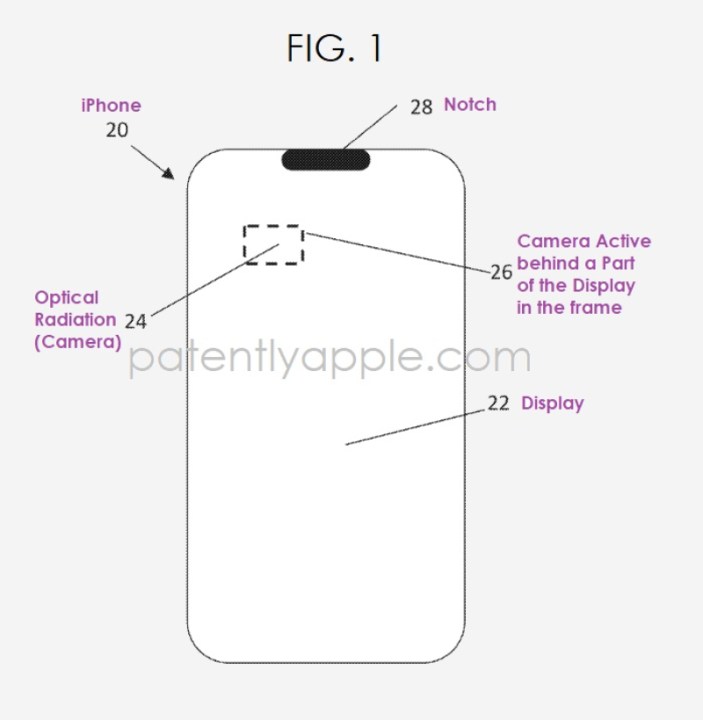
    New Apple patent concerning Face ID components under the display.
    Patently Apple

    The iPhone X, which launched in 2017, was the first Apple device to feature the notch design—a pill-shaped cutout at the top to accommodate the TrueDepth camera system for Face ID and front-facing cameras. Although the notch serves its purpose, it has often been criticized for disrupting the sleek, uninterrupted look of the display.

    In recent years, Apple has made gradual improvements to the size and functionality of the camera cutout. The introduction of the Dynamic Island on the iPhone 14 Pro provided a more interactive experience, yet the cutout remains a prominent feature. This ongoing conversation about the design has fueled speculation among Apple fans about a potential redesign or reduction of the notch in future models.
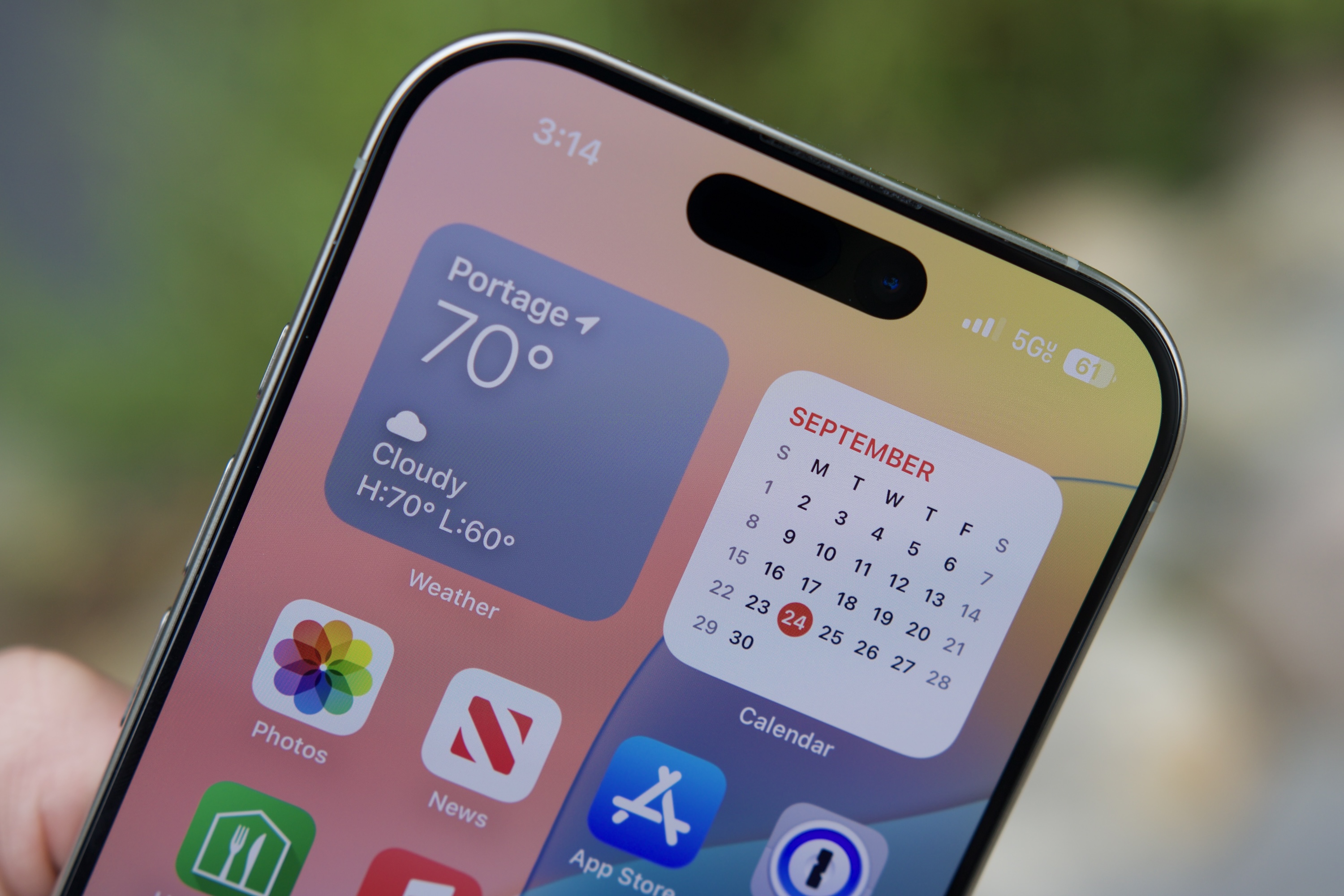
    The Dynamic Island on the iPhone 16 Pro.
    Joe Maring / Digital Trends

    For at least the past two generations of iPhones, rumors have circulated about Apple’s desire to decrease the notch’s size, yet not eliminate it entirely. However, the recent patent implies that the company may be leaning toward removing the notch altogether. While some might argue otherwise.

    It is possible that at least three models in next year’s lineup—the iPhone 17, iPhone 17 Pro, and iPhone 17 Pro Max—could have smaller notches to enhance their visual appeal. Meanwhile, the highly talked-about “iPhone Air,” likely to be positioned as a new premium offering, could debut as the first Apple smartphone to integrate Face ID components beneath the screen. This would signify a significant leap in Apple’s design philosophy, paving the way for a more seamless display experience.

    In such a scenario, the iPhone Air might incorporate a minuscule camera hole as opposed to a traditional notch, echoing design trends seen in other smartphone brands. This fresh approach would align with the current movement towards maximizing screen space while enhancing the overall user experience by providing an immersive display unbroken by physical interruptions.

    The upcoming months will shed more light on these developments. Apple is expected to unveil the iPhone 17 series in September, and until then, speculation and excitement will likely intensify.

  • AI-Powered ChatGPT Ads: The Technology Explained

    Artificial Intelligence (AI) is revolutionizing how brands interact with consumers, and one of the most intriguing applications of AI in marketing is the use of ChatGPT for advertising. This innovative technology blends conversational AI with targeted ad strategies, providing a new avenue for engaging potential customers. In this article, we’ll delve into the mechanics of ChatGPT-powered advertising, its benefits, and the underlying technology that makes it all possible.

    Understanding ChatGPT Technology

    ChatGPT stands for Chat Generative Pre-trained Transformer. It is a sophisticated language model designed to understand and generate human-like text.

    How Does ChatGPT Work?

    • Natural Language Processing (NLP): This technology utilizes NLP techniques to interpret, process, and generate human language. It can comprehend context, sentiment, and various nuances in conversation.

    • Training Data: ChatGPT is trained on a diverse dataset that includes texts from books, articles, and websites, allowing it to learn a wide range of topics and language styles.

    • Generative Capabilities: The model can create coherent and contextually relevant responses, making it capable of simulating conversation effectively.

    Key Features of ChatGPT

    • Context Awareness: ChatGPT maintains the context of a conversation, adapting responses based on prior exchanges.

    • Personalization: The model can tailor its messages to align with user preferences, offering a more personalized advertising experience.

    • Scalability: Unlike human agents, AI can handle multiple inquiries simultaneously, making it an efficient option for brands looking to reach a wider audience.

    The Role of ChatGPT in Advertising

    ChatGPT’s integration into advertising strategies offers unique solutions for brands aiming to enhance customer engagement.

    Dynamic Customer Interactions

    • Conversational Ads: Advertisers can deploy ChatGPT in interactive ad formats that engage users in real-time conversations. This dynamic method encourages user interaction, resulting in higher engagement rates.

    • 24/7 Availability: AI-powered conversations can occur around the clock, ensuring that potential customers receive instant responses to their inquiries at any time.

    Targeted Messaging

    • Data-Driven Insights: By analyzing customer interactions, brands can gain valuable insights into customer needs and preferences, allowing them to craft targeted messages that resonate better.

    • Segmentation: ChatGPT can effectively segment audiences based on behavior and preferences, ensuring that advertising reaches the right people with the right message.

    Advantages of ChatGPT-Inspired Ads

    Incorporating ChatGPT into advertising campaigns can yield numerous benefits for brands.

    • Enhanced User Experience: Providing instant responses and personalized interactions leads to a more satisfying customer journey.

    • Increased Conversion Rates: By engaging users in meaningful conversations, brands can guide prospects through the buying process more efficiently, increasing the likelihood of conversions.

    • Cost Efficiency: Utilizing AI for customer interactions can significantly reduce costs compared to traditional advertising methods, as it diminishes the need for large customer service teams.

    Challenges and Considerations

    While AI-powered advertising offers exciting prospects, there are also challenges to be mindful of.

    Ensuring Authenticity

    • Maintaining Brand Voice: Brands must ensure that AI-generated content aligns with their tone and messaging strategy to maintain authenticity.

    • Avoiding Miscommunication: Designers must monitor AI interactions to avoid misunderstandings that could lead to negative customer experiences.

    Ethical Implications

    • Data Privacy: Brands must handle personal data responsibly and transparently, ensuring compliance with regulations like GDPR and CCPA.

    • Bias Mitigation: Continuous efforts must be made to address any biases inherent in the training datasets to prevent skewed messaging.

    Future Directions in AI-Powered Advertising

    As technology continues to evolve, so too will the potential applications of ChatGPT in advertising.

    • Integration with Other Technologies: Future advancements may see ChatGPT working alongside augmented reality (AR) and virtual reality (VR) to create immersive advertising experiences.

    • Continuous Learning: Ongoing updates and improvements to the AI model will enhance its capabilities, allowing it to deliver even more nuanced and relevant interactions.

    By understanding the technology behind AI-powered ChatGPT ads, businesses can leverage its power to create innovative marketing strategies that engage consumers and drive results. As the landscape of advertising evolves, embracing such technologies will be crucial for staying competitive in the market.

  • ChatGPT Ads for Advertisers: What You Need to Know

    As the digital landscape continues to evolve, advertisers are seeking innovative ways to engage their target audiences. One of the latest advancements in this realm is the integration of ChatGPT technology into advertising strategies. This article will delve into what ChatGPT Ads are, their benefits, and key considerations for advertisers looking to adopt this cutting-edge approach.

    Understanding ChatGPT Ads

    ChatGPT Ads utilize artificial intelligence to create conversational advertisements that interact with users in real-time. Unlike traditional banner ads or static content, these ads offer personalized experiences, making interactions feel more engaging and relevant.

    How ChatGPT Ads Work

    • Real-Time Interaction: ChatGPT engages users through dialogues, allowing for immediate feedback and responses.
    • Personalization: Using data inputs, these ads can tailor messages to individual preferences, enhancing the effectiveness of the marketing message.
    • Data-Driven Insights: Advertisers can collect valuable user data during interactions, helping to refine ongoing campaigns.

    Benefits of ChatGPT Ads for Advertisers

    Implementing ChatGPT Ads can lead to several advantages, including:

    • Increased Engagement: Conversational ads can capture attention better than traditional formats, leading to higher interaction rates.
    • Improved Customer Experience: By providing immediate responses and personalized content, advertisers can enhance the overall user journey.
    • Cost-Effective Solutions: Automated conversations can reduce the need for extensive customer service resources, leading to savings.
    • Scalability: AI-driven technology allows campaigns to reach larger audiences without a proportional increase in cost or effort.

    Strategies for Effective ChatGPT Ads

    To maximize the impact of ChatGPT advertising, consider the following strategies:

    Define Your Objectives

    • Set Clear Goals: Determine what you aim to achieve with your ads, be it brand awareness, lead generation, or sales conversions.
    • Target Audience: Identify your ideal customers based on demographics, interests, and behavior.

    Craft Engaging Content

    • Conversational Tone: Utilize a friendly and approachable language to make interactions feel more relatable.
    • Test Variations: Experiment with different dialogue styles and messages to see what resonates best with your audience.

    Monitor Performance Metrics

    • Engagement Rates: Track how many users interact with your ads and how long they stay engaged.
    • Conversion Tracking: Measure how many interactions lead to desired actions, such as purchases or sign-ups.

    Considerations Before Launching ChatGPT Ads

    While the benefits are promising, there are several factors to keep in mind:

    Maintain Brand Voice

    • Consistency is Key: Ensure that the tone and content of your conversational ads align with your overall brand identity to build trust.

    Manage User Expectations

    • Set Boundaries: Clearly communicate what users can expect from their interactions to prevent confusion or dissatisfaction.

    Ensure Compliance

    • Data Privacy: Familiarize yourself with regulations on data usage and privacy to safeguard user information.

    Conclusion

    The integration of ChatGPT in advertising opens up a new realm of possibilities for engaging consumers. As advertisers explore this innovative technology, understanding how to effectively implement and manage ChatGPT Ads can yield promising results. By focusing on personalized experiences and maintaining a keen awareness of your audience’s needs, your advertising strategy can achieve greater impact in the ever-competitive digital marketplace.

  • Will ChatGPT Start Showing Ads? Hereʼs What to Expect

    As artificial intelligence continues to evolve, the way we interact with applications like ChatGPT is changing significantly. One of the most pressing questions on users’ minds is whether ChatGPT will begin integrating advertisements into its platform. This speculation opens the door to a variety of implications for users and the platform itself.

    Understanding the Current Model

    Before delving into the potential for advertisements, it’s essential to understand how ChatGPT currently operates:

    Subscription-based Services

    • Free Version: Allows users to access basic features with limitations.
    • Premium Version: Provides enhanced capabilities and an ad-free experience for subscribers.

    User Engagement

    • Users rely heavily on ChatGPT for various tasks, including generating content, answering questions, and brainstorming ideas, without the distraction of ads.

    The Case for Advertisements

    While the platform does not currently feature ads, there are several reasons why this could change in the future:

    Revenue Generation

    • Sustainability: As usage increases, maintaining and improving the technology can become costly. Ads could provide an additional revenue stream.
    • Growth Opportunities: Introducing advertisements could attract new partnerships and sponsorships, fostering further innovation.

    User Experience Considerations

    • Balancing Act: However, the introduction of ads must be carefully considered, as they could disrupt the user experience. Brands typically don’t want to alienate potential customers with intrusive ads.

    Potential Formats for Ads

    If advertisements were to be implemented, several formats could be considered:

    Native Advertisements

    • Seamless Integration: Ads that match the style and tone of the platform could provide a less disruptive experience. This might involve sponsored prompts or recommended tools that enhance the user experience.

    Sponsored Content

    • Informative Aspects: Sponsored content, which provides users with valuable information alongside promotional messaging, could be another effective format.

    Pay-Per-Action Model

    • Performance-Based: This model would allow brands to pay based on user interactions, creating a mutually beneficial setup without compromising user satisfaction.

    User Reactions and Expectations

    The introduction of ads could elicit mixed reactions from users, leading to the following considerations:

    Positive Feedback

    • Free Access: Some users may appreciate that ad-supported services would help keep a version of ChatGPT free and accessible.

    Negative Feedback

    • User Distraction: Many long-time users may find advertisements distracting and may reconsider using the platform if it significantly alters the experience they value.

    Future Prospects and Developments

    The AI landscape is continuously evolving, and so are the technologies behind ChatGPT. Keeping a close eye on industry trends can provide insights into future directions:

    Competitor Influence

    • Market Trends: Other platforms that introduce advertisements may influence ChatGPT’s decisions, compelling it to adopt similar strategies if they prove financially beneficial.

    Community Feedback

    • User Input: Open channels for user feedback can help navigate potential changes, ensuring that any advertisement strategy aligns with user expectations and preferences.

    Innovations in Technology

    • Ad-Tailored Experiences: Advances in AI could lead to personalized ad experiences that seamlessly integrate with user interactions, minimizing annoyance and maximizing relevance.

    As the debate continues, the future of advertising in AI platforms like ChatGPT remains uncertain but intriguing. Users are encouraged to share their thoughts and preferences, as the platform evolves to meet their expectations while navigating the complexities of monetization and user experience.

  • How ChatGPT Ads Work: Everything You Need to Know

    In the rapidly evolving landscape of digital marketing, understanding how ads operate within AI-driven platforms is essential. ChatGPT, developed by OpenAI, has emerged as a potent tool that businesses can leverage for advertising. This article dives into the mechanics of ChatGPT ads, outlining their structure, functionality, and unique advantages.

    Understanding ChatGPT Advertising

    ChatGPT advertising refers to the integration of promotional content within interactions facilitated by the AI. Advertisers can communicate their products or services seamlessly through chat-based services without compromising user experience.

    Key Features of ChatGPT Ads

    • Conversational Interface: Ads can be embedded naturally within conversations, allowing for interactive and engaging experiences.
    • Targeted Messaging: The AI can tailor messages based on user preferences, enhancing relevance and engagement.
    • Data-Driven Insights: Marketers obtain valuable feedback from users, providing insights into campaign performance and audience behavior.

    How ChatGPT Ads Function

    The operational framework of ChatGPT ads can be broken down into several components:

    Ad Placement

    1. In-Chat Integration: Prompts or messages can appear embedded in conversations, mimicking organic dialogue.
    2. Sponsored Prompts: Advertisers can pay for specific prompts that guide the conversation toward their products or services.

    User Interaction

    • Engagement Metrics: The effectiveness of ads can be measured through user interactions, including clicks and responses.
    • Feedback Mechanisms: Users can express their interest or disinterest, helping refine future targeting efforts.

    AI Learning Capabilities

    • Behavior Analysis: ChatGPT continuously learns from user interactions, adjusting its responses to optimize ad delivery.
    • Dynamic Adjustments: Real-time data allows for modifications in ad placement and content, enhancing overall effectiveness.

    Benefits of Using ChatGPT Ads

    Utilizing ChatGPT for advertising offers a multitude of advantages for businesses:

    Enhanced User Experience

    • Natural Integration: Ads feel less intrusive and more like part of the conversation, leading to higher user engagement.
    • Improved Relevance: By leveraging user data, ads can resonate more with the audience.

    Increased Conversion Rates

    • Targeted Offers: Personalized ads are more likely to lead to conversions as they cater directly to user interests.
    • Real-Time Interaction: Businesses can engage users in live conversations that encourage immediate action.

    Cost-Effectiveness

    • Budget Flexibility: Ad campaigns can be adjusted based on real-time performance, optimizing return on investment.
    • Performance Tracking: Detailed analytics enable businesses to measure success and tweak strategies accordingly.

    Best Practices for ChatGPT Ads

    To maximize the impact of advertising within ChatGPT, marketers should consider the following strategies:

    Craft Compelling Content

    • Engaging Tone: Use a friendly and relatable tone to capture user interest.
    • Concise Messaging: Keep messages brief and to the point to maintain user engagement.

    Focus on Relevance

    • Segmentation: Target specific user groups based on behaviors and preferences.
    • Contextual Relevance: Ensure ads relate directly to the ongoing conversation or user queries.

    Monitor and Optimize

    • A/B Testing: Experiment with different ad formats and messages to determine which resonates best with users.
    • Analyze Performance Metrics: Regularly review engagement data to identify trends and make data-driven decisions.

    By understanding the mechanics behind ChatGPT ads, businesses can effectively harness this innovative platform to reach their audience in a meaningful way. Implementing best practices will further enhance the efficacy of advertising campaigns and ensure that businesses stay ahead in the competitive market landscape.

  • We Might Be Wrong About Apple’s First Folding iPhone

    We Might Be Wrong About Apple’s First Folding iPhone

    Apple is reportedly set to introduce its first foldable iPhone in 2026. Initially, many speculated that this device would adopt a clamshell design akin to the Samsung Galaxy Z Flip rather than the more expansive Galaxy Z Fold.

    However, display industry analyst Ross Young posits that if Apple does launch a foldable iPhone in two years, it would more likely resemble the Galaxy Z Fold. When questioned on X about whether Apple’s device would be a Flip, a Fold, or both, Young stated, “Fold.”

    This speculation comes at a crucial time for the foldable smartphone market. A recent report from Young’s Display Supply Chain Consultants (DSCC) suggests that foldable phone sales are anticipated to increase by only 5% this year, with an expected decline of 4% in 2025. This marks a stark contrast to the consistent yearly growth of over 40% the market has seen since 2019, making these projections particularly surprising.

    Although September 2026 is still a considerable time away, it may be premature to assess the validity of this rumor regarding Apple’s potential first foldable offering. Nonetheless, there are compelling reasons to believe that Apple is favoring a “Fold” model over a “Flip” design.

    Fold

    — Ross Young (@DSCCRoss) December 2, 2024

    First, by 2026, consumer preferences may have shifted toward a foldable version, like an “iPhone Fold,” rather than a “Flip.” According to the DSCC report, sales of the Galaxy Z Fold 6 are expected to exceed those of the Galaxy Z Fold 5 this year, while the Galaxy Z Flip 6 might see a drop of up to 10% in sales compared to its predecessor, even though the Z Flip remains the best-selling foldable phone currently available.

    Additionally, Apple might recognize the necessity to create a notable impact as it enters the foldable phone space, a market it has approached with caution until now. An iPhone Fold would come with a larger screen, allowing Apple to explore a range of design and feature innovations in this new category. Such a product could help rejuvenate Apple’s offerings and draw users in search of versatile gadgets that blend functionality with modern aesthetic appeal.

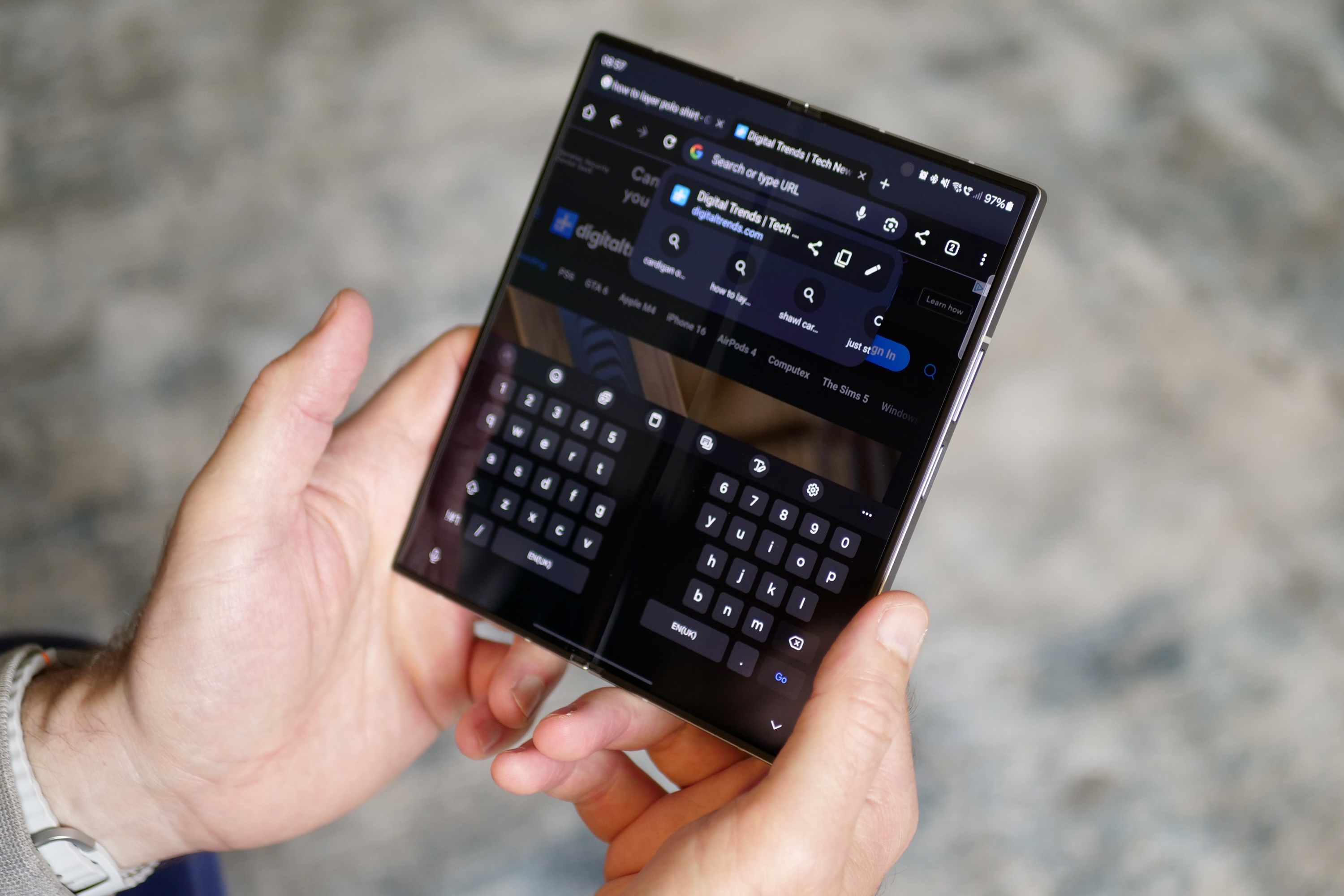
    The split Samsung keyboard on the open Samsung Galaxy Z Fold 6.
    Andy Boxall / Digital Trends

    A foldable iPhone also has the potential to enhance Apple’s profit margins, as it is likely to command a higher price. For comparison, the entry-level Galaxy Z Flip 6 starts at $999, while the least expensive Galaxy Z Fold 6 is priced at $1,799.

    For those eager to see what Apple has in store before the end of 2026, the “iPhone 17 Air” is anticipated to roll out next year. This device is expected to be Apple’s slimmest iPhone yet and will likely take the place of the iPhone Plus within the overall lineup. Alongside the iPhone 17 Air, Apple is expected to introduce the iPhone 17, iPhone 17 Pro, and iPhone 17 Pro Max.

  • OnePlus Hints At Budget Phone That Beats Flagship Performance

    OnePlus Hints At Budget Phone That Beats Flagship Performance

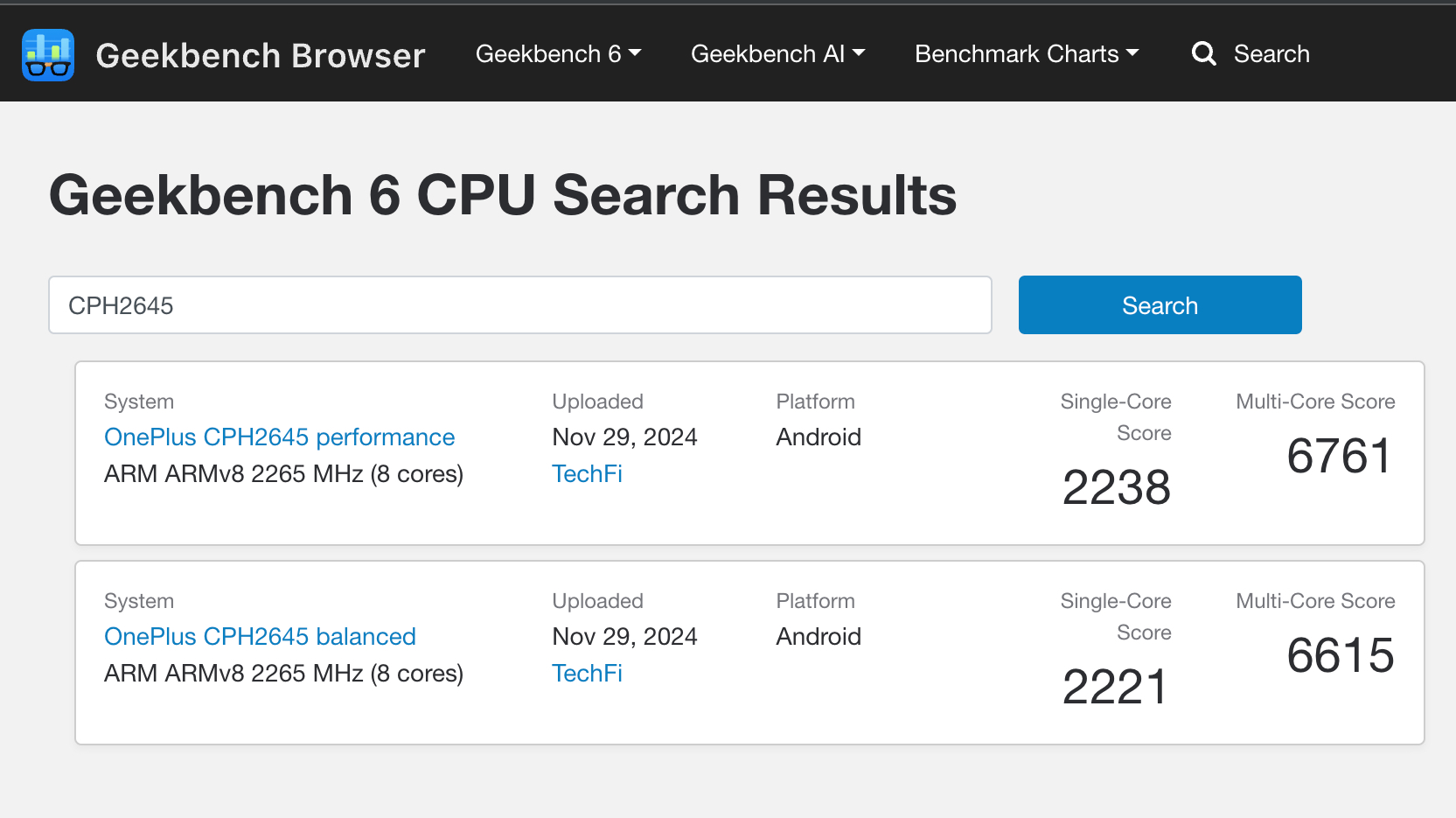
    A few weeks have passed since the OnePlus 13 was officially launched in China, and it appears that the smartphone company has more devices in the pipeline. A new OnePlus smartphone, identified by the model number CPH2645 and codenamed “pineapple” for its motherboard, has recently appeared on a benchmarking platform.

    MySmartPrice was the first to notice this device on Geekbench, and soon after, Digital Trends identified a total of five benchmark tests for the same model, all recorded on the same date. If these benchmark logs are to be trusted, they reveal some exciting details about OnePlus’ upcoming budget smartphone.

    OnePlus smartphone spotted on Geekbench tests.
    Nadeem Sarwar / Digital Trends

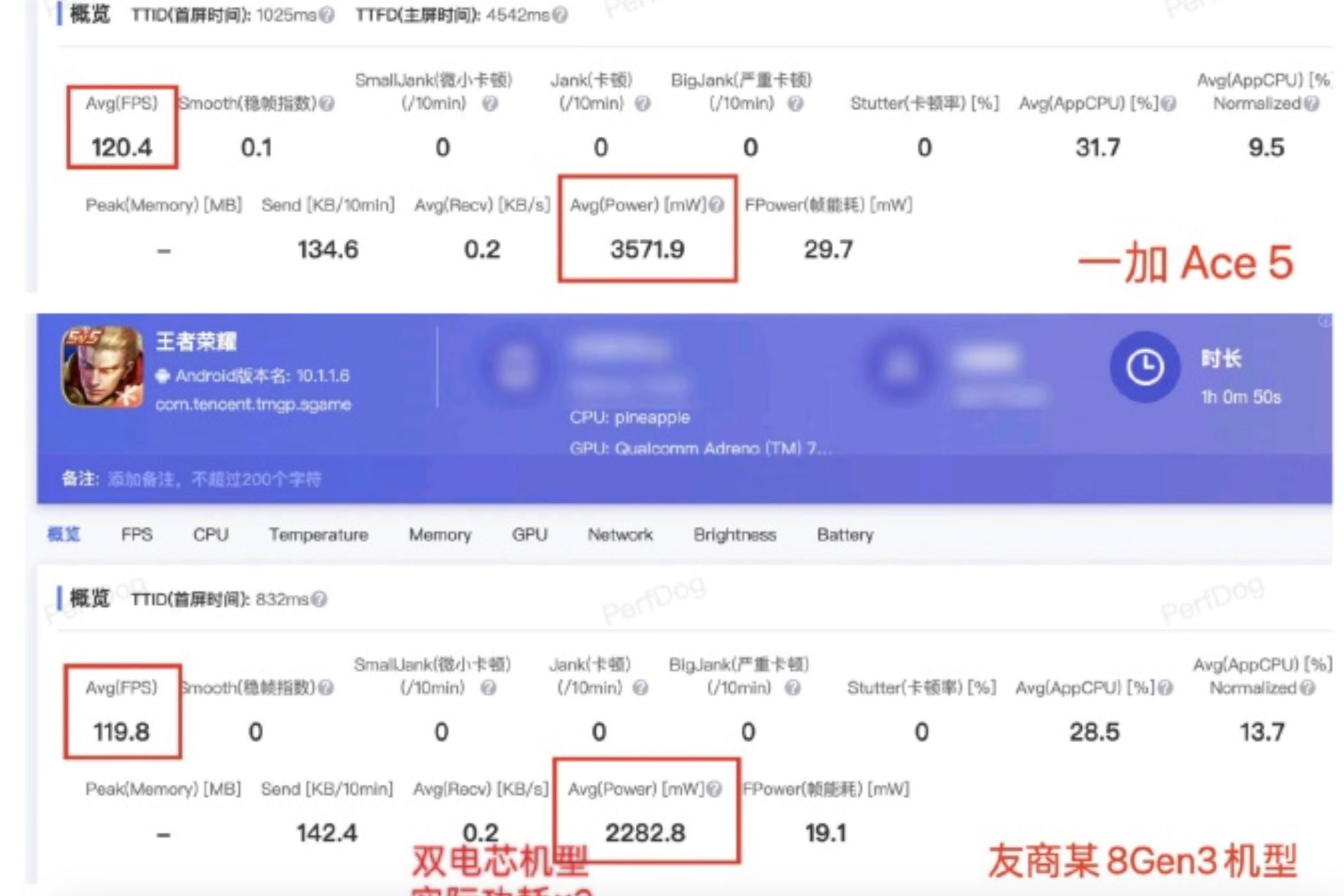
    This isn’t the first time the “pineapple” codename has come to our attention. Earlier this month, a OnePlus executive shared an official comparative benchmark that included this same identifier in the CPU section for two devices: the upcoming OnePlus Ace 5 and another unnamed phone featuring Qualcomm’s Snapdragon 8 Gen 3 chipset.

    This particular chipset is the same one found in the brand’s current flagship, the OnePlus 12. Additionally, the Geekbench listings indicate the presence of the Adreno 750 graphics unit, which is also paired with the Snapdragon 8 Gen 3 SoC.

    OnePlus smartphone spotted on Geekbench compute listings.
    Screenshot Nadeem Sarwar / Digital Trends

    OnePlus has traditionally branded its devices as “Ace” for those launched in China, often releasing them as variants of its main series in international markets. For instance, the OnePlus Ace 3 was very similar to what was released as the OnePlus 12R globally.

    The company has already confirmed that it will unveil two new devices in China this December: the OnePlus Ace 5 and the Pro version. Additionally, OnePlus executive Louis Lee has indicated that the upcoming Snapdragon 8 Gen 3-based phone will match the performance of competitors equipped with the new Snapdragon 8 Elite chipset.

    Official performance teaser of upcoming OnePlus phone.
    Screenshot Weibo

    Lee has further mentioned in another post in November that the OnePlus Ace 5 series is set to launch “next month,” which suggests an official debut sometime in December. However, it’s still uncertain when the Ace 5 will be released internationally as the OnePlus 13R.

    As a reminder, the OnePlus 13 has yet to make its debut outside of China, but rumors point to a potential launch in December. Given the typical release timeline for the R series, it might take some time before the OnePlus 13R becomes available to consumers, despite its promising features.

  • Echo Show 21 Vs Echo Show 10: Which Smart Display Is Better

    Echo Show 21 Vs Echo Show 10: Which Smart Display Is Better

    Amazon

    The Echo Show 21 is the latest addition to the Echo Show series, boasting an impressive 21-inch display and a robust audio system. But how does it compare to the Echo Show 10? Beyond its larger touchscreen, are there significant differences between these two smart displays? Most importantly, which device is a better fit for your smart home needs?

    From pricing, design, and display quality to features, let’s dive into a detailed comparison of the new Echo Show 21 and the Echo Show 10 to help you make an informed purchase.

    Pricing and design

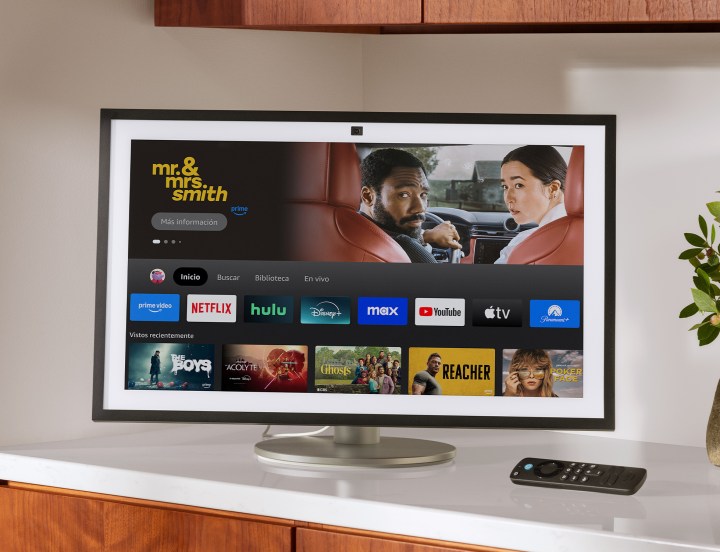
    The Echo Show 21 smart display.
    Amazon

    As the largest model in the Echo Show lineup, it’s no surprise that the Echo Show 21 comes with the highest price tag at $400, compared to the $250 cost of the Echo Show 10. Both devices are elegantly designed and crafted to Amazon’s high standards, so aesthetically, you can’t go wrong with either option.

    The Echo Show 10 is a tabletop device supported by a built-in stand that holds its 10.1-inch display, while the Echo Show 21 can either be wall-mounted or placed on a tabletop (though you’ll need to purchase a separate stand for the latter).

    Winner: Tie

    Display and quality

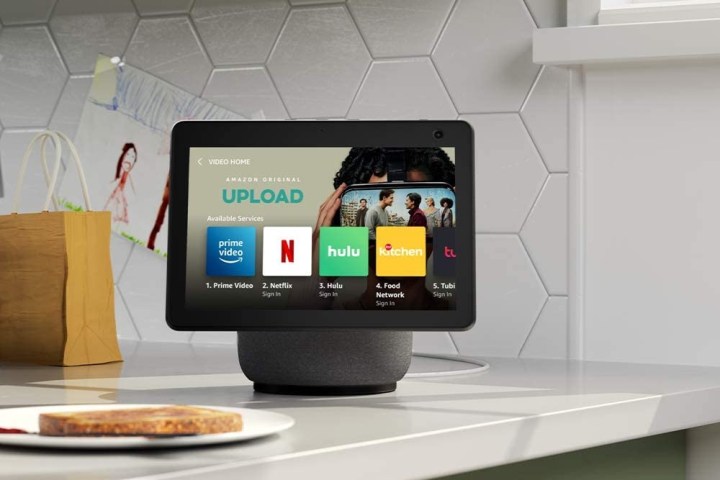
    The Amazon Echo Show 10 on a kitchen counter.
    Amazon

    The Echo Show 21 features a generous 21-inch touchscreen with a 1080p resolution, while the Echo Show 10 has a 10.1-inch display with a resolution of 1280 x 800. Although the resolution on the smaller screen is impressive, viewing TV shows is more enjoyable on the larger Echo Show 21. The Echo Show 10 has been well-reviewed for its build quality, and it’s anticipated that the Echo Show 21 will meet similar reliability standards over time.

    Winner: Echo Show 21

    Features and smart home connectivity

    The Echo Show on a table.
    Amazon

    Beyond its larger display, the Echo Show 21 offers additional enhancements when compared to the Echo Show 10. Here’s a brief overview of their key differences regarding features:

    • The Echo Show 21 is equipped with a 13MP wide-angle webcam that includes auto-framing, while the Echo Show 10 also features a 13MP camera with auto-framing capability.
    • For sound, the Echo Show 21 has two 2-inch woofers and two 0.6-inch tweeters, whereas the Echo Show 10 is outfitted with two 1-inch tweeters and a 3-inch woofer.
    • Additionally, the Echo Show 21 comes with Fire TV integration.

    Many users report that the Echo Show 10 offers slightly better audio quality due to its enhanced low-frequency response. Both display models support auto-focusing to keep you framed during video calls, although the Echo Show 21 does provide a broader viewing angle.

    This means the notable advantages of the Echo Show 21 boil down to its larger screen, wide-angle camera, and Fire TV integration.

    Winner: Tie

    Is the Echo Show 21 better than the Echo Show 10?

    While the Echo Show 21 offers size advantages for those looking to enhance their viewing experience, it is not categorically superior to the Echo Show 10. The larger display is ideal for watching shows, but it might not suit every living space. The Echo Show 10 remains a strong contender for those seeking a compact solution that doesn’t take up much counter space. Its more affordable price coupled with excellent sound makes it a more practical choice for many families.

    Given that the distinctions between the two devices are limited, justifying the higher price of the Echo Show 21 could be challenging. However, if you envision using your smart display primarily for entertainment, the Echo Show 21 proves to be a compelling option. With its 21-inch screen, it can effectively double as a small television, perfect for watching your favorite shows while engaged in kitchen tasks like washing dishes or cooking.

  • How Much Should You Pay for a Good Laptop?

    How Much Should You Pay for a Good Laptop?

    When it comes to purchasing a laptop, understanding the price range that corresponds with your needs is essential. With such a wide variety of options available in the market, determining the right budget can be overwhelming. This guide will help clarify how much you should think about spending for a quality laptop based on your criteria and preferences.

    Factors Influencing Laptop Prices

    Prices can fluctuate significantly based on several critical aspects and features. Here are the primary elements influencing laptop costs:

    1. Performance Specifications

    • Processor (CPU):

      • Entry-level: Intel Core i3, AMD Ryzen 3 (around $300-$600)
      • Mid-range: Intel Core i5, AMD Ryzen 5 (about $600-$1,000)
      • High-end: Intel Core i7/i9, AMD Ryzen 7/9 (starting from $1,000)

    • RAM:

      • Basic usage: 4GB (generally $300-$500)
      • Moderate multitasking: 8GB ($600-$1,000)
      • Heavy usage: 16GB or more (from $1,000 upwards)

    • Storage:

      • HDD vs. SSD: SSDs are faster but usually more expensive. Expect to pay more for laptops with larger SSDs.

    2. Display Quality

    • Resolution:

      • HD (1366 x 768): Cheaper models (around $300-$600)
      • Full HD (1920 x 1080): Standard for most mid-range and high-end machines ($600-$1,500)
      • 4K (3840 x 2160): Premium models (starting at $1,500+)

    • Screen Size:

      • Smaller 11-14 inch models tend to be more portable and often range from $400 to $800.
      • 15-inch laptops balance portability and performance, generally costing between $600 and $1,500.
      • 17-inch laptops offer more power and screen real estate but can exceed $1,000.

    3. Brand and Build Quality

    Some brands have established a reputation for durability and performance, which can affect price. Generally, popular brands and premium models cost more:

    • Budget brands (like Acer, Lenovo): $300-$800
    • Mid-tier brands (like Dell, HP, Asus): $600-$1,500
    • Premium brands (like Apple, Microsoft Surface): $1,000+

    4. Usage Purpose

    Your intended use significantly impacts how much you might consider spending:

    • Basic Tasks (browsing, office applications): $300-$600
    • Students/Moderate Use (light gaming, design work): $600-$1,200
    • Gamers/Professionals (high-performance tasks): $1,200-$2,500+

    Budgeting Tips for Your Laptop Purchase

    When setting a budget, it’s wise to consider additional costs that may arise.

    Consider Maintenance and Upgrades

    • Warranty: Extended warranties or protection plans generally cost extra but can save money in case of damage.
    • Upgrades: Laptops with easy upgrade options can extend their lifespan, saving money in the long run.

    Look for Sales and Discounts

    • Seasonal Promotions: Black Friday, Cyber Monday, and back-to-school sales are ideal times for making a purchase.
    • Refurbished Models: Certified refurbished laptops can be a budget-friendly option without sacrificing quality.

    Calculate Total Cost of Ownership

    Don’t forget to factor in additional expenses such as software licenses, accessories, and potential repairs into your budget. This ensures you’re prepared for costs beyond the laptop’s initial purchase price.

    Summary of Price Ranges

    To streamline your decision-making process, here’s a quick snapshot of expected prices based on different needs:

    • Basic Use: $300 – $600
    • Mid-Range Performance: $600 – $1,200
    • High-Performance Models: $1,200 – $2,500
    • Premium Laptops: $1,500 and up

    By understanding these cost influences and planning effectively, you can make an informed decision, ensuring that your new laptop meets both your budget and performance requirements.

  • Whatʼs the Best Laptop to Buy These Days?

    In today’s digital age, choosing the right laptop can be overwhelming, given the myriad of options available. Whether you’re a student, a professional, or a casual user, selecting the best laptop for your needs involves considering various factors. In this guide, we’ll explore some of the top contenders in the laptop market as of 2023, breaking down their features, strengths, and weaknesses.

    Factors to Consider When Buying a Laptop

    Before diving into specific models, it’s important to identify what you need from a laptop. Here are some key factors to keep in mind:

    1. Purpose

    • Casual Use: Web browsing, streaming, and social media
    • Professional Use: Office applications, video conferencing, and remote work
    • Gaming: High-performance requirements for graphics and processing power
    • Creative Work: Graphic design, video editing, and music production

    2. Operating System

    • Windows: Versatile and supports a wide range of applications
    • macOS: Known for its stability and performance, popular among creative professionals
    • Chrome OS: Lightweight and perfect for web-based applications

    3. Budget

    • Under $500: Basic laptops for everyday tasks
    • $500 – $1,000: Mid-range options with better performance and features
    • $1,000 and Above: High-end laptops for gaming and professional tasks

    Top Laptop Picks for 2023

    Apple MacBook Air (M2)

    For those who prefer the macOS ecosystem, the MacBook Air with the M2 chip is a top choice.

    • Key Features:

      • 13.6-inch Retina display
      • Up to 18 hours of battery life
      • Lightweight design (2.7 pounds)
      • 8-core CPU and 10-core GPU for smooth performance

    • Strengths:

      • Exceptional build quality
      • Excellent keyboard and trackpad
      • Seamless integration with other Apple products

    • Weaknesses:

      • Pricey compared to Windows alternatives
      • Limited ports (primarily USB-C)

    Dell XPS 13

    The Dell XPS series is renowned for its stylish design and robust performance, making the XPS 13 a popular option.

    • Key Features:

      • 13.4-inch InfinityEdge display (up to 4K)
      • 11th Gen Intel Core processors
      • Up to 14 hours of battery life

    • Strengths:

      • Compact and portable
      • High-resolution display with vibrant colors
      • Premium materials and design

    • Weaknesses:

      • Higher price point
      • Limited upgrade options

    ASUS ROG Zephyrus G14

    For gamers and those requiring high performance, the ASUS ROG Zephyrus G14 is a standout.

    • Key Features:

      • 14-inch QHD display with a 120Hz refresh rate
      • AMD Ryzen 9 and NVIDIA GeForce RTX 3060 options
      • Up to 10.7 hours of battery life

    • Strengths:

      • Excellent gaming performance
      • Solid battery life for a gaming laptop
      • Compact design for portability

    • Weaknesses:

      • Can run hot during intense gaming sessions
      • Price may be high for budget-conscious gamers

    Lenovo ThinkPad X1 Carbon (Gen 10)

    The ThinkPad X1 Carbon is a staple among business professionals due to its reliability and features.

    • Key Features:

      • 14-inch UHD display
      • Intel’s latest processors
      • Legendary keyboard comfort

    • Strengths:

      • Exceptional build quality
      • Strong security features (fingerprint reader, IR camera)
      • Long battery life

    • Weaknesses:

      • On the pricier side
      • Heavier than some ultra-portables

    Budget-Friendly Options

    If you’re looking for a solid laptop without breaking the bank, consider these choices:

    Acer Aspire 5

    • Key Features:

      • 15.6-inch FHD display
      • AMD Ryzen 5 or Intel Core i5 options
      • Up to 8 hours of battery life

    • Strengths:

      • Great value for performance
      • Good selection of ports
      • Upgradeable memory and storage

    • Weaknesses:

      • Design is more utilitarian
      • Display could be brighter

    HP Pavilion x360

    • Key Features:

      • 14-inch touchscreen display
      • 2-in-1 convertible design
      • Latest Intel Core processors

    • Strengths:

      • Versatile design for different use cases
      • Affordable pricing

    • Weaknesses:

      • Average battery life
      • Build quality is decent but not premium

    With these options and factors in mind, you should be well-prepared to choose the laptop that suits your needs. Whether you prioritize performance, portability, or price, there’s a laptop out there that’s right for you.

  • Why Are 98-Inch TVs So Expensive?

    In recent years, the market for large-screen televisions has grown rapidly, with 98-inch models becoming increasingly popular. However, these massive displays come with a hefty price tag. Understanding the factors that contribute to the high cost of these oversized TVs can help consumers make informed decisions.

    Manufacturing Costs

    Advanced Technology

    Producing a 98-inch TV involves cutting-edge technologies that elevate the cost. These include:

    • OLED and QLED Panels: Many large TVs use organic light-emitting diode (OLED) and quantum dot light-emitting diode (QLED) technologies. They provide superior picture quality, vibrant colors, and deep blacks but are more expensive to manufacture.
    • High Refresh Rates: Large screens often support high refresh rates for smoother motion, which requires more sophisticated components.

    Quality Control

    With larger screens, there’s an increased potential for defects. Manufacturers implement rigorous quality control measures to ensure that every panel meets stringent standards, which can raise production costs.

    Supply Chain and Distribution

    Logistics

    The logistics of transporting a 98-inch TV can be substantial. Because of their sheer size and weight, shipping these units requires special handling:

    • Specialized Packaging: Large TVs must be packaged with extra care to prevent damage during transport.
    • Shipping Costs: The shipping cost increases due to the volume and weight of the product.

    Availability of Components

    Certain premium components necessary for large TVs are not always available in bulk. The limited supply can drive the prices up, particularly if a specific technology is favored.

    Brand Premium

    Brand Reputation

    Well-known brands often command a higher price due to their established reputation for quality and customer service. Several prominent manufacturers dominate the market, and their brand equity can significantly influence costs.

    Marketing and Advertising

    The investment in marketing campaigns and promotional activities also contributes to the overall price of the product. Big brands spend substantial resources to maintain their market presence and awareness.

    Features and Functionality

    Smart Technology

    Most large TVs are equipped with smart features, including:

    • Built-in Streaming Services: Access to services like Netflix, Hulu, and Disney+.
    • Voice Control: Integration with devices such as Amazon Alexa or Google Assistant.

    These features enhance user experience but also involve costs in development and licensing agreements.

    Connectivity Options

    98-inch TVs often offer multiple connectivity options, which can include:

    • HDMI 2.1 Ports: Ensuring compatibility with the latest gaming consoles and devices.
    • Wireless Connectivity: Feature-rich smart TVs come with Wi-Fi and Bluetooth capabilities that enhance convenience but may increase overall costs.

    Market Demand

    Consumer Preferences

    As consumers increasingly seek larger screens for home entertainment, demand for 98-inch TVs has surged. This demand often outpaces supply, allowing manufacturers to justify higher prices.

    Luxury Item Status

    A 98-inch TV is often seen as a luxury item, positioning it in the premium market segment. This perception allows brands to price these models accordingly, reflecting the exclusive experience of ownership.

    Summary of Cost Drivers

    Ultimately, here’s a quick recap of the reasons behind the high price of 98-inch TVs:

    • Advanced manufacturing technologies
    • Increased logistics and shipping costs
    • Brand equity and associated marketing
    • Feature-rich smart technology
    • High consumer demand and luxury status

    Understanding these elements can provide a clearer picture of the premium pricing associated with 98-inch televisions, helping consumers navigate the market more effectively.

  • TikTok Changes Who Can Use Beauty Filters What You Need To Know

    TikTok Changes Who Can Use Beauty Filters What You Need To Know

    In the wake of growing concerns about the impact of beauty filters, the United Kingdom and the European Union have enacted new regulations aimed at protecting young users from potential negative effects. In line with these changes, TikTok has revealed new measures to bolster user safety, particularly for those aged 13 to 18.

    As reported by The Guardian, TikTok is set to impose limitations on beauty filters for this demographic. These limitations will eliminate options that allow substantial alterations to appearance, including adjustments like enlarging eyes, plumping lips, or changing skin tones. Notably, filters that significantly transform facial features, such as the Bold Glamour filter, will be banned, while whimsical filters like those adding bunny ears or dog noses will still be permitted.

    These updates were announced during a safety forum held in Dublin, Ireland. Recently, the U.K. government enacted the Online Safety Bill, mandating social media platforms to discover new ways to shield children from harmful material, which includes unrealistic beauty standards facilitated by filters.

    TikTok app on phone next to cameras.
    Bryan M. Wolfe / Digital Trends

    Similarly, the EU’s Digital Services Act, enacted in 2022, introduces comparable regulations. This law emphasizes the importance of platform transparency concerning algorithms and provides users with more control over their content. Such initiatives may help raise awareness regarding the use of filters and their possible implications for users.

    Alongside restricting specific beauty filters for younger audiences, TikTok is also aiming to prevent users under the age of 13 from using the platform in the U.K. This effort involves utilizing machine learning technology to detect and stop users from circumventing age restrictions.

    Chloe Setter, TikTok’s lead for child safety public policy, stated, “We’re aiming to enhance our ability to identify and remove users more swiftly.”

    Moreover, users who feel they have been mistakenly blocked will have the option to appeal. TikTok’s new policies are not limited to the EU and U.K.; they will be rolled out globally in the upcoming weeks.

    In recent times, the proliferation of beauty filters on social media has sparked significant dialogue regarding self-image, beauty ideals, and mental health, particularly among youth. Research published by Psychology Today and other institutions indicates that regular exposure to altered images can skew a child’s perception of beauty. This skew can lead to dissatisfaction with their natural looks and a desire to emulate the filtered versions they see online.

    Additionally, findings from the Child Mind Institute suggest that constant viewing of enhanced beauty images can contribute to various mental health issues among children and teenagers, including anxiety, depression, and low self-esteem.

    In June, Dr. Vivek H. Murthy, the former U.S. surgeon general, expressed that social media can be detrimental to health and should face regulations akin to those imposed on tobacco products in the past.

    Any measures, aside from deleting their accounts, that parents can utilize to protect their children from the adverse effects of online interactions are invaluable.

    TikTok is available for download on various platforms, including iOS and Android, and can be accessed on devices such as the iPhone 16 and Google Pixel 9.

  • Is Disk or Digital PS5 Better?

    Is Disk or Digital PS5 Better?

    The PlayStation 5 (PS5), Sony’s latest gaming console, comes in two variants: the standard edition with a disc drive and the digital edition without one. Choosing between these two options can be challenging for gamers. This article delves into their pros and cons to help you make an informed decision.

    Understanding the Variants

    PS5 Disc Edition

    The disc edition of the PS5 features a physical disc drive, allowing players to buy and play games on Blu-ray discs.

    Key Features:

    • Physical Game Copies: Allows users to buy, sell, or trade physical games.
    • Backward Compatibility: Supports PS4 physical titles.
    • 4K UHD Blu-ray Player: Plays movies and TV shows in ultra HD quality.
    • More Storage Options: Can install games directly from discs, potentially requiring less storage space.

    PS5 Digital Edition

    The digital edition of the PS5 omits the disc drive, meaning all games must be purchased and downloaded from the PlayStation Store.

    Key Features:

    • Sleeker Design: Lighter and more streamlined without the disc drive.
    • No Need for Physical Storage: No need for shelves or storage for physical media.
    • Faster Access to Games: Direct downloads allow for instant access to games.
    • No Late Fees: Digital games cannot be lost or damaged, ensuring you always have access.

    Pros and Cons of Each Edition

    PS5 Disc Edition Pros

    • Game Resale and Trade-In: Ability to sell or trade games means lower long-term costs.
    • Family Sharing: Physical copies can be lent to friends or family, enhancing multiplayer experiences.
    • Collection Display: For enthusiasts, having a collection of physical games is appealing.

    PS5 Disc Edition Cons

    • Space Requirement: Requires physical storage for discs.
    • Loading Times: Some players report longer loading times with physical copies compared to digital.
    • Potential for Damage: Discs can scratch, be lost, or damaged over time.

    PS5 Digital Edition Pros

    • Convenience: All games are in one place, eliminating the need to swap discs.
    • Digital Discounts: Frequent sales on the PlayStation Store can lead to cost savings.
    • No Risk of Loss: Digital libraries are safe from physical damage or loss.

    PS5 Digital Edition Cons

    • No Resale Value: Digital games cannot be resold, limiting recovery on initial investments.
    • Game Sharing Limitations: Sharing games is restricted compared to the disc version.
    • Storage Considerations: Requires managing limited internal storage as all games take up space.

    Which One Suits Your Gaming Style?

    Casual vs. Serious Gamers

    • Casual Gamers: If you play occasionally and enjoy a few games without the intent to resell, the digital edition might be ideal. It provides easy access and no hassle of physical media.
    • Serious Gamers: If you play frequently, enjoy a diverse library, and like to collect games, the disc edition offers flexibility that may suit your needs better.

    Digital Savvy vs. Traditional Users

    • Digital Savvy Users: If you’re comfortable with downloading and managing data, the digital edition is a great fit. This edition often enjoys instant access to game updates and patches.
    • Traditional Users: If you prefer the tactile experience of physical media, appreciate the resale market, or enjoy displaying collections, then the disc edition will likely resonate more with you.

    Storage Capacity

    • Built-in Storage: Consider the storage capacities of the PS5 models. The disc edition may offer more flexibility, while the digital edition requires thoughtful management of your game library.

    Cost Considerations

    • Initial Investment: The price difference between the two models might be significant for some. The digital edition is generally less expensive.
    • Long-Term Costs: Factor in potential resale value, discounts for physical games, and exclusive digital sales when evaluating your budget.

    In summary, the decision between the PS5 disc and digital editions hinges on your preferences as a gamer. Carefully evaluating your gaming habits, storage needs, and financial considerations will guide you to the right choice for your gaming experience.

  • What Is the Difference Between a Laptop and a PC Laptop?

    When it comes to personal computing, the terms "laptop" and "PC laptop" are commonly used, but many people may not fully understand the distinctions between them. Both devices serve similar functions but cater to different needs and preferences. Let’s break down the differences to help you make an informed choice.

    Understanding Laptops

    A laptop is a portable computer that combines all the components of a traditional desktop computer into a single unit. Laptops are designed for mobility, making them ideal for users who need to work on the go.

    Key Features of Laptops:

    • Portability: Lightweight and compact, easy to carry.
    • Integrated Components: Contains built-in keyboard, trackpad, and display.
    • Battery Powered: Can operate without a constant power source.
    • Variety of Operating Systems: Runs on Windows, macOS, or Linux.

    What is a PC Laptop?

    "PC laptop" typically refers to laptops running Windows operating systems or those that are compatible with the PC ecosystem. Essentially, it’s a laptop that is designed primarily for users who prefer the Windows environment or have specific needs associated with PC software.

    Characteristics of PC Laptops:

    • Operating System: Primarily uses Windows, offering compatibility with most software.
    • Hardware Customization: Offers a variety of configurations tailored for gaming, business, or general use.
    • Expandability: Many PC laptops allow for upgrades in RAM, storage, and graphics.

    Key Differences Between Laptops and PC Laptops

    Understanding the primary differences can help users decide which option best suits their needs.

    Operating System and Software Compatibility

    • Laptops: May run different operating systems (Windows, macOS, or Linux).
    • PC Laptops: Usually runs Windows, ensuring compatibility with a broader range of software applications.

    Design and Build

    • Laptops: Often designed for portability, featuring lightweight and compact designs.
    • PC Laptops: May vary significantly in size and weight, catering to different user needs—some may prioritize portability, while others may focus on performance.

    Use Cases

    • Laptops: Great for everyday tasks like browsing, streaming, or light productivity work.
    • PC Laptops: Ideal for users who need specific applications that require a Windows environment, including gaming, software development, or enterprise applications.

    Performance Capabilities

    • Laptops: Performance can range widely but tend to be suitable for casual users.
    • PC Laptops: Generally pack more powerful hardware options, making them suitable for demanding tasks.

    Price Range

    • Laptops: Price can vary but often provides budget-friendly options for casual users.
    • PC Laptops: Prices can vary more dramatically depending on specifications; high-end options are available for gamers and professionals.

    Battery Life

    • Laptops: Battery life tends to vary; some prioritize efficiency over performance.
    • PC Laptops: Performance-heavy laptops may have shorter battery life due to powerful hardware but often aim to balance power with usability.

    In Summary

    When deciding between a generic laptop and a PC laptop, it’s essential to consider your specific needs. If you’re looking for portability and everyday functionality, a laptop may be ideal. On the other hand, if you rely on Windows for professional applications and need high performance, a PC laptop could be the better choice. Choosing between them will ultimately depend on your usage patterns, preferences, and budget.

  • Is iPhone 7 Still OK to Use?

    Is iPhone 7 Still OK to Use?

    The iPhone 7, released in September 2016, marked a significant milestone for Apple. Despite its age, many users still wonder if this device remains viable in today’s tech landscape. In this article, we will explore the functionality, software support, and overall performance of the iPhone 7 to help you decide if it’s worth holding onto.

    Performance Overview

    Speed and Efficiency

    The iPhone 7 is powered by the A10 Fusion chip, which was a cutting-edge processor when it was released. Its performance remains fairly strong for everyday tasks:

    • App Launch Speed: The phone can handle common applications smoothly, such as social media, messaging, and browsing.
    • Gaming: While it may struggle with the latest graphics-intensive games, many older titles run without issues.
    • Multitasking: The device can manage multiple apps simultaneously, although performance may lag with newer, resource-heavy applications.

    Battery Life

    The iPhone 7 features a solid battery capacity, which holds up reasonably well for daily use:

    • Video Playback: Up to 13 hours, which is respectable even by today’s standards.
    • Web Browsing: Most users can expect a full day of light to moderate use.
    • Charging: Quick charging is not supported without an accessory, but it remains convenient for casual users.

    Software Support

    iOS Updates

    As of October 2023, the iPhone 7 supports up to iOS 16. However, it’s uncertain how many future updates are in store for this model. Here’s what you should know:

    • Recent Features: iOS 16 introduces several new features; however, some advanced functionalities may be limited or unavailable on older hardware.
    • Security Updates: Regular software updates ensure that your device remains secure, which is critical for protecting personal data.

    App Compatibility

    While many apps continue to support the iPhone 7, developers are increasingly optimizing their offerings for newer models. Consider the following:

    • Older Apps: Most everyday applications, like social media and messaging, are still compatible.
    • Newer Apps: Some updated apps may not function as intended, or at all, on the iPhone 7.

    Camera Capabilities

    Photography

    The iPhone 7 maintains a competent camera system for casual photography:

    • 12 MP Rear Camera: Produces sharp images with good color representation. It performs adequately in various lighting conditions.
    • 7 MP Front Camera: Suitable for selfies and video calls but lacks modern features like portrait mode.

    Video Recording

    The device can record in 4K resolution at 30 fps, making it a decent option for video:

    • Image Stabilization: The built-in stabilization helps produce smoother videos, which is beneficial for casual recording.
    • Playback Quality: Videos appear sharp on the device’s Retina display, although they may not match the quality of newer models.

    Considerations for Continued Use

    Advantages

    • Affordability: If you’re looking for a budget smartphone, the iPhone 7 offers great value in the second-hand market.
    • Durability: The device features a sturdy design with water resistance (IP67), adding to its longevity.

    Limitations

    • Performance Hurdles: As apps and systems evolve, the phone may show its age in speed and capabilities.
    • Limited Future Updates: As support wanes, users may become increasingly vulnerable to security risks.

    Alternatives

    If you find that the iPhone 7 no longer meets your needs, consider these options:

    • iPhone SE (2nd Generation): A more budget-friendly alternative that offers modern features.
    • iPhone 11 or 12: Better performance, cameras, and longevity with software support.

    In summary, the iPhone 7 can still function adequately for basic tasks, but potential buyers or current users should weigh its limitations against their personal needs and preferences.

  • Is It a Good Idea to Get a Touch Screen Laptop?

    Is It a Good Idea to Get a Touch Screen Laptop?

    As technology continues to advance, the debate between traditional laptops and touch screen devices heats up. A touch screen laptop combines the features of a standard laptop with the interactive capabilities of a tablet, providing users with a diverse range of options. But is it the right choice for you? Let’s explore the advantages and drawbacks to help you make an informed decision.

    Advantages of Touch Screen Laptops

    Enhanced Interactivity

    • Direct Control: A touch screen allows you to directly interact with your content. This can lead to a more engaging experience when navigating software or browsing the web.
    • Intuitive Navigation: Swiping and tapping can feel more natural than using a trackpad or mouse, making it easier for many users to adapt, especially those familiar with smartphones and tablets.

    Flexibility in Usage

    • Multiple Modes: Many touch screen laptops come with 2-in-1 functionality, allowing you to switch between laptop and tablet modes. This versatility can cater to various activities, such as reading, gaming, or drawing.
    • Note-taking Capabilities: For students or professionals, the ability to use a stylus on a touch screen can enhance note-taking and sketching, improving overall productivity.

    Visual Appeal

    • Vivid Displays: Touch screen laptops often feature high-resolution displays that offer vibrant colors and sharp images, making media consumption a joy.
    • Sleek Design: Many touch screen models have contemporary designs that can be more visually appealing and modern compared to traditional laptops.

    Disadvantages of Touch Screen Laptops

    Price Considerations

    • Higher Costs: Generally, touch screen laptops come at a premium compared to their non-touch counterparts. This price increase may not be justified for users who don’t require the additional features.
    • Maintenance and Repairs: Touch screens can be more prone to damage, leading to potentially higher repair costs.

    Battery Life Concerns

    • Higher Power Consumption: The additional hardware required for touch screens may lead to increased battery consumption. If portability is a priority, this could be a significant factor to consider.
    • Shorter Lifespan for Components: Touch screens may have a different lifecycle than traditional screens, which might affect the longevity of the device.

    Key Factors to Consider When Choosing a Touch Screen Laptop

    Use Cases

    • Gaming: Touch screen laptops may not be ideal for high-end gaming where precision and speed are essential.
    • Graphic Design: If your work involves graphic design or digital art, a touch screen feature can significantly enhance your creative process.

    Type of Operating System

    • Windows vs. Chrome OS: Windows offers more features that benefit touch screen users, while Chrome OS tends to prioritize simplicity, which may affect how touch interactions are implemented.

    User Preferences

    • Comfort Level: Evaluate how comfortable you are using touch screens. If you’re accustomed to traditional navigation methods, transitioning might take some time.
    • Multitasking Needs: If you frequently switch between applications, a touch screen can streamline your workflow.

    Recommendations for Specific Users

    • Students: If you take notes by hand, consider a touch screen laptop with a stylus. It can be a practical tool for class sessions.
    • Business Professionals: For presentations and meetings, touch screen laptops can facilitate more engaging interactions.
    • Casual Users: If you primarily use your laptop for browsing and streaming, the touch screen may offer added convenience without the drawbacks.

    Navigating the decision to buy a touch screen laptop can be challenging, given the varied needs of users. Weighing the pros and cons against your personal and professional requirements is key to finding a suitable device tailored to your preferences.

  • Is It a Good Idea to Buy iPad Pro Now?

    Is It a Good Idea to Buy iPad Pro Now?

    The iPad Pro has long been heralded as one of the most powerful tablets on the market. With a range of features designed for productivity, creativity, and entertainment, it begs the question: is now the right time to invest in one? This article will examine various factors influencing this decision.

    Key Features of the iPad Pro

    Performance

    • M1 or M2 Chip: The iPad Pro is equipped with either the M1 or M2 chip, depending on the model. These processors offer impressive performance, making multitasking and high-demand applications a breeze.
    • RAM Options: With configurations up to 16GB of RAM, the iPad Pro is designed for handling heavy applications and demanding tasks.

    Display Quality

    • Liquid Retina Display: The iPad Pro boasts a stunning Liquid Retina display, offering vivid colors and incredible detail.
    • Promotion Technology: The 120Hz refresh rate provides smoother scrolling and more responsive touch interactions, enhancing the overall user experience.

    Accessories and Compatibility

    • Apple Pencil Support: The iPad Pro fully supports the Apple Pencil (2nd Generation), turning your tablet into a powerful tool for artists and note-takers alike.
    • Magic Keyboard Compatibility: For those looking to use their iPad Pro as a laptop replacement, the Magic Keyboard offers a seamless experience with a trackpad and backlit keys.

    Up-to-Date Features and Pricing

    Current Model Availability

    • Latest Releases: Apple regularly updates its product lineup. Check if the newest model has been released recently, as new features might enhance your experience.
    • Previous Generation Pricing: Older models may see price reductions, providing a cost-effective alternative without sacrificing too much performance.

    Pricing Considerations

    • Storage Options: The iPad Pro comes in various storage capacities, affecting pricing. Assess your storage needs to avoid overspending.
    • Promotional Offers: Consider looking for seasonal sales or student discounts, which can significantly cut costs.

    Assessing Your Needs

    Intended Use

    • Content Creation vs. Casual Use: If you plan to use the iPad Pro for graphic design, video editing, or gaming, its high-end specs make it worthwhile. However, for casual browsing or streaming, a less expensive model may suffice.

    Future-Proofing Your Investment

    • Longevity: Given the advanced technology integrated into the iPad Pro, investing now can mean fewer upgrades in the coming years. Check specifications to ensure they align with future app requirements.

    Market Comparisons

    Competing Tablets

    • Microsoft Surface Pro: Often compared to the iPad Pro, the Surface Pro offers versatility with a Windows operating system for those who prefer a laptop-like experience.
    • Samsung Galaxy Tab S8 Ultra: An Android alternative, known for its vibrant display and excellent multitasking features.

    Market Trends

    • Consumer Preferences: Research shows a growing shift towards tablet computing for both work and play. Many users favor the convenience of a tablet over traditional laptops.

    User Feedback and Reviews

    Ratings and Testimonials

    • User Experiences: Look for feedback from current iPad Pro users on platforms like Reddit or tech review sites. Insights into real-world performance can greatly influence your decision.
    • Video Reviews: Platforms like YouTube often feature in-depth reviews that highlight both pros and cons of the iPad Pro, offering valuable perspectives.

    Support and Service

    • AppleCare Availability: Consider if you want to purchase AppleCare for extended warranty and coverage for any potential issues down the road. This can offer peace of mind and security for your investment.

    In evaluating whether to buy an iPad Pro now, consider your personal needs, the timing of potential updates, and alternative products in the market. This comprehensive approach will help ensure that your investment meets your expectations and requirements.