The recent rollout of the Windows 11 update, known internally as 24H2, has not been smooth for Microsoft. It’s become clear that gamers should hold off on this installation. And here’s yet another complication to consider.
As reported by Windows Latest, Microsoft acknowledged in an update on their 24H2 issues page that the new version is causing problems with its Auto HDR feature. Users are experiencing incorrect color displays, and in severe cases, some games are becoming unresponsive altogether.
The official statement notes, “You may notice that game colors appear incorrect in some display configurations. Certain games might also become unresponsive.” This vague language may be frustrating for gamers trying to diagnose issues on their systems. As a result of these complications, Microsoft has decided to suspend the Windows 11 24H2 update for computers that have Auto HDR enabled.
To remedy this, users are advised to disable Auto HDR on their PCs. This can be done by navigating to Settings > System > Display. From there, proceed to Graphics and select Turn Off Auto HDR for all games. Microsoft asserts that this adjustment will allow users to receive the Windows 11 24H2 update again.
Auto HDR is a valuable feature that enhances standard dynamic range (SDR) games to high dynamic range (HDR). It’s particularly beneficial for those with HDR-capable displays, such as high-end OLED monitors. However, it’s not worth the potential disruption it can cause to gameplay.
As the rollout of Windows 11 24H2 continues to unfold since early October, it may take time for PC gamers to confidently upgrade. For the moment, exercising caution and awaiting more stable updates seems wise.
Get your weekly teardown of the tech behind PC gaming
In recent years, mini projectors have surged in popularity, becoming a sought-after gadget for both entertainment and professional use. Compact and portable, these devices offer a way to project images and videos in various settings. But do they genuinely deliver value for their price? Let’s dive into the pros, cons, and factors to consider when evaluating the worth of mini projectors.
Understanding Mini Projectors
What Is a Mini Projector?
Mini projectors are lightweight, compact devices designed to display images and videos from various sources onto a flat surface. They can easily fit into a backpack or purse, making them an attractive option for on-the-go presentations, movie nights, or outdoor gatherings.
Key Features
When assessing mini projectors, it’s essential to consider several key features:
Brightness: Measured in lumens, brightness affects how well the projector performs in different lighting conditions.
Resolution: Higher resolution means clearer images. Common options include 720p and 1080p.
Connectivity: Look for diverse connection methods such as HDMI, USB, and wireless options for versatility.
Battery Life: For portable models, having a robust battery is crucial for extended use without being tethered to a power source.
Speakers: Built-in speakers vary in quality; consider whether you might need external sound systems.
Advantages of Mini Projectors
Portability
Mini projectors are designed for easy transport. Their lightweight design means you can carry them to a friend’s house, a camping trip, or a business meeting without hassle.
Versatility
Multiple Uses: They are suitable for home entertainment, business presentations, gaming, and even outdoor movie nights.
Adaptable Settings: Mini projectors can be used in various environments—dark rooms, backyards, or even during daytime events.
Cost-Effective Options
Compared to traditional projectors, mini projectors often come at a lower price point, offering more budget-friendly options for casual users.
Easy Setup
Set-up is usually straightforward. Many mini projectors can connect wirelessly to smartphones or tablets, eliminating complicated installations.
Disadvantages of Mini Projectors
Limited Brightness
Mini projectors, while adequate for many environments, may struggle in bright rooms, with some models providing low lumen counts that affect visibility.
Sound Quality
The built-in speakers on many mini projectors may not deliver high-quality audio. Users seeking a cinematic experience should consider external speakers.
Screen Size Limitations
While mini projectors can produce large images, the quality may degrade as the projected size increases. A suitable screen size is crucial for optimal viewing experiences.
Battery Life Concerns
While portable, some mini projectors have limited battery life, which may not suffice for longer presentations or movie viewings without power access.
Considerations Before Buying a Mini Projector
Use Case
Determine how and where you plan to use the projector. Casual viewers might prioritize portability and ease of use, while business users might look for high brightness and resolution.
Budget
Mini projectors range widely in price. Set a budget and prioritize features that matter most to you.
User Reviews
Do your research by reading user reviews. They’ll provide insights into real-world performance and reliability, helping you to make an informed decision.
Additional Accessories
Consider whether you’ll need extra accessories, such as a screen, mounting hardware, or an external sound system, all of which can add to your total cost.
In evaluating if mini projectors are worth it, it’s essential to weigh your needs against the capabilities of available models. Understanding both the pros and cons, along with considerations tailored to your intended use, will help guide your investment in these compact devices.
The Google Home Max, renowned for its impressive sound quality and smart features, has garnered attention since its launch. However, recent developments have sparked discussions about its availability and future. Let’s explore whether the Google Home Max has indeed been discontinued.
Understanding the Google Home Max
Features and Specifications
The Google Home Max debuted in 2017, positioning itself as a high-end smart speaker. Its standout features include:
Superior Sound Quality: Equipped with dual 4.5-inch woofers and dual tweeters, it delivers rich bass and clear highs.
Smart Integration: Built-in Google Assistant allows for voice commands and smart home connectivity.
Streaming Capabilities: Supports various music streaming services, including Spotify and YouTube Music.
Stereo Pairing: Users can pair two Home Max devices for an enhanced stereo experience.
Recent Developments
Availability Issues
As of late 2023, reports have surfaced indicating that the Google Home Max is increasingly difficult to find in mainstream stores and online retailers. This has led many consumers to wonder if the product has been officially discontinued.
Official Statements
Google’s Position: As of now, Google has not released an official statement confirming the discontinuation of the Home Max. However, the absence of stock in major outlets raises questions about its ongoing production.
Focus on Other Products: Google has been keen on promoting its newer devices, like the Nest Audio and Nest Hub series, which may have resulted in reduced emphasis on the Home Max.
Alternatives to the Google Home Max
If you’re considering a smart speaker with similar capabilities, there are viable options available:
Nest Audio
Compact Design: Smaller and lighter than the Home Max.
Quality Sound: Offers impressive sound quality for casual listening.
Smart Features: Similar integration with Google Assistant.
Sonos One
Multi-Room Setup: Great for a multi-room audio experience.
Voice Assistant Compatibility: Works with multiple voice assistants, including Alexa and Google Assistant.
Robust App Support: Comprehensive app for music streaming.
Apple HomePod Mini
Privacy-Centric: Known for its privacy features.
Interconnectivity: Best for users within the Apple ecosystem.
Decent Sound Quality: Compact speaker with good audio performance.
The Future of Smart Speakers
Market Trends
Increasing Competition: The smart speaker market is crowded, with brands like Amazon, Apple, and Sonos competing for attention.
Shift Towards Multi-Functional Devices: Consumers are gravitating towards devices that offer multiple functions beyond just audio playback.
Consumer Preferences
Demand for Variety: Users are looking for options that depend on their needs, such as compact size, portability, or advanced smart home features.
Price Sensitivity: As prices fluctuate, many consumers weigh options carefully to ensure they get the best value for their investment.
In summary, while it appears that the Google Home Max may be difficult to find, the lack of an official discontinuation announcement leaves room for speculation about its future. Whether consumers will embrace alternative smart speakers or hold out hope for the Home Max’s return remains to be seen.
AirDrop and AirPlay are widely utilized features that offer significant advantages to users, yet they remain exclusive to Apple devices. This situation might evolve in the future, particularly in the European Union (EU), where new proposals could compel Apple to extend these functionalities to Android users.
As reported by TechRadar, the proposed modifications under the Digital Markets Act (DMA) aim to require Apple to share its unique features with other developers and manufacturers of smartphones.
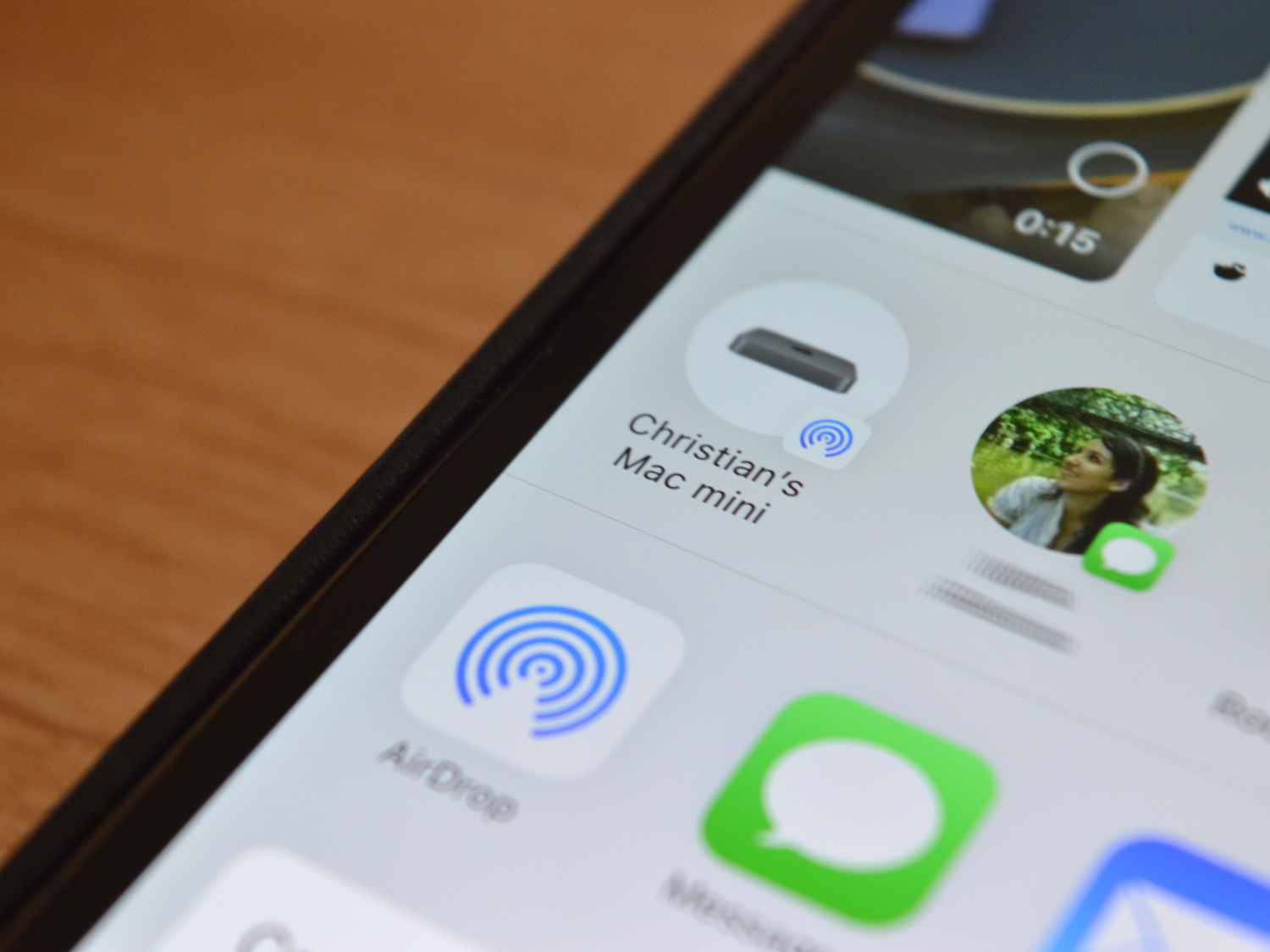
AirDrop is built into Apple devices and allows users to share files wirelessly with others nearby. This feature provides a straightforward digital method to transfer files without the need for cables. Similarly, AirPlay enables Apple users to stream audio, video, photos, and other content wirelessly from their iPhones, iPads, and Macs to various devices including Apple TV, smart TVs, and wireless speakers.
The focus of the proposed changes is on Application Programming Interfaces (APIs), which facilitate communication between different applications. This could mean that, for residents of the EU, owning an iPhone 16 may not be a prerequisite to access these functionalities.
Digital Trends
Recently, the EU has been actively working to curb Apple’s dominance in the smartphone market through the DMA. A notable requirement includes giving users access to alternative app stores for downloading applications on their iPhones and iPads. Furthermore, the DMA mandates that Apple permit users to select default apps for functions like web browsing and email.
AirDrop and AirPlay are often perceived as exclusive benefits for Apple users. However, regulators view these features as potentially anticompetitive. Both perspectives have merit: Apple aims to cultivate a loyal user base within its ecosystem, while regulators are concerned about the monopoly power of a single corporation.
If Apple is eventually mandated to open up these services to other developers and manufacturers, it is crucial that the robust security measures currently in place are preserved. If so, it would represent a positive outcome for consumers, irrespective of their choice of smartphone.
The release of Apple’s M1 chip marked a significant milestone in the world of personal computing. With its impressive performance and efficiency, the M1 set a new standard for laptops and desktops. But with the introduction of the M2 chip, many consumers are left wondering: Is the M2 worth the upgrade? This article dives into the differences between the M1 and M2 chips, assessing performance, features, and value.
Performance Comparison
Speed and Efficiency
The M2 chip is designed to build on the success of the M1 by enhancing speed and improving energy efficiency. Here are some key performance metrics:
M2: Up to 10 GPU cores, offering better graphics performance
Benchmarks
Single-Core Performance: The M2 shows about 15% improvement over the M1.
Multi-Core Performance: The M2 can achieve up to 20% better performance in multi-threaded tasks.
These numbers translate to improved responsiveness, especially in demanding applications like video editing and 3D rendering.
New Features in M2
Enhanced Neural Engine
The M2 introduces an upgraded Neural Engine that enhances machine learning tasks:
Speed: The Neural Engine now operates at 15.8 trillion operations per second, improving applications like photo and video editing.
Application Benefits: This can enhance features like background noise reduction in video calls or improved image analysis in photography.
RAM and Storage Options
Unified Memory: The M2 supports up to 24GB of unified memory, compared to the M1’s maximum of 16GB.
Storage Speeds: M2 offers faster SSD speeds, resulting in quicker file access and improved system performance.
Battery Life
While the M2 is more powerful, it remains efficient:
Battery Longevity: The M2 maintains similar battery life to the M1, capable of lasting up to 18 hours on a single charge.
Efficiency Features: Better thermal management allows for high performance without generating excess heat.
Price Consideration
Cost Differences
M1 Devices: Generally, M1-powered devices are more affordable, with many options in the budget-friendly segment.
M2 Devices: Newer M2 devices typically come with a higher price tag, which might not justify the performance leap for casual users.
Value for Professionals
For professionals working in creative fields or requiring high computational power, the investment in an M2 device may be worthwhile due to:
Enhanced Speed
Advanced Features
Future-Proofing: Better hardware ensures that devices will remain relevant as software requirements evolve.
Who Should Upgrade?
Everyday Users
If you’re primarily using your device for browsing, document editing, or media consumption, the M1 still holds strong.
The M2 may not provide substantial benefits for these users, making the M1 the smarter financial choice.
Power Users
Those involved in heavy multitasking, video editing, or gaming might find value in M2’s improved graphics and processing speed.
The new features, such as increased RAM support and faster SSD, can significantly enhance productivity and user experience.
Final Thoughts
Whether the M2 chip is worth the upgrade over the M1 depends substantially on your needs. The M1 remains a very capable chip for most users, while the M2 brings notable advancements that can benefit professionals and heavy users alike. Understanding your usage patterns and requirements can help make an informed decision on which chip best suits your needs.
Audio Magic Eraser is an innovative feature designed for Android devices that enhances video audio quality by removing unwanted background sounds. By leveraging cutting-edge AI technology, this tool can detect and suppress distracting noises—like wind, conversation, or other sudden sounds—resulting in a clearer, more focused listening experience.
Difficulty
Moderate
Duration
10 minutes
What You Need
A compatible Google Pixel phone
This feature is currently limited to the Google Pixel 8 and Google Pixel 9 series smartphones. If you don’t own a Pixel device, Samsung might be introducing a similar feature in some of its upcoming models. Whether capturing a precious memory or recording an outdoor event, this feature ensures that your audio is maintained with clarity.
What is Audio Magic Eraser?
Audio Magic Eraser is seamlessly integrated into the Google Photos app for straightforward use. This function intelligently assesses videos, recognizing various audio elements such as dialogue, music, and ambient noise. Users can choose to diminish or remove distracting sounds—like noise from the wind or background chatter—while enhancing important sounds, like voices. This results in a significant improvement in audio clarity, streamlining the audio enhancement process without the need for complex software or specialist knowledge.
Pixel 8 (left) and Pixel 9 Ajay Kumar / Digital Trends
Which phones support Audio Magic Eraser?
Currently, Audio Magic Eraser is primarily available on the Pixel 8. While there are indications that it may extend to other devices, like the Galaxy S25, here’s a list of the smartphones that currently have this feature:
Google Pixel 8
Google Pixel 8 Pro
Google Pixel 8a
Google Pixel 9
Google Pixel 9 Pro
Google Pixel 9 Pro Fold
How to Use Audio Magic Eraser
Follow these steps to utilize the Audio Magic Eraser feature:
Step 1: Launch Google Photos and select the desired video you wish to modify.
Step 2: Tap on the Edit button located at the bottom of the interface.
Step 3: Navigate through the editing options horizontally until you find the Audio section. Click on it.
Bryan M. Wolfe / Digital Trends
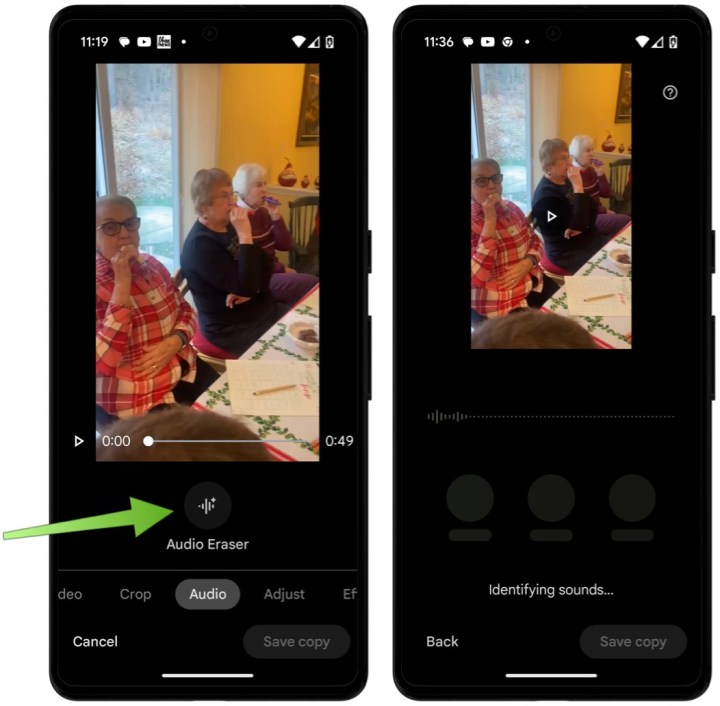
Step 4: Choose the Audio Eraser button. The device will then analyze the audio from your video, which may take a few minutes depending on video length.
Bryan M. Wolfe / Digital Trends
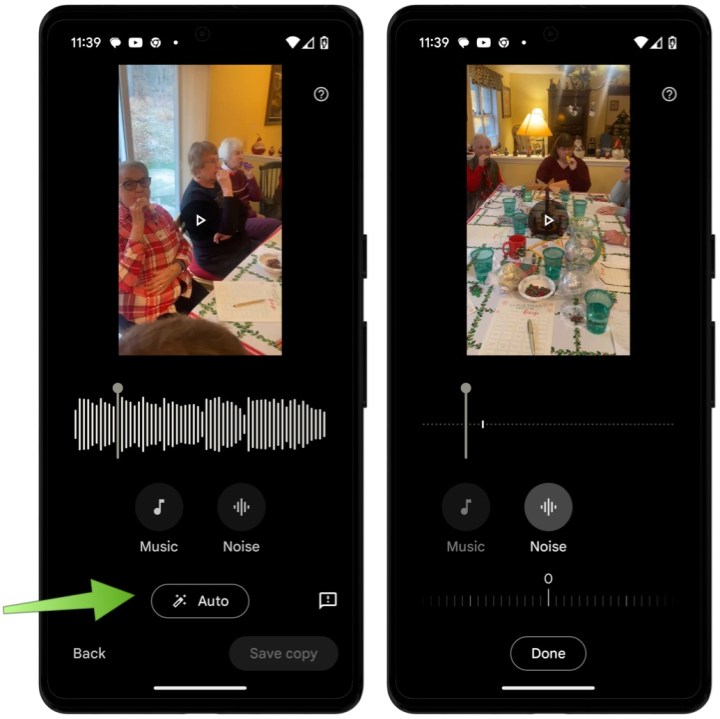
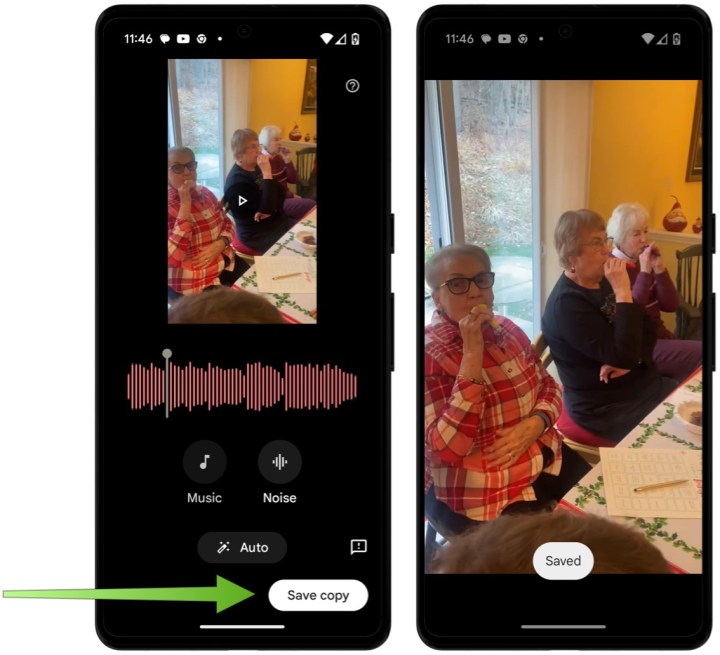
Step 5: Here, you can adjust the audio using either the Auto or Manual setting.
Selecting the Auto option allows Google's AI to handle background noise removal automatically. For more precise control, you can choose either the Music or Noise buttons to make gradual adjustments as preferred. You can also listen to real-time changes by pressing the Play button above the video.
Bryan M. Wolfe / Digital Trends
Step 6: Finally, tap on Save copy to save your changes.
Bryan M. Wolfe / Digital Trends
An Important Consideration
The performance of the Audio Magic Eraser largely hinges on the initial quality of the video and the variety of sounds it captures. It performs most effectively when there is a clear contrast between the sounds you wish to retain and those you wish to filter out.
It is wise to experiment with different settings and to preview various adjustments before finalizing, as the changes may be subtle.
This feature is still evolving, and Google is expected to enhance its effectiveness and features over time.
Unlocking an iPhone allows users to switch carriers freely, giving them the flexibility to choose the best service provider based on their needs. This process can come with different costs, depending on various factors. Below, we’ll explore the costs involved in unlocking an iPhone, different methods for unlocking, and the factors that might affect the price.
Understanding iPhone Unlocking
Unlocking an iPhone involves removing the carrier settings that restrict the use of the device to a specific network. This can be beneficial if you’re traveling internationally, switching carriers, or selling your phone.
Types of Unlocking
There are generally two methods to unlock an iPhone:
Carrier Unlocking
Third-Party Unlocking Services
Carrier Unlocking
This method involves contacting your mobile carrier to unlock the device. Most carriers in the U.S. will unlock your phone if you meet certain criteria.
Eligibility Criteria:
The phone must be paid off completely.
The phone should not be reported stolen or blacklisted.
The account must be in good standing.
Costs for Carrier Unlocking
Cost: Many carriers offer unlocking services for free, as long as you meet the eligibility requirements. However, some might have hidden fees or may require you to be a customer for a certain period.
Third-Party Unlocking Services
If you can’t unlock your iPhone through your carrier, third-party services are an alternative. These businesses specialize in unlocking phones.
Advantages:
Quick turnaround.
May offer services for older or blacklisted devices.
Costs for Third-Party Unlocking
Average Price Range: Costs for third-party unlock services can vary widely, usually between $20 to $150 or more, depending on:
The model of the iPhone.
The carrier it is locked to.
Whether it is blacklisted or not.
Factors Affecting Unlocking Costs
Several factors can influence how much you’ll pay to unlock your iPhone.
Voided Warranties
Potential Risks: Using third-party services may void any warranty you still have on your device. Always check with the service provider before proceeding.
Model Compatibility
Older Models vs. Newer Models: Unlocking costs may be higher for the latest models due to limited access to unlocking codes.
Carrier Policies
Carrier-Specific Costs: Different carriers have different policies regarding unlocking fees, which can impact your overall costs.
How to Unlock Your iPhone
If you decide to unlock your iPhone yourself, here’s a simple guide:
Check Eligibility: Make sure your device is eligible for unlocking by reviewing your carrier’s policies.
Gather Information: Collect all necessary account information, including your IMEI number, which you can find by dialing *#06#.
Contact Your Carrier: Reach out to your carrier’s customer service, either online or by phone, and request an unlock.
Follow Instructions: If approved, your carrier will provide specific instructions to unlock your device.
Benefits of Unlocking Your iPhone
Unlocking your iPhone not only opens up your options for carriers but also offers several other advantages:
Travel Flexibility: You can use local SIM cards to save on roaming fees when traveling abroad.
Increased Resale Value: Unlocked devices often sell for more than locked ones.
Choice of Carrier: You can easily switch to a better plan or carrier as your needs change.
Summary of Costs
Method
Average Cost Range
Carrier Unlocking
Free, if eligible
Third-Party Unlocking
$20 to $150+
By understanding the costs and options for unlocking your iPhone, you can make an informed decision that aligns with your needs and budget. Always remember to weigh the pros and cons of each method to find the best solution for your situation.
More than two years ago, there were discussions about Apple potentially launching a hardware subscription service for the iPhone, allowing users to pay a monthly fee for the privilege of upgrading to a new model each year. This concept seemed appealing, especially as subscription services have become increasingly popular across various industries.
However, it appears that this initiative is no longer underway. Fast-forward to December 2024, and Bloomberg reports that the planned iPhone subscription service has been permanently shelved.
It remains uncertain why Apple decided to abandon this subscription model before it ever reached consumers. A closer look at Bloomberg’s coverage suggests that it could have been a solid option:
“Instead of purchasing an iPhone in full or opting for an installment plan, users would have simply paid a monthly fee through their Apple account, the same account they use to download apps and services. This arrangement would enable them to exchange their iPhone for a newer model every year.”
Much like the now-defunct Apple Pay Later initiative, the hardware subscription was intended to rely on Apple’s financial infrastructure, utilizing loans provided by the company itself. Earlier this year, Apple tested the subscription service with employees from its Pay division, with teams involved in App Store billing and online retail participating as well.
Joe Maring / Digital Trends
Currently, Apple offers the iPhone Upgrade Program, which enables customers to make monthly payments for a new iPhone over a span of 24 months, with the option to trade in their device and upgrade after just 12 payments. Additionally, Apple provides interest-free monthly payments for purchases made with an Apple Card.
The now-abandoned subscription service seemed to be a more straightforward option compared to existing payment plans. Perhaps Apple decided against introducing yet another alternative to avoid complicating the purchasing experience for consumers. While more choices can be beneficial, the iPhone Upgrade Program largely accomplishes what Apple intended with its subscription service.
There’s always the possibility that Apple will revisit this concept and eventually roll out an iPhone subscription in the future. However, don’t expect it to launch alongside the iPhone 17 next year.
Apple’s smartwatches have long been regarded as the gold standard in wearable devices. While the seamless integration within the Apple ecosystem is frequently praised, Apple’s advancements in health technology and innovation are equally commendable.
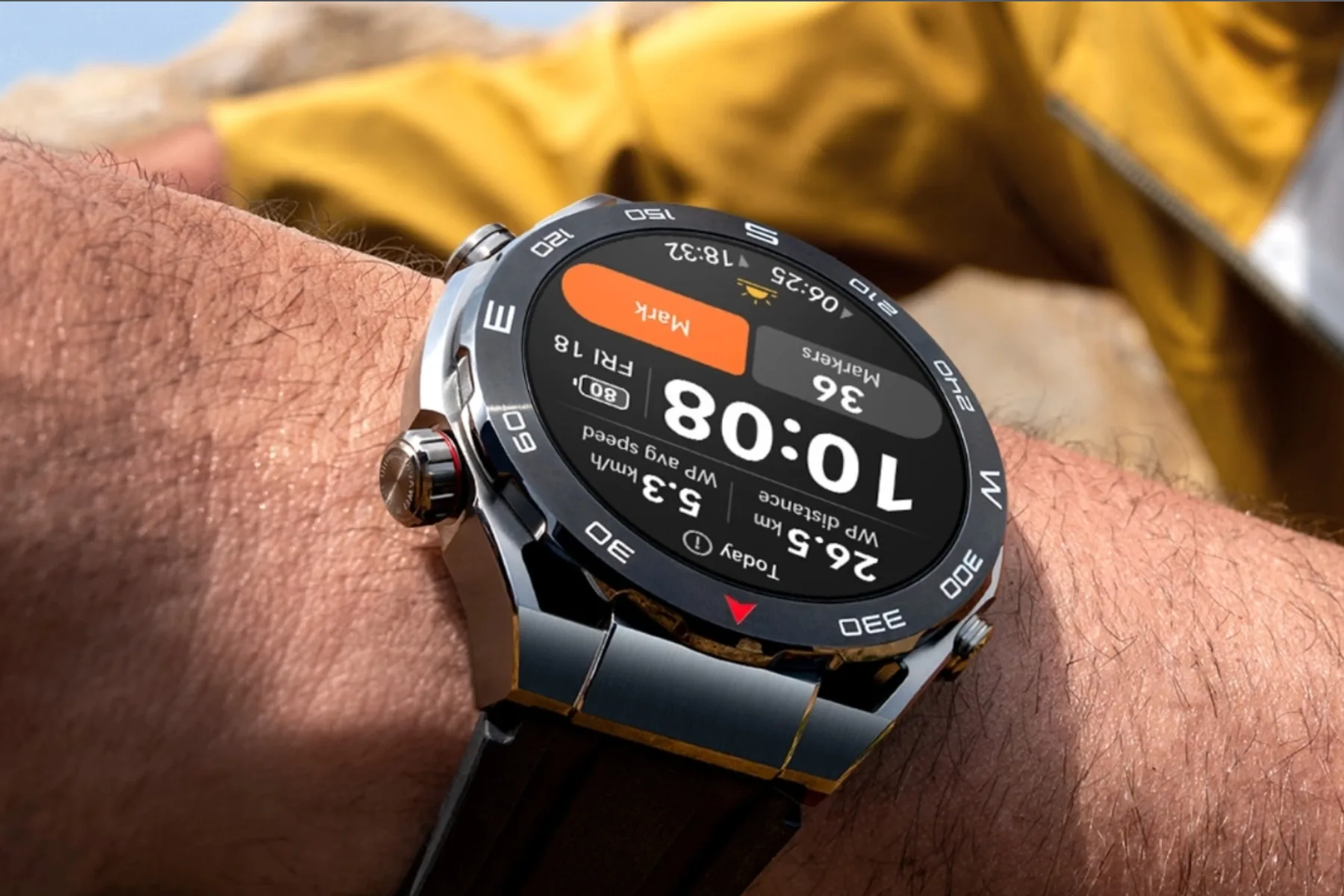
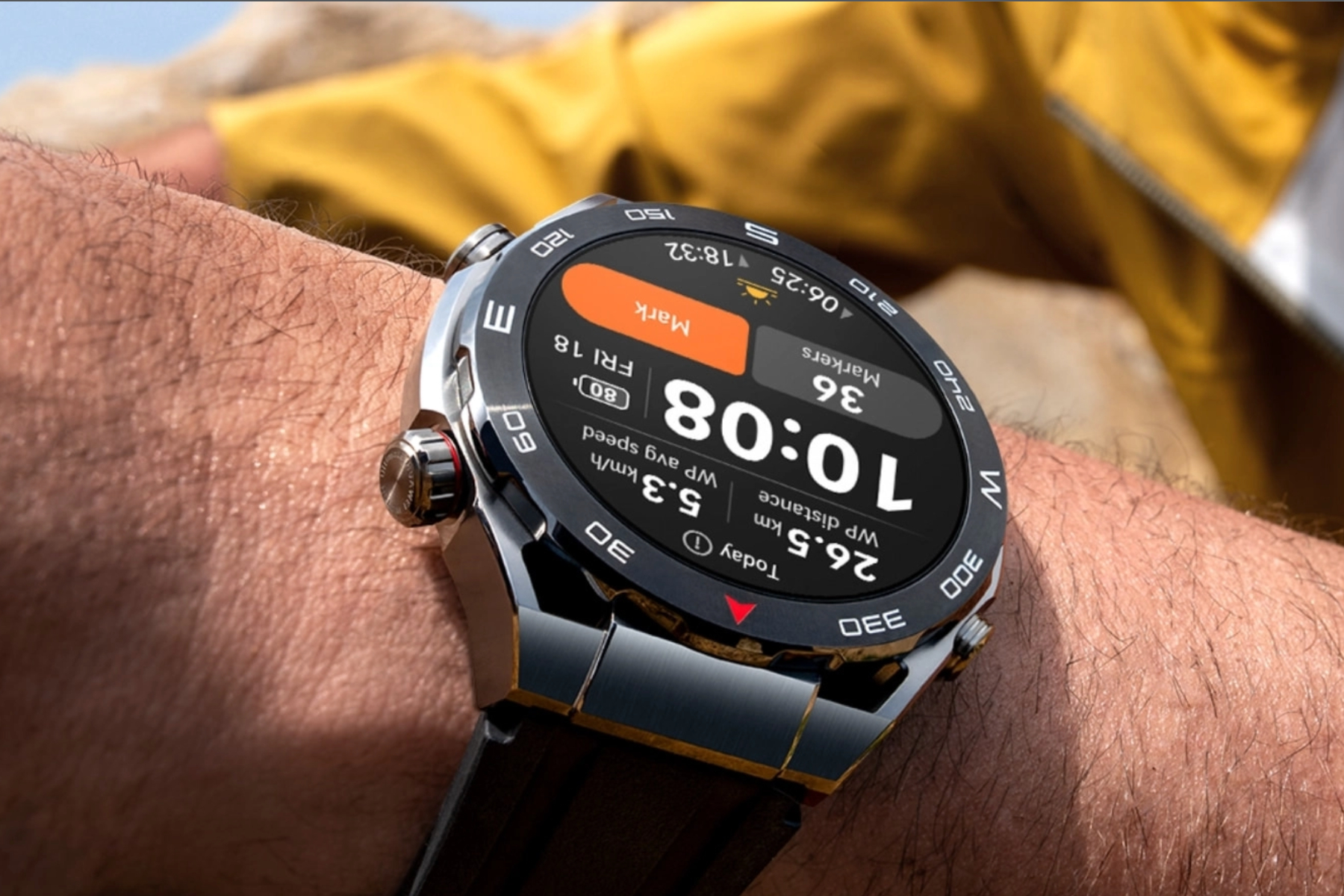
Given this background, it’s quite remarkable to see how Huawei, a company facing various sanctions and with a much smaller foothold in Western markets, has managed to surpass Apple and claim the title of the world’s leading brand in wrist-worn devices.
Remarkably, this marks the second consecutive occasion this year where Huawei has outperformed Apple, according to recent quarterly market analysis from IDC.
According to the latest Worldwide Wearables Quarterly Tracker report from IDC, Huawei shipped more wearable devices than Apple, achieving a market share of 16.9% (23.6 million units) compared to Apple’s 16.2% (22.5 million units) during the first three quarters of 2024.
Huawei
Looking at year-over-year growth, Huawei’s market position has surged by an impressive 44.3%, while Apple has seen a decline of 12.8% in the global landscape. Other major brands, including Samsung and Xiaomi, have also shown growth in the wearables segment.
Huawei’s rise in the wearable market can largely be attributed to China, which has become the largest market for such devices globally. In fact, according to IDC’s tracker, Huawei took the lead over Apple in the second quarter, capturing one-fifth of the global market while Apple held just 13%.
A Dark Horse of Wearable Innovation
The Huawei Watch D2 can measure blood pressure levels using a stack integrated within the strap.Huawei
While Apple continues to dominate the smartwatch sector, it’s interesting to note that IDC’s report combines data from both fitness trackers and smartwatches. Huawei is also competing fiercely in smartwatch innovation, leading in various categories.
Take, for instance, the Huawei Watch D2, which features Ambulatory Blood Pressure Monitoring. Unlike devices that use light sensors to gauge blood flow and require calibration—like the Samsung Galaxy Watch—Huawei’s TruSense technology includes a high-precision pressure sensor, a mini pump, and an inflatable airbag integrated into the strap.
This smartwatch allows users to monitor their blood pressure at any time, including during activities like sleeping or walking. Additionally, users can customize it for regular readings and set up a 24-hour auto-monitoring plan that tracks average systolic and diastolic blood pressure along with heart rate data.
In a surprising turn, Huawei’s website states that this feature can be “used as a reference in clinical practice.” The company has a diverse portfolio of wearables, offering various styles and functionalities across different price points—essentially catering to a wider audience.
Huawei’s health tracking capabilities are impressive, often surpassing those of Samsung and Apple, especially in terms of stylish options for female users. However, it’s possible that market dynamics could shift back in Apple’s favor as the holiday shopping season approaches, so we’ll wait for those figures in the coming weeks.
In an era where reliable internet access is crucial, a WiFi booster can be a game-changer. Whether you’re working from home, streaming your favorite shows, or gaming online, having a strong and stable connection throughout your space is essential. Many options are available today, but figuring out which WiFi booster stands out can be a daunting task. This guide aims to highlight some of the top contenders on the market.
Understanding WiFi Boosters
Before jumping into product recommendations, it’s important to understand what a WiFi booster does. A WiFi booster, also known as a range extender, amplifies the existing WiFi signal, helping it reach areas that are typically dead zones or have weak connections. This can improve connectivity in larger homes, offices, or buildings with thick walls.
Key Features to Look For
When shopping for a WiFi booster, consider the following features:
Coverage Area: Look for a booster that can effectively cover the size of your home or office.
Speed: Check the WiFi speed ratings to ensure satisfactory performance for streaming, gaming, or browsing.
Dual-Band or Tri-Band: Dual-band boosters can operate on both the 2.4 GHz and 5 GHz bands, while tri-band models offer an additional 5 GHz band for higher loads.
Ease of Setup: User-friendly installation procedures save time and frustration.
Compatibility: Make sure that the booster is compatible with your existing router.
Top WiFi Boosters of 2023
Several models have gained popularity for their performance and reliability. Below are some of the best WiFi boosters available:
1. TP-Link RE650
Features:
Coverage: Up to 14,000 square feet
Speed: Up to 2600 Mbps
Dual Band: Offers both 2.4 GHz and 5 GHz bands
Setup: Easy setup via the TP-Link Tether app
Pros:
Strong performance with minimal dropouts
Excellent range
Ignition feature to test signal strength
2. NETGEAR Nighthawk X6S
Features:
Coverage: Suitable for large homes
Speed: Offers speeds of up to 4000 Mbps
Tri-Band: Capable of supporting multiple devices seamlessly
Setup: Quick and easy installation via the Nighthawk app
Pros:
High-speed performance ideal for heavy use
Advanced features like Smart Connect
Compact design
3. Linksys RE7000 Max-Stream AC1900+
Features:
Coverage: Good for medium to large homes
Speed: Up to 1900 Mbps
Dual Band: Benefits from both 2.4 GHz and 5 GHz bands
Access Point Mode: Can be switched to Access Point Mode for wired devices
Pros:
Seamless roaming and prioritization for video streaming
Multiple Ethernet ports for wired connections
Intelligent signal management
4. Amazon eero Pro 6
Features:
Coverage: Capable of covering up to 6,000 square feet with a mesh system
Speed: Supports WiFi 6, delivering fast speeds
Tri-Band: Provides robust connections even with many devices
Integration: Works well with smart home devices
Pros:
Easy app-based setup and monitoring
Self-optimizing mesh network for seamless connectivity
Attractive design that fits well in any setting
Customer Considerations
When looking to purchase a WiFi booster, it’s advisable to consider the following factors based on customer reviews and experiences:
Neighborhood Interference: If you live in a densely populated area, a dual or tri-band booster can help minimize interference.
Device Compatibility: Ensure that your devices are compatible with the booster, especially if you have older technology.
User Reviews: Checking reviews from other users can provide insights into real-world performance and any potential issues.
Choosing the right WiFi booster can dramatically enhance your internet experience, allowing you to enjoy seamless connectivity throughout your home or office. With the plethora of options available, doing thorough research and considering your specific needs will guide you toward making the best choice.
The Wall Street Journal reports that U.S. authorities are probing the well-known home internet router manufacturer amid concerns about its possible associations with cyberattacks linked to China. Agencies such as the Justice, Defense, and Commerce Departments are actively investigating the brand, with the latter issuing a subpoena to the company.
This inquiry may culminate in a ban on the router manufacturer in the upcoming year, as the cyberattacks have reportedly impacted various entities, including Defense Department contractors, governmental bodies, non-profits, and think tanks. Such a prohibition would significantly affect the company, which commands roughly 65% of the U.S. router market and is even utilized by establishments like the Department of Defense and NASA.
According to the Wall Street Journal, TP-Link routers continue to be delivered to consumers despite known security vulnerabilities, and discussions with insiders indicate that the company has been reluctant to address these issues.
A spokesperson for the router manufacturer expressed a different viewpoint, stating, “We welcome any opportunities to engage with the U.S. government to demonstrate that our security practices align with industry standards and to reaffirm our commitment to the U.S. market, consumers, and addressing potential national security concerns.”
If enacted, this router ban would represent one of the most substantial withdrawals of Chinese telecommunications equipment from the American market since the Trump administration’s action against Huawei Technologies in 2019. TP-Link’s affordable routers have been a popular choice among consumers, and some premium models are regarded as top-tier Wi-Fi routers—even before this development came to light.
Regardless of the outcome, it’s crucial for users to ensure the security of their Wi-Fi networks and keep their router firmware updated. Regular firmware updates are essential for implementing the latest security patches that can protect against vulnerabilities exploited by hackers.
Related
Ransomware attack on U.S. hospital raises safety concerns
FAA states 50 U.S. airports won’t receive expanded 5G service until late 2022
The OnePlus Watch Harry Potter Edition launches but is unavailable in the U.S.
In the digital age, keyboards remain fundamental tools for interfacing with computers. Although they all serve the primary function of inputting data, keyboards come in various designs and technologies. Here’s an overview of the three major types of computer keyboards you might encounter.
Mechanical Keyboards
Mechanical keyboards are known for their distinct tactile feedback and durability. Each key has its own mechanical switch, which provides a different feel and response when pressed.
Key Features:
Switch Types: Mechanical keyboards utilize different types of switches, such as Cherry MX, Razer, or Logitech’s Romer-G. Each switch has its own characteristics:
Tactile: Offers a noticeable bump when the key is activated.
Linear: Keys press down smoothly without any tactile feedback.
Clicky: Produces an audible click sound with each keystroke.
Durability: Designed for longevity, mechanical keyboards typically last for millions of keystrokes.
Customization: Users can often customize keycaps and switch types, as well as create macros for enhanced functionality.
Lighting: Many mechanical models feature RGB lighting, which can be customized for aesthetic appeal.
Membrane Keyboards
Membrane keyboards are more common and often come as the standard option in many systems. They operate through a pressure pad system that registers keystrokes when pressed.
Key Features:
Construction: These keyboards consist of three layers: a top membrane layer with printed characters, a middle spacer layer, and a bottom layer that includes the circuit.
Cost-Effective: Generally cheaper to manufacture, membrane keyboards are widely used in budget-friendly devices.
Quiet Operation: They are typically quieter than mechanical counterparts, making them ideal for shared spaces.
Limited Key Feel: Users may find that there’s less tactile feedback and a softer feel compared to mechanical keyboards.
Chiclet Keyboards
Chiclet keyboards, also known as island-style keyboards, feature flat, rectangular keys with space in between each key. They are often seen on laptops and some compact desktop keyboards.
Key Features:
Sleek Design: The low-profile keys provide a minimalist look, which is visually appealing and saves space.
Travel Distance: Chiclet keyboards offer shorter key travel, requiring less effort to press the keys, which can facilitate quicker typing.
Easier Cleaning: The spaced-out keys make it easier to clean debris and spills, as particles are less likely to become trapped under the keys.
Hybrid Uses: Many chiclet keyboards also incorporate functions for multimedia and shortcuts, often replacing standard keys.
Summary
Choosing the right keyboard involves understanding the various types available and how they fit your personal or professional needs. Mechanical keyboards are favored for their tactile feedback and durability; membrane keyboards offer economical options with quieter usage; and chiclet keyboards are recognized for their modern aesthetics and compact designs. Each type serves different purposes, making it crucial to select one that best matches your typing style and requirements.
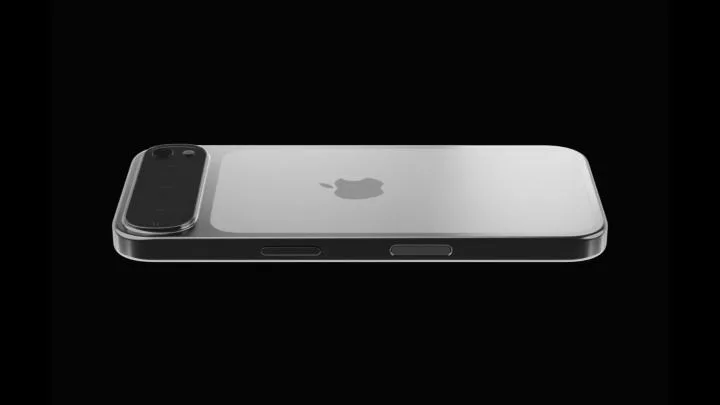
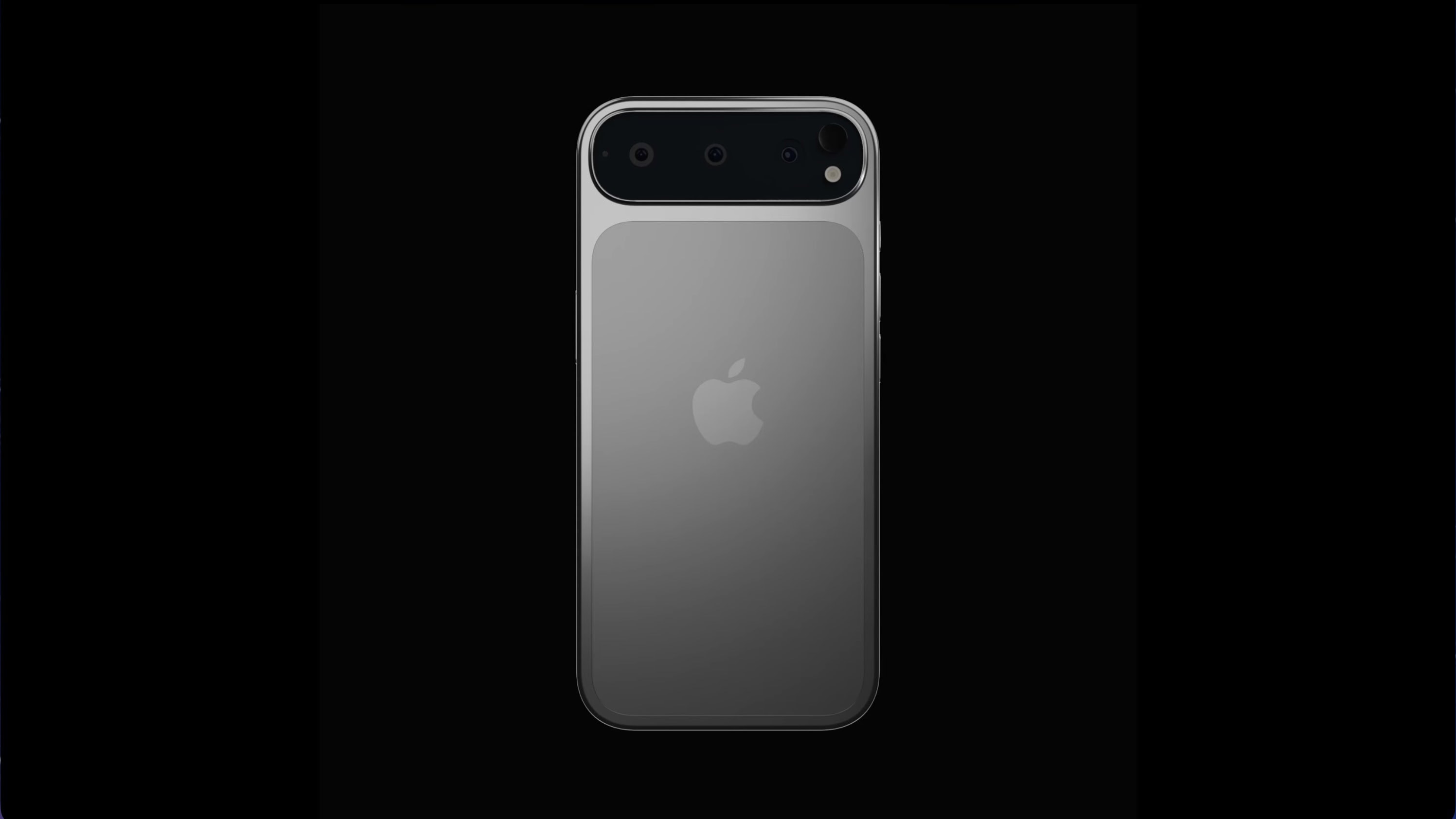
With the release of the iPhone 16 series, Apple introduced notable updates to the standard models, while the Pro versions continued the trend of a similar design seen in past models. However, it seems Apple is gearing up for an impressive redesign with the iPhone 17 Pro Max, especially if these mock-up images from a Russian YouTube channel, Wylsacom, hold any truth.
The video suggests that the iPhone 17 Pro Max will significantly depart from the style of its predecessors, based on the rumors surrounding these mock-ups.
The back of the device is rumored to feature a distinctive horizontal triple-lens camera setup, reminiscent of the camera bar seen on the Pixel 9 and Pixel 9 Pro/XL. There’s also speculation that the iPhone 17 Pro models will predominantly incorporate aluminum for the back panel, retaining glass in select areas.
This design marks a major shift for the Pro models, which have followed the same aesthetic since the iPhone 11 Pro. While it’s vital to approach these mock-ups with a healthy dose of skepticism, early renders like this tend to provide a reasonably accurate glimpse of what’s to come.
Personally, I have mixed feelings about this redesign. I was let down by the iPhone 16 Pro maintaining the same look as its predecessors, while the iPhone 16 received a refreshing overhaul. A redesigned appearance for the iPhone 17 Pro is exciting, but I’m uncertain how I feel about the direction it’s headed.
Wylsacom / YouTube
One concern is that it closely resembles the Google Pixel 9 series, which also introduced a sleek new camera bar this year. This resemblance makes it seem as though Apple borrowed this design language. On the bright side, a horizontal camera layout would minimize wobbling when the phone is placed on a flat surface.
Yet, it’s worth noting that we appear to have reached a plateau in smartphone aesthetics, making it challenging to find designs that haven’t already been explored. A vertical triple-lens configuration could remind users of the Samsung Galaxy S24, while a circular setup would echo the OnePlus 12.
Wylsacom / YouTube
I’m quite intrigued by the predominantly aluminum rear. The mock-ups suggest a two-tone appearance reminiscent of the original iPhone. For someone who usually uses a case, the shift to an aluminum back could increase durability, which is always a plus. This change might even encourage me to forgo a case occasionally.
Ultimately, we won’t get an official look at the next generation of iPhones until September 2025. However, if the current rumors hold true, prepare for substantial changes within the iPhone 17 family.
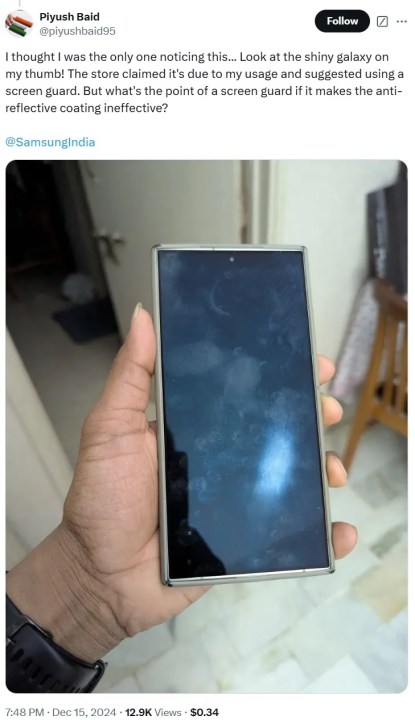
For those who have the Samsung Galaxy S24 Ultra, there’s some disappointing news to share. Multiple users are reporting that the oleophobic coating on their device’s screen is deteriorating. This coating is meant to repel oils and smudges, but instead, it is making displays appear dirty, greasy, and in certain cases, even scratched, significantly impacting overall user satisfaction.
As highlighted by Android Authority, complaints have mainly emerged from social media, particularly on X, raising alarm among users. For instance, Rajan Thakur mentioned the appearance of a persistent glass polish mark on their device, while Plyush Baid questioned the effectiveness of screen protectors if they compromise the anti-reflective coating.
The Galaxy S24 Ultra showcases a 6.8-inch Dynamic AMOLED 2X display, protected by Corning Gorilla Glass Victus 2.
Launched in January alongside its counterparts, the Galaxy S24 and Galaxy S24 Plus, this issue seems to be exclusive to the Ultra version, as users of the other models haven’t reported similar problems. This raises concerns regarding the manufacturing techniques or materials used specifically for the Ultra.
Piyush Baid
While it remains unclear if this issue is widespread, it is concerning given the phone’s relatively new release. At this time, Samsung has not publicly addressed the problem, leaving many users in a state of uncertainty.
Users who have reached out to Samsung have been instructed to compile detailed reports regarding their specific issues, including purchase details, device information, and images of the affected screens. This input appears vital for Samsung to assess the situation and determine future actions.
The root cause of the problem is still uncertain, with speculation pointing towards a potential issue in a specific production batch or lapses in quality control measures. Many hope that Samsung will offer clarification soon.
Looking ahead, Samsung is expected to unveil the Galaxy S25 series within the next month, which will include the Galaxy S25 Ultra.
OnePlus has officially announced the launch date for the highly anticipated OnePlus 13, slated for January 7, 2025. This announcement comes weeks ahead of the event, confirming when we can expect to see this major smartphone release outside of China. Along with this news, OnePlus has shared some exciting features and hinted at a surprise product debut alongside the phone.
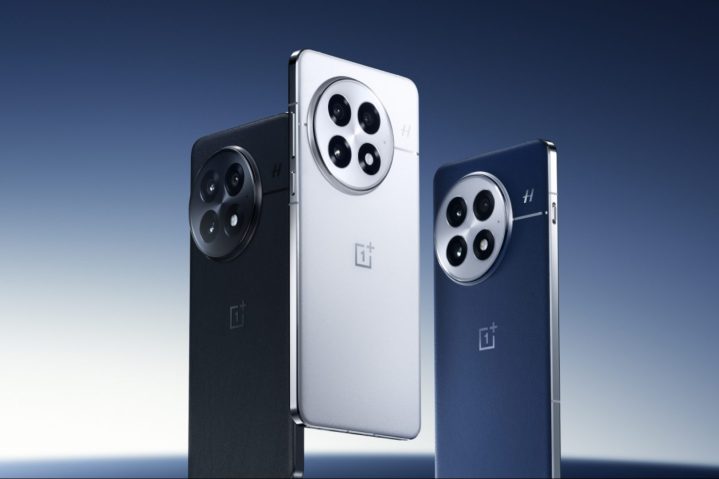
The OnePlus 13 will be available in three distinct colors: Black Eclipse, Arctic Dawn, and Midnight Ocean. The Midnight Ocean variant stands out as it boasts a unique micro-fiber vegan leather material, designed to resist corrosion and scratches while maintaining a premium feel. The Arctic Dawn model will feature glass with a special coating that provides a silky-smooth touch. These color options are likely similar to those available in China, albeit with different designations.
On the durability front, the OnePlus 13 will carry both IP68 and IP69 ratings for water and dust resistance. While you might wonder about the necessity of both ratings, the IP69 certification ensures protection against high-powered water jets and scalding-hot liquids, allowing you to comfortably use your device in the shower or around hot drinks. Additionally, the smartphone will be powered by the Qualcomm Snapdragon 8 Elite processor and will run on OxygenOS 15 over Android 15.
OnePlus 13 colors in ChinaOnePlus
Regarding the display, OnePlus has shared that the OnePlus 13 will feature a variable refresh rate ranging from 1Hz to 120Hz, a 2K resolution, and an impressive peak brightness of 4,500 nits. In addition to the phone, the company plans to unveil a new set of OnePlus Buds Pro 3 earbuds during the launch event, available in a Sapphire Blue hue that complements the Midnight Ocean variant of the smartphone. In the U.K., OnePlus will host a pop-up shop in Covent Garden, London, where the first 20 customers to queue for the OnePlus 13 will receive a special backpack filled with gifts.
While OnePlus hasn’t explicitly mentioned the OnePlus 13R, which is expected to be unveiled alongside the OnePlus 13, the press release hints that more details are forthcoming. The company indicated that the OnePlus 13 is the first device to be revealed from the new series, suggesting that additional announcements are on the horizon. A steady stream of information leading up to the launch day is just part of the excitement we can expect from OnePlus.
The iPhone 16 series from Apple comes packed with impressive new features. The latest A18 chip bridges the gap between the standard iPhone 16 and iPhone 16 Plus and their Pro counterparts like never before. The Pro Max model boasts an expansive 6.9-inch display and incredibly thin bezels, making it the slimmest smartphone available.
This year's iPhone lineup feels more cohesive, as Apple appears to have moved away from limiting new features to its Pro models for a changed strategy; features like the Dynamic Island and Action Button are now included across all models. The spotlight feature this year, Camera Control, is present on all four variants too. While there are still other features exclusive to the Pro models, such as the 120Hz ProMotion Display and a 5x telephoto camera, these distinctions seem justifiable for a "Pro" classification.
Difficulty
Easy
Duration
15 minutes
What You Need
An iPhone 16, iPhone 16 Plus, iPhone 16 Pro, or iPhone 16 Pro Max
However, like any new device, the iPhone 16 can occasionally encounter issues, and it may take time for Apple to resolve these. Fortunately, most of the problems early users experience are software-related. This is why nearly every iOS update includes what Apple refers to as "stability and performance improvements." Although there is a possibility of receiving a defective unit, this is uncommon. Due to the cohesive nature of Apple’s software and hardware, initial software versions may take time to optimize with the new models.
Before diving into the specifics of the common issues, it’s important to note that many can be resolved with future software updates. Some issues have already been addressed in the current iOS 18 point releases. We understand that some are hesitant to install new updates immediately due to fears of encountering new glitches. Nonetheless, point updates primarily aim to enhance functionality and often provide critical security fixes that resolve vulnerabilities which could lead to exploitation of older versions. Thus, it’s advisable to check for the latest iOS 18 version in the Settings app under General > Software Update. If an update is available, ensure you install it.
Andy Boxall / Digital Trends
Touchscreen Issues
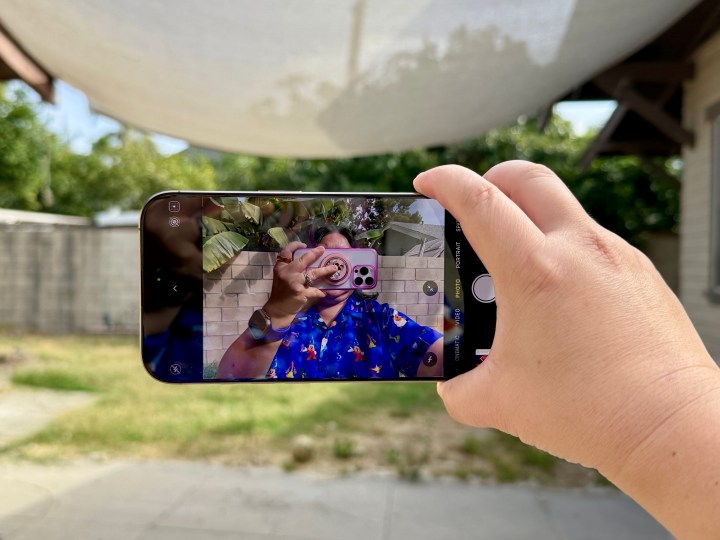
One of the primary concerns reported by early purchasers of the iPhone 16 was issues with unresponsive touchscreens. Various theories were proposed for this glitch, ranging from problems with the new Camera Control feature, to users accidentally triggering the touch rejection algorithm by gripping the phone too tightly due to the slim bezels.
Solutions
Make sure your device is updated to the latest version of iOS 18. Apple officially addressed this issue in iOS 18.0.1, but new iPhones may still come with an older version pre-installed. Check for updates manually.
Consider using a case with your iPhone 16. Many users reported that the touchscreen problem did not occur when the device was protected by a case. Cases often have raised edges that help keep your palms off the display, mitigating accidental touches.
If the issue persists, contact Apple Support or visit an Apple Store or authorized service provider. While software updates can often resolve these issues, hardware defects may still be a factor.
Joe Maring / Digital Trends
Battery Life Concerns
After launching a new iPhone or a major update, it's common for users to voice concerns about battery life. New iPhone owners typically face these issues, especially those who have just switched to the iPhone 16 with iOS 18—a version they might not have installed previously on their older iPhone. Even if you’re switching from the last generation, such as the iPhone 15 Pro Max, it may take a few days for the battery performance to stabilize.
Solutions
Often, the issue resolves itself after a short break-in period as the new device optimizes settings and calibrates the battery. This period can last anywhere from two days to a week. If you migrated data from another iPhone, note that caches and indexes will need to be rebuilt, which can temporarily use extra battery.
Check if 5G Auto is turned on in Settings > Cellular > Cellular data options > Voice & data. Utilizing 5G can drain more battery than 4G/LTE, but with 5G Auto, the iPhone will manage power consumption when not in heavy use.
Lower your screen brightness and ensure that Auto-Brightness is enabled to avoid unnecessary battery drain. This can be checked in Settings > Accessibility > Display & text size.
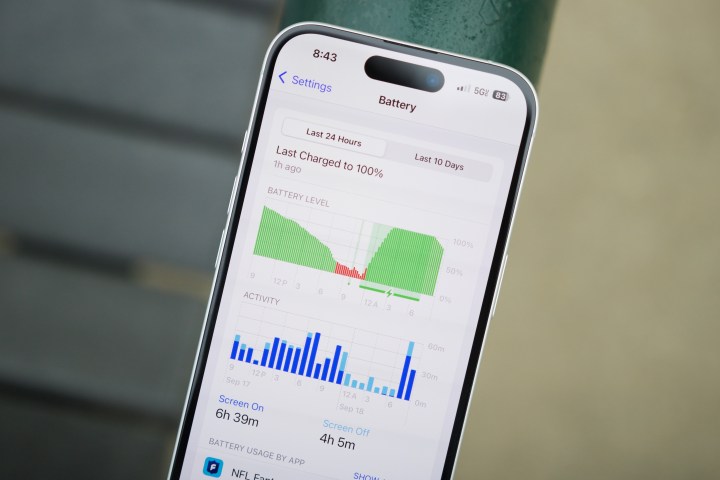
Navigate to Settings > Battery to view suggestions on optimizing battery performance, such as adjusting screen brightness and auto-lock settings. You can also monitor which apps have consumed the most power recently and make changes accordingly to limit usage of power-hungry apps.
Some users have reported instances of their iPhone randomly restarting without explanation. These reboots can occur while charging or even while the device is in use.
It’s essential to differentiate between two types of restarts. A momentary blank screen with a spinning progress indicator indicates a "springboard restart," which only affects the user interface. Conversely, a full reboot, which leads back to the Apple logo, signifies deeper issues and may take longer to process fully. Users will need to input their password after a full reboot before accessing the phone again.
While both of these scenarios can be frustrating, frequent full reboots often indicate a hardware malfunction. Springboard restarts may stem from corrupted settings or problematic apps, especially if the issues arise post-backup restoration from older iPhones.
Solutions
If you’re facing resprings or reboots while using specific applications, check for updates on the App Store, and consider deleting and reinstalling those apps. Cloud-based apps typically keep data secure, but local storages should be backed up before deletion.
Performing a forced restart can often resolve respring issues. This process clears temporary data that might interfere with the user interface, even if your device is experiencing full reboots.
For broader issues across multiple apps, consider resetting global preferences in Settings under General > Transfer or reset iPhone > Reset. Various options allow this process, ensuring that saved data is not affected aside from Wi-Fi network settings, which will require re-entering passwords afterward.
A complete factory reset can help troubleshoot these issues. Oftentimes, restoring from a backup may not fix glitches caused by temporary files or corrupted caches. Setting up your iPhone as new before restoring data can be beneficial for identifying whether the issue is hardware-related.
If you experience issues after restoring from iCloud or other backup methods, this may indicate a corrupted backup. Attempt direct data transfer from your previous iPhone or restoring from a different backup available through iCloud if needed.
To investigate system errors, access Settings > Privacy & security > Analytics & improvements > Analytics data. Look for entries that mention the word "panic," as these refer to kernel crashes that can point to hardware failures.
Christine Romero-Chan / Digital Trends
Camera App Problems
Some users initially reported their camera app lagging or freezing, especially during basic functions like zooming or taking photos. This concern was more prevalent at the launch and may have diminished with later software updates.
Solutions
Verify that your device is running the latest version of iOS 18, as the release notes for iOS 18.0.1 specifically resolved an issue where the camera froze during macro mode recording on iPhone 16 Pro models.
If you’re already updated but still encountering issues, consider waiting. Performance challenges commonly arise as iOS adapts to the device in the background.
Apple
NFC Functionality Issues
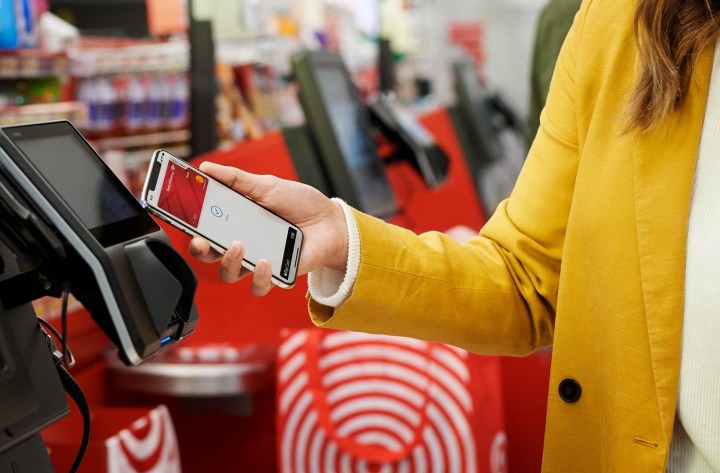
Some users have faced difficulties with the NFC hardware, particularly when trying to make payments with Apple Pay or attempting to read NFC tags. Often, the device fails to recognize NFC cards, leading to frustration.
Solutions
Download an app like NFC Tools to check the functionality of your NFC tags or cards. This can help ascertain whether the issue lies with the app or hardware.
Try restarting your iPhone; this familiar cliché frequently resolves minor glitches.
Some have found success by cycling through Airplane Mode or tweaking Cellular Data settings, prompting the NFC to function correctly.
Resetting network settings can also help. Access this through Settings > General > Transfer or reset iPhone > Reset > Reset network settings. Be aware that this will remove saved Wi-Fi networks, necessitating reentry of passwords afterward.
If problems persist with Apple Pay, this may hint at a hardware malfunction or issues with the Secure Element. In this case, contacting Apple Support is advisable if simple measures fail to resolve the problem.
Andy Boxall / Digital Trends
Random Camera Launch
A few users have reported that their camera application unexpectedly activates at awkward moments—such as during intense gaming sessions or while the phone is merely resting in their pockets. This can be quite distracting and potentially drain the battery.
Solutions
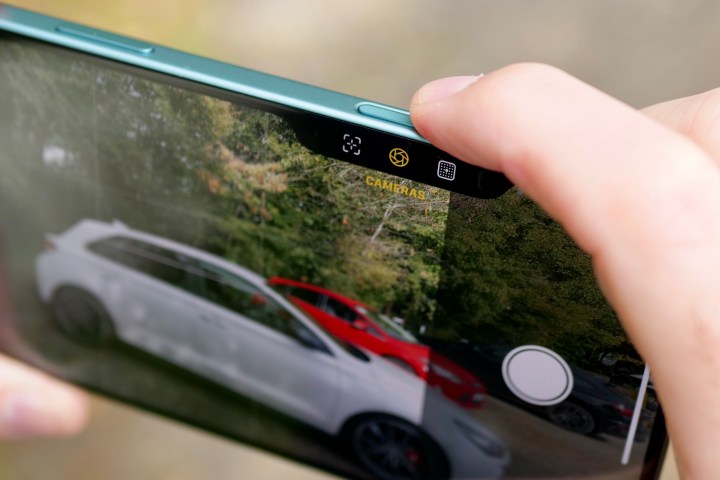
Consider changing your case. Some cases may inadvertently press the Camera Control button, leading to unintended activation. While new cases are designed for this feature, it’s worth evaluating if the current one is causing trouble.
The Camera app can be set to open only with a double-click. Navigate to Settings > Camera > Camera Control and select "Double Click" under "Launch camera." This adjustment requires two quick presses rather than just one to open the app.
If you're not interested in using the Camera Control feature, it can be entirely disabled in Accessibility settings. Disabling this option will render the button non-functional.
Waymo is set to introduce its autonomous taxis internationally for the first time as it expands its testing beyond U.S. borders.
In an announcement made Monday, the company revealed that a fleet of its self-driving vehicles will soon navigate the bustling streets of Tokyo, with operations beginning early next year.
To manage and service the vehicles, Waymo will partner with Nihon Kotsu, the largest taxi operator in Tokyo, and collaborate with GO, a well-known taxi-hailing app in Japan. Initially, drivers from Nihon Kotsu will operate Waymo’s vehicles manually to map crucial areas of Tokyo, targeting neighborhoods such as Minato, Shinjuku, Shibuya, Chiyoda, Chūō, Shinagawa, and Kōtō. Following this mapping phase, the company plans to offer paid rides in a pilot program, although a specific timeline has not yet been disclosed.
Waymo’s team believes that navigating Tokyo’s streets will enhance its autonomous technology by familiarizing it with left-hand driving and the unique driving habits required in one of the most densely populated cities in the world.
In a blog post describing this expansion, Waymo expressed eagerness to collaborate with local partners, government officials, and community organizations to understand and integrate into Tokyo’s transport system. The company emphasized its commitment to ensuring that its technology is safe and effective throughout the process.
Additionally, Waymo is engaging with local regulators and safety officials in Japan to facilitate a smooth integration of its autonomous technology into Tokyo’s transport infrastructure.
The decision to expand to Japan is timely, as the country is currently experiencing a significant shortage of taxi drivers, which may have influenced Waymo’s choice. However, achieving a comprehensive robotaxi service throughout Tokyo may still take several years to develop.
Having conducted tests in multiple U.S. cities, including San Francisco, Phoenix, and Los Angeles, Waymo recently announced plans to launch services in Miami and has already started providing paid rides via ridesharing apps.
This expansion effort comes amid challenges faced by competitors in the autonomous vehicle sector. General Motors has recently decided to cease funding for its competitor Cruise, citing high operation costs and the difficulties of scaling its business amidst growing competition in the robottaxi market.