الوسم: Technology

  • Nvidia DLSS 4 Is Coming Soon But Questions Still Linger

    Nvidia DLSS 4 Is Coming Soon But Questions Still Linger

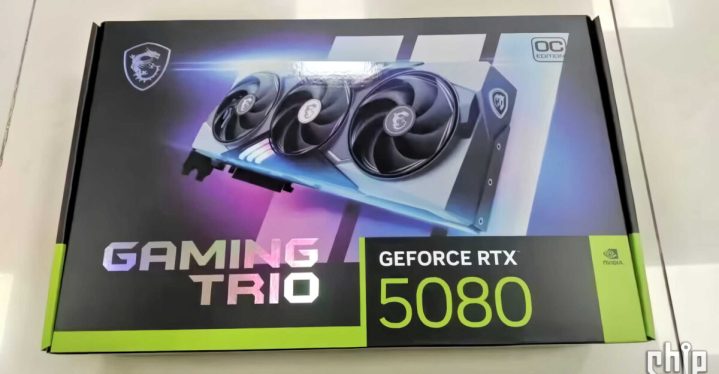
    Nvidia RTX 5080 box
    Source: VideoCardz / Chiphell
    CES 2025
    Explore our extensive coverage of CES here.
    Updated recently

    Nvidia’s upcoming RTX 50-series is quickly approaching, and one of the most well-known GPU insiders has recently confirmed that a new iteration of Deep Learning Super Sampling (DLSS) is also on the horizon. Insights from kopite7kimi on X (formerly Twitter) suggest that DLSS 4 will be unveiled alongside Nvidia’s latest graphics cards. This raises several intriguing questions.

    The primary curiosity revolves around whether DLSS 4 will be exclusive to the RTX 50-series. Previously, DLSS 3, known for its outstanding frame generation capabilities, was only compatible with the RTX 40-series. It’s conceivable that Nvidia could again introduce significant advancements to DLSS 4 that may only be available on the new generation of GPUs. Given that some of the upcoming GPUs are rumored to offer only slight performance improvements, DLSS 4 could be a crucial feature for promoting Nvidia’s RTX 50-series.

    Furthermore, there’s speculation about what DLSS 4 could introduce that previous versions did not. As reported by VideoCardz, Inno3D, a partner of Nvidia, has indicated that DLSS 4 might revolutionize graphics processing and output. There are also suggestions of enhanced neural rendering capabilities. Nvidia’s CEO Jensen Huang has hinted at future capabilities such as creating entire textures and even characters, but it’s uncertain whether these features will be integrated into DLSS 4. The potential for such extensive in-game content generation would undoubtedly be a major selling point for the RTX 50-series.

    Get your weekly breakdown of the technology behind PC gaming


    Check your inbox!

    In terms of pricing, a leaked listing for the RTX 5080 has brought this topic to the forefront. Kopite7kimi commented on a post by GawronskIT on X that indicated the RTX 5080 would be priced at an eye-watering 1,699 euros (approximately $1,750). This listing highlighted DLSS 4 in the title, further confirming its arrival.

    RTX 5080 – 1699 euro Asus price ~1349$ (no vat/tax) pic.twitter.com/ui24JcWqNQ

    — Tomasz Gawroński (@GawroskiT) January 2, 2025

    This is quite a hefty price for the RTX 5080, which has previously been seen listed at similarly high amounts. It seems likely that the MSRP for the RTX 5080 could mirror that of the initial launch price for the RTX 4080, which was set at $1,200 for the Founders Edition. Overclocked models from Nvidia’s partners may exceed that initial amount by several hundred dollars, possibly including the Asus variant shown in the image.

    We won’t have to wait long for clarity. Stay tuned for our coverage of CES 2025, where we will report on all the announcements from Nvidia on January 6.


  • Intel’s New CPUs Surprise Us All

    Intel’s New CPUs Surprise Us All

    As CES 2025 approaches, excitement is building for forthcoming announcements, with several companies already hinting at new products. Intel has revealed that it will expand its line of CPUs, potentially challenging some leading processors in the market. The company has kicked off preorders for its new Arrow Lake CPUs, although they are not yet accessible to many consumers.

    According to VideoCardz, Intel China has initiated preorders for the Core Ultra 200 non-K CPUs, with an official launch date slated for January 13. These CPUs are expected to be non-overclockable variants of existing Arrow Lake models, like the Core Ultra 9 285K. In its announcement, Intel hinted at “new architecture” and improved “power efficiency.”

    This intriguing announcement was somewhat unexpected. Currently, it appears that the preorders are limited to the Chinese market, as Intel’s global channels have not acknowledged the development. A key question remains: will these Core Ultra 200 non-K processors become available internationally on January 13, or will their launch initially be confined to China? We might have to wait for Intel to provide more information, likely during CES 2025.

    Intel China announces Core Ultra 200 non-K.
    Intel Chip Products

    In another notable development reported by VideoCardz, there seems to be a planned launch of Arrow Lake-H series CPUs in China and South Korea ahead of other regions. However, this information comes from a leak and should be taken with a grain of caution.

    According to a Weibo source, the Arrow Lake-H series, a collection of laptop CPUs built on Lion Cove and Skymont architectures, is expected to debut first in China and South Korea before rolling out to additional regions about a month later. These mainstream chips are likely to be paired with Nvidia’s next-generation RTX 50-series graphics cards, which would interest many consumers. However, what gamers might be most eager to hear about—the Arrow Lake HX-series—was not mentioned in this update.

    Overall, these developments point to the potential rollout of Intel CPUs in China before they’re introduced to the global market. More insights are anticipated during CES 2025.

  • Apple’s Futuristic iPhone Display May Be Delayed

    Apple’s Futuristic iPhone Display May Be Delayed

    If you’re eager to own an iPhone that features a completely bezel-less display, you might have to adjust your expectations for the timeline. Recent reports indicate that the anticipated launch of Apple’s innovative OLED display designed to eliminate bezels has been pushed even further into the future than previously anticipated.

    According to a South Korean news source, The Elec, which first brought attention to the possibility of a bezel-free display for the iPhone, the release date is now uncertain as the necessary technology has yet to reach a sufficient level of maturity for production.

    The source did not entirely negate the existence of this sought-after iPhone display. Both Samsung and LG are reported to be actively developing potential designs. However, production on a large scale has not commenced, meaning that a true all-screen iPhone model might not materialize until 2025 or even beyond.

    The idea of a bezel-less iPhone has been a vision for many concept designers for nearly a decade. Recently in 2023, rumors surfaced from the South Korean supply chain suggesting that Apple has become genuinely intrigued by the idea, leading to projections for a launch between 2025 and 2026.

    Vivo Nex 3 bezel less display.
    Vivo Nex 3, a 2019 smartphone featuring a display with minimal bezels on two sides.Vivo

    In contrast to certain Chinese manufacturers who have attempted extreme curvature to achieve high screen-to-body ratios, Apple is rumored to prefer a design with flat edges and subtle curves akin to the Apple Watch Series 10. This choice aims to reduce optical distortions that may occur at the edges when viewed from various angles.

    Despite the excitement surrounding this potential advancement, manufacturers like Samsung are encountering significant technical hurdles with the zero-bezel display. One major challenge includes integrating not only the front-facing camera but also the Face ID sensors beneath the display area. Samsung is reportedly facing difficulties with the “transmittance” issue, which is the front camera’s capability to function effectively while hidden behind active pixels.

    Moreover, Apple has specifically requested the use of thin film encapsulation (TPE) – a protective coating preventing moisture from reaching the organic LEDs – along with optical clear adhesive (OCA) to ensure vibrant colors and eliminate chromatic distortions along the gently curved edges.

    Durability of these displays is also a concern that Apple must address before unveiling this technology to consumers. Until these challenges are resolved, it seems unlikely that Apple will make any drastic changes, regardless of how appealing the concept may be.

  • 32 Hours Battery Life? This New Ultralight Laptop Is Awesome

    32 Hours Battery Life? This New Ultralight Laptop Is Awesome

    CES 2025
    Explore our complete coverage of CES.
    Last updated just now

    With CES 2025 on the horizon in just two weeks, Asus is gearing up to unveil a new ultrathin laptop that it boasts will be the lightest Copilot+ PC in the world.

    A brief teaser shared by Asus showcases the laptop effortlessly floating, though specific weight details remain under wraps. To claim the title of the world’s lightest, it would need to weigh less than 2.6 pounds, surpassing competitors like the Surface Pro 11th edition (including keyboard) and the Lenovo Yoga Slim 7x.

    CES 2025 ASUS Official Teaser – Unload

    While Asus hasn’t disclosed the processor that will power this model, a press release hints at impressive battery longevity—up to 32 hours. To reach such ambitious numbers, the most likely candidate for the CPU is Qualcomm’s Snapdragon X Elite, renowned for its energy efficiency. Alternatively, it could feature the Intel Core Ultra Series 2, which has also demonstrated commendable battery performance.

    However, it’s crucial to remember that the battery life figures promised by manufacturers often differ from real-world results. Companies typically create optimal conditions for testing that don’t accurately reflect typical usage. When reviewers eventually test this new laptop, it’s likely the actual figures will fall short by at least three to four hours. As always, your actual mileage may vary.

    Nonetheless, this claim is certainly eye-catching. Achieving over 25 hours of battery life would rank this new device among the best in its category, making the impending results all the more intriguing.

    Fortunately, we won’t have to wait long for more details, as Asus is set to formally introduce the laptop during its “Always Incredible” event on January 7.


  • Upcoming iOS 18 Update Details You Should Know

    Upcoming iOS 18 Update Details You Should Know

    With the recent launch of iOS 18.2 just over a week ago, users gained access to highly anticipated features like Image Playground, Visual Intelligence, and enhanced writing tools. Now, it appears that an additional update, version 18.2.1, may be on the horizon.

    According to findings by MacRumors, there is evidence of this upcoming update within their analytics logs, which have previously hinted at several iOS releases before their official announcements. As this is a minor update, it is unlikely to introduce any significant new features. Instead, it is expected to focus on resolving bugs, though specific issues have yet to be identified. Expect this update to be available either in late December or early January, with a year-end release appearing more probable.

    Furthermore, iOS 18.3 is currently in the testing phase, with developers and beta testers actively working with the system. As this version is set to launch in January, it’s likely that the smaller update will precede it and serve as a hotfix rather than a substantial overhaul.

    Screenshot showing the iPhone screen where you can change default apps on iOS 18.2.
    Bryan M. Wolfe / Digital Trends

    Since the release of iOS 18.2, some users have reported a few annoying bugs, including excessive heat generation. The new features powered by Apple Intelligence have put additional strain on the hardware of older iPhone models, suggesting that the forthcoming update may include optimizations to help alleviate this pressure.

    Apple typically conducts internal testing on its devices before rolling out updates, allowing developers to catch and fix critical bugs prior to the public release. The recent analytics data indicating iOS 18.2.1 suggests that we should expect its launch in the near future.

  • How much should a desktop cost?

    How much should a desktop cost?

    When considering a new desktop computer, one of the most pressing questions is how much it should cost. The answer isn’t straightforward, as it greatly depends on the specific needs, usage, and brand preference of the user.

    Factors Influencing Desktop Computer Prices

    Understanding the aspects that determine the price of a desktop can help you make an informed decision. Here are the key factors:

    1. Purpose of Use

    • Basic Tasks: For tasks such as web browsing, email, and word processing, you can find budget-friendly options.
    • Gaming: High-performance gaming desktops require powerful graphics cards and processors, resulting in higher prices.
    • Professional Applications: If usage involves video editing, graphic design, or software development, expect to invest in higher-end components.

    2. Specifications

    • Processor (CPU): More powerful processors (e.g., Intel i7, AMD Ryzen 7) demand higher prices.
    • RAM: Desktops with higher RAM (16GB and above) generally cost more.
    • Storage: Solid State Drives (SSDs) offer better speed than traditional Hard Disk Drives (HDDs) and will impact cost.
    • Graphics Card: Dedicated graphics cards can add significantly to the price, especially for gaming and graphic design.

    3. Brand

    • Established brands like Dell, HP, and Apple often charge a premium for their desktops, while lesser-known brands may offer more budget-friendly options without sacrificing quality.

    Budget Ranges for Desktops

    When evaluating desktop prices, consider your budget and needs. Here are some common price ranges:

    1. Entry-Level Desktops ($300 – $600)

    • Ideal for basic tasks.
    • Often equipped with limited specs suitable for web browsing and office applications.
    • Examples: Basic HP Pavilion, Lenovo IdeaCentre.

    2. Mid-Range Desktops ($600 – $1,200)

    • Suitable for more intensive tasks, casual gaming, and multitasking.
    • Enhanced specifications generally include better processors and increased RAM.
    • Examples: Dell XPS desktops, iMac.

    3. High-End Desktops ($1,200 and above)

    • Designed for gaming, professional content creation, and advanced applications.
    • Features high-performance CPUs, significant RAM, and powerful graphics cards.
    • Examples: Alienware, custom-built gaming rigs.

    Additional Costs to Consider

    When shopping for a desktop, it’s important to factor in additional costs that may not be included in the initial price:

    Accessories

    • Monitor: The price can vary widely; budget for quality if you want a better viewing experience.
    • Keyboard and Mouse: Basic peripherals come cheap, but gaming or specialized peripherals can add to your costs.
    • Speakers or Headphones: Good audio quality may require additional investment.

    Warranties and Support

    • Extended warranties or support packages can ensure your desktop runs smoothly but might increase the overall price.

    Software

    • Many desktops come with pre-installed operating systems, but you may need to purchase software such as productivity suites or antivirus programs.

    Tips for Finding the Best Desktop for Your Budget

    • Assess Your Needs: Determine what you will use the desktop for and set a budget accordingly.
    • Research Comparisons: Look into performance benchmarks and customer reviews to make an informed choice.
    • Watch for Sales: Major retailers often have sales around holidays or back-to-school seasons, providing opportunities for discounts.
    • Consider Refurbished Options: Certified refurbished desktops can offer significant savings while still providing quality performance.

    By weighing these factors and understanding these price ranges, you can make a confident decision about how much to spend on a desktop that fits your needs.

  • I Played Black Myth: Wukong On The New MSI Handheld

    I Played Black Myth: Wukong On The New MSI Handheld

    When MSI handed me the Claw 8 AI+ with Black Myth: Wukong open, I couldn’t help but chuckle. Having logged 80 hours on a full desktop equipped with an RTX 4090, I was well aware of the game’s demanding nature. Playing such a high-intensity title on a handheld seemed far-fetched.

    Clicking on Continue, I started at the Pool of Shattered Jade rest point—the best spot for farming; if you’re familiar with the game, you know what I mean. I rushed toward the cocoons scattered around the area, activated my spirit ability, and dashed back. Amid the low light of a New York City bar, my farming routine was on repeat. I had plenty of experience harvesting in the game.

    That’s when it struck me—I was completely immersed in Black Myth: Wukong, completely forgetting that I was playing on a handheld device. Sure, the graphics weren’t flawless, and the frame rate wasn’t a steady 60 fps, but here I was, tackling one of the year’s most demanding games on something portable enough to have stowed in my carry-on.

    Get your weekly teardown of the tech behind PC gaming


    Check your inbox!

    However, let’s keep things in perspective. The original MSI Claw, which I rated a dismal 5/10, had its fair share of issues. In my earlier review, I stated that it “isn’t worth your time and certainly isn’t worth your money.” It was pricier than its competitors and delivered inconsistent performance—a total disaster.

    But the MSI Claw 8 AI+ aims to reclaim its place in the handheld gaming world, thanks to Intel’s latest Lunar Lake chip. Just on the basis of the new chip, it’s understandable if you’re feeling a glimmer of hope.

    Specs for the MSI Claw 8 AI+ compared to the ROG Ally X.
    MSI

    With this new model, MSI is clearly competing against the Asus ROG Ally X. It features the Core Ultra 258V chip, 32GB of LPDDR5x RAM (as the Lunar Lake is a system-on-a-chip, 24GB isn’t an option), an 8-inch 1200p display, Hall Effect joysticks, an 80Wh battery, dual Thunderbolt 4 ports, and Wi-Fi 7. On paper, it seems like the Claw 8 AI+ outperforms the ROG Ally X in nearly every respect.

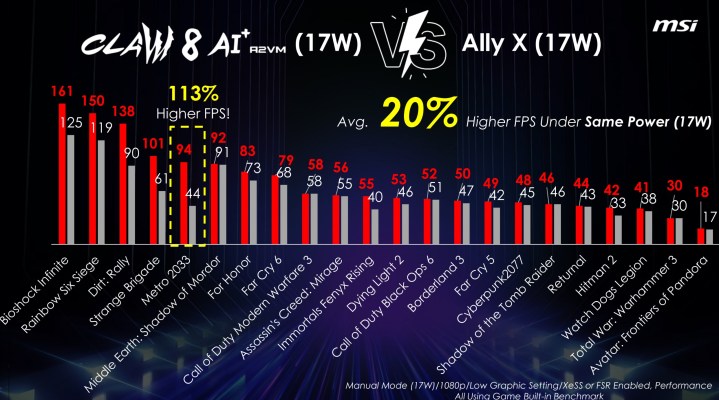
    MSI also claims it surpasses the ROG Ally X in performance. In its 17W mode, it allegedly offers 20% greater average performance, and with MSI’s dynamic AI Engine settings, it boasts a 28% increase. Impressively, MSI asserts that it delivers 7% more performance at 17W compared to the ROG Ally X at 30W, along with 44% longer battery life.

    Performance comparison between the MSI Claw 8 AI+ and Asus ROG Ally X.
    MSI

    While these claims are bold, we’ve seen MSI make grand statements before. I’m reserving judgment until the handheld actually arrives, and I recommend you do the same. The original MSI Claw often consumed more power while providing less performance compared to the initial ROG Ally, meaning MSI has significant work ahead of it.

    Nevertheless, being able to play a portion of Black Myth: Wukong is impressive. It may not be enough to earn a full-fledged endorsement, but it certainly piqued my interest. I truly hope MSI’s performance claims hold true once the device is officially available.

    MSI is releasing two versions of the handheld: the Claw 8 AI+ and the Claw 7 AI+. The latter retains the original Claw’s design but features the internals of the Claw 8 AI+. Priced at $899 and $799 respectively, MSI needs to not only match Asus’s offerings with the ROG Ally X but also exceed them given the higher price tags.

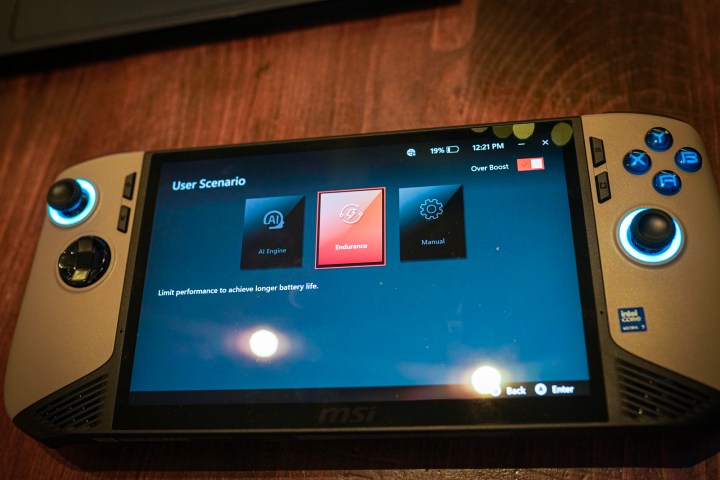
    Power settings on the MSI Claw 8 AI+.
    Jacob Roach / Digital Trends

    What concerns me is the release strategy. Both handhelds are currently available for preorder, with an official sale date set for December 26. MSI has informed me that no reviews will be released on launch day. Like the original Claw, this handheld will hit the shelves without a review program for media outlets.

    This means that initial feedback will come solely from consumers taking a chance with their own funds—a potential red flag in tech product launches. If you’re considering the Claw 8 AI+, I suggest waiting for a while after its release to see insights from independent reviewers before making a decision.

  • Is OnePlus better than Pixel?

    Is OnePlus better than Pixel?

    The smartphone market is a battlefield fiercely contested by various brands, each offering unique features and experiences. Among them, OnePlus and Google’s Pixel line stand out for their quality and innovation. A question often arises: Is OnePlus better than Pixel? This analysis will delve into various aspects of both brands to help you make an informed choice.

    Design and Build Quality

    OnePlus Design Elements

    • Premium Materials: OnePlus devices often boast a premium feel, using materials such as glass and aluminum.
    • Sleek Aesthetics: The designs lean towards modern and minimalist, with vibrant color options.

    Pixel Design Features

    • Distinctive Look: The Pixel series features a unique design, often characterized by a two-tone color scheme and a prominent camera bar.
    • Functional Ergonomics: Google focuses on usability, ensuring that devices are comfortable to hold and operate.

    Display Technology

    OnePlus Display Advantages

    • High Refresh Rate: Many OnePlus models come with 90Hz to 120Hz refresh rates, providing smoother scrolling and gaming experiences.
    • AMOLED Panels: The use of AMOLED technology ensures vibrant colors and deep blacks.

    Pixel Display Characteristics

    • Accurate Color Reproduction: Pixels are known for their natural color tones that appeal to photographers and content creators.
    • Adaptive Display Features: Google incorporates adaptive brightness and color profiles that adjust according to the ambient light.

    Camera Performance

    OnePlus Camera Capabilities

    • Versatile Camera Systems: OnePlus devices typically offer multiple lenses, including ultra-wide and macro cameras.
    • Strong Performance: While OnePlus cameras have improved, especially in recent models, they may not match Pixel’s exceptional low-light capabilities.

    Pixel Camera Excellence

    • Software Integration: The Pixel’s photo processing software is lauded for producing stunning images, particularly in low-light conditions.
    • AI Features: Google’s computational photography utilizes machine learning to enhance images beyond traditional hardware limits.

    Software Experience

    OnePlus Software

    • OxygenOS Advantage: OnePlus utilizes its OxygenOS, which is based on Android and known for its speed and customization options.
    • Regular Updates: OnePlus commits to timely software updates, although they may not match Google’s schedule.

    Pixel Software Benefits

    • Pure Android Experience: Pixels run stock Android, providing a clean and unmodified interface.
    • Fast Software Updates: Google provides timely updates and security patches directly to Pixel devices, ensuring the latest features and security.

    Battery Life and Charging

    OnePlus Battery Features

    • Fast Charging Technology: OnePlus is famous for its Warp Charge technology, allowing rapid charging times that can fully charge a phone in under an hour.
    • Good Battery Capacity: Most OnePlus smartphones tend to have larger battery capacities, ensuring exceptional battery life.

    Pixel Battery Capabilities

    • Adaptive Battery Management: Google’s Adaptive Battery can extend battery life by learning user habits and prioritizing power usage accordingly.
    • Moderate Charging Speed: While charging speed is decent, it typically doesn’t match OnePlus’s lightning-fast capabilities.

    Price and Value

    OnePlus Pricing

    • Affordable Flagships: OnePlus is known for offering flagship features at more competitive prices compared to other brands, including Google.
    • Diverse Range: A good variety of models across different price points caters to budget-conscious consumers.

    Pixel Pricing

    • Premium Pricing for Features: Pixels are often priced similarly to other flagship devices, reflecting their unique features and capabilities.
    • Value in Software Experience: The value is especially notable for users looking for the latest Android features and updates directly from Google.

    Ecosystem Integration

    OnePlus Ecosystem

    • Expanding Gadgets: OnePlus has been broadening its ecosystem, including wearables and smart home products, enhancing overall connectivity.
    • Compatibility: OnePlus devices generally offer good compatibility with other Android-based devices.

    Pixel Ecosystem

    • Google Services: Pixels seamlessly integrate with Google services, making the experience smoother for users already entrenched in the Google ecosystem.
    • Smart Home Compatibility: The Pixel also provides excellent compatibility with Google Home products and Nest devices.

    Conclusion

    Choosing between OnePlus and Pixel boils down to personal preferences and priorities. Both brands have their strengths and weaknesses across various categories, whether it’s photography, software experience, or pricing. By assessing your needs, you can find the device that fits you best in today’s competitive smartphone landscape.

  • Is Oculus Quest 2 worth the money?

    The gaming landscape has evolved immensely, especially with the rise of virtual reality (VR). One of the standout products in this arena is the Oculus Quest 2. Launched by Facebook Technologies, LLC, this device aims to provide an accessible yet immersive experience for both casual and hardcore gamers. So, is it a smart investment? Let’s delve into the details.

    Key Features of Oculus Quest 2

    Before assessing its value, understanding its features is crucial. The Oculus Quest 2 comes packed with several appealing qualities:

    High-Resolution Display

    • Enhanced Clarity: With a resolution of 1832 x 1920 per eye, visuals are crisp and detailed.
    • Refresh Rate Options: Supports up to 120 Hz, creating a smoother experience in fast-paced games.

    Standalone Functionality

    • No External Hardware Required: Unlike traditional VR setups, the Quest 2 does not need a gaming PC or console.
    • Wireless Freedom: Offers the ability to roam without being tethered by cables, allowing for a more immersive experience.

    Diverse Game Library

    • Variety of Genres: From action-packed shooters to tranquil exploration games, the Oculus Store has something for everyone.
    • Regular Updates: New titles and experiences are frequently added, ensuring continued engagement.

    Social Features

    • Multiplayer Options: Many games allow for social interaction, enhancing the multiplayer experience.
    • Horizon Workrooms: This platform enables users to meet and collaborate in a virtual space, making it handy for remote workers.

    Performance and Comfort

    The user experience is paramount in determining the overall value of a VR headset. The Oculus Quest 2 shines in several areas:

    Processing Power

    • Qualcomm Snapdragon XR2 Chip: Provides robust performance, ensuring seamless gameplay and graphics.
    • Adaptive Graphic Settings: Automatically adjusts to optimize performance based on the game’s requirements.

    Comfort and Design

    • Lightweight Build: At approximately 503 grams, it can be worn for extended gaming sessions without causing fatigue.
    • Adjustable Head Strap: Allows for a personalized fit, accommodating different head sizes.

    Price and Value Comparison

    While the Oculus Quest 2 is competitively priced for a VR headset, evaluating its cost-effectiveness is essential.

    Pricing Breakdown

    • Base Model: Typically starts around $299, offering 64 GB of storage.
    • Higher Storage Option: The 256 GB model retails for approximately $399, ideal for those wanting more space for games.

    Comparing with Other VR Headsets

    • PlayStation VR: Priced similarly but requires a PlayStation console, leading to additional costs.
    • Valve Index: Offers superior build quality and tracking but at a steep price, often exceeding $999 when factoring in all components.

    What Users Say

    Customer satisfaction plays a significant role in assessing whether a product is worth its price. Here’s what many users have experienced:

    Positive Feedback

    • Immersive Gameplay: Many users rave about the sense of presence and realism in various VR experiences.
    • User-Friendly Interface: The setup process and user interface are generally considered intuitive and straightforward.

    Areas for Improvement

    • Battery Life: Some users note that the battery may not last as long as desired during intense gaming sessions.
    • User Limits: Extended play can lead to discomfort for some users, although this varies from person to person.

    Final Thoughts

    The Oculus Quest 2 stands out in the crowded VR marketplace for its combination of affordability, functionality, and adaptability. For individuals seeking an accessible entry into virtual reality or for seasoned players in search of a portable, standalone option, it offers significant value. While certain aspects may need refinement, the overall experience and game library make it a worthy investment for enthusiasts eager to explore the possibilities of virtual reality.

  • Is Oculus 2 worth the money?

    Is Oculus 2 worth the money?

    The Oculus Quest 2, a standalone virtual reality headset, has made waves in the tech world since its release. With an affordable price tag and impressive features, it raises a common question among potential buyers: Is the Oculus Quest 2 worth the investment? Let’s dive deeper into its features, performance, and overall value to help you make an informed decision.

    Key Features of Oculus Quest 2

    Standalone Functionality

    One of the standout aspects of the Oculus Quest 2 is its ability to function independently without the need for a gaming PC or console. Aquí son las características clave:

    • All-in-One Experience: You can enjoy games and apps directly on the headset.
    • Portable Design: Lightweight and easy to transport, perfect for on-the-go gaming.
    • Wireless Connectivity: Enjoy a free range of movement without being tethered by cables.

    Display and Performance

    The Oculus Quest 2 comes equipped with impressive hardware specifications, which enhance the gaming experience.

    • High Resolution: Offers a resolution of 1832 x 1920 per eye, creating sharp images and vivid colors.
    • Refresh Rate: Supports up to 120 Hz, resulting in smoother visuals during fast-paced games.
    • Powerful Processor: Utilizes the Qualcomm Snapdragon XR2, ensuring seamless performance.

    Extensive Game Library

    Another factor contributing to the value of the Oculus Quest 2 is its diverse selection of games and experiences.

    • Variety of Titles: From action games to immersive simulations, there’s something for everyone.
    • Regular Updates: Oculus frequently adds new games and experiences to its library.
    • Social VR Experiences: Engage with friends in virtual environments.

    Comfort and Usability

    Design Considerations

    When investing in a virtual reality headset, comfort and usability are crucial factors.

    • Ergonomic Design: Adjustable head straps and lightweight materials ensure comfort during long sessions.
    • Easy Setup: Simple configuration process makes it accessible to users of all experience levels.
    • Adjustable Fit: Customizable spacers for different interpupillary distances.

    User-Friendly Interface

    The Oculus Quest 2 boasts an intuitive interface that enhances the overall user experience.

    • Home Environment: A stylized virtual space where users can access their games and settings easily.
    • Voice Commands: Control the headset using voice, making navigation hassle-free.

    Pricing and Value Comparison

    While the Oculus Quest 2 provides an impressive VR experience, its pricing structure makes it stand out among other VR systems.

    Affordability

    • Competitive Price Point: Generally priced lower than many VR systems that require a gaming PC.
    • No Additional Costs: The all-in-one design eliminates the need for buying a separate console or hardware.

    Comparison to Competing Systems

    When comparing the Oculus Quest 2 to other popular VR headsets, several factors come into play.

    • Valve Index: Higher price but offers exceptional visuals and tracking.
    • HTC Vive Cosmos: More expensive and requires external sensors, making it less portable.
    • PlayStation VR: Offers a good experience but limited by console requirements.

    Longevity and Future-Proofing

    Regular Updates

    One of the benefits of investing in the Oculus Quest 2 is the ongoing software support and updates.

    • New Features: Oculus frequently rolls out updates that add new functionalities and improve performance.
    • Game Expansion: Continuous addition of new titles and experiences keeps the library fresh.

    Community and Support

    • Active User Community: Engage and share experiences with other users through forums and social media.
    • Customer Support: Oculus provides comprehensive support resources for troubleshooting and inquiries.

    Final Thoughts

    If you’re considering diving into the world of virtual reality without breaking the bank, the Oculus Quest 2 certainly represents a smart investment. With its robust features, impressive performance, and wide array of available content, it offers significant value for both newcomers and seasoned VR enthusiasts alike. Whether you’re interested in gaming, fitness, or social interactions, the Oculus Quest 2 opens the door to a rich virtual experience that is hard to overlook.

  • What does DSLR mean for a camera?

    What does DSLR mean for a camera?

    Digital Single-Lens Reflex (DSLR) cameras have become tremendously popular among both amateur and professional photographers. These versatile devices offer a unique combination of advanced features, image quality, and adaptability, making them a go-to choice for capturing stunning images.

    Understanding the Basics of DSLR

    What is a DSLR?

    A DSLR camera is a type of digital camera that uses a mirror mechanism to direct light from the lens to an optical viewfinder. This design provides real-time previews of the scene, allowing photographers to frame their shots accurately.

    Key Components of a DSLR

    • Single-Lens Reflex Mechanism: The key feature of a DSLR is the reflex mirror, which reflects light from the lens up into an optical viewfinder. When you take a photo, the mirror flips up, allowing light to reach the image sensor.

    • Interchangeable Lenses: DSLRs have the ability to swap lenses, offering different focal lengths and aperture options based on shooting needs.

    • Optical Viewfinder (OVF): Unlike digital cameras that use electronic displays, DSLRs utilize an optical viewfinder that provides a clear, real-time view of the scene through the lens.

    • Image Sensor: DSLRs are equipped with either APS-C or full-frame sensors, which significantly impact image quality and depth of field.

    Benefits of Using a DSLR

    Superior Image Quality

    • High Resolution: DSLRs typically come with large sensors that provide high-resolution images, perfect for large prints and detailed captures.

    • Low Light Performance: Many DSLRs perform exceptionally well in low light, thanks to larger pixels that can capture more light.

    Versatility

    • Wide Range of Lenses: The ability to switch lenses makes DSLRs versatile for various photography styles, from wide-angle landscapes to close-up portraits.

    • Customizable Settings: Photographers can adjust settings like ISO, shutter speed, and aperture, providing greater control over image outcomes.

    Advanced Features

    • Faster Autofocus: Many DSLRs offer advanced autofocus systems that allow for quick and accurate focusing, ideal for fast-moving subjects.

    • Manual Control: Photographers can take full control of their camera settings, which is vital for those who want to experiment with creative techniques.

    Considerations When Choosing a DSLR

    Size and Weight

    • Portability: Compared to compact digital cameras, DSLRs tend to be bulkier and heavier. This might be a concern for travel photographers or those who prefer lightweight gear.

    Price Range

    • Investment: While entry-level DSLRs can be reasonably priced, high-end models and compatible lenses can be quite costly. Budgeting is important if you plan to invest in a full DSLR system.

    Learning Curve

    • Complexity: For beginners, DSLRs can be intimidating due to their vast array of features and settings. It may require some time to become proficient.

    Maintenance

    • Regular Care: DSLRs require regular maintenance, such as sensor cleaning and lens care, to ensure optimal performance over time.

    Popular DSLR Brands

    • Canon: Known for its extensive range and variety of lenses and accessories.

    • Nikon: Praised for its user-friendly interface and robust autofocus systems.

    • Sony: While primarily focused on mirrorless cameras, Sony still offers a strong DSLR line, especially in the full-frame category.

    • Pentax: A solid choice for outdoor enthusiasts, known for weather-sealed bodies.

    By understanding what a DSLR camera offers, photographers can make informed decisions on their equipment choices, ensuring that they capture the best images possible, regardless of their skill level or photographic goals.

  • Why is it so hard to get rid of an old TV?

    Why is it so hard to get rid of an old TV?

    As technology continually evolves, many of us find ourselves faced with the dilemma of what to do with our old television sets. While it may seem straightforward to dispose of them, a variety of factors complicate the process. Let’s explore why getting rid of an old TV can be such a challenge.

    The Environmental Impact

    When disposing of an old television, the environmental considerations can be significant.

    Harmful Materials

    Many older TVs, especially CRT models, contain hazardous substances that require careful handling:

    • Lead: Found in cathode ray tubes, lead poses health risks if not disposed of properly.
    • Cadmium: Present in some circuit boards and batteries, cadmium can contaminate soil and water.
    • Brominated flame retardants: These chemicals can leach into the environment and are linked to various health concerns.

    E-Waste Growth

    The surge in electronic waste (e-waste) is a growing global issue. In the United States alone, millions of tons of e-waste are generated each year, making responsible disposal vital. With aging TVs contributing to this problem, the challenge intensifies.

    Lack of Convenient Disposal Options

    Many consumers find themselves frustrated with the limited disposal options available for old TVs.

    Local Regulations

    Different cities and states have varying rules regarding TV disposal:

    • Some areas have strict bans on placing electronics in regular trash.
    • Others offer recycling events or designated drop-off locations, but these may not be convenient.

    Collection Fees

    Some recycling programs might charge fees, making it costly to dispose of an old television. This can deter individuals from seeking responsible methods of disposal, leading to discarded devices ending up in landfills.

    The Emotional Attachment

    For many, a television is more than just an appliance; it can hold sentimental value.

    Memories Associated with the TV

    • Family Gatherings: Watching favorite shows as a family can create lasting memories.
    • Milestones: Celebrations like game nights or movie marathons often revolve around the TV.

    This emotional connection can make the decision to part ways with an old set more difficult than it seems.

    Concerns About Upgrading

    People may also worry about upgrading to new technology, unsure if they’ll enjoy it as much as their old, trusty television. This hesitation can prolong the process of letting go.

    The Market for Old TVs

    Surprisingly, there may be potential avenues to explore for old TVs, even if they’re outdated.

    Resale and Donation Opportunities

    While it might seem counterintuitive, there are individuals and organizations interested in older TVs:

    • Charitable organizations: Some might accept donations, especially if the TV is still functional.
    • Online marketplaces: Websites like Craigslist or Facebook Marketplace can be used to list old TVs for sale at low prices.

    Vintage Appeal

    Retro televisions are experiencing newfound popularity. Some collectors actively seek out older models for nostalgia or style. This trend can create opportunities for those looking to sell their old sets.

    Conclusion

    The complexities of disposing of an old TV stem from a blend of environmental concerns, convenience, emotional factors, and potential market opportunities. Understanding these challenges can help individuals navigate the process more effectively while contributing positively to environmental sustainability. Whether opting for recycling, resale, or donation, each choice plays a part in addressing the larger issue of e-waste.

  • Is the Galaxy 22 Ultra waterproof?

    Is the Galaxy 22 Ultra waterproof?

    Understanding the Waterproof Capabilities of the Galaxy S22 Ultra

    The Galaxy S22 Ultra has gained considerable popularity for its impressive features, but one question that frequently arises among potential buyers is whether this flagship smartphone is waterproof. Let’s delve into its specifications and clarify what you can expect in terms of water and dust resistance.

    IP Rating Explained

    One of the primary indicators of a smartphone’s resistance to water and dust is its IP rating. The Galaxy S22 Ultra has an IP68 rating, which is a standard measure used to define the level of protection provided against dust and liquid ingress.

    What Does IP68 Mean?

    • IP: Stands for "Ingress Protection," which is a classification system used to define the effectiveness of protection against environmental elements.
    • 6: The first digit signifies dust resistance on a scale from 0 (no protection) to 6 (totally dust-tight).
    • 8: The second digit indicates water resistance, ranging from 0 (no protection) to 9 (protection against water under pressure). An IP68 rating means the device is protected against continuous immersion in water over 1 meter, specifically up to 1.5 meters for a duration of 30 minutes.

    Real-World Water Resistance

    With the IP68 rating, the Galaxy S22 Ultra is built to withstand accidental splashes or brief immersion in water. However, users should keep in mind a few important factors when it comes to using the device around water.

    Key Considerations

    • Freshwater vs. Saltwater: While the phone is designed to resist water ingress, using it in saltwater or chlorinated pools can lead to corrosion over time. It’s best to keep the device away from these types of water.
    • Temperature: Extreme temperatures can impact the seals that protect the smartphone from water damage. It’s advisable to avoid exposing the phone to very high or low temperatures for prolonged periods, especially in wet conditions.
    • Warranty Limitations: Manufacturers often do not cover water damage under warranty. So even with an IP68 rating, if the device suffers water-related issues, it may not be eligible for repair or replacement.

    Tips for Protecting Your Galaxy S22 Ultra

    If you plan to take your Galaxy S22 Ultra near water, consider the following advice to maximize its longevity:

    • Use a Waterproof Case: For activities like swimming or extensive outdoor use, invest in a reliable waterproof case for added protection.
    • Avoid Diving: The smartphone is rated for immersion, but it’s not intended for diving or prolonged submersion beyond its specified limits.
    • Dry Off: After exposure to water, make sure to wipe off the phone and remove any cases or covers to ensure it dries properly.

    Conclusion

    While the Galaxy S22 Ultra indeed comes with an IP68 rating, making it resistant to dust and water, it’s essential to exercise caution to ensure its longevity. Keeping the smartphone away from harsh conditions and using proper protective accessories can help maintain its pristine condition, even in the presence of water.

  • How is MacBook Pro better than Air?

    How is MacBook Pro better than Air?

    When it comes to choosing between Apple’s MacBook Pro and MacBook Air, users often find themselves weighing various factors to determine which model best suits their needs. While both laptops belong to the same family and share some core features, the MacBook Pro presents several noticeable advantages that set it apart. Let’s delve into how the MacBook Pro outshines the Air in critical aspects.

    Performance

    Superior Hardware

    • Processor Options: The MacBook Pro typically comes equipped with higher-end processors. The latest models often feature Apple’s M-series chips, which deliver enhanced performance and efficiency, making them ideal for demanding tasks like video editing or software development.
    • Graphics Capability: The Pro models usually include advanced graphics cards, catering to creative professionals who require robust graphic performance for tasks like 3D rendering and game development.

    Enhanced Memory and Storage

    • More RAM: MacBook Pro models often offer the option for larger RAM configurations, which can significantly improve multitasking performance, especially when running resource-heavy applications.
    • Larger SSD Options: Users can also benefit from higher storage capacities in the Pro models, accommodating extensive projects and large file collections without the need for external drives.

    Display Quality

    Brighter and More Colorful

    • Liquid Retina XDR Displays: The latest MacBook Pro models feature Liquid Retina XDR displays, providing a stunning visual experience. This advanced technology offers higher brightness levels and better contrast ratios, making it perfect for HDR content creation.
    • Larger Screen Sizes: The availability of larger display options, including 14-inch and 16-inch models, allows for a more immersive experience, ideal for graphic design, video editing, and other visual tasks.

    Battery Life

    • Efficiency with Performance: While both laptops boast impressive battery life, the MacBook Pro’s efficiency in handling demanding applications doesn’t compromise its longevity. Users often find that they can perform intensive tasks for hours without reaching for a charger.

    Thermal Management

    Advanced Cooling System

    • Heat Management: The MacBook Pro is designed with better thermal management systems, including larger heat sinks and additional fans. This allows the laptop to maintain performance under demanding workloads without throttling.

    Build Quality and Design

    Durability

    • Professional Build: The MacBook Pro is built with premium materials, which contribute to a more robust and durable frame. This quality is particularly appealing for professionals who often travel or work in versatile environments.

    Port Selection

    More Connectivity Options

    • Additional Ports: The MacBook Pro offers a wider variety of ports, including HDMI, SD card slots, and multiple Thunderbolt/USB 4 ports. This enhances the laptop’s versatility, allowing users to connect an array of devices without needing additional adapters.

    Target User Base

    Designed for Professionals

    • Targeted Features: The MacBook Pro caters specifically to professionals in creative fields, such as videography, photography, and software development. It includes features and specifications designed to meet the high demands of these industries.

    Ideal for Heavy Duty Work

    • Performance Under Pressure: Whether you’re compiling large amounts of data or working on extensive graphic projects, the MacBook Pro is designed to handle heavy workloads seamlessly.

    Summary of Key Differences

    Feature MacBook Air MacBook Pro
    Processor M1/M2 M1 Pro/M1 Max
    RAM Options Up to 16GB Up to 64GB
    Display Retina Display Liquid Retina XDR
    Battery Life Excellent Excellent under load
    Ports Limited Varied, including HDMI
    Target User Casual users Professionals

    In summary, while the MacBook Air is a fantastic device for everyday use, the MacBook Pro excels in performance, display quality, thermal management, and connectivity options, making it a superior choice for professionals and power users. Whether you’re engaged in creative projects or require intensive computational tasks, the MacBook Pro is equipped to handle them with ease.

  • Get Ready For Google’s New AI Mode To Compete With ChatGPT

    Get Ready For Google’s New AI Mode To Compete With ChatGPT

    AI Overviews being displayed on Google Search.
    Google

    Google is making a significant move as it prepares to roll out a new “AI Mode” for its search engine, designed to offer an experience similar to that of the Gemini AI chatbot interface.

    A report from The Information indicates that this AI Mode will be accessible through a dedicated tab in the search results menu, which currently features options like “All,” “Images,” “Videos,” and “Shopping.” This mode aims to enhance user accessibility and create a more intuitive experience, allowing users to pose follow-up inquiries related to the search results through a chatbot interface, according to the report.

    Earlier disclosures from Android Authority found evidence of the AI Mode feature in a beta version of the Google Search mobile app as of early December. Screenshots revealed an icon representing AI Mode as a magnifying glass combined with a plus sign. Furthermore, 9to5Google previously reported that the AI Mode would include a voice input feature, enabling users to ask questions verbally.

    While Google hasn’t publicly discussed this new development, it is clear that the company is in direct competition with OpenAI, the organization behind the ChatGPT chatbot. Following the launch of ChatGPT Search in late October, many noted that Google Search could face its most significant competition yet, given the rapid rise in ChatGPT’s popularity.

    Research has shown that ChatGPT attracts considerable traffic, with around 3.7 billion visits to its site globally, in contrast to Google Chrome’s 3.45 billion users. This has led to speculation that OpenAI might develop an AI-powered browser to rival Google, although OpenAI executives have denied such plans. Meanwhile, OpenAI is focusing on enhancing its AI capabilities with a target of reaching 1 billion ChatGPT users by 2025 and has recently unveiled various AI advancements as part of its “12 days of OpenAI” initiative.

    On the other hand, analysts have pointed out that Google’s recent advancements in its search engine have primarily concentrated on AI-generated summaries. The company has begun to extend support for this feature into several new markets. To date, Google’s AI strategy seems to involve integrating its traditional features into Gemini, as opposed to the reverse.


  • Do all laptops use the same charger?

    Do all laptops use the same charger?

    With the convenience of portability, laptops have become an essential tool for work, study, and entertainment. However, this raises an important question: do all laptops use the same charger? Understanding laptop charging standards is crucial, especially when dealing with multiple devices.

    Understanding Laptop Chargers

    Laptop chargers serve a specific function: they convert wall outlet electricity to a form that the laptop can safely use. However, not all chargers are created equal. They vary significantly in terms of voltage, amperage, and connection type.

    Common Charger Specifications

    • Voltage (V): This is the electrical potential supplied to the laptop. Most laptops require a specific voltage to charge effectively, typically ranging from 15V to 20V.
    • Amperage (A): This refers to the current the charger can provide. A higher amperage can charge the laptop faster but must match the laptop’s requirements.
    • Wattage (W): Wattage is the product of voltage and amperage. Laptop chargers usually range from 30W for lightweight models to over 100W for high-performance laptops.

    Different Types of Laptop Chargers

    Laptops are categorized into various types based on their design and functionality, and correspondingly, their chargers come in different types.

    Connector Types

    • Barrel Connectors: This is the most common type, featuring a cylindrical plug.
    • USB-C: Modern laptops are increasingly adopting USB-C, allowing for universal charging and data transfer.
    • Proprietary Connectors: Some manufacturers use unique connectors designed to work only with their products.

    Brand-Specific Chargers

    Laptops made by different manufacturers often have unique charging specifications:

    • Apple: MacBooks typically use USB-C chargers with a specific voltage and wattage.
    • Dell: Their laptops may use barrel connectors or USB-C, with voltage and amperage varying between models.
    • HP & Lenovo: Both brands offer a mix of barrel and USB-C options with varying specifications.

    Why Compatibility Matters

    Using the wrong charger can lead to several issues, including:

    • Overheating: A charger with the wrong voltage can cause the laptop to overheat.
    • Insufficient Power: If the charger does not provide enough wattage, the laptop may not charge or could drain while in use.
    • Device Damage: Prolonged use of an incompatible charger can potentially damage the laptop’s battery and other components.

    Universality in Some Cases

    While not all laptops share the same charger, there are some cases where compatibility exists, particularly with newer technology:

    • USB-C Charging: Many laptops now support charging via USB-C, making it easier to use a single charger for multiple devices.
    • Power Delivery (PD): This protocol allows for smarter charging, enabling devices to communicate with the charger to draw the appropriate amount of power.

    Summary

    While the idea of a universal laptop charger sounds convenient, the reality is far more complex. Chargers are specialized components tailored to the specifications of individual laptops or brands. It’s essential to use the charger that matches your device’s specifications to ensure optimal performance and safety.

  • Exciting CES 2025 Launch Leak Just Happened

    Exciting CES 2025 Launch Leak Just Happened

    CES 2025
    CES 2025
    Dive into our extensive CES coverage here
    Updated less than 1 minute ago

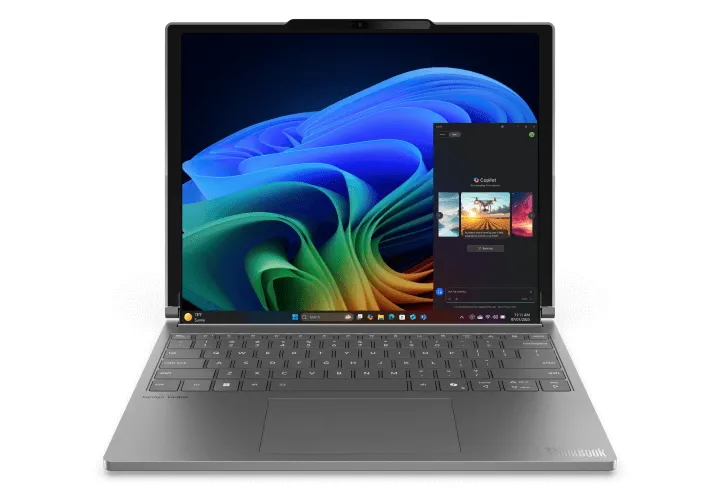
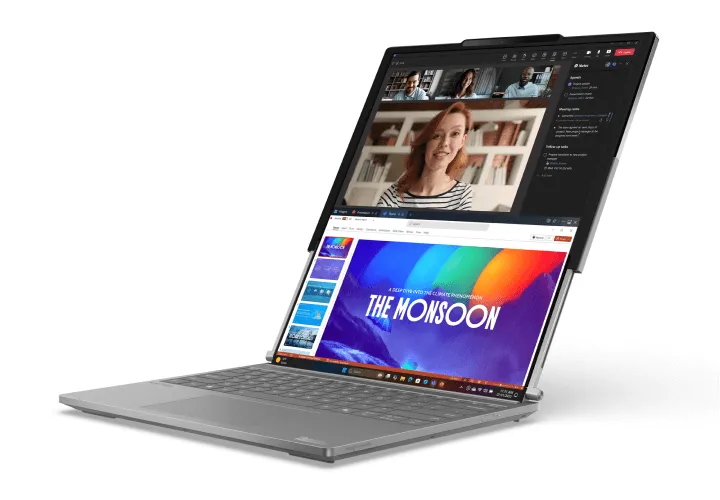
    Lenovo made waves last year with a concept for a rollable laptop showcased at MWC 2023, but it was merely a prototype back then. According to a recent leak reported by The Verge and Evan Blass, that idea is set to materialize at CES 2025 in just a few weeks.

    The Lenovo device, which initially appears as a standard laptop, transforms dramatically with the push of a button located on the side. The additional screen rolls out from beneath the keyboard, gradually expanding until it effectively presents two screens stacked atop each other.

    Leaked image of Lenovo rollable laptop
    Leaked image of the potential rollable laptop Evan Blass

    The extension process is somewhat gradual, and a noticeable crease is present when the display is fully expanded; however, it remains unclear whether these features are solely characteristic of the prototype. The leaked photographs suggest that refinements may have been implemented since the initial reveal.

    Notably, the leaked model boasts a traditional hinge design, a departure from the prototype’s aesthetics. Although details concerning specifications remain undisclosed, the original prototype featured a resolution of 2024 x 2368 pixels upon full extension, effectively resembling a vertical display. In a market inundated with ultrawide screens and expansive monitors, many users are increasingly challenged by the confines of conventional laptops, making Lenovo’s innovative trials particularly appealing.

    The durability and practical application of this product remain uncertain. However, given Evan Blass’s reliable track record of accurate leaks, we can anticipate learning more during CES 2025 next month.

    Lenovo is known for its experimental approach, contrasting with companies like Apple, which tends to release products only after achieving near perfection in their development. Each year, Lenovo introduces unconventional PC designs to gauge public interest and assess the viability of novel ideas.

    Lenovo rollable laptop.
    Evan Blass

    For instance, Lenovo introduced the ThinkPad X1 Fold in 2020, which features a foldable OLED display that operates with a separate keyboard. The company also released a second-generation model last year, in addition to other innovative concepts like the ThinkBook Plus Gen 4, equipped with an e-ink screen on the lid, and the ThinkBook Plus Gen 5, convertible into an Android tablet.

    While foldable devices have garnered attention for years, rollable technology brings us back to uncharted territory.