• About Us
  • Contact Us
  • Advertise
  • Privacy Policy
  • Guest Post
No Result
View All Result
Digital Phablet
  • Home
  • NewsLatest
  • Technology
    • Education Tech
    • Home Tech
    • Office Tech
    • Fintech
    • Digital Marketing
  • Social Media
  • Gaming
  • Smartphones
  • AI
  • Reviews
  • Interesting
  • How To
  • Home
  • NewsLatest
  • Technology
    • Education Tech
    • Home Tech
    • Office Tech
    • Fintech
    • Digital Marketing
  • Social Media
  • Gaming
  • Smartphones
  • AI
  • Reviews
  • Interesting
  • How To
No Result
View All Result
Digital Phablet
No Result
View All Result

Home » How to Upgrade the Max M.2 Memory on HP 15-ef2127wm

How to Upgrade the Max M.2 Memory on HP 15-ef2127wm

Fahad Khan by Fahad Khan
April 15, 2026
in How To
Reading Time: 1 min read
A A
ADVERTISEMENT

Select Language:

If you want to give your laptop a big boost in storage, adding a new NVMe SSD is a great option. The good news is, there’s usually no strict limit to how much storage you can add, as long as the SSD is single-sided and will fit into your laptop’s slot.

ADVERTISEMENT

For example, if you own an HP 15-ef2127wm, you can upgrade to an NVMe SSD with up to 4 TB of space. That’s much more than the 256 GB drive it originally came with, giving you plenty of room for files, photos, videos, and more.

To upgrade, you’ll need to open up your laptop and replace the existing drive with the larger SSD. There are plenty of helpful videos out there that show exactly how to do this for your specific model. One useful link is a detailed teardown video for the HP 15 series, which guides you step-by-step through removing and replacing parts. You can find it here: Removing & replacing parts for HP 15-ef0000 Laptop PC.

Before you start, make sure to check that the SSD you choose is compatible with your laptop. Visiting a trusted retailer’s website like Crucial’s can help you find the right fit. They offer NVMe SSDs up to 4 TB that will work with your notebook.

ADVERTISEMENT

Upgrading your SSD is usually straightforward, but if you’re not comfortable opening your laptop, consider seeking help from a professional technician. With a new, larger drive, your laptop will feel almost like new with all that extra storage!

ChatGPT ChatGPT Perplexity AI Perplexity Gemini AI Logo Gemini AI Grok AI Logo Grok AI
Google Banner
ADVERTISEMENT
Fahad Khan

Fahad Khan

A Deal hunter for Digital Phablet with a 8+ years of Digital Marketing experience.

Related Posts

There Are 18 Countries in West Asian Region 

 Georgia
 Armenia
 Azerbaijan
 Tur
Infotainment

Top 18 Countries in West Asia You Should Know

June 29, 2026
How to Install a Cooler on HP 30L with AM4 Ryzen CPU
How To

How to Install a Cooler on HP 30L with AM4 Ryzen CPU

June 29, 2026
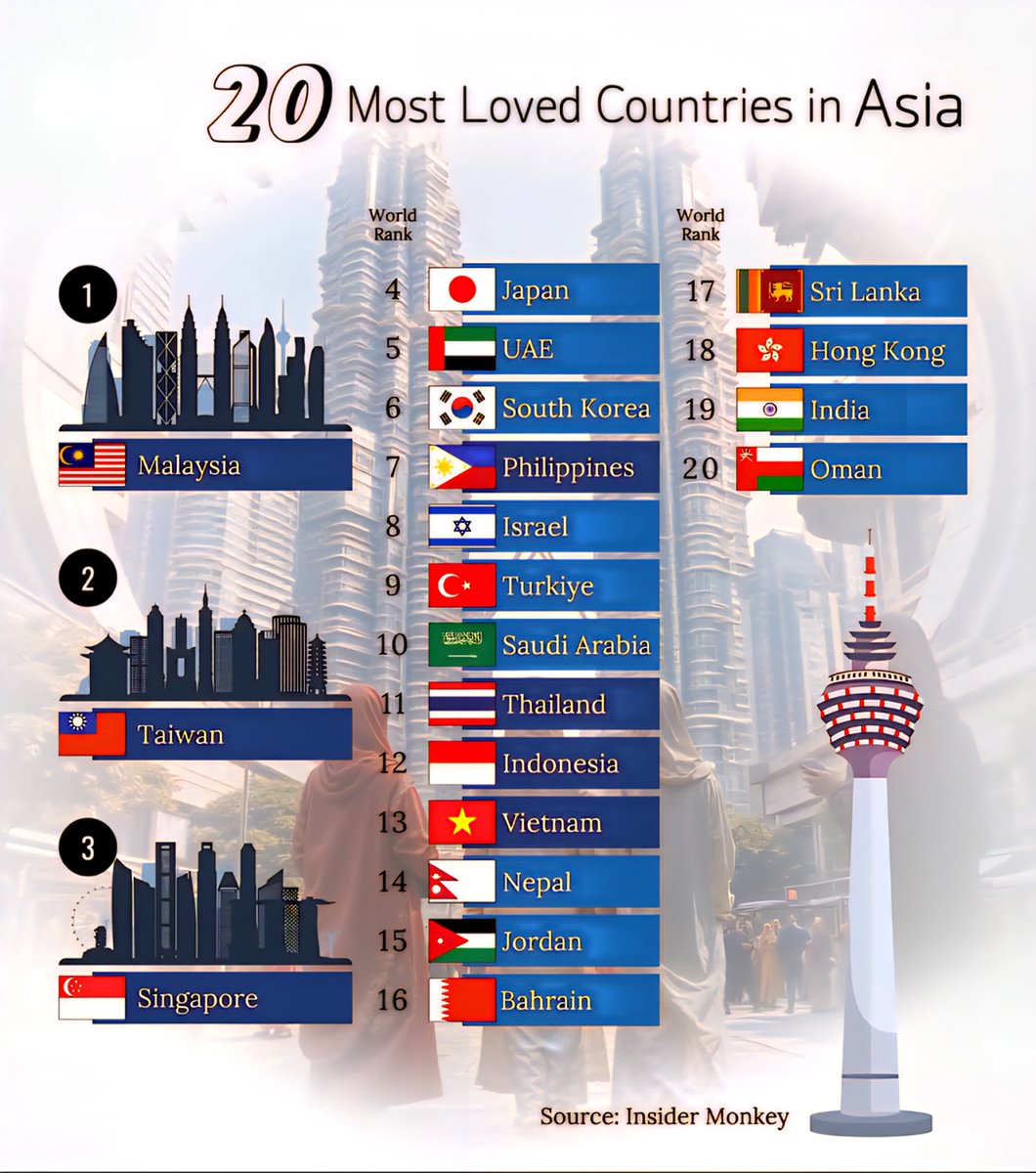
Top 20 Most Loved Countries in Asia 

❶  Malaysia
❷  Taiwan
❸  Singapore
❹  Japa
Infotainment

Top 20 Most Loved Countries in Asia

June 29, 2026
How to Fix AWS Quick Data Preview Issue for Iceberg Tables in Athena
How To

Troubleshooting Missing AWS Digital Badge on Credly After 13 Days

June 28, 2026
Next Post
How to Achieve the Perfect Corpse in Graveyard Keeper by Solving Challenges

How to Achieve the Perfect Corpse in Graveyard Keeper by Solving Challenges

  • About Us
  • Contact Us
  • Advertise
  • Privacy Policy
  • Guest Post

© 2026 Digital Phablet

No Result
View All Result
  • Home
  • News
  • Technology
    • Education Tech
    • Home Tech
    • Office Tech
    • Fintech
    • Digital Marketing
  • Social Media
  • Gaming
  • Smartphones

© 2026 Digital Phablet