• About Us
  • Contact Us
  • Advertise
  • Privacy Policy
  • Guest Post
No Result
View All Result
Digital Phablet
  • Home
  • NewsLatest
  • Technology
    • Education Tech
    • Home Tech
    • Office Tech
    • Fintech
    • Digital Marketing
  • Social Media
  • Gaming
  • Smartphones
  • AI
  • Reviews
  • Interesting
  • How To
  • Home
  • NewsLatest
  • Technology
    • Education Tech
    • Home Tech
    • Office Tech
    • Fintech
    • Digital Marketing
  • Social Media
  • Gaming
  • Smartphones
  • AI
  • Reviews
  • Interesting
  • How To
No Result
View All Result
Digital Phablet
No Result
View All Result

Home » How To Address CMOS Errors and Battery Issues on Your Laptop

How To Address CMOS Errors and Battery Issues on Your Laptop

Fahad Khan by Fahad Khan
June 6, 2026
in How To
Reading Time: 1 min read
A A
How To Address CMOS Errors and Battery Issues on Your Laptop
ADVERTISEMENT

Select Language:

When you replace your laptop battery with a new one, it’s a good idea to run a battery check to make sure it’s a genuine HP battery. Keep in mind that the battery might not display “HP” as the brand, since HP sources batteries from different manufacturers. The battery report provides helpful information, including whether the battery has been used before and if it has the right amount of amperage. You can also compare your current battery to the new one to see if they match.

ADVERTISEMENT

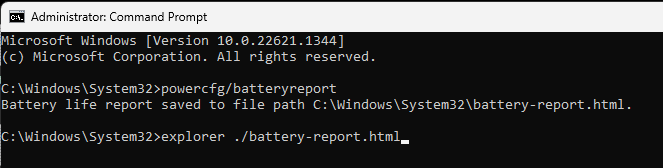
To generate the battery report, you’ll need to open the command prompt with administrator rights. Once open, type in the command shown below and press Enter:

powercfg /batteryreport

After running this command, a detailed report will be generated, usually saved in your user folder. The report contains information such as the battery’s health status and cycle count. Since batteries typically last around five years but may wear out sooner if used heavily for gaming or other demanding tasks, checking the health regularly is a smart move.

ADVERTISEMENT

If you haven’t already, consider calibrating your battery. This process helps improve its accuracy and longevity. You should do the battery report both before and after calibration, then save and compare the results to monitor any improvements or issues.

If you’re unsure about the results or need help with calibration steps, feel free to ask. Regularly checking your battery’s health can prevent surprises and keep your device running smoothly.

ChatGPT ChatGPT Perplexity AI Perplexity Gemini AI Logo Gemini AI Grok AI Logo Grok AI
Google Banner
ADVERTISEMENT
Fahad Khan

Fahad Khan

A Deal hunter for Digital Phablet with a 8+ years of Digital Marketing experience.

Related Posts

Trump Confronts GOP Pushback Amid Midterm Challenges
News

Trump Confronts GOP Pushback Amid Midterm Challenges

June 6, 2026
World's Top 100 Biggest Economies in 2026

1.  China - $43.49 Trillion
2.  Unite
Infotainment

Top 100 Biggest Economies Worldwide in 2026

June 6, 2026
Top 25 Greatest Footballers of the 21st Century 

1.  Lionel Messi
2.  Cristiano
Infotainment

Top 25 Greatest Footballers of the 21st Century

June 6, 2026
10 49 18 933 960 720.jpg
Smartphones

OnePlus Turbo 6X Pro: Specs, Price, Release Date & More!

June 6, 2026
Next Post
World's Top 100 Biggest Economies in 2026

1.  China - $43.49 Trillion
2.  Unite

Top 100 Biggest Economies Worldwide in 2026

  • About Us
  • Contact Us
  • Advertise
  • Privacy Policy
  • Guest Post

© 2026 Digital Phablet

No Result
View All Result
  • Home
  • News
  • Technology
    • Education Tech
    • Home Tech
    • Office Tech
    • Fintech
    • Digital Marketing
  • Social Media
  • Gaming
  • Smartphones

© 2026 Digital Phablet