• About Us
  • Contact Us
  • Advertise
  • Privacy Policy
  • Guest Post
No Result
View All Result
Digital Phablet
  • Home
  • NewsLatest
  • Technology
    • Education Tech
    • Home Tech
    • Office Tech
    • Fintech
    • Digital Marketing
  • Social Media
  • Gaming
  • Smartphones
  • AI
  • Reviews
  • Interesting
  • How To
  • Home
  • NewsLatest
  • Technology
    • Education Tech
    • Home Tech
    • Office Tech
    • Fintech
    • Digital Marketing
  • Social Media
  • Gaming
  • Smartphones
  • AI
  • Reviews
  • Interesting
  • How To
No Result
View All Result
Digital Phablet
No Result
View All Result

Home » AWS DMS CDC Converter Error from Postgres 18 to Oracle 19

AWS DMS CDC Converter Error from Postgres 18 to Oracle 19

Emily Smith by Emily Smith
June 6, 2026
in How To
Reading Time: 2 mins read
A A
How to Fix AWS Quick Data Preview Issue for Iceberg Tables in Athena
ADVERTISEMENT

Select Language:

If you’re experiencing issues with AWS Database Migration Service (DMS) when migrating data from PostgreSQL to Oracle, here are some straightforward solutions to help you fix the common errors.

ADVERTISEMENT

One of the main errors you might encounter is the ORA-24806 LOB form mismatch. This usually happens because of a character set mismatch between your source and target databases. For example, if your Oracle database uses WE8MSWIN1252 encoding and your PostgreSQL database defaults to UTF8, the difference in character sets can cause CLOB operations to fail. To resolve this, it’s best to standardize your source database to use UTF8 encoding. Then, make sure you configure your DMS source endpoint correctly, adding the right connection settings to handle character set conversion properly. This can involve specifying character set mapping parameters in your DMS endpoint settings.

Another frequent issue is the “Converter not found” error, which occurs because PostgreSQL’s WIN1252 encoding isn’t directly supported by AWS DMS. DMS expects standard PostgreSQL encodings, and WIN1252 isn’t included in the list of supported source encodings for DMS. To fix this, switch your PostgreSQL database to UTF8 encoding, which is a widely accepted standard and compatible with DMS migration tasks.

Here are some practical steps to improve your setup:

ADVERTISEMENT
  1. Switch your PostgreSQL database to UTF8 encoding. Keep your database in this encoding throughout the migration.
  2. Properly configure your DMS source endpoint. Add specific connection attributes if needed, so that character set conversions happen smoothly.
  3. Check the data types in your database, especially CLOB columns. Make sure they are compatible between PostgreSQL and Oracle to prevent mapping issues that can cause the migration task to fail.
  4. Ensure your DMS replication instance has enough resources—memory and processing power—to handle the data load. Insufficient capacity can lead to errors and slowdowns.
  5. Use CloudWatch logs to troubleshoot errors. Search for messages like “]E:” or “]W:” to find details about where and why the failure is happening. This insight can help you pinpoint whether the problem lies with source capture, target apply, or data conversion.

The root cause of many of these errors is the unsupported WIN1252 encoding in DMS. Making the switch to UTF8 on PostgreSQL and working closely with AWS Support can help you set up the character set handling properly. This approach ensures a smoother migration without data loss or errors.

For more detailed guidance, you can visit the AWS documentation on troubleshooting DMS issues here: AWS Re:Post – Troubleshoot AWS DMS replication task failures.

ChatGPT ChatGPT Perplexity AI Perplexity Gemini AI Logo Gemini AI Grok AI Logo Grok AI
Google Banner
ADVERTISEMENT
Emily Smith

Emily Smith

Emily is a digital marketer in Austin, Texas. She enjoys gaming, playing guitar, and dreams of traveling to Japan with her golden retriever, Max.

Related Posts

Stream Summer Game Fest 2026 Live for PS5 News
Gaming

Stream Summer Game Fest 2026 Live for PS5 News

June 6, 2026
rewrite this title and keep it under 65 characters and make it unique and this is a How To title


		‎06-04-2026
	
		
		07:21 AM


			HP Recommended


			Mark as New


			Bookmark


			Subscribe


			Permalink


			Print


			Flag Post


						Hello, need a cable to connect a HDD between the Power SATA 6 PIN from the mother card to the female SATA, do i need a M2-L20611 cable for that ?If Yes, can you please help me to find this kind of cable Thank you for your information and help.Best regards  


						Solved!
					
					Go to Solution.
How To

How to Upgrade Your HP Z4 G4 Workstation CPU Safely

June 6, 2026
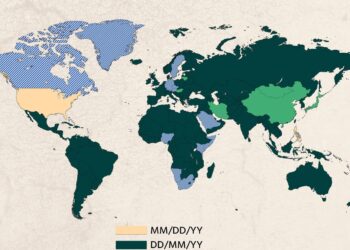
Which Date Format Each Country Uses!

 MM/DD/YY

 DD/MM/YY

 YY/MM/DD

 N0 Speci
Infotainment

Top Date Formats Used by Countries Worldwide

June 6, 2026
Revived PS2 Action Series Returns on PS5
Gaming

Revived PS2 Action Series Returns on PS5

June 6, 2026
  • About Us
  • Contact Us
  • Advertise
  • Privacy Policy
  • Guest Post

© 2026 Digital Phablet

No Result
View All Result
  • Home
  • News
  • Technology
    • Education Tech
    • Home Tech
    • Office Tech
    • Fintech
    • Digital Marketing
  • Social Media
  • Gaming
  • Smartphones

© 2026 Digital Phablet