الوسم: Technology

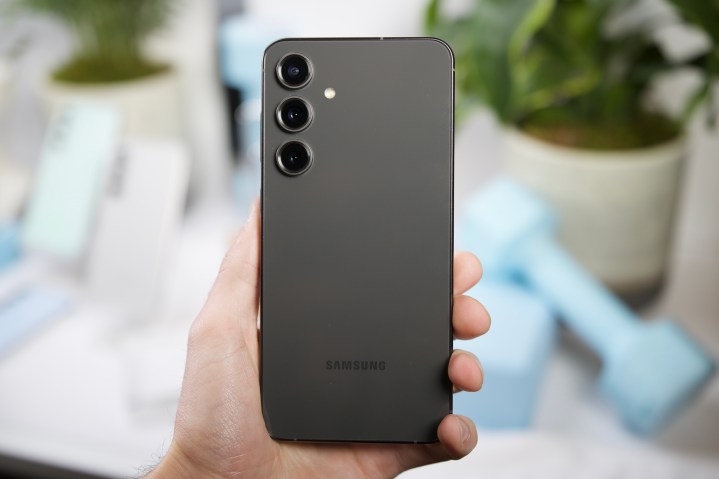
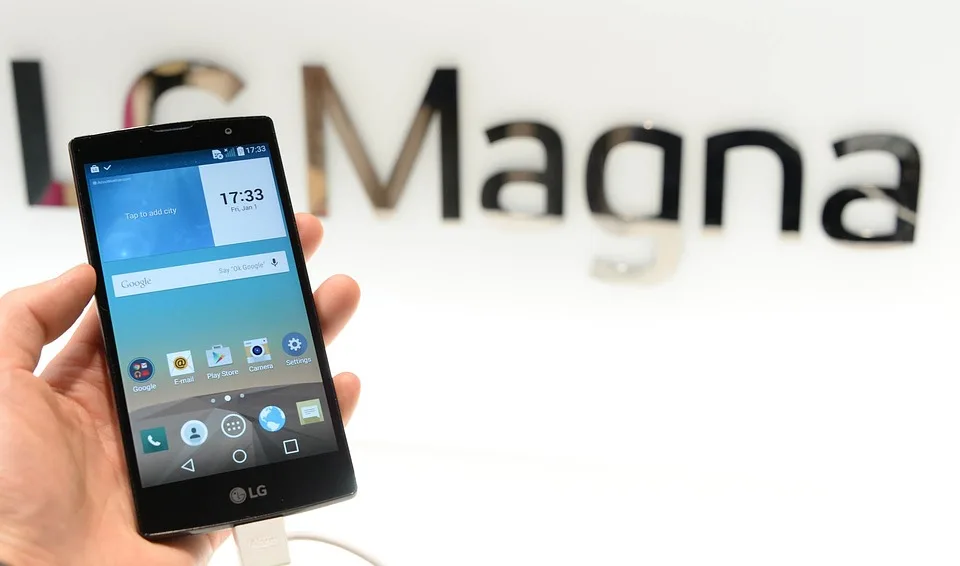
  • Is LG better than Samsung?

    Is LG better than Samsung?

    When it comes to electronics, particularly in the realm of televisions and home appliances, LG and Samsung are two of the biggest names in the industry. Both brands offer a variety of products, each with distinct features, benefits, and qualities. This article explores various factors to consider when comparing LG and Samsung, particularly in their television and appliance lines.

    Television Technology

    Display Quality

    When evaluating TV options, display quality is often the most critical factor. Both LG and Samsung utilize advanced display technologies, but they approach them differently:

    • LG:

      • OLED Technology: LG is well-known for its OLED (Organic Light Emitting Diode) panels, which provide deep blacks, vibrant colors, and excellent viewing angles.
      • Brightness: While OLEDs are superb in dark environments, they may struggle with brightness in sunlit rooms.

    • Samsung:

      • QLED Technology: Samsung’s QLED (Quantum Dot Light Emitting Diode) TVs offer improved brightness and color accuracy, making them suitable for well-lit environments.
      • HDR Performance: Samsung typically excels in HDR (High Dynamic Range) content, providing a more dynamic range of colors and brightness.

    Smart Features

    The smart TV platforms for both brands are robust, but they cater to different preferences:

    • LG webOS:

      • User-friendly interface with easy navigation.
      • Supports popular streaming services and has a built-in AI assistant, LG ThinQ.

    • Samsung Tizen:

      • Offers a wide variety of apps and customization options.
      • Features Bixby, Samsung’s voice assistant, allowing for voice control and smart home integration.

    Home Appliances

    Quality and Innovation

    Both LG and Samsung have made a name for themselves in the home appliance sector, with each brand focusing on innovation:

    • LG:

      • Reliability: Known for durable products, especially in refrigerators and washing machines.
      • Smart Features: Integrates smart technology seamlessly, allowing users to control appliances remotely via the LG ThinQ app.

    • Samsung:

      • Design: Stands out with modern aesthetics, offering a sleek look to appliances.
      • SmartThings Integration: Provides robust smart home compatibility, allowing for easy control and automation of multiple devices.

    Energy Efficiency

    Energy savings are a priority for many consumers, and both brands have made strides in eco-friendliness:

    • LG:

      • Many LG appliances are ENERGY STAR certified, emphasizing low energy consumption without sacrificing performance.

    • Samsung:

      • Offers several ENERGY STAR-rated products and features like EcoBubble technology in washers that improve energy efficiency.

    Pricing and Value

    Cost Considerations

    Pricing can vary widely based on the type, size, and specific features of appliances and televisions:

    • LG:

      • Generally priced competitively, especially for OLED TVs, which may be more expensive due to their advanced technology.
      • Offers a range of budget and high-end products to cater to different consumers.

    • Samsung:

      • Often has a wider price range, especially in QLED offerings, which can be more expensive in the premium segment.
      • Frequent promotions and bundles can make Samsung products more affordable at times.

    Warranty and Support

    The level of support and warranty can also influence buyer decisions:

    • LG:

      • Typically offers a 1-year warranty on most products, with some appliances providing extended warranties.

    • Samsung:

      • Also offers a 1-year warranty but has been known for more comprehensive support options, including remote diagnostics for some devices.

    Final Thoughts on LG vs. Samsung

    The choice between LG and Samsung ultimately varies by individual needs and preferences. Factors such as brand loyalty, specific product requirements, and usage scenarios all come into play. For example, if an individual prioritizes superior display quality in a TV, LG’s OLED technology could be the go-to choice. Conversely, someone who wants bright, vibrant colors in a well-lit room may lean towards Samsung’s QLED line.

    When selecting home appliances, those seeking innovative features and modern design might find Samsung more appealing, while those who value reliability and smart integration may lean towards LG.

  • Do they still make 42 TVs?

    Do they still make 42 TVs?

    Do They Still Make 42-Inch TVs?

    In the ever-evolving landscape of television technology, consumer preferences and market trends significantly influence the sizes and types of TVs that manufacturers produce. One common question that arises among avid TV shoppers is whether 42-inch televisions are still being manufactured. This article looks into the current status of 42-inch TVs and what options are available to consumers today.

    The Shift in Television Sizes

    Changing Consumer Preferences

    Over the past few years, there has been a noticeable shift in consumer preferences towards larger screen sizes. Factors influencing this change include:

    • Viewing Experience: Larger screens provide a more immersive viewing experience, particularly for cinematic movies and sports.
    • Room Dimensions: Modern homes often include larger living spaces that can accommodate bigger TVs.
    • Price Factors: As technology improves, the price difference between smaller and larger displays has decreased, making larger screens more accessible.

    Availability of 42-Inch TVs

    Current Market Landscape

    While 42-inch TVs were once quite popular, the current market has shifted towards larger displays. However, some manufacturers still offer models around the 42-inch size, often categorized as intermediate-sized TVs. Here’s how you can find these options:

    • Specialized Retailers: Some retailers may still carry 42-inch models, especially in specific brands or older lines.
    • Online Options: Websites like Amazon, eBay, or dedicated electronics retailers might list some 42-inch TVs, both new and refurbished.

    Brands Offering 42-Inch TVs

    A few brands are known to offer models in the 42-inch category, although the selection may be limited. Some of these brands include:

    • LG: Occasionally includes 42-inch models, particularly in their 4K and UHD series.
    • Samsung: While primarily known for larger screens, older models might still be available.
    • Sony: Sony has released some smaller models in previous years that may still be in stock.
    • TCL: This brand has produced budget-friendly options that sometimes feature the 42-inch size.

    Alternatives to 42-Inch TVs

    Popular TV Sizes

    If you’re open to alternatives, consider these popular sizes that might better fit your viewing needs:

    • 50-Inch TVs: A common next step for consumers looking for larger displays.
    • 55-Inch TVs: Widely available and provide an excellent balance between size and price.
    • 65-Inch TVs: Ideal for home theater setups, these models are becoming industry standards.

    Finding the Right Fit

    When considering a new television, it’s important to assess your viewing environment. Think about:

    • Room Size: A larger room might benefit from a bigger TV.
    • Viewing Distance: The distance from your seating to the screen can influence size choice.
    • Content Consumption: Consider what you’re primarily watching. If it’s mainly movies or sports, bigger is usually better.

    Final Thoughts on Purchasing a TV

    When on the hunt for a television, it’s crucial to look beyond just the size. Check the following features that enhance the viewing experience:

    • Resolution: High-definition or 4K resolution can significantly improve picture quality.
    • Smart Features: Look for built-in streaming capabilities and intuitive interfaces.
    • Audio Quality: Consider sound quality features, as built-in speakers may not always be sufficient.

    In summary, while 42-inch TVs are less common in today’s market, they are still available through some retailers and brands. As consumer preferences continue to evolve, exploring alternative sizes and features can offer an improved viewing experience tailored to your needs.

  • Which one is better Dell or HP?

    Which one is better Dell or HP?

    When selecting a new laptop or desktop, the battle between Dell and HP often comes to the forefront. Both brands have a strong presence in the market, providing numerous options to consumers. However, determining which is better depends on various factors such as performance, design, customer support, and price. Let’s delve deeper into a comparison between the two tech giants.

    Performance

    Dell: Power and Efficiency

    • High-End Options: Dell’s XPS series is known for its power and efficiency, making it ideal for professionals and gamers.
    • Reliable Components: Many Dell computers come equipped with Intel’s latest processors and high-quality graphics cards.
    • Performance Optimization: Dell often emphasizes optimization in its software, leading to smoother operation.

    HP: Versatility and Functionality

    • Broader Range: HP offers a variety of models that cater to different user needs, from basic tasks to high-performance gaming.
    • Innovative Technologies: HP frequently integrates cutting-edge technology, such as their Spectre series which boasts impressive battery life and performance.
    • Solid Performance Across the Board: Users generally report satisfaction with HP’s ability to handle multitasking and gaming.

    Design and Build Quality

    Dell: Premium Aesthetics

    • Sleek and Modern Designs: Dell is known for its minimalist design philosophy, particularly in the XPS line.
    • Durability: The materials used in Dell products often lend to sturdiness, making them quite durable.
    • Display Quality: Dell laptops often feature high-resolution displays with excellent color accuracy, particularly in their premium series.

    HP: Stylish and Functional

    • Variety in Design: HP offers a plethora of designs, catering to different customer tastes ranging from professional to chic.
    • Convertible Models: Their Spectre x360 series features a versatile convertible design, appealing to those who prefer touchscreen capabilities.
    • Lightweight Options: HP tends to produce lightweight models, making them more portable without sacrificing performance.

    Customer Support and Warranty

    Dell: Solid Support Options

    • Comprehensive Support: Dell provides a variety of support options, including chat, phone, and community forums.
    • Warranty: Many Dell products come with a standard one-year warranty, with options to extend for additional coverage.

    HP: User-Friendly Assistance

    • Easy Access to Resources: HP offers a wealth of online resources, tutorials, and troubleshooting support through their website.
    • Warranty Choices: Like Dell, HP provides a standard warranty, and both companies offer extended service plans for added peace of mind.

    Price Range

    Dell: Competitive Pricing

    • Affordable Options: Dell provides budget-friendly models without compromising essential features, making technology accessible to many.
    • High-End Segment: Their premium models can reach significantly higher price points, aimed at users leveraging advanced specifications.

    HP: Budget to Premium

    • Variety in Pricing: HP also caters to a broad spectrum of consumers, with decent budget models alongside their premium lines.
    • Frequent Discounts: Consumers can often find competitive prices, especially during back-to-school sales or holiday promotions.

    Summary of Key Differences

    • Performance: Dell often excels in high-performance options, while HP provides versatility.
    • Design: Dell focuses on sleek minimalism, whereas HP offers a wider array of stylized choices.
    • Customer Support: Both brands are reliable, with HP providing easier access to online resources.
    • Pricing: Both companies present various price ranges catering to different budgets.

    Final Thoughts

    Choosing between Dell and HP largely depends on personal preferences and specific needs. Whether one favors the robust performance of Dell or the diverse options from HP, both brands have their unique strengths. Ultimately, it’s advisable to assess your priorities and explore individual models to find the best fit for your requirements.

  • What are the top 10 best speakers?

    What are the top 10 best speakers?

    In today’s audio landscape, selecting the right speaker can make a significant difference in your listening experience. Whether you’re an audiophile looking for the perfect sound output, a casual listener, or someone seeking an upgrade, we’ve compiled a list of the top ten best speakers available on the market.

    1. Sonos One

    Key Features:

    • Smart speaker functionality: Built-in voice assistants like Alexa and Google Assistant.
    • Multi-room audio: Easily sync with other Sonos products.
    • Quality sound: Impressive bass and clarity for its size.

    Best For:

    • Users who want both smart capabilities and superior audio.

    2. Bose SoundLink Revolve+

    Key Features:

    • 360-degree sound: Delivers consistent sound in all directions.
    • Water-resistant: IPX4 rating makes it great for outdoor use.
    • Long battery life: Up to 17 hours on a single charge.

    Best For:

    • Those seeking portability without compromising sound quality.

    3. JBL Charge 4

    Key Features:

    • Powerful bass: Enhanced low frequencies for a punchy audio experience.
    • Rugged design: IPX7 waterproof rating for durability.
    • Built-in power bank: Charge your devices while playing music.

    Best For:

    • Active individuals who need a tough, portable speaker with extra features.

    4. Amazon Echo Studio

    Key Features:

    • High-fidelity audio: Designed with five speakers for robust sound.
    • Smart home integration: Works seamlessly with various smart home devices.
    • 3D audio experience: Dolby Atmos support for immersive sound.

    Best For:

    • Smart home enthusiasts who prioritize high-quality audio.

    5. Klipsch R-41M

    Key Features:

    • Bookshelf design: Compact size, perfect for home or office.
    • Crisp highs and deep lows: Suitable for all types of music.
    • Luxurious aesthetics: Stylish wood veneer finish.

    Best For:

    • Home theater setups or smaller spaces that need impactful sound.

    6. Apple HomePod Mini

    Key Features:

    • Compact size: Minimal footprint with rich sound.
    • HomeKit integration: Ideal for Apple ecosystem users.
    • Siri capabilities: Voice control for convenience.

    Best For:

    • Apple devices users wanting to enhance their smart home experience.

    7. Audioengine A2+

    Key Features:

    • Premium sound: High-end sound in a small package.
    • Versatile connectivity: Bluetooth and wired options.
    • Attractive design: Classic look elevating any space.

    Best For:

    • Music enthusiasts who appreciate aesthetic design and high fidelity.

    8. Polk Audio T15

    Key Features:

    • Budget-friendly: Offers excellent value for the price.
    • Versatile placement: Can be wall-mounted or placed on stands.
    • Wide soundstage: Great imaging and clear dialogue.

    Best For:

    • Homeowners looking for great performance without breaking the bank.

    9. Bang & Olufsen Beoplay A1

    Key Features:

    • Stylish design: Iconic look and feel.
    • Good battery life: Offers up to 24 hours of playback.
    • Bluetooth connectivity: Stream music effortlessly from your devices.

    Best For:

    • Style-conscious users wanting premium sound on the go.

    10. Sony SRS-XB43

    Key Features:

    • Extra bass technology: Enhanced low frequency for a lively sound.
    • Durable build: Water and dust resistant for outdoor usage.
    • Party Connect feature: Sync multiple speakers for a bigger sound experience.

    Best For:

    • Party-goers seeking a robust, lively audio experience.

    Final Thoughts

    Selecting the ideal speaker involves considering sound quality, functionality, and design preferences. The aforementioned list represents a variety of options suitable for different lifestyles and needs, ensuring you can find the perfect speaker to enhance your audio experience.

  • Why are curved monitors so expensive?

    Why are curved monitors so expensive?

    Understanding the High Cost of Curved Monitors

    Curved monitors have surged in popularity over the last few years, attracting gamers, professionals, and general users alike. However, one noticeable aspect of these devices is their often high price tag. This article delves into the various factors that contribute to the elevated costs of curved monitors.

    Premium Display Technology

    Curved monitors utilize advanced display technologies that can significantly increase their value.

    • Screen Curvature: The ergonomic design offers a more immersive viewing experience by reducing eye strain and enhancing peripheral vision.
    • Higher Resolution Options: Many curved monitors boast higher resolution displays, such as 2K or 4K settings, which deliver sharper and more detailed images.
    • Improved Color Accuracy: These monitors often feature advanced panel technologies, such as VA or OLED, leading to richer colors and better contrast.

    Innovative Design and Engineering

    The design and manufacturing processes for curved monitors also play a significant role in their pricing.

    • Complex Manufacturing Process: The intricate process of bending the screen involves precise engineering to maintain quality and performance, which can drive up production costs.
    • Unique Aesthetic Appeal: The sleek, stylish design of curved monitors caters to modern aesthetics, which can also justify higher pricing.

    Enhanced Features and Specifications

    Incorporating additional features can significantly impact the cost of curved monitors.

    • Refresh Rate and Response Time: Many high-end versions offer faster refresh rates (e.g., 144Hz or more) and lower response times, making them ideal for gaming and professional use.
    • Built-in Technologies: Features like G-Sync or FreeSync for smoother gameplay, as well as HDR support for richer visuals, add to the overall value.
    • Adjustable Stands and Ergonomics: Some models come with advanced stands that allow for height and tilt adjustments, enhancing user comfort.

    Brand Reputation and Marketing

    The brand name can often influence the price of a monitor.

    • Prestige Brands: Established brands with a reputation for premium quality often charge more for their products.
    • Marketing and Target Audience: Many curved monitors are marketed towards gamers and professionals who are willing to invest more for enhanced experiences, allowing manufacturers to set higher prices.

    Market Demand and Trends

    The growing popularity of curved monitors is pushing prices higher.

    • Increasing Adoption: As more users recognize the benefits of curved screens, demand continues to rise, often resulting in higher prices.
    • Limited Competition: The presence of fewer manufacturers producing high-quality curved monitors can lead to reduced competition, allowing companies to maintain higher price points.

    Longevity and Quality

    Investing in a curved monitor can prove worthwhile over time.

    • Durability: Many curved monitors are designed to last longer, with higher quality components that make them more resistant to wear and tear.
    • Future-Proofing: With constant technological advancements, purchasing a high-quality curved monitor can save users from having to upgrade frequently, ultimately offering better long-term value.

    Factors to Consider When Purchasing

    When contemplating a curved monitor, several factors should be taken into account beyond just the price.

    • Intended Use: Determine if the monitor fits your specific needs, whether for gaming, professional work, or general use.
    • Budget: Assess what features are most important and find a model that balances cost with your requirements.
    • Warranty and Support: Evaluate the warranty options and customer support provided by the manufacturer, as these can add value to your purchase.

    Understanding the reasons behind the high cost of curved monitors can aid consumers in making informed decisions and foster a greater appreciation for the technology and engineering involved.

  • Samsung Is Targeting Smart Glasses To Disrupt The Market

    Samsung Is Targeting Smart Glasses To Disrupt The Market

    Samsung is gearing up to dive into another wearable technology category, just months after its debut smart ring was launched. According to a research firm based in Shenzhen called Wellsen XR, the company plans to unveil smart glasses that could be available by late 2025 or early 2026.

    “Samsung Electronics has confirmed its intention to release AI smart glasses, with an initial production run of 500,000 units set for the third quarter of 2025,” noted the report by Maeil Business Newspaper.

    Interestingly, Samsung appears to be opting for a more conservative approach, focusing on a strategy similar to the highly successful Meta Ray-Ban Stories smart glasses, mirroring the internal hardware configuration as well.

    The upcoming Samsung smart glasses are expected to feature Qualcomm’s AR1 Gen 1 wearable chip and an NXP semiconductor as an auxiliary processing unit. They will be equipped with a 12-megapixel camera utilizing a Sony CMOS sensor to handle multimedia capture.

    The front of the Ray-Ban Meta and Solos AirGo 3 smart glasses.
    Ray-Ban Meta (top) and Solos AirGo 3 smart glasses. Andy Boxall / Digital Trends

    These smart glasses are reported to be powered by a 155 mAh battery and will weigh around 50 grams. The front camera is expected to facilitate code scanning, gesture recognition, and regular photo and video taking.

    Despite their similarities to the Meta Ray-Ban smart glasses, the underlying software will be different. Rather than the Meta AI suite currently used in Stories, Samsung will rely on Google’s technology.

    Specifically, Samsung will integrate Google’s Gemini AI into its smart glasses. This partnership aligns with previous collaborations, as Samsung’s Galaxy smartphones were among the first to feature native Gemini capabilities within the Galaxy AI ecosystem.

    This technological edge is significant since Gemini is already well-embedded in many of Google’s applications, particularly the Workspace suite utilized by millions. It currently offers valuable functionalities in essential tools like Gmail and Docs, along with the ability to interact with custom AI agents.

    Additionally, the partnership with Android will streamline the connection between the smart glasses and other devices in the ecosystem. However, Samsung won’t be the only contender in the smart glasses arena, as its Chinese competitor, Xiaomi, is reportedly working on a similar product designed to compete with Meta’s offerings.

  • What is the difference between a wireless printer and a Wi-Fi printer?

    What is the difference between a wireless printer and a Wi-Fi printer?

    As technology continues to evolve, the terms used to describe various devices can often become confusing. When it comes to printers, you might have encountered the terms "wireless printer" and "Wi-Fi printer." While they are frequently used interchangeably, they refer to different functionalities. This article will clarify the differences between these two types of printers, helping you make an informed decision when purchasing or utilizing printing solutions.

    What is a Wireless Printer?

    A wireless printer refers to any printer that can print documents without the need for a physical connection, such as USB or parallel cables. Instead, it can communicate with other devices over radio signals. Wireless printers generally use one of the following methods to connect:

    Types of Wireless Connections

    • Bluetooth:

      Bluetooth-enabled printers allow you to print from compatible devices within a short range, typically up to 30 feet. They are ideal for quick, one-off tasks and small environments without complex networking needs.

    • Infrared (IR):

      Although less common today, some older printers utilize infrared connections. This technology requires a line of sight between the printer and the device, making it less practical than newer wireless options.

    What is a Wi-Fi Printer?

    A Wi-Fi printer is a specific type of wireless printer that connects to a local area network (LAN) using Wi-Fi technology. This connectivity allows multiple devices to access the printer from various locations within the network. Features of Wi-Fi printers include:

    Characteristics of Wi-Fi Printers

    • Network Access:

      Wi-Fi printers can be easily connected to your home or office Wi-Fi network, allowing any compatible device on the same network to print.

    • Multiple Device Compatibility:

      These printers support connections from smartphones, tablets, and computers, making them versatile for multiple users.

    • Cloud Printing Capabilities:

      Many Wi-Fi printers enable cloud printing, allowing users to print from anywhere with an internet connection, utilizing services like Google Cloud Print.

    Key Differences Between Wireless and Wi-Fi Printers

    While all Wi-Fi printers are technically wireless printers, the reverse isn’t true. Here are some key distinctions:

    1. Connection Method

    • Wireless Printer:

      Connects using technologies like Bluetooth or infrared.

    • Wi-Fi Printer:

      Connects specifically through a Wi-Fi network.

    2. Range and Accessibility

    • Wireless Printer:

      Generally limited by the range of the specific technology (Bluetooth, etc.).

    • Wi-Fi Printer:

      Can be accessed from anywhere within the Wi-Fi network range, often extending throughout an entire home or office.

    3. User Capability

    • Wireless Printer:

      Usually designed for individual use or a small number of users directly connecting through Bluetooth or similar technology.

    • Wi-Fi Printer:

      Designed for multiple users; ideal for home offices, small to medium-sized businesses, or environments where several people need access.

    4. Features and Functionality

    • Wireless Printer:

      Basic printing functionalities may be limited; not all wireless printers support advanced features.

    • Wi-Fi Printer:

      Often comes with additional features like duplex printing, scanning, and copying, along with more sophisticated connectivity options.

    Advantages of Each Type of Printer

    Wireless Printers

    • Simplicity:

      Easy to set up and use, especially in small spaces with limited connectivity options.

    • Cost-Effective:

      Generally more affordable than extensive networking equipment.

    Wi-Fi Printers

    • Flexibility:

      Ability to print from multiple devices, including smartphones and laptops, enhances usability.

    • Remote Printing:

      Capability to print documents from outside the local network with cloud features.

    Conclusion

    Understanding the distinct functionalities of wireless printers and Wi-Fi printers is crucial when selecting the right printing solution for your needs. Whether you choose a wireless printer for personal use or a Wi-Fi printer for a shared work environment, knowing these differences ensures you make a choice that aligns best with your printing requirements.

  • What smartwatch works best with an Android phone?

    What smartwatch works best with an Android phone?

    With the rapid evolution of wearable technology, choosing the right smartwatch that is compatible with Android devices can be quite a challenge. The perfect smartwatch enhances your smartphone experience, provides health tracking, and keeps you connected on the go. In this guide, we’ll delve into some of the best options available on the market today.

    Key Features to Consider

    Before diving into specific models, it’s crucial to understand what features you should look for in a smartwatch that pairs well with your Android phone:

    Compatibility

    • OS Compatibility: Ensure the smartwatch is designed to work with Android phones. Most smartwatches function better with their respective ecosystems, like Wear OS for Google, Tizen for Samsung, and Fitbit’s own OS.
    • App Availability: Check if the smartwatch supports popular applications that you regularly use.

    Health and Fitness Tracking

    • Heart Rate Monitoring: Look for continuous heart rate tracking and alerts for irregularities.
    • GPS: Built-in GPS allows for standalone tracking during runs, hikes, or other outdoor activities.
    • Activity Tracking: Features like step counting, sleep tracking, and various sports modes can enhance your fitness journey.

    Battery Life

    • Standby Time: Some smartwatches offer several days of battery life, while others may require frequent charging.
    • Usage Time: Consider how long the watch lasts on a single charge during regular use.

    Design and Customization

    • Style: From sporty to elegant designs, the choice should reflect personal style.
    • Watch Faces and Bands: A range of customizable faces and interchangeable bands helps personalize the watch.

    Top Smartwatches for Android Users

    Several smartwatches are tailored to work seamlessly with Android devices. Here are some top contenders:

    1. Samsung Galaxy Watch 5

    Key Features:

    • Runs on Wear OS with Samsung’s One UI integration
    • Available in two sizes: 40mm and 44mm
    • Excellent health tracking features, including body composition analysis, heart rate, and ECG
    • IP68 water resistance rating
    • Long-lasting battery life (up to 40 hours)

    2. Google Pixel Watch

    Key Features:

    • Designed specifically for Google’s ecosystem with deep integration with Google Assistant
    • Sleek, minimalist design with customizable watch bands
    • Excellent fitness tracking through Fitbit integration
    • Support for offline music and maps
    • Up to 24 hours of battery life

    3. Fitbit Versa 4

    Key Features:

    • Focuses on health and fitness with guided workouts and sleep insights
    • Supports a wide variety of third-party apps
    • Great battery life of more than 6 days
    • Built-in GPS for accurate activity tracking
    • Affordable price compared to other smartwatches

    4. Garmin Venu 2

    Key Features:

    • Superb GPS capabilities ideal for outdoor enthusiasts
    • Detailed health and fitness metrics, including VO2 max and stress tracking
    • Vibrant AMOLED display
    • Good battery life (up to 11 days in smartwatch mode)
    • Water-resistant and built for active lifestyles

    5. Fossil Gen 6

    Key Features:

    • Stylish design with a variety of case and strap options
    • Powered by the latest Snapdragon Wear 4100+ processor for improved performance
    • Health tracking features, including heart rate and SpO2 monitoring
    • Supports Google Assistant and notifications from Android apps
    • Personalized watch faces and customization options

    Consider Your Use Case

    When selecting the right smartwatch, consider how you will primarily use it. Whether your focus is health and fitness, productivity, or style, understanding your needs can help narrow down your choices.

    Recommended Use Cases

    • Fitness Enthusiasts: Opt for models like the Garmin Venu 2 or Fitbit Versa 4 for advanced health metrics and training features.
    • Everyday Users: The Samsung Galaxy Watch 5 and Google Pixel Watch provide a balance of functionality and style.
    • Fashion-forward Choices: Fossil Gen 6 offers a trendy design without compromising on features.

    With numerous smartwatches available, finding one that aligns with your preferences and lifestyle can significantly enhance your Android experience. Whether you prioritize advanced fitness tracking or seamless integration with your smartphone, the right choice is out there waiting for you.

  • How to Watch Apple TV+ on Chromecast or Google TV Devices

    How to Watch Apple TV+ on Chromecast or Google TV Devices

    Derek Malcolm / Digital Trends

    Are you eager to catch up on popular shows like Severance, Ted Lasso, and Silo on Apple TV+ but don’t own an Apple device? Fortunately, there’s a workaround that enables you to stream all your favorite Apple TV+ content using Chromecast, Google TV, or even smart TVs with casting capabilities.

    This guide provides a straightforward method to cast Apple TV+ from your Chrome browser on a computer to your Chromecast or Google TV without needing any Apple-specific hardware.

    If you happen to have a newer Chromecast featuring Google TV or a Google TV Streamer, you can download the Apple TV app directly on those devices. This allows for a complete Apple TV+ experience, complete with watchlists and tailored suggestions. Follow these steps to stream Apple TV+ on your Chromecast or Google TV.

    Difficulty

    Easy


    Duration

    5 minutes

    What You Need

    • A Chromecast device, like Chromecast Ultra

    • A Google TV device, such as the Google TV Streamer

    • The Apple TV app

    • Active Internet connection

    • Apple TV+ subscription

    Apple TV+ showing 'Monarch: Legacy of Monsters' in Chrome.
    Screengrab / Digital Trends

    How to Stream Apple TV+ Using Chromecast

    Before diving in, here’s how to cast Apple TV+ content to a Chromecast device. This method applies to both Chromecast dongles and devices like the Chromecast Ultra.

    Step 1: The Apple TV app itself cannot be directly cast to Chromecast from smartphones or desktop apps. However, you can cast Apple TV+ via the Chrome web browser on a computer. Note that this does not work on mobile Chrome browsers.

    To begin, ensure your Chromecast dongle is connected to the HDMI port on your TV, computer monitor, or projector.

    Step 2: Confirm that your Chromecast is properly set up and connected to the same Wi-Fi network as your computer.

    Step 3: Open the Chrome browser and go to the Apple TV+ website. Log in using your Apple ID.

    Step 4: Once logged in, browse for a show or movie you’d like to watch and hit play. You may want to pause it while preparing to cast, so you don’t miss anything.

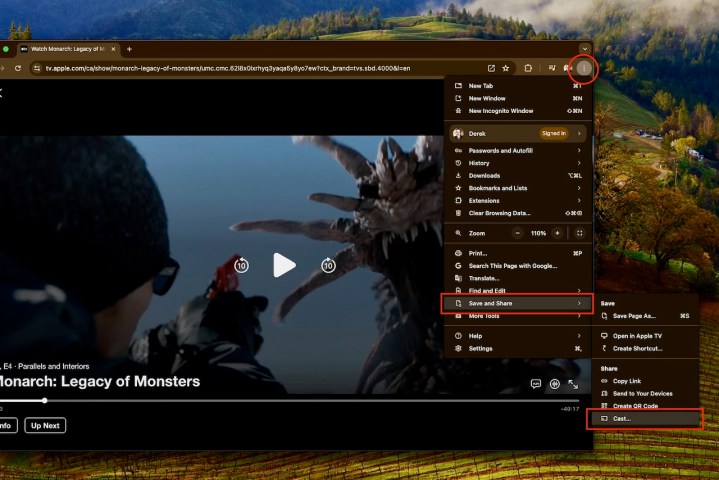
    Step 5: To cast the selected content, right-click in the browser window and choose Cast… from the menu. Alternatively, access the three-dot menu in the upper right corner, click Save and share, then select Cast….

    Chrome casting options for Apple TV+ content.
    Derek Malcolm / Digital Trends

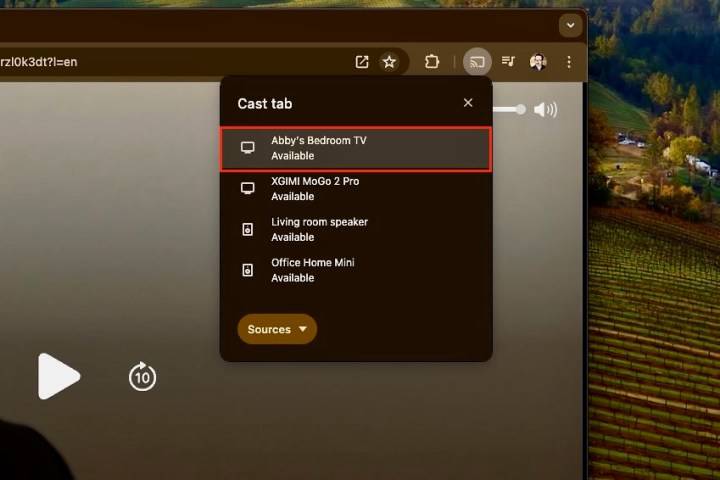
    Step 6: A list of available Chromecast devices will appear. Choose the device you wish to cast to—like “Abby’s Bedroom TV” featuring a Chromecast Ultra.

    Selecting the Chromecast for Apple TV+ streaming.
    Derek Malcolm / Digital Trends

    Step 7: Your selected Apple TV+ content will start playing on the screen connected to your Chromecast, and playback can be managed directly through the Chrome browser.

    Step 8: Remember, this casting method also works with other devices featuring Google’s Cast technology, including TVs, projectors, and connected speakers, provided they are on the same Wi-Fi network. You’ll be able to see and select these options in the Cast menu.

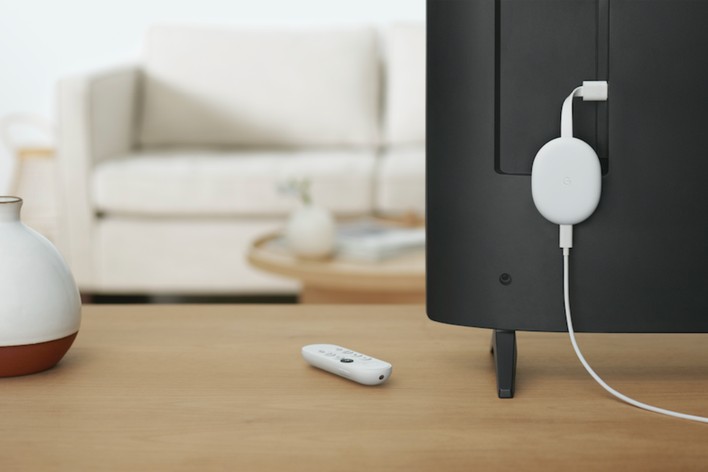
    Chromecast connected to the back of a TV.
    Google

    Watching Apple TV+ via Google TV or Google TV Streamer

    The Chromecast has evolved significantly since its early versions, which relied on a source device for control. The Chromecast with Google TV and Google TV Streamer offer a fully integrated streaming platform, allowing you to install various streaming service apps, including Apple TV+, right on the device.

    With the Google TV operating system available on numerous TVs and built into the Chromecast with Google TV, installation is a breeze.

    To access Apple TV+ on a Chromecast with Google TV or Google TV Streamer, simply install the app.

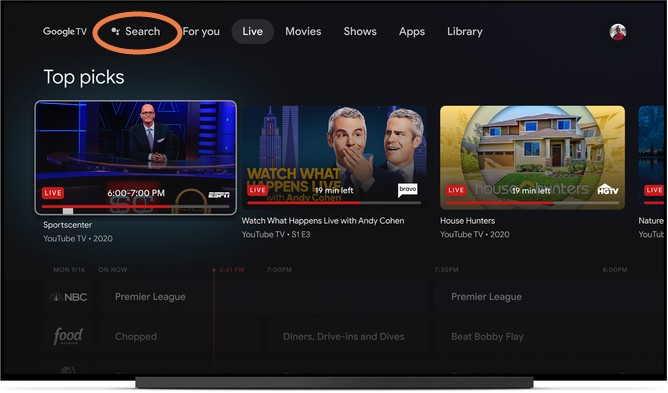
    Google TV search function.
    Google

    Installing the Apple TV App on Google TV

    Step 1: If you haven’t yet signed up for Apple TV+, visit the Apple TV+ website and create an account using your Apple ID, or you can easily do so on an Apple device. The subscription costs $10 a month and typically includes a seven-day free trial. Sometimes, Apple offers extended complimentary access when you purchase a new Apple device, like an iPhone.

    Step 2: Next, locate the Apple TV app. In your Chromecast with Google TV or Streamer’s menu, navigate to the Apps section and select Search for apps (or simply search for “Apple TV”). You should find the app in the Google Play Store.

    Step 3: Install the app and open it once the installation completes. You’ll need to sign in with your Apple ID. Alternatively, the app can also be installed via a smartphone or tablet using the Google Play Store, with the option to select your Chromecast with Google TV during the installation process.

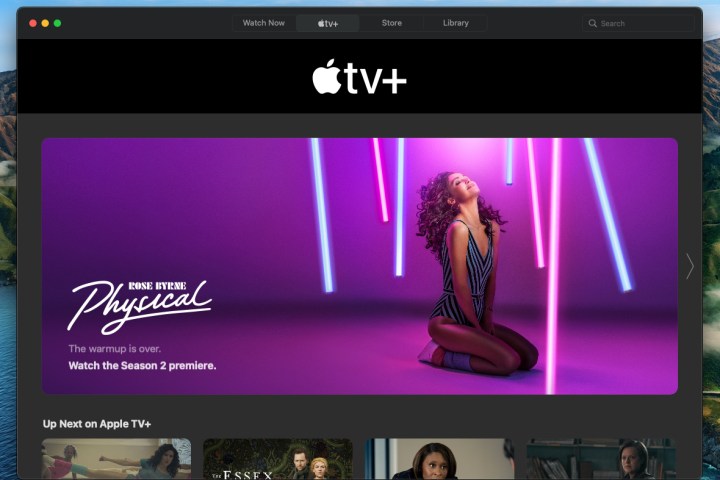
    Apple TV+ home screen showcasing the show 'Physical'.
    Apple

    Begin Discovering Shows to Watch

    Step 1: The app should now function as it does on an Apple device. Browse through the shows and add them to your Google TV Watchlist for easy access later.

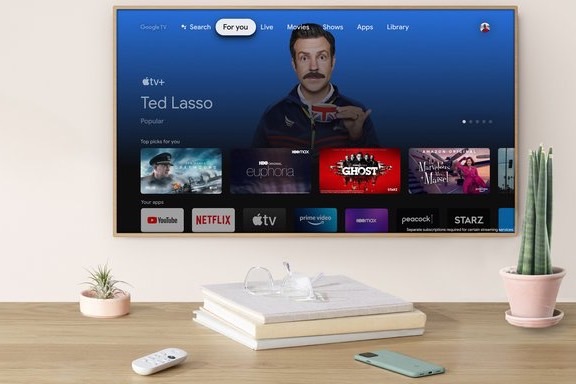
    Step 2: Be aware that Apple may suggest shows across various services, so you might see options from Hulu, Prime Video, and others, similar to Google TV’s functionality.

    Furthermore, if you’re using an Apple Family Sharing plan, you can invite up to six people to log in with their Apple IDs, allowing everyone to enjoy their own viewing experiences under a single subscription.

    Apple TV app displayed on Chromecast with Google TV.
    Google

    Utilizing Google Features for Your Apple TV+ Experience

    Lastly, when streaming Apple TV+ on a Chromecast, you can leverage Google Assistant for searching and controlling playback alongside your Watchlist. This ensures you retain all your features while enjoying Apple’s fantastic content!

    Don’t forget: a subscription to Apple TV+ is necessary to access this service, as it remains one of the top streaming options available.

  • Should I buy a laptop on Cyber Monday or Black Friday?

    Should I buy a laptop on Cyber Monday or Black Friday?

    Shopping for a laptop can be a daunting task, especially when trying to decide between two of the biggest sales events of the year: Cyber Monday and Black Friday. Both have their unique advantages, and understanding the differences can help you make an informed decision.

    Understanding Black Friday and Cyber Monday

    Before diving into the specifics of which day is better for purchasing a laptop, it’s essential to grasp what each event entails.

    Black Friday

    • Origin: Traditionally marks the start of the holiday shopping season in the United States, occurring the day after Thanksgiving.
    • Focus: Retailers often emphasize in-store deals, making it a bustling day for shoppers looking for deals on various electronics, including laptops.
    • Sales: Discounts can be substantial, with many retailers offering doorbuster deals that may run out quickly.

    Cyber Monday

    • Origin: Established as a way for retailers to promote online shopping the Monday after Thanksgiving.
    • Focus: Primarily focuses on internet sales, making it more convenient for those who prefer to shop from home.
    • Sales: While many retailers extend their Black Friday sales into Cyber Monday, there are often exclusive online deals specific to this day.

    Factors to Consider

    When deciding where to shop, consider the following elements:

    Pricing and Discounts

    • Black Friday:

      • Typically offers deeper discounts on physical inventory.
      • Look out for bundle deals (accessories included).
    • Cyber Monday:

      • Often features price cuts on items that didn’t sell on Black Friday.
      • More exclusive deals on specific brands or models available online.

    Availability of Models

    • Black Friday:

      • Popular models may be in stock, but demand can lead to rapid sellouts.
    • Cyber Monday:

      • Broader selection due to online listings, allowing comparison across multiple retailers at once.

    Online vs. In-Store Shopping

    • Black Friday:

      • Experience the rush of in-store sales, but this may mean long lines and crowded stores.
    • Cyber Monday:

      • Shop from the comfort of your home, avoiding crowds and allowing for easier price comparisons.

    Tips for Shopping

    When you’re ready to make a purchase, keep these tips in mind:

    Research Before the Sale

    • Check reviews: Read user reviews on laptops you’re interested in before the sale.
    • Create a shortlist: Identify a few models and brands you prefer.

    Sign Up for Notifications

    • Retailer newsletters: Subscribe to your favorite retailers to receive alerts on upcoming deals.
    • Price tracking tools: Use online tools to monitor price changes for specific laptops.

    Be Mindful of Warranty and Return Policies

    • Warranty: Ensure the laptop you purchase comes with a solid warranty.
    • Return Policy: Check the return window in case your choice does not meet your expectations.

    Conclusion

    With thoughtful consideration of pricing, availability, and shopping preferences, you can make an informed decision on whether to purchase your laptop on Cyber Monday or Black Friday. Explore both options but remember that preparation is key to snagging the best deals!

  • Is a desktop PC cheaper than a laptop?

    Is a desktop PC cheaper than a laptop?

    When considering a new computer, one of the primary questions is often whether to choose a desktop PC or a laptop. While both options have their advantages and disadvantages, one significant factor that often influences the decision is cost. In this article, we will explore whether a desktop PC is indeed cheaper than a laptop, taking into account various factors.

    Cost Breakdown: Desktop vs. Laptop

    Initial Purchase Price

    • Desktops:

      • Typically, desktop PCs offer a lower initial purchase price compared to laptops with similar specifications.
      • The components of desktops, such as monitors, keyboards, and mice, are generally more affordable to produce than the compact components found in laptops.

    • Laptops:

      • Laptops often carry a premium price tag due to their portability and the engineering required to fit components into a smaller frame.
      • Entry-level laptops can be found at a lower price point, but they usually come with limitations in performance and features.

    Performance vs. Cost

    • Hardware Specifications:

      • Desktops can be easily customized and upgraded, allowing users to build a machine tailored to their needs without breaking the bank.
      • Options for budget-friendly components are more extensive in the desktop market.

    • Gaming and Performance PCs:

      • For gamers or users requiring high performance, desktops can be built with more powerful graphics cards and processors for less money than a comparable laptop.

    Long-Term Considerations

    Maintenance and Upgradability

    • Desktops:

      • Easier to upgrade; users can often replace or add components like RAM, storage, or graphics cards without replacing the entire system.
      • Repairs can often be more straightforward and less costly, thanks to the modular nature of desktops.

    • Laptops:

      • Upgrading a laptop is more challenging, with many models having soldered components and limited space.
      • Repairs can be more expensive, given the specialized parts and labor required.

    Lifespan and Devaluation

    • Declining Value:

      • Laptops tend to depreciate faster than desktops due to the rapid pace of technological advancement.
      • Desktops might have a longer usable life due to their upgrade potential, which can lessen the overall cost over time.

    Cost of Accessories and Add-Ons

    Necessary Equipment

    • Desktops:

      • Generally require additional purchases like monitors, keyboards, and mice, which can add to the initial setup cost.
      • However, these components can last longer, diminishing the need for frequent replacements.

    • Laptops:

      • Integrated features mean fewer additional accessories are needed initially.
      • Portability may come with a trade-off, as accessories (like protective cases) may incur extra costs.

    Power and Efficiency

    • Energy Consumption:

      • Desktops typically consume more power because they usually house more powerful components.
      • Laptops, designed for energy efficiency, tend to have longer battery lives which can lower electricity costs in the long run.

    Summary of Costs

    • Initial Costs:

      • Desktops are usually less expensive initially for equivalent performance.

    • Upgrade and Maintenance Costs:

      • Desktops are more economical in the long run due to upgradability.

    • Longevity:

      • Desktops have a longer lifespan, minimizing replacement frequency.

    • Accessories:

      • Desktops incur higher initial accessory costs but may last longer.

    In assessing whether a desktop PC is cheaper than a laptop, consider your specific needs, preferences, and potential future requirements. Depending on how you plan to use your computer, a desktop may provide better value, especially if performance and upgradeability are priorities.

  • What are desktop computers good for?

    Desktop computers have long been a staple in both professional and personal settings. Despite the increasing popularity of laptops and tablets, desktops remain relevant due to their unique advantages. Let’s delve into what makes desktop computers a great choice in various scenarios.

    Key Advantages of Desktop Computers

    Performance and Power

    One of the most significant advantages of desktop computers is their superior performance capabilities.

    • Robust Components: Desktops typically house larger, more powerful hardware compared to laptops.
    • Cooling Efficiency: With better ventilation and larger cooling systems, desktops can run intensive applications without overheating.
    • Upgradability: Users can easily replace or upgrade components like RAM, graphics cards, and storage options.

    Cost-Effectiveness

    Desktop computers often provide better performance for the price compared to their portable counterparts.

    • More Bang for Your Buck: You often get more powerful hardware for a similar price than you would in a laptop.
    • Longevity: Due to their construction and upgradability, desktops can last longer and offer extended usability over time.

    Ideal Uses for Desktop Computers

    Gaming

    Gaming is one of the prime areas where desktops shine.

    • High-Quality Graphics: Capable of hosting powerful graphics cards, desktops deliver stunning visuals for a more immersive experience.
    • Custom Builds: Gaming enthusiasts can tailor every aspect of their system to meet specific needs.

    Content Creation

    Whether it’s video editing, graphic design, or music production, desktops excel at handling resource-intensive tasks.

    • Multi-Monitor Setups: Desktops can easily accommodate multiple monitors, enhancing productivity and workflow.
    • Powerful Software: Desktops can run demanding software applications that require significant processing power and memory.

    Business and Office Work

    The traditional office environment often still relies heavily on desktops for various reasons.

    • Ergonomics: Desktops can be set up at eye level, making for a more comfortable working position while reducing the risk of strain.
    • Peripheral Support: Easy connectivity for various peripherals like printers, scanners, and external drives.

    Education

    For students, desktops provide a stable environment for studying and completing assignments.

    • Research and Writing Tools: The larger screens and keyboards facilitate reading and writing tasks.
    • Affordable Learning Stations: Many educational institutions maintain desktop computer labs for students, offering more cost-effective computing options.

    Recreational Use

    Desktops are not just for work; they can also enhance leisure activities.

    Multimedia Consumption

    From streaming movies to listening to music, desktops offer an exceptional media experience.

    • Larger Screens and Better Sound: Ideal for watching videos or listening to music with higher quality than most portable devices.
    • Home Theater Setups: With the right components, desktops can serve as powerful multimedia centers.

    Casual Gaming

    Casual gamers also find desktops to be a more enjoyable option.

    • Game Selection: Many classic and indie games run better on desktops.
    • Comfort of Play: Larger screens and ergonomic setups contribute to longer and more comfortable gaming sessions.

    Collaboration and Networking

    In team environments, desktops facilitate better collaboration.

    • Shared Workspaces: Multi-user setups encourage teamwork and brainstorming without distractions.
    • Network Reliability: Typically more reliable on wired connections, which can be crucial for business operations.

    Desktop computers remain a versatile option suited for various needs, from high-performance gaming to educational purposes. Their combination of power, affordability, and adaptability means they will continue to hold an essential place in the tech landscape for years to come.

  • Galaxy S25 Could Receive Much-Needed Spec Upgrade

    Galaxy S25 Could Receive Much-Needed Spec Upgrade

    The Samsung Galaxy S25 is gearing up to introduce a significant enhancement over its predecessor, the Galaxy S24: an increase in RAM. While it might seem like a straightforward technical upgrade, recent benchmark tests suggest that the base model could feature an impressive 12GB of RAM. In contrast, the Galaxy S24 debuted with just 8GB in its entry-level version, which many viewed as inadequate for a flagship device considering its premium price tag. Reports indicate that the Galaxy S25 aims to step up this specification to 12GB, as detailed by GSMArena.

    This additional RAM is expected to enhance the performance of applications, resulting in smoother operation with fewer lags, but it’s wise to remain cautious. It’s uncertain whether Samsung will completely eliminate the 8GB variant, given that some higher-end Galaxy S24 models already offered 12GB. Additionally, the sources for the benchmark data could be misleading, so skepticism is advised.

    Samsung Galaxy S24 FE.
    Samsung

    Samsung must escalate its base RAM specifications to remain competitive against rivals such as the OnePlus 13 and Pixel 9, both of which come with 12GB of RAM and various storage options. Additionally, leaks suggest that the OnePlus 13 will offer configurations featuring 12GB of RAM alongside 256GB of storage. As for the Galaxy S25’s processor to complement its RAM, there’s ongoing speculation about whether it will feature the Qualcomm Snapdragon 8 Elite or an alternative Exynos chipset, with rumors supporting both possibilities.

    At the very least, Samsung’s color choices for the Galaxy S25 seem relatively settled, so there’s some certainty there. Regardless of whether the device is powered by the Snapdragon 8 Elite or another processor, the Galaxy S25 promises to be a powerhouse flagship that many enthusiasts are eager to experience. The anticipated launch date for the Galaxy S25 is slated for January, although the specific timing remains somewhat unclear, potentially landing around January 22 or 23.

  • How much is a Oculus Quest 3?

    How much is a Oculus Quest 3?

    As the release of the Oculus Quest 3 approaches, many gamers and VR enthusiasts are curious about its pricing. Oculus, now part of Meta Platforms, has been a leader in the virtual reality space, and the Quest 3 is highly anticipated for its enhanced features and capabilities. Here’s a comprehensive breakdown of the pricing details and what you can expect.

    Official Price Point

    The Oculus Quest 3 is expected to launch at a retail price of $499. This places it in a competitive range alongside other high-quality VR headsets, but let’s delve deeper into what you get for that price.

    What’s Included in the Purchase?

    When you buy the Oculus Quest 3, you can generally expect:

    • The headset: Updated optics, improved comfort, and enhanced tracking capabilities.
    • Controllers: New Touch Pro controllers that offer better haptic feedback and precision.
    • Built-in features: Enhanced processing power, built-in Meta technologies for social interaction, and possibly a few bundled games or apps.

    Additional Costs to Consider

    While the base price gives you a good indication of the investment, there are other financial facets to keep in mind.

    Accessories

    Depending on your usage and preferences, you might want to purchase additional accessories, which can include:

    • Carrying Case: $30 – $60
    • Lens Inserts (for glasses wearers): $40 – $80
    • Charging Dock: $30 – $50
    • Additional Facial Interfaces: $20 – $40

    Games and Content

    The Oculus ecosystem has a broad library of VR games and experiences. Pricing for these can vary:

    • Average game price: $20 – $60
    • Subscription services: Platforms like Oculus Store often offer memberships or season passes which can add to your monthly expenses.

    Buying Options

    When purchasing an Oculus Quest 3, you have a few options:

    • Direct from Meta: This is the safest option to ensure you receive a new device with warranty.
    • Retailers: Major retailers might offer promotions, bundles, or financing options.
    • Second-hand markets: While you could save money, ensure you buy from reliable sources to avoid scams.

    Financing Options

    Some consumers may prefer to finance their purchase. Popular financing options include:

    • Payment plans: Retailers may offer installment payments spread over a few months.
    • Credit options: Use a credit card that offers cash back or promotions for electronics.

    Expected Launch Date

    While the exact launch date of the Oculus Quest 3 is yet to be confirmed, it is widely anticipated to be released in late 2023 or early 2024. Keeping an eye on announcements from Meta and related tech events can provide updates on the precise date.

    What Do Users Expect?

    As the new generation of the Oculus headset, users have expressed various expectations, including:

    • Enhanced Graphics: Improved resolution and refresh rates.
    • Better Comfort: Lighter design and improved weight distribution.
    • Expanded Content: More AAA titles and unique VR experiences.

    The quest for an immersive virtual reality experience continues, and the Oculus Quest 3 promises to elevate the journey into that digital world. With its price point and potential costs considered, prospective buyers can make informed decisions about their investment in VR technology.

  • What are the 4 types of drones?

    What are the 4 types of drones?

    Drones, also known as unmanned aerial vehicles (UAVs), have gained immense popularity across various sectors, from recreational use to professional applications. These flying machines come in different shapes, sizes, and capabilities, tailored for specific tasks. Understanding the types of drones available can help users make informed decisions based on their needs. Below, we explore the four main types of drones.

    1. Consumer Drones

    Consumer drones are designed for everyday individuals and hobbyists. These drones are typically user-friendly and come equipped with camera capabilities, making them popular for photography and videography.

    Features of Consumer Drones:

    • Camera Quality: Often equipped with high-definition cameras.
    • User Interface: Generally have intuitive controls, suitable for beginners.
    • Flight Range: Limited flying distance, usually within a few kilometers.
    • Cost: Ranges from affordable models to more expensive options with advanced features.

    Common Uses:

    • Aerial photography
    • Recreational flying
    • Real estate marketing

    2. Commercial Drones

    Commercial drones are intended for business purposes and professional applications. These drones often offer advanced features and payload capabilities suitable for various industries.

    Features of Commercial Drones:

    • Payload Capacity: Designed to carry equipment or sensors essential for specific tasks.
    • Advanced Technology: May include GPS, automated flight paths, and real-time data transmission.
    • Regulatory Compliance: Often built to meet aviation regulations for commercial use.
    • Price Range: Typically pricier due to enhanced specifications and capabilities.

    Common Uses:

    • Agriculture (crop monitoring and analysis)
    • Industrial inspections (bridges, towers, and pipelines)
    • Delivery services

    3. Racing Drones

    Racing drones are specifically built for speed and agility, allowing users to engage in competitive racing events. These drones prioritize performance over features typically found in consumer or commercial models.

    Features of Racing Drones:

    • Speed and Agility: Capable of flying at high speeds maneuvering through obstacle courses.
    • Lightweight Design: Made from lightweight materials to enhance speed.
    • Customization: Highly customizable for performance tuning.
    • FPV Capabilities: Often equipped with First Person View (FPV) technology for immersive control.

    Common Uses:

    • Competitive drone racing events
    • Hobbyist racing leagues
    • Aerial stunts and tricks

    4. Military Drones

    Military drones, also referred to as combat drones or unmanned aerial systems (UAS), are utilized by defense organizations for surveillance, reconnaissance, and even combat operations.

    Features of Military Drones:

    • Advanced Sensors: Equipped with high-resolution cameras, thermal imaging, and radar systems.
    • Autonomous Flight: Capable of operating autonomously or under remote control.
    • Durability: Built to withstand harsh environments and carry out missions under various conditions.
    • Cost: Generally very expensive due to their specialized technology and capabilities.

    Common Uses:

    • Surveillance and reconnaissance missions
    • Target acquisition
    • Armed operations and airstrikes

    Drones have become integral tools in varying fields, each designed to serve specific functions. Whether for personal enjoyment, commercial applications, high-speed racing, or military tactics, understanding these distinct drone types can help users select the right one for their specific goals.

  • How do burner phones work?

    How do burner phones work?

    Burner phones have gained popularity for their anonymity and convenience in various situations. Whether used for privacy reasons or temporary communication, understanding the mechanics behind these devices helps users grasp their advantages and limitations.

    What is a Burner Phone?

    A burner phone is a prepaid mobile device often used for short-term communication. Unlike regular phones tied to a specific carrier or contract, burner phones allow users to purchase and use them without long-term commitments or personal information requirements.

    Characteristics of Burner Phones

    • Prepaid Usage: Users buy them with prepaid minutes or data plans, making them ideal for temporary use.
    • No Contracts: There’s no need for a long-term contract, so users can dispose of or stop using the phone any time.
    • Limited Features: They typically offer basic features compared to smartphones, focusing on calls and text messages.
    • Anonymity: Users can maintain a level of privacy, as burner phones often don’t require extensive personal information for activation.

    How Burner Phones Operate

    Burner phones function similarly to standard mobile devices, but several key factors distinguish them.

    Activation Process

    1. Purchase: Users can buy burner phones at retail stores or online, often without providing any personal identification.
    2. SIM Card Installation: After purchasing, the user inserts a prepaid SIM card that connects to a mobile network.
    3. Top-Up Options: Users must add credit to the SIM card, usually available through various retailers or online platforms.

    Communication Mechanism

    • Voice Calls and Texts: Users can make calls and send texts just like regular phones, relying on the cellular networks of service providers.
    • Limited Internet Access: Some burner phones offer limited data services, but many models focus primarily on voice and text functionalities.

    Reasons to Use Burner Phones

    The use of burner phones varies based on individual needs. Here are some common scenarios:

    Privacy Protection

    • Avoiding Tracking: Individuals concerned about surveillance or tracking may opt for burner phones to keep their communication private.
    • Anonymous Communication: Burner phones allow users to engage in conversations without revealing their identity.

    Temporary Solutions

    • Travel Needs: Travelers often use burner phones to avoid international roaming charges while staying connected.
    • Short-Term Projects: Professionals may use these phones for specific campaigns or contracts, separating work and personal life.

    Safety and Security

    • Protection from Harassment: Individuals in sensitive situations might use a burner phone to evade persistent contacts or harassment.
    • Emergency Situations: Having a backup phone can be helpful during emergencies when a primary device may fail or be lost.

    Limitations of Burner Phones

    While burner phones offer distinct advantages, they also come with certain drawbacks.

    Limited Functionality

    • Basic Features: Users may find that burner phones lack the advanced capabilities of modern smartphones.
    • No App Support: Most burner phones do not support popular applications or services, limiting their usability.

    Short Lifespan

    • Credit Expiration: Prepaid minutes or data can expire quickly, rendering the phone useless if not actively topped up.
    • Physical Durability: Many burner phones are designed for temporary use, often lacking the durability of flagship models.

    Legal Considerations

    Using a burner phone can raise legal questions, especially regarding compliance with laws:

    Lawful Usage

    • Legitimate Reasons: Communication for legal activities is permissible, while using them for illicit purposes can lead to serious consequences.
    • Potential Monitoring: Law enforcement may monitor burner phone activity, especially in crimes or investigations.

    Best Practices

    • Avoid Illegal Activities: Use burner phones responsibly to avoid legal repercussions.
    • Dispose of Correctly: Properly dispose of burned devices to prevent recovery of sensitive information.

    In understanding how burner phones work, users can navigate their benefits and restrictions effectively, making informed choices for their communication needs.

  • How do I decide which desktop computer to buy?

    How do I decide which desktop computer to buy?

    Choosing the right desktop computer can be a daunting task, especially with the myriad of options available today. Whether you need one for gaming, work, or casual use, understanding your requirements and the specifications available is key to making a wise investment. Here’s a guide to help you navigate this process effectively.

    Determine Your Primary Use Case

    The first step in selecting a desktop computer is to identify how you will utilize it most often. Different tasks require different specifications.

    For Gaming

    If you’re a gamer, consider the following:

    • Graphics Card: Look for a powerful GPU, as it directly impacts gaming performance.
    • Processor (CPU): A multi-core processor, like AMD Ryzen or Intel i7, is recommended.
    • RAM: At least 16GB of RAM for smooth gameplay.
    • Storage: An SSD for faster load times alongside a larger HDD for additional game storage.

    For Work or Productivity

    Professionals often need:

    • Processor: A strong multi-core CPU to handle multitasking efficiently.
    • RAM: 16GB or more, especially for design, video editing, or programming.
    • Display: Consider dual monitors or a high-resolution screen for improved multitasking.

    For Casual Use

    If your usage is more basic, such as web browsing or document editing, look for:

    • Processor: A dual-core or entry-level quad-core CPU.
    • RAM: 8GB of RAM should suffice for everyday tasks.
    • Storage: An SSD will enhance speed even for casual usage.

    Set a Budget

    Establishing a budget early on can streamline your purchasing process. Desktop computers come in a range of prices, so knowing how much you are willing to spend will help narrow down your options.

    Price Ranges

    • Entry-Level ($300 – $600): Suitable for basic tasks; often includes integrated graphics.
    • Mid-Range ($600 – $1,200): Good for gaming, productivity; generally includes discrete graphics.
    • High-End ($1,200 and above): Designed for enthusiasts; offers the best performance and upgradability.

    Evaluate Key Specifications

    Once you’ve determined your needs and budget, it’s essential to look into the specifications of the computers you’re considering.

    Key Components to Review

    • CPU: Look for newer generation processors for better performance efficiency.
    • RAM: More RAM allows for smoother multitasking. Aim for at least 8GB, with 16GB or more for demanding tasks.
    • Storage:

      • SSD: Faster boot and load times.
      • HDD: Larger capacity at a lower price, beneficial for storing large files.
    • Graphics Card: Important for gaming and graphic design. A dedicated GPU will enhance performance compared to integrated graphics.

    Additional Features

    • Port Availability: Ensure there are enough USB ports, HDMI, etc., to connect your peripherals.
    • Form Factor: Decide between a compact design (All-in-One, Mini PC) or a traditional tower based on your space availability.
    • Warranty and Support: Look for manufacturers that offer robust technical support and warranties to cover future issues.

    Research Brands and Models

    After identifying the right specifications, it’s time to smartly research brands and models.

    Popular Brands

    • Dell: Known for the variety of options and customer service.
    • HP: Offers a range of desktops catering to both casual and professional needs.
    • Apple: Great for users invested in the Apple ecosystem, but generally higher priced.
    • Lenovo: Excellent for customizable configurations and business desktops.

    Reading Reviews

    • Browse online reviews to understand the performance and reliability of specific models.
    • Check tech blogs and customer testimonials to gauge real-world usage experiences.

    Consider Upgradability

    Think about the future; the ability to upgrade your desktop can significantly extend its lifespan.

    Upgradeable Components

    • RAM: Ensure your system can accommodate more RAM down the line.
    • Storage: Look for an additional drive bay for future storage upgrades.
    • Graphics Card: Desktop designs that allow for easy GPU upgrades are preferable, especially for gamers.

    Check for Special Features

    Depending on your needs, certain features may enhance your experience:

    • Built-in Wi-Fi: For wireless connectivity without the need for an Ethernet cable.
    • Touchscreen: Can be beneficial for creative tasks or presentations.
    • Customizable Lighting: While more aesthetic, RGB lighting can enhance the look of gaming rigs.

    By thoroughly understanding your requirements, budget, and the specs that matter, selecting the right desktop computer can become a manageable process. The key is to balance your needs with informed choices to make a sound investment that will serve you well for years to come.