Taylor Swift’s Eras Tour has made headlines not only for its extravagant production but also for its historical significance. Grossing over $2 billion in ticket sales, this tour has shattered previous records, making it the highest-grossing concert tour of all time. Swift’s dedication to her fans was showcased through 149 shows spanning five continents and drawing in more than 10 million fans.
Unprecedented Financial Success
Ticket Sales Statistics
The financial success of the Eras Tour is staggering. With ticket sales exceeding $2 billion, it is more than double the gross of any other concert tour in history. This achievement highlights Swift’s immense star power and the dedication of her fanbase, affectionately known as "Swifties," who traveled from around the globe to witness her performance.
Bonuses for Crew and Performers
In addition to her tour’s financial milestones, Swift made headlines by paying her performers and crew a remarkable $197 million in bonuses since the tour’s commencement in March 2023. This is a significant gesture, showcasing her commitment to supporting those who work tirelessly behind the scenes. The bonuses were distributed on top of the crew members’ regular salaries, which included a diverse lineup of professions from truck drivers and caterers to hair stylists and carpenters.
Touring Challenges
Cancellations and Safety Concerns
Despite her reputation for rarely canceling shows, Swift faced two significant interruptions during the Eras Tour. The first occurred in Rio de Janeiro, where she was compelled to postpone a concert due to extreme heat conditions following a tragic incident in which an attendee died during the first night of the performance.
The second cancellation involved three scheduled performances in Vienna, prompted by security concerns arising from local authorities’ reports of a potential terror threat. These decisions, although disappointing for fans, underscored Swift’s commitment to prioritizing the safety and well-being of her audience.
Film Adaptation of the Tour
Record-Breaking Concert Film
The excitement around the Eras Tour continued with the release of a film adaptation, which became the highest-grossing concert film in history. In its initial weekend, the film grossed over $93 million in the domestic box office alone, demonstrating the continued interest in Swift’s work beyond the concert stage. Overall, the film amassed more than $260 million in global box office revenue, further solidifying Swift’s influence in the entertainment industry.
Theater Participation
The film was shown in a staggering 3,855 theaters across the United States, showcasing the immense demand and popularity of Taylor Swift’s music and performances. This massive reach not only engaged her current fans but also attracted new audiences, expanding her influence even further.
Touring Highlights and Fan Experience
Multitude of Shows
Over the duration of the tour, Swift’s shows became a celebration of her vast discography, with performances featuring a mix of hits from different eras of her career. Each concert served as a nostalgic journey for fans, connecting them to the evolution of Swift’s music and artistry.
Fan Engagement and Community
The Eras Tour also fostered a sense of community among fans, with many attendees dressing in outfits inspired by Swift’s various album eras. This level of engagement transformed the concert experience into a festival of shared memories, creating lasting bonds amongst fans who came together to celebrate their love for Swift’s music.
Conclusion
The Eras Tour is not only a milestone in Taylor Swift’s illustrious career but also a significant cultural event, reflecting her impact on the music industry and her fans worldwide. As she navigated challenges and celebrated triumphs, Swift’s commitment to her art and her audience remains evident, leaving an indelible mark on the landscape of live music.
Nvidia has unveiled a cutting-edge generative audio AI model that can produce a wide array of sounds, music, and voices simply based on users’ text and audio instructions.
This innovative model, known as Fugatto (short for Foundational Generative Audio Transformer Opus 1), has the capability to craft jingles and music segments from text prompts, as well as to modify existing audio tracks by adding or removing instruments and vocals. It can also alter the emotional tone and accent of voices, and even create sounds that have never been heard before, as per an announcement from Nvidia.
“Our goal was to design a model that comprehends and generates sound in a manner akin to human cognition,” said Rafael Valle, a manager in Nvidia’s applied audio research division. “Fugatto represents an initial stride toward a future where unsupervised multitask learning in audio creation and transformation can emerge from expansive datasets and model scalability.”
The potential applications for music producers are vast; they can quickly prototype and experiment with song ideas across different styles, enhance existing tracks by introducing new effects, and even adapt ad campaigns by localizing music and voiceovers. Additionally, it could allow game developers to dynamically adjust soundtracks as players progress through levels.
Fugatto is capable of generating entirely new sounds, such as barking trumpets and meowing saxophones, utilizing a method known as ComposableART, which allows it to combine various learned attributes during training.
“I aimed to provide users the freedom to mix attributes artistically, controlling how much emphasis they placed on each,” remarked Nvidia AI researcher Rohan Badlani. “During my trials, the outcomes often surprised me and made me feel somewhat like an artist, despite being a computer scientist.”
This model comprises 2.5 billion parameters and was trained using 32 H100 GPUs. The rise of audio AI technology is significant; Stability AI introduced a similar system in April that can generate tracks of up to three minutes, while Google’s V2A model can create an endless range of soundtracks based on any video input.
In recent developments, YouTube has also released an AI music remixer that can generate 30-second samples by interpreting input songs along with user prompts. Further, OpenAI is exploring this field, having launched an AI tool in April that can replicate a user’s voice and vocal patterns with just 15 seconds of sample audio.
Explore Further
YouTube’s new AI music remixer could let you swap genres
Is AI already plateauing? New reporting suggests GPT-5 may be in trouble
Zoom debuts its new customizable AI Companion 2.0
New AI tool can tell you how to get what you want — from other AIs
People are making entire short films with this new AI video-generation app
If you’re having trouble with AirPlay, such as dropped streams or poor audio quality, you’re not alone. These issues can be frustrating but are often fixable with a few simple steps. Here’s a straightforward guide to help you troubleshoot and resolve common AirPlay streaming problems.
Understanding the Issues
Dropped Streams:
When your AirPlay connection drops, it usually means your iTunes or Apple Music cannot maintain communication with your AirPlay device (like an Apple TV or AirPort Express). This often happens due to a weak or unstable Wi-Fi connection.
Poor Audio Quality:
If you notice that the audio quality is lacking while streaming (without any interruptions), it’s likely due to insufficient bandwidth between your device and the speaker.
Step-by-Step AirPlay Troubleshooting
Here are five essential steps to troubleshoot your AirPlay issues:
Check Your Mac’s AirPort Card:
Make sure your AirPort card is functioning properly by using the built-in Wireless Diagnostics tool.
Close Conflicting Applications:
Ensure that no applications on your Mac are preventing you from connecting to AirPlay.
Configure Your Mac for Streaming:
Make sure your Mac is properly set up for AirPlay streaming.
Set Up Your AirPlay Device Correctly:
Confirm that your AirPlay device (like an AirPort Express or Apple TV) is configured for streaming.
Eliminate Wi-Fi Interference:
Check for any interference that could disrupt your Wi-Fi signal, such as other networks or devices like microwaves or baby monitors.
Ensuring Your Mac’s AirPort Card is Working
To check your AirPort card functionality:
Access Wireless Diagnostics:
Right-click the Wi-Fi icon in your menu bar and select “Open Wireless Diagnostics.”
Begin the Diagnostics:
Click “Continue” in the introduction window, then enter your admin credentials.
Review the Results:
Wait for the diagnostic results. If you see “Your Wi-Fi connection appears to be working as expected,” click “Start Over.” If not, you may need to further investigate the AirPort card.
Consider a Diagnostics Report:
You can also opt to create a diagnostics report by clicking “Continue.”
Closing Applications That Block AirPlay
Applications like antivirus programs or firewalls could interfere with AirPlay. Ensure that the required ports for AirPlay are open:
Temporarily disable your firewall or adjust its settings based on the AirPlay ports needed for streaming.
Proper Configuration for Streaming
For AirPlay to work correctly, it’s essential to have key IP protocols enabled:
Enable IPv6 Link-local:
Go to System Settings > Network > Wi-Fi/Ethernet > Details > TCP/IP. Set “Configure IPv6” to “Link-local only” if your ISP doesn’t provide IPv6 services.
Ensure Bonjour Can Detect Your Device:
Download a tool like Bonjour Browser to ensure your AirPlay speaker appears in the list.
Confirming Your AirPlay Device Setup
For devices like the AirPort Express:
Use AirPort Utility to confirm the device name is under 16 characters, with no spaces or special characters.
Ensure that "Enable AirPlay" is checked.
For Apple TV:
Go to Settings > AirPlay and ensure it is turned on and configured to allow access to everyone or anyone on the same network.
Checking for Wi-Fi Interference
To check for nearby Wi-Fi networks that could be causing interference:
Run Network Diagnostics:
Access Wireless Diagnostics again and select “Scan” from the Window menu. This will show nearby networks.
Observe Signal Quality:
Check the Signal-to-Noise Ratio (SNR) to ensure it’s above 25 dB for good streaming performance.
Watch for Fluctuations:
Monitor the quality trend line in the performance section of Wireless Diagnostics. If you see significant peaks and valleys, your signal might be unstable.
Conclusion
By following these steps, you should be able to identify and resolve common AirPlay issues. Whether it’s a dropped connection, poor audio quality, or trouble configuring your devices, a little troubleshooting goes a long way in enjoying seamless streaming. Happy listening!
Subwoofers are essential components of modern audio systems, providing a depth of sound that enhances the listening experience. Whether you are immersing yourself in a movie, enjoying your favorite music, or gaming, a subwoofer adds richness to the audio landscape. Let’s dive into what exactly subwoofers do and how they improve sound quality.
The Role of a Subwoofer
A subwoofer is specifically designed to reproduce low-frequency sounds, commonly referred to as bass. This component operates within a certain range of frequencies that typical speakers often struggle to replicate. Here’s what defines the function of a subwoofer:
Frequency Range
Lower Frequencies: Subwoofers typically handle frequencies from around 20 Hz to 200 Hz. This range includes the deep rumble of thunder, the punch of a kick drum, and the vibrations in cinematic explosions.
Complementing Other Speakers: By managing these lower frequencies, subwoofers allow regular speakers to focus on mid and high frequencies, resulting in clearer overall sound.
Acoustic Impact
Enhanced Soundstage: The deep tones provided by a subwoofer create a more immersive soundstage, allowing listeners to feel the music or sound effects rather than just hearing them.
Cinematic Experience: In home theater settings, subwoofers elevate film soundtracks by providing that powerful bass that draws viewers into the action.
Types of Subwoofers
There are different types of subwoofers designed for varying applications and preferences. Understanding these types can help you choose the right one for your setup.
Passive vs. Active Subwoofers
Passive Subwoofers: These require an external amplifier to drive the sound. They are typically used in more complex audio systems where specific amplification can be customized.
Active Subwoofers: These have built-in amplifiers, making them easier to connect and set up. They are the more popular choice for home use due to their convenience.
Front-Firing vs. Down-Firing Subwoofers
Front-Firing: The speaker faces forward and is best for use in small to medium-sized rooms. They provide direct sound and can integrate well with other front-facing speakers.
Down-Firing: These subwoofers have the driver facing downward, which allows the bass to interact with the floor. This design is often preferred for larger rooms as it can fill the space more effectively.
Benefits of Adding a Subwoofer
Integrating a subwoofer into your audio setup can bring several advantages, enhancing both music and movie experiences.
Improved Audio Quality
Richer Detail: By taking care of low frequencies, subwoofers significantly improve the clarity of mid and high-range sounds.
Balance: Subwoofers help balance the overall sound, preventing heavier bass from overpowering vocals and instruments.
Versatile Applications
Home Theater Systems: Provides a more cinematic experience, crucial for action movies or thrillers where bass plays an integral role.
Music Enjoyment: Enhances bass lines in music genres such as hip-hop, rock, and electronic, giving listeners a fuller sound.
Gaming: Creates an engaging experience, as many games utilize sound design that benefits from deep bass sounds.
Adjustable Settings
Tuning Capabilities: Many subwoofers come with adjustable settings for frequency and volume, allowing users to tailor their audio experience based on personal preferences or room acoustics.
Bluetooth Connectivity: Some modern subwoofers feature wireless options, making it easier to integrate into various audio setups without the clutter of cables.
Final Thoughts
Subwoofers are indispensable for anyone serious about experiencing sound in its fullest form. Whether for music, movies, or gaming, they expand the audio range and bring depth that standard speakers cannot achieve alone. By understanding their role and function, you can make informed decisions about adding a subwoofer to enhance your audio enjoyment.
When it comes to enjoying music, movies, or gaming, the importance of sound quality cannot be overstated. One component that often elevates audio experience to a new level is the subwoofer. Designed to reproduce low-frequency sounds, subwoofers enhance overall performance in various audio setups. In this article, we will explore the benefits of using a subwoofer and how it enriches your auditory experience.
Enhanced Bass Response
A subwoofer primarily handles the low-frequency sounds that regular speakers might struggle to reproduce.
Why Is Bass Important?
Depth of Sound: Bass adds depth and fullness to music, allowing listeners to feel the rhythm and energy of a track.
Realism in Movies: In film soundtracks, deep bass sounds create a more immersive experience, whether it’s the rumble of an explosion or the subtle vibrations of atmospheric sounds.
Gaming Impact: Subwoofers bring an element of realism to gaming, from footsteps in a stealth game to the roar of engines in racing games.
Improved Audio Clarity
Incorporating a subwoofer can actually enhance the clarity of other sound frequencies.
How It Works:
Dedicated Frequency Range: By offloading bass sounds to a subwoofer, main speakers can focus on higher frequencies, resulting in cleaner sound reproduction.
Reduced Distortion: With less strain on regular speakers, there’s a decreased likelihood of distortion, leading to a pleasant listening experience.
Greater Overall Power
Subwoofers can significantly boost the total power output of your audio system.
Benefits of Increased Power:
Higher Volume Levels: With a subwoofer, you can achieve higher volume levels without compromising sound quality.
Dynamic Range: A powerful subwoofer enhances the dynamic range, making quiet sounds more discernible while also allowing for powerful peaks without distortion.
Versatility Across Different Media
One of the compelling reasons to invest in a subwoofer is its versatility across various types of media.
Adaptability:
Music: Genres like hip-hop, electronic, and rock benefit immensely from deep bass sounds.
Movies: Action and horror films become more thrilling with robust bass that adds to the suspense and excitement.
Gaming: Subwoofers can bring immersive elements to first-person shooters and adventure games.
Placement Flexibility and Design Options
Modern subwoofers come in various designs and sizes, offering flexibility in placement.
Factors to Consider:
Size and Form Factor: Many models can fit seamlessly into any room, from compact designs to larger, more powerful options.
Placement: Subwoofers can be placed in various locations within a room, including corners or hidden spaces, which can enhance the sound experience without taking up valuable space.
Customization for Personal Preference
Using a subwoofer allows for customization of audio settings to suit individual preferences.
Tailored Audio Experience:
Adjustable Settings: Many subwoofers come with adjustable frequency ranges, volume controls, and phase settings, allowing users to fine-tune their audio experience.
Integration with Sound Systems: Whether it’s a home theater setup or a two-channel music system, subwoofers can be tailored to integrate perfectly with existing components.
Incorporating a subwoofer into your audio setup can provide significant advantages, enriching your listening experience across various media formats. With enhanced bass response, improved audio clarity, and versatility, a subwoofer can transform how you enjoy music, movies, and gaming.
How to Manage Your Apple ID Authorizations and Associations Effectively
If you often use Apple Music, iTunes, or other Apple services, understanding how to manage your Apple ID authorizations and associations is crucial. Here’s a step-by-step guide to help you streamline your use of these services without any hassle.
Step 1: Understanding Authorizations
You can authorize up to 5 computers for each Apple ID, allowing those machines to access your DRM-protected content. However, you won’t find a straightforward record of which computers you’ve authorized. Here’s how to keep track:
Create a Record: Use a simple text file to list authorized computers. You can store this file in your main iTunes folder for easy access.
If you need to deauthorize computers that you no longer want to use, you have two options:
Deauthorize on Specific Machines: Go to the machine and deauthorize it directly.
Deauthorize All: This option allows you to reset all authorizations at once, but note that you can only do this once a year. If you need to reset it sooner, you may reach out to Apple Support for assistance.
Important Note:
If you reinstall Windows without deauthorizing first, that will also use up one of your authorizations.
Step 2: Managing Associations
You can associate up to 10 computers and iOS devices (with a maximum of 5 computers) with your Apple ID. This association is essential for using features like iTunes Match, Apple Music, automatic downloads, and re-downloading past purchases.
Changing Associations: Note that once you associate a new device, there’s a 90-day waiting period before you can switch that device to another Apple ID.
You can check which devices are associated with your account by visiting your account details in iTunes or the Music app. Remember, HomePods and Apple TVs aren’t subject to the same association rules.
Keep It Simple:
If you’ve used multiple Apple IDs over time, it’s wise to stick with one primary Apple ID for future use. This is generally the ID used for purchasing apps, as it simplifies updates.
Step 3: Using Family Sharing
If you have other Apple IDs and want to access past purchases, consider setting up Family Sharing. This feature allows your main Apple ID to access purchases made with other accounts, giving you more flexibility with your content.
Step 4: Managing Your Music Library with iCloud
If you’re using iCloud Music Library, keep in mind that it may not sync tracks purchased under different accounts. A useful tip is:
Convert Tracks: Change any ineligible tracks to 256k AAC copies, and then you can archive the originals. This way, your library remains clean and syncs effectively with your devices.
Troubleshooting Download Issues
Sometimes, you might experience problems with downloads requiring repeated authorization. This usually points to corrupt or incomplete files. Here’s what you can do:
Delete Issues: Remove tracks that aren’t playing from your library while ensuring you don’t hide them from your purchase history.
Re-download: Use the cloud icon next to the track to download it again. If it doesn’t appear immediately, restart the app and check again.
Adjust Settings: While downloading, click the activity widget and disable simultaneous downloads to improve performance.
If you still run into issues, check out Apple Support for further troubleshooting steps.
Step 5: Checking Your Sign-In Status
To know where you’re signed in with your Apple ID, you can access a different list that shows devices and browsers you’ve logged into. For more information, visit Check your Apple ID device list. Be aware that a single device may appear multiple times, particularly if you’ve signed in through a web browser.
Final Thoughts
Managing your Apple ID authorizations and associations effectively can make your experience seamless across multiple devices and services. By following these steps, you’ll ensure that your content is always within reach, and you’ll avoid common pitfalls along the way.
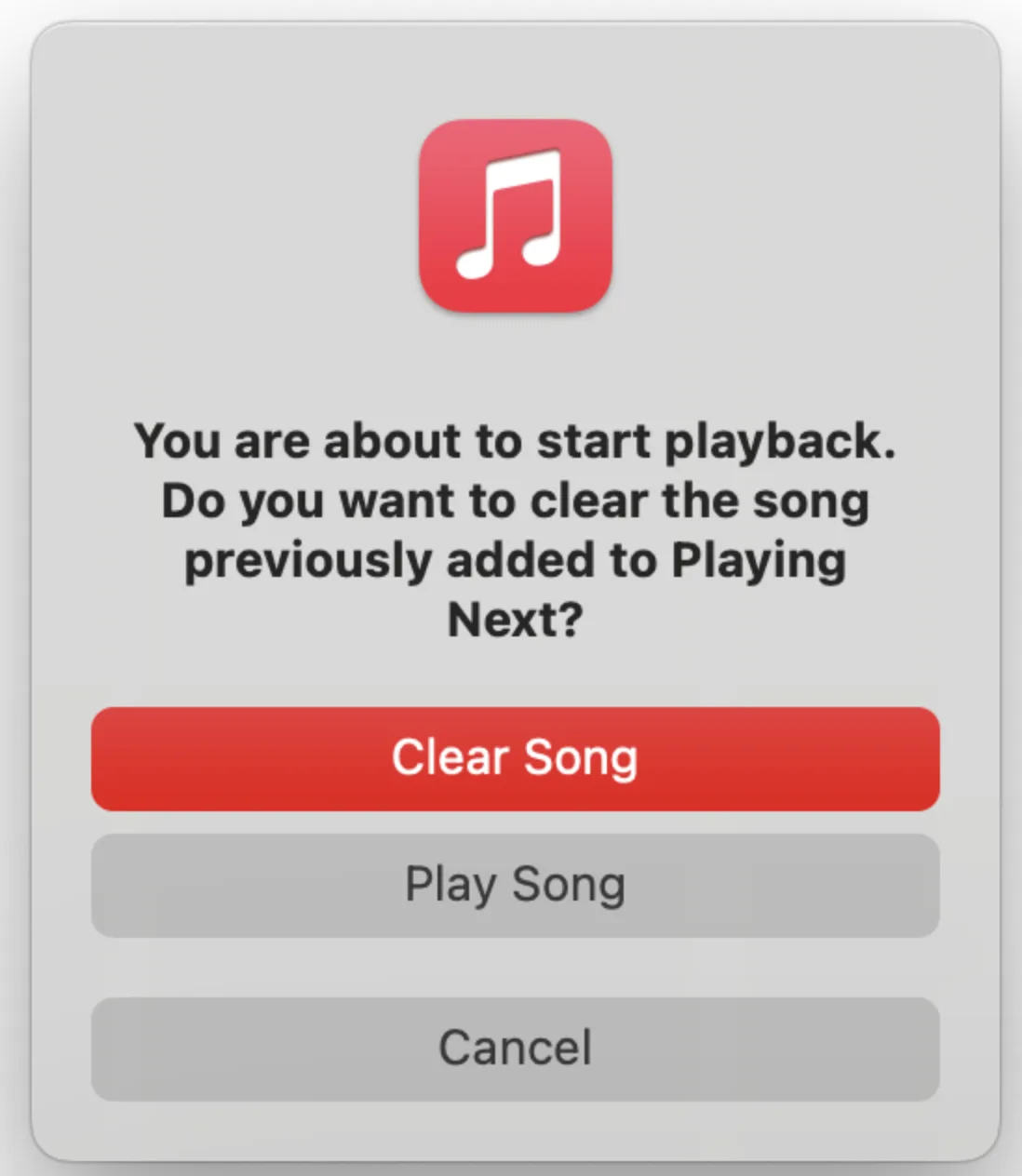
If you’ve come across the error message that reads, “You are about to start playback. Do you want to clear the song previously added to Playing Next?” don’t worry—you’re not alone. Many users have reported experiencing this issue when using the Music app. In this guide, we’ll provide you with a straightforward solution to fix the error and get back to enjoying your music.
Understanding the Issue
When you encounter this message, it indicates that the Music app is trying to play songs that you’ve added from the Cloud. Unfortunately, something has caused it to stall, resulting in the “Playing Next Loop” error message.
Steps to Fix the Error
One of the easiest ways to resolve this issue is by signing out of your Apple account in the Music app and then signing back in. Here’s how to do it step by step:
Locate the Error Message: Start by keeping the error message visible on your screen.
Open the Account Menu: Find and click on the “Account” menu at the top of the app.
Sign Out: Select “Sign Out” from the menu options.
Access the Account Menu Again: Go back to the “Account” menu.
Sign In Again: Click on “Sign In” to re-enter your account details.
Resume Playback: After signing back in, click on “Play” to start enjoying your music again.
Following these steps should remove the error message and allow you to continue with your listening experience.
Informing Apple About the Issue
It’s essential to report this error to Apple. While they might not respond directly, your feedback is vital for helping them identify and address issues. Here’s how to report the problem:
Pakistani singer Ali Sethi, known for his soulful music across the subcontinent, recently shared a post on Instagram that some interpreted as him identifying as queer.
There have been longstanding rumors about Sethi’s sexual orientation, but this could be the first time he’s addressed them publicly.
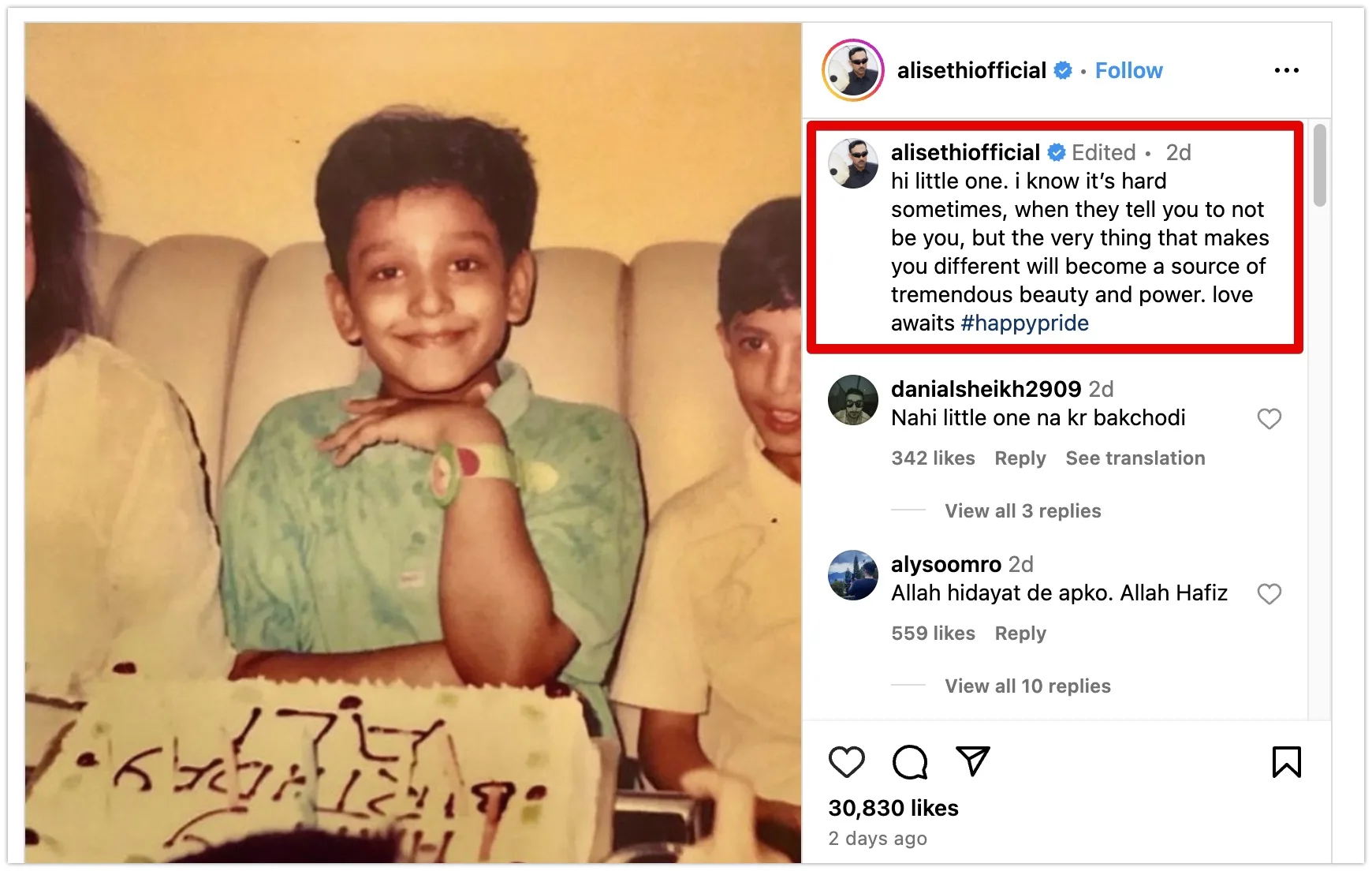
Ali Sethi closed out Pride month with a heartfelt Instagram post. Sharing a childhood photo, he wrote a message to his younger self: “Hey little one, it can be tough when they tell you to be someone else. But remember, what makes you different will become your greatest strength and source of beauty. Love is waiting for you. #HappyPride.”
This post on Pride Month marks a potential turning point for Sethi, as it’s the first time he’s publicly addressed his identity in this way. While rumors about his sexual orientation have circulated among fans for years, this could be his way of acknowledging them. Sethi’s message also holds significance as he might be the first Pakistani celebrity to celebrate his queer identity so openly.
In 2023, rumors swirled online about Ali Sethi marrying Pakistani artist Salman Toor. Speculation suggested a long-term relationship culminating in a New York wedding. However, Sethi swiftly debunked the news on social media, clarifying he wasn’t married. He even added a touch of humor, suggesting the rumor-mongers might be better off promoting his new release.
Ali Sethi’s recent Instagram post sparked a range of reactions online. While many fans celebrated and expressed support, others indicated they were already aware and surprised this was his first public acknowledgment. Unfortunately, some also resorted to homophobic comments and trolling.
Just discovered Ali Sethi is openly queer????? An openly queer Pakistani national had one of the biggest songs of last year across the subcontinent and diaspora, made it onto the Ms Marvel soundtrack and Bollywood recreated it😭😭 King did that! #pasoorihttps://t.co/n29CbwOR46
— শাহান | شاہان ☀️🇧🇩🫱🏾🫲🏽🍉 (@S_Hussain_1999) June 26, 2023
Y'all were indulging in Pasoori when you didn't know the song was about forbidden queer love.
And now, you're abusing Ali Sethi for not delivering the #Coachella performance you wanted because he was so gay on stage.
Ali Sethi putting out a very public post about being queer is such a huge win for desi queers in the global creative industry. I love this for our community! 🥺🏳🌈❤🩹
May Allah guide us all may he keep us away for the fitna of Shaitaan , putting a childhood pic while pasting ur current choices is disservice to the innocence of a child in this pic, that child has nothing to do what u r now . Ali sethi announced it many I know haven’t .. pic.twitter.com/Gckdl0sKlK
Last night, needed something to get sad about. Don't know if U can relate to the feeling, when everything is going well, but U've this urge to cry. Opened Twitter & saw #AliSethi trending. It shook my soul, got me crying for him. Allah hidayat dy 😭 Can't listen to him now. Sad!
Honestly i don’t understand why there’s so much discussion & shock surrounding the Ali Sethi sexuality reveal, man always seemed a lil fruity to me, i mean have you heard pasoori properly💀
Ali Sethi is a Pakistani singer known for soulful hits like “Chandni Raatein,” “Umran Langiyaan,” and the global phenomenon “Pasoori.” Released in 2022, “Pasoori” skyrocketed Sethi’s popularity, becoming one of the year’s most streamed songs on YouTube worldwide.
The costs for Spotify are increasing due to the increase in operational costs and industry changes.
Spotify, the popular music streaming service, has been steadily increasing its prices over the years, leaving many users wondering why.
In this article, we will explore the reasons behind Spotify’s price increases and how they fit into the company’s overall business strategy.
1. Keeping Up with the Market
One of the main reasons for Spotify’s price increases is its effort to stay competitive in the market. The landscape of music streaming is ever-evolving, with new competitors entering the scene and existing ones raising their prices. To maintain its position as a leading streaming service, Spotify needs to invest in product features, user experience enhancements, and content acquisition.
By raising prices, Spotify can generate more revenue to fund these initiatives. This enables the company to keep up with competitors like Apple Music and Amazon Music, which have also increased their prices. Matching their prices helps Spotify remain attractive to users who are considering alternative streaming services.
2. Covering Operational Costs
As Spotify continues to expand its services and offerings, its operational costs also increase. The company needs to generate sufficient revenue to cover these costs and maintain profitability. Price increases are one way to achieve this.
A significant portion of Spotify’s budget goes towards royalty payments to artists and record labels. While this has been a source of contention in the past, Spotify has been working to improve its relationships with artists and ensure they receive fair compensation. To reduce its reliance on music royalties, Spotify has also been investing in other types of content, such as podcasts and audiobooks, which come with their own set of costs.
3. Enhancing the User Experience
Spotify’s price increases are not just about covering costs but also about improving the user experience. The additional revenue allows Spotify to innovate and enhance its platform. This includes developing new features, improving personalized recommendations, and providing a more seamless streaming experience for users.
Spotify has also introduced various subscription plans to cater to different user needs. The Premium Duo plan, for example, offers a discounted rate for two users, while the Family plan provides access for up to six accounts. These plans offer flexibility and cost savings for users, demonstrating Spotify’s efforts to provide value beyond just music streaming.
4. Adapting to Industry Changes
The music industry is dynamic, and Spotify must adapt to changing trends and consumer behaviors. As physical music sales decline, streaming has become the primary source of revenue for the industry. This shift has led to a rise in licensing and royalty costs for streaming services like Spotify.
Additionally, consumer spending patterns can impact Spotify’s pricing decisions. For example, during periods of economic downturn or when consumer spending slows, price increases may seem counterintuitive. However, Spotify needs to balance its revenue needs with the risk of user churn due to price sensitivity.
Spotify’s price increases are a result of a combination of factors, including market competitiveness, operational costs, user experience enhancements, and industry changes. By raising prices, Spotify aims to maintain its position as a leading streaming service while also generating the revenue necessary to invest in new features, content, and improvements that benefit its users.
While price increases may be unpopular with some users, Spotify hopes to demonstrate the value it provides through its innovative platform, diverse content offerings, and personalized experiences. As the streaming landscape continues to evolve, Spotify must carefully navigate its pricing strategy to strike a balance between profitability and user satisfaction.
Jockie music bot is an excellent addition to any Discord server, whether it’s one you’re running or one that you want to join, and it’s easy to add if you know-how. With this guide, you’ll be able to add the Jockie music bot to your Discord in just five simple steps.
You’ll also learn about the numerous commands that allow you to easily control the bot and its many features, which include changing volume levels, playing songs from YouTube, and adding tracks from your own playlist and library. Ready? Let’s get started!
You will see many bots and servers for Discord there; you can search the top bots or type in the name of the bot you want to add manually.
Search for Jockie Music Bot
Adding ‘Jockie Music bot’ is as simple as typing the name and pressing enter; click the ‘Invite’ button for Jockie Music.
Select the server
You will see many bots and servers for Discord there; the bot will be accessible from your Discord account through a new tab. Select the server where the bot should be added.
Click continue
Click on ‘Continue’ to continue
Verify I am Human
Click on ‘I am human’ after clearing the captcha.
Bot added
The bot will now appear under ‘Online’ on the right side of your server in Discord.
Done!
You can now play music on Discord once you have added the desired bot.
How To Play Music In Discord Bot – (Jockie Music Bot Commands)
Since Jockie music bot has been added to your Discord server to play music. Connect to the voice channel of your server after that. You will then have to give commands to Discord to play, pause, or stop music based on the music bot you added.
Now that Jockie Music bot has been added to Discord, here is how you can use it:
In the ‘Voice Channels’ section, click on the name of the voice channel you wish to join.
At the bottom left corner of the screen, you will see the confirmation message ‘Voice connected’
You will then need to enter the commands for the bot. Here are the basic commands:
m!play – Play tracks by link or search
m!skip – Skip the track currently playing
m!leave – Exit the voice channel with the bot
m!pause – Stop the track
Let’s say, you want to play the ‘Shape of You’ track, simply type in the right command for the Jockie Music bot in the text channel i.e. m!play – Shape of You and press ‘enter’. Jockie Music will search for the track and start playing it.
Similarly, you can try giving other commands to the bot to see how it works. You can even give more than one command to the bot at a time; it will follow all the commands one by one automatically.
As one of the leading VoIP, instant messaging, and digital distribution platforms, Discord has over 300 million registered users. When it comes to multitasking, Discord is great when it comes to gaming and listening to music.
Music, games, and talking to your friends can all be played simultaneously. It may be for this reason that Discord manages 19 million active servers every week.
You probably already know that Discord has a music feature if you have been a loyal user. The fun and entertainment you could have had if you had done so are missing out on if you have not done so.
Controversial social media platform X temporarily blocks terms related to Taylor Swift following the widespread circulation of explicit deepfakes of the singer, amidst increased scrutiny of X’s content moderation policies.
Following the viral spread of explicit, AI-generated images featuring pop sensation Taylor Swift, the social media platform X, formerly known as Twitter, has temporarily disabled related searches for the singer on its platform.
Users attempting to search for Swift were confronted with an error message that recommended they try reloading. This action was taken, according to a released statement from X, “with an abundance of caution as we prioritize safety on this issue.”
The explicit content, which was recently alarmingly ubiquitous online, was live on X for nearly 19 hours before swift action led to the suspension of the account responsible for the posts. Yet, this significant duration, coupled with the nature of the images, triggered widespread outrage from not only Swift’s loyal supporters but also from concerned netizens who condemned the “violently misogynist” character of the AI creations.
X, which responded nearly a day later, announced its proactive efforts in “actively removing all identified images” and imposing penalties on accounts implicated in circulating the offensive visuals.
Ever since billionaire entrepreneur Elon Musk acquired X, renaming the erstwhile Twitter, the platform has faced amplified scrutiny pertaining to its revised content moderation policies. These changes have already triggered unease among many advertisers, leading to a pull-out over concerns about their ads featured alongside contentious posts.
Refashioning their guidelines, X, in concert with CEO Linda Yaccarino, propagated a “freedom of speech, not reach” policy. This initiative curtails the spread of certain posts without outright deleting them.
Regrettably, explicit, false depictions of Swift found their way to other platforms, notably Facebook and Reddit. Online searches for Swift on Instagram, owned by Meta, yielded zero results, offering instead a message intimating the association of such search terms with the activities of perilous organizations and individuals.
Meta spokespersons affirmed their vigilance, stating, “We’re continuing to monitor, and if we identify any additional violating content, we’ll remove it and take appropriate action.”
Deepfakes, especially those of an explicit nature, have come under fire. Karine Jean-Pierre, White House press secretary, described the incident as “alarming” and added that social media firms must execute their responsibilities to curb the proliferation of such content on their platforms. The incident starkly highlights the rising threat posed by deepfake technology, emphasizing the urgent need for stringent checks and balances in the digital sphere.
Hugely popular social media platform, Instagram, once grappled with what it termed the “Bieber problem,” a high-volume interaction issue tied to pop sensation Justin Bieber’s huge fanbase.
Whenever Bieber posted a photograph on the platform, it generated such an astounding number of “likes” that Instagram’s existing cache was unable to accommodate them all. Consequently, the service would slow as it attempted to retrieve each piece of interaction data from the disk, putting immense strain on the platform’s entire infrastructure.
This issue was so pronounced that Instagram’s co-founder, Mike Krieger, memorized Bieber’s digital ID due to the frequency of these challenges. Addressing such a unique, large-scale problem requires a unique solution. Instagram resolved this issue by restructuring its system, specifically aiming at managing the high volume of interactions generated by posts from figures like Bieber. The platform implemented a memory cache within its computer data centers to swiftly roll out new content to millions of users.
This innovative approach allowed Instagram to swiftly relay data from memory—a process notably faster than retrieving it from databases located on disks. This change dramatically improved overall service speed and user experience.
As of 2024, Instagram’s algorithm has witnessed significant evolution. It now employs an array of algorithms, classifiers, and various other processes to deliver a highly personalized user experience. This restructuring aims to retain users on the app by offering content they find engaging and relevant.
Despite these changes, celebrities like Bieber continue to exert significant influence on the platform’s day-to-day operation and long-term development. Their popularity directly impacts the platform’s algorithms, shaping the way content is delivered and consumed. This dynamic crossroad of technology and star power is a testament to Instagram’s commitment to adapt and cater to the evolving demands of its extensive user base.
I have been researching a topic about North Korea for about a week. I found that in Pyongyang people wake up to a strange sound that can be heard in this YouTube video
The Eerie Music of Pyongyang
The sound that people in North Korea hear early in the morning is eerie and seems to be from a dystopian movie.
To understand it better, I asked Ali Asad (a musician from Karachi, Pakistan) to deconstruct the music for me.
The reason I contacted Ali Asad is because he had no idea where this music came from, I did not give him any details to get a better idea of how he feels about it as a musician.
This is his quote:
“Mode: Aeolian (Natural Minor Scale) Key: A Instruments: Vocals, bells, some blowing instruments.
It sounds like a day/night ‘full of tragedies, incidents, disappointments, broken hearts, lost’ has ended, and now people who still have hope are cleaning up the mess to give it a new beginning and make the world a better place. The Last Hope”.
Ali Asad
The music is haunting and seems to be from a dystopian movie. According to Ali Asad, the music is in the Aeolian mode (Natural Minor Scale) with the key of A. The instruments used in the music are vocals, bells, and some blowing instruments. Ali Asad believes that the music sounds like a day/night “full of tragedies, incidents, disappointments, broken hearts, lost” has ended, and now people who still have hope are cleaning up the mess to give it a new beginning and make the world a better place. He calls it “The Last Hope”.
What Is That Song That Is Being Played?
“Where Are You, Dear General?” (Korean: 어디에 계십니까 그리운 장군님)
The composition titled “Where Are You, Dear General?” (Korean: 어디에 계십니까 그리운 장군님; MR: Ŏdie kyeshimnikka kŭriun changgunnim) has been resonating from the speakers at Pyongyang Railway Station every morning since at least 2008. It is believed that this song was penned by Kim Jong Il himself.
https://www.youtube.com/watch?v=ToOspn0VKE8
Music in North Korea
North Korea has a rich musical heritage, which includes a wide array of folk, pop, light instrumental, political, and classical performers. Beyond patriotic and political music, popular groups like Pochonbo Electronic Ensemble and Moranbong Band perform songs about everyday life in the DPRK and modern light pop reinterpretations of classic Korean folk music. Music education is widely taught in schools, with President Kim Il Sung first implementing a program of study of musical instruments in 1949 at an orphanage in Mangyongdae.
Music in North Korea is an important part of everyday life and serves as a key propaganda tool, lionizing the ruling Kim family and its fight against imperial aggression. The monopoly North Korea exerts over creative expression makes the state’s songs – and thus their approved messages – uniquely pervasive.
The eerie music that people in Pyongyang hear early in the morning is a haunting reminder of the oppressive regime that rules North Korea. However, it is also a testament to the power of music to convey emotions and ideas. Ali Asad’s analysis of the music is quite insightful and provides a unique perspective on the music. North Korea’s music heritage is rich and varied, and it is important to recognize its significance in the country’s culture.
Recently, Google has created an AI system which is able to create music according to a text description. This follows the trend of AI being used to generate images, as well as helping people compose written works.
Google, the online search and advertising behemoth, called this system ‘MusicLM.’ An academic paper released on January 26th from Google’s researchers explains MusicLM as “a model that produces high-quality music from text descriptions, such as ‘a soothing violin tune complemented by a distorted guitar riff.’”
The paper states that MusicLM has been proven to be able to adapt to both a text caption and a melody, whether it be a hum or a whistle.
The paper specifies that MusicLM can be fed with user-generated descriptions, for example “enchanting jazz track having a memorable sax solo and a vocalist” or “Berlin 90s techno accompanied by a deep bass and firm kick,” and still give back the right results.
One can hear some of the tunes created with MusicLM here.
The rapid growth of OpenAI’s ChatGPT, an artificial intelligence-driven natural language processing tool, has caused Google to take action, with reports of the company’s management having declared a “code red” according to The New York Times. In response, Google is allegedly preparing to unveil more than 20 AI-based projects in 2021, including a version of Google Search that incorporates AI technology.
TechCrunch mentions that MusicLM is not the only AI music generator, as other projects such as Riffusion, Dance Diffusion, Google’s AudioLM and OpenAI’s Jukebox have been exploring the same field.
It is unlikely that MusicLM will be available to the public soon due to worries about the possibility of programming biases causing technological issues, lack of representation, and misuse of creative content. To illustrate, during a trial, Google’s research team discovered that one percent of the music produced by MusicLM was identical to the songs it was trained on.
It is possible to reduce the risk of plagiarism by altering the structure of a text while preserving its contextual and semantic content. This can be achieved by rearranging the words, phrases, and sentences while keeping the original meaning intact.
Amazon is offering new Prime Day [year] subscribers free access to Amazon Music Unlimited as part of one of its early deals as Prime Day gets closer and closer.
A beginner or an advanced player must have the right equipment for your practice sessions. The most essential piece of equipment is, of course, a piano.
However, it’s also necessary to have the best headphones for piano to get the most out of your time spent playing.
If you buy something using links in this article, Digital Phablet may earn a commission. This helps us in supporting journalism.
This article will look at some of the best headphones on offer and explain why they are worth considering when buying new equipment for your home studio.
Best Headphones For Piano
1. Sony MDR7506 Professional (Large Diaphragm Headphone)
The Sony MDR7506 Professional headphones are a favorite among professionals and audiophiles alike. The Sony MDR7506 Professional headphones have a wide soundstage that gives you an immersive, accurate sound experience.
PROS:
They’re incredibly durable, thanks to their sturdy design and construction.
They’re comfortable for extended listening sessions due to their plush ear pads and lightweight frame.
The cord is detachable for easy replacement, and it’s also coiled to prevent tangling.
CONS:
While the cord is detachable and coiled, it’s also just 6 feet long—a bit too short for most setups if you’re using these at home or in the studio rather than on the go!
2. Sennheiser HD 280 Pro (Over-Ear Headphones)
The Sennheiser HD 280 Pros are a great pair of high-quality headphones. The plush ear pads are very comfortable, and they block out external noise effectively.
PROS:
They’re not the most expensive, but they’re not cheap either.
The sound quality is excellent.
The noise cancellation is impressive.
CONS:
The only issue with these headphones is that they don’t come with an additional cable for use with devices that don’t have a 3.5mm jack.
3. Beyerdynamic DT 770 PRO 80 ohm (Studio Headphones)
The Beyerdynamic DT 770 PRO headphones are an excellent choice for those looking for a relatively affordable, comfortable, high-quality pair of headphones.
The DT 770 Pros come with many features you’d expect to only find in higher-end models, and they’re an incredible bargain for the price point.
PROS:
They have an excellent frequency response, so you can hear every detail in your music.
They are comfortable! The earcups are soft and don’t press too hard on your head.
They’re not too heavy, so you can wear them for hours at a time without getting uncomfortable or experiencing any fatigue.
CONS:
They aren’t wireless (you’ll have to plug them into your device).
They’re not waterproof (you’ll have to avoid getting them wet).
4. Audio-Technica ATH-M50x (Professional Studio Monitor Headphones)
The Audio-Technica ATH-M50x is a pair of professional monitor headphones. It is designed with a 45mm audio driver and has a frequency response range of 15 to 28,000 Hz.
The headphones have a closed-back design that helps reduce noise leakage and provides listeners with accurate sound reproduction.
PROS:
The sound quality is top-notch, with great bass and treble response. They’re a bit heavy on the base, but if you’re looking for something more balanced, check out the ATH-M40x.
The earcups are comfortable and fold flat. They also come with a nice carrying case.
CONS:
Not the best choice if you’re looking for noise-canceling headphones—they block out some ambient noise, but not as much as other options on the market.
5. Shure SRH440 (Professional Studio Headphones)
The Shure SRH440 is an excellent choice for anyone looking for a solid pair of headphones that won’t break the bank. The sound quality is impressive, and it’s comfortable to wear for long periods.
PROS:
Excellent sound quality for the price
Comfortable to wear for long periods
Strong bass response and accurate mids and highs
CONS:
Can get a bit warm after long periods of use
6. Numark Red Wave Carbon (Professional DJ Headphones)
The Numark Red Wave Carbon headphones come with an adjustable headband to find the perfect fit for your head shape and size.
This feature makes it easy to wear these headphones for long periods without experiencing any discomfort from pressure points on your head caused by tight straps around your ears or headband bands that don’t fit properly.
PROS:
The Numark Red Wave Carbon headphones are lightweight, making them a good option for DJs who want to avoid fatigue while performing.
The ear cushions are made from memory foam, so they’ll conform to your ears and stay in place while you’re dancing around.
An adjustable headband makes the headphones fit comfortably on your head, no matter how much you move around.
CONS:
The Numark Red Wave Carbon headphones are not noise-canceling, which means that you’ll be able to hear whatever is going on around you while you’re listening to music or watching videos through these.
7. Monoprice Premium Hi-Fi (DJ Style Over-the-Ear Pro Headphone)
With Monoprice Premium Hi-Fi, you get the best of both worlds: quality sound and a budget price.
It has a wide frequency range and delivers crisp, clear audio.
PROS:
Great sound quality.
Easy to use.
One of the cheapest options on the market.
CONS:
The cord is not detachable, making it difficult to move the speakers around and store them in different locations.
8. AKG K 240 MK II (Semi-Open Stereo Studio Headphone)
The AKG K 240 MK II is one of the best-selling headphones on the market. It’s a workhorse with features that make it an excellent choice for recording and mixing in home and professional settings.
PROS:
The K 240 MK II headphones provide excellent sound quality, especially for the price point.
They are comfortable for long listening periods!
CONS:
Not portable.
9. Superlux HD681 Evo (Closed Back Dynamic Studio Monitoring Headphones)
The Superlux HD681 Evo is a studio-grade pair of headphones that are also fabulous for everyday use. They’re durable, comfortable, and provide excellent sound quality.
The main benefit of the HD681 Evo over other models is that it’s so easy to wear for long periods without getting uncomfortable or feeling like you need to take a break. The padding on the ear cups is soft, and the headband doesn’t put any pressure on your head.
PROS:
Wide frequency range, which means they can produce sounds from deep bass to high treble.
Versatile enough to be used with any device that has a headphone jack (including smartphones and tablets).
Comfortable fit for all head sizes and shapes.
Excellent value for money.
CONS:
Not ideal for loud environments because they leak sound.
10. Sennheiser HD 559 (Open Back headphone)
The Sennheiser HD 559 headphones are designed with a closed back and over-the-ear design. The headphones have a frequency response of 15 Hz to 27 kHz, which means they can produce deep bass notes and high-end sounds. They also feature a closed-back design that helps to block out external noise.
When looking for the best laptop for DJing, you need a powerful machine that can handle your software and plug-ins. We’ve rounded up the top 10 laptops for DJing in this list based on their specs and user reviews.
We have considered the best DJ laptops in our selection—so whether you prefer to lay down tracks at home or do live performances on the go, you’ll find something here to suit your needs.
1. Dell XPS 15
For the best mix of performance and portability, the Dell XPS 15 is our top choice. It comes with a 15.6″ 1920 x 1080 display that can be configured with an optional 4K touchscreen or an anti-glare panel that blocks distracting reflections.
The XPS 15 also has a powerful Intel Core i7-9750H processor, 16GB DDR4 RAM, 512GB PCIe SSD, 1TB HDD, and NVIDIA GeForce RTX 2060 graphics card (or better versions depending on your budget).
This laptop offers excellent value for money at its current price point and will easily handle DJing tasks such as mixing music files while still providing good battery life.
2. MSI P65 Creator-1084
The MSI P65 Creator-1084 is a powerful gaming laptop that can also be used for DJing. It comes with an Intel Core i9-9900K Processor, 16GB DDR4 2666MHz RAM, 512GB SSD, and NVIDIA GeForce RTX 2080 8GB GDDR6.
It has a 15.6″ FHD (1920×1080) 144Hz IPS Display with a matte finish to reduce glare and reflection when performing in dimly lit environments or outdoors under the sun.
3. Lenovo LEGION Y740
This laptop is a perfect choice, especially if you are looking for a laptop that can handle multitasking. The display is excellent and offers crystal clear visuals. It also has an Intel Core i7-9750H processor with 16GB DDR4 2666MHz RAM and 512GB PCIe SSD.
The NVIDIA GeForce RTX 2080 Max-Q is powerful enough to play games without lag or stuttering, even on high settings. These specifications make it ideal for DJing, video editing, rendering, and even gaming (if you’re into that).
4. Apple MacBook Pro 16″
This beautiful machine is the perfect choice for those who want to create music with their laptop. The Apple MacBook Pro has a Retina display of a 2560 x 1600, which is ideal for DJing. The display can show many instruments and effects simultaneously, making it extremely easy to choose what you want to use.
It comes with 16GB RAM and 512GB SSD storage capacity (upgradeable up to 32GB RAM and 1TB SSD). It also has an 8th Gen Intel Core i7 CPU that makes it powerful enough to play high-quality audio files without interruptions or distortion in sound quality. It also comes preloaded with macOS Mojave operating system, which allows you to use Logic Pro X and other software designed specifically for DJs, such as Serato DJ Pro 2, Traktor Pro 2, or any other music creation software out there!
This laptop weighs just 3.02 pounds, so even if you carry it around all day long while performing live shows or giving presentations at different venues, there won’t be any problem since this laptop will feel light in your bag/purse/backpack no matter how many hours had passed since last time when you used it!
5. Acer Predator Helios 500
The Acer Predator Helios 500 is the most expensive laptop on this list, with a starting price of $2,199.99. While you may be tempted to think that higher price equals better quality, we recommend taking your time with this before committing.
The Helios 500 comes with an Intel Core i9 processor and 16GB of RAM—enough power to handle most DJ software and hardware combinations without sweat. It also has an Nvidia GeForce GTX 1070 graphics card for smooth visuals during your gigs or house parties (or whatever it is you do). However, if you’re looking for something more portable that’s easy to travel with from gig to gig, don’t mind sacrificing some power.
6. HP Omen 15
The HP Omen 15 is an excellent choice for DJing. It has an Intel Core i7-8750H processor, 16GB of RAM, and a 256GB solid-state drive. The graphics card is the NVIDIA GeForce GTX 1050 Ti 4GB GDDR5 card, which should be more than enough to handle most tasks you throw at it. It also comes with Windows 10 Home installed, so you don’t need to worry about installing any extra operating systems or software applications to start immediately.
The key feature that makes this laptop stand out from other models on our list is its screen quality; it has a 1920 x 1080 pixels resolution display with a 120 Hz refresh rate (for those who like fast screen refreshes) which will make sure whatever you do on your computer looks good even when viewed from up close!
7. Alienware Area 51m
This laptop is a machine that can keep up with your DJing needs. It’s powered by an Intel Core i9-9900K processor, 16GB DDR4 RAM, and NVIDIA GeForce RTX 2080 graphics card. The 512GB SSD will give you enough storage space for all the music files and videos you need, while the 1TB HDD will also help you store your favorite games.
The 15.6″ FHD (1920 x 1080) IPS Anti-Glare 300-nits display offers a great visual experience at home or in clubs and bars when playing music from this laptop with excellent sound quality thanks to its integrated speakers.
8. Razer Blade 15 Studio Edition
The Razer Blade 15 Studio Edition is a portable laptop that packs in the power to meet your DJing needs. The high-performance NVIDIA GeForce RTX 2080 Max-Q GPU and 8th Gen Intel Core i7 processor can handle high-quality video recording, live streaming, and many DJ software without skipping a beat. The RGB keyboard features per-key lighting settings, so you can customize your look no matter how many people are watching.
The speakers are loud enough to fill up a room without distortion when playing music at high volumes, making them perfect for when you’re practicing on your own or rocking out with friends. A large battery provides up to nine hours of use per charge; whether you’re performing at a gig or sitting on the couch binge-watching Netflix shows with friends after class, this laptop will keep going strong all night long!
A few drawbacks include its size, which makes traveling difficult unless you have extra space inside your bag (or have checked luggage). In addition, it weighs 5 pounds, so carrying it around might become tiresome after a while, depending on how long before showtime we’re talking about here too! And finally: This laptop costs upwards of USD 2k depending on which the buyer chooses configuration options—this may prove too expensive for some buyers looking only to buy one model!
9. Asus ROG Zephyrus S GX701
The Asus ROG Zephyrus S GX701 is an excellent choice for aspiring DJs. It has a fast CPU and GPU, handling the most demanding audio mixing tasks. Its keyboard is comfortable to use, with individual RGB backlit keys that allow you to create unique lighting patterns in the dark.
The laptop also has a high-quality display that provides clarity for music visualization apps like Serato DJ Pro and streaming platforms such as YouTube or Twitch.
Its battery life is decent at about 6 hours when used for everyday activities like watching videos on Netflix or listening to music on Spotify.
However, depending on how long your gigs last, it might not be enough if you’re playing several sets in one night without any breaks between them (for example, 4+ hours).
10. MSI GT75 Titan-051
The MSI GT75 Titan-051 is the best laptop for DJing and at a relatively affordable price.
The GTX 1080 graphics card is powerful enough to handle complex 3D rendering and gaming. The Intel Core i9 processor meets the GPU’s demands by providing enough speed for multitasking and heavy-duty processing tasks like audio editing.
This combination makes this laptop one of the fastest on our list, capable of efficiently handling even the most demanding applications.
The RGB keyboard (with dedicated Windows key lock) glows brightly in red when plugged in but dims to an ambient glow when running on battery power — perfect for dark stages or late-night studio sessions where you don’t want to be distracted by bright lights! The overall design is excellent: sturdy build quality with no flexing whatsoever despite being lighter than most other 15″ laptops; comfortable palm rests; accessible access ports (including two USB Type-Cs); backlit keyboard with full Numpad…and did we mention how good it looks?
It does have some downsides, though: no Thunderbolt 3 port means slower transfer speeds when plugging into external devices such as monitors or hard drives; only 8GB RAM vs. 16GB RAM on most other laptops – might cause problems if running multiple virtual machines at once (but probably won’t).
We hope you enjoyed reading our top 10 best laptop for DJing in [year] list. If so, please share this article with your friends and colleagues who may also be interested in learning more about these unique devices!