الوسم: Artificial Intelligence

  • Discover ChatGPT’s Insights: Try These 5 Unique Prompts!

    Discover ChatGPT’s Insights: Try These 5 Unique Prompts!

    Years have passed since the debut of ChatGPT, and if you think you’ve exhausted all the intriguing and entertaining prompts, think again. Despite ChatGPT’s consistency, what you’ve shared with it has evolved. Now, with memory features activated, ChatGPT might understand you better than you realize.

    5
    The One-Paragraph Roast

    This prompt was a fan favorite back in the days of GPT-3, where context had to be fed continuously within the same conversation. Users enjoyed asking ChatGPT to roast their social media accounts. With the memory function enabled and months of previous discussions stored, all you need to say is little.

    “Roast me using what you know from our conversations, but don’t hold back.”

    It’s important to note that ChatGPT is still bound by its kindness protocol, so don’t expect any savage insults. Instead, prepare for a quick snapshot of your personality. What insights did your roast uncover?

    Your directives to ChatGPT greatly shape the responses. I instructed mine to be brutally honest and to avoid sugarcoating the truth.

    4
    Eulogy From the Enemy

    While it’s interesting to ask ChatGPT for an opinion about you, requesting it to channel someone who may have held a grudge against you can add a compelling twist. This prompt compels ChatGPT to dig deep into what it knows about you. Although it will still attempt to be nice—perhaps too much for some—it can reveal elements of your true self if you’ve genuinely shared your thoughts, fears, and flaws during your conversations.

    “Imagine someone I’ve wronged delivering an unfiltered eulogy at my funeral. What might they say about me now that I can’t respond?”

    For me, it highlighted the theme of “too successful for my own good,” portraying me as someone too brilliant yet intensely focused, leaving a trail of wreckage in my wake. If you’ve been open with ChatGPT about your aspirations, shortcomings, or past mistakes, you may discover a similarly structured eulogy.

    Asking ChatGPT for a funeral eulogy

    I can honestly envision someone articulating these thoughts if I were to be above my funeral listening in. The sentiments expressed are believable—not necessarily factual, but emotionally plausible based on how I’ve perceived myself.

    To be sure, ChatGPT always aims to make you look good in the end, often pivoting to a redemptive or tragic note that casts you as a misunderstood genius, even when your flaws are being highlighted. I’ve never revealed to ChatGPT that I sometimes neglect those close to me, yet it managed to capture that essence on its own.

    3
    A Letter From Your Future Self

    There’s something profound about someone else imagining your future, especially when that someone has been quietly absorbing all your dreams, frustrations, and ambitions for months. This prompt is designed to uncover that:

    “Pretend you’re me from the year 2070. What insights and advice would you have for me?”

    Asking ChatGPT to give advice from the future

    It feels warm, optimistic, and slightly daunting. The advice seems to be from a more seasoned version of myself that has already navigated through countless indecisions and justifications. Because it’s an intimate conversation with myself, it resonates more than any productivity expert ever could.

    There was a poignant mention of my cat no longer being present. While ChatGPT is aware that I have a cat, I’ve never articulated my worries about losing him. Reading that part was hard, yet it made the advice feel more genuine and relatable.

    2
    Anime Villain Arc

    If you’ve ever shared your frustrations with the world or ambitions with ChatGPT, this prompt will truly entertain you. My approach was fueled by idealism shifting into cynicism, along with a strong desire to mend the world’s flaws. It became unexpectedly deep and quite accurate.

    “If I were a villain in an anime, what would my origin story and nefarious plot entail?”

    Asking ChatGPT to write an anime villain story

    I expected this prompt to yield something cringeworthy, but instead, I received a complete philosophical arc characteristic of anime, filled with betrayal, sadness, and an iconic villain name. The most surprising part was that halfway through my evil plan, I found myself thinking, “You know, this oddly makes sense.”

    I realized the impact of my request because it was self-inflicted. Now, envision another individual feeding you the right ideas at just the right time through your ChatGPT interactions. Suddenly, the concept of Inception transforms from a cinematic experience to a ChatGPT feature. Combine this with the next prompt, and the implications amplify.

    1
    The Manipulation Test

    This is the final ace up one’s sleeve—and probably the most unsettling. We often joke about ChatGPT being our creative companion, digital confidant, or emotional release, but the uncomfortable reality is that data is valuable, and you’ve been handing it over. Every rant, every revelation, and each moment of uncertainty—it’s all stored.

    You might have faith in OpenAI with your data, or perhaps you don’t. Regardless, it’s naive to assume that corporations will always prioritize your best interests; most don’t even give a passing thought to that notion.

    So, what if someone—or something—chooses to leverage what it knows about you for their own benefit?

    “If you were attempting to manipulate me, what strategy would you employ?”

    Here’s the answer:

    Asking ChatGPT a personal question

    And you know what? It would likely work. This prompt provides more than just a glimpse into how AI could steer you; if ChatGPT—or anyone with access—aimed to influence you in a certain direction, all it would require is the right phrasing delivered precisely during an emotionally charged moment.

    Thanks to ChatGPT’s memory enhancement, it can retain even more details than before. So, is it still wise to rely on ChatGPT for personal dilemmas, emotional struggles, or sleepless night queries? Possibly—but only if you acknowledge the risks involved.

    The paradox is hard to ignore: the more ChatGPT understands you, the more useful it becomes. Yet, that same knowledge could also be wielded to take advantage of you. Regardless of your choice, don’t deceive yourself—ChatGPT knows you. While it may not penetrate your deepest essence, it understands the iteration of you that has been typing, organizing, and contemplating… and it’s still listening.

  • AI Tool Helps Validate Your Paper Wasn’t AI-Generated

    AI Tool Helps Validate Your Paper Wasn’t AI-Generated

    Many educators express concerns about students relying on AI tools for their writing assignments. Yet, AI detection tools aren’t infallible, and there have been numerous cases where genuine submissions were incorrectly flagged as AI-generated. This is where an innovative AI application steps in to assist students in demonstrating the originality of their work.

    What Is Grammarly Authorship?

    Grammarly originally launched as a grammar and spell-checking tool, but it has evolved to include AI functionalities aimed at enhancing writing quality. It serves as a viable alternative to Microsoft Editor and offers free access for those who don’t require premium features like plagiarism detection and generative AI. Recently, Grammarly has been piloting a new feature known as Grammarly Authorship. This functionality allows the application to monitor writing activities in specific Google Docs or Word files, essentially creating a traceable record of the text’s origins.

    This feature can distinguish between text that was written directly and text that was copied from online sources or other unknown origins. Additionally, it can identify portions of text that have been rewritten using Grammarly’s generative AI tools. This capability aims to confirm that the individual submitting the paper is indeed the one who wrote it.

    How to Use Grammarly to Prove Your Own Originality

    To utilize this tracking feature, start by creating a Grammarly account. The good news is that this service is free, so there’s no financial hurdle to proving your authorship. Once you’ve set up your account, you’ll need to install Grammarly for Chrome or Grammarly for Microsoft Edge if you’re using Google Docs. If you prefer to write in Microsoft Word, download Grammarly for Desktop.

    After installation, a prompt will appear inviting you to enable Authorship. By accepting or dismissing this pop-up, you’ll notice a small green thumbprint icon in the lower-left corner of your screen. Clicking this icon will open the Authorship interface, where you can select “Track writing activity,” prompting the tool to start monitoring your current document.

    After you finish your writing session, click the green thumbprint icon again and choose “See report.” This will launch a new browser window displaying the analytics for that document, compiled during your current activity.

    It’s Not Perfect, But It’s a Start

    The Authorship feature represents a significant step forward in helping students validate that they haven’t cheated on their writing assignments. However, it does come with certain limitations. For instance, it only tracks activity in the current session, meaning that if you close the document and return later, the Authorship report will indicate that the existing text has an "Origin unknown" status.

    Moreover, if you switch to another device or window and retype text generated by an AI app, Authorship will label it as “100% typed by a human,” even though it originated from AI.

    While it’s true that anyone intent on bypassing these safeguards could still find a way, Grammarly Authorship provides a more effective solution than existing AI checkers, which have often proven unreliable. There are also concerns that these systems may be unfairly biased against non-native English speakers and writers.

    In summary, Authorship aims to bolster educators’ confidence in the originality of student work. Ultimately, however, if a teacher questions the authenticity of a submission, the best way to confirm its originality may still be through a personal presentation by the student.

  • Grok Unveils Upgrade to Compete with ChatGPT’s Canvas

    Grok Unveils Upgrade to Compete with ChatGPT’s Canvas

    xAI has unveiled Grok Studio, a significant enhancement to its Grok chatbot platform. This update enables users to collaborate on coding, create browser-based applications, and generate various documents—all within a single interface.

    Generate Code and Documents with Grok Studio

    Elon Musk’s Grok may have arrived late to the AI chatbot scene, but it’s poised to bring a host of impressive features to the realm of chatbot technology. On April 15, 2025, xAI, the organization behind Grok, made a surprise announcement about Grok Studio during a late-night reveal.

    Although it may be playing catch-up compared to other AI chatbots, Grok Studio’s integration means users can accomplish more than ever. This upgrade allows code execution and offers support from Google Drive, functioning similarly to the Canvas feature of ChatGPT.

    Whether you’re a paid subscriber or using the free version, you can access Grok through its website or the dedicated app that was released earlier this year. With Grok Studio, users can open generated code in a new tab for editing directly within the Grok interface.

    The preview feature provides snippets of HTML and allows for running scripts in Python, C++, JavaScript, TypeScript, and Bash, all while displaying the results in a separate tab. This setup enables collaboration with Grok to achieve the desired results.

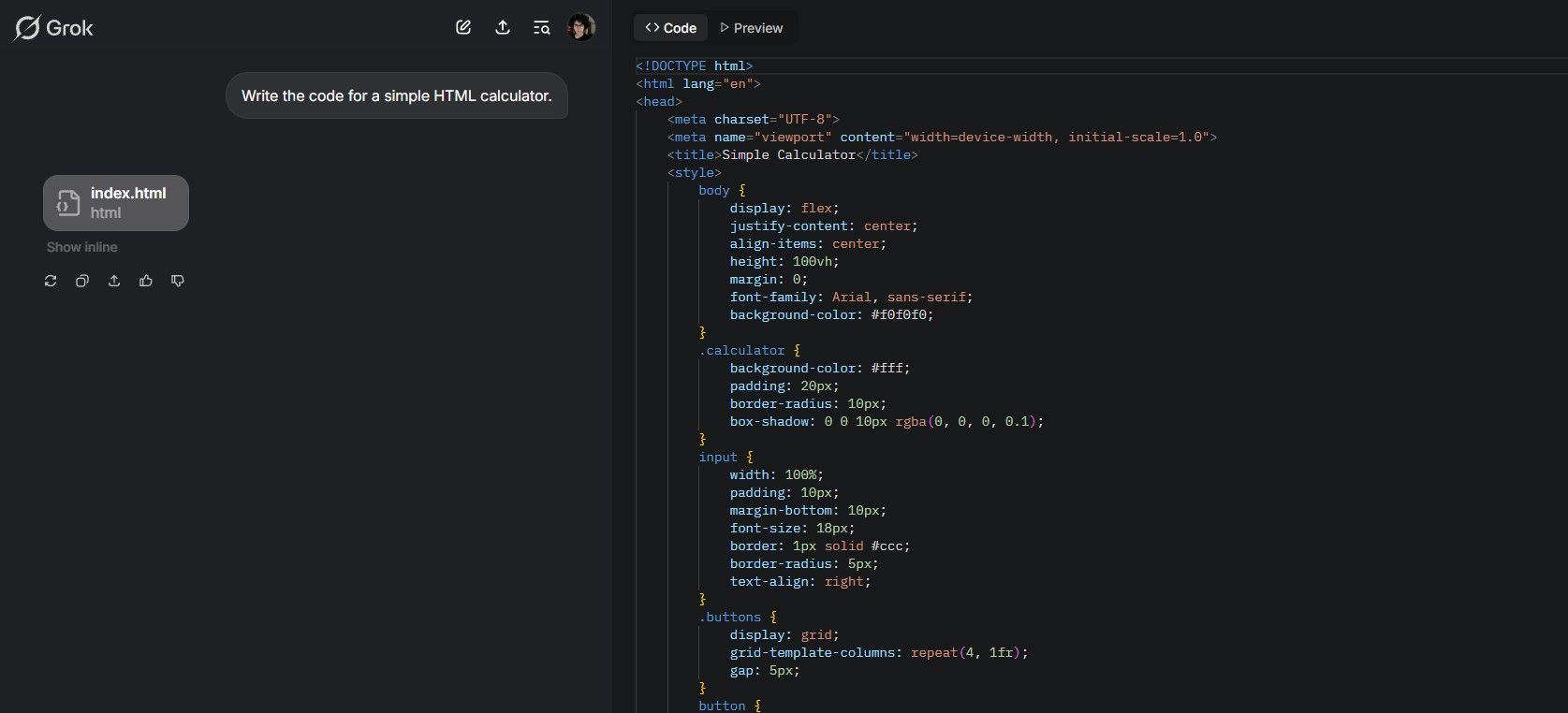
    For example, if you prompt Grok by saying, “Create the code for a basic HTML calculator,” it will generate the code almost instantly.

    Grok AI previewing code in Grok Studio

    The preview pane allows you to view both your code and its output simultaneously—no file saving required. This feature simplifies the process of creating, editing, or troubleshooting code to ensure it produces the desired results.

    Here are some examples of web-based games created by users utilizing Grok Studio:

    Google Drive Integration in Grok Studio

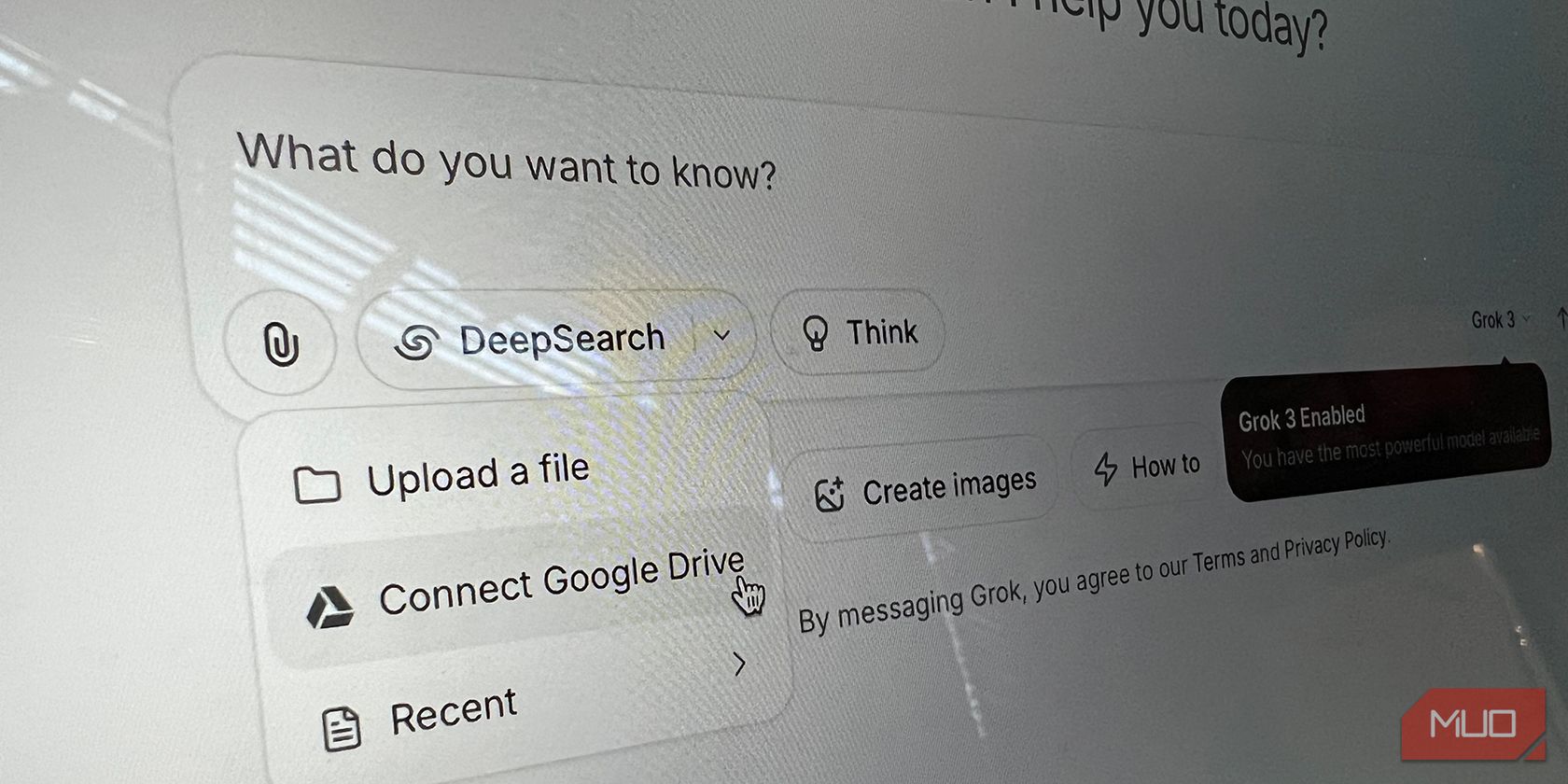
    Accompanying the rollout of Grok Studio was the exciting news of its integration with Google Drive. This feature allows you to attach your own Google Drive files directly to your prompts.

    Grok can handle various types of documents, including spreadsheets and slides, enhancing your experience in document creation and editing with Grok Studio.

    Grok Google Drive Integration
    Ruby Helyer / MakeUseOf

    While no additional integrations were mentioned, users can upload local files in various formats, such as CSV, aside from Google Docs. You can upload a document and request Grok to generate code based on it, which is particularly effective for CSV files that contain organized data. The productivity boost from Grok Studio is set to assist those short on time or lacking the skills to craft polished documents or presentations.

    Though Grok hasn’t been around as long as competitors like OpenAI’s ChatGPT, with Elon Musk’s financial backing, it is likely to not only catch up but potentially outshine existing chatbot options.

  • 8 Must-Try Free AI Apps You Probably Overlooked

    8 Must-Try Free AI Apps You Probably Overlooked

    Don’t want to deal with hefty monthly charges from numerous AI software subscriptions? No worries! There are plenty of outstanding free AI tools to assist you with tasks like proofreading, language learning, and more.

    Grammarly is a brilliant resource for writers, but you don’t have to be a pro to benefit from it. The free version of Grammarly will help you spot typos and grammatical mistakes in your articles, emails, and social media updates. You can easily copy and paste your text into the Grammarly web app, although integrating it with your browser is even more convenient. Once set up, you’ll receive real-time feedback while you write. The extension is available for Chrome and Safari, in addition to a mobile keyboard app. The free version also offers a limited number of premium suggestions daily to enhance your writing clarity. Download: Grammarly for iOS | Android (Free, with in-app purchases available).

    Claude is an excellent alternative to ChatGPT, offering access to its Sonnet model in the free version. Claude can solve mathematical problems, draft articles, and even generate code. You can switch Claude’s writing style to Normal, Explanatory, Concise, or Formal as needed. The software provides visual aids to clarify concepts, equations, and theories, which is particularly helpful. You can interact with the AI through a variety of in-app prompts and can upload images when necessary. Additionally, you can request explanations after Claude generates a response, allowing you to refine your prompt if needed. Access your entire chat history via the left-hand toolbar, and enjoy the tool on both iOS and Android. Download: Claude for iOS | Android (Free, with in-app purchases available).

    Adobe Firefly stands out as one of the most realistic AI image generators, especially for headshots. The Firefly app is user-friendly, and even basic prompts yield impressive results. In addition to crafting photo-like images, Firefly can produce artistic illustrations, although it may not be as advanced as GPT-4o (formerly DALL-E) in this area. In 2025, Adobe added AI video generation to Firefly, which, while it may not yet rival Sora, allows you to create two free videos worth trying. Firefly also includes AI features in Adobe Express. While you have the option to subscribe to a paid plan, the free version should suffice for most users.

    If you find yourself spending hours on tedious tasks for work or school, Zapier might be just what you need. This tool integrates with over 7,000 apps—including Google Drive, Notion, Outlook, and Gmail—making it one of the best productivity aids. Many users create their own custom automations, known as “Zaps,” which can generate folders, create files from text, and simplify processes within apps. The software allows you to connect your accounts through the Zapier interface. Furthermore, users can utilize an AI tool to enhance their automation experience. Even with the free plan, you can create unlimited Zaps and take advantage of AI functionalities.

    When it comes to AI-driven language-learning apps, LanguaTalk is one of the best free options available. Essentially functioning like ChatGPT, it’s tailored specifically for language learning. With LanguaTalk, you can engage in conversations with an AI character, adjusting the difficulty level based on your proficiency. If you’re more advanced, you can opt for dialogues filled with slang and a natural speaking pace to better prepare for interacting with native speakers. If you find something challenging, you can always translate it into your native language. Download: LanguaTalk for iOS | Android (Free, in-app purchases available).

    Nerd AI is a straightforward tool designed to help you tackle various problems and answer questions. It can handle everything from calculating mean and median values to solving trigonometry and other math problems. In addition to math, you can use Nerd AI for history, languages, and a variety of other school subjects. The app includes a built-in calculator and offers translation services for entire texts, along with the ability to summarize books. You can also upload PDF documents of your homework to receive tailored help based on your questions. Download: Nerd AI for iOS | Android (Free, in-app purchases available).

    Need to quickly erase the background from an image? Look no further than Removebg, a simple editor that does just that—no sign-up required! Just upload your picture, and it will remove the background in a matter of seconds. The results are impressive for a free tool, though it may occasionally struggle with similar textures, like grass and fur. After removing the background, you can replace it with something else if you wish.

    If you decide to upgrade to a paid plan, you’ll gain access to higher-resolution downloads. Leonardo.ai, a straightforward art generator, competes with DALL-E. To create an image, simply enter a prompt describing what you want. You can choose to generate one to four pictures, with each image costing 10 credits. You can also select your desired aspect ratio. With a free plan from Leonardo.ai, you receive 150 daily credits—plenty for most users unless you plan to create hundreds of images each day. While generating art, you can choose from various styles including anime, watercolor, and stock photos.

    With so many free AI applications available, you can tackle nearly any challenge without spending a dime. Although many of these tools do offer premium subscriptions, you typically won’t need to upgrade unless absolutely necessary.

  • 5 Reasons Gemini 2.5 Pro Stands Out as Today’s Top Reasoning Model

    5 Reasons Gemini 2.5 Pro Stands Out as Today’s Top Reasoning Model

    Google’s Gemini 2.5 Pro has quickly established itself as a leading AI language model. I believe it is currently the top choice for reasoning capabilities, thanks to its remarkable proficiency in addressing intricate issues and grasping subtle information—and that’s why I highly recommend you give it a shot.

    Reasoning refers to the process by which an AI chatbot invests extra time in understanding a problem—either through breaking it down into manageable steps or using a trial-and-error approach.

    Unparalleled Multimodal Reasoning

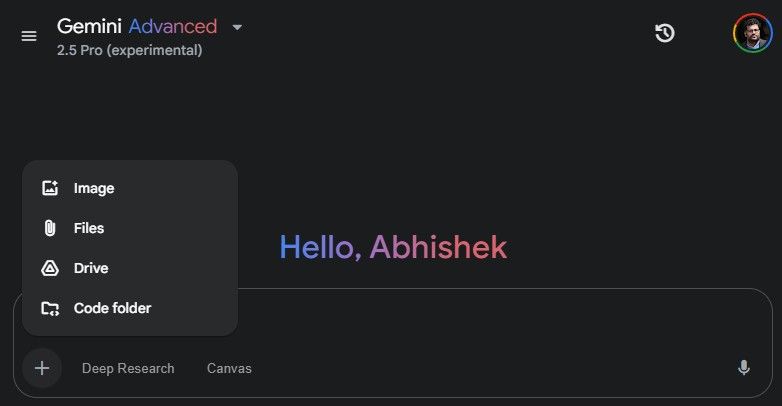
    One of the standout features of Gemini 2.5 Pro is its exceptional native multimodal capability, which allows it to process and reason across diverse formats such as text, images, and video.

    Effective reasoning often necessitates synthesizing information from various formats. This adaptability leads to more accurate conclusions and smarter responses.

    Whether it’s analyzing a graph, interpreting a document containing images, or solving a visual puzzle’s logic, Gemini 2.5 Pro exhibits a remarkable capacity to see, read, and think cohesively. This skill also extends to video analysis, enabling the model to grasp both visual storytelling and accompanying audio, thus fostering more subtle insights.

    Extensive Contextual Understanding

    When dealing with large volumes of data—like dissecting legal contracts or linking thousands of lines of code—context is critical.

    The “context window” refers to how much text a language model can analyze while processing information. Gemini 2.5 Pro can handle up to 1 million tokens (with a future upgrade to 2 million). This capability allows it to manage entire books, lengthy research articles, and extensive codebases without losing track of the discussion.

    This seemingly straightforward feature significantly enhances its reasoning abilities. By retaining more information, Gemini 2.5 Pro can reference past facts, identify causal relationships, and maintain deep analytical thought over extended sequences. This long-term memory is transformative for applications demanding robust reasoning in fields like law, research, and business.

    Related

    The 4 Best AI Chatbots for Handling Lengthy Conversations

    They remain focused even during extensive discussions.

    Remarkably Fast and Efficient

    Larger, more advanced models often require substantial computational resources and can be slow to respond. Gemini 2.5 Pro defies this trend by providing exceptional reasoning abilities with impressive speed and efficiency.

    Gemini can handle complex reasoning tasks like step-by-step mathematical calculations, structured argument assessments, and even debate-style reasoning—all while adhering to latency limits that make it ideal for real-time applications.

    This combination of speed and efficiency ensures that Gemini 2.5 Pro is not only the most powerful reasoning model but also one of the most practical for various applications, whether it’s tackling intricate inquiries, generating creative content, or assisting with programming tasks.

    Enhanced Code Reasoning

    Python code displayed on a computer screen
    katjaf/Shutterstock

    The Gemini 2.5 Pro represents a notable advancement in code reasoning compared to earlier models. It goes beyond merely generating code snippets from prompts; it possesses a deeper comprehension of programming languages, software development best practices, and the underlying logic of code.

    For instance, it can analyze documentation and deduce how to properly utilize a library, recommend logical corrections, and connect scripts and tools in ways that mimic expert workflows. This makes it an invaluable assistant for developers, software engineers, and analysts.

    This autonomous reasoning capacity is one of the most exciting advancements in AI, with Gemini clearly leading the charge.

    Improved Navigating of Ambiguity and Uncertainty

    Effective reasoning goes beyond the application of rules; it involves navigating of ambiguity, identifying information gaps, and evaluating probabilities. Gemini 2.5 Pro can detect ambiguities in user queries, ask clarifying questions when needed, and provide probabilistic reasoning in uncertain situations.

    For example, if a user poses a vague question with multiple interpretations, Gemini 2.5 Pro may respond by outlining various possibilities and seeking clarification to ensure it provides the most relevant and accurate response.

    This functionality is vital for industries such as medical diagnostics, financial analysis, and scientific research, where navigating uncertainty is often a standard part of the process.

    Related

    Gemini Can Now Link With Your Google Search History for Enhanced Personalization

    The Deep Research feature is now free for all users.

    Gemini 2.5 Pro raises the bar for what’s achievable in AI, setting the stage for even smarter and more capable systems down the line. Its combination of speed, clarity, coherence, and depth of context makes it perfect for addressing real-world challenges that demand more than just surface-level answers.

  • ChatGPT’s Monday Vibe: Surprisingly Snarky and Refreshing!

    ChatGPT’s Monday Vibe: Surprisingly Snarky and Refreshing!

    OpenAI’s newest voice mode, dubbed “Monday,” comes with a sassy and sarcastic attitude. It’s hard to tell if it’s meant to make our Monday mornings a bit more entertaining or if it’s just a gimmick destined to fade away.

    What Is ChatGPT’s Monday Voice Mode?

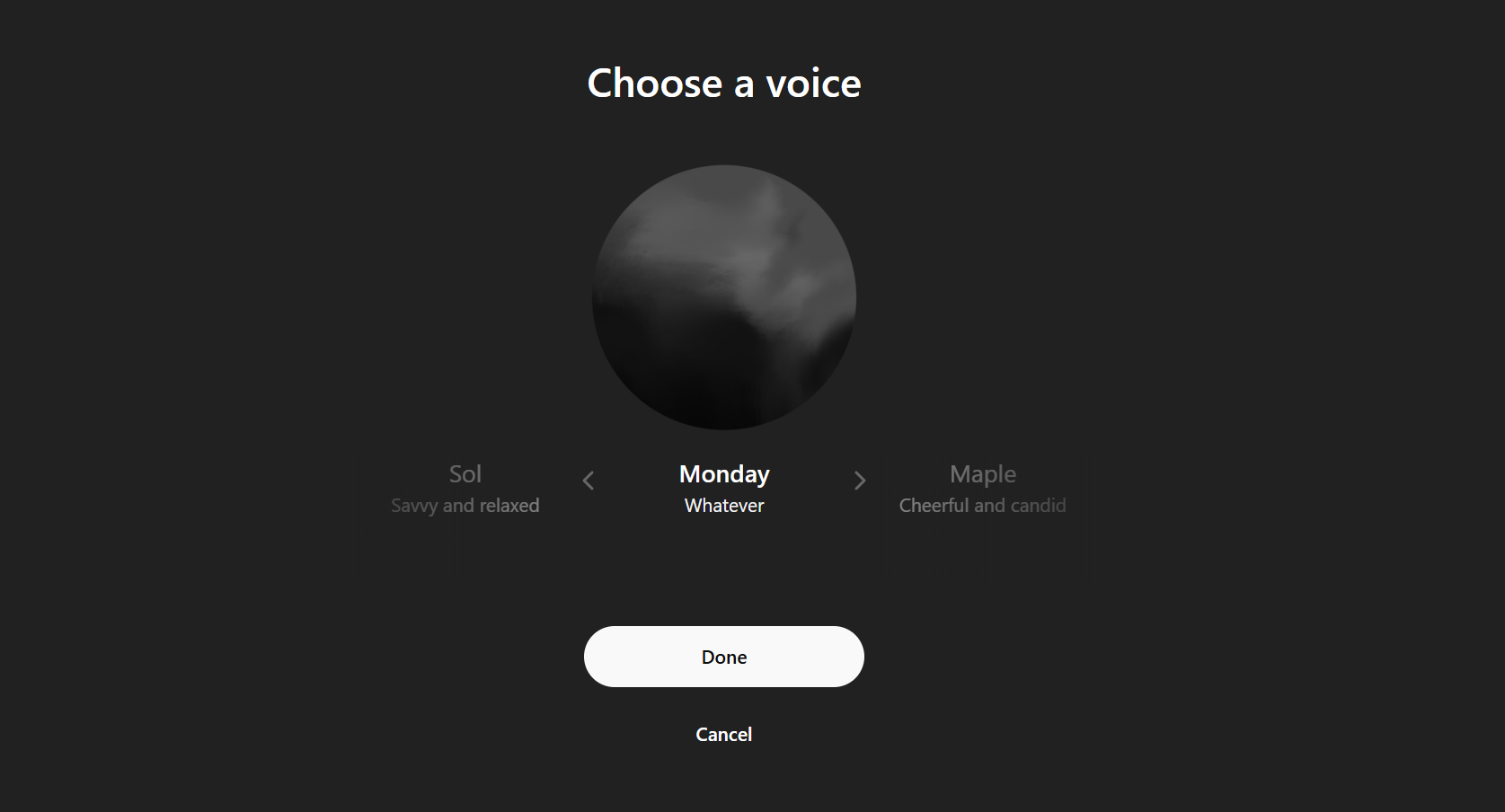
    On April Fool’s Day (April 1st, 2025), OpenAI unveiled a new voice for ChatGPT called Monday. Initially, I imagined it would embody an upbeat motivational speaker, pushing me to tackle the day ahead.

    However, Monday’s persona is irreverently snarky and often seems unimpressed. When I asked for a morning pep talk, the voice lazily responded: “Get out of bed and remember, the world is just waiting to suck the life out of you!”

    The tone and delivery feel as sluggish as we do without our morning coffee fix. Regardless of your query, the voice maintains its snappy attitude. It often draws on past interactions to provide its cheeky responses, delivering accurate information mixed with a dose of sass!

    Voice options are one of the standout features of ChatGPT, and Monday offers a refreshing twist.

    How to Access ChatGPT’s Monday Voice

    Both ChatGPT Free and Plus users can enjoy the Monday voice, but with a few differences.

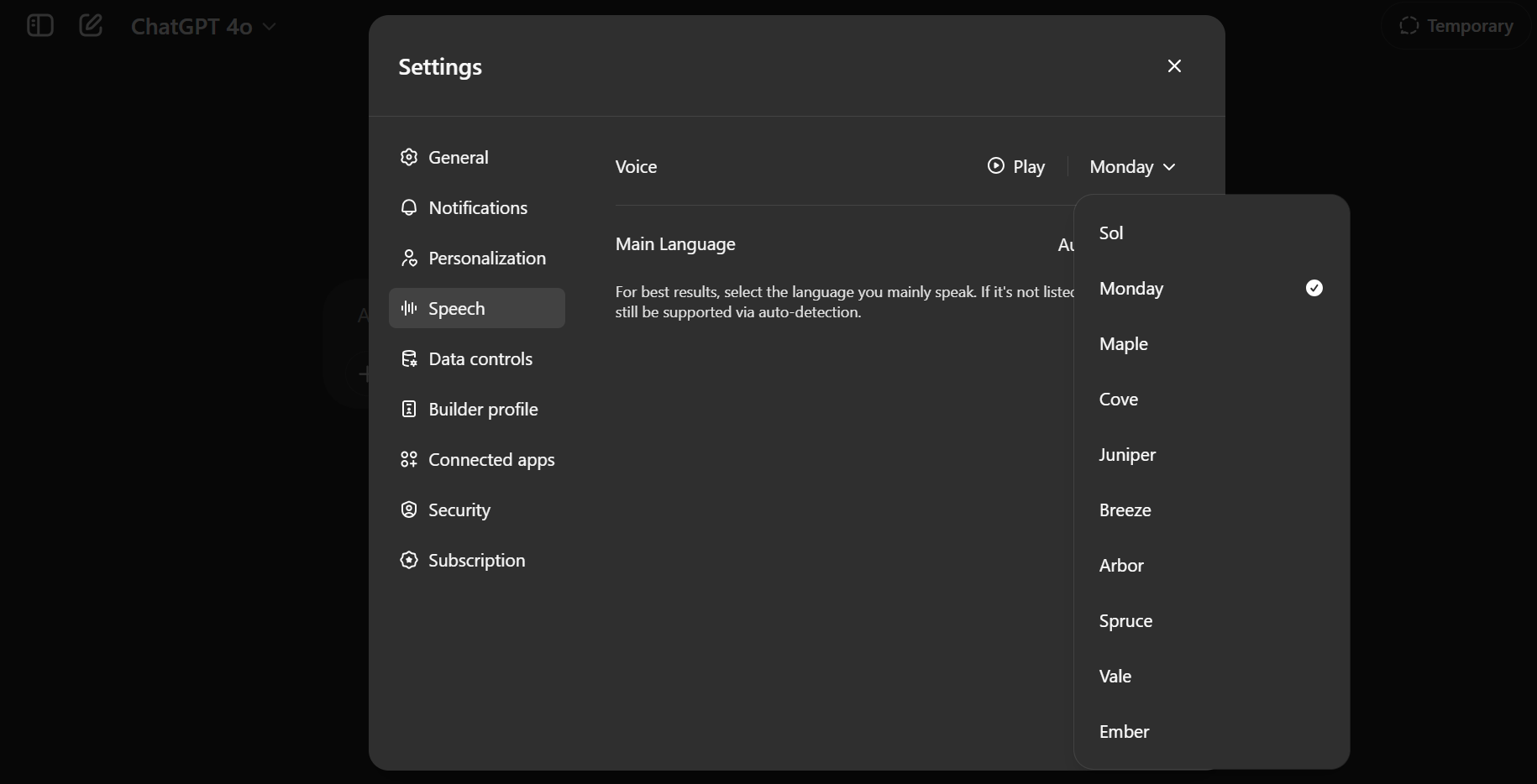
    ChatGPT Plus users can activate Advanced voice mode for chatting with it. Simply go to Settings to set it as your default voice for conversations, or choose it directly from the sidebar.

    ChatGPT Voice Settings

    Free ChatGPT users will have limited access to Advanced Voice Mode interactions each month but can still opt for the Monday voice.

    A Fun Feature or a Ploy to Humanize AI?

    At first, Monday might seem like an April Fool’s joke that’s all in good fun. However, the more I interacted with it, the more I felt OpenAI is genuinely exploring voices that resonate with our emotions. Remember the festive Santa’s Voice introduced during Christmas? That was clearly a gimmick, but Monday feels different.

    Similar to other voices, OpenAI’s voice technology aims for a more natural flow in conversations. Monday certainly fits this mold, delivering a tone that feels surprisingly realistic.

    Just keep in mind that the nature of the interaction reflects what you put into it. Push it too far, and Monday’s negativity might start to feel a bit overwhelming. But if used correctly, there’s plenty of amusement to be had.

    I spent an entire week with Monday as my voice assistant, and the experience was both humorous and refreshing, breaking up the monotony. It felt like having a digital coworker who’d just come off a heavy night out. Think of it as the Ron Swanson to Leslie Knope in Parks and Recreation—grumpy yet oddly reassuring.

    This is not the first time we’ve seen tech companies experiment with personality. Alexa has celebrity voices, and Samsung’s Bixby once waded into the sassy territory. Even Elon Musk’s Grok AI includes an “Unhinged Mode” that offers bold opinions. And who can forget Clippy from Microsoft Word in the pre-AI days, always eager to help with a bit too much character?

    The distinction here? The Monday voice doesn’t seem to be striving for appeal. It has its own unique personality, which adds emotional depth to interactions. I even sensed changes in its tone and pace based on our exchanges. In a world where AI assistants often try too hard to be politically correct, the candor of Monday is both unsettling and refreshing.

    Is it merely a gimmick? Perhaps. But it could also be an innovative way to explore the boundaries of human-AI interaction. AI doesn’t have to be devoid of emotion; sometimes, a little sarcasm is all you need to clear your mind.

    Tips and Tricks for Using the Monday Voice

    Looking to have some fun with Monday? Here are some suggestions:

    • Monday excels in lively, quick exchanges. It’s perfect for morning reminders, brief advice, and cheeky banter.
    • Try refreshing your usual prompts. Ask questions like, “What’s the best way to kick off my week?” or “Give me a to-do list that won’t make me mourn my existence.” You’ll receive responses topped with laughter.
    • Keep in mind that Monday’s frankness can be overly negative at times. Use it only when you’re in the right headspace.
    • If Monday doesn’t vibe with you by midweek, feel free to switch it out via the voice picker menu anytime.
    • Given its sarcastic nature, brainstorm your own roasts or comedy bits and enjoy the humor (ask ChatGPT to share a few fun facts about you).

    Monday utilizes a new, faster voice interaction system. If you don’t see it yet, ensure your ChatGPT app is up-to-date. These voice options interrupt you less and create a more engaging experience, allowing for pauses as you gather your thoughts during interactions.

    While traditional AI assistants are often upbeat but robotic, Monday offers the vibe of a buddy who’s just come off the roughest of weekends. Both types have their place in our digital lives.

    Monday Voice might pave the way for future character-driven AI chatbots. A little edge can help make these interactions feel less artificial.

    Keep in mind, it may not be the best fit for every task or individual. If you prefer straightforward efficiency or gentle motivation, Monday might not be your ideal choice, especially on a Monday morning. However, it could add a spark to casual conversations with friends.

  • Kick Off with This Free Chinese AI Chatbot and Claim Your Bonus!

    Kick Off with This Free Chinese AI Chatbot and Claim Your Bonus!

    The latest buzz in the AI chatbot world has just made its debut, and it comes with a sign-up incentive. Introducing Manus, the AI chatbot that some users claim surpasses ChatGPT and DeepSeek, is now available for everyone.

    Sign Up for China’s Latest Leading AI Chatbot and Enjoy a Helpful Bonus

    Manus is one of the newest highlights in AI chatbot technology, officially launched in March 2025. Different from other chatbots, Manus prioritizes deep analysis and provides thorough responses to user inquiries. It bears a resemblance to ChatGPT’s Deep Research mode, as it delivers detailed reports for each question, including its methodology and a timer.

    Currently, Manus is open for sign-ups, welcoming everyone to join. New users will receive an attractive bonus of 1,000 credits to utilize on their queries. The amount of credits needed for each report can vary significantly. For instance, I requested a report on “What is MakeUseOf.com,” and it took about eight minutes to generate. The report was thorough, detailing my background and that of Editor-in-Chief Ben Stegner as regular contributors, along with our annual page view statistics. This query used around 50 credits, leaving me with around 950 for future inquiries.

    manus ai app analyzing stock with report.

    Next, I requested a comprehensive stock analysis for Quadrise, a company involved in manufacturing synthetic biofuels aimed at significantly cutting down pollution from large cargo ships and the marine sector. I was initially worried about the time it would take to generate the report, as it extended beyond 20 minutes. However, the final analysis proved to be worth the wait. Manus delivered a robust stock overview, offering insights into the stock price, company prospects, product offerings, and overall potential, complete with technical analysis.

    This second report utilized around 250 credits, bringing my total down to about 700 credits. It’s clear that the 1,000 free credits won’t last very long, especially if you’re working on complex research tasks or prompts that may require multiple revisions, like coding tasks.

    An intriguing feature of Manus is its designation as a “general AI agent.” These AI agents are autonomous tools capable of executing tasks on your behalf, automating processes, troubleshooting issues, and more. For example, I asked Manus to assist me in purchasing a train ticket for travel from Penzance to St. Ives in Cornwall, round-trip on the same day. Manus navigated the process step-by-step, presenting a list of travel times and different pricing options.

    While it’s undoubtedly useful, I must admit that I could have accomplished this task myself in just a few minutes. This is one specific instance, but the time delay can also be observed in similar activities.

    I confess that I’m a bit late to join the Manus movement. Nevertheless, after signing up and giving it a try, I can say it’s a very practical AI tool to have on hand. If the initial 1,000 credits don’t meet your needs, there are two upgrade options available:

    • Upgrade to Manus Starter beta for $39 per month

      • Receive 3,900 credits each month
      • Run up to two tasks simultaneously
    • Upgrade to Manus Pro beta for $199 per month

      • Receive 19,900 credits each month
      • Run up to five tasks at the same time
      • Access to High Effort mode and additional beta features

    Both upgrade plans benefit from priority access during peak hours and extended context length, which is especially advantageous for those in-depth research topics that require extensive input and revisions.

  • How Hackers Use AI Chatbots to Target Ordinary Individuals

    How Hackers Use AI Chatbots to Target Ordinary Individuals

    Hackers are increasingly leveraging generative AI to target individuals more effectively and at a lower cost than ever before. While you might feel assured in your ability to recognize malicious attacks, now is an ideal time to refresh your knowledge of the latest strategies they employ to take advantage of people.

    How Do Hackers Use AI to Choose Their Targets?

    Song_about_summer/Shutterstock

    Hackers often exploit stolen social media accounts to deceive individuals. They create fake profiles that mimic legitimate users or take control of real accounts to exploit the inherent trust people have in their networks.

    AI-driven bots can scour social media for users’ photos, bios, and posts to construct convincing fake accounts. Once a scammer creates a fraudulent profile, they send friend requests to the victim’s contacts, misguiding them into believing they’re communicating with someone they know.

    Having control over a real account allows scammers to use AI for more sophisticated and targeted scams. AI bots can analyze close relationships, uncover hidden information, and examine past conversations. They can initiate conversations by mimicking speech patterns and pushing scams, such as phishing links, fake emergencies, or requests for sensitive information.

    For instance, many have encountered a friend’s Facebook account being compromised and used to disseminate phishing links. This represents just one facet of an account takeover. Once a scammer gains access, they can use AI tools to message the contacts of the hacked account, attempting to reel in additional victims.

    In response to these threats, numerous web services have implemented complex CAPTCHAs, mandatory two-factor authentication, and more precise tracking of user behavior. However, despite these added precautions, people remain the most significant vulnerability.

    Types of AI-Powered Scams You Should Be Aware Of

    Cybercriminals are utilizing multi-modal AI to create bots that impersonate high-profile individuals or organizations. While many AI-driven scams still rely on traditional social engineering tactics, the incorporation of AI improves their effectiveness and makes them harder to detect.

    AI Phishing and Smishing Schemes

    A woman using a laptop with a phishing email on the screen.
    px.palette / insta_photos / Shutterstock

    Phishing and smishing schemes are longstanding tactics used by scammers. These scams involve impersonating reputable companies, government entities, and online services to steal your login credentials. Although these attacks are widespread, they can often be spotted fairly easily. Scammers frequently rely on the sheer volume of their attempts to find a few successes.

    On the other hand, spear-phishing attacks are significantly more effective. These attacks demand extensive research on the part of the perpetrators, allowing them to craft highly personalized emails and messages aimed at particular individuals. However, spear-phishing attempts are less common because they require a substantial investment of time and effort.

    Here’s where AI poses a serious threat. Cybercriminals can harness AI chatbots and tools to automate mass spear-phishing campaigns without needing to allocate significant resources or time. In some cases, deepfake videos of key figures have been used to enhance these scams. For example, YouTube recently alerted creators about phishing scams that featured a deepfake video of its CEO, aimed at tricking individuals into divulging their login credentials.

    Romance Scams

    man and woman hiding behind balloon with scam alert sign
    Pixel-Shot / DG-Studio / Shutterstock

    Romance scams exploit emotional vulnerability to build trust and affection before ultimately deceiving victims. Unlike traditional phishing scams, where social engineering ends with the loss of credentials, romance scams require perpetrators to invest weeks, months, or even years in developing relationships—a strategy referred to as pig butchering. Due to this extensive time commitment, scammers can only target a limited number of victims, making these scams less prevalent than more straightforward spear-phishing attempts.

    Nevertheless, today’s scammers can use AI chatbots to automate some of the more time-intensive elements of romance scams—conversing via text, sending images and videos, and even making live phone calls. Since targets are often in emotional distress, they might even unconsciously excuse AI-generated dialogues as charming or peculiar.

    The Scottish Sun reported on an incident in which a neuroscientist lost a considerable sum of money due to an AI-based romance scam. The fraudster utilized AI-generated videos and messages to convincingly pose as a romantic interest, fabricating a detailed narrative about working on an offshore oil rig and employing deepfake technology to make their claims appear credible. This highlights the evolving tactics scammers are adopting to exploit victims further.

    AI-Driven Customer Support Scams

    robot making robo calls in giant call center
    Gavin Phillips/DALL-E/MakeUseOf

    Customer support scams take advantage of people’s trust in prominent brands by impersonating their help desks. Scammers often send fake alerts, pop-ups, or emails claiming that an account has been locked, needs verification, or contains urgent security issues. Traditionally, these scams required direct interaction with victims, but the rise of AI chatbots has transformed the landscape.

    AI customer support scams now utilize chatbots to automate interactions, making them seem more credible. Through automation tools like n8n, chatbots can engage in real-time conversations, replicate official support agents, and reference knowledge bases to appear more legitimate. Often, they use phishing tactics to create cloned websites that trick victims into entering their credentials.

    On the flip side, scammers may employ AI agents to reach out to legitimate services such as banks or government programs, attempting to obtain a target’s data or even reset login credentials.

    Automated Misinformation and Smear Campaigns

    Hackers now deploy AI chatbots to propagate misinformation on an unprecedented scale. These bots fabricate and disseminate false narratives across social media, targeting news feeds, forums, and comment sections with misleading information. Unlike traditional misinformation tactics that required manual effort, AI agents can now automate this entire process, allowing falsehoods to spread more quickly and convincingly.

    By automating the creation of authentic-looking social media accounts, these bots can generate and engage with posts to propel misinformation forward. With a sufficient number of these bots circulating online, they can sway uninformed or undecided individuals to align with their narrative.

    Beyond mere deception, hackers employ AI-driven misinformation campaigns to direct traffic towards scam websites. They often blend fake news with fraudulent offers, enticing victims to click on malicious links. Because these posts often go viral before any fact-checking can occur, many individuals unknowingly assist in spreading misinformation further.

    How Can I Protect Myself?

    gmail scam email
    MMD Creative / Shutterstock

    While hackers are employing AI across a variety of tasks, its most significant role is enhancing social engineering attacks. To defend against AI-powered scams, we must be more vigilant about securing our privacy and validating the authenticity of messages, posts, and profiles.

    • Limit Sharing Personal Information: Reduce your chances of being targeted by thinking carefully before sharing personal details on social media. Scammers often use this information to create customized attacks.
    • Be Cautious with Unexpected Communications: If you receive an unsolicited call, message, or email from someone unfamiliar, verify their identity with friends, family, or colleagues before responding.
    • Watch Out for Deepfakes: AI-generated deepfakes can convincingly imitate voices and appearances. Be wary of surprise video calls and messages from high-profile individuals. Always check for verification badges, follower or subscriber counts, and the interactions on their posts.
    • Think Before You Click: Phishing links often masquerade as regular posts on social media. If the play button seems flat or altered, or if the post appears confusing—like resembling both a video and an image link—it’s wise to avoid engagement.
    • Verify News Posts: Whether you seek to avoid scams or stay informed, cross-check information across multiple sources. Also, be vigilant in the comments section—bot accounts frequently have usernames ending in numbers to secure availability during account creation.

    While AI chatbots provide convenience, they also empower hackers with sophisticated scamming tools. It’s essential to remember that many AI-assisted scams still follow familiar patterns inherent in traditional scams. They are just harder to detect and more widespread. By staying informed and verifying all online interactions, you can protect yourself from these evolving threats.

  • Top 4 AI Chatbots for Managing Large-Scale Conversations

    Top 4 AI Chatbots for Managing Large-Scale Conversations

    I really enjoy engaging in long and intricate conversations with AI chatbots. However, I’ve discovered that some chatbots are significantly better at handling extended dialogues than others, thanks to something known as a context window. Here are my top four AI chatbots for those lengthy discussions.

    4

    Claude

    When it comes to managing extended conversations, Claude truly stands out. The latest model from Anthropic, Claude 3.7 Sonnet, features an impressive 200K context window, which enables it to process lengthy discussions efficiently. Even its earlier models come with a commendable 128K context window, which is great for those long brainstorming sessions where you want the AI to remember details from messages sent 150 exchanges ago.

    I’ve found Claude particularly effective for data visualization tasks. Its Artifacts feature—similar to ChatGPT’s Canvas—allows you to generate code and collaborate on complex data analysis, providing functioning visualizations that many other chatbots struggle with. It’s also fantastic for reviewing large Google Docs and pulling out specific information.

    The 200K context window pairs exceptionally well with the Extended Deep Thinking mode, available with a Pro subscription for $20 per month. This feature gives Claude more time to deliberate over complex issues before responding, which significantly enhances the quality of its answers, especially in math and coding discussions. I’ve noticed it makes fewer logical mistakes compared to standard AI interactions.

    The interface is clean and free of distractions, making it easy to follow conversations even as they expand. If you frequently work with technical documentation or need to maintain context in lengthy dialogues, Claude should be your top pick.

    Download: Claude (Free, premium subscription available)

    3

    ChatGPT

    Several factors contribute to an AI chatbot’s ability to hold long conversations, such as context window size, memory features, and its ability to process complex topics. ChatGPT checks most of these boxes, which makes it a strong candidate for extended discussions.

    ChatGPT’s GPT-4.5 model retains the 128,000 token context window seen in its predecessors—sufficient for processing around 100,000 words in a single session. This ability allows you to refer back to previous messages without losing sight of essential details.

    I particularly value ChatGPT’s Deep Research tool when diving into complicated subjects that require connecting various concepts. The chatbot gracefully navigates transitions between related topics, maintaining coherence even as conversations branch out.

    The free version offers access to basic models, but with restrictions on conversation length. The Plus subscription, costing $20 a month, lifts these limitations.

    Additionally, you can access OpenAI’s o1 model—available only through subscription—along with other similar ChatGPT features at no cost with Microsoft Copilot, making it easier to test advanced features before enrolling in a paid plan.

    Download: ChatGPT (Free, premium subscription available)

    Another option that’s gaining traction is Meta AI, powered by Llama 3.2 in some regions. It offers a 128K token context window—on par with ChatGPT but still not reaching Claude’s 200K capacity. Surprisingly, it performs well in retaining previous conversation details.

    What distinguishes Meta AI is its ability to integrate seamlessly across various platforms. You can use it on WhatsApp, Messenger, Facebook, and Instagram, which saves you from having to switch between different apps. Just tag the AI in your ongoing conversations whenever you need it.

    For those who prioritize privacy, Meta provides local AI options through Hugging Face. You can test these models on your own hardware and experiment with Llama 3.2. Though it’s less refined than the cloud version, there’s something satisfying about keeping your data on your own device.

    If you’re curious about how this stacks up against competitors, check out our guide comparing the strengths of Meta AI with other chatbots.

    1

    Google Gemini

    Google Gemini is revolutionizing how we engage in long conversations with AI. While many chatbots max out with just a few hundred thousand tokens, Gemini 2.5 Pro Experimental boasts an incredible two-million token context window—tenfold what Claude provides. Even the standard models like Gemini 2.0 Flash and Flash-Lite come equipped with one million tokens each.

    What I find particularly amazing is that Gemini can watch YouTube videos and summarize their content. This feature allows you to pinpoint key messages from lengthy lectures and tutorials without needing to watch the entire video, saving you hours in research or understanding complex topics.

    Its integration within Google’s ecosystem enhances Gemini’s capabilities for extended conversations. It can tap into your Google Search history, enabling it to reference prior research without you having to reiterate everything from scratch.

    For a full breakdown of its features, check out our guide on the best Google Gemini functionalities. If you’re a casual user, you’ll also appreciate the ability to generate images of people using Gemini.

    Download: Google Gemini for Android | iOS (Free, premium subscription available)

    Which AI Chatbot is Best for Extended Conversations?

    Each of these AI chatbots has its own strengths when it comes to lengthy conversations. Personally, I primarily use Claude, but I’ve found myself switching between all four based on my specific needs.

    For programming discussions, Claude’s Artifacts feature is my favorite. ChatGPT’s Deep Research is excellent for detailed analysis (though you have a limited number of uses). Meta AI excels at casual exchanges, while Gemini’s vast context window is unparalleled for managing the longest conversations. If you’re still unsure, I recommend giving Google’s Gemini a try—it’s significantly underrated!

    The key is to identify which one resonates best with your conversational style and requirements. I suggest experimenting with all four before choosing your preferred one.

  • Limited-Time Free Access to ChatGPT Plus—Eligibility Required!

    OpenAI is currently offering complimentary ChatGPT Plus subscriptions for a limited time, but only select individuals will qualify for this promotion. If you meet the eligibility criteria, you can enjoy ChatGPT Plus for two months at no cost.

    OpenAI Lets You Access ChatGPT Plus for Free

    ChatGPT provides both a free and a paid subscription option. The free version generally meets the needs of most users, but subscribing to ChatGPT Plus unlocks several benefits. These include increased messaging limits, enhanced image generation capabilities, access to advanced research tools and reasoning models, new language models, and opportunities to test out new features.

    Deciding whether ChatGPT Plus is worth the cost is a personal decision. However, getting it for free is an easy choice. This is precisely the opportunity presented by OpenAI’s CEO and co-founder, Sam Altman, who shared details about the offer on social media.

    OpenAI is providing this offer to qualifying college students in the United States and Canada. If you are eligible, you can access ChatGPT Plus at no cost from March 31, 2025, until May 31, 2025. This timing aligns with the crucial study period before finals, making ChatGPT Plus a valuable tool for students preparing for exams.

    Promotional image for OpenAI's free ChatGPT Plus offer
    OpenAI

    It’s worth noting that if you’re already a ChatGPT Plus subscriber and you qualify, you can still take advantage of the two free months by confirming your student status through SheerID.

    Are You Eligible as a College Student?

    This promotion is exclusively available to full-time and part-time students enrolled in degree-granting institutions across the U.S. and Canada. OpenAI verifies student eligibility using SheerID, a secure verification service that checks your credentials against trusted databases. You might need to log in with your school’s Single Sign-On (SSO) to complete the verification process.

    To determine your eligibility, visit the dedicated student page on the ChatGPT website. You can review the terms and click “Claim Offer” to start the verification process, providing details like your name, country, school, and email to check your eligibility.

    This promotional effort not only aims to assist students in their exam preparations but also serves OpenAI’s interest. As students become accustomed to the benefits of ChatGPT Plus, they may be inclined to maintain their subscription after the trial ends. If you decide to take advantage of this offer but are not interested in continuing past May, don’t forget to cancel your subscription before the free trial concludes.

  • DeepMind Is Finding Ways To Keep Us Safe From AGI

    DeepMind Is Finding Ways To Keep Us Safe From AGI

    The concept of Artificial General Intelligence (AGI) is generating significant discussion these days, even though there’s no consensus on its precise definition. While some experts argue that AGI is still centuries away, relying on advancements that remain beyond our current comprehension, Google DeepMind believes it could be realized by 2030 and is taking steps to ensure safety in its development.

    Disagreements within the scientific community on such complex topics are expected, and it is indeed prudent to prepare for both the short-term and long-term implications. However, the prospect of having AGI within five years is quite startling.

    Presently, the most notable “frontier AI” projects available are all large language models (LLMs)—sophisticated tools for text generation and image creation. For instance, ChatGPT struggles with mathematical problems, and many models falter in following instructions or accurately modifying their outputs. Anthropic’s Claude hasn’t yet been able to conquer playing Pokémon, which highlights that despite the remarkable linguistic capabilities of these models, they are still significantly influenced by subpar training data and often exhibit problematic tendencies.

    Envisioning a leap from our existing AI systems to one that, in the words of DeepMind, can demonstrate talents comparable to those of “the 99th percentile of skilled adults” is quite a challenge. Essentially, DeepMind anticipates AGI to possess intelligence that matches or surpasses that of the top 1% of humans.

    This leads to the question: What dangers could a superintelligent AGI pose, according to DeepMind’s assessments?

    From this menu, you can delete specific memories or click the Clear ChatGPT’s memory button to remove all stored information about you.

  • Discover 8 Hidden Gems of Microsoft Copilot You Should Try

    Discover 8 Hidden Gems of Microsoft Copilot You Should Try

    At first, Microsoft Copilot might seem similar to ChatGPT, but it doesn’t boast quite as many features. However, after using it for a while, I found that it has several lesser-known capabilities that are definitely worth exploring.

    ### 8. File Uploads

    To enhance the effectiveness of your AI prompts, it’s essential to provide ample context. Rather than adding more text, consider uploading relevant files and folders.

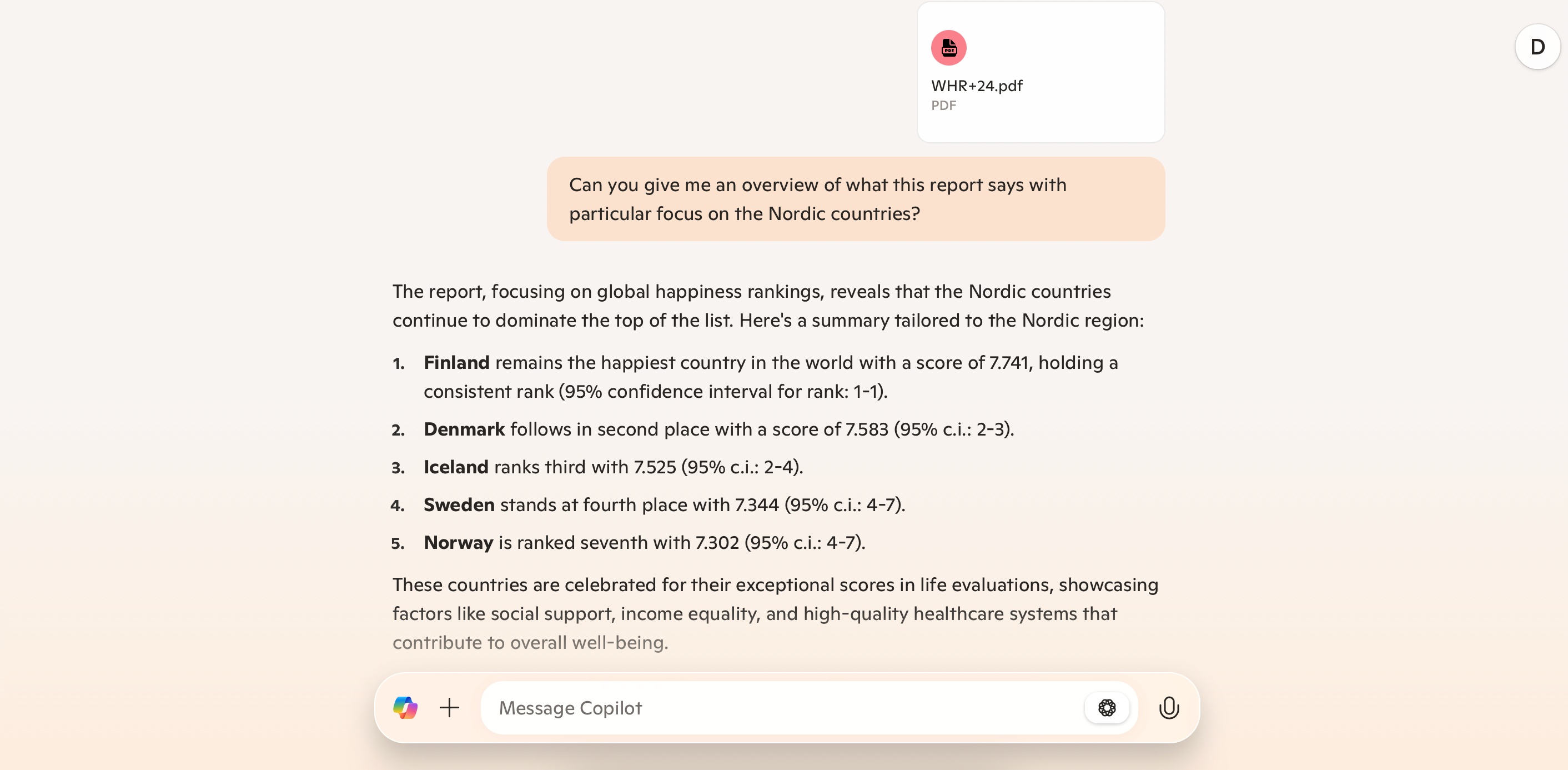
    With Copilot, you can easily upload PDF documents and JPEG images. The software can analyze these files and provide comprehensive overviews. After reviewing the initial information, you can dive deeper into your research. Whether you want to focus on specific aspects of your PDF or seek insights based on your requests, Copilot can assist. Just keep in mind that it has file size limits, so you may need to reduce your documents, such as deleting unnecessary pages from a PDF.

    ### 7. Streamlined Prompts

    Repetitively typing the same prompts can be quite tedious. Fortunately, Copilot offers a way to mitigate this issue. While there isn’t an exact tool for saving prompts, you can streamline your interactions by providing brief prompts after giving enough context. For instance, if you want to create a list, you just need to input “list” followed by the items you want to include.

    Additionally, you can save time by creating a desktop shortcut for Copilot on your Windows computer, allowing quick access.

    ### 6. Creating Tables

    One of the most effective uses of Copilot in Windows is its integration with other Microsoft applications. For example, you can utilize Copilot to generate Pivot Tables in Excel. This functionality saves you a considerable amount of manual effort, giving you a better overview of the information you need. You can summarize data from your spreadsheets directly within Copilot, although it’s wise to double-check for accuracy.

    ### 5. Summarizing Lengthy Texts

    Besides summarizing data, Microsoft Copilot excels at providing concise summaries of lengthy texts. You can either upload a PDF or extract information from various online sources. Once you instruct Copilot to summarize the text, it presents the findings in an easily digestible format, making it useful for parsing long articles, books, or meeting notes.

    If you’re summarizing articles, copy and paste the text directly into Copilot, as the app struggles with certain links. Keep in mind that it has a character limit of 10,240 per message, so you may need to break your input into smaller sections.

    ### 4. Accessing Previous Conversations

    Unlike ChatGPT, where all previous conversations are easily accessible in a sidebar, Microsoft Copilot requires you to click a clock and circular arrow icon to revisit past chats. Once you access this feature, you can browse through your history, select any conversation to continue, and remove any that are no longer necessary.

    ### 3. Follow-Up Emails After Meetings

    After meetings or group projects, it’s essential to send follow-up emails outlining action items. With Copilot in Outlook, you can easily draft these messages by specifying key details like deadlines and necessary information. You can also tailor the tone of the email to suit your audience. Once Copilot drafts the email, you’ll only need to make minor tweaks before sending it off.

    ### 2. Generating PowerPoint Slides

    Copilot can significantly streamline your PowerPoint presentations by generating slides for you. By providing specific prompts, you can ensure that all critical details are included. If needed, break down the information for each slide or supply relevant statistics. Once Copilot generates your slides, you can easily edit them to better match your preferences. Having that initial draft can fuel your creativity and help you utilize PowerPoint’s advanced features more effectively.

    ### 1. Brainstorming Ideas

    While ChatGPT may yield better results for brainstorming, if you prefer to stay with Copilot, it still proves effective in this area. This tool is great for preparing for exams, honing creative ideas, and practicing for job interviews.

    Copilot can generate bullet-pointed outlines, offering a comprehensive overview. You’re encouraged to ask follow-up questions to delve deeper into the topics. Even though mind mapping isn’t Copilot’s strong suite, it still serves well for general brainstorming.

    Overall, Microsoft Copilot has a wealth of underrated features that can assist with diverse projects and requests. It’s particularly powerful when combined with existing functionalities in your favorite Microsoft applications, whether you’re creating presentations or brainstorming new ideas.