الوسم: Artificial Intelligence

  • Google’s New AI Assistant Can Manage Your Phone Completely

    Google’s New AI Assistant Can Manage Your Phone Completely

    Are you fed up with constantly barking orders at your AI assistant? Google’s latest universal AI assistant could be the answer to that dilemma—and much more.

    AI Could Soon Take Control of Your Android Phone

    Google has unveiled its ambitious concept for a “universal AI assistant” capable of grasping the context around you, devising solutions, and executing them autonomously. The aim is to develop an all-seeing, all-hearing assistant that knows when to step in without requiring a manual prompt.

    This new assistant is named Project Astra. During I/O 2025, Google showcased some stunning demonstrations of its capabilities. In one instance, a user faced issues with their bike brakes and asked Astra to locate the bike’s online manual.

    After finding the manual, Astra was instructed to scroll to the section about the brakes, which it did flawlessly. The user then requested Astra to search for a video tutorial on YouTube and even to get in touch with the local bike shop for information on the necessary parts. Astra could even call the nearby bike shop on the user’s behalf to check if the needed components were in stock.

    The Verge reported another demo where Bibo Xiu, a product manager from the Google DeepMind team, pointed her phone camera at a pair of Sony headphones and asked Astra to identify them. Astra responded, saying they were either WH-1000XM4 or WH-1000XM3—confusing labels that many humans might struggle with, too.

    Once identified, Xiu requested Astra to pull up the manual and explain how to pair the headphones with her phone. She then interrupted the assistant mid-explanation and asked it to pair the headphones for her. Unsurprisingly, Astra handled the task without a hitch.

    The demos suggest that Astra is simulating screen interactions to navigate the device. Indicators from the screen recordings imply that Astra reads the screen and determines where to navigate as it completes tasks.

    A Universal AI Assistant Is on the Way

    While these demos are impressive, they’re not flawless. User input is still necessary, and, in Xiu’s case, she had to manually grant Astra access to her phone’s screen.

    Currently, Project Astra serves as a testing ground for Google’s most ambitious AI ideas. Features that perform well in these tests often trickle down to applications like Gemini, making them available to the public. Google envisions ultimately transforming the Gemini app into a universal AI assistant capable of handling everyday tasks.

    Google is diligently working on gradually phasing out outdated tools for newer, AI-enhanced alternatives. AI Mode is replacing traditional Google Search, and Gemini already features an array of impressive capabilities for users to explore.

    Michaelyoh/Shutterstock

    That being said, even today’s most advanced AI systems require you to provide prompts at each step and offer necessary data and context; manual intervention may still be necessary. Astra aims to simplify these inputs by drawing on your information from various platforms, enabling it to create the context needed for action.

    Achieving this goal won’t be easy, and privacy and security concerns are paramount with a universal AI assistant like Astra. While Astra could potentially handle many tasks locally using the Gemini Nano model, the demos haven’t indicated as much.

    Creating an assistant of this caliber will take time. However, these demonstrations give us a glimpse into the future. A universal AI assistant may not arrive tomorrow, but it’s definitely on the horizon, and I’m looking forward to its debut.

  • ChatGPT’s New Coding Agent: Game-Changer for Everyone!

    ChatGPT’s New Coding Agent: Game-Changer for Everyone!

    ChatGPT has proven adept at converting text prompts into code and explaining it. Now, OpenAI has introduced a new coding agent to ChatGPT that’s sure to excite both developers and non-developers alike.

    ChatGPT’s Codex Elevates AI Programming

    OpenAI is launching an early research version of Codex, a “cloud-based software engineering agent.” This feature is based on codex-1, a variant of the OpenAI o3 model specially designed for coding and software development tasks. Codex-1 has been fine-tuned to closely match “human coding preferences and standards.”

    If you’re a ChatGPT Pro, Enterprise, or Team user, you can find this feature in the ChatGPT sidebar, with Plus and Edu users set to gain access soon. Once activated, you can assign it a coding task by using the Code button or ask questions about your codebase with the Ask button. Below the prompt bar, you’ll see Codex’s task list and its progress.

    This innovative agent can handle a variety of tasks on your existing codebase, such as adding new features, fixing bugs, and providing answers to your questions. Each task operates in its own isolated environment pre-loaded with your codebase or repository. Codex can also read and modify files.

    According to OpenAI’s announcement, tasks may take between one and 30 minutes to complete, depending on their complexity. You can watch its progress in real-time and even manage multiple tasks at once, all while using your browser and computer as normal.

    While ChatGPT can help create code and even produce complete projects for testing, it struggles with software repositories and codebases. Codex’s ability to integrate seamlessly with typical software engineering workflows makes it significantly more beneficial than standard ChatGPT for both companies and individuals managing various projects in repositories.

    Codex generates cleaner code that is ready for human review and can be integrated into existing workflows or codebases. It also conducts tests and ensures they pass all specified conditions. Once it finishes a task, Codex commits changes to its environment and provides “verifiable evidence of its actions with citations from terminal logs and test outputs.”

    Why Is Codex Important?

    Codex represents a significant advancement for professionals across various fields. It enables users to write Excel macros, automate reports, batch edit files, and accomplish tasks that previously required expertise in programming or scripting languages.

    While ChatGPT can assist with code generation, it may not always be reliable. A solid understanding of the programming language and debugging principles is often necessary. In contrast, Codex automatically validates its code and runs tests to ensure functionality.

    Although improvements are expected with the upcoming GPT-4.1 model, it’s essential to recognize that selecting the right ChatGPT model can impact the quality of the output. A model specifically tailored for coding will generally outperform a more general-purpose one.

    For programmers, Codex offers immense value, integrating seamlessly with GitHub repositories. This automation focuses on repetitive tasks and test cases, enabling faster development and deployment of applications without the usual distractions of maintenance and testing that accompany software development.

  • Unlock Local LLM Benefits for Everyone with These 5 Apps

    Unlock Local LLM Benefits for Everyone with These 5 Apps

    Cloud-based AI chatbots like ChatGPT and Gemini are user-friendly, but they do have their drawbacks. Utilizing a local LLM—the technology that powers these chatbots—gives you more control, offline functionality, and enhanced data privacy. While the technology might seem intimidating, user-friendly applications make it accessible for everyone.

    Ollama is an intuitive application that allows users to run local LLMs without needing technical knowledge. You can operate powerful AI models on standard hardware, such as a laptop. Ollama’s standout feature is its simplicity and the fact that no intricate setup is required.

    It supports a range of models and is compatible with macOS, Windows, and Linux. So, regardless of your platform, Ollama has you covered. The installation is straightforward, and you can be up and running with LLMs in no time.

    To launch a model, simply use the command ollama run [model identifier]. You can specify any of the supported LLMs. For instance, to run Microsoft’s Phi 4 model, use the following command:

    ollama run phi4

    For Llama 4, use the command:

    ollama run llama4

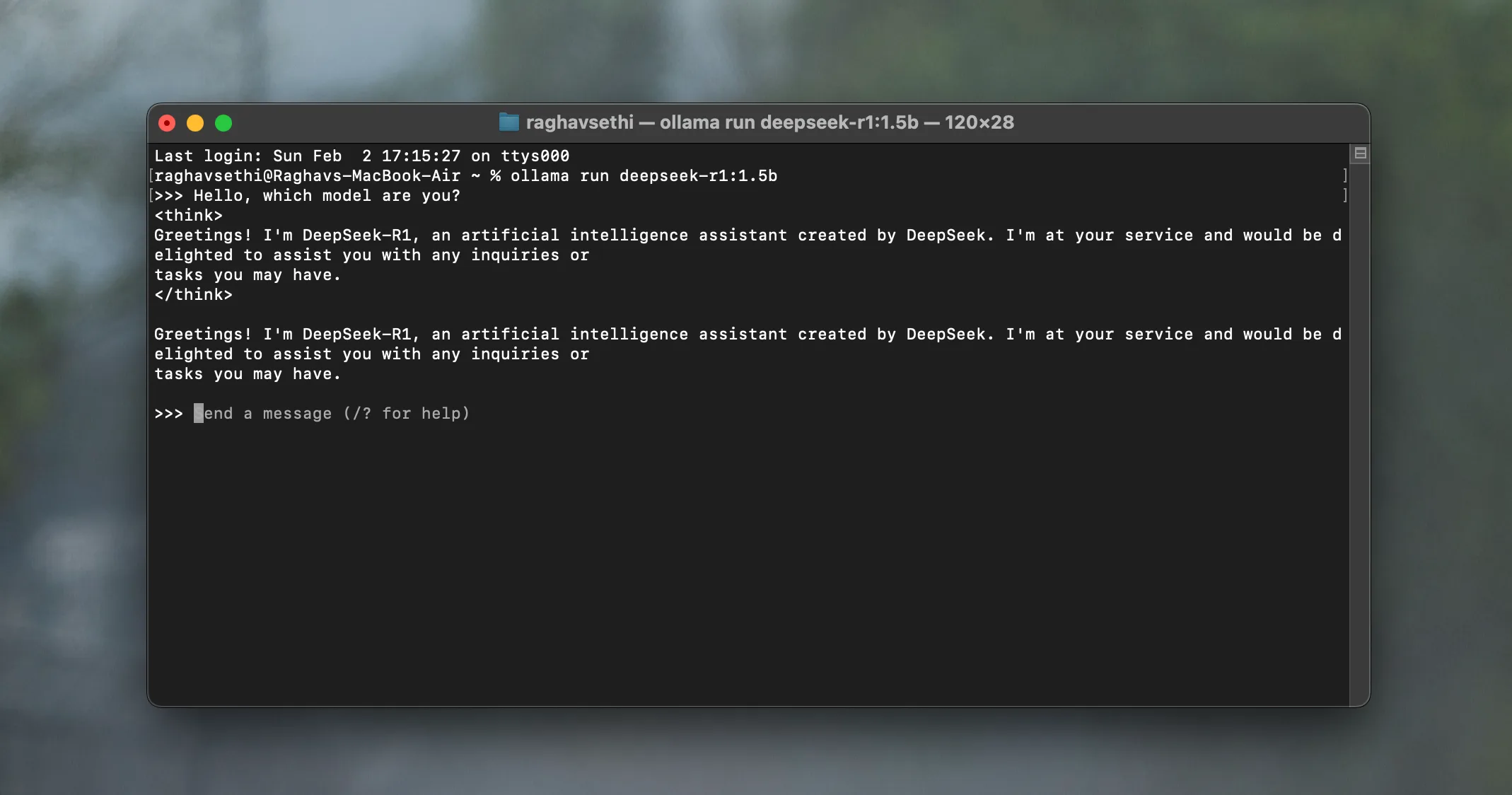
    The chosen model will download and start running, allowing you to interact with it directly from the command line. For example, you can run DeepSeek on a laptop using Ollama.

    Running LLMs locally on Mac using Msty

    Similar to Ollama, Msty is a straightforward app that simplifies the process of running local LLMs. It is compatible with Windows, macOS, and Linux, removing the usual complexity associated with local LLMs, such as Docker configurations or command-line interfaces.

    Msty supports a variety of models, including popular choices like Llama, DeepSeek, Mistral, and Gemma. You can also scout for models directly on Hugging Face, a great site for discovering new AI chatbots. Upon installation, the app automatically downloads a default model to your device.

    After that, you can download any model from the available library. If you prefer to avoid the command line entirely, Msty is the right app for you. Its intuitive interface provides a smooth experience.

    The app also comes with a library of prompts featuring several pre-made options to guide LLM models and refine responses. Additionally, it offers workspaces to keep your chats and tasks organized.

    AnythingLLM app home screen on macOS

    AnythingLLM is an excellent desktop application for users who want to run LLMs locally without complicated processes. From installation to your first prompt, everything is seamless and intuitive, akin to using a cloud-based LLM.

    During the initial setup, you can choose from various models. Some top offline LLMs available for download include DeepSeek R1, Llama 4, Microsoft Phi 4, Phi 4 Mini, and Mistral.

    Like most applications on this list, AnythingLLM is fully open-source. It has its own LLM provider as well as support for multiple third-party sources, including Ollama, LM Studio, and Local AI, allowing you to download and operate countless LLM models available online.

    Chatting with Qwen LLM locally using Jan.ai app

    Jan positions itself as an open-source alternative to ChatGPT that works offline. It provides a sleek desktop application for running various LLM models locally. Getting started with Jan is simple. Once you install the app (available for Windows, macOS, and Linux), you can choose from several LLM models to download.

    While only a few models are displayed by default, you can easily search for models or enter a Hugging Face URL if you’re looking for something specific. Additionally, you can import a model file (in GGUF format) if you have one on your device—it doesn’t get much simpler! The app also lists cloud-based LLMs, so make sure to use the appropriate filter to exclude them.

    Related

    Should You Use a Local LLM? 9 Pros and Cons

    Using a local large language model isn’t for everyone, but there are some compelling reasons to give it a try.

    LM Studio Onboarding Screen

    LM Studio is another application that offers one of the easiest ways to run local LLMs on your device. It provides a desktop application (available for macOS, Windows, and Linux) that allows you to run LLMs effortlessly.

    Once you’ve set it up, you can easily browse and load popular models like Llama, Mistral, Gemma, DeepSeek, Phi, and Qwen from Hugging Face with just a few clicks. Everything runs offline, ensuring your prompts and conversations remain private on your device.

    The app features an intuitive user interface that feels familiar, making it comfortable for anyone who has used cloud-based LLMs like Claude.

    There are multiple ways to operate an LLM across various systems, but the applications listed here offer some of the most convenient methods. While some involve a bit of command line interaction, others, like AnythingLLM and Jan, allow you to manage everything through a graphical user interface (GUI).

    Depending on your comfort level with technology, feel free to experiment with a few options and choose the one that best fits your needs.

  • Choosing the Wrong AI Video Tool? It Could Harm Your PC!

    Choosing the Wrong AI Video Tool? It Could Harm Your PC!

    While there are many free AI image and video generators available, some can pose significant risks. Using the wrong AI video generator might result in inadvertently downloading malware along with your media.

    AI Video Generators May Spread Malware

    Recently, a new type of malware known as Noodlophile has been discovered lurking within counterfeit AI video generators. Security experts from Morphisec revealed that these deceptive websites often use enticing names like “Dream Machine” and promote their offerings in Facebook groups to draw in unsuspecting users.

    These sites typically prompt users to upload a sample image, which their AI claims to convert into a video. The final product is offered as a downloadable ZIP file. If you’ve turned off file extensions in Windows File Explorer, it might appear to be an MP4 video at first glance. However, it’s actually an executable file disguised as a legitimate version of CapCut (version 445.0). This executable is even signed with a security certificate to avoid raising suspicion.

    When you double-click the deceptive MP4 file to view the so-called AI-generated video, it launches CapCut and executes a background batch script. This script utilizes the legitimate Windows tool, certutil.exe, to extract a password-protected RAR archive disguised as a PDF. It also creates a new registry key in Windows, ensuring persistent access to your system.

    A hidden Python script is then triggered, which loads the actual infostealer. This script checks if Avast antivirus is installed; if it is, the infostealer is injected into the RegAsm.exe process. If not, it loads directly into the system memory.

    Once executed, Noodlophile can extract data from popular browsers like Chrome, Edge, Brave, Opera, and other Chromium-based options on your computer. If you have any cryptocurrency wallet extensions, those are targeted as well.

    Investigators have discovered that Noodlophile is sometimes packaged with XWorm, a remote access trojan (RAT) that grants hackers administrative privileges on your machine, allowing them complete control or enabling the upload of additional malware.

    All captured data is transmitted to a Telegram bot, which also functions as a command-and-control (C2) server for the infostealer, providing hackers with real-time access to the stolen information.

    The best strategy to protect yourself from such malware is to steer clear of untrustworthy AI tools or suspicious websites. To help you get started, we have a list of reliable AI video generators available.

    Additionally, I recommend enabling file extensions in Windows 11 so you can see the true nature of the files you are executing. Hackers often exploit this by using double extensions to mislead users, especially since this setting is disabled by default in Windows.

    Make sure to keep your operating system and antivirus software up-to-date. Avoid running files downloaded from unknown sources without proper scrutiny, and rely on legitimate, trustworthy web tools to stay safe.

  • Spotify’s AI DJ Now Takes Requests: No More Odd Choices!

    Spotify’s AI DJ Now Takes Requests: No More Odd Choices!

    Whether you’re a fan of Spotify’s AI DJ or not, it certainly offers a uniquely entertaining way to enjoy music. Traditionally, this AI DJ has operated in an “I speak, you listen” format, but things are changing.

    Spotify’s AI DJ Now Empowers You to Make Requests

    Today, Spotify rolled out an exciting new feature that allows users to interact with the DJ more actively, which they announced on the Spotify Newsroom. Users can now make music requests, providing “an entirely fresh way to shape the atmosphere of their listening experience in real time.”

    With this new functionality, you can ask the DJ to adjust the music by specifying what you want to hear. You might say something like, “Play some chill songs for a rainy evening” or “Surprise me with some never-before-heard jazz tracks.” You can request specific genres, moods, artists, or even suggest something related to an activity.

    To access this feature in the Spotify app, navigate to the Search tab at the bottom. Search for DJ and click on the DJ playlist. When you’re ready to make a request, just press and hold the DJ button located in the bottom right corner.

    Once the DJ activates, you’ll hear a beep, signaling that it’s ready for your request. The DJ will then adjust the playlist based on your specified preferences, listening history, and more.

    Previously, if you weren’t feeling the tracks the DJ selected, your only option was to hit the DJ button to skip to the next song. This update grants you more control over the musical flow while still allowing the DJ to help you discover new tunes effortlessly.

    I can already imagine using the feature to ask the DJ to stop playing those tracks I’ve been skipping for weeks and instead focus on that indie artist I’ve recently grown fond of!

    I have always enjoyed the DJ feature for its uniqueness. As someone who tends to obsessively track my Spotify stats, it’s fun to hear the DJ summarize my listening habits. However, I do wish there was an option to type out requests rather than only using voice commands, especially in situations where speaking isn’t convenient.

    Keep in mind that the DJ feature is currently only accessible to Spotify Premium subscribers in 60 regions, meaning free users and those outside these markets won’t have this option. Although a Spanish-speaking DJ was introduced last year, request capabilities are still limited to English. The feature may still be rolling out, so it might take a bit of time before it’s available to you, even if you already have access to DJ.

  • Riyadh Launches AI Initiative HUMAIN Prior to Trump’s Visit

    Riyadh Launches AI Initiative HUMAIN Prior to Trump’s Visit

    Saudi Crown Prince Mohammed bin Salman engages with Greek Prime Minister Kyriakos Mitsotakis at the Maximos Mansion in Athens, Greece, on July 26, 2022. — Reuters

    RIYADH: Saudi Arabia has unveiled a new artificial intelligence firm named HUMAIN, coinciding with the visit of U.S. President Donald Trump to the kingdom.

    This company is a key component of Riyadh’s strategy to assert its leadership in AI and enhance its forward-looking economy.

    The Public Investment Fund (PIF) announced that its chairman, Crown Prince Mohammed bin Salman, launched HUMAIN to “operate and invest throughout the artificial intelligence value chain.”

    This announcement comes just before Trump’s arrival as part of his Gulf tour, during which AI is expected to feature prominently at a joint Saudi-U.S. investment forum in Riyadh.

    According to the PIF, HUMAIN will offer a diverse range of AI services, products, and tools.

    “The company will also introduce one of the world’s most advanced multimodal Arabic large language models (LLMs),” the statement detailed.

    Saudi Arabia aims to position itself as a global leader in the AI sector, a field currently dominated by the United States.

    This technology is a focal point of Saudi Arabia’s ambitious “Vision 2030” reform initiative, which seeks to diversify the economy of the world’s largest oil exporter in anticipation of a future less reliant on oil.

    Among an array of high-profile projects is NEOM — a substantial $500 billion futuristic city in the desert — along with hosting the 2034 football World Cup and developing a major new airport in Riyadh.

    This rewritten content presents the information in a fresh, unique manner while retaining the original context and meaning.

  • 5 Clear Signs You’re Reading AI-Generated Text

    5 Clear Signs You’re Reading AI-Generated Text

    ChatGPT, our cherished AI assistant, has matured significantly. To someone unfamiliar, distinguishing between human and machine writing can be nearly impossible. Yet, beneath its polished exterior, ChatGPT and similar models still leave traces of their artificial origins.

    5
    Buzzwords

    Some terms initially appear impressive, but as they become ubiquitous, they lose their significance. There’s a distinct type of language that screams “AI-generated.” The issue isn’t the vocabulary itself, but the fact that no real person speaks like that unless they’re aiming for a marketing position. Expressions like treasure trove, game-changer, maximize, enhance, streamline, robust, seamless, elevate, delve, embark, and anything occurring in a realm raise red flags.

    These phrases frequently appear in AI-produced content, reflecting how ChatGPT was trained on an internet saturated with commercial language.

    So when you encounter a phrase like “Let’s delve into the intricacies of this seamless solution that will elevate your workflow,” it doesn’t come across as professional anymore; it screams AI. An article continually referencing “delving into the intricacies of” or labeling every option a “game-changer” is heavily influenced by AI. ChatGPT even lightheartedly comments on this on X:

    4
    Rhetorical Fragments

    Rhetorical devices can spark intrigue, create contrast, or build suspense before delivering a punchline. However, they only work effectively when used purposefully and not every few lines.

    I’m not particularly fond of rhetorical fragments, but AI seems to overuse them. Here are a few examples:

    “And what’s even worse? It’s making people lazy.”

    “The issue? Microsoft isn’t delivering as expected.”

    “The other factor? The entire compatibility nightmare.”

    “And another detail? AI is increasingly sounding like everything else online.”

    ChatGPT using rhetorical questions

    These sentences are classic ChatGPT outputs, identifiable by their consistent structure. A simple fix? Transform them into complete sentences by replacing the question mark with “is” or “is that” to create meaningful statements without overwhelming the reader.

    • What’s even worse is that it’s making people lazy.
    • The issue is that Microsoft isn’t performing as expected.
    • The other factor is the entire compatibility nightmare.
    • Another detail is that AI is sounding increasingly similar to everything else online.

    3
    Participial Add-Ons

    This is another sentence structure that AI tends to overuse. A participial add-on describes one action, followed by a second phrase that explains its effect.

    ChatGPT using participial add-ons

    While this construction isn’t inherently wrong, it often lacks clarity. You’ll spot it easily once you start paying attention. Others have noticed this too, as this type of phrasing is a common reason why AI detection tools may flag your writing. Here are some examples generated by ChatGPT when asked about Excel:

    “The chart wizard generates trend lines, illustrating growth trajectories over time.”

    “The filter tool narrows down records, focusing on priority transactions in seconds.”

    “VBA macros automate repetitive tasks, boosting efficiency across large datasets.”

    “The pivot table groups entries by category, revealing spending patterns at a glance.”

    In many cases, the second part doesn’t add any value that could simply be conveyed with _and_. Essentially, the AI forces two ideas together rather than allowing each to stand independently or flow naturally with a clear connector.

    These constructions can be refined by selecting a more impactful main verb, dividing the thought into separate sentences, or replacing that comma with “and.” For instance, consider the filter tool example:

    Original

    Improved

    The filter tool narrows down records, focusing on priority transactions in seconds.

    The filter tool narrows down records and highlights priority transactions in seconds.

    2
    Contrastive Redefinitions

    This is another powerful writing technique that AI often mishandles. Writers typically use a two-part structure to increase drama: first downplaying something, then elevating it to something extraordinary.

    The usual structure is “This isn’t just X. It’s Y.” When done sparingly, it’s effective. Sadly, ChatGPT seems unaware of the importance of moderation.

    Here are some instances from one ChatGPT session:

    “This isn’t linear evolution—it’s rhizomatic.”

    “Adriana isn’t defined by her origins—she’s something _new_, created in contradiction.”

    “The mix isn’t dilution. It’s transmutation.”

    “This isn’t just a career path—it’s a metamorphic trajectory.”

    “Your path isn’t simply logistical. It’s ontological.”

    “Backing up your Gmail data isn’t just smart—it’s essential.”

    Six of these came from the same ChatGPT thread! It’s unfortunate because the structure itself is solid. I often use it in my own writing, especially when I aim for a reflective tone. However, the purpose of this construction is to create tension and resolution. When everything is redefined into something far-flung or “deeper,” it loses meaning.

    ChatGPT using contrastive redefinitions

    When you see writing that keeps asserting “this isn’t just one thing—it’s a cosmic, soul-redefining, metaphysical breakthrough,” pause for a moment. Does it genuinely feel that way? If not, it was likely crafted by AI.

    1
    Em Dash Splices

    Em dashes can be fantastic. I only started using them a few years ago and quickly became a fan. They’re versatile, stylish, and can inject vibrancy into a sentence. However, ChatGPT tends to go a bit overboard with them. Ask it to write something as simple as a blog post about planning a weekend trip, and suddenly every third sentence is overstuffed with em dashes:

    ChatGPT overusing em dashes in its response

    Look at that! It’s not just the sheer number of dashes; it’s that many of them are used incorrectly. Every pause, every shift, every side thought got its own dash. Initially, it might seem engaging, but it quickly becomes overwhelming. Many of those pauses would be clearer as commas, and some could function well as standalone sentences.

    The power of the em dash lies in its sparseness; overusing it makes it trivial. Therefore, when you encounter a text brimming with dashes from someone who typically doesn’t use them, you can bet it wasn’t penned by them. ChatGPT likely wrote it.

    Of course, all these stylistic quirks can appear in human writing as well. None of them alone indicates that a piece was generated by AI. However, if you notice them being used oddly, excessively, or if multiple red flags appear together, it’s a sign to proceed with caution.

  • Why Google’s Search Struggles: Insights from 2025 Results

    Why Google’s Search Struggles: Insights from 2025 Results

    If using Google feels slower, more chaotic, and less trustworthy than in the past, you’re not alone in that observation. Today, Google search results are increasingly filled with AI-generated content, aggressive advertisements, and cluttered SEO tactics, which often overshadow the reliable information you’re seeking.

    The AI Overview Often Misses the Mark

    The AI-generated summaries Google provides at the top of search results are intended to deliver quick answers, but they frequently fall short. These overviews tend to be overly simplistic, lack depth, and come from dubious sources that aren’t always credible.

    For instance, when I searched for “How to clean a cast iron skillet without damaging it,” I expected solid advice based on culinary best practices. Instead, I got a basic list: avoid aggressive scrubbing, rinse with soapy water, use a salt scrub, and clean rust with a potato and baking soda.

    The advice was contradictory—first warning against soap, then including it as a method—and most of the information came from Reddit threads, Quora posts, and YouTube videos, which are not known experts in cookware maintenance.

    This kind of AI summary creates a façade of authority while offering unclear or overly simplistic guidance. Rather than featuring techniques backed by expertise or linking to reputable culinary sources, it combines information without a clear vetting system. The outcome? A superficial response that can mislead and potentially harm those seeking reliable advice.

    Search Results Favor Advertisers Over Users

    Using Google today often resembles navigating a vast advertisement gallery rather than a search engine, leading many to explore alternative search engines that provide more pertinent results. Sponsored listings occupy prime positions on nearly every results page, often resembling genuine answers. The lines between paid and organic results are blurred, complicating the task of finding what you’re really looking for.

    Below the ads, Google fills the screen with features like “People also ask,” AI-generated responses, and product carousels. While they may seem useful, these components are designed to keep you engaged on Google’s platform, leading to increased ad visibility and user tracking.

    Valuable, unpaid content—the type most users are searching for—is pushed deep into the results. On a mobile device, it often takes multiple scrolls just to find the first organic result. Even then, what you land on is frequently cluttered with affiliate links, prioritizing sales over quality.

    What was once a tool for web exploration now resembles a pathway leading only to monetized content. Google’s business model relies heavily on advertisements, and the layout of search results increasingly reflects that agenda, often at the cost of your time, trust, and access to reliable information.

    The Rise of Clickbait and Misleading Headlines

    As Google’s search algorithms continue to favor content designed merely to attract clicks over genuine value, clickbait headlines have proliferated. These sensational titles often promise far more than they deliver, leading to results that lack relevance, depth, or even truthfulness.

    Recently, I searched for “Fast 11,” hoping to find reliable information about the upcoming movie. Instead, I was inundated with clickbait. The top results were fake, AI-generated fan trailers with titles like “NEW TRAILER,” featuring Vin Diesel and Cody Walker. Just beneath the video thumbnails were catchy headlines like “Is It Doomed?”—even though filming hasn’t even begun. It was a barrage of misinformation and AI-created noise, with no credible or useful content in sight.

    A screenshot of Google's clickbait results for a generic prompt

    Google’s results now prioritize SEO tactics like catchy phrases, keyword-heavy titles, and attention-grabbing thumbnails over genuine quality. What should be a straightforward inquiry becomes a frustrating quest for actual answers.

    Adding “Reddit” Has Become Essential

    Many users have started appending “Reddit” to their searches. This isn’t by chance; it’s a strategy for avoiding the noise. If you’re seeking product recommendations, troubleshooting tips, or insights based on real experiences, including “Reddit” helps you bypass much of the irrelevant content.

    Why? Within Reddit threads and old forums lie authentic conversations among users. You encounter genuine opinions filled with human emotion and analysis, not soulless affiliate links or SEO-driven content. You see people sharing what worked, what didn’t, and the reasons behind it. That’s context that AI-generated summaries and generic blog posts cannot provide.

    This practice has become mainstream, revealing a stark reality: people trust communities of real users more than the top results on Google’s page. We are now compelled to employ strategies to navigate Google effectively. It’s a significant sign of how far Google Search has strayed.

    At first glance, the brief summaries below clickable links in a Google Search—known as meta descriptions—may seem helpful. They are intended to give a quick preview of a webpage’s content, allowing you to decide whether to click or not. However, they frequently end up confusing, contradictory, or even misleading.

    These snippets are not always generated by the site’s creator. Google often auto-generates them from the page content, sometimes taking sentences out of context or misrepresenting what the page is about. This misrepresentation becomes problematic when these descriptions are accepted as trustworthy information.

    For instance, in my search for “Fastest land animal,” nearly every result pointed to the cheetah, but the meta descriptions were wildly inconsistent. One site claimed cheetahs can reach 60 mph, while another insisted on 75 mph—a speed that has never been recorded.

    A screenshot of generic Google results displayed after a query

    Moreover, a Reddit thread humorously claims that a cow dropped from a helicopter at 3,500 feet qualifies as the fastest land animal. While obviously a joke, this comment appears alongside serious sources, making it difficult to distinguish fact from fiction.

    Google’s algorithm overlooks accuracy and focuses instead on relevance and engagement. As AI continues to inform these summaries, users must recognize that the text below each link isn’t always verified truth. These descriptions are frequently automated guesses, often lacking the nuance and context we require.

    SEO Has Become a Tool for Manipulation

    Initially, search engine optimization (SEO) was designed to help search engines understand and rank valuable content. That concept has all but vanished. In 2025, SEO has morphed into a game of manipulation benefiting companies with financial resources, software, and influence.

    Instead of elevating insightful or informative pages, Google now prioritizes those that adhere best to its “rules.” Techniques like keyword stuffing, search-phrase-laden subheadings, and artificially bloated introductions that aim to boost engagement metrics dominate the first pages of Google results.

    These pages are frequently generated by AI tools, polished by SEO professionals, and mass-published by digital marketing firms. The objective is no longer to inform but to monopolize search results and transform clicks into revenue. Valuable personal blogs, niche experts, and independent journalists have seen their traffic decline, not due to a lack of usefulness, but because they lack the technical resources to compete. Human insights face a steep uphill battle against a wall of strategic noise.

    Google has set the stage for this conflict and armed those willing to exploit it most aggressively. In this environment, it’s not quality that triumphs; it’s whoever can manipulate the system best.

    Google Search Is Trying to Be Everything—and Failing at the Essentials

    In its quest to be more than just a search engine, Google has cluttered its results pages. You no longer receive a straightforward list of links. Instead, you encounter a sprawling interface filled with shopping widgets, trending stories, answer boxes, influencer “Perspectives,” and even YouTube highlights.

    The original goal of Search was simplicity: type in a question, receive relevant answers. Now, Google attempts to anticipate your needs with overlays and predictive functions that often miss their targets.

    When I searched for “Italy vacation ideas,” I expected to find hotel recommendations, packing tips, and must-see locations. Instead, I was overwhelmed with vacation packages and rigid itineraries marketed by major travel companies. The helpful, first-person advice I sought was buried multiple pages deep.

    A screenshot of general Google results provided after a search

    In its quest to become an all-encompassing platform for information, shopping, and entertainment, Google has diluted the precise and trustworthy results it once provided.


    Google Search isn’t obsolete, but it certainly no longer feels like the reliable tool it used to be. Now, instead of easily locating answers, you must navigate through ads, sift through poor-quality content, and tweak your queries just to obtain better results. The direction of this change remains uncertain as Google shifts focus to its new AI mode, which aims to redefine aspects of Search.

    In 2025, Search feels more like a chore, influenced by advertisers and content creators rather than driven by actual usefulness. The internet still holds a wealth of valuable information; it’s just become more challenging to access it through Google.

  • Why You Should Use Copilot: 9 Compelling Reasons It Shines Over ChatGPT

    Why You Should Use Copilot: 9 Compelling Reasons It Shines Over ChatGPT

    While Copilot may not match ChatGPT in overall capabilities, it certainly excels in several areas. Knowing when to opt for Copilot over ChatGPT can be beneficial.

    ### 1. Exceptional Image and PDF Reading

    From my experience, Copilot outperforms ChatGPT when it comes to reading images and PDFs. Even with the recent advancements in GPT-4, my stance remains unchanged. When you upload a document or image to Copilot, it quickly provides an accurate summary of the content.

    ChatGPT shines in complex reasoning tasks like reverse image searches, but for straightforward tasks involving PDFs and images, Copilot is a reliable choice.

    ### 2. Exciting Features in Copilot Labs

    Copilot Labs offers intriguing functionalities designed to enhance your experience. For instance, the Copilot Podcasts feature lets you create audio episodes on topics that interest you, making it a great alternative when you’re struggling to find content on platforms like Spotify or Apple Podcasts.

    Within the Labs, you’ll also find Copilot Vision, available in Edge and Windows, even on free plans. This feature assists with various tasks, including photo editing. Additionally, Copilot Labs includes gaming experiences and more unique features.

    ### 3. User-Friendly Interface

    One of the standout advantages of Microsoft Copilot is its more intuitive interface compared to ChatGPT. The layout is less cluttered, allowing for an enjoyable user experience even during extended conversations.

    The contrasting color scheme in Copilot aids in efficiently navigating conversations and locating chats. You can easily jump to specific dates of previous discussions. While there’s room for more features, the navigation is straightforward.

    ### 4. Pages Feature for In-Depth Work

    For anyone who wants to explore deeper topics, the Pages feature is invaluable. While typical conversations can yield basic information, Copilot’s Pages are perfect for brainstorming and drafting.

    You start by entering a prompt, after which Copilot responds. You can then choose whether to accept or reject the revisions, giving you complete creative control. This tool is perfect for generating ideas and collaborating with other features of Copilot.

    ### 5. Suggested Topics for Inspiration

    If you’re ever feeling uninspired, AI chatbots can often spark some creativity. Copilot includes a “Topics I Thought You’d Enjoy” feature that suggests themes you may find engaging. There’s also a “Need Inspiration?” section for those completely out of ideas.

    To enhance your knowledge, check the “Ideas to Explore” section for helpful insights. All suggested topics can be found in the Discover section for easy access.

    ### 6. Seamless Integration with Microsoft Apps

    One major advantage of Copilot is its seamless integration with Microsoft’s suite of applications. Whether you’re using Word or PowerPoint, Copilot enhances productivity. For instance, in PowerPoint, it can help you craft impressive presentations for both school and work.

    Copilot is also effective in Excel, allowing users to create formulas easily, which is ideal for those new to this software. Additionally, if you’re considering a switch from Google Sheets to Excel, Copilot’s features could help solidify your decision.

    You can even utilize Copilot in Outlook to get quick email summaries, helping you grasp messages swiftly.

    ### 7. Superior Initial Prompting Suggestions

    While ChatGPT provides detailed responses, its prompting suggestions often lack clarity. In contrast, Copilot offers much more intuitive initial prompts. As soon as you start a new chat, you’ll be presented with several prompt options tailored to various tasks, such as brainstorming or quizzes.

    Moreover, Copilot excels at providing helpful follow-up prompts, similar to other advanced AI tools. While ChatGPT has improved its follow-up questions, having ready-made prompts can be very convenient.

    With numerous features designed to enhance focus and streamline research, Copilot remains a highly effective tool for users looking for inspiration and efficiency.

  • NotebookLM’s New Feature: Transform Notes Into Videos!

    NotebookLM’s New Feature: Transform Notes Into Videos!

    Sure! Here’s a unique rewrite of the content in American English:


    NotebookLM: New Features Coming to Transform Your Notes

    Artificial Intelligence is increasingly adept at summarizing information, and it looks like it’s about to take note-taking to the next level. While several apps currently leverage AI for note summaries, an exciting new functionality within Google’s NotebookLM could soon enhance this experience significantly.

    Transforming Notes into Videos

    A recent discovery by TestingCatalog has unveiled a new Video Overviews option in NotebookLM, Google’s AI-driven note-taking application. This indicates that users may soon have the ability to create video summaries of their notes. Developed by Google, it’s likely these videos will be powered by Veo 2, the company’s latest video generation model.

    NotebookLM already includes an Audio Overviews feature, enabling users to turn their notes into podcasts. This feature has been key to the app’s popularity, and if the video generation functions as anticipated, it could elevate NotebookLM into a must-have tool for anyone who takes notes.

    While we don’t yet know exactly how the end product will look, it’s clear that the process won’t just involve using notes as prompts for video creation. According to Google, Veo 2 can create video clips lasting "several minutes" and possesses an improved understanding of physical reality along with human movement and expressions—suggesting that the outcomes could be quite impressive.

    Notably, NotebookLM has been known to generate podcasts that can last an hour based on user content. Therefore, it seems unlikely that the new video feature will serve as a complete substitute. Instead, Google appears to be aiming to augment the AI-generated podcasts with visual metaphors or brief explanations to clarify more complex subjects effectively.

    The Audio Overviews often feature scripted exchanges between two AI-generated hosts using distinct voices. Given some limitations with Veo 2, it’s conceivable that Google will implement a similar template-driven approach for video to enhance the quality of the final output.

    More Than Just Videos

    Interestingly, the new Video Overviews aren’t the only updates coming to NotebookLM. TestingCatalog has also identified interface improvements aimed at enhancing content discoverability. A new section titled Editor’s Picks has been noted, suggesting that users may soon be able to explore public notebooks. Given it’s a Google project, personalization features are likely to enhance user experience by providing engaging recommended content.

    These community-oriented features have the potential to elevate NotebookLM from just a note-taking tool into a robust knowledge-sharing platform, similar to the Discover section of Perplexity. Google seems to be integrating its entire AI ecosystem—including text, voice, and now video—into a cohesive, user-driven tool reminiscent of applications like Notion.

    The Video Overviews feature and new interface changes are slated to be part of the upcoming NotebookLM release for iOS and Android, expected on May 20. Coinciding with this release is the Google I/O event, where these features are likely to be showcased prominently.

    I find NotebookLM to be one of the most innovative applications of AI in the realm of research and note-taking I’ve encountered in a while. I’m genuinely looking forward to trying it out, particularly given the efficiency of its Audio Overviews feature.


    Let me know if you need any further adjustments!

  • Choosing the Right ChatGPT Model: OpenAI’s Expert Insights

    Choosing the Right ChatGPT Model: OpenAI’s Expert Insights

    Not all ChatGPT models are created equal, and selecting the wrong one can result in sluggish performance, subpar responses, and—worst of all—AI hallucinations. Fortunately, OpenAI has clarified how to choose the most suitable model for different tasks, making it easier to identify which one to use for any situation.

    Why Choosing the Right ChatGPT Model is Important

    Since the launch of ChatGPT in 2022, OpenAI has released various updates and models. This can be overwhelming, even for those who stay informed about tech trends. If you find the names of AI models confusing, you’re certainly not alone.

    By May 2025, ChatGPT offers several models, each tailored for specific tasks. Many may think that the latest or most powerful model is always the best choice, but that’s not necessarily the case. Selecting the right ChatGPT model involves aligning its strengths with your specific needs. Using the appropriate model can vastly enhance the speed, quality, and relevance of your outcomes.

    On the flip side, opting for the incorrect model can lead to generic answers and inefficient use, particularly when working with models that come with strict usage limits.

    Consider the o1 pro mode of ChatGPT. While it excels in complex reasoning tasks, it has a strict limit of just five requests each month, making it a poor choice for generating Studio Ghibli-style images.

    When to Use Each OpenAI Model

    Andy Cormier / MakeUseOf

    With OpenAI continuously releasing new AI models, choosing the right one for your needs can be intimidating. That’s why OpenAI’s guidance on when to use each model is so helpful. Whether you’re solving technical issues, conducting in-depth research, or planning strategy, you’ll be sure to make the right choice.

    GPT-4o: The Every Day Multitasker

    GPT-4o is your go-to model for day-to-day tasks, providing fast responses with ample power. It’s ideal for summarizing long articles or meeting notes, drafting emails, brainstorming, proofreading reports, and more.

    This model also supports multimodal tasks, so you can generate images, and it accepts a variety of inputs, including text, documents, and even audio and video, with capabilities for live video analysis. If you need a dependable all-around assistant, start with GPT-4o.

    GPT-4.5: The Creative Collaborator

    Launched in February 2025, ChatGPT 4.5 is now the top recommendation for creative tasks. It’s optimized for scenarios that require a touch of human creativity, making it the best choice for engaging with individuals or groups.

    This model excels in key areas such as emotional intelligence, clear communication, and intuitive thinking. Whether you’re crafting compelling content, fostering empathetic discussions, or brainstorming, GPT-4.5 is the ideal option for drafting marketing material that resonates with your brand’s voice.

    OpenAI o4-mini: The Quick Technical Helper

    OpenAI o4-mini is designed for speed. However, this rapidity comes with limitations. Unlike its larger counterparts, it may lack depth when handling tasks. It shines at quick, straightforward technical jobs, making it great for simple tasks that don’t require elaborate explanations.

    This model is perfect for students needing assistance with STEM homework that doesn’t demand deep reasoning. For programmers, o4-mini offers quick fixes, much like those on Stack Overflow.

    OpenAI o4-mini-high: The Detailed Technical Helper

    If you need guidance on more intricate technical issues, o4-mini-high is your solution. This model is suited for advanced coding, math, and scientific problems. While it may respond more slowly than o4-mini, the trade-off is in the enhanced quality and depth of its output.

    Use this model whenever you require accuracy and detail for higher-level technical challenges, such as complex math problems or in-depth explanations of intricate computer science concepts.

    OpenAI o3: The Strategic Workhorse

    OpenAI o3 takes complexity to the next level. It builds upon the capabilities of o4-mini-high, tackling tasks that are not only complex but also involve multiple steps.

    Use o3 for multistep analyses of datasets, developing business expansion strategies while considering market dynamics and competition, or reviewing system logs from various microservices for optimization strategies.

    OpenAI o1 Pro Mode: The Deep Thinker

    If you operate at the forefront of your industry, o1 pro mode is the model for you. Speed isn’t its strong suit; rather, it’s tailored for high-risk sectors and tasks that demand meticulous analysis where errors can be costly, such as in finance, law, and healthcare.

    For example, you might use OpenAI o1 to craft financial forecasting algorithms and develop policy documentation.

    In conclusion, it’s important not to rely on a single ChatGPT model for every task. While the newest model may seem like a universal fix, the information provided here illustrates that no one model excels at all tasks. Instead, choose a model that aligns with the type of work you’re doing, which will likely vary over time.

  • Unlock Creativity: Unconventional Ways AI Can Inspire You

    Unlock Creativity: Unconventional Ways AI Can Inspire You

    Sure! Here’s a unique rewrite of the content in American English:

    —

    It’s now 2025, and artificial intelligence has settled into our daily routines, transcending initial excitement. For many, AI is a reliable ally tackling mundane tasks effortlessly. However, when paired with a creative spirit, AI has the potential to spark innovation, fuel experimentation, and lead to unexpected breakthroughs.

    The screenshots shown below were captured from a sequential conversation with ChatGPT, illustrating a continuous dialogue.

    1
    Collaborate with AI

    AI is capable of exploring avenues you may overlook. It can investigate ideas beyond your experience, bring in perspectives shaped by varied cultural backgrounds, or reveal patterns hidden from the human eye. Instead of simply issuing AI prompts for traditional results, use it as a brainstorming partner that mimics a collaborative thought process.

    For instance, if you’re crafting a novel, employ AI to concoct unexpected plot twists or unique character motivations, allowing it to challenge your existing narrative. Use AI as a sounding board for your ideas, compelling you to refine and expand your own concepts.

    In the realm of visual arts, utilizing creative AI tools in real-world applications can transform AI into an “unconscious collaborator.” By giving it minimal direction—like a specific color palette or an abstract theme—you can let it generate pieces that deviate entirely from your usual style. If you’re a graphic designer, challenge it to create new visual systems that disrupt your standard design principles. Allow AI to navigate you through uncharted territories and see what you can create from that output.

    2
    Optimize Your Creative Schedule

    We all know those moments when creativity flows effortlessly, but such times are fleeting. What if AI could track your creative rhythms and optimize them? Rather than using AI merely for project help, consider utilizing it to chart your creative cycles, much like personal trainers do for physical performance.

    AI can evaluate your past projects, working patterns, and the times when you’re most productive. By tapping into this data, AI can recommend the best times to brainstorm, write, or even take breaks. It can adjust your creative workflow to cater to your unique energy levels and thought processes, nudging you when it’s time to push forward or pull back for inspiration.

    This kind of creative time management allows you to capitalize on your natural creative flow instead of forcing it. You may begin to notice patterns in your productivity—perhaps you’re more inventive late in the evenings or thrive after a good meal. It’s not about working harder or longer; it’s about working efficiently when it matters.

    3
    Use AI to Combine Genres

    One of the most exciting applications of AI is its ability to inspire completely original creations. This includes blending genres, mediums, or techniques in unconventional ways. Looking towards the future of AI in creative software, AI’s knack for synthesizing vast amounts of global data can help create entirely new genres or hybrid expressions.

    A screenshot of using AI to help combine two completely different genres in order to tell a unique story

    For example, challenge AI to merge the structure of a classic novel with the pacing of a video game, or blend minimalist aesthetics with Victorian intricacy. The outcome could lead to a narrative style that feels entirely fresh or a visual presentation that stretches the limits of your imagination.

    If you’re a filmmaker, prompt AI to craft a story outline that mixes elements of science fiction and noir. Musicians, consider asking it to fuse jazz with techno. These hybrids are not merely about combining disparate elements; they’re about discovering a novel way to experience both, potentially shaping your next creative venture.

    4
    Create Constraints to Stimulate Creativity

    While constraints are often viewed as restrictions, they can actually unleash innovative ideas. Rather than starting with endless possibilities, let AI impose specific boundaries that encourage you to think outside the box.

    For instance, instruct AI to confine your work to certain colors or writing styles, like exclusively using present tense or avoiding particular words. If you’re working with design software or exploring creative design AI features, have it suggest unconventional rules, such as utilizing only geometric shapes or omitting straight lines. These limitations will push you to step beyond your usual methods and explore new avenues.

    The benefit of limiting options is that AI compels you to concentrate on creative solutions within a defined framework. Many groundbreaking works in art and design have originated from self-imposed constraints, and AI can present you with similar opportunities. These boundaries foster unconventional thought processes, revealing ideas that might otherwise remain hidden.

    5
    Challenge Your Creative Process

    Creatives often find themselves stuck in comfortable routines that stifle growth. AI can nudge you outside your comfort zone by challenging your established creative process. Instead of only assisting you, share your current ideas or drafts with AI and request alternatives that contradict your usual methods.

    If you’re a writer, ask AI to suggest a radically different plot twist or ending that disrupts your direction. For designers, let AI propose radical alterations to your layout, color choices, or structure. When AI offers ideas that feel “wrong” or uncomfortable, that’s where the real innovation occurs. Such moments compel you to examine your work and your process critically, paving the way for fresh breakthroughs.

    AI is not just about following your lead; it’s about questioning your decisions and encouraging you to break free from creative stagnation. By utilizing AI to challenge your assumptions, you can uncover new insights and expand your creativity in unforeseen ways.

    6
    Mine “Creative Waste” with AI

    A valuable yet underutilized approach to AI involves the concept of “creative waste” — the seemingly random thoughts and ideas that arise during the creative process. Instead of strictly using AI to refine your work, consider it a tool to sift through the discarded bits of your creative journey to unearth hidden treasures.

    A screenshot of using discarded ideas to help generate new ideas for a unique story

    For example, during a project, you may generate numerous drafts, sketches, or fragments of ideas that don’t quite fit into the final piece. AI can sift through these overlooked bits of work, identifying trends or connections you might have missed. Essentially, it acts as a miner, digging through the “waste” of your creative process to discover viable ideas.

    In this manner, AI serves not just as a filter but as an archaeologist, clearing away debris to reveal the remains of your imagination hidden beneath the surface.

    7
    Get Real-Time Feedback on Your Work

    Obtaining timely, genuine feedback while working on a project can sometimes be challenging. The capabilities of AI for real-time analysis have advanced beyond just offering corrections or suggestions. Now, you can utilize AI as a resource to simulate how your creative work might resonate with an audience before it even reaches them.

    If you’re a writer, AI can quickly evaluate the tone, pacing, and emotional impact of your narrative, suggesting modifications that might better connect with readers. For musicians, AI can mimic how a piece might sound to an audience, providing emotional context or recommending shifts in arrangement to evoke different feelings.

    This form of feedback immerses you deeper into the creative realm you’re building, allowing you to assess its potential impact before finalizing your decisions.

    The notion of using AI solely for automating or streamlining tasks is straightforward. Yet with clever prompts and a touch of creativity, AI can become a partner in creativity, challenges your ideas, and serves as a wellspring of inspiration. Push the limits. Rather than relying on AI to simply enhance efficiency, let it propel your creativity to new heights.

  • Why Upgrading to ChatGPT Plus is a Game-Changer

    Why Upgrading to ChatGPT Plus is a Game-Changer

    While subscribing to ChatGPT may seem unnecessary, the advancements in GPT-4o make it a worthwhile consideration. It’s time to rethink any doubts you might have.

    9
    Deep Research

    ChatGPT has always been capable of conducting research, but its effectiveness has dramatically improved with GPT-4o. The Deep Research tool exemplifies this enhancement.

    Although it’s possible to use the Deep Research function with the free version, you’ll find that the Plus version allows for more queries. By utilizing Deep Research, ChatGPT conducts extensive web searches, providing you with reading materials, statistics, and much more.

    Since the process takes a few minutes to yield results, it’s wise to be patient. However, considering the thoroughness of the answers, this wait is often justified. As of May 2025, users receive 25 Deep Research requests each month.

    8
    Improved Reasoning

    Reasoning was a challenge in earlier ChatGPT versions, but GPT-4o has made significant strides in this area. While it may not yet rival some advanced models, its responses are more comprehensive when you request deeper reasoning.

    This feature can be beneficial in various scenarios, from research to goal setting. Asking for detailed reasoning can also help clarify your decision-making process.

    Moreover, ChatGPT can reason with images you upload, adding another layer of interactivity.

    7
    Less Robotic Communication

    While ChatGPT won’t replace human conversations, its responses feel much more natural. You’ll find yourself engaged in dialogue that resembles speaking with a person. The tool utilizes everyday language and can pose genuine questions.

    Having a conversation in ChatGPT

    With GPT-4o, ChatGPT is now more likely to provide straightforward answers instead of merely agreeing with you. While it does offer encouragement, the tool is becoming more adept at presenting rational arguments and can even challenge your views when necessary—just prompt it with requests like, “Be honest and don’t shy away from disagreement.”

    6
    Enhanced Image Generation

    DALL-E served as an early AI image generator but faced several limitations, particularly in generating text. While still imperfect, GPT-4o shows substantial improvement in image creation, offering better responsiveness to prompts.

    When complemented by ChatGPT’s editing capabilities, you gain a robust AI image generator, though tools like Adobe Firefly may still lead in some aspects.

    ChatGPT Image Generation Example

    One ongoing annoyance is that GPT-4o sometimes misses the mark on specific requests, regardless of how you rephrase them. Hopefully, this will improve over time.

    5
    Accelerated Processing

    As a frequent user of ChatGPT, I’ve noticed notable enhancements in processing speeds. GPT-4o can deliver responses in less time, enabling smoother conversations.

    Interactions flow more quickly, particularly when the software isn’t required to search the web or update memory. While there are still some slowdowns within lengthy conversations, the overall speed has improved significantly.

    This means you can accomplish more in less time when using ChatGPT.

    4
    More Proactive Suggestions

    In earlier iterations, ChatGPT tended to act merely as a reactive tool. You had to prompt it for suggestions, which limited its usefulness. With GPT-4o, the tool is far more proactive, offering suggestions without any further prompts from you.

    ChatGPT is likely to propose creating spreadsheets, images, mind maps, and more, often suggesting ideas you might not think of initially or would take additional time to brainstorm.

    ChatGPT Offering Suggestions

    In the Deep Research feature, ChatGPT frequently asks follow-up questions to capture all necessary details. If the volume of suggestions feels overwhelming, you can instruct GPT-4o to limit them—though the default setting fostering creativity is a plus.

    3
    Enhanced Memory Capacity

    When working with ChatGPT, you might find yourself starting new conversations for various reasons, like organizing thoughts or hitting conversation limits.

    Fortunately, the app won’t forget the information it has previously gathered. It can cross-reference and extract relevant data to enhance its responses. Even when certain memories are deleted, I’ve found that the tool still comprehends context without needing much clarification from me.

    This improved memory function results in more insightful responses, making the monthly subscription to Plus well worth the investment.

    2
    Stronger Non-English Capabilities

    While ChatGPT has excelled in English, its performance in other languages has varied. However, GPT-4o shows marked improvement in this area.

    I occasionally use GPT-4o in Danish, and although it isn’t as effective as in English, it does a better job of helping me memorize and create desired responses.

    The tool might still have room for improvement in image generation in other languages, but I anticipate progress as time goes on. Languages with unique characters may require more effort from the system to master.

    1
    Upgraded Voice Mode

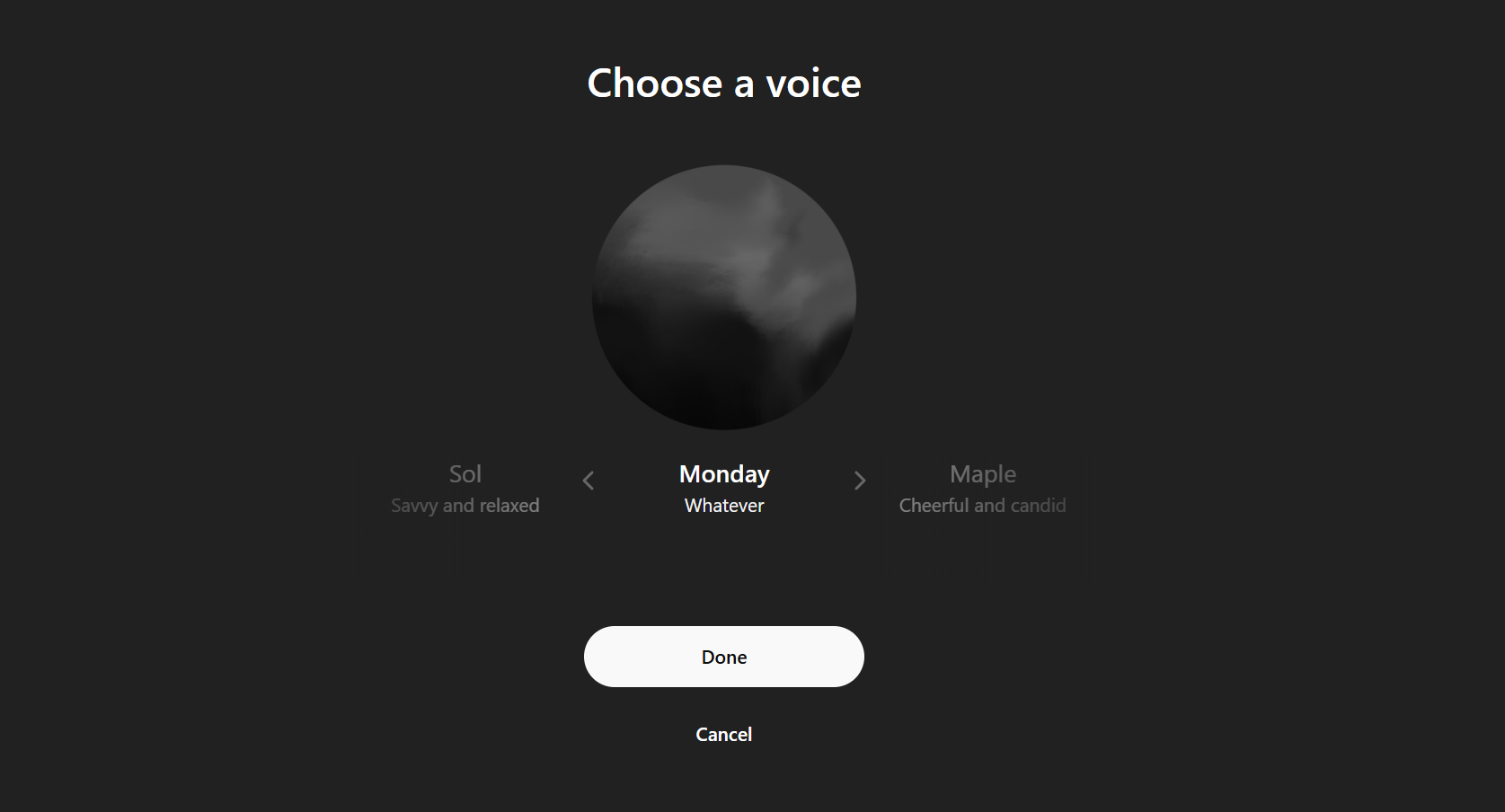
    Beyond text improvements, ChatGPT’s Voice Mode has evolved significantly since the early days of GPT-4o. Conversations are now much more fluid, and while it’s clear you’re still talking to a bot, it feels more human.

    ChatGPT's Voice Mode

    In April 2025, ChatGPT even introduced a new voice mode called “Monday Mode,” broadening its functionalities. You can utilize this tool for various applications—including interview preparation and casual conversations.

    Since your interactions will be recorded for later reference, it’s worth trying out the Voice Mode.

    The benefits of subscribing to ChatGPT Plus may not be immediately obvious, but the impressive enhancements in GPT-4o make it a powerful tool. While the free version is sufficient for casual chats, opting for Plus unlocks a world of possibilities.

  • Google’s AI Overhaul: A Game-Changer for Search Overviews

    Google’s AI Overhaul: A Game-Changer for Search Overviews

    Google is currently testing a new feature called “AI Mode” for its Search function. Soon, our search experiences may be transformed as this AI-driven, chatbot-like interface begins offering conversational responses rather than just a list of links.

    AI Mode Wants to Engage with You

    In contrast to the existing AI Overviews that provide brief summaries above traditional search results, the AI Mode features a dedicated full page filled with AI-generated answers. This new capability is powered by Google’s Gemini 2.0 model, designed to tackle more complex and open-ended questions, enabling a dynamic dialogue between users and the chatbot.

    The AI Mode will have its own tab on the Search page, alongside familiar categories like Images and News.

    Just select the AI Mode tab and start asking questions. Gemini works behind the scenes to provide thorough answers and supports follow-up questions through text, voice, or images. Each response is enhanced with links to original sources and other pertinent information.

    Similar to Gemini, your previous queries will be compiled in a narrow panel on the left side. According to a Google Help page, AI Mode requires Search History to be enabled. This allows you to revisit past questions and synchronize responses between your desktop and Google app on Android and iOS.

    Google AI Mode Search page

    The AI Mode for Google Search is currently in a testing phase for users in the United States. According to Google’s Keyword blog, it’s gradually being introduced to a limited group of users outside of Labs (in the U.S.). There’s a good chance you might encounter it in your search results soon.

    A Move Toward More Conversational Searches

    The rollout of AI Mode represents Google’s effort to create a more intuitive and effective Search experience, eliminating the need for multiple searches or switching over to Gemini. By harnessing its sophisticated AI capabilities, Google aims to provide direct and thorough answers right on the Search page.

    What I appreciate about this is that it’s less disruptive than the AI Overviews, which often detract from the links. With AI Mode, everything is just a tap away, eliminating the need to open another tab or query Gemini separately. The integration of traditional search with AI-driven conversations feels much more seamless now.

    This innovation positions Google to compete effectively with AI-centered search alternatives like Perplexity and ChatGPT, which offer conversational responses. By providing an AI chatbot for search, Google seeks to maintain its relevance and uphold its dominance in the search engine landscape.

    While AI Mode is still in the experimental stage, its potential to redefine our search behavior is substantial. Like Gemini, it may eventually offer both free and subscription-based options. As Google continues to refine this feature, users can expect more engaging conversations during their searches.

  • Thank Goodness: Wikipedia Won’t Replace Humans with AI

    Thank Goodness: Wikipedia Won’t Replace Humans with AI

    Artificial intelligence is capable of many tasks, but it’s still not refined enough to fully replace human editors. Wikipedia recognizes this, which is why it won’t be substituting its human contributors anytime soon.

    Wikipedia Volunteers Are Set to Receive AI Assistance

    The Wikimedia Foundation has revealed plans to incorporate AI for creating new features. These enhancements are designed specifically to support and uplift Wikipedia’s volunteer community.

    Instead of replacing editors, moderators, or volunteers, the new AI tools will automate time-consuming tasks and facilitate the onboarding of new contributors through “guided mentorship.” Additionally, AI will enhance the platform’s information discoverability, allowing editors to focus more on thoughtful engagement and consensus-building while creating, refining, or updating Wikipedia articles.

    Roman Pyshchyk / Shutterstock

    Wikipedia aims for its volunteers to focus on their goals rather than getting bogged down by technical tasks. Automating processes like translation and adaptation of common topics will enable editors to better convey local perspectives and insights.

    As AI continues to evolve and poses challenges to job markets, especially in creative fields, it’s refreshing to see Wikipedia prioritize its volunteers. For further details on the foundation’s AI strategy, you can check out the announcement on Meta-Wiki. A notable excerpt from the announcement emphasizes:

    We believe our future efforts with AI will thrive not just due to our actions, but also our approach. Our initiatives will be driven by our enduring values, principles, and policies (like privacy and human rights) which will guide us: we will adopt a human-centered approach, emphasize human agency, prioritize open-source AI, champion transparency, and embrace a nuanced perspective on multilinguality, a core characteristic of Wikipedia.

    Generative AI Lacks Human Oversight

    While Wikipedia may not always be seen as the most reliable information source online, its human oversight certainly enhances its credibility compared to generative AI alternatives, which often fabricate or misrepresent facts.

    Most AI tools, such as ChatGPT, Gemini, and Grok, learn from diverse internet data, which can contain inaccuracies that lead to erroneous outputs, known as “hallucinations.” Wikipedia asserts that it remains central to AI training models, meaning it is essential for ensuring accurate information and context.

    Unlike generative AI tools, which often lack human creativity, empathy, and contextual understanding, Wikipedia benefits from human review, making it a superior option when verifying facts, information, and historical details.

  • Google Launches New Labs Experiment as Your Language Coach

    Google Launches New Labs Experiment as Your Language Coach

    Google has introduced **Little Language Lessons**, a Gemini-powered tool for language learning that’s currently part of its Google Labs experiments. This offers a playful opportunity for real-world practice if you’re feeling stuck in your language studies.

    Little Language Lessons: More Than Just Vocabulary

    As an emerging AI-driven experimental tool, Little Language Lessons aims to enhance your English or foreign language learning experience in a more natural and contextual way than typical language apps. Rather than relying on static word lists and repetitive grammar drills, this tool provides three engaging, interactive lessons that replicate real-life situations.

    According to Google’s The Keyword blog, these bite-sized learning experiments are intended to supplement traditional language learning methods.

    The initial lesson, **Tiny Lesson**, models brief conversations. You select the language you wish to learn and describe a scenario that requires speaking that language. The chatbot then responds with useful vocabulary, phrases, and grammar insights.

    You can adjust the context as needed. For example, you might start with how to call a cab and then transition to phrases for giving directions.

    Another engaging feature is **Slang Hang**, which uses storytelling to spark conversations. Press the spacebar to navigate through dialogues between characters who sprinkle their discussions with slang in your chosen language. This kind of interaction can help you quickly pick up on the nuances of everyday speech, rather than just memorizing textbook phrases.

    Google Labs Slang Hang

    The highlight of the tool is the **Word Cam**, a visual vocabulary builder. With this feature, you can take a picture of an item around you, and Gemini will identify it while providing related vocabulary. For example, snapping a photo of a backpack in English might yield terms like “zipper,” “strap,” or “pocket.” This object-oriented learning approach is designed to improve vocabulary retention by linking language directly to your environment.

    At present, the tool supports a variety of languages based on the selected experiment among its three options. You can access Little Language Lessons from any web-enabled device.

    While leading language learning apps like Duolingo, Babbel, and Memrise have embraced gamified approaches to language acquisition, Google is testing how instant real-world context, powered by AI, can create a unique experience. Other AI language learning tools are also emerging in this space.

    Using Gemini, Google’s conversational AI, the tool responds dynamically to your interactions. It goes beyond mere grammar corrections or phrase translations; the voice narration aims to capture tone and nuance, allowing you to incorporate slang and idioms into basic conversations—something many traditional apps often overlook at first.

    This informal approach to learning is especially beneficial for those wishing to understand how meanings change in everyday dialogue.

    Though **Little Language Lessons** remains a Labs experiment for now, and there’s no indication of when it might be more broadly available, it exemplifies the increasing trend of applying AI to transform passive tools into active learning partners.

    In summary, Little Language Lessons is a lighthearted and engaging experiment that feels less like a formal lesson and more like having a quick chat with a tutor.

  • New Microsoft Copilot Feature: Unintuitive and Unhelpful?

    New Microsoft Copilot Feature: Unintuitive and Unhelpful?

    Microsoft is continuously refining Click to Do, a feature in Windows 11 powered by AI that helps users complete tasks more efficiently by recognizing text and images on their screens. However, some of its latest features could use a bit more development before they’re genuinely beneficial.

    Currently, Click to Do is available in preview mode for Windows Insiders using Windows 11, version 24H2 in the Dev and Beta Channels on Copilot+ PCs. The ‘Ask Copilot’ feature was introduced in Build 26120.3671 (KB5055622) for Windows Insiders.

    Using Copilot with Click to Do

    By default, Click to Do scans your screen to let you select the text or image you want to focus on. With Ask Copilot, Microsoft is expanding the capabilities of Click to Do.

    When you highlight text or images, you can now select “Ask Copilot” from the menu. This sends your selected content to the Copilot app, where you can refine the prompt before asking Copilot any questions related to your work.

    Essentially, Ask Copilot represents Microsoft’s effort to enhance the AI features available within the Windows 11 ecosystem. It’s designed to smooth the path to using Copilot, improving your workflow by integrating AI support into your current activities.

    At first glance, integrating Copilot into Click to Do seems like a logical step. Yet, in practice, it doesn’t reach the full potential one might hope for.

    An Overabundance of Options

    Click to Do is experiencing a productivity paradox: it tries to offer so many features that it ultimately overwhelms users. While versatility is generally a plus, having too many options creates a confusing experience.

    You are now faced with navigating a complex interface filled with choice points and dropdown menus. Additionally, you have two further options in Ask Copilot—Copilot and Microsoft 365 Copilot. Unfortunately, the latter does very little.

    Other options include Search the web, which is already supported by Bing through Copilot. Plus, there’s the Copy function, allowing you to copy content directly into the Copilot app, and an Open with option where you can choose the Copilot app to access the highlighted content. While the extensive list of proposed actions offers various possibilities, the sheer number of choices leads to a cluttered experience rather than a streamlined one.

    Ideally, AI should simplify tasks. Yet, in its current form, Ask Copilot complicates an interface that’s already overloaded with options. It’s important to note that the feature is still in preview, and Microsoft may adjust it based on feedback from Windows Insiders.

    It’s Not That Useful Right Now

    Beyond the issues with usability and interface clutter, a crucial question remains: Does Ask Copilot genuinely provide any real value?

    I tested Ask Copilot after selecting an image on a website. It merely transferred the image to the prompt box in the Copilot app and awaited my input for the prompt. In contrast, other Click to Do features—like background blurring, object erasing in the Photos app, or background removal in Paint—seem to be more actionable, aside from the Bing visual search functionality.

    As it stands, the integration feels lackluster. It only transfers selected content to the prompt box in the Copilot app, lacking the depth and context necessary for true usefulness. Copilot doesn’t consider where the content is coming from or the nuances of your workflow—it acts like a simple shortcut.

    It’s clear that Microsoft is eager to integrate Copilot throughout its ecosystem, which makes sense given the objective of having AI readily available in all Windows experiences. While the vision for AI-enhanced productivity is exciting, the present implementations leave much to be desired. This is unfortunate, as the underlying idea has real potential.

    Microsoft has successfully implemented this concept in other areas of Windows. For instance, the Edge browser features built-in Copilot capabilities that allow for smarter browsing with AI assistance. While reading articles, watching videos, or browsing websites, you can engage with Copilot and receive quick, relevant answers without leaving the page.

    Moreover, numerous Copilot features are available in Microsoft 365 apps, enabling you to utilize Copilot as a writing assistant in Word or get help in PowerPoint for effective presentations.

    This doesn’t mean the concept should be discarded. Instead of overwhelming users with an array of random actions, Ask Copilot could thrive in a more focused, streamlined environment that facilitates real productivity enhancements. Until meaningful improvements are made, however, this feature feels more cumbersome than beneficial.