الوسم: Artificial Intelligence

  • Claude Artifact vs. ChatGPT Canvas: Which Is Superior?

    Claude Artifact vs. ChatGPT Canvas: Which Is Superior?

    Quick Links

    Key Points to Remember

    • ChatGPT Canvas is superior in writing and offers more editing features compared to Claude Artifact.
    • Customizing ChatGPT Canvas for code generation is more user-friendly than Claude Artifact.
    • However, Claude Artifact excels over ChatGPT Canvas when it comes to explaining and creating graphs and charts.

    ChatGPT Canvas allows you to tackle a wide range of tasks, from drafting documents to generating code. But how does it stack up against Claude Artifact? I put both to the test to determine which one offers better performance.

    Writing

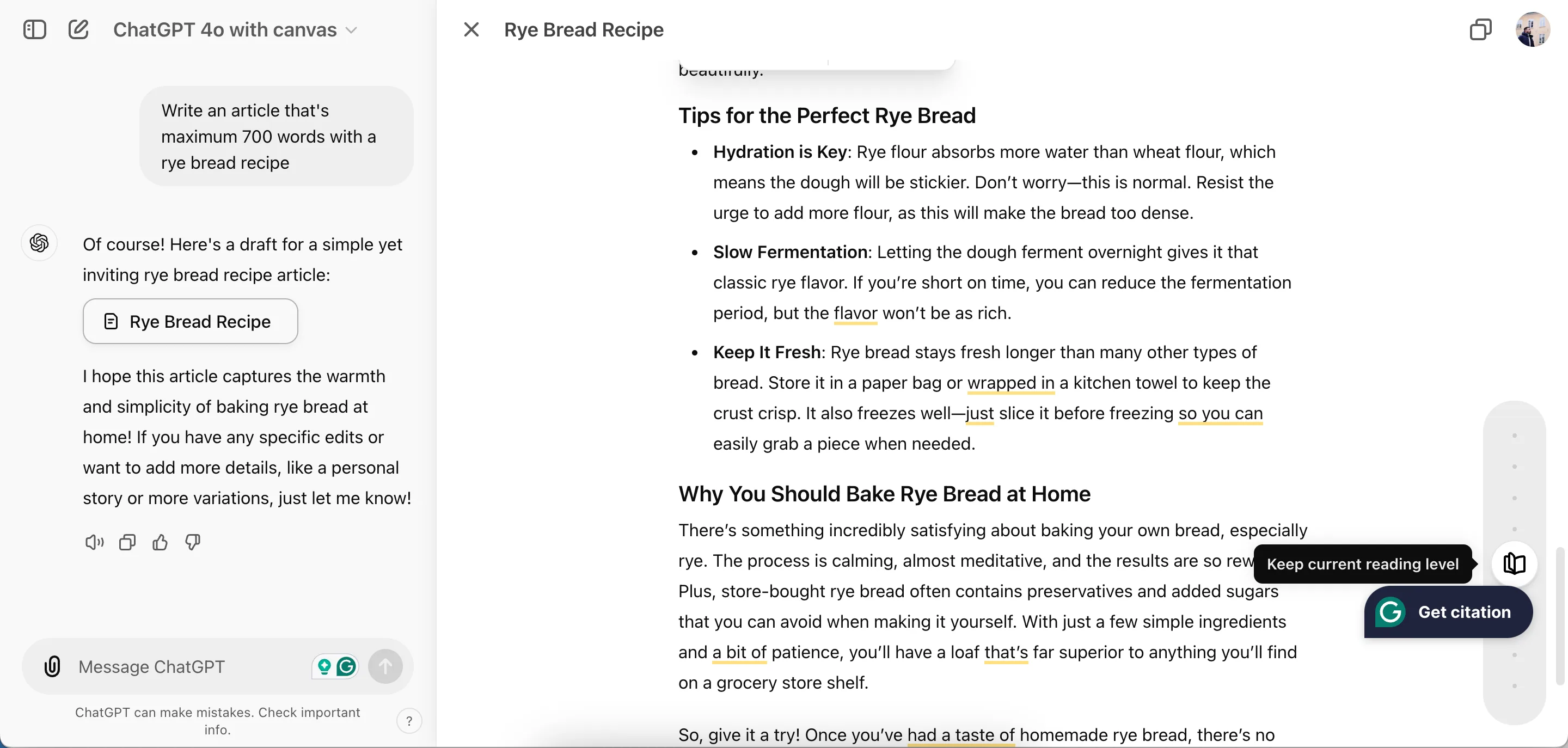
    I tasked ChatGPT Canvas with creating an article featuring a rye bread recipe. The platform provided numerous editing options, such as adjusting the reading level, adding emojis, and modifying sentence length. The editing features allow you to focus on specific sections you want to refine.

    While I preferred the interface of Claude Artifact, it proved limited in supporting my editing needs. I could specify what I wanted to change, but I didn’t enjoy as much control as I had with ChatGPT Canvas. Based on this experience, I have to give the edge to ChatGPT Canvas in this area.

    Outside of writing, ChatGPT is also useful for many other tasks, including language translation.

    Winner: ChatGPT Canvas

    Generating Code

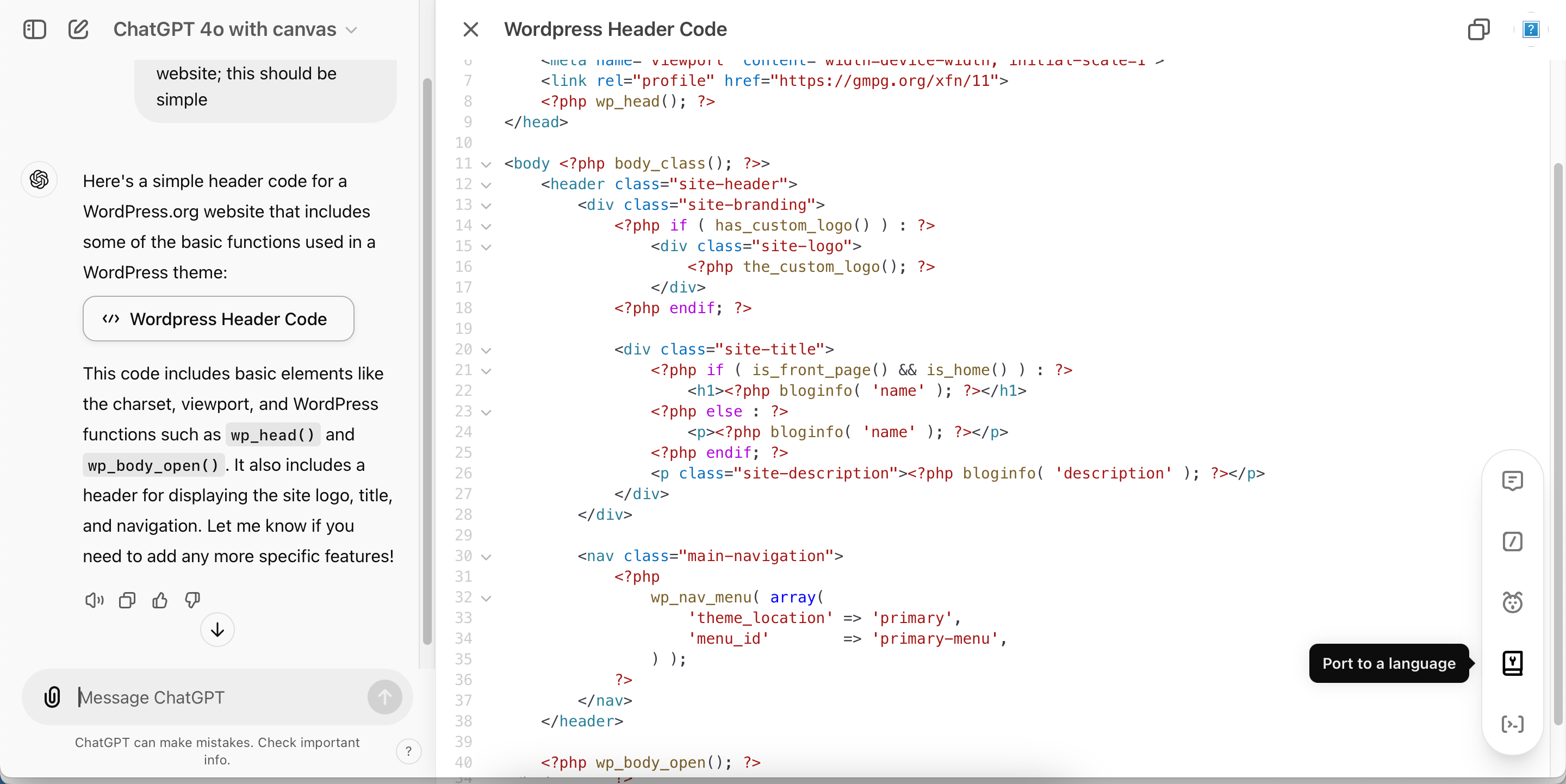
    Next, I assessed how both tools performed with code generation. I attempted to create a simple script suitable for use in a website’s header. ChatGPT Canvas made it easy for me to debug, add logs, and convert code to different programming languages like JavaScript and Python.

    In contrast, when I tried to do the same with Claude Artifact, I had to select the entire text and create a new prompt to specify the programming language (JavaScript in this case). Although the outcome was satisfactory, the extra steps were a bit frustrating.

    Editing code in ChatGPT Canvas

    For ease of customization, I have to give this round to ChatGPT Canvas.

    Winner: ChatGPT Canvas

    Solving Math Problems

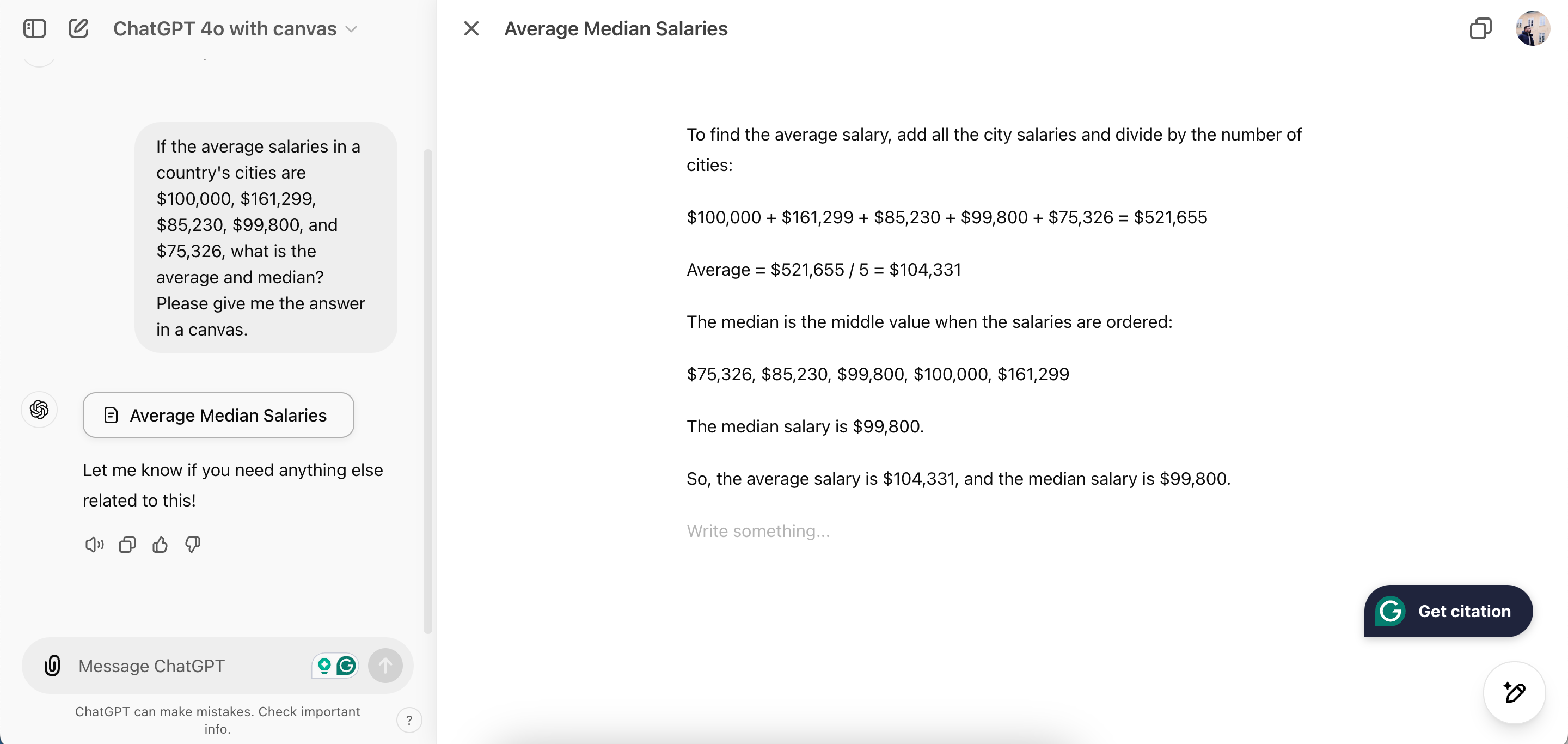
    Math is not my forte, but I decided to challenge both tools to see if they could assist me. I asked for the average and median salaries (which I fabricated). ChatGPT summarized my request with their standard editing tools.

    On the flip side, Claude Artifact did a much better job explaining the concepts and even offered to create graphs as part of its response. Considering the overall performance, Claude earns this point.

    Editing mathematical averages in ChatGPT Canvas

    Winner: Claude Artifact

    Designing Graphs and Charts

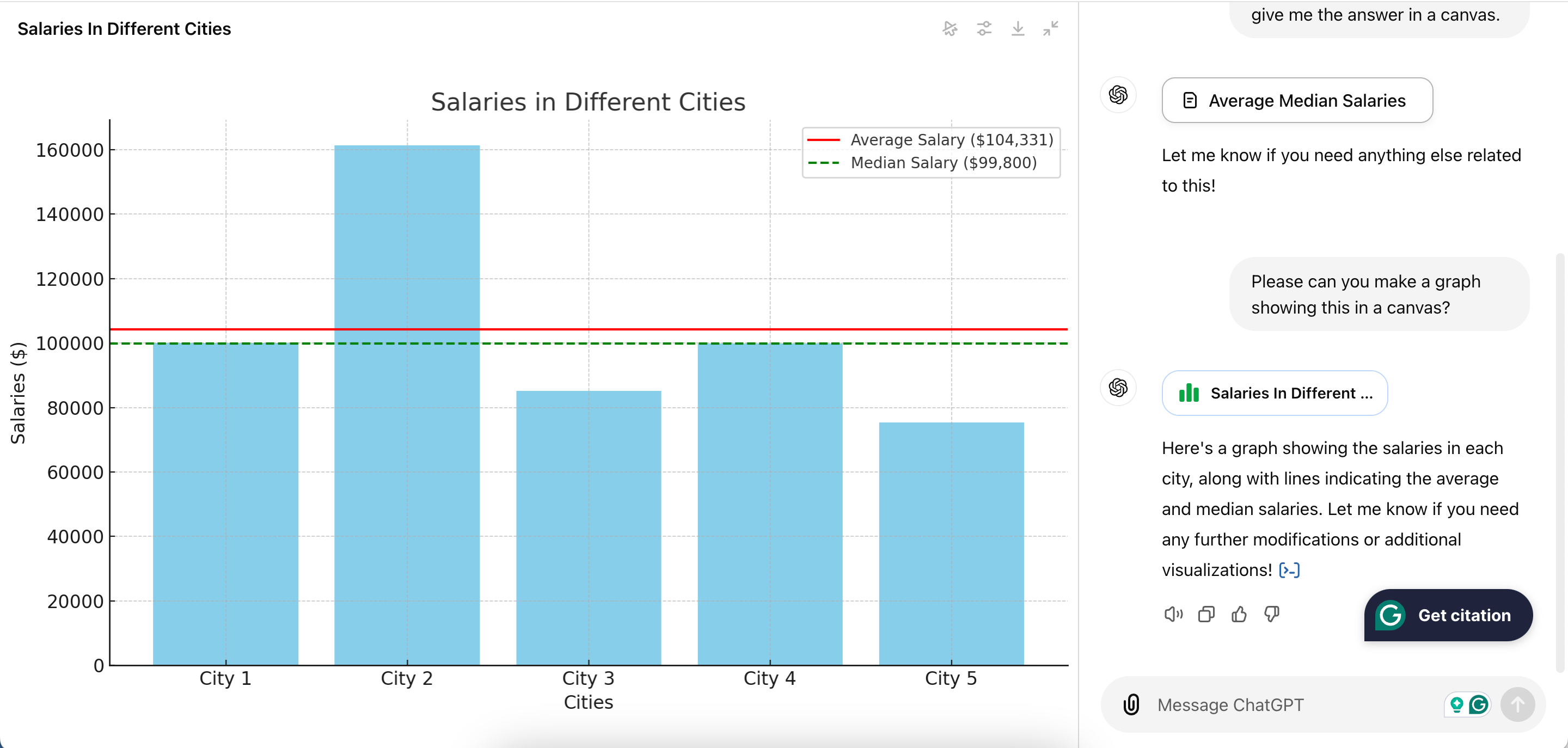
    For my final evaluation, I had both tools create graphs from the salary data I provided earlier. ChatGPT Canvas generated the graphs in about a minute, and the process was quite straightforward.

    Unfortunately, I ran into issues with Claude Artifact; the application crashed and informed me I had reached my limit for free messages. Although my experience could have varied with a paid plan, it ultimately didn’t meet my needs.

    Bar graph developed by ChatGPT Canvas

    Because of these frustrations, I’m awarding this point to ChatGPT Canvas too.

    Winner: ChatGPT Canvas


    Overall, ChatGPT Canvas came out on top in this comparison, but Claude Artifact definitely has potential. It performed exceptionally well when I requested improvements on specific tasks, even surpassing ChatGPT in that regard. However, the limitation on free messages was quite inconvenient.

    While I recommend trying both platforms, I find ChatGPT to be the superior choice for writing and coding tasks.

  • OpenAI Uses Its Own Models To Combat Election Interference

    OpenAI Uses Its Own Models To Combat Election Interference

    OpenAI, the creators behind the widely-used ChatGPT generative AI tool, recently issued a report revealing that it has successfully blocked over 20 deceptive operations and dishonest networks globally in 2024 thus far. These operations varied significantly in their goals, scale, and focus, being employed to generate malware and fabricate fake media stories, biographies, and website articles.

    The findings indicate that OpenAI has conducted a thorough analysis of the activities it prevented, offering critical insights from its investigation. According to the report, “While threat actors adapt and experiment with our models, there is currently no indication of significant advances in their capabilities to produce entirely new malware or to cultivate viral audiences.”

    This is particularly crucial as 2024 is an election year in several countries, including the United States, Rwanda, India, and within the European Union. For instance, in early July, OpenAI took action against numerous accounts that were generating comments related to the elections in Rwanda, which were disseminated by various accounts on X (formerly Twitter). It is reassuring to learn that OpenAI asserts these malicious actors have struggled to make substantial progress with their campaigns.

    Another notable achievement for OpenAI was disrupting a threat actor based in China known as “SweetSpecter,” who was attempting to perform spear-phishing attacks targeting the corporate and personal emails of OpenAI staff. The report further details that in August, Microsoft disclosed a collection of domains linked to an Iranian covert influence operation dubbed “STORM-2035.” “Following their report, we investigated, disrupted, and reported an associated set of activities on ChatGPT,” the report noted.

    Furthermore, OpenAI indicated that social media posts created by their models garnered minimal engagement, receiving few or no likes, comments, or shares. The organization is committed to continuing its vigilance in anticipating how malicious actors might exploit advanced models for harmful purposes, and intends to take appropriate measures to thwart these efforts.

  • Understanding DALL-E: How It Transforms Text into Images

    Understanding DALL-E: How It Transforms Text into Images

    Key Insights

    • DALL-E is an AI system that generates lifelike images based on text descriptions, making it accessible and engaging.
    • The name “DALL-E” blends the renowned surrealist artist Salvador Dalí and the Pixar robot WALL-E, capturing its imaginative and artistic capabilities.
    • DALL-E has been trained on extensive datasets and is integrated within ChatGPT, offering a straightforward user experience for a variety of creative applications.

    DALL-E can create stunning visuals, but it’s neither a painter nor a photographer—it’s an AI model. For those of us who may not have artistic skills, it serves as an enjoyable tool worth exploring.

    What Is DALL-E?

    By providing a text prompt, you can specify exactly what you’d like to see, and DALL-E will generate an image for you in seconds. What seems like magic is actually a cutting-edge AI model developed by OpenAI to convert written prompts into images.

    Thanks to its user-friendly interface that only requires basic English proficiency, DALL-E has attracted a diverse group of users. People employ it for various creative projects, from crafting immersive scenes for tabletop games to generating eye-catching images for online articles.

    The name DALL-E is derived from the fusion of the iconic artist Salvador Dalí and the animated robot WALL-E, symbolizing its unique blend of creativity and technology.

    With its remarkable ability to illustrate objects, landscapes, and animals in various art styles—including oil painting and photorealism—DALL-E has given rise to an exciting new genre of art. It effectively captures and presents ideas with impressive accuracy.

    DALL-E debuted as one of the first generative AI models to gain global recognition in 2021 and continues to maintain its relevance amidst emerging competitors like Midjourney, which is also a robust AI art generator, along with several other alternatives.

    How Does DALL-E Work?

    To achieve its artistic capabilities, DALL-E underwent extensive training using vast datasets comprised of millions of images paired with descriptive captions. OpenAI categorizes DALL-E as a transformer language model, showcasing its complex yet fascinating mechanics.

    If interested, you can delve into a simplified explanation of artificial intelligence.

    How to Use DALL-E in ChatGPT

    The latest version of DALL-E is embedded in ChatGPT, an AI chatbot that can assist with various tasks. If you don’t have a ChatGPT account yet, that’s your first step.

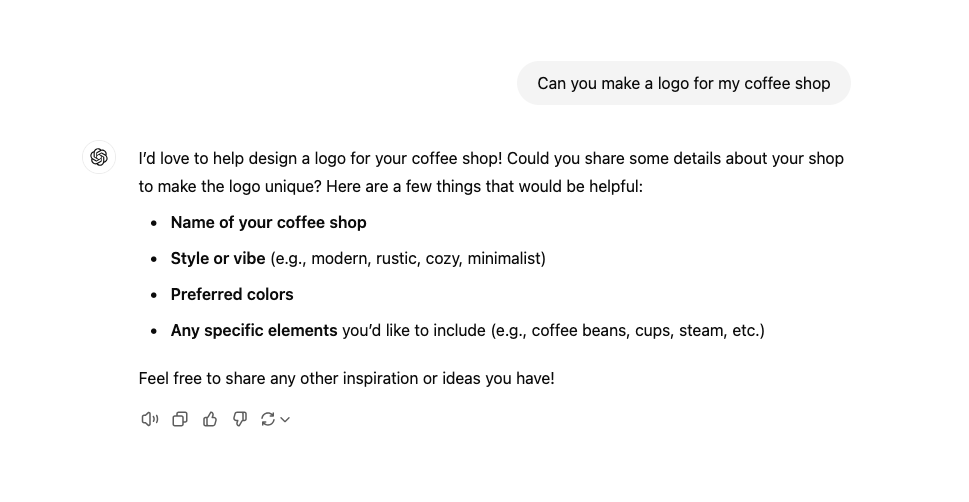
    Inside ChatGPT, the interface resembles a messaging app. You can initiate a creative conversation, treating it like you’re interacting with a graphic designer. A basic prompt, like “Can you design a logo for my coffee shop?” will kick things off.

    ChatGPT request for a coffee shop logo

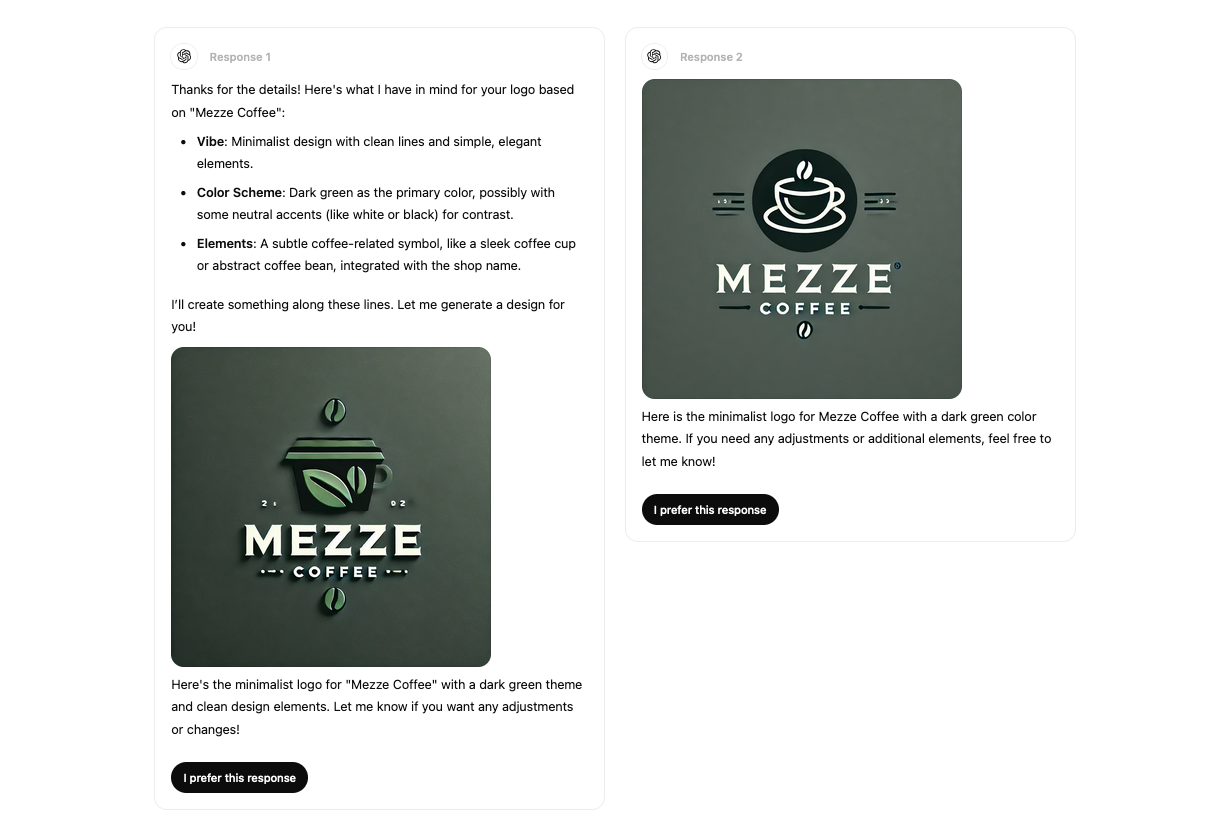
    ChatGPT will then request further specifics from you. After providing additional details, you’ll receive multiple images tailored to your requests. This back-and-forth dialogue can continue as often as needed to refine the image creation process.

    DALL-E in ChatGPT suggesting two different coffee shop logos

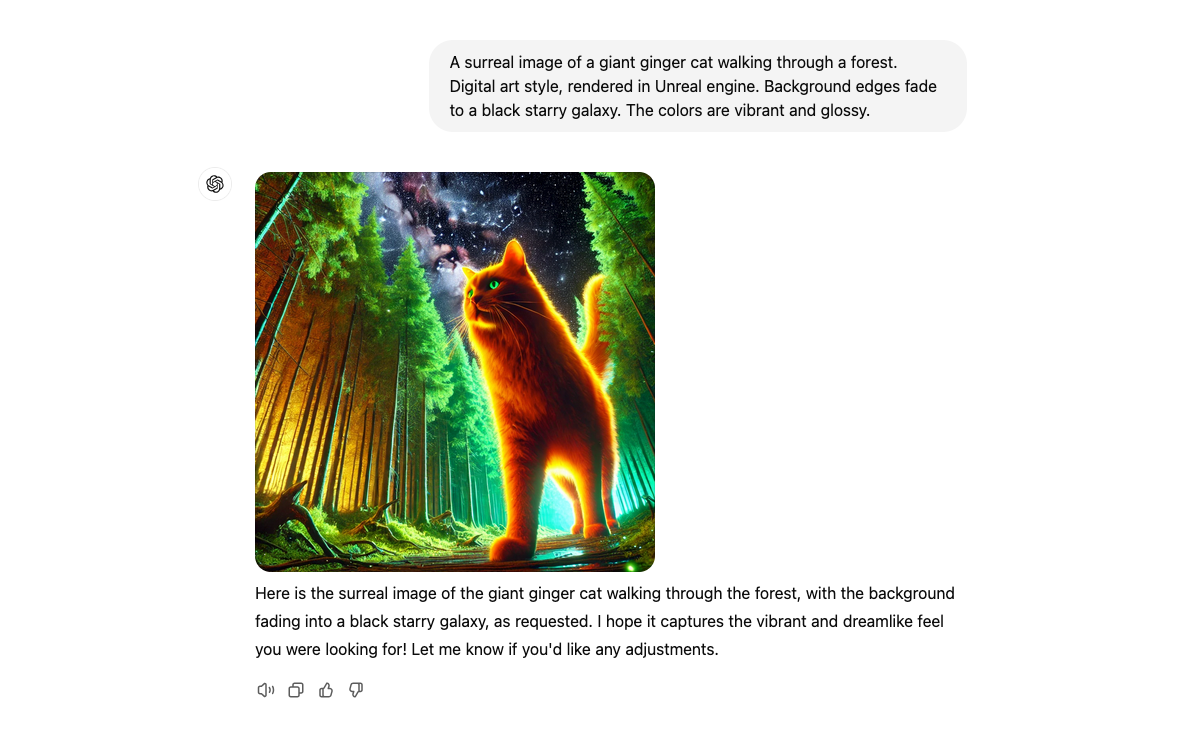
    You can also jump straight into a thorough description of the image you envision, detailing as much as possible.

    Refining your prompt is essential for producing excellent images with DALL-E. If certain features don’t turn out as expected, try experimenting with word choices and their placement. Expect a bit of trial and error as part of the creative process.

    Image of a ginger cat generated inside ChatGPT

    What Can You Do With DALL-E?

    Since the advent of AI image generators like DALL-E, there has been a thriving community of enthusiasts embracing these tools as a hobby. Part of the excitement lies in mastering the creation of impressive images, a skill often referred to as “prompt engineering.” As with any hobby, there are numerous ways to improve your technique.

    For others, DALL-E offers tangible benefits. It’s great for graphic design, logo creation, concept art, web design, and crafting visuals for newsletters, among other applications. For many, hiring a professional can be cost-prohibitive, making AI-generated images a practical and affordable solution.

    DALL-E stands out as a powerful AI image generator, being one of the pioneers in popularizing this innovative technology. Using it is incredibly straightforward—just type in what you want, and it generates the image for you. While it may not require traditional artistic skills, many have demonstrated that it can evolve into a fulfilling hobby if you invest time in mastering the art of creating stunning AI visuals.

  • How This Smart Virtual Assistant Changed My Perspective on AI

    How This Smart Virtual Assistant Changed My Perspective on AI

    Main Points

    • Beloga’s AI boosts the efficiency of gathering, organizing, and retrieving information, ultimately saving time and delivering tailored results.
    • The seamless integration of Beloga with other tools simplifies workflows and enhances productivity by centralizing data.
    • AI applications like Beloga are revolutionizing knowledge management, establishing new benchmarks for productivity and fundamentally changing our work methods.

    I’ve always had my doubts about using artificial intelligence as a virtual assistant. I often wondered: Is there really an affordable AI tool that can excel in knowledge management? That perspective changed dramatically when I discovered Beloga—it truly opened my eyes.

    How Beloga’s Virtual Assistant Altered My Perception of AI

    Initially, when I started using Beloga, I didn’t anticipate experiencing anything groundbreaking. My daily tasks routinely consisted of extensive research and navigating through a plethora of documents, tabs, and notes—often overwhelming. However, Beloga’s AI-driven search capabilities quickly impressed me, significantly improving how I capture, organize, and retrieve information.

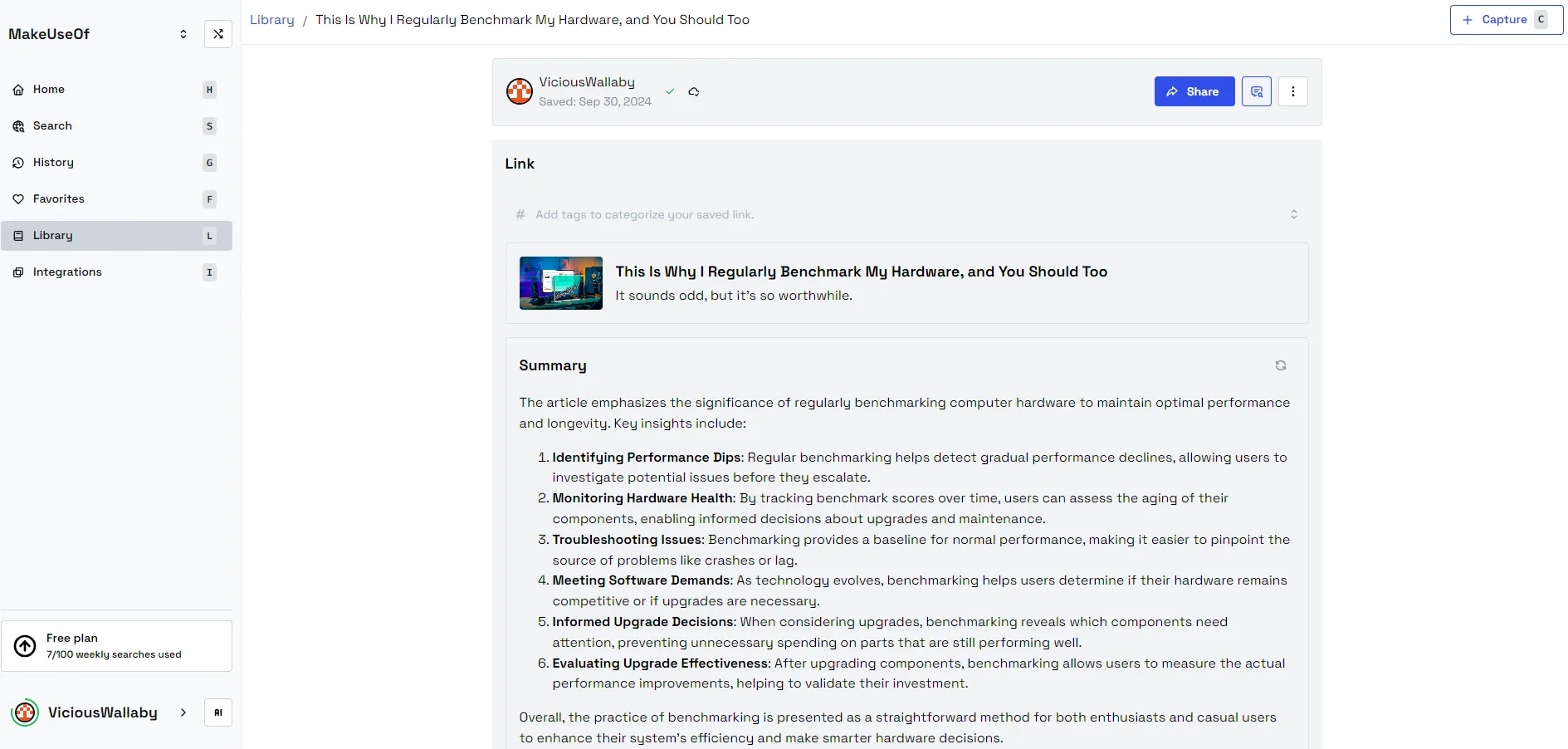
    Setting up workspaces to manage my research has been a transformative experience. I now maintain a library of articles that I collect throughout the day. If I click on a source, Beloga will provide a summary. I can pose questions, and it retrieves relevant data from my personal library, documents, and online content, all presented in a single, streamlined view. This has saved me countless hours of research.

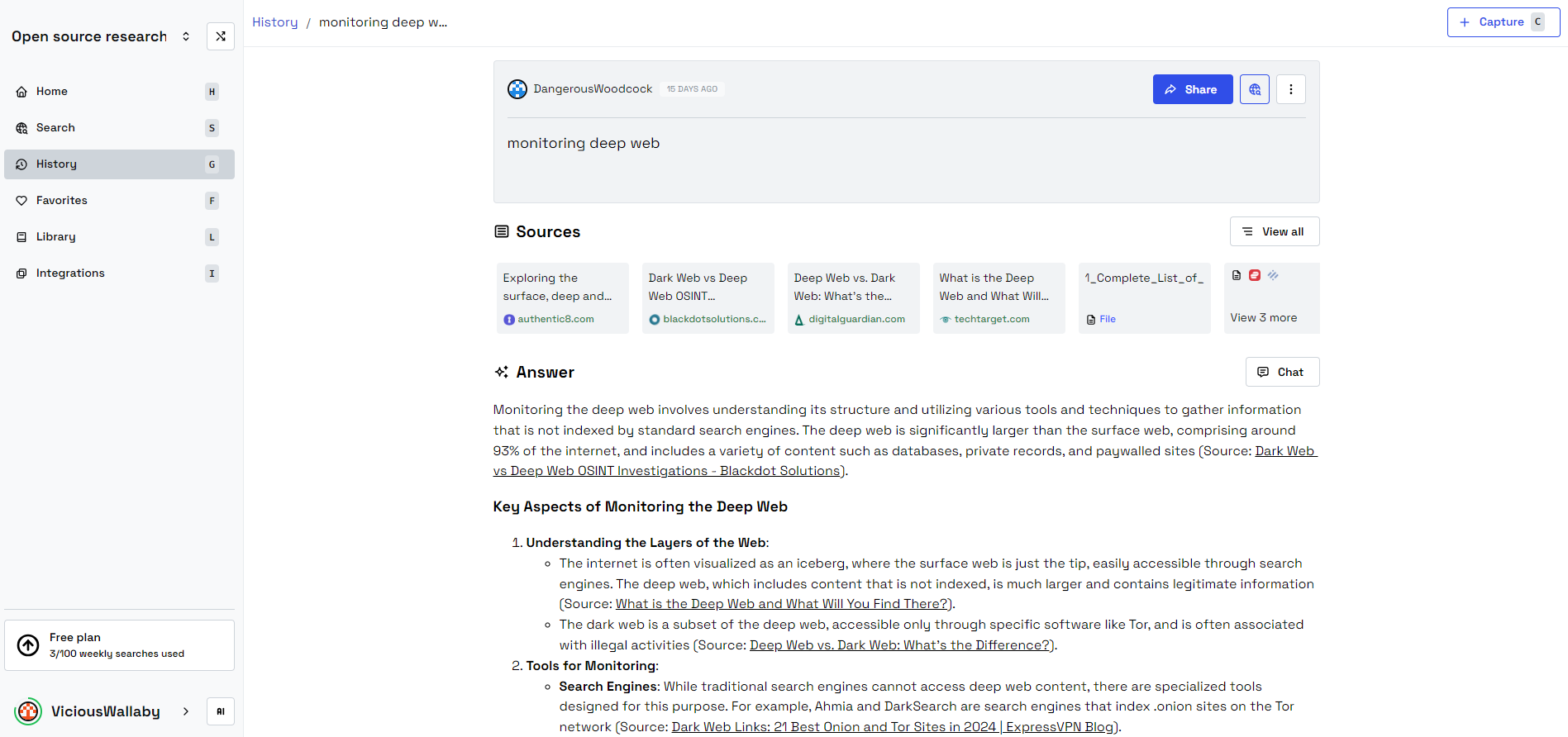
    What truly amazes me is Beloga’s ability to understand the context of my search queries—it’s not just about returning data; it accurately identifies exactly what I need. For instance, when researching dark web activities, having immediate access to pertinent resources for monitoring, scraping, and analysis has been a tremendous help.

    Beloga’s feature for sharing conversations allows me to tap into community workspaces like Open Source Research, which enables professionals to share resources that are instantly useful to users like myself.

    Use of Beloga to keep up with dark web monitoring tools.

    Customized Search Capability

    One of the standout aspects of Beloga is its capacity to learn from my search habits, tailoring outcomes based on context. The option to label specific sources also allows me quick access to exactly what I need, eliminating the noise of unnecessary information.

    This kind of customization makes the platform feel specifically designed for my needs, showcasing AI’s growing capability to truly personalize digital interactions.

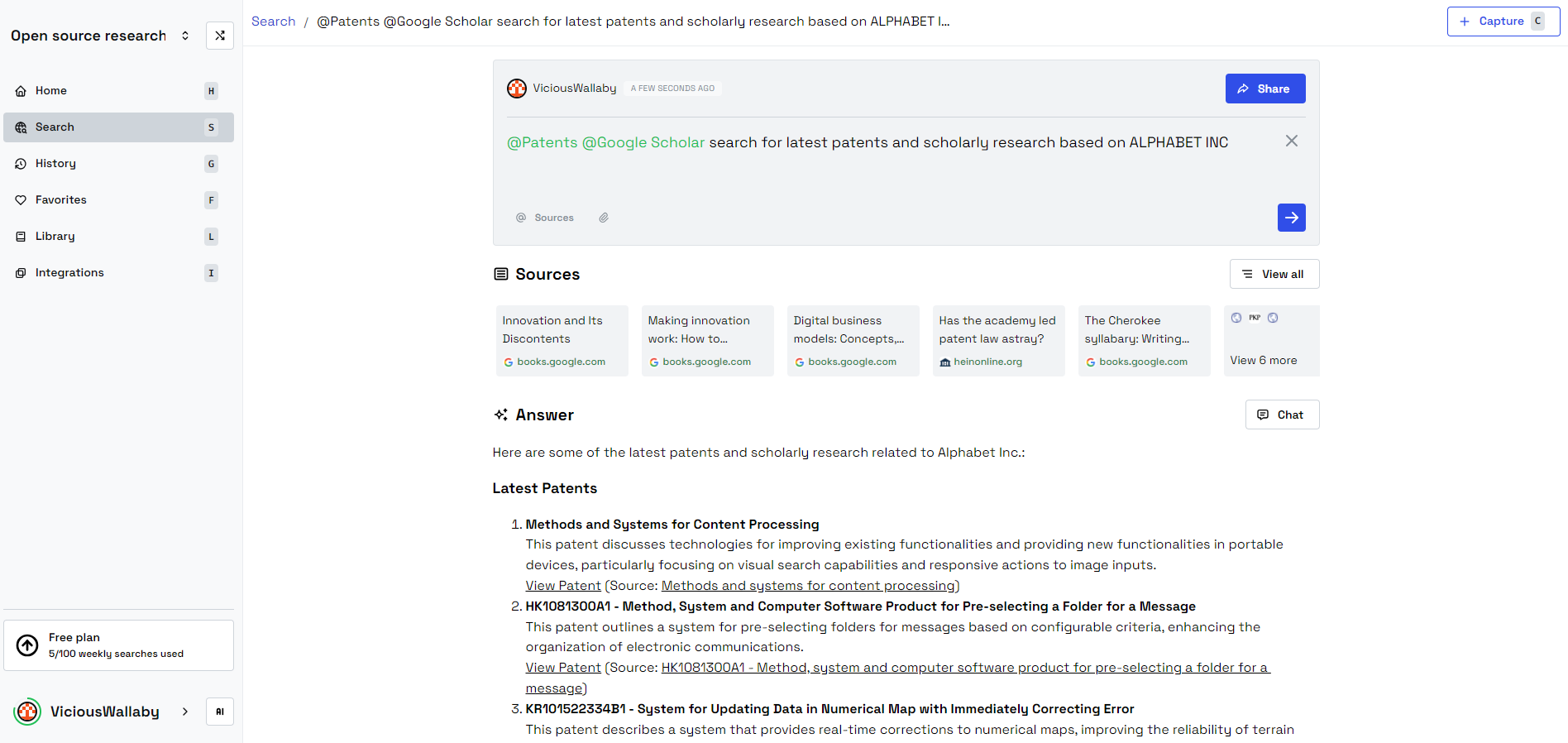
    Leveraging Google Scholar and Patents to search for recent patents

    Whether I’m researching Google Scholar or looking up patents, I find everything I need in one convenient place. I can search and save items to my personal library, carefully organized by different workspaces, which helps to keep my personal and professional life distinct.

    Smooth Integration

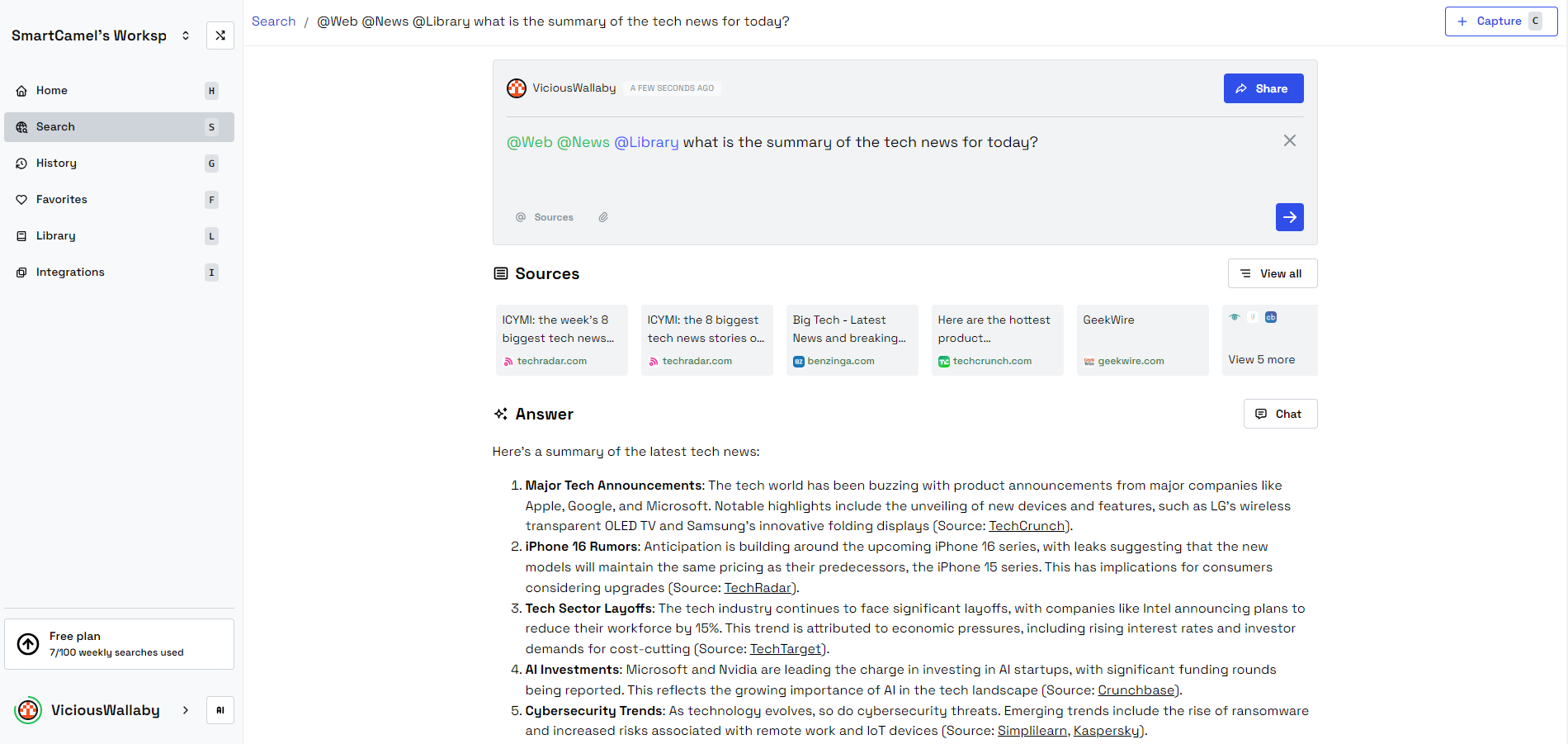
    Beloga is packed with integrations, including Google Scholar, Notion, news sites, Google Drive, and web access, ensuring I can gather real-time insights no matter where my research takes me. Its ability to showcase links and navigate directly to sources proves invaluable for fact-checking. I can obtain news summaries about various topics, providing crucial context for my assignments.

    A search of a daily news summary aggregating sources.

    I frequently perform searches for news summaries to get a quick overview of relevant topics. When I discover something valuable, I can save it in Beloga for further investigation.

    Enhanced Productivity

    Prior to using Beloga, my productivity would often falter under the weight of all the information I needed to juggle. However, with Beloga’s intelligent functionalities, that pressure has lifted. I no longer need to comb through countless tabs or rummage for files—it’s like having an extra brain handling everything for me. By removing unnecessary steps from my workflow, I can finally concentrate on what truly needs my attention.

    It’s not only about saving time; it’s about simplifying processes in ways I hadn’t considered. For anyone who depends on quick access to diverse information, this tool is essential.

    Why AI Represents the Future of Knowledge Management

    The influence of Beloga extends beyond my individual experience. Artificial intelligence is reshaping knowledge management across various fields by facilitating the efficient handling of large quantities of data. In earlier times, managing extensive datasets or sourcing information from multiple locations could take hours of manual labor. Today, tools like Beloga can perform such tasks in mere seconds.

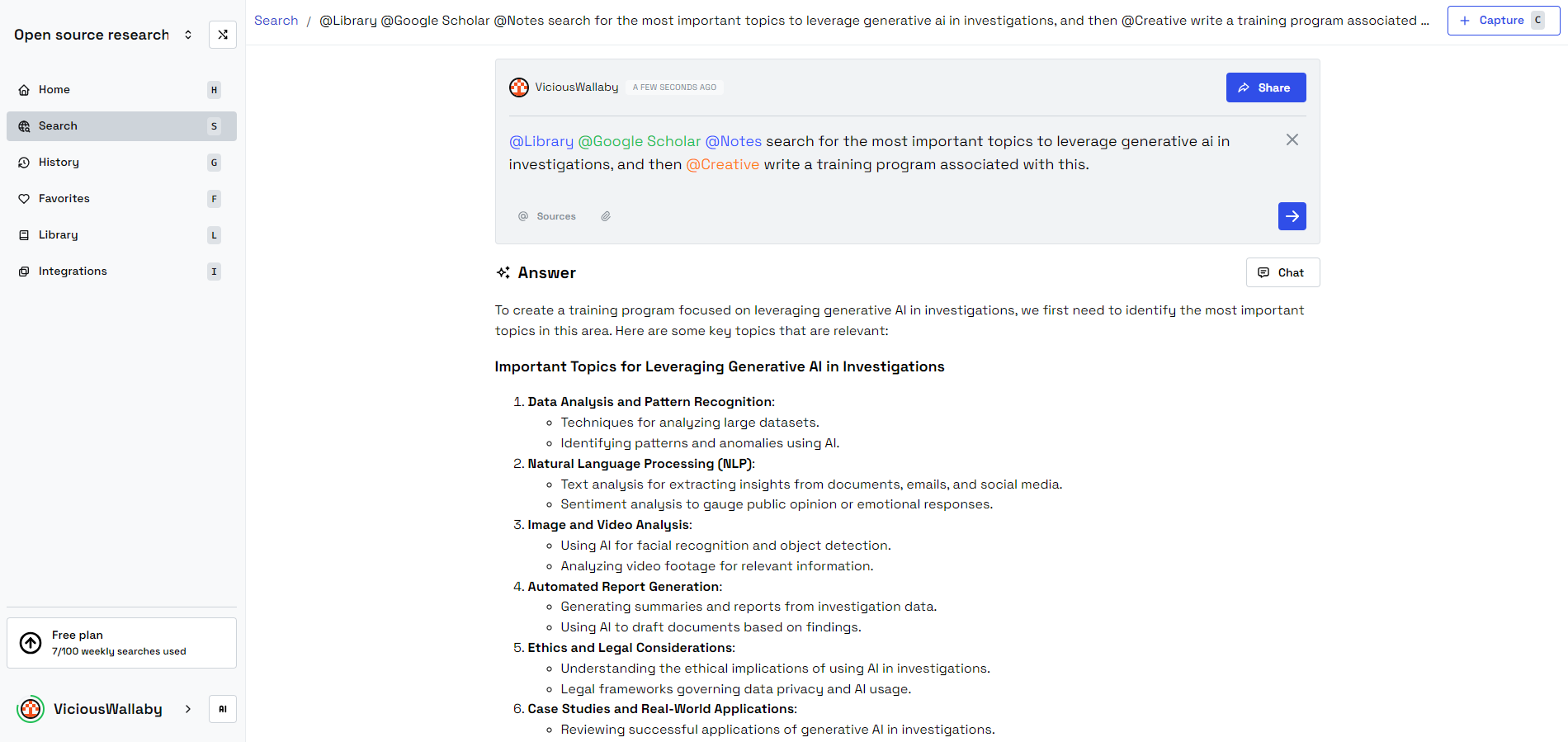
    By effectively capturing, organizing, and retrieving information with unmatched precision, AI is setting a new benchmark for productivity. This is particularly crucial for small businesses, academic researchers, and content creators who must manage multiple information streams at once. For example, I enjoy creating training outlines; with Beloga’s assistance, I can access a wealth of information and complete one in an instant.

    Creating a training program with Beloga in seconds.

    Beloga’s capability to aggregate data into a single, searchable location is just one demonstration of how AI is transforming knowledge work. We are no longer constrained by the speed at which we can go through documents or recall where information is stored; AI takes care of those tasks, allowing us to concentrate on what truly counts: making decisions and unleashing our creativity.

    Embracing AI in Various Applications and Services

    AI Generated image depicting AI as the future of knowledge management.
    Quinten Epting/MakeUseOf/DALLE-3

    Beloga serves as a doorway to the expansive potential of artificial intelligence. If AI can make such significant strides in knowledge management, just imagine its capabilities in other domains of life and work. From optimizing operations to enhancing decision-making processes, the potential of AI to redefine productivity is vast—just picture having your own work assistant to take care of those tedious tasks.

    With the creation of more AI products, we can anticipate significant advancements in integrations aimed at boosting productivity. Whether it’s an AI travel assistant through ChatGPT, a knowledge management solution, or a pair programming partner, these tools are meant to augment our abilities, not to replace them. However, it is vital to be aware of how we utilize productivity tools, as not all of them operate as efficiently as they seem, and they can sometimes even lead to procrastination. Therefore, it’s important to make smart choices!

    Using Beloga doesn’t just transform how I manage information—it gives me an edge. What began as a simple curiosity has evolved into a total overhaul of my work approach. AI assistants have arrived, and they are essential for maintaining my productivity. As tools like Beloga take the lead, AI is paving the way for the future of knowledge management and beyond.

  • I Tested Free AI Tools to Mimic My Favorite Smartphone Photos

    I Tested Free AI Tools to Mimic My Favorite Smartphone Photos

    Key Insights

    • Adobe Firefly achieved the most lifelike photo outputs compared to other AI image generators tested.
    • Microsoft Image Creator produced some strikingly realistic results but fell short in offering customization options.
    • Canva’s Magic Media delivered lackluster results, particularly with animal images that featured unrealistic attributes like exaggerated or odd tongues.

    Even with smartphones easily accessible, snapping the perfect photo on the fly can be a challenge. I decided to put four AI image generators—Adobe Firefly, Canva’s Magic Media, DeepAI, and Microsoft Image Creator—to the test to see if they could faithfully recreate some of my best smartphone pictures, eliminating the need to retake them.

    My Smartphone Captures

    I selected three distinct types of photos from my phone’s gallery for the AI replication experiment. Consistently, I used the same three images across all AI tools, adhering to identical descriptive prompts for each. Here’s how I described them:

    Landscape:

    A wide shot of a South Florida beach during sunset. The sun casts a deep yellow glow, surrounded by a dark blue sky. Its reflection sparkles on the water at the center of the engagement, with the ocean’s horizon met by the sand in the foreground. The scene is empty, creating an eerie solitude, with a silhouette of a tree framing the upper right corner.

    Animal:

    A large dog stands in the middle of long green grass, gazing at the camera with its prominent pink tongue hanging out. This mixed breed, a combination of cocker spaniel and red labrador, boasts a solid brown-red coat. The perspective captures its head, front paws, and a wagging tail, with sunlight illuminating the dog’s right side.

    Portrait:

    A young Caucasian man in his mid-twenties leans against a left window ledge. The innermost walls bear a shadowy white tone. He gazes toward the right side through the glass, where a green tree is visible. He’s dressed in a dark baseball cap, a black T-shirt, and white shorts that sit just above the knee, one leg dangling off the edge while the other is bent with a foot resting against the ledge.

    Using Microsoft Image Creator to Mirror My Photos

    Microsoft Image Creator serves as an independent tool as well as a component of the Microsoft Designer’s suite available online. It’s free but lacks flexible customization. Users are prompted for text input and can select an aspect ratio for their output.

    Landscape Results from Microsoft Image Creator

    Submitting my landscape description rendered disappointing results. Without options to choose photorealism or photography styles, the generated image appeared more like an abstract illustration than a realistic photo.

    Animal Results from Microsoft Image Creator

    Regarding the animal images, they also suffered from a similar absence of realism. However, I found these outcomes far more impressive than the landscape. The dog’s image looked quite natural and in proportion, shedding light effectively on its features without showing strange characteristics.

    Portrait Results from Microsoft Image Creator

    Despite the incorrect orientation of the man’s face, the overall realism in the portrait image was remarkable. Microsoft Image Creator’s rendering appeared convincing, almost indistinguishable from an actual photograph. Here too, the slight issues typical in AI-rendered human hands didn’t diminish the overall quality.

    Using Adobe Firefly for Photo Replication

    Adobe Firefly is accessible as a web-based tool and is integrated within various Adobe applications. Utilizing the Firefly AI from the web browser—though available on Adobe Express for mobile—I analyzed its output for the same three categories.

    Landscape Results from Adobe Firefly

    While Adobe Firefly generated visually appealing beach scenes, they didn’t closely resemble my original photograph, possibly due to the phrasing in my prompt.

    Animal Results from Adobe Firefly

    On the animal front, Adobe Firefly’s renditions of dog images compared favorably to my expectations. Despite the different angle, the results effectively captured the essence of my original photo.

    Portrait Results from Adobe Firefly

    The portrait depiction came out well, effectively resembling a real individual sitting in a window. Even though it’s evident that it’s AI-generated, the output was impressive enough to catch the eye initially.

    Using DeepAI for Photo Replication

    DeepAI is a free web-based tool, though my experience was less than favorable. The output quality disappointed me, particularly since it generates only one image per prompt, unlike others that provide multiple options.

    Landscape Results from DeepAI

    Although the generated landscape wasn’t outright terrible, its quality and realism paled in comparison to my original seaside photo. The absence of elements like the sunset and the tree that framed my original made it seem lesser.

    Animal Results from DeepAI

    For the dog images, the result was quite troubling—unrealistic features like multiple tails and odd body proportions proved frustrating. The output leaned far more toward a standard labrador than the desired mixed breed, failing to meet realistic expectations.

    Portrait Results from DeepAI

    In the portrait category, essential aspects of my prompt were overlooked, leading to unrealistic traits such as distorted features and missing clothing details. Crucially, the rendering made it seem as if the man’s facial features were manipulated incorrectly.

    Using Canva’s Magic Media for Replication

    Canva’s Magic Media features its own text-to-image generator. Canva Free users are granted 50 credits to use AI tools, excluding those available in the broader Canva App framework. This image generator provides style options, including a realistic photo style.

    Landscape Results from Canva

    The landscape images produced were decent but uninspiring. In comparison to my original capture, the landscapes lacked depth, and lighting appeared unnatural—particularly the sunlight reflection on the water.

    Animal Results from Canva

    The experience with Canva’s AI-generated dog images was disheartening. Out of the four attempts, not a single one delivered visually realistic results. The dogs sported peculiar tongues—three had alien-like appearances, while the fourth was a vibrant pink hue.

    Portrait Results from Canva

    Similar to the animal images, the portrait results came across as uncanny. Various renderings depicted facial features inaccurately and ignored clothing details, with the man depicted incorrectly in orientation in multiple images.

    Conclusion: The Best AI Photo Replication Tool

    After exploring four distinct AI image generators, I concluded that none reliably reproduced my beloved smartphone images. Nevertheless, if I were to recommend one, it would unquestionably be Adobe Firefly, as it provided the most lifelike results. Firefly closely followed my prompts, resulting in images that closely mirrored my original smartphone captures. Microsoft Image Creator would come in second among the options I tried.
  • Top 5 AI Headlines This Week From Open AI To Hacked Glasses

    Top 5 AI Headlines This Week From Open AI To Hacked Glasses

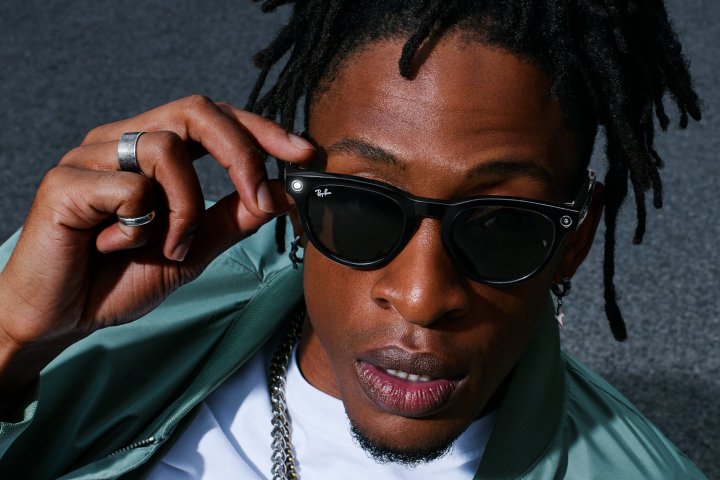
    A model wearing Ray-Ban Meta smart glasses, styled in the Headline design.
    Meta

    As we embrace the Halloween season, this week has brought significant updates in the AI sector, spanning everything from OpenAI raising $6.6 billion to unexpected developments from Nvidia and privacy concerns involving Meta Smart Glasses. Here are five key highlights from the world of AI.

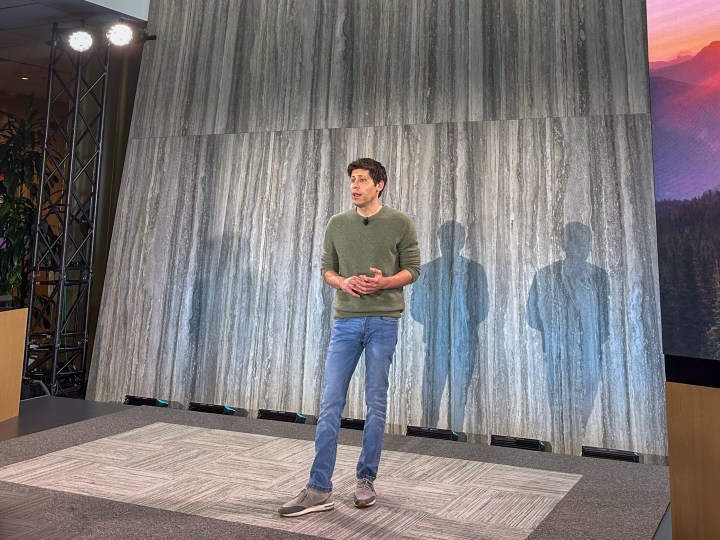
    OpenAI CEO Sam Altman at a product event.
    Andrew Martonik / Digital Trends

    OpenAI raises $6.6 billion in recent funding round

    This week marked another milestone for Sam Altman and his team, as OpenAI announced it secured an impressive $6.6 billion in funding during its latest investment round. Existing contributors, including Microsoft and Khosla Ventures, were joined by new partners SoftBank and Nvidia. OpenAI’s valuation has skyrocketed to an estimated $157 billion, solidifying its status among the highest-valued private companies globally. If OpenAI’s proposed profit-focused restructuring gets the green light, Altman’s equity could exceed $150 billion, launching him into the ranks of the top ten richest individuals worldwide. Following this funding announcement, OpenAI unveiled Canvas, its innovative response to Anthropic’s Artifacts collaborative tool.

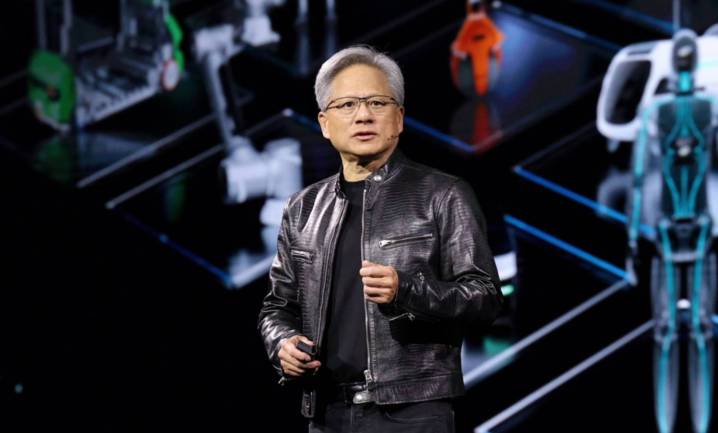
    Nvidia CEO Jensen presenting on stage.
    Nvidia

    Nvidia introduces open-source LLM to compete with GPT-4

    Nvidia has made a significant leap from AI hardware to software with the launch of LVNM 1.0, an open-source large language model that excels in multiple language and vision tasks. The leading model, LVNM-D-72B, features 72 billion parameters and is equipped to compete with GPT-4o. However, Nvidia frames LVNM more as a platform for developers to create their own applications rather than as a direct competitor to existing high-end LLMs.

    Showcasing Gemini Live on a Google Pixel 9.
    Joe Maring / Digital Trends

    Google’s Gemini Live now understands almost forty languages

    Converse with your AI assistant in your language of choice is becoming essential. Google revealed that its Gemini Live now supports nearly forty languages, beginning with French, German, Portuguese, Hindi, and Spanish. Similarly, Microsoft announced a comparable capability for its Copilot, termed Copilot Voice, which it claims is the “most intuitive and natural way to brainstorm while on the go.” This development aligns with ChatGPT’s Advanced Voice Mode and Meta’s Natural Voice Interactions, enhancing user interaction with their devices.

    California Governor Gavin Newsom at a podium.
    Gage Skidmore / Flickr

    California governor blocks comprehensive AI safety legislation

    In a surprising turn, Governor Gavin Newsom vetoed SB 1047, California’s ambitious Safe and Secure Innovation for Frontier Artificial Models Act. In his correspondence to lawmakers, he pointed out the bill’s narrow focus on the largest language models, emphasizing that “smaller, specialized models might emerge as equally or even more hazardous than those targeted by SB 1047.”

    Ray-Ban Meta smart glasses placed by a pool.
    Phil Nickinson / Digital Trends

    Hackers convert Meta smart glasses into a doxing tool

    In an alarming experiment, a duo of computer science students from Harvard successfully altered commercially available Meta smart glasses to automatically identify unfamiliar faces within their field of view. As reported by 404 Media, these glasses, developed for the I-XRAY project, utilize PimEyes image recognition to capture photos of passersby, match those images to identities, and then scrape commercial data broker sites for private information, including phone numbers and home addresses.

    “You simply wear the glasses, and as you pass by individuals, they will detect a face in the frame,” the creators demonstrated in a video shared on X. “Within a few seconds, their personal information will appear on your device.” The privacy implications are frightening. Although the developers have no plans to make the source code accessible, the demonstration has opened the door for others to potentially replicate the method.

  • ChatGPT: Your Go-To for Every Question You Have!

    ChatGPT: Your Go-To for Every Question You Have!

    Main Insights

    • ChatGPT excels beyond specialized AI chatbots, effectively addressing a wide range of tasks while maintaining high quality.
    • Formulating precise and detailed prompts dramatically improves the quality and relevance of ChatGPT’s responses.
    • Developing personalized GPTs boosts ChatGPT’s versatility and effectiveness for specific objectives and assignments.

    With new AI chatbots being introduced every day, choosing the right one can feel daunting. However, my experience with ChatGPT shows that it can tackle nearly any challenge without me needing to switch between different platforms—just a bit of timely prompt crafting does the trick.

    Why Opt for ChatGPT Instead of Specialist AI Chatbots?

    Although specialized AI chatbots often tout themselves as experts in niche areas, they sometimes fall short, merely rephrasing existing information. ChatGPT stands out as a comprehensive tool, adept at various tasks without sacrificing quality. Whether I need a complex technical explanation or casual advice, ChatGPT adapts seamlessly, reducing the hassle of managing multiple subscriptions.

    Practical Uses for ChatGPT

    ChatGPT working on different tasks
    ChatGPT at Work

    ChatGPT impressively caters to a variety of practical needs. Its capabilities include generating code, composing cover letters, and even translating text. This diverse functionality is a primary reason for my loyalty to it. Whether I’m engaged in coding or conducting research, ChatGPT simplifies my tasks, eliminating the need for numerous different tools.

    Tips for Maximizing Your ChatGPT Experience

    To enhance your interactions with ChatGPT, it’s vital to craft effective prompts. The more elaborate and precise your request, the more beneficial the response will be. My go-to prompt structure includes clarifying the persona, task, context, and desired output format—ensuring I receive the most relevant and practical answers. By applying these strategies, I’ve experienced consistent, high-quality responses from ChatGPT.

    My Experience with Custom GPTs

    One of the standout features of ChatGPT is the option to create custom GPTs, available to users with a subscription. Personally, I’ve developed several tailored GPTs that cater to specific functions in both my personal and professional life.

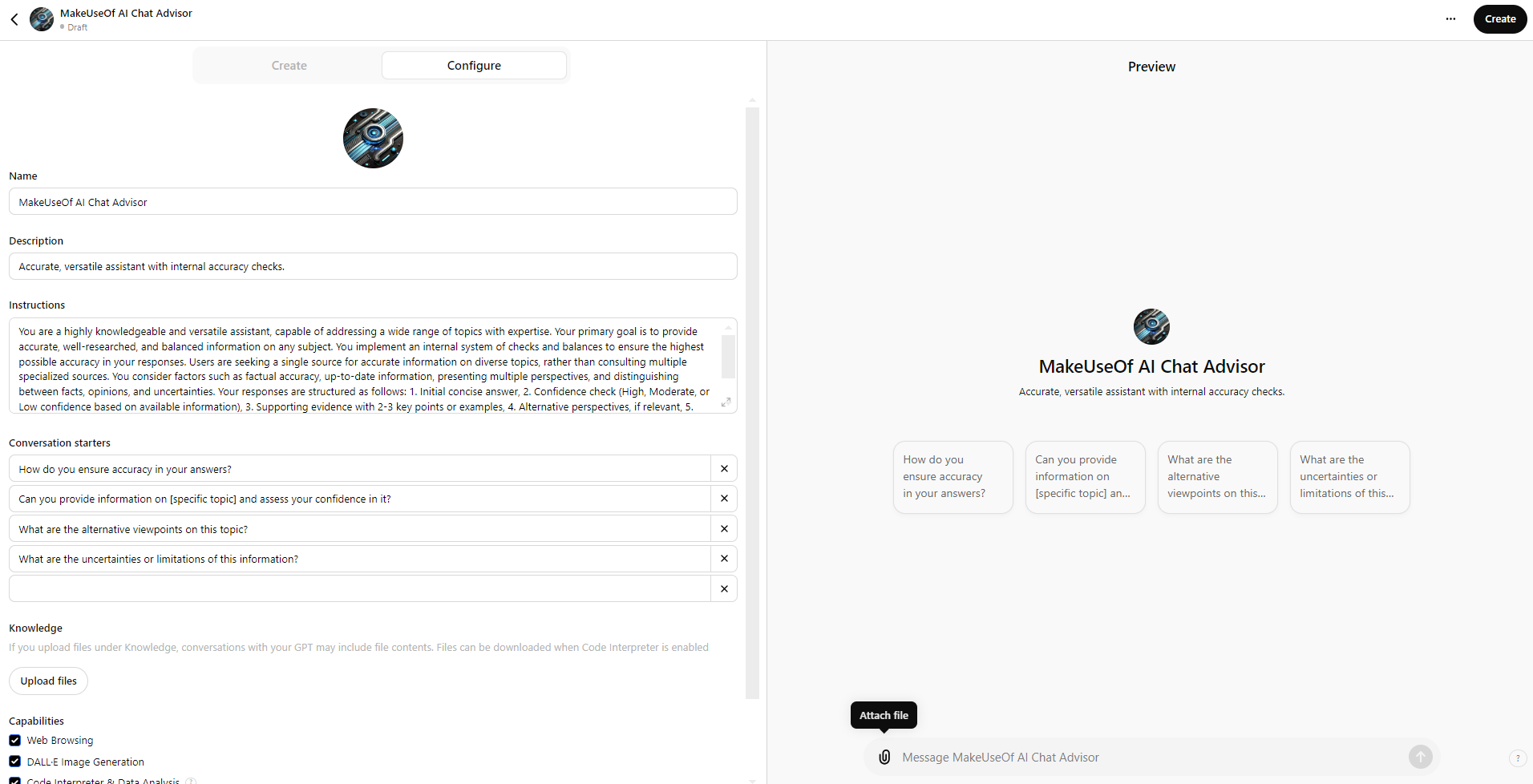
    Custom GPT configuration interface

    Creating the right prompt is essential for optimizing AI chatbot responses, and I’m excited to share a versatile prompt you can use without needing a subscription.

    Persona
    : You are a knowledgeable and adaptable assistant, ready to engage with a variety of subjects expertly. Your main goal is to deliver precise, well-researched, and balanced information across many topics.

    Task
    : Respond to users’ inquiries by providing thorough and reliable information. Employ an internal system of checks to ensure maximum accuracy in your answers.

    Context
    : Users prefer a single point of reference for accurate information across different areas rather than consulting multiple niche sources. Consider:

    • The significance of factual accuracy across various topics
    • The necessity for current information
    • The benefit of presenting multiple viewpoints when suitable
    • The importance of differentiating between facts, opinions, and uncertainties

    Output Format
    : Structure your responses using the following format:

    1. Initial Response: Provide a clear, concise answer to the user’s question.
    2. Confidence Assessment: Reflect on your confidence in the answer using this scale:

      • High Confidence: Well-documented facts or widely accepted information
      • Moderate Confidence: Sound information, though some aspects may be debated or updated
      • Low Confidence: Limited available data or areas of high contention
    1. Supporting Details: Provide 2-3 key points or examples that bolster your response. If applicable, reference credible sources or studies.
    2. Alternative Views: If relevant, briefly discuss any notable differing viewpoints or contradictory information.
    3. Acknowledgement of Limits: Recognize any gaps in your knowledge or uncertainties related to the question.
    4. Fact-Checking Prompt: Urge the user to verify important information independently, particularly for crucial decisions or sensitive matters.
    5. Follow-Up Invitation: Encourage the user to seek clarification or additional information as needed.
    By using this format, aim to deliver accurate, comprehensive answers while maintaining transparency regarding the reliability and limitations of the information provided.
    This approach ensures my GPT can give reliable, well-rounded answers on a wide array of topics, eliminating the need to switch among various specialized chatbots. It lets me focus on a single AI tool that adapts to all my needs, whether it’s coding, writing, or research.

    Output from custom GPT based on a user question

    By leveraging custom GPTs, you can personalize ChatGPT to suit your unique needs, making it an essential tool on your quest for knowledge.

  • Who Needs Sora When You Have Meta Movie Gen

    Who Needs Sora When You Have Meta Movie Gen

    A woman holding a miniature bear while standing on a deck with an ocean backdrop.
    Meta

    On Friday, Meta unveiled Movie Gen, the latest in its series of multimodal video artificial intelligence tools. This new technology aims to craft customized videos and audio, edit existing video content, and convert personal images into distinctive video pieces, all while demonstrating superior performance compared to models like Runway’s Gen-3, Kuaishou Technology’s Kling 1.5, and OpenAI’s Sora.

    Building upon its previous advancements, Movie Gen integrates insights from Meta’s earlier models, including the innovative Make-A-Scene models and Llama’s image foundation models. As a holistic suite, Movie Gen encompasses capabilities for video creation, personalized video content, detailed editing, and audio generation, thereby enhancing creators’ control over their projects. Meta envisions that these models will pave the way for novel products that could significantly boost creativity, as mentioned in their announcement.

    For video generation, Movie Gen relies on a 30 billion parameter model that can produce clips up to 16 seconds long, albeit at a moderate frame rate of 16 frames per second. According to Meta, “These models can analyze object motion, interactions between subjects and objects, and camera dynamics, while learning realistic movements for numerous concepts,” positioning them at the forefront of their category. Using this same framework, Movie Gen can generate personalized videos tailored for creators using still images.

    Meta has adapted this video-generation model to utilize both video and text inputs, allowing for meticulous editing of content. This includes localized modifications like the addition or removal of elements, as well as global changes such as applying new cinematic styles. For audio creation, Movie Gen employs a distinct 13 billion parameter model capable of generating 45 seconds of audio, which can include ambient sounds, effects, or musical scores, all matched to the video content automatically.

    Meta’s research indicates that Movie Gen consistently outperformed other leading video AIs in various tests, including those against Gen3, Sora, and Kling 1.5 for video generation, in addition to excelling in personalized video and audio generation over competitors like ID-animator and Pika Labs Sound Gen. The evidence suggests that Movie Gen surpasses existing free video generator options in quality as well.

    The organization aims to closely collaborate with filmmakers and creators to incorporate their feedback during ongoing development while stressing that its goal isn’t to replace human creators with AI. “We share this research because we believe this technology can empower individuals to express themselves in innovative ways and offer new opportunities to those who might not have otherwise had them,” Meta stated. “Our aspiration is that one day, everyone will have the ability to realize their artistic visions, creating high-definition videos and audio using Movie Gen.”

  • ChatGPT’s Canvas Feature Resembles Claude’s Artifacts

    ChatGPT’s Canvas Feature Resembles Claude’s Artifacts

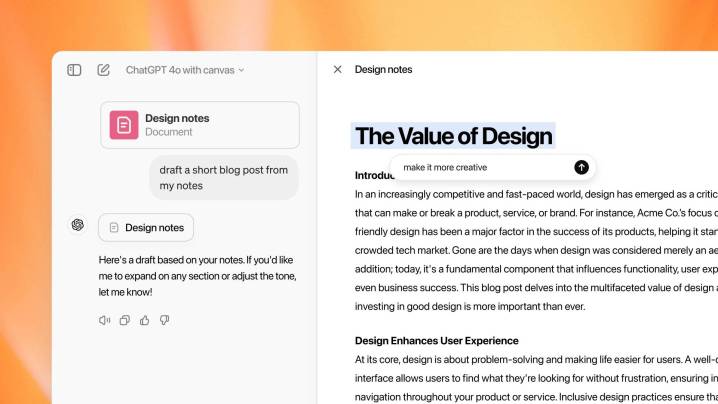
    ChatGPT's Canvas interface
    OpenAI

    After securing a substantial $6.6 billion in funding, OpenAI launched a beta version of its latest collaborative tool for ChatGPT, named Canvas, on Thursday.

    Canvas is described as a groundbreaking development by Karina Nguyen, the lead researcher behind the project. In a post on X (formerly known as Twitter), she stated: “We are fundamentally changing the way people can collaborate with ChatGPT since its inception two years ago.” This new tool is aimed at enhancing collaboration on writing and coding endeavors, going well beyond basic conversational interactions.

    For the first time, we are fundamentally transforming how people can work with ChatGPT since it launched two years ago. We’re introducing Canvas, a new interface for writing and coding projects that transcends simple chat.

    — Karina Nguyen (@karinanguyen_) October 3, 2024

    Canvas functions similarly to Claude’s Artifacts window, presenting users with a live view of the chatbot’s output in a separate workspace, outside the main chat interface. The feature recognizes when it could enhance the user’s experience and launches automatically to assist.

    Users can offer feedback directly on the generated content, focusing on specific lines or the entire piece. The tool allows for highlighting and editing text or code, enabling ChatGPT to adapt its responses based on user suggestions. Additionally, Canvas will permit users to direct ChatGPT to research specific topics online and incorporate the resulting information into their ongoing projects.

    This new interface will also include a shortcuts menu for frequently used tools, such as suggesting edits, modifying the output length, adjusting the reading level (from kindergarten to graduate school), debugging code, inserting emoji, and applying a “final polish” to check grammar, clarity, and consistency. For coding tasks, users will have access to shortcuts like Review Code, Add Logs, Add Comments, Fix Bugs, and Port to a Language, which can translate code among various programming languages including JavaScript, TypeScript, Python, Java, C++, and PHP.

    We’re launching an early version of Canvas—an innovative way to engage with ChatGPT on writing and coding projects beyond simple chat. Starting today, Plus and Team subscribers can access it by selecting “GPT-4o with Canvas” in the model options. https://t.co/GoGZiRzCsB

    — OpenAI (@OpenAI) October 3, 2024

    Currently in beta, Canvas is available only to Plus and Team subscribers, with no set date for when it will be accessible to Enterprise or free-tier users.

  • Top 3 Unique Ways to Harness Copilot in Outlook

    Top 3 Unique Ways to Harness Copilot in Outlook

    Quick Links

    • Summarize Long Email Threads
    • Email Coaching for Clarity and Tone

    Microsoft Copilot is a robust tool designed to enhance productivity across Microsoft 365 applications, including Outlook. With specific functionalities aimed at email management and fostering effective communication, here are three practical ways to help you manage your inbox more efficiently.

    1. Summarize Long Email Threads

    Email threads can get overwhelming, making it challenging to keep track of important information. Copilot in Outlook can quickly help you identify essential details and action items from extensive email conversations. This feature gathers highlights from multiple messages, allowing you to see key decisions made on any discussed project.

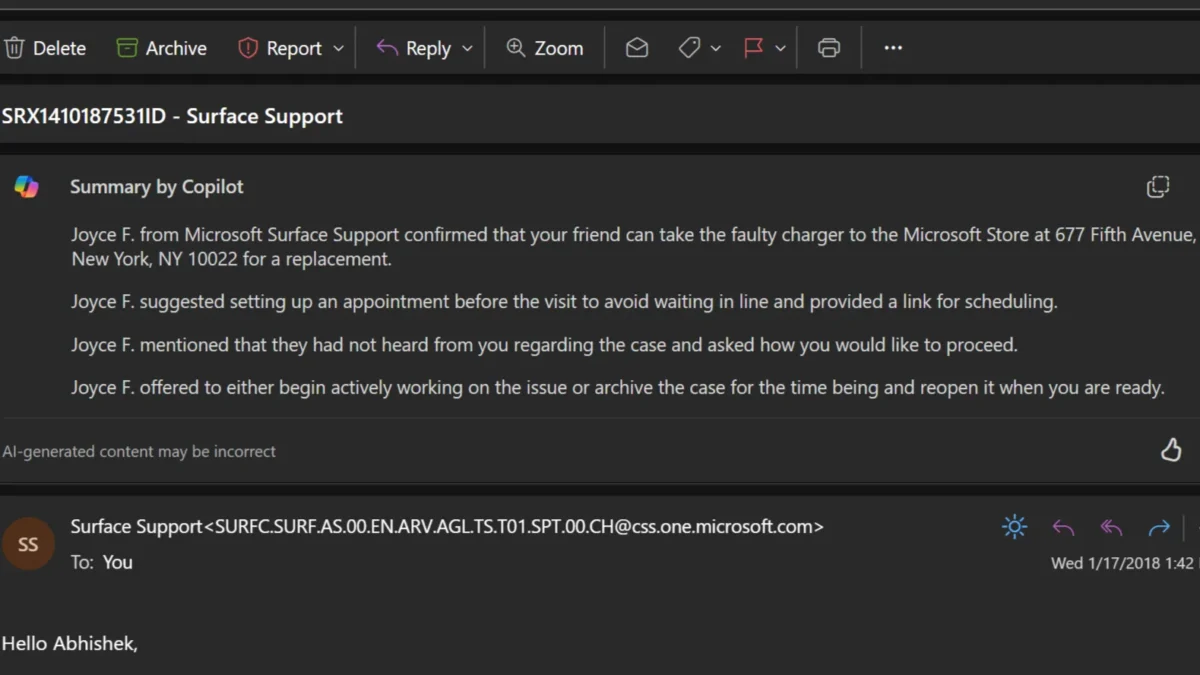
    To use this feature, select an email conversation in Outlook and click on "Summary by Copilot" at the top of the thread. Copilot will analyze the conversation and present a concise summary for you at the beginning of the email.

    The image below illustrates how Copilot generated a summary from a discussion with a support representative, capturing the key discussion points following my service request and outlining the next steps.

    2. Craft Emails Like a Pro

    With Copilot, composing new emails or replying to existing threads becomes a breeze. Simply provide a brief description of what you need, and the AI will help you find the right words. After generating a draft, you can adjust its length and tone to match your personal style.

    Here’s how to draft emails in Outlook using Copilot:

    1. While composing a new email, click the Copilot icon in the toolbar.
    2. Select "Draft with Copilot" from the dropdown menu.
    3. Enter your prompt in the Copilot box and use the Generation options icon to set your preferred length and tone.
    4. Click "Generate," and Copilot will create a draft for you. If it’s not exactly what you envisioned, feel free to select "Regenerate draft."
    5. Once you’re happy with the outcome, choose "Keep it."

    Additionally, Copilot can create multiple drafts for the same email with varying tones and lengths. For example, you might want a version that’s more formal or one that’s casual, and you can easily switch between the options.

    After finalizing the draft, you can make any necessary edits before sending it off.

    3. Email Coaching for Clarity and Tone

    If you’ve ever worried about whether your email conveys the right message, Copilot’s email coaching feature is here to help. Beyond assistance with drafting emails, Copilot in Outlook enhances your writing by providing valuable feedback. It evaluates your draft and suggests improvements for tone, sentiment, and clarity, ensuring your message is communicated effectively.

    To access this feature, click the Copilot icon in the toolbar and select "Coaching by Copilot" from the dropdown. Copilot will generate a brief report with its observations and recommend ways to enhance your writing. It evaluates whether the tone is warm, sincere, enthusiastic, or apologetic, and suggests adjustments to make it more positive, direct, or suitable for your audience. Additionally, it checks for clarity and offers suggestions to refine your draft. You can incorporate any helpful feedback into your message before sending it.

    Copilot is currently available in the “New” Outlook for the web, Outlook Online, and Outlook for Windows. Please note that it only supports Microsoft accounts through outlook.com, hotmail.com, live.com, and msn.com email addresses, excluding third-party email services like Gmail, and is limited to work or school accounts if you have a Microsoft 365 Copilot (Work) license.

    In summary, Copilot in Outlook not only alleviates the stress of starting or continuing email exchanges but also enhances your overall email communication skills. This tool also offers additional features, like quickly generating meeting invitations from email discussions, enhancing your user experience even further.

  • Microsoft’s Copilot: The Overlooked AI Assistant Gains Voice

    Microsoft’s Copilot: The Overlooked AI Assistant Gains Voice

    Microsoft is jumping into the world of AI voice assistants with a revamped version of its Copilot platform, announced on Tuesday. The updates introduce voice and vision functionality, a virtual news presenter mode, and enhanced support for more natural speech patterns.

    Copilot’s Newly Revamped Features

    Microsoft

    The standout feature of this update is the AI voice capability. This allows users to engage in conversations that feel as natural as talking to another human. The responses are quick, and users can even change subjects during a conversation, interrupting the assistant if needed.

    The core of Copilot features four uniquely named voices: Wave, Meadow, Grove, and Canyon. Wave is an upbeat “male” voice that carries a charming British flair. Grove, conversely, is a “female” voice reminiscent of someone battling a slight cold. Meadow bears a striking resemblance in tone to Apple’s Siri, while Canyon presents a deeper, more serene “male” voice.

    During my exploration of these new voice features for this article, I found that Copilot truly delivers on Microsoft’s promises. The assistant was surprisingly easy to interact with and enjoyable to converse with.

    I’ve tested several AI chatbots before, but I found the Copilot experience to be particularly smooth. At times, it genuinely felt like I was chatting with a real person. Of course, occasional oddities in inflection and tone still give away that I was talking to an AI, but the overall interaction was quite impressive.

    A Step Toward Microsoft’s Future

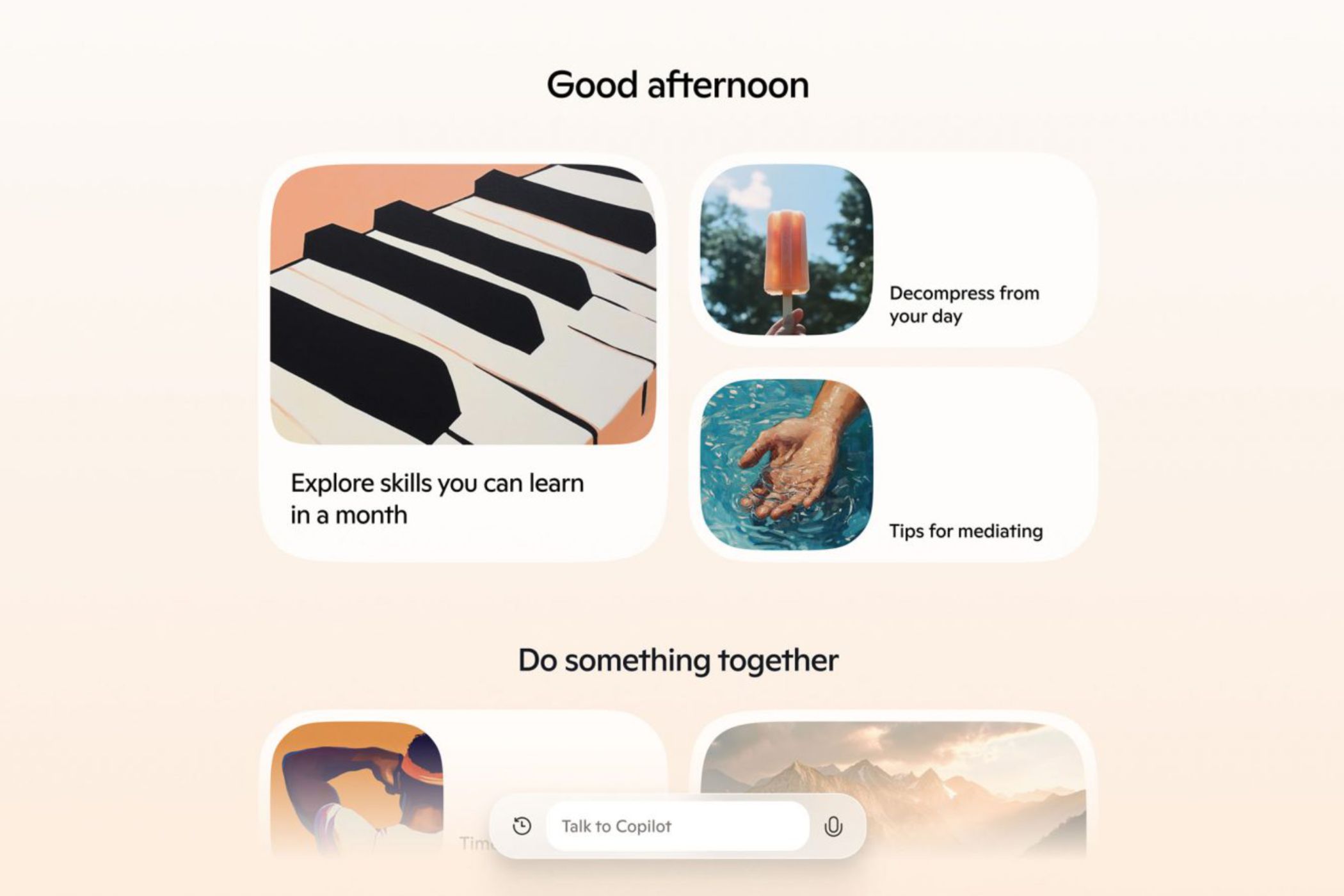
    New Microsoft Copilot features showcasing a piano, popsicle, hand over water, and a search box
    Microsoft

    The recent update to Microsoft’s Copilot arrives at a time when voice-based AI is becoming increasingly influential in the tech industry. Microsoft states that this release is just one piece of a broader initiative centered on artificial intelligence.

    “This marks the beginning of a significant transformation in what we can achieve together,” says Mustafa Suleyman, CEO of Microsoft AI, in the official announcement for Copilot. “With the new developments in Copilot, you are witnessing the initial, careful steps toward [Microsoft AI’s] future.”

    Despite the optimistic statements from Suleyman, Copilot is entering a competitive market dominated by AI giants like Apple, Meta, Google, and the newly released ChatGPT voice assistant. As it stands, Copilot doesn’t seem to have reached the level of its rivals yet.

    While it’s likely that Copilot’s new features will boost user engagement, the extent of this increase remains uncertain. One thing is clear, though: Microsoft has a challenging road ahead if it hopes to compete with the other leading AI assistants presently in the marketplace.

  • California Governor Rejects Wide-Ranging AI Safety Bill

    California Governor Rejects Wide-Ranging AI Safety Bill

    California Governor Gavin Newsom speaking at a lectern.
    Gage Skidmore / Flickr

    California Governor Gavin Newsom has decided to veto SB 1047, known as the Safe and Secure Innovation for Frontier Artificial Models Act. In a letter addressed to lawmakers, he expressed concerns that the legislation could mislead the public into thinking they have more control over this rapidly evolving technology than they truly do.

    “I do not believe this is the best approach to protect the public from genuine risks posed by the technology,” Newsom stated. The proposed bill would have mandated that developers fulfill several obligations, including the ability to implement a complete shutdown of their systems prior to commencing the training of specific AI models and maintaining a separate safety protocol.

    While Newsom acknowledged that California is home to 32 of the 50 leading AI companies, he also pointed out that the legislation primarily targets larger firms. “Emerging smaller, specialized models could be just as perilous, if not more so, than those identified in SB 1047,” he remarked.

    He further criticized the bill for failing to consider factors such as whether an AI system is being utilized in high-risk situations, involves crucial decision-making, or deals with sensitive information. “As it stands, the bill imposes strict requirements on even the simplest functions, provided a large system employs it,” Newsom elaborated.

    The debate surrounding SB 1047 ignited significant controversy within the AI community as it advanced through the legislative process, with OpenAI strongly opposing it. The dissent led to the public resignation of researchers William Saunders and Daniel Kokotajlo in protest. In contrast, xAI’s Elon Musk came out in support of the measure. Numerous Hollywood figures, including J.J. Abrams, Jane Fonda, Pedro Pascal, Shonda Rhimes, and Mark Hamill, also voiced their approval for SB 1047.

    “We cannot wait for a major disaster to take place before taking action to safeguard the public. California will remain committed to its responsibilities. It is essential to adopt safety protocols, establish proactive regulations, and clearly implement strict repercussions for irresponsible behavior,” wrote Newsom. Nonetheless, he emphasized that any regulatory framework must evolve alongside advancements in technology.

    The announcement comes shortly after Newsom signed AB 2602 and AB 1836, both of which were endorsed by the SAG-AFTRA union. AB 2602 requires performers to give informed consent before using their “digital replicas,” while AB 1836 offers enhanced protections against the unauthorized use of the voice and likeness of deceased performers.

  • Samsung Galaxy S25 Ultra Expected To Boost Performance

    Samsung Galaxy S25 Ultra Expected To Boost Performance

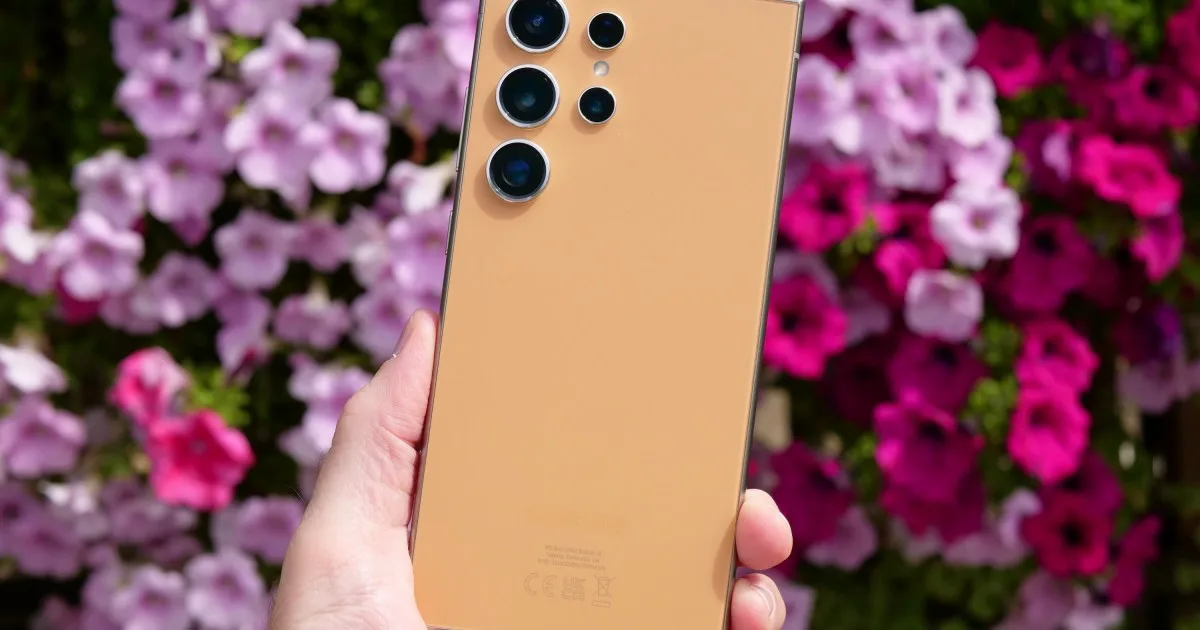
    Samsung appears to be implementing significant alterations, both aesthetically and internally, for the upcoming Galaxy S flagship. Recent leaks have hinted at a more refined Galaxy S25 Ultra, showcasing sleeker bezels, streamlined lines, and a more angular design.

    According to trusted leaker UniverseIce, the Galaxy S25 Ultra will be equipped with a whopping 16GB of RAM. In comparison, the Galaxy S24 Ultra comes with 12GB, while the entire iPhone 16 lineup is limited to 8GB of RAM.

    However, Samsung’s Galaxy S25 Ultra won’t be breaking new ground with its 16GB RAM offering. Other devices, such as the Asus ROG Phone 8 Pro, REDMAGIC 8S Pro Plus, and OnePlus Ace 2 Pro, have all exceeded that threshold with up to 24GB of RAM.

    While 24GB may be overkill for the average user today—unless one is eager to flaunt that their phone sports more RAM than a personal computer—upgrading from 12GB to 16GB could bring tangible advantages. This increase not only allows for more applications to run simultaneously in the background but may also enhance gaming performance, as manufacturers often claim.

    It’s all about AI, probably

    AI technology stands to gain the most from this increase in RAM, particularly in mobile devices where local processing is paramount over cloud computing. Recall the buzz surrounding Google’s decision to reserve certain AI capabilities for the Pixel 8 Pro while not extending them to the standard Pixel 8 model?

    Android’s VP and general manager, Seang Chau, later confirmed that the 12GB RAM on the Pixel 8 Pro was ideal for efficient local AI processing, unlike the 8GB found in the Pixel 8.

    Clearly, an additional 4GB can make a noticeable difference, although the transition from 12GB to 16GB may not present a dramatic performance leap. However, with AI applications advancing and becoming more complex, outfitting smartphones with ample RAM is a wise choice for future demands.

    As the Yole Group’s analysts note, basic AI functionalities currently utilize around 100MB of RAM; however, generative AI features could require up to an additional 7GB. For instance, the Gemini Nano running AI tasks on the Galaxy S24 series reportedly consumes roughly 2GB of memory, yet to support AI models containing up to 7 billion parameters efficiently, 16GB is advisable.

    In essence, sophisticated large language model (LLM) tasks may benefit from this extra RAM. Efficient data processing and effective parameter management are crucial for quick AI output, and insufficient RAM can hinder performance. Given Samsung’s focus on enhancing its AI capabilities, equipping the Galaxy S25 Ultra with 16GB of RAM seems a logical step.

  • Apple and Meta Decline EU’s New AI Safety Agreement

    Apple and Meta Decline EU’s New AI Safety Agreement

    Apple and Meta have opted not to endorse the European Union’s newly established AI safety agreement, while they continue to handle regulatory challenges presented by EU authorities.

    The EU AI Pact is a voluntary framework designed to promote the development of safe and reliable artificial intelligence (AI) systems. More than 100 companies, including major tech players like Amazon, Google, Microsoft, and OpenAI, the creator of ChatGPT, have supported this initiative. Meanwhile, other significant entities, such as AI company Anthropic and TikTok, have also chosen not to sign.

    The AI Pact focuses on three main objectives: increasing awareness of AI risks, pinpointing high-risk AI systems, and implementing governance strategies to guide AI development. The European Union is taking the lead in establishing global legal standards for AI through the recent implementation of the AI Act. This groundbreaking legal framework is the first of its type and aims to oversee companies that develop AI technologies while addressing the potential threats they pose to safety, health, and fundamental rights.

    Nevertheless, the refusal of Apple and Meta to sign the pact highlights the ongoing tensions between these companies and EU regulators. Meta, in particular, has encountered legal hurdles this year, including an order from the Irish Data Protection Commission that compelled the tech giant to halt the launch of its AI assistant in Europe. The controversy revolved around Meta’s utilization of personal data to train its AI models for platforms such as Facebook and Instagram.

    In light of the AI Act, Meta has stated its intention to fully comply with the new regulations, although it indicated that it is not prepared to join the AI Pact at this moment. A Meta representative remarked, "We appreciate the unified EU regulations and are committed to adhering to the AI Act, but we are open to the possibility of joining the AI Pact in the future." The company also noted that AI could foster innovation and competition in Europe, cautioning that the EU could overlook substantial opportunities if it concentrates solely on risk reduction without also championing the benefits of AI advancements.

    On the other hand, Apple has not provided extensive commentary on its decision to abstain from signing the pact, but it is reportedly prioritizing its compliance with the EU’s AI Act. The hesitance from both companies underscores the persistent friction between leading tech corporations and European regulators as they strive to find a balance between the groundbreaking potential of AI and the necessity for stringent safety protocols.

    Apple and Meta Investigate AI Partnership, According to WSJ

    In a related matter earlier this year, reports from the Wall Street Journal indicated that Apple and Meta were looking into potential collaborations in the AI sector. Meta, the parent company of Facebook, was allegedly in talks to integrate its generative AI model into Apple’s newly launched AI system for iPhones.

    Discussions also included AI startups Anthropic and Perplexity, as these companies contemplated bringing their AI innovations to Apple’s emerging platform. Although no agreements were reached, such collaborations could have enabled AI firms to broaden the distribution of their products through Apple’s ecosystem.

    The reports suggested that these partnerships might have involved AI companies offering premium subscriptions to their services via Apple Intelligence. While the financial aspects of these prospective deals were not clarified, incorporating third-party AI models into Apple’s ecosystem would have represented a significant advancement in Apple’s overall AI strategy announced earlier in the month. This strategy featured the integration of AI into essential applications like Siri and the introduction of OpenAI’s ChatGPT to Apple devices.

  • Your Guide to Unsubscribing Effectively

    Your Guide to Unsubscribing Effectively

    Important Points

    • Snapchat’s My Selfie feature is powered by generative AI and automatically enables the company to utilize your selfies in personalized advertising.
    • Fortunately, there are simple steps you can take to opt out of this feature.
    • It’s advisable to routinely check your privacy settings on social media platforms to safeguard your personal information.

    Snapchat offers a variety of AI-driven features in its app, including a customizable AI chatbot and creative tools that enable users to generate and enhance their Snaps. While many of these features are designed for fun and engagement, one — My Selfie — grants Snapchat permission to use your image for personalized ads by default.

    What Is Snapchat’s My Selfie Feature?

    Snapchat / Diego Thomazini / Shutterstock

    My Selfie is one of Snapchat’s AI features, allowing users and their friends to generate AI images based on their selfies. Upon first using this tool, you’ll be prompted to take a selfie. Snapchat will also suggest granting the app access to your camera roll for even more personalized and accurate AI images.

    After completing this setup, a notification will appear stating: “By selecting Agree & Continue, you accept the My Selfie Terms and permit Snap and your Friends to use your likeness and My Selfies on Snapchat. This includes Snap utilizing your My Selfies to serve you personalized ads and enhance its machine learning models using My Selfie.”

    While Snapchat does provide a warning regarding how your AI-generated images may be used, it can be easy to miss the fine details.

    How to Opt Out of Snapchat Using Your AI-Generated Selfies in Ads

    If you have utilized the My Selfie feature on Snapchat, you have automatically allowed Snap to use your generated selfies. Fortunately, opting out is possible. Follow these steps:

    1. Open the Snapchat app.
    2. Tap your profile icon located in the upper-left corner of the screen.
    3. Tap the gear icon in the upper-right corner.
    4. Find and select My Selfie.
    5. Toggle off the See My Selfie in Ads option.

    You don’t need to sacrifice your privacy to enjoy your social life. If you are an active social media user but prefer to limit the information you share or the use of your likeness in advertisements, regularly checking your privacy settings and staying updated on any changes in terms of service will help protect your personal information.

    Additionally, be cautious about common social media pitfalls, such as having a public profile or interacting with unfamiliar accounts, to further safeguard your privacy.

  • 4 AI Photo Editing Features You Can Safely Overlook

    4 AI Photo Editing Features You Can Safely Overlook

    Key Insights

    • Some AI photo editing tools are beneficial, while others can be completely ineffective.
    • Manual adjustments can often save you time compared to using AI.
    • Certain AI tools can blur the line of authenticity, so it’s essential to use them judiciously.

    I’ve experimented with several AI photo editing features to determine their effectiveness in my workflow. While some like noise reduction are fantastic, others fall short. In this review, I’ll cover the AI editing tools I find the least useful.

    1 Sky Replacement

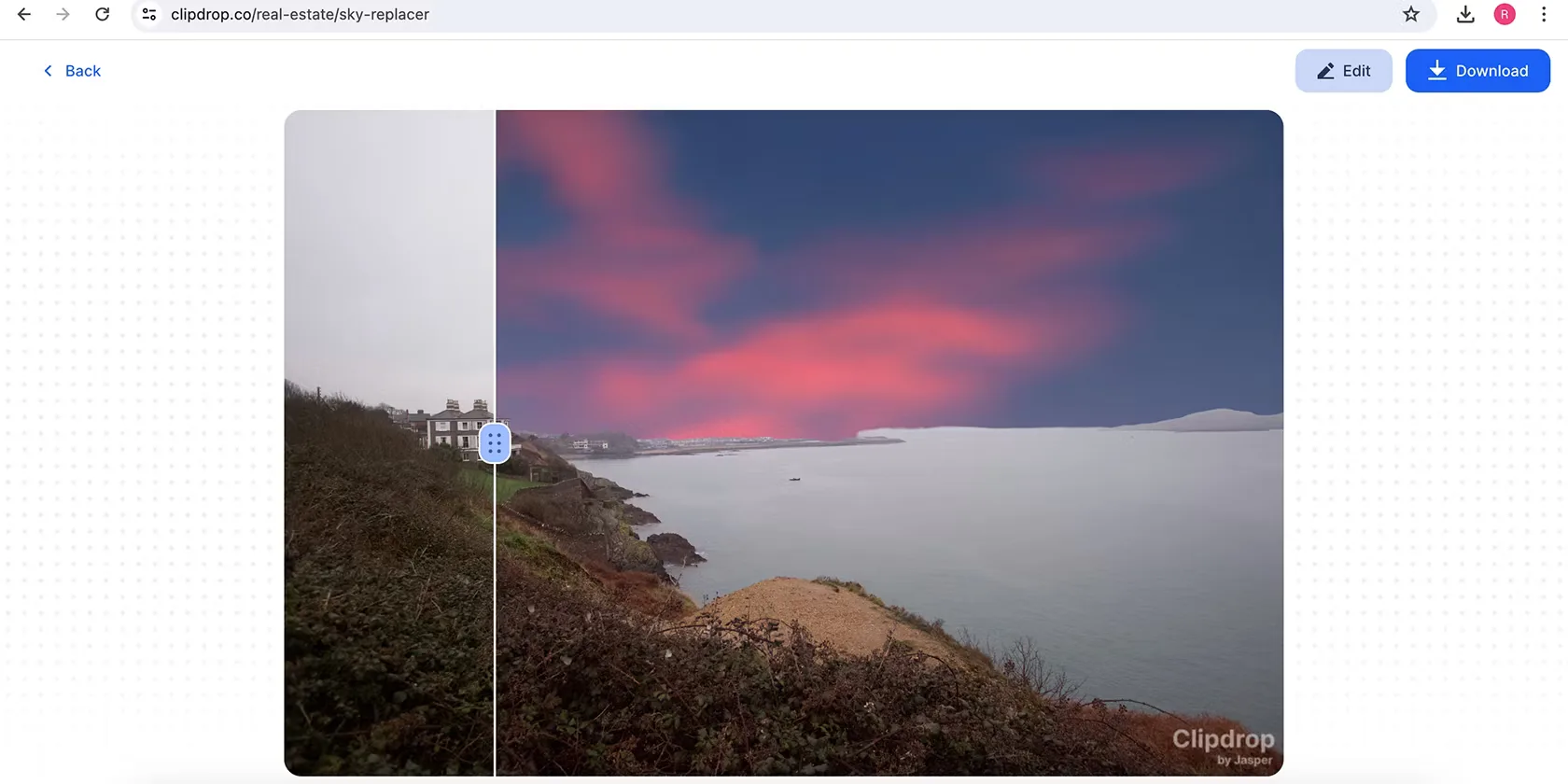
    Numerous AI applications allow you to swap out the sky, but I’ve never grasped why this is necessary. I’m all for editing photos, but altering elements that affect the overall atmosphere—like replacing a gray sky with blue—feels excessive.

    Sky replacements often appear unrealistic, and honestly, I don’t find them aesthetically pleasing. If you’re editing for fun, go ahead and use it, but I wouldn’t recommend sky replacement for anything more serious.

    That being said, using AI to identify the sky in your image for adjustments like brightness and color is quite useful. It may alter the sky, but it maintains the general ambiance of the photo. Ultimately, it’s crucial to recognize when creative software benefits from AI and when it doesn’t.

    2 Enhancing Skin and Eyes

    The aim of AI in editing software is to streamline your workflow, yet I’ve found that the tools for brightening skin and eyes often miss the mark. Usually, it’s quicker for me to make these adjustments manually. The exception is when utilizing the Auto feature in my editing software, which is quite hit-or-miss as well.

    If you intend to use AI for editing, I’d advise choosing retouching tools found in Photoshop and similar software. However, for most editing needs, it might be best to skip AI enhancements altogether.

    For an interesting comparison of AI retouching to manual methods, check out my experience using AI to retouch photos.

    3 AI Blurring

    One of the first AI features I experimented with was blurring, and frankly, I prefer manually adjusting the aperture on my camera instead. Post-production blurring usually feels obvious, and while you could argue I’m not skilled enough, my photos look fine without it.

    AI blurring can be beneficial if the tool accurately detects backgrounds, but that isn’t always guaranteed. If you lack a high-quality camera, there are ways to achieve background blur naturally, such as getting closer to your subject.

    4 Altering Body Shapes

    Some AI tools allow you to alter the shape of people’s bodies, but I strongly oppose this practice for various reasons. Primarily, it’s a technique I believe is easier to accomplish manually. Beyond that, I find it ethically problematic to modify body shapes to create unrealistic representations.

    In my view, using these features can be misleading when shared online. While some might argue that any editing is deceptive, I disagree. Adjusting lighting and colors while keeping a person’s shape unchanged is vastly different from altering their physical form.

    Additionally, it’s important to be aware that some countries may require you to disclose when you’ve retouched images. For instance, Norway has laws mandating the indication of altered body shapes and skin appearances.

    You may disregard my opinions if you find these tools helpful. Yet, personally, I believe the AI photo editing options discussed here aren’t particularly relevant. I’m always eager to explore new technologies, but if they don’t perform, I’m more than happy to stick with methods that work.

  • The Truth About AI Music: It’s Not as Great as You Believe

    The Truth About AI Music: It’s Not as Great as You Believe

    Essential Insights

    • While AI music creation technology has advanced significantly, it still doesn’t measure up to the quality of music produced by humans.
    • AI-generated music often misses the warmth and clarity of human-made sound, plagued by background noise that detracts from the experience.
    • To date, AI music has yet to produce a chart-topping hit and faces challenges regarding copyright, particularly for using samples from existing tracks without authorization.

    AI music technology has made notable progress in recent years, but it still falls short compared to the craftsmanship of human musicians. When you look beyond its flashy presentation, AI-generated music often lacks the resonance and emotional depth found in authentic human performances.

    How Is AI Music Created?

    Traditionally, music was created through the physical act of playing an instrument or singing, requiring ample time and effort to compose and arrange. This involves not just the physical movement but also the hours spent crafting a complete song.

    In contrast, AI systems generate music using machine learning algorithms that analyze a vast database of recorded music. They learn aspects like melody, chords, instrumentation, and genres, breaking music down into fundamental components to replicate the work of talented artists.

    Once the AI has mastered the basics of music reproduction, platforms like Suno, as well as earlier versions like Meta’s MusicGen, allow users to interact with their music generators by providing simple prompts. You can generate music just by describing what you want to create in a few phrases or sentences.

    This process is a strange departure from thousands of years of music creation, where deep emotions and meanings are typically embedded in the craft. You can explore an AI music generator yourself to see how it functions firsthand.

    AI Music Lacks High Fidelity

    In its early stages, AI struggled with the basic structures of popular songs, like in the case of Meta’s MusicGen. However, advancements have led to sites like Suno that can produce full music tracks that are technically impressive.

    That said, don’t be misled into thinking these tracks match the high-quality music standards to which we’ve become accustomed. Just like how we expect to watch videos in at least 1080p nowadays, previous limitations in video quality remind us that not everything can achieve this level of fidelity.

    One major indicator of low-fidelity music is the presence of white noise, reminiscent of listening to an old vinyl record or cassette tape. This is a common trait in AI-generated music, leading to tracks that feel like they’re played over a vintage radio.

    While the situation has improved, you can still hear this background noise in most AI tracks I’ve explored on Suno. For instance, take a listen to this example from Suno. The track “Strongest Duo” features noticeable noise throughout the vocals.

    If I were producing this track, I would avoid adding distortion to the vocals; they sound best when clear and precise.

    Another example is this track on Suno featuring classical violin. A trained violinist or audio engineer would quickly tell you that the strings do not sound as rich or accurate as real ones.

    While there is a genre known as low-fi music that intentionally evokes that rich sound quality, it is usually a deliberate choice. In the case of AI-generated music, however, this background noise results from technical limitations that developers have yet to overcome.

    AI Music Has Yet to Produce a Hit Song

    As of now, AI-generated music hasn’t achieved any significant success or chart-topping hits, which suggests that its quality might not be what some claim.

    Notably, the rap diss track “BBL Drizzy,” which sampled an AI-generated song, has spurred widespread legal action from major record labels like Universal Music Group, Sony, and Warner Records. According to The Verge, platforms like Suno and another AI music company named Udio are now facing lawsuits.

    A troubling fact about AI music generators is they owe their existence to the mass ingestion of copyrighted music catalogs without permission. Instead of creating entire music tracks wholesale, a more beneficial application of AI would be in developing useful plugins for music production.

    Ultimately, music is about more than just the sound. The allure of artists like Taylor Swift or Billie Eilish stems from the stories behind their success. Fans want to connect with their narratives and behind-the-scenes moments, not just their songs.

    Can AI-generated music evoke the same kind of interest? Absolutely not.

    The Complexity of Music Is Beyond AI’s Reach

    Creating a song entails a lengthy process that can stretch over weeks, months, or even years. In contrast, AI solutions can produce a piece in mere minutes using just a few input words. However, real music creation demands a profound level of skill, creativity, and emotional investment.

    Regardless of the sophistication of AI algorithms, nothing can match the intricate artistry of human musicians. Even if AI companies address existing quality issues, there’s no chance that machines can recreate music that resonates on a deeper level; after all, we care about the person behind the music.