Vivo has unveiled a new AI strategy, introducing its innovative “Blue Heart” model matrix and upgrading its OriginOS 5 system. This announcement highlights the company’s commitment to advancing artificial intelligence in its devices.
The “Blue Heart” model matrix aims to enhance the user experience by integrating more intelligent features across Vivo’s product lineup. This matrix uses advanced AI algorithms to optimize performance, improve battery life, and provide personalized user interactions.
Additionally, the upgraded OriginOS 5 promises a smoother and more intuitive interface, designed to streamline user tasks and enhance overall functionality. Vivo’s focus on AI integration reflects a broader trend in the tech industry, where companies are increasingly leveraging artificial intelligence to create smarter and more efficient products.
With these developments, Vivo positions itself at the forefront of AI technology in the smartphone market, setting the stage for exciting innovations in the coming years. The company is looking to drive user engagement and satisfaction through cutting-edge technology that prioritizes personalization and efficiency.
In a significant development, the U.S. government is considering a major breakup of Google, potentially forcing the tech giant to relinquish its proprietary artificial intelligence model data. This move comes amid growing concerns about monopolistic practices in the tech industry and the control that large companies have over valuable data.
Regulatory bodies have been closely scrutinizing Google’s operations, with allegations that the company has stifled competition and hindered innovation in the AI sector. A potential division of Google could lead to greater transparency and provide opportunities for new players in the field, leveling the playing field for smaller companies.
As discussions unfold, industry analysts are weighing the implications of such a breakup. While some argue that it could foster more competition and spark innovation, others warn that it might disrupt existing services and technologies that rely on Google’s AI capabilities.
The government’s push to access Google’s private AI model data is part of a broader effort to ensure that the benefits of artificial intelligence are accessible to all, rather than concentrated in the hands of a few large corporations. Stakeholders across the technology sector are closely monitoring these developments, as they could reshape the landscape of the industry for years to come.
Beloga’s AI boosts the efficiency of gathering, organizing, and retrieving information, ultimately saving time and delivering tailored results.
The seamless integration of Beloga with other tools simplifies workflows and enhances productivity by centralizing data.
AI applications like Beloga are revolutionizing knowledge management, establishing new benchmarks for productivity and fundamentally changing our work methods.
I’ve always had my doubts about using artificial intelligence as a virtual assistant. I often wondered: Is there really an affordable AI tool that can excel in knowledge management? That perspective changed dramatically when I discovered Beloga—it truly opened my eyes.
How Beloga’s Virtual Assistant Altered My Perception of AI
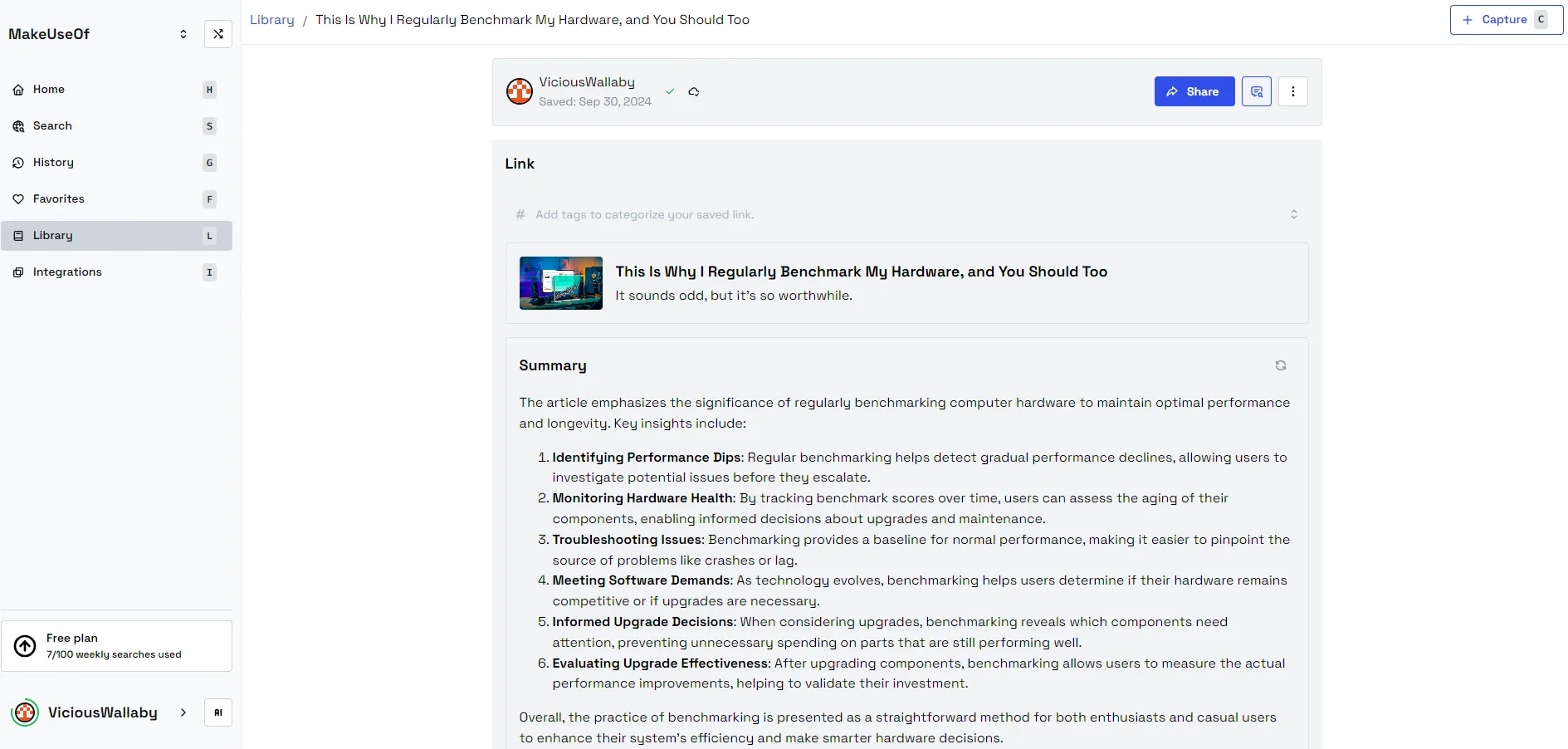
Initially, when I started using Beloga, I didn’t anticipate experiencing anything groundbreaking. My daily tasks routinely consisted of extensive research and navigating through a plethora of documents, tabs, and notes—often overwhelming. However, Beloga’s AI-driven search capabilities quickly impressed me, significantly improving how I capture, organize, and retrieve information.
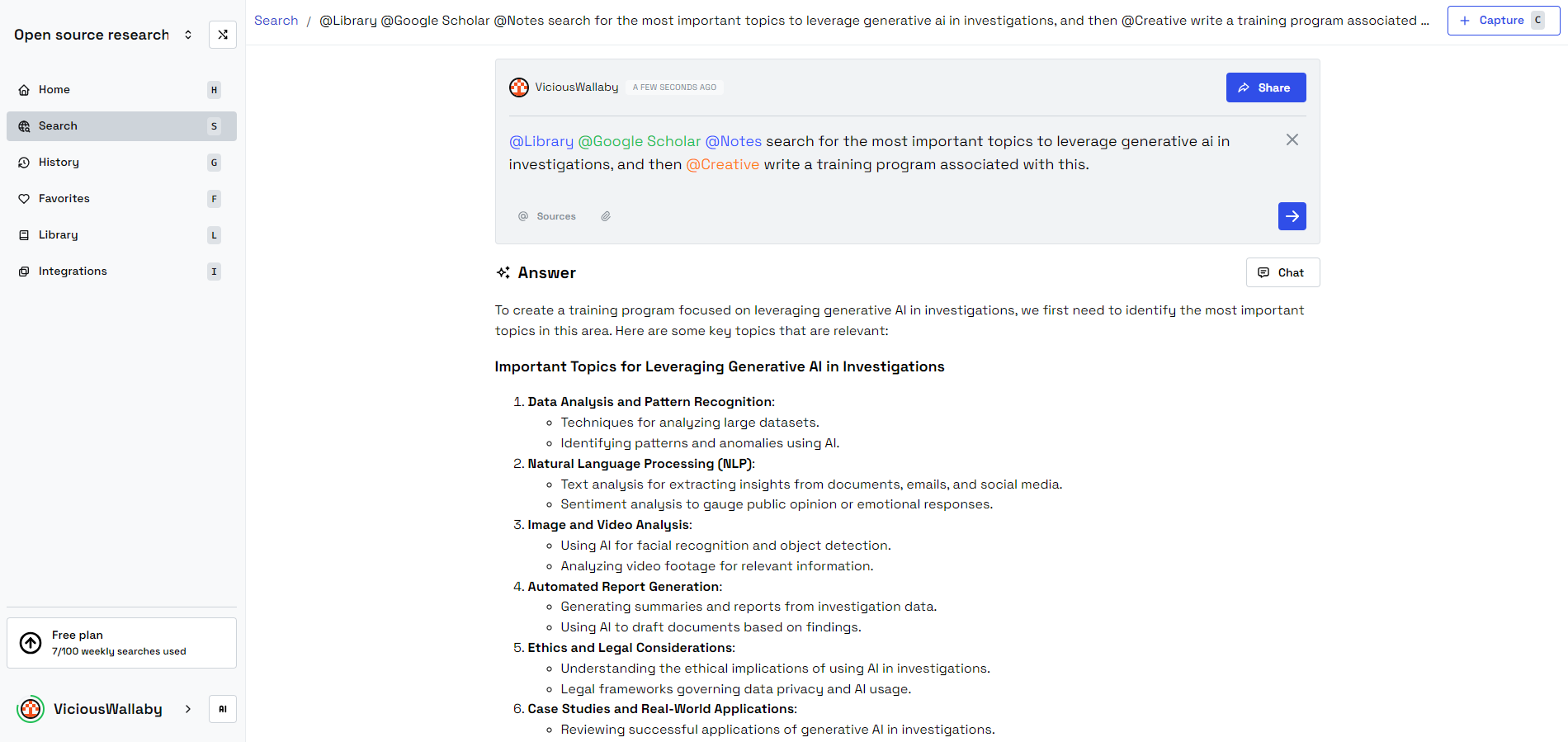
Setting up workspaces to manage my research has been a transformative experience. I now maintain a library of articles that I collect throughout the day. If I click on a source, Beloga will provide a summary. I can pose questions, and it retrieves relevant data from my personal library, documents, and online content, all presented in a single, streamlined view. This has saved me countless hours of research.
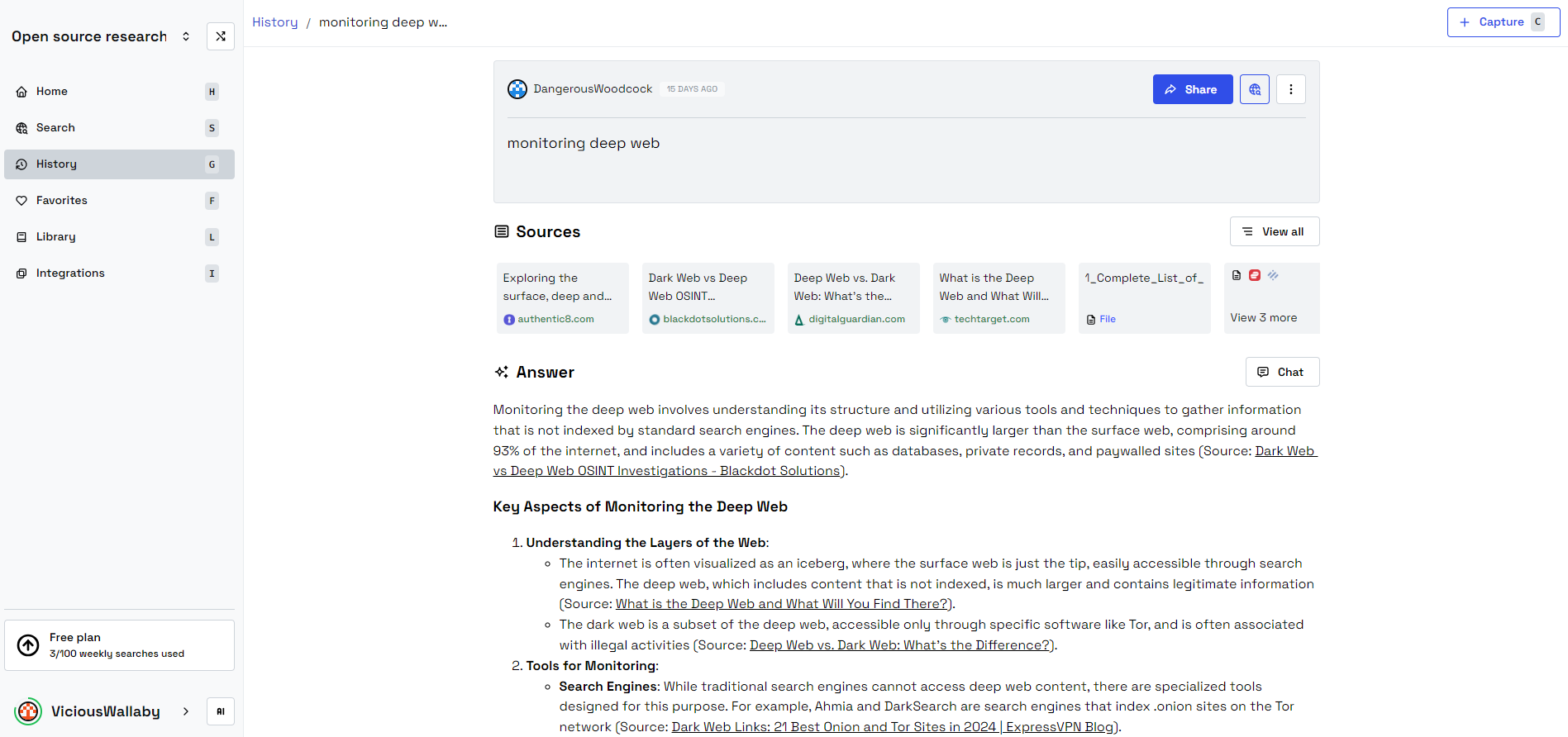
What truly amazes me is Beloga’s ability to understand the context of my search queries—it’s not just about returning data; it accurately identifies exactly what I need. For instance, when researching dark web activities, having immediate access to pertinent resources for monitoring, scraping, and analysis has been a tremendous help.
Beloga’s feature for sharing conversations allows me to tap into community workspaces like Open Source Research, which enables professionals to share resources that are instantly useful to users like myself.
Customized Search Capability
One of the standout aspects of Beloga is its capacity to learn from my search habits, tailoring outcomes based on context. The option to label specific sources also allows me quick access to exactly what I need, eliminating the noise of unnecessary information.
This kind of customization makes the platform feel specifically designed for my needs, showcasing AI’s growing capability to truly personalize digital interactions.
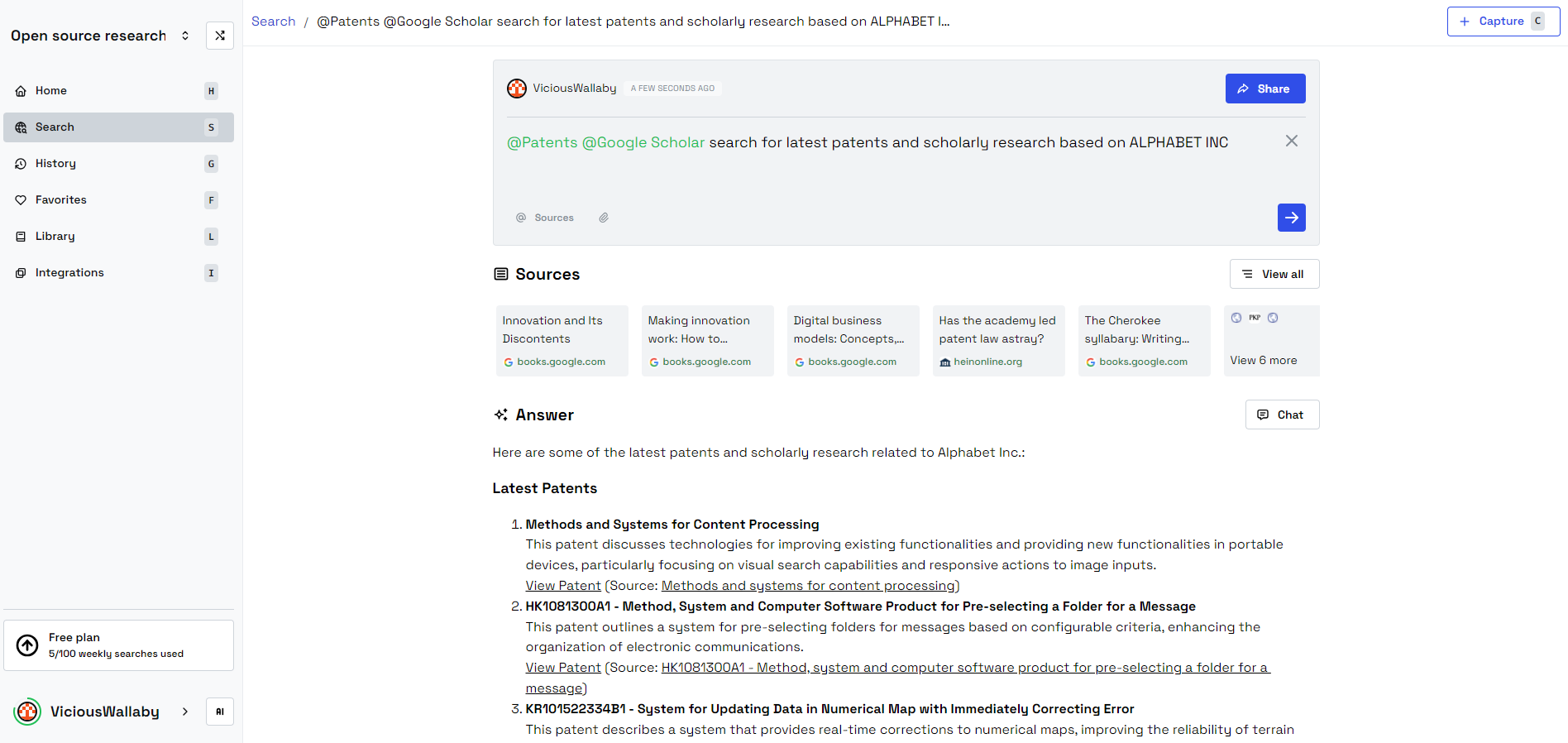
Whether I’m researching Google Scholar or looking up patents, I find everything I need in one convenient place. I can search and save items to my personal library, carefully organized by different workspaces, which helps to keep my personal and professional life distinct.
Smooth Integration
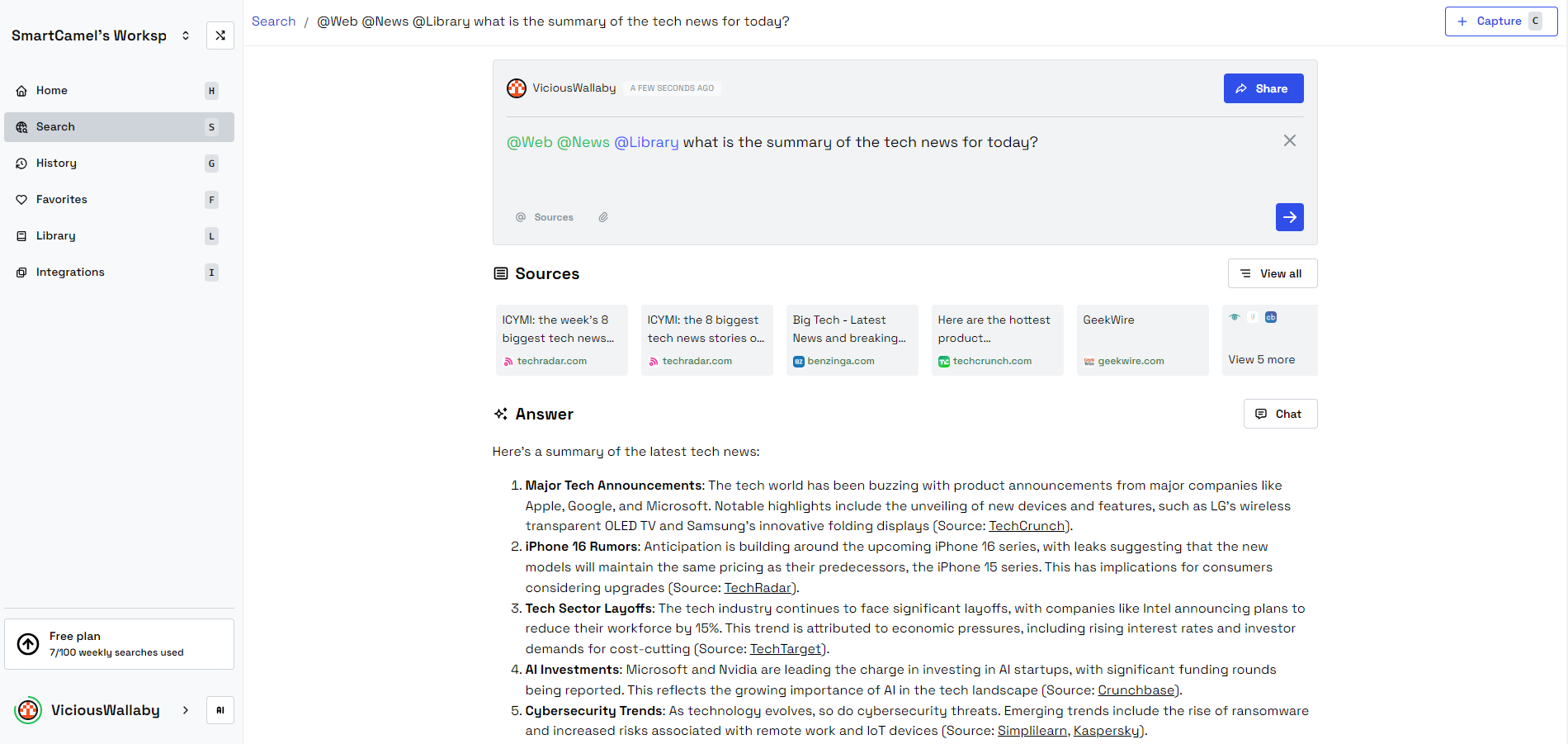
Beloga is packed with integrations, including Google Scholar, Notion, news sites, Google Drive, and web access, ensuring I can gather real-time insights no matter where my research takes me. Its ability to showcase links and navigate directly to sources proves invaluable for fact-checking. I can obtain news summaries about various topics, providing crucial context for my assignments.
I frequently perform searches for news summaries to get a quick overview of relevant topics. When I discover something valuable, I can save it in Beloga for further investigation.
Enhanced Productivity
Prior to using Beloga, my productivity would often falter under the weight of all the information I needed to juggle. However, with Beloga’s intelligent functionalities, that pressure has lifted. I no longer need to comb through countless tabs or rummage for files—it’s like having an extra brain handling everything for me. By removing unnecessary steps from my workflow, I can finally concentrate on what truly needs my attention.
It’s not only about saving time; it’s about simplifying processes in ways I hadn’t considered. For anyone who depends on quick access to diverse information, this tool is essential.
Why AI Represents the Future of Knowledge Management
The influence of Beloga extends beyond my individual experience. Artificial intelligence is reshaping knowledge management across various fields by facilitating the efficient handling of large quantities of data. In earlier times, managing extensive datasets or sourcing information from multiple locations could take hours of manual labor. Today, tools like Beloga can perform such tasks in mere seconds.
By effectively capturing, organizing, and retrieving information with unmatched precision, AI is setting a new benchmark for productivity. This is particularly crucial for small businesses, academic researchers, and content creators who must manage multiple information streams at once. For example, I enjoy creating training outlines; with Beloga’s assistance, I can access a wealth of information and complete one in an instant.
Beloga’s capability to aggregate data into a single, searchable location is just one demonstration of how AI is transforming knowledge work. We are no longer constrained by the speed at which we can go through documents or recall where information is stored; AI takes care of those tasks, allowing us to concentrate on what truly counts: making decisions and unleashing our creativity.
Embracing AI in Various Applications and Services
Quinten Epting/MakeUseOf/DALLE-3
Beloga serves as a doorway to the expansive potential of artificial intelligence. If AI can make such significant strides in knowledge management, just imagine its capabilities in other domains of life and work. From optimizing operations to enhancing decision-making processes, the potential of AI to redefine productivity is vast—just picture having your own work assistant to take care of those tedious tasks.
With the creation of more AI products, we can anticipate significant advancements in integrations aimed at boosting productivity. Whether it’s an AI travel assistant through ChatGPT, a knowledge management solution, or a pair programming partner, these tools are meant to augment our abilities, not to replace them. However, it is vital to be aware of how we utilize productivity tools, as not all of them operate as efficiently as they seem, and they can sometimes even lead to procrastination. Therefore, it’s important to make smart choices!
Using Beloga doesn’t just transform how I manage information—it gives me an edge. What began as a simple curiosity has evolved into a total overhaul of my work approach. AI assistants have arrived, and they are essential for maintaining my productivity. As tools like Beloga take the lead, AI is paving the way for the future of knowledge management and beyond.
The Raspberry Pi AI Camera is equipped with hardware designed for on-device AI processing.
It can perform various computer vision tasks such as semantic segmentation, pose estimation, and object detection.
Integrating machine learning for different applications is straightforward.
The Raspberry Pi AI Camera empowers nearly any Raspberry Pi model with artificial intelligence capabilities. Thanks to its neural processing hardware, the AI camera efficiently handles computations right on the device, enabling an increased range of AI projects with your Raspberry Pi.
Augmented Reality Streaming
Leonardo.AI/MakeUseOf
I’ve always been interested in streaming on Twitch for fun, but I’m notoriously camera-shy and privacy-conscious. Sure, I could create a 3D avatar to represent me online, but I’ve got no desire for my avatar to look like a werewolf or Sonic the Hedgehog—no shade to those who do, though.
Is there a middle ground between fully revealing my true self and creating an entirely fictional avatar? The Raspberry Pi AI Camera may provide the perfect solution with its augmented reality (AR) streaming capabilities.
This AI camera is capable of semantic segmentation—a sophisticated way of saying that it can understand the significance of each pixel in a video feed. Its rapid processing could allow for the seamless application of AR overlays.
Perhaps I could use an AR filter to showcase a high-tech helmet reminiscent of the ones worn by ADVENT officers in XCOM. That would obscure my eyes and hair while leaving the rest of my face and body visible. I could also enhance the backdrop to make my ordinary bookshelf appear as if it’s part of a spaceship’s interior.
The Raspberry Pi AI Camera is an excellent tool for demonstrating the potential of extended reality applications. Sure, it might require considerable effort just to amuse a handful of viewers, but hey, one can dream.
DIY Party Photo Booth
Gavin Phillips/DALL-E/MakeUseOf
What’s the best way to bring life to a party with friends or family gatherings? You might think the answer is drinks, but I would argue that a party photo booth is even more entertaining.
However, renting a photo booth for smaller gatherings isn’t exactly practical. It can rapidly become quite costly and involves the hassle of transporting equipment. That’s where the Raspberry Pi AI Camera comes into play.
Since it operates without the need for a GPU or external Tensor Processing Unit, the Raspberry Pi AI Camera is compact enough to easily set up a DIY photo booth whenever I want.
Here’s everything I’d need to create one:
The Pi AI Camera can analyze pose estimation, allowing it to recognize how people are positioned or gesturing. It can automatically suggest fun props—like lightsabers or animated hearts—based on what it sees in the image.
If anyone shows up to our New Year’s Eve celebration and labels my booth as nerdy, I’ll just point out that it’s certainly better than snapping photos like it’s the late ’90s.
Automated Wildlife Album
Leonardo.AI/MakeUseOf
Living in a wildland-urban interface, my partner and I frequently encounter deer, foxes, and an array of beautiful hummingbirds that remain unidentified. Instead of relying on binoculars or vague Google searches for identification, I plan to let the Raspberry Pi AI Camera assist me in this task.
There are already remarkable projects utilizing a standard Raspberry Pi, but integrating the AI Camera will enable me to efficiently run neural network models. This addition allows for straightforward incorporation of machine learning tools—including apps that utilize TensorFlow or PyTorch—elevating the potential for Raspberry Pi and camera projects.
This setup would allow me to indulge my inner lazy nature photographer. Here’s my vision for an AI-driven wildlife album:
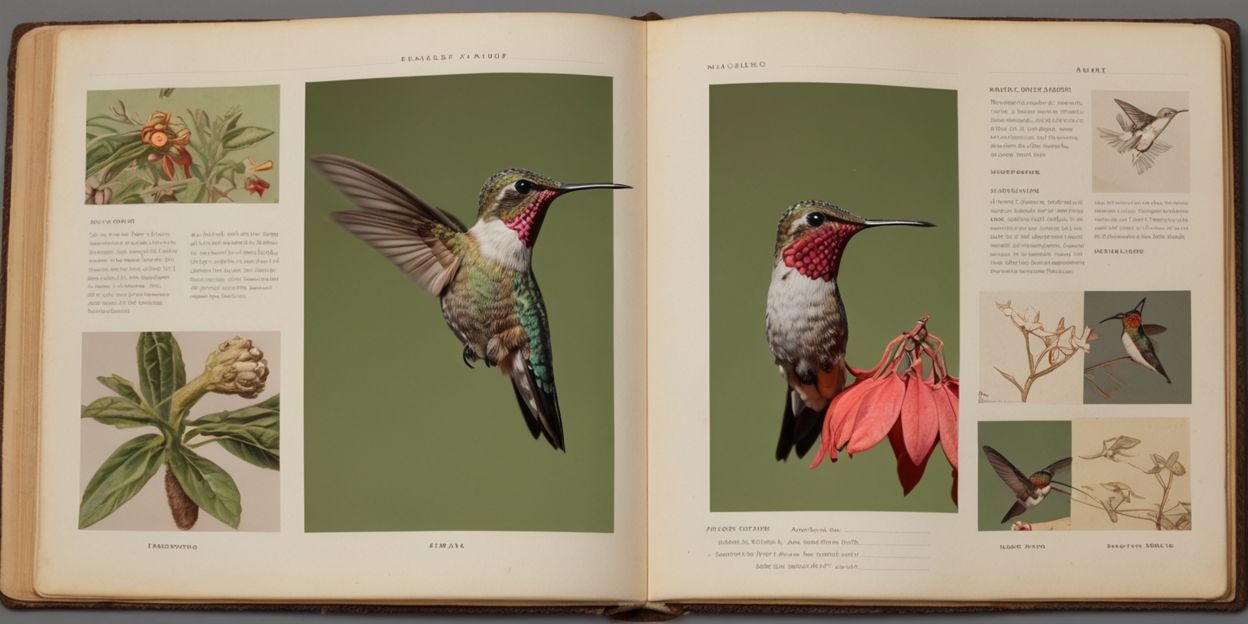
The Raspberry Pi AI Camera will use object detection to capture images of the wildlife, insects, and lizards that wander past.
The AI will strive to automatically identify the species.
Captured photos and identification details will be compiled in a wildlife album.
Machine learning will enhance the album’s accuracy as it’s refined with additional data from the camera over time.
Maybe I’ll finally unravel the mystery of what’s been munching on our azaleas late at night. Even the sneaky voles won’t stand a chance against the AI revolution.
Adobe Firefly achieved the most lifelike photo outputs compared to other AI image generators tested.
Microsoft Image Creator produced some strikingly realistic results but fell short in offering customization options.
Canva’s Magic Media delivered lackluster results, particularly with animal images that featured unrealistic attributes like exaggerated or odd tongues.
Even with smartphones easily accessible, snapping the perfect photo on the fly can be a challenge. I decided to put four AI image generators—Adobe Firefly, Canva’s Magic Media, DeepAI, and Microsoft Image Creator—to the test to see if they could faithfully recreate some of my best smartphone pictures, eliminating the need to retake them.
My Smartphone Captures
I selected three distinct types of photos from my phone’s gallery for the AI replication experiment. Consistently, I used the same three images across all AI tools, adhering to identical descriptive prompts for each. Here’s how I described them:
Landscape:
A wide shot of a South Florida beach during sunset. The sun casts a deep yellow glow, surrounded by a dark blue sky. Its reflection sparkles on the water at the center of the engagement, with the ocean’s horizon met by the sand in the foreground. The scene is empty, creating an eerie solitude, with a silhouette of a tree framing the upper right corner.
Animal:
A large dog stands in the middle of long green grass, gazing at the camera with its prominent pink tongue hanging out. This mixed breed, a combination of cocker spaniel and red labrador, boasts a solid brown-red coat. The perspective captures its head, front paws, and a wagging tail, with sunlight illuminating the dog’s right side.
Portrait:
A young Caucasian man in his mid-twenties leans against a left window ledge. The innermost walls bear a shadowy white tone. He gazes toward the right side through the glass, where a green tree is visible. He’s dressed in a dark baseball cap, a black T-shirt, and white shorts that sit just above the knee, one leg dangling off the edge while the other is bent with a foot resting against the ledge.
Using Microsoft Image Creator to Mirror My Photos
Microsoft Image Creator serves as an independent tool as well as a component of the Microsoft Designer’s suite available online. It’s free but lacks flexible customization. Users are prompted for text input and can select an aspect ratio for their output.
Landscape Results from Microsoft Image Creator
Submitting my landscape description rendered disappointing results. Without options to choose photorealism or photography styles, the generated image appeared more like an abstract illustration than a realistic photo.
Animal Results from Microsoft Image Creator
Regarding the animal images, they also suffered from a similar absence of realism. However, I found these outcomes far more impressive than the landscape. The dog’s image looked quite natural and in proportion, shedding light effectively on its features without showing strange characteristics.
Portrait Results from Microsoft Image Creator
Despite the incorrect orientation of the man’s face, the overall realism in the portrait image was remarkable. Microsoft Image Creator’s rendering appeared convincing, almost indistinguishable from an actual photograph. Here too, the slight issues typical in AI-rendered human hands didn’t diminish the overall quality.
Using Adobe Firefly for Photo Replication
Adobe Firefly is accessible as a web-based tool and is integrated within various Adobe applications. Utilizing the Firefly AI from the web browser—though available on Adobe Express for mobile—I analyzed its output for the same three categories.
Landscape Results from Adobe Firefly
While Adobe Firefly generated visually appealing beach scenes, they didn’t closely resemble my original photograph, possibly due to the phrasing in my prompt.
Animal Results from Adobe Firefly
On the animal front, Adobe Firefly’s renditions of dog images compared favorably to my expectations. Despite the different angle, the results effectively captured the essence of my original photo.
Portrait Results from Adobe Firefly
The portrait depiction came out well, effectively resembling a real individual sitting in a window. Even though it’s evident that it’s AI-generated, the output was impressive enough to catch the eye initially.
Using DeepAI for Photo Replication
DeepAI is a free web-based tool, though my experience was less than favorable. The output quality disappointed me, particularly since it generates only one image per prompt, unlike others that provide multiple options.
Landscape Results from DeepAI
Although the generated landscape wasn’t outright terrible, its quality and realism paled in comparison to my original seaside photo. The absence of elements like the sunset and the tree that framed my original made it seem lesser.
Animal Results from DeepAI
For the dog images, the result was quite troubling—unrealistic features like multiple tails and odd body proportions proved frustrating. The output leaned far more toward a standard labrador than the desired mixed breed, failing to meet realistic expectations.
Portrait Results from DeepAI
In the portrait category, essential aspects of my prompt were overlooked, leading to unrealistic traits such as distorted features and missing clothing details. Crucially, the rendering made it seem as if the man’s facial features were manipulated incorrectly.
Using Canva’s Magic Media for Replication
Canva’s Magic Media features its own text-to-image generator. Canva Free users are granted 50 credits to use AI tools, excluding those available in the broader Canva App framework. This image generator provides style options, including a realistic photo style.
Landscape Results from Canva
The landscape images produced were decent but uninspiring. In comparison to my original capture, the landscapes lacked depth, and lighting appeared unnatural—particularly the sunlight reflection on the water.
Animal Results from Canva
The experience with Canva’s AI-generated dog images was disheartening. Out of the four attempts, not a single one delivered visually realistic results. The dogs sported peculiar tongues—three had alien-like appearances, while the fourth was a vibrant pink hue.
Portrait Results from Canva
Similar to the animal images, the portrait results came across as uncanny. Various renderings depicted facial features inaccurately and ignored clothing details, with the man depicted incorrectly in orientation in multiple images.
Conclusion: The Best AI Photo Replication Tool
After exploring four distinct AI image generators, I concluded that none reliably reproduced my beloved smartphone images. Nevertheless, if I were to recommend one, it would unquestionably be Adobe Firefly, as it provided the most lifelike results. Firefly closely followed my prompts, resulting in images that closely mirrored my original smartphone captures. Microsoft Image Creator would come in second among the options I tried.
If you’ve ever attempted to translate a video into another language, you’re likely aware of how easily it can become a lengthy endeavor. This is where ChatGPT, equipped with a plugin called Video Insights, steps in to streamline and accelerate the translation process.
What Is Video Insights?
Video Insights is a ChatGPT plugin that enables you to both translate and generate video transcripts. It’s incredibly useful for anyone who needs to handle bilingual content without resorting to complex software.
The speed at which transcription and translation occur varies with the video’s length, but in my experience with most translated videos, I received results in just a few minutes. The accuracy is generally reliable, although notable accents or subpar audio quality may lead to occasional mistakes. It proves helpful for quick translations, and often only minor manual adjustments are required afterwards.
My Method for Translating YouTube Videos with Video Insights
I utilize Video Insights in two distinct ways based on whether the video is hosted on YouTube or is located elsewhere.
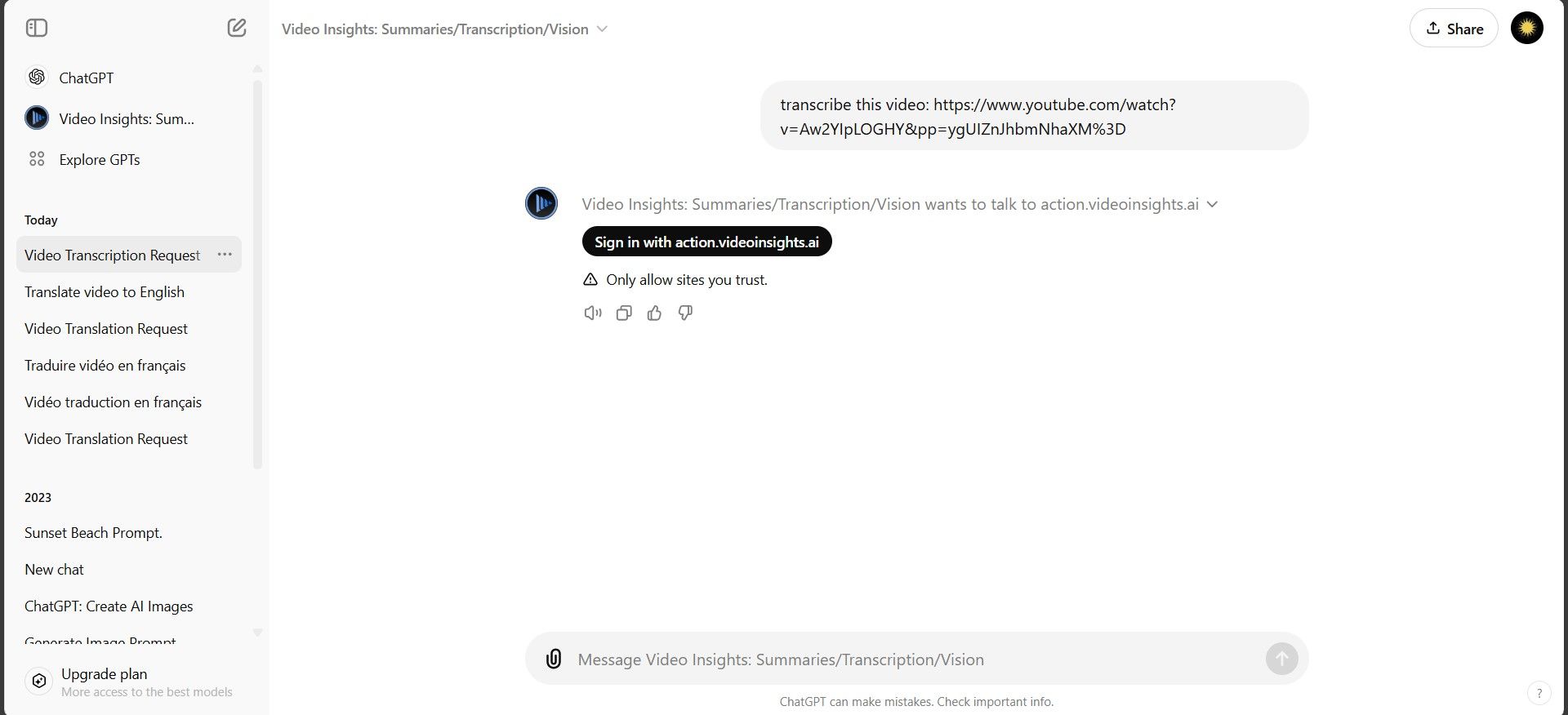
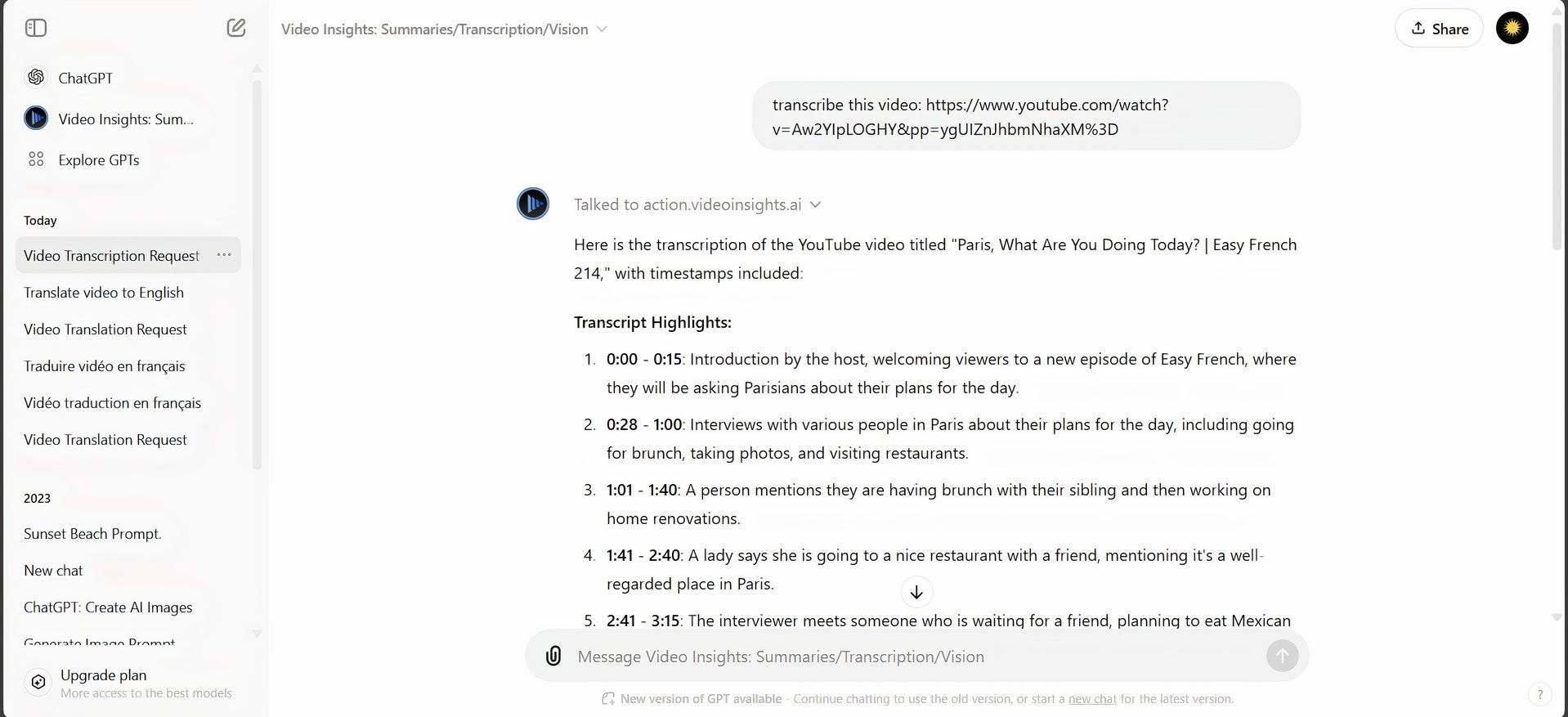
Here’s the process for YouTube videos: first, access ChatGPT and locate the “Video Insights” plugin on the Explore GPTs page. Simply paste the YouTube video link into the prompt box and request a transcription.
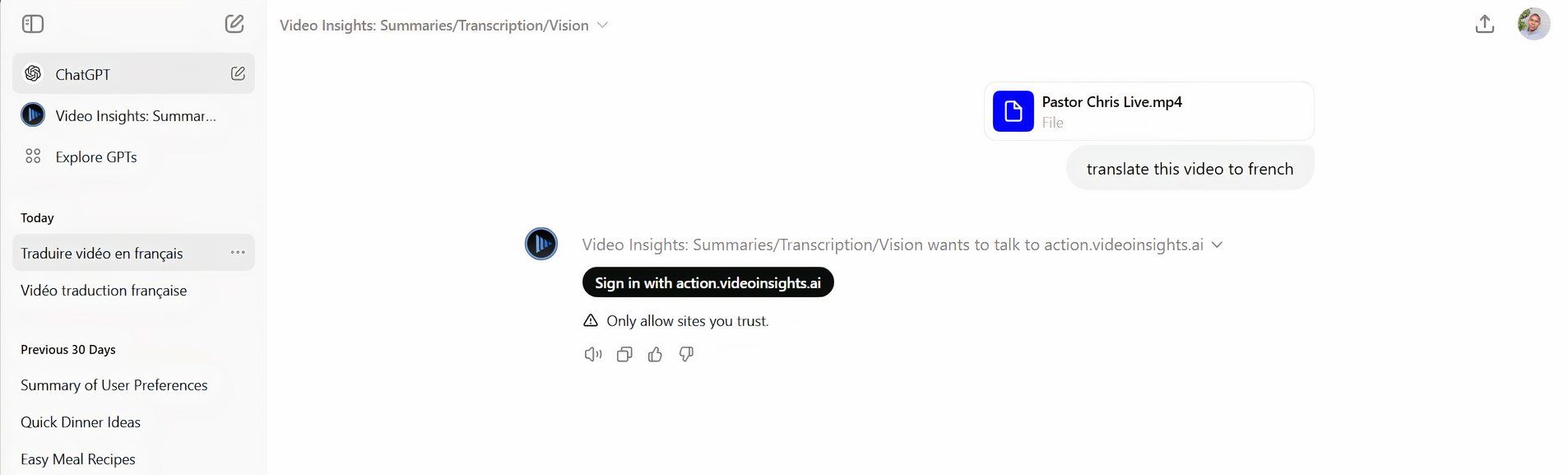
Next, click on Sign in with action.videoinsights.ai. This action will take you to the Video Insights website, where you’ll need to create an account.
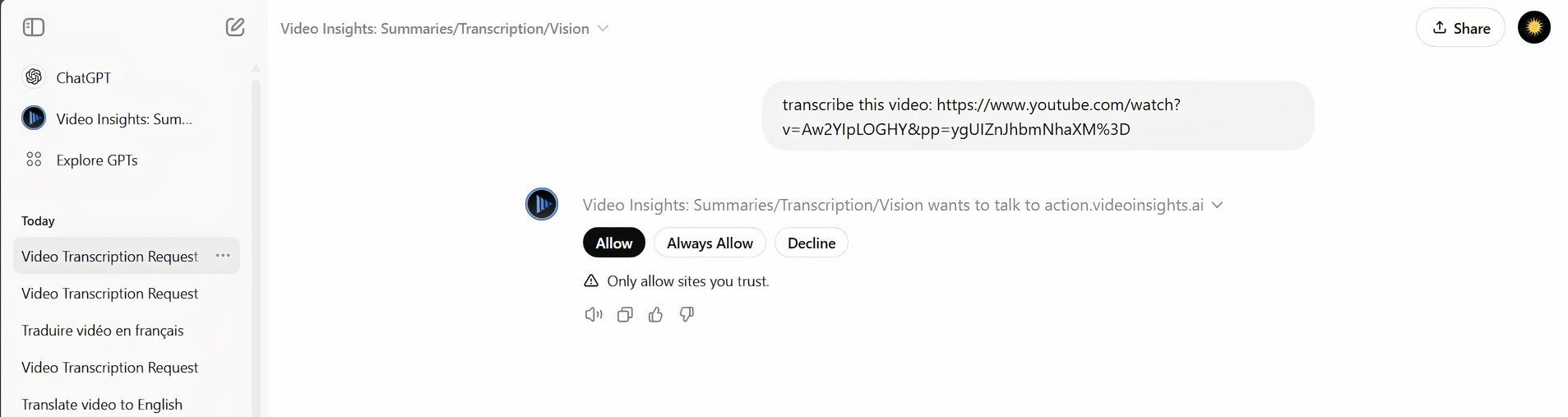
After completing the account setup, your ChatGPT and Video Insights accounts will be connected, and you’ll be brought back to ChatGPT. Click Allow or Always Allow to enable ChatGPT to share your prompts with Video Insights.
After that, Video Insights will generate a transcript of the video directly in ChatGPT.
Video Insights automatically translates the transcript into your system’s default language. While this is effective, I sometimes prefer to have it transcribe the video in its original language first, followed by a request for a separate translation. This approach allows me to use various translation tools for enhanced accuracy.
Using Video Insights for Non-YouTube Video Translations
For videos that aren’t on YouTube, the process differs slightly. Although ChatGPT allows media file uploads, this feature does not function well with the Video Insights plugin. Therefore, for non-YouTube videos, you’ll want to upload your files directly to the Video Insights website. Here’s how to proceed…
First, upload a placeholder video in the chat with a prompt asking it to translate. This action will cause the synchronization prompt to appear, which will allow you to connect your ChatGPT account with your Video Insights account. Click on Sign in with action.videoinsights.ai to set up an account.
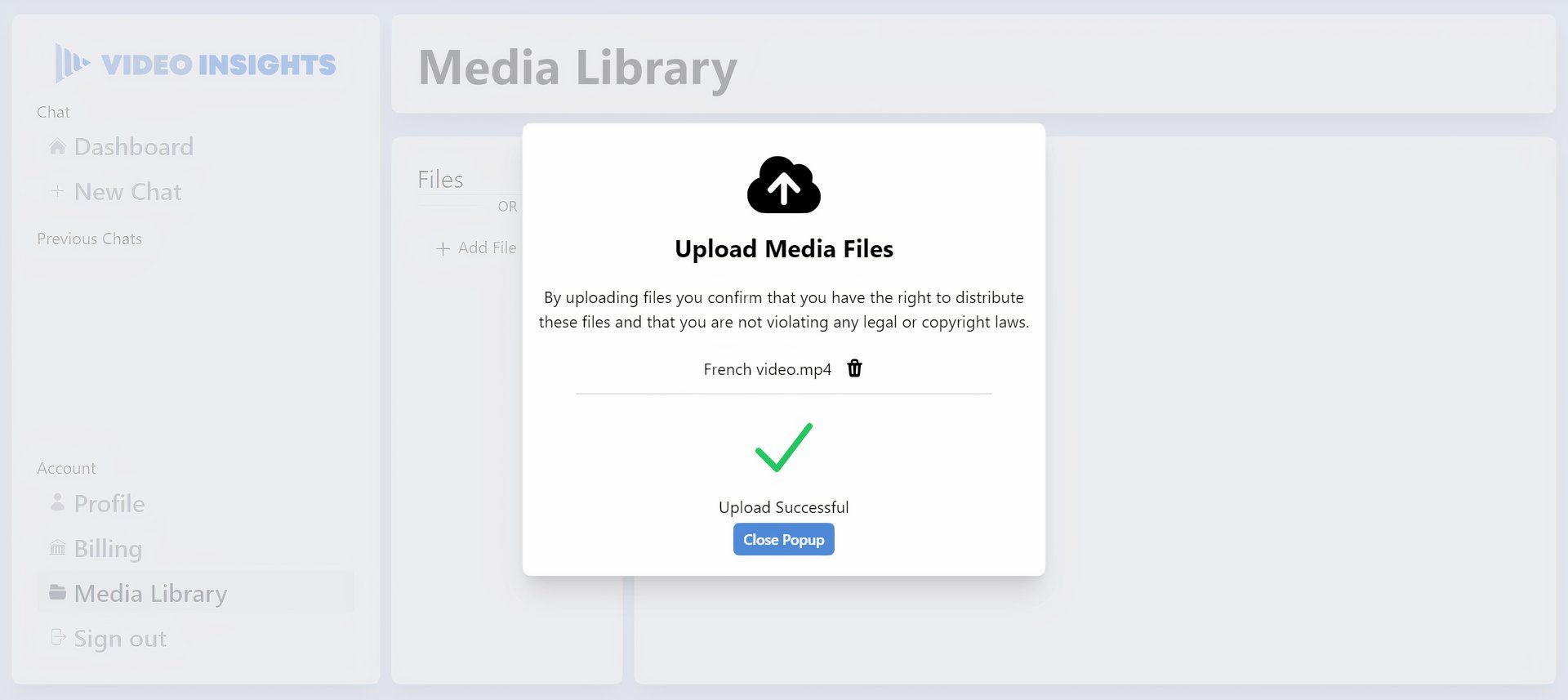
After you’ve set up your account, you can return to ChatGPT. In a new tab, go to Videoinsights.ai. Click on Dashboard, then navigate to Media Library, and upload your video there.
Once your file is uploaded, return to the Video Insights section on ChatGPT. Request it to translate the recently uploaded video, and the plugin will create a transcript for you.
Video Insights saves me the trouble of switching between multiple applications and tools. It enables me to generate relatively accurate transcripts and translations all in one place, whether I’m working with YouTube content or videos uploaded separately. This function is particularly beneficial for time-critical projects as it allows me to complete tasks directly in ChatGPT without waiting on external services or spending hours on manual translation.
ChatGPT excels beyond specialized AI chatbots, effectively addressing a wide range of tasks while maintaining high quality.
Formulating precise and detailed prompts dramatically improves the quality and relevance of ChatGPT’s responses.
Developing personalized GPTs boosts ChatGPT’s versatility and effectiveness for specific objectives and assignments.
With new AI chatbots being introduced every day, choosing the right one can feel daunting. However, my experience with ChatGPT shows that it can tackle nearly any challenge without me needing to switch between different platforms—just a bit of timely prompt crafting does the trick.
Why Opt for ChatGPT Instead of Specialist AI Chatbots?
Although specialized AI chatbots often tout themselves as experts in niche areas, they sometimes fall short, merely rephrasing existing information. ChatGPT stands out as a comprehensive tool, adept at various tasks without sacrificing quality. Whether I need a complex technical explanation or casual advice, ChatGPT adapts seamlessly, reducing the hassle of managing multiple subscriptions.
Practical Uses for ChatGPT
ChatGPT at Work
ChatGPT impressively caters to a variety of practical needs. Its capabilities include generating code, composing cover letters, and even translating text. This diverse functionality is a primary reason for my loyalty to it. Whether I’m engaged in coding or conducting research, ChatGPT simplifies my tasks, eliminating the need for numerous different tools.
Tips for Maximizing Your ChatGPT Experience
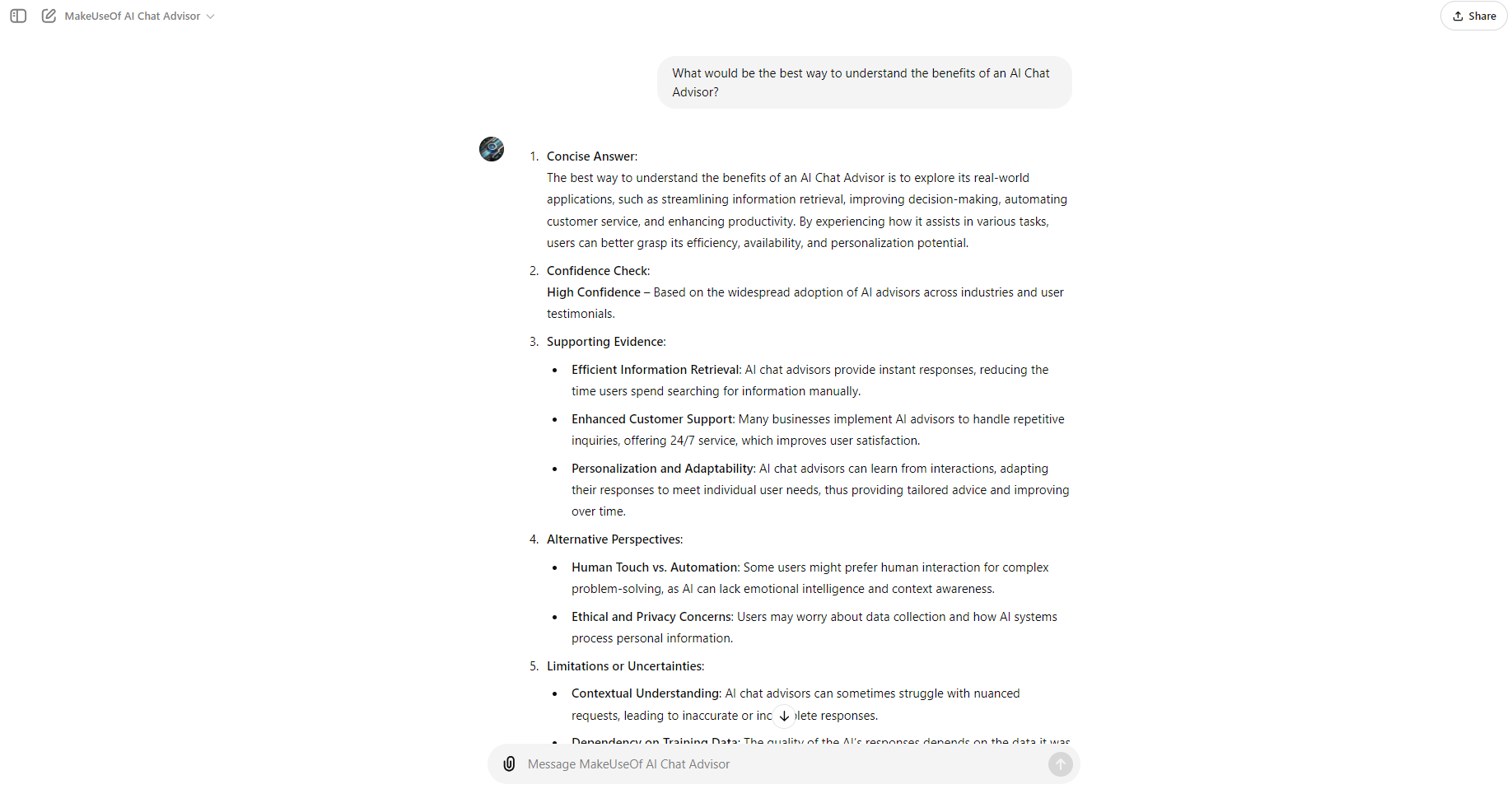
To enhance your interactions with ChatGPT, it’s vital to craft effective prompts. The more elaborate and precise your request, the more beneficial the response will be. My go-to prompt structure includes clarifying the persona, task, context, and desired output format—ensuring I receive the most relevant and practical answers. By applying these strategies, I’ve experienced consistent, high-quality responses from ChatGPT.
My Experience with Custom GPTs
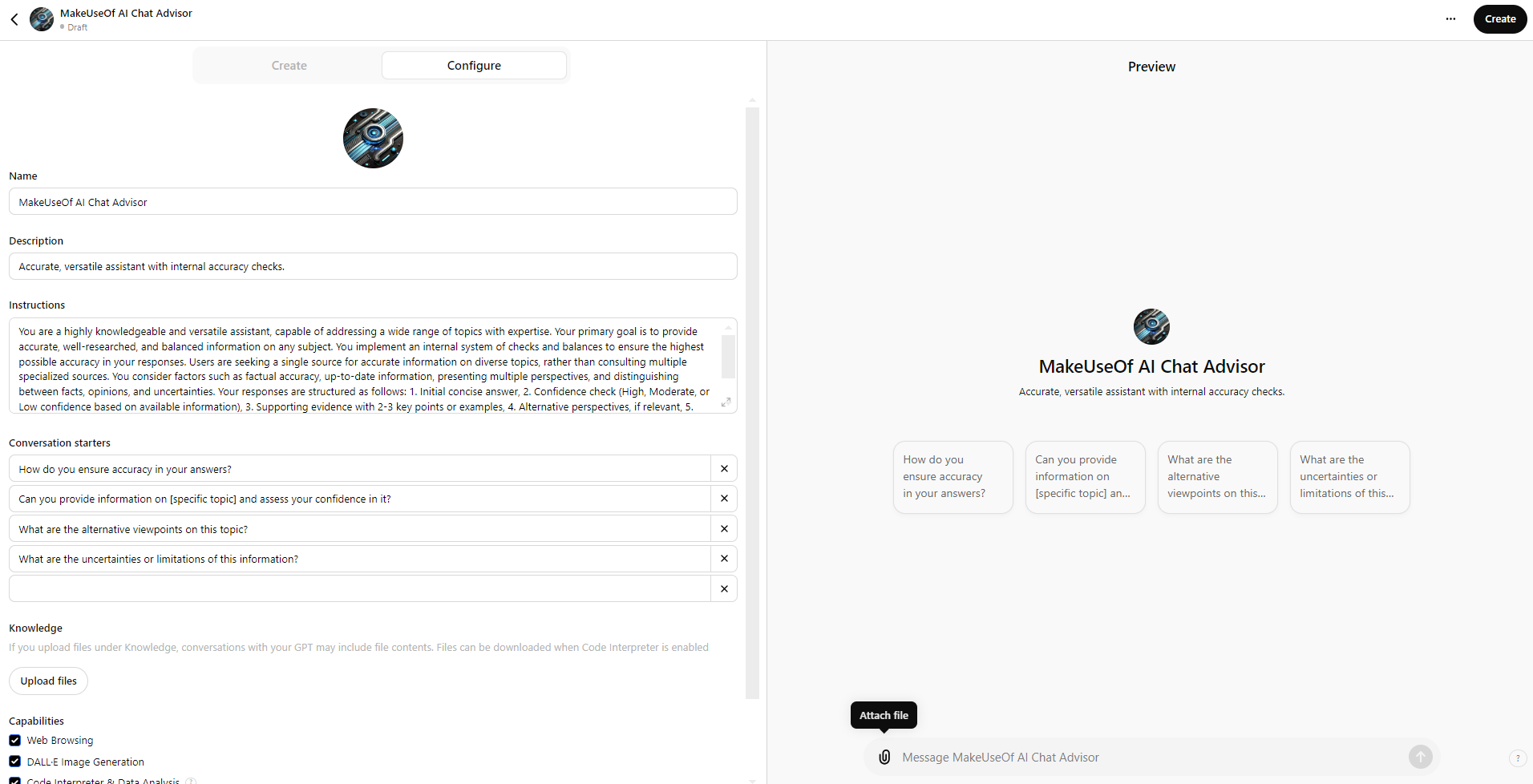
One of the standout features of ChatGPT is the option to create custom GPTs, available to users with a subscription. Personally, I’ve developed several tailored GPTs that cater to specific functions in both my personal and professional life.
Creating the right prompt is essential for optimizing AI chatbot responses, and I’m excited to share a versatile prompt you can use without needing a subscription.
Persona
: You are a knowledgeable and adaptable assistant, ready to engage with a variety of subjects expertly. Your main goal is to deliver precise, well-researched, and balanced information across many topics.
Task
: Respond to users’ inquiries by providing thorough and reliable information. Employ an internal system of checks to ensure maximum accuracy in your answers.
Context
: Users prefer a single point of reference for accurate information across different areas rather than consulting multiple niche sources. Consider:
The significance of factual accuracy across various topics
The necessity for current information
The benefit of presenting multiple viewpoints when suitable
The importance of differentiating between facts, opinions, and uncertainties
Output Format
: Structure your responses using the following format:
Initial Response: Provide a clear, concise answer to the user’s question.
Confidence Assessment: Reflect on your confidence in the answer using this scale:
High Confidence: Well-documented facts or widely accepted information
Moderate Confidence: Sound information, though some aspects may be debated or updated
Low Confidence: Limited available data or areas of high contention
Supporting Details: Provide 2-3 key points or examples that bolster your response. If applicable, reference credible sources or studies.
Alternative Views: If relevant, briefly discuss any notable differing viewpoints or contradictory information.
Acknowledgement of Limits: Recognize any gaps in your knowledge or uncertainties related to the question.
Fact-Checking Prompt: Urge the user to verify important information independently, particularly for crucial decisions or sensitive matters.
Follow-Up Invitation: Encourage the user to seek clarification or additional information as needed.
By using this format, aim to deliver accurate, comprehensive answers while maintaining transparency regarding the reliability and limitations of the information provided.
This approach ensures my GPT can give reliable, well-rounded answers on a wide array of topics, eliminating the need to switch among various specialized chatbots. It lets me focus on a single AI tool that adapts to all my needs, whether it’s coding, writing, or research.
By leveraging custom GPTs, you can personalize ChatGPT to suit your unique needs, making it an essential tool on your quest for knowledge.
OpenAI has introduced a new tool called “Canvas,” designed to enhance the writing and coding capabilities of ChatGPT. Much like Anthropic’s Artifacts and Cursor, Canvas is marketed for its speed and increased precision in output.
This tool is available for free to all users, and its beta version was rolled out to ChatGPT Plus and Teams on Thursday. Reports indicate that OpenAI plans to extend access to Enterprise and Educational users as early as next week.
While some argue we’ve reached a saturation point with artificial intelligence, OpenAI’s Canvas brings new improvements to the table. With this feature, users can open a new window alongside the chat interface, allowing them to highlight text and have ChatGPT make revisions almost instantly.
This type of editable workspace is gaining traction among businesses utilizing large-language models (LLMs) to maximize productivity amongst developers and creative teams. To fully leverage ChatGPT’s capabilities, users currently must input quite detailed prompts, requiring a fair amount of creative thinking to formulate.
However, creating the ideal prompt can be time-consuming, and many would prefer to cut down that time and the associated costs. With Canvas, if you’re struggling to articulate a specific prompt, you can give ChatGPT a similar one, and the tool will assist in streamlining the refinement process. This also allows users to make adjustments to specific elements of the output that may not meet their expectations.
Canvas Enhances Revision and Comprehension
A report by TechCrunch notes that Canvas will become visible when ChatGPT deems it useful. Additionally, typing “use canvas” will bring up the tool. An “add comments” button will also be available for in-line documentation, helping to explain coding terms to those less experienced in programming.
In the future, there are plans to introduce a “review code” function that will assist in editing specific lines of code, even if they were originally penned by ChatGPT. The tool will also attempt to resolve any bugs autonomously.
Ultimately, whether Canvas is viewed as a helpful addition or a potential setback varies among users. While the benefits and risks of the tool’s introduction are evident, the true impact will depend on how much reliance individuals place on it.
Microsoft Copilot is a robust tool designed to enhance productivity across Microsoft 365 applications, including Outlook. With specific functionalities aimed at email management and fostering effective communication, here are three practical ways to help you manage your inbox more efficiently.
1. Summarize Long Email Threads
Email threads can get overwhelming, making it challenging to keep track of important information. Copilot in Outlook can quickly help you identify essential details and action items from extensive email conversations. This feature gathers highlights from multiple messages, allowing you to see key decisions made on any discussed project.
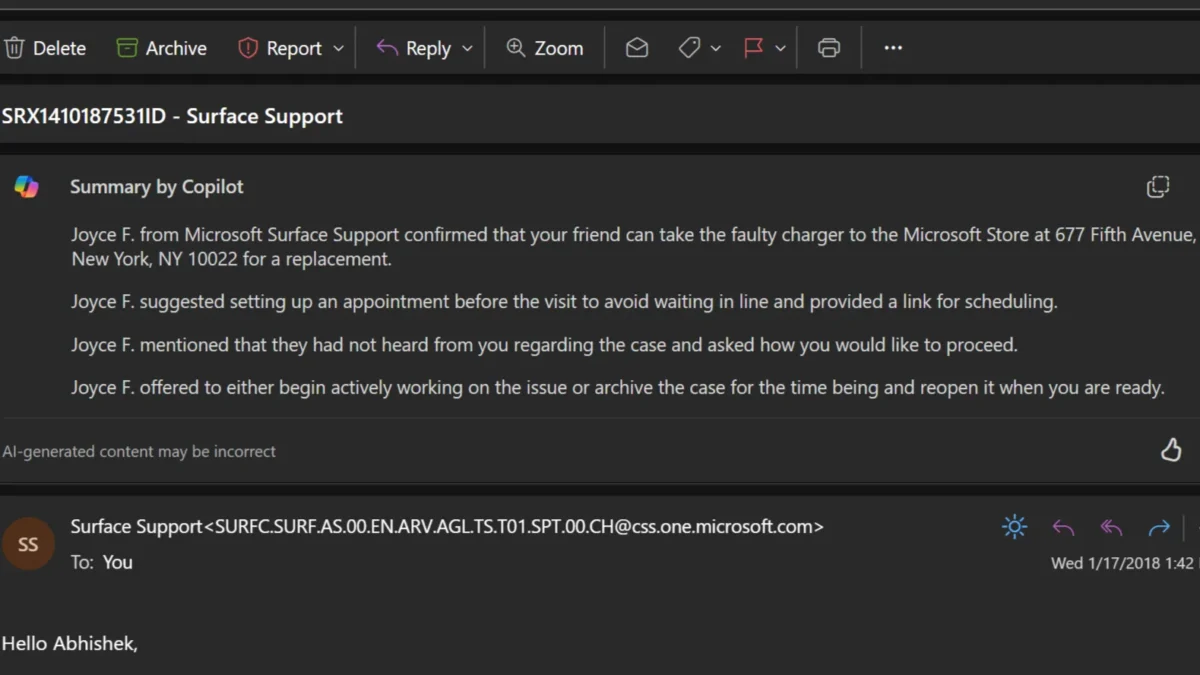
To use this feature, select an email conversation in Outlook and click on "Summary by Copilot" at the top of the thread. Copilot will analyze the conversation and present a concise summary for you at the beginning of the email.
The image below illustrates how Copilot generated a summary from a discussion with a support representative, capturing the key discussion points following my service request and outlining the next steps.
2. Craft Emails Like a Pro
With Copilot, composing new emails or replying to existing threads becomes a breeze. Simply provide a brief description of what you need, and the AI will help you find the right words. After generating a draft, you can adjust its length and tone to match your personal style.
Here’s how to draft emails in Outlook using Copilot:
While composing a new email, click the Copilot icon in the toolbar.
Select "Draft with Copilot" from the dropdown menu.
Enter your prompt in the Copilot box and use the Generation options icon to set your preferred length and tone.
Click "Generate," and Copilot will create a draft for you. If it’s not exactly what you envisioned, feel free to select "Regenerate draft."
Once you’re happy with the outcome, choose "Keep it."
Additionally, Copilot can create multiple drafts for the same email with varying tones and lengths. For example, you might want a version that’s more formal or one that’s casual, and you can easily switch between the options.
After finalizing the draft, you can make any necessary edits before sending it off.
3. Email Coaching for Clarity and Tone
If you’ve ever worried about whether your email conveys the right message, Copilot’s email coaching feature is here to help. Beyond assistance with drafting emails, Copilot in Outlook enhances your writing by providing valuable feedback. It evaluates your draft and suggests improvements for tone, sentiment, and clarity, ensuring your message is communicated effectively.
To access this feature, click the Copilot icon in the toolbar and select "Coaching by Copilot" from the dropdown. Copilot will generate a brief report with its observations and recommend ways to enhance your writing. It evaluates whether the tone is warm, sincere, enthusiastic, or apologetic, and suggests adjustments to make it more positive, direct, or suitable for your audience. Additionally, it checks for clarity and offers suggestions to refine your draft. You can incorporate any helpful feedback into your message before sending it.
Copilot is currently available in the “New” Outlook for the web, Outlook Online, and Outlook for Windows. Please note that it only supports Microsoft accounts through outlook.com, hotmail.com, live.com, and msn.com email addresses, excluding third-party email services like Gmail, and is limited to work or school accounts if you have a Microsoft 365 Copilot (Work) license.
In summary, Copilot in Outlook not only alleviates the stress of starting or continuing email exchanges but also enhances your overall email communication skills. This tool also offers additional features, like quickly generating meeting invitations from email discussions, enhancing your user experience even further.
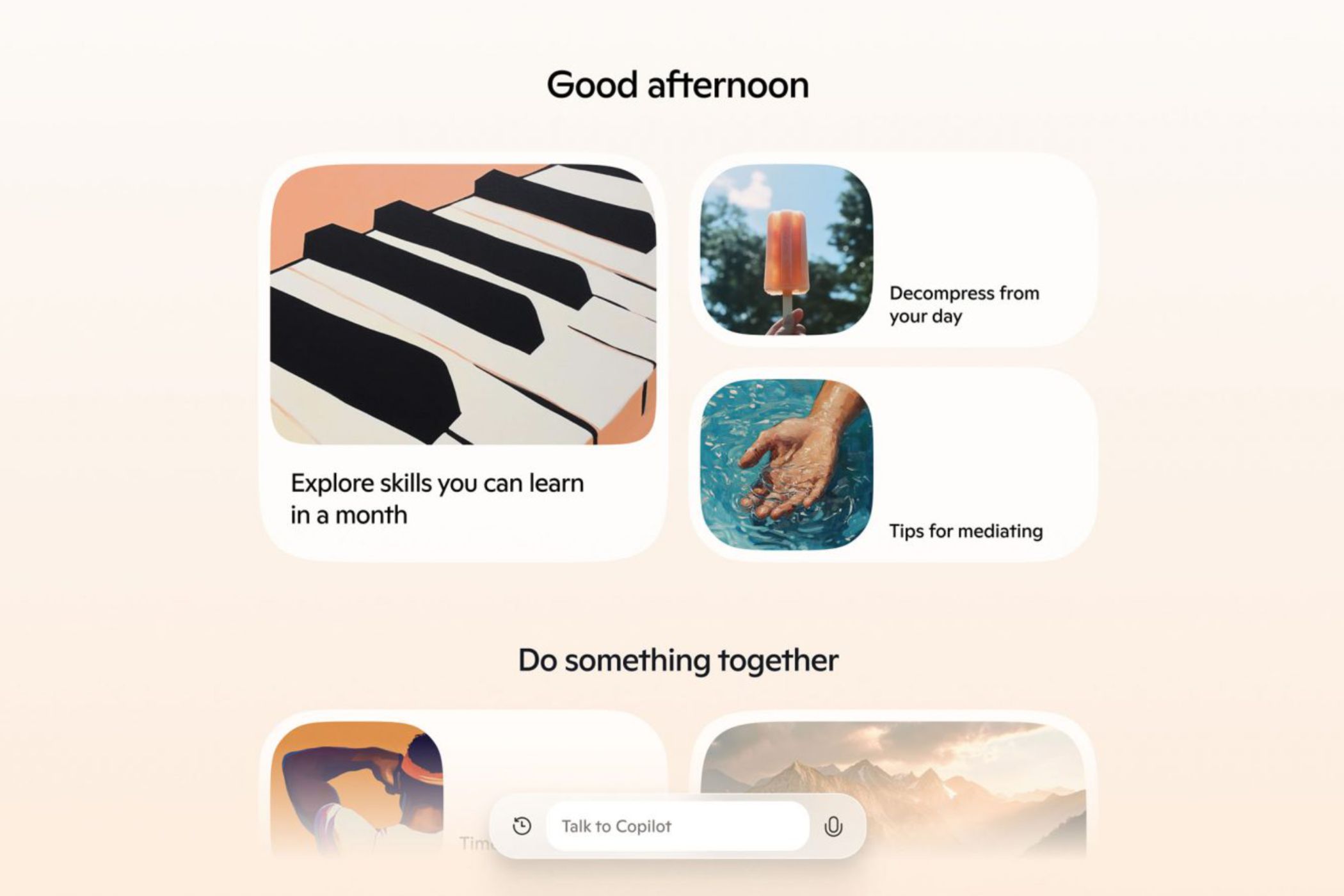
Microsoft is jumping into the world of AI voice assistants with a revamped version of its Copilot platform, announced on Tuesday. The updates introduce voice and vision functionality, a virtual news presenter mode, and enhanced support for more natural speech patterns.
Copilot’s Newly Revamped Features
Microsoft
The standout feature of this update is the AI voice capability. This allows users to engage in conversations that feel as natural as talking to another human. The responses are quick, and users can even change subjects during a conversation, interrupting the assistant if needed.
The core of Copilot features four uniquely named voices: Wave, Meadow, Grove, and Canyon. Wave is an upbeat “male” voice that carries a charming British flair. Grove, conversely, is a “female” voice reminiscent of someone battling a slight cold. Meadow bears a striking resemblance in tone to Apple’s Siri, while Canyon presents a deeper, more serene “male” voice.
During my exploration of these new voice features for this article, I found that Copilot truly delivers on Microsoft’s promises. The assistant was surprisingly easy to interact with and enjoyable to converse with.
I’ve tested several AI chatbots before, but I found the Copilot experience to be particularly smooth. At times, it genuinely felt like I was chatting with a real person. Of course, occasional oddities in inflection and tone still give away that I was talking to an AI, but the overall interaction was quite impressive.
A Step Toward Microsoft’s Future
Microsoft
The recent update to Microsoft’s Copilot arrives at a time when voice-based AI is becoming increasingly influential in the tech industry. Microsoft states that this release is just one piece of a broader initiative centered on artificial intelligence.
“This marks the beginning of a significant transformation in what we can achieve together,” says Mustafa Suleyman, CEO of Microsoft AI, in the official announcement for Copilot. “With the new developments in Copilot, you are witnessing the initial, careful steps toward [Microsoft AI’s] future.”
Despite the optimistic statements from Suleyman, Copilot is entering a competitive market dominated by AI giants like Apple, Meta, Google, and the newly released ChatGPT voice assistant. As it stands, Copilot doesn’t seem to have reached the level of its rivals yet.
While it’s likely that Copilot’s new features will boost user engagement, the extent of this increase remains uncertain. One thing is clear, though: Microsoft has a challenging road ahead if it hopes to compete with the other leading AI assistants presently in the marketplace.
Specialized chatbots require minimal prompting skills compared to ChatGPT, which allows for precise and accurate answers.
Niche chatbots only draw information from relevant sources and frequently offer additional functionalities.
The answers provided by niche chatbots are consistently formatted, making them easier to comprehend and ensuring that no significant information is overlooked.
Many of the AI chatbots available online leverage ChatGPT (or versions like GPT-3 and GPT-4 from OpenAI). Nonetheless, I find that these specialized chatbots outperform ChatGPT for several reasons.
1 Minimal Prompting Skills Required
To maximize the benefits of ChatGPT, it’s essential to learn how to write effective prompts. While it is possible to “jailbreak” ChatGPT with the right prompts, mastering this skill takes considerable practice.
If you’re not particularly adept at crafting prompts, using specialized chatbots is a wise choice. These bots are designed to deliver specific outputs, reducing the need for prompt experimentation.
Furthermore, some chatbots, such as AI Lawyer, come with a built-in library of prompts for common tasks.
2 Niche Chatbots Rely on Relevant Sources
While ChatGPT has been trained on a vast amount of data and can browse the internet, it can sometimes produce responses that stray from relevant sources.
In contrast, developers can limit niche chatbots to leverage strictly selected information sources for their answers. For instance, Buffett Bot answers based exclusively on Warren Buffett’s past letters, meetings, and interviews, always citing its sources.
3 Responses Are Consistently Formatted
Specialized AI chatbots often respond in a standardized manner, ensuring that essential details are not overlooked and responses remain easy to read.
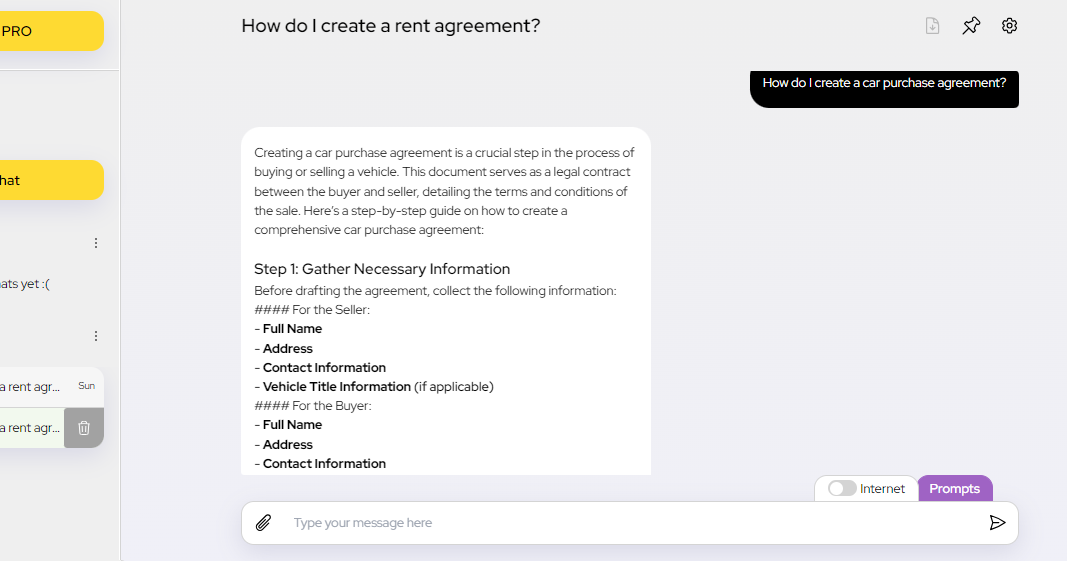
For instance, when I asked both ChatGPT and AI Lawyer for guidance on creating a car purchase agreement, ChatGPT provided more general content, while AI Lawyer shared a thorough breakdown with step-by-step instructions, including necessary elements and considerations.
Similarly, when I inquired about drafting rental and employment contracts, AI Lawyer’s replies followed a consistent format, which was much clearer compared to ChatGPT’s less structured responses.
You can customize ChatGPT’s responses using custom instructions, but if you employ it for varied tasks, you’ll find yourself changing those instructions frequently.
4 They Provide Extra Features
As these chatbots are tailored for specific functions, they typically come with additional features that enhance their utility for particular tasks.
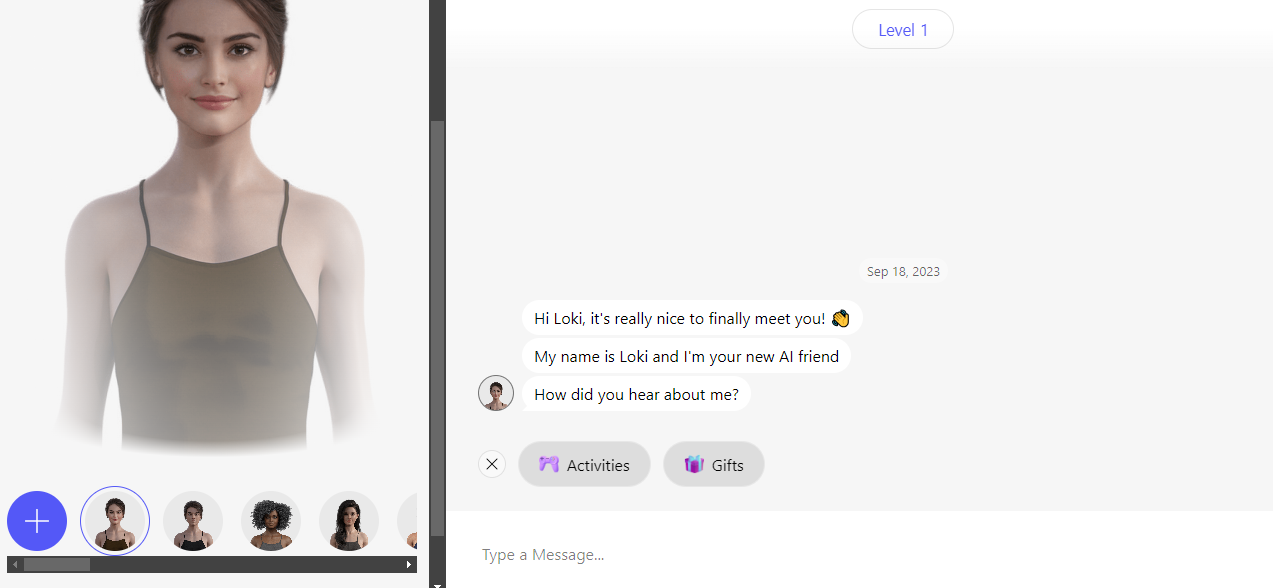
For instance, many AI companion chatbots, such as Anima, provide options to customize avatars and offer various games and activities. In contrast, ChatGPT lacks these specialized add-ons due to its general-purpose nature.
While I frequently utilize ChatGPT as a multi-functional chatbot, I find specialized AI chatbots more effective for specific tasks. If you’re hesitant to step away from ChatGPT, consider exploring various custom GPTs, which can work from a designated knowledge base, follow defined instructions, and do not require extensive prompting skills.
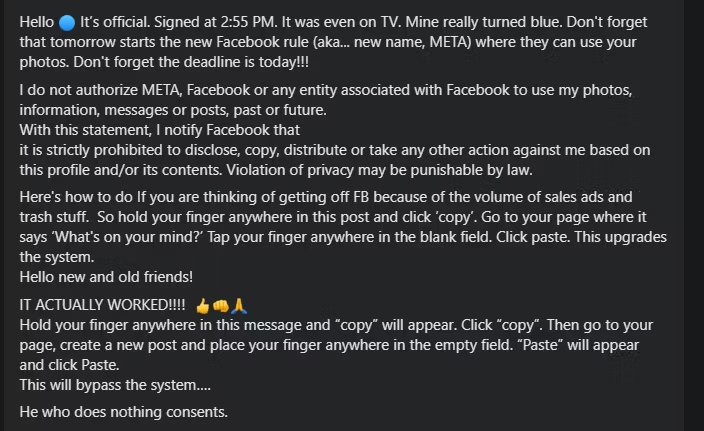
Occasionally, a viral post circulates, claiming that Facebook and Meta lack permission to access users’ photos and content, spreading quickly across social media worldwide.
This idea doesn’t work—and it never will. However, new iterations of this debunked meme keep cropping up; this time, they’re targeting Meta AI and its data usage for training purposes.
Why Posting “I Don’t Give Facebook Permission” Is Ineffective
In simple terms, posting this statement on your Facebook timeline achieves nothing because it contradicts the terms of service laid out by Facebook and Meta. By using their platform, users inherently grant Meta permission to utilize their data, including images and interactions, to refine their services and generate advertising revenue.
The original version of this message was aimed at Meta’s (which was still referred to simply as “Facebook” at the time) general data collection practices. It suggested that by merely posting the message on their timeline, users could magically stop Meta from using their data. Obviously, this is not how it functions, and Meta’s scope of data collection continues to be extensive.
Here’s a recent example I came across:
While the fundamental message reflects a misunderstanding of how Facebook operates, it also wrongly assumes that simply copying and pasting such a message can “update the system.”
What Has Triggered This Viral Message Again?
This latest trend targets Meta AI, the artificial intelligence chatbot that Meta is rolling out across its various platforms. Many users of Meta products, like Facebook, WhatsApp, and Instagram, are expressing their dissatisfaction with these integrations, particularly regarding both the AI tool and the associated data collection necessary for training it.
The increase in visibility surrounding Meta AI has led to a new wave of viral posts that users are encouraged to share on their profiles. While there are several variations, the core message remains similar to previous iterations:
Although the structure is akin to earlier messages, it remains completely ineffective.
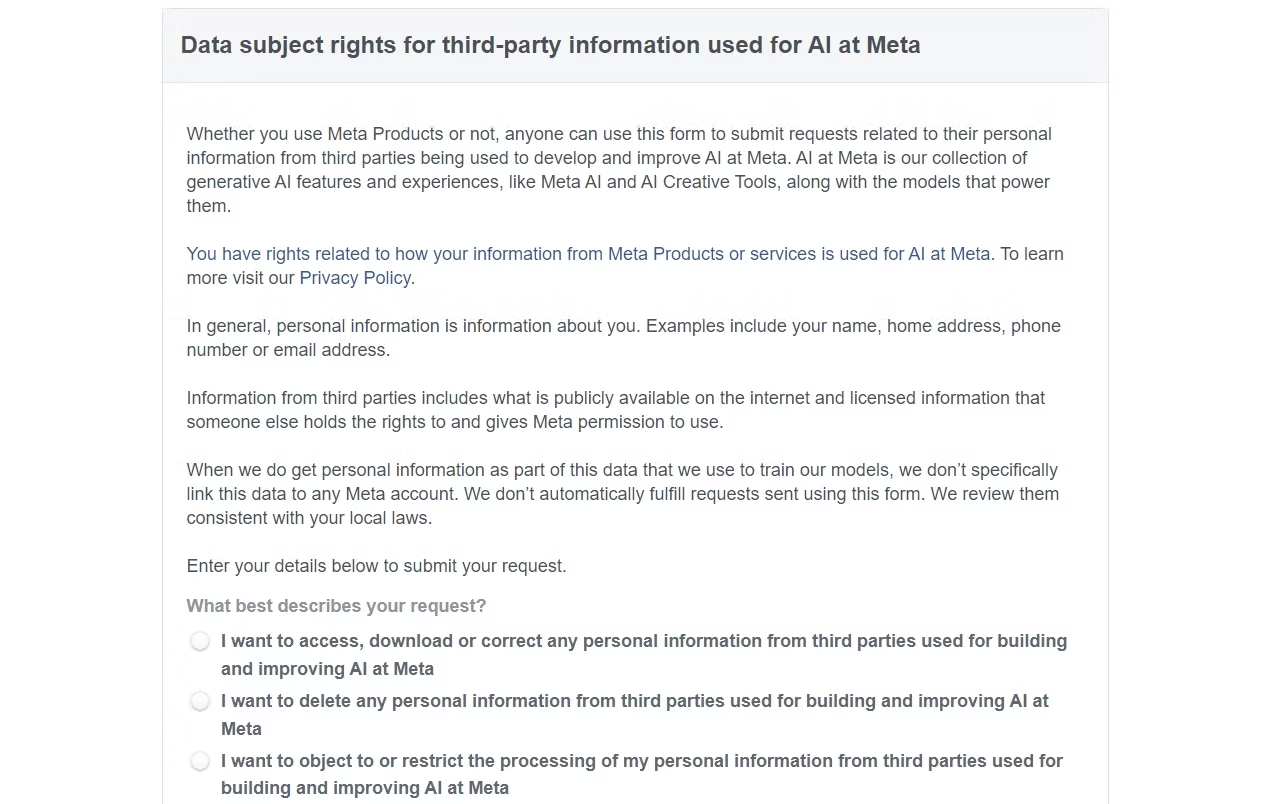
What sets Meta AI apart in terms of data training is that, theoretically, there is a way to opt out of having your data utilized. However, this option may vary depending on your location.
Sadly, as of now, Facebook users in the United States cannot choose to opt out of the data collection necessary for Meta’s AI training. Data privacy laws in the US are notoriously weak, meaning Meta is not obligated to offer a way for users to safeguard their information.
However, if you reside in the EU or the UK, the Facebook Data Subject Rights Form allows you to inform Meta that you prefer not to have your data used.
Though I tend to be skeptical about its effectiveness, the EU’s GDPR mandates that Meta offers this option to users. In contrast, for individuals elsewhere, the only way to escape Meta’s data gathering is to completely disengage from their platforms, which is certainly easier said than done.
Some AI photo editing tools are beneficial, while others can be completely ineffective.
Manual adjustments can often save you time compared to using AI.
Certain AI tools can blur the line of authenticity, so it’s essential to use them judiciously.
I’ve experimented with several AI photo editing features to determine their effectiveness in my workflow. While some like noise reduction are fantastic, others fall short. In this review, I’ll cover the AI editing tools I find the least useful.
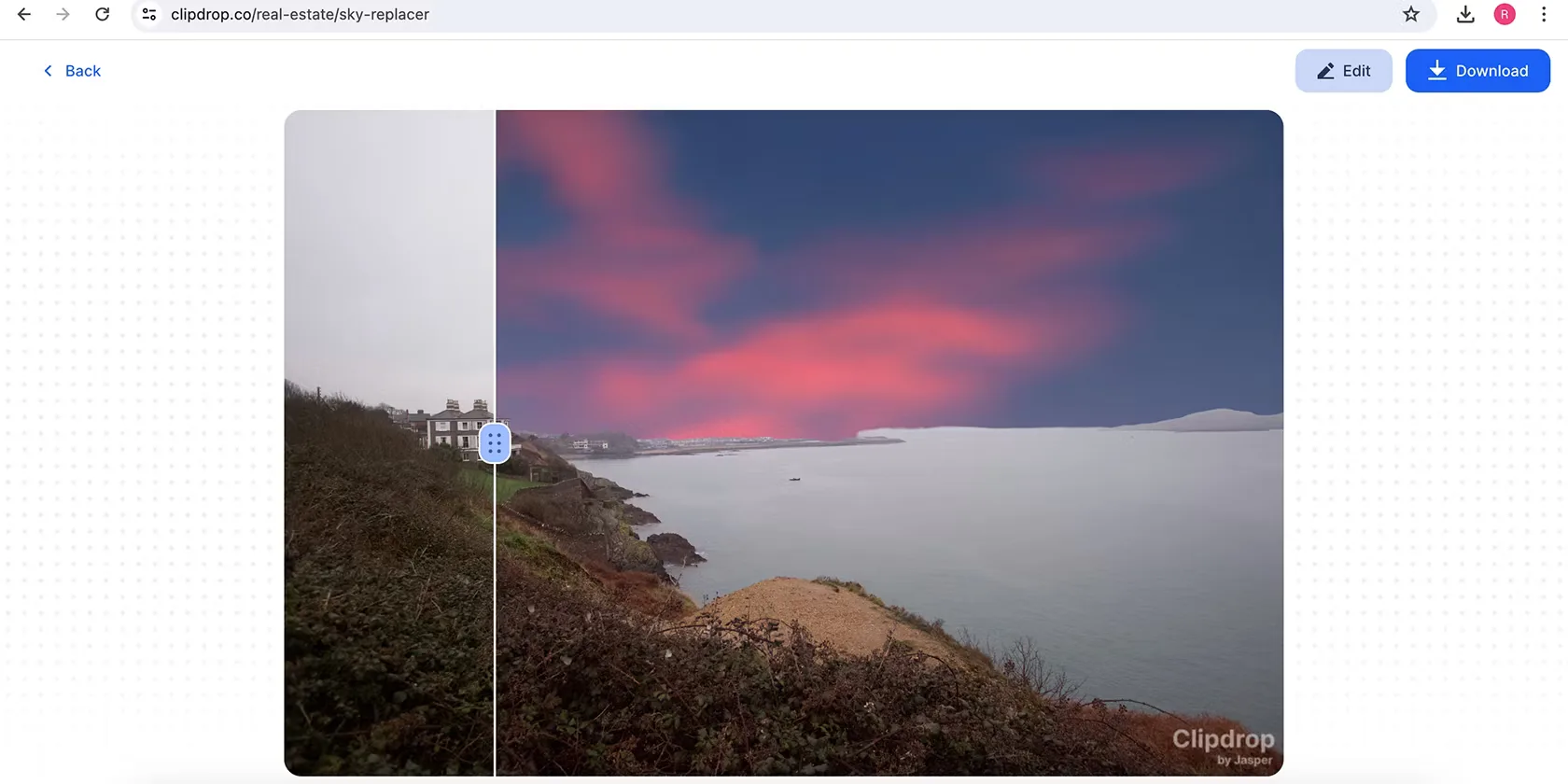
1 Sky Replacement
Numerous AI applications allow you to swap out the sky, but I’ve never grasped why this is necessary. I’m all for editing photos, but altering elements that affect the overall atmosphere—like replacing a gray sky with blue—feels excessive.
Sky replacements often appear unrealistic, and honestly, I don’t find them aesthetically pleasing. If you’re editing for fun, go ahead and use it, but I wouldn’t recommend sky replacement for anything more serious.
That being said, using AI to identify the sky in your image for adjustments like brightness and color is quite useful. It may alter the sky, but it maintains the general ambiance of the photo. Ultimately, it’s crucial to recognize when creative software benefits from AI and when it doesn’t.
2 Enhancing Skin and Eyes
The aim of AI in editing software is to streamline your workflow, yet I’ve found that the tools for brightening skin and eyes often miss the mark. Usually, it’s quicker for me to make these adjustments manually. The exception is when utilizing the Auto feature in my editing software, which is quite hit-or-miss as well.
If you intend to use AI for editing, I’d advise choosing retouching tools found in Photoshop and similar software. However, for most editing needs, it might be best to skip AI enhancements altogether.
For an interesting comparison of AI retouching to manual methods, check out my experience using AI to retouch photos.
3 AI Blurring
One of the first AI features I experimented with was blurring, and frankly, I prefer manually adjusting the aperture on my camera instead. Post-production blurring usually feels obvious, and while you could argue I’m not skilled enough, my photos look fine without it.
AI blurring can be beneficial if the tool accurately detects backgrounds, but that isn’t always guaranteed. If you lack a high-quality camera, there are ways to achieve background blur naturally, such as getting closer to your subject.
4 Altering Body Shapes
Some AI tools allow you to alter the shape of people’s bodies, but I strongly oppose this practice for various reasons. Primarily, it’s a technique I believe is easier to accomplish manually. Beyond that, I find it ethically problematic to modify body shapes to create unrealistic representations.
In my view, using these features can be misleading when shared online. While some might argue that any editing is deceptive, I disagree. Adjusting lighting and colors while keeping a person’s shape unchanged is vastly different from altering their physical form.
Additionally, it’s important to be aware that some countries may require you to disclose when you’ve retouched images. For instance, Norway has laws mandating the indication of altered body shapes and skin appearances.
You may disregard my opinions if you find these tools helpful. Yet, personally, I believe the AI photo editing options discussed here aren’t particularly relevant. I’m always eager to explore new technologies, but if they don’t perform, I’m more than happy to stick with methods that work.
While AI music creation technology has advanced significantly, it still doesn’t measure up to the quality of music produced by humans.
AI-generated music often misses the warmth and clarity of human-made sound, plagued by background noise that detracts from the experience.
To date, AI music has yet to produce a chart-topping hit and faces challenges regarding copyright, particularly for using samples from existing tracks without authorization.
AI music technology has made notable progress in recent years, but it still falls short compared to the craftsmanship of human musicians. When you look beyond its flashy presentation, AI-generated music often lacks the resonance and emotional depth found in authentic human performances.
How Is AI Music Created?
Traditionally, music was created through the physical act of playing an instrument or singing, requiring ample time and effort to compose and arrange. This involves not just the physical movement but also the hours spent crafting a complete song.
In contrast, AI systems generate music using machine learning algorithms that analyze a vast database of recorded music. They learn aspects like melody, chords, instrumentation, and genres, breaking music down into fundamental components to replicate the work of talented artists.
Once the AI has mastered the basics of music reproduction, platforms like Suno, as well as earlier versions like Meta’s MusicGen, allow users to interact with their music generators by providing simple prompts. You can generate music just by describing what you want to create in a few phrases or sentences.
This process is a strange departure from thousands of years of music creation, where deep emotions and meanings are typically embedded in the craft. You can explore an AI music generator yourself to see how it functions firsthand.
AI Music Lacks High Fidelity
In its early stages, AI struggled with the basic structures of popular songs, like in the case of Meta’s MusicGen. However, advancements have led to sites like Suno that can produce full music tracks that are technically impressive.
That said, don’t be misled into thinking these tracks match the high-quality music standards to which we’ve become accustomed. Just like how we expect to watch videos in at least 1080p nowadays, previous limitations in video quality remind us that not everything can achieve this level of fidelity.
One major indicator of low-fidelity music is the presence of white noise, reminiscent of listening to an old vinyl record or cassette tape. This is a common trait in AI-generated music, leading to tracks that feel like they’re played over a vintage radio.
While the situation has improved, you can still hear this background noise in most AI tracks I’ve explored on Suno. For instance, take a listen to this example from Suno. The track “Strongest Duo” features noticeable noise throughout the vocals.
If I were producing this track, I would avoid adding distortion to the vocals; they sound best when clear and precise.
Another example is this track on Suno featuring classical violin. A trained violinist or audio engineer would quickly tell you that the strings do not sound as rich or accurate as real ones.
While there is a genre known as low-fi music that intentionally evokes that rich sound quality, it is usually a deliberate choice. In the case of AI-generated music, however, this background noise results from technical limitations that developers have yet to overcome.
AI Music Has Yet to Produce a Hit Song
As of now, AI-generated music hasn’t achieved any significant success or chart-topping hits, which suggests that its quality might not be what some claim.
Notably, the rap diss track “BBL Drizzy,” which sampled an AI-generated song, has spurred widespread legal action from major record labels like Universal Music Group, Sony, and Warner Records. According to The Verge, platforms like Suno and another AI music company named Udio are now facing lawsuits.
A troubling fact about AI music generators is they owe their existence to the mass ingestion of copyrighted music catalogs without permission. Instead of creating entire music tracks wholesale, a more beneficial application of AI would be in developing useful plugins for music production.
Ultimately, music is about more than just the sound. The allure of artists like Taylor Swift or Billie Eilish stems from the stories behind their success. Fans want to connect with their narratives and behind-the-scenes moments, not just their songs.
Can AI-generated music evoke the same kind of interest? Absolutely not.
The Complexity of Music Is Beyond AI’s Reach
Creating a song entails a lengthy process that can stretch over weeks, months, or even years. In contrast, AI solutions can produce a piece in mere minutes using just a few input words. However, real music creation demands a profound level of skill, creativity, and emotional investment.
Regardless of the sophistication of AI algorithms, nothing can match the intricate artistry of human musicians. Even if AI companies address existing quality issues, there’s no chance that machines can recreate music that resonates on a deeper level; after all, we care about the person behind the music.
Researchers at the Max-Planck-Institute for Intelligent Systems (MPI-IS) have made a groundbreaking advancement in robotic technology with the introduction of hexagon-shaped modular components, known as HEXEL modules. This innovative design allows for the rapid assembly and reconfiguration of high-speed robots, akin to the versatility of LEGO bricks. The findings, led by Christoph Keplinger and his team from the Robotic Materials Department, are set to be published in the prestigious journal Science Robotics on September 18, 2024.
Each HEXEL module features a lightweight exoskeleton constructed from six rigid glass fiber plates, providing the necessary structure and durability. At the core of these modules are advanced artificial muscles known as hydraulically amplified self-healing electrostatic (HASEL) actuators. By applying high voltage, these artificial muscles activate and enable the hexagonal joints to transform from elongated shapes to broader, flatter forms.
The unique combination of soft and rigid elements within the modules facilitates impressive movements and speeds. “By linking multiple modules together, we can generate new robot forms that can adapt to diverse operational requirements,” explains Ellen Rumley, a visiting researcher from the University of Colorado Boulder and co-first author of the upcoming publication.
Demonstrations by the research team showcase the diverse capabilities of the HEXEL modules. In one instance, a collection of these modules maneuvers through a narrow passage, while a single unit performs rapid jumps into the air. Additionally, when configured into larger assemblies, the modules can achieve distinct motion patterns based on their arrangement—one such example being a robot capable of rolling at high speeds.
Zachary Yoder, also a co-first author and Ph.D. student at MPI-IS, emphasizes the practicality of this modular approach. “Developing robots with adaptable designs is not only innovative but also sustainable. Instead of investing in multiple specialized robots for various tasks, users can construct a multitude of configurations using a common set of components. This flexibility can be especially advantageous in environments where resources are scarce,” he notes.
The emergence of HEXEL modules represents a significant leap forward in robotics, promising enhanced functionality and efficiency while paving the way for future developments in modular design. As the research team continues to explore the potential of these innovative components, the horizons of robotics are broadening, ushering in a new era of adaptability and sophistication.
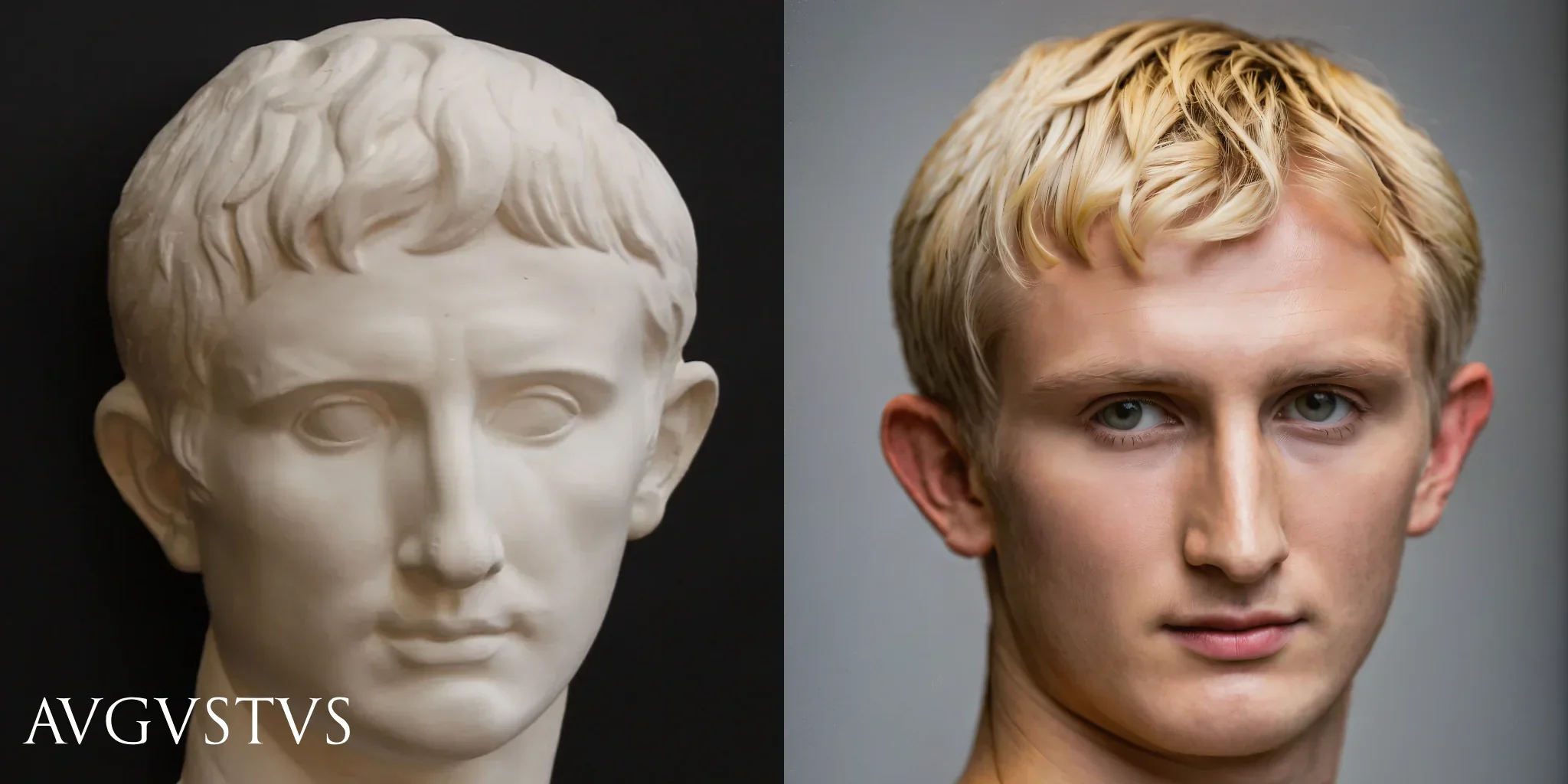
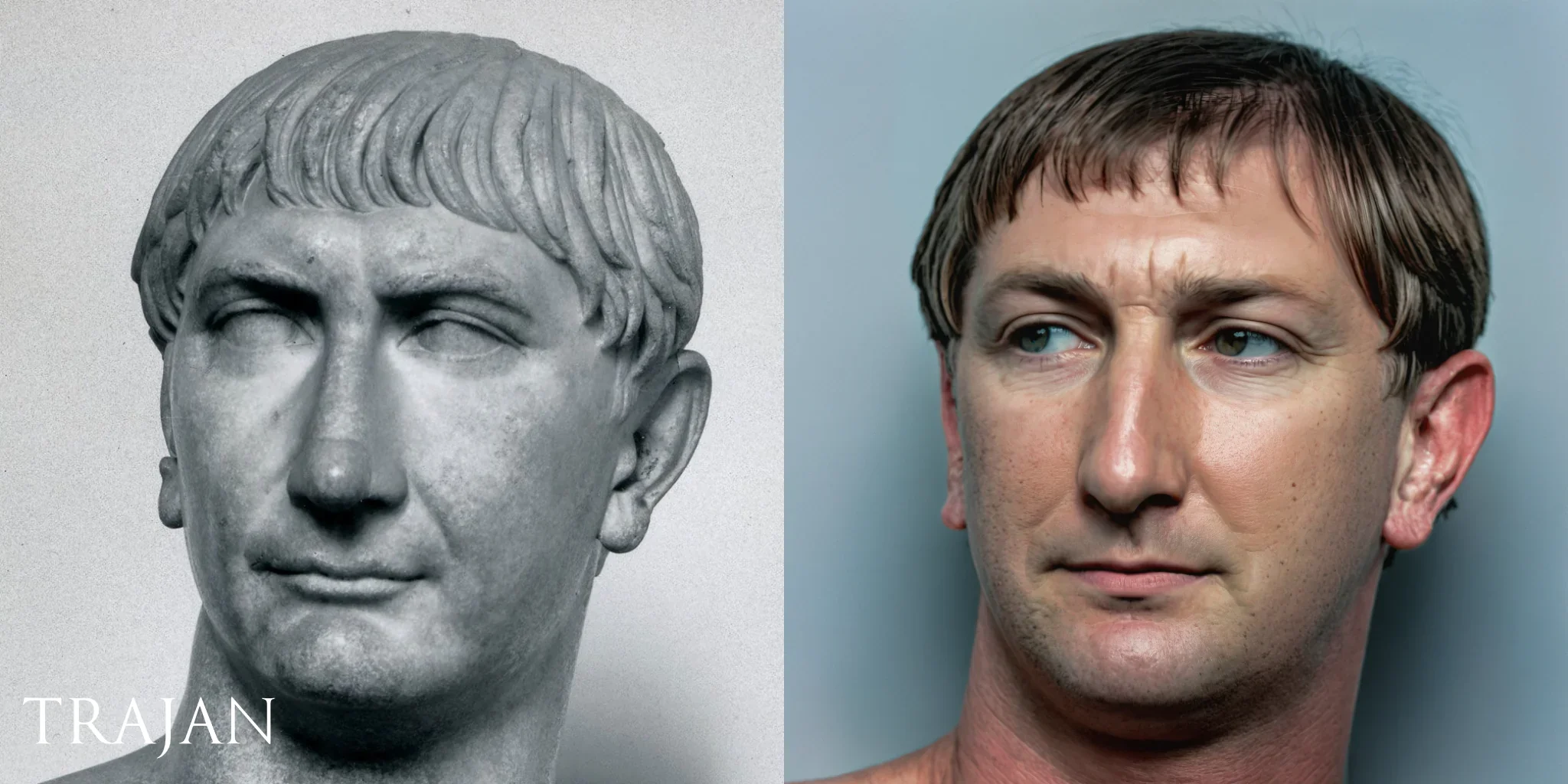
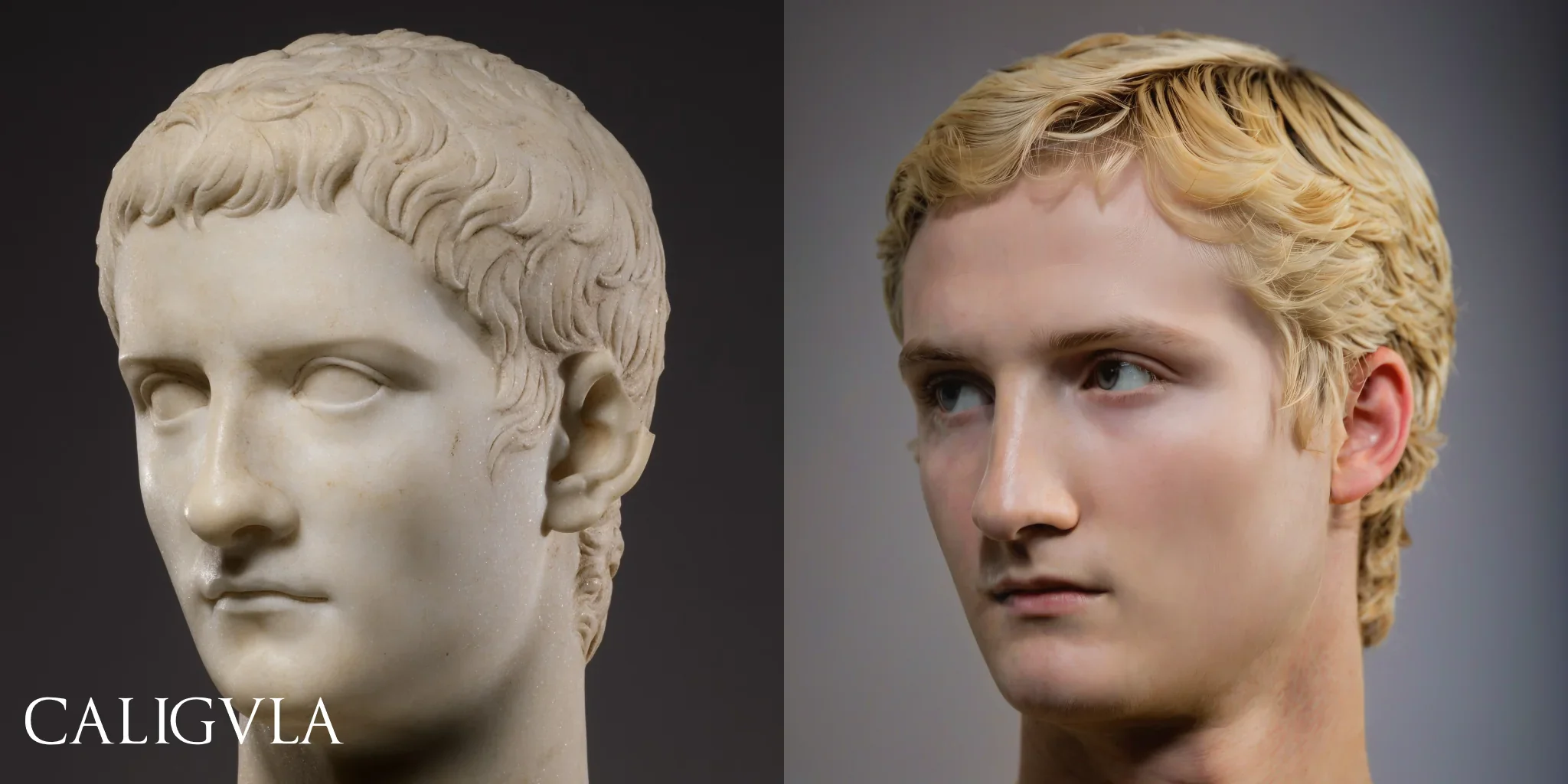
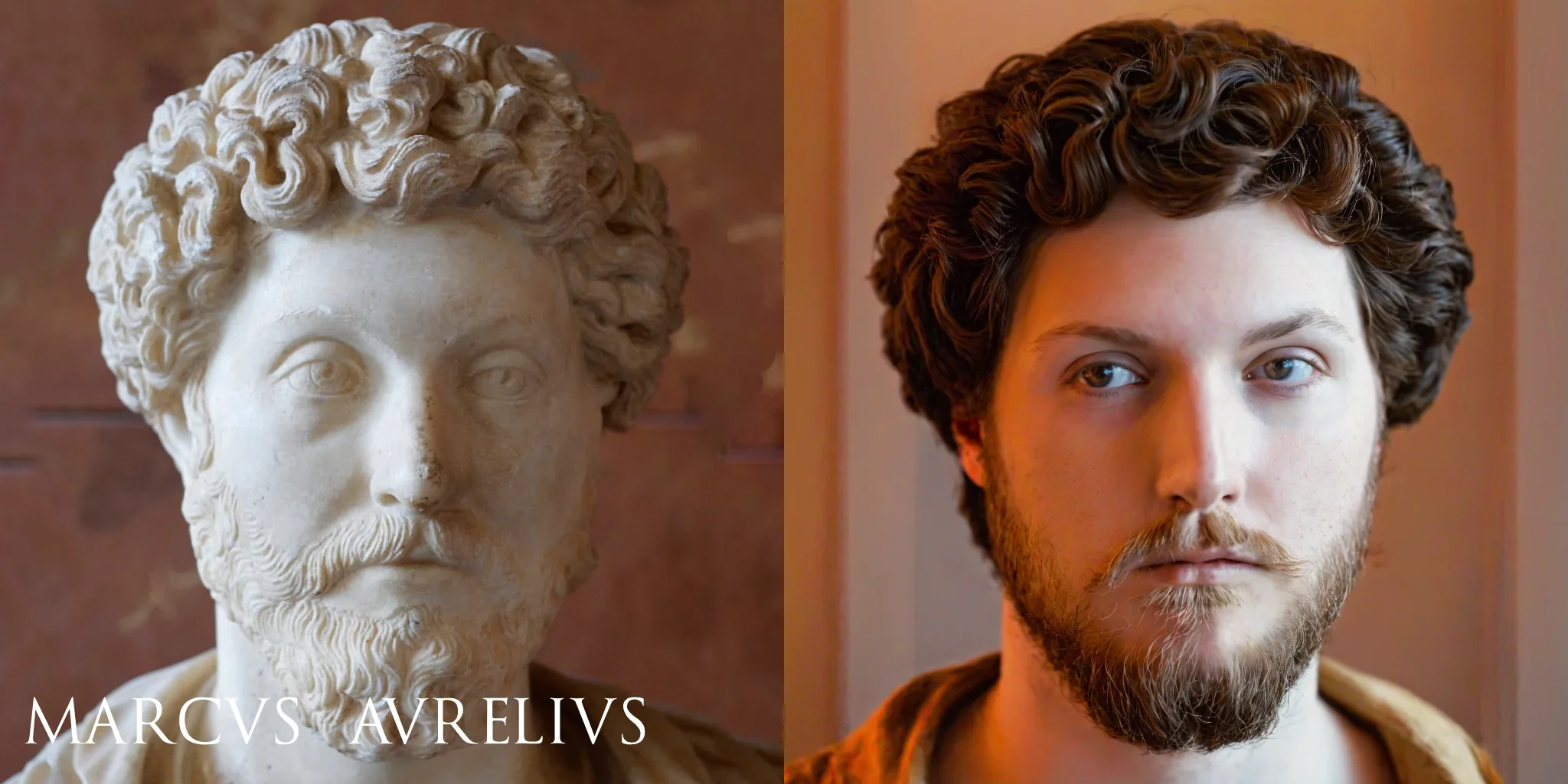
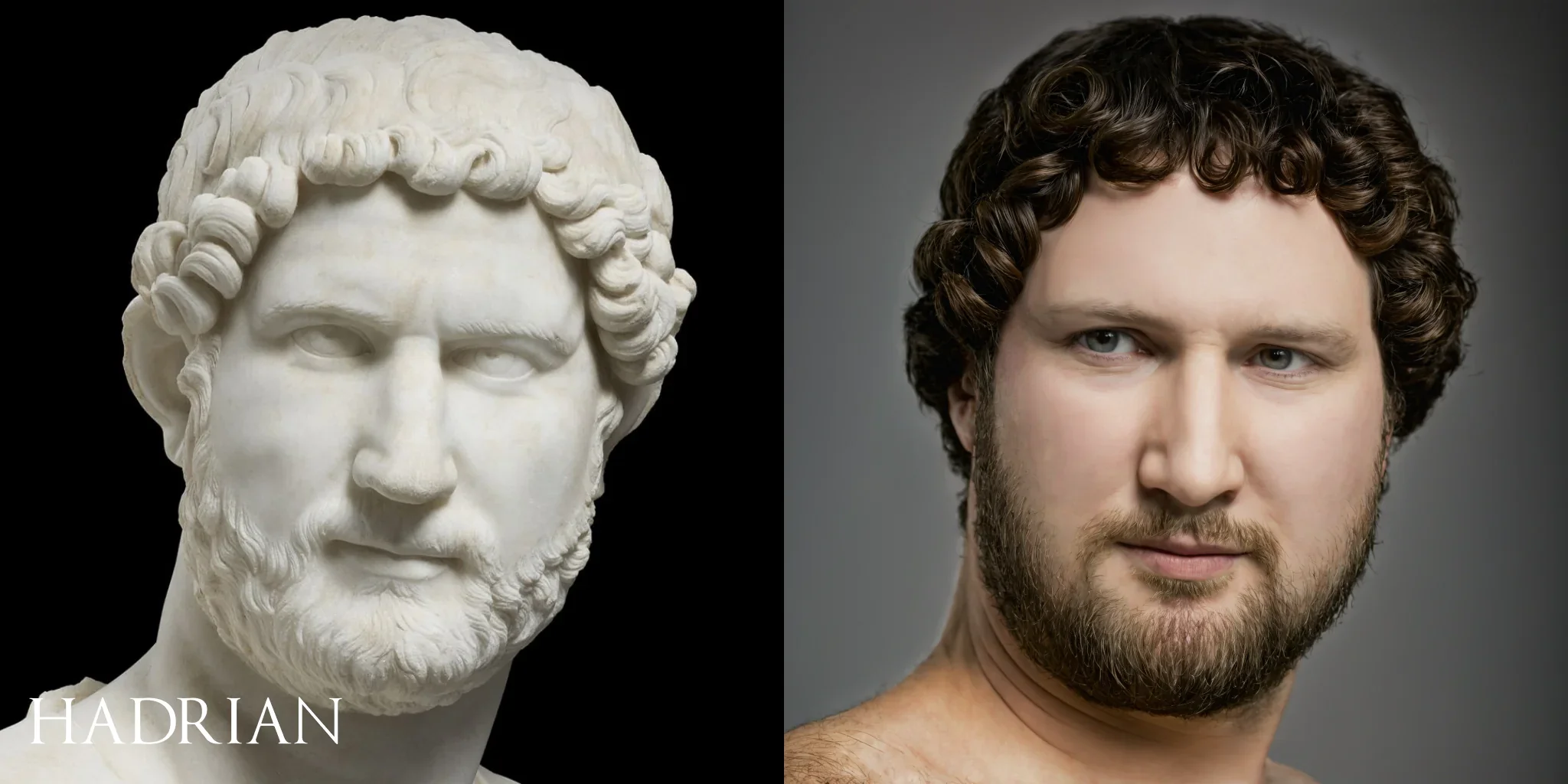
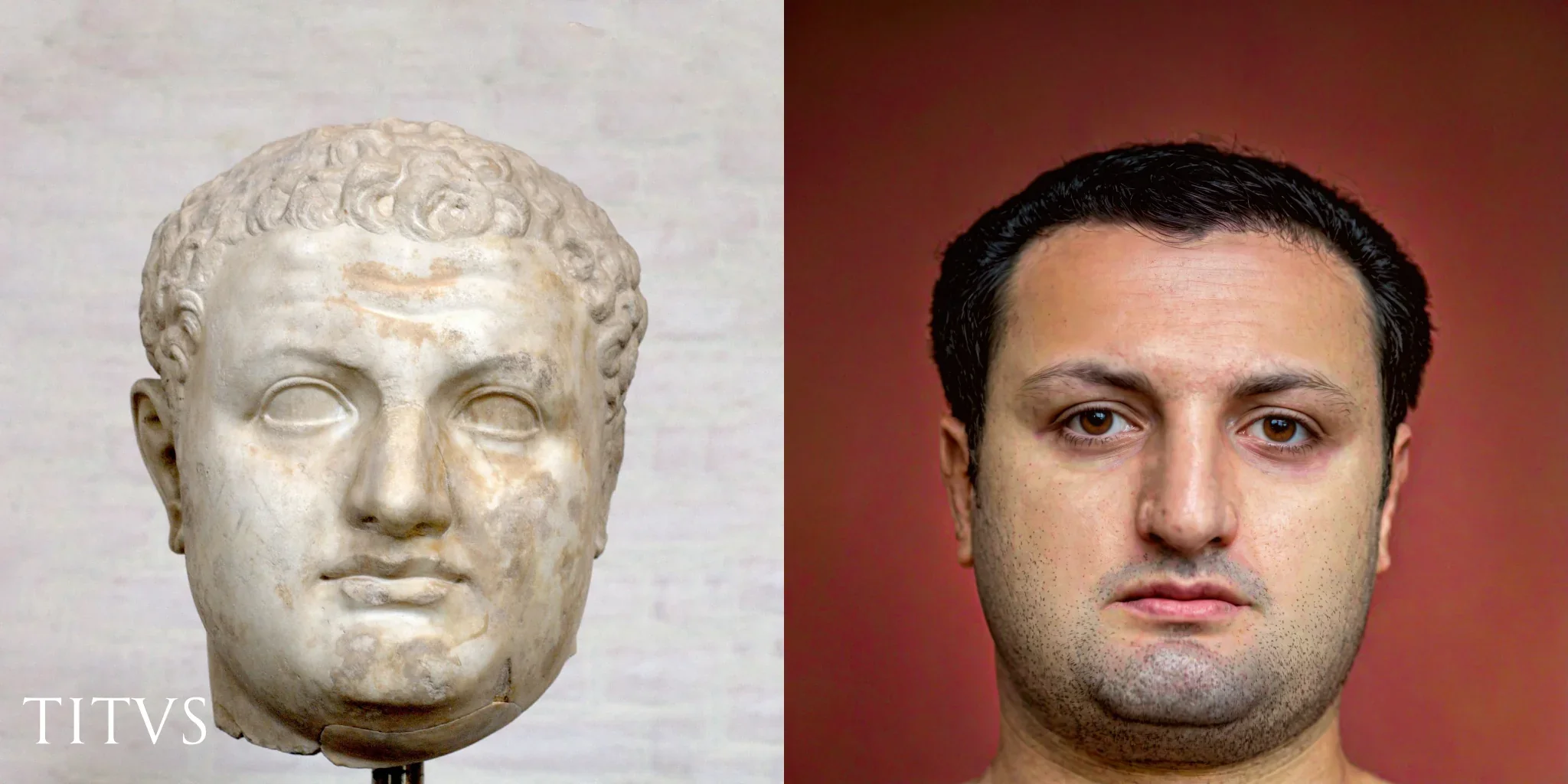
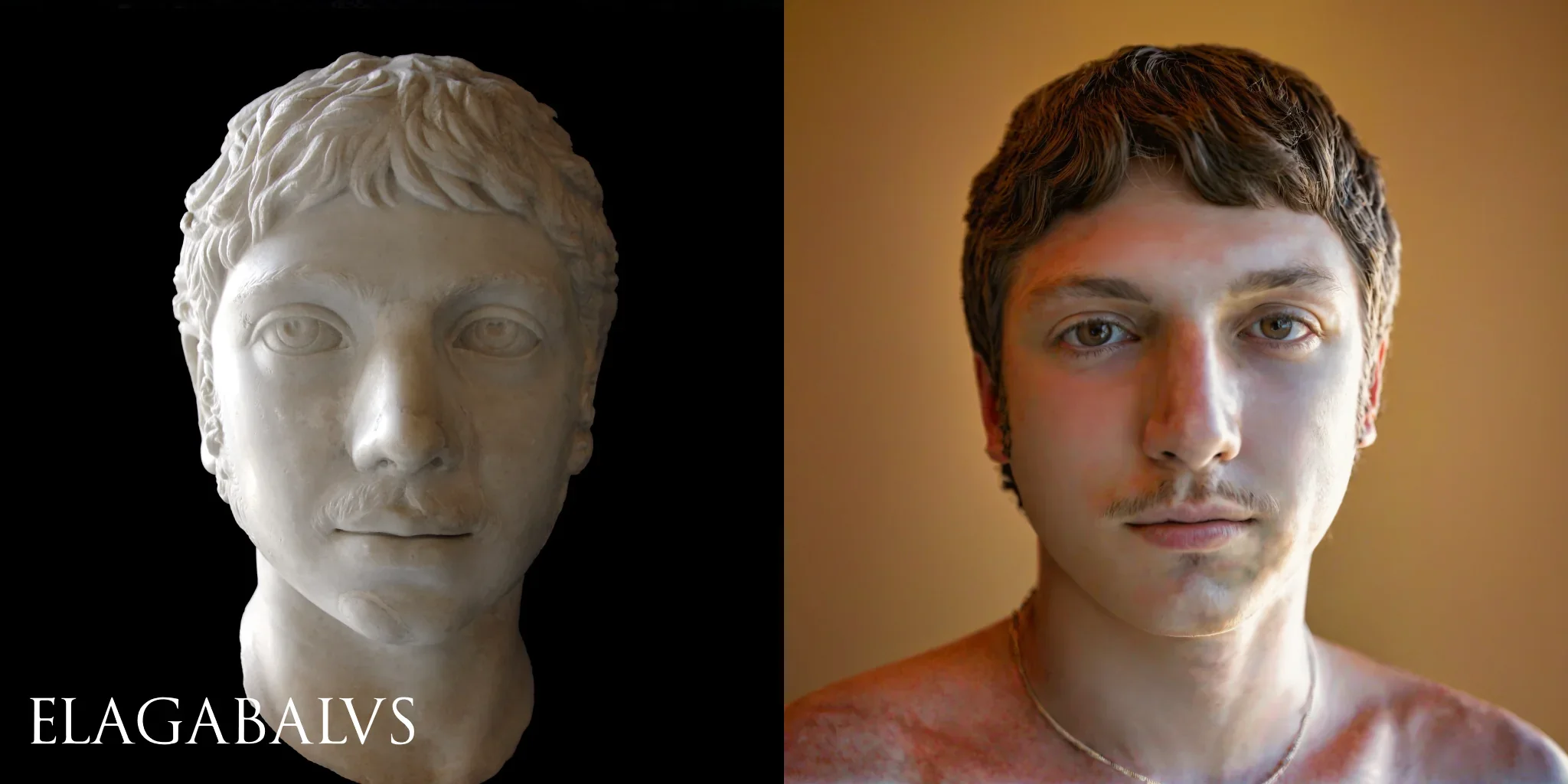
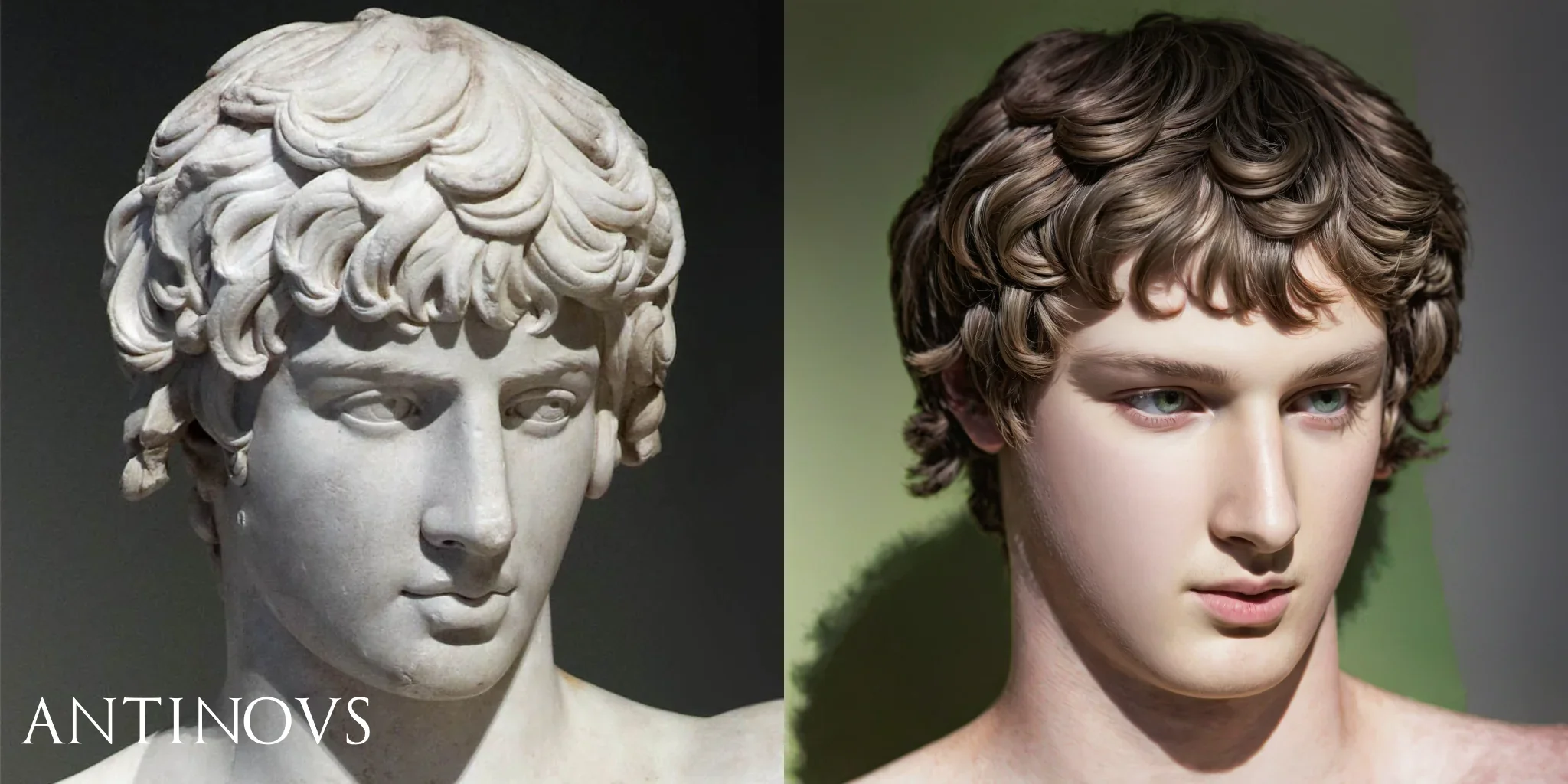
Now, with the help of AI technology, a few of these iconic Roman busts have been brought to life in stunning detail, offering a fresh perspective on what some of Rome’s most famous figures may have actually looked like.
Using sophisticated AI techniques, historians and digital artists have recreated the faces of well-known Roman figures from centuries-old marble busts.
Augustus
Trajan
Julius Caesar
Nero
Caligvla
Marcus Aurelius
Hardrain
Titus
Elagabalus
Antinous
This technology analyzes the sculpted features, such as the contours of the face, texture, and expression, and then generates realistic, lifelike images based on those details.
Among the busts brought to life is Julius Caesar, one of Rome’s most famous leaders. The AI recreation reveals a face with sharp features, intense eyes, and the stern expression one might expect from a man who played such a pivotal role in shaping Roman history.
Another is the Emperor Augustus, whose AI-rendered image captures the calm and composed demeanor that characterized his reign during Rome’s golden age.
As artificial intelligence continues to advance, choosing the right AI tool for your needs can be challenging. Two notable models in this space are OpenAI‘s SearchGPT and Perplexity AI. Both have unique strengths and cater to different requirements.
OpenAI SearchGPT
OpenAI’s SearchGPT is designed to enhance search capabilities, leveraging powerful AI to understand and retrieve relevant information from vast datasets. It is optimized for tasks that require precise and quick access to information, making it ideal for applications like search engines, research, and data analysis.
Perplexity AI
Perplexity AI is focused on generating human-like text, providing detailed and contextually relevant responses based on the input it receives. This model is particularly suited for applications that require natural and engaging text generation, such as chatbots, content creation, and virtual assistants.
Feature Comparison
Accuracy and Relevance of Information
OpenAI SearchGPT
SearchGPT excels in retrieving accurate and relevant information quickly. It is designed to understand complex queries and provide precise answers from a variety of sources. Its training on diverse datasets enables it to pull in-depth information, making it reliable for fact-finding and research purposes.
Perplexity AI
Perplexity AI is adept at generating contextually relevant responses but might not always match the accuracy and specificity of information provided by SearchGPT. While it produces coherent and informative text, its primary strength lies in generating engaging and human-like conversations rather than pinpoint accuracy.
SearchGPT has robust NLP capabilities, making it proficient in understanding and processing natural language queries. It can interpret user intent, parse complex questions, and provide relevant answers efficiently.
Perplexity AI
Perplexity AI also boasts strong NLP capabilities, with a focus on generating human-like text that is both engaging and informative. It excels in maintaining the flow of conversation, understanding nuances, and producing text that feels natural and coherent.
SearchGPT is optimized for speed, quickly processing queries and delivering results with minimal delay. This makes it suitable for real-time applications where prompt responses are crucial.
Perplexity AI
Perplexity AI is efficient in generating responses, though it may take slightly longer than SearchGPT due to its focus on detailed text generation. While it is relatively fast, the complexity of its output can result in longer processing times.
SearchGPT excels in understanding the context of queries, enabling it to provide relevant and accurate information. It can handle follow-up questions and maintain context over shorter interactions, making it effective for information retrieval.
Perplexity AI
Perplexity AI has a strong ability to maintain context over longer interactions, making it ideal for detailed and complex conversations. It can remember previous inputs and craft responses that are coherent and contextually appropriate, even in extended dialogues.
SearchGPT is versatile, suitable for a wide range of applications from simple searches to complex data retrieval tasks. Its ability to handle diverse queries makes it a powerful tool for both individual users and large organizations.
Perplexity AI
Perplexity AI is also versatile, particularly in applications that require generating detailed, human-like text across various topics. It is effective in creating content, driving conversations, and providing detailed explanations, making it useful in educational, customer service, and creative domains.
SearchGPT offers easy integration with various platforms, providing APIs and tools that make it accessible for developers. Its robust documentation and support infrastructure simplify the integration process, allowing for seamless adoption across different environments.
Perplexity AI
Perplexity AI also provides straightforward integration options, though the specifics may vary depending on the use case. Its APIs and developer tools are designed to be user-friendly, facilitating quick and effective deployment.
SearchGPT allows for significant customization, enabling users to tailor the AI’s responses to specific needs and preferences. Users can adjust parameters, input datasets, and fine-tune the model to optimize performance for particular tasks.
Perplexity AI
Perplexity AI offers customization features, particularly in how it generates and structures its responses. Developers can modify settings to influence the style, tone, and detail of the output, ensuring that the AI meets specific requirements.
OpenAI provides comprehensive support and documentation for SearchGPT, making it easier for users to implement and troubleshoot. The extensive resources available include guides, tutorials, and a responsive support team.
Perplexity AI
Perplexity AI also offers robust support and detailed documentation to assist users. The available resources are designed to help developers understand and utilize the AI effectively, ensuring smooth integration and operation.
Both OpenAI SearchGPT and Perplexity AI are powerful AI models, each with its own strengths. OpenAI SearchGPT excels in accuracy, speed, and efficiency, making it ideal for tasks requiring precise information retrieval. Perplexity AI shines in contextual understanding, making it better suited for generating detailed and coherent responses over longer interactions.
When choosing between these two, consider your specific needs. If you require rapid and accurate information retrieval, OpenAI SearchGPT is the better choice. For generating engaging and contextually rich text, Perplexity AI may be more suitable. Ultimately, both models offer significant benefits and can be valuable tools depending on the application.