الوسم: The Sims 4

  • Gibbi Point Festivals in The Sims 4: Completing & Solving Adventures

    Gibbi Point Festivals in The Sims 4: Completing & Solving Adventures

    Each new expansion pack for The Sims 4 usually features a weekly or monthly festival. These events give your Sim a chance to explore, make friends, and join in local activities. Adventure Await’s Gibbi Point has four different festivals, each offering unique experiences for visiting Sims.

    No matter if your Sim loves to exercise, catch butterflies, or learn about the Plumbob, there’s a festival suited for everyone. Here’s what you need to know about the festivals happening in Gibbi Point’s neighborhoods.

    Fitness Fest

    Location: Jellyfish Junction
    Time: Monday to Wednesday, 9 a.m. to 6 p.m.

    Fitness Fest is perfect for Sims who enjoy working up a sweat outdoors. You can take a spin class led by the strict Kasey Doty, who can guide your Sim through their fitness journey. If spin isn’t your thing, there are weights on the dock your Sim can use to build muscle.

    In the water nearby, colorful kayaks line the shore, offering a fun paddling experience. Brayden Savage runs a food kiosk here, where Sims can buy snacks and drinks—feel free to haggle if you think the price is too high for a Power-Sip. There’s also archery, and if your Sim wins the competition, they can earn $2,500.

    Note: Only haggle with Brayden if you have a good relationship with him; otherwise, he might not be very happy.

    Glow And Flow Festival

    Location: Jellyfish Junction
    Time: Every New Moon, 7 p.m. to 2 a.m.

    Every new moon, Jellyfish Junction transforms into a magical scene. The waters of Underlight Bay glow with bioluminescent light, creating a beautiful and mystical atmosphere. Sims are encouraged to take a special swim in the glowing waters to enjoy the enchanted view.

    At the dock, your Sim can catch a local delicacy called Astral Pro-Jellyfish and cook it over an open flame. After the festival ends, your Sim will feel inspired—great for starting new projects or learning skills.

    Sunrise, Sunset Festival

    Location: Crystal Valley
    Time: Every weekend, 1 p.m. to 6 p.m.

    This festival is where all ages come together to celebrate life at Gibbi Point. It features food stalls and fun activities suitable for everyone. Kids and adults alike can enjoy treats from Hazel Hill’s cupcake stand or grab a can of Blurple Drink to keep energized.

    Adults and elders often share tips and stories, and from time to time, you might spot the rare Jorjan Birdwing butterfly. Keep your net handy if you’re into collecting insects!

    ‘Round The Fire Festival

    Location: Wanderwood Wilds
    Time: Every weekend, 7 p.m. to 2 a.m.

    After dark, Wanderwood Wilds hosts the ‘Round The Fire Festival, where Sims gather around campfires with music, dancing, and toasted marshmallows. It’s a lively place to meet Sims who know plenty about Gibbi Point’s local Plumbird. The superfan of the bird is often around, happy to answer questions.

    If your Sim wants to add to their collection, they might find the mysterious Sphinx Moth here. The festival is an excellent chance to socialize and enjoy outdoor nighttime fun.

  • Completing Formative Moments and Childhood Sentiments in The Sims 4: Adventure Awaits

    Be The Best Friend
    As an adult, your Sim will be more successful when using Friendly Socials on other Sims.

    Be A Star
    In adulthood, they will move up faster in the Actor career and earn an extra Fame Point (requires Get Famous pack).

    Be Curious About Technology
    As an adult, the Sim will progress more quickly in Tech Guru and Engineering careers.

    Care for the Environment
    Adult Sims will advance faster in Civil Design and Conservationist careers.

    Experience Death
    Once they are adults, they will get promoted quickly in the Undertaker career and be less likely to develop a Fear of Death.

    Show Morbid Curiosity
    Adults will find it easier to become Reapers (requires Life and Death pack).

    Gather With Others
    In adulthood, your Sim will become a great mentor, helping others learn skills faster.

    Be Curious About Health
    Adults will gain the Logic skill more rapidly and find it easier to progress in the Doctor career (requires Get to Work pack).

    Be Rebellious
    As adults, they will be less likely to feel embarrassed.

    Be Disciplined
    Adult Sims are more likely to succeed in the Military career.

    Future Politician
    Adults will advance more quickly in a Politics career.

    Think Of Others
    Adults’ relationships tend to last longer with less effort, but building negative relationships is harder.

    Be A Pet Friend
    As adults, they will make and keep friendships with animals faster and find it easier to train them (requires Cats and Dogs pack).

    Be A Horse Kid
    Adult Sims will form stronger bonds with horses and improve their Horse riding skill more easily (requires Horse Ranch pack).

    Be Investigative
    In adulthood, progress faster in the Secret Agent career.

    Be Active
    Adults will advance quicker as Athletes.

    Explore The Ocean
    As adults, they will lose energy more slowly during water activities and stay invigorated longer.

    Master Archery
    Adult Sims will remain focused longer.

    Explore Nature
    Adults will enjoy alone time more and their social needs will decrease at a slower rate.

    Share Sibling Adventures
    In adulthood, they will quickly develop strong bonds with family members.

    Be A Traveler
    Adult Sims will stay energized for longer periods.

    Be Entrepreneurial
    Adults will move up faster in the Business career and as Salarypersons (requires Snowy Escape pack).

    Be Useful
    In adulthood, they will succeed more easily in part-time careers for Teens and Adults.

    Establish An Image
    Adult Sims will progress faster in Style Influencer careers.

    Feed Yourself
    Adults will excel in Culinary careers, and as Baristas or in Fast Food jobs.

    Be Crafty
    In adulthood, they will improve their Papercraft skills faster and do better in Art and Painter careers.

    Be An Aspiring Author
    Adults will advance more quickly in the Author career.

    Be An Enthusiast
    As adults, they will experience boredom less often.

    Be A Good Student
    Adult Sims will progress faster in Education careers and complete university homework more quickly (requires University pack).

    Follow In Their Footsteps (Music)
    Adults will develop musical skills faster.

    Follow In Their Footsteps (Swimming)
    As adults, swimming will drain less energy.

    Follow In Their Footsteps (Art)
    Adults will improve their Painting skill faster.

    Learn From The Past
    Adults will be more successful in interactions with other Sims.

    Be Annoying
    In adulthood, they will learn the Mischief skill more easily.

    Be Caring
    Adult Sims will form relationships easily with babies and children.

    Be Curious About Science
    Adults can progress faster as Astronauts and in other scientific careers, and perform better in Engineer jobs (requires University pack).

    Be A Collector
    Adults will have a better chance to find collectibles from Buddy Scoop.

    Be Criminal
    In adulthood, they will move up faster in the Criminal career.

    Live Dangerously
    Adult Sims are resistant to food poisoning, less easily scared, and better at withstanding heat and cold (requires Seasons pack).

    Master Cooking
    Adults will advance quicker in Gourmet Cooking careers.

    Master Fishing
    Adults will improve their Fishing skill faster and progress more quickly in the Fishing part-time career (requires Island Living).

    Be Homesick
    Once adults, they will find it easier to make friends.

    Enjoy A Getaway
    Adults will stay confident longer.

    Master Gardening
    Adult Sims will speed up their Gardening skill development.

    Master Photography
    They will progress faster in the Photographer career.

    Be A Survivalist
    Adults will gain more Energy when outdoors.

    Have A Goofball Imaginary Friend
    Their pranks will be more successful as adults.

    Have A Creative Imaginary Friend
    Adults can build their Creative skills more easily.

    Have An Evil Imaginary Friend
    Their Mean interactions will be more successful.

    Have A Competitive Imaginary Friend
    Adults will stay confident for longer.

  • How to Boost Your Entomology Skill in The Sims 4 by Solving & Completing

    How to Boost Your Entomology Skill in The Sims 4 by Solving & Completing

    The Sims 4 expansion, Adventure Awaits, adds a new skill for your Sim: Entomology, the study of insects. Your Sim will be especially interested in bugs that hover around flowers and plants.

    Gibbi Point has many outdoor spots where your Sim can catch butterflies and moths for their collection. They can keep the bugs in habitats, observe them closely, and learn more about these fascinating creatures. Here’s what you need to know about increasing your Sim’s Entomology skill.

    How to Raise Butterflies and Moths

    Start by raising caterpillars until they turn into butterflies or moths. To begin, go into Build Mode, search for Objects By Function, then Activities and Skills. In the outdoor activities list, you’ll find the Flutteranium Caterpillar Incubator for 15 Simoleons and the Gibbi Point Butterfly and Moth Habitat for 600 Simoleons.

    Buy the incubator and place it on an outdoor table. Set the habitat nearby in your garden. To start rearing a caterpillar, select the Flutteranium Incubator and choose “Start Raising a Caterpillar.” There are 13 different species of butterflies and moths, plus an “Unknown” species. When your Sim is just starting out with the skill, only the unknown is available. As your skills improve, more types become unlocked.

    Caterpillars grow quickly, turning into cocoons and then into butterflies or moths within hours. Your Sim needs to feed the caterpillar regularly, usually every few hours. After about six hours, it’ll become a cocoon, and a few hours later, you can read to it to help it emerge as a butterfly or moth. The whole process from cocoon to adult bug takes roughly 12 hours. Once your butterfly or moth is ready, transfer it to the Gibbi Point habitat to study and increase your skill.

    How to Increase Your Entomology Skill

    You can boost your Sim’s Entomology level by engaging with bugs in different ways. You might:

    • Read Entomology books bought from the bookcase.
    • Observe the caterpillar in the incubator.
    • Read to the cocoon.
    • Examine the cocoon closely.
    • Study each butterfly or moth in the habitat.

    Your Sim will learn faster if they are feeling focused.

    Skill Levels and Unlocks

    Skill Level Unlocks
    1 Raise an unknown caterpillar using the Flutteranium Incubator.
    2 Gain extra outcomes when raising caterpillars.
    3 Raise an unknown caterpillar to produce an uncommon butterfly or moth.
    4 Raise a rare butterfly or moth from an unknown caterpillar.
    5 Keep the rarest caterpillars in the incubator for the best specimens.

    All Butterflies and Moths

    You can only catch moths and butterflies at Gibbi Point. While they are visible in other neighborhoods, capture is only possible there. Once caught, they are unlocked as outdoor decorations, and can be placed anywhere. Moths appear only at night, while butterflies flutter during the day.

    If you’re having trouble locating specific butterflies, your Sim’s notebook provides clues. Open the Household Collections section, hover over the butterfly or moth, and see the hint to find their exact location.

    Butterfly and Moth Locations

    Type Level Location
    Unknown 1 N/A
    Branded King Shoemaker 3 Daytime in Wanderwood Wilds.
    Cordelian Butterfly 3 Daytime in Jellyfish Junction.
    Dina Yellow Butterfly 3 Midday in Crystal Valley.
    Glasswing Butterfly 3 Daytime in Wanderwood Wilds near the waterfall.
    Goliath Silk Moth 3 Sunset in Crystal Valley and Jellyfish Junction.
    Richmond Birdwing Butterfly 3 Daytime in Wanderwood Wilds.
    Sphinx Moth 4 Night at the Fire Festival (7 PM – 2 AM).
    Owl Butterfly 4 Daytime near the Hermit Ranger’s Tower.
    Jorjan Birdwing Butterfly 4 Weekend at the Crystal Cottage, 1 PM-8 PM.
    Grim’s-head Hawkmoth 4 Jellyfish Junction during a new moon.
    Cryptid Moth 5 After completing Peculiar Plumbird Quests.
    Jelly Butterfly 5 After catching a jellyfish in Jellyfish Lagoon. Place the jellyfish in the world to summon the butterfly.
    Red Admiral Butterfly 5 At the geyser in Wanderwood Wilds during a fire eruption, after Melody of the Geyser Quest.
    Magical Origami Butterfly 5 Catch all 13 butterflies, reach level 2 in Papercraft, and craft this butterfly in the craft station. Drag it into the habitat to see it come alive.

    Catch and collect butterflies and moths to expand your Sim’s knowledge and collection. Keep an eye on their notebook for hints, and enjoy the new world of entomology adventures.

  • How to Claim All Rewards in The Sims 4 Forever Friends Completing Event

    How to Claim All Rewards in The Sims 4 Forever Friends Completing Event

    The Sims 4 continues its tradition of hosting a limited-time in-game event around the release of each expansion. For the Adventure Awaits expansion, the event is called Forever Friends. It will be available over the next four weeks, with some additional time afterward for players to complete it.

    There will be a daily login reward and various items you can earn by completing quests that unlock each week. Here’s everything you need to know to finish the Forever Friends event and claim all the rewards.

    Forever Friends Overview

    The event kicks off on Tuesday, September 23, 2026, and will unlock new content over the following four weeks. New quests will be available on September 30, October 7, and October 14. Once the event starts, you’ll have until November 4 to finish everything.

    Rewards include build and buy items, new clothing options for creating a Sim, a new trait, and a special recipe. As each week’s quests open up, we’ll update you with details on what to do and what rewards you’ll get, so make sure to check back regularly.

    Week One Quests and Rewards

    When you open the game during the event, you’ll see a pop-up about the new quests. Clicking on it will give you the chance to claim Pixel the Friendly Bear, a new soft toy. After clicking “Claim All,” the event menu will open, allowing you to collect this item.

    Once you’ve claimed the bear, enter a household in live mode to begin the quest chain. The storyline involves a child and their soft toy, so you’ll need a Child Sim in the household. When you load into the game, a prompt will appear asking if you want to start a new journey. Click OK to begin.

    In the top left corner of the interface, you’ll see two icons:

    • The bunny with a wand opens the event menu where rewards are claimed.
    • The plumb bob icon opens the event quests.

    Week One Quests and Rewards Include:

    • Magnetic Memories Board – a decoration to display magnets
    • Willow Creek Magnet – a magnet featuring the magical tree
    • Friendship Jelly Bracelets – a set of children’s bracelets
    • Campfire Spudz – a vegetarian, lactose-free recipe
    • Oasis Springs Magnet – a cute dinosaur magnet
    • Instant Fun Potion – boosts fun needs when used

    A New Journey Walkthrough

    The initial quest involves bonding your Child Sim with their new stuffed animal. You can buy Pixel the Friendly Bear for around $180, though other stuffed toys from the base game or DLC may be cheaper. Place the bear anywhere in the house, then select your Child Sim, click on the bear, and choose “Hug Pixel the Friendly Bear.”

    Note that stuffed toys can be moved in live mode, so you can reposition the bear easily to complete the tasks. For the second step, move the stuffed toy close to a TV — about three grid spaces away — and turn the TV on. Then, have your Child Sim watch the Kids Network. Standing near the toy and watching TV will complete this part of the quest.

    Next, buy a Toybox from the Kids & Toys section in Build Mode. It’s worth about $200 or more. Place it nearby, then have your Child Sim play with the toy inside. This can often automatically happen if the toy and the Child are in the same room. Afterward, move the stuffed animal next to a bed and have the Child Sim sleep or nap there, completing the day’s activities.

    Once finished, a pop-up will show that the day is over. Use the bunny icon to claim your rewards: the Magnetic Memories Board and Willow Creek Magnet.

    Friends Forever Walkthrough

    After completing the first quest chain, a second set of tasks, called Friends Forever, will appear. These include:

    • Having your Sim eat something
    • Using a toilet
    • Telling an adult about a problem
    • Optional: Buying the Kate & Berry Sweet Treats Fabricator 3000 (requires specific game packs)
    • Drawing a plan
    • Sharing the plan with a Stuffed Animal

    For eating, Child Sims can eat quick meals from the fridge or be served by an adult. The optional goal involves purchasing the Sweet Treats Fabricator, which costs about $300 and requires a clear counter in the kitchen. Sharing the plan involves buying an Activity Table from Kids & Kids Activities, then drawing a plan and sharing it with the Stuffed Toy by clicking on the toy.

    Once you’ve shared the plan, you’ll finish this quest chain. Then, you can go to the event menu to claim the final rewards: friendship bracelets, a Campfire Spudz recipe, a dinosaur magnet, and a fun potion.

    Note: If you skip the optional quests, you may not be able to claim the Fun Potion during that week.

  • How To Bring a Sim Back to Life in The Sims 4 by Completing and Solving

    How To Bring a Sim Back to Life in The Sims 4 by Completing and Solving

    Death is an inevitable part of life in The Sims 4. Sims can pass away peacefully from old age or due to more unusual causes like getting crushed by Murphy beds. When a Sim’s time ends, there isn’t much you can do to stop it.

    But is that true? If you want to cheat death and spend more time with your favorite Sim, there are ways to bring them back to life. Once you learn these methods, you can revive any ghostly Sim for a second chance.

    Updated on September 10, 2025, by Gabrielle Castania: With new expansion packs released since our last guide, we’ve added the latest methods for reviving Sims to help you explore all available options.

    All Ways To Bring A Sim Back To Life

    If you’re determined to bring a dead Sim back to life in The Sims 4, there are several options, especially as you add expansion packs. Most of these methods only work after the Sim has died, so if you’ve lost a beloved Sim, don’t give up hope just yet.

    Tip: These revival methods work best if the ghost is part of your household. If the ghost isn’t a household member, you can use cheats to temporarily add them so you can find their ghost more easily.


    How To Save A Sim Before Death

    Your best chance to save a Sim before they die is to plead with the Grim Reaper. When the Reaper comes to take the Sim, have another Sim interact with him and try to persuade him to spare the life. Success depends on:

    • The pleading Sim’s moodlets—better moods increase success chances.
    • The relationship between the pleading Sim and the Grim Reaper—those closer to him are more likely to succeed.

    If you’re not using the Life & Death expansion, your best option is to be near the dying Sim and chat with Grim before he leaves. If you have the expansion, you can find Grim in many other ways.

    If the plea succeeds, the dead Sim is reincarnated without being reaped, giving them a second chance at life. If it fails, the Sim is reaped as normal and marked as deceased.


    Use The Book Of Life

    If your Sim is a good writer, they can learn the Writing skill from the base game. Focus on completing the Bestselling Author aspiration to unlock the ability to write the Book of Life. Once you finish this, you can craft the book at any computer or laptop, then select it from your Sim’s inventory to Bind a Soul to the book. This can only be done with living Sims. If that bound soul dies, the Sim can be revived by reading the book.


    Eating Ambrosia

    A classic method for reviving a deceased Sim is to prepare and feed them Ambrosia—a dish unlocked at level ten of Cooking Skill, or once the Gourmet Cooking skill is maxed out. To make Ambrosia, you need:

    • One Angelfish (caught at level three of Fishing)
    • One Death Flower (found in Rare Seed Packs or grafted from Pomegranate and Orchid after level five Gardening)
    • A Potion of Youth (purchased from the Satisfaction Rewards Store)

    Stored ingredients on your lot mean your chef Sim can prepare Ambrosia once a Sim dies. When the ghost of the deceased eats it, they come back to life.


    Wish at the Wishing Well

    If you have the Wishing Well from the expansion packs, your ghost Sims can make a wish to come back to life. To do this:

    • Select a dollar amount to donate.
    • Make a Wish for Life.

    A higher donation increases the chances of success, especially if the well looks happy. The outcome can vary:

    Outcome Result
    Overwhelmingly Positive The Sim revives and can only die of old age for the next 24 hours.
    Positive The Sim revives with some Ambrosia ingredients in their inventory to prevent immediate death.
    Neutral The Sim revives with just one ingredient needed for Ambrosia.
    Negative The wish fails, and the money is lost.
    Overwhelmingly Negative The wish fails, and you must wait four hours to try again.

    Cast the Dedeathify Spell

    For spellcasters with the Realm of Magic installed, a spell called Dedeathify allows you to revive a dead Sim. Gain access by:

    • Improving your Magic skill.
    • Interacting with the Sages in the Magic Realm to learn new spells, including Dedeathify (which belongs to the Untamed Magic school).

    Once learned, cast Dedeathify on the ghost of the deceased Sim through the social menu. This spell returns them to life.


    Drink Vitality Nectar

    In the Horse Ranch expansion, your Sim can craft Vitality Nectar to bring ghosts back. To get the Nectar:

    • Become friends with Roberto Crinkletop, who sells recipes and will give you a bottle for free at high friendship levels.
    • Make the Nectar by combining a Death Flower and Spinach in the Nectar Maker.

    When a ghost Sim drinks Vitality Nectar, they are revived.


    Begin Anew Through Rebirth

    If a Sim has completed most of the Soul’s Journey in the Life & Death expansion, they can choose to be reborn as a new Sim. Reach level six of the Soul’s Journey, then decide to begin a new life with the skills and traits they accumulated. Ghosts eligible for rebirth can use mirrors to recall their previous life, regaining memories and skills.


    All these methods give you multiple ways to bring your favorite Sims back from the dead, helping you keep your household strong and lively.

  • How to Become and Care for a PlantSim in The Sims 4 by Completing and Solving

    How to Become and Care for a PlantSim in The Sims 4 by Completing and Solving

    PlantSims have been available in The Sims 4 for some time, but the Enchanted by Nature expansion notably expanded their possibilities. Before, becoming a PlantSim was mostly a challenge—either achieved by reaching high Gardening skill or by using cheats. Now, transitioning into a PlantSim is much easier.

    Once you become a PlantSim, your needs will slightly change. However, this status only lasts a few days before you revert to your regular self. Here’s everything you need to know about turning into a PlantSim in The Sims 4.

    What Are PlantSims?

    PlantSims are a hybrid between humans and plants, recognizable by their green skin, hair, and features. They are a temporary state that transforms your Sim from a normal human into a plant-like being.

    Originally introduced during a spring event in 2017, you could only access PlantSims through cheats or by mastering the Gardening skill to level ten.

    Tip: To cheat your way into a PlantSim, activate testing cheats by typing testingcheats true in the cheat console, then shift-click your Sim and select “Make Into PlantSim” from the menu.

    How to Turn Into a PlantSim

    To become a PlantSim legitimately, you’ll need to acquire the Magic PlantSim Stump from Build mode, which requires reaching level ten in Gardening. Then, open rare seed packs in search of the six seeds needed for the stump. Once you have all six, plant them in the stump and have a high-level gardener tend to it until it blooms into a portal. Step into the portal and you’ll receive a Forbidden Fruit.

    If you have the Enchanted by Nature expansion, you can also see PlantSims wandering around Innisgreen along with fairies and other magical creatures. You can ask a PlantSim for a Forbidden Fruit, which they seem willing to give regardless of your relationship.

    For immediate transformation, you can eat a Forbidden Fruit directly from your inventory. Alternatively, you could plant Forbidden Fruit to grow more and have a steady supply for a longer-term stay as a PlantSim.

    Remember, this transformation is only temporary and lasts about five days in the game.

    What Changes When You’re a PlantSim?

    When transformed, two of your motives change in the Needs panel. Water replaces the usual Bladder need, and Hunger is now fulfilled by sunlight, similar to how plants photosynthesize.

    Warning: If a PlantSim’s water need is ignored and they dry out, their hair turns gray and moodlets will warn you to hydrate them before they wither away.

    You also gain access to unique social interactions, such as chatting with plants to boost your Social motive. With the Enchanted by Nature expansion, you can cast the Green Meanie curse on other Sims, make nearby plants bloom, or even refresh a PlantSim’s life force to extend their stay in this form.

  • How to Grow Living Houseplants and Use the Nature Press in The Sims 4

    How to Grow Living Houseplants and Use the Nature Press in The Sims 4

    There are many new activities for your Sims to try in The Sims 4: Enchanted by Nature. One of the most charming and decorative options is pressing flowers and herbs into art pieces or candles using the Nature Press.

    This expansion also introduces a variety of live houseplants that your Sims will need to plant and care for, similar to real-life gardening. Unlike decorative plants, these live plants require regular attention to stay healthy. If you want to connect with nature, here are some ways to do it.

    How to Care for Houseplants

    The game now features several live houseplants that need ongoing maintenance. Unlike in previous versions, where plants could be placed and then ignored, these require your Sim to check on them regularly.

    To buy live houseplants, you need to purchase a pot from the Build Mode’s Plants section. These come in four shapes and many colors. You can also access them by clicking the plant icon in any room, especially if you’re sorting items by rooms. The plants cost around §240 each.

    You can acquire live houseplants in a few ways:

    • From garden plots where your green-thumb Sims grow fruits, vegetables, flowers, or herbs.
    • From Build Mode while purchasing planters, which can be placed directly into pre-selected pots.
    • From the shop in Innisgreen, located in the top-left corner of the neighborhood map.

    Choosing a live houseplant in The Sims 4 Enchanted by Nature

    Once you get a live plant, your Sim needs to care for it consistently. Remember which plants are alive and check on them often. If neglected, these plants can wither and die after a few days, requiring you to remove dead plants and replant new ones. Make sure your Sims can reach the plants easily, or they might decay quickly.

    Using the Nature Press for Decoration and Preservation

    Just like in real life, pressing plants can serve as keepsakes. In The Sims 4: Enchanted by Nature, your Sims can create pressed flowers, decorate candles, and more by preserving their plants.

    To make these, you’ll need a variety of plants, such as those grown through Gardening, foraged items from the Natural Living skill, market-bought fruits and vegetables, herbs, and even processed goods like jams or berry preserves. Many of these items can be purchased directly from the Nature Press.

    Fairy Sims can also use fairy dust to make enchanted versions of these items, which can influence their mood. The recipes are the same, but you’ll need one pile of fairy dust to enchant the item, adding a magical element to your collection.

    Two items made with the Nature Pressing kit

    All Nature Pressing Recipes

    Here are some of the recipes you can craft with the Nature Press:

    Name Cost (§) Ingredients
    Dancing Daisy Portrait 10 —
    Faerie-Kissed Blossoms Portrait 20 —
    Bonnet Beauty Candle 245 Parsley, Orchid, Basil, Jam/Berry
    Floral Flame Candle 90 Grapes, Rose, Vegetables (any)
    Majestic Butterbloom Portrait 70 Bluebell, Lily, Tulip
    Owl-Ways in Bloom Portrait — Parsley, Spinach, Sage, Apple
    Flora Elegance Portrait — Chrysanthemum, Snapdragon, Rose
    Blossom Bonnets Portrait 30 —
    Golden Blooms Portrait 10 —
    Butterfly Blooms Candle 80 Bird of Paradise, Lemon, Potato
    Frogs on Leafy Lilypads Portrait 50 Tulip, Snapdragon, Apple, Herb
    The Midnight Dance Portrait 85 —
    Petal Medley Portrait 5 —
    Flame of Floral Fruits 55 Parsley, Lily, Herb
    Illuminated Firefly Candle 65 Pomegranate, Tulip, Jam/Berry

    Note: These handmade items can be used for decorating your home, giving as gifts, or selling for profit. If you have the Open for Business expansion pack, you can set up a shop to sell them—alternatively, you can sell directly from Build Mode.

    This way, your Sims can enjoy gardening, crafting, and decorating with a touch of nature’s magic.

  • Completing Your Romance with Mother Nature in The Sims 4

    Completing Your Romance with Mother Nature in The Sims 4

    In The Sims 4: Enchanted By Nature, Mother Nature is a new non-playable character (NPC) who aids you in your quest to become a fairy. She will assist you in gaining or losing your fairy status or in resetting your fairy abilities. However, she doesn’t just appear in Everdew—you’ll have to call her to chat.

    Of course, you might wonder if she’s romanceable. The answer is somewhat complicated. We’ll explore how to summon Mother Nature, discuss the available interactions without mods, and examine what kind of relationship you can pursue with her.

    How To Summon Mother Nature


    To summon Mother Nature, find and plant a fairy seedling. Once it’s in the ground, she will appear. You can interact with her, and she will stick around for a while, but she will disappear after a few hours, just like Patchy or Grim.

    Finding fairy seedlings isn’t too hard, so you can summon her again. The quickest way is to ask a fairy for one. Engage them in conversation, and then select Fairy > Social > Ask For Fairy Seedling.

    You can also forage for seedlings anywhere in Everdew, but this method can be time-consuming, so asking is quicker.

    To plant the seedling, just click on any patch of grass or soil and select Plant Fairy Seedling. A plant will sprout and transform into Mother Nature.

    How To Romance Mother Nature

    A sim and mother nature with a heart emoji above them in the sims 4 enchanted by nature.

    You can romance Mother Nature using standard romantic interactions from the social menu. However, this is trickier than a typical relationship since she will disappear after a few hours.

    Reports indicate she can vanish within two to six hours after being summoned, without any clear trigger for her departure. Interacting with her can help extend her stay, but if your relationship level is low, she may leave mid-conversation.

    How To Build A Relationship With Mother Nature

    Mother nature running away in The Sims 4 Enchanted By Nature.

    To build a meaningful relationship, you’ll likely need to summon Mother Nature multiple times. She won’t appear in the social menu, which means you’ll need to rely on her preferences.

    Once your relationship level is sufficiently high, you can offer her a key to your home. After this gesture, she may ask to visit and will stay longer.

    In terms of relationship dynamics, you can engage in all regular romantic interactions, including woohoo. Friendship options are also available. Mixing both types of interactions can speed up the advancement of your relationship.

    Mother Nature’s Likes And Dislikes

    Mother nature and a male Sim performing sky woohoo in The Sims 4 Enchanted By Nature.

    If you have the Lovestruck trait, note that Mother Nature is open to pursuing relationships with Sims of any gender.

    She possesses the traits of being outgoing, cheerful, and loves the outdoors. Her turn-ons and turn-offs include:

    • Turn-Ons

      • Way of Life: Career-oriented, Culinary, Drink Crafting, Self-employed, Arts & Crafts, Nature-focused.
      • Traits: Pet lover, Humorous, Energetic, Messy, Argumentative, Nature lover, Optimistic.
    • Turn-Offs

      • Way of Life: Engineering, Lazy.
      • Traits: Emotionally driven decision-makers.

    Can You Marry Mother Nature?

    A male Sim and Mother Nature coming out of the shower together in The Sims 4 Enchanted By Nature.

    Unfortunately, you cannot marry Mother Nature. You can only request to be woohoo partners. After some time, she might propose to become romantic partners, but that’s as far as the relationship can go without cheats.

    While she cannot get pregnant, you can have a science baby together once you reach partner status.

    Can You Add Mother Nature To Your Household?

    A male sim summoning mother nature in Everdew in The Sims 4 Enchanted By Nature.

    You can add Mother Nature to your household, but only by using cheats. To do this:

    • Open the text box (Ctrl + Shift + C or all four shoulder buttons)
    • Type testingcheats on and hit enter.
    • Shift-click on Mother Nature and select Add To Family.

    Keep in mind that some glitches might occur with her, given her status as an NPC. If she’s in your household, you can still summon another NPC version of her, much like you can with Grim.

  • Completing Ailment Identification and Solving in Sims 4: Nature’s Magic

    Completing Ailment Identification and Solving in Sims 4: Nature’s Magic

    In The Sims 4: Enchanted By Nature, players encounter eight new ailments. These ailments function similarly to illnesses as they impact the Sims for a limited time, altering their appearance and actions. They can be transmitted to other Sims and will either disappear on their own after a few days or can be treated.

    Each ailment comes with its own set of unique symptoms, and can sometimes even offer advantages. Sims pursuing the Naturopathy career should take note of these symptoms and physical indicators. Let’s explore how to identify each ailment, what they do, and ways to create cures for them.

    What Are Ailments?

    There are a total of eight ailments, each presenting both positive and negative effects, along with distinct symptoms. Typically, these ailments endure for about three days unless treated.

    All ailments cause Sims to vomit unexpectedly.

    How Can You Catch Ailments?

    You can catch ailments through several means:

    • Being Out of Balance – This occurs when a Sim is frequently in a bad or uncomfortable mood.
    • From Another Infected Sim – Ailments can be caught by being close to others who are infected, for instance, at work or in public restrooms.
    • Cursed by a Fairy Sim – A fairy Sim equipped with the cure or apply ailment ability can afflict another Sim with an ailment.

    How Do You Cure Ailments?

    Cures for ailments can be crafted using the apothecary skill at an apothecary table or purchased from the apothecary stall. Additionally, you can obtain a cure from Moondrop Springs in Everdew. Sims can also hire a Naturopath for treatment or cure others if they choose to follow this new career path. Fairies can learn abilities to either cure or inflict ailments on other Sims.

    All Ailment Symptoms and Cures

    Below is a comprehensive list of the eight ailments, detailing their symptoms, signs, and recommended cures.

    Simoleon Fever

    A Sim suffering from Simoleon Fever will randomly cough up simoleons. Their body will exhibit a multicolored pattern that includes orange, blue, and green dots and simoleon symbols, particularly visible on their arms, neck, and face. They will experience a +3 uncomfortable debuff for three days and will gain an additional +1 uncomfortable debuff for two hours after coughing up simoleons, although they will earn some simoleons during this time.

    Name Skill Ingredients
    Simoleon Fever Cure 1 Daisy (1)
    Lemon (2)

    Creation Impulse

    The Creation Impulse ailment drives Sims to focus solely on crafting items. Affected Sims show colorful paint splotches on their bodies in red, green, blue, and yellow. They will autonomously seek out creative tasks and experience a +3 Dazed debuff for three days while gaining boosts in crafting skills during this period.

    Name Skill Ingredients
    Creation Impulse Cure 1 Daisy (3)
    Aura Petal (1)

    Burning Passion

    A Sim with the Burning Passion ailment exhibits vibrant flame-like patterns in yellow, purple, and orange. This ailment causes Sims to become flirtatious and, unfortunately, also flammable, making them a potential fire hazard. Affected Sims will carry a +3 uncomfortable debuff and are prone to igniting flammable objects while feeling flirty.

    Name Skill Ingredients
    Burning Passion Cure 1 Aura Petal (2)
    Sage (2)

    Gnome Lure

    With the Gnome Lure ailment, Sims attract living gnomes to their location, which can occasionally assist with watering or cleaning plants. These gnomes appear randomly and cause the afflicted Sim’s skin to turn bright red with white spots, resembling a toadstool. Their cheerful disposition grants them a +3 happy buff for three days, although gnomes may clutter their lot with seed packets.

    Name Skill Ingredients
    Gnome Lure Cure 2 Daisy (1)
    Lemon (2)

    Sonic Sinuses

    Sims suffering from Sonic Sinuses experience unexpected breakage of items when they sneeze. Symptoms include a rash of red dots across their upper body and face. They will tend to break things but gain an advantage in their handiness skill when attempting repairs.

    Name Skill Ingredients
    Sonic Sinuses Cure 2 Daisy (1)
    Sage (2)

    Luck Magnet

    A Sim with the Luck Magnet ailment enjoys a streak of good fortune, marked by green clovers appearing on their body. This ailment grants them a +3 happy buff as well as a good luck buff for its duration.

    Name Skill Ingredients
    Luck Magnet Cure 2 Lemon (2)
    Aura Petal (1)

    Greenie Meanie

    With the Greenie Meanie ailment, Sims find themselves drawn to gardening but lack enjoyment while doing so. Characterized by green splotches on their faces and vine-like patterns on their arms, they also carry a +3 anger debuff throughout the duration of the ailment, even as their gardening skills improve.

    Name Skill Ingredients
    Greenie Meanie Cure 2 Basil (3)
    Aura Petal (1)

    Emotional Void

    A Sim with the Emotional Void ailment will show fewer emotions, with a rock-like grey pattern appearing on their skin. This ailment results in a +3 Fine buff for three days, affecting their emotional responses as well as those of nearby Sims.

    Name Skill Ingredients
    Emotional Void Cure 2 Basil (1)
    Aura Petal (2)
  • Launching a Hobby Meetup in The Sims 4: Businesses & Hobbies Guide

    Launching a Hobby Meetup in The Sims 4: Businesses & Hobbies Guide

    The Sims 4: Businesses & Hobbies enhances gameplay by incorporating various skills and activities from the series’ history, enriching the in-game experience and storytelling. Whether your goal is to start a business or explore your Sim’s hobbies, there are plenty of activities to keep your Sims engaged, even during longer lifespans.

    One engaging feature is hobby meetups, perfect for meeting other Sims, trying new activities, or revisiting old interests. No matter if your Sims enjoy pottery or stargazing in Nordhaven, there are many options to choose from.

    How to Attend Hobby Meetups

    Hobby meetups take place in Nordhaven, a vibrant new area in The Sims 4: Businesses & Hobbies. To join, you need to visit either Gammelvik or Iverstad neighborhoods at designated times on specific days, with meetups kicking off automatically as scheduled.

    Traveling to any location within these neighborhoods allows access to the meetups. Keep an eye out for public plazas where gatherings are held, usually found near wooden kiosks selling snacks and beverages.

    Tip: If you’re not in the area already and decide to visit Nordhaven for a meetup, consider stopping by one of the new small business venues in the vicinity. Not only can you attend the meetup, but this gives you an opportunity to explore the neighborhood too.

    Attending the Meetup

    Joining a hobby meetup doesn’t require any special qualifications; anyone can participate, regardless of their experience with the hobby. Meetups are organized around a sign that’s a permanent fixture in the neighborhood plazas, typically located close to the market kiosks. You can recognize these meetups by watching for groups of Sims with skill items, like pottery wheels or kilns. The sign will light up when a meeting is in progress, and you can hover over it to see details.

    To join a meetup, you can interact with any available items, socialize with other attendees, or use the sign directly.

    Tip: If you find it tricky to locate an ongoing meetup, look out for groups of Sims gathered together. Hover over them to see their names; if someone is part of a meetup, it will show “Meetup Attendee.”

    How to Walk to Hobby Meetups

    You can also use the sign to quickly reach the meetup. If it’s happening, select the sign and choose the “Check Current Meetup” option to see what’s going on. At the bottom of the pop-up, you’ll find the “Walk to Meetup” option. Select this, and your Sim will head to the right spot, ready to start engaging with the hobby or mingling with other attendees.

    Note: This method will only work if the meetup has already started.

    What are Hobby Meetups?

    Hobby meetups serve as a gathering for Sims in Nordhaven and beyond, focusing on improving their skills. With a total of seven different meetups available, each focusing on unique skills and activities, they are free to join and follow a set schedule.

    They’re similar to festivals but specifically aim to enhance skills, similar to events like the Spice Festival in San Myshuno or the Celebration of Life in Crow’s Crossing. Events vary daily, with different hobbies showcased on different days.

    Tip: Hobby meetups are a great opportunity to save on skill-related items. Some meetups even provide chances for your Sims to create items to sell, adding an extra layer of profitability.

    Available Hobby Meetups and Their Schedules

    Nordhaven offers a wide array of hobby meetups, including:

    Meetup Description Time Day
    Creative Co-Work Engage in woodworking and other crafts with fellow creatives. 8 AM – 1 PM Iverstad: Saturday
    Gammelvik: Sunday
    Galactic Gambits Star gazing and chess at this late-night event. 8 PM – 1 AM Iverstad: Wednesday
    Gammelvik: Monday
    Munch & Mingle Enjoy food and drinks with friends and neighbors. 11 AM – 4 PM Iverstad: Thursday
    Gammelvik: Wednesday
    Pottery & Pals Get hands-on with pottery using available wheels and kilns. 5 PM – 10 PM Iverstad: Tuesday
    Gammelvik: Thursday
    Spotlight Stars Perform at the biweekly open mic for singers and comedians. 6 PM – 11 PM Iverstad: Sunday
    Gammelvik: Friday
    Sweat & Socialize Start your day with fitness and socializing. 6 AM – 11 AM Iverstad: Thursday
    Gammelvik: Tuesday
    Writers & Readers Join a writer’s group or book club with fellow literary lovers. Iverstad: 12 PM – 5 PM
    Gammelvik: 2 PM – 7 PM
    Iverstad: Monday
    Gammelvik: Saturday

    Hobby meetups give your Sims a chance to thrive in a community atmosphere!

    Note: If you have additional downloadable content, some meetups may offer extra activities. For instance, Sims with the Nifty Knitting pack may see individuals knitting at a Creative Co-Work meetup.

    Using the Hobby Meetup Sign

    Both Iverstad and Gammelvik feature a hobby meetup sign. Selecting this sign provides a menu of interactions to check on upcoming activities, view all hobby meetups, and adjust your notification preferences.

    Tip: If a meetup is currently in progress, the sign will illuminate, allowing you to access the “Check Current Meetup” option, which reveals the ongoing session’s details. Hovering over the sign will also provide updates on the current meetup.

    Adjusting Meetup Notifications

    In Nordhaven, you must opt in or out of meetup notifications. To modify your notification settings, find the meetup sign, interact with it, and select "Meetup Notifications." From this submenu, you can enable or disable notifications for specific meetups or all at once.

    All notifications are disabled by default, so you’ll need to enable them individually or select all to receive reminders.

    Once enabled, notifications will appear on the notification wall at the top right corner of your screen when meetups are about to start, applicable to both neighborhoods. Make sure to be in the appropriate location to attend!

  • Tips for Thriving in Your Sims 4 Spa Business

    Tips for Thriving in Your Sims 4 Spa Business

    In The Sims 4: Spa Day, players can embrace relaxation through yoga, massages, manicures, and pedicures. With the release of The Sims 4: Businesses & Hobbies, players can now also purchase and manage their own spa. Are you excited to bring your dream beauty spa to life?

    Thanks to cross-pack integration, your Sims can oversee every detail of their spa, whether it’s at home or in a designated community space. Here’s a comprehensive guide to launching and managing a spa.

    Setting Up Your Sim’s Spa

    Your Sim can run a spa from home or a community lot. If you have enough Simoleons (or don’t mind using cheats), starting your spa on a community lot could be a better option, especially since Maxis has included prebuilt lots in the library.

    Don’t forget, you need to own both the Businesses & Hobbies and Spa Day game packs to operate a spa as a small business.

    Buying a Spa

    Start by entering ‘Manage Worlds’ and selecting the world where you want to open your spa. Next, access your library or the gallery, filtering for Maxis content or specifically for spa lot types.

    You have three pre-built spas to choose from:

    Name Price (Simoleons)
    Aham Ashram Yoga Studio 99,497
    Center of Center Massage 114,271
    Perfect Balance Spa 125,089

    If these spas are too pricey, think about buying a starter home and transforming it into a spa by adding the right items. Alternatively, you could dedicate a portion of your Sim’s home for the business.

    After choosing a spa, place it on an empty lot and confirm your selection. Return to Live Mode with the household you want to manage the spa and use a computer or phone to select the Buy Small Business Venue Lot option.

    If you’re using a computer, the option is in the Small Business menu. On the phone, look under the Business menu as indicated by the golden briefcase icon.

    An overview of some of the Maxis lots available in The Sims 4 library.

    Find and select the spa you just placed and make sure to buy it furnished. Be sure to check the box below the lot preview to automatically register the business, which will help you set the proper business settings later on.

    Running a Spa from Home

    Sims can also save money by operating a spa from home. To do this, simply follow the usual steps for starting a home business and purchase the necessary equipment, potentially hiring some staff as needed.

    A busy spa in The Sims 4 full of Sims getting massages in a business ran by Celeste and Christopher Michaelson.

    To register your home business, select your Sim’s phone and follow these steps:

    1. Select the business section.
    2. Click on ‘Register Small Business‘.
    3. Fill in details about your business, including activities and a name.

    This is an economical way to start a spa, but keep in mind you need 750 Simoleons to register your business. Additionally, ensure you have money set aside for any essentials, like massage tables or yoga mats.

    Selecting Activities for Your Spa

    After you’ve set up your business, it’s time to focus on the particulars, including:

    • Selecting your business activities.
    • Determining your target customer base.
    • Branding your business.

    If you purchased a community lot designated as a spa, many of these details will be handled for you. But if you didn’t, you can easily customize everything yourself.

    To get started, open the ‘Owned Businesses Panel’ while playing as the Sim who registered the business. Next, navigate to the ‘Manage Businesses‘ menu to get an overview of your establishment.

    An overview of the UI in the spa small business menu in The Sims 4: Businesses and Hobbies.

    A spa with automatic registration will include the spa preset, meaning it will be named ‘Spa’, feature a tranquil leafy logo, and have the ‘Do Spa Activities‘ business activity included. Spa activities cover:

    • Bathtubs
    • Massage chairs and tables
    • Meditation stools (including cushions)
    • Yoga mats
    • Saunas/Steam rooms

    If you’re customizing your business manually, Do Spa Activities is a crucial activity to include. You can add it by clicking on one of the plus icons in the business activities section or by selecting the Spa preset from the dropdown menu.

    Sims doing a yoga class at a spa, led by Don Lothario. Naoki Ito is there.

    Additionally, you might consider adding other activities based on your DLC, such as:

    • Drinking tea
    • Using hot tubs
    • Taking baths and showers
    • Practicing yoga
    • Meditating

    While it may sound misleading, the ‘Use Hot Tubs’ activity also applies to Sims using hot spring items. Make sure to provide showers and lockers to maintain hygiene.

    Some activities like ‘Do Yoga’ and ‘Meditate’ are already included under ‘Do Spa Activities’, so you don’t need to add them again. But if you’d like more control over specific spa activities, you can adjust accordingly.

    Hiring Staff for Your Spa

    Although a single Sim can manage a spa, it can be quite challenging, especially if you offer various services that require attention. For instance, massage tables and chairs need employees to function.

    Open the ‘Owned Businesses’ panel again and select ‘Manage Employee Tasks’. You’ll see the Sim who owns the business along with three empty slots available for hiring.

    The manage employees menu from The Sims 4 Businesses and Hobbies showing add employee task.

    Now that you have employees, you can assign them specific tasks. Click the plus icon and select ‘Do Massages’ to enable them to manage the massage tables or chairs.

    Be sure to have staff ready to handle any other activities offered in your spa. For example, if you’re including ‘Bathe and Shower’, ensure you have an employee with the Clean task to maintain hygiene in the plumbing.

    Rahmi Watson receiving a manicure from Celeste Michaelson in a spa in The Sims 4.

    Your employees will come for their shifts the next time you open your spa. The ‘Owned Businesses’ panel allows you to set their hourly wage and uniform style.

    Currently, there isn’t a task specifically for an employee to lead yoga classes. This may require your Sim’s involvement or hiring a yoga instructor through interaction with a mat.

    Tips for Operating a Successful Spa

    Don Lothario reading a book while being a yoga instructor in a spa.

    With your spa operational, focus on enhancing the experience to make your first few Simoleons. Hire skilled staff, invest in quality equipment, and strategize your business approach.

    Approaching Customers Directly

    A social menu in The Sims 4 showing offer hand massage and offer foot massage.

    When a customer arrives, select them as if you were about to introduce yourself. If you have the appropriate equipment, you can offer them a service directly.

    This approach can be beneficial, as customers may take time before spending Simoleons, but direct offers can expedite the process. It clearly indicates your potential earnings from the service.

    Even if they decline at that moment, it doesn’t necessarily mean they won’t spend later on.

    Choosing Staff with High Wellness Skills

    Don Lothario leading a yoga class in a spa with two other Sims on yoga mats.

    It’s advisable to hire the most skilled Sims possible. This can be tricky, as your Sim can only hire Sims they’ve met, and there aren’t any pre-made Sims with the Wellness skill.

    A good strategy is to visit a spa community lot that your Sim doesn’t own and engage with the staff. This way, you can recruit skilled employees for your own business without worrying about competition rules.

    Satisfied customers tend to give tips, making it worthwhile to invest in quality staff.

    Another method is to interact with spa equipment and hire staff. Initially, they’ll act as freelancers, offering their services to your clients. After introducing yourself, they can become potential employees.

    Decorating and Furnishing Your Spa

    Siobhan Fyres meditating on a stool in a spa surrounded by candles and decorations.

    Make an effort to furnish your spa with luxurious baths, massage tables, and yoga gear. A well-equipped spa will enhance customer satisfaction, providing more opportunities for them to spend their Simoleons.

    Consider adding corner jet baths for a luxurious touch. There’s one included in the base game and others that correspond with the Fitness Stuff and Get Famous packs.

    You might also want to introduce other products that aren’t directly spa-related to encourage spending. Customers will buy food from vendors, or you could establish a mini gift shop for luxurious items like face masks, crystals, and candles.

    Adding mood-enhancing features can significantly improve your business. Consider placing and lighting incense to influence customers’ feelings or using crystals around the spa for a similar effect.

    Ticket kiosks are another new feature from Businesses & Hobbies that can increase your revenue. You can find them in Buy Mode and set prices through the Manage Business menu.

    You can either charge a flat entry fee or charge by the hour for customers. This approach can generate additional income to offset expenses like staff wages.

    Charging for entry may lead customers to spend less on additional services since their entry fee covers some costs.

    Experiment with your pricing strategy to optimize your income.

  • Opening a Bakery in The Sims 4: Exploring Business Ventures

    Opening a Bakery in The Sims 4: Exploring Business Ventures

    Bakeries have taken a flavorful leap with the Get to Work expansion in The Sims 4: Businesses & Hobbies. This update brings new baking options, enticing drinks, and a variety of customers, making your bakery more prosperous than ever before!

    While you can certainly thrive with just the items from Businesses & Hobbies, there are additional packs that complement your bakery adventures. Equip yourself with tools from Get to Work or Home Chef Hustle to elevate your baking game.

    How to Start a Bakery

    Although the Businesses & Hobbies expansion includes preset businesses, opening a bakery isn’t necessarily straightforward. You’ll need to be a bit inventive to utilize Business Activities to establish a bakery when you Register a Small Business.

    You can select activities such as Bake, Browse and Buy Items, Eat, Make Treats, and an optional fifth activity of your choice. Incorporating a coffee option is smart if you have a coffee bar, while promoting Friendly interactions can enhance customer experiences.

    If you have Get Together, consider starting with the Cafe preset, which encourages coffee drinking, dining, and reading. This setup allows you to offer baked goods for customers to enjoy on spot as they relax.

    Key Items for Your Bakery

    A bakery, like any food establishment, requires essential items to function properly. You’ll need to bake all those delicious goods! While you can transfer items from your Sim’s home to any Small Business venue, it’s best to prepare everything on-site to ensure freshness.

    Here are the must-have items for your bakery:

    • Ovens: Essential for talented bakers to create delectable sweets consistently.
    • Refrigerators: For gathering ingredients.
    • Sinks: Necessary for washing hands and cleaning up after selling pastries.
    • Sales Cases: To showcase your daily offerings.

    Beyond the basics, let your creativity shine! Many players build cozy bakeries with tables and chairs for customers, bookshelves for entertainment, and even stages for live performances.

    Expanding Your Bakery with Other Packs

    As previously mentioned, various other expansion packs enhance your bakery. With Businesses & Hobbies, you gain access to an array of candies and confections, including the fun Kate & Berry Sweet Treats Fabricator 3000, which creates mouthwatering candies.

    For packs that complement this one, Get to Work offers neat gadgets like the Cupcake Machine, café setups, and retail management options. If you’re looking for a farm-to-table experience, Cottage Living expands your options significantly.

    Smaller food-themed packs like Dine Out focus on traditional restaurants, while Home Chef Hustle and Cool Kitchen bring food stands and essential kitchen items into the mix.

    Tips for Running a Successful Bakery

    Hire Skilled Staff

    Just like in real bakeries, your success in The Sims 4: Businesses & Hobbies depends on hiring talented staff. Set their tasks around food preparation, bringing in Sims with high culinary skills. These skilled chefs will create baked goods that tourists are eager to buy.

    The regular Cooking skill offers a broad range of baked goods, while mastering Gourmet Cooking allows access to fancy treats, enhancing your menu. If you’re using Get to Work, Sims can also learn the specialized Baking skill, which can elevate the quality and price of your offerings.

    Showcase Your Finest Goods and Price Fairly

    Setting prices based on the quality of food and freshness is vital. Remember, the skills your culinary specialists bring can enhance the quality of dishes, thus allowing you to charge more for high-end items. To attract customers, make sure your display cases can easily be seen. Use the Stock Surface option to keep your baked goods visible, ensuring customers know what’s on offer.

    If you have a seating area, create a welcoming space for guests to enjoy their treats. Offering both indoor and outdoor seating can make your bakery a delightful place to visit.

    Don’t forget to maintain cleanliness and keep your bakery stocked; assign tasks to employees to tidy up during slower periods.

    With these tips and tricks, you’ll be on your way to running a thriving bakery in The Sims 4!

  • Hiring and Managing Sims 4 Employees: A Guide to Profits & Fun

    Hiring and Managing Sims 4 Employees: A Guide to Profits & Fun

    Managing a small business in The Sims 4: Businesses & Hobbies involves a lot of responsibilities, so why not lighten the load by hiring some employees? By bringing others onto your team, your Sim can focus on what really needs their attention.

    As the owner, you can hire several employees—anyone your Sim knows in the game. You have the option to bring family and friends on board for a more personal touch or to hire new faces for a professional atmosphere. The choice is entirely yours when starting a new business.

    Hiring and Managing Employees

    To get started with managing employees, navigate to the Owned Businesses tab, which is where you’ll open and close the business each day. Here, you’ll find various employee management options.

    Choosing Employees Based on Skills

    The first step in managing your employees is to hire them. Use the Manage Employees button to access an overview of potential hires, allowing you to bring on any Sim that your character knows. If your Sim is new to the neighborhood, they might need to mingle a bit before building a suitable team. While there’s no perfect candidate, selecting employees that match the requirements of your business is essential for success.

    When hiring, consider each Sim’s relevant skills that can boost your business. For instance, check their cooking or artistic skills for a café or a gallery. This way, you can ensure that you’re making the best hires for your specific needs.

    If you find that you need more qualified Sims, don’t hesitate to interact with new customers who visit your business. You never know when a hidden gem might walk through the door.

    Setting Uniforms and Pay

    After you’ve brought some employees on board, it’s time to choose their uniforms. You can select from a variety of predefined outfits suited for different business types or create custom uniforms in CAS if you have a specific look in mind.

    Once your team is set up, you can adjust their salaries through the Manage Employees menu. Everyone starts at a base rate, but it’s wise to offer higher pay if you want to keep your staff happy. Remember, satisfied employees can significantly contribute to your bottom line, while dissatisfaction over low pay may lead to high turnover. Regular check-ins on employee morale will help you avoid losing valuable team members.

    Delegating Tasks to Employees

    One of the perks of being a business owner is the ability to delegate tasks to your employees, allowing you to focus on strategic decisions. Assigning tasks that match each employee’s skill set can make a noticeable difference in the quality of service. For instance, artistic employees should be assigned creative tasks while charmers excel at customer interactions.

    It’s essential to align your employees’ tasks with your business activities. If your establishment offers food and drinks, make sure tasks related to food preparation are assigned accordingly. Each employee can handle up to five different tasks, giving you flexibility as your team grows.

    Keep in mind customer needs when delegating. Adjust assignments as necessary to meet demand—there’s no shame in reorganizing roles if you notice a shortfall in service.

    Through the tasks menu, you can explore various categories, including Food and Drink, Art and Music, Social interactions, and more, to find the right fit for your staff. By maintaining a keen awareness of your establishment’s needs and your employees’ strengths, you can cultivate a thriving business in The Sims 4!

  • How to Create and Run a Small Business in The Sims 4: A Guide to Businesses and Hobbies

    How to Create and Run a Small Business in The Sims 4: A Guide to Businesses and Hobbies

    The The Sims 4: Businesses and Hobbies Expansion Pack gives players the opportunity to establish and manage a highly customizable small business. Whether you envision a cozy cat cafe, a chic candy shop, or a trendy tattoo parlor, the options are nearly limitless for your new venture.

    Difficulty

    Easy


    Duration

    10 minutes

    What You Need

    • 750 Simoleons

    Players have long awaited unique business choices and the ability to master the tattooing skill. This pack even introduced pottery, perfect if that's the type of enterprise you wish to pursue. Before you dive into profits, however, it's crucial to understand how to establish and effectively manage your small business in The Sims 4: Businesses and Hobbies.

    How to Create a Small Business

    The initial stage of launching your business idea is, of course, to create it, which can effortlessly be done after you design a new Sim and begin your game.

    Step 1: Click on the cash register icon in Live Mode located at the bottom right corner of your screen. Depending on your available packs, several options may appear, but you should select the Small Business tab. Choose the Register Small Business option, costing 750 Simoleons.

    EA

    Step 2: Now, you can customize your business details. Enter the name, description, and select an icon that best represents your venture.

    Creating small business in The Sims 4: Businesses and Hobbies.
    EA

    Step 3: On the left side, you can select specific Business Activities. You'll choose from five options, or you can opt for a preset if you prefer not to select. Remember, these activities are for your customers, not employees; for instance, customers in a café should drink coffee instead of making drinks themselves.

    Business activities in The Sims 4: Businesses and Hobbies.
    EA

    Step 4: On the right, you can select whether your business should occupy a different lot or share the same lot as your residence. Yes, you can live right above your business now!

    If you opt for this feature, ensure you designate areas within your home as Residential, Public, or Employee in Build Mode. This prevents customers from wandering into your personal space.

    Sectioning off rooms in The Sims 4: Businesses and Hobbies.
    EA

    Step 5: Finally, you'll decide if you want to implement any entrance fees and what your price modifier will be. You can always adjust this later after your business is set up.

    Choosing target customers is optional but can be beneficial if you want your business to attract a specific crowd, such as a particular age group or Sims with certain skills.

    Customer criteria in The Sims 4: Businesses and Hobbies.
    EA

    Step 6: Once your business is created, be sure to manage your employee tasks before opening. Hit the Manage Employee Tasks button in the Small Business menu to assign duties to each employee.

    Managing employee tasks in The Sims 4: Businesses and Hobbies.
    EA

    Step 7: You also have the ability to Manage Employees, allowing you to hire new workers and determine their wages. Keep in mind that your Sim can only hire those they know, so if you lack connections, it’s time for some socializing.

    Hiring employees in The Sims 4: Businesses and Hobbies.
    EA

    Step 8: After setting up your small business, you can unlock your doors (which costs 75 Simoleons) and watch the customers flood in. While it may not be strictly necessary, having a Kiosk handy is wise. It allows Sims to pay any entrance fees and serves as a point for altering prices or opening your shop.

    Entrance kiosk in The Sims 4: Businesses and Hobbies.
    EA

    How to Successfully Run a Small Business

    Step 1: The first essential step for managing a thriving business in The Sims 4: Businesses and Hobbies is to unlock Small Business Perks. You’ll need Perk Points, which are obtainable through several activities:

    • Selling products
    • Employees completing their tasks
    • Interacting with customers via Small Business interactions

    While we’ll elaborate on these later, be sure to spend your Perk Points as you accrue them. With enough Business Renown, you can unlock various perks that enhance your operation, from implementing a tip jar to investing in SimoCoin, or even engaging in dubious activities like falsifying payments.

    Small business perks in The Sims 4: Businesses and Hobbies.
    EA

    Step 2: Offering products and services is the most straightforward way to enhance your business's renown. If these items are linked to a skill, such as making candy or pottery, the higher your skill level, the more you can charge for your creations. Keep honing your skills as you progress.

    Be mindful not to overcharge your customers to avoid feelings of being scammed. Conversely, avoid pricing everything too low. Offering occasional sales is a good strategy, and when you have high-quality products, consider increasing your price modifier.

    Step 3: Ensure your employees are fulfilling their roles adequately. A balanced approach is to have each staff member manage specific tasks, such as cleaning or serving customers. Remember, fair wages are crucial; underpaying will lead to dissatisfaction, while overpaying can eat into your profits.

    Employee tasks in The Sims 4: Businesses and Hobbies.
    EA

    Step 4: While engaging with customers, you will have various options. If it’s a first-time visitor, welcome them warmly to your establishment.

    After the introduction, you can provide them with small business advice or share a light rumor about your business. If a customer becomes unruly, don't hesitate to ask them to leave. Building relationships through conversation can significantly enhance your renown, so be proactive!

    Small business interactions in The Sims 4: Businesses and Hobbies.
    EA

    Step 5: Keeping your business reviews positive can be achieved through various subtle strategies. Ensure your retail displays are well-stocked to maintain a professional appearance. Additionally, invest in attractive decor and ambient music to create a pleasant atmosphere.

    Providing a variety of activities for your customers will also make for a more enjoyable experience. Explore different game packs or mods — particularly on PC — that enhance the gameplay experience, allowing for unique business combinations like a cat café or a university commons!

  • Mastering Kintsugi: Repair Pottery in The Sims 4’s Hobbies!

    Mastering Kintsugi: Repair Pottery in The Sims 4’s Hobbies!

    The Sims 4: Businesses & Hobbies has introduced a pottery skill that lets your Sims create various pottery items, allowing them to dive deep into this enjoyable pastime. You can either buy a potter’s wheel and kiln for your home or opt to use the facilities at Terra-Potta for a fee.

    As is often the case with pottery, sometimes things go wrong, and items can break. Fortunately, there’s a unique and elegant way to fix shattered pottery using Kintsugi. Here’s how it works.

    What Is Kintsugi?

    Kintsugi is the Japanese practice of repairing damaged pottery in a way that enhances its flaws. This technique involves mending pots with powdered gold, silver, or platinum, and in The Sims 4, gold is the material used.

    This method allows pieces to be reassembled in a way that produces unique designs on the pottery, focusing on celebrating its imperfections rather than concealing them.

    How To Mend Broken Pottery With Kintsugi

    A Sim mending pottery at a pottery wheel.

    When you’re just starting out, your pottery might occasionally break while in the kiln, resulting in a pile of shattered pieces. If this happens, don’t worry. Just store the broken pieces in your inventory until you reach pottery skill level 7. This level unlocks the ability to fix ceramics.

    To repair them, simply click on the broken pieces and choose repair ceramic. Your Sim will need a potter’s wheel nearby to complete the repairs.

    The item will keep the glaze pattern it had before breaking.

    Can You Deliberately Break And Repair Pottery?

    If you want to create a broken look without actual bad luck, your Sim can simply click on any pottery item and select break ceramic. Your Sim will then use a hammer to smash the item into shards.

    Once that’s done, you can select repair ceramic and create a stunning mended Kintsugi piece.

  • How To Run A Class And Lecture In The Sims 4: Mastering Businesses And Hobbies

    How To Run A Class And Lecture In The Sims 4: Mastering Businesses And Hobbies


    A standout feature of The Sims 4 Businesses and Hobbies Expansion Pack is the capability to conduct lectures and classes. While giving lectures helps Sims enhance their skills, teaching classes can be a lucrative opportunity if you run a small business.

    Difficulty

    Moderate


    Duration

    5 minutes

    What You Need

    • The appropriate skill level

    • A small business

    Leading a class or lecture has its challenges, and certain requirements must be fulfilled before you can impart skills to other Sims. While the latest burglar update has brought some excitement, the Expansion Pack significantly enhances the learning experience for various hobbies. Let's delve into how to effectively conduct a lecture and a class in The Sims 4 Businesses and Hobbies.

    How to conduct a lecture in The Sims 4 Businesses and Hobbies

    It's important to remember that lectures do not require you to own a small business—this requirement is only for classes. Lectures are free and, while they don’t generate direct income, they are an excellent way to impart your skills to other Sims.

    Step 1: Acquire the Sharing is Caring Hobby Whiteboard for 630 Simoleons, available in the Small Business section of Buy Mode.

    EA

    Step 2: After placing the whiteboard, you'll see a grey square indicating the space in front where objects must be positioned if your lecture involves them. For instance, if you are teaching pottery and the wheel is outside that square, it won’t work.

    Here's a list of skills that require specific objects to be present for your lectures:

    • Acting: 3 mirrors or microphones
    • Baking: 1 fridge, 3 ovens, 3 counters
    • Bowling: 1 bowling lane
    • Charisma: 3 mirrors
    • Comedy: 3 microphones
    • Cooking: 1 fridge, 3 counters
    • Cross-stitch: 1 cross-stitch kit
    • Dancing: 1 stereo or dance floor
    • DJ Mixing: 3 DJ booths
    • Fabrication: 3 fabricators or candle-making stations
    • Fishing: 1 pond suitable for fishing
    • Fitness: 3 workout machines/objects
    • Flower Arranging: 3 flower arranging tables
    • Gardening: 3 plants
    • Gemology: 3 gemology tables
    • Gourmet Cooking: 1 fridge, 3 counters
    • Guitar: 3 guitars
    • Handiness: 3 woodworking benches
    • Herbalism: 3 stoves/grills
    • Knitting: 3 yarn baskets
    • Logic: 3 chess tables, microscopes, telescopes, or children's science tables
    • Media Production: 3 mix master music stations
    • Medium: 3 séance tables
    • Mischief: 3 computers
    • Mixology: 3 bars
    • Nectar Making: 3 nectar makers
    • Painting: 3 easels or digital sketchpads
    • Piano: 3 pianos
    • Pipe Organ: 3 pipe organs
    • Pottery: 3 pottery wheels
    • Programming: 3 computers
    • Research & Debate: 3 debate podiums or research archive machines
    • Robotics: 3 robotics workstations
    • Rocket Science: 1 unfinished rocketship
    • Singing: 3 microphones
    • Tattooing: 3 tattoo tables or digital sketchpads
    • Video Gaming: 3 computers, video game consoles, or arcade machines
    • Violin: 3 violins
    • Wellness: 3 massage tables/chairs, meditation stools, or yoga mats
    • Writing: 3 computers

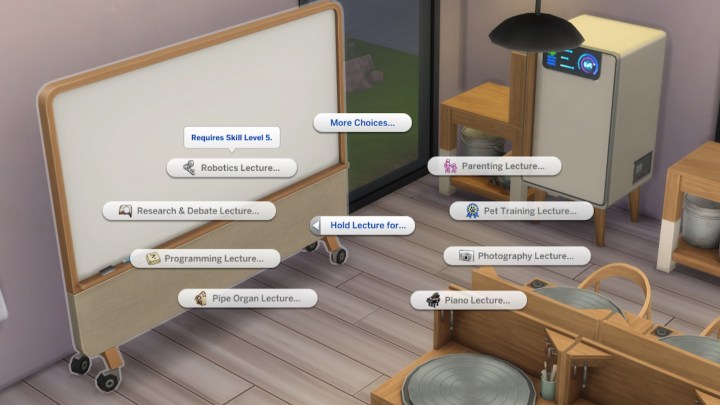
    Step 3: Once you have the necessary objects arranged for your lecture, make sure your Sim is at the right skill level for teaching. Each lecture will need your Sim to be at skill level three or five. You can check the required skill level when you interact with the whiteboard.

    Whiteboard lecture options in The Sims 4 Businesses and Hobbies.
    EA

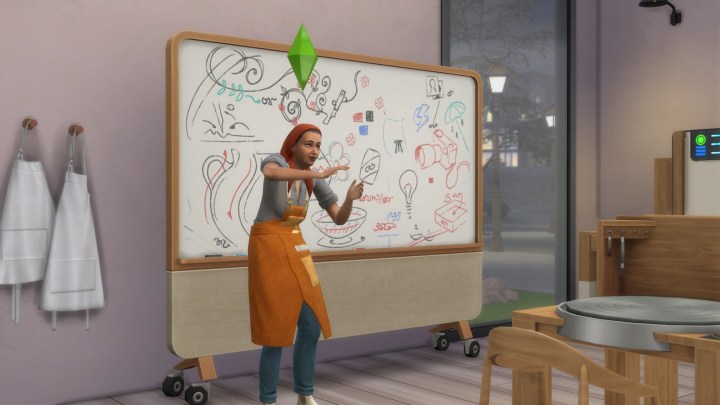
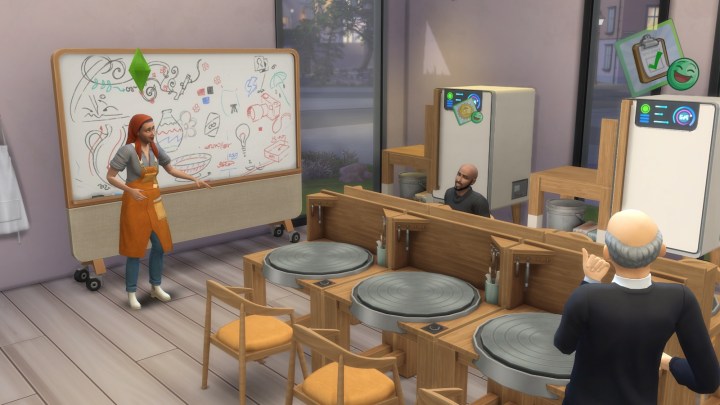
    Step 4: You're now ready to kick off your lecture. Other Sims can approach the whiteboard to join, and as they participate, their respective skill levels will increase.

    If you operate a small business, you can easily have your employees deliver lectures by assigning them the lecture task.

    Giving a lecture in The Sims 4 Businesses and Hobbies.
    EA

    How to conduct a class in The Sims 4 Businesses and Hobbies

    Before we begin, remember that you can only run classes if you own a small business. This must be done on your business lot when your shop is open and customers are present.

    Step 1: Purchase the Sharing is Caring Hobby Whiteboard for 630 Simoleons in the Small Business section of Buy Mode.

    Hosting a class in The Sims 4 Businesses and Hobbies.
    EA

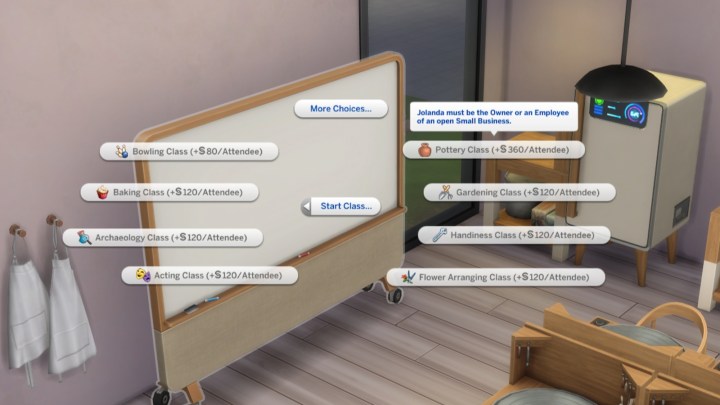
    Step 2: After placing the whiteboard, interact with it to explore various class options. Depending on your skill level, you can set a higher fee per student. Initially, you may charge 120 Simoleons per attendee, but as you reach maximum skill, this can increase to about 360 Simoleons.

    Keep in mind that teaching some classes requires having specific objects close by. The whiteboard's marked area will indicate where these items need to be located. Refer back to the previous section for the complete list of required items for each skill.

    Whiteboard class options in The Sims 4 Businesses and Hobbies.
    EA

    Step 3: You can only commence your class when your shop is open. Select the whiteboard and initiate your class. Customers will enter, and some may show interest in joining your session.

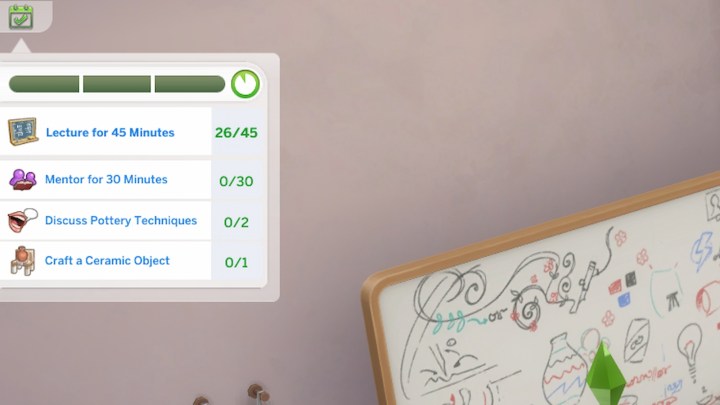
    During the class, a timed event will start, during which you will engage in different activities. You'll mainly want to lecture for 45 minutes, but you can also mentor students or discuss skills. Completing these tasks will enhance the effectiveness and appeal of your classes to the customers.

    Whiteboard class event in The Sims 4 Businesses and Hobbies.
    EA


  • How to Find and Stop Burglars in The Sims 4: A Complete Guide

    How to Find and Stop Burglars in The Sims 4: A Complete Guide


    After much anticipation, burglars have made their return to The Sims 4, courtesy of a free update! These notorious characters have provided a level of mischief since the days of The Sims 1, and their absence in the newer version was felt by many Simmers.

    Difficulty

    Easy


    Duration

    10 minutes

    What You Need

    • The latest Sims 4 update

    Now you can encounter the infamous burglar, Robin Banks, directly—whether through confrontation or by hiding and waiting for the police. There are numerous strategies to either lure burglars to your lot or stop them entirely. Here's how to effectively deal with burglars in The Sims 4.

    How to find a burglar in The Sims 4

    Before you can confront a burglar, you first need to locate one on your property. If you're curious or more adventurous, there are several methods to boost your odds of encountering a burglar.

    Step 1: To increase the likelihood of a burglar showing up, consider using the Lot Challenge Heist Havoc. You can activate this challenge in Build/Buy mode by clicking the house icon in the upper left corner, then navigating to the tab marked with a question mark for Lot Traits and Challenges.

    The Heist Havoc challenge enhances the frequency of burglar appearances on your lot while also making your burglar alarms less reliable. This means that, if Robin Banks does decide to visit, you might have to handle the situation yourself!

    EA

    Step 2: If you prefer not to use that Lot Challenge and don’t want to just wait idly, you can summon a burglar using cheats. To do this, first enable cheats by pressing Shift + Ctrl + C, then type 'testingcheats true'.

    With cheats active, hold the Shift key and click on your mailbox. You’ll see an option to 'Schedule Burglar Visit (Debug).' Once you select this, a burglar will visit your lot during night time.

    The Sims 4 mailbox cheats.
    EA

    How to stop the burglar in The Sims 4

    If a burglar arrives at your home and you’re wondering how to chase them off, you have several options to consider. Additionally, there’s a way to completely prevent burglars from appearing if you’d rather not deal with them at all.

    Step 1: The most straightforward and affordable method to deter a burglar is to install an alarm system. The Alertz Burglar Alarm can be found in Build/Buy mode alongside the fire alarms and thermostats. Priced at just 85 Simoleons, placing it near your front door will trigger the loud sound when a burglar attempts to break in.

    This alarm wakes your household and scares off the burglar, ensuring your possessions remain safe. Don’t forget—if you have both front and back entrances, set up alarms for both!

    The Sims 4 burglar alarm.
    EA

    Step 2: If you don't have an alarm at your disposal, your Sim has three main options when faced with a burglar. You can choose to fight, though this may negatively impact your relationship with Robin Banks. Alternatively, you can try to confront them directly, but this typically won't deter the burglar. Lastly, you can call the police; however, their response time isn’t quick, so if you want to prevent the burglar from escaping with stolen items, engaging them directly is often a better choice.

    Confronting a burglar in The Sims 4.
    EA

    Step 3: Fortunately, if you own specific DLCs, there are various additional ways to deal with burglars. Certain Game and Expansion Packs introduce unique interactions that can assist in these situations. Here’s a rundown of special Sim interactions based on your packs:

    • Dogs will fiercely chase off burglars. (Requires: The Sims 4 Cats & Dogs Expansion Pack)
    • Werewolves can intimidate burglars into fleeing. (Requires: The Sims 4 Werewolves Game Pack)
    • Spellcasters have access to a variety of spells for confusion and transformation. (Requires: The Sims 4 Realm of Magic Game Pack)
    • Servos can immobilize burglars using their defense matrix. (Requires: The Sims 4 Discover University Expansion Pack)
    • Scientists can use the Freeze Ray to stop burglars in their tracks. (Requires: The Sims 4 Get to Work Expansion Pack)
    • Vampires can capitalize on the situation for a quick snack before sending burglars away. (Requires: The Sims 4 Vampires Game Pack)

    Step 4: For those who would prefer to avoid burglars altogether, you have the option to disable them. Navigate to Game Options, and under Gameplay, look for the 'Allow Burglar Visits' toggle. After making your choice, just apply the changes and you’re all set.

    The Sims 4 Game Options.
    EA