الوسم: Technology

  • Apple Wants Your Emails To Improve Its AI Performance

    Apple Wants Your Emails To Improve Its AI Performance

    Table of Contents

    • Overview of AI Training
    • Apple’s Strategy to Enhance Its AI
    • The Importance of This Development

    Overview of AI Training

    Before diving into the details, let’s briefly explore how AI tools function. The training phase involves supplying a vast amount of human-generated data to an “artificial brain.” This data may include books, articles, research papers, and more. The more data the AI processes, the more effectively it can generate relevant responses.

    Chatbots, known as Large Language Models (LLMs), analyze patterns and relationships between words. Programs like ChatGPT, which are integrated into platforms such as Siri and Apple Intelligence, operate as advanced word predictors.

    However, there are limitations to the amount of usable data available for training AI systems, making the process both lengthy and costly. One might wonder why AI-generated content isn’t utilized for this purpose. Unfortunately, research indicates that using synthetic data can skew AI models, resulting in inaccurate and misleading outputs.

    Apple’s Strategy to Enhance Its AI

    Rather than depending exclusively on synthetic data, a more effective way to enhance an AI tool’s performance is through continual refinement and tuning. The ideal method for training an AI assistant is to utilize authentic human data. The wealth of information stored on users’ devices represents a valuable resource, but accessing this data directly would raise significant privacy concerns and potential legal challenges.

    To circumvent these issues, Apple is exploring a method of analyzing users’ emails indirectly. The data will never leave the user’s device, nor will it be transmitted to Apple’s servers. Instead of reading emails, Apple’s approach will involve comparing them to a collection of synthetic emails. The goal is to identify synthetic data that closely resembles human-written text, thereby gaining insights into natural conversation patterns.

    Historically, Apple has relied heavily on synthetic data for AI training, as reported by Bloomberg. The company explains, “This synthetic data can then be used to test the quality of our models on more representative data and identify areas for improvement in features like summarization.” The anticipated outcome could lead to more accurate responses from Siri and Apple Intelligence.

    Apple aims to enhance its email summarization features and other components within its Writing Tools using insights from this realistic human data. The company ensures that the sampled emails will not be transferred off devices or shared with Apple, highlighting a commitment to user privacy similar to those applied in the Genmoji system.

    The Importance of This Development

    Currently, the summaries provided by Apple Intelligence in Mail can be confusing and, at times, nonsensical. This issue has progressed to the point where Apple temporarily suspended its notification feature after it received negative feedback for misrepresenting news stories.

    The inadequacies of the summaries have even become a source of humor among teams, as the AI frequently combines unrelated sentences that fail to convey the intended message.

    The fundamental challenge is that AI continues to have difficulty understanding context and human intent. Improving this understanding necessitates training on data that is aware of specific situations and contexts. Although newer AI models designed for reasoning have been developed, they still do not fully address the issues at hand.

    Apple’s proposed method appears to strike a perfect balance. The company states, "This process allows us to improve the topics and language of our synthetic emails, which helps us train our models to create better text outputs in features like email summaries while prioritizing privacy."

    Importantly, Apple will not be accessing all emails on iPhones and Macs globally. Instead, it will adopt an opt-in approach, allowing only those users who consent to share Device Analytics data with Apple to participate in the AI training process. Users can enable this feature by navigating to Settings > Privacy & Security > Analytics & Improvements. Reports indicate that these initiatives will coincide with the release of upcoming updates for iOS 18.5, iPadOS 18.5, and macOS 15.5 in beta.
  • iPadOS 19 May Finally Get A macOS-Style Update

    iPadOS 19 May Finally Get A macOS-Style Update


    Apple undoubtedly produces some of the most powerful and refined tablets on the market. For creatives, the iPad Pro series stands out as the top choice, particularly since the introduction of M-series chips, which have significantly elevated performance levels.

    However, one aspect that has lagged behind is iPadOS. Other than features like Stage Manager, the operating system hasn’t provided a unique experience and has often felt like an extended version of iOS. That may be about to change later this year.

    According to reports, Apple is gearing up for a substantial update with iPadOS 19, aiming to make the software much more akin to macOS. This marks the first credible indication of Apple's intentions to enhance iPadOS functionality substantially in the near future.

    What is changing?

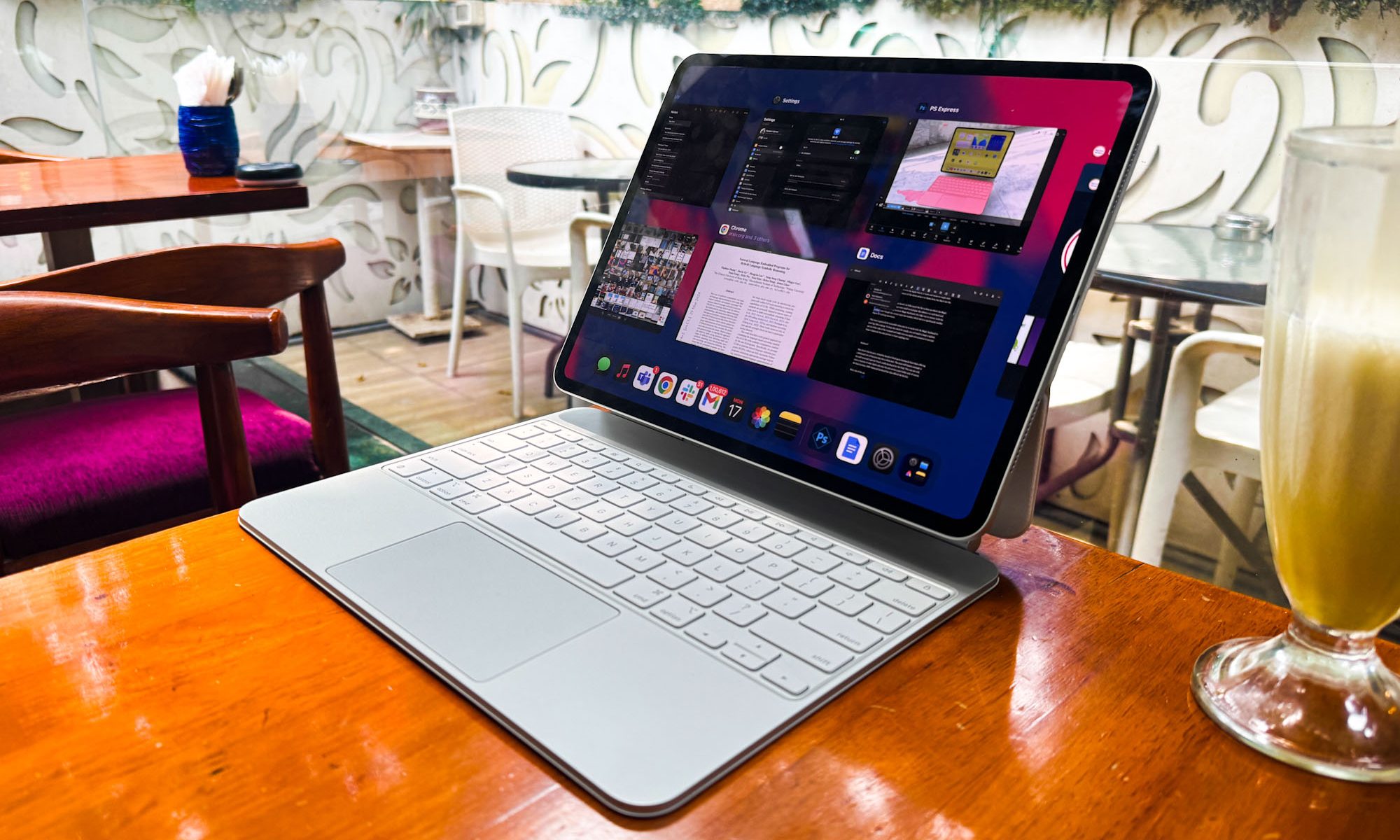
    Magic Keyboard and iPad Pro.
    Nadeem Sarwar / Digital Trends

    Bloomberg’s Mark Gurman notes that this year’s upgrade is set to emphasize productivity, multitasking, and app window management, prioritizing a Mac-like operating environment. Gurman states, “I’ve been informed that this year’s upgrade will focus on productivity and multitasking, aiming for the device to operate more similarly to a Mac.”

    The report lacks specifics regarding the macOS-inspired refresh for iPadOS, aside from the promise of improved window management. Currently, the resizing of app windows on iPads has been somewhat restrictive. Despite the fact that Apple tablets now have screen sizes comparable to a MacBook Air, users still cannot resize app windows freely.

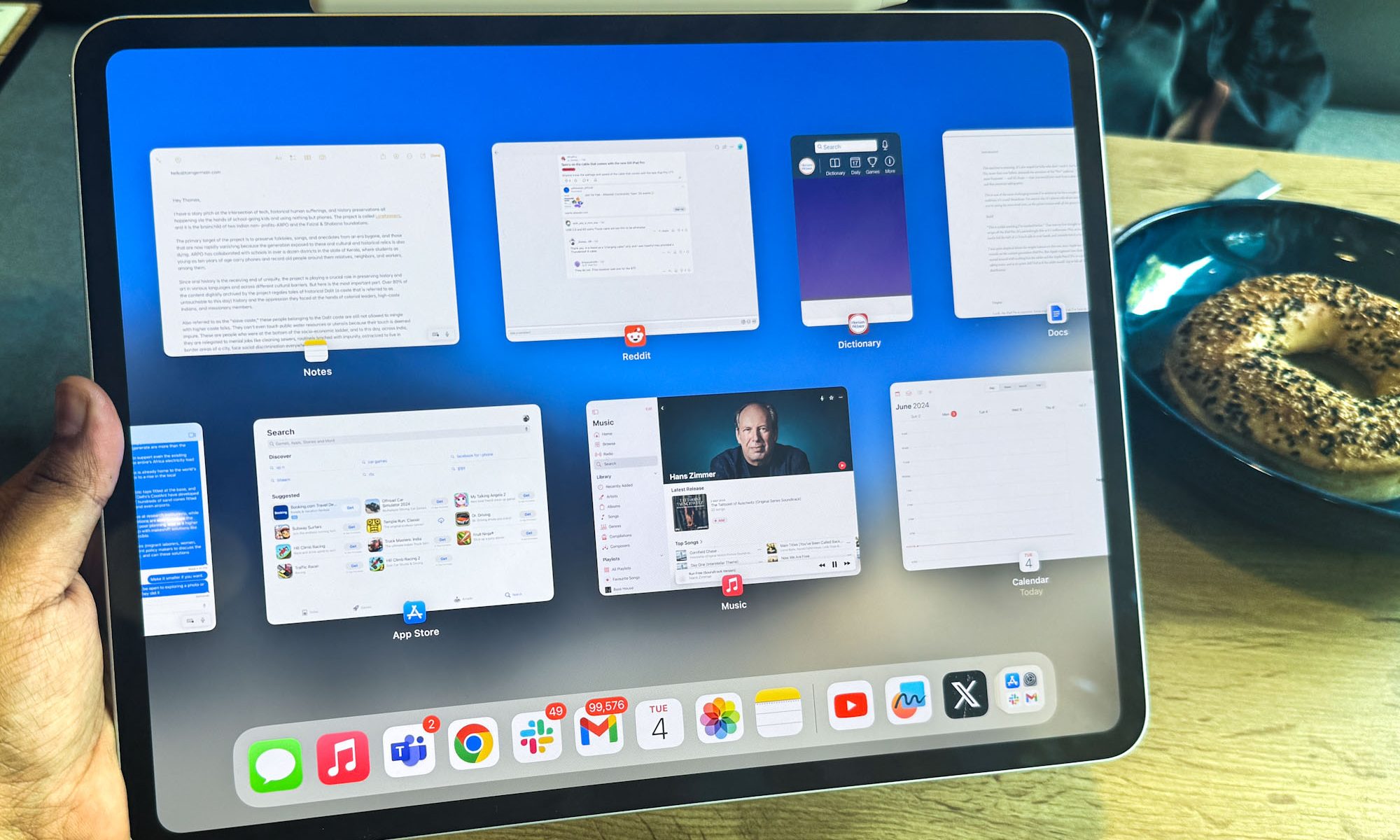
    Stage Manager, which enhances the iPad's usability when connected to larger screens and mimics macOS’s multitasking features, has yet to deliver a fully satisfactory experience. Its implementation feels superficial, lacking the flexibility found in macOS, despite the iPad’s powerful hardware.

    Apple could learn from Samsung’s DeX system and the impressive Open Canvas interface found on newer OnePlus tablets. My personal experience with the M4-equipped iPad Pro has been unsatisfactory. I often sense that this device is underutilized and would greatly benefit from a more expansive, desktop-like interface.

    Why does it matter?

    Stage Manager on M4 iPad Pro.
    Nadeem Sarwar / Digital Trends

    According to Bloomberg, the focus on productivity will be central to the upcoming iPadOS 19, which is anticipated to debut at WWDC in June. While the exact plans remain unclear, a touch of flexibility towards a desktop-like software experience would be immensely beneficial.

    As I pointed out in my review of the iPad Pro last year, the situation has not changed:

    “Unless you are a creative relying on tools such as Procreate, Adobe Creative Suite, or Logic Pro, you will find that a robust web browser is essential. Safari is lacking, and Chrome’s mobile version disappointingly falls short of its desktop counterpart. Basic browser extensions are unavailable on a $1,500 tablet.”

    There are indications that Apple is planning an overhaul for its operating systems, including iPadOS, with the next yearly upgrade. I remain optimistic that this will accompany more professional-grade applications and better integration between the tablet environment and its Mac counterpart. The recent experience with Oppo’s Find N5 foldable device showcases the potential for such connected advancement, and I believe Apple is capable of achieving this.

  • Step By Step Voice Search Optimization

    With the rise of smart speakers and virtual assistants, voice search has transformed how users interact with technology. Businesses are increasingly recognizing the need to optimize their content for voice queries. This guide provides a comprehensive way to enhance your online presence through effective voice search optimization.

    Understanding Voice Search

    Voice search utilizes speech recognition technology to allow users to perform searches using their voice rather than typing. This method relies on natural language processing (NLP) to interpret spoken queries and deliver relevant results.

    Key Differences Between Text and Voice Search

    • Query Length: Voice searches are typically longer and more conversational.
    • Intent: Users often ask questions that imply intent, such as “Where can I find a nearby coffee shop?” rather than just typing “coffee shop.”
    • Contextual Queries: Voice queries may reflect the user’s current context or location.

    Step 1: Optimize for Conversational Keywords

    To succeed in voice search optimization, it’s essential to adjust your keyword strategy.

    How to Choose Conversational Keywords

    • Use Long-Tail Keywords: Focus on longer phrases that mimic natural speech.
    • Consider Question Phrases: Integrate who, what, where, when, why, and how into your keywords.
    • Identify Local Keywords: If your business serves specific local areas, include local terminology.

    Example of Optimized Keywords

    • Text search: “best pizza NYC”
    • Voice search: “What’s the best pizza place near me in New York City?”

    Step 2: Create Structured Data Markup

    Implementing structured data helps search engines understand your content better.

    Types of Structured Data to Use

    • Schema Markup: Use schema markup to enhance your pages with rich snippets, making them more appealing in search results.
    • Local Business Schema: For businesses, include your address, contact details, and hours of operation.

    Benefits of Structured Data

    • Enhances visibility in search results.
    • Increases click-through rates (CTR).
    • Helps search engines interpret and categorize content accurately.

    Step 3: Optimize for Featured Snippets

    Featured snippets answer users’ questions directly at the top of the search results.

    Steps to Achieve Featured Snippet Status

    1. Identify Common Queries: Research questions your audience frequently asks.
    2. Provide Clear Answers: Break down information into concise, digestible sections.
    3. Use Bullet Points and Lists: Format your content to enhance readability.

    Formatting Tips

    • Use headings (H2, H3) to structure your content.
    • Add images with alt text for better understanding.

    Step 4: Improve Local SEO

    Voice search is often used for local queries, making local SEO crucial for optimization.

    Steps to Enhance Local SEO

    • Claim Your Google My Business Listing: Ensure all information is up-to-date and accurate.
    • Encourage Customer Reviews: Positive reviews boost local rankings.
    • Optimize for Local Keywords: Integrate relevant local terms naturally within your content.

    Essential Local Information to Include

    • Address
    • Phone number
    • Business hours
    • Service areas

    Step 5: Focus on Mobile Optimization

    Most voice searches are conducted on mobile devices, making it vital to ensure your site is mobile-friendly.

    Mobile Optimization Checklist

    • Responsive Design: Ensure your website adapts to different screen sizes.
    • Fast Loading Times: Optimize images and reduce webpage size to improve speed.
    • Easy Navigation: Simplify menus and buttons for user-friendly access.

    Step 6: Monitor and Adapt

    Voice search optimization is not a one-time task but an ongoing process.

    Tools for Monitoring Performance

    • Google Analytics: Track user behavior and identify traffic sources.
    • Search Console: Analyze search performance data to uncover areas for improvement.

    Indicators to Measure

    • Changes in website traffic from voice searches.
    • Improvement in rankings for targeted long-tail keywords.
    • Growth in conversions stemming from local searches.

    By following these steps, businesses can effectively optimize their online presence for voice search, ensuring they remain competitive in this evolving digital landscape. The key lies in understanding how users search verbally and adapting content to meet those needs.

  • How To Use AI For Predictive Analytics

    How To Use AI For Predictive Analytics

    Predictive analytics is transforming industries by leveraging vast amounts of data to forecast future outcomes. As Artificial Intelligence (AI) technologies continue to evolve, organizations can harness this power to enhance decision-making processes, optimize operations, and drive strategic planning. This article explores ways to effectively utilize AI for predictive analytics.

    Understanding Predictive Analytics

    Predictive analytics employs statistical algorithms and machine learning techniques to identify patterns in historical data and predict future events. Here are some key aspects:

    Key Concepts

    • Data Collection: Gathering relevant data from various sources, including transaction records, social media, and IoT devices.
    • Data Processing: Cleaning and organizing data to ensure it is usable for analysis.
    • Model Building: Utilizing algorithms to develop models that can make predictions based on input data.

    Implementing AI in Predictive Analytics

    Integrating AI into predictive analytics involves several critical steps. Below are actionable strategies to successfully employ AI technologies.

    1. Define Your Objectives

    Before starting the data analysis process, clarify the objectives you want to achieve. Consider the following:

    • What specific outcomes do you want to predict?
    • Who will benefit from the predictions?
    • How will the predictions be applied in your organization?

    2. Data Acquisition

    The quality and quantity of data significantly impact the accuracy of predictions. Strategies for effective data acquisition include:

    • Identifying Data Sources: Use internal databases, customer feedback, purchase history, and external datasets.
    • Utilizing APIs: Leverage APIs to access real-time data from social media, financial markets, or weather services.

    3. Data Preparation

    Preparing data for analysis is crucial to ensure that AI models yield accurate predictions. Key activities include:

    • Data Cleaning: Remove duplicates, handle missing values, and correct inaccuracies.
    • Normalization: Scale numerical data to ensure it fits within a specific range without losing its distribution.
    • Feature Engineering: Create new input variables that can enhance model performance.

    4. Choosing the Right AI Models

    There are various AI algorithms suited for predictive analytics, each with its advantages. Common choices include:

    • Linear Regression: Effective for understanding relationships between variables.
    • Decision Trees: Simplifies complex decision-making processes and provides interpretable results.
    • Neural Networks: Suitable for large datasets with intricate patterns, particularly in image and speech recognition tasks.

    5. Training the Model

    Once the model is selected, it needs to be trained using historical data. Important considerations include:

    • Training Data: Use a significant portion of your dataset to teach the AI model.
    • Validation: Set aside a part of the data to validate the model’s performance and avoid overfitting.

    6. Evaluating Model Performance

    After training, assessing the model’s accuracy is vital. Common evaluation metrics include:

    • Accuracy: Measures the total correct predictions made by the model.
    • Precision and Recall: Evaluate the model’s relevancy in predicting true positives versus false positives.
    • F1 Score: Combines precision and recall into a single metric.

    7. Deploying Predictions

    After validation, the next step is deploying the model into real-world applications. Consider these approaches:

    • Integration with Business Systems: Embed the AI model within existing systems to automate decision-making.
    • Ongoing Monitoring: Continuously track the model’s performance and refine it with new data.

    Use Cases of AI in Predictive Analytics

    AI’s application in predictive analytics spans various industries, driving innovation and efficiency. Here are some notable use cases:

    Healthcare

    • Patient Predictive Modeling: Anticipate patient outcomes and optimize treatment plans.
    • Disease Outbreak Prediction: Leverage historical data and AI models to forecast potential outbreaks.

    Retail

    • Customer Behavior Analysis: Analyze shopping habits to personalize marketing strategies.
    • Inventory Forecasting: Predict stock requirements based on historical sales data and seasonal trends.

    Finance

    • Credit Scoring: Assess the likelihood of repayment based on historical credit data.
    • Fraud Detection: Use AI algorithms to identify transactions that deviate from normal patterns.

    Manufacturing

    • Predictive Maintenance: Forecast equipment failures before they occur, reducing downtime costs.
    • Supply Chain Optimization: Analyze data to improve inventory management and reduce waste.

    By leveraging AI for predictive analytics, organizations can unlock valuable insights, enhance operational efficiency, and stay ahead of market demands. Through the outlined steps and use cases, any business can strategically integrate AI into its predictive analytics processes.

  • Your Next Phone May Feature 10Km Bluetooth Range

    Your Next Phone May Feature 10Km Bluetooth Range

    Bluetooth connectivity usually has a limited operational distance, typically reaching up to around 33 feet. However, MediaTek has unveiled the Dimensity 9400 Plus, a cutting-edge chipset that boasts the ability to support connections up to 10 kilometers (approximately 6.2 miles). The previous model, the Dimensity 9400, was capable of facilitating connections over 1.5 kilometers, marking a significant enhancement. However, the details are not quite as straightforward as they may appear.

    This estimated range applies to phone-to-phone Bluetooth links, meaning your wireless earbuds won’t experience a sudden upgrade in performance over extended distances. MediaTek’s website specifies, “The Dimensity 9400+ can extend direct phone-to-phone Bluetooth connections up to 10km under line-of-sight conditions, providing a remarkable increase of over 6.6 times when compared to the Dimensity 9400. These long-range connections operate without needing cellular services, enhancing privacy and conserving data.”

    While line-of-sight might elevate the effective range a little, achieving 10 kilometers in practice would require an unobstructed area similar to an airport runway. In everyday scenarios, the practical applications of this extended range are somewhat constrained, but any enhancement in connectivity is certainly an advantage. It may even lead to some amusing pranks involving AirDrop.

    In addition to improved Bluetooth technology, the Dimensity 9400 Plus features enhancements in CPU performance, AI capabilities, and more. This chipset includes a 12-core GPU for nearly PC-like gaming visuals, upgraded HDR video support, and much else. It can achieve speeds of up to 3.73GHz, larger Wi-Fi coverage, and also supports Wi-Fi 7.

    Keep in mind that this is merely a system-on-chip (SoC), and manufacturers will need to incorporate it into their devices for users to benefit from these advancements. The emergence of this technology, representing a significant leap forward, is definitely promising. The Dimensity 9400 Plus is positioned as a serious contender to the popular Snapdragon 8 Elite, and it could greatly enhance the next wave of smartphones.

  • How To Optimize For Voice Search

    How To Optimize For Voice Search

    With the rapid rise of voice-activated devices and virtual assistants, businesses must adapt their digital strategies to accommodate this shift. Voice search is not merely a trend; it’s becoming a cornerstone of online search behavior. This guide outlines effective strategies to ensure that your content is voice search-friendly.

    Understanding the Impact of Voice Search

    Voice search technology has revolutionized how users interact with their devices. Instead of typing queries, users often prefer speaking due to its convenience. Key statistics highlight this shift:

    • Increasing Popularity: Approximately 55% of households are expected to own a smart speaker by 2022.
    • User Behavior: 61% of users say they prefer voice search over typing.

    Such data underscores the necessity for businesses to optimize their online content for voice queries.

    Key Strategies for Voice Search Optimization

    1. Focus on Natural Language

    When optimizing for voice search, consider the way people speak compared to how they type. Voice queries are typically longer and more conversational. Here’s how to incorporate natural language:

    • Use Conversational Keywords: Think of phrases that people might verbally use. For example, instead of “best pizza delivery,” use “what is the best pizza delivery service near me?”

    • Answer Questions: Structure content to directly respond to common questions in your industry. Use FAQs or a Q&A format to help.

    2. Enhance Content for Featured Snippets

    Voice-activated devices often read out featured snippets. To position your content for these voice search results, do the following:

    • Provide Clear and Concise Answers: Aim for short, factual paragraphs that get straight to the point.

    • Utilize Lists and Bullet Points: Break down information into digestible sections to improve readability and increase the chances of being selected as a snippet.

    3. Optimize for Local Searches

    Many voice searches are location-specific, making local SEO critical. Focus your optimization efforts on:

    • Google My Business: Ensure your business listing is accurate and up-to-date. Include your physical address, phone number, and hours of operation.

    • Local Keywords: Incorporate geographical terms naturally into your content. For example, “best sushi in San Francisco.”

    4. Improve Page Load Speed and Mobile Responsiveness

    Fast and mobile-friendly websites are crucial for users, especially on mobile devices. To enhance user experience:

    • Optimize Images and Videos: Reduce file sizes without losing quality to improve loading times.

    • Implement a Responsive Design: Ensure your website adapts seamlessly to different screen sizes and devices.

    5. Emphasize Schema Markup

    Schema markup helps search engines better understand your content, providing context that can improve visibility in voice searches.

    • Use Structured Data: Implement schema for FAQs, products, reviews, and local businesses to enhance search results.

    • Test Your Markup: Use tools like Google’s Structured Data Testing Tool to ensure your markup is correctly implemented.

    6. Leverage Long-Tail Keywords

    Voice search queries often consist of longer, more specific phrases. Using long-tail keywords increases your chance of matching these types of queries.

    • Research User Intent: Understand what users are looking for when they conduct voice searches, and tailor content accordingly.

    • Meet Specific Needs: Create content that addresses niche topics, which can capture the attention of users seeking precise information.

    7. Create High-Quality Content

    Quality content remains crucial in any SEO strategy. Ensure your content is useful, engaging, and relevant.

    • Solve Problems: Focus on providing solutions to common problems your audience faces.

    • Keep Content Fresh: Regularly update your content to keep it relevant and aligned with the latest trends.

    8. Implement Voice Search Analytics

    Gaining insights into how users are interacting with your content through voice search can help you refine your strategy.

    • Use Google Search Console: Monitor which voice queries are driving traffic and adjust your content based on user behavior.

    • Employ User Feedback: Encourage customers to provide feedback on their search experience, guiding your optimization efforts.

    Incorporating these strategies into your digital marketing plan will enhance your visibility in voice search results and align your business with evolving consumer behaviors. As voice search becomes increasingly mainstream, staying ahead of the curve will position your brand effectively for future growth.

  • Motorola Edge 60 Pro Leaks Show Almost Everything

    Motorola Edge 60 Pro Leaks Show Almost Everything

    Recently, Motorola has announced a series of new smartphones, with the Moto G Stylus 2025 launching in the U.S. shortly after the Edge 60 Fusion made its debut in the U.K. Now, a new leak has surfaced regarding an upcoming handset, hinting that the official release is just around the corner. This device, known as the Motorola Edge 60 Pro, is expected to be among the brand’s flagship models for 2025. While its name indicates it will primarily be available internationally, there is a good chance that a variant will also hit the North American market.

    The latest leak displays three different variants of the Edge 60 Pro in new Pantone colors: Sparkling Grape, Shadow Green, and Dazzling Blue. These names may not be the final designations that Motorola and Pantone will use. Notably, two of these colors were previously hinted at in a leak featuring the Edge 60 Pro in a promotional clip, which also included a third gray model.

    Interestingly, a new physical button was detected on the device’s side, presumably intended for activating Motorola’s AI services, including features like AI search and generative AI image capabilities, as well as AI-enabled screenshot and note-taking functions. While the Edge 60 Fusion has similar AI services, it lacks a dedicated button. Given that the Edge 60 Pro is a higher-tier model, Motorola is likely to leverage its AI functionalities as a key selling point.

    In terms of specifications, this device is rumored to house a robust 6,000mAh battery, a significant upgrade from the 4,500mAh battery found in the Edge 50 Pro. Other expected features include a 6.67-inch quad-curved display, a MediaTek Dimensity 8350 processor, and both IP68 and IP69 ratings for dust and water resistance, alongside a triple-camera setup on the rear.

    If the speculations hold true, the camera system will include a 50-megapixel primary camera, a 13-megapixel wide-angle lens, and a 50-megapixel telephoto camera—a notable improvement over the Edge 50 Pro’s 10MP telephoto with 3x optical zoom. Switching to MediaTek chips represents a significant departure in its design strategy as well. While much about the Motorola Edge 60 Pro is becoming clear, the announcement date remains under wraps. However, considering that the Edge 50 Pro was revealed in early April 2024, we can anticipate an upcoming announcement soon.

  • How To Get Started With Spatial Computing

    How To Get Started With Spatial Computing

    Spatial computing represents a significant shift in how we interact with digital environments, blending the digital and physical worlds seamlessly. Whether for business applications, gaming, or education, understanding how to delve into this field can be both exciting and daunting. This guide will illuminate your path to getting started with spatial computing.

    Understanding Spatial Computing

    Spatial computing refers to the use of technology to enable interaction with digital content in the physical space. Key elements include:

    • Augmented Reality (AR): Overlays digital information onto the real world.
    • Virtual Reality (VR): Creates entirely immersive digital environments.
    • Mixed Reality (MR): Combines both AR and VR, allowing real and virtual elements to interact in real-time.
    • 3D Mapping: Utilizes spatial data to create three-dimensional representations of locations or objects.

    Why is Spatial Computing Important?

    • Enhanced User Experiences: Users can interact with digital content in more intuitive ways.
    • Value in Various Industries: From healthcare and education to entertainment and real estate, spatial computing offers innovative solutions.
    • Future of Work: As remote work becomes increasingly prevalent, spatial computing can facilitate better collaboration through virtual environments.

    Getting Started: Tools and Technologies

    To embark on your spatial computing journey, familiarize yourself with essential tools and platforms.

    Common Hardware

    • Head-Mounted Displays (HMDs):

      • Oculus Quest 2
      • Microsoft HoloLens
      • HTC Vive

    • Mobile Devices:

      • Latest smartphones equipped with AR capabilities (e.g., Apple iPhone, Android phones with ARCore)

    Key Software and Platforms

    • Unity: A powerful game engine that allows developers to create AR and VR applications.
    • Unreal Engine: Great for high-fidelity visual experiences in spatial computing; suitable for both games and enterprise applications.
    • ARKit and ARCore: Development frameworks for creating AR experiences on iOS and Android, respectively.

    Learning the Basics

    Online Courses and Resources

    1. Coursera: Offers courses in AR and VR, helping you grasp the concepts and technology involved.
    2. edX: Provides certificates in XR technologies.
    3. YouTube Tutorials: Free resources can show practical implementations and coding tips.

    Recommended Books

    • "The Fourth Transformation" by Brian McCarthy and Paul Boucher: A deep dive into the impact of spatial computing on various sectors.
    • "Masters of Doom" by David Kushner: While focused on gaming, it provides insights into the roots of interactive technology.

    Community Engagement

    Join forums and online communities dedicated to spatial computing. Platforms such as:

    • StackOverflow: For developer questions.
    • Reddit (r/augmentedreality, r/VR): For discussions and news.
    • Meetup: Locate local groups focusing on AR and VR innovation.

    Practical Applications to Explore

    Developing Simple AR Apps

    1. Choose Your Platform: Decide whether you want to build for iOS, Android, or both.
    2. Start with Unity: Follow specific tutorials to develop a basic AR app using ARKit or ARCore.
    3. Test Your App: Utilize your mobile device for hands-on testing to troubleshoot and improve usability.

    Experimenting with VR Content

    • Create a VR Scene: Use Unity to craft a virtual space.
    • Incorporate Interactivity: Add elements that the user can interact with, like buttons or moving objects.
    • Gather Feedback: Share your VR experience with friends or online communities for constructive insights.

    Tips for Success in Spatial Computing

    • Stay Updated: Follow industry news via blogs and podcasts to keep abreast of new tools and trends.
    • Practice Regularly: Dedicate time each week to experiment, simulate, and learn.
    • Network with Professionals: Attend workshops and conferences focused on spatial computing to connect with other enthusiasts and industry leaders.

    Future Trends to Watch

    • Advancements in AI: Integration of AI will revolutionize interactions in spatial computing.
    • More Physical-Digital Blending: Expect to see even more sophisticated ways to merge physical spaces with digital experiences.
    • Expansion into New Sectors: Industries such as automotive, retail, and hospitality are increasingly adopting spatial computing technologies.

    By following these guidelines, you can establish a firm foundation in spatial computing and embark on an exciting journey into the future of technology-enhanced interactions.

  • Nvidia RTX 5060 Ti Could Be More Affordable Than Anticipated

    Nvidia RTX 5060 Ti Could Be More Affordable Than Anticipated

    The launch of Nvidia’s RTX 5060 Ti is imminent, and excitement is in the air. The focus isn’t solely on how it will perform against other top-tier graphics cards; it’s also on the potential pricing that gamers are anxious about during the current GPU shortage. Fortunately, there are encouraging signs that the price point might be more favorable than initially feared.

    A recent leak from Board Channels suggests that the RTX 5060 Ti will match the pricing of its predecessors. For clarity, it’s anticipated that the RTX 5060 Ti will come in two configurations: one featuring 16GB VRAM and the other with 8GB. Previous rumors indicated that the 16GB variant could launch at $499, consistent with the last generation’s pricing, while the 8GB model might be priced at $399.

    Initially, I thought this was fairly positive news, since it suggested we might avoid a price hike. However, as reported by IT Home, there’s even better news on the horizon: a potential price cut.

    According to IT Home, Nvidia has shared the official MSRP with its add-in card (AIC) partners, and the results are better than many anticipated. The prices are reportedly set at $379 for the 8GB model and $429 for the 16GB model, representing a significant decrease for the 16GB variant and a modest $20 reduction for the 8GB version.

    Details about the RTX 5060 haven’t been disclosed yet, although it is expected to be unveiled alongside its counterparts on April 15. If the RTX 5060 Ti starts at $379, we could estimate the RTX 5060 to be around $300 to $320, but that remains speculative until the official announcement. Until Nvidia provides further updates, we can only make educated guesses.

  • One UI 7 Brings New Camera Features To Your Samsung Phone

    One UI 7 Brings New Camera Features To Your Samsung Phone


    Samsung has officially started releasing the Android 15-based One UI 7 update for its older smartphones through the stable version, beginning with the Galaxy S24, along with the Galaxy Z Flip 6 and Z Fold 6.

    Additionally, the company has published an updated roadmap detailing the devices set to receive this software upgrade, alongside highlighting new camera functions included in the package.

    When will the One UI 7 update be available?

    If you're using a Samsung smartphone, here's the expected schedule for the One UI 7 update for your device:

    • April 2025: Galaxy S24 series, Galaxy S23 series, Galaxy Z Fold 5, Galaxy Z Flip 5, Galaxy Tab S10 series
    • May 2025: Galaxy Z Fold 4, Z Fold 3, Z Flip 4, Z Flip 3, Galaxy Tab S9 series, Galaxy S21 series, Galaxy S22 series, Galaxy A34, Galaxy A16, Galaxy Quantum 4, Galaxy Quantum 5
    • June 2025: Galaxy Tab S9 series, Galaxy Tab A9 series, Galaxy A53, A33, A25, A24, A15, Galaxy Quantum 3, Galaxy Jump 3, Galaxy Jump 2, Galaxy Buddy 3, Galaxy Tab Active 5, Tab Active 4 Pro

    What new camera features are included with One UI 7?

    Now, let’s explore the enhancements introduced by the One UI 7 update within Samsung’s camera and gallery apps. According to a post shared on Samsung’s official community forum, the updates commence with the camera app's home screen layout.

    Key controls like aspect ratio, megapixel format, exposure, and filters have been relocated from the top to the bottom alongside the zoom controls. This alteration facilitates easier access to essential quality and composition settings, especially when taking photos in portrait mode.

    Samsung is also introducing a new customizable filter system in the Upcoming Galaxy S25 series, inspired by Apple’s Photographic Styles. This feature will allow Galaxy users to create personalized filters based on the color profile of any image in their gallery. The option will be available for Galaxy S flagships from the S22 series onward, as well as select foldable models like the Galaxy Z Flip 4 and Z Fold 4. All devices, barring the “FE” series, will also support RAW image editing directly on the device.

    Another notable feature being introduced from the Galaxy S25 to older devices is support for LOG capture, which permits users to record footage that can undergo extensive color grading and post-processing adjustments.

    Additionally, the camera app will feature a Shooting Assistance Function that allows users to utilize zebra patterns and false color adjustments while in Pro video mode for LOG recordings.

    Support for Motion Photos—a feature akin to iPhone’s Live Photos—is now available on the Galaxy S24, Z Flip 6, and Fold 6. This enables users to capture a stabilized video clip of 1.5 seconds before and after taking a still photo by long-pressing the shutter button.

    The Galaxy S24, Z Flip 6, and Fold 6 are also getting enhanced slow-motion video capabilities across all camera lenses, in addition to an Audio Eraser feature to eliminate unwanted sounds from captured videos.

    Additionally, Samsung’s AI-driven face swap feature, enabling users to select their preferred version of a person’s face during photo capture, will also be expanded with the One UI 7 update and will be available on the Galaxy S (up to the S23 series) and Galaxy Z (up to the Z Flip 5 and Fold 5) series devices, as well as tablets in the Galaxy Tab S10 and S9 series.

  • Why You May Not Buy A Galaxy S25 Edge Right Away

    Why You May Not Buy A Galaxy S25 Edge Right Away

    The eagerly awaited Samsung Galaxy S25 Edge is set to debut in the next few weeks. However, according to insider tipster Ice Universe, the initial release will be limited to South Korea and China.

    Samsung hinted at the Galaxy S25 Edge during the MWC Barcelona event in January, and it was already anticipated that supply would be limited. A previous report indicated that only 40,000 units would be available at launch. In contrast, Samsung sold one million standard Galaxy S25 devices in Korea within the first 21 days of release. However, a report from SamMobile suggests that Samsung aims to produce up to three million Galaxy S25 Edge units, paving the way for a more widespread rollout soon.

    Expected to rival the upcoming iPhone 17 Air, the Galaxy S25 Edge could emerge as one of the slimmest smartphones on the market, potentially featuring a ceramic back for increased durability. Speculations indicate that it will sport a 6.656-inch display and deliver significant camera enhancements, with reports mentioning a 200-megapixel primary camera.

    Like its counterparts in the Galaxy S25 series, the S25 Edge is anticipated to be equipped with the Snapdragon 8 Elite chip.

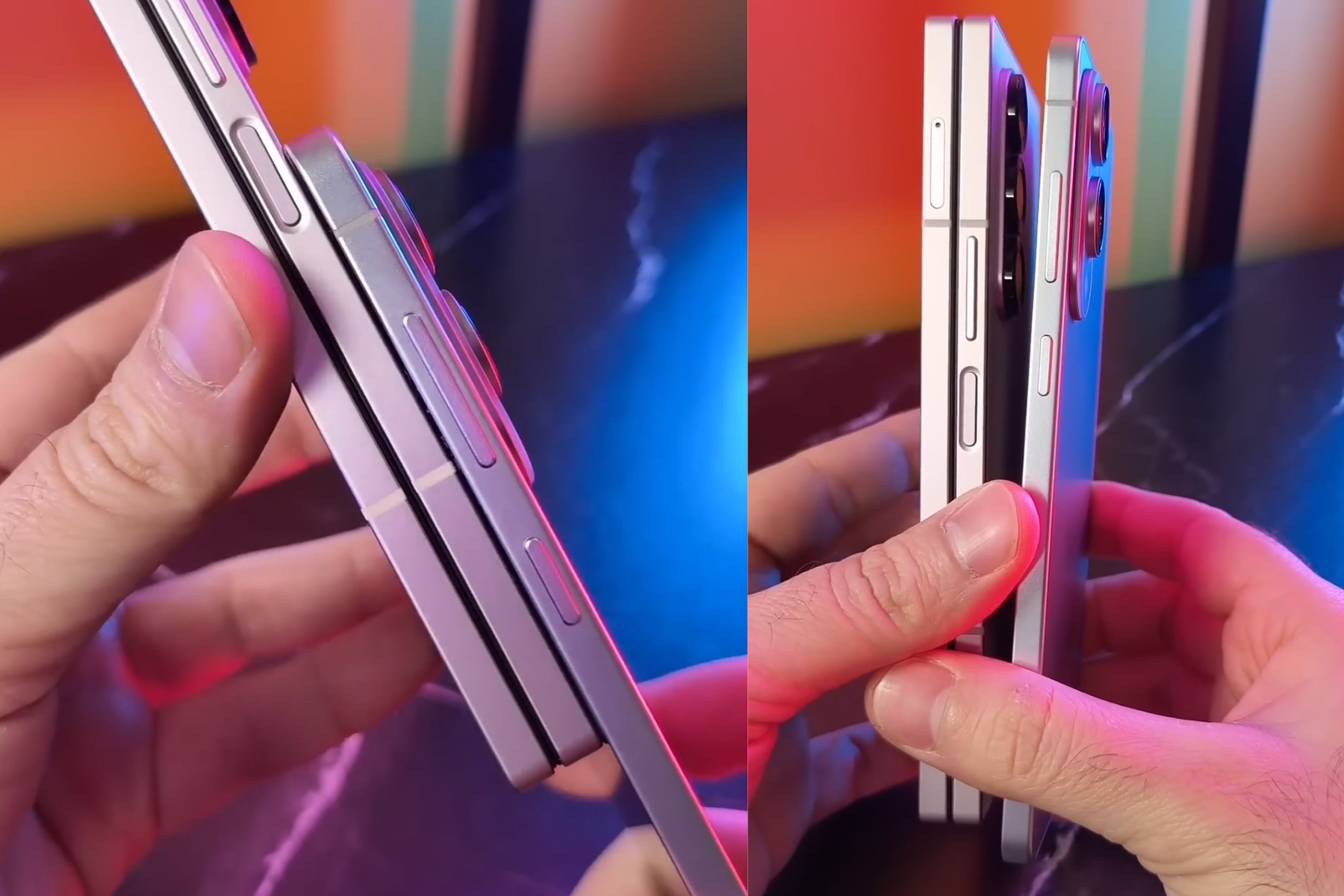
    When we say “new,” we really mean larger. The iPhone 17 Pro is expected to forgo the square camera layout with rounded corners seen on the iPhone 16 Pro in favor of a camera hump that stretches across from edge to edge. If the leaked images hold true, it’s going to be quite pronounced.

    While the Bloomberg article aligns with these leaks, it also urges caution. They clarify that Apple isn’t opting for a radical two-tone design approach similar to what has been seen on Google’s Pixel 9 series smartphones. The report states, “The back of the iPhone 17 Pro will be the same color as the rest of the device, without a two-tone effect.” This illustrates Apple’s trend of making more gradual design tweaks rather than drastic changes.

    It seems Apple plans to take a more subtle, industrial approach with the enlarged camera island on the iPhone 17 Pro. This increase in size is likely due to enhancements in the internal camera hardware, which may include upgraded resolution sensors for both the front and ultrawide cameras.

    Specifically, the ultrawide camera might see its resolution upgraded from 12 megapixels to 48 megapixels on the iPhone 17 Pro. This would mean that all three rear cameras would boast the same resolution, and it may even enable support for 8K video recording.

    On the front, it’s rumored that Apple will replace the 12-megapixel selfie camera with a higher 24-megapixel sensor. Additionally, the RAM is expected to be increased from 8GB to 12GB, paired with a next-generation processor.

    As for the pricing, it remains uncertain, particularly due to recent tariffs implemented during the Trump administration, which have sparked countermeasures from China—a major hub for Apple’s manufacturing. This situation also impacts assembly locations like India and Vietnam.

  • IBM: 114 Years of Innovation Among Tech Giants

    IBM: 114 Years of Innovation Among Tech Giants

    The Legacy of IBM: A Pioneer Among Tech Giants

    Introduction to IBM’s Historic Journey

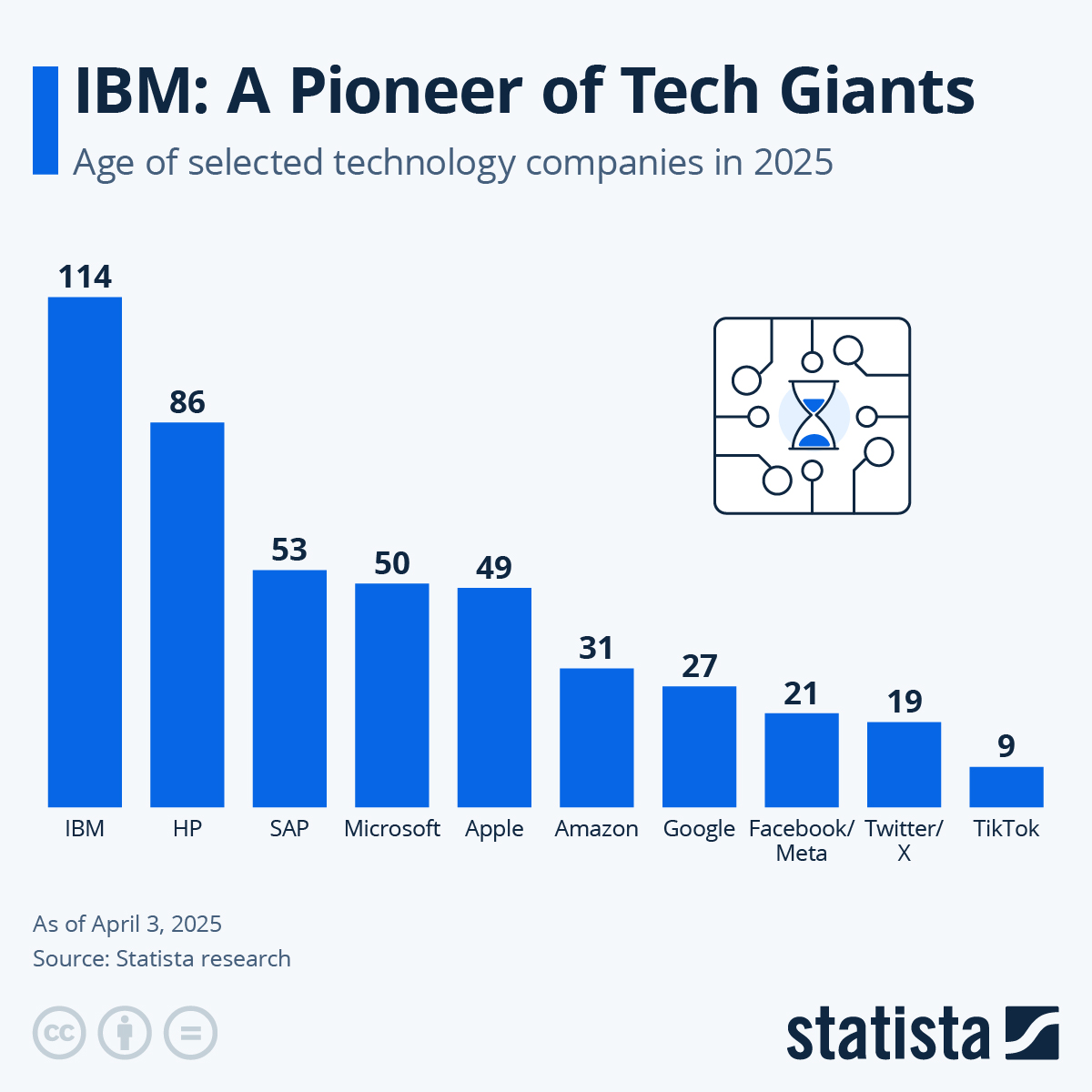
    IBM, or International Business Machines Corporation, stands as a monument in the tech industry, embodying innovation and resilience. Founded in 1911, IBM marks its 114th anniversary in a world where technology often conjures images of youthful startups. Its long history is a testament to its ability to adapt and thrive amidst the rapid evolution of technology.

    The Birth of a Giant

    IBM originated from the merger of four companies, establishing itself as a leader in manufacturing and selling machinery. From its early days focused on punch card technology, IBM diversified into computing, data processing, and hardware solutions. The company was instrumental in the development of early mainframe computers, setting industry standards that would last for decades.

    Fifty Years of Microsoft: A New Era of Technology

    The Founding of Microsoft

    In stark contrast to IBM’s lengthy history, Microsoft celebrates its 50th anniversary this year, having been founded on April 4, 1975, by Bill Gates and Paul Allen. Microsoft’s rise to prominence reshaped the technology landscape, particularly in software development. With the introduction of MS-DOS and Windows OS, the company positioned itself as a critical player in personal computing.

    The Evolution of Social Media Platforms

    Facebook: A 21-Year Legacy

    Launched in 2004, Facebook quickly revolutionized social interaction online. With over two billion active users, it has transformed the communication landscape and influenced everything from marketing strategies to privacy debates. Its 21-year history signifies an era that began with simple connections amongst college students, evolving into a global community platform.

    Twitter (Now X): 20 Years of Microblogging

    X, formerly known as Twitter, is set to celebrate its 20th anniversary in 2024. Since its inception, it has become a vital tool for real-time communication and news dissemination. X has played a crucial role in shaping public discourse, offering a platform for voices across the globe.

    The Rise of TikTok: The New Kid on the Block

    Launched in 2016, TikTok is the youngest entity in this illustrious company list, celebrating its 9th anniversary this year. Despite its relatively brief presence, TikTok’s explosive growth highlights a shift in user engagement primarily focused on short-form video content. It has reshaped the marketing landscape, compelling brands to engage audiences creatively and interactively.

    Technology’s Timeless Impact

    In examining the ages of these various tech entities, it is clear that they each represent different eras and innovations within the tech industry. While IBM continues to embody the spirit of long-standing enterprise technology, companies like Microsoft, Facebook, X, and TikTok symbolize the ever-evolving nature of digital communication and user interaction.

    The Future of Technology

    As we reflect on the history and milestones of these companies, it is essential to consider what lies ahead. With advancements in artificial intelligence, cloud computing, and cybersecurity, the tech industry is poised for further transformation. Companies with deep roots, like IBM, will likely continue to influence emerging technologies, while newer platforms will adapt to changing user behaviors.

    In summary, the tech landscape is rich with history, innovation, and adaptation. Each of these companies, whether age-old or new, has played a significant role in shaping the way we communicate, work, and engage with technology today.

  • Wiim Unveils Voice Remote 2 Priced At $39

    Wiim Unveils Voice Remote 2 Priced At $39

    If you are a fan of Wiim and appreciate the convenience of a voice-activated remote, but find the standard plastic option that comes with many of their network music streamers unappealing, you’re in luck. The newly unveiled Wiim Voice Remote 2 offers a more stylish alternative. Made entirely of aluminum, this Bluetooth remote closely resembles Apple’s Siri Remote and will be available for purchase directly from Wiim’s website and on Amazon for $39 starting April 8.

    At its core, the Voice Remote 2 is primarily a visual enhancement. Functionally, it mirrors the capabilities of the original remote included with every Wiim Pro Plus, Wiim Amp, Wiim Amp Pro, and Wiim Ultra. Users can activate Alexa-powered voice commands by pressing a mic button located on the side, while the directional pad manages volume and playback.

    The remote features dedicated buttons for muting and switching inputs, along with four programmable buttons for your favorite presets, which can be assigned through the Wiim Home app.

    One notable upgrade in the Voice Remote 2 is its power system. It includes a rechargeable battery, moving away from the two AAA batteries used in its predecessor. Although Wiim hasn’t disclosed the exact battery life, it does have a capacity of 475 mAh and can be fully charged in one hour via USB-C. In comparison, the current Siri Remote from Apple has a capacity of 398 mAh.

    The Voice Remote 2 is designed to operate with any of Wiim’s streamers, although it does not support the latest non-streaming product, the Vibelink Amp. Interestingly, despite showing up in some Vibelink promotional photos, Wiim has clarified that if your Vibelink is connected to an Ultra, you can manage the entire system using the remote.

    As of now, there has been no confirmation from Wiim about including the Voice Remote 2 with any of their existing or upcoming streamers. However, it seems reasonable to expect this integration, especially with their high-end products.

  • Switch 2 Supports Ray-Tracing And DLSS But Details Are Scarce

    Switch 2 Supports Ray-Tracing And DLSS But Details Are Scarce

    After the unveiling of the Nintendo Switch 2 yesterday, Nintendo hosted a series of roundtable Q&A sessions in New York City, addressing fans’ questions about the new console. During these discussions, the company confirmed that the Switch 2 leverages Deep Learning Super Sampling (DLSS) and ray tracing technology, although they did not disclose specific details about its operation.

    Earlier leaks had hinted that Nintendo would adopt some form of AI-driven upscaling technology—precisely what DLSS offers—to keep game sizes manageable enough for cartridges without compromising on 4K resolution. The integration of DLSS, which is a product of Nvidia, was confirmed along with the use of an Nvidia GPU in the Switch 2. Tetsuya Sasaki, General Manager of Nintendo’s Technology Development Division, remarked, “Nintendo typically doesn’t disclose extensive hardware specifications. We prefer to concentrate on the value we can provide to our customers. However, I believe our partner Nvidia will be sharing more information.”

    The use of DLSS could significantly expand possibilities for developers. Much like the abilities available on Xbox Series and PlayStation 5, there’s potential for games to feature both graphical fidelity and performance modes. Senior Director of the Programming Management Group, Takuhiro Dohta, stated, “We utilize DLSS upscaling technology, a necessity in our game development process.”

    He elaborated that the hardware can output up to 4K resolution on TVs. “Whether a developer opts for native resolution or upscaling is their choice, but it certainly creates numerous options,” he noted. When questioned about ray tracing capabilities, Dohta confirmed that the GPU supports this technology, providing yet another tool for developers.

    While Nintendo has shared a considerable amount of information, many specifics remain under wraps. It appears we may have to wait for an actual Switch 2 console to investigate internal components fully. Nevertheless, the confirmation of advanced graphic technologies like ray tracing and DLSS indicates a notable upgrade in power and suggests Nintendo could be narrowing the graphical gap with its competitors.

  • MSI Eases OLED Monitor Protection Challenges

    MSI Eases OLED Monitor Protection Challenges

    If you have invested in one of the top OLED monitors, you're likely aware of their exceptional color vibrancy and contrast. However, these monitors come with a notable downside: burn-in problems. Manufacturers recognize this issue, and many are working to find solutions. MSI has already implemented some protective measures, and with their latest firmware update, they aim to make the process of safeguarding your monitor even easier.


    What is OLED burn-in?

    Burn-in is a problem that results in permanent discoloration or ghosting on certain OLED displays when static images remain on-screen for prolonged periods. This often includes elements like logos, gaming HUDs, or news tickers—essentially anything that is displayed consistently over time. Running your monitor at its maximum brightness can worsen burn-in, as it leads to uneven wear on the organic compounds responsible for generating light in OLED screens.

    Fortunately, contemporary OLED technology has made significant strides in reducing the risk of burn-in, though it can still occur and is quite annoying to deal with. You may notice a faint lingering shadow of a previously displayed static image, which remains visible regardless of the content currently being shown.

    When burn-in occurs, it is typically irreversible. This is why companies like MSI are proactive in employing strategies to prevent it from arising in the first place—no one wants their gaming monitor marred by lasting ghosting imagery.


    How does MSI’s new update help prevent burn-in?

    MSI has implemented a strategy called MSI OLED Care, a suite of features designed to extend the life of OLED displays and prevent burn-in. While MSI monitors generally come with a three-year warranty, utilizing these protective technologies is crucial to maintaining that warranty.

    One key feature within OLED Care 2.0 is Panel Protect, which refreshes each pixel to ensure consistent display quality and mitigate the risk of ghosting. This process, however, can disrupt gameplay if it occurs during an intense gaming session. Previously, the refresh happened every 16 hours—while not too common, it could still be poorly timed.

    MSI has acknowledged user feedback and is extending the refresh interval to once every 24 hours. If your monitor is used for over four hours, the system will prompt you to perform a Pixel Refresh. You can postpone this notification a few times, but overdoing it could result in the refresh happening regardless of your preference. Fortunately, it will now be scheduled for 24 hours instead of 16, which should be a relief for avid gamers who tend to leave their systems running for extended periods.

    The only way to access this update is to download the new firmware. If you're satisfied with the current 16-hour refresh cycle and it's working for you, feel free to skip it. However, for those who appreciate extended operational intervals, waiting an extra eight hours may be beneficial. MSI has also released an update for their Claw handheld device, reflecting similar user-driven enhancements.

  • Wait Longer For Samsung’s Slim Galaxy S25 Edge

    Wait Longer For Samsung’s Slim Galaxy S25 Edge

    The recent leadership shifts at Samsung have reportedly postponed the release of its highly anticipated super-slim smartphone. Initially, the Galaxy S25 Edge was slated for a launch around mid-April; however, this timeline has now been delayed by several weeks.

    A report from Korea’s ET News indicates that the launch event has been rescheduled to sometime between May and June. According to the article, this information has also been communicated to the three major mobile carriers set to offer the Galaxy S25 Edge.

    An insider mentioned in the report suggests that, because of the delayed launch, the device’s availability for purchase may take even longer. Importantly, it was clarified that the postponement is not due to any quality issues with the smartphone.

    In related news, Google announced a delay in the release of its budget-friendly Pixel 9a smartphone due to performance issues with its components. According to DigiTimes, the company had to revise nearly 500,000 units to address undisclosed concerns.

    What to Expect?

    The Galaxy S25 Edge is anticipated to feature a durable titanium construction, powered by Qualcomm’s latest Snapdragon 8 Elite SoC. With an impressively slim design measuring just 5.8mm, it is expected to showcase a 6.7-inch OLED display, supported by a compact 3,786 mAh battery.

    Leaks suggest that the Galaxy S25 Edge will incorporate a larger vapor chamber cooling system than its counterpart, the Galaxy S25. Despite its slim profile, it may impress consumers with a powerful 200-megapixel primary camera alongside a 12-megapixel ultrawide lens.

    As for pricing, recent reports from South Korea indicate a cost of approximately KRW 1.5 million, translating to roughly $1,020. This would position the S25 Edge between the Galaxy S25 Plus and the high-end Ultra model.