الوسم: speaker

  • Google Home Speaker 2026 Review: Smarter and Brighter with a Subscription

    Google Home Speaker 2026 Review: Smarter and Brighter with a Subscription

    Google Home Speaker

    MSRP $99.99

    “A delightful smart speaker that’s easy to love.”

    Advantages

    • Gemini makes voice interactions feel genuinely conversational
    • Robust smart home integration
    • Better sound quality than previous compact Google speakers
    • Modern, compact look
    • Outstanding value at $99

    Disadvantages

    • Advanced features require a subscription
    • Optimal experience depends on using Google’s ecosystem
    • No display for visuals or info

    Quick Overview

    Google has introduced its new Home Speaker with Gemini, signaling one of the biggest shifts in the company’s smart home lineup in years. This isn’t just a hardware upgrade with better sound or a fresh look. Instead, Google presents Gemini as the core of a smarter home assistant, capable of understanding natural conversations rather than relying solely on rigid voice commands. Priced at $99, it enters a highly competitive market segment, typically compared with devices like Apple’s HomePod mini.

    After testing for several weeks, it’s clear that Gemini is the key upgrade. The hardware is an advancement over earlier Google compact speakers, but the most significant change is how naturally it understands and responds during conversations. It adapts seamlessly to your speech, making interactions feel more genuine and less mechanical.

    What’s Inside the Google Home Speaker?

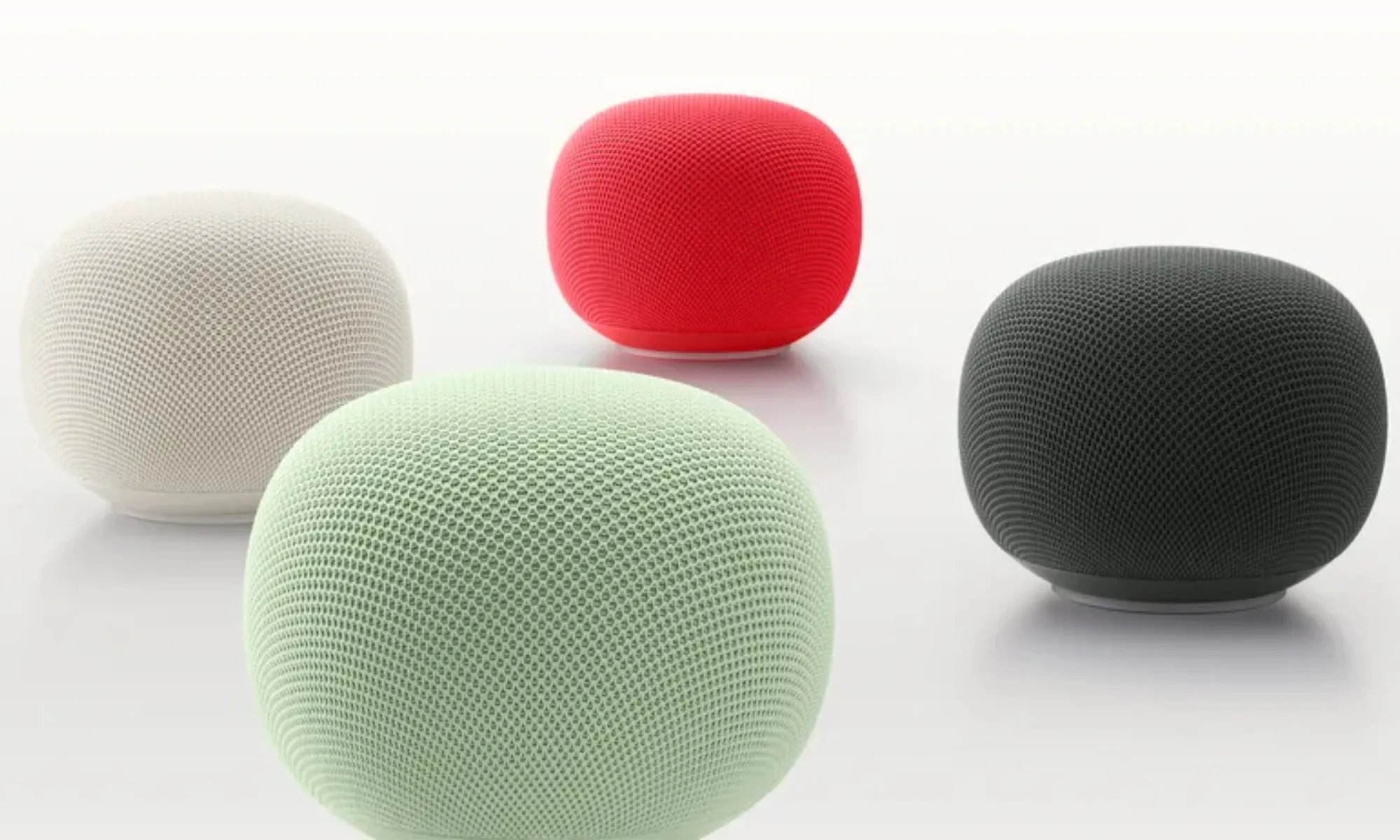
    Colors Berry, Porcelain, Hazel, Jade
    Dimensions Product: 3.4″ x 4.2″ diameter
    Power Cable: 59.1″
    Weight 0.9 lbs (including speaker and cable, excluding power adapter)
    Power & Ports 30W USB-C Adapter, 59.1″ cable, dimensions 2.3″ x 1.1″ x 2.2″, weight 0.1 lbs
    Memory & Storage 1 GB LPDDR4 RAM, 4 GB eMMC storage
    Processor Quad-core A55 2.0 GHz with NPU
    Sound & Microphones Omnidirectional sound, 58mm full-range driver, three microphones with a two-stage hardware mute
    Technology Gemini for Home, Voice match tech
    Sensors Capacitive touch control (3 zones)
    Materials At least 37% recycled materials in its design, plastic-free packaging
    Connectivity Wi-Fi 6, Bluetooth 5.4, Thread 1.3 border router
    Compatibility Google Home, Matter, acts as a Matter hub with Google Home
    Supported Devices iOS and Android
    Included in the Box Google Home Speaker, Power adapter, 59.1″ cable, Quick guide, Safety and warranty info

    Design and Setup: Sleek and Simple

    The speaker stands just 3.44 inches tall, with a 4.2-inch diameter and a light 0.9 pounds, making it incredibly easy to fit into any space while looking more refined than Google’s previous Nest models. Setting up is straightforward. Inside the box, you’ll find the speaker, a 30W USB-C power adapter, and a 1.5-meter cable, all configured through the Google Home app.

    It’s available in four colors: Hazel, Porcelain, Jade, and Berry, with Jade and Berry exclusive to the U.S. Currently, the Porcelain option used for this review has a clean, subtle look that blends easily into most homes. Its minimal, modern aesthetic doesn’t draw attention but complements most decor. The design also emphasizes sustainability, with recycled materials used throughout, including the exterior fabric that resembles Apple’s HomePod style.

    One neat detail is the dynamic light ring around the base, which shifts based on the speaker’s activity, such as listening, processing, or responding. This visual feedback enhances the overall experience, making interactions feel more responsive and alive. The omnidirectional microphones ensure the device picks up requests clearly from across the room without needing repeated commands.

    Interacting with the New Gemini

    The most noticeable change with the new Home Speaker isn’t just hardware—it’s the shift from Google Assistant to Gemini, fundamentally transforming how you communicate with your device.

    Older Google smart speakers required you to speak in commands. For example, turning off the lights or setting a timer meant delivering specific requests one at a time. Gemini moves away from this command-based model. Instead, you can speak naturally, much like talking to another person. Saying “Get the house ready for bedtime,” is enough for it to understand your intent and act accordingly. It can handle multiple instructions in one sentence and even adjust if you change your mind mid-sentence.

    What sets Gemini apart is its reasoning capability. During testing, when asked if it would rain during a baseball game, it didn’t just give today’s forecast. It processed multiple data points to make an inference, providing a more contextual and intelligent response. Google describes this as real reasoning, a substantial improvement over previous AI capabilities from Google Assistant.

    It’s equally adept at routine tasks. It can manage reminders, calendar events, shopping lists, and daily planning, supporting follow-up questions that build on the conversation rather than starting anew each time. You can personalize its voice with ten options, enhancing the natural feel of interactions.

    Google is offering the core Gemini experience at no extra charge. Buyers who get the Home Speaker before the end of September also receive six months of Google Home Premium, unlocking Gemini Live. This feature facilitates full conversations, enabling you to say, “Let’s chat,” and enjoy an extended back-and-forth. Premium adds advanced smart home management features, like camera status updates or the ability to ask if the garage was left open or if the dog jumped on the couch. It also provides summaries of events you missed while away. Google Home Premium comes in two tiers, with the basic included in Google AI Pro and the more advanced version bundled with Google AI Ultra.

    Sound Experience: Solid for Its Purpose

    Along with Gemini, audio performance has been significantly improved. Google claims the new Home Speaker offers enhanced microphone processing for clearer voice pickup, 360-degree sound, and bass that’s 2.5 times stronger than the Nest Mini. The difference in sound quality is immediately apparent compared to older Google compact speakers, making it a worthwhile upgrade if you owned previous models.

    Dual speakers can be paired for stereo sound, and integration with Google TV, Nest devices, and Cast-compatible products allows it to be part of a whole-home audio setup. It fits well within Google’s ecosystem, providing room-filling audio with punch and clarity. It avoids overly processed sound, delivering a balanced audio profile suitable for podcasts and vocals. While it handles small to medium rooms well, it might struggle with complex music at high volumes, where it can sound a bit muddled. For audiophiles, models like the Sonos Era 100 or the larger Google Nest Audio may be preferable.

    HomePod mini vs. Google Home Speaker

    Comparing this Google speaker to Apple’s HomePod mini is almost inevitable, as both are priced at around $99, feature fabric finishes, and come in various colors. The key distinction is purpose: the HomePod mini is primarily a music-focused speaker within the Apple ecosystem, while the Google Home Speaker is designed as a visual-less AI hub powered by Gemini.

    Gemini’s conversational improvements significantly distinguish Google’s offering. Its ability to handle multi-step, context-aware interactions feels more natural. Apple’s Siri AI, however, doesn’t yet support these next-gen features, meaning future versions of the HomePod may need to improve to match this experience.

    Those invested in Apple’s HomeKit ecosystem might prefer the HomePod mini, but Gemini’s support for multi-action commands, contextual dialog, and AI automation makes interactions more fluid and less reactive for Google users. In terms of audio quality, the HomePod mini offers clear, balanced sound suitable for casual listening, whereas Google emphasizes bass and immersive 360-degree audio that fills a room.

    Should You Consider Buying?

    This device offers more than just an upgrade in sound quality; it represents a shift in what a smart home assistant can be. The experience is less about issuing commands and more about natural, intuitive interactions. It performs well with podcasts and music for casual listening and features one of the most advanced on-device AI assistants available. Voice conversations feel natural, cross-device integration is seamless, and it can manage various tasks across apps if your accounts are linked. Some advanced features require a subscription, but for basic smart speaker needs, the latest Google Home Speaker is a top choice.

    Alternative Options to Explore

    Amazon Echo Dot Max — If exceptional audio quality is your priority, the Echo Dot Max features a dedicated woofer and tweeter, delivering impressive bass and clarity. Its Omnisense system offers presence detection, and support for protocols like Matter and Thread makes it versatile for smart homes. It automatically adapts to room layouts and includes a new, upgraded Alexa assistant.

    Apple HomePod mini — The closest competitor in design, the HomePod mini emphasizes Apple ecosystem integration. It provides pleasing sound, though less thunderous than larger speakers. Its AI, Siri, has improved significantly, supporting complex tasks across third-party apps, but it’s less flexible for Android users as many features remain locked behind Apple’s ecosystem.

    Sonos Era 100 SL — For audiophiles willing to invest more, the Sonos Era 100 SL offers refined, deep bass, a wider soundstage, and stereo separation. It supports multi-room playback and detailed EQ tuning. However, its virtual assistant features and app experience still need enhancement.

    How We Conducted Our Testing

    Our evaluation lasted several weeks, during which the device was linked to a personal Google account to access Gemini’s smart features. Sound quality was assessed by playing various genres, with comparisons made against the Apple HomePod mini for context. We focused on three core aspects: audio fidelity, responsiveness and accuracy of the AI, and how well it integrated across connected devices.

    Performance in audio was gauged by how well it reproduced different frequencies. The AI interaction tests involved natural language queries related to smart device control and information retrieval, measuring accuracy and response times. Finally, the setup was tested in different locations with varying network conditions to ensure reliable multi-device functioning.
  • Google Home Speaker Looks Great But The Power Cable Falls Short

    Google Home Speaker Looks Great But The Power Cable Falls Short

    The Google Home Speaker hasn’t officially begun shipping yet, but a fortunate individual managed to acquire an early unit and share their initial thoughts. Overall, the feedback is positive, though there’s one aspect that might disappoint those concerned with ease of repair.

    In case you’re not aware, Google announced the speaker in October 2025, with pre-orders opening last week. Priced at $99, it’s the company’s first new speaker in six years, prompting many questions.

    A Reddit user spotted the device on Walmart shelves and purchased it ahead of the official launch.

    The main issue highlighted is that the power cord is permanently attached to the speaker and measures just under 5 feet, a significant change from previous Google speakers, which allowed users to disconnect and replace the cable. The purchaser pointed out this as the biggest drawback, and it’s hard to disagree—fixed wiring can be a hassle if you need to replace it later.

    To be transparent, Google didn’t hide this feature. As noted by 9to5Google, the Google Store includes a 30W USB-C adapter in the box and mentions the “captive cable” in the specifications. It just went under the radar for most consumers.

    Regarding performance, the Reddit user reported that the sound quality is solid, with adequate volume and decent handling of mid-range and bass frequencies for a speaker of this size. They admitted they were comparing it to a high-end sound system, so it had a tough crowd to impress, but it still performed well.

    The interface also looks promising. It features subtle lights on the top mesh to display volume adjustments, and you control it by tapping the speaker, similar to other Home devices. Setup was straightforward and completed in under 10 minutes using a hotspot with an existing Home account.

    At $99, this speaker appears to be a compelling little device, despite the fixed cable, and offers a good alternative to the HomePod mini for non-Apple users.

  • Exclusive: This Is Wiim’s First Wireless Speaker Launch

    Exclusive: This Is Wiim’s First Wireless Speaker Launch


    Tomorrow, Wiim is set to unveil its first wireless speaker, the Wiim Sound. Sporting a design reminiscent of Apple’s HomePod, it features a cylindrical shape clad in a fabric grille and is equipped with a touch control panel. However, the standout element is its built-in, 1.8-inch circular touchscreen, which offers high-resolution album displays and controls similar to those seen on the Wiim Ultra, the company's top-tier network music streamer.

    As with Wiim's other products, the Wiim Sound is engineered to integrate smoothly within the affordable Wiim ecosystem, giving existing Sonos users an additional incentive to make the switch.

    The Wiim Sound will have its debut at High End Munich 2025, an audio exhibition focused on audiophiles in Germany. Pricing details and specific availability haven't been disclosed yet, but the company has indicated it will launch in “Q3 2025 on Amazon and selected retailers,” and it will initially be available only in black.

    Another Step Toward a Genuine Sonos Alternative

    While the Wiim Sound is the latest addition, it isn't the company’s first foray into wireless speakers. Earlier in 2025, Wiim partnered with the Swedish brand Audio Pro to create Wiim Edition versions of their A10 Mk II and C10 Mk II wireless speakers. These can be discovered and controlled directly through the Wiim Home app. Nonetheless, the Wiim Sound represents a significant step forward for the company as it works toward building an ecosystem of self-designed products that can directly compete with Sonos.

    It’s easy to speculate that Wiim will expand its offerings further, potentially entering other categories such as soundbars, Bluetooth speakers, and perhaps even headphones.

    Between the HomePod and Era 100

    The Wiim Sound’s dimensions place it between Apple’s HomePod and the Sonos Era 100, measuring 5.7 x 5.7 inches in footprint and standing 7.5 inches tall, slightly more than the Era 100 (7.18 inches). The addition of the circular touchscreen might reignite discussions about Apple's rumored next HomePod, which is speculated to feature a display.

    In terms of internal components, the Wiim Sound is more aligned with Sonos’ design, incorporating a 4-inch woofer complemented by two balanced-mode radiator (BMR) tweeters. Wiim claims that this setup allows the Sound to reproduce two-channel stereo sound, although true stereo separation could be challenging to achieve. The amplifier configuration is yet to be detailed by Wiim, but they assert that the speaker can deliver a combined power output of 100 watts.

    At the base, the speaker includes power ports, a 10/100 Ethernet connection, and a 3.5mm input jack. It supports wireless connectivity via both Wi-Fi 6E and Bluetooth 5.3. Although labeled as a smart speaker, the lack of a built-in microphone and a native voice assistant might limit that classification. Nevertheless, it can serve as an Amazon Alexa device through the provided voice remote, which resembles a modified version of Siri’s remote and is called the Wiim Voice Remote 2. It is also compatible with Google Assistant, responding to commands from Assistant-enabled smartphones or devices.

    The Wiim Sound boasts an impressive range of streaming and EQ features, which include:

    • Hi-res audio support up to 24-bit/192 kHz
    • Chromecast (Google Cast), Spotify Connect, Tidal Connect, DLNA, or Alexa Cast
    • 24 preset EQ profiles, a 10-band graphic equalizer, and an optional parametric EQ interface
    • Room correction capabilities via a smartphone running the Wiim Home app

    Users can manage the Wiim Sound within a larger multiroom audio setup through the Wiim Home app. This functionality allows for grouping the Sound with other Wiim components for synchronized playback, and even stereo pairing two Wiim Sounds. Additionally, a single Wiim Sound can function as a center channel speaker, and two can be configured for surround sound in a 5.1 setup, provided the audio source is a 5.1 mix either from a personal library or a TV connected to one of Wiim’s HDMI-ARC compatible devices (Wiim Ultra, Wiim Amp, Wiim Amp Pro).

    Still Lacking AirPlay

    For reasons known only to Wiim and Apple, the Wiim Sound is the third streaming product from the company to launch without support for Apple's AirPlay 2 protocol. When the Wiim Ultra was first introduced without AirPlay capabilities, it was presumed to be a temporary oversight that would be resolved through a firmware update. This correction did not occur, and the recent Wiim Amp Pro also launched without AirPlay.

    While AirPlay is a valuable feature for iPhone users, enabling them to stream audio via home Wi-Fi networks from various apps, its demand among Wiim's user base remains ambiguous. Additionally, AirPlay 2 tends to employ lossy compression, which many audiophiles feel is unacceptable. The emergence of streaming apps developing their own versions of AirPlay (like Tidal Connect, Spotify Connect), alongside the availability of Google Cast, diminishes AirPlay’s necessity in many scenarios. Moreover, Bluetooth could serve as an adequate alternative even on iOS when streaming Apple Music through Wiim devices.

  • What is the best speaker for camping in a car?

    What is the best speaker for camping in a car?

    Camping trips often call for a reliable audio source to enhance the outdoor experience. Whether you’re lounging by the campfire, enjoying a scenic view, or even cooking up a meal, having good music can elevate the vibe. But what makes a speaker ideal for camping in a car? Let’s explore the essential features to look for, along with some top recommendations.

    Key Features to Consider

    When selecting a speaker for camping in a car, there are several factors to keep in mind:

    Portability

    • Size and Weight: Look for compact and lightweight speakers that can easily fit in your gear.
    • Carrying Options: Features such as straps or handles can be beneficial for transport.

    Battery Life

    • Longevity: Choose speakers with extended battery life to avoid constant recharging.
    • Power Source: Some speakers offer options for charging through a car’s USB port.

    Durability

    • Water Resistance: Opt for speakers that are water-resistant or waterproof to withstand unexpected weather.
    • Rugged Build: A rugged construction can handle rough environments often found in camping.

    Sound Quality

    • Bass Response: A speaker with good bass can enhance the listening experience, especially outdoors.
    • Volume Levels: Ensure the speaker can reach suitable volumes without distortion, especially in open spaces.

    Top Recommendations

    1. JBL Flip 6

    • Portability: Lightweight and compact design.
    • Battery Life: Up to 12 hours of playtime.
    • Durability: IP67 rating makes it dust and waterproof.
    • Sound Quality: Excellent bass response and clear sound quality.

    2. Ultimate Ears WONDERBOOM 3

    • Portability: Tiny size makes it easy to carry.
    • Battery Life: Lasts about 14 hours on a single charge.
    • Durability: Also IP67 rated, suitable for any weather conditions.
    • Sound Quality: 360-degree sound coverage provides impressive clarity.

    3. Anker Soundcore Motion+

    • Portability: Slightly larger but still portable.
    • Battery Life: Offers up to 15 hours of playback.
    • Durability: Splash-resistant (IPX7) for occasional rain exposure.
    • Sound Quality: Delivers high-quality sound with deep bass.

    4. Bose SoundLink Micro

    • Portability: Very compact and lightweight.
    • Battery Life: Around 6 hours of playtime.
    • Durability: IPX7 rated, can be submerged in water.
    • Sound Quality: Strong audio performance for its size, with deep bass.

    Using Your Speaker Effectively

    Once you’ve selected the perfect camping speaker, consider these tips for an enjoyable experience:

    • Placement Matters: Position the speaker away from walls or barriers to maximize sound dispersion.
    • Adjust Volume Gradually: Start at a lower volume and increase it to avoid sudden loudness, which can scare wildlife.
    • Keep Connections Ready: Ensure Bluetooth or aux connections are prepared for easy pairing with your device.
    • Protect from Elements: If it’s not waterproof, keep it in a dry bag or similar protective case during sudden rain.

    By considering these factors and suggestions, you can enhance your camping experience with the right audio accompaniment. Whether you’re traveling with friends or enjoying a solo retreat, the right speaker can make all the difference. Happy camping!

  • Which Is the Best Bluetooth Wireless Speaker?

    Which Is the Best Bluetooth Wireless Speaker?

    Bluetooth wireless speakers have transformed the way we enjoy music, offering flexibility and portability that traditional speakers simply cannot match. With countless options available, choosing the right speaker can feel overwhelming. In this guide, we’ll explore some of the top contenders and factors to consider when selecting the best Bluetooth wireless speaker for your needs.

    Factors to Consider

    There are several elements to think about when determining the best Bluetooth speaker for you:

    Sound Quality

    • Audio Clarity: Look for speakers that provide crisp highs and deep lows.
    • Bass Response: For bass enthusiasts, a speaker with a dedicated subwoofer will enhance the listening experience.

    Battery Life

    • Playback Time: Opt for speakers that offer a long battery life, ideally 10 hours or more.
    • Charging Time: Consider how quickly the speaker can be recharged between uses.

    Portability

    • Size and Weight: If you plan to take your speaker on the go, smaller and lighter options are preferable.
    • Durability: Many speakers come with rugged designs and water resistance, great for outdoor use.

    Connectivity

    • Bluetooth Range: A long Bluetooth range (at least 30 feet) allows you more freedom to move around.
    • Multiple Device Pairing: Some speakers allow for pairing with multiple devices, making it easy to switch between music sources.

    Additional Features

    • Voice Assistant Integration: Many modern speakers come equipped with voice assistants like Amazon Alexa or Google Assistant.
    • Built-in Microphone: This feature allows for hands-free calls and voice commands.

    Top Bluetooth Wireless Speakers

    After evaluating various options on the market, here are some leading Bluetooth wireless speakers:

    1. JBL Charge 5

    • Sound: Rich, balanced sound with impressive bass.
    • Battery Life: Up to 20 hours.
    • Extras: Waterproof rating of IP67 and can charge devices via USB.

    2. Bose SoundLink Revolve+

    • Sound: 360-degree sound for consistent audio quality in any direction.
    • Battery Life: Up to 17 hours.
    • Extras: Water-resistant and can connect to multiple devices.

    3. Ultimate Ears BOOM 3

    • Sound: Deep bass and high clarity in a cylindrical design.
    • Battery Life: 20 hours of playback.
    • Extras: Highly durable and designed for outdoor use, plus a waterproof rating of IP67.

    4. Sony SRS-XB43

    • Sound: Strong bass with Extra Bass technology.
    • Battery Life: Up to 24 hours.
    • Extras: LED lights for a party vibe and waterproof design.

    5. Anker Soundcore Motion+

    • Sound: Outstanding audio quality with Hi-Res sound.
    • Battery Life: 15 hours of playtime.
    • Extras: Customizable EQ settings through a smartphone app.

    Comparing Price Points

    When it comes to pricing, Bluetooth speakers vary widely, from budget-friendly models to high-end purchases. Here’s a quick look at different budget categories:

    • Budget ($30 – $100): Reliable options for casual listening, such as the Anker Soundcore Mini.
    • Mid-range ($100 – $200): More powerful and feature-packed speakers like the JBL Charge 5 and Bose SoundLink Revolve+.
    • Premium ($200 and above): High-quality audio experience offered by brands like Sony and Ultimate Ears.

    The Best Choice for You

    Ultimately, the ideal Bluetooth wireless speaker will depend on your specific needs and preferences. To make the best decision:

    • Identify your primary use: Is it for outdoor gatherings, home use, or travel?
    • Consider your sound quality expectations: Are you an audiophile or a casual listener?
    • Balance features with budget: Decide what features are must-haves versus nice-to-haves.

    By weighing these factors and exploring the suggested speakers, you can find the perfect Bluetooth wireless speaker to elevate your music experience.

  • Which sound speaker is best?

    Which sound speaker is best?

    When it comes to choosing the best sound speaker, the options can be overwhelming. With advancements in technology and an influx of brands on the market, finding the right speaker that meets your needs can be a challenge. This article will delve into various types of speakers, factors to consider, and highlight some of the top contenders in the market.

    Types of Speakers

    Understanding the different categories of speakers can help streamline your selection process. Here’s a brief overview:

    1. Portable Bluetooth Speakers

    • Convenience: Lightweight and easy to carry, ideal for outdoor activities.
    • Connectivity: Connects easily to devices via Bluetooth.
    • Battery Life: Varies from a few hours to over 20 hours based on different models.

    2. Home Audio Speakers

    • Sound Quality: Typically designed for superior sound performance in a static environment.
    • Wired and Wireless Options: Can be connected through cables or operate wirelessly.
    • Variety of Designs: Available in a wide range of sizes and styles to fit interior decor.

    3. Smart Speakers

    • Voice Assistance: Integrates with smart home devices and often comes with voice control.
    • Streaming Capabilities: Capable of streaming music from various online services.
    • Multi-Room Audio: Some models can be synchronized throughout your home.

    Factors to Consider

    Before making a purchase, evaluating certain factors will ensure you select the best sound speaker for your needs.

    Sound Quality

    • Frequency Response: A wider frequency range typically leads to richer sounds.
    • Clarity: Look for speakers that have minimal distortion at high volumes.
    • Bass Response: Ensure the speaker has sufficient bass management for your music preferences.

    Portability and Size

    • Compactness: Consider how portable you need the speaker to be.
    • Space Availability: Measure the space available in your home or the intended location.

    Connectivity Options

    • Bluetooth: Is the speaker Bluetooth-enabled for wireless connections?
    • Wired Connections: Check if there are options for auxiliary or USB inputs.

    Price Range

    • Budget: Determine how much you are willing to spend.
    • Value for Money: Weigh the features against the price to ensure you’re getting a good deal.

    Top Speaker Models

    Here are some highly rated speakers from various categories that are worth considering:

    Portable Bluetooth Speakers

    JBL Charge 5

    • Excellent sound quality with deep bass.
    • IP67 waterproof rating.
    • Long battery life of up to 20 hours.

    Ultimate Ears BOOM 3

    • 360-degree sound.
    • Durable and waterproof design.
    • Vibrant colors with customizable options.

    Home Audio Speakers

    Sonos One

    • Great sound quality with built-in voice assistant.
    • Multi-room capabilities.
    • Sleek design that fits well in any decor.

    Bowers & Wilkins 606

    • Audiophile-grade sound quality.
    • Compact bookshelf design suitable for smaller spaces.
    • Excellent dynamics and clarity.

    Smart Speakers

    Amazon Echo (4th Gen)

    • Versatile features with Alexa integration.
    • Enhanced audio quality with a spherical design.
    • Compatible with various smart home devices.

    Apple HomePod Mini

    • Impressive sound quality in a small package.
    • Seamless integration with Apple devices.
    • Intelligence features with Siri voice control.

    Final Thoughts on Choosing the Best Speaker

    Selecting the right speaker involves weighing your preferences, budget, and the specific environment where it will be used. By being informed about different types of speakers and the essential factors that affect sound performance, you can make a well-rounded decision that enhances your listening experience.

  • What will a subwoofer do?

    What will a subwoofer do?

    Subwoofers are essential components of modern audio systems, providing a depth of sound that enhances the listening experience. Whether you are immersing yourself in a movie, enjoying your favorite music, or gaming, a subwoofer adds richness to the audio landscape. Let’s dive into what exactly subwoofers do and how they improve sound quality.

    The Role of a Subwoofer

    A subwoofer is specifically designed to reproduce low-frequency sounds, commonly referred to as bass. This component operates within a certain range of frequencies that typical speakers often struggle to replicate. Here’s what defines the function of a subwoofer:

    Frequency Range

    • Lower Frequencies: Subwoofers typically handle frequencies from around 20 Hz to 200 Hz. This range includes the deep rumble of thunder, the punch of a kick drum, and the vibrations in cinematic explosions.
    • Complementing Other Speakers: By managing these lower frequencies, subwoofers allow regular speakers to focus on mid and high frequencies, resulting in clearer overall sound.

    Acoustic Impact

    • Enhanced Soundstage: The deep tones provided by a subwoofer create a more immersive soundstage, allowing listeners to feel the music or sound effects rather than just hearing them.
    • Cinematic Experience: In home theater settings, subwoofers elevate film soundtracks by providing that powerful bass that draws viewers into the action.

    Types of Subwoofers

    There are different types of subwoofers designed for varying applications and preferences. Understanding these types can help you choose the right one for your setup.

    Passive vs. Active Subwoofers

    • Passive Subwoofers: These require an external amplifier to drive the sound. They are typically used in more complex audio systems where specific amplification can be customized.
    • Active Subwoofers: These have built-in amplifiers, making them easier to connect and set up. They are the more popular choice for home use due to their convenience.

    Front-Firing vs. Down-Firing Subwoofers

    • Front-Firing: The speaker faces forward and is best for use in small to medium-sized rooms. They provide direct sound and can integrate well with other front-facing speakers.
    • Down-Firing: These subwoofers have the driver facing downward, which allows the bass to interact with the floor. This design is often preferred for larger rooms as it can fill the space more effectively.

    Benefits of Adding a Subwoofer

    Integrating a subwoofer into your audio setup can bring several advantages, enhancing both music and movie experiences.

    Improved Audio Quality

    • Richer Detail: By taking care of low frequencies, subwoofers significantly improve the clarity of mid and high-range sounds.
    • Balance: Subwoofers help balance the overall sound, preventing heavier bass from overpowering vocals and instruments.

    Versatile Applications

    • Home Theater Systems: Provides a more cinematic experience, crucial for action movies or thrillers where bass plays an integral role.
    • Music Enjoyment: Enhances bass lines in music genres such as hip-hop, rock, and electronic, giving listeners a fuller sound.
    • Gaming: Creates an engaging experience, as many games utilize sound design that benefits from deep bass sounds.

    Adjustable Settings

    • Tuning Capabilities: Many subwoofers come with adjustable settings for frequency and volume, allowing users to tailor their audio experience based on personal preferences or room acoustics.
    • Bluetooth Connectivity: Some modern subwoofers feature wireless options, making it easier to integrate into various audio setups without the clutter of cables.

    Final Thoughts

    Subwoofers are indispensable for anyone serious about experiencing sound in its fullest form. Whether for music, movies, or gaming, they expand the audio range and bring depth that standard speakers cannot achieve alone. By understanding their role and function, you can make informed decisions about adding a subwoofer to enhance your audio enjoyment.

  • Can Amazon dot be used as a Bluetooth speaker?

    Can Amazon dot be used as a Bluetooth speaker?

    The Amazon Echo Dot, a popular smart speaker known for its compact size and affordability, often raises questions about its functionality. One of the commonly asked features is whether the Echo Dot can act as a Bluetooth speaker. This article will explore this feature in detail, highlighting how to connect it and what benefits it offers.

    Understanding Echo Dot’s Bluetooth Capabilities

    The Echo Dot is not just a smart assistant that answers questions and controls smart home devices; it also includes Bluetooth functionality. This allows users to connect their smartphones, tablets, or other Bluetooth-enabled devices to play audio through the speaker. Here’s a closer look at how it works:

    How to Connect Your Device

    Connecting your device to the Echo Dot as a Bluetooth speaker is a straightforward process. Follow these steps:

    1. Turn on Your Echo Dot:
      Ensure your Echo Dot is powered on and within range of your Bluetooth device.

    2. Enable Bluetooth on Your Device:
      Make sure Bluetooth is enabled on the smartphone or tablet you want to pair with the Echo Dot.

    3. Put Echo Dot in Pairing Mode:

      • Wake the Echo Dot by saying “Alexa.”
      • Then, say “Pair” or “Connect to Bluetooth.” This will put the Echo Dot in pairing mode.

    4. Select Echo Dot from Your Device:
      On your smartphone or tablet, go to the Bluetooth settings. Look for the Echo Dot in the list of available devices and select it.

    5. Confirmation:
      Once connected, Alexa will confirm the pairing. You can now start playing audio.

    Supported Audio Formats

    The Echo Dot supports several audio formats when used as a Bluetooth speaker, including:

    • MP3
    • AAC
    • WAV
    • FLAC

    This allows for a wide variety of streaming options, from music to podcasts and audiobooks.

    Benefits of Using Echo Dot as a Bluetooth Speaker

    Using the Echo Dot as a Bluetooth speaker offers several advantages:

    Compact and Portable

    • Space-Saving Design: The Echo Dot’s small size makes it an ideal choice for limited spaces.
    • Lightweight: Easy to move from room to room.

    Versatile Compatibility

    • Supports Various Devices: Connect to smartphones, tablets, and laptops.
    • Streaming Services: Play music from popular apps like Spotify, Apple Music, and Amazon Music.

    Smart Features

    • Voice Control: Use Alexa to manage playback and adjust volume without needing to touch your device.
    • Hands-Free Calling and Messaging: Make calls and send messages using voice commands while connected as a speaker.

    Multi-Room Audio

    • Link Multiple Devices: If you have more than one Echo device, you can connect them to create a multi-room audio system, allowing music to play throughout your home.

    Improved Sound Quality

    • Better Audio Performance: While the Echo Dot itself has decent sound quality, using it as a Bluetooth speaker lets you enjoy clearer and louder audio than many built-in device speakers.

    Troubleshooting Common Issues

    Here are a few tips to resolve common problems users may encounter when connecting their devices to the Echo Dot:

    • Echo Dot Not Discoverable:

      • Make sure the device you’re trying to connect is in Bluetooth pairing mode.
      • Restart the Echo Dot and reattempt the pairing process.

    • Connectivity Drops:

      • Ensure both devices are within a reasonable range (typically within 30 feet).
      • Check for interference from walls or other electronic devices.

    • Audio Delay:

      • Use the latest firmware for both the Echo Dot and your audio source to minimize any latency issues.

    With these features and capabilities, the Amazon Echo Dot serves as a versatile Bluetooth speaker, offering both convenience and impressive audio performance. This functionality expands the use of the Echo Dot beyond just being a smart assistant, making it a valuable addition to any tech-savvy home.

  • Which is the No 1 Bluetooth speaker?

    Which is the No 1 Bluetooth speaker?

    With the rise of wireless technology, Bluetooth speakers have become an essential accessory for music lovers and tech enthusiasts alike. Whether you’re at the beach, hosting a backyard barbecue, or simply enjoying a quiet evening at home, having a reliable Bluetooth speaker can elevate your audio experience. But with so many options flooding the market, the question arises: which Bluetooth speaker truly stands out as the number one choice?

    Key Features to Consider

    When searching for the best Bluetooth speaker, several features help determine its overall performance and user satisfaction. Here are some critical aspects to keep in mind:

    Sound Quality

    • Clarity: Look for speakers that offer clear highs, balanced mids, and rich lows.
    • Bass Response: A good speaker should provide adequate bass without overpowering other frequencies.

    Battery Life

    • Duration: The best Bluetooth speakers typically offer 10 to 20 hours of playtime on a single charge.
    • Fast Charging: Some models support quick charging, allowing you to get back to listening faster.

    Portability

    • Weight: Lightweight designs make it easy to carry around.
    • Size: Compact speakers can fit in small bags or cup holders without hassle.

    Durability

    • Water Resistance: An IP rating, such as IP67, indicates resistance to dust and water.
    • Rugged Design: Look for speakers made from durable materials that can withstand bumps and drops.

    Top Contender: Ultimate Ears MEGABOOM 3

    After evaluating various contenders on the market, the Ultimate Ears MEGABOOM 3 has emerged as a top choice among Bluetooth speakers. Here’s why it stands out:

    Exceptional Sound Quality

    The MEGABOOM 3 offers 360-degree sound that fills any space, ensuring party guests or quiet listeners alike enjoy an immersive auditory experience. The bass is powerful yet not overpowering, with audio clarity that remains intact even at high volumes.

    Impressive Battery Life

    • 20-Hour Playtime: With a long-lasting battery, you can enjoy uninterrupted music all day.
    • Quick Charge: Just charge it for 2.5 hours for a full battery, so you’re always ready to go.

    Rugged and Portable Design

    • Water and Dust Proof: With an IP67 rating, it can withstand spills and exposure to the elements.
    • Lightweight and Sleek: Weighing in at just 2.5 pounds, it’s easy to pack for trips.

    User-Friendly Features

    • PartyUp Feature: Connect over 150 enabled speakers for an even bigger sound.
    • One-Touch Control: Easily access playlists from your phone with a single button.

    Other Noteworthy Bluetooth Speakers

    While the Ultimate Ears MEGABOOM 3 is a top pick, several other Bluetooth speakers deserve attention:

    JBL Charge 5

    • Sound Quality: Renowned for its robust sound, especially in bass response.
    • Power Bank Feature: Charges your devices while playing music, making it versatile for outdoor adventures.

    Bose SoundLink Revolve+

    • 360-Degree Sound: Provides satisfying audio coverage for both indoor and outdoor events.
    • Built-in Speakerphone: Great for conference calls, offering clear call quality.

    Sony SRS-XB43

    • Extra Bass Feature: Delivers powerful sound for those who crave deep bass.
    • Party Lights: Built-in LED lights enhance the atmosphere during gatherings.

    Final Thoughts

    Finding the top Bluetooth speaker involves considering personal preferences, usage scenarios, and required features. The Ultimate Ears MEGABOOM 3 checks all the boxes, but other speakers like the JBL Charge 5 and Bose SoundLink Revolve+ also offer impressive performances. Assess your needs, explore these options, and enjoy a high-quality audio experience wherever you go.

  • Which is best Bluetooth speaker?

    Which is best Bluetooth speaker?

    Bluetooth speakers have come a long way, transforming the way we listen to music, podcasts, and audiobooks on the go. With numerous options available, selecting the right one can feel overwhelming. Here, we’ll break down some of the best Bluetooth speakers on the market, focusing on their features, sound quality, battery life, and portability.

    Factors to Consider When Choosing a Bluetooth Speaker

    Before diving into the top speakers, it’s crucial to understand what features matter most. Here are the primary factors to consider:

    Sound Quality

    • Audio Performance: Look for clarity in both highs and lows, along with a balanced sound profile.
    • Bass Response: A good Bluetooth speaker should deliver solid bass without distorting the sound at high volumes.

    Battery Life

    • Playtime: Opt for speakers that offer at least 10 hours of continuous use.
    • Charging Time: Consider how long it takes to recharge the speaker. Faster charging means less downtime.

    Portability

    • Size and Weight: Lightweight and compact speakers are ideal for travel.
    • Durability: If you plan to use the speaker outdoors, consider water and dust resistance ratings.

    Top Bluetooth Speakers of 2023

    Let’s take a closer look at some of the best Bluetooth speakers available, based on the factors mentioned earlier.

    1. JBL Charge 5

    Key Features:

    • Battery Life: Up to 20 hours of playtime
    • Sound Quality: Powerful wireless sound with deep bass
    • Durability: Waterproof (IP67 rating) and rugged design
    • Extra Functionality: Can charge other devices via USB port

    2. Bose SoundLink Flex

    Key Features:

    • Battery Life: Up to 12 hours of continuous play
    • Sound Quality: Rich, deep sound with effective bass
    • Portability: Lightweight (1.3 lbs) and detachable silicone strap for easy carrying
    • Durability: Designed to withstand water exposure (IP67 rating)

    3. Ultimate Ears BOOM 3

    Key Features:

    • Battery Life: 20 hours of playtime
    • Sound Quality: 360-degree sound with deep bass and clear highs
    • Portability: Waterproof (IP67) and floats, making it ideal for pools and beaches
    • Design: Available in multiple colors with a stylish fabric finish

    4. Anker Soundcore Motion+

    Key Features:

    • Battery Life: Up to 15 hours on a single charge
    • Sound Quality: Hi-res audio with customizable EQ settings through the app
    • Portability: Lightweight yet robust, perfect for travel
    • Extra Functionality: Can pair with other Soundcore speakers for stereo sound

    Comparing Bluetooth Speakers

    When evaluating which Bluetooth speaker is the best for you, consider the following comparisons between the top choices:

    Audio Performance

    • JBL Charge 5: Known for booming bass and robust sound suitable for outdoor use.
    • Bose SoundLink Flex: Excellent for indoor settings with a focus on vocal clarity.
    • Ultimate Ears BOOM 3: Balanced sound profile perfect for parties and gatherings.

    Portability and Use Cases

    • JBL Charge 5 and Ultimate Ears BOOM 3: Best for outdoor adventures, thanks to their durable build and waterproof features.
    • Bose SoundLink Flex: Great for casual listening around the house or on the go, offering a blend of aesthetics and sound.
    • Anker Soundcore Motion+: Versatile for home use with the ability to connect to other Soundcore products.

    Final Thoughts

    Finding the ideal Bluetooth speaker hinges on understanding your priorities—whether it’s sound quality, battery life, portability, or durability. Each speaker has its strengths and suits different needs. Whether you prioritize powerful sound for outdoor gatherings or a compact speaker for travel, there’s a perfect option for everyone.

  • Which speaker is best for desktop computer?

    Which speaker is best for desktop computer?

    When it comes to enhancing your desktop computer experience, selecting the right speakers is crucial for audio quality, whether you’re gaming, working, or enjoying music. With various options available, identifying the best speaker for your setup can be a bit overwhelming. This article will explore the essential features, types of speakers, and top recommendations to help you make an informed choice.

    Key Features to Consider

    Before diving into specific models, it’s important to understand which features matter most. Here are some essential elements to consider when selecting speakers:

    Sound Quality

    • Frequency Response: Look for a wider frequency range for a fuller sound. A speaker that can reproduce lows, mids, and highs well will enhance your audio experience.
    • Clarity and Detail: Good speakers should reproduce sound accurately, allowing you to hear every detail without distortion.

    Connectivity Options

    • Wired vs. Wireless: Decide if you prefer wired options for reliable sound quality or wireless for convenience and reduced clutter.
    • Input Ports: Multiple input options (like USB, RCA, or aux) increase versatility, making it easier to connect various devices.

    Size and Design

    • Desktop Space: Smaller speakers are ideal for limited desk space, while larger models can offer better sound but take up more room.
    • Aesthetics: Choose a design that matches your setup and personal style, whether it’s sleek and modern or classic.

    Price Range

    Speakers come in a range of prices. It’s essential to find a balance between quality and budget, enabling you to get the most value for your money.

    Types of Speakers

    There are several types of speakers to consider for your desktop setup. Each has its pros and cons:

    2.0 Stereo Speakers

    • Description: A simple two-speaker system without a subwoofer.
    • Advantages: Compact, affordable, and easy to set up.
    • Ideal For: Casual users who primarily listen to music and watch videos.

    2.1 Speaker System

    • Description: Consists of two speakers and a separate subwoofer.
    • Advantages: Enhanced bass response and overall sound quality.
    • Ideal For: Gamers and movie enthusiasts seeking immersive audio.

    Bluetooth Speakers

    • Description: Wireless speakers that connect via Bluetooth.
    • Advantages: Portable and convenient, with no messy cables.
    • Ideal For: Users who prefer flexibility and want to use speakers for multiple devices.

    Studio Monitors

    • Description: High-fidelity speakers designed for accurate sound reproduction.
    • Advantages: Superior clarity and precision, making them ideal for music production.
    • Ideal For: Professionals and audiophiles requiring top-notch sound quality.

    Top Speaker Recommendations

    Here are some top-rated speakers across various categories to consider for your desktop setup:

    Creative Pebble 2.0

    • Type: 2.0 Stereo Speakers
    • Price: Affordable
    • Pros: Compact design, impressive sound quality for size, easy to use.
    • Cons: Limited bass; not suitable for bass-heavy music.

    Logitech Z623

    • Type: 2.1 Speaker System
    • Price: Mid-range
    • Pros: THX-certified sound for cinematic quality, powerful subwoofer for deep bass.
    • Cons: Bulky design may not fit small desks.

    Bose Companion 2 Series III

    • Type: 2.0 Stereo Speakers
    • Price: Higher-end
    • Pros: Exceptional sound clarity, sleek design, easy setup.
    • Cons: Pricey compared to basic models; lacks a subwoofer.

    Audioengine A2+ Wireless

    • Type: 2.0 Stereo Speakers
    • Price: Premium
    • Pros: Beautiful design, Bluetooth connectivity, excellent audio performance.
    • Cons: Higher price point; might not suit budget-conscious buyers.

    JBL Flip 5

    • Type: Bluetooth Speaker
    • Price: Mid-range
    • Pros: Portable, waterproof, robust sound quality, and battery life.
    • Cons: Limited functionality for desktop use compared to wired options.

    KRK Rokit 5 G4

    • Type: Studio Monitors
    • Price: Premium
    • Pros: Excellent sound detail and frequency range; versatile applications.
    • Cons: Larger footprint; may require additional setup for optimal use.

    Conclusion About Speaker Selection

    Ultimately, the best speaker for your desktop computer hinges on your specific needs, budget, and preferences. Whether you prioritize sound quality, connectivity, or design, understanding these factors will help you find a speaker that elevates your audio experience.

  • How To Turn Off The DualSense Controller Speaker on PS5

    How To Turn Off The DualSense Controller Speaker on PS5


    Sony / .

    The DualSense controller for the PS5 is a favorite among gamers due to its impressive functionality. It boasts features like haptic feedback and adaptive triggers that significantly enhance the gaming experience. However, many users find the integrated speaker to be more of a nuisance. If you want to silence this feature, follow the straightforward steps below to turn it off.

    PS5 DualSense controller against a dark background.

    Sony / .

    To disable the speaker on your DualSense controller, follow these steps:

    Step 1: On the home screen of your PS5, click the Settings gear icon.

    Step 2: From the menu, select Accessories.

    Step 3: Choose the Controller (General) option.

    Step 4: Scroll down to find the Controller Speaker option, then move the toggle all the way to the left to turn off the sound coming from the speaker.

  • Tribit StormBox Blast 2 Speaker Gets Power Boost And Karaoke

    Tribit StormBox Blast 2 Speaker Gets Power Boost And Karaoke

    Tribit, known for crafting some of our favorite Bluetooth speakers, has unveiled the StormBox Blast 2. This upgraded version of their popular rugged portable speaker delivers an impressive 200 watts of output, features enhanced dust and water resistance, and introduces dual karaoke inputs and functionalities that cater to partygoers.

    Boosting its power significantly from the original StormBox Blast’s 90 watts, the Blast 2’s 200 watts (180 watts on battery) comes from five newly engineered drivers, including an 80-watt woofer, two 45-watt midrange drivers, and a pair of 15-watt tweeters.

    The system is driven by what Tribit refers to as two “advanced Ti amplifiers” designed to provide a “balanced and dynamic sound.” Similar to other barrel-shaped Bluetooth speakers like the Soundcore Boom 2 Plus and Skullcandy Barrel, the StormBox Blast 2 incorporates passive bass radiators on either end, which enhance the low-end sound.

    Tribit StormBox Blast 2
    Tribit

    However, the Blast 2 stands apart from similar boombox-style Bluetooth speakers by incorporating karaoke features, making it comparable to party models like the JBL PartyBox Stage 320, albeit in a more compact, less powerful design. It comes with two 1/4-inch microphone inputs for wired mics, allowing users to sing duets with friends. Additionally, it supports two wireless Tribit microphones, one of which is included with the Blast 2 at launch while supplies last. Each microphone input features its own volume controls, allowing for a balanced mix of vocals and music, and a reverb effect can be added for an enhanced experience.

    The karaoke inputs on the back of the Tribit StormBox Blast 2.
    Tribit

    Wireless connectivity is provided by Bluetooth 5.4, enabling easy pairing with phones, laptops, and other devices for seamless streaming from platforms like Spotify and Apple Music. Alternatively, there’s a 3.5mm aux input on the back for wired connections.

    The Blast 2 is significantly larger than its predecessor, measuring 18.7 by 7.6 by 10 inches and weighing 20 pounds, compared to the original Blast’s weight of 12 pounds. This increased size not only boosts its volume output but also enhances the light show feature, with LED strips lining both sides that can be customized through the Tribit app.

    Though the Blast 2 has seen an upgrade from the IPX7 rating to a now dustproof IP67, there was no need to enhance its battery life, which remains a robust 30 hours per charge—ample time for pool parties or karaoke sessions, although it’s worth monitoring battery performance during the latter.

    The Tribit StormBox Blast 2 is priced at $299, and Tribit is offering an early bird special that includes an $80 discount and a complimentary wireless microphone until October 27.