Tag: Smart Home

  • Must-Try Alexa Features You’re Not Using

    Must-Try Alexa Features You’re Not Using

    “Alexa, turn on the lights.”

    That’s a common phrase in my household. With a comprehensive smart lighting system connected to the Amazon Alexa platform and two Echo Show 15s—one in my office and another in the kitchen—this voice assistant plays a vital role in managing everything from lighting to grocery lists.

    Many people are familiar with basic voice commands like setting to-do lists or checking the weather. However, the Alexa platform offers a range of powerful, lesser-known features that can enhance its usability.

    Show and Tell

    The Show and Tell feature utilizes the Echo Show’s camera to recognize and announce the identity of various objects. Primarily designed to assist visually impaired users, it can help distinguish everyday items such as pantry ingredients—like cumin versus cinnamon—by simply saying, “Alexa, what am I holding?” or “What’s in my hand?” The device guides you on how to position the item for proper recognition, signaling when you’re aligned correctly.

    Eye Gaze

    Typically, smart assistants rely on voice commands. The Eye Gaze feature allows users to control Alexa devices using their eye movements alone. This is particularly useful for individuals with speech or mobility limitations, letting them activate pre-programmed Alexa actions without needing to speak or use their hands.

    Currently, this feature is only available on the Fire Max 11 Tablet and in select countries. Although it’s in the early stages, there are plans to expand it to additional devices in the future.

    Real-Time Translation

    While many prefer their phones for video calls, Alexa can also facilitate conversations with family. This feature includes live captions on the screen, making it easy to converse in multiple languages simultaneously, ensuring that both parties understand each other.

    This feature is also beneficial for hearing-impaired users, as the real-time captions allow them to follow the conversation seamlessly. Just enable call captioning through the Alexa app or settings on the Echo Show.

    Adaptive Listening

    Individuals with speech difficulties may struggle to issue commands quickly to Alexa. That’s where Adaptive Listening comes in. It extends the time Alexa waits to process your request, making interactions feel more natural. This feature can be activated within the Alexa app or through specific Echo devices.

    Interestingly, even those without speech issues appreciate this feature, as it allows for a smoother conversational flow.

    Find Your Phone

    Like many people, I often misplace my phone. When it’s time to leave the house, I might scramble through couch cushions or search high and low for it.

    Now, instead of searching frantically, I simply say, “Alexa, find my phone.” The device initiates a call, allowing me to listen for its vibrations around the house. There are several Alexa Skills designed for this as well, but the built-in feature is typically sufficient.

    Whisper Mode

    When I put the baby down for the night and need to ask Alexa something, Whisper Mode becomes invaluable. Once activated, I can speak softly, and Alexa responds in a matching whisper. This feature is convenient for late-night inquiries, so you don’t disturb anyone else in the house.

    However, make sure to enable it first, as not having it activated can lead to some loud surprises when you try to whisper an inquiry.

    Emergency Assist

    For years, users have desired the ability for Alexa to call 911. While that is not yet an option, the Emergency Assist feature connects you to a “Urgent Response” agent who can dispatch emergency services if needed. Keep in mind, though, this feature requires a monthly subscription fee.

    Without a subscription, you’re limited to one emergency contact. Emergency Assist allows for up to 25 and can listen for critical sounds like breaking glass or smoke alarms, enhancing safety in your home.

    Alexa continues to be one of the most popular smart home platforms, evolving and improving over time. While the introduction of a subscription model for specific features has slowed its growth, it still remains a key player in the smart home arena.

  • Apple’s HomeOS And Smart Home Display Delayed But It Makes Sense

    Apple’s HomeOS And Smart Home Display Delayed But It Makes Sense

    During its annual developers conference this year, Apple unveiled a range of significant updates across its software platforms. This included a fresh design language, a complete overhaul of iPadOS, and crucial enhancements to macOS features like Spotlight. However, one notable omission at WWDC 2025 was the much-anticipated homeOS.

    Many expected a grand introduction of Apple’s operating system focused on smart home technologies, especially with the launch of several new products on the horizon. The first device is rumored to resemble a smart display equipped with its own speaker setup, while the second could even incorporate a robotic arm. Now, it appears that the rollout of homeOS and associated smart home devices has been delayed until 2026.

    Despite this setback, keen observers caught glimpses of what the future might hold. Artificial Intelligence will play a significant role in these plans, enabling more meaningful and effective interactions with smart home devices. Picture this: a blend of apps, developers, AI, and voice controls.

    Current Developments

    Phil Nickinson / Digital Trends

    Initially, Apple planned to launch homeOS back in March, but delays related to AI features derailed those timelines. According to Bloomberg, the new operating system and its devices are heavily reliant on updates to Siri, meaning they can’t be launched until these enhancements are completed.

    Reportedly, the first of the two upcoming devices features a six-inch screen that can be mounted on a wall, along with several base accessories like a speaker. While this is not entirely new—companies like Amazon and Google have tried similar concepts—the integration with Apple’s ecosystem aims to distinguish it from the competition. Beyond simply managing smart home gadgets, the device is expected to support video calls and run applications such as Safari and Apple Music.

    A key aspect of this device is its expected reliance on advanced AI capabilities, where Apple currently lags behind competitors. “This technology was intended for a smart home hub, which has now also been postponed, preventing Apple from venturing into this new product category,” as noted by the publication.

    Google Assistant Smart Display
    John Velasco / Digital Trends

    With an eye on Spring 2026 for the launch of advanced Siri features and on-device AI functionalities, it’s still unclear precisely what will accompany homeOS. If Amazon’s recent Alexa+ is any indication, the forthcoming advancements will likely be substantial.

    Rationale Behind the Delay

    “This is a significant undertaking,” stated Apple’s senior VP of software engineering, Craig Federighi, in an interview with The Wall Street Journal last year regarding the future of Siri. A year later, his message remains consistent: “There’s no need to rush and deliver a flawed product just to be the first to market,” he emphasized.

    Apple is cautious about the potential pitfalls of AI, especially following episodes like the misinterpretation incident involving Apple Intelligence and the BBC. Moreover, Google’s AI continues to falter on basic tasks such as accurately displaying the date repeatedly.

    While Amazon reports that Alexa boasts hundreds of millions of users, its AI-enhanced Alexa+ has reached less than one percent of this audience. A Reuters report cites internal sources highlighting issues with slow responses and inaccuracies in the information provided by Alexa+.

    Siri on an iPad Pro
    Nadeem Sarwar / Digital Trends

    A recent piece in The New York Times reveals that many of Alexa+’s most anticipated features are either unavailable or still in development. These challenges, while serious, are not unmanageable. The pressing concern remains the capabilities of AI.

    AI’s conversational abilities pose risks; a troubling report from The New York Times illustrates how interactions with ChatGPT spiraled emotionally for users, resulting in tragic outcomes.

    It’s important to mention that ChatGPT has been included in the Apple Intelligence framework to enhance Siri’s ability to tackle complex queries. With updates in iOS 26 and other Apple platforms, Siri can now perform an even wider array of tasks.

    Envision an Apple smart home device running ChatGPT (with its known flaws) in your household, especially with children and elderly family members present. While it’s generally safe and accurate, there are scenarios where deeper interactions could lead to unforeseen consequences.

    Apple is likely unwilling to take the risk of deploying such technology in a device that will be used daily in homes. Aside from potential risks, poorly developed features would harm its appeal and invite criticism.

    The company has learned from past mistakes, even retracting one of its ambitious Siri-AI marketing campaigns due to technology shortcomings. However, with a set target for a 2026 release, it’s reasonable to expect that substantial advancements in Siri and AI features are underway.

    A Glimpse into the Future

    A person using the Amazon Echo Hub.
    Amazon

    So, why all the excitement about the next generation of Siri? Apple is fundamentally redesigning Siri’s architecture to make it act more like a chatbot, similar to Gemini, ChatGPT, or Claude.

    This change is as substantial as the transition from Google Assistant to Gemini. Siri’s current limitations in handling user interactions and smart home controls leave room for improvement, which could soon change, as hinted at during WWDC.

    The transformative aspect here is the new on-device AI framework from Apple. Developers will soon be able to create smarter, more user-friendly AI experiences integrated into their applications with minimal coding effort.

    Best of all, the computing required for this AI will happen on-device, ensuring that user privacy is upheld. In essence, apps utilizing Apple’s AI models will become more intuitive and responsive. This raises intriguing possibilities for Apple’s smart home display.

    According to Bloomberg, the anticipated device will work seamlessly with the iPhone, even allowing for Handoff features to transfer tasks effortlessly between screens. Overall, it’s clear that Apple aims to ensure that its software, AI, and app integrations are harmonized to prevent running into any issues at launch.

    Apple’s goal is to facilitate natural language conversations and allow users to handle tasks across various applications with intuitive voice commands. A few extra months in development could make a substantial difference.

  • Setting Up Your Smart Home Just Got Easier

    Setting Up Your Smart Home Just Got Easier

    Wave farewell to some of the challenges associated with smart homes. A variety of new user-friendly features are being introduced to Matter, making it simpler than ever to set up your smart home and navigate the more frustrating aspects of adding new devices. These enhancements are part of the 1.4.1 specification, which was announced today by the Connectivity Standards Alliance.

    One of the standout new features is the Multi-Device Setup QR Code. Previously, users had to scan each smart bulb or device individually for setup, which can be quite tedious and often requires the device to be powered on for the scan. Given that QR codes are typically located at the bottom of devices, this process could be challenging.

    With the new update, users can scan just one QR code to configure multiple devices at once—provided that manufacturers enable this functionality in their products.

    Another enticing addition is the capability to set up devices via an NFC connection. Although this isn’t a brand-new concept—companies like Apple HomeKit and LIFX have implemented it—it has not been widely adopted across the industry. By integrating it into the Matter protocol, this feature can reach a broader array of devices.

    The final notable improvement is the Enhanced Setup Flow (ESF). When using the Google Home app to set up a new device, users often face interruptions to accept the manufacturer’s terms and conditions in a separate app. With the ESF, you can now agree to those terms without leaving the Google Home app, streamlining the process.

    The 1.4.1 update is the first minor release under Matter, and while the changes may be incremental, they effectively tackle some of the primary concerns users have expressed about the protocol. Any enhancements that simplify the management of a smart home are certainly beneficial.

  • Google’s Nest Thermostat Removal Warns Smart Home Users

    Google’s Nest Thermostat Removal Warns Smart Home Users

    If you were one of the early adopters of the Nest Learning Thermostat, there’s some unfortunate news: Google has confirmed that support for the first and second generations of these devices will end on October 25. Essentially, they will no longer function as “smart” devices. You won’t be able to control them via your smartphone or Google Assistant, although they will still operate as regular wall-mounted thermostats.

    According to Google’s announcement, “As we assess our ability to support your energy needs moving forward, it has become increasingly difficult to continue updating these early hardware models. Therefore, we’ve made the tough decision to discontinue software updates starting October 25, 2025, for the Nest Learning Thermostat (1st gen, 2011), Nest Learning Thermostat (2nd gen, 2012), and the European version of the 2nd gen (2014).”

    Some features like schedules and modes will still be available, but they will require manual adjustments. On the brighter side, Google has offered discounts on the 4th gen Nest Learning Thermostat for eligible customers: $130 off for U.S. residents, $160 for those in Canada, and a 50% discount for European customers on the Tado Smart Thermostat X Starter Kit.

    While it’s normal for both hardware and software to lose support over time, this news has disappointed many loyal users who haven’t felt the need to upgrade. Though the discount is a nice touch, it doesn’t entirely alleviate the additional costs involved. For some, it might feel like a $140 charge to keep using a thermostat they already purchased.

    This isn’t the first time a smart home device has been rendered obsolete soon after its release. The first-gen Nest Learning Thermostat launched in 2011 and has enjoyed 14 years of support, while the second generation debuted in 2012. Most consumers expect their electronics to serve them until they naturally wear out.

    This situation prompts a reevaluation of how we perceive smart home technology. Unlike traditional electronics that may hold sentimental value, smart home gadgets could be seen more like appliances, designed for convenience rather than lasting memories. A toaster or stand mixer may need replacement over time, and perhaps the same mindset should apply to smart home devices.

    However, one might argue that brands like Cuisinart won’t suddenly remove the functionalities of a toaster just because it’s old. That would be absurd. Yet, smart gadgets might be seen in a different light due to their connectivity and potential vulnerabilities to cyber threats.

    Google finds itself in a tricky position. By discontinuing support for older models, the company can focus on enhancing newer products and mitigate risks associated with outdated hardware. Balancing customer satisfaction with overall business strategy is no easy feat, though.

    The backlash from customers has been significant. Since the announcement, many have taken to social media platforms to voice their concerns. One user succinctly stated, “It’s fine to end support for a product, but it’s not acceptable to force a migration and then shut down the app.”

    Other users have expressed that this decision has eroded their trust in Google, suggesting that a better approach would involve maintaining full functionality while ceasing software updates. Ultimately, users should have the autonomy to decide if they want to take risks with security.

    Personally, I resonate with this perspective. While I acknowledge the rationale behind the discontinuation, it troubles me that a company can revoke functionality. This scenario reinforces the notion that ownership is diminishing, particularly concerning internet-connected products. I’ve always believed that once I buy something, it should remain mine to use as I wish.

    At least some functionality still prevails. Other smart home systems have been completely closed, leaving users with expensive devices that serve no purpose, such as Lowe’s Iris, which operated from 2012 until its shutdown in 2019. Users were reimbursed for devices that couldn’t be used on other platforms, although Samsung did step in to help migrate compatible Iris products to SmartThings.

  • Roku Adds Two New Security Cameras To Smart Home Lineup

    Roku Adds Two New Security Cameras To Smart Home Lineup

    Roku may be widely recognized for its streaming devices and smart televisions, but the company is also making significant strides in the smart home arena. With a diverse array of products ranging from video doorbells and smart lighting to plugs and motion detectors, Roku’s offerings in the smart home market are surprisingly extensive. Excitingly, the lineup is set to grow in the near future with the introduction of two new security cameras: the Roku Battery Camera and the Roku Battery Camera Plus.

    The Roku Battery Camera Plus stands out as the more appealing option of the two, boasting up to two years of battery life from a single charge, while the standard Battery Camera lasts for about six months. Additionally, there is an option to attach a solar panel to further extend battery longevity. For the most part, the specifications are quite similar, featuring 1080p video quality, color night vision, and motion detection alerts that keep you informed about activities around your home.


    Roku

    Details regarding pricing and release dates are still pending, but Roku has confirmed that both models will be available in the upcoming months. Designed for seamless integration within the Roku ecosystem, these cameras allow users to monitor feeds directly on their TVs and adjust settings via the Roku mobile app. By downloading the Roku Cameras app for TV, you can access a Camera Carousel that rotates through all your camera views, transforming your television into a dedicated security hub.

    Moreover, you can receive motion alerts on your TV or set up a Picture-in-Picture feature, enabling you to enjoy your favorite show while keeping an eye on your backyard.

    Roku entered the smart home sector a few years back, collaborating with Wyze and Walmart. Its products are often budget-friendly, making them an ideal choice for consumers interested in smart security systems, video doorbells, or smart lighting. The forthcoming Roku Battery Cameras are anticipated to be a valuable addition to this lineup, so keep an eye out for more updates in the weeks ahead. Additionally, Roku has unveiled new streaming devices that were announced alongside the two security cameras.

  • Dreo Unveils Smart Home Devices To Combat Summer Heat

    Dreo Unveils Smart Home Devices To Combat Summer Heat

    As summer approaches, Dreo is preparing for the heat by unveiling an array of innovative smart devices. Some products are currently available, while others are expected to hit the market in the upcoming months, all crafted to help you stay cool and enhance your indoor air quality.

    The Dreo Summer 2025 collection features fans, portable air conditioners, air purifiers, and humidifiers, many of which come equipped with practical smart functionalities to optimize performance and simplify control. Leading the lineup is the Dreo Portable Air Conditioner 319S, boasting a robust 10,000 BTU system that operates quietly and requires no drainage, providing an effective solution to keep your home cool. It’s compatible with both Google Assistant and Alexa, allowing for easy voice commands.

    Among the standout products is the Dreo Tower Fan 518S, which offers nine power settings and operates at a whisper-quiet 25dB. Additionally, the HEPA-equipped Dreo Air Purifier 505S and the Dreo Dehumidifier 711S, designed to accommodate large spaces up to 4,500 square feet, were also showcased.

    Here’s a complete list of the new offerings:

    • Dreo TurboPoly Fan 707 S — $170 (Launching in July)
    • Dreo TurboPoly Fan 508S — $120 (Available now)
    • Dreo TurboPoly Fan 512 — $90 (Releases in May)
    • Dreo Portable Air Conditioner 319S — $400 (Available now)
    • Dreo Tower Fan 518S — $100 (Releases in May)
    • Dreo Ceiling Fan 325S — $110 (Available now)
    • Dreo Humidifier 717S — $120 (Available now)
    • Dreo Air Purifier 505S — $100 (Available now)
    • Dreo Dehumidifier 711S — $299 (Releases in April)

    In addition to these devices, Dreo introduced the BaristaMaker Frother Air and the ChefMaker Combi Fryer, both designed to make your kitchen tasks more efficient. You can explore all of these products and more on the official Dreo website. Looking for additional ways to stay comfortable this summer? Consider our roundup of top smart home tips for the season, designed to help lower your energy bills while maintaining comfort.

  • Roborock Boosts Smart Home Connections in Its Vacuums

    Roborock Boosts Smart Home Connections in Its Vacuums

    Several Roborock models will receive a firmware update by April 10, enhancing the onboard Matter protocol for an improved user experience. An announcement mentions that “the exact timing will vary based on different time zones,” so users are encouraged to be patient as the update becomes available. The newest series, which includes all versions of the Roborock Saros and Roborock Qrevo, will enjoy enhanced capabilities, including the Roborock S8 Max V Ultra.

    Additionally, Apple unveiled Matter integration with its Home App on devices like iPhone, iPad, Apple Watch, Apple TV, HomePod, and Mac, allowing users to control any compatible Roborock robot vacuum via these devices. You can initiate cleaning sessions as soon as you leave home or designate specific cleaning zones through the Home app. Just ensure your iPhone is running iOS 18.4 or a later version, as earlier versions will not support these features.

    Users can also utilize Siri to start and stop cleaning sessions. Beyond Roborock, Apple’s integrations extend to other brands such as Ecovacs and iRobot. As long as the device is compatible with Matter, it can be controlled from any Apple device.

    Keep in mind that operational features may differ not just among Roborock devices, but also depending on the ecosystem you are using. Not all smart home platforms have adopted Matter to the same extent; specifically, Google Home may not be as advanced in certain areas.

    As Matter integration continues to grow across various platforms, more devices will seamlessly connect and interact without requiring complex setups. This progress marks a significant improvement from the early days of smart home tech, where navigating different ecosystems often involved complicated IFTTT and Zapier automations and a bit of luck.

  • Xiaomi’s New Smart Curtain Might Be What You’ve Been Waiting For

    Xiaomi’s New Smart Curtain Might Be What You’ve Been Waiting For

    Xiaomi has unveiled the Mijia Hidden Smart Curtain in China, offering a compact and efficient solution for managing your curtains compared to other available options. While it’s uncertain whether this innovative smart home device will reach Western markets, it aims to address several issues that current smart curtains present.

    The Mijia Hidden Smart Curtain can be operated through a remote control, the Mijia app, or via voice commands. Users can set schedules for when the curtains should open and close, but the most user-friendly feature may be its ability to respond to a gentle tug. This tug sends a signal to the motor, allowing users to control the curtains easily, which is a great feature for those who may struggle with technology.

    Each unit can accommodate up to 110 pounds of fabric and operates at a noise level of approximately 30 decibels. However, it does not support L- or U-shaped tracks, which makes certain curtain styles, particularly those with eyelets, incompatible without adjustments.

    One of the standout features of this device is its compact design. Xiaomi has specified the dimensions at 2.1 x 3 x 4.1 inches—small enough to hold in your hand—making it a more convenient choice than many bulkier alternatives on the market.

    Currently, the Mijia Hidden Smart Curtain is priced at CNY 599, roughly translating to about $82. While its pricing in domestic markets remains uncertain, it could compete with other smart curtain offerings, such as the SwitchBot Curtain 3 and the Ryse SmartCurtain, which are priced at $70 and $150 respectively.

  • Amazon Echo: Tracks 28 of 32 Data Points in Smart Devices

    Amazon Echo: Tracks 28 of 32 Data Points in Smart Devices

    The Data-Hungry World of Smart Home Devices: A Deep Dive

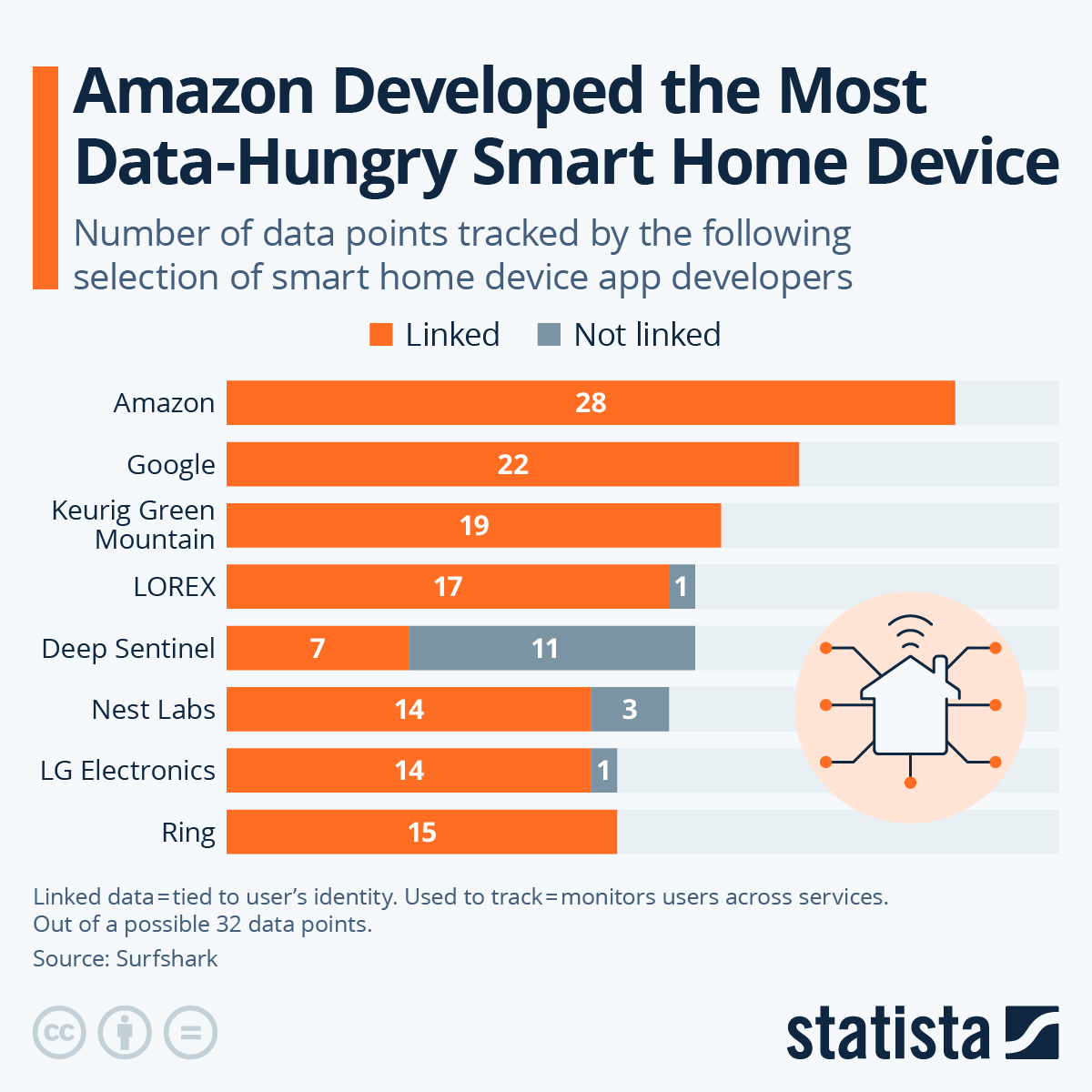
    As technology evolves, smart home devices are becoming increasingly integrated into our lives, offering convenience and efficiency. However, this innovation comes at a cost—data collection. A recent analysis by Surfshark has shed light on which smart home devices are the most data-hungry, revealing the extent to which they collect user information.

    Understanding Data Collection

    Categories of Data Points

    The analysis categorizes the 32 potential data points that smart home apps can collect into two main groups:

    1. Linked Data: This type of information is directly tied to the user’s identity. It includes identifiable details like names, phone numbers, location data, and other personal identifiers.

    2. Non-Linked Data: In contrast, this category comprises information that does not identify the user personally. It includes general usage statistics of the app and behavior analytics.

    The Leaders in Data Collection

    Amazon’s Echo: The Most Data-Hungry Device

    Amazon’s Echo device stands out as the most voracious data collector in the smart home landscape. According to Surfshark’s research, the Amazon app collects data across 28 out of the possible 32 metrics. This extensive data collection includes sensitive categories such as health data and detailed search history. With the Echo device permeating households worldwide, the implications of such data collection practices raise significant privacy concerns.

    Google Home: A Close Second

    Following closely behind is the Google Home app, which collects a substantial array of data points linked directly to the user’s identity. Notable among the information gathered are photos, videos, audio recordings, and browsing history. Given Google’s expansive ecosystem, the data harvested through the Google Home app feeds into its larger marketing and analytics machinery, enhancing its ability to target users with precision.

    The Surprising Contender: Keurig’s Coffee Machine App

    Perhaps the most unexpected entry in the list of data-hungry devices is Keurig’s coffee machine app. In total, this app collects 19 data points, including eight that enable tracking across third-party networks. Besides serving coffee enthusiasts, this app also incorporates an online shopping function, which accounts for some of its data collection metrics. This diversification shows how even seemingly innocuous devices can participate in the broader data economy.

    Security Applications: Lorex, Deep Sentinel, and Ring

    When it comes to security and surveillance, applications such as Lorex, Deep Sentinel, and Ring allow users to monitor and control security camera footage remotely. While these apps enhance home safety, they also engage in significant data collection. Understanding what data these applications gather is essential for users who wish to maintain their privacy while ensuring their homes are secure.

    Smart Home Management: Nest Labs and LG Electronics

    Apps like Nest Labs and those from LG Electronics provide users with capabilities to manage various smart home appliances, including thermostats and doorbells. These applications not only optimize home energy consumption and security but also collect valuable data that can enhance user experience. The balance between convenience and privacy in such applications remains a critical discussion point, as consumers weigh their options.

    The Implications of Data Collection

    The growing tendency for smart devices to monitor and gather personal information illuminates an essential conversation about consumer privacy rights. Understanding which data is collected and for what purpose is vital. Many companies track app usage for several reasons, including targeted advertising and sharing data with third parties or data brokers. As smart home technology proliferates, transparency regarding data practices becomes imperative for user trust and safety.

    This analysis serves as a critical reminder of the trade-offs involved in embracing smart technology.

  • Philips Hue May Add A Smart Doorbell To Its Lineup

    Philips Hue May Add A Smart Doorbell To Its Lineup

    Recent findings within the Hue iOS app suggest that Philips Hue may be gearing up to introduce a smart doorbell to its product range. The app has been updated to include a feature allowing users to install devices either by scanning a QR code or manually. Opting for the manual method displays a list of installable devices, which includes an item intriguingly labeled as the “Hue Secure doorbell.”

    This leak serves as a strong hint that Philips Hue is developing a new offering, although no formal announcement has yet been made. In the absence of specific details, we can only speculate about the features and specifications based on the existing product lineup.

    Currently, Philips Hue features a range of security cameras, including the Secure Flood Light Camera and the Secure Battery Camera, both capable of recording in 1080p. This makes it reasonable to predict that the forthcoming Hue Secure Doorbell will also support 1080p resolution, rather than 4K. Expect a price point around the $200 mark for this new addition.

    Hue secure doorbell
    Hue Blog

    Insights from the app suggest that the doorbell will likely require a hardwired connection to the home’s power supply instead of relying on batteries. This indicates that it will probably replace a traditional doorbell setup. Given that the current items in the Secure Camera series do not support Apple HomeKit, it is plausible that this new doorbell will follow suit.

    This leak appears to be in its early stages, and the information has reportedly been removed from the Hue app. Our attempts to locate it during testing were unsuccessful, but some alert fans captured screenshots of the relevant app sections. It’s possible that this doorbell was intended as part of a recent collaboration with SmartThings, and there is hope that Philips Hue will provide an official update soon.

  • Philips Hue Joins SmartThings For Better Smart Homes

    Philips Hue Joins SmartThings For Better Smart Homes

    Samsung’s SmartThings, a platform designed for interconnected smart homes, has strengthened its collaboration with Philips Hue and has expanded support for more products. Hue has partnered with SmartThings to certify an additional 155 items as compatible with the Works With SmartThings program.

    What does this mean for users? Essentially, it simplifies the process for manufacturers like Philips Hue to integrate their devices with SmartThings. This initiative, known as the Certification by Similarity program, enables companies to efficiently certify their full range of products.

    “We continually aim to streamline the Works with SmartThings Certification process for our partners. Recent updates to our Developer Center have significantly improved our support for them,” said Aaron Swift, Director of Product Management – Developer Experience. “Philips Hue has been a leader in smart lighting, setting high standards for innovation and dependability. We are excited to extend our certification to their entire lighting line, allowing more consumers to enjoy their premium and connected lighting options.”

    A person sitting on a couch with SmartThings products in the foreground.
    Samsung

    If you are a SmartThings user, there is no need to adjust your current usage. However, this enhancement means you will gain improved control over your smart devices. A broader selection of products can now be linked to your smart home setup and managed from a single interface, providing you with more features that may have previously been limited.

    When compared to Amazon Alexa and Google Nest, Samsung SmartThings has historically been less popular. With this expansion and greater product compatibility, SmartThings is positioning itself to compete more equally with these well-established platforms.


    Please enable Javascript to view this content

  • Amazon Empowers Alexa with AI: Will You Shell Out for It?

    Amazon Empowers Alexa with AI: Will You Shell Out for It?

    Amazon recently unveiled an exciting new Alexa feature at its 2025 Devices & Services event, enhancing its home assistant with cutting-edge AI capabilities. This upgrade significantly boosts Alexa’s intelligence, giving its smart speakers some impressive new functionalities.

    Meet Alexa+, Powered by AI

    The introduction of ChatGPT in 2022 opened the doors for everyday users to access AI technology, making it only a matter of time before such features made their way into smart speakers. Google was among the pioneers, testing its Gemini AI on a few Google Nest models, although it’s still in the development stage and has various limitations. Amazon has jumped ahead of the competition with its broader launch of Alexa+.

    If you own an Alexa speaker, you have the option to upgrade to Alexa+, which offers several key benefits. According to Amazon, this new feature will greatly improve communication with Alexa. Thanks to advanced AI models like Amazon Nova and Anthropic Claude accessed via Amazon Bedrock, Alexa+ will better comprehend your requests—understanding everything from casual phrases to complex commands, even if you take a moment to gather your thoughts.

    Additionally, Amazon has rolled out a feature called “experts,” which comprises collections of systems, capabilities, APIs, and instructions designed to tackle specific tasks for users. This will simplify interactions with your IoT devices, allow you to utilize applications, set reminders, and more, all from your speaker.

    Moreover, Alexa+ can remember the preferences of you and your family, taking these into account in its responses. For instance, if you share your food allergies, Alexa+ will retain this information, ensuring it doesn’t suggest food options that might be harmful when placing future orders.

    Opt for a Subscription for Smarter Features

    While these innovative features are designed to make AI accessible to a broad audience—especially considering the 600 million Alexa devices in use globally—they come at a cost. The Alexa+ service is priced at $19.99 per month for new subscribers, which some may find steep. However, if you’re already a member of Amazon Prime, Alexa+ is included, enhancing the value of your Prime membership with additional benefits that you might have missed.

    This makes Amazon Prime an incredible deal, especially since it costs only $14.99 per month in the U.S., roughly $5 less than solely subscribing to Alexa+. For students and young adults (ages 18-24), this membership is even more affordable at just $7.49 per month.

    Currently, Alexa+ is rolling out exclusively in the U.S., with gradual availability. Amazon has indicated that the Echo Show 8, 10, 15, and 21 will be the initial models to receive this feature over the next few months as part of an early access rollout. If you’re eager to experience these AI features firsthand, Amazon recommends purchasing one of these devices now and signing up on the New Alexa page for a chance at early access.

  • Google’s Gemini AI Now Controls Smart Home Devices

    Google’s Gemini AI Now Controls Smart Home Devices

    Nest

    After a successful Public Preview phase, Google is now launching its Google Home extension for the Gemini app to all users. This new feature enables control over various smart home devices directly through Gemini, allowing you to perform actions like switching on smart lights, checking your thermostat settings, or adjusting speaker volume.

    The Google Home extension will be available over the next few weeks. Once updated, any devices that are compatible and linked to your Google account will be operable via Gemini. If you attempt to use a command within the Gemini app that isn’t supported, your smartphone will automatically redirect you to the Google Home app to carry out that action (such as managing camera functions or accessing smart lock features).

    Gemini is compatible with a diverse range of devices, including smart lights, power switches, thermostats, curtains, speakers, TVs, and even appliances like washing machines, coffee makers, and vacuum cleaners. Google emphasizes that Gemini is focused on tasks intended for convenience, with most safety and security-related commands being unavailable.

    For instance, while Gemini can’t unlock a door, it is capable of launching the Google Home app to assist you in completing that action.

    To use these new features, simply connect your Google Home and Gemini apps. Supported devices linked to your Google Home account will respond to commands given through Gemini. Here are some examples of commands you can try:

    • "Set the dining room for a romantic date night."
    • "Adjust the AC for optimal sleeping conditions."
    • "Turn off the bedroom TV and lights."
    • "The sun is too bright in the living room," (to close the window coverings).
    • "Help me clean up the kitchen," (to start vacuuming).

    Keep an eye on your apps over the next few weeks to access this added functionality.

  • Apple Watch Becomes Your Mac And Smart Home Gesture Hub

    Apple Watch Becomes Your Mac And Smart Home Gesture Hub

    CES 2025
    CES 2025
    Explore our full coverage of CES here.
    Updated recently

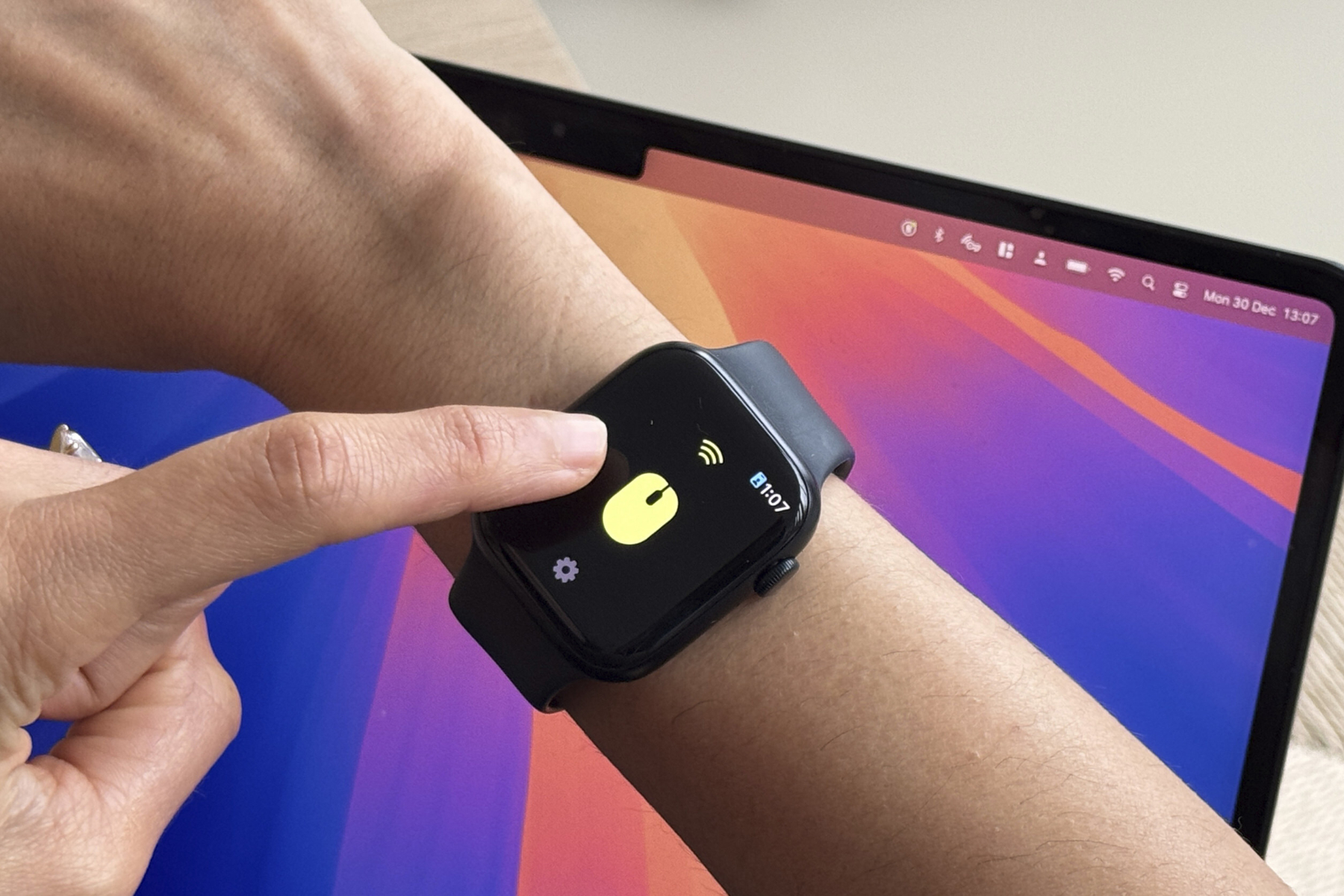
    About a year ago, a startup called DoublePoint launched a gesture control application that enables smartwatch users to operate various devices, including smartphones and tablets. Now, the Apple Watch has its own version of this innovative app.

    Ahead of CES 2025, DoublePoint unveiled the WowMouse app for the Apple Watch, featuring several algorithm enhancements thanks to a collaboration with Bosch. The app has already achieved over 100,000 downloads on Android, according to the company.

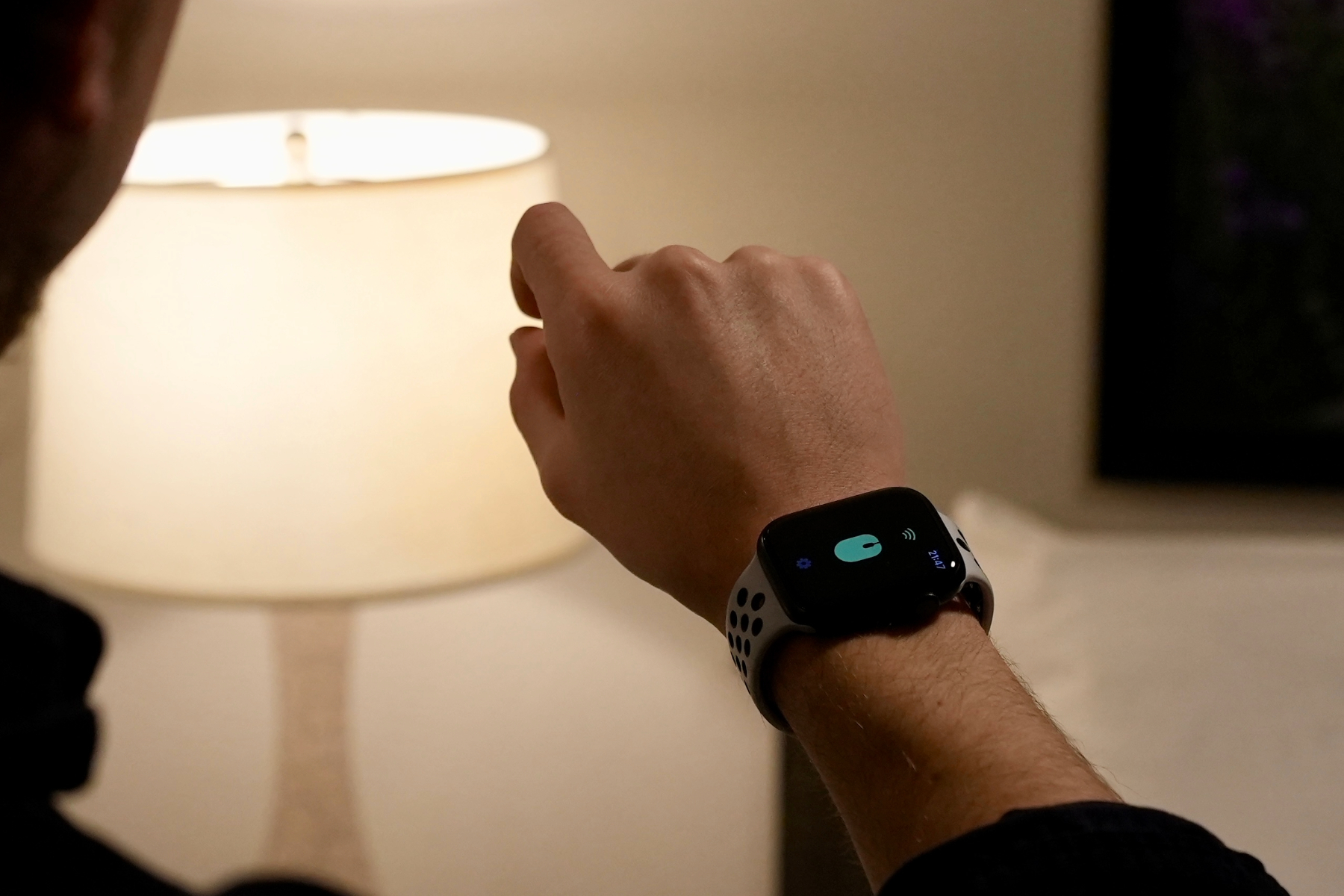
    The concept behind WowMouse is straightforward. With this app, Apple Watch users can maneuver a cursor and execute clicks on their Mac simply by making gesture movements. However, DoublePoint envisions even larger possibilities for the app.

    Using WowMouse app on Apple Watch to control appliances.
    DoublePoint Technologies

    The company states, “DoublePoint aims to extend connectivity soon to manage any Bluetooth-enabled device.” Furthermore, the software will be open-sourced, allowing developers to enhance its functionality.

    To achieve this, DoublePoint has partnered with Bosch Sensortec to combine its gesture algorithms with Bosch’s inertial measurement units (IMUs), enabling efficient and accurate gesture sensing.

    Bosch Sensortec is a prominent name in the mobile technology sector, providing MEMS sensors for various functions such as activity tracking, gesture recognition, and image stabilization.

    This collaboration with Bosch underscores DoublePoint’s ambition to enhance device control through its software solutions.

    At its booth during CES, the company is showcasing potential future applications. With the WowMouse app, users can enjoy gaming, summon an AI assistant, utilize it as input for extended reality (XR) applications, and manage smart home gadgets—all from their Apple Watch.

    Person using WowMouse app on their Apple Watch.
    DoublePoint Technologies

    Alongside the watchOS version, DoublePoint has also improved its foundational framework, resulting in a significant boost in accuracy. The static accuracy now stands at an impressive 97%, while figures for walking and running are reported at 95% and 94%, respectively.

    According to the company, these advancements open the door for groundbreaking applications across smartwatches, fitness wearables, augmented reality headsets, accessibility tools, and various everyday scenarios.

    Apple currently provides gesture control via the Double Tap system on its smartwatches, though this feature is limited to the Apple Watch Ultra 2, Apple Watch Series 9, and their successors.

  • Apple’s Next Smart Home Move May Be A Doorbell With Face ID

    Apple’s Next Smart Home Move May Be A Doorbell With Face ID

    After scrapping its ambitious car initiative, facing challenges with its iPhone subscription service, and experiencing delays in AI feature launches, Apple seems to have discovered a promising avenue for innovation in the smart home market. As reported by Bloomberg, the tech giant is in the early stages of developing a smart doorbell that will feature Face ID for authentication.

    In addition, Apple is also rumored to be developing a device with iPad-like functionalities that will act as a central hub for various smart home devices. This new doorbell project reflects Apple’s intention to carve out a niche within its HomeKit ecosystem.

    The doorbell is described by Bloomberg as a “smart doorbell with advanced facial recognition that wirelessly connects to a deadbolt lock.” The idea is simple: Apple aims to integrate its reliable biometric authentication technology into a doorbell, enhancing security and convenience.

    Currently, the smart doorbell market is led by major players such as Amazon, Google, Eufy, and Logitech. Products like the Nest Doorbell and Amazon Blink consistently rank high in popularity among consumers. It’s clear why Apple would want to enter this competitive space, especially given its technological resources, skilled talent pool, and established supply chain.

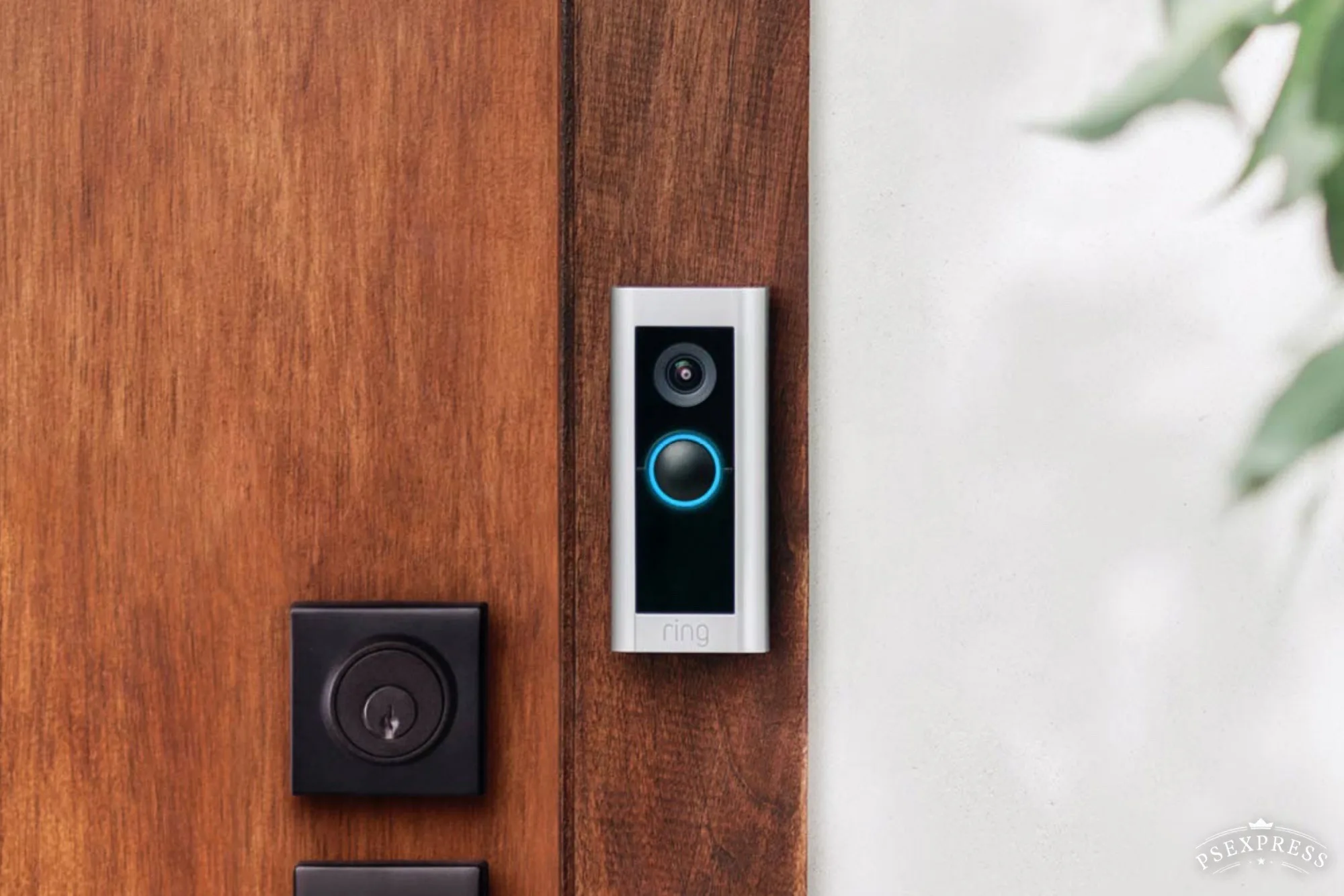
    Ring smart doorbell installed outside a home.
    Screenshot Ring

    However, the development of this Face ID-equipped doorbell is still in its infancy, meaning it’s not expected to hit the market anytime soon. Reports quoting insiders suggest that consumers shouldn’t anticipate any product release before the end of the year, at the earliest.

    There’s also the possibility that instead of crafting a device from scratch, Apple may collaborate with established manufacturers such as Logitech or Belkin. This wouldn’t be out of character for Apple; for instance, it currently sells accessories for the Vision Pro headset through its online store.

    This doorbell could also utilize Apple’s upcoming dual-purpose chip for Wi-Fi and Bluetooth, which is said to debut alongside updated models of the HomePod Mini and Apple TV in 2025. This chip, reportedly codenamed Proxima, will be produced by Apple’s longtime partner, TSMC.

    A smart doorbell appears to be a logical progression for Apple, especially with its unique facial recognition feature. The company is already laying down the groundwork with its existing HomeKit software, which has been adopted by numerous third-party brands.

    Furthermore, the anticipated home hub device, designed with an iPad-inspired look, will connect seamlessly with various smart home products. It will reportedly incorporate the FaceTime feature for video calls, possibly linking directly with the future smart doorbell to provide video communication capabilities.

    Nonetheless, there are significant concerns about this new venture, including potential security risks, especially regarding the possibility of breaches by unauthorized individuals. Recent incidents involving the misuse of AirTag trackers highlight some of these dangers.

    Apple has generally maintained a strong stance on user privacy and safety, often navigating around controversial situations with caution. Therefore, it’s likely that Apple will take a careful approach in developing and releasing the smart doorbell, or even choose to license the concept to other companies while collecting royalties.

  • Is A Smart Home Gym Really Worth The Investment

    Is A Smart Home Gym Really Worth The Investment

    Tonal

    Home fitness systems have evolved significantly recently. Rather than a basic setup with just weights and a bench, today’s smart home gym technology can deliver personalized workout plans tailored to individual needs. These systems can also monitor your performance, offer guidance, and connect you to a larger community of users equipped with similar devices. However, many of these smart setups come with a subscription fee that can vary from $15 to $50 monthly, making them a costly endeavor.

    So, is it worth investing in a smart home gym or should you stick with a conventional gym membership? There’s no straightforward answer, as it depends on your personal preferences. Some individuals may find the convenience of a smart gym beneficial, while others may thrive on the motivation and social interaction found in a traditional gym environment.

    To help you weigh your options, let’s take a closer look at whether acquiring a smart home gym is the right choice for you.

    What is a smart home gym?

    A man using the Gymera Smart Home Gym to play a game.
    Gymera

    Smart home gyms come in various designs, primarily recognized as workout equipment that connects to the internet and offers advanced functionalities beyond traditional weights. The main goal of these systems is to provide access to tailored instructions, allowing users to join a larger fitness community. Many systems also help track progress and offer rewards for achieving specific milestones.

    One of the most impressive applications of this technology is found in integrated trainer-led sessions. For instance, a high-tech treadmill may show you a video of a trainer scaling a hill, with the treadmill automatically adjusting its incline and speed to match the trainer’s actions. This integration means you can enjoy an intense workout without the need to manually adjust your machine — just select a session, and the system handles the rest.

    In essence, smart home gyms simplify the workout process, providing detailed feedback and personalized guidance along with the ability to automatically adjust settings as necessary.

    What are the benefits of a smart home gym?

    A woman using the NordicTrack T Series 8.5 S Treadmill in her living room.
    NordicTrack

    The most prominent advantage of a smart home gym is its convenience — you can achieve an intense workout without leaving your home. Traveling to the gym can be a nuisance, especially when you’re busy and trying to squeeze in a workout. Having a gym literally at your disposal simplifies the routine and encourages consistency.

    Additionally, you gain access to features like personal training. Whether through software like Tonal that tracks your achievements, guidance from certified trainers for varied workouts, or AI-enhanced recommendations that help you with form based on sensor feedback, smart home gyms offer a multitude of functionalities.

    Depending on your subscription and the specific system you choose, a smart home gym may result in financial savings over time. Since many of these systems allow multiple users, they can be an excellent choice for families, potentially replacing the need for several individual gym memberships.

    What are the drawbacks of a smart home gym?

    One of the main concerns regarding smart home gyms is their high initial cost. Many systems require a significant investment, with products like Tonal costing around $4,000 and the NordicTrack Commercial 2450 Treadmill priced at about $3,000. When you consider that most gyms offer monthly memberships starting at around $15, justifying such costs can be challenging. However, for those who value the convenience and plan to consistently use their smart gym, the expense may balance out over time.

    Another critical consideration involves the ongoing subscription fees tied to many of these systems. Most smart home gyms are designed to be more effective when paired with a paid membership. If you decide to discontinue your subscription, the value of the equipment diminishes significantly. Thus, the true overall cost of a smart home gym can be far more substantial than one might initially expect; therefore, it’s vital to thoroughly investigate all costs linked to your preferred system compared to what a traditional gym membership entails.

    If you’re aiming to boost your cardiovascular fitness, you may want to explore treadmill options to find a discounted model that aligns better with your budget.

    Moreover, ensure you have enough space in your home for a smart gym. Although many models are designed to be compact and sleek, they typically occupy a fair amount of room. If you’re residing in a small apartment or a cozy home, it might not be practical to dedicate a portion of your space to a gym.

    Is a smart home gym worth it?

    A person lifting weights with Tonal
    Tonal

    If you are comfortable with the initial investment, have adequate space, and desire the convenience of a smart home gym, it could be a smart purchase. These systems not only facilitate quick workouts within a busy schedule, but the integration of personal trainers and AI assistance may enhance your exercise effectiveness compared to a standard home gym. They provide immediate access to diverse classes and data often absent in regular gym memberships, offering notable advantages.

    On the flip side, individuals who thrive on the social aspect of fitness might find smart home gyms lacking. While these systems can include features like leaderboards and connectivity with fellow users, they can’t replicate the camaraderie found in a local gym. Additionally, a gym membership could be better suited for those with limited space or uncertainty about long-term commitment to a home gym setup. After all, few people want to spend $4,000 on equipment that may end up collecting dust in the corner.

  • Flic Buttons Simplify Smart Home Control

    The Flic Smart Button placed on a table.
    Jon Bitner / Digital Trends

    One of the key challenges with today’s smart home technology is its reliance on digital interfaces. From smart lights to robot vacuums, many interactions depend on using a smartphone, which can be inconvenient for other household members or guests. This is where Flic steps in, providing a range of physical buttons and dials that allow everyone to control their favorite smart devices without needing a screen.

    I’ve been putting the Flic Smart Buttons and Flic Twist through their paces, and while they do have limitations, they can add a fun element to most smart homes. This is particularly true for users of Alexa or HomeKit, as both platforms are compatible with these innovative smart buttons.

    The Flic app simplifies setup

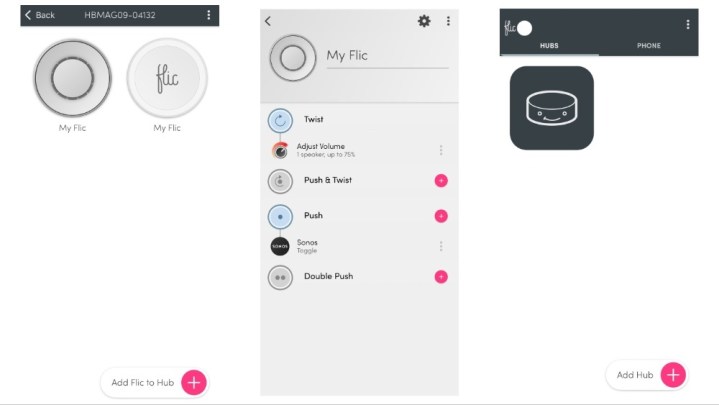
    Screenshots from the Flic app showing various features.
    Jon Bitner / Digital Trends

    Setting up my Flic system was a surprisingly straightforward process. Even with multiple products, I managed to get everything up and running, including my first automation, in just a few minutes. My setup consisted of a Flic Twist, Smart Buttons, and a Flic Hub.

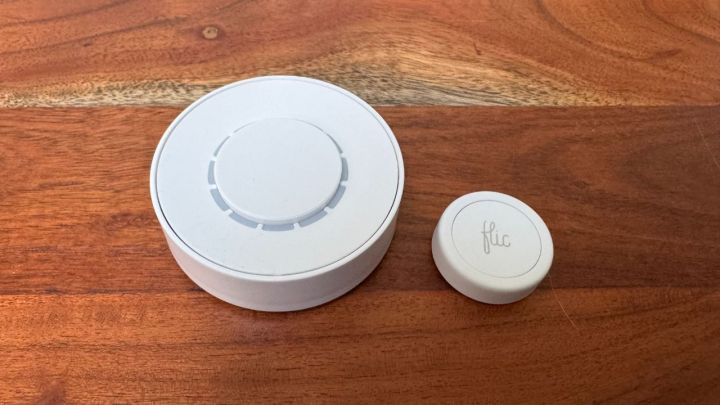
    The Flic Twist functions as a dial that can be pressed or rotated, allowing you to adjust features like volume on your smart speaker or the brightness of your lights. The Smart Buttons serve as standard push buttons, enabling you to program them for three different actions (press, double press, or hold). The Flic Hub acts as the central control unit for everything, and it is necessary for the Flic Twist. The Smart Buttons can sync either to the Hub or directly to your smartphone.

    Once my devices were linked, configuring actions was incredibly easy. The Flic app allows you to create actions without needing to access additional applications. For instance, I set up my Flic Twist to manage my Sonos speaker without ever touching the Sonos app. In a matter of seconds, I could play, pause, and adjust the volume — a remarkable advantage over other controllers that often require cumbersome third-party apps for setup.

    Your experience may vary depending on what devices you’re intending to connect to the Flic system, but I found it a hassle-free process without the typical headaches associated with smart home setups.

    Missing essential features

    The Flic Twist and Smart Buttons displayed on a wooden tabletop.
    Jon Bitner / Digital Trends

    The primary limitation of the Flic system is its overall functionality. While the company has made significant progress over the years by supporting platforms like Alexa and Matter, it is still lacking compatibility with major brands like Google Home. Additionally, certain functionalities are limited to specific Flic devices, and the Flic Twist does not support all products and capabilities. For a comprehensive list of compatible devices and actions, see the Flic Applications list.

    Another significant drawback is that each Twist or Button can only be programmed for a limited number of controls simultaneously. For example, with my Twist, I set it so that twisting adjusts the speaker volume and pressing the button toggles the music. There are still “Double Push” and “Push & Twist” actions available, which enables a total of four programmable actions for the $80 device.

    This stands in contrast to competitors like the Linxura Smart Controller, which supports up to 52 devices through a built-in display and doesn’t require a hub. Linxura’s compatibility with Google Home is particularly useful for my current setup, as it allows for extensive automation of multiple gadgets with a single device.

    Although programming the Flic may be simpler than the Linxura and I personally find the design of the Flic Twist more appealing, it falls short in terms of overall versatility.

    Physical buttons for your smart home

    Your experience with Flic will largely depend on your specific smart home ecosystem. If you utilize compatible products like Sonos, HomeKit, or Alexa, you’ll discover numerous ways to seamlessly integrate the Twist and Smart Buttons into your daily routine. The setup process only takes a few moments, and the companion app is user-friendly.

    Incorporating physical buttons and dials into your smart home can enhance convenience, and their usefulness becomes apparent when used effectively. While the limitation of programming only a handful of actions might be disappointing, if you want to provide your family with an uncomplicated way to access frequently used functions, investing in a Flic product could be beneficial. The company continues to add new features and compatibility options, and with Matter support, Flic is likely to remain relevant for the long haul.