الوسم: PS5

  • PS5 Price Increases After Black Myth Wukong Becomes Global Hit

    PS5 Price Increases After Black Myth Wukong Becomes Global Hit

    The price of Sony’s PlayStation 5 (PS5) has seen a surprising uptick in various markets, following the global success of the highly anticipated action RPG, Black Myth: Wukong.

    Developed by the Chinese studio Game Science, the game has been praised for its intricate design, breathtaking visuals, and a fresh take on the beloved tale of the Monkey King.

    With its success, gamers worldwide are eager to experience the game in the best possible way, driving up demand for the PS5, which is considered one of the top platforms for the game.

    Rising Demand, Rising Prices

    Retailers have reported a noticeable increase in PS5 sales since the release of Black Myth: Wukong. This surge in demand has, in turn, led to a hike in prices for the already hard-to-find console.

    In some regions, the PS5’s price has increased by as much as 10% to 15%, as retailers and third-party sellers capitalize on the game’s popularity.

    The increase in price has been particularly evident in markets where the PS5 was already in short supply, exacerbating the situation for consumers looking to purchase the console.

    Sony has not officially commented on the price increase, as the company does not control the pricing set by individual retailers.

    However, the company has acknowledged the impact that blockbuster game releases can have on console sales.

    Industry analysts suggest that Sony could potentially ramp up production of the PS5 to meet the increased demand, though supply chain challenges continue to be a hurdle.

  • Will PS5 Pro Have Dolby Vision?

    Will PS5 Pro Have Dolby Vision?

    Dolby Vision is a high dynamic range (HDR) imaging technology developed by Dolby Laboratories. It enhances the color, contrast, and brightness of video content, providing a more vibrant and lifelike viewing experience. Dolby Vision is widely regarded as one of the best HDR formats available.

    Will the PS5 Pro Include Dolby Vision?

    No, PS5 Pro will not include Dolby Vision.

    PS5 Pro supports HDR10 but does not include Dolby Vision. HDR10 is a widely used HDR format that provides enhanced picture quality but lacks the dynamic metadata and higher brightness levels offered by Dolby Vision.

    Incorporating Dolby Vision into the PS5 Pro would require hardware and software adjustments. While these changes are feasible, they may impact the overall cost and development timeline of the console.

    However, some industry insiders and leaks suggest that Sony is exploring the possibility of including Dolby Vision in their next-generation console such as PS6. This speculation is based on the growing trend of incorporating advanced HDR formats in gaming and entertainment devices.

  • Best Weapons In Horizon Forbidden West [year]

    Best Weapons In Horizon Forbidden West [year]

    Horizon Forbidden West offers a variety of weapons to suit nearly every playstyle, from standard bows and arrows to spike throwers and shredders.

    With so many options, it can be challenging to determine which weapons to prioritize.

    This guide lists the 10 best weapons in Horizon Forbidden West based on their perks and utility and explains how to unlock each one.

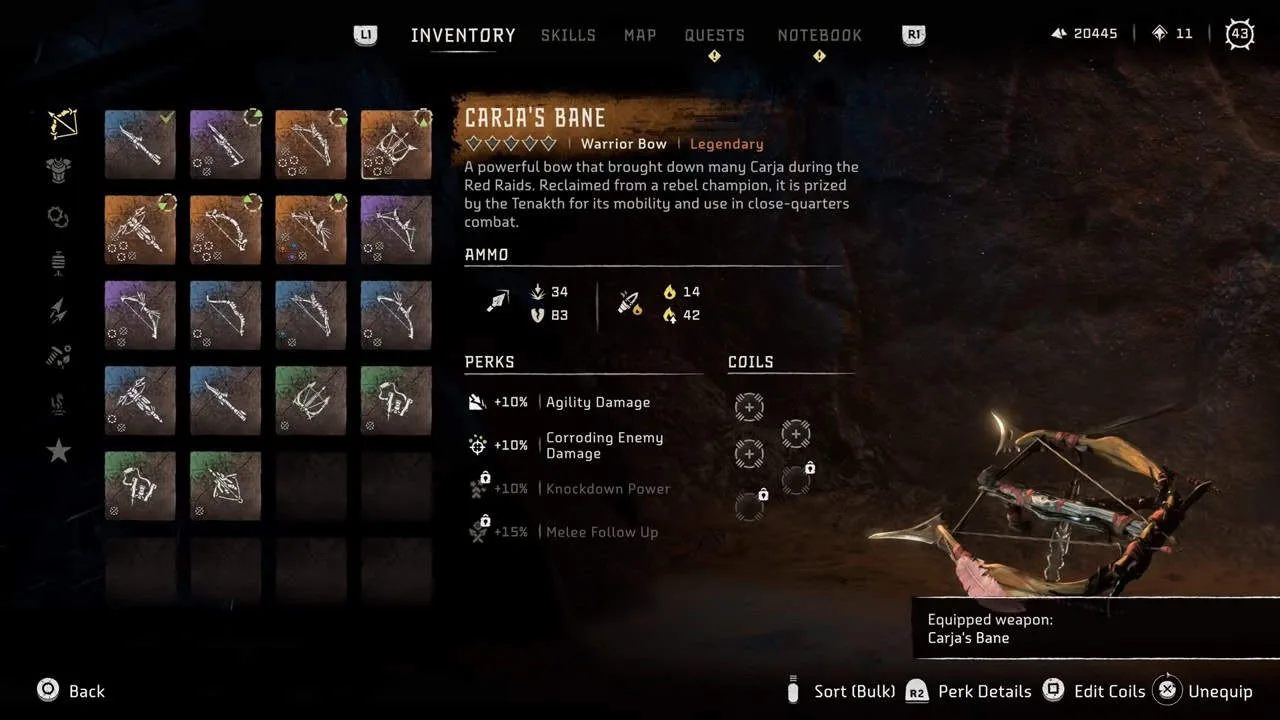
    10. Carja’s Bane

    Carja Bane

    The Carja’s Bane Warrior Bow deals Impact, Fire, and Tear damage and has perks that set it apart from other Warrior Bows. It can be upgraded five times and uses standard and fire arrows. To unlock Carja’s Bane, complete four Gauntlet Runs located in the Dry Yearn, The Stillsands, Cliffs of the Cry, and the Bonewhite Tear.

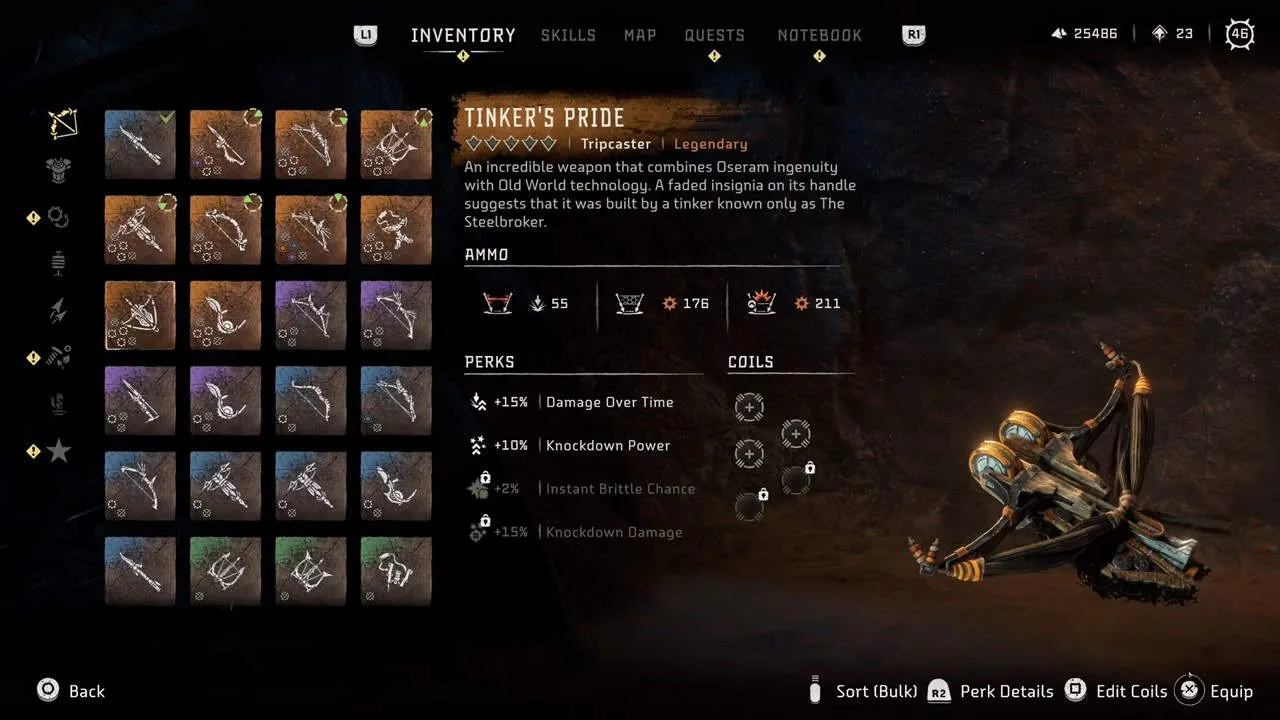
    9. Tinker’s Pride

    Tinker Pride

    Tinker’s Pride is a legendary Tripcaster best suited for stealth situations, dealing Impact and Fire damage. It can be upgraded five times, with increased knockdown power and knockdown chance. To unlock this weapon, earn full stripes at all 12 hunting grounds in Horizon Forbidden West.

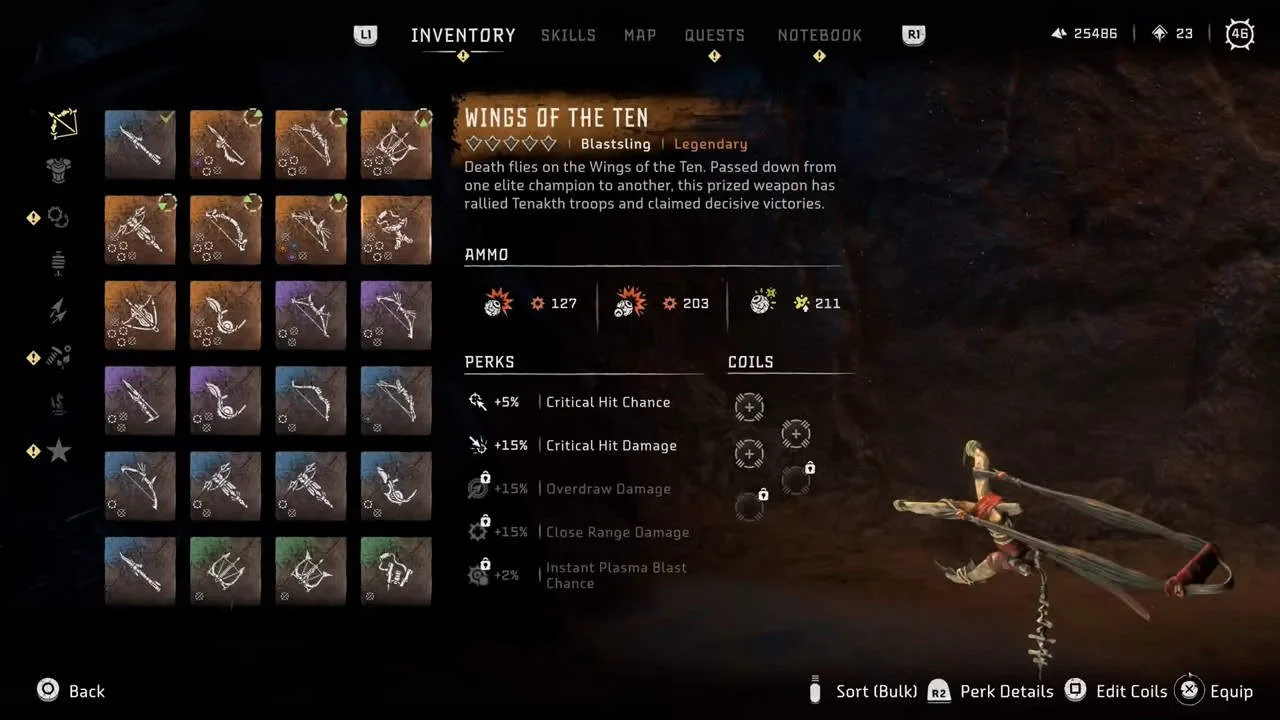
    8. Wings of the Ten

    Wings of the ten

    Wings of the Ten is a legendary Blastsling that excels at critical damage and chance, making it effective for weakening larger machines. It can be upgraded five times and uses adhesive and fire arrow types. To unlock it, find and deliver 10 black boxes to Untalla at Memorial Grove.

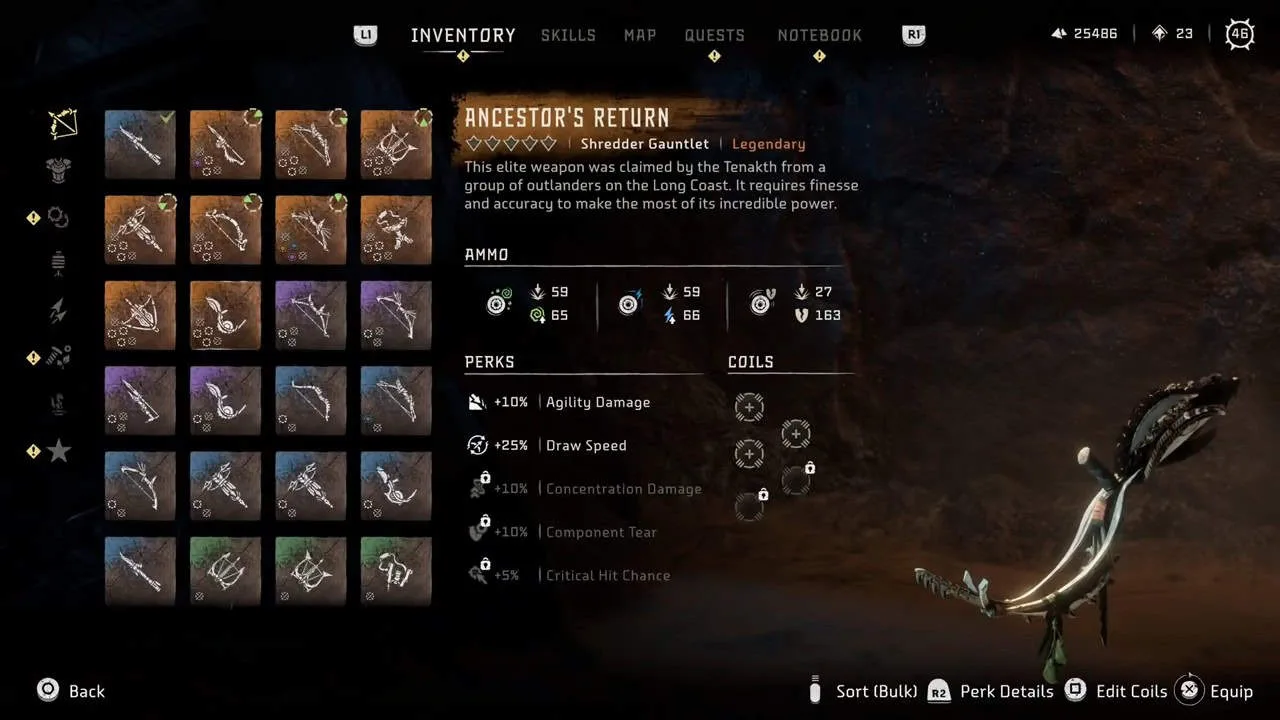
    7. Ancestor’s Return

    ancestor return

    Ancestor’s Return is a Shredder Gauntlet that deals Shock, Acid, Tear, and Impact damage. Unlock it by collecting nine ornaments and giving them to Stemmur. This weapon can be upgraded five times and is excellent for quickly knocking components off machines due to its Component Tear perk.

    6. Death Seeker’s Shadow

    death seeker

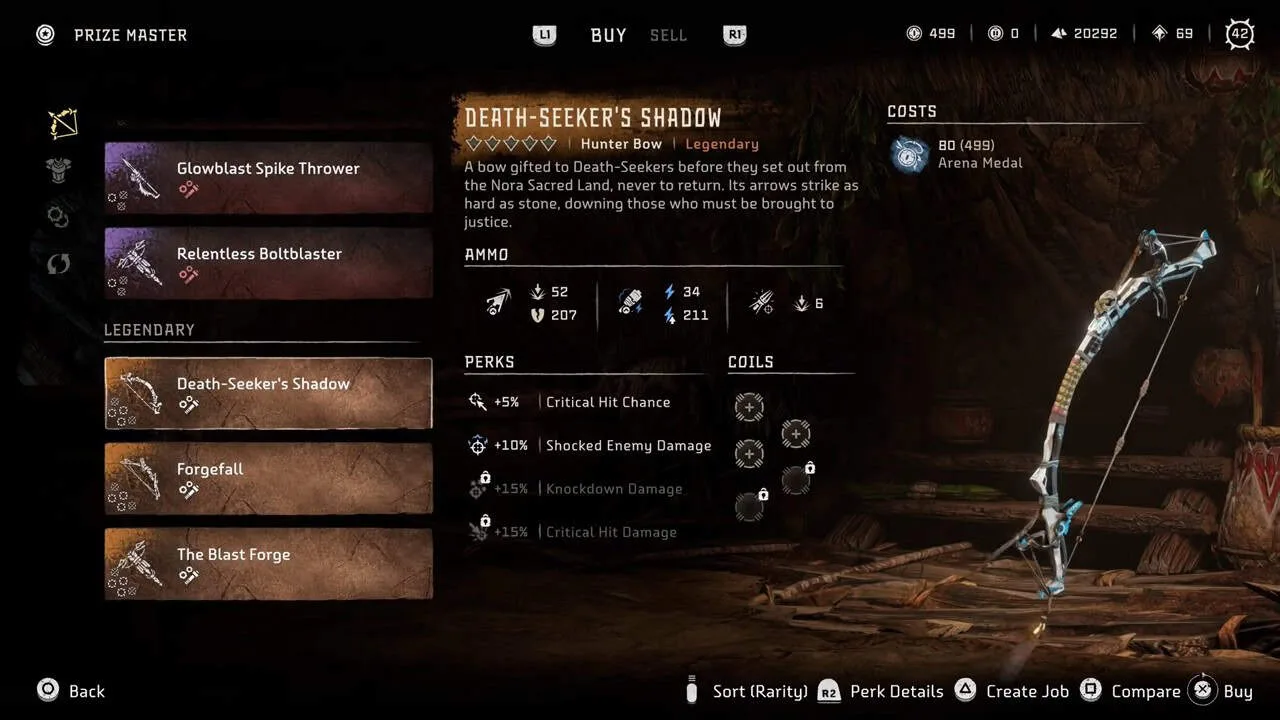
    The Death Seeker’s Shadow is a Hunter Bow known for its critical damage capabilities, dealing Shock, Tear, and Impact damage. To unlock it, acquire 40 arena medals at the Maw of the Arena.

    5. The Sun Scourge

    the sun scourge

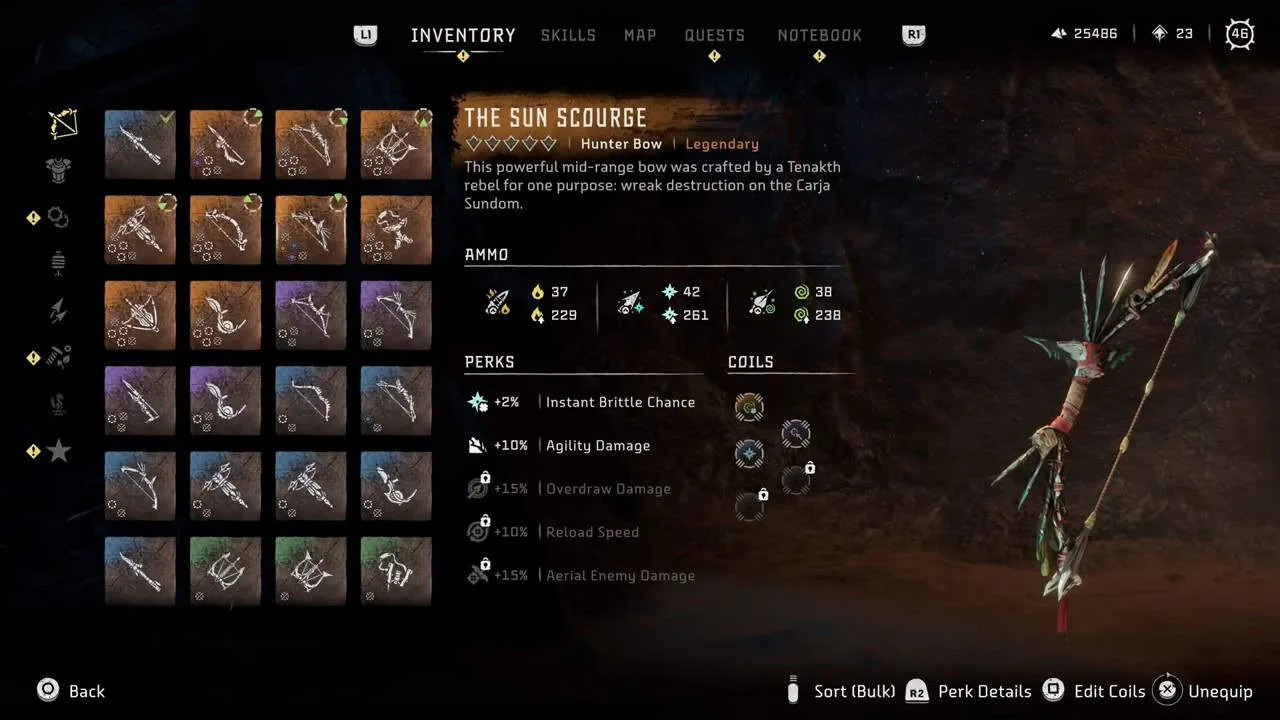
    The Sun Scourge is another Hunter Bow that can be unlocked by clearing the First Forge Rebel Camp and looting Asera’s body. It uses Fire, Frost, and Acid arrows, making it versatile in many situations. This weapon can be upgraded five times.

    4. The Blast Forge

    the blast fourge

    The Blast Forge is a legendary Bolt Blaster with higher draw speed and faster reload times than standard Bolt Blasters. It deals Impact and Explosive damage and can be unlocked by acquiring 80 arena medals.

    3. The Skykiller

    the skykiller

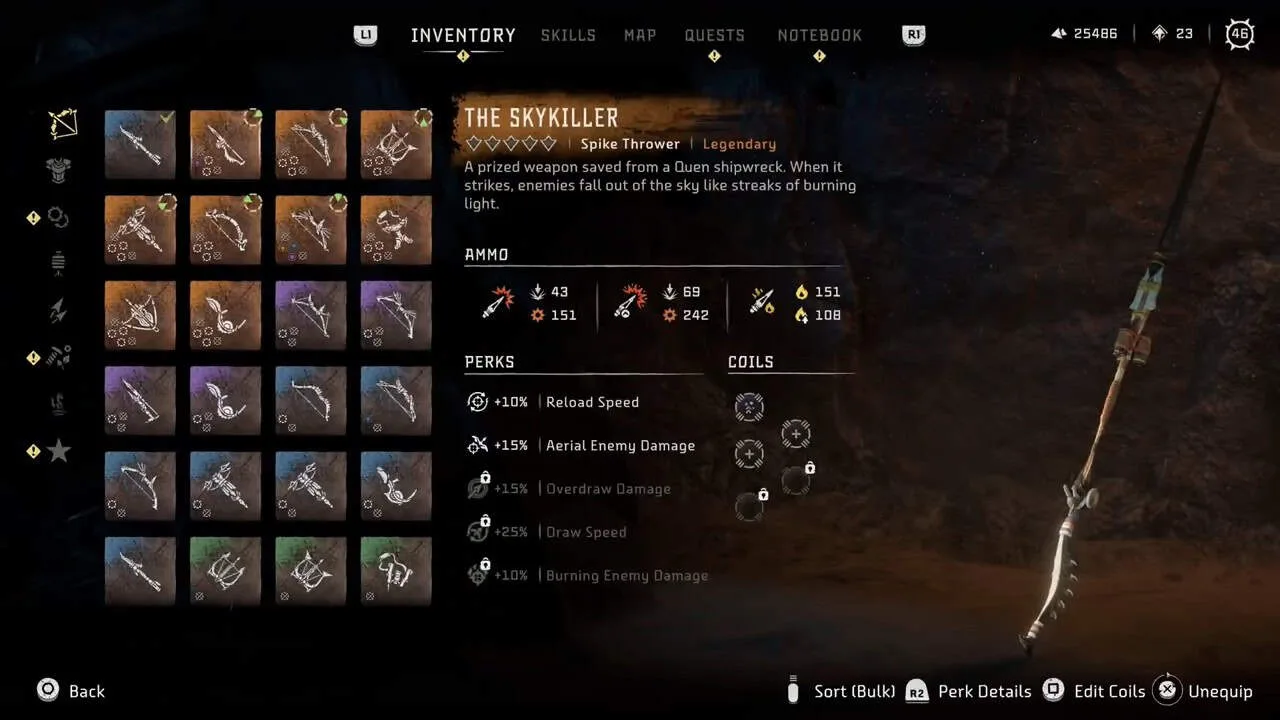
    The Skykiller is a legendary Spike Thrower that excels at taking out flying machines but is also effective against standard machine types due to its overdraw damage increase and increased burning damage. It deals Explosive, Fire, and Impact damage and is unlocked by completing the main quest “The Way Home”.

    2. Forgefall

    forgefall

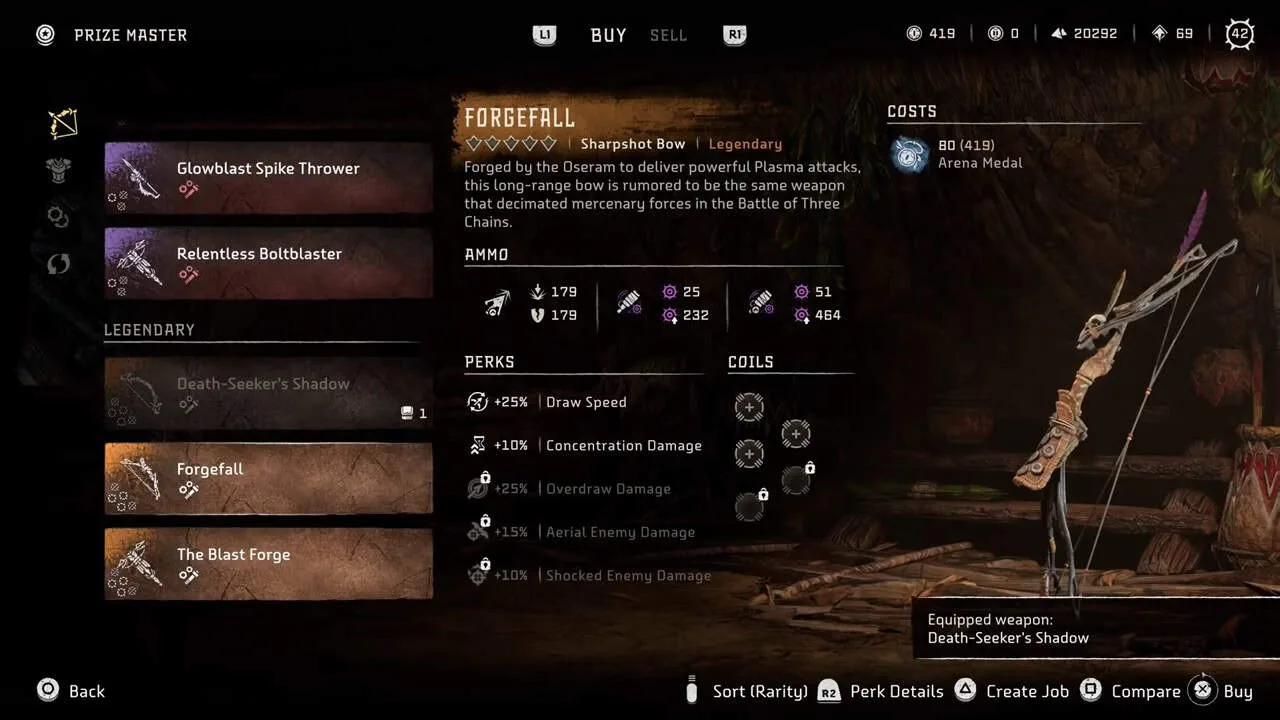
    Forgefall is a legendary Sharpshot Bow acting like a sniper with high-damage single-shot firing. It deals Tear, Impact, and Plasma damage and has a higher draw speed for quicker shots. Unlock it by acquiring 80 arena medals at the Arena. This bow can be upgraded five times.

    1. Specter Gauntlet (Burning Shores)

    Specter Gauntlet

    The Specter Gauntlet is the most unique weapon in Horizon Forbidden West, wrapping around Aloy’s wrist and firing shards quickly to deal Tear damage. It has three firing modes: standard (Tear damage), shard barrage (Explosive damage), and Railgun (Impact damage). Its versatility makes it one of the best weapons in the game. The Specter Gauntlet is unlocked by completing the main quest “The Stars In Their Eyes” in the Burning Shores DLC.

  • How to Connect PS5 Controller to iPhone?

    How to Connect PS5 Controller to iPhone?

    If you’re someone who loves gaming on the move but craves a bit more control than your phone’s touchscreen can offer, then you’re in for some good news. With iOS 17 or later, you can link up a PlayStation controller to your iPhone using Bluetooth pairing.

    Although you can also do this with an iPad and certain Xbox controllers, we’re honing in on how to sync your PS5 DualSense controller with your iPhone.

    How To Connect

    1. Head over to the Settings menu on your iPhone.
    2. Tap on “Bluetooth” to enter the Bluetooth menu. If it’s not already enabled, flip the switch at the top of the screen to turn it on. You’ll know it’s on when the switch turns green.
    3. Keep the Bluetooth menu open so you can spot the controller when it appears for pairing.
    4. On your PS5 controller, simultaneously press the Playstation and Share buttons. Keep them held down until the light on your controller starts flashing.
    5. Look out for “DUALSENSE Wireless Controller” in the Bluetooth menu on your iPhone under other devices. Tap on it to pair your controller.
    6. Your controller is successfully paired when the light on the backstops blinking and turns reddish-pink.

    If you prefer to pair your PS4 controller with an iPad instead, you can follow the same steps.

    How To Disconnect

    To disconnect your controller after your gaming session, here’s what you do:

    1. If your phone has Face ID, swipe diagonally from the upper right to the lower left to access the Control Center. For Touch ID, swipe up from the bottom of your screen.
    2. Press and hold the Bluetooth icon.
    3. A menu will appear. Look for the icon labeled “Bluetooth: On,” then press and hold it.
    4. Your available devices, including your DualShock controller, will be displayed. Tap on the controller name to disconnect.

    If you prefer, you can also access the Bluetooth menu from Settings, just like when you paired the controller initially. Here’s how:

    1. Go to Settings on your device.
    2. Find and select “Bluetooth.”
    3. Under “My Devices,” locate “DUALSENSE Wireless Controller” and click the small ‘i’ icon next to it.
    4. Press “Disconnect.”

    Troubleshooting

    If you’re still experiencing issues connecting your controller, Apple suggests trying the following steps:

    If your DualShock 4 controller connects, but you still encounter a “connection unsuccessful” message, try pressing the PlayStation (PS) button and waiting for it to establish a connection.

    Ensure that you don’t have numerous other devices already connected, as there are limits to the number of devices you can pair at once.

    And that’s it! Happy gaming!

  • PS5 Pro Will Be 70% Faster Than Xbox Series X

    PS5 Pro Will Be 70% Faster Than Xbox Series X

    Sony has filed the PS5 Pro patent that showed that it contains two GPUs (Graphic Cards), making it 70% faster than the Xbox Series X and Xbox Series S.

    When the standard PS5 came out, it showed significant performance compared with the PS4 Pro and Xbox One X, But on comparing it with the Xbox Series X, it is found to have a little edge over the PS5.

    PS5 Pro with two GPUs

    Sony is gearing up for their latest console PS5 Pro, having 70 times more power than the Xbox Series X, which is termed an “Xbox crusher.” Xbox Series X might be a little better than PS5, but it didn’t show any significant results; it was a mere few seconds of difference.

    PS5 Pro vs Xbox Series X

    But with PS5 Pro, it will be the end of Series X/S, as Microsoft hasn’t shown any signs of an upgraded version of their next-gen consoles.

    A breakdown of the UK s physical games market by format in 2022

    The release date hasn’t been given for the console, nor Sony has made a formal announcement. The configuration mentioned in the patent filed by Sony to launch their new Playstation hardware shows that it can easily dominate the gaming world.

    Improved Hardware is 50% faster than the standard version

    If we compare it with the standard PS5, which has a single GPU, the PS5 Pro will have double the power of the PS5, it will be like having the power of two in one, which comes with a higher price tag.

    PS5 Slim

    There are also rumors that Sony will come up with a PS5 Slim, which will be more similar to the Xbox Series S. It will be a direct competitor. It will be cheaper than the standard console but will show great performance in the affordable price tag.

    Which console is best in your view? Xbox or Playstation? Do not hesitate to let us know your choice in the comments box below.

  • PS5 Disc or Digital: Which One Is Better?

    PS5 Disc or Digital: Which One Is Better?

    The Disc and Digital PS5 both come with their advantages and disadvantages. The comparison and choice depend highly on your preferences and needs.

    Disc and Digital PS5 are two versions of PlayStation 5 (PS5). Both versions have the same specifications and performance. However, they differ in design and cost.

    The standard PS5 is with a disc drive. The PS5 digital edition however is discless.

    Price

    playstation, ps4, ps5
    PhotoEnduro

    The digital version or Digital PS5 is offered at a cheaper price than the standard Disc PS5.

    WINNER: PS5 Digital. If you are looking for a budget-friendly option then the digital version will be the best.

    Performance

    black and white xbox one game controller

    The digital disc and the standard disc both have the same performance. The internal specs for both of the discs are as follows;

    • AMD Zen 2
    • 8-core CPU
    • AMD RDNA 2 “Oberon” GPU
    • 16GB GDDR6 RAM
    • 825GB SSD

    WINNER: Draw. Both are great at performance.

    User Friendly

    a close up of two video game controllers
    Triyansh Gill

    PS5 digital is completely disc-less thus it has limitations. You can only buy games for it Digitally. This can be a disadvantage if you want physical copies of games. Moreover, in case of slow internet connections, downloading ability is reduced.

    WINNER: PS5 Disc. The standard PS5 allows you to play physical discs. It comes with a 4K Blu-ray drive. This can serve as a home cinema bonus.

    Game Library

    a person holding a video game controller in front of a tv
    Reet Talreja

    Both versions of the PS5 offer access to the same digital game library on the PlayStation Store.

    The only difference is the delivery method. Disc-based games require a disc drive. However disc-less ones can download digital games directly to the console’s SSD.

    WINNER: Draw.

    Design

    charles sims QHha7JOJYnw unsplash
    Charles Sims

    Digital PS5 is symmetrical and sleeker. It has a curved white shell and a modern design. Because of its appealing design users prefer the digital version more.

    WINNER: Draw. Disc PS5 offers a traditional look.

    Which One To Choose?

    If you are confused regarding which version is the best suited for you, consider the following factors:

    • If you have a slow internet connection go for Disc PS5.
    • However, if the connections are good digital PS5 can work well.
    • The standard PS5 is a better option if you want physical copies of games.
    • Digital PS5 can be the best choice if you are looking for a modern and appealing design.
    • If budget is an issue Digital PS5 is an affordable option.

    The choice between the two versions depends on your personal needs. If you value stable internet and physical game copies the Disc PS5 can be the best option. However, if you are tight on budget and prefer a modern design the PS5 Digital Edition is the way to go.

  • How long is the PS5 going to last?

    How long is the PS5 going to last?

    Look, we all know the PlayStation 5 is an absolute powerhouse of a console. That beefy AMD chip, blitz-fast SSD, hardware-accelerated ray tracing – it was truly a generational leap over the PS4 when it launched back in 2020.

    But in the ever-evolving world of gaming hardware, even the mightiest of systems eventually gets surpassed and unceremoniously put out to pasture. So just how many years does the PS5 have left in its life cycle before Sony phases it out for something newer and shinier?

    If we go by history alone, PlayStation generations tend to stick around for about 6-7 years. The PS4 had an unusually long run of 7 years before getting relieved by the PS5. And who could forget the PlayStation 3’s marathon tour of duty from 2006 to 2013?

    Following that cadence, the PS5 should theoretically see its curtain call sometime in the 2026-2027 window. But thanks to the notoriously global chip shortage, this console cycle could be poised for longer durability than usual.

    See, the semiconductor famine made PlayStation 5 units exceedingly difficult to find at retailers for the first couple of years after launch. By some estimates, Sony had only shipped around 20 million PS5 consoles by the end of 2022 due to limited supply. For context, the PS4 sold over 20 million units within its first year.

    With its momentum stymied out of the gate, that could incentivize Sony to stretch out the PS5’s lifecycle further than usual to maximize sales and make up for its sluggish start. Some analysts predict we won’t see a true PlayStation 6 until as late as 2028.

    Then again, the rapid pace of technological progress is always nipping at aging consoles’ heels. Just look at how quickly the PS5’s marquee graphics features like ray tracing have already become standard on current PC hardware. There’s a real risk of the PS5 starting to feel outmatched by the cutting-edge sooner rather than later.

    Sony will also want to get its next PlayStation out with plenty of runways before the expected gaming revolution brought about by the rise of cloud streaming, VR/AR, and more. So keeping the PS5 on life support for too long could handcuff their ability to lead that next disruptive wave.

    Our best guess? The PS5 is likely to remain Sony’s gaming flagship through at least 2027 – a nice 7-year run. But whenever the eventual PS6 does arrive, the poor old PS5 will undoubtedly start fading into legacy status soon after. For a console as historically significant as the PS5 was, that’s still one hell of an enviable career spanning the better part of the decade.

  • Top 8 Best Gaming TVs For PS5 and Xbox Series

    Top 8 Best Gaming TVs For PS5 and Xbox Series

    Explore the best Gaming TVs for your PS5 and Xbox Series in 2023. From Samsung’s exceptional brightness to Philips’ immersive features, this guide provides detailed reviews, sizes, and prices. Make informed choices for an elevated gaming experience, whether you prioritize affordability or optimal performance.

    The new era of gaming consoles, such as the PlayStation 5 or the Microsoft Xbox Series X (and the Series S to some extent), introduces a plethora of exciting technical features. However, to fully unlock their potential, a compatible gaming TV is essential, specifically one equipped with HDMI 2.1. Some TVs, despite claiming support, may lack crucial functions, especially in HDR performance, particularly at high refresh rates.

    Here’s our curated selection of the best gaming TVs tailored for PS5 and Xbox Series, ensuring HDMI 2.1 compatibility. Our choices consider supported standards, as well as panel responsiveness and color accuracy. Also, keep in mind that TV boxes can enhance your gaming experience on your new TV.

    1. Samsung TQ55S95C: Best Gaming TV of 2023

    a computer screen with a video game on it
    Samsung
    • Exceptional brightness
    • Xbox Cloud Gaming compatibility
    • Low input lag
    • A bit expensive at $1,790
    • Available in 55, 65, and 77 inches, priced from $2,699 to $5,099

    The second generation of Samsung televisions with QD-OLED panels, exemplified by the TQ55S95C, introduces performance improvements. Slim design, facilitated by the OneConnect box consolidating connections, houses 4 HDMI 2.1 inputs. Supporting VRR, ALLM, FreeSync Premium, and G-Sync, it accepts Ultra HD signals up to 120 frames per second, boasting an input lag of 9.3 ms. The Neural Quantum Processor 4K ensures detailed image scaling, with a peak brightness of 1325 cd/m2 and support for HLG, HDR10, and HDR10+ formats.

    To save money, consider the previous year’s model, Samsung QE55S95B (2022). [Buy Samsung QE55S95B (2022)](Cdiscount Marketplace $1,394)

    2. LG OLED65G3: High-Brightness HDMI 2.1 TV

    black flat screen tv turned on near white wall
    LG
    • All gaming functions available
    • Market’s brightest TV
    • Slim design
    • Priced at $2,190
    • Available in 55, 65, 77, and 83 inches, ranging from $2,699 to $7,499

    The LG OLED65G3, featuring a White OLED Evo panel, delivers improvements. With 4 HDMI 2.1 slots for new-gen consoles, an input lag of 9.1 ms, and VRR, ALLM, FreeSync Premium, and GSync compatibility, it excels in gaming. It achieves a maximum brightness of 1430 cd/m2 and offers advanced customization through WebOS 23. Available in various sizes, the LG OLED65G3 is an impressive gaming TV.

    For budget considerations, consider the previous generation LG G2. [Buy LG OLED65G2](Rakuten Marketplace $1,894)

    3. LG OLED65C3: OLED (Slightly) More Affordable

    a computer screen with a video game on it
    LG
    • Excellent gaming display quality
    • Great value for money
    • No HDR 10+
    • Priced at $1,790
    • Available in various sizes, with 55 inches listed at $1,790

    LG OLED65C3, part of the G series, boasts gaming-centric features like VRR, ALLM, FreeSync Premium, and GSync compatibility. With 4 HDMI 2.1 ports at 48 Gbit/s, it supports Ultra HD signals at 120 frames per second, and Dolby Vision. Achieving an input lag of 12.5 ms (potentially 9.5 ms with optimal settings), it provides excellent performance and display quality.

    4. Panasonic TX-55MZ2000E: Gaming TV with the Lowest Input Lag

    gaming, tv, players
    Panasonic
    • Best brightness in OLED
    • Perfect colorimetry
    • Lowest input lag on the market
    • Two HDMI 2.1 ports
    • Priced at $2,2900 (approx.)

    The Panasonic TX-55MZ2000E stands out with OLED brilliance, offering impeccable color accuracy and the lowest input lag on the market. Equipped with two HDMI 2.1 ports, it caters to gaming enthusiasts seeking optimal performance. The TV, priced at $2,290, provides an exceptional balance of brightness and color, ensuring a top-tier gaming experience.

    5. Philips 55OLED936: Immersive Gaming TV

    video game, entertainment, boy
    Philips
    • High-quality display for immersive gaming
    • Advanced gaming features
    • Dolby Vision and HDR10+ support
    • Priced at $2,399 (approx.)
    • Available in 55 inches, 65 inches, and 77 inches, with prices ranging from $2,399 to $4,999

    The Philips 55OLED936 offers an immersive gaming experience with its high-quality display and advanced gaming features. With support for Dolby Vision and HDR10+, this TV ensures stunning visuals for gaming. It is available in various sizes, catering to different preferences and room setups.

    6. Sony 55A95K: Ideal for the PS5

    game, play, controller
    SONY
    • Optimized for PS5 gaming
    • Impressive display quality
    • Advanced gaming features
    • Priced at $2,599 (approx.)
    • Available in 55 inches, 65 inches, and 77 inches, with prices ranging from $2,599 to $5,999

    The Sony 55A95K is tailored for PS5 gaming, offering impressive display quality and advanced gaming features. With a focus on optimizing the gaming experience, this TV is a top choice for PlayStation enthusiasts. It comes in various sizes, providing flexibility for different setups.

    7. TCL 65C845: Inexpensive Gaming TV

    person holding Sony PS3 controller in front of flat screen monitor
    TCL
    • Budget-friendly gaming option
    • Decent gaming performance
    • HDMI 2.1 support
    • Priced at $999 (approx.)
    • Available in 65 inches and 75 inches, with prices ranging from $999 to $1,499

    The TCL 65C845 offers a budget-friendly gaming option with decent gaming performance and HDMI 2.1 support. If you’re looking for an affordable yet capable gaming TV, the TCL 65C845 is worth considering. It comes in various sizes, accommodating different preferences.

    8. TCL 55C635: Affordable HDMI 2.1 TV

    a computer desk with two monitors and a keyboard
    TCL
    • Cost-effective HDMI 2.1 option
    • Suitable for budget-conscious gamers
    • Decent gaming features
    • Priced at $555 (approx.)
    • Available in 55 inches and 65 inches, with prices ranging from $799 to $999

    The TCL 55C635 provides an affordable HDMI 2.1 option for budget-conscious gamers. With decent gaming features, this TV offers a cost-effective solution for those looking to enhance their gaming setup. It comes in various sizes, catering to different preferences.

    In conclusion, choosing the right gaming TV is crucial for maximizing the potential of your PS5 and Xbox Series gaming experience. Consider your preferences, budget, and room setup when selecting from our top picks

  • PlayStation Enables Cloud-Gaming For PS5 Games, Play Without Any Download

    PlayStation Enables Cloud-Gaming For PS5 Games, Play Without Any Download

    On October 23, cloud-game streaming for PlayStation 5 owners will be available in the UK, according to PlayStation.

    Members of PlayStation Plus Premium will have access to this feature. At £13.49 per month or£ 119 per year, that is the highest level of PlayStation Plus membership.

    You can use PlayStation Plus streaming to play games online from the Plus Game Catalogue, your own collection, and the service’s Game Trials.

    The main advantage is that these games won’t need to be installed on the internal storage of your PlayStation 5. As a result, there will be less game juggling and less time spent waiting for the data to download, which is significant given that some games are over 100GB in size.

    PlayStation 5 Cloud Streaming Eligible Games

    The following games will be available for PlayStation 5 owners to stream starting on October 23:

    1. Dead Island 2
    2. Fall Guys
    3. Fortnite
    4. Genshin Impact
    5. Ghost of Tsushima
    6. Hogwarts Legacy
    7. Horizon Forbidden West
    8. Marvel’s Spider-Man: Miles Morales
    9. Mortal Kombat 11
    10. Resident Evil 4
    11. Saints Row IV
    12. The Calisto Protocol
    13. The Witcher 3: Wild Hunt

    According to Nideaki Nishino, senior vice president of platform experience at Sony Interactive Entertainment, we intend to support this new benefit with hundreds of PS5 games.

    How Game Streaming on PS5 Works

    It’s important to note that PlayStation 5 game streaming doesn’t actually give players access to them. It’s just another way to play games that PlayStation Plus users already have access to, either directly from your own ownership of the games or through their Game Catalogue and Game Trials.

    Because you can only stream games from the PlayStation 5 itself at launch, it is also much more constrained than Xbox Game Pass.

    If you’d like, you can use Game Pass Ultimate to play Xbox games on your phone. Sony still has significant game streaming plans. On November 15, its PlayStation Portal streaming handheld will be available.

    There aren’t any overt criticisms of PlayStation 5’s initial cloud streaming quality expectations either.

    Requirements for PS5 Cloud Gaming

    Where available, it can broadcast in HDR at up to 4K resolution and 60 frames per second. The roll call also includes Tempest 3D Audiotech audio and surround sound.

    According to Sony, a connection speed of at least 38 mbps is required to stream 4K, 15 Mbps content at 1080p. Additionally, a minimum speed of 5 mbps is required, though it probably wouldn’t be enjoyable to stream on that connection.

    A week before the Americans, we have game streaming. On October 17, Sony will begin operations in Japan, followed by October 23, in the UK and Europe, and October 30, in North America.

    Of course, this is not the first time that PlayStation Plus has used game streaming. Since the PlayStation 5 cannot play games from that generation natively, every time you play a PlayStation 3 game from the Game Catalogue, it is streamed over your home internet.

    However, as a result of this development, PlayStation game streaming is now more comparable to that of Xbox.

  • PS5 Slim Digital Edition: Release Date, Price, Specs, Review

    PS5 Slim Digital Edition: Release Date, Price, Specs, Review

    The PS5 Slim Digital Edition is a slimmer and pricier version of the disc-less PS5. Here’s everything you need to know about its release date, price, specs, and review.

    Release Date

    The PS5 Slim Digital Edition is one of the two new models of the PS5 that Sony announced in October 2023. The other model is the PS5 Slim with Ultra HD Blu-ray Disc Drive, which has the same price as the original PS5.

    The PS5 Slim Digital Edition will be available from October 2023 in select regions and will roll out globally in the following months. Sony has not announced the exact release date for each region, but you can check the availability of the PS5 Slim Digital Edition on the PlayStation website or your local retailers.

    The PS5 Slim Digital Edition will replace the current PS5 Digital Edition once they sell out, so if you want to get the disc-less PS5 at its current lower price, you should act fast.

    Price

    The PS5 Slim Digital Edition will cost £389.99 / $449.99 / 449.99 Euro, which is £10 / $50 / 50 Euro more than the current PS5 Digital Edition model.

    However, you can also buy the disc drive separately for £99.99 / $79.99 / 119.99 Euro and attach it to your PS5 Slim Digital Edition whenever you want. This gives you more flexibility and choice when it comes to playing physical games and media on your console.

    The price increase for the PS5 Slim Digital Edition may also reflect the increased storage space and the second USB-C port that the new model offers.

    Specifications

    The PS5 Slim Digital Edition has the same hardware power as the original PS5, which means it can run games at up to 4K resolution and 120 frames per second, support ray tracing and 3D audio, and offer fast loading times with its custom SSD.

    The main difference is that the PS5 Slim Digital Edition has a 1TB SSD compared to the original PS5’s 825GB SSD, which means you can store more games and apps on your console. The PS5 Slim Digital Edition also has a second USB-C port on the front panel, replacing the USB-A port on the original PS5.

    The PS5 Slim Digital Edition is also much smaller and lighter than the original PS5. The PS5 Slim Digital Edition weighs 2.6kg, which is 24% less than the original PS5 Digital Edition’s 3.4kg. The PS5 Slim Digital Edition also has a 30% lower volume than the original PS5, which means it takes up less space in your entertainment setup.

    The PS5 Slim Digital Edition also has a new look that features a curved slit that divides each faceplate into glossy and matte sections. You can also customize your PS5 Slim Digital Edition with different colored faceplates that will be available for £54.99 / $54.99 / 59.99 Euro starting from early 2024.

    Review

    The PS5 Slim Digital Edition is a welcome update to Sony’s next-generation console that offers some improvements and enhancements over the original PS5.

    The slimmer and lighter design makes the console more portable and easier to fit in your living room, while the increased storage space and additional USB-C port are useful additions that enhance your gaming experience.

    The detachable disc drive is also a clever feature that gives you more options and flexibility when it comes to playing physical games and media on your console.

    However, the PS5 Slim Digital Edition is not a major upgrade that changes the core performance or features of the console. If you already own a PS5 or a PS5 Digital Edition, you may not feel the need to switch to the PS5 Slim Digital Edition unless you really care about saving some space or having more storage capacity.

    The price increase for the PS5 Slim Digital Edition may also deter some buyers who prefer to go digital-only with their games.

    Overall, the PS5 Slim Digital Edition is a refined and improved version of the original PS5 that offers some benefits and advantages for new buyers or those who want to upgrade their console.

    The PS5 Slim Digital Edition is still one of the best gaming consoles on the market that delivers stunning graphics, smooth gameplay, and immersive sound for a wide range of games and genres.

    If you are looking for a slimmer and sleeker way to enjoy your PlayStation games, you should definitely consider getting the PS5 Slim Digital Edition when it launches in October 2023.

    Deals

    If you are interested in buying the PS5 Slim Digital Edition, you may want to look out for some deals and discounts that may be available from time to time. You can check the PlayStation website or your local retailers for the latest offers and bundles that may include the PS5 Slim Digital Edition, games, accessories, or subscriptions.

    You can also sign up for PlayStation Plus, which gives you access to online multiplayer, free monthly games, exclusive discounts, and more. You can also use the PlayStation app on your smartphone or tablet to browse and buy games, manage your downloads, and chat with your friends.

    Bottom Line

    The PS5 Slim Digital Edition is a promising addition to the world of gaming consoles. With its sleek design, enhanced storage capacity, and the option to attach a disc drive, it offers greater flexibility and convenience to gamers. While it may not represent a groundbreaking transformation from the original PS5, it’s an ideal choice for those seeking a more compact gaming experience without compromising on performance.

    If you’re considering upgrading or diving into the world of gaming with a PlayStation console, the PS5 Slim Digital Edition is a solid choice. It’s set to hit the market in October 2023, promising top-notch graphics, immersive gameplay, and the familiarity of the PlayStation ecosystem. Keep an eye out for special deals and bundles to make the most of your gaming experience. Whether you’re a seasoned gamer or new to the scene, the PS5 Slim Digital Edition has something to offer everyone.

  • Will Starfield Release On Playstation (PS4/PS5)?

    Starfield, the highly anticipated creation from Bethesda Game Studios, renowned for their iconic franchises like Fallout and The Elder Scrolls, has finally touched down.

    This ambitious sci-fi RPG invites players to traverse the vastness of space, offering a massive open world with thousands of planets to explore.

    However, there’s a significant twist: Starfield is not available on PlayStation consoles. In this article, we’ll delve into the reasons behind Starfield’s exclusivity to Xbox Series X|S and PC and provide insights into how PlayStation users can still embark on their space odyssey through Xbox Cloud Gaming.

    Is Starfield Avaialble on PS4 and PS5?

    The short answer is NO. It is an Xbox-exclusive game and will not be released on PlayStation whatsoever.

    Why Starfield Is Exclusive to Xbox Series X/S and PC?

    The exclusivity of Starfield to Xbox Series X|S and PC stems from Microsoft’s acquisition of Bethesda‘s parent company, ZeniMax Media, in 2021

    This acquisition sealed the fate of all Bethesda-published games, making them exclusive to Xbox and PC platforms. Consequently, Starfield will not see a release on PS5, PS4, or any other platform outside of the Microsoft umbrella. This strategic move aligns with Microsoft’s efforts to bolster its gaming portfolio and compete with Sony’s lineup of PlayStation exclusives.

    While Aaron Greenberg, Xbox marketing general manager, has hinted that Starfield’s exclusivity status is “for now,” suggesting a possibility of future releases on other platforms, no official confirmation or announcement regarding PlayStation availability exists. Therefore, PlayStation users should not anticipate Starfield on their consoles in the near future.

    How To Play Starfield on PS4 or PS5?

    Xbox Cloud Gaming emerges as the solution for PlayStation users eager to experience Starfield. This service enables game streaming directly from the cloud to your device, eliminating the need for downloads or installations.

    Notably, Xbox Cloud Gaming is part of the Xbox Game Pass Ultimate subscription, granting access to a diverse library of over 100 games across console, PC, and mobile platforms. With Xbox Cloud Gaming, PlayStation users can venture into Starfield’s universe on their PS5 or PS4, provided they have a stable internet connection and an active Game Pass Ultimate subscription.

    To embark on your Starfield journey via Xbox Cloud Gaming on your PS5 or PS4, you’ll need the following:

    • A PS5 or PS4 console with a reliable internet connection.
    • An active Xbox Game Pass Ultimate subscription.
    • A compatible controller.
    • A web browser on your console.

    With these prerequisites in place, follow these steps:

    1. Launch the web browser on your PS5 or PS4.
    2. Visit xbox.com/play.
    3. Sign in with your Microsoft account.
    4. Locate Starfield in the list of available games.
    5. Select “Play.”
    6. Relish your Starfield adventure on your PlayStation console.

    Pros and Cons of Playing Starfield via Xbox Cloud Gaming

    Playing Starfield through Xbox Cloud Gaming brings both advantages and disadvantages worth considering:

    Pros include:

    • Access to Starfield on your PlayStation console without the need to invest in an Xbox or PC.
    • Enjoying Starfield without the hassle of downloads or installations.
    • A Starfield experience on par with that of Xbox Series X|S and PC users.

    Cons to be mindful of:

    • A stable and high-speed internet connection is imperative for smooth streaming.
    • An active Xbox Game Pass Ultimate subscription is required for access to Xbox Cloud Gaming.
    • Latency or lag may occur depending on network conditions.

    In Conclusion

    Starfield, a game that promises an unforgettable sci-fi RPG experience, has left PlayStation users with a dilemma: It’s an Xbox-exclusive title, available solely on Xbox Series X|S and PC. If you’re a PlayStation owner and eager to explore Starfield’s universe, you may need to acquire a compatible device or await a potential future release on other platforms.

    Alternatively, you can access Starfield through Xbox Cloud Gaming, a feature included in the Xbox Game Pass Ultimate subscription. This allows you to stream Starfield directly to your console without the hassle of downloads or installations.

    However, a strong internet connection and a compatible controller are essential for an enjoyable Starfield experience on your PlayStation console. So, prepare for your interstellar journey and dive into the depths of space with Starfield!

  • Sony PlayStation 5 Project Q Review [year]

    Sony’s latest gaming innovation, Project Q handheld console, is reshaping the landscape of portable gaming.

    Packed with cutting-edge features and promising an unparalleled gaming experience, this 8-inch OLED wonder is taking on competitors like the Nintendo Switch and Steam Deck.

    Sony PlayStation 5 Project Q Review 1

    Let’s explore the exciting features, impressive pros, potential cons, pricing, and how it measures up against its rivals in the handheld gaming market.

    PS5 Project Q Review

    Sony’s Project Q handheld offers captivating visuals, immersive gameplay, and innovative features, but its dependency on a connected PS5 and limited native game support may affect its appeal in the competitive handheld gaming market.

    Pros:

    • Captivating LCD Display: Project Q’s 8-inch LCD screen provides crisp visuals and vibrant colors, taking portable gaming to a whole new level.
    • Immersive Gaming Experience: The built-in controller’s haptic feedback and adaptive triggers offer a more realistic and engaging gameplay experience, setting Project Q apart from its rivals.

    Cons:

    • Limited Native Game Support: Project Q relies on streaming games from a connected PS5, potentially limiting its appeal to users who prefer cloud gaming or games available directly on the device.
    • Dependent on PS5 Console: The handheld requires a PS5 console for full functionality, which might deter potential buyers who do not own or intend to purchase a PS5.

    Verdict

    ⭐️⭐️⭐️⭐️ 4/5 Rating

    Features

    Project Q dazzles with its 8-inch LCD display. The technology promises stunning visuals, vibrant colors, and captivating contrasts, elevating the gaming experience to new heights. Alongside this, the handheld showcases its prowess by streaming PS5 games over Wi-Fi, ensuring that players can enjoy their favorite titles on the go.

    Sony PlayStation 5 Project Q Review 2

    The built-in controller is a major highlight, incorporating haptic feedback and adaptive triggers. The haptic feedback technology immerses players by delivering realistic vibrations, making every action feel tangible. Meanwhile, the adaptive triggers dynamically adjust resistance, offering responsive and intuitive controls, a feature that sets Project Q apart from its competitors.

    Battery life is a crucial factor for gaming on the move, and It has been rumored that this one contains an extended and decent battery life. This extended playtime ensures uninterrupted gaming sessions without the constant need for recharging.

    Price

    Project Q is going to cost you USD 299.99.

    Comparison With Competitors

    FeatureProject QNintendo SwitchSteam Deck
    ManufacturerSonyNintendoValve
    Release dateTBAMarch 3, 2017December 2021
    Price$299.99$299.99 – $349.99$399 – $649
    Display8-inch, 1920×1080, 16:9 aspect ratio, 60Hz (rumored)6.2-inch or 7-inch, 1280×720 or 1920×1080, 16:9 aspect ratio, 60Hz7-inch, 1280×800, 16:10 aspect ratio, 60Hz
    ConnectivityWi-Fi (6E rumored), PS5 Remote PlayWi-Fi, Bluetooth, USB-C, HDMI (dock)Wi-Fi, Bluetooth, USB-C
    StorageTBA32 GB internal, up to 2 TB microSD card64 GB eMMC, 256 GB or 512 GB NVMe SSD, microSD card slot
    Battery lifeTBA4.5 – 9 hours (depending on model and game)2 – 8 hours (depending on game)
    Games libraryPS5 games via streaming (excluding PSVR games)Nintendo Switch games (physical or digital)PC games via SteamOS or Windows
    ControllersBuilt-in PlayStation controller-halves with all the buttons and features of a PS5 controllerDetachable Joy-Con controllers or Pro Controller (sold separately)Built-in Steam controller-halves with dual trackpads, analog sticks, buttons and triggers

    Project Q enters the competitive handheld gaming market, facing off against established rivals like the Nintendo Switch and Steam Deck.

    Its captivating OLED display, built-in controller with haptic feedback and adaptive triggers, and extended battery life give it an edge in the visual and immersive departments.

    However, its dependency on a connected PS5 and limited native game support may prove to be drawbacks compared to the more versatile options offered by its competitors.

    Bottom Line

    Sony’s Project Q handheld represents a leap forward in portable gaming technology, catering to enthusiasts who crave an on-the-go gaming experience without compromising performance. Its exceptional LCD display and innovative built-in controller add a touch of sophistication to the gaming landscape. However, its reliance on a connected PS5 and lack of native game support may limit its appeal to some potential buyers.

    Sony PlayStation 5 Project Q Review 3

    As excitement builds for the fall 2023 release, eager gamers await further details on pricing and availability. With fierce competition in the handheld gaming market, Project Q’s success will hinge on its ability to strike the right balance between innovation, affordability, and broad accessibility, ultimately capturing the hearts of gamers worldwide.

  • Top 10 Best Gaming Glasses to Buy in [year]

    Gaming Glasses are getting very common in [year] as it helps you sleep better, reduce eye strain, and protects your eyes from the blue light.

    (المزيد…)
  • Is PS5 Rest Mode Safe Overnight?

    Find out if leaving your PS5 in rest mode overnight for updates and downloads is safe. Get tips for responsible use and proper ventilation.

    PlayStation 5 owners can spend much time downloading, installing, and updating large files for games over 100GB.

    The PS5 comes standard with a limited 825GB hard drive, but with only about 667GB free, you can keep the console running updates all night to charge your phone overnight. The uninterrupted game time during the day.

    Quick Answer:

    • Yes, it is generally safe to leave your PS5 in sleep mode overnight.

    However, as a responsible console owner, I’m sometimes concerned about leaving my PS5 on too long. Let’s take a closer look at some of the potential issues and whether they are justified. The PS5 sleep mode is a handy feature that allows you to continue charging with a minimal power consumption of just 1.2W. To enter sleep mode, press the PlayStation button and select “Turn on sleep mode”.

    When playing PS5 games, the console consumes about 209.8W, 45.6W on the home screen, but in sleep mode, the power consumption drops significantly to just 0.35W, making it an energy-efficient choice. Idle had system stability issues during the console launch, including subscription instances of the console, and Sony has since rolled out stability updates to address these issues. 

    Another issue for some users is overheating. Long gaming sessions can generate heat, and the PS5 is designed to withstand such use without damaging its internal fans. Your console may get hot during long gaming sessions, but fan noise from high temperatures is temporary and won’t cause long-term damage. 

    Ultimately, there’s no “right” setting to keep your PS5 on all night. We recommend using this device cautiously if you’ve had hibernation issues or have heard about them from others. In theory, however, leaving the PS5 overnight shouldn’t harm the console. 

    In summary, it’s generally safe to leave your PS5 in sleep mode overnight for updates and downloads, but use this feature responsibly and be aware of issues that may arise. Is important. Follow Sony’s recommendations for energy-efficient sleep and make sure your console is properly ventilated to ensure longevity and performance.

  • Top 10 Best 4K Monitors for PS5 and PS5 Pro – [year]

    We have picked the best 4K monitors for PS5 and PS5 Pro that you can buy in [year] at an affordable price tag to level up your gaming experience.

    (المزيد…)
  • Top 10 Best PS5 Games in [year] That are MUST-PLAY!

    As Sony is gearing up to launch their next-generation console in the different parts of the world, the PlayStation 5 console will come with interesting PS5 Games. That also follows for PS5 Pro as well.

    (المزيد…)
  • 5 Best PS5 Stand To Buy In [year]

    If you’re looking for the best PS5 Stand, you have come to the right place. We have made this list of the 5 Best PS5 Stands so that you can easily choose from them.

    Now let us know why you should buy a PS5 Stand:

    • It helps in protecting your consoles from scratches and dents.
    • It provides easy access to all ports and buttons on your console without moving it around as much as possible, which would otherwise be difficult with regular stands or cases, for example.
    • It provides easy access to all ports and buttons on your console.
    • When a PS5 is on standby mode, the LEDs on the front of the console and the power button light up.out having to move it around as much as possible which would otherwise be difficult with regular stands or cases, for example.
    • Save space by minimizing storing unnecessary cables for connecting peripherals such as gamepads, microphones, etc.

    1. OIVO PS5 Horizontal Stand

    The OIVO PS5 Horizontal Stand is a great choice for those who want to keep their PS5 console flat in the entertainment center without scratching the surface. It also allows for airflow, which is important when storing your gaming system.

    OIVO PS5 Horizontal Stand

    The horizontal ps5 Stand uses an upgraded screw-fixing design, improves the stability of the ps5 console by a huge margin, and offers full support for its weight so that it doesn’t tip over while in use.

    2. Mcbazel RGB Vertical Stand for PS5 Console

    The McBazel RGB Vertical Stand for PS5 UHD, and Digital Edition consoles is a compact vertical lighting base for your PS5 console. It’s simple to set up, easy to use and can be adjusted to fit any gaming needs.

    Mcbazel RGB Vertical Stand for PS5 Console

    The McBazel RGB Vertical Stand has three extra USB 2.0 ports on top of the console, so you can charge your smartphone or another device while playing games at the same time without having it take up space on your desk or table!

    This Stand also comes with anti-slip pads at the bottom for stability when in use and can hold up to 5kgs weight (11lbs). It’s made from ABS material which makes it durable enough but also lightweight enough not to strain your wrists when using them long-term during play sessions like I did 🙂

    3. KIWIHOME PS5 Vertical Stand with Suction Cooling Fan

    The KIWIHOME PS5 Vertical Stand with Suction Cooling Fan is the perfect gift option for PS5 obsessed person. It has two built-in suction cooler fans with three speeds, a dual PS5 controller charger station with LED indicators, 8 RGB modes, ten games holders, three 2.0 USB ports, two setting buttons, and a USB-C cable.

    KIWIHOME PS5 Vertical Stand with Suction Cooling Fan

    This Stand keeps everything more organized and fingertip-ready so you can enjoy your favorite games without worrying about having a messy tabletop or cable mess all over your console!

    The Dual up to 3500 RPM suction cooling fans push hot air out of the sides and bottom to prevent overheating after a long gaming session (you’ll never have another burned finger thanks to this feature).

    4. NexiGo PS5 Cooling Stand with LED Lighting Fans

    The NexiGo PS5 Accessories Cooling Stand with LED Lighting Fans is a great choice if you’re looking for an adjustable fan stand that can easily fit into your living room.

    NexiGo PS5 Cooling Stand with LED Lighting Fans

    It has many features designed to keep your game console as cool as possible, including built-in storage space for up to 10 game boxes and charging bays for two controllers. If you want more room than this Stand offers but don’t want too much clutter on the table surface where it’s sitting, then check out our next pick:

    5. NexiGo PS5 Horizontal Stand

    This Stand allows you to place your PS5 console horizontally while protecting the bottom panel from being scratched. The NexiGo PS5 modular system can fully charge two DualSense controllers within three hours, with an LED light to display an orange light while the controller is charging and a blue light when the controller is fully charged or on standby.

    NexiGo PS5 Horizontal Stand

    Flexible modules for combination include a horizontal console stand, dual controller chargers, extendable headset holder, remote media slot, and hard drive slot.

    This Stand is made from high-quality ABS material, making it durable enough to support your PS5 console safely without causing any damage to its delicate parts like buttons or ports.