الوسم: inZOI

  • Completing Your Search for Graffiti Art Spaces in InZoi

    Completing Your Search for Graffiti Art Spaces in InZoi

    While you’re keeping an eye on your cherished Zoi in InZoi, they’ll express various desires based on their unique traits. These requests show up at the bottom of the screen as Urges. Some tasks are straightforward, while others can be a bit tricky, often because you may not know where to fulfill them.

    One such Urge is graffiti, which can be confusing since it’s not obvious where your Zoi can unleash their creativity. Here’s a guide on how and where to help your Zoi create some cool street art.

    InZoi is in early access on Steam, and the game will evolve with future updates. We will continue to update this guide as needed.

    How to Graffiti

    If your Zoi enjoys being artistic, they’ll likely have a desire to try their hand at graffiti at some point.

    You can find Street Art and Mural Spaces scattered throughout both city maps. These locations are typically marked by a white spray can icon. Just select the spray can and pick one of the graffiti options to leave your artwork.

    If a space already has graffiti, you’ll first need to remove it by clicking on it and selecting ‘Remove Street Painting’ to clear it, allowing you to create your own art.

    Where to Find Street Art and Mural Spaces


    Spotting Street Art and Mural Spaces can be challenging, particularly if they’ve already been used. We’ve identified a few locations in each city to assist you. This guide will be updated as we discover more locations.

    Keep in mind that not all graffiti around town marks a Street Art or Mural Space; some of it is simply decorative.

    Dowon

    Bliss Bay

    • You’ll find a couple of Street Art Spaces on the ground near Clover Park. One is located beside the green checked playground, and the other is just east of that, next to the hot dog cart.

  • Completing Your Look: Solving Short Hair Styling in InZoi

    When designing your Zoi in InZoi, it’s important to pay attention to every detail, including selecting the perfect hairstyle. Whether you’re in the character creation phase or making changes to an existing Zoi, you might want to adjust the hair length.

    This option isn’t immediately clear, especially since it isn’t available for all hairstyles. Here’s what to look for when you’re in either the Create a Zoi or edit menus.

    InZoi is currently in early access on Steam, which means content may evolve over time. We’ll keep this guide updated with new information as it comes out.

    How To Change Hair Length

    When you’re creating or editing your Zoi, some hairstyles will give you the ability to customize the default length. However, there are a few limitations to keep in mind.

    For hairstyles that support this feature, you can only make the hair shorter, not longer. Also, only ten hairstyles in total have this option: three medium-length hairstyles and seven long hairstyles.

    To modify the hair length, simply click on the color wheel to access the hairstyle options. If the length is adjustable, you’ll see a slider labeled ‘Length’ at the bottom of the pop-up window. Move this slider to shorten the hairstyle as desired.

    Remember, you’re not stuck with the hairstyle you picked during creation. You can change your Zoi’s appearance at any time, and while there are some limitations, the hairstyle isn’t one of them.

  • Completing AI Emotes in InZoi: Your Guide to Solving It

    Are you ready to bring your Zoi to life like never before? In InZoi, it’s all about unleashing your creativity. Creating emotes is a fun way to inject some personality into your gameplay and give your Zoi a unique touch.

    Whether you want to upload a still image for a cool pose or explore animations with a video, this guide will show you easy steps to prepare your custom emotes. Get ready to enhance your Zoi’s appearance.

    How to Create an AI Emote

    To start, open the game and click on your Zoi. Scroll down to find the ‘AI Motion’ option. Hover over it and select ‘Make AI Emote.’ You’ll have two methods to create your emote: uploading an image for a still pose or uploading a video for an animated emote.

    Image

    If you opt for an image upload, the AI will create a still emote based on that photo. Make sure the image is a full-body shot of one person, taken from the front and free of distractions. This helps the AI accurately analyze the subject. A clear, high-quality image works best, and you should use formats like .png or .jpg.

    When searching for reference images, try using terms like ‘Full Body Pose’ on Pinterest for solid options. Upload your selected image, let the AI work its magic, and once you’re happy with the created emote, click save to name and save the emote.

    Keep in mind that the AI might have difficulty interpreting detailed hand movements, so complex gestures like peace signs or clenched fists may not come out as expected.

    Video

    If you’re going for animated emotes, you’ll need to upload a video. Supported formats include .MP4, .AVI, and .MOV. The video should show one person in a full-body shot with a stationary camera to ensure accurate motion capture. After you upload the video, click save to name and store the animated emote.

    For the best outcome, consider looking for short clips of Fortnite emotes on YouTube, as these often work well with the AI’s features.

    How to Perform an AI Emote

    Once your AI emote is saved, performing it in the game is a breeze. Just click on your Zoi, go to ‘AI Motion,’ and select the emote you created. Your character will then carry out the movement or pose you designed.

  • How to Have a Baby in Inzoi: A Complete Guide

    How to Have a Baby in Inzoi: A Complete Guide


    Once your Zois in Inzoi have tied the knot and are ready to expand their family, there’s nothing quite like bringing a new baby into the world. Like many life simulation games, the joys of having a child are central to the experience, especially as you watch your baby Zois mature into children, teenagers, and eventually adults.

    Difficulty

    Easy


    Duration

    1 hour

    Requirements

    • Two married Zois

    While some Zois may opt for pets instead of children, having kids provides the opportunity to grow your Zoi family and continues their legacy for future generations. Though expanding your family might sound straightforward, it involves several important steps in Inzoi.

    How to Get Pregnant

    The initial step in starting a family is getting pregnant, and in the Early Access version of the game, there are specific requirements to achieve a successful pregnancy for your Zoi.

    Step 1: Ensure that a male and female Zoi are married. Although the game allows same-sex marriages, adoption is not currently an option, but the developers have mentioned it is expected in a future update. For now, a male and female Zoi must conceive naturally, and the option to have a baby is only available if they are married.

    Inzoi Studio

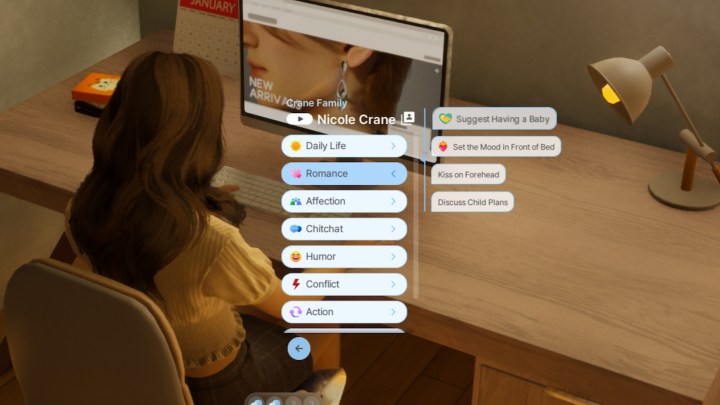
    Step 2: Use the Romance dialogue tab to select the Suggest Having a Baby option between your married Zois. If the discussion concludes positively, they'll head to bed to try and conceive.

    Suggest having a baby in Inzoi.
    Inzoi Studio

    Step 3: Be prepared for the possibility that the first or even the second attempt might not lead to a positive result. After trying, tap the red exclamation mark icon above your female Zoi's image to offer a pregnancy test. Once you select it, she will take the test, and you will receive either good or bad news. A successful pregnancy will trigger a pop-up congratulating your Zoi!

    Pregnancy test in Inzoi.
    Inzoi Studio

    How to Give Birth to Your Zoi Baby

    Now that your Zoi is pregnant, the next step is waiting for her to give birth!

    Step 1: The pregnancy lasts for three in-game days, during which you will notice your pregnant Zoi's belly visibly expanding. Additionally, the Pregnant status will appear when you check her mood.

    Pregnant Zoi in Inzoi.
    Inzoi Studio

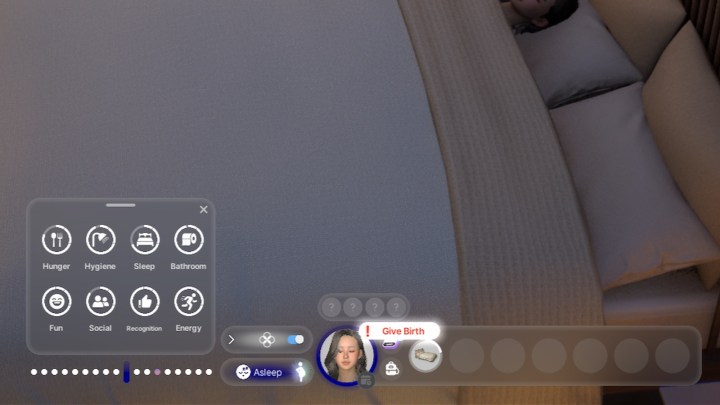
    Step 2: On the third day, wait for the same red exclamation mark icon to appear again. This time, it will give you the opportunity to select the option to give birth. Choose that, and your Zoi will be taken to the hospital to welcome the new addition to the family. The scene will cut to her resting in a hospital bed with her newborn.

    Giving birth in Inzoi.
    Inzoi Studio

    Step 3: Following the cutscene, a pop-up will appear congratulating your Zois on their newborn and providing details about the baby's sex. You can now choose their first and last name.

    Naming your baby in Inzoi.
    Inzoi Studio

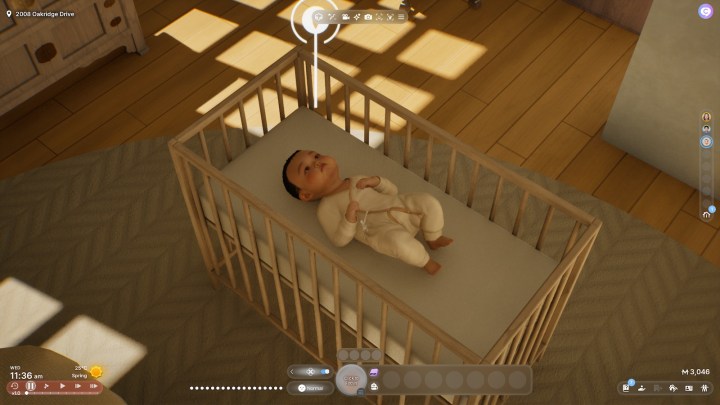
    Step 4: There's no need to worry about buying a crib just yet, as it will automatically be placed in your home with the baby inside. You can later access Build Mode to adjust its placement. That’s all there is to having a baby in Inzoi. Now, your focus should shift to nurturing their needs and building a strong parent-child connection!

    Baby in crib in Inzoi.
    Inzoi Studio
  • How to Drive a Car in Inzoi: A Comprehensive Guide

    How to Drive a Car in Inzoi: A Comprehensive Guide


    Exploring the vibrant cities of Inzoi is an adventure best experienced behind the wheel. While walking or using the fast-travel bus are options, having your own car can enhance your gameplay experience. However, driving and maintaining your vehicle comes with a unique set of responsibilities, particularly if you're choosing to manually control it.

    Difficulty

    Easy


    Duration

    5 minutes

    Did you know that Inzoi includes a manual driving option? While this feature is still developing, it adds an exciting layer to navigating the city. Before hitting the road, you'll need to learn how to acquire your vehicle and switch between driving modes.

    How to buy a car

    To enjoy the thrill of driving, you'll first need to save enough money from your job to afford a car.

    Step 1: Click the smartphone icon on your hotbar (or press the P key) to open the orange Dream Car app.

    Inzoi Studio

    Step 2: From within the app, choose the car you want to purchase for your household. The most affordable option starts at $10,000, so make sure to accumulate enough virtual currency. You can also select your preferred color for your vehicle.

    List of cars to buy in Inzoi.
    Inzoi Studio

    Step 3: After the purchase, your vehicle will be parked outside your residence. You can interact with it in various ways, such as washing it, repairing any damage, or even taking memorable selfies on the hood.

    Car interactions in Inzoi.
    Inzoi Studio

    How to manually drive the car

    Your game begins with the driving set to automatic. When you opt for the Drive Here feature on the map, your character will drive without any input. However, an additional but still imperfect feature allows for manual control if you activate it first.

    Step 1: Navigate to Game Options and select the Gameplay tab. Scroll to find the Driving (Experimental) section. Enable manual driving here, keeping in mind that it is still in beta and may have glitches.

    Gameplay settings in Inzoi.
    Inzoi Studio

    Step 2: After updating your settings, have your character enter the driver's seat. You can then use the WASD keys to navigate. Switch between first and third-person views using the Tab key, and honk the horn with a left-click.

    Be mindful of other characters' safety; crashing can lead to consequences. Striking another character or vehicle can negatively impact your Karma. Expect a confrontation between drivers if you crash, and repairing your vehicle will be necessary after an accident.

    Also, note that you cannot hit child or baby characters in the game, as a recent update has fixed this capability, ensuring a more family-friendly experience.

    Manually driving a car in Inzoi.
    Inzoi Studio
  • Completing the Quest: Finding Lottery Stands in InZoi

    Completing the Quest: Finding Lottery Stands in InZoi

    In InZoi, you want your Zois to enjoy life to the max. While it’s tempting to use the money cheat for instant wealth, there’s something special about letting them earn it themselves. You can encourage them to face the job market, but have you thought about trying their luck with the lottery too?

    Do you believe your Zoi has what it takes to hit the jackpot, or will they end up with only a fraction of the ticket cost? If you’re curious about how the lottery functions and where to find ticket vendors, we’ve got the details for you right here.

    Since InZoi is still in Early Access, expect changes over time. We’ll keep this guide updated as necessary.

    How Does the Lottery Work?

    Your Zois can purchase a lottery ticket for five Meow at various lottery booths or stands. Most of the time, they’ll only win back three Meow, but there’s always a chance for bigger rewards. If their karma is high, their odds of winning increase!

    Even if you’re not inclined to take a gamble, your Zoi might feel compelled to buy a ticket from time to time due to a random urge.

    Where to Get Lottery Tickets

    Lottery tickets can be bought from freestanding booths located on the street or from lottery stands within various stores. There are several throughout the game’s maps, but here are some locations to help you out.

    We’ll keep updating this guide as we discover more locations.

    Dowon

    In Dowon, look for larger freestanding lottery booths at both Central Park – Fountain and Harang River Park – East.

    Bliss Bay


    In Bliss Bay, a lottery stand is available inside Posey’s Surf Shop, located towards the back of the store.

  • How To Get a Job at Inzoi: Your Complete Guide to Success

    How To Get a Job at Inzoi: Your Complete Guide to Success


    A straightforward method to earn money in Inzoi is through securing a job. While some alternatives, like selling your artwork or engaging in illegal activities for Meows, the in-game currency, exist, pursuing a career is the more conventional approach.

    Difficulty

    Easy


    Duration

    5 minutes

    If your Zois have aspirations of starting a family, purchasing a vehicle, or taking care of pets, financial stability is essential. Inzoi offers both jobs that your Zoi can leave unattended and those you can assist with. With a variety of unique career paths to explore, here's how to secure a job successfully.

    How to get a job in Inzoi

    The application process is simple and only requires a few clicks.

    Step 1: Access your Zoi's Smartphone by selecting the phone icon or pressing the "P" key on your keyboard. Choose the career app located in the bottom row between School and Messages.

    Inzoi Studio

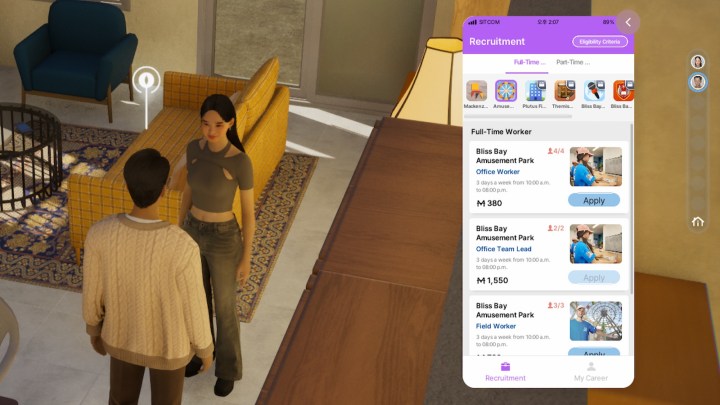
    Step 2: At the top, you can choose between full-time and part-time positions. You'll find that some options are interactive and not just rabbit holes, allowing you to accompany your Zoi to work.

    Job options in Inzoi.
    Inzoi Studio

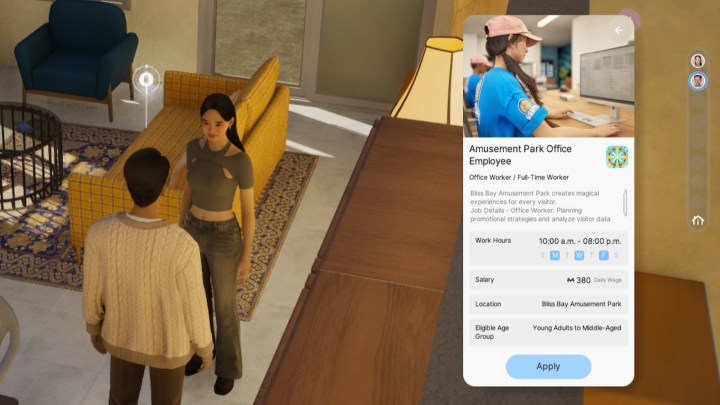
    Step 3: To identify whether a job is one you can accompany your Zoi to, select the job title and position to determine if there's a location associated with it. If a location is listed, you can follow your Zoi to work; otherwise, they will vanish until they return home after their shift.

    Amusement park employee in Inzoi.
    Inzoi Studio

    Step 4: After you've chosen a position for your Zoi, click the Apply button. A pop-up will appear asking if you'd like to apply for the job and may indicate if there is an opening. If there isn't, it might provide an option to remove another Zoi from the position in order to claim it. Select the Apply option again to finalize the application.

    Applying to a job in Inzoi.
    Inzoi Studio

    How to commute to work

    With the job secured, it's essential to understand the process when your Zoi's shift begins.

    Step 1: To verify your Zoi's work schedule, click on the list icon in the My Career section of the Career app. This will show the days and hours they are scheduled to work. You can also check their complete schedule via the map or by clicking the Schedule icon located at the bottom right of their character icon.

    Inzoi job schedule.
    Inzoi Studio

    Step 2: When it's time for work, regardless of whether the job is interactive, a pop-up notification will prompt your Zoi to start heading to work. If your Zoi isn’t moving toward their job, you can direct them to attend the scheduled event either through the pop-up or from the Schedule menu.

    Heading to work in Inzoi.
    Inzoi Studio

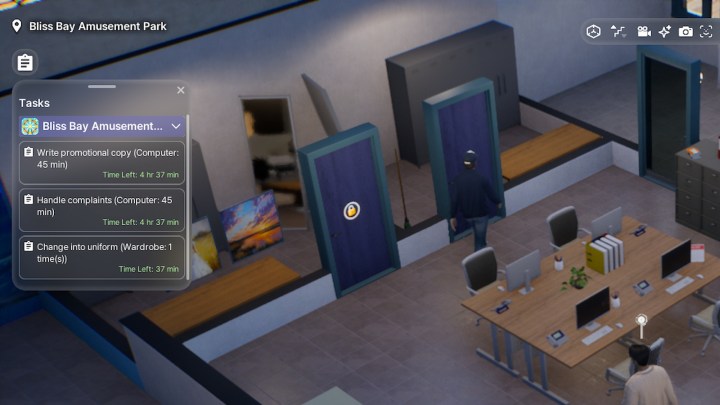
    Step 3: If you’re accompanying your Zoi at their workplace, a list of tasks will appear in the upper left corner of your screen. These tasks are necessary for your Zoi to complete in order to maintain their position and possibly earn promotions. You’ll see how much time is left for each task and how long it will take to finish them.

    If you're unsure where your Zoi needs to complete a task, the description will indicate the location. For instance, they might need to "Handle Complaints" at a computer. If they're at a convenience store, they may need to interact with product shelves to organize items. In case of a full-time job, your Zoi will have both morning and afternoon tasks, offering you ample opportunity for breaks to let your Zoi take care of their needs.

    Job tasks in Inzoi.
    Inzoi Studio
  • Completing Your Performance Skill: A Guide to Solving Challenges

    Completing Your Performance Skill: A Guide to Solving Challenges

    Starting a new chapter in InZoi opens up a world of opportunities. You can take on any role, from a clever villain to a beacon of hope for your community. If you set your mind to it and think creatively, there’s virtually no limit to what you can achieve.

    As Zois navigate through life, they acquire various skills that help shape their personalities and fulfill their ambitions. One key skill is performance. Every Zoi has the potential to become a local pop star with the right guidance and practice. Let’s explore how to enhance the performance skill and kickstart your entertainment journey!

    Keep in mind that InZoi is currently in early access, and features may change. We’ll keep our guides updated as necessary!

    What Is the Performance Skill?


    The performance skill allows your Zoi to sing and entertain an audience in public settings. It’s a delightful talent that lightens the atmosphere and gives your Zoi the chance to show off their creativity to friends, family, and admirers.

    To avoid any embarrassing moments of being booed or laughed at during performances, it’s essential to find effective ways to enhance this skill.

    How To Improve The Performance Skill


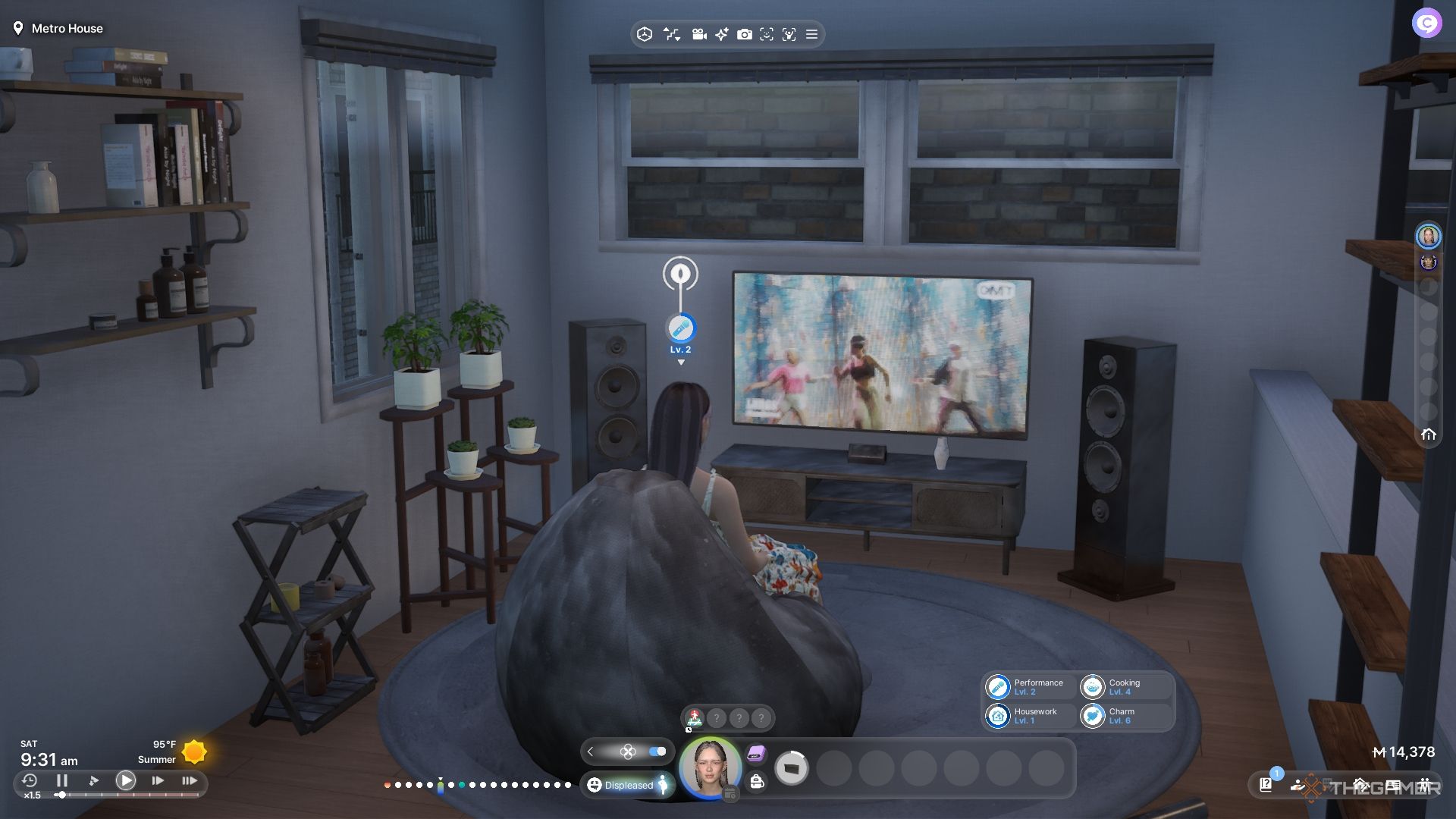
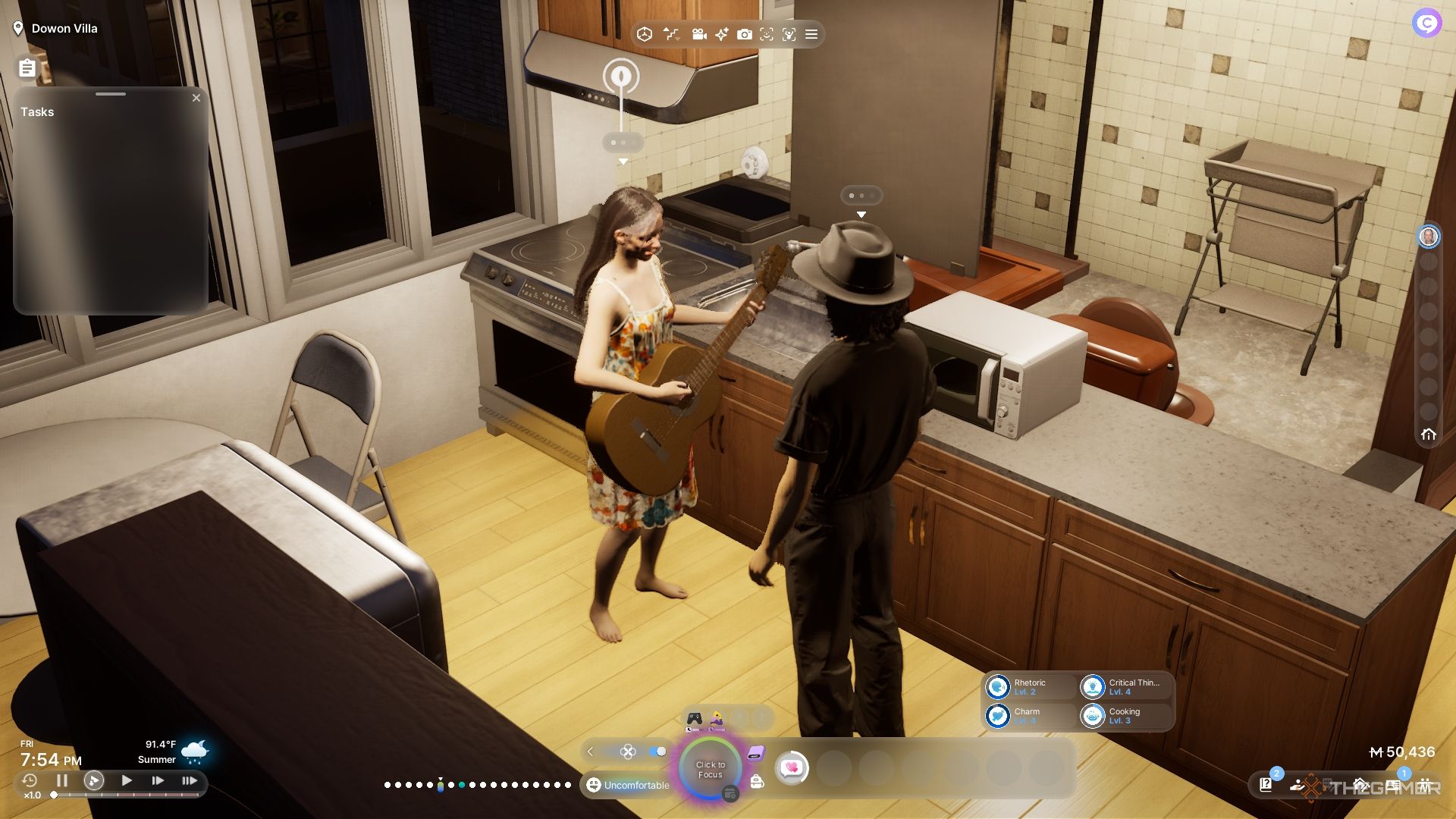
    A woman serenading her fiancé in their apartment.

    Enhancing the performance skill requires either researching with a Zoi or practicing solo. There are various ways to achieve this, and we’re here to guide you.

    Keep in mind that playing instruments like the piano, guitar, or drums will not contribute to this skill, as they are categorized as different skills.

    Here are some of the most effective methods to boost your performance skill and instill confidence in your Zoi:

    Karaoke Nights

    Check out your city map and visit the nearby karaoke bar with friends or even by yourself if you enjoy solo outings. For just five Meow, you can book a room to sing solo or share a duet with another Zoi.

    Note that not all Zois enjoy karaoke, and their skills won’t improve any faster by participating.

    This makes for a fantastic opportunity to unwind with friends after work, so be sure to schedule regular visits with fellow Zois.

    Explore Humor Websites

    At home, your Zoi can enhance their performance skill by visiting humor websites. They can spend hours looking at jokes and entertaining content to develop their skills.

    While it may not be the quickest way to improve the performance skill, it’s a great alternative for Zois who are not yet ready to perform publicly. They can practice at their own pace in a comfortable setting.

    Read Books on The Performing Arts

    Lastly, Zois can read various books on performing arts from their bookshelf. This is a budget-friendly and low-risk way to hone the performance skill without putting your Zoi in any embarrassing situations.

    By revisiting these books regularly, they can gain a deeper understanding of the field, all from the comfort of their home. Your Zoi will max out their skills before you know it, possibly even tiring of the same material!

  • Completing the Housework Skill in InZoi: A Solving Guide

    Completing the Housework Skill in InZoi: A Solving Guide

    As you embark on your journey in InZoi, there are numerous personal skills to explore that can enrich your Zois’ experiences. Whether it’s painting on a canvas or hitting the gym with your friends, you’ll find a variety of engaging activities at your fingertips.

    While you dive into exciting adventures and discover your new city, it’s essential to keep your home tidy. Housework might seem mundane, but it carries more weight than just washing dishes and taking out the trash. Here’s what you need to know about this valuable housework skill and tips for mastering it in InZoi.

    Keep in mind that InZoi is currently in early access, so things may change. We will adjust our guides accordingly.

    What Is The Housework Skill?


    At first glance, the housework skill might look like just another chore. Keeping your home clean and organized will help your Zoi remain calm amidst the chaos of life. A messy environment, on the other hand, can lead to unnecessary stress and negative emotions.

    Nonetheless, developing your housework skill is crucial for your Zois. To manage your home effectively, you’ll want to stay on top of tasks like doing laundry, taking care of your appliances, and general maintenance.

    If your home gets too cluttered, you’ll receive a pop-up reminder to clean up.

    How To Boost Your Housework Skill


    Mopping in the bedroom by the furniture workbench.

    As you enhance your housework skills, your Zoi will grow more effective in maintaining the home. Routine household tasks will naturally boost your skills as you tidy up.

    To speed up your progress, take a proactive approach to cleaning and explore various methods to become more industrious around the house. Here are the best ways to improve your housework skill:

    Cleaning The House

    The primary method to increase your housework skill is to clean your living space. You can do this by using a vacuum or by selecting the clean option when you interact with your Zoi.

    Your Zoi will go around the house, cleaning multiple rooms until everything sparkles.

    You’ll also get the clean option when surfaces get dirty, allowing your Zoi to tidy up. Look for opportunities to improve your skills by monitoring your home!

    Doing The Laundry

    Another way to enhance your housework skill is to do laundry. Just choose the wash option on the washing machine, and your Zoi will get a load started.

    If something goes wrong with the machine, don’t panic—it’s not the end!

    Should you need to repair the appliance, you will also gain experience for your housework skill. Fixing appliances falls under general maintenance, so stay handy to maximize your skill.

    Creating Custom Furniture

    You can also boost your housework skill by making custom furniture at a workbench. This lets you craft your own tables, chairs, computers, and lamps for your home.

    If you’re unable to create furniture right at the workbench, simply press the back button and use the build menu to gain experience while still at the workbench. Your Zoi will still earn skill points!

  • Completing the Programming Skill in InZoi: A Solving Guide

    Completing the Programming Skill in InZoi: A Solving Guide

    As you create your life in InZoi, you’ll need to hone various skills to thrive. One of the most valuable and adaptable skills you can acquire is programming, which opens up numerous opportunities in the world of technology.

    We’re here to guide you through mastering the programming skill quickly. This ability can help you generate income and also indulge in fun hacking projects on your computer. Here’s everything you need to know about developing your programming expertise in InZoi. Enjoy diving into the world of technology!

    Keep in mind that InZoi is currently in early access, so the content may evolve. We’ll refresh our guides as necessary!

    What Is The Programming Skill?


    The programming skill is deeply connected to computer usage, whether you’re engaged in gaming or trying your hand at hacking. Zois can become adept in technology, even exploring activities like online scams and fraud to earn a little extra cash.

    Success in these endeavors relies heavily on your programming ability, so it’s wise to elevate this skill to optimize your results. Fortunately, there are plenty of ways to boost your programming knowledge.

    How To Improve The Programming Skill


    A woman working on programming at a computer.

    To enhance your programming skills, you’ll typically need access to a computer. There are various tasks you can perform on it to gain proficiency, along with the option to grab a book for additional learning.

    Here are the best methods to practice and elevate your programming abilities!

    Playing Video Games

    Engaging in video games on your computer can help enhance your programming skills, whether you choose a sandbox game or something different. It may take some time, but your Zoi will improve their abilities while having fun.

    A gaming session may require several hours to complete, but the payoff is significant if you want your Zoi to excel at multitasking. Combining relaxation with learning something new is an excellent way to spend their time and opens up exciting possibilities.

    Practicing Programming On The Computer

    You can also directly have your Zois practice programming on a computer. Although this may not be as entertaining as gaming, it allows for a more focused skill development session.

    Becoming a professional programmer takes time, but your skill level will progress more quickly through dedicated practice. Just ensure your Zoi’s needs are taken care of before they start working on their skill enhancement.

    Reading Programming Books

    If you can’t get to a computer or simply want a break from screens, consider studying programming through books. Head to your bookshelf, and choose a book to read and browse the available titles.

    Find a book about programming, such as the Complete Guide To Beginner Programming or the InZoi gaming guide. This approach may take longer to boost your skills, but it’s a practical option if you have the time or experience a computer issue.

  • Completing the Media Production Skill in InZoi: A Guide to Solving

    Completing the Media Production Skill in InZoi: A Guide to Solving

    With more than a dozen skills to choose from in InZoi, picking just a few to start can be daunting. Each skill requires specific equipment and a certain amount of time to develop, making the process both essential and a bit tedious.

    Fortunately, the media production skill offers a variety of applications and ways to improve. You’ll also enjoy plenty of creative freedom as you develop this skill. Let’s cover the fundamentals and figure out how to enhance this skill quickly! Here’s what you need to know about media production in InZoi!

    Please note that InZoi is currently in early access, and information may change. We’ll update our guides as needed.


    The media production skill focuses on creating content for online sharing, whether it’s a personal post or an advertisement for sale. There are endless possibilities for what you can create, provided your skill level is high enough.

    Improving media production requires ongoing effort, and there are various methods to advance your abilities. This skill is particularly useful for tech-savvy Zois and those looking to build an audience or delve into the tech world.

    To enhance your media production skill, you’ll need a phone and a computer. While all Zois start with access to a phone, the computer must be bought from the build menu.

    Here are some ways you can utilize your devices to boost your media production skill:

    How To Create And Sell Videos

    Using a laptop, you can practice editing videos. Once you reach a higher skill level, you can take on larger and more complex projects. These videos can be named and described briefly before you sell them for a profit.

    The higher your skill, the more Zois will pay for your videos!

    While producing videos can be a time-consuming venture, you will gain substantial experience throughout the process. Be sure to meet your Zoi’s needs before embarking on your next project.

    How To Use Social Media

    Another effective method to enhance your media production skill is to post selfies and take photos in popular locations around town. These photo opportunities provide a great chance to practice your skills and gain visibility for your work.

    Using the camera mode to take photos does not contribute to this skill.

    To snap a selfie, interact with your Zoi and use an action to take the photo. Your Zoi will pull out their phone and quickly post it online.

    While the experience gained is minimal with this action, it’s quick to perform. You can repeat it frequently for extra experience, but be prepared for some curious looks from your neighbors as you take your many selfies.

  • Completing Karma: How It Works in InZoi

    InZoi is designed around a karma system, which means that the Zois you manage play a crucial role in creating a positive community. Acts of kindness and generosity have a much greater impact than hostile behaviors or bullying among Zois. However, how you choose to engage in this system can be more challenging than you might expect.

    To help you navigate this system, we’ll explain how karma works, from your direct interactions to the autonomy that each Zoi possesses. With this understanding, you’ll be able to influence the Zois’ world and customize their city to suit your vision.

    InZoi is currently in early access, so expect some details to change. We will update our guides as necessary.

    What Is Karma?

    Karma is the driving force in InZoi. Each Zoi has a unique karma tracker that ranges from bad to good. Negative karma accumulates through disruptive behaviors like threatening, mocking, or displaying anger toward fellow Zois.

    If you mistreat others, it’s likely that you’ll face the same treatment in return. Other Zois may avoid you, ignore you, or even ridicule you openly. A poor karma score signals to other Zois that you are not a respectable member of the community, severely affecting your chances of success.

    If the overall city karma drops too low, you may need to meet with the CEO outside your Zoi’s universe.

    On the other hand, showing kindness and compassion will earn you more friends. Your interactions have a ripple effect, influencing the Zoi’s world in ways that extend beyond personal relationships. Everything is interconnected, much like the butterfly effect.

    The color icon next to an interaction indicates its potential karma impact. Red means negative, purple is neutral, and blue signifies positive!

    How To Increase Karma

    Boosting your karma is straightforward: just be kind to other Zois and contribute to the community. Click on the interactions tab when selecting a Zoi or your playable character to explore available options.

    Performing blue interactions will raise your karma, though it may take some time to see significant improvements. Building your karma score can require several in-game days.

    You can adjust your settings to change how often Zois engage in violent behavior or how karma is calculated, making the game easier or more challenging!

    Additionally, any form of violence, even accidental, can hurt your karma. For instance, hitting pedestrians while driving is frowned upon. To keep your Zoi on the right side of morality, avoid letting them steal or commit fraud.

    Avoiding unethical actions will greatly help you in improving your karma. However, keep in mind that you can only manage one household at a time, while a whole city of Zois has its own set of challenges. Managing city-wide karma can be much more demanding.

    If a Zoi with poor karma dies, they will turn into a ghost until they can improve their karma and move on.

    How To Intervene With A Zoi’s Karma

    If a Zoi’s karma is critically low, you can intervene through the City Menu to manage their behavior. Every day, you can access their profile and choose to intervene, giving them a chance to improve their karma.

    The decision to accept this help is ultimately up to them.

    While scolding a Zoi can help steer them in the right direction, it’s not your only option. If a Zoi has exceptionally high karma, you can also choose to intervene positively by complimenting them. This can lead to rewards or beneficial opportunities that further motivate them.

    Be sure to avoid intervening between 5:00 AM and 6:00 AM, as that time is special for the Zois. The reasons for this are unclear, but it’s probably wise to heed the warning from your feline overlords.

  • Completing Your Journey to Marriage in InZoi: A Guide to Solving

    Living a solitary life isn’t truly living, whether you’re making friends or finding a partner in InZoi. Forming connections with others is essential for fully embracing the experience within the world of the Zois, even if it can be challenging to get started. Fortunately, with a little guidance, you’ll be able to broaden your Zoi’s social circle.

    Each relationship in InZoi, from a budding romance to an intense love affair, is distinct. No two connections are the same, and we’re here to help you figure out which relationships will suit your Zois best.

    InZoi is currently in early access, meaning some details might change over time. We’ll keep our guides updated as necessary.

    How to Start Dating

    Romantic connections in InZoi often begin with a mutual attraction. While chatting with another Zoi, you can inquire about their preferences, relationship status, and more. This information is valuable in helping you find a suitable partner for your Zoi.

    You can view this information anytime through the relationship panel.

    To build the romance, choose romantic and affectionate actions from the interactions menu. As the relationship grows, you may find two Zois developing a mutual crush.

    With this foundation, you can start incorporating more romantic interactions, such as kisses, hugs, and dates. Going out on dates is simply a matter of asking a partner out and meeting them at the chosen location. You’ll have a limited time to engage in date-specific interactions, but these can be automated for convenience.

    While dating isn’t necessary to strengthen a relationship, it sure adds excitement.

    Once your relationship reaches a certain level, you can have a conversation about your feelings to become official sweethearts. This requires one Zoi to express their love, and if the other reciprocates, your relationship is confirmed!

    If you ever want to revert to a previous stage or prefer a less stable relationship, you can ask to return to how things were, but be aware that your partner may not be thrilled about it.

    How to Get Engaged

    After solidifying your relationship, you can propose to your Zoi’s significant other. A successful proposal leads to an engagement, which is more likely to succeed if your Zois are committed to each other as true loves.

    During engagement, your Zois will enjoy their close bond and companionship—there’s no need to rush into planning the wedding. Take your time and make new friends to join the celebration when the big day arrives.

    You can end the engagement at any time through the interactions menu.

    How to Plan a Wedding

    When the time feels right, you can access the scheduling options to plan your wedding. The Zoi who kicks off this process will fill in the available guest and officiant slots with their friends, so be sure to double-check the guest list before finalizing everything.

    Zois can choose to plan the wedding together, but it’s not a requirement.

    Planning a wedding doesn’t have to be complicated. Just choose a date, decide how long you want the event to last, and select a location for the ceremony. When everything looks good, confirm the details and look forward to the special day.

    You can personalize the venue, such as an outdoor location, with as many decorations as you wish before the wedding. This is completely optional.

    On the wedding day, you’ll celebrate with friends and family. Don’t forget to dress appropriately for the occasion so you can capture lovely memories in photos.

    After saying “I do,” Zois can start a family by discussing having children. But remember, they can also request a divorce if things don’t work out!

  • Completing Your Custom Clothing Journey in InZoi

    Completing Your Custom Clothing Journey in InZoi

    As you dive into InZoi, your goal is to create a wide variety of unique Zois to fill up the game world. Each Zoi brings a fresh perspective, along with distinct skills, preferences, and goals. One of the most exciting ways to express their uniqueness is through fashion.

    Your clothing choices are the perfect way to showcase your personality to others, and in the character creator of InZoi, you have the ability to design your own outfits. We’ll guide you on how to build your personal wardrobe and save your creations, ensuring you never lose track of your best fashion designs.

    Keep in mind, InZoi is currently in Early Access, and features may change. We’ll keep our guides updated as necessary.

    Where to Create Clothing


    While in the character creator, look for the clothing crafting tab in the bottom right corner of the screen. This is the final option in the bottom menu, where you can do a variety of tasks.

    You have the option to create new shirts, skirts, or shorts and even accessories. Additionally, you can utilize the 3D scan feature to bring in and design entirely new items, utilizing the in-game engine for even more distinctive styles.

    How to Design Custom Clothing


    A Zoi shopping at a clothing store.

    Designing custom clothing is a thrilling aspect of the character creator. Each piece comes with various customization tools that unlock your creativity. From the garment cut to the color and pattern, we’ll explain everything you need to know!

    You can also upload custom images and patterns directly from your device for that extra flair or uniqueness!

    Creating a Top

    • To create a top, simply click on the shirt icon in the crafting menu. From here, you’ll be able to adjust the following:

      • Neckline: This affects how the shirt fits around the neck and shoulders, with options ranging from a turtleneck to a low-cut sweetheart style.
      • Sleeves: You can choose between sleeveless designs or options with sleeves, including puffy sleeves for added warmth.
      • Hem: This is the cut at the bottom; you can crop it to showcase your Zoi’s midriff or extend it for a looser look.

      You can change the colors of specific items using the color wheel based on your choices, but we suggest saving a version of the top in white as a blank canvas for future designs.

    Creating Bottoms

    • Bottoms are categorized into pants and skirts. Each has various customization points, but there are fewer options compared to tops:

      • Inseam (Pants Only): This controls the waist area, allowing you to select styles from low-rise to high-rise.
      • Hem (Pants Only):
      • Hemline (Skirts Only):

    Creating Accessories

    • Besides clothing, you can also create accessories like necklaces and watches for your Zoi.

      • Pendant: This is the decorative piece on a necklace; you can select various shapes like hearts, butterflies, or crescent moons.
      • Necklace Chain: Choose the chain type for your pendant, from simple leather cords to shiny metal chokers.

      With watches, you can adjust the face shape, display, and wristband material. Though customization options are somewhat limited here, it adds a nice touch for personal flair.

    Where to Locate Custom Clothes


    A Zoi wearing a green jersey in the character creator.

    You can find your custom clothes exclusively in the character creator and wardrobe, specifically in the crafted clothes section of each category. This makes it easy to locate the items you’ve designed.

    Feel free to explore the crafting menu further, as it will direct you to the saved section when you create a new item.

    Once you’ve saved your clothing designs, you can apply them to any Zoi and change the colors at any time. The colors you save will be the defaults, but altering them on a Zoi won’t affect the saved presets.

  • How to Get Married in Inzoi: A Comprehensive Guide

    How to Get Married in Inzoi: A Comprehensive Guide

    Getting married is an important step if you're looking to start a family in Inzoi. This life simulation game lets your Zois find love, date, and eventually tie the knot. However, with a plethora of dialogue options and customizable elements, organizing your special day can be a daunting task.

    Difficulty

    Easy


    Duration

    10 minutes

    What You Need

    • Two dating Zois

    Before diving into wedding planning, your Zois need to become engaged.

    How to get engaged in Inzoi

    Step 1: Elevate their romantic relationship to the Sweetheart or True Love status. You can do this by selecting options under the Romance tab. Be sure to opt for those relationship types in the dialogues as you reach the necessary levels, otherwise, you may miss critical checkpoints. Look for the dialogue option marked with the Select Relationship label.

    Inzoi Studio

    Step 2: Once you achieve those romance levels, you’ll unlock the option to Ask Them To Marry You. This is found in the Romance tab represented by a diamond ring icon.

    Asking to get married in Inzoi.
    Inzoi Studio

    How to plan the wedding

    If the proposal is accepted, you can finally kick off the wedding preparations!

    Step 1: Access your Zoi's phone and tap on the Schedule app. Here, you can choose to schedule important events, including the wedding.

    Planning an event in Inzoi.
    Inzoi Studio

    Step 2: Select an available time slot and choose the Make Event option. Select Wedding for the event type, name your event, and establish how long it will last, as well as the location. Ensure you pick the correct wedding venue option.

    Planning a wedding in Inzoi.
    Inzoi Studio

    Step 3: Decide on the newlyweds, guests' dress code, and set any rules for behavior. This will help ensure a smooth event and proper conduct from the guests. You'll also need to designate an officiant, and you can choose familiar Zois for your wedding party and guests.

    Planning wedding guests in Inzoi.
    Inzoi Studio

    Step 4: When it's time for the event, you'll instantly be taken to the venue where you can select from certain scripted and immediate actions. These could include moments like walking down the aisle or tossing your bouquet. Once the ceremony concludes, you’ll receive a pop-up congratulating you on your wedding success. With that hurdle behind you, your Zois can start planning for a baby or two!

    Walking down the aisle in Inzoi.
    Inzoi Studio
  • InZoi Life-Sim Game Release Delayed To 2025

    InZoi Life-Sim Game Release Delayed To 2025

    A woman designed in the Inzoi character creator, featuring short brown hair and large eyes gazing to the left.
    Krafton

    The creators of inZOI announced an early access launch date set for March 28, 2025, on Thursday, despite earlier claims that the innovative life simulation game would debut this year.

    In a public message on the inZOI Discord channel, producer and director Hyungjun “Kjun” Kim explained that the extra time is necessary to provide “the best possible start” for the game.

    Until now, the game had not been given a specific release timetable, but last month, a Krafton representative informed PC Gamer that the intention was to launch it in 2024. In August, the studio introduced inZOI: Character Studio on Steam, a limited-time demo of its character creation system. Available for just five days, the demo captivated players eager to recreate both fictional and real-life figures with extensive detail.

    inZOI: Character Studio Official Announcement

    Following the feedback from that demo and various playtest sessions, Kim stated that the team needed additional time to enhance the game and deliver “the most complete experience possible.”

    “It is often noted that, among primates, the process of raising a human child to adulthood is the longest because humans must learn to adapt to their constantly evolving environment,” Kim wrote. “The additional care needed to nurture a child is a metaphor for our journey with inZOI—a creation that we will cultivate together starting from its Early Access stage. This new release date underscores our commitment to lay a solid foundation for inZOI, so we can embark on this journey together effectively.”

    inZOI stands to be a notable contender in the life simulation genre, particularly given that it remains in development after Paradox Interactive canceled its own title, Life by You, prior to entering early access. At present, it ranks as the 12th most wishlisted game on Steam.