الوسم: inZOI

  • How to Visit Cahaya Resort & Spa in InZoi: Completing and Solving Tips

    How to Visit Cahaya Resort & Spa in InZoi: Completing and Solving Tips

    In InZoi, your starting point is choosing the neighborhood where you want to live. The game features two main cities, each in separate universes, plus a new addition from the Island Getaway DLC: Cahaya Resort. This island is a remote tropical location waiting to be explored.

    This tropical paradise offers many new activities, from living off the land to relaxing in luxury. Whether your Zoi needs a peaceful retreat or an exciting adventure, Cahaya Resort has everything. Here’s what you need to know about the island before visiting.

    Where To Find Cahaya Resort

    You can find Cahaya Resort just below the city option, opposite Bliss Bay. It’s accessible for those who want a vacation by themselves or with family. In the game, you can choose any neighborhood you like, but the DLC allows you to move to the luxurious Cahaya Resort—a tropical island filled with adventure.

    If you wish to fully enjoy life at the resort, it’s recommended to move there with a new family. This helps you meet local characters and adapt to the new gameplay.

    Cahaya Resort Activities

    There are many things to do on the island beyond the resort. One of the main features is a journal that helps you track your collections. Fill it up before returning to your normal life or consider staying on the island permanently if you enjoy it.

    How To Go Snorkeling

    Enjoy diving into the clear ocean water to find treasure. You can visit the snorkeling stall at the beach to rent equipment, then start exploring underwater. As you snorkel, your skill improves. Any treasures you find can be sold for resort coins, which you can exchange for special items only available here.

    How To Live Off The Land With Fishing, Mining, And Farming

    Island life is different from city living, offering new ways to sustain yourself. You can start farming on your property to grow ingredients or sell your produce at the market. Additionally, you can use a pickaxe to search for precious gems to sell or craft with. Fishing is also an easy activity—simply cast your line and start fishing in the waters surrounding the island.

    How To Use The Resort And Spa

    The resort’s spa provides a perfect way to relax. You can pay for treatments like massages or use the sauna to unwind. These activities help boost your Zoi’s mood, which is the main goal of taking a vacation.

    You can also explore different resorts around the island to meet new friends and enjoy parties. Whether you want to watch sharks in the lobby or enjoy drinks with music at a lively venue, there are plenty of social spots to visit.

    Sail Boats Across The Ocean

    Living on a tropical island means access to open waters and beaches. Renting a boat is simple, and controls are similar to walking or driving in the game. You can sail around, explore deserted islands, or plot a course across the ocean—weather permitting.

    Visit The Cat Temple

    One special site on the island is the ancient cat temple. Making a day trip there is peaceful and rewarding. You’ll be surrounded by cats and can pay your respects, connecting more deeply with the island’s spirit.

    Additionally, if your Zoi needs a mood lift, you can draw a fortune. Sometimes it can improve your situation, but beware—it might also have negative effects, so use it wisely.

  • How to Plant and Grow Crops in InZoi: Completing and Solving Methods

    How to Plant and Grow Crops in InZoi: Completing and Solving Methods

    Building a new life in InZoi involves a lot of tasks, from finding a new job and making friends to exploring hobbies that keep you busy. At the same time, you’ll need to find ways to meet your basic needs. One great option is farming.

    With the Cahaya Resort DLC, you can try farming on a tropical island to grow your own crops. It’s more challenging than it seems, but we’ll guide you through growing various tasty ingredients you can use in your favorite dishes.

    How to Start Farming

    Before planting crops, you need to buy some equipment. Go into build mode, open the outdoor furniture menu, and select the gardening option. Gardening and farming are part of the same skill tree, but they mainly differ in the types of crops you grow and how you tend to them. Potted plants and herbs grow only one at a time and have fewer maintenance options. Instead, you should buy dirt plots that you can place in your yard.

    Pro Tip: Potted plants yield one product at a time, while dirt plots produce four.

    You don’t need tools to start, but it’s a good idea to buy them early. Visit your local farming supply store on the map and pick up a pitchfork and watering can to till soil and keep your crops moist. If you’re living on the island, you’ll get a free home farming kit, too!

    Where to buy seeds

    To plant crops, you first need seeds. Head to the farming supply shop on your map. You can buy different types of seeds here, with prices fluctuating based on availability and current events. Natural disasters, for example, can make it harder to get supplies and cause prices to go up.

    You can purchase various seeds, including:

    • Tomato Seeds
    • Potato Seeds
    • Carrot Seeds
    • Corn Seeds
    • Banana Tree Seedlings
    • Mango Tree Seedlings

    Each crop has six different harvests. It’s smart to stockpile seeds when prices are low so you can practice farming and build your inventory. One seed packet will fill a whole plot with four standard crops.

    Note: A tree seedling will be planted alone and will take up a whole plot.

    How to grow crops

    Growing crops takes more time than potted plants. You can check their status by hovering over them—to see moisture levels, nutrients, and time left until harvest. Water and fertilize your plants regularly to improve your chances of a better crop. While daily watering and fertilizing might seem like a lot, they help ensure healthy plants.

    If moisture or nutrients drop too low, your crops may become buggy or wither away, reducing their quality. You can still cook with these damaged crops, but it’s not recommended.

    Be sure to look out for weeds and pull them immediately—they can harm your harvest quality. Once your crops are ready, harvest them and decide whether to cook with them or sell them at the local market. You can buy a stall for your property or set up on a multipurpose lot and start selling crops to earn money. Remember, larger and healthier-looking crops typically fetch higher prices!

  • How To Swim in InZoi: Island Getaway by Completing and Solving

    How To Swim in InZoi: Island Getaway by Completing and Solving

    Swimming is now available in InZoi with the Island Getaway DLC. You can visit beach resorts, and pools are an essential part of these locations. Improving your swimming skill will also help you explore ocean waters more effectively.

    If you want to stay longer in the water and develop your swimming ability, having a pool at home is very helpful. You can buy houses that already include pools or build your own from scratch. Imagine jumping into the pool right after waking up or just before breakfast.

    ## How To Swim

    You can swim either in public pools or in the ocean by the beach. Public pools are located at parks and other places marked on the map. Building a pool at your house makes it more convenient to practice and grow your swimming skills.

    Young Zoi tend to improve their Aquatic Ability skill instead of just swimming, which serves as a good prep for future skills.

    To swim, just select a pool and press the “Go” button to jump in and relax. When at the beach, you will automatically start swimming as you walk into the water.

    Swimming can drain a lot of energy, so make sure your needs are full before heading into the ocean. Spending too much time will make you feel tired, and after three hours, you’ll drown, plus your character will move slowly. It’s recommended to use a tube in pools for relaxing, as it doesn’t use energy. As your swimming skill levels up, you’ll swim more efficiently and face less risk from sharks or other dangerous creatures in the sea.

    ## How To Build A Swimming Pool

    In the build menu, go to the “Exteriors” tab and select “Swimming Pools.” Here, you’ll find different options to either build preset pools or create a custom design. You’ll see pool walls that you can choose based on how steep you want the sides to be. To shape your pool, drag lines from one point to another to enclose the boundary. You can also add paint and lighting for a better look.

    While pools are typically outside, you can also build them indoors if preferred. To enlarge an existing pool, build another boundary with the same wall length across it.

    It’s recommended to add a ladder so your Zoi can reach the pool easily. If there’s no ladder, your Zoi will simply jump in instead.

  • How to Sell Items at a Market Stall in InZoi: Completing & Solving

    How to Sell Items at a Market Stall in InZoi: Completing & Solving

    If you’ve been filling your inventory with random items in InZoi: The Island Getaway, you might start wondering what to do with all of them. Instead of hoarding everything like a beachside dragon, a better idea is to set up a shop and turn your clutter into real Mew. That’s exactly what the market stall is for.

    More than just a way to sell things, the market stall is a social spot where you’ll meet Zois and maybe catch a thief or two. Running a stall can make you a good amount of Mew and become a fun part of island life once you get the hang of it.

    ### How to Sell Items at the Market Stall

    Selling items at your market stall is easy and a good way to earn Mew while interacting with residents. First, go to the build menu on a property and look for “Stall.” You’ll see an option for a “Wider Sales Stall” which costs 330 Mew. Place it outside near the street, but avoid putting it on your home lot because Zois will see your house as an open invitation to walk inside.

    After setting up the stall, select it and choose “Place items for sale.” This opens your inventory, allowing you to pick what you want to sell and set your prices.

    Once you’ve chosen your items and prices, click the stall again and select “Start selling” to begin the sale. You can boost your sales by choosing actions like “Greet Customers,” “Dance for Promotion,” or “Promote,” and then pressing the play button to queue them up. Keep an eye on how customers react; if Zois hover over your stall and think your prices are “pricey” or start booing, you might need to lower your prices.

    A typical booth sale takes about three hours, but you can end it early anytime by selecting your stall and choosing “End sale.”

    ### How to Catch Stall Thieves

    While managing your stall, there’s a chance a thief might try to steal your items. You’ll notice this if a Zoi pockets something, causing you to lose Mew instead of earning it. To deal with this, select the Zoi trying to steal, then choose “Fight the thief.” Doing this will regain your lost Mew and give you Karma as a reward.

  • How To Get a Loan in InZoi: Completing and Solving Tips

    How To Get a Loan in InZoi: Completing and Solving Tips

    If you want to buy a big mansion or a small beachfront house in InZoi but don’t have enough money right now, you might need a loan. Borrowing money in InZoi isn’t just clicking “yes” on a prompt—it’s a decision that can affect your entire island life. Your choices can impact your assets, your freedom, and even your furniture. This guide will help you understand how to get a loan and what to watch out for so you can enjoy your new home without future trouble.

    What Are Property and Shark Loans?

    In InZoi, there are two main types of borrowing:

    • Regular property loans from banks: These are safer loans, with lower interest rates usually around 1%, and predictable repayment schedules.
    • High-risk “loan shark” loans: These are quick cash options for urgent needs but come with very high interest rates. You can borrow 2,500 or 5,000 Mew, but you’ll owe an extra 5% interest. These loans can spiral out of control if you don’t manage them carefully, often leading to threatening collection tactics if you miss payments.

    How to Get a Loan

    Getting a loan in InZoi is easy. For standard property loans, just pick a house you want but can’t afford yet. On the screen, look for a checkbox that says “Receive a move-in assistance loan.” The interest rate depends on the house’s price, but it’ll be lower than a loan shark’s rate.

    To borrow from a loan shark, use the dedicated “Loan” app on your in-game phone. Select how much money you want, then accept the high-interest rate. Be careful—these loans can lead to serious consequences if not handled responsibly.

    What Happens If You Don’t Pay Your Loan?

    Keep a close eye on your loan payments. Falling behind, especially with loan sharks, can lead to debt collectors showing up and seizing your assets. This means you may lose some household items until you pay back what you owe. Missing payments can quickly turn into bigger problems, so stay on top of your loans to avoid losing control of your financial situation.

  • How to Mine Gems in InZoi: Completing & Solving Guide

    How to Mine Gems in InZoi: Completing & Solving Guide

    Gemstones may sound like treasure from a fantasy game, but in InZoi: The Island Getaway, they’re just part of island life—if you know where to look. Mining isn’t just about hitting shiny rocks with a pickaxe; it’s a way to improve your gathering skills, collect useful materials, and add to your Family Collection Log.

    If you’re looking for a relaxing activity to break up your day, gem mining is a good option. To succeed, you’ll need the right tools, good locations, and some basic knowledge. This guide will help you get started.

    How to Get a Pickaxe

    Before you start mining for gems, you need a pickaxe. Visit the Farm Store in Cahaya, located in the bottom right part of the map. Inside, you’ll see various tools on the wall you can buy. You can choose between a stone, copper, or steel pickaxe, each capable of mining.

    You can also craft your own pickaxe at any crafting table, which can be purchased in the build menu.

    How to Mine

    Once you have your pickaxe, it’s time to dig. One of the top spots for gem mining is Xiang Park in the Cahaya map. Other good locations include Bliss Garden, Cahaya Farmland, Harang River Park, and other open areas.

    Most grassy areas will have mining spots. Look for rocky patches and shiny spots on the ground. Interact with these spots and select “Mine with Tools.” Your character, Zoi, will start mining. Successful attempts will give you rocks, gemstones, or raw minerals straight into your inventory. While it’s possible to mine with your hands, using a proper pickaxe is much more effective.

    Mining also helps improve your gathering skill and offers long-term benefits.

    What to Do with Items You Mine

    After mining, you’ll get raw gems and materials such as iron, silver, and sodalite. You can refine these into polished jewels or use them to craft new tools at a crafting table.

    Collected items are automatically added to your Family Collection Log, accessible via the book icon on the right side of your screen. Completing entries in this log not only tracks your progress but also unlocks rewards like exclusive furniture as you complete specific sets.

    Mining spots respawn quickly, giving you frequent chances to gather resources.

  • How To Snorkel In InZoi: Complete Your Adventure and Solve the Mystery

    How To Snorkel In InZoi: Complete Your Adventure and Solve the Mystery

    Snorkeling in InZoi: The Island Getaway is one of the most relaxing ways to explore the game. The ocean is full of different marine creatures and surprises, but you won’t find them just by walking along the beach.

    Getting the right gear makes a big difference between an easy, enjoyable swim and one that quickly drains your energy. This guide will cover everything you need to start your underwater adventures so you can enjoy the sights and maybe even find some cool loot for your Zoi.

    ### How to Get Snorkel Equipment

    Snorkeling begins with getting the proper equipment. Head to the snorkeling stand at the beach; a good spot is near the middle of Barat Beach, on the right side of the Cahaya map.

    At the stand, you can rent a snorkeling set. You have options like the beginner set, diver set, or ocean pro set. If you’re new to the game, we suggest starting with the beginner set. Once you buy it, it will automatically appear in your inventory, ready to use.

    ### How to Snorkel

    Snorkeling involves swimming far out into the ocean to reach the Deep Sea area. You just need to walk past the beach into the water—no boat needed.

    Once you’re in the Deep Sea, select your Zoi and equip your snorkeling gear from your inventory. You can choose ‘Practice Snorkeling’ to improve your skills gradually or ‘Start Snorkeling with your equipment’ to fully experience the underwater wildlife. Practicing boosts your skill, while starting with your gear lets you collect sea life and enjoy the scenery. Keep in mind that swimming long distances uses your energy and stamina, so work on building these skills before trying for longer snorkel excursions.

    Be cautious of sharks and jellyfish, as both can seriously harm or even kill your Zoi.

    ### How to Sell Snorkel Items

    While exploring, you might collect various sea creatures, such as sea urchins, which go directly into your inventory without extra steps. To sell what you find, visit the Coin Exchange Kiosk in the Sri Lestari Resort, located just to the left of the info desk. You can sell your sea life there for coins.

    Coins earned can be exchanged for special resort-themed items at the same kiosk. Improving your swimming and snorkeling skills allows you to spend more time exploring the ocean and gathering items for your Zoi.

  • Optimal Settings for Graphics and Performance in InZoi Completing Solutions

    Optimal Settings for Graphics and Performance in InZoi Completing Solutions

    When you’re in charge of creating the world in InZoi, the last thing you want is for lag to interfere during your gameplay. This life simulation game allows you to develop neighborhoods, create ideal characters, and observe the unfolding of either chaos or tranquility. However, none of this is enjoyable if your gaming experience resembles a stuttering slideshow.

    Whether you prefer stunning graphics or seamless performance, adjusting the right settings can significantly enhance your experience. This guide will help you optimize your graphics and performance settings, allowing you to craft and enjoy your ideal world without interruptions. Let’s get started.

    Optimal Graphics Settings

    If you’re keen on stunning visuals that make the game feel almost lifelike, this section is tailored for you.

    Keep in mind that these settings demand more from your system and are best suited for high-end PCs.

    Setting

    Option

    Display Mode

    Fullscreen

    Resolution Scale

    100%

    Dynamic Resolution

    Off

    Maximum FPS

    Unrestricted

    Vertical Sync

    On

    Ray Tracing

    On

    Occlusion Method

    Hardware

    Character Display Distance

    Ultra

    Object Display Distance

    Ultra

    Lighting Display Distance

    Ultra

    Shadow Distance

    Ultra

    Background Detail Quality

    Ultra

    Anti-Aliasing Mode

    TAA

    Anti-Aliasing Quality

    Ultra

    Post-Processing Quality

    Ultra

    Shadow Quality

    Ultra

    Cast Shadows (Lighting)

    On

    Cast Shadowing (Streetlamps)

    On

    Realistic Shadows

    On

    Global Illumination Quality

    Ultra

    Reflection Quality

    Ultra

    Texture Quality

    Ultra

    Effects Quality

    Ultra

    Plant Density and Quality

    Ultra

    Shader Quality

    Ultra

    Ray Tracing Quality

    Ultra

    Ray Tracing Object

    Actual Mesh

    Optimal Performance Settings

    If you prefer a smooth and responsive gameplay experience over eye-catching graphics, we understand completely. After all, there’s no joy in managing your perfect world if it feels sluggish. This section highlights the best adjustments to maintain seamless performance.

    Setting

    Option

    Display Mode

    Fullscreen

    Resolution Scale

    50%

    Dynamic Resolution

    On

    Maximum FPS

    30

    Vertical Sync

    Off

    Ray Tracing

    Off

    Occlusion Method

    Hardware

    Character Display Distance

    Low

    Object Display Distance

    Low

    Lighting Display Distance

    Low

    Shadow Distance

    Low

    Background Detail Quality

    Low

    Anti-Aliasing Mode

    TAA

    Anti-Aliasing Quality

    Low

    Post-Processing Quality

    Low

    Shadow Quality

    Low

    Cast Shadows (Lighting)

    Off

    Cast Shadowing (Streetlamps)

    Off

    Realistic Shadows

    Off

    Global Illumination Quality

    Low

    Reflection Quality

    Low

    Texture Quality

    Low

    Effects Quality

    Low

    Plant Density and Quality

    Low

    Shader Quality

    Low

    Ray Tracing Quality

    Low

    Ray Tracing Object

    Fallback Mesh

  • InZOI: A Complete Guide for Aspiring Idol Trainees

    InZOI: A Complete Guide for Aspiring Idol Trainees

    One of the most distinctive career options available in InZOI is the Idol Trainee role. This position is often more challenging than other careers because it requires honing a variety of skills. Additionally, there’s a pressing time limit to advance in this field, as being an Idol Trainee is restricted to a specific life stage, unlike many other professions. In summary, if you aim to thrive in this role, it’s essential to have a clear understanding of your path forward.

    Beyond developing your skills, creating and sustaining a positive image is crucial for becoming an idol. You can achieve this through the karma system in InZOI. Ideally, you should start with a Zoi during their teenage years to enhance skills like songwriting and playing musical instruments. However, this guide will focus on how to embark on the idol journey with a newly created young adult Zoi.

    Quick Links

    How to Join the Idol Trainee Career

    Living in Dowon City is a prerequisite for pursuing the Idol Trainee career in InZOI, which is currently in Early Access. If you’re creating a new Zoi, make sure to select the Entertainer or Go-Getter trait, as both are ideal for this career path. Once you begin playing, open your smartphone, navigate to the Career menu, and take the Rookie Trainee position at Adam Entertainment.

    As of now, there are only three levels for this career: Rookie Trainee, Junior Trainee, and Senior Trainee. Given that the game is still in Early Access, it’s likely that transitioning to a full-fledged idol will be introduced in future updates. In the meantime, you can lay the groundwork by progressing to the Senior Trainee level. This role involves actively working and completing tasks during each shift, and you can leave early if you finish everything before your shift ends.

    While working on your career advancement, you can check your promotion status in the Career menu on your smartphone, which displays a progress bar toward your next promotion. Focusing on related skills during your free time is also beneficial. Skills to prioritize include vocals, instruments, charm, media production, and general performance.

    All Idol Trainee Tasks and How to Complete Them

    In the Idol Trainee role, you will encounter six tasks each workday. These tasks are selected from a pool of options and are distributed in two sessions—three in the morning and another three in the afternoon. As you advance beyond the rookie level, additional tasks may appear during your shifts. Completing all assigned tasks quickly allows you to leave early while still receiving full pay for your shift.

    Tasks and Completion Methods:

    Task How to Complete Rank It Appears
    Change Into Practice Clothes Go to the wardrobe by the practice room and select the option. Rookie
    Do Morning Dance Training Visit the practice room and interact with the mirrors to dance. Rookie
    Practice Vocals Go to the studio and use the microphone to sing. Rookie
    Study Producing Interact with the computers in the studio to learn producing. Rookie
    Work Out in the Fitness Room Head to the fitness room and use the exercise equipment. Rookie
    Study Language Interact with the computers in the studio to learn languages. Junior Trainee
    Check Recording Access the computers in the studio to check recordings. Senior Trainee

    At this moment, that’s the extent of the Idol Trainee career. Once you reach the Senior Trainee level, your options become quite limited. Furthermore, you exit this career when you age into adulthood, meaning it’s restricted to the young adult stage. This limited time makes it challenging to ascend through the ranks, which can feel disheartening since you won’t have the opportunity to become a full idol but only remain a trainee. Consequently, this career path will require updates and enhancements as InZOI continues through its Early Access phase.

  • InZOI: A Comprehensive Guide to University Professorship

    InZOI: A Comprehensive Guide to University Professorship

    How to Become a University Professor in InZOI

    Becoming a University Professor in InZOI is quite straightforward, requiring minimal effort. This makes it an appealing option if you’re looking for an uncomplicated yet rewarding occupation for your Zoi. While it’s simpler than it appears, the experience might also be less engaging than expected.

    Although there are several aspects of InZOI that surpass The Sims, this feature isn’t one of them. Nevertheless, since the game is still in Early Access, there’s a potential for improvement down the line. Once you grasp how the career works, you’ll find it easy to advance.

    Quick Navigation

    How to Start Your Career as a University Professor

    Where to Go to Become a Professor

    To launch your career as a University Professor in InZOI, the only requirement is that your Zoi must fall between the Young Adult and Middle-Aged age categories. You won’t need specialized skills, such as a college degree, or particular personality traits to kick off this career path. Admittedly, this was a bit surprising to me, but it does save time on skill development. I haven’t noticed any advantage from a higher critical thinking skill as of now, but this could change as the game receives updates.

    To begin, simply access your Zoi’s smartphone at the bottom of the screen and navigate to the careers section. The workplace you’ll be assigned to depends on the location you selected during character creation, with only two university options available:

    • Bliss Bay – Bliss Bay University
    • Dowon – University of Youngsung

    If a position is open, select it. If not, there’s an easy workaround: locate the current professor and approach them. Click on their character, and use the play button (the arrow pointing right) to switch to them. Pause the game, use the smartphone to quit the job, and switch back to your Zoi.

    Alternatively, you can find the current professor through the family menu, but this method is more complicated due to the unhelpful menus in InZOI. It’s generally quicker to simply explore the city to wait for them to appear.

    University Professor Tasks and How to Complete Them

    Types of Jobs

    In InZOI, there are two kinds of job structures: rabbit hole and active jobs. Unfortunately, the University Professor position is a rabbit hole job. This term means your character will go into a location, and you won’t see them until they come back out. To manage tasks, just click the briefcase on the right and select a task—it’s that simple. This setup is similar to what you find in The Sims 3, where you manage tasks for your Sims while they are away.

    Here’s a brief overview of the different positions available within the University Professor career:

    Job Title Schedule Salary (Daily) Tasks
    Assistant Professor Tuesday: 9 AM – 3 PM 342 Meows – Assist with thesis writing
    – Complete assignments
    – Prepare lecture materials
    – Answer student questions
    Full Professor Tuesday: 9 AM – 3 PM 930 Meows – Conduct lectures
    – Provide career counseling
    – Review written assignments
    – Write articles for journals
    Distinguished Professor Tuesday: 9 AM – 3 PM 1,920 Meows – Conduct lectures
    – Provide career counseling
    – Review written assignments
    – Write articles for journals

    It’s important to clarify that the tasks themselves do not contribute to your Zoi’s promotion. You will be sending your Zoi to work, but it’s all about waiting for them to come back during designated hours, which are Tuesday through Thursday from 9 AM to 3 PM. The tasks serve mainly to enhance the role-playing experience rather than act as a means of career advancement.

    When your Zoi assumes the role of Assistant Professor, the tasks are fairly basic. Choosing tasks from the menu doesn’t accelerate the promotion process. There’s even a "Leave Early" option that seems to have little effect on progress. As the game is still in Early Access, several features, including this aspect, still need refinement.

    As your Zoi progresses to the Full Professor level, they will unlock new tasks, which, while they yield more pay, do not impact promotional speed. Help students, conduct lectures, or write papers—but bear in mind that you won’t witness these activities as your Zoi will be hidden within the university building. Progression occurs organically, and you’ll simply be waiting for the progression bar to fill to reach the next level.

  • Completing the Pocket Market in InZoi: A Guide to Solving It

    Completing the Pocket Market in InZoi: A Guide to Solving It

    InZoi allows you to live your ideal life, whether you aspire to be a star or prefer the role of a devoted homemaker. Whatever path you choose, you can leverage the technology at your disposal and the Zois to enhance your lifestyle. From creating beautiful crafts to acquiring items from helpful neighbors, we’ll guide you on how to make the most of it.

    If you’re looking to declutter, there are multiple ways to get rid of unwanted items, whether that means selling them secondhand or listing them online. Below, we’ll detail how you can utilize the Pocket Market to turn those items into extra cash.

    InZoi is currently in early access, and details may change as we continue to develop the platform. We will keep our guides updated accordingly.

    How to Sell Items Secondhand


    If you have extra items lying around, your Zoi can help you sell them secondhand in their designated area. Essentially, you’ll be setting up a type of yard sale where passersby can browse and purchase items—as long as the price is right.

    Not everything can be sold secondhand! Only smaller decorative items, such as gifts, are eligible for resale.

    You can remove an item from the market if you have a change of heart, but if you’re serious about selling, make sure to display it prominently so potential buyers can see it. Additionally, you have the option to sell handmade goods directly to customers without waiting.

    How to Sell Items on Pocket Market

    A woman walking past a canvas with the option to sell it on Pocket Market.

    As you create artwork, such as paintings, you can sell the finished piece on Pocket Market. This instantaneously transfers the art into cash, freeing up space and filling your pockets.

    The amount you earn in Meow is determined by the quality of the piece. The more skilled you are, the better the payout!

    Keep in mind that once you sell these items, you cannot retrieve them, so be sure you’re ready to part with them when you decide to list them on Pocket Market. This is a fantastic way to earn an income while honing your creative skills.

  • Completing Custom Creator Content: Solving Uploads in InZoi

    Completing Custom Creator Content: Solving Uploads in InZoi

    InZoi offers a highly customizable life simulation experience that lets you take control of your virtual world. You can inspire others to accumulate good karma in your city, or you might choose a more rebellious path, leading your surroundings into chaos. The direction you take is entirely up to you—how will you choose to live?

    One of the standout features of InZoi is Canvas, the online hub for custom content. In this guide, we’ll explain how to navigate Canvas so you can explore and share your own creations with others. Here’s all the essential information you need about this feature.

    Keep in mind, InZoi is currently in early access, so some details might change. We’ll keep our guides updated accordingly.

    What Is Canvas?


    Canvas serves as the central hub for custom content and shared designs in InZoi. Here, other creatives share their unique designs that you can download and incorporate into your own game.

    You can access Canvas anytime by clicking the purple ‘C’ icon or by selecting the computer screen in the main menu.

    From Zoi presets to building blueprints, you can either spark your creativity or speed up your gameplay with ready-to-use items. In Canvas, you’ll find categories such as:

    Some items uploaded during the beta phase may have limited features.

    • Zois
    • Faces
    • Outfits
    • Properties
    • Rooms
    • Furniture

    When you find an item that catches your interest, you can show your appreciation by clicking the heart icon or downloading it directly to your game. Once downloaded, everything will appear in the relevant section of your character studio or build menu.

    Don’t forget to follow creators whose work you admire!

    How To Upload Creations


    Canvas Creator page with several zois.

    Whether you’re in the Character Studio or Build Studio, you can upload your work using the Canvas button. Here, you can name your creation, write a description, add hashtags and thumbnails, and choose the category for your submission.

    After completing these steps, your work will be added to your Creator Profile. You can modify its appearance at any time and track how many likes and follows your uploads receive!

    If you wish, you can remove uploads from your profile by editing the page.

    Strive to provide valuable and well-loved assets to elevate your profile and expand your audience.

  • Completing 3D Printing for Furnishings and Accessories in InZoi

    Completing 3D Printing for Furnishings and Accessories in InZoi

    InZoi allows you to design your own items using a 3D printer, making it an exciting feature to explore. You can also find your favorite items in the game and display them in your virtual apartment. Just take a photo of something you love in real life, and bring it into the world of Zois.

    By decorating your space with these creations, you’ll truly feel at home. However, creating high-quality objects can be tricky, especially if your initial image isn’t great. Here are some helpful tips to help you achieve better results with the 3D printer.

    InZoi is in early access on Steam, and its content will evolve over time. We’ll keep this guide updated as changes occur.

    How to Use the 3D Printer

    Begin by opening the build mode and clicking on the Craft tab. From there, select the 3D Printer and upload a photo of the object you want to create. The printer will process the image for a few seconds to generate your desired item.

    You can also buy a 3D printer for 628 Meows and place it anywhere in your home for your Zoi to create 3D objects. Producing a single 3D printed item will cost you 100 Meows each time you save it after it’s made.

    The first attempt might not yield the desired results, so feel free to try generating it again.

    And if the 3D Printer is unresponsive, restarting the game might help resolve the issue.

    How to Craft 3D Printed Accessories

    3D Printed Decorations in the craft menu are shown in InZoi.

    You won’t find a crafting option for accessories directly in the 3D printer, but you can do that through the clothing craft menu. After opening the craft tab, select 3D Printed Decorations. You’ll then see multiple spots on your character, allowing you to choose where to add a custom accessory. On the right side of the screen, all the objects you’ve created with the 3D printer will appear, so you can select any of them to have your character wear as an accessory.

    Getting accessories right can be challenging, especially with specific curves. For instance, if you’re creating an eye patch, you’ll want it to curve inward rather than outward. To achieve this, we reversed the image design, uploaded it, and then rotated it 180 degrees to achieve the proper curve while ensuring the design wasn’t backward.

    A Majima eyepatch in InZoi.

    How to Get Good Results

    The Symmetry Mode is shown in the 3D Printer in InZoi.

    Here are some tips to help you create clean objects, as using the 3D printer can be a bit challenging:

    • Ensure the photo only captures one object to make it easier to recognize.
    • Avoid bright light or sunlight when taking the photo to prevent glare or shine.
    • You can create objects using 2D images, but this is more complex, especially if the object blends with the background.
    • Using a green screen, transparent, or contrasting background can significantly improve your chances of success.
    • If you notice some edges are missing, try rotating the object in the picture or changing its position to see if that improves the output.
    • Simple objects tend to be easier to reproduce accurately since the 3D printer might struggle with intricate details.

    How to Edit the Object

    The object is on the desk in the 3D Printer in InZoi.

    Once an object is created, you can use the X, Y, and Z-axis sliders below to adjust its rotation and positioning. When you’re happy with how it looks, click ‘Next’ to finalize the object’s location.

    If you want the object to be symmetrical, enable the Symmetry Mode then generate the image again.

    Utilize the X bar to change the size of the object, the Y bar to move it left or right, and the Z bar to move it up or down to place it on the desk.

  • Completing Your Donation Process in Inzoi: A Guide to Solving

    Completing Your Donation Process in Inzoi: A Guide to Solving

    As you explore the world of InZoi, you’ll find numerous chances to engage with other players and your surroundings. If you’re among the more affluent players who have access to various luxuries, have you ever considered giving back to the community?

    Making donations is a wonderful way to support those around you and make a positive impact. Not only does it aid individuals in need, but it can also enhance your reputation within the game. If you’re interested in contributing to the community in InZoi, this guide will walk you through several methods that can help you become a commendable citizen while assisting others.

    InZoi is currently available in early access on Steam, and game content will evolve over time. We’ll update this guide as we gather more information.

    How to Make a Donation

    Using the Blue Mailbox

    The first way to donate is to send money via mail. To do this, you need a blue mailbox. You can find these mailboxes outside or build one near your home.

    Once you have your mailbox set up, interact with it and choose the option that says ‘Donate to the Local Community.’ This action will cost you 75 Meow Coins, and you can repeat it as many times as you like.

    Using an ATM

    Another method is to locate an ATM, which can be found on various sidewalks throughout the city. Once you find one, interact with it and select the ‘Karma Action’ option. You will see two different actions, and you should choose the one that reads ‘Make Donations.

    This donation will cost you 100 Meow Coins, which will be deducted from your account. Shortly after, you will receive a text notification from the Hope Sharing Foundation confirming your donation and sending you their best wishes.

    Keep in mind that unlike the blue mailbox, you can’t repeatedly donate from the ATM. You’ll need to wait a few in-game days before you can make another donation.

    Through Additional Methods

    The third and fourth methods do not require you to spend silver but do necessitate a high level of good Karma. These are:

    • When interacting with a wardrobe, you’ll have an option to ‘Look for Clothes to Donate.
    • If you interact with a computer and choose Karma Action, you can select ‘Pledge to Donate Organs.

    You might be curious about the benefits of donating. If you have extra coins and are looking for a solid way to boost your Karma in the game, donations are a great option.

    You can also choose to donate to homeless individuals as part of ambitious tasks, but based on our experience, we haven’t encountered any.

  • Completing Your Escape: Solving Jail in InZoi

    Completing Your Escape: Solving Jail in InZoi

    In InZoi, breaking the rules can lead to some serious repercussions, and how harsh your punishment is depends on what you’ve done. If you’ve treated others poorly or blatantly ignored the guidelines, getting caught can result in your character being arrested and sent to jail.

    Whether you’re curious about the game or already facing time behind bars, this guide covers everything you need to know about getting into trouble and, more importantly, how to bail yourself out. We’ll explain the types of crimes that can land you in jail and share tips for a speedy escape—just keep in mind, this is all in the game!

    InZoi is currently in early access on Steam, and content may evolve over time. We’ll update this guide as more information becomes available.

    How To End Up in Jail


    To end up in jail, you need to be aware of what actions your Zoi can take that could lead to an arrest. If you’ve been playing it straight and keeping your Karma high, the odds of going to jail are pretty slim.

    However, if you’ve been acting unjustly and overall not being a nice character, your Karma will drop, and while your chance of jail time is still not super high, it’s definitely there.

    With low Karma, you’ll gain access to new bad behaviors that can alert the police and potentially get you arrested. Examples of these actions include:

    • Hitting other Zoi.
    • Engaging in fights with other Zoi.
    • Stealing from shops.
    • Vandalizing public property.
    • Robbing ATMs.
    • Extorting law enforcement officers.
    • And many more…

    Zoi Medo is shouting at a police officer - Inzoi

    You might not get arrested on your first offense, but repeatedly committing these acts will definitely land you in jail.

    These actions are only available to a Zoi with low Karma and are indicated by a red icon, so you’ll easily identify these harmful actions that could lead to jail time.

    How To Escape Jail


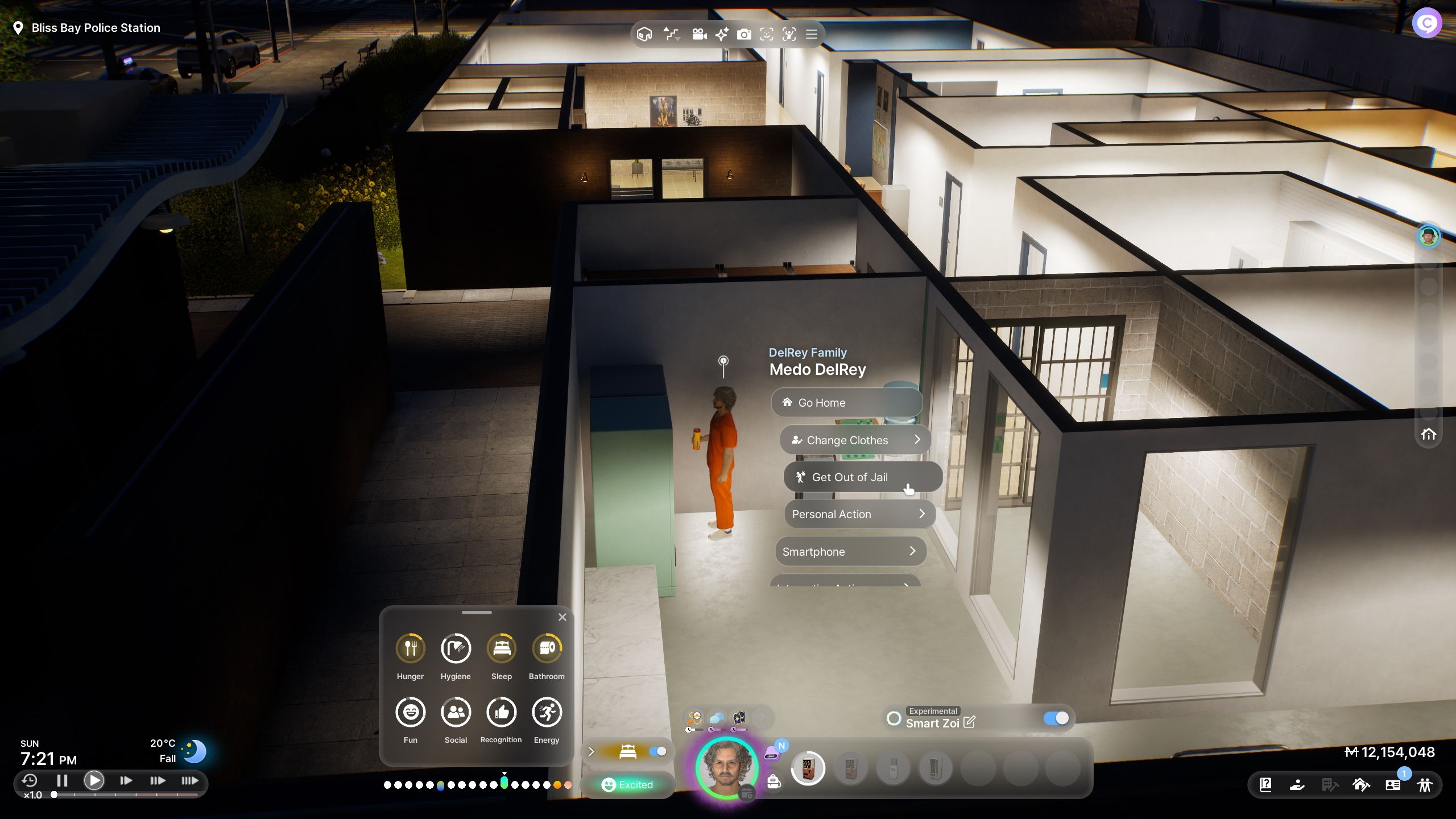
    Option to get out of jail when clicking on your Zoi  - Inzoi

    Once your Zoi has been arrested, they will be taken to the police station and placed in a cell, where they’ll switch into the iconic orange jumpsuit.

    In the cell, your Zoi will find a bed to sleep on, a toilet, and a couple of vending machines to keep them from starving. It’s quite a cramped space, though.

    If you’re not sure how to get back to your ordinary life, there are two ways to escape jail:

    • Serve your time: The easiest way is to wait until 9 AM the next day, at which point your Zoi will be released.
    • Bail out early: If you’re in a hurry, simply click on your Zoi and choose the option ‘Get out of Jail. This will release them instantly from the police station in their regular clothes.
  • Completing Your InZoi Journey: Solving Dirty Clothes Challenges

    Completing Your InZoi Journey: Solving Dirty Clothes Challenges

    Just like in real life, after wearing clothes for a few days, they get dirty, and you’ll want to switch to something fresh. But once you decide to change, you can’t just leave the dirty clothes lying around. You need to clean them. This idea is also true in the life simulation game, InZoi.

    When your clothing is dirty, it impacts your Zoi’s well-being, making it crucial to keep everything clean. This guide will help you through the process of washing your clothes, ensuring your Zoi stays in great shape and is ready for whatever life throws their way.

    Currently, there are no laundromat services available for cleaning clothes, so you’ll need to handle it yourself.

    Please note that InZoi is in Early Access, which means the content will evolve over time. We’ll keep this guide updated as changes occur.

    How to Clean Dirty Clothes


    To clean your dirty clothes, you’ll need to have a washing machine in your home. Start by entering Build Mode by pressing ‘I’ on your keyboard.

    This will bring up the building menu allowing you to modify your house.

    On the left side, select Furniture, and then pick Bathroom. Here you’ll find all the bathroom items you can include.


    Build mode showing all available washing machines to build - InZoi

    Select the washing machine, and you’ll see several models to choose from. After picking your desired machine, place it in a spacious area.

    All of them serve the same purpose of cleaning clothes, so it really comes down to your personal choice.

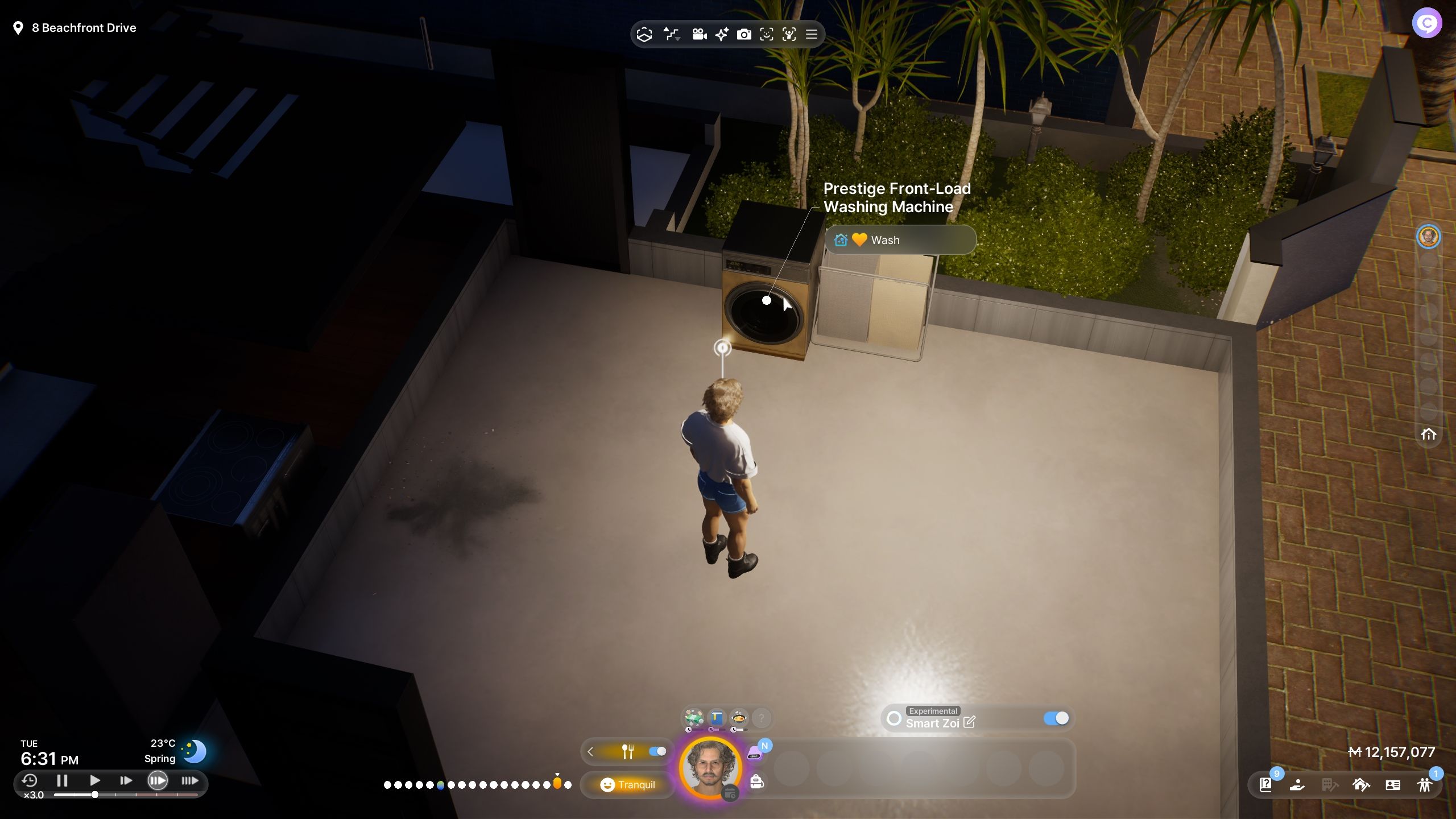
    Once the washing machine is set up in your home, interact with it and select the ‘Wash Laundry’ option. Your Zoi will then take care of the cleaning, and your clothes will be fresh in no time!

    This process applies to Zoi of all ages, except for children, who have a unique method. If you’re managing a child, you must interact with the washing machine and select ‘Ask them to do Laundry.’


    A parent handling their child's laundry - InZoi

    This will display a menu showing all family members who can help the child with laundry. The person you choose must be present in the house to assist.

    After selecting someone, both the child and the chosen adult will work together at the laundry to get the clothes cleaned.

    If you’d prefer not to do the laundry each time, you can set it as a preference for your Zoi. Just go to your Zoi Card, edit preferences, and select Laundry. This will prompt your Zoi to handle the laundry on their own.

    Keeping your clothes clean is important: let’s face it, nobody likes wearing dirty clothes.

    The same goes for your Zoi. If they remain dirty, they will become uncomfortable, affecting their interactions with others, and some Zoi might even avoid them.

  • Where Can You Surf in InZoi? Completing the Quest for Waves

    Where Can You Surf in InZoi? Completing the Quest for Waves

    Your Zois will enjoy exploring different hobbies and activities in InZoi. They will experience various Urges, and you can support them in their pursuits to keep them content. One exciting activity for those with the Life of Excitement Desired Life is surfing.

    If you’re curious about how to help your Zoi ride the waves, there’s no need to buy them a surfboard. Just head to a special spot in Bliss Bay, and we’ve got all the details you need.

    InZoi is currently in early access on Steam, and we’ll keep this guide updated as new content becomes available.

    Where to Surf

    On the western side of the Bliss Bay map, you’ll find a long stretch of beach. There are surfboards scattered along the shore, making this the perfect place to surf.

    How to Surf

    Before hitting the water, your Zoi will need to practice first. They can do this by selecting one of the surfboards and choosing either ‘Practice Good Posture’ or ‘Practice Paddling.’

    Practicing just once typically unlocks the surf option.

    After practicing, your Zoi will be ready to select a surfboard, and the ‘Surf’ option will appear.


    Some surfboards located further down the beach (away from the water) may not offer the surf option but do allow for practice.

    Make sure to use the surfboards closest to the water. The boards that work best seem to have blue and white patterns.

    Once you select ‘Surf’, your Zoi will dash into the water with their board and ride the waves, helping to improve their Fitness skill.

    We noticed that surfing could sometimes cause Zois to get stuck below ground level. If that happens, remember to use ‘Emergency Rescue’ from the Psycat Guide menu to assist them.