Tag: features

  • WWDC 2025 Highlights: Top 10 Features That Will Change Your Apple Experience

    Apple’s Worldwide Developers Conference (WWDC) 2025 has unveiled an exciting array of features aimed at enhancing the user experience across its ecosystem. From groundbreaking advancements in software to innovative hardware integrations, Apple is continuing to redefine how users interact with technology.

    1. Enhanced iOS Features

    Apple has introduced significant upgrades to iOS, emphasizing personalization and efficiency.

    Improved Widgets

    • Dynamic Sizing: Widgets can now adapt to the user’s interaction, resizing based on context.
    • Smart Stacks: Widgets can intelligently manage and display relevant information based on time and location.

    Focus Mode Enhancements

    • Contextual Focus Modes: Users can customize modes based on activities like work, exercise, or relaxation, tailoring notifications accordingly.
    • Cross-Device Support: Focus modes will sync seamlessly across all Apple devices, ensuring consistency.

    2. Revolutionized macOS Experience

    The latest version of macOS, codenamed "Mirage," offers a sleeker interface and powerful new tools.

    Universal Control 2.0

    • Fluid Navigation: Users can effortlessly shift from Mac to iPad using a single keyboard and mouse.
    • Drag and Drop Enhancements: Enhanced support for transferring files between devices with minimal friction.

    Advanced Multitasking

    • Split View Improvements: New layouts allow for more effective multitasking with up to three apps displayed simultaneously.
    • Mission Control Redesign: A more intuitive approach to managing open applications, making it easier to find and switch between tasks.

    3. A New Era for iPadOS

    iPadOS is taking a leap forward with features tailored for productivity and creativity.

    Collaboration Tools

    • Real-time Collaboration in Notes: Multiple users can edit notes simultaneously, enhancing teamwork.
    • Enhanced Apple Pencil Functions: New gestures for quickly navigating and annotating documents.

    Stage Manager Enhancements

    • Flexible Window Management: Users can now resize and layer windows more organically for better workflow.

    4. WatchOS Upgrades

    Apple Watch is set to become an even more indispensable companion with its latest version.

    Health Monitoring Innovations

    • Advanced Sleep Tracking: With deeper insights into sleep patterns, users can make informed decisions about their health.
    • Stress Level Assessment: New metrics to help manage stress through guided breathing and mindfulness exercises.

    Interactive Watch Faces

    • Customizable Complications: Users can now create unique watch faces tailored to their lifestyle and preferences.

    5. Innovative tvOS Features

    Apple TV continues to push the envelope with a new focus on immersive experiences.

    Multi-User Profiles

    • Personalized Recommendations: Each family member can have their own profile, ensuring tailored content suggestions.
    • Shared Watch Lists: Easily keep track of what everyone wants to watch.

    Enhanced Gaming Experience

    • Apple Arcade 2.0: An upgrade featuring exclusive titles, improved graphics, and multiplayer capabilities.

    6. HomePod Enhancements

    With the latest update, HomePod is evolving into a more interactive smart home hub.

    Smart Home Integration

    • Expanded Compatibility: Easily control a wider range of third-party smart devices, enhancing interoperability.
    • Home Automation Routines: Users can create complex routines based on time, location, or specific events.

    Voice Recognition Improvements

    • Individualized Responses: HomePod can now recognize different voices, providing personalized information to each user.

    7. Privacy and Security Features

    Apple remains committed to user privacy with new security enhancements across its platforms.

    Privacy Dashboard

    • Transparency Reports: Users can view which apps have accessed their data and when.
    • Granular Permissions: More options to control data sharing, improving user confidence.

    Advanced Face ID Capabilities

    • Face ID in Portrait Mode: Unlock your device while the phone is held at unconventional angles, enhancing functionality.

    8. Augmented Reality (AR) Boost

    Apple is doubling down on its investment in AR technology with new features aimed at developers and users alike.

    Enhanced ARKit

    • Realism Improvements: Developers can create experiences with more lifelike graphics using improved rendering techniques.
    • Environmental Mapping: The new ARKit allows for advanced interaction with physical environments, creating truly immersive experiences.

    AR Collaboration Tools

    • Shared AR Experiences: Users can engage with AR content collectively, enhancing gaming and creative applications.

    9. Health App Overhaul

    The Health app has undergone a significant transformation, focusing on holistic well-being.

    Comprehensive Health Tracking

    • Mental Health Features: Tools to track mood and mental health over time, integrated directly into the app.
    • Holistic Data Aggregation: Users can now link health data from various apps and wearables, providing a complete health overview.

    10. Siri’s Intelligence Upgrade

    Siri is stepping up its game with increased capabilities and smarter responses.

    Contextual Understanding

    • Conversational Context: Siri can remember previous questions and provide more nuanced answers, allowing for ongoing conversations.

    Cross-Platform Harmony

    • HomeKit Integration: Users can control all smart home devices smoothly through verbal commands, enhancing convenience.

    With these stellar features unveiled at WWDC 2025, Apple is continuing to enhance its ecosystem, catering to the needs of existing users while also attracting newcomers. The ambitious focus on personalization, productivity, and privacy is set to redefine how individuals interact with their devices, making everyday technology more intuitive and enriching.

  • Apple Says Siri’s AI Features Are Taking Longer Than Planned

    Apple Says Siri’s AI Features Are Taking Longer Than Planned

    During an earnings call with analysts yesterday, Apple CEO Tim Cook confirmed that the company is actively enhancing Siri, though a release might still be some time away. Cook reassured listeners about Apple’s ongoing progress, even without specifying a timeline for when these advancements would be available. He elaborated on the Apple Intelligence features that have debuted with iOS 18, which encompass Genmoji, Clean Up, and integration with ChatGPT, among others.

    Cook stated, “Regarding the more personalized Siri features we’ve announced, we require additional time to ensure they meet our rigorous standards. We are indeed making progress and can’t wait to present these enhancements to our customers.”

    When questioned directly about the delays by Richard Kramer from Arete Research, Cook reiterated, “We simply need more time to finalize the work, so it lives up to our high standards. It’s primarily taking longer than anticipated, but we are excited and making progress toward launching these personalized Siri features.” Unfortunately, neither Cook nor CFO Kevan Parekh hinted at a specific release timeline.

    Originally, these updates were expected to launch in April, but internal feedback has indicated numerous issues that remain unresolved. As a temporary measure, Apple has partnered with ChatGPT to integrate its features on both iPhone and Mac platforms. The company is keen to resolve these issues soon, particularly as it faces legal challenges for misleading advertising centered on advanced AI capabilities.

    While earlier communications from Apple hinted at a release sometime this year, this was the first update since the delays were disclosed in March. The upcoming Siri enhancements are supposed to include contextual commands and the capability to perform actions within various applications and device settings.

  • See More Text Coming Soon In Google Messages

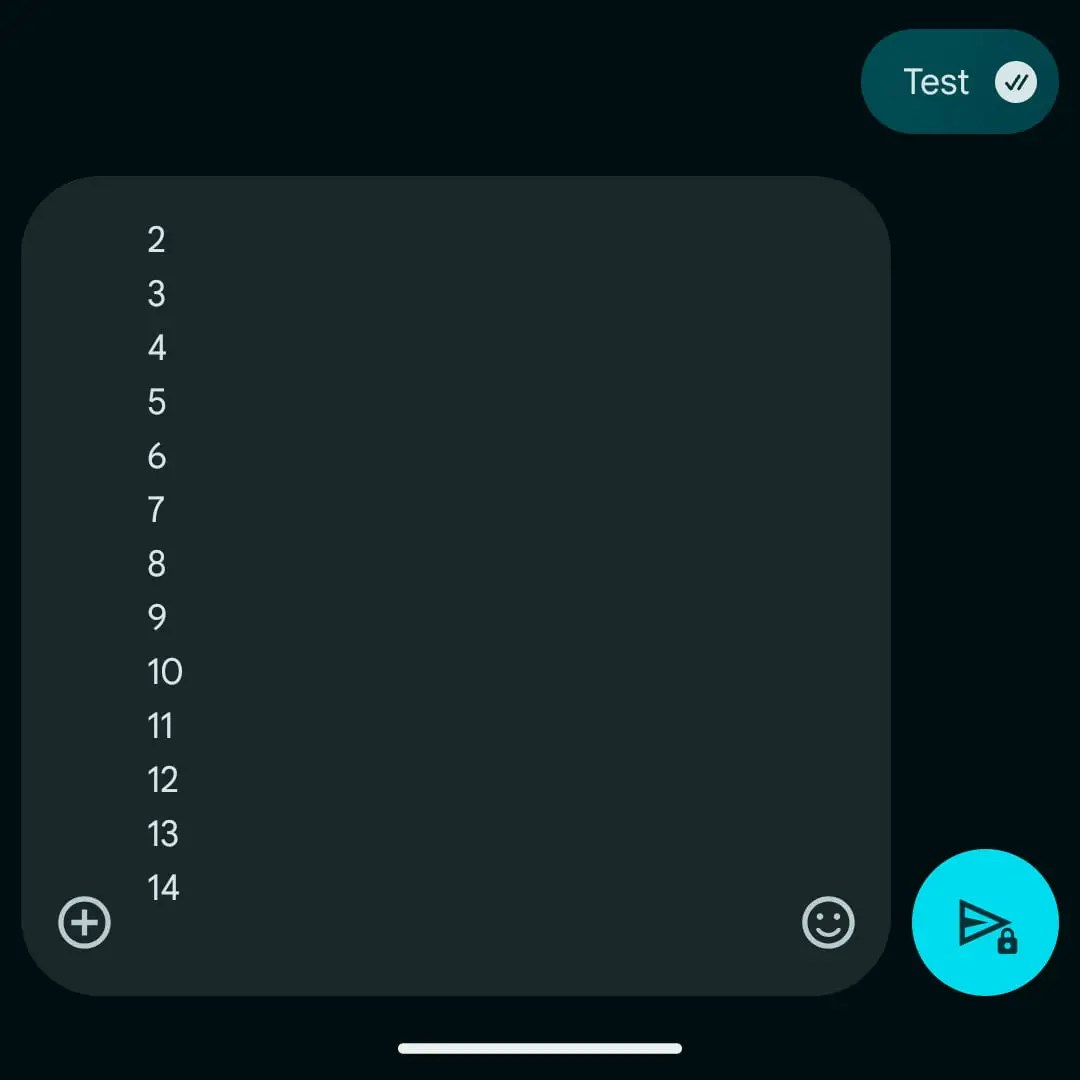
    If you’ve ever found yourself frustrated by the small size of the text box in Google Messages, there’s some positive news: it’s about to get a whole lot better! Last month, Google introduced a redesign of its compose area—the section where you write your messages—but many users were disappointed that it could only show four lines of text at any one time. This limitation became especially troublesome when trying to share lengthy URLs that took up nearly the entire field.

    Fortunately, the situation is improving. The latest update in the Google Messages beta allows the text box to expand to a maximum of 14 lines, eliminating the need to scroll until you reach that limit. While this feature is not yet available in the stable version, it is expected to be rolled out soon.

    An example of the improved Google Messages text field.
    Image used with permission from the copyright holder

    While this update may seem minor, it significantly enhances the user experience—a welcome change amid several recent improvements to Google Messages. Other enhancements include the ability to watch YouTube videos directly from the chat and better message backup options. Google has also indicated improvements in RCS support are on the way, though the timeline for this rollout remains unclear.

    As this feature is still in beta testing, the exact date for its release in the stable version of Google Messages is uncertain, but you can expect it to appear in the coming weeks. In the meantime, keep an eye out for additional enhancements. The recent Material You update introduced increased padding around the text box and a slightly larger send button, which, while not groundbreaking, contribute to a more pleasant overall experience.

    Google has been consistently enhancing Google Messages, particularly following the discontinuation of its competitors’ messaging apps like those from Samsung and Verizon. If these updates continue at this pace, Google Messages could very well become the top choice for messaging.

  • How To Restore Apple App Missing Features

    How To Restore Apple App Missing Features

    Apple’s suite of applications is designed to enhance user experience and productivity. However, users occasionally encounter missing features or functionalities that can disrupt their workflow. If you find yourself in such a situation, here are effective strategies to help restore those features.

    Understanding the Issue

    Before diving into solutions, it’s important to identify why features may be missing. Some common reasons include:

    • Software Updates: An update may change the way an app functions or eliminate certain features.
    • Settings Adjustments: Settings can be inadvertently modified, causing features to become hidden or disabled.
    • Compatibility Issues: Some features may not be available on older devices or older versions of iOS/macOS.
    • Corrupted Installations: Issues during the installation of an app can lead to missing functionalities.

    Restore Missing Features: Step-by-Step Guide

    Update Your Software

    Keeping your devices updated is crucial for optimal app performance.

    1. For iOS Devices:

      • Open Settings.
      • Tap General > Software Update.
      • If an update is available, follow the prompts to install it.

    2. For macOS Devices:

      • Click on the Apple menu in the top-left corner.
      • Select System Preferences > Software Update.
      • Check for available updates and install them.

    Check App Settings

    Sometimes, features may simply need to be re-enabled. Follow these steps:

    1. Open the App: Launch the problematic app.
    2. Access Settings: Look for a gear icon or a menu labeled Preferences or Settings.
    3. Review Available Options: Look through the settings to find any disabled features and turn them back on.

    Reinstall the App

    If features remain missing after updates and checks, consider reinstalling the app.

    1. iOS Devices:

      • Press and hold the app icon until it wiggles, then tap the X to delete it.
      • Go to the App Store, search for the app, and reinstall it.

    2. macOS Devices:

      • Open Finder and go to the Applications folder.
      • Drag the app to the Trash.
      • Empty the Trash, then visit the App Store to download and reinstall.

    Reset Settings on iOS and iPadOS

    If features continue to be missing, resetting settings on an iOS device may help:

    1. Open Settings: Tap on Settings.
    2. Select General: Scroll down and tap on Transfer or Reset iPhone.
    3. Choose Reset: Select Reset All Settings. Note that this will reset Wi-Fi passwords and other preferences, but not delete any data.

    Use Alternative Methods

    Many Apple applications have alternative methods to access features. Here are some examples:

    • Finder vs. iTunes: If you’re on macOS Catalina or later, many features related to device management have moved from iTunes to Finder.
    • Keyboard Shortcuts: Learn keyboard shortcuts that can mimic or expedite functions that may be hidden in the app’s new layout.

    Contact Apple Support

    If all else fails, reaching out to Apple Support can provide expert guidance. Consider these options:

    • Visit the Apple Support Website: Check for known issues or FAQs.
    • Call Support: Speak directly with an AppleCare representative for instant assistance.
    • Visit an Apple Store: If you’re near an Apple Store, visiting in person may yield faster results.

    Keeping Your Apps Running Smoothly

    To prevent future occurrences of missing features, follow these helpful tips:

    • Regularly check for updates to both apps and your device’s operating system.
    • Review app settings and preferences after updates to ensure everything is configured correctly.
    • Maintain a backup of your device to restore settings and apps quickly in case of issues.

    By taking these proactive measures, you can enjoy the full range of features that Apple’s apps have to offer and reduce the risk of encountering missing functionalities in the future.

  • Essential Map Highlights of the Atlas in Mudborne

    Essential Map Highlights of the Atlas in Mudborne

    The space outside the Carpenter’s Shop in Mudborne seems quite large, and you’re correct. However, your first journey with Dendro to the Central Junction will reveal just how expansive the pond map truly is. This is before you even consider the dream world!

    If you check the map boards scattered throughout Mudborne, you’ll always have an aerial view of your current location. This can be very useful for figuring out your next moves, especially if you plan to utilize quick travel options like the Reflection Pools or Gateway Nexus.

    Two Maps for Each Area

    At the beginning of your adventure in Mudborne, you’ll start on the Spawning Pool map. This vast space has everything necessary to dive into the heart of the game, from restoring ecosystems to breeding vibrant frogs. As you explore and interact with characters like Hopert, you’ll get familiar with the game’s mechanics and naturally stroll by significant stone pools along your path.

    These are called Reflection Pools, and they serve as your gateway between the waking and dream worlds in Mudborne. Each area of the map boasts a corresponding dream world, which largely mirrors the waking world but with important differences. Certain paths may be blocked in the dream world, while other areas could hide crucial items that help you unlock new locations in the waking realm. Furthermore, each area features its own unique obstacles and decorative elements that make them distinct.

    Despite the similarities in the maps between the waking and dream worlds, navigating them requires a map! As you explore uncharted territories, watch for bulletin boards with a magnifying glass icon. These are usually positioned in central areas or near significant landmarks. Using your magnifying glass on these boards will allow you to save a map of that area to your Atlas, which helps keep track of your journey.

    The maps for the waking and dream worlds are stored separately. For instance, visiting the Kindergarten doesn’t automatically unlock the Future Farms map; you must activate a Reflection Pool and enter the dream world for each map individually. Only then will you observe the environmental changes on each map.

    Upon your initial exploration, you’ll notice various markings on the maps. Take note of these marked locations, as they often indicate important buildings, key item spots, helpful hints, and much more. You’ll also find that stepping stones and natural blockages, like patches of algae, are clearly marked, showing you where you can’t go.

    Each area offers distinct resources based on which version of the world you are navigating. For example, the Common Green frogs found in the waking world are replaced by Dozy Dreamers in the dream world—frogs with enhanced base A.N.O.U.R.E.S. stats. Balancing resources from both realms is key to advancing your story in Mudborne.

    Additionally, keep an eye out for stone archways across the maps. These archways serve as portals into the Gateway Nexus, enabling speedy travel between regions without the need for a long walk.

    To aid your navigation, we’ve compiled a summary of the significant buildings and features for each map in Mudborne below.

    Overview of Each Map in Mudborne

    Map Key Features Characters and Story
    Spawning Pools
    • Carpenter’s Workshop
    • Ancestry Research
    • Emergency Reserves
    • Mud Analysis
    • Project Management
    • Mass Breeding
    • Reception
    • Dumeril’s Lab

    Here, you’ll learn the fundamentals of Mudborne. Characters like Hopert and the Compendium guide you as you become familiar with frog breeding, mushroom cultivation, using Reflection Pools, and more. Hopert, a carpenter, offers various tools, adorable frog-themed furniture, and plenty of storage for your items. Your first home is the Carpenter’s Workshop with a Gateway Nexus portal located on the loft roof.

    Kindergarten
    • Maintenance Shed
    • Fungal Projection
    • Spore Hybridization
    • Bug Farms
    • Improved Farming
    • Shipping Warehouse
    • Keeper’s House

    Located west of the Central Junction, the Kindergarten features Ribbert, a frog with a mushroom cap who helps you clear algae blooms obstructing parts of the map. In exchange for Filters and various bugs and mushroom furniture, Ribbert will assist you in repairing broken lifts that connect different islands and levels of the map. Bring frogs with high Umbrage stats to use in filters for clearing algae. The Gateway Nexus portals are located beside Ribbert’s dock and on an island north of the stagnant water pools and Bug Farms.

    Residential District
    • Site Management
    • Pumphouse
    • Annura’s House
    • Drayto’s House
    • Engineer’s House
    • Dumeril’s House
    • Vacant Lot
    • Archivist’s House
    • Central Engineering
    • Staff Canteen
    • Botanist’s House
    • Marina’s House
    • Myola’s House
    • Carpenter’s House
    • Dockyard

    The Residential District lies to the east of the Central Junction and may initially seem overwhelming due to its size. To navigate here, you’ll need to drain flooded rooms with the aid of Kroaka and his array of helpful tools. A key aspect of this area involves managing Saturation, adjusting the dampness of various spots to access important items. You’ll require a Humidifier and Dehumidifier from Kroaka, which you can also use back at your own home for ongoing projects with mushrooms and new frog breeds. The Gateway Nexus portals are close to Site Management and at an island in the center of the map, near Central Engineering and the Staff Canteen.

    Climate Control
    • Forecasting
    • Climate Research
    • Climate Control
    • Caretaker’s Rest
    • Residential Shipping
    • Cold Storage
    • Food Storage
    • Deep Storage
    • ???

    Upon arriving at Climate Control, the area may feel daunting, particularly as it’s mostly frozen due to a massive storm that triggered the events of Mudborne. The machinery is malfunctioning, and fixing it falls to you. You’ll meet Annura in the Caretaker’s Rest as you explore this frosty landscape. You’ll utilize Heaters and Coolers from Annura to navigate by managing the temperature to access buildings. You’ll also need to devise a path around large green pipes that block your way, making it essential to find routes across the water. Your goal is to deal with frozen control items before returning to Climate Control to repair the machinery and improve exploration opportunities. Gateway Nexus portals are located near Annura in the Caretaker’s Rest and on the northern island above Deep Storage.

    Central Junction
    • Memory Works Access
    • Collector’s House
    • Record Keeping
    • Hibernation Centre
    • Administration
    • Pondmother’s Pool

    The Central Junction serves as your primary access point to explore most areas in Mudborne. After unlocking the Northern Pool and following Dendro the Historian to his new dock area south of the Pondmother’s Pool, you’ll need to thoroughly explore the Kindergarten, Residential District, and Climate Control maps to advance the story and create three seals, one in each region, allowing direct access to the Pondmother’s Pool. The only Gateway Nexus portal here is located east of Dendro’s dock, providing quick access just north of your home.

    If you spot an area you want to explore later on, you can mark your map with symbols on any map page to remind yourself while you progress through the game.

  • Oppo’s Next Phone Outshines iPhone 16 Pro Feature

    Oppo’s Next Phone Outshines iPhone 16 Pro Feature

    The launch of Oppo’s upcoming flagship smartphone, named the Oppo Find X8s, is just around the corner. The company has been eagerly showcasing its innovations compared to competitors, recently highlighting the impressive display enhancements of this new model, including its superiority over the iPhone 16 Pro.

    According to Oppo, the Find X8s will feature remarkably slim bezels on all four sides of its display. Product manager Zhou Yibao shared a comparison image on the Chinese social platform Weibo, where the bezels of the Find X8s—previously thought to be called the Find X8 Mini—are juxtaposed with those of the iPhone 16 Pro or iPhone 16 Pro Max.

    Comparison of Oppo Find X8s and iPhone 16 Pro
    Bezel comparison between Oppo Find X8s (left) and iPhone 16 Pro/Pro Max Zhou Yibao/Weibo

    It’s evident that the bezels on the Oppo device appear to be thinner than those on the iPhone 16 Pro. Though the exact measurement hasn’t been disclosed, it has been indicated that the thickness is “only 1.xx mm,” with the “xx” denoting two decimal points following 1. Oppo has reportedly achieved this impressive thinness with a proprietary “chip-level screen packaging technology.”

    Previously, a similar approach was highlighted when Oppo announced its earlier flagship, the Find X8, last November, which showcased a display with 1.45mm bezels on all sides.

    In contrast, the iPhone 16 Pro is expected to have bezels measuring 1.41 mm along the top and bottom and 1.46 mm on the sides. Notably, the iPhone 16 Pro Max, despite having a larger display, features even slimmer bezels at just 1.36 mm. It’s worth mentioning that the Galaxy S25 Ultra has much thicker borders, exceeding two millimeters.

    If Oppo is making a point to emphasize these measurements, it seems they are positioning themselves to rival the smaller values found on the two iPhone 16 Pro models. While the significance of these comparisons may seem trivial, Oppo is keen to establish itself as the brand with the thinnest bezels.

    The Oppo phone appears noticeably narrower than the iPhone in the image, likely due to its smaller anticipated display size of around 6.3 inches.

    Competition Among Upcoming Slim Phones

    Oppo’s larger device, the Find X8 Pro, has already outperformed the iPhone 16 Pro with its versatile camera capabilities, though the same may not hold true for this smaller variant. More details are on the way, as Oppo has assured us that the “ultra-thin, small-screen flagship” is set to debut in April, positioning itself to compete against the Galaxy S25 Edge and the upcoming iPhone 17 Air. Whether the Oppo phone can claim the title for overall slimness will soon be revealed next month.

    This timeline points to a launch in China. However, given that Oppo recently opted out of a global launch for its foldable device, the Find N5, expectations for the Find X8s should be tempered. That said, this same model might debut as the OnePlus 13T, should there be no notable changes along the way.

  • Apple Confirms Longer Wait For Key Siri Features

    Apple Confirms Longer Wait For Key Siri Features

    Late last week, Apple discreetly announced that the release of an important Apple Intelligence feature would be postponed. The company has since made this information more accessible by including a note on its official website.

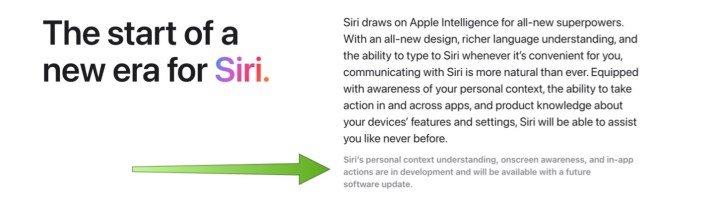
    Apple Intelligence, which was revealed in June, was anticipated to feature an upgraded version of Siri, the company’s voice assistant. These eagerly awaited improvements aimed to enhance Siri’s comprehension of user context and its capability to communicate more effectively with applications.

    In a statement, Apple explained, “It’s going to take us longer than we thought to deliver these features, and we anticipate rolling them out in the coming year.”

    This delay had previously gone unmentioned on Apple’s online store until recently, when this oversight was corrected. The Apple Intelligence webpage now states that “Siri’s personal context understanding, onscreen awareness, and in-app actions are in development and will be available with a future software update.”

    Apple admits it's delaying parts of Apple Intelligence.
    Apple

    Apple Intelligence has encountered several obstacles since its announcement at last year’s Worldwide Developers Conference (WWDC). Many expected its launch to coincide with the release of the iPhone 16 series in the fall. Instead, Apple decided to take a phased approach for the rollout. Some features of Apple Intelligence were included in the updates for iOS 18.1, iPadOS 18.1, and macOS Sequoia 15.1, while additional capabilities were introduced in later updates. Notably, Apple Intelligence remains unavailable in specific regions, such as the European Union.

    This most recent setback in Apple Intelligence’s development occurs at a time when competitors, such as Google, are rapidly incorporating AI functionalities into their offerings, exemplified by their Gemini project.

  • Reddit’s New Features Will Keep You In Control

    Reddit’s New Features Will Keep You In Control

    When discussing user experience design and seamless operations, Reddit often isn’t the first platform that comes to mind. This is evident from the popularity of various third-party Reddit apps, like Apollo, which flourished until the site imposed restrictions that ultimately caused them to shut down.

    Fast forward roughly two years, Reddit appears to be shifting gears with some long-awaited updates, although the overall design has remained intact. The site is introducing new tools aimed at simplifying the content posting process, particularly for those who may not be familiar with the established guidelines or rules enforced by moderators.

    One of the notable enhancements in the post-composer section is an automated tool that reviews the content and aligns it with community regulations. If there’s a discrepancy, users will receive guidance on what aspects of their submissions might be problematic and could lead to removal.

    Reddit explaining posting rules.
    Reddit

    Additionally, Reddit will provide upfront visibility of rules—such as Karma prerequisites and content restrictions—before a post goes live. Users whose submissions were previously removed by moderators will now be able to utilize a new feature that allows them to submit the same content to a different subreddit.

    You’ll no longer feel totally lost

    Many of Reddit’s most robust communities enforce strict posting regulations, often restricting contributions from newcomers until they’ve achieved a certain level of engagement, such as accumulating Karma points. This can lead to frustrations for new users, especially when their posts are swiftly removed without any prior warning.

    To address this situation, Reddit is introducing features to help users navigate the posting landscape more effectively.

    Reddit community recommendation feature.
    Reddit

    While crafting their posts, users will now find a suggestion feature that presents a list of communities suitable for sharing their content. Reddit claims these suggestions are tailored based on the nature of the post and the best community match.

    Another significant addition is an insights dashboard, which allows users to monitor engagement metrics on their posts, including upvotes and shares. These updates are being rolled out to Reddit users on both desktop and mobile platforms, with the proactive rule-checking tool expected to begin testing on mobile devices shortly.

  • Adobe Lightroom And Camera Raw Gain Two New AI Editing Tools

    Adobe Lightroom And Camera Raw Gain Two New AI Editing Tools

    Adaptive Profiles in Adobe Lightroom
    Adobe

    During the Max Japan 2025 design conference, Adobe unveiled advanced AI editing features for its Lightroom and Camera Raw applications, aimed at streamlining repetitive editing tasks.

    One standout feature is Adaptive Profiles, which, although it made its initial debut last fall, is now officially available in both Lightroom and Camera Raw for use with color and black-and-white HDR images. According to Adobe, Adaptive Profiles “dynamically adjust the tones and colors of your photos, providing an enhanced yet authentic foundation for further modifications.” Unlike standard presets that apply the same enhancements to every photo, Adaptive Profiles leverages AI to assess each image and fine-tune adjustments such as Exposure, Shadows, Highlights, Color Mixer, and Curves.

    Another innovative tool, currently in Early Access for Camera Raw but soon to be available in Lightroom, is Distraction Removal. This feature intelligently identifies and eliminates unwanted elements from your images, such as reflections in windows, crowded backgrounds, or unexpected figures in scenic shots.

    For photographers looking to organize their work, Adobe is introducing the Find Duplicates feature, which has launched in Early Access for Lightroom users on the web. This tool helps locate and delete duplicate images in your library, ensuring that you don’t accidentally edit the wrong picture. The Find Duplicates function is part of the Clean Up toolset, which also identifies and removes blurred photos and screenshots.

    Lightroom mobile for iOS is receiving updates that will simplify the sharing process for your photos. Users will now benefit from auto-generated shareable links that can be accessed by anyone you send them to, regardless of whether they use Lightroom. Furthermore, the link creation speed will be increased by 75%, enabling you to quickly share images by copying the link, posting on social media, or sending it directly to your contacts. Information on when these features will be available for the Google and Samsung Lightroom apps is still pending.

  • Latest iOS Update May Have Reactivated Apple Intelligence Features

    Latest iOS Update May Have Reactivated Apple Intelligence Features

    Users of iPhones have noted that the recent update to iOS 18.3.1 has brought back certain Apple Intelligence features that were previously deactivated on particular devices. Features such as Notification Summaries had been disabled due to concerns regarding their accuracy, but many users are now observing that these options have been reactivated post-update.

    Devices that showcased a welcome screen following the update appear to be more likely to have these features turned back on. A Reddit user named u/Hanthunius documented this issue on their iPhone 15 Pro Max, and others reported similar experiences on their Mac devices. Research conducted by MacRumors indicated that while Apple Intelligence stayed off in tests conducted on iPads and iPhones, the Mac Mini was an exception.

    The testing team observed the Welcome screen appearing on the Mac Mini, but it was absent on other devices. They pointed out the unusual nature of this specific Welcome screen, as it did not offer the option to set it up later, compelling users to enable the feature to proceed.

    Close up of Apple Intelligence Notification Summary on iPhone 16 Pro
    Nirave Gondhia / Digital Trends

    This approach is not user-friendly, and reactivating Apple Intelligence brings additional issues. It occupies approximately 7GB of storage per device, which can be a concern for users with limited space who might want to disable it to free up memory for more frequently used apps.

    With the launch of iOS 18.3, Apple Intelligence became an opt-out feature, meaning it is enabled by default on any compatible device. Users who do not wish to utilize this feature must actively turn it off.

    If you previously disabled Apple Intelligence, it’s wise to verify that your settings remain unchanged. Though this bug seems to occur sporadically, if you’ve updated to the latest iOS version—especially if you encountered a Welcome screen after restarting your device—it’s a good idea to check your settings.


  • IPhone SE 4 May Have Dynamic Island Instead Of Notch

    IPhone SE 4 May Have Dynamic Island Instead Of Notch

    Recently leaked images from tipster Evan Blass indicate that the upcoming iPhone SE 4 may indeed feature Dynamic Island technology. In addition to this, Blass disclosed code snippets that suggest several forthcoming Apple products, including the 11-inch iPad Air with the M3 chip, the 13-inch iPad Air with M3, the 11th-generation iPad, and the fourth-generation iPhone SE. Following his initial leak, he further shared visual assets for these devices; among them, the iPhone SE 4 prominently displays Dynamic Island.

    The appearance of the Dynamic Island is subtle in the images. For a clearer view, it’s advisable to view the image in full-screen mode. Blass mentioned that he altered the image’s colors to enhance visibility. Specifically, he noted that this editing confirms the presence of the Dynamic Island in the images he shared.

    Concept render of the iPhone SE 4.
    Evan Blass

    Interestingly, the design of the iPhone SE 4 closely resembles that of the iPhone 16, with both models expected to sport the A18 chip, 8GB of RAM, and various features powered by Apple Intelligence. Traditionally, the iPhone SE has been a more budget-friendly option, but given the advanced specs, a price increase is plausible.

    The similarities are significant enough that 9to5Mac has even speculated that the device might be referred to as the iPhone 16E instead of the iPhone SE 4.

    This revelation contrasts with earlier leaks that claimed the iPhone SE 4 would only feature a standard notch, not Dynamic Island. While its inclusion is a delightful surprise, it makes sense when considering that the notch could become nearly obsolete soon, especially with the iPhone 14 being phased out of the market later this year. Why would Apple want to revitalize an outdated design element in a new device?

    That said, it’s important to remember that the iPhone SE 4 is still some time away from its official launch, so these early insights should be taken with caution, as features and specifications are subject to change before the final version is released.


  • Exploring Practice Mode Features in Marvel Rivals

    Exploring Practice Mode Features in Marvel Rivals

    The Evolution of Gaming Practice Modes

    Remember when gaming meant rushing to the arcade, dropping in a quarter, and diving right into action without any prep? With other players waiting for their turn, who had time to practice, right? But then came home consoles, and practice modes slowly became essential. Now, it’s hard to think of our beloved games without them, especially Marvel Rivals.

    The practice suite in Marvel Rivals is packed with features designed to level up your skills. You can start with the basics in the Tutorial mode, refine your techniques at the Practice Range, and even challenge yourself in Practice Vs. AI or Doom Match. We suggest exploring these training modes—you might find them truly Marvel-ous!

    Overview of Practice Modes in Marvel Rivals

    As of January 20, 2025, with the full release and the beginning of Season One, several practice modes have been upgraded and expanded. This guide has been updated to include new practice options, training modes, and helpful tips for mastering controls.

    There are four main practice modes in Marvel Rivals:

    1. Tutorial
    2. Practice Range
    3. Doom Match
    4. Practice Vs. AI

    Each mode has a specific purpose to help you get the hang of the game.

    Tutorial Mode

    The Tutorial mode serves as a hands-on introduction to the fundamentals of Marvel Rivals. It contains four segments designed to teach you everything from basic controls to the intricacies of each character’s role:

    • Basic Tutorial: Play as The Punisher and grasp the game’s fundamental controls.
    • Hero Tutorial: Switch between various heroes to learn the specifics of different roles like Duelist, Vanguard, and Strategist.
    • Domination Tutorial: Familiarize yourself with gameplay mechanics on Domination maps.
    • Convoy Tutorial: Discover how to tackle Convoy missions.

    The Practice Range

    The Practice Range is where you can take a closer look at your hero’s abilities. This area features various locations where you can engage in different types of training. Here are some of the training areas available:

    • Target Practice Area
    • Support Training Area
    • Team-Up Practice Area
    • Range Practice Area
    • Building Destruction Zone
    • Hero Target Practice Area
    • Timed Practice Range

    Doom Match

    In Doom Match, you can compete against other players in an infinite respawn setting, where the goal is simple: rack up as many kills as possible. You can choose any hero, and each death will lead to a quick respawn.

    This is a fantastic opportunity to experiment with your hero’s abilities against real opponents without the pressure of objectives.

    Practice Vs. AI

    Practice Vs. AI allows you and your online team to pit yourselves against AI foes in a Quick Match. Choose from three difficulty settings: Easy, Medium, or Hard.

    Navigating the Practice Range

    Using modes like Tutorial, Doom Match, and Practice Vs. AI is straightforward. However, the Practice Range offers extensive features tailored to enhance your training experience. You’ll find several areas designed for various training styles:

    1. Target Practice: Head left and down the stairs from the spawn room to practice attacking enemy bots.
    2. Support Training: Go right from the spawn room to practice healing allies.
    3. Team-Up Practice: Located to the right or left, this area helps you practice team-up abilities.
    4. Range Practice Area: Here, focus on ranged attacks with a guided meter on the ground.
    5. Building Destruction: Learn how to scan and destroy structures.
    6. Hero Simulation: Attack enemy heroes directly outside the spawn area.
    7. Timed Practice: Set customizable sessions against bots or enemy heroes.

    Practice Settings

    When paused, you can adjust specific training parameters under Practice Settings. Here are some features you can toggle:

    • No Ability Cooldown: Use abilities without any waiting period.
    • Friendly Fire Mode: Allow damage to friendly heroes during practice.

    Timed Practice Range Features

    At the Timed Practice Range, you can customize your practice sessions with options like:

    • Hero Spawn Selection
    • Target Distance
    • Fixed or Dynamic Distance
    • Target Movement and Speed
    • Duration
    • Background Music

    This is an ideal setting to practice all your hero’s abilities quickly.

    Power-Up Spaces

    Power-Up Spaces enhance your hero’s abilities as you step onto them. Some appear during regular gameplay, while several can be found in the practice area. Here are a few:

    • Ultimate Charge Space: Charges your ultimate attack instantly.
    • Health Space: Restores a portion of your health.
    • High Jump Space: Propels you into the air, allowing you to reach elevated areas.

    Learning About Your Hero

    To gain a deeper understanding of your hero, check out their Hero Profile. Each profile includes:

    • Overview: Basic info, difficulty ratings, and character models.
    • Cosmetics: Customize your hero’s appearance.
    • Abilities: Detailed move lists and techniques.
    • Lore: Background stories for each hero.
    • Proficiency: Track achievements to unlock cosmetics.

    Focusing on the Abilities section of your hero profile can help you learn the specifics of their skills.

    Utilizing the Abilities List

    Your hero’s Abilities List is an invaluable tool for mastering their skills. It includes:

    1. A list of all your hero’s skills (Normal Attacks, Abilities, Team-Up Abilities).
    2. Click on any skill to see a demonstration video.
    3. The Suggested Combo section shows you effective combos that incorporate different skills.

    By understanding and utilizing these resources and training modes, you can master Marvel Rivals and enjoy a more enriching gaming experience.

  • All Grade Shop Features in Tales of Graces F Remastered Unveiled

    Exchange EXP for Gold

    You will trade away a significant portion of your usual experience points for more Gald. This means your levels will likely stay low unless you are in New Game Plus mode, where your levels might already be acceptable.

    No, definitely not.

    Double Experience

    Your battle experience points will be doubled, allowing for faster leveling.

    Probably; it can speed up the process without making things too easy, helping you avoid excessive grinding.

    5x Experience

    Your experience points will increase five times faster than normal, making leveling up quick. This can be combined with Double Experience for an even faster pace.

    Probably not; unless you seriously want to rush through the game, you’ll end up at a much higher level than intended, which could make many battles too easy.

    Half Experience

    As the name implies, you’ll receive only half of your normal experience points.

    No; this significantly slows your progress, leading to a lot of grinding if you want to maintain the correct difficulty level.

    Double SP

    You will gain skill points at double the standard rate, allowing your characters to learn skills more quickly.

    Probably; there are countless skills to learn for every character in Tales of Graces f, and this option makes the process much easier.

    Triple SP

    Skill points will increase three times faster. This can be combined with Double SP for incredibly rapid growth.

    Probably not; this could disrupt the game’s balance significantly, and you might find it frustrating to keep changing titles at such a fast pace!

    Double Item Drops

    Enemies will drop crafting materials and other items at twice the normal rate. If you’re collecting ingredients for Dualization, this will speed it up.

    Maybe; you will definitely gather a lot of items if you want to engage with the Dualizer frequently. It’s useful, but not overwhelming.

    Dualize Discount

    The cost of using the Dualize feature will decrease by 75 percent.

    Probably not; the economy in Tales of Graces f is reasonably balanced. You should have enough Gald for Dualizing without issue.

    Upgrade Eleth Mixer

    The speed at which your Eleth Mixer produces duplicate items will increase significantly.

    Yes; this enhancement doesn’t affect the game’s balance much. Item creation can be a slow process, so this makes it easier.

    Expand Inventory

    Your maximum capacity for each item will rise from 20 to 30.

    Yes; this minor improvement doesn’t disrupt the game’s overall design. It’s a useful boost, though you might not notice it all the time.

    Maximum Speed

    Your character Asbel will run at his highest speed possible across the world.

    Yes; since there’s a lot of backtracking in this game, it can often feel tedious. This option helps alleviate some of that frustration.

    Chain Capacity +1

    The number of attacks your characters can link together before needing to recharge is increased by one, both in minimum and maximum.

    Probably not; while it’s not a huge deal, it provides more of an advantage in early combat than intended. If that doesn’t bother you, then why not!

    Chain Capacity +2

    Provides a boost of +2 on both minimum and maximum.

    Probably not; see the previous point.

    Double Critical

    Your characters will achieve critical hits at double the usual rate. However, enemies will do the same!

    No; this creates a risky situation that’s best suited for replaying the game.

    Double Damage

    No; while this speeds up battles, Tales of Graces f doesn’t struggle with slow combat, and it could become overwhelming for new players.

    5x Damage

    Each attack will deal five times the usual damage.

    No; this is going to feel excessive. Avoid combining this with Double Damage for a 10x multiplier!

    Double Gald

    The amount of money you earn will be doubled.

    Probably not; Tales of Graces f’s economy is quite balanced. It might require a bit of grinding, so if that’s an annoyance, feel free to enable it.

    Unlock Qualities

    You will unlock additional potential qualities for your gear, which can enhance their stats even further.

    Probably; it’s a fun enhancement that can give you a good power boost, but you will need to put in the effort to see those results.

    Eleth +500

    Your Eleth Mixer’s fullness will increase by 500, which means you won’t need to recharge it as frequently.

    Probably; you’ll be using this resource up quickly early in the game, and it doesn’t change much for a long while. Not having to visit Turtlez merchants as often is definitely a plus.

    HP +1000

    Your characters will gain an extra 1000 hit points.

    No; this significantly alters gameplay, especially during the childhood section, which is already quite easy.

  • Helpful AI Features In The Clever Galaxy S25

    Helpful AI Features In The Clever Galaxy S25

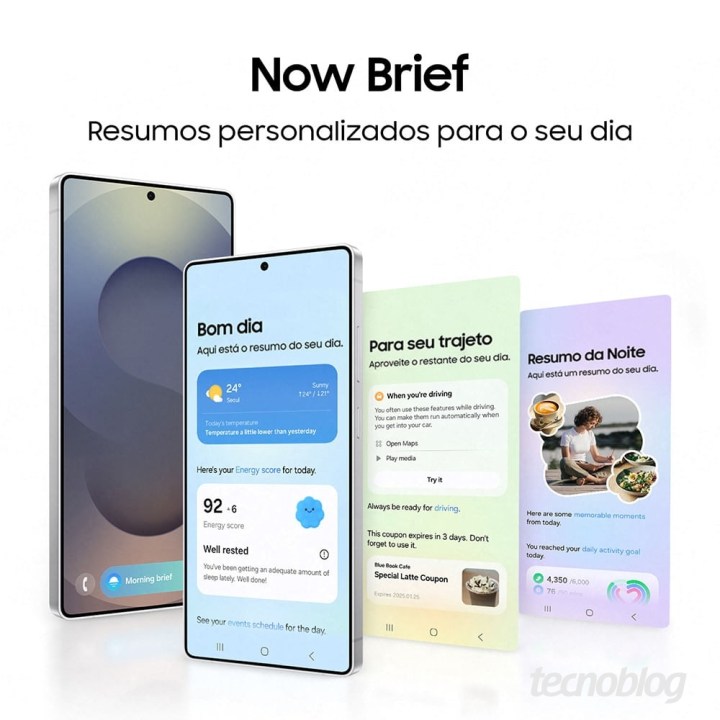
    With less than a week remaining until Samsung’s Galaxy Unpacked event in January 2025, details surrounding the Galaxy S25 series have emerged. A recent leak has provided fresh insights into the camera system and Galaxy AI features. Notably, the Galaxy S25 is set to integrate the Gemini assistant into applications like Samsung Notes and YouTube, but the standout is a new feature called Now Brief.

    The Now Brief feature appears to deliver real-time updates throughout your day. For instance, it could start your morning with a weather report and your energy level, include a “For your route” section featuring a map and a coupon, and even conclude with a “Night Summary” that reviews your daily physical activity. These discoveries were shared with the Portuguese platform Tecnoblog, and while the card names are translated into English, if these details are accurate, it seems Galaxy AI is poised to enhance daily living significantly.

    The capabilities of Gemini AI are already impressive, and these new images suggest even more functionality than anticipated. For instance, users might soon be able to play a YouTube video and command Gemini to “List the locations mentioned in this video and save a Note.” This indicates at least two applications that will work with the AI, with the possibility of others yet to be revealed. Even if these are the only two for now, having access to on-demand video summaries could be a massive time saver, especially for those learning new tasks or trying to determine if a video has the information they need.

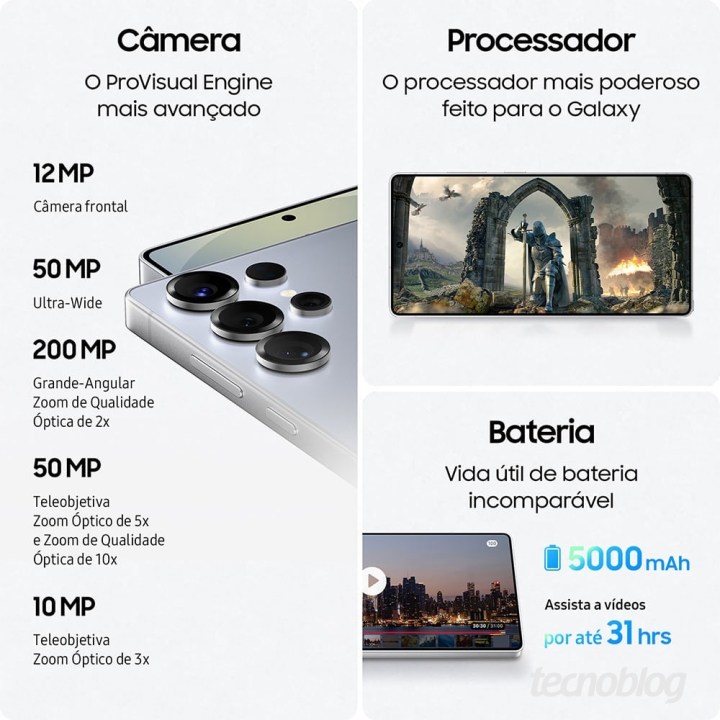
    Regarding the camera setup, the Galaxy S25 Plus will feature a 12MP front camera, a 12MP ultrawide lens, a 50MP main camera with 2x optical zoom, and a 10MP telephoto lens with 3x optical zoom. It will be supported by a robust 4,900mAh battery, which Samsung claims can last up to 30 hours on a single charge.

    The Galaxy S25 Ultra offers an even more advanced camera array. The rear cameras will include a 50MP wide-angle lens, a massive 200MP main camera, a 50MP telephoto lens with 5x optical zoom, and another 10MP telephoto lens with 3x optical zoom. Additionally, the S25 Ultra will carry a powerful 5,000mAh battery. We’ll confirm the accuracy of these details and unveil what more the Galaxy S25 series has to offer on January 22.

  • iOS 18.2 Is Here With New Apple Intelligence Features

    iOS 18.2 Is Here With New Apple Intelligence Features

    Apple has begun the public release of iOS 18.2 along with the updated iPadOS, rolling out several much-anticipated features within its AI toolkit. The release notes detail a variety of improvements, including some minor enhancements to existing functionalities in Apple Intelligence.

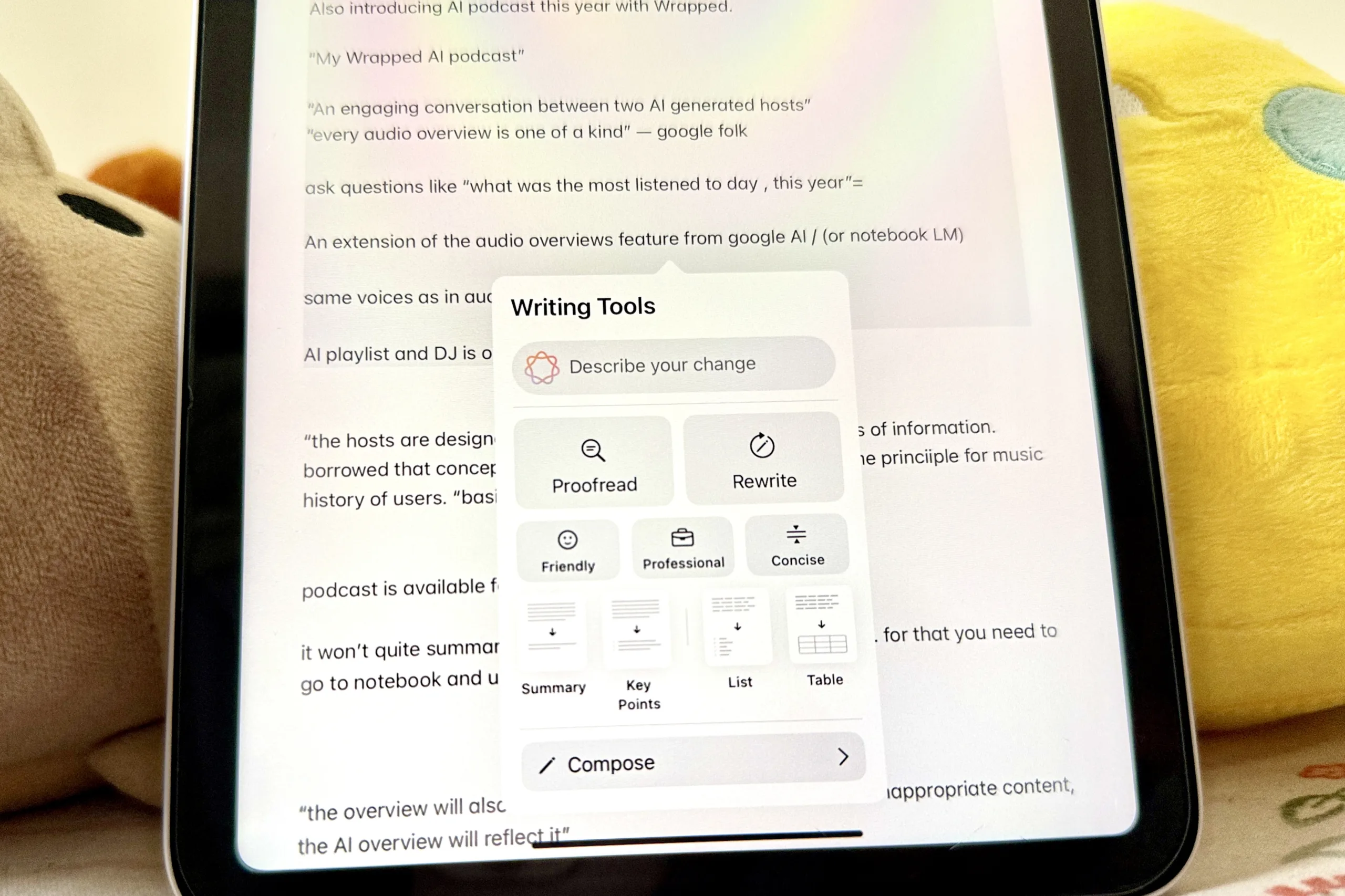
    One of the standout features of this update is the integration of ChatGPT with Siri. Now, if Apple’s voice assistant is unable to provide an answer, it will seamlessly transition to the OpenAI chatbot for further assistance. Additionally, ChatGPT’s functions are expanding within the Writing Tools collection, which now includes a composing feature that allows users to craft new content and generate images.

    Siri’s interface has also been revamped, now offering a fresh keyboard option. This redesign leverages a comprehensive database of Apple’s product guides, enabling Siri to provide step-by-step troubleshooting tips directly, eliminating the need to open a browser for help.

    On the file processing front, ChatGPT will be able to interact with various types of media. For instance, users can request a summary of a PDF document simply by asking.

    Another significant feature introduced is Visual Intelligence, which enables users to use their camera for various tasks—all of which may pull information from ChatGPT or Google Search results. This feature can be accessed through the Camera Control button and is capable of summarizing text, scanning codes, retrieving business information, translating languages, and copying text, among other tasks.

    Within the Mail app, emails are now neatly organized, allowing users to view email threads summarized for easier responses. The Smart Reply functionality also helps in crafting thoughtful replies quickly. The new Notification Summaries feature condenses app notifications under a single banner, offering concise summaries of ongoing conversations or activities.

    On the creative side, the update introduces the Image Playground app, which allows users to generate images using various text prompts, artistic presets, and combinations. Users can also create custom emojis—dubbed Genmojis—either from text descriptions or images from their library.

    For those who use the Apple Pencil with their iPads, the new Image Wand feature will be useful. It transforms rough sketches or scribbles into refined images suitable for notes or presentations. Users can choose from existing sketches, images, or either handwritten or typed notes to craft new visuals.

    While several features for Siri are expected in future updates, such as reading on-screen content and handling in-app queries, they have not yet been implemented.

    To access the generative AI models locally, it is essential to enable Apple Intelligence in the Settings app. The update is compatible with the iPhone 15 Pro series, iPhone 16 models, iPad mini (2024), and all iPads equipped with M1 or newer chips.

    In terms of language support, iOS 18.2 broadens English support to include regional variations like those for Australia, Canada, Ireland, New Zealand, South Africa, and the UK. Meanwhile, additional language support for Chinese, English (India), English (Singapore), French, German, Italian, Japanese, Korean, Portuguese, Spanish, and Vietnamese is expected to be rolled out starting April next year.

  • ChatGPT’s New Feature Now Available For Free Users

    ChatGPT’s New Feature Now Available For Free Users

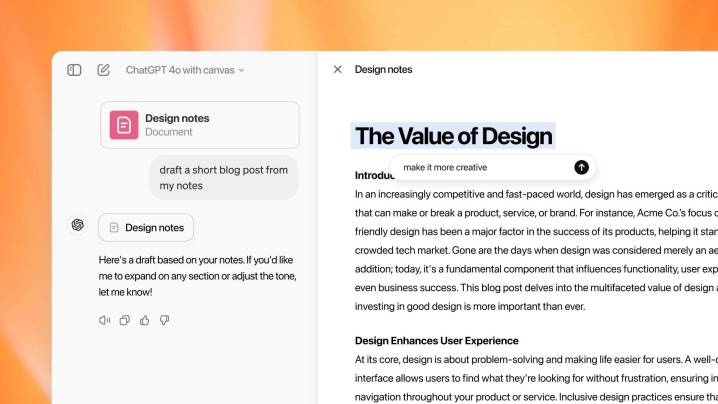
    ChatGPT's Canvas screen
    OpenAI

    In October, OpenAI introduced its Canvas feature, an interactive platform designed to provide a visual representation of AI responses based on user input, whether it be writing or coding. Initially rolled out as a beta feature for Plus and Teams subscribers, OpenAI has since made it accessible to all users, including those on the free tier.

    While Canvas may bear some resemblance to Anthropic’s Artifacts feature, OpenAI is integrating a variety of new functionalities into it. Notably, Canvas is now a core part of the GPT-4o model, allowing it to operate directly within ChatGPT without requiring users to select it from a list of models.

    This enhanced platform can now execute Python code inside the Canvas workspace, enabling ChatGPT to assess the code and suggest improvements. Users can enter prose or code right into the Canvas interface, bypassing the usual upload process through the chat window.

    The revamped Canvas feature also supports OpenAI’s custom GPTs, simplifying the process of building and designing them for users who may not have extensive programming expertise. Additionally, a Show Changes functionality highlights the most recent edits in code or text, making it easier to track modifications.

    Canvas is available via web browsers and the Windows desktop application. OpenAI has expressed intentions to continue enhancing Canvas and rolling out new features in the near future.

    This update coincides with OpenAI’s inaugural “12 Days of OpenAI” marketing campaign. So far, the company has officially launched its Sora video generation technology, capable of creating 20-second clips at resolutions up to 1080p. Moreover, it has released the full version of its o1 reasoning model family and introduced a Pro subscription tier priced at $200 a month to access these features.

  • New AI Features Now On Select Motorola Phones

    New AI Features Now On Select Motorola Phones

    Motorola has finally provided clarity on the AI features it promised for its devices. Following a brief preview last month, the company has officially launched an open beta program for select models. If you own a Motorola Razr Plus 2024, Razr 2024, or Motorola Edge 50 Ultra, you’re in for an exciting experience as the Moto AI features are now available for testing, starting today, November 27.

    To give you a quick overview, the Moto AI beta program includes several innovative features: Catch Me Up, Pay Attention, and Remember This. Motorola aims to enhance user experience by reducing notification overload and making it easier to recall information.

    Earlier this year, Motorola showcased these features on the Edge 50 and Razr 2024 series. Now, users can opt in to try them firsthand. After enrolling in the open beta and installing it on a compatible device, you’ll be able to access Moto AI effortlessly with a simple double-tap on the back of your device.

    Catch Me Up helps you stay informed about what’s happening by providing a personalized summary of crucial notifications and messages, allowing you to avoid the hassle of reviewing each one individually.

    Pay Attention is designed to keep you engaged during meetings or discussions. By activating the record button, Moto AI takes care of the rest—capturing, transcribing, and summarizing key points for you to review later.

    Remember This enables you to document and save significant moments. As you take photos and screenshots, Moto AI enriches your memories with relevant insights, context, and facts in a private journal. When you want to revisit those moments, simply call on Moto AI to help you recall important details.

    Moreover, Motorola has enhanced the search functionality to make finding information more user-friendly. The new accessible search bar allows users to search their devices, the internet, or utilize a large language model (LLM) to find what they need. You can also employ natural language for searches, whether in voice or text form. The Smart Actions feature streamlines tasks, making it easier to perform actions like taking selfies or turning on your hotspot with a single command instead of navigating through multiple settings. Additionally, the app tray will now include extra tabs for Apps, News, and Journal.

    If any of these features pique your interest and you have a Motorola Razr 2024, Razr Plus 2024, or Motorola Edge 50 Ultra, you should begin receiving notifications to sign up for the beta program starting today. For more information and registration details, be sure to check out Motorola’s website.