Tag: Engineering

  • Deep-Sea Sponge Designs Lightweight, Durable Materials Resistant to Vibrations

    Deep-Sea Sponge Designs Lightweight, Durable Materials Resistant to Vibrations

    A remarkable deep-sea sponge has inspired researchers to create a new class of lightweight materials that are not only stronger but also more efficient at handling flowing air or water. This innovation could enhance aircraft components, underwater structures, and even medical devices.

    Scientists from the University of California, Berkeley, and Harvard University based their research on the Venus’ flower basket, a glass sponge thriving more than 500 meters below the ocean surface. Despite its fragile appearance, this sponge boasts an incredibly durable yet lightweight skeleton—a feature that has intrigued researchers for nearly 200 years.

    Published in Nature Communications, the team’s study introduces a computer-driven design system that enables engineers to craft materials balancing two key qualities: mechanical strength and optimal fluid flow. Achieving both simultaneously has traditionally been difficult; structures designed for high strength often cause turbulence, while designs optimized for fluid movement can compromise structural integrity. The team aimed to tackle both issues at once.

    The Venus’ flower basket provided an ideal model. Its intricate silica framework withstands the immense pressure and strong currents of deep oceans for centuries. Simultaneously, its lattice-like structure smoothly guides water through and around the sponge, aiding in food collection while minimizing stress from ocean currents.

    Inspired by this natural architecture, the researchers developed an automated computer framework combining mechanical engineering principles with advanced fluid dynamics simulations. Users input desired performance criteria, and the system evaluates hundreds of potential designs, iteratively refining them to find the optimal balance between strength and fluid efficiency.

    The software integrates two established engineering techniques: Finite Element Analysis, which predicts how structures respond to forces, and Computational Fluid Dynamics, which simulates how fluids move around objects. By merging these methods, the framework can optimize materials in ways previously deemed difficult.

    Once the optimal designs were generated digitally, the team 3D printed physical samples and tested their strength and fluid behavior. The experiments confirmed that the computer models aligned well with real-world results. The specially designed materials could withstand roughly 140% more load before buckling compared to randomly designed counterparts, without using extra material.

    Additionally, introducing just about 5% open space within the structure significantly reduced vortex shedding—a phenomenon where swirling vortices form behind objects flowing in air or water—causing repetitive forces that induce vibrations and fatigue over time. Carefully shaping the internal layout allowed fluids to flow more smoothly, decreasing vibrations and further increasing durability.

    The researchers believe this optimization framework can be adapted to develop advanced materials across various fields. Possible applications include underwater pipelines, offshore installations, aircraft wings, helicopter parts, and medical stents designed to improve blood and fluid flow.

    This work demonstrates how millions of years of natural evolution, exemplified by the Venus’ flower basket, can inform modern engineering solutions. By studying one of the ocean’s most extraordinary creatures, scientists have shown that smarter, more resilient materials can be crafted through better design—often with less material—rather than relying solely on increased volume or strength.

    The full study appears in Nature Communications, supported by findings from UC Berkeley.
  • AI Design Tool May Reduce Building Material Use by 90%

    AI Design Tool May Reduce Building Material Use by 90%

    The construction sector ranks among the largest contributors to global carbon emissions. In 2022, producing essential materials like steel, concrete, and timber accounted for over 7% of worldwide emissions. But what if many of those materials were unnecessary from the start?

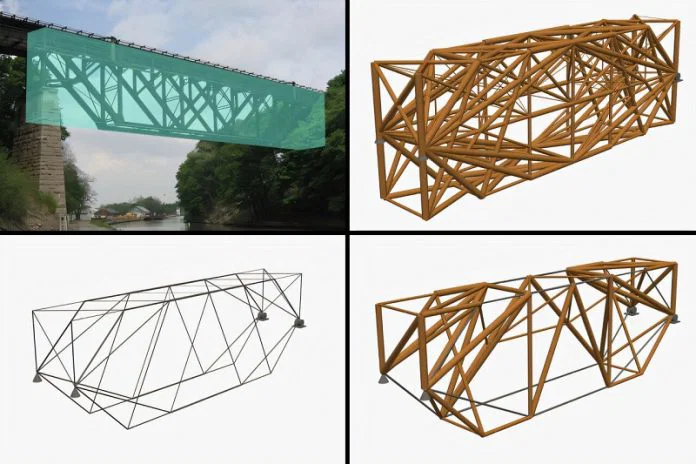
    Researchers at the Massachusetts Institute of Technology have created a new computer-aided design approach that could drastically cut down the amount of material needed for building bridges, skyscrapers, and other structures. In some cases, this method can reduce material requirements by as much as 90%, which could lower costs and decrease pollution without compromising safety or strength.

    This innovative technique is based on topology optimization—a computer process that identifies the most efficient use of materials within a structure. It eliminates excess material while maintaining enough support to bear significant loads. Designs generated through this process often feature unconventional, web-like structures with slender branches, quite different from traditional architectural forms.

    While highly efficient, these designs are usually too intricate to construct with current building methods, leading to their typical use in research labs or for small, 3D-printed objects rather than large-scale projects. MIT researchers aimed to change that by developing a new framework that allows engineers to control the complexity of the final design.

    This system enables the creation of practical, buildable structures by setting limitations such as the maximum number of components at a single joint, the smallest permissible piece size, and the minimum angle between connected parts. These parameters help produce designs that are easier to manufacture, transport, and assemble on-site.

    The technology also considers different building materials simultaneously, rather than assuming a single material in all parts. It intelligently assigns steel, timber, or other materials based on their strength, weight, cost, and environmental impact. For example, steel is ideal for supporting heavy loads, while timber tends to have a smaller carbon footprint. The program combines these options, maximizing sustainability while ensuring structural integrity.

    Further improvements include better handling of connections between different parts of the structure. Since securing beams, cables, and supports safely is a significant engineering challenge in real-world construction, the new model incorporates these considerations from the start rather than adding them later.

    To validate their approach, the team redesigned various truss frameworks used in bridges and buildings. They also tested the design on the Lockport “Upside-Down Bridge” in New York, analyzing how different practical constraints affected the outcome. The results demonstrated that incorporating realistic construction limits produced designs that remained highly efficient yet more feasible to build.

    Although this modern technique demands more computing power than older methods, the team successfully ran their simulations on a standard MacBook Pro. They believe the technology is already viable for many engineering firms.

    Looking ahead, they plan to create small-scale prototypes of their computer-generated structures to verify performance and safety. They also aim to incorporate additional practical design rules, making the software more accessible for everyday engineering projects.

    Overall, the researchers contend that many critical decision points that influence carbon emissions occur well before construction begins. By designing buildings and bridges that only use the essential materials, engineers can significantly reduce waste, lower expenses, and foster a more sustainable construction industry.

  • All You Need to Know Before Completing Lego Voyagers and Solving Challenges

    All You Need to Know Before Completing Lego Voyagers and Solving Challenges

    Lego Voyagers provides a simple approach to cooperative platformer games, but it adds its own Lego-themed flavor by focusing on two cute characters: a red brick and a blue brick. The game is quick and easy to start, with intuitive controls, but it takes most of its five-hour gameplay to learn all the tools needed to reach your rocket.

    Although the main idea involves building your way across the game using Lego blocks, you’re given little guidance at the beginning of your Lego adventure. To help you out, here are some useful tips for starting in Lego Voyagers.

    ### Use the Attach Ability Freely

    The most important mechanic in the game is that you are a Lego brick that can connect to different pieces in the environment. Attaching yourself to various bricks speeds up puzzle solving and testing solutions. Press B or Circle to attach to another brick—be it the ground, a buildable block, or your co-op partner. This button helps you try different interactions and can lead to successful outcomes in puzzles.

    A handy tip is to use the attach button when jumping from one ledge to another. Attaching to a brick can make your jump more secure, especially if there’s something to latch onto nearby.

    ### Rotate Your Brick Pieces

    When building, don’t forget to rotate your Lego pieces by pressing Y or Triangle. Rotating pieces allows you to fit into tight spaces or stretch your creations to form bridges. This saves time and gives you more control when customizing vehicles or structures.

    ### Recognize When Collaboration Is Needed

    If you’re stuck in a certain part, it probably means you need to work together. Many puzzles require one brick to hold or operate a switch while the other jumps across panels or fans. While early sections can often be completed solo, later stages demand careful teamwork, especially during a mini-game involving rocket landings that needs precise coordination.

    ### Bricks Can Substitute for You

    Sometimes, you might need to replace your character with a brick to help progress. You can grab a brick and place a handle or support to help move other bricks or cross gaps more efficiently. This method allows two bricks to work together in sections designed for a single character, enabling smoother progress.

    ### Speed Is Important When Building

    When constructing, quick action is vital. Once you attach a brick to another, you have only a limited time to lock the pieces together before they disconnect. Move fast to keep your builds stable and to continue building efficiently.

    ### Understand Your Bricks

    Using bricks creatively can help you climb by stacking, cross gaps by building bridges, customize rockets, or weigh down certain segments. Keep these options in mind, as many puzzles can be solved in multiple ways by combining these techniques in inventive ways.

    ### Put Your Platforming Skills to Work

    Jumping and climbing are crucial for navigating the terrain. Walking alone won’t get you very far; expect to jump, climb, and shimmy through tight or awkward spots. Embracing these challenges early on will expand your puzzle-solving options and make exploration more fun.

    ### Look for Designated Jobs

    Throughout the game, you’ll notice red and blue markings next to interactable objects. These indicate which brick should activate or operate the mechanism. Using the wrong brick usually results in a loud beeping sound or no function at all, so pay attention to the color cues to progress smoothly.

    ### Don’t Be Afraid to Improvise

    There’s no single best way to build in Lego Voyagers. Whenever you see an opportunity to cross a gap or climb a cliff, use your imagination. You’re free to create messily or neatly—whatever works as long as it fits within the constraints. Experimenting with different solutions often leads to creative and effective results.

    ### Cheese Some Puzzles

    While the game doesn’t specify how you should approach puzzles, playing cooperatively suggests that solo play might sometimes use “cheesy” tactics. For example, in later, more challenging sections—like the rocket training—letting one person control both characters using two controllers can make tricky puzzles easier to complete. Though unconventional, this method can be a lifesaver when you’re stuck.

    Seizing opportunities to improvise, working together on puzzles, and building efficiently are all key strategies in Lego Voyagers. The game encourages creative problem-solving and offers plenty of freedom to explore different solutions.

  • How To Craft a Computation Brick in Abiotic Factor by Completing and Solving

    How To Craft a Computation Brick in Abiotic Factor by Completing and Solving

    Surviving After the Abiotic Factor Crisis

    With GATE in chaos following the incident at Abiotic Factor, you’ll need to survive using whatever tools you can find. You might make arrows out of pens and use parts of decks as weapons. Since you’re a new employee, you also have less access than others, making things harder.

    Most of the scientists are gone or missing, so you’ll have to build makeshift technology to escape the facility. A crucial part is taking the Security Bot CPU, but to get it, you’ll need to destroy Security Bots. These robots don’t like having their parts taken and can be dangerous to fight.

    How to Kill Security Bots

    To get a Security Bot CPU, you must destroy a Security Bot, but they can be very dangerous. In the early game, they can kill you in four or five hits even if you wear decent armor.

    Security Bots become active from 9 PM to 6 AM when the power goes out. During these hours, they patrol their assigned areas. When the power comes back in the morning, they go back to their stations and stay inactive.

    You can find Security Bots in the Office Sector and Manufacturing West. The easiest one to reach is in the Cafeteria of the Office Sector, just below the Security Station with Warren.

    Other easy locations include:

    • Level Three of the Office Sector, looping through areas near Alice Mayfield and the large Executive Office.
    • The office area past Reception, which they patrol in a circle near their station on the wall.

    Security Bots’ headlights turn red when they see you or enemies, and they have good sight from a distance. However, because they walk slowly, you can outrun them by hiding or preparing to fight.

    Security Bots have three types of attacks: a melee punch that stuns briefly, an electrical tackle that stuns and has short range, and a spin attack with high knockback that hits multiple enemies. They prefer to use the spin attack when they are surrounded.

    ![Player near Security Bot in Abiotic Factor](https://static1.thegamerimages.com/wordpress/wp-content/uploads/wm/2025/07/abiotic-factor_20250726223422.jpg)

    The easiest and safest way to kill them early is to set a Shock Trap in their path and then shoot them with a Makeshift Crossbow loaded with around 30 to 40 bolts, depending on your accuracy. Once they see you, walk backward so they step onto the Shock Trap and get stunned for a few seconds. Hit them with bolts while backing up and circle around near the trap to keep them stunned.

    Materials to Craft Items

    Item Materials Needed
    Shock Trap Energy Brick x1
    Stapler x1
    Coil x1
    Makeshift Crossbow Desk Leg x1
    Rubberband Ball x3
    Plastic Scrap x2
    Stapler x1
    Makeshift Crossbow Bolts Pens x1
    Metal Scrap x1

    Place a Shock Trap in its path before the bot wakes up, then fire your bolts while it is stunned. Keep repeating this process, reactivating the trap as needed, until the Security Bot is destroyed. Including damage from the trap, it should take about 25 to 30 bolts. Without the trap, closer to 40 bolts.

    Natural electrical hazards, like electrified water on Level Three, can also stun and damage Security Bots, making them easier to kill.

    After defeating a Security Bot, it will drop a few sodas. You can use a Kitchen Knife to butcher it like an alien, but the process takes longer.

    They always drop Robot Oil and one Security Bot CPU, a vital resource. Sometimes, they also drop Metal Scraps, Coils, Glass Scrap, and Tech Scrap. Setting up automated farms for Security Bots can help you gather large amounts of Metal Scraps without breaking many cabinets.

    What to Do With Security Bot CPUs

    Crafting menu showing components for a Computation Brick.

    The main use for Security Bot CPUs is to craft Computational Bricks. These are essential for creating several key items: the Controller, Infrared Emitter, and the LCD Screen, which are used to make the Keypad Hacker.

    Component Amount Needed Materials Required
    Controller 1 Computation Brick x1
    Keyboard x2
    Desk Phone x2
    Box Of Screws x1
    LCD Screen 1 Computation Brick x1
    Tech Scrap x3
    Glow Stick x1
    Box Of Screws x1
    Infrared Emitter 1 Circuit Board x1
    Computation Brick x1
    Glass Shards x2

    The Keypad Hacker is needed to progress in the game, unlock areas like Security Rooms, and access crucial items like the Power Cell. All recipes for its parts can be discovered by crafting the Computation Brick, and then unlocking advanced components at a workbench.

    To get all the recipes at once, it’s easiest to visit Alice Mayfield, a GATE researcher on Level Three, who can give you the full list of components and recipes.

    How to Find Alice Mayfield

    Player at the entrance to a computer room with Alice Mayfield.

    To reach Alice Mayfield, go left from Reception toward the Security Office, follow the path to the office, and use an Energy Brick to open the nearby shutters. This unlocks a shortcut back to Manufacturing West and a lift to Level Three.

    Ride the lift to a small research area with radiation warnings, then go to the portal at the end of the catwalk to reach Anteverse II. This area offers key resources like Anteverse Wheat and fights with Exor enemies for their Hearts, which can upgrade your workbench.

    Follow the path through Anteverse II to another portal leading back to Level Three. Cross the pipes, jump over electrified water, and head toward Silo Three.

    Remember to unlock the elevator across from where Alice is located; this will give you a shortcut back to the main entrance, making travel easier in the future.

    Alice Mayfield is in an unlocked room near the entrance of Silo Three. She will provide the recipe for the Keypad Hacker, all the parts needed, and some hints on how to use it effectively.

  • AI Prompt Engineering Techniques

    The rapid development of artificial intelligence (AI) has led to various applications across industries, particularly in natural language processing (NLP). One of the crucial components that enable these AI systems to understand and generate human-like text is prompt engineering. This innovative approach involves creating effective prompts to guide the language model in producing desired outputs. This article delves into several techniques of prompt engineering, highlighting their significance and effectiveness.

    Understanding Prompts

    A prompt serves as the initial input that is provided to an AI model to stimulate a response. The quality and structure of the prompt can greatly influence the outcomes generated by the system. Properly constructed prompts can help achieve more accurate, relevant, and coherent results.

    Types of Prompts

    • Instructional Prompts: These clearly define the task and desired output. For example, "Write a summary of the following article."
    • Contextual Prompts: Providing context helps the model understand the background, enhancing its response. For instance, "In a fantasy world where dragons exist, describe the hero’s journey."
    • Conversational Prompts: To simulate a dialogue, prompts can start with a question or statement, allowing the model to respond as if in a conversation. Example: "What do you think about renewable energy?"

    Techniques for Effective Prompt Engineering

    Creating successful prompts requires a nuanced understanding of the AI model’s behavior. Here are several techniques to enhance prompt effectiveness.

    1. Specify Desired Format

    Clearly mentioning the format of the desired output can lead the model to provide content in that specific structure. For instance:

    • "List five benefits of meditation in bullet points."
    • "Provide a short poem about nature."

    2. Use Examples

    Incorporating examples within the prompt can guide the AI in understanding the expected response. This technique can include:

    • Demonstration: "Translate the sentence ‘Hello, how are you?’ into Spanish. Example: ‘Good morning’ becomes ‘Buenos días.’"
    • Templates: "Complete this template: ‘The best way to learn is by _. For instance, .’"

    3. Explore Temperature Settings

    Adjusting the temperature parameter can influence the randomness of the AI’s responses. Lower values lead to more predictable outputs, while higher values can produce creative variations.

    • Low Temperature (e.g., 0.2): Use for factual information.
    • High Temperature (e.g., 0.8): Utilize for creative writing tasks.

    4. Iterative Refinement

    Prompt engineering is often an iterative process. Experimenting with various prompts can provide insights into which structures yield the best results. Effective practices include:

    • A/B Testing: Create two different prompts for the same task and compare the outputs.
    • Feedback Loop: Analyze the responses and refine the prompts based on what works best.

    5. Utilize Constraints

    Setting constraints within the prompt can lead to more focused responses. For instance:

    • "In less than 100 words, describe the impact of climate change."
    • "Provide three reasons for exercise, and include one counter-argument."

    Common Pitfalls in Prompt Engineering

    While developing prompts, avoiding common mistakes can significantly improve output quality.

    Ambiguity

    Vague prompts can lead to confusion, resulting in irrelevant responses. Ensure clarity by being specific about the task.

    Overloading

    Including too many instructions within a single prompt may overwhelm the model. Simplifying the prompt can lead to better focus.

    Neglect

    Failing to provide enough context may limit the model’s ability to generate comprehensive responses. Always include pertinent background information when necessary.

    Best Practices for Successful Prompts

    Implementing best practices can enhance the efficiency of prompt engineering. These include:

    • Keep It Simple: Use straightforward language to avoid confusion.
    • Be Direct: State the main task clearly at the beginning.
    • Test Regularly: Continuously experiment with different prompts and adjust strategies based on outcomes.

    By adopting these techniques and understanding the principles of prompt engineering, users can maximize the potential of AI models, ensuring they deliver valuable, relevant, and high-quality responses. Engaging with AI through thoughtful prompting not only refines the output quality but also enhances the overall interaction experience.

  • Ultimate AI Prompt Engineering Guide

    Ultimate AI Prompt Engineering Guide

    In the rapidly evolving landscape of artificial intelligence, mastering prompt engineering is essential for optimizing the interaction with AI models. This guide offers insights and practical strategies to enhance your skills in crafting effective prompts.

    Understanding the Basics of Prompt Engineering

    What is Prompt Engineering?

    Prompt engineering involves designing and structuring prompts in a way that maximizes the effectiveness of AI responses. A well-crafted prompt can significantly influence the quality, accuracy, and relevance of the generated content.

    Importance of Effective Prompts

    • Improved Output Quality: A well-defined prompt leads to clearer answers.
    • Enhanced Creativity: Specific prompts can stimulate creative and diverse responses.
    • Reduced Ambiguity: Clear prompts minimize misunderstanding and irrelevant information.

    Crafting Effective Prompts

    Key Components of a Good Prompt

    To create effective prompts, incorporate the following elements:

    • Clarity: Be direct and specific about what you want.
    • Context: Provide relevant background information when necessary.
    • Constraints: Set any limits or guidelines (e.g., length, style).

    Techniques for Prompt Design

    1. Use Open-Ended Questions: Encourage detailed responses by avoiding yes/no questions. For example:

      • Instead of asking, “Is climate change a problem?” try “What are the main impacts of climate change on ecosystems?”

    2. Incorporate Examples: Offer examples to guide the AI:

      • “Write a poem about spring, similar to this: [insert example].”

    3. Specify the Format: Indicate the desired output style:

      • “List three benefits of regular exercise, using bullet points.”

    4. Segment Complex Tasks: Break down multifaceted inquiries:

      • “Describe the causes of World War I. Then, summarize its effects on Europe.”

    Iterating on Prompts

    Trial and error is a crucial part of prompt engineering. Don’t hesitate to refine your prompts based on the responses you receive. Consider the following:

    • Analyze Responses: Look for trends in the AI’s output. Are there weak points?
    • Adjust Prompt Structure: Slight modifications can lead to significantly different responses.
    • Test Variations: Use synonyms or reword a prompt to explore diverse outputs.

    Examples of Effective Prompts

    Creative Writing Prompts

    • Scenario-Based: “Imagine a world where humans can communicate with animals. Describe a day in the life of a veterinarian in this setting.”
    • Character Development: “Create a backstory for a superhero who uses technology to fight crime.”

    Technical Prompts

    • Data Analysis: “Given the dataset of XYZ, outline the steps you would take to analyze trends in sales over five years.”
    • Engineering Challenges: “What are the main considerations when designing a sustainable building?”

    Leveraging Advanced Techniques

    Incorporating AI’s Capabilities

    AI models often have specific strengths. Utilize these to your advantage:

    • Language Translation: “Translate the following paragraph into French: [insert paragraph].”
    • Summarization: “Summarize the key points from this article in three bullet points.”

    Fine-Tuning for Specific Audiences

    When targeting a specific demographic, adjust prompts accordingly:

    • Academic Tone: “Draft a formal proposal on renewable energy initiatives for a university audience.”
    • Casual Engagement: “Write a fun blog post about gardening tips for beginners.”

    Troubleshooting Common Challenges

    Addressing Ambiguous Responses

    If the AI generates confusing or irrelevant content, consider:

    • Clarifying Instructions: Specify exactly what you mean, removing any potential for misinterpretation.
    • Adding Context: More background information can help the AI respond more accurately.

    Handling Inconsistencies

    Inconsistencies may arise in responses. To mitigate this:

    • Use Consistent Language: Stick to familiar terminology throughout your prompts.
    • Reinforce Previous Context: Remind the AI of prior details if a conversation spans multiple prompts.

    Best Practices for Prompt Engineering

    • Stay Concise: Use precise language to communicate effectively.
    • Experiment Regularly: Keep trying various prompts to discover new capabilities and outputs.
    • Leverage Feedback: Seek external opinions on your prompts to identify areas for improvement.

    Whether you’re a novice or someone with experience in AI interactions, mastering prompt engineering will provide you the tools to harness the power of artificial intelligence effectively. The right prompts can lead to innovative solutions, creative content, and highly relevant outputs tailored to your needs.

  • Max-Planck Institute Unveils Innovative Modular Hexagon Design

    Max-Planck Institute Unveils Innovative Modular Hexagon Design

    Researchers at the Max-Planck-Institute for Intelligent Systems (MPI-IS) have made a groundbreaking advancement in robotic technology with the introduction of hexagon-shaped modular components, known as HEXEL modules. This innovative design allows for the rapid assembly and reconfiguration of high-speed robots, akin to the versatility of LEGO bricks. The findings, led by Christoph Keplinger and his team from the Robotic Materials Department, are set to be published in the prestigious journal Science Robotics on September 18, 2024.

    Each HEXEL module features a lightweight exoskeleton constructed from six rigid glass fiber plates, providing the necessary structure and durability. At the core of these modules are advanced artificial muscles known as hydraulically amplified self-healing electrostatic (HASEL) actuators. By applying high voltage, these artificial muscles activate and enable the hexagonal joints to transform from elongated shapes to broader, flatter forms.

    The unique combination of soft and rigid elements within the modules facilitates impressive movements and speeds. “By linking multiple modules together, we can generate new robot forms that can adapt to diverse operational requirements,” explains Ellen Rumley, a visiting researcher from the University of Colorado Boulder and co-first author of the upcoming publication.

    Demonstrations by the research team showcase the diverse capabilities of the HEXEL modules. In one instance, a collection of these modules maneuvers through a narrow passage, while a single unit performs rapid jumps into the air. Additionally, when configured into larger assemblies, the modules can achieve distinct motion patterns based on their arrangement—one such example being a robot capable of rolling at high speeds.

    Zachary Yoder, also a co-first author and Ph.D. student at MPI-IS, emphasizes the practicality of this modular approach. “Developing robots with adaptable designs is not only innovative but also sustainable. Instead of investing in multiple specialized robots for various tasks, users can construct a multitude of configurations using a common set of components. This flexibility can be especially advantageous in environments where resources are scarce,” he notes.

    The emergence of HEXEL modules represents a significant leap forward in robotics, promising enhanced functionality and efficiency while paving the way for future developments in modular design. As the research team continues to explore the potential of these innovative components, the horizons of robotics are broadening, ushering in a new era of adaptability and sophistication.

  • What is the most used design software in mechanical engineering and design?

    Design programmes are becoming one of the most necessary tools, especially to help professionals to carry out their work in a very correct way. As mechanical design engineers, they have to manufacture or model objects that without programmes like the ones we are going to mention, it would be much more complicated. 

    Nowadays, thanks to the new technologies, they have safe help. That is, if we know how to use them as we need to. That is why we want to mention the best design programmes and the advantages of each one of them. As the vast majority of them have replaced hand drawing and the ability to create 3D designs makes it easier to visualise them prior to construction. So they are widely used by engineers, as we have mentioned, but also by architects or site managers among many others.

    Which mechanical design software is used the most?

    When we think of the most widely used software, we think of one that is always the main protagonist: CAD (Computer Aided Design). Within it we can find several options because only this will help us to create a much more complete work. With this name we have mentioned, we must point out that it is a set of programmes with which professionals can create three-dimensional graphic representations of objects. In addition to this, you can also modify or analyse and create anything that comes to mind. As we say, they are one of the best resources to give life to your work and that the result is as expected. 

    If we start with a programme and add complements such as Computer Aided Manufacturing, then we will be able to manufacture the required product. Technology is advancing by leaps and bounds and this is a good example of this. 

    What are the main advantages of these softwares?

    We have already mentioned one of the most important software, but now we need to know why. So, we will tell you that among all of them is that they allow the work to be speeded up.  Therefore, delivery times are reduced and manual processes are avoided. Since everything will be automated. Another advantage that we cannot forget is that errors are reduced. Something that is sometimes frequent and in all types of work. But when we follow the option of technology, the process will be more accurate than ever. 

    In conclusion, we can say that it reduces the costs of the entire work process. It improves productivity and ensures the quality of each product. Once all this is done, the software also creates a kind of schematic with all kinds of details. This means that we always have them at hand for when we need them again. In case you didn’t know, CAD technology works really surprisingly well. Because you can make the design you need with its help. Once you have it, it’s the modelling software’s turn to bring your design to life. As a result, you’ll have your file ready to be manufactured. 

    Are there any disadvantages to CAD software? Yes, there are. You always have to talk about the less positive side. But this is something that happens in many other areas of our work. On the one hand, it is expensive and on the other hand, it has so many functions that it can sometimes be a bit complicated to know how to use them correctly. 

    Programmes you should know about

    When we talk about the most used design software, there are always several names and not just one. Because we need them to adapt to the needs of each job or each company. That is why it is good to know more so that we can choose.

    Matlab

    Both engineers and scientists can use software like this. It is suitable for numerical calculations but also for visualisation and code programming. Therefore, mathematical functions and vector calculations can be used. When you have all this, you can always share the results in the form of graphs or by making complete reports. Not forgetting that it also helps to automate all the information so that nothing is lost. 

    SolidWorks

    When it comes to engineering, this software is one of the most comprehensive. On the one hand, it will help you to optimize processes, work in an organised way and reduce costs. On the other hand, you can integrate customer databases and it has tools that are very versatile for working in 3D or creating mechanical modelling of structures.

    CATIA

    As it provides new design and manufacturing solutions, it becomes another important software. In addition, it is intended for solid modelling. You will have access to mechanical design, drawing generation, steel structure design and much more. 

    Solid Edge

    It can be defined as an easy-to-use tool that encompasses the entire design process and product development. It also has 3D design and simulation, it is fast and simple compared to other similar programs. Thanks to technology, changes can be made simultaneously.

    Rhino

    One of its main virtues is that it is an option that is compatible with other design programmes. This means that we can have all the advantages in one place. In addition, it should also be said that it is a cheaper alternative. You can perform different tasks such as creating, analysing, modifying and documenting, among many others.

    Patran

    In this case we are talking about simulation software to create virtual products. So, it encompasses each of the steps that must be taken for the final result to be very satisfactory. It has a comprehensive set of tools to create. Design engineers will be very happy to be able to use such an option. 

    In case you had any doubts, now you know a little more about all the software that is at your fingertips and that has a very clear job: to help you in all your daily tasks. As we have mentioned, some are simpler than others, but this is a way to choose the one you need at any given moment.