الوسم: Delta Force

  • Locating Keycards in Delta Force: A Guide

    Locating Keycards in Delta Force: A Guide

    Utilizing Keycards in Delta Force can lead to some impressive loot, but it’s important to remember that they come with a “high risk, high reward” aspect. If you’re eager to track down these Keycards to enhance your loot collection and outsmart your opponents, here’s a comprehensive guide just for you.

    How to Obtain Keycards in Delta Force


    To find Keycards in Delta Force, you should explore high-loot areas, like the East Wing Manager’s Office in Zero Dam or the King’s Suite in Layali Grove. Another option is to purchase them affordably from the “Card Holders” section in the game.

    Here, you can buy the specific Keycard you need and head directly to the designated room to collect the loot.

    Complete List of Keycards in Delta Force

    Zero Dam Keycards

    • East Wing Manager’s Office
    • Substation Tech Room
    • West Wing Control Room
    • West Wing Monitoring Room
    • Equipment Collection Room
    • Barracks Storage Room
    • Ticket Office
    • Cement Plant – Dormitory 201
    • Central VIP Room
    • Cement Plant Office
    • West Wing Infirmary
    • Substation Dormitory

    Layali Grove Keycards

    • King’s Suite
    • Radar Station UAV Platform
    • Prince’s Suite
    • Radar Station Data Center
    • Lab Building Archive Room
    • Spades Room
    • General’s Room
    • Radar Station Control Room
    • Lab Building Office
    • Diamonds Room
    • Town Diner
    • Radar Station Conference Room
    • Cargo Plane Conference Room
    • Checkpoint Storeroom
    • Radar Station Side Entrance Keycard
    • Farm Admin Room
    • Small Train Station Ticket Office

    Brakkesh Keycards

    • Underground Vault Storage
    • Hotel Dining Room
    • Museum Exhibition Suite
    • Old Bath VIP Room
    • CEO Conference Room
    • Interrogation Room 1
    • Medical Conference Room
    • Relink Implant Surgery Room
    • Biological Data Server Room
    • New Tower of Babel Power Access Card
    • Museum Abandoned Exhibition Hall
    • Outpatient Room
    • Museum Surveillance Room
    • Old Bath Diner
    • Ocean Monitoring Hall
    • East Town Residential Bedroom
    • Hotel Staff Break Room
    • West Town Residential Bedroom

    Space City Keycards

    • CEO Office Reception Room
    • Black Chamber Server Room
    • Test Range Core
    • Eastern Suspension Bridge
    • Test Range Data Center
    • Assembly Workshop 2F Lab
    • West Gate
    • Employee Passage
    • No.3 Dormitory Back Room
    • Central Command Room 3F
    • Test Range Glass Room
    • Buoyancy Lab Infirmary
  • Top Shepherd Loadout for Delta Force Success

    Top Shepherd Loadout for Delta Force Success

    Terry Musa, also known as Shepherd, is part of the Engineer Class in Delta Force. To excel with this Operator, it’s crucial to know the optimal loadout featuring the best weapons and gadgets to overpower your enemies.

    Delta Force offers a wide selection of Operators, and Shepherd is available right from the beginning. As an Engineer, he specializes in cutting and repairing with a welding gun.

    Best Loadout for Shepherd


    The top weapon for Shepherd is the M249 Light Machine Gun. Here’s the ideal setup for that gun:

    Attachment

    Name

    Muzzle

    Sandstorm Vertical Compensator

    Barrel

    M249 Gulf Short Barrel

    Optic

    Russian Accuracy 2x Scope

    Handguard

    M249 MIL-STD Raid Handguard

    Foregrip

    ZFSG Tactical Grip

    Stock

    M249 Elite Skeleton Stock

    The Sandstorm Vertical Compensator is key for minimizing vertical recoil with the LMG, while the ZFSG Tactical Grip enhances stability and overall weapon control.

    The Russian Accuracy 2x Scope strikes a perfect balance between field of view and zoom, making it easier to take down enemies from afar. The M249 Gulf Short Barrel is exceptional for close-range encounters, improving the handling and stability of the LMG.

    With the M249 Elite Skeleton Stock, you’ll gain added stability and a faster aiming down sight speed, and the M249 MIL-STD Raid Handguard will expand your attachment options while enhancing control and stability.

    For your equipment, consider the following options:

    • G17 as your secondary weapon.
    • TAC Dagger for melee combat.
    • AT4 Launcher as your Class gadget.

    The G17 is an excellent choice for a secondary weapon, boasting a rapid fire rate of 462 RPM and a muzzle velocity of 400 m/s, making it effective for dispatching enemies quickly.

  • Top Stinger Gear Setup for Delta Force Operations

    Top Stinger Gear Setup for Delta Force Operations

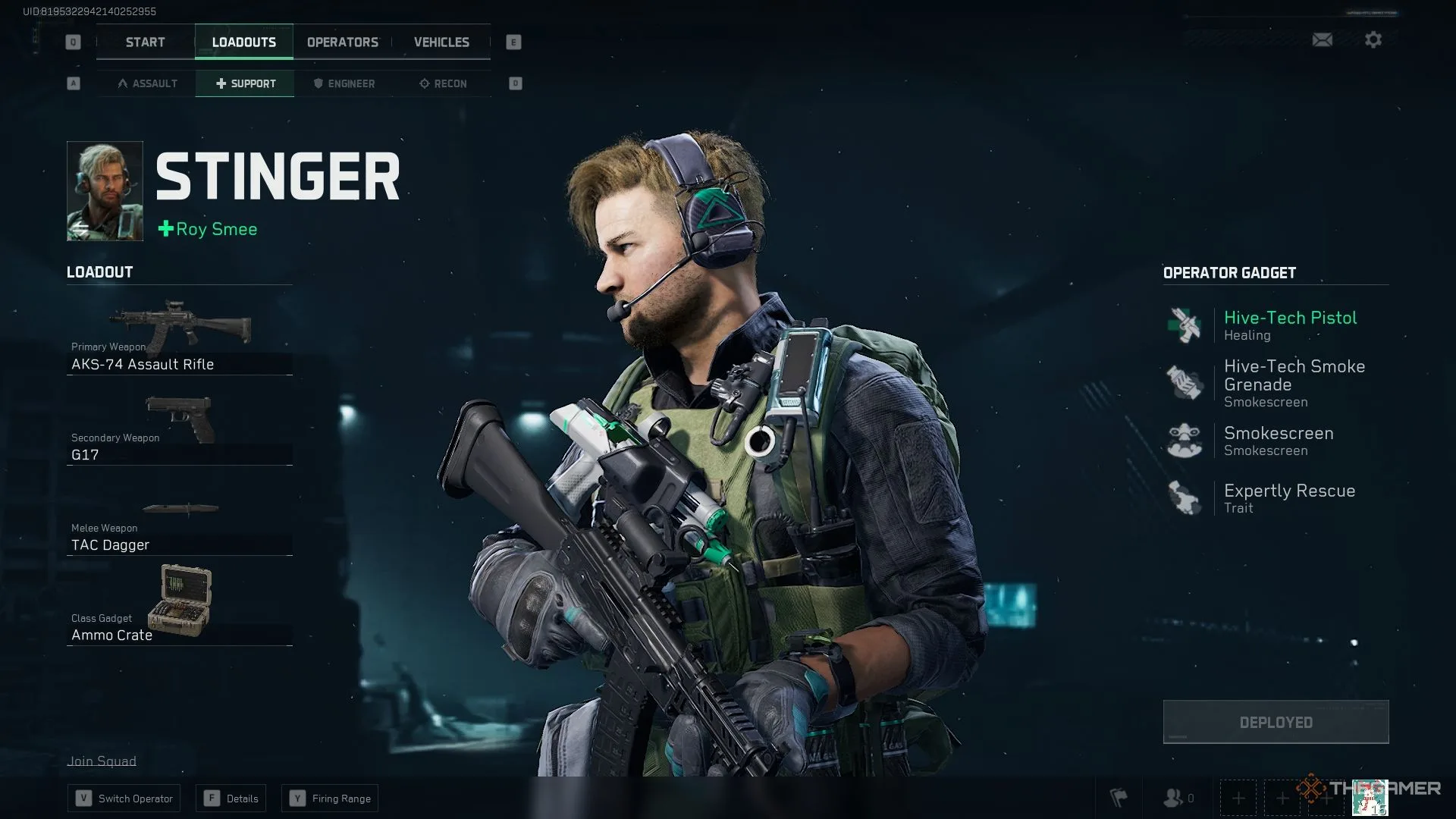
    In Delta Force, Stinger stands out as one of the key Operators, essential for achieving success in combat scenarios and missions. To maximize his effectiveness, it’s crucial to select the right combination of weapons, gadgets, and abilities.

    As part of the Support class in Delta Force, Stinger is equipped with various tools that help revive teammates quickly after they’re knocked out by enemies. His ability to heal fellow players rapidly is invaluable in critical moments during battle.

    Optimal Loadout for Stinger

    The optimal weapon choice for playing as Stinger is the AKS-74 assault rifle. This weapon offers a solid mix of damage and range, making it a top option for this Operator. Here’s the ideal loadout for Stinger in Delta Force:

    Attachment

    Name

    Muzzle

    DTK Muzzle Brake

    Optic

    Russian Accuracy 2x Scope

    Foregrip

    Mini Hand Stop

    Mag

    AK-12 30-Round Polymer Mag

    Mag Mount

    Badger Small Mag Assist (Small)

    Rear Grip

    Scorpio Rear Grip

    Stock

    AK Polymer Stock

    Stock Pad

    AK Stock Recoil Pad

    Upper Handguard

    AKS-74 Upper Rail Handguard

    Handguard

    AKS-74 Lower Rail Handguard

    The DTK Muzzle Brake enhances weapon stability during firing, although it does come at a slight cost to control. To counteract this, incorporating the AKS-74 Upper Rail Handguard, AKS-74 Lower Rail Handguard, and Mini Hand Stop can significantly improve the rifle’s handling at medium distances.

    The Russian Accuracy 2x Scope is an excellent optic for the AKS-74, offering clarity and sufficient zoom to take down enemies effectively. The AK-12 30-Round Polymer Mag provides a magazine capacity of 30 rounds and improves the rifle’s maneuverability.

    This setup makes it easier to control the AKS-74, especially when engaging close-range foes without aiming down sights.

    The AK Polymer Stock and AK Stock Recoil Pad are vital attachments. The stock enhances accuracy, control, handling, and stability, while the recoil pad further improves overall performance.

    For your equipment, consider these options:

    • G17 as the secondary weapon
    • TAC Dagger for melee combat
    • Ammo Crate as your Class gadget

    The G17 serves as an excellent secondary weapon. With a fire rate of 462 rounds per minute and a muzzle velocity of 400 m/s, it excels at finishing off enemies who are nearly defeated.

  • Mastering Solo Play in Delta Force: A Complete Guide

    Mastering Solo Play in Delta Force: A Complete Guide

    Quick Links


    Playing extraction shooters by yourself presents a significant challenge. With only your own senses to rely on, you’re often at a disadvantage compared to opponents who have team support. This is especially true in Delta Force, where most players are teamed up right from the start.

    Winning solo in Delta Force is achievable, but it requires a different approach. The key to success lies in surprise tactics, but there are additional strategies that can help you come out on top.

    How To Win More Fights As A Solo Player

    In Delta Force, if you’re not winning fights, you risk spending all your time in the lobby without earning money or progressing in tasks. As a solo player, you’re likely to be outnumbered almost every time. This means charging into popular loot zones or busy areas isn’t wise unless you’re an exceptional player.

    Even the most skilled players can falter when outnumbered. If you’re focused on one enemy and a second catches you off guard from behind, you’ll have little time to react.

    To improve your odds, avoid confrontations you can’t win. While it sounds simple, it can be challenging in the heat of the moment. If you hear more than two sets of footsteps nearby that don’t sound like AI, it usually means you’re up against multiple players. If they both poke their heads around a corner at the same time, your chances of winning are slim.

    Find a hidden spot where your enemies wouldn’t think to look, and let them pass. If you’re positioned well, you might watch them walk by without noticing you. From there, you can decide if you want to engage based on your comfort level.

    Next, focus on one-on-one battles. Even if you encounter a squad, use the terrain to your advantage and engage them one at a time. The game maps have plenty of cover and ways to break line of sight, allowing you to isolate opponents. Remember, two against one is rarely a winning situation.

    Keep some kind of cover between you and your opponents, using it to confuse their communication. Since you’re playing solo, you can’t coordinate with teammates, so the enemy’s lack of organization can be exploited. The more mobile you are, the easier it will be to split up their group.

    If you have the funds, always equip purple armor and use purple ammo. You’d be surprised at how much you can accomplish with the right protection and firepower.

    Tips To Survive More When Playing Alone

    Surviving in Delta Force isn’t just about winning fights; it’s also about avoiding them when possible. The most crucial rule is to avoid fights altogether if you can.

    While it sounds straightforward, it can take practice to master. Your primary defense is your hearing. Always wear a helmet equipped with audio enhancement and noise reduction features, like the MC201.

    It might be of lower rarity, but for loot runs or when you’re trying to stay out of combat, the 20% increase in hearing range combined with decent noise reduction can be incredibly helpful.

    Additionally, you need to learn the maps well. If you’re entering a map like Space City for the first time, glance at the tactical map while approaching and after you land. Identify safe zones and any enemy officers that might be present, and stay away from them.

    Remember that all players have access to the same map icons, indicating high-value areas. These spots will quickly become battlegrounds in the early minutes, so it’s wise to steer clear of congested areas for the first ten minutes and only move in later when it’s less risky.

    Another effective survival tactic is using the Stinger operator. While operators like Luna, Hackclaw, and D-Wolf excel in team play, Stinger’s self-heal ability not only restores health but also temporarily neutralizes the effects of debuffs.

    For around ten seconds following a self-heal, Stinger can ignore severe injuries like broken bones while still regenerating health over time. This allows you to escape from seemingly unwinnable confrontations.

    Strategically, combine Stinger’s healing with erratic movement to evade fights. You can adopt a guerrilla warfare mindset, engaging briefly and disappearing, which can unsettle entire squads.

    Lastly, don’t rush after spawning. Instead of sprinting toward the nearest building, take a moment to listen. You will likely hear gunfire or other sounds of conflict. The initial moments of a match often see chaos as players engage with both AI and one another. After a few minutes, the dust will settle, giving you a clearer sense of safety to explore your surroundings.

    With these strategies, you can enhance your solo gameplay experience in Delta Force and increase your chances of survival.

  • Maximize Your Performance in Delta Force: A How-To Guide

    Maximize Your Performance in Delta Force: A How-To Guide

    For a game currently in early access and developed in Unreal Engine 5, Delta Force performs impressively on PC. Thanks to advanced upscaling technology, it can easily hit or surpass high refresh rates on quality monitors, even when played on higher settings and resolutions.

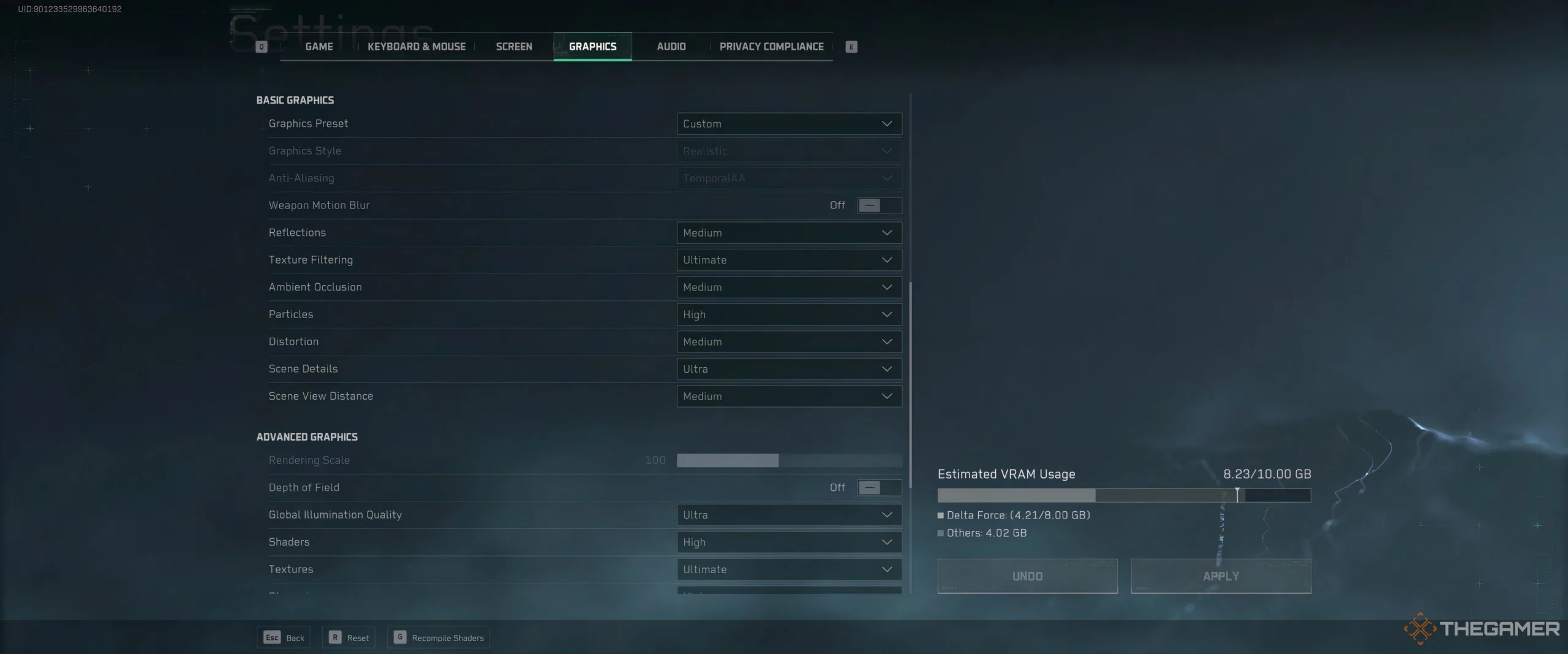
    That said, it’s still a good idea to create a list of optimized settings to achieve high frames per second (FPS), as adjusting your settings can greatly enhance your gaming experience. We’ve experimented with all available graphics settings in Delta Force and compiled our recommendations for players with mid-range gaming PCs.

    Top Settings for High FPS

    Before we get into specifics, it’s important to note that each setting was tested with all other options set to Medium, with no upscaling applied, on the following setup:

    • CPU: Intel i7 13700K
    • GPU: NVIDIA 3080 Founder’s Edition
    • RAM: 32 GB HyperX
    • OS: Windows 10
    • Monitor Resolution: Ultrawide at 3840×1600, 144Hz refresh rate.

    Due to the higher resolution consuming more graphics card resources, the frame rates we observed in our tests were likely lower than what most players using 1440p monitors would experience. Additionally, the NVIDIA 3080 wasn’t quite strong enough to run Delta Force at its highest settings.

    Nevertheless, the game managed to achieve between 80-90 FPS without upscaling. In our tests, AMD FSR 2.0 provided a ten-frame boost over DLSS, although results may vary based on your system.

    Recommended Settings Table

    Setting FPS Impact Recommended Setting
    Reflections Decreases FPS by 1-3 frames Medium
    Texture Filtering No impact Ultimate
    Ambient Occlusion Decreases FPS by 2-3 frames Medium
    Particles Decreases FPS by 1-3 frames High
    Distortion Decreases FPS by 1-3 frames Medium
    Scene Details Decreases FPS by 1-3 frames Ultra
    Scene View Distance Decreases FPS by 4-6 frames Medium (or lower)
    Global Illumination Decreases FPS by 2-4 frames High/Ultra (based on preference)
    Shaders Decreases FPS by 3-5 frames High/Medium
    Textures Decreases FPS by 1-2 frames Ultimate
    Streaming Decreases FPS by 1-3 frames High
    Shadow Decreases FPS by 2-4 frames Medium
    Shadow Map Decreases FPS by 3-5 frames Medium
    Post-Processing Decreases FPS by 2-3 frames High
    Volumetric Fog Decreases FPS by 1-3 frames Medium
    Animation No impact High

    With these settings and AMD FSR 2.0 set to Quality, the test rig consistently reached and held 144 FPS in indoor environments, maintaining smooth gameplay even in intense scenarios with many enemies, where it dipped to the low to mid-100s.

    If your hardware is slightly older, particularly if you’re using an NVIDIA 10 series card or similar, you may need to adjust some of the higher recommended settings down a notch.

    Overall, Delta Force runs quite well, and achieving over 100 FPS shouldn’t be difficult, even with a mid-range system. If your setup is more advanced than our testing PC, you could expect frame rates over 150 FPS with similar settings.

  • Understanding Armor and Bullet Impact Mechanics in Delta Force

    Understanding Armor and Bullet Impact Mechanics in Delta Force

    Quick Links

    In contrast to classic first-person shooter games, extraction shooters offer a more intricate armor and ammunition damage system. The Operations mode in Delta Force reflects this complexity, although it’s somewhat more straightforward than a game like Escape from Tarkov. Understanding which armor to select and which ammunition to use is crucial, as it can greatly influence your effectiveness in combat and your overall survival.

    The gunplay mechanics of Delta Force are not as confusing as in Tarkov but certainly more detailed than what you’d see in a battle royale title like Warzone. Let’s break down the essential elements.

    How Weapon Damage Works

    Several factors contribute to how well your weapon performs against opponents in Delta Force. The primary factor is the base damage of your weapon. Each firearm has a specific damage rating, which varies based on the body part you hit.

    Every soldier starts with a maximum of 100 health points distributed across their body. Damage values differ depending on whether you strike the head, limbs, or torso, among other areas.

    The damage also varies with distance; in close quarters, all weapons deliver maximum damage. However, the effective range can differ significantly between weapon types; for instance, a submachine gun will not reach as far as a battle rifle.

    Note: You won’t deal less than the minimum damage of a weapon at long range, as damage reduction isn’t linear.

    Additionally, each weapon has a base armor damage value that indicates how effectively it can wear down an opponent’s armor with each shot that lands. The type of ammunition used can modify this damage, which we’ll explore soon.

    How Armor Stops Bullets Until It Doesn’t

    Armor is categorized into six levels, with protection increasing as the level rises. When engaged in a firefight, the game compares your armor’s protection level to the enemy’s ammunition. There are three possible outcomes:

    1. Armor and ammo levels are equal: Your armor will absorb some damage but will lose durability, and you’ll still receive some damage to your health.
    2. Armor level exceeds ammo level: The armor fully stops the bullet, sustaining damage instead. You only take health damage once the armor’s durability is depleted.
    3. Armor level is less than ammo level: The ammo bypasses the armor entirely, inflicting full damage to your health.

    Armor can only protect areas it covers — typically the chest, abdomen, and shoulders. It’s important to select armor wisely, as heavier armor can slow your movement and aiming. If agility is vital for your play style, consider lighter armor options.

    How Ammo Affects Armor

    Ammunition is perhaps the most complex aspect of Delta Force’s gameplay, given its numerous variables. The bottom line is that higher-quality ammo offers better performance. This principle applies whether you’re armed with a handgun or a rifle.

    Every type of ammunition has a level, similar to armor, with the added possibility of level zero ammo for budget-conscious players. Essentially, higher-grade ammo provides superior armor penetration.

    It’s important to remember:

    • Ammo meeting armor of the same level does only 75% of its stated base damage.
    • The ammo level serves as a separate multiplier for armor damage, with a level four ammo yielding a 100% multiplier against armor up to level five but dropping to 60% against level six.
    • Certain ammunitions, like 9mm RIP or .45 RIP, may have unexpected penetration capabilities, favoring flesh damage over armor damage, making them ideal against limbs.

    In practice, any ammunition type can potentially compromise any armor, and our observation shows level-four armor can be damaged by lower-tier ammo. Submachine guns excel at this due to their rapid-fire capabilities, although only the armor would take damage in such encounters.

    Always come prepared for raids with armor repair kits; as your armor’s rarity increases, so should the quality of your repair kits. Damaged armor offers little protection. Also, stockpile more ammo than you anticipate needing — an unloaded weapon is as ineffective as compromised armor.

  • Delta Force Devs Warn About Cheating, Exploits And USBs

    Delta Force Devs Warn About Cheating, Exploits And USBs

    Tencent’s latest shooter, Delta Force, reminiscent of the iconic Battlefield series, was released yesterday as a free-to-play game. Many early players are enjoying the experience, and while the monetization approach may raise concerns, if you’re a fan of Battlefield-like gameplay and have found DICE’s recent titles lacking, this could be worth a try. However, it’s peculiar that Tencent has compiled a list of software they deem “risky.”

    Delta Force employs GTI Security, a system that monitors players in real-time and can impose bans for various infractions. The developers have made public a comprehensive list of software that is either outright banned or classified as “not recommended.” Some restricted software is obvious – anything used for cheating or exploiting the game is strictly prohibited.

    While it’s clear that programs enabling emulation, speed hacks, or similar functionalities are off-limits, Tencent has also flagged virtual machines as problematic — which could pose hurdles for those wishing to enjoy Delta Force on platforms like Hackintosh.

    An Operator in Delta Force: Hawk Ops.
    TiMi Studio Group

    Several of the “not recommended” applications include remote access tools, suggesting that streaming the game from a home server may also attract scrutiny, along with any frame capture software.

    If you’re caught using any of the banned items, expect a possible ban. The consequences for software that lies in a gray area are less clear, but it may lead to in-game glitches.

    A particularly noteworthy restriction includes USB drives, which raises questions. While these can be used to bypass certain anti-cheat measures, they might also be necessary for gamers using external drives for legitimate reasons. Will players who utilize their systems for functions like running a Plex server need to unplug their drives?

    Shooting in Delta Force: Hawk Ops.
    TiMi Studio Group

    These decisions spark numerous questions, and Tencent has yet to respond. Here’s the complete list of restricted hardware and software.

    Prohibited while playing Delta Force:

    • Hardware
      • DMA
      • DMA bridges
      • KMBox
      • Fusers
      • Screen splitters
      • Synchronizers
      • USB drives
      • Hardware macros
      • Development boards like Arduino, etc.
    • Analysis Software
      • Modifiers like Cheat Engine Ark
      • Tools like YDARK, PCHunter, Huorong Sword
      • Debugging tools such as OllyDbg, WinDbg, x32dbg/x64dbg
      • Analysis tools like API Monitor, Process Hacker, Process Monitor
    • Speed-Hack Software
      • Speed Wizard, Speed Gear, etc.
    • Emulation Scripts
      • Automated scripts capable of simulating keystrokes, such as AutoHotkey, Python, etc.
    • Virtual Machines
      • Virtual environments like VMWare, KVM, VirtualBox, etc.

    Not recommended while playing Delta Force:

    • Remote Control and Desktop Sharing Software
      • Remote access software like ToDesk, Sunlogin, TeamViewer, AnyDesk
      • Streaming tools like NVStreamer, Sunshine, Parsec, Moonlight
    • Frame Capture Tools
      • Tools like RenderDoc, WinPix, Nvidia Nsight, Intel GPA, etc.