
If you're looking to enjoy the best games on the Nintendo Switch, there's simply no substitute for this versatile console—or its expected successor, the Switch 2. Getting started with physical games is a breeze; just insert the cartridge and play. Unlike the top titles on the PS5 or Xbox Series X, most physical Switch games are playable immediately without requiring additional downloads. However, digital purchases and titles accessed via Nintendo Switch Online typically come with lengthy downloads. Fortunately, there are various methods to enhance your download speeds.
Nintendo
Increase Your Maximum Transmission Unit
This may sound daunting, but it's quite straightforward and can significantly boost your download speeds. By adjusting one setting in your Switch, you can save valuable time on large downloads.
Step 1: Navigate to System Settings -> Internet -> Internet Settings.
Nintendo
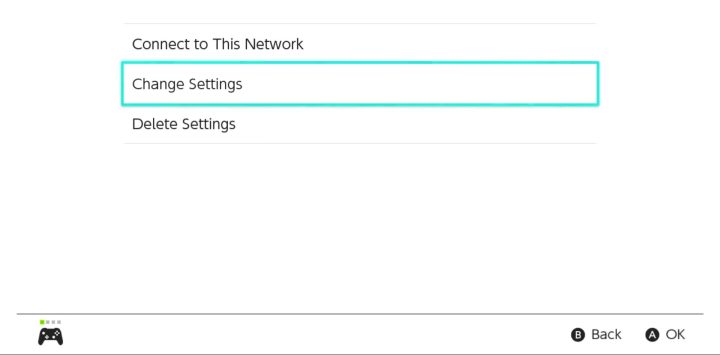
Step 2: Choose your network and click on Change Settings.
Nintendo
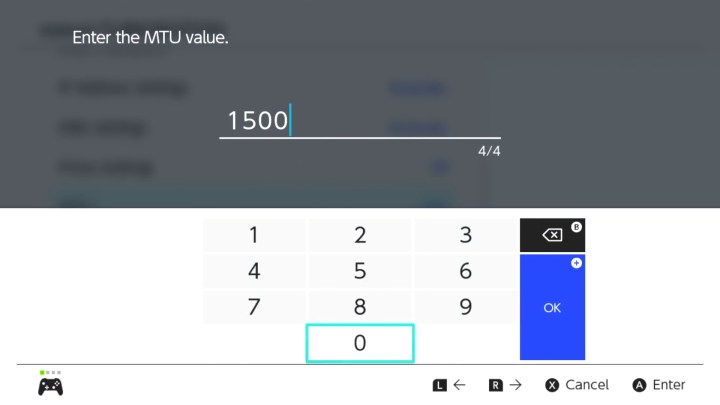
Step 3: Scroll until you find the MTU option. The default setting is usually at 1,400, but we need to change it to 1,500.
Nintendo
Clear Your Network
Also, try to disable or disconnect any other devices sharing the same network. The more devices connected, the less bandwidth available for each, so having just your Switch online will maximize its speed.