Whether you’re using macOS or Windows, we’ve got you covered when it comes to managing your email efficiently in Outlook. No more waiting until the early hours just to send that important message.
You can easily schedule any email in Outlook, whether you’re on the Windows version, the Mac app, or the web browser. Each platform has its own process, and we’ll guide you through each one. Plus, we’ll answer some common questions to make the process even smoother. Here’s how to schedule emails in Outlook across different platforms.
If you accidentally send an email too soon, don’t worry. Outlook allows you to recall messages and try again. And if spam is becoming a problem, we can also help you find ways to stop unwanted emails. Enjoy a more organized and stress-free emailing experience!
NotebookLM users now have an exciting new feature that allows them to discover additional sources online for their notebooks by simply describing their needs. This functionality began to roll out on Wednesday, with Google aiming for complete access within a week.
Previously, when creating a notebook, users had to manually input sources—up to 50 for free users and 300 for paid ones. This involved uploading documents, links to websites, Google Docs, YouTube videos, and other file types to build a comprehensive information library.
While you can still add files manually, the new Discover feature now allows users to enhance their existing sources with fresh information from the web. By typing in a topic of interest, NotebookLM will search for hundreds of relevant sources, evaluate their significance, and present up to ten options, each accompanied by a brief summary.
You can easily add the suggested sources to your notebook with a single click. These sources function just like manually added ones, allowing you to ask NotebookLM’s AI model natural language questions about them. Notably, you can specify which sources to include or exclude when making inquiries.
The aim is for NotebookLM to rely solely on information from your selected sources, rather than random details from the internet. It will also provide citations to indicate where the information originated, enabling you to jump directly to the relevant section of the source for more context.
Whether conducting research or jotting down your own notes, you can generate insights based on the AI’s responses or contribute your own notes as supplementary sources for future sessions.
More popular features, such as Audio Overviews, are now available on Gemini alongside the new Mind Maps feature that was introduced recently.
NotebookLM only incorporates sources that you approve, allowing you to view the full original content, decide when to use them, see citations when referenced, and remove any entries later if desired. This should simplify maintaining your notebooks and help eliminate any misinformation that may inadvertently enter them.
Explore our extensive coverage of Mobile World Congress.
Updated just a moment ago
Opera is stepping into the future of AI-driven browsing with a groundbreaking feature called Browser Operator, showcased at MWC 2025. This innovative tool transforms simple written queries into actionable commands, streamlining the web surfing experience and reducing the need for users to manually navigate through different pages.
Simply type your request in everyday language, and Browser Operator does the rest. For instance, if you need to secure three concert tickets, just instruct the Operator, and it will handle the selection and booking process, guiding you to the final payment stage without hassle.
As this browsing assistant springs into action, users will receive a detailed breakdown of the actions taken, akin to an AI reasoning model. The Operator can tackle complex multi-step tasks while keeping track of context from prior interactions.
How does Operator work?
Nadeem Sarwar / Digital Trends
This tool doesn’t operate fully autonomously; Opera has designed it to require user confirmation at sensitive points, like entering personal information such as phone numbers or vehicle details. The technology relies on the AI Composer Engine, intelligently parsing user inputs into specific browsing directives.
One of the standout aspects of the Browser Operator is that it functions locally on your device rather than relying on cloud processing, ensuring that user data remains private. According to Opera, “the Browser Operator runs natively inside your browser,” protecting sensitive information such as cookies and browsing history.
The AI’s approach differs from traditional web interactions, as it emphasizes a text-based comprehension of webpages rather than treating them as static images. This efficiency accelerates the browsing process significantly.
Moreover, the Operator effectively interacts with elements that might be overlooked by users, such as pop-ups and verification prompts. If it encounters steps requiring user action, it will prompt the individual to temporarily take control.
Nadeem Sarwar / Digital Trends
Opera describes its process as a “human-in-the-loop” methodology, where users can either navigate the webpage themselves or input necessary details directly into the Operator chat interface. It’s essential to note that at no point does the Operator retain any data, as that information is intended solely for processing by the website.
The Browser Operator is currently in its preview stage, with plans for a feature rollout in the “near future.” It’s worth mentioning that Opera isn’t the only player in the field; OpenAI has also created its version called Operator, and Gemini Deep Research offers another web-centric agentic AI solution.
The competition among web browsers is intensifying. Firefox is testing a new approach to attract users by automatically designating itself as the default browser during installation.
This initiative employs an attribution campaign that allows Firefox, recognized as a strong competitor in the browser market, to set itself as the default without the usual step of changing settings in Windows. Upon downloading Firefox, it will automatically take on the role of your main web browser through the set_default_browser campaign.
Mozilla detailed this in a bug note titled “Support setting Firefox as default based on installer attribution campaign.” This update introduces a startup task that sets Firefox as the default if an attribution ID of ‘set_default_browser’ is detected during the initial run. This measure supports a future experiment allowing users to select a ‘download as default’ option via the stub installer marketing interface.
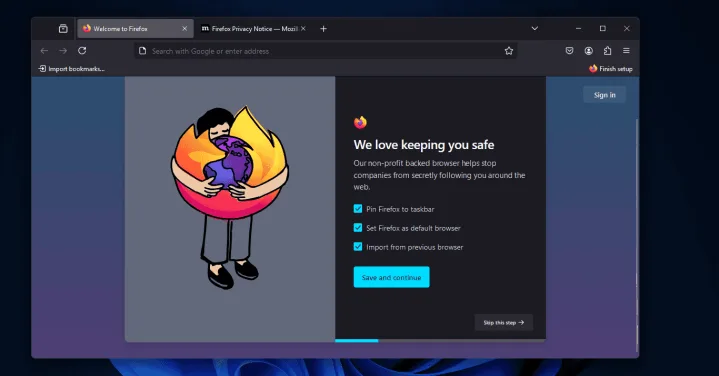
As highlighted by Windows Report, Firefox’s installation process involves automatically selecting options that include pinning the browser to the taskbar, designating it as the default browser, and importing data from any previous browser used. When opting to make Firefox the default, the installation prompts will guide you to the Windows settings for confirmation.
This approach essentially simplifies the process of adjusting Windows settings post-installation, especially for users unfamiliar with how to change their default web browser or those who might forget to do so. While this change may seem harmless, it is a significant move in the competitive landscape where Edge, Chrome, and Firefox vie for dominance on user devices. Notably, Microsoft has employed various strategies to divert users away from other browsers, leveraging its control over the Windows operating system. Mozilla has openly critiqued this behavior in the past.
“There needs to be more respect for users’ default browser choices in Windows. Users should have a clear and straightforward way to define their defaults, and all operating systems must provide proper developer support for upholding default status,” remarked a Mozilla spokesperson previously.
The Arc browser has certainly revitalized the often-stagnant browser market, but The Browser Company is just getting started. In a recent YouTube video, co-founder and CEO Josh Miller revealed that a completely new browser is currently in development.
While details about its name and launch timeline remain undisclosed, the focus is on creating a seamless experience for users right from the start. The company aims to ensure that the initial moments with the new browser feel effortless, showcasing its capabilities right away.
As the team works on this new project, Miller confirmed that updates for Arc will persist, addressing significant bugs and enhancing stability. The team is keen to hear from users and is committed to refining the current feature set based on user feedback.
The goal is to provide a more accessible and streamlined experience with the upcoming browser. The Browser Company has invested considerable time into this new project, envisioning it as a proactive app platform with a strong emphasis on AI integration. The intention is to craft a browser that surpasses Arc in user engagement and functionality.
Some innovations the company is considering include horizontal tabs and automation for common tasks, such as transferring data between different applications or retrieving order numbers for customer service. Although no specific release date has been confirmed, speculation suggests a potential launch in early 2025 or later that same year.
Miller acknowledges the complexities of Arc’s design and its appeal, especially among tech-savvy users. It remains to be seen what core features will define this new browser, along with its unveiling details.
Social media platforms are increasingly incorporating paid features that enhance user experience while also boosting visibility and status on their networks. The most troubling of these features is the paid verification checkmark. It’s a pay-to-win system, and honestly, I’m quite fed up with it.
1 It’s Tougher to Distinguish Authentic Accounts
Before the rise of paid verification, identifying real accounts from fake ones was relatively straightforward. Blue checkmarks were once known as verification badges, specifically designed to confirm that an account genuinely belonged to the person, business, or organization it claimed to represent. These badges were not tied to a subscription or a paid service.
Now that some social media platforms allow users to purchase these badges, the distinction between genuine and fake accounts has become increasingly murky. This compromises the overall experience of social media for me, making me question the authenticity of accounts that display this mark. For instance, during a recent test on X (formerly Twitter), we found that some verified accounts responded to bot-generated prompts, indicating that verification doesn’t necessarily guarantee that an account is a legitimate person.
It’s exhausting to have to take on the responsibility of verifying an account’s authenticity myself. I’d much rather be enjoying spontaneous interactions online than sleuthing for authentic accounts.
2 It Encourages the Spread of Misinformation
With premium features offered by services like X Premium, accounts with dubious credibility can reach a wider audience than ever before. In the hands of the wrong people, this access can become a weapon for disseminating misinformation.
This situation frustrates me immensely because, in addition to validating accounts, I now find myself needing to fact-check information shared on the platform. This task can be not just time-consuming, but also incredibly complicated when navigating complex topics or breaking news.
3 It Fosters Inequality Within the Platform
Similar to what we see with pay-to-win video games, paid features on social media create disparities among users. The most aggravating aspect for me is that when two people engage in a debate, the one with the checkmark is likely to receive more favorable treatment. Many users are unaware that these badges are now just superficial indicators of credibility.
Moreover, these verified accounts often receive an artificial push due to algorithmic biases on certain platforms. This creates an uneven playing field, disadvantaging those who choose not to pay for added visibility.
4 Paid Credibility Reflects Poorly on Everyone
As more people recognize that paid verification often equates to paid influence, this presents a double-edged sword.
On one side, it signals a decline in the perceived value of verified badges. However, those who genuinely appreciate the perks of these features are often grouped with individuals merely chasing after clout.
This shift negatively impacts everyone involved, including social media companies, as it undermines their credibility.
5 It Simplifies Scamming Users
While individuals can always take steps to safeguard themselves on social media, platforms also have a responsibility to prevent misuse of their systems that could endanger users. Accounts equipped with paid features can exploit their false sense of legitimacy to scam unsuspecting users.
On X, users can control who can message them. However, there’s a setting that allows verified users to send message requests, effectively letting people pay for broader access to others’ inboxes without the user’s explicit consent.
Although paid verification is unlikely to disappear anytime soon, it’s crucial for social media platforms to ensure that these features are not used to disadvantage their users, be it through misinformation or scams. Ultimately, a balance must be struck between monetization and maintaining a secure environment for everyone.