الوسم: Vision Pro

  • macOS Tahoe Dock: How to Get Vision Pro Transparency Effects

    With the introduction of macOS Tahoe, Apple has enhanced user experience by offering a more visually appealing interface. One of the standout features is the new Dock design, which includes Vision Pro transparency effects. This guide will delve into how you can replicate these stunning visual elements on your macOS system.

    Understanding Vision Pro Transparency Effects

    Vision Pro transparency effects create a seamless blend between the application windows and the Dock, enhancing visual clarity and elegance. This feature makes it easier to focus on tasks while maintaining aesthetic appeal.

    Key Characteristics of Vision Pro Transparency

    • Layered Visuals: Different layers interact to create depth and separation.
    • Dynamic Background: The appearance adjusts based on the active windows and desktop backdrop.
    • Subtle Blur and Opacity: Elements remain discernible without overwhelming distractions, striking a balance between visibility and beauty.

    Enabling Transparency in macOS Tahoe Dock

    If you’re eager to bring these stunning effects to your macOS interface, follow these steps:

    Step 1: Adjusting System Preferences

    1. Open System Preferences:

      • Click on the Apple logo in the top-left corner.
      • Select "System Preferences" from the drop-down menu.

    2. Select Accessibility:

      • Navigate to the "Accessibility" option.

    3. Change Display Settings:

      • Under Display, locate the “Reduce Transparency” checkbox.
      • Ensure it is unchecked to allow full transparency effects.

    Step 2: Customizing Dock Preferences

    1. Access Dock Settings:

      • Back in System Preferences, click on "Dock & Menu Bar."

    2. Modify Dock Appearance:

      • Adjust the size and magnification settings to optimize visibility.
      • Enable “Animate opening applications” to add a dynamic touch.

    Step 3: Using Third-Party Applications

    While macOS Tahoe has built-in features that improve transparency, certain applications can elevate the experience further:

    • Bartender: Organizes menu bar icons for a cleaner look.
    • Moom: Helps manage window arrangements, keeping your desktop free from clutter.
    • Backdropify: Creates dynamic backgrounds that can enhance visual interaction with transparency effects.

    Tweaking Backgrounds for Enhanced Transparency

    A stunning background can amplify the visual effects of the Dock. Consider the following options:

    Custom Wallpapers

    • High-Resolution Images: Use photos with subtle textures or gradients for a sophisticated feel.
    • Dark Mode: Choosing darker images can make the transparency effects pop.

    Live Wallpapers

    • Dynamic Backgrounds: Consider using tools to set live wallpapers that shift and change, providing a lively environment that complements the Dock’s transparency effects.

    Additional Tips for Optimizing Your macOS Tahoe Experience

    In addition to enabling transparency effects, consider these enhancements:

    Utilize Stacks for Better Organization

    • Organize Files: Right-click on the desktop and select “Use Stacks” to declutter your workspace.
    • Maintain Focus: Keeps your essential tools easily accessible without distracting clutter.

    Explore Widgets

    • Dashboard Widgets: Use widgets to add frequently accessed information, making your workflow more efficient.
    • Personalization: Experiment with different widget styles that harmonize with your Dock’s aesthetic.

    Customize App Icons

    • Personalized Icons: Change default app icons to ones that suit your theme, enhancing the overall look of your Dock.
    • Icon Packs: Look for icon packs online that fit your aesthetic, creating a unique and cohesive design.

    By following these steps and tips, you can effectively replicate the Vision Pro effects on your macOS Tahoe Dock. Enjoy a more immersive and visually appealing workspace as you navigate your tasks and applications.

  • macOS Tahoe Floating Menus: Enable Vision Pro-Style Interface

    In the evolving landscape of user interfaces, macOS Tahoe introduces a revolutionary feature: floating menus that emulate the aesthetic and functionality of Apple’s Vision Pro. This enhancement aims to transform how users interact with their systems, making navigation more intuitive and visually appealing. By harnessing the power of floating menus, users can experience a new level of productivity and creativity.

    What Are Floating Menus?

    Floating menus are dynamic, context-sensitive interface elements that create an immersive experience. They can hover over other applications and windows, allowing users to access functions without disrupting their workflow.

    Features of Floating Menus

    • Context-Awareness: Menus adapt based on the current application or task.
    • Enhanced Visibility: Options remain visible without requiring excessive clicks or navigation.
    • Dynamic Interaction: Users can drag and drop items directly onto floating menus for quick actions.

    How to Enable Floating Menus in macOS Tahoe

    Activating floating menus in macOS Tahoe is straightforward. Follow these steps to enhance your user experience:

    Step-by-Step Guide

    1. Open System Preferences:

      • Click on the Apple logo in the top-left corner.
      • Select "System Preferences" from the dropdown menu.

    2. Navigate to Accessibility:

      • Find and click on "Accessibility."

    3. Access Display Settings:

      • Choose "Display" from the left sidebar.
      • Look for the option labeled "Enable Floating Menus."

    4. Customize Preferences:

      • Adjust settings such as transparency and size to fit your personal style.
      • Enable or disable specific features like auto-hide to streamline your workspace.

    5. Test the Interface:

      • Open various applications to see floating menus in action.

    Benefits of Using Floating Menus

    Integrating floating menus into your workflow offers multiple advantages:

    Increased Efficiency

    • Immediate Access: Menus are accessible at a glance, eliminating the need for deep navigation.
    • Simplified Actions: Common tasks can be performed directly via the floating menu.

    Improved Multitasking

    • Flexible Layout: Float menus allow users to keep essential functions visible while working on other tasks.
    • Enhanced Workflow: Users can switch between tasks without losing focus or interrupting their flow.

    Aesthetic Appeal

    • Sleek Design: Matches the modern aesthetic of macOS, providing a seamless visual experience.
    • Customizable Options: Personalization enhances user satisfaction and ease of use.

    Tips for Maximizing Your Experience

    To fully leverage floating menus in your macOS Tahoe interface, consider the following tips:

    • Explore Third-Party Apps: Some applications integrate well with floating menus, enhancing functionality.
    • Keep It Organized: Use groups or categories in your floating menus for better efficiency.
    • Stay Updated: Regularly check for updates to macOS Tahoe, as new features may emerge.

    Popular Use Cases for Floating Menus

    Floating menus can greatly benefit various user types. Here are some examples:

    Designers and Creatives

    • Quick Access to Tools: Easily switch between brushes, layers, and other tools in design software.
    • Preview Options: Instantly see adjustments without navigating away from the main workspace.

    Developers

    • Streamlined Coding Environments: Access frequently used snippets or commands without cluttering the screen.
    • Real-Time Testing: Quickly shift between testing and coding views.

    Everyday Users

    • Enhanced File Management: Drag and drop files directly from folders to applications or clouds without excessive clicking.
    • Simplified Settings Access: Quickly modify system settings without navigating through menus.

    By embracing the floating menus of macOS Tahoe, users are not just enhancing their workflow; they’re stepping into a future of computing that prioritizes efficiency and design. Experience the elegance and functionality firsthand, and transform how you interact with your Mac.

  • iOS 26 Design: Will Your iPhone Look Like Apple Vision Pro?

    As technology continues to evolve at a rapid pace, Apple’s upcoming iOS 26 raises a fascinating question: will the design aesthetics of the iPhone mirror that of the Apple Vision Pro? In this article, we’ll explore the features expected in iOS 26 and how they might reflect the design philosophies of the Vision Pro.

    The Apple Vision Pro: A Brief Overview

    Before diving into iOS 26, it’s essential to understand what the Apple Vision Pro represents. Launched as Apple’s first mixed-reality headset, it has generated considerable excitement due to its innovative features.

    Key Features of the Apple Vision Pro

    • Immersive User Experience: Combines digital content with the physical world seamlessly.
    • Advanced Display Technology: Offers high-resolution visuals and spatial audio.
    • Intuitive Controls: Users can navigate using eye tracking, gestures, and voice commands.

    These features signal a shift towards more immersive and interactive design in Apple’s ecosystem.

    Expected Features in iOS 26

    With the anticipation surrounding iOS 26, many are speculating how its design might reflect the principles seen in the Vision Pro. Here are some features that may be incorporated into the iOS 26 interface:

    1. Enhanced Visual Components

    • Rich User Interfaces: Expect a more vibrant and dynamic UI, similar to the Vision Pro’s engaging visuals.
    • Spatial Layouts: Object placement could be designed to emphasize depth, making navigation more intuitive.

    2. Integration of AR Capabilities

    • Augmented Reality Features: iOS 26 might include tools that allow for the seamless integration of AR into everyday tasks.
    • Enhanced Interaction: AR applications may utilize your environment, enhancing how you interact with your device.

    3. Voice and Gesture Controls

    • Natural Language Processing: Improvements in voice recognition could lead to more conversational interfaces.
    • Gesture Controls: Following the Vision Pro’s lead, iOS 26 could implement gesture-based commands for significant functions.

    User Interface Evolution: Practical Implications

    If the design elements of the Apple Vision Pro are adopted for iOS 26, users can expect significant changes in how they interact with their iPhones.

    Potential Design Changes

    • Fluid Transitions: Smooth animations and transitions reflecting real-world interactions.
    • 3D Elements: Incorporation of three-dimensional elements for notifications, apps, and widgets, enhancing usability.

    User Experience Enhancements

    • Personalized Content Delivery: The interface may adapt to user preferences much like the Vision Pro does in its environments.
    • Haptic Feedback: Enhanced tactile feedback to make interactions more engaging.

    Is Your iPhone Ready for This Transformation?

    While the transition toward designs associated with the Vision Pro is exciting, several factors will influence how quickly and effectively these changes are implemented in iPhones.

    Considerations for iPhone Users

    • Device Compatibility: Not all iPhones may support the visual and interactive enhancements of iOS 26.
    • User Preferences: Some users may prefer a more traditional interface, which could impact Apple’s design decisions.

    The Future of iOS Design

    As the boundaries between augmented reality and traditional mobile interfaces blur, the potential for iOS 26 to embrace a design that mirrors the Apple Vision Pro could redefine the user experience. It embodies Apple’s philosophy of innovation while aiming to enhance user engagement.

    By observing the trends and features of the Vision Pro, Apple seems poised to usher in a new era for the iPhone with iOS 26. As we get closer to its release, the excitement and speculation are bound to grow, sparking conversations about the future of mobile technology.

  • iOS 26 Glass Theme: How to Enable Vision Pro-Style Transparency

    With the introduction of iOS 26, Apple has unleashed a fresh wave of design aesthetics that take inspiration from its Vision Pro technology. One of the standout features is the "Glass Theme," which delivers a stunning layer of transparency and depth to your device’s interface. Here’s how to enable this feature and transform your iOS experience.

    What is the Glass Theme?

    The Glass Theme offers users a visually appealing interface inspired by the sleek, transparent designs seen in Vision Pro. This aesthetic aims to create a sense of depth and sophistication, making your iPhone or iPad feel more immersive.

    Key Features of the Glass Theme:

    • Translucent Elements: UI components allow the background to subtly peek through.
    • Vibrant Colors: Enhanced colors and gradients give a modern touch.
    • Lightweight Feel: The design creates an airy, less cluttered space for user interactions.

    How to Enable the Glass Theme in iOS 26

    Enabling the Glass Theme is a simple process. Follow these steps to transform your device’s appearance:

    1. Update to iOS 26

    First, ensure that your device is running on iOS 26. You can check for updates by following these steps:

    • Open the Settings app.
    • Tap on General.
    • Select Software Update and download any available updates.

    2. Accessing Display Settings

    Once your device is updated:

    • Go back to Settings.
    • Tap on Display & Brightness.

    3. Enable the Glass Effect

    To enable the Glass Theme:

    • Scroll down to find Transparency options.
    • Toggle on Enable Glass Theme.

    4. Adjusting Background Effects

    For a more tailored experience:

    • Visit Wallpaper in Settings.
    • Choose Choose a New Wallpaper and select a dynamic or vibrant background to enhance the glass effect.

    Customize Your Experience

    The Glass Theme offers additional customization options to enhance the overall look and functionality. Here’s how to adjust different settings:

    Color and Contrast Adjustments

    • Navigate back to Display & Brightness.
    • Look for Color Filters to fine-tune the visual vibrancy.
    • Experiment with brightness settings to complement the glass aesthetic.

    Widget Customizations

    Widgets also receive the glass treatment, allowing you to enjoy transparency effects right on your Home Screen:

    • Long press on the Home Screen.
    • Tap the + icon to add new widgets.
    • Choose widgets that are compatible with the Glass Theme for an upscale look.

    Accessibility Features

    The Glass Theme includes many accessibility features, allowing everyone to enjoy its sleek design:

    • Larger Text: Adjust text size to ensure readability against transparent backgrounds.
    • Motion Reductions: If animations can be distracting, enable motion reduction under Accessibility > Motion.

    Quick Tips for Enhancing the Glass Theme Experience

    • Opt for Dark Mode: Deep colors contrast beautifully with transparent elements and enhance the glass effect.
    • Update Apps: Ensure that your apps are optimized for the latest features, including the Glass Theme.

    Troubleshooting Common Issues

    If you experience issues with the Glass Theme, consider these steps:

    • Restart Your Device: A simple reboot can resolve minor glitches.
    • Reset Settings: If problems persist, go to Settings > General > Transfer or Reset iPhone > Reset > Reset All Settings to refresh your configurations.

    By embracing the new Glass Theme in iOS 26, users can not only enjoy a visually striking interface but also enhance their overall user experience with the stunning transparency effects that mirror the futuristic look of Vision Pro. Adjust your settings and make your device stand out with this innovative theme!

  • Apple’s Budget Vision Pro Headset May Arrive Early

    Apple’s Budget Vision Pro Headset May Arrive Early


    Although Apple’s Vision Pro headset stands out as a leading device in the XR category, it didn't achieve the anticipated success. Its hefty price tag of $3,500 likely scared off many potential buyers, coupled with the absence of a strong computing ecosystem backing it.

    Nevertheless, Apple remains determined and is reportedly developing a more budget-friendly variant, which might be released sooner than anticipated. As reported by Bloomberg, the launch could coincide with the introduction of the iPhone 17 series later this year.

    Some analysts had previously estimated that the new, less powerful XR headset would take several years to hit the market. However, it seems that fierce competition is hastening Apple's timeline.

    When can we expect Apple’s next XR headset?

    “Everything indicates that the lighter model should launch between late this year and the first half of 2026,” as stated in the Bloomberg report. Previously, there were rumors of a “Vision One” model under development.

    The report also raises an intriguing question: Will Apple discontinue the Vision Pro, or will both versions coexist? “The main uncertainty is whether the lighter version will serve as a replacement for the Vision Pro or as a more affordable option,” it notes.

    This dilemma is compounded by the fact that a flagship successor to the Vision Pro is also in the works. This upcoming model will likely operate in a tethered mode, connecting to a Mac to ensure optimal performance without issues related to battery life or latency.

    What’s the low-cost Apple headset all about?

    Regarding the more affordable headset, Bloomberg has previously indicated that it might feature the upcoming M5 processor. Apple is also set to unveil new Mac and iPad Pro models that will use the same chip later this year.

    The primary changes are expected to be in its size and heft. The headset is projected to be lighter, weighing under a pound. It may retail for roughly $1,500 to $2,500, contrasting sharply with the Vision Pro's $3,500 price tag.

    To complement the lower price point, Apple's budget XR headset is likely to include a lower-resolution display. Specifics on how Apple plans to cut down on weight, including any major design changes, are still unclear.

    However, if the Vision Pro serves as a precedent, merely trimming weight won't be sufficient. The current Vision Pro can be uncomfortable to wear, making it essential for Apple to address this ergonomic issue in the new budget model.

  • New VR Headset Matches Vision Pro Display, Weighs Like iPhone

    New VR Headset Matches Vision Pro Display, Weighs Like iPhone

    Pimax has just unveiled a lightweight PC VR headset that weighs under 200 grams and features stunning 4K microOLED displays for each eye, paired with pancake lenses. This means the Pimax Dream Air offers comparable display specifications to Apple’s Vision Pro but is lighter than an iPhone 16 Pro.

    The design of the Dream Air is reminiscent of the Vision Pro, suggesting that Pimax took cues from Apple’s aesthetic. The images reveal a sleek, curved headset equipped with a single rear strap that cradles the back of the head.

    A sideview of the Pimax Dream Air shows the facial interface and head strap design.
    A sideview of the Pimax Dream Air highlights the facial interface and head strap design. Pimax

    Pimax claims the strap automatically adjusts for a snug fit, and there’s auto lens spacing to align perfectly with your eyes. This feature is essential, as the Pimax Dream Air includes eye-tracking capabilities.

    The Pimax Dream Air's head strap automatically tightens for the perfect fit.
    The Pimax Dream Air’s head strap automatically adjusts for a perfect fit. Pimax

    This feature allows the Dream Air to be easily shared among users, unlike the Vision Pro, which necessitates a face scan for a proper fit before purchase.

    Pimax has built a reputation for developing high-end PC VR headsets that often come with heavy and cumbersome headsets that require a VR-ready PC. However, the Dream Air represents a shift in Pimax’s approach, potentially reshaping our expectations.

    Like the Pimax Crystal and the $800 Crystal Light, the Dream Air is expected to deliver top-notch performance when connected to a Windows PC with a robust graphics card. It connects with a 5-meter USB-C cable, necessitating a computer capable of supporting DisplayPort over USB.

    Boasting a resolution of 3840 × 3552 pixels per eye at 90Hz, the headset presents a challenge for older GPUs. Nonetheless, Pimax has incorporated foveated rendering and upscaling techniques to alleviate some of the performance demands. While detailed system specifications are not yet available, a powerful gaming PC will undoubtedly be essential.

    A render shows a closeup of the Pimax Dream Air facial interface.
    A render displays a detailed view of the Pimax Dream Air facial interface. Pimax

    The Pimax Dream Air is equipped with inside-out tracking, eliminating the need for external base stations. Additionally, Pimax has introduced new controllers devoid of rings, resembling the Touch Plus controllers that come with Meta’s budget-friendly Quest 3 and 3S. Users can also take advantage of hand-tracking, making it possible to use the headset without controllers for certain games.

    The Pimax Dream Air has impressive specifications.
    The Pimax Dream Air boasts remarkable specifications. Pimax

    Pimax has also introduced an optional Cobb compute puck, powered by a Qualcomm Snapdragon XR2 chip. It’s yet to be confirmed whether it will feature the original XR2 or the newer Snapdragon XR2 Gen 2 found in the Quest 3 and 3S. When connected to the Dream Air, users should be able to access certain functionalities without the need for a PC.

    This feature could be particularly beneficial while traveling, as it may allow for video playback or casual gaming and browsing. However, details regarding pricing and complete specifications for Cobb remain undisclosed.

    In summary, the Pimax Dream Air presents itself as a fascinating PC VR gaming headset packed with impressive features in a compact and remarkably lightweight design. The added potential for mobile usage with the Cobb accessory enhances its appeal, suggesting it may become one of the leading VR headsets on the market.

    Pimax has announced that the Dream Air will begin shipping in May 2025. With only five months before this timeline, the company must act swiftly to meet this commitment. Given Pimax’s history of product shipping delays, it wouldn’t be unexpected if the Dream Air’s release ends up being pushed back to later in the year.

    The Pimax Dream Air is currently available for preorder on Pimax’s official website, priced at an attractive $1,895 ($1,199 for the preorder and $697 due upon shipping). Additionally, purchasers have the option for a 14-day trial period after receiving the headset, allowing for a full refund if they are not satisfied.

  • Apple May Partner With Sony For Key Vision Pro Upgrade

    Apple May Partner With Sony For Key Vision Pro Upgrade

    Apple’s Vision Pro headset has not achieved the transformative success the company anticipated. The hefty price of $3,500 has deterred some users, while the VR gaming ecosystem has not met expectations, an essential component for growth in this market. In response, Apple is now teaming up with Sony to bolster its gaming capabilities.

    According to a report from Bloomberg, the two firms are collaborating to integrate support for the PlayStation VR 2 controllers with Apple’s expensive headset. The report notes, “Apple has talked to third-party developers, encouraging them to add compatibility with their games.”

    Interestingly, while both Apple and Sony were expected to announce controller compatibility recently, technical challenges have delayed this confirmation. There’s currently no set timeline for when this partnership will be finalized, with the possibility of it being scrapped altogether.

    As part of this collaboration, Sony plans to offer the PlayStation VR 2 controller through Apple’s online store as well as in physical retail locations. Apple’s storefront already features various third-party accessories, including the Sony PlayStation DualSense Wireless controller.

    Thus far, the Vision Pro has struggled to support third-party VR controllers effectively, although it does work with standard gamepads from manufacturers such as Sony, Microsoft, and 8BitDo. This limitation has negatively impacted the device’s aspirations within the VR gaming landscape.

    Many VR games rely heavily on specialized motion controllers, making the transition to hand and eye tracking a complex challenge. In contrast, Apple has embraced gesture controls based on hand and eye movements for the Vision Pro’s functionality.

    Despite this focus, Apple recognizes the utility of physical controllers for accurate interactions and the enhanced experience provided by haptic feedback in virtual reality, especially in gaming. Reports indicate that Apple previously considered dedicated VR accessories for the Vision Pro but ultimately scrapped those plans.

    According to a Bloomberg article from 2023, Apple explored the idea of a finger-worn device for controlling the headset and looked into using third-party VR controllers, such as those offered by HTC. However, the company ultimately decided to prioritize hand and eye tracking technology over the use of physical controllers.

    The partnership with Sony not only holds promise for enhancing VR gaming on the Vision Pro but may also improve navigation across the visionOS platform. The collaboration aims to optimize features of the PlayStation VR 2 controller—like the D-Pad, triggers, and thumbsticks—for various tasks, including scrolling and clicking.

    This would benefit users who prefer a more tactile interaction with the system rather than relying solely on gestures. Beyond such corporate partnerships, there are initiatives, like iVRy, aimed at introducing SteamVR support to the Vision Pro headset.

    However, whether Apple’s collaboration with Sony will lead to a new range of MFi-certified VR controllers remains uncertain. The same Bloomberg report indicates that Apple has sold only about 500,000 units of the Vision Pro, and enthusiasm among developers for creating exclusive titles for the headset seems lukewarm at best.

  • Forgotten Apple Patent Unveils Vision Pro’s Original Idea

    Forgotten Apple Patent Unveils Vision Pro’s Original Idea

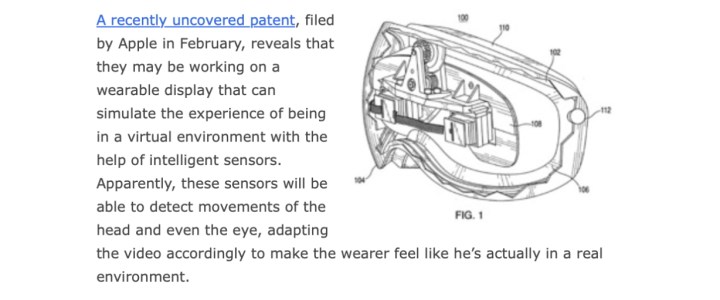
    A previously overlooked Apple patent from 2008 indicates that the tech giant has been developing the Vision Pro for an extended period. This patent was discovered by Dan Moren from Macworld while he was exploring the Internet Archive. Although the old documentation includes just a single diagram, it strikingly resembles the Vision Pro’s display panel.

    The patent details a wearable display equipped with advanced sensors designed to “mimic the sensation of being in a virtual environment.” It also notes that these sensors would be capable of monitoring head and eye movements. Although the technology Apple envisioned during that time likely varies significantly from what’s currently used, the overall design and form factor of the headset show remarkable consistency.

    Screenshot of an old Apple patent for the Vision Pro.
    An image of the archived article Macworld

    It’s common knowledge that Apple and various tech companies pursue patents extensively, leading many to assume back in 2008 that this concept would never see the light of day. However, the tech industry thrives on long-term projects—take Meta’s Orion initiative, which is a decade in the making and still years away from release.

    The existence of this patent doesn’t definitively mean that Apple was actively pursuing the Vision Pro back in 2008. It might have simply served as a conceptual exploration, patented for potential future applications. If Apple did seriously consider creating the device, it wouldn’t have taken extensive research to determine that achieving the desired size, weight, and cost benchmarks at that time would have been virtually impossible.

    Looking ahead, speculation surrounds both a second-generation Vision Pro and a more affordable version of the current model. The specifics of Apple’s plans remain uncertain, but there’s a clear consumer demand for enhancements in both weight and pricing.

  • Apple’s Enhanced Vision Pro Headset Could Come Sooner

    Apple’s Enhanced Vision Pro Headset Could Come Sooner

    While Apple’s venture into the XR wearable market hasn’t matched the explosive success of the iPhone or Apple Watch, the tech giant is determined to push forward with future models. Although initial plans for a more affordable headset may have been put on the back burner, a new version of the Vision Pro could be released in approximately a year.

    In a recent edition of his PowerOn newsletter, Mark Gurman from Bloomberg suggests that Apple is considering launching the second-generation Vision Pro headset sometime between Fall 2025 and Spring 2026. This timeline aligns with the typical schedule for unveiling updated iPhones and intermittent Mac hardware.

    Reports indicate that Apple is exploring various design concepts for this next-generation headset. However, Gurman asserts that one design option for the Vision Pro 2 closely resembles its predecessor. This approach is in line with Apple’s history, where internal hardware revisions often occur without altering the external design across their iPhone, Mac, or Apple Watch lines.

    This seems like a logical strategy for the Vision Pro successor since it represents some of the most advanced engineering Apple has offered in years. Maintaining the foundational architecture while enhancing processing capabilities and optimizing software would be a sensible move, especially considering the company’s substantial investment in research and development.

    A person wearing the Apple Vision Pro demo unit in an Apple Store.
    Christine Romero-Chan / Digital Trends

    On the topic of enhancements, previous reports from Bloomberg have indicated that the second-generation Vision Pro is expected to be fitted with M5 silicon. Currently, Apple is in the process of refreshing its Mac lineup with M4 series processors, an effort anticipated to extend into 2025.

    Industry analyst Ming-Chi Kuo believes that the new Vision Pro headset could begin production in the latter half of 2025, transitioning from an M2 to an M5-class processor. Another significant upgrade may include expanded capabilities for Apple Intelligence.

    In addition, Apple has started examining the development of smart glasses. Earlier this year, companies like Meta and Snap showcased their innovative smart glasses focused on interactive AR applications, built on custom hardware. Apple seems poised to enter this competitive space as well.

    Gurman notes, “With smart glasses, the company could take various approaches, including creating a glasses version of its AirPods.” For the time being, Apple has not publicly addressed its eventual ambitions in the XR sector, so it’s essential to approach these predictions with cautious optimism.

  • Long Wait Ahead For A Cheaper Vision Pro

    Long Wait Ahead For A Cheaper Vision Pro

    It seems that Apple has decided to put the development of a more budget-friendly alternative to its $3,500 Vision Pro mixed-reality headset on hold. In January of this year, The Information reported that a less expensive variant with simplified features could be released sometime in 2025.

    Recently, well-known supply chain analyst Ming-Chi Kuo indicated that this cost-effective headset may not be available for purchase in the next three years. Kuo stated on X, “As far as I know, the production of the lower-priced Vision Pro has been postponed beyond 2027 for some time now.”

    Per a report from Bloomberg, Apple had plans to release a lower-priced model even before the Vision Pro’s debut. Initially codenamed N107, this version was anticipated to arrive by late 2025.

    Apple was reportedly aiming for a pricing range between $1,500 and $2,000 for this trimmed-down model, which would likely omit certain features like the EyeSight display and potentially utilize lower-resolution screens.A person wearing the Apple Vision Pro demo unit in an Apple Store.

    However, the Vision Pro has faced a lukewarm reception, partly due to the absence of compelling use cases. Kuo echoed this sentiment, suggesting that Apple’s decision to delay the lower-cost Vision Pro stems from the realization that simply lowering the price would not generate effective use cases.

    Kuo also mentioned that Apple could use the time to release an updated Vision Pro featuring the next-gen M5 silicon, as the current model relies on the 8-core M2 processor paired with an R1 co-processor.

    In response to a user’s question on the same platform, Kuo emphasized that what Apple considers an affordable alternative to the Vision Pro might still be perceived as expensive when judged against its competitors. This situation is further complicated by the specialized software ecosystem associated with the headset.

    Looking at the broader industry, gaming remains the leading force driving demand in the extended reality (XR) wearables market, yet mainstream options are considerably more budget-friendly. For instance, the Meta Quest 3S starts at just $300, while the Quest 3 is available for around $500, frequently discounted.

    Christine wearing the Apple Vision Pro demo unit.
    Christine Romero-Chan / Digital Trends

    The flagship Quest Pro, by contrast, has a price tag of $1,000. Additionally, devices like Xreal, RayNeo, and Viture have established a loyal following in the smart glasses sector, primarily targeting content consumption and gaming enthusiasts.

    Both Meta and Snap have recently showcased their visions for advanced VR applications, with Google and Samsung also developing their own smart glasses. Qualcomm is expected to supply the required silicon, according to CNBC.

    Apple has not officially addressed its plans for smart glasses, although speculation suggests that the company is considering this direction for the future. Until further developments occur, Apple’s XR strategy likely hinges on the Vision line’s success. Whether Apple can establish itself as a significant player in this competitive space remains to be seen.

  • Samsung’s Vision Pro Rival Moves Closer To 2025 Launch

    Samsung’s Vision Pro Rival Moves Closer To 2025 Launch

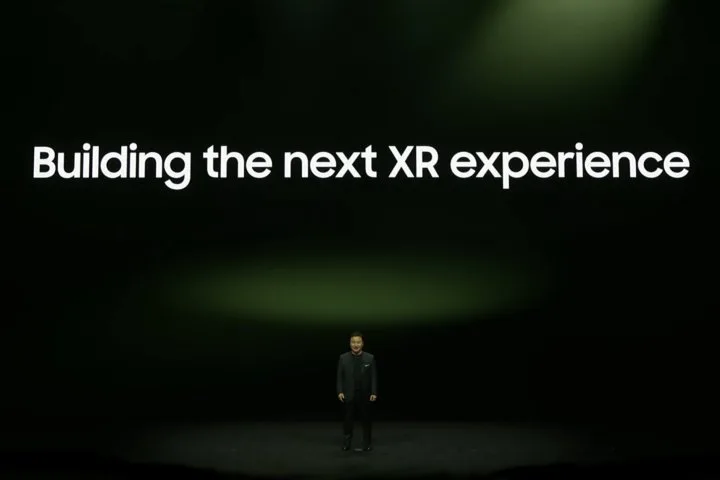
    Samsung's TM Roh discusses XR initiatives at the 2023 Galaxy Unpacked event.
    Samsung’s TM Roh discusses XR initiatives at the 2023 Galaxy Unpacked event.
    Samsung

    Samsung has officially stated that it plans to introduce an XR device, projected to be released next year.

    In its latest third-quarter earnings report, the company provided updates regarding its extended reality (XR) project, previously indicating a 2024 rollout. Now, Samsung aims to enhance connectivity across its devices, including the forthcoming XR offerings, targeting a launch for 2025.

    Although specific details about the XR devices were not disclosed in the earnings report, there’s already a buzz surrounding these potential products. Samsung has been collaborating with Qualcomm and Google since 2023 on a mixed-reality product capable of supporting augmented reality (AR), virtual reality (VR), and XR functions.

    Despite the lack of details about this collaboration, it’s reasonable to speculate how it may unfold. Samsung will likely contribute its branding, design, and user experience, while Qualcomm will supply the chipset, and Google will develop the software. Qualcomm’s latest XR chip, the Snapdragon XR2+ Gen 2, became available in January 2024. The three companies reaffirmed their intentions during Samsung’s Galaxy Unpacked event in July.

    The uncertainty surrounding Samsung’s XR device may stem from the limited information available about its features. However, a recent report from Android Authority highlighted an update to the Google Play Store, which now includes support for XR headset app installations, coinciding with Samsung’s third-quarter guidance release. Notably, no other Android manufacturers are currently known to be developing XR devices, suggesting that Google is positioning itself in anticipation of its collaboration with Samsung.

    A person wearing the Sony XR headset.
    The Sony XR headset
    Sony

    Samsung has now confirmed a projected timeline for 2025. In fact, Business Insider reported as early as July that the Samsung XR project would not see a 2024 launch, potentially debuting in March 2025 instead.

    While there have been no updates until now, industry analysts anticipate that this device could compete with the Apple Vision Pro, which launched in February at a price of $3,500. Previous reports have suggested that the Android-based XR platform might retail between $1,000 and $1,500.

    Samsung and Apple are not the only players in the XR space. Sony has showcased its upcoming XR headset since July, and Meta is actively collaborating with companies such as Lenovo and Asus for future headsets in its Horizon OS ecosystem, following the recent release of the Quest 3S.

  • Vision Pro Suspended Due To Weak Demand

    Vision Pro Suspended Due To Weak Demand

    The Vision Pro made a notable entrance earlier this year, but a recent report indicates that interest has significantly dwindled since its debut.

    Despite being available for just eight months, The Information has revealed that production is set to be halted next month due to “weak demand,” with some suppliers ceasing component manufacturing as early as this past summer.

    https://t.co/rAAxAGDLEv

    Apple may suspend production of the Vision Pro as soon as next month due to low demand, with some suppliers having already halted component manufacturing since early summer. For more details, check out my latest scoop with @QianerLiu at @theinformation.

    — Wayne Ma (@waynema) October 23, 2024

    The Vision Pro was never intended for the mass market, as its $3,499 price tag typically excludes it from broad consumer appeal. Apple has acknowledged this fact, but if the production pause is indeed happening, it could hint at troubling times ahead for this innovative technology.

    This news follows a candid interview with CEO Tim Cook, who stated, “At $3,500, it’s not a mass-market product. Right now, it’s an early-adopter product. It’s designed for those who want cutting-edge technology today. Fortunately, there are enough early adopters to keep it exciting.”

    This somewhat optimistic perspective contrasts sharply with the more pessimistic insights from The Information’s sources. However, Apple does have plans for future headsets, including a more affordable model and an anticipated Vision Pro 2. The lower-cost version is expected to arrive in 2025, while the Vision Pro 2 is projected for 2026.

    Interestingly, earlier reports indicated that Apple might have slowed down development on the Vision Pro 2 to focus on the cheaper variant.

    Regardless of how one assesses the situation, it’s concerning that the Vision Pro lacks sufficient market demand to sustain production, particularly for a device that is not updated annually. Similarly, Meta has also halted production on its Quest Pro, with its next iteration potentially delayed until 2027.

  • Apple Vision Pro Review (2024)

    Apple Vision Pro Review (2024)

    Apple’s Vision Pro shatters expectations for mixed reality headsets, but does its groundbreaking tech come at the cost of comfort and immersion?

    From Retina to Reality: Apple Vision Pro Redefines How We See the World (and Each Other)

    Imagine a world where virtual desktops float in your living room, where apps dance along your fingers, and where digital avatars seamlessly blend with your real-life interactions. This isn’t a scene from a sci-fi flick – it’s the promise of Apple’s Vision Pro, the mixed-reality headset that’s rewriting the rules of how we engage with technology.

    reading article on apple vision pro
    Apple

    Priced at a whopping $3,499, the Vision Pro sits firmly in the “cutting-edge, early adopter” territory. But is it worth the hefty price tag? After spending a few hours immersed in its virtual world, I have some answers, some doubts, and a whole lot of excitement for the future of mixed reality.

    Eye-Popping Vision, Groundbreaking Blending

    One thing’s clear – the Vision Pro’s visuals are absolutely bonkers. Imagine strapping on two 4K screens, each pixel a mere 23 microns in size, and gazing into a world so sharp you could read an eye chart off a virtual billboard. Text shimmers with clarity, colors explode with vibrancy, and even the finest details in 3D models are rendered with meticulous precision.

    Project management vision pro
    Apple

    But the Vision Pro isn’t just about stunning pixels. It’s about seamlessly blending the virtual and the real. With its clever video passthrough feature, the headset projects a “persona” – a digital avatar of your eyes – onto the front, allowing onlookers to connect with you even amidst the digital landscapes. It’s an ingenious step towards eliminating the isolation often associated with VR, fostering a sense of shared experience that feels revolutionary.

    Gestures on the Go, Control at Your Fingertips

    Controlling the Vision Pro is as intuitive as scrolling through your iPhone. Eye tracking is pinpoint accurate, letting you select objects and navigate menus with just a glance. Hand gestures, familiar from your iPad, translate seamlessly into the virtual world, allowing you to toss apps around, resize windows, and interact with objects with an almost magical ease.

    Immersion: A Two-Sided Coin

    iMessage on Vision Pro
    Apple

    While the Vision Pro’s visual fidelity is undeniable, the marketing materials might paint a slightly rosier picture of its immersive abilities. Black borders remain visible in your peripheral vision, reminding you of the physical barrier between you and the virtual world. It’s an immersion trade-off for the constant awareness of your surroundings, and whether it works for you depends on your VR preferences.

    Comfort Counts, But So Does Balance

    The Vision Pro isn’t the lightest kid on the block, but Apple knows how to distribute weight. The sleek design feels surprisingly comfortable, thanks to the clever balance achieved by the backstrap. Sure, you wouldn’t wear it for a marathon movie session, but for focused work or short bursts of virtual exploration, it’s surprisingly pleasant.

    A Glimpse of the Future, But Not Without Kinks

    Vision Pro Interface
    Apple

    Is the Apple Vision Pro a perfect device? No. It’s expensive, has its immersion limitations, and might leave your neck a tad sore after a while. But what it is, undoubtedly, is a groundbreaking step forward for mixed reality. It’s a glimpse into a future where the virtual and real worlds intertwine seamlessly, where information floats at your fingertips, and where human connection transcends physical boundaries.

    Apple Vision Pro Review

    The Apple Vision Pro is a technological marvel, paving the way for a future where mixed reality redefines how we work, play, and connect. While its kinks are evident, its groundbreaking features and intuitive design make it a clear winner for early adopters and tech enthusiasts willing to invest in the future. So, strap on your Vision Pro, embrace the blend, and get ready to see the world in a whole new light – and let others see you in it too.

    Pros:

    • Stunning visuals with 4K per eye displays
    • Groundbreaking video passthrough for shared experiences
    • Intuitive eye tracking and gesture control
    • Sleek design and surprisingly comfortable fit

    Cons:

    • High price tag ($3,499)
    • Visible black borders in peripheral vision
    • Not the lightest headset

    Verdict

    ⭐️⭐️⭐️⭐️ 4.5/5 Rating

    Order

    P.S. While the price might sting, remember – this is the first chapter in a whole new book. And with Apple’s track record of innovation, the future chapters of mixed reality look thrilling.

  • Jony Ive’s Vision Pro Patent Paves the Way for a New Interactive Future

    Jony Ive’s Vision Pro Patent Paves the Way for a New Interactive Future

    In the ever-evolving world of technology, a newly granted patent stands out—The Vision Pro patent. An invention that counts Jony Ive, Apple’s former Chief Design Officer, among its innovators. This patent unveils how a head-mounted display’s external screen could signal what the user is seeing or participating in. It may not directly discuss the Vision Pro and its remarkable “EyeSight” display element, but it’s evident that some aspects greatly influenced the finished product’s features.

    One of the Vision Pro headset’s unique attributes, an Apple product, is the outer display. It exhibits vivid abstract designs while the user is deeply absorbed in content, and a visual representation of their eyes when they’re in the augmented reality mode, providing them an awareness of their environment. Thus, hinting at the Vision Pro’s external screen capability to project the user’s eyes or a color scheme symbolizing complete immersion in virtual reality.

    The patent further contains diagrams illustrating the various graphics that the Vision Pro headset’s external display can exhibit at differing intervals. These images represent diverse scenarios such as weather conditions, a stock price graph, a “Do Not Disturb” sign, or even substituting the wearer’s eyes with Zoom icons. However, it’s crucial to understand that owning a patent doesn’t necessarily lead to producing commercial products or features.

    patentvisionpro01

    Amid reports stating that Apple is on the brink of launching the Vision Pro, the patent showcases how the company is considering possibilities to enhance the virtual reality headset’s functionality. Despite this, it’s important to acknowledge that achieving a patent doesn’t guarantee that Apple will incorporate this feature into the Vision Pro headset, either presently or in future.

    This inventive step propels the prospect of an interactive world where we could experience virtual reality in exciting, hitherto-unseen ways. As the grand unveiling of Vision Pro nears, consumers and tech-lovers worldwide eagerly anticipate its potential impact on the virtual reality landscape.