الوسم: video call

  • A Video Call to Space Could Change Mobile Coverage Forever

    A Video Call to Space Could Change Mobile Coverage Forever

    Vodafone, a leading global telecommunications firm, has made strides in communication technology by successfully executing a “space video call” using a conventional mobile phone and commercial satellites. This breakthrough is crucial for addressing mobile coverage gaps, with plans to introduce a direct-to-smartphone broadband satellite service in the UK later this year and across Europe by 2026. However, several hurdles remain before this service can be launched.

    Why is this significant?

    In recent years, brands like Apple, Samsung, and T-Mobile have started integrating satellite communication features into certain smartphones and smartwatches. These features, however, are typically confined to select devices and are designed primarily for emergencies, allowing users to send messages only to emergency services in areas devoid of cellular or Wi-Fi coverage.

    Vodafone aims to provide a comprehensive mobile broadband experience to individuals in regions lacking cellular or Wi-Fi access. The company’s first successful test occurred during a video call originating from a mountainous area in Ceredigion, Wales. Instead of reaching the International Space Station, the call was routed through a satellite, which then relayed it to the land-based network for connection to another device. You can find the demonstration of this technology in the video below.

    As Vodafone’s CEO Margherita Della Valle articulates, this advancement could help eradicate “not spots,” regions currently lacking coverage. “This is a pivotal moment as we pave the way for universal connectivity across the UK, ensuring people are connected, no matter their location,” she noted.

    Is this feasible?

    While Vodafone has achieved a successful test, this does not guarantee immediate availability for consumers within the year. According to the BBC, there are significant regulatory challenges that Vodafone needs to overcome before moving forward. Additionally, astronomers express concerns that an increase in satellites required for such services could hinder space observation.

    Cost is another aspect to consider, as Vodafone has yet to clarify the pricing of this service. Generally, satellite communication can be pricey, potentially restricting access for some users. Furthermore, satellite connections often experience higher latency and reduced bandwidth in comparison to land-based networks, which can impact the quality of video calls. Weather conditions could also disrupt satellite signals, further affecting communication.

    Why this could be groundbreaking

    Satellite image.
    Grok

    The potential for satellite-enabled video calls via smartphones could revolutionize communication, provided current challenges are resolved. This technology holds promise for narrowing the digital divide, ensuring internet access for everyone. Such connectivity improvements could foster social inclusion, boost economic growth, and enhance access to vital services like education and healthcare.

    Additionally, this advancement would allow adventurers, researchers, and travelers in remote locations to stay in touch with loved ones, colleagues, and emergency services, enhancing their safety and security. It would significantly improve real-time communication during crises or natural disasters, supplying first responders with visual information to aid in decision-making and resource allocation.

    Vodafone is not alone in its pursuit of satellite video communication. In the U.S., T-Mobile is testing a similar satellite service, while Apple has introduced a satellite messaging option with the iPhone 14. In collaboration with Motorola and the now-defunct Bullitt Group, MediaTek has also created the Defy Satellite Link dongle for emergency purposes.

  • Why I Choose WhatsApp for All My Voice and Video Calls

    Why I Choose WhatsApp for All My Voice and Video Calls

    I’ve experimented with various platforms for video and voice calls, including Zoom, Skype, and Google Meet. Yet, no matter how popular or innovative new options become, I always end up back on WhatsApp. The ease of use it offers is simply unparalleled. However, convenience isn’t the only motivating factor for my loyalty to this app.

    1 It’s Totally Free

    One of the most attractive features of WhatsApp for video and audio calls is that it is absolutely free. There are no subscription fees, hidden costs, or in-app purchases for its basic functionality. You just need an internet connection, and you’re set!

    When compared to traditional phone calls, particularly international ones, WhatsApp completely removes any financial obstacles. Even against traditional video conferencing tools, it shines because there’s no pressure to pay for upgrades to get better quality or extra features.

    This accessibility makes WhatsApp stand out in a way that few other applications can match. Whether I’m calling a neighbor or a family member across the globe, I appreciate knowing the only charges I might incur are for data usage.

    2 Smooth Integration with Messaging

    WhatsApp is remarkable because it seamlessly merges messaging and calling. Everything takes place in one app. If I’m already chatting with someone and find it easier to explain something over a call, I can switch to voice or video with just a tap—there’s no need to jump between different applications.

    But it’s not just about spontaneous calls. WhatsApp’s Events feature lets you schedule calls directly within a chat. You can arrange a meeting, and WhatsApp will send notifications to you and the person you’re calling. This is ideal for organizing discussions without relying on separate calendar applications or worrying about forgetting them.

    This smooth transition between texting, calling, and now scheduling adds a layer of convenience that is hard to beat. It feels like WhatsApp intuitively understands how modern conversations progress—which is one reason I keep coming back.

    3 Quality and Reliability of Calls

    No matter how many features an app has, it doesn’t matter if the call quality is lacking. WhatsApp has consistently impressed me with its dependable voice and video calls, even under less-than-ideal circumstances.

    Whether I’m using a strong Wi-Fi connection or mobile data on the move, WhatsApp dynamically adapts to ensure a stable call. While there may be occasional glitches—no service is foolproof—these are rare compared to my experiences with other platforms.

    4 Accessibility Across Platforms

    Another reason I trust WhatsApp for all my calls is its compatibility across devices. It works seamlessly on smartphones, tablets, and computers, regardless of whether you’re on Android, iOS, macOS, or Windows.

    This cross-platform functionality means you’re not confined to a specific ecosystem. I can initiate a video call from my laptop, and my call log updates across all devices. I can easily check if I’ve missed any calls, no matter which device I have with me at the time.

    5 Security Features

    Security is paramount when it comes to phone calls, and WhatsApp excels with its end-to-end encryption. Nobody—not even WhatsApp—can eavesdrop on your conversations. Whether it’s a casual hello or a serious talk, I know my calls are private and secure.

    Each WhatsApp call, whether video or voice, has the same level of encryption protection as your messages. The best part is that it’s automatic—there’s no need to adjust settings or pay for premium security. Many other video and voice calling services offer end-to-end encryption, but having it integrated into WhatsApp means I can make calls without needing an additional app. I can stay connected on WhatsApp and not worry about who might be listening.

    WhatsApp is my go-to application for video and voice calls because it simply works—without hassle. Whether I’m catching up with a friend in a different time zone or switching devices mid-call, WhatsApp ensures a smooth experience. Other apps may have their merits, but WhatsApp stands out by focusing on what truly matters: reliable connections, user-friendly tools, and features that feel custom-designed for everyday life.

  • How to Make a Video Call on the Roborock Qrevo Curv: Step-by-Step Guide

    How to Make a Video Call on the Roborock Qrevo Curv: Step-by-Step Guide

    Roborock

    The Roborock Qrevo Curv stands out as one of the top robot vacuum and mop combinations available. With an impressive suction power of up to 18,500 Pa and a striking new dock design, it is both visually appealing and practical for home use. Beyond its aesthetic and cleaning capabilities, Roborock has incorporated a variety of entertaining additional features, one of which is its ability to facilitate video calls.

    The feature, officially recognized as “Remote Viewing,” operates similarly to a video call. While it might not be ideal for chatting with friends and family due to its ground-level perspective, it excels at keeping an eye on your pets. You can activate a setting that allows the Qrevo Curv to roam your home in search of your furry companions, ensuring they’re not getting into trouble, whether it’s raiding the pantry or exploring your houseplants.

    Curious about how to use this functionality? Here’s a guide on setting up a video call with the Roborock Qrevo Curv.

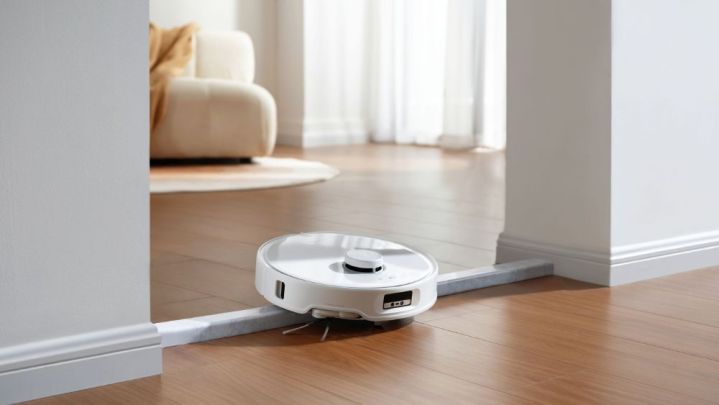
    Qrevo Curv climbing a threshold.
    Roborock

    How to Activate Video Calling on the Roborock Qrevo Curv

    Once you have completed the initial setup and mapped your home, initiating a video call is a straightforward process.

    Step 1: Open the Roborock mobile application.

    Step 2: Select your Qrevo Curv and hit Enter.

    Step 3: Tap on the ellipsis icon located at the top right of your screen.

    Step 4: Access the Remote Viewing section.

    Step 5: To activate Remote Viewing, you’ll need to physically press the Power button on your Qrevo Curv the first time you use this feature, so be near the robot.

    Step 6: You will then create a lock pattern, which will be required for anyone attempting to access Remote Viewing.

    Step 7: Once those steps are complete, Remote Viewing will be ready to go.

    Step 8: Return to your home’s map and click on the camera icon positioned on the right side of the screen to start a Remote Viewing session (input your lock pattern when prompted).

    There are several exciting ways to utilize Remote Viewing in your home. You can manually control the robot by using the buttons on your screen to rotate and move it. Alternatively, pressing the Cruise button allows it to navigate your home automatically, or select Search for the Pet to have it find your pet. Additionally, the Pin ‘n Go feature lets you drop a pin on the map for the robot to navigate to that location.