الوسم: Unlimited

  • MTG Strixhaven Quandrix Unlimited Commander Deck: Completing & Solving Tips

    MTG Strixhaven Quandrix Unlimited Commander Deck: Completing & Solving Tips

    If you’re thinking about getting one of the new Magic: The Gathering Secrets of Strixhaven Commander pre-constructed decks for your next game night, the mysterious Quandrix Unlimited green and blue deck is a solid choice.

    Although the complete deck list isn’t out yet, we have a good idea of some of the key cards and mechanics it will include. If you enjoy boosting your creatures with +1/+1 counters and casting X-cost spells for maximum benefit, this deck aligns with that playstyle.

    Quandrix Unlimited Deck List

    While we wait for the full list, here are some cards we know are likely to be in the deck:

    • Zimone, Infinite Analyst
    • Sol Ring
    • Arcane Signet
    • Talisman of Curiosity

    The full deck list is expected to be revealed between late March and early April, and we will update as more spoilers come out.

    Commander Breakdown

    The main commander for this deck is Zimone, Infinite Analyst. This card has a lot of text, so understanding its abilities is important before you jump into a game:

    • Whenever you cast your first spell with an X cost each turn, it costs one less mana for each +1/+1 counter on Zimone.
    • When you cast your first X spell each turn, you also put two +1/+1 counters on Zimone.

    This makes Zimone a powerful and potentially game-breaking card, especially as you add more counters to it. Focus on creating ways to add counters to Zimone, so you can reduce the cost of your X-spells and cast bigger spells more easily, rapidly shifting the board state in your favor.

    Deck Strategy & Themes

    The deck’s main strategy revolves around two key mechanics:

    • Placing many +1/+1 counters on your creatures.
    • Casting X-cost spells to maximize their impact.

    Zimone only places counters on itself, so you will need other ways to buff your other creatures. Timing your X-spells is crucial—they can be used for various effects like creating tokens or dealing damage to opponent’s creatures. It’s best to cast these spells selectively, choosing the right moment to get the most benefit rather than just going for maximum value every time.

    Upgrades

    There are many ways to boost this deck, especially by adding impactful X-spells. Some potential upgrades may include reprints of powerful cards, once we see the official list.

    Notable Upgrade Options:

    Nissa, Steward of Elements
    This planeswalker is unique because it’s cast with an X-value, giving it a dynamic entry. If you can cast her with at least seven X, her -6 ability becomes available immediately, allowing you to turn two lands into 5/5 flying, haste creatures that stay on the battlefield. This can deal a lot of damage quickly. Her other abilities help with drawing cards and finding lands, making her a flexible upgrade.

    Repulsive Mutation
    An instant that’s great as both an offensive tool and a counterspell. It puts X +1/+1 counters on a creature you control and counters an opponent’s spell unless they pay mana equal to the highest power among your creatures. For example, if you have a creature at 12/12, the opponent must pay 12 mana to cast their spell, effectively making it very hard to counter your big threats.

    Zimone, Paradox Sculptor
    Consider using a different version of the commander for additional synergy. This version can put a +1/+1 counter on up to two creatures at the start of your turn, and with some mana and tapping, can double the counters on those creatures or artifacts, further amplifying your growth.

    Hydroid Krasis
    A versatile X-spell that gains you life and draws cards based on X. When cast, you gain half of X in life and draw that many cards, then it enters with X +1/+1 counters, flying, and trample—making it both a big threat and a sustain source.


    This deck revolves around stacking counters and casting impactful X-spells at the right moments to dominate the game. Keeping your focus on speeding up your threats and controlling the pacing with well-timed spells will give you a strong edge.

  • Xfinity Mobile Premium Unlimited Plan: 5 Key Facts You Should Know

    Xfinity Mobile Premium Unlimited Plan: 5 Key Facts You Should Know


    Xfinity Mobile is raising the bar with its new Premium Unlimited Plan, positioning itself as a formidable competitor to other providers. Whether you're already part of Xfinity Mobile or considering a switch, here are some essential details about this plan.

    The Premium Unlimited plan enhances the existing Unlimited option by adding more features and improving what was already available.

    You can upgrade your phone twice per year

    Xfinity now offers an Elite Upgrade option for its Premium Unlimited Service, allowing upgrades to your phone as often as twice a year, given that you comply with specific requirements. The criteria aren’t as tough as you might assume; you just need to maintain a Premium Unlimited subscription and new subscribers must complete two full billing cycles to qualify.

    After that, you merely purchase a new phone on the 24-month device plan, with the price spread over that duration. To upgrade, you trade in your current phone to have its balance forgiven, which grants you a discount on your new device. If you upgrade twice within a year, you’ll need to wait 12 months from your first upgrade date before you can upgrade a second time, which can only happen after a 60-day waiting period.

    Most individuals likely won't upgrade twice a year, but it's good to know the option exists, especially for those who may switch between brands like Samsung and iPhone.

    Say adios to spam calls

    Another valuable feature is Xfinity Call Guard, which alerts you to potential scam calls. This service allows you to block specific numbers and easily report spam calls. Xfinity describes it as a "force field for your phone," an essential tool given the millions of spam calls made each month.

    Xfinity Mobile is now faster than ever

    Xfinity WiFi PowerBoost can provide speeds exceeding a gig, whether you're at home or on the move. This service utilizes Xfinity’s extensive hotspot network to deliver faster, more secure connections, with over 15 million hotspots available for compatible devices.

    Additionally, subscribers of the Premium Unlimited plan receive 30GB of 5G hotspot data every month, which is perfect for connecting secondary devices. Even once the monthly data limit is reached, users can still utilize the hotspot, albeit at lower speeds.

    You can stream your favorite shows in 4K UHD

    In today’s world, phones are commonly used for streaming, whether it’s Netflix or social media content. Typically, video resolution is around 480p to 720p, with some cases allowing for 1080p streaming.

    The Premium Unlimited plan offers the ability to stream content in ultra-high 4K resolution, enhancing detail and color. Even if you don’t watch a lot of 4K content, the extra bandwidth will reduce buffering significantly.

    Premium Unlimited has no usage caps

    True to its name, the Premium Unlimited plan does not impose limits on talk, text, or data usage, including calls and texts to and from Mexico and Canada. Additional lines are available for just $30, making it a budget-friendly option.

    If this sounds intriguing, Xfinity even provides a savings calculator to help you determine potential costs and savings compared to your current plan. For those looking to save on mobile services during economically challenging times, this offer is worth considering.

    Xfinity’s Premium Unlimited plan is a prime example of competitive offerings in the industry, similar to T-Mobile’s incentives for new users and Verizon’s recent price locks. As the competition heats up, expect to see more attractive plans and unique features, such as the twice-per-year upgrade option that truly stands out among rivals.

  • How To Cancel Amazon Music Unlimited: A Step-by-Step Guide

    Although Amazon Music Unlimited may be connected to your Amazon Prime subscription, you’re not obligated to keep using it. Even if you decide to cancel this service, you can still enjoy the standard Amazon Music at no additional cost as part of your Prime membership.

    Whether you're unhappy with rising costs or simply wish to make a change, here's a guide on how to unsubscribe from the Unlimited service.

    Thinking about switching to another music streaming platform afterward? Check out our top picks!

    Difficulty

    Easy


    Duration

    About 5 minutes

    Canceling Amazon Music Unlimited on the Website

    If you prefer managing your account through a desktop or laptop, you can cancel your Amazon Music Unlimited subscription with just a few clicks.

    Step 1: Go to Amazon.com and click on Hello, sign in in the upper right corner if you're not logged in yet.

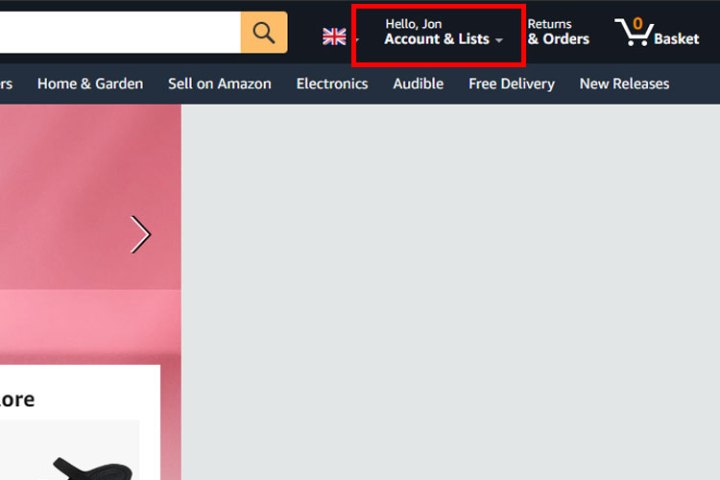
    Step 2: Access your account by selecting your name in the top-right corner.

    Image showing how to cancel Amazon Music Unlimited.
    DigitalTrends

    Step 3: From the drop-down menu, select Memberships & Subscriptions.

    Image showing how to cancel Amazon Music Unlimited.
    DigitalTrends

    Step 4: Locate your Amazon Music Unlimited subscription from your list of services. To the right, click on the Cancel membership button.

    Step 5: If prompted for a reason, you can provide one, then click Submit and continue to cancel. Be aware that Amazon may display several confirmation messages, but if you genuinely want to cancel, follow through with the cancellation steps.

    Step 6: On the final page, click Confirm cancellation to complete the process. You’ll continue to have access to Amazon Music Unlimited until your next billing date, at which point your subscription will revert to the standard Amazon Music option—more details can be found in our Amazon Music guide.

    Canceling Amazon Music Unlimited on Android

    You can also manage your subscription via the Amazon Music app on your Android device. Here’s how.

    Step 1: Open the Amazon Music app, tap the gear icon in the top-right corner, and select Settings.

    Step 2: Under the "Your Account" section, tap on Amazon Music Unlimited Member.

    Step 3: Select Cancel Subscription and confirm your cancellation when prompted.

    Canceling Amazon Music Unlimited on iPhone and iPad

    When using your iOS device, the cancellation process occurs through the Settings app.

    Step 1: Launch the Settings app on your iPhone or iPad and select your name.

    Step 2: Choose Subscriptions.

    Step 3: Find the Amazon Music Subscription, tap on it, then select Cancel. Confirm if prompted.

    Canceling Amazon Music Unlimited via iTunes

    If you subscribed to Amazon Music Unlimited through iTunes, you’ll need to cancel it via Apple's support website.

    Step 1: Go to support.apple.com.

    Step 2: Scroll to My Support and log in to your Apple account.

    Step 3: Look for Billing and subscriptions, select it, and browse through your subscriptions. Follow the on-screen prompts to cancel Amazon Music Unlimited when located.

    If you registered through Apple, Google, or a mobile provider, you might need to directly contact them for the cancellation process.

    Are you considering a new music streaming service? Here are some popular suggestions you might like.