Tag: Threads

  • Threads Unveils New Bio Feature That Outshines X

    Threads Unveils New Bio Feature That Outshines X

    What can enhance your bio? Perhaps two links? Or even three? Threads is now expanding its capabilities, allowing users to include multiple links in their bios—outpacing the single link option available on X, previously known as Twitter.

    In a press release issued on Thursday, Meta revealed that Threads users can now add up to five links in their bios. This update is particularly beneficial for content creators, enabling them to link to their podcasts, YouTube channels, Twitch streams, TikTok profiles, newsletters, articles, and more, facilitating greater engagement with their audience beyond Threads.

    Along with the ability to add more links compared to the single link limitation on X, Meta is also introducing a weekly recap feature within Insights. This allows users to track how their links perform each week, providing insights into the number of clicks, whether the links are shared through bios or posts, and comparisons of post engagement over time. Additionally, users can monitor their total views, growth in followers, and receive suggestions on optimizing their content to better connect with their audience.

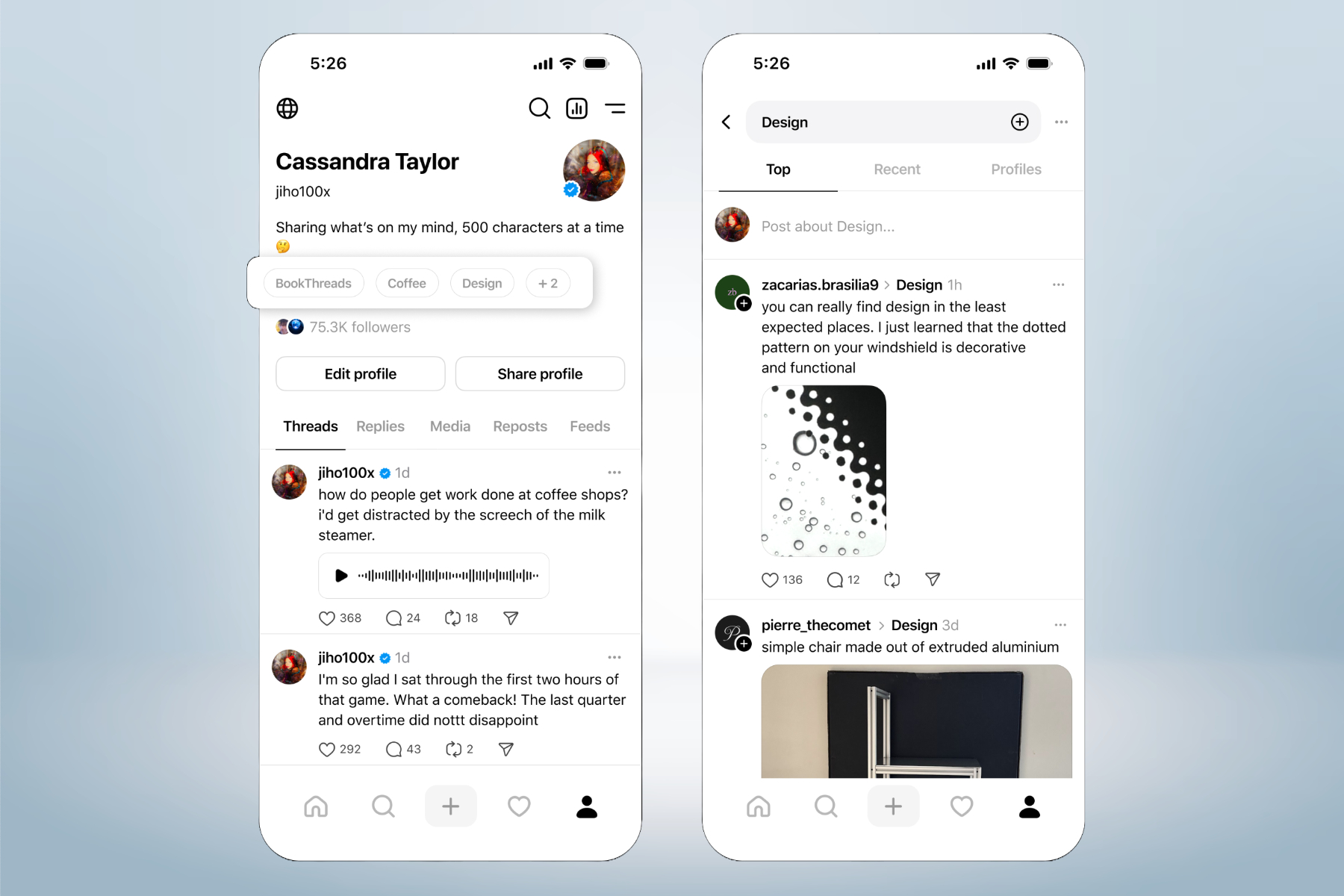
    The recent enhancement of allowing multiple links in Threads comes just two months after the introduction of a feature enabling users to showcase up to ten topics in their profiles. This idea aimed to enhance the visibility of other users and content creators with shared interests. Furthermore, users can tag topics in their posts, directing others to a feed filled with discussions about those specific subjects.


  • Threads’ New Tools Calm Commentary Chaos And Enhance Discovery

    Threads’ New Tools Calm Commentary Chaos And Enhance Discovery

    Meta is enhancing its Threads platform, which competes with X, by introducing new features that allow users to increase the visibility of their profiles and content through topics. This update also provides users with greater control over post interactions. A key addition is the inclusion of profile topics.

    With this update, users can now add up to ten topics in their social bios, facilitating easier discovery of accounts that share similar interests. Notably, clicking on a topic in someone else’s bio will direct you to their related posts.

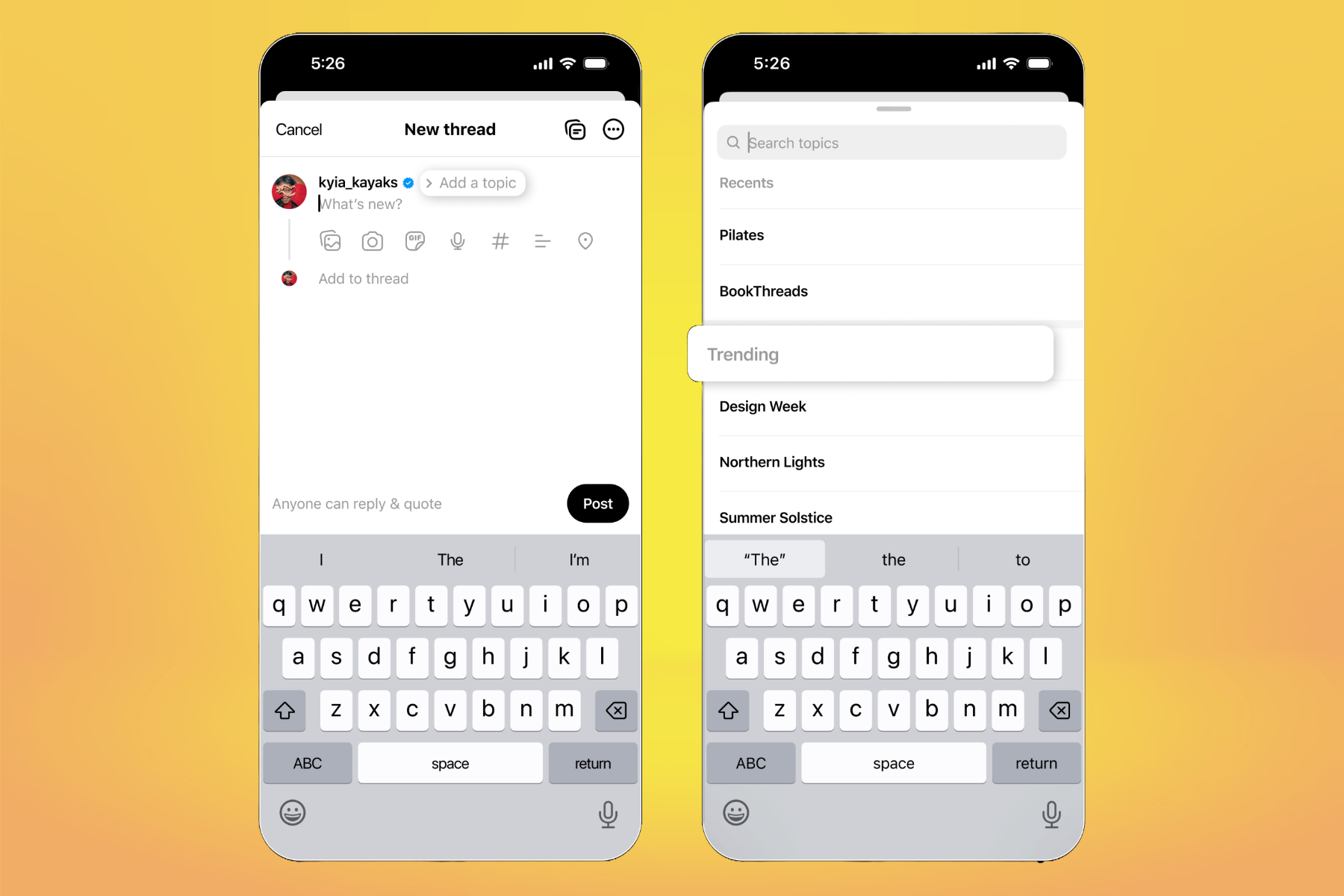
    This feature is supported by a new system that enables users to tag topics in their posts. “While composing posts, you’ll receive prompts to include trending topics or ones connected to your previous content, making it easier for your audience to find your posts,” Meta stated in a blog announcement.

    Adding topics to Threads bio.
    Meta

    According to internal data, Meta reports that posts featuring topic tags tend to attract more views. Furthermore, users now have options to control who is able to reply to or quote-share their posts.

    Threads has introduced four interaction settings for posts: anyone can respond, only followers can engage, just followed profiles, and accounts that were mentioned. Additionally, users can customize their default feed view for when they open the app.

    Adding topics to Threads post.
    Meta

    In an effort to enhance the video playback experience, Meta has revamped the video player on Threads. The updated player now includes pause/play functionality, along with rewind and fast-forward buttons.

    Additionally, an interactive progress bar at the bottom allows users to navigate through the video content easily. A significant new feature implemented this week is the introduction of community notes on Threads, paralleling similar features on Instagram and Facebook.

    Post interaction tool on Threads.
    Meta

    Meta has recently announced the conclusion of its third-party fact-checking initiative, transitioning to a community-sourced system that allows users to flag potentially misleading content. Contributors will collectively determine whether a post is problematic.

    If a consensus is reached, a public note—limited to 500 characters—will be appended to the relevant post, providing additional context through a associated link. Testing of community notes began on March 18 in the U.S., with support for six languages.

    Importantly, adding a community note to a post will not result in any penalties for the post or the user who published it. “We anticipate that Community Notes will be less biased than the previous third-party fact-checking program, and will be capable of operating on a larger scale once fully deployed,” the company stated.

  • Threads Adopts BlueSky’s Idea of Sharable Custom Feeds

    Threads Adopts BlueSky’s Idea of Sharable Custom Feeds

    In November, Threads rolled out a feature allowing users to craft custom feeds centered on specific topics. Today, the platform announced that users can now share these feeds with their friends. This functionality is similar to BlueSky’s Starter Packs, enabling users to search for and discover public feeds that align with their interests.

    If you want to share a custom feed, the first step is to make it public. To do this, long-press the For you button located at the top of the screen, then select Edit feeds. Choose the specific feed you wish to share and modify its privacy settings as needed.

    The introduction of custom feeds simplifies the way users can manage their diverse interests. For instance, someone could create one feed dedicated to technology updates and another focusing on local dining options. This capability to share feeds presents substantial opportunities for influencers on Threads, as a well-liked shared feed can attract considerable attention.

    OnePlus 12R Genshin Impact Edition showcasing the Threads app.
    Christine Romero-Chan / Digital Trends

    The sharing feature is currently being rolled out, and Threads anticipates it will be fully available by the end of the day. As of this writing, the update hasn’t appeared on our devices yet, but users are encouraged to keep checking back. If the feature still doesn’t show up, ensure that the Threads app is updated to its latest version.


    Please enable Javascript to view this content

    Recently, Threads has introduced several new features, including the ability to schedule posts and view engagement metrics. Following the decline of X and the rise in popularity of Instagram, the platform has experienced a surge in users, prompting efforts to enhance performance and compete effectively with platforms like BlueSky.

  • China: WhatsApp, Threads, Telegram and Signal Removed From Apple App Store

    China: WhatsApp, Threads, Telegram and Signal Removed From Apple App Store

    KEY TAKEAWAYS

    • Apple removed WhatsApp, Threads, Telegram, and Signal from its China store.
    • The ban may be retaliatory due to scrutiny of TikTok in the West.
    • The apps are still available in Hong Kong and Macau.

    Apple has deleted four applications from its China-regional app store, including Meta’s WhatsApp and Threads, after being directed to do so by Beijing for security grounds.

    The Chinese government also ordered the shutdown of Telegram and Signal, indicating that the decree specifically targeted messaging applications. Except for Threads, all applications use strong encryption methods, which may have annoyed the Middle Kingdom because encryption makes it much more difficult for it to monitor its residents.

    It’s worth noting that the ban comes shortly after the China-based social media app TikTok was heavily scrutinized in the United States and Europe. Congress is considering outright banning TikTok, while the EU is looking into the new TikTok Lite app, which was introduced earlier this month. The restriction on Western applications is probably retaliatory.

    However, the precise timing might be a coincidence, with the fundamental cause being a regulation China enacted in August that required developers to register with the government, according to Reuters. The deadline for registration was at the end of March, and the law took effect on April 1.

    China is not attempting to crack down on all international chat applications, at least not yet. According to Reuters, Meta’s other programs, such as Facebook, Messenger, and Instagram (with which Threads is entwined), as well as X and YouTube, remain available.

    Apple was not too pleased with the order. “We are compelled to observe the laws of the nations in which we operate, even if we disagree,” the business stated.

    The withdrawal has not taken effect throughout China, since the four applications are still available in Hong Kong and Macau, which are not fully integrated into China due to their unique “one country, two systems” status.

    Given that Hong Kong strengthened its social media controls last month and suggested banning several sites, Apple may be forced to remove the same applications in the city at some point.

  • Mark Zuckerberg Loses $3 Billion in Facebook and Instagram Global Outage

    Mark Zuckerberg Loses $3 Billion in Facebook and Instagram Global Outage

    Mark Zuckerberg, the CEO of Meta, experienced a colossal loss of nearly $3 billion. This financial blow followed an hour-long global outage of Facebook, Instagram, and Threads, among the popular social media platforms under his corporation.

    How the Global Outage Impacted Zuckerberg’s Wealth

    Following the temporary shutdown of Facebook and Instagram, Zuckerberg’s net worth plummeted by $2.79 billion. Greater than the GDP of many small countries, the loss, while it may seem insurmountable, brought Zuckerberg’s net worth down to $176 billion, according to comprehensive financial reports from India Today.

    Despite the steep descent, Zuckerberg remains unscathed as the world’s fourth richest person, as per the Bloomberg Billionaires Index. Even in the face of adversity, the resilience of the tech tycoon continues to inspire.

    The prevalence of the outage instigated a 1.6% drop in Meta’s shares and precipitated this depreciation of Zuckerberg’s net wealth. Meta shares concluded the overnight trading session on Wall Street at $490.22 per share.

    User Experience During the Outage

    During the duty hour on Tuesday night, Facebook, Instagram, and Threads users were confronted with problems when trying to access their accounts. This unusual occurrence wasn’t limited to Meta’s applications. Meta Quest users had difficulty logging into their headsets, and quite a few YouTube users reported errors.

    Throughout this hour-long outage, Facebook and Instagram users were met by “failure to load” error pages. While some users could still view older stories, many Facebook accounts were automatically logged out.

    Public Reaction to the Outage

    During the turmoil, frustrated users resorted to Elon Musk’s platform, X, formally known as Twitter, venting about the inconvenience caused by the shutdown.

    Elon Musk, a long-standing rival of Zuckerberg, seized the moment to mock the unfortunate outage faced by Meta platforms. This incident served as a sharp reminder of the unpredictable nature of the tech world and the potential vulnerabilities even at the summit of the digital pyramid.

  • How To Post On Threads From Desktop PC (Windows/Mac)

    Threads, the text-primarily based totally messaging app evolved via means of Instagram, has garnered over one hundred million customers within only a week of its launch.

    This milestone highlights the developing call for intimate social networking reports and the attraction of personal sharing amongst friends.

    While Threads is typically designed for cell devices, there may be a time when you will need to post on Threads out of your laptop (Windows/Mac).

    In this article, we are able to manual you through the technique of the usage of Bluestacks, an Android emulator, to post on Threads out of your laptop.

    Post on Threads from Desktop or Laptop:

    Install Bluestacks

    Begin via means of downloading and putting in Bluestacks, an Android emulator specially designed for Android apps on laptop computers.

    Log in with your Google account

    Launch Bluestacks and log in with your Google account credentials.

    Open Google Play Store

    Within Bluestacks, find and open the Google Play Store.

    Install Instagram

    Search for “Instagram” in the Play Store and set up the Instagram app.

    Log in to Instagram

    Open the Instagram app inside Bluestacks and log in to the app with your Instagram account credentials.

    Install Threads

    Return to the Play Store inside Bluestacks and search for “Threads” Install the Threads app.

    Login to Threads

    Launch the Threads app inside Bluestacks and log in. Log in to the usage of your Instagram account credentials.

    Post on Threads

    After correctly logging in, you may create a brand new post on Threads.

    The Popularity of Threads

    Threads have fast won traction as a famous social media platform because of its specific emphasis on connecting customers with their nearest friends in a personal and private setting.

    With its real-time updates, custom near friends list, and direct messaging features, Threads presents a committed area for sharing moments, popularity updates, and media content material solely with decided individuals.

    This centered technique has resonated with customers looking for greater intimate connections and actual interactions.

    Bottom Line:

    With the assistance of Bluestacks, an Android emulator, you may now revel in the benefit of having access to and posting on Threads out of your laptop (Windows/Mac).  Follow the step-via way of means-of-step stated above to post your updates seamlessly on Threads out of your laptop.

    The speedy achievement of Threads, with over one hundred million customers in only a week, highlights the developing call for intimate social networking experiences.

    Threads’ consciousness of personal sharing has struck a chord with customers seeking out a greater private and genuine social media environment.

    Whether accessed on mobile phones or desktops, Threads gives a committed area for customers to connect, share, and interact with their near buddies. Join the thriving Threads network and enjoy the pleasure of intimate social networking.

    Can you post on Threads from your desktop or laptop?

    Yes, you can, but through bluestacks as Facebook still doesn’t allow users to directly post via the website.

    Can you use Threads on PC?

    Yes, you can use it. Simply open your Instagram account on your PC and then click on your threads handle from your profile and it will take you to the Threads.
  • Threads Video and Picture Downloader Online Free

    Download videos and pictures effortlessly with Threads Video and Picture Downloader. Save high-quality content from personal and public accounts using our user-friendly platform. Start downloading now and never miss captivating Threads moments.

    Best Threads Downloader For Video/Picture

    The Ultimate Threads Downloader is a highly efficient platform designed to quickly retrieve high-quality content from Instagram. When it comes to downloading Threads content, using third-party websites like Threads is the best approach.

    With millions of photos posted on Threads every day, it has become the most popular photo app worldwide. There are countless captivating images that you come across and simply cannot resist saving. That’s where the Threads video downloader becomes essential to meet your immediate needs.

    Features

    • High-Quality Media Downloads: It enables you to download high-quality Threads videos and pictures effortlessly.
    • Simple and Fast Download Process: Downloading Threads content is a breeze, providing a quick and efficient way to save your desired videos and images.
    • Wide Range of Content Support: It allows you to download various types of Threads media, ensuring compatibility with different video and image formats.
    • User-Friendly Interface: The platform offers a user-friendly interface, making it easy for users to search, preview, and download Threads content seamlessly.
    • Reliable and Secure: As a trusted third-party tool, Threads ensures the security and reliability of your downloads, giving you peace of mind while saving Threads media.
    • Cross-Device Compatibility: Threads is compatible with different devices, enabling you to access and download Threads content from desktop computers, smartphones, and tablets effortlessly.

    How To Use?

    Copy the Link

    Simply copy the link of the Threads image or video you want to download from the Threads app or website.

    Paste and Download

    Paste the link into the designated area. Then, click on the “Download” button.

    Save Your Content

    After clicking “Download,” your content will be processed, and you’ll be provided with a download link.

    Our tools were created with the intention of assisting you in downloading videos and images uploaded from your personal account. We maintain the right to decline to offer our service if our tools are utilized to violate the privacy and content of others.

  • Threads Posts Generator Online: 100% Unique Content

    Threads Posts Generator Online: 100% Unique Content

    Generate captivating Threads posts effortlessly with our free online tool. Simply enter your keywords and instantly create engaging content for your Threads account. Unlock the power of keyword-based posts today!

    Welcome to the Threads Post Generator! Unlock the power of captivating content for your Threads account with our easy-to-use online tool. By simply entering your keywords, you can create engaging and attention-grabbing posts that will spark conversations and drive engagement.

    Save time and effort by leveraging the potential of keyword-based posts. Whether you’re a seasoned Threads user or just starting your journey, our generator will help you create compelling content that resonates with your audience.

    Generate Threads Posts

    [wpaicg_form id=60447 custom=yes]

    How to Use

    • Enter your keywords

      Start by typing your keywords into the provided input field.

    • Generate your post

      Click the “Generate Post” button to create a captivating Threads post instantly.

    • Share your post

      Share your engaging Threads post on other social media platforms or directly within the Threads community.

    • Enjoy the engagement

      Sit back, relax, and watch as your captivating post sparks conversations and attracts attention.

    Features

    Fast and Accurate

    Instantly generate captivating Threads posts based on your keywords.

    Customization Options

    Tailor the generated post to reflect your unique voice and personality.

    Keyword Insights

    Gain valuable insights into popular keywords and trending topics for maximum impact.

    Social Sharing

    Easily share your generated posts across other social media platforms to expand your reach.

    Mobile-Friendly

    Access the post generator on any device, ensuring a smooth user experience.

    Time-Saving

    Create engaging content within minutes, saving you valuable time and effort.

    We strive to provide a seamless user experience. If you encounter any issues or have feedback regarding our Threads Post Generator, we would love to hear from you. Please contact us to report any problems or share your valuable insights. We appreciate your contribution in making our tool even better!