Today, the widely used photo-editing application Pixelmator announced its intention to become part of Apple in a blog post. This news was highlighted by 9to5Mac. The deal is still awaiting regulatory approval, and the Pixelmator team stated that no changes would be made to their applications at this moment.
Pixelmator offers two main apps: Pixelmator Pro, a robust professional-grade image editing tool available for a one-time payment of $50, and Photomator, a free editing app. The pricing of Pixelmator Pro makes it a more accessible option compared to competitors like Photoshop, which tends to have higher subscription costs.
Both apps are packed with useful features such as color correction, AI-driven background removal, and various illustration tools. Photomator has garnered accolades over the years and is compatible with Mac, iPhone, iPad, and the Apple Vision Pro.
Pixelmator
While Pixelmator has assured users that there will be no immediate changes to its products, the outcome of the acquisition could bring about an array of possibilities. Previous acquisitions by Apple have resulted in different trajectories for the purchased apps; for instance, they have occasionally discontinued apps like Dark Sky while maintaining others like Final Cut Pro and Logic Pro.
The limited editing capabilities of Apple’s Photos app highlight how beneficial it could be to integrate the technology from Photomator, enhancing the photo-editing landscape on iPhones.
As for the acquisition’s approval, while it may face little to no hurdles, large corporate mergers often attract scrutiny from regulatory bodies. Historically, large-scale acquisitions, such as Nvidia’s attempt to purchase Arm, have faced rigorous examination and even rejection. If Apple continues acquiring smaller firms, it may also catch the attention of authorities.
Although the current focus of the system is on detecting credit card transaction fraud, Nvidia has indicated that it can be adapted for various other types of financial crimes, such as new account fraud and money laundering. This flexibility may attract financial institutions that are considering the integration of their fraud detection systems.
The platform facilitates a shift for financial organizations from traditional computing frameworks to enhanced computing with the Nvidia AI Enterprise software platform and Nvidia GPU instances—specialized processors built for handling parallel processing tasks.
“As artificial intelligence models become larger, more complex, and diverse, it’s crucial for businesses across various sectors, including financial services, to tap into computing solutions that are both cost-effective and energy-efficient,” states Patangia.
“Standard data science workflows often lack the necessary computational acceleration to manage the substantial amounts of data needed to effectively combat fraud, especially as losses in the industry continue to grow,” he notes. “Utilizing the RAPIDS Accelerator for Apache Spark could enable payment companies to decrease data processing times and trim their processing expenses.”
Don’t forget to check out the latest issue of FinTech Magazine and register for our global conference series – FinTech LIVE 2024
This month, Android 15 was released for Pixel devices, and many other devices are anticipating their updates. While it may feel premature to start discussing Android 16, reliable analyst Mishaal Rahman has shared that not only will the next operating system receive an update sooner than originally thought, but Google plans to roll out two updates in 2025.
To grasp the significance of this news, it’s essential to understand the Android release cycle. Google typically unveils a new Android update annually. This year, we have Android 15, and Android 16 is expected next year. In addition, users receive smaller version updates throughout the year, known as quarterly platform releases or QPRs.
While it’s reasonable to expect that Android 16 will launch in the latter part of the year, Android Authority reports that the main update is likely scheduled for Q2 of 2025. This timeline is ahead of the anticipated schedule, which enables Google to introduce a secondary update in Q4, featuring new APIs. Although the specifics of that update are unclear, Google assures that it won’t necessitate developers to rework their applications and that support isn’t mandatory.
Joe Maring / Digital Trends
This means that the upcoming update should have minimal impact on apps, so users need not worry about their favorite games crashing due to the operating system upgrade.
Related
Apple Intelligence features are finally available for everyone
Android 15: everything you need to know
I tried OnePlus’ OxygenOS 15, and it’s much better than I expected
The report indicates that, despite the altered schedule for 2025, it doesn’t guarantee that two Android updates will occur annually in the future. As Rahman mentions, “Google informed me that future timings after 2025 will hinge on its internal roadmaps.”
This unusual release schedule could be an anomaly, or it might signal a new trend. Only time will tell, but the fact that Google is rolling out Android 16 much earlier generates excitement among Android enthusiasts.
Nvidia may soon play a pivotal role in your next gaming computer, not just via its graphics cards but also by incorporating its processors. The company is reportedly developing an Arm-based platform specifically for PCs, featuring a CPU and GPU designed by Nvidia, with aims to launch in September 2025, as reported by DigiTimes.
The report indicates that Nvidia intends to introduce a high-end computing framework based on Arm architecture in September, with a full commercial rollout expected by March 2026. While this marks the first known timeline for Nvidia’s Arm-based chips, discussions surrounding this initiative are not new. About a year ago, Reuters disclosed that Nvidia was exploring Arm-based CPUs as part of Microsoft’s initiative to assist chip manufacturers in developing Arm processors for Windows PCs.
As we move into 2024, the prior discussions come into clearer focus, especially with Microsoft promoting its Arm-based Copilot+ laptops. However, Nvidia appears to be aiming for a more advanced market, targeting premium users who are interested in high-performance gaming systems. If this information holds true, it offers new insights into Nvidia’s previous unsuccessful bid to acquire Arm.
There’s compelling evidence backing the validity of this report. Earlier this year, Nvidia’s CEO, Jensen Huang, hinted at the company’s work on a consumer-oriented Arm-based processor during a conversation with Dell’s CEO, Michael Dell. In terms of enterprise solutions, Nvidia has already established a significant track record in designing Arm-based CPUs. For instance, the Grace CPU is an integral component of its Grace Hopper platform, a cornerstone in many data centers.
The timing of this initiative is also noteworthy. Currently, Qualcomm has an exclusivity agreement with Microsoft for producing Arm-based chips for Windows PCs. Given the ongoing licensing disputes between Arm and Qualcomm, Arm is likely eager to engage additional brands to manufacture chips for consumers based on its designs. Arm has stated that it anticipates this exclusivity to conclude this year, potentially allowing companies like AMD, Nvidia, and Intel to begin producing Arm-based chips by 2025.
Nvidia has been contemplating the development of Arm-based CPUs for Windows PCs for several years, but it may finally be coming to fruition. The company’s substantial success in the data center sector has rapidly transformed it into one of the world’s wealthiest corporations, thanks to its advancements in AI accelerators. Now, it seems Nvidia is setting its sights on the consumer market.
Get your weekly breakdown of the technology behind PC gaming
By next year, Apple might have its proprietary Wi-Fi chips installed in at least one of its phones.
According to Ming-Chi Kuo, a well-regarded analyst known for his accurate predictions, Apple is in the process of developing its own Wi-Fi chips to replace those currently supplied by Broadcom. However, there is no concrete timeline for their release (via MacRumors). Kuo suggests that the upcoming iPhone 17 Pro may feature this new chip, while others speculate that broader implementation won’t happen until the iPhone 18.
While Wi-Fi 7 is not a new technology—since all iPhone 16 models already support it—these devices use Broadcom’s chips. By switching to in-house production for these network chips, Apple aims to reduce manufacturing costs, which could lead to more affordable devices in the future.
Broadcom currently supplies Apple with over 300 million Wi-Fi+BT chips annually. However, the company plans to minimize its dependence on Broadcom and introduce its own Wi-Fi chips in new products by the second half of 2025, including the iPhone 17.
The forthcoming shift to in-house chip production might enhance Apple’s software integration capabilities. However, critics of Apple’s tightly controlled ecosystem argue that proprietary chips could detract from the user experience, especially in terms of repairability.
Kuo noted that the new Wi-Fi chip would be produced using the 7nm N7 process, a more advanced technique than that which was employed to create the A13 Bionic chip.
Nirave Gondhia / Digital Trends
If you’re not familiar with Wi-Fi 7, here’s what to expect: It offers increased bandwidth and the ability to transmit data across 2.4GHz, 5GHz, and 6GHz bands at the same time, achieving speeds of over 40 Gbps. This is more than four times faster than Wi-Fi 6, outpacing many wired connections.
Should the iPhone 17 Pro be the first to feature Apple’s new chips, it’s highly likely that the entire iPhone 18 lineup will make the switch. As Apple continues to innovate, faster speeds and more reliable connectivity are becoming increasingly necessary.
The Growing Trend of Upgrading Functional Electronics
Understanding Consumer Behavior
In today’s technology-driven world, upgrading to the latest electronic devices has become a common practice for many consumers. According to a recent survey conducted by Statista Consumer Insights, a significant number of individuals in various countries are opting to upgrade even when their existing gadgets are still fully functional. This illustrates a broader trend that reveals insights into consumer behavior and the evolving dynamics of the electronics market.
Survey Insights: Who is Upgrading?
The survey results indicate that approximately 30% of respondents from the United Kingdom, Germany, and Spain have upgraded their devices despite the functionality of their current models. This trend is notably more pronounced in China, where 36% of online participants reported similar behaviors.
Regional Differences in Upgrade Patterns
United Kingdom: The market shows a robust culture of electronic upgrades, with a sizable percentage of consumers falling into the upgrade cycle.
Germany: As a nation known for its strong engineering and manufacturing, it is intriguing to see the majority engage in frequent electronic renewals.
Spain: The trend in Spain reflects broader European attitudes towards consumer electronics, showcasing a collective inclination to adopt newer technologies.
China: With technology being at the forefront of China’s economic growth, the propensity to follow the latest trends in electronics is even more pronounced, prompting a 36% upgrade response rate.
Environmental Concerns: The Dark Side of Frequent Upgrades
While the technological advancements bring convenience, the environmental implications of such consumer behavior are alarming. Each new device involves multiple environmental burdens, including raw material extraction, energy-intensive production processes, and waste management challenges.
Raw Material Extraction
The extraction of materials like lithium, cobalt, and rare earth elements required for electronics has severe ecological impacts. Mining these resources often leads to habitat destruction, pollution, and significant carbon emissions, contributing to climate change.
Energy-Intensive Production
Manufacturing brand-new electronics consumes immense amounts of fossil fuels and electricity. The production process is not only resource-intensive but also results in significant greenhouse gas emissions. The more frequently consumers upgrade their devices, the greater the overall energy demand, compounding the environmental impact.
Waste Management Challenges
Once consumers have discarded their functional devices, the challenges shift to waste management. Electronic waste, or e-waste, is one of the fastest-growing waste streams globally. Many electronics contain hazardous substances, and improper disposal can lead to soil and water contamination.
The Psychological Factors Behind Upgrading
The desire to own the latest technology often stems from psychological factors, including social status, the fear of missing out (FOMO), and marketing pressures.
Social Status and Perception
For many, owning the latest gadget provides a sense of status and identity. Individuals are often influenced by peers or celebrities showcasing cutting-edge technology, fostering a notion that possessing the latest devices boosts social standing.
FOMO and Marketing Pressure
The fear of being left behind in a fast-paced electronic world is potent. Consumers frequently encounter aggressive marketing campaigns promoting new releases, which creates an urgency to upgrade.
Discussion: Is There a Way Forward?
Addressing the sustainability issues tied to electronic upgrades has become crucial. Possible avenues include encouraging longer usage of devices through repairs, promoting sustainable manufacturing practices, and fostering consumer awareness regarding e-waste and the environmental implications of frequent upgrades.
In a world where technological advancement is rapid, the interplay between consumer behavior and environmental sustainability remains a pivotal discussion point that requires collective efforts to forge a responsible future.
Apple has made the highly anticipated announcement of the M4 MacBook Pro, available in both 14-inch and 16-inch configurations. Alongside the standard M4 model, there are also M4 Pro and M4 Max versions in each size.
However, let’s be honest: the M3 MacBook Pro was already an exceptional device. Is it truly beneficial to upgrade to the new version? While I won’t have a definitive answer until I conduct my own tests, here are six important updates you should know about the latest MacBook Pros.
The M4 Chip
Apple
The centerpiece of interest in these new MacBook Pros is undoubtedly the M4 chip. Available in M4, M4 Pro, and M4 Max setups, the latest generation maintains the same CPU core counts as its predecessor. The top-tier M4 Max features a 16-core CPU, composed of 12 Performance cores and four Efficiency cores.
Apple touts the M4 as “the world’s fastest CPU core,” highlighting its enhanced single-threaded performance. The graphics have also seen improvements, though the GPU core counts remain unchanged. The enhanced cores are designed to operate at higher frequencies, along with increased video memory bandwidth, leading to superior graphics performance.
Apple showcased several notable performance gains across various applications like Redshift and Cinema 4D, as well as the upcoming game Control. However, we will have to wait for third-party evaluations to accurately measure the generational improvements. This also applies to AI performance, especially considering Apple’s claims regarding the M4 Neural Engine’s significant efficiency gains, which is now twice as fast as its forerunner.
More, Faster RAM
Apple
Apple has increased the base memory of the M4 from 8GB to 16GB. For years, the decision to offer a “Pro” device with only 8GB of RAM was a long-standing point of contention, making this upgrade much appreciated.
Previously, Apple defended the use of 8GB in the M3 MacBook Pro, asserting that 8GB on a Mac was akin to having 16GB on a Windows laptop. Regardless of the validity of that claim, many competitors have shifted to 16GB as a standard option this year, primarily to meet the “Copilot+” criteria.
This update was also applied to the M4 iMac and M4 Mac mini revealed earlier this week, and even the MacBook Air received this welcome RAM upgrade.
Moreover, the new RAM features a 30% increase in bandwidth across all configurations.
Brighter, Less Reflective Screens
Apple
This generation brings two significant display enhancements to the MacBook Pro. Firstly, the mini-LED panels can now reach an impressive 1000 nits of brightness in standard dynamic range (SDR), making these screens potentially much brighter than the previous models. In terms of HDR content, peak brightness soars to 1600 nits.
Additionally, customers now have the option to upgrade to a nano-texture display, which effectively minimizes glare and reflections without diminishing brightness and clarity as matte finishes often do.
A Better Webcam
This iteration features an upgrade from the 1080p FaceTime camera to a higher-resolution 12-megapixel version, which is a significant boost in image quality for video calls.
The M4 MacBook Pro also introduces some new functionality, such as Center Stage, which automatically frames your face in the shot similarly to the iPad’s camera. Users can manually adjust this to achieve perfect alignment. Moreover, the Desk View feature provides a top-down perspective of your workspace, making it useful for presentations and video interactions.
Thunderbolt 5
Apple
The port selection on the M4 MacBook Pro remains unchanged, but there is one noteworthy enhancement: the USB-C ports have been upgraded to Thunderbolt 5.
This enables transfer speeds of up to 120Gb/s, a substantial increase compared to the 40Gb/s offered by the previous Thunderbolt 4 ports.
More Battery Life
Amidst the ongoing battery life competition, Apple is raising the stakes. The M4 MacBook Pro claims an impressive battery life of up to 24 hours, a notable improvement from the previous 22 hours. Naturally, standard usage will influence real-world battery performance, but an extra two hours can be quite beneficial.
I anticipate that battery life may be slightly reduced in the M4 Pro and M4 Max variants, but I’ll reserve my detailed assessment until I have a chance to test them firsthand.
Space Black for All
The final prominent change regarding the new MacBook Pros is the color of the chassis. The previously introduced Space Black on the 16-inch M3 MacBook Pro is now available for all configurations of the 14-inch model as well.
While it may not be the most dramatic update, it’s certainly a welcomed feature among users.
With technology constantly evolving, the line between laptops and tablets has blurred, leading to the emergence of 2-in-1 laptops. These versatile devices are designed to function as both a traditional laptop and a tablet, aiming to offer the best of both worlds. But are they truly worth the investment? Let’s explore the features, advantages, and considerations to help you make an informed decision.
Understanding 2-in-1 Laptops
2-in-1 laptops typically come in two forms: detachable and convertible.
Detachable 2-in-1s
Design: The keyboard can be completely removed, allowing the screen to function as a standalone tablet.
Usage: Ideal for users who prefer a lightweight device without being tied to a keyboard.
Convertible 2-in-1s
Design: The keyboard is hinged, allowing the device to flip, fold, or rotate into different modes.
Usage: Great for those who want the flexibility of a laptop with the option to use it as a tablet.
Benefits of 2-in-1 Laptops
When weighing your options, consider the following benefits of 2-in-1 laptops:
Versatility
Multiple Modes: Users can shift from a laptop mode for productivity tasks to tablet mode for casual use or media consumption.
Touchscreen Capabilities: Most 2-in-1s come with touchscreens, enhancing navigation, especially for apps and games.
Portability
Lightweight Design: Many models are slimmer and lighter than traditional laptops, making them easier to carry.
All-in-One Device: Combining the features of a laptop and a tablet reduces the need to carry multiple devices.
Enhanced Productivity
Stylus Support: Many 2-in-1s support styluses, making them excellent for note-taking or digital art.
Improved Battery Life: Some models are designed for longer battery performance, suitable for on-the-go users.
Cost-Effectiveness
Savings on Multiple Devices: Instead of purchasing a tablet and a laptop separately, a 2-in-1 can fulfill both roles, potentially offering savings.
Considerations When Choosing a 2-in-1 Laptop
While 2-in-1 laptops have numerous advantages, they may not fit everyone’s needs. Here are some aspects to contemplate before making a purchase:
Performance
Hardware Limitations: Some 2-in-1s may not have the same processing power as high-end laptops, which could impact performance for demanding applications.
RAM and Storage: Ensure that the device has sufficient RAM and storage to meet your usage requirements.
Keyboard Comfort
Typing Experience: Some detachable models may feature smaller keyboards or less comfortable layouts compared to traditional laptops.
Use Case: If most of your work involves extensive typing, consider whether a 2-in-1 can meet your comfort needs.
Durability
Build Quality: Foldable hinges and detachable components can wear out faster than traditional laptop designs.
Screen Protection: Portability increases the risk of damage, so consider investing in a protective case.
Price Factor
Higher Initial Investment: Quality 2-in-1s can be pricier than standard laptops or tablets. Evaluate your budget and compare it with features offered.
Long-Term Value: Factor in how long you plan to use the device and whether it meets future needs.
Popular Use Cases for 2-in-1 Laptops
Certain user profiles may benefit more from 2-in-1 laptops:
Students: Ideal for note-taking in classes and completing assignments, all while being portable.
Creative Professionals: Perfect for artists and designers who need both a laptop for editing software and a tablet for drawing.
Business Travelers: Convenient for those who move frequently, allowing for work during travel and leisure during downtime.
In Summary
Choosing whether a 2-in-1 laptop is worth the investment depends on your unique needs, preferences, and work style. Consider performance requirements, usability, and your primary activities to determine if this versatile device aligns with your technological lifestyle.
When investing in new tech, the decision on whether to purchase protection plans can be daunting. Geek Squad, a well-known tech support service provided by Best Buy, offers various protection plans for your devices. But is it worth it? This article delves into the pros and cons of Geek Squad protection, helping you decide if it’s the right choice for you.
Understanding Geek Squad Protection
Geek Squad protection plans cover a range of services, from accidental damage to software issues. It’s essential to grasp what these plans entail before making a decision.
Types of Coverage Offered
Accidental Damage: Protection against spills, cracks, and other unintentional damages.
Technical Support: Access to Geek Squad agents for troubleshooting and support.
Repair Services: Coverage for part or full replacement of devices that fail due to normal wear and tear.
Data Recovery: Assistance in retrieving lost data from malfunctioning devices.
Pros of Geek Squad Protection
Investing in Geek Squad protection may be beneficial, depending on your circumstances. Here are some advantages:
Peace of Mind
Expert Assistance: Access to certified technicians who can troubleshoot issues quickly.
24/7 Support: Round-the-clock availability for questions and assistance.
Comprehensive Coverage
Multiple Devices: Coverage can typically extend to various tech devices, not just one.
Accidental Damage: It provides protection for mishaps that might not be covered by standard warranties.
Convenience
Easy Repairs: Walking into a Best Buy store for service could save you time compared to other repair options.
In-Home Support: Some plans may include the option for technicians to come to your home for specific services.
Cons of Geek Squad Protection
While there are benefits, some disadvantages may lead you to reconsider purchasing a plan.
Cost Considerations
Pricey Plans: Depending on the type and duration of coverage, plans can be expensive.
Potential for Expiring Coverage: Coverage usually lasts for a designated period; if your device remains functional beyond that time, you may not see the value.
Limitations in Coverage
Exclusions: Not all services are covered; for example, the protection may not extend to certain types of software issues.
Deductibles: Some plans may require deductible payments for certain claims, which can add to costs.
Is It Worth It?
Deciding if Geek Squad protection is a wise investment boils down to a few considerations:
Assess Your Needs
Device Usage: If you frequently use high-end or fragile devices, extra protection may be wise.
Technical Savvy: If you’re comfortable troubleshooting problems, you might not need the level of support offered.
Cost Analysis
Budget: Evaluate if the annual or monthly costs align with your financial situation.
Equivalence with Repair Costs: Consider the potential repair costs without coverage. If they significantly exceed the protection plan’s cost, it may be worth it.
Making Your Decision
Ultimately, the choice to invest in Geek Squad protection hinges on your individual situation, including how you use your devices and your comfort level with technology. By weighing the pros and cons, you can make a more informed decision and align your options with your tech needs.
When delving into the world of cycling, you may come across terms like "e-bike" and "electric bike." While they may seem interchangeable, subtle distinctions differentiate the two categories. Understanding these differences is essential for potential buyers or enthusiasts looking to choose a suitable ride.
Understanding E-Bikes
Definition of E-Bike
An e-bike, short for electric bicycle, refers to a bicycle that incorporates an electric motor to assist with pedaling. The motor’s assistance can vary, allowing for a more enjoyable cycling experience, especially on inclines or during long distances.
Key Features of E-Bikes
Pedal Assist System: E-bikes typically come with pedal assist, meaning the motor activates only when the rider pedals.
Battery-Powered: They are equipped with a rechargeable battery that powers the motor, which can vary in capacity and voltage.
Types of E-Bikes: E-bikes fall into various categories, including:
Commuter E-Bikes: Designed for urban commuting, often featuring racks and fenders.
Mountain E-Bikes: Built for off-road trails with sturdy construction and enhanced suspension.
Folding E-Bikes: Compact designs that are easy to store and transport.
Understanding Electric Bikes
Definition of Electric Bike
Electric bike is a broader term that encompasses various bicycles equipped with electric motors. While all e-bikes are technically electric bikes, not all electric bikes function in the same way as an e-bike.
Key Features of Electric Bikes
Variety of Assistance Levels: Electric bikes may include a different level of motor assistance, ranging from fully electric (where the motor does all the work) to hybrid models.
Throttle Control Options: Some electric bikes offer throttle control, allowing riders to propel the bike without pedaling.
Less Emphasis on Cycling: While many electric bikes maintain pedaling functionality, some models are designed purely for electric operation and might not include a pedal-assist feature.
Notable Differences
Motor Functionality
E-Bikes: Primarily focused on pedal assist with an emphasis on enhancing the rider’s efforts.
Electric Bikes: Often feature multiple modes, including options for full electric operation without pedaling.
Riding Experience
E-Bikes: Provide a cycling experience similar to traditional biking, preserving the need for pedaling.
Electric Bikes: Can cater to riders seeking a non-cycling experience, especially in models focused on convenience.
Regulations and Classification
E-Bikes: In many regions, e-bikes fall into specific classes based on speed and motor assistance, often affecting where they can be legally used.
Electric Bikes: The classification can be broader, leading to more variability in usage rights based on local laws.
Choosing Between E-Bikes and Electric Bikes
Consider Your Riding Style
When deciding whether to opt for an e-bike or a more general electric bike, consider these factors:
Commute Distance: Longer distances may benefit from the motor assistance offered by e-bikes.
Terrain: If you plan to tackle hills or rough terrain, a mountain e-bike would be beneficial.
Physical Condition: If you require significant assistance due to mobility issues, an electric bike with throttle capabilities may be more suitable.
Evaluate Battery Life and Range
Both options vary in battery life and range, so consider:
Recharge Frequency: How often are you willing to recharge your bike?
Battery Capacity: Larger batteries often translate to longer rides, but they may also increase weight.
Budget Considerations
Price ranges between e-bikes and electric bikes can vary widely:
E-Bikes: May have a higher initial cost due to advanced technology and specialized components.
Electric Bikes: Offer a broader range of prices, including more affordable options lacking high-end features.
By understanding these distinctions, you can make a more informed decision when selecting between an e-bike and an electric bike, tailored to your specific needs and preferences.
The Microsoft Surface Pro line has garnered significant attention since its debut, often sparking debates about its value compared to other laptops and tablets. With a range of models available, users frequently wonder: Are Surface Pro devices worth the investment? Let’s break this down by considering key aspects, including design, performance, versatility, and pricing.
Design and Build Quality
One of the standout features of the Surface Pro is its sleek and portable design.
Key Design Features:
Lightweight Construction: The Surface Pro devices are designed to be ultra-portable, making them easy to carry around for both work and leisure.
Premium Materials: Crafted with high-quality materials, the Surface Pro exudes a professional aesthetic while maintaining durability.
Kickstand: The adjustable kickstand allows users to find the perfect angle for typing or viewing, enhancing comfort and usability.
The combination of these elements makes the Surface Pro not just a functional device, but also an appealing one in terms of style and ergonomics.
Performance Capabilities
When evaluating whether a Surface Pro is worth it, performance is a crucial consideration.
Specifications Overview:
Processor Options: Many Surface Pro models come equipped with Intel Core i5 or i7 processors, providing robust computing power for most tasks.
RAM Choices: With options ranging from 8GB to 32GB of RAM, users can choose a configuration that meets their multitasking needs.
Storage Solutions: SSD storage options can go up to 1TB, ensuring quick access to files and applications.
Real-World Performance:
Productivity Tasks: Ideal for running Microsoft Office applications, web browsing, and other daily tasks without noticeable lag.
Creative Work: The Surface Pro handles graphic-intensive applications like Adobe Creative Cloud, making it suitable for designers and artists.
Gaming: While not a dedicated gaming device, it can handle casual gaming with some limitations on high-end titles.
Versatility and Functionality
The versatility of the Surface Pro adds to its appeal, especially for professionals and students.
Key Functionalities:
Tablet Mode: The device can easily convert into a tablet, allowing users to annotate, sketch, or browse with a touchscreen.
Keyboard Attachment: The Surface Type Cover transforms the device into a fully functional laptop, enhancing productivity with a tactile keyboard experience.
Ports and Connectivity: USB-C and USB-A ports, along with Mini DisplayPort, ensure compatibility with a wide range of peripherals.
Ideal Use Cases:
Education: Perfect for students who need a powerful yet portable device for note-taking, research, and presentations.
Business Professionals: Business users can carry their work with ease, attending meetings, and working on reports all from the same device.
Pricing Considerations
While the Surface Pro offers premium features, the price point is often a point of contention.
Price Range Analysis:
Entry-Level Models: Starting around $799, the base models offer good value for those who need a capable device without all the bells and whistles.
High-End Configurations: Prices can soar above $2,000 for fully-loaded models, which may make potential buyers reconsider based on budget and needs.
Cost vs. Value:
Investing for Longevity: Given its build quality and performance, a Surface Pro may serve users well for several years, potentially making it a worthwhile investment.
Comparison with Competitors: When compared to traditional laptops or other detachable tablets, the Surface Pro offers a flexible alternative, though some cheaper options exist.
What Users Are Saying
Gathering feedback from Surface Pro users offers additional insight into its overall value.
Positive Feedback:
Portability: Many users appreciate the lightweight design, which allows for easy transport.
Performance: Users report satisfaction with the device’s ability to handle day-to-day tasks seamlessly.
Common Concerns:
Pricing: Some find the cost prohibitive, especially when considering similar devices at lower price points.
Battery Life: While generally good, some users wish for longer battery durations for extended use away from outlets.
In summary, whether a Surface Pro is worth your hard-earned money largely depends on your individual needs. Factors like design, performance, versatility, and pricing all come into play. With ample features catering to a wide range of users, it’s clear that the Surface Pro holds significant merit in the marketplace.
The Surface Pro series has gained notoriety for blending the functionality of a laptop with the portability of a tablet. As technology continues to evolve, many individuals wonder if purchasing a Surface Pro device is a wise investment. This article explores various aspects of the Surface Pro that can help determine if it’s worth it.
Design and Portability
Sleek and Lightweight
One of the standout features of the Surface Pro is its slim and lightweight design, making it incredibly portable.
Weight: Models typically weigh around 1.7 pounds.
Thickness: Less than 0.4 inches, making it easy to slip into a bag.
Build Quality
Microsoft has focused on durable materials that give the Surface Pro a premium feel.
Materials: Magnesium casing is both lightweight and sturdy.
Kickstand: Integrated kickstand allows for multiple viewing angles, enhancing usability.
Performance Capabilities
Processor Options
The latest Surface Pro models come equipped with powerful processors designed for performance.
Intel Core i5/i7: Suitable for multitasking and running demanding applications.
Storage Options: Ranges from 128GB to 1TB SSD, providing ample space for files and software.
Battery Life
Battery performance is crucial for on-the-go users.
Average Battery Life: Up to 15 hours on a single charge, though usage patterns will affect this.
Fast Charge Capability: Can reach 80% charge in about an hour.
Display Quality
High-Resolution Screen
The Surface Pro features a high-resolution PixelSense display that stands out in terms of color accuracy and sharpness.
Resolution: 2736 x 1824 pixels, offering a vibrant experience for both media and productivity tasks.
Touchscreen Functionality: Supports stylus input, making it suitable for creative tasks like drawing and note-taking.
Versatile Usage
With its touch capability and adjustable angles, the Surface Pro accommodates various user preferences.
Tablet Mode: Perfect for reading or casual browsing.
Laptop Mode: Ideal for typing with the addition of a detachable keyboard.
Software and Ecosystem
Windows Operating System
Running on Windows 10 or Windows 11, the Surface Pro benefits from familiar functionality and a broad application ecosystem.
Compatibility: Runs most software that PC users rely on, from office applications to creative tools.
Regular Updates: Microsoft frequently updates the OS, ensuring that users receive security patches and new features.
Integration with Microsoft Services
The Surface Pro integrates seamlessly with Microsoft products, enhancing the overall user experience.
Microsoft 365: Bundled features improve productivity and collaboration.
OneDrive: Cloud integration allows access to files from anywhere.
Price Point Considerations
Investment vs. Value
The price of a Surface Pro can be a significant factor in determining its worth.
Starting Prices: Typically begin at around $799 and can go well beyond $2,000 for higher configurations.
Accessories: Additional costs for the Type Cover and Surface Pen can add to the overall price.
Long-Term Durability
When assessing whether a Surface Pro is worth the investment, consider its longevity and performance over time.
Resale Value: Surface devices tend to hold their value better than many alternatives.
Warranty and Support: Microsoft offers decent customer service and warranty coverage.
User Scenarios
Suitable for Various Users
The versatility of the Surface Pro makes it appealing to multiple demographics.
Students: Lightweight and portable, ideal for taking notes and studying.
Professionals: Excellent for business tasks, presentations, and remote work.
Creatives: Artists and designers can utilize the touch capabilities and high-resolution display for their work.
Limitations to Consider
While the Surface Pro has many strengths, it also has drawbacks that may not suit everyone.
Limited Gaming Capabilities: Not designed for high-end gaming, as it may struggle with resource-intensive titles.
Accessory Costs: Additional purchases, like keyboards and pens, can make it pricier than anticipated.
Determining whether a Surface Pro is worth the investment ultimately depends on individual needs, preferences, and budget. By weighing the pros and cons, potential buyers can make a more informed decision regarding this innovative device.
In recent years, curved monitors have gained significant attention among gamers, graphic designers, and everyday users alike. The shift from traditional flat screens to curved displays raises an important question: Are curved monitors better? This article delves into the benefits and drawbacks of curved monitors, along with who might benefit most from this technology.
What is a Curved Monitor?
Curved monitors feature a display that bends around the viewer’s field of vision. This design aims to provide a more immersive experience compared to flat screens. The curvature of the monitor is measured in "radius" (R), with common values being 1800R or 3000R, indicating how tightly the curve wraps around the viewer’s position.
Key Features of Curved Monitors
Field of View: A curved screen can simulate a wider field of view, drawing the viewer’s eyes into the action.
Reduced Distortion: Curved displays may minimize glare and reflection, creating a more uniform viewing experience.
Improved Depth Perception: Curved designs can enhance depth perception, making it easier to focus on different screen elements.
Advantages of Curved Monitors
Enhanced Immersion
Curved monitors are particularly appealing for gaming and cinematic experiences. The wrapping effect of the screen can surround the viewer more effectively, allowing for a heightened sense of engagement.
Wider FOV: Users often report feeling more ‘in’ the game or film.
Better Visual Surrounding: The curve can create a panoramic effect, enveloping the viewer.
Comfort and Reduced Eye Strain
Many users find that curved monitors help reduce eye fatigue during extended periods of use.
Natural Viewing Angle: The design follows the natural curvature of the eye, potentially leading to less strain.
Consistent Viewing Distance: The angle maintains a more consistent distance for all parts of the screen, which can be easier on the eyes.
Aesthetic Appeal
Curved monitors often boast a modern look that can enhance the overall aesthetics of a workspace.
Sleek Design: Their unique shape can set them apart from standard flat screens.
Improved Workspace Setup: Curved monitors can fit into various setup configurations, allowing users to customize their space.
Disadvantages of Curved Monitors
Price Point
Curved monitors typically come at a premium compared to flat screens, which can be a significant factor for budget-conscious consumers.
Higher Cost: Expect to pay more for a similar-sized curved display compared to its flat counterpart.
Limited Budget Options: Fewer affordable options are available in the market.
Limited Viewing Angles
While curved monitors provide advantages in frontal viewing, they can present challenges from side angles.
Distortion at Angles: Viewing the screen from the sides may lead to color distortion and decreased image quality.
Not Ideal for Collaborative Viewing: If multiple people are viewing the screen from different angles, the experience can suffer.
Space Considerations
Curved monitors can occupy more space compared to flat screens, which may be a concern for those with limited desk area.
Depth Requirement: Users need adequate depth to benefit fully from the curvature.
Monitor Stands: Some curved monitors come with bulkier stands that take up more desk space.
Who Should Consider Curved Monitors?
Gamers
For gamers seeking immersive experiences, curved monitors can offer a substantial upgrade to gameplay.
Increased Engagement: Genres like racing and simulation games particularly benefit from the wrap-around effect.
Higher Resolutions: Pairing a curved monitor with high resolutions can enhance the visual experience even further.
Creative Professionals
Graphic designers, video editors, and photographers may find curved displays beneficial for editing work.
Depth Perception: Curved screens can help in evaluating depth and spatial relationships more effectively.
Improved Color Consistency: Though not universally true, many high-quality curved monitors may provide better color representation.
Everyday Users
For everyday tasks, the choice is more subjective. Users who spend long hours at their computers and value comfort may find curved monitors advantageous.
Extended Viewing Comfort: Those who frequently work on large spreadsheets or enjoy watching movies may appreciate the ergonomic design.
Visual Aesthetics: A sleek curved monitor can enhance the visual aspect of a home or office setup.
In summary, whether curved monitors are better depends on specific use cases, preferences, and budget considerations. Evaluating the various benefits and drawbacks can help users decide if this technology is right for them.
The OnePlus Open made quite an impression as a foldable smartphone, earning a solid four out of five in our evaluation. Now, there’s exciting intel regarding its next iteration. The OnePlus Open 2 is anticipated to arrive sometime in 2025, boasting notable enhancements, including a sleeker design. This is significant considering that the original OnePlus Open is already remarkably slim at just 5.8mm when fully opened.
This information comes from leakster Digital Chat Station on Weibo and has been translated by GSMArena. Previous reports had suggested that the OnePlus Open 2 could measure less than 10mm when folded, further supporting the speculation of an ultra-thin device.
Moreover, the camera system is set for a significant update. While the OnePlus Open featured a 48MP primary camera, a 48MP ultra-wide camera, and a 64MP telephoto lens, the upcoming OnePlus Open 2 is expected to include dual 50MP cameras for the main and ultra-wide shots, along with a 50MP sensor for the telephoto lens. Although the number of cameras is lower, the upgraded sensor technology should enhance the camera performance.
Tushar Mehta / Digital Trends
Powering the OnePlus Open 2 will be the Snapdragon 8 Elite, alongside an impressive 5,700mAh battery—an upgrade from the 4,805mAh battery found in the previous model. With the original already known for all-day battery life and swift charging capabilities, expectations are high for even greater performance with the Open 2.
In terms of pricing, we can only speculate. The original OnePlus Open debuted at $1,700, so the upcoming model will likely start at a similar price point or higher. While this price tag may seem steep, many users might consider it justified, especially when compared to the Galaxy Z Fold 6, which has a starting price of $1,900.
When it comes to choosing a television, the two heavyweights that often come to mind are LG and Samsung. Both brands have earned their place in the market and have a loyal customer base. However, the question remains: which is better? This article breaks down the differences between LG and Samsung TVs, considering various aspects that can influence your purchasing decision.
Display Technology
OLED vs. QLED
One of the most significant distinctions between LG and Samsung is their approach to display technology:
LG:
OLED (Organic Light Emitting Diode)
Offers deep blacks due to individual pixel illumination.
Superior contrast ratios and viewing angles.
Generally more expensive but provides stunning picture quality.
Samsung:
QLED (Quantum Dot Light Emitting Diode)
Produces vibrant colors using quantum dot technology.
Generally provides higher brightness, which is great for well-lit rooms.
More resistant to burn-in issues compared to OLED, making it more versatile for varied content.
Picture Quality
Brightness and Color Accuracy
Both brands excel in picture quality, but their strengths lie in different areas:
LG:
Exceptional black levels and contrast make it ideal for dark room viewing.
Notable performance in HDR (High Dynamic Range) content.
Accuracy in color reproduction, particularly in the OLED models.
Samsung:
Higher brightness levels, making them more suitable for bright environments.
Excellent color volume and dynamics due to quantum dot technology.
HDR performance is also strong, particularly in its QLED series.
Smart Features
Operating Systems
The smart functionality of a TV can significantly impact usability and content access:
LG:
Runs on WebOS.
Offers a user-friendly interface with easy access to streaming services.
Features like AI Picture Pro enhance the viewing experience.
Samsung:
Utilizes Tizen OS.
Known for its intuitive navigation and wide selection of apps.
SmartThings integration allows seamless connectivity with smart home devices.
Gaming Performance
Gaming-Friendly Features
For gamers, both brands offer features that can enhance the gaming experience:
LG:
Low input lag and support for HDMI 2.1, enabling 4K gaming at high frame rates.
NVIDIA G-SYNC compatibility in some models, providing smoother gameplay.
Game optimizer settings allow tailored adjustments for different genres.
Samsung:
Also supports HDMI 2.1, making it suitable for next-gen consoles.
Features like Motion Xcelerator improve motion clarity in fast-paced games.
Game mode options provide specific enhancements for better gameplay experience.
Design and Aesthetics
Build Quality and Style
The visual appeal of a TV can be a major buying factor. Here’s how they stack up:
LG:
Typically features sleek and ultra-thin designs, especially in OLED models.
Minimal bezels create a modern look that fits well in any room.
Samsung:
Offers a range of designs, including the unique "The Frame" model that blends into your decor.
Generally sturdy builds with premium finishes.
Price Range
Value for Money
Cost can be a decisive factor in the buying process:
LG:
OLED models tend to be on the pricier side but offer unparalleled picture quality.
Mid-range options are available but might not match brightness levels of QLED TVs.
Samsung:
Wide range of price points from affordable to high-end QLED models.
Good value in terms of brightness and color performance, even in mid-range options.
Customer Support and Warranty
Reliability and Service
After-sales service can also influence your choice:
LG:
Generally reputable customer service with various warranty options.
Offers extensive resources for troubleshooting and support online.
Samsung:
Known for responsive customer service.
Similar warranty options to LG, with good online support resources.
Final Thoughts
Choosing between LG and Samsung TV comes down to personal preference and specific needs. If you’re after top-tier picture quality, especially in darker settings, LG’s OLEDs are hard to beat. However, if you prioritize brightness and a wider variety of models, Samsung’s QLED lineup may be more appealing. Consider factors such as room brightness, gaming capabilities, and smart features to make an informed decision that best fits your lifestyle and viewing habits.
Microsoft is set to implement several updates to its Teams app soon, as reported by The Verge. One major enhancement includes a unified view for chats and channels that will enter public preview next month. Additionally, threaded conversations are expected to be introduced in 2025.
Currently, the Teams app separates your one-on-one and group chats into one section and your channels into another. Although the channels are just a quick click away from the chats tab, this extra step can impede efficient communication.
When users are unable to keep track of all new posts in a single location, it becomes challenging to manage various communication channels, leading to potential oversights. The new combined view will allow users to see both chats and channels collaboratively, enabling them to organize their communications according to their preferences.
The Verge
A new Favorites section at the top will allow users to pin their most frequently accessed chats and channels, and they can also thematically group their chats and channels. The interface will retain distinctive icons: circle icons for chats and square icons for channels, ensuring each is easily identifiable.
Additional features are on the horizon, including enhanced message previews and the ability to manage time stamps. A view for @mentions will help users swiftly address priority messages without overlooking anything important.
The Verge
These updates are expected to roll out for both desktop and mobile versions, so be sure to update in November to experience the new features. While threaded conversations may take some time to arrive, their eventual introduction promises to streamline chats, keeping the main feed clear with only the initial message visible and allowing users to click to reveal replies.
Although Microsoft Teams often receives criticism compared to other messaging apps like Slack, these improvements appear to be a positive move toward enhancing user experience.
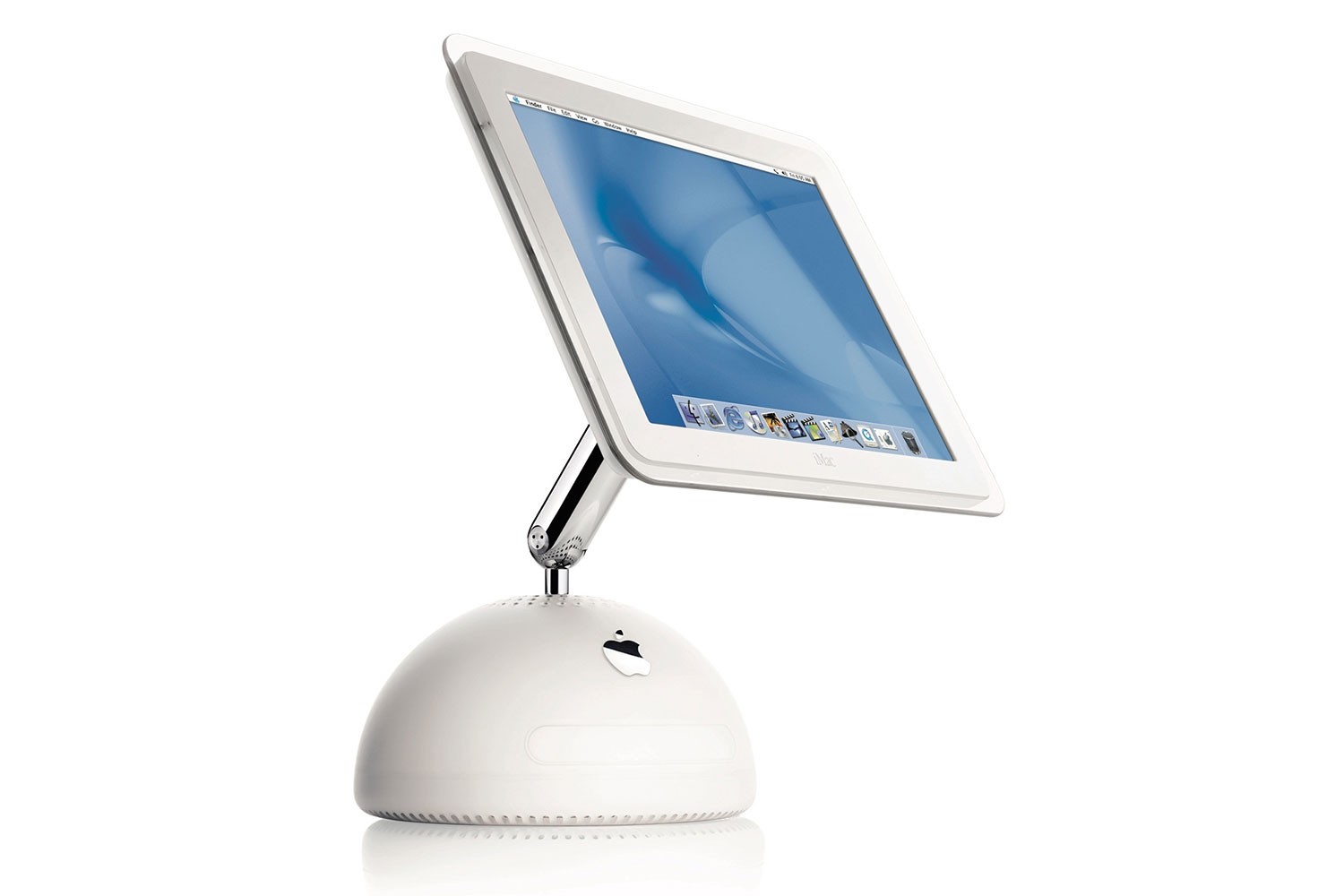
The tech world is buzzing about Apple’s anticipated entry into the smart display market, with reports from Bloomberg suggesting that the launch could happen as early as 2025. Recently, Mark Gurman of Bloomberg shared insights in his PowerOn newsletter. According to Gurman, this new device may take design cues from the iconic iMac G4.
Gurman observes, “The screen is angled on a compact base, reminiscent of the circular foundation that debuted a couple of decades ago.”
The iMac G4 holds a significant place in Apple’s design legacy. Steve Jobs, the company’s co-founder and then-CEO, was influenced by designer Jony Ive as they conceptualized the new Mac desktop.
Additional Insights
Apple may introduce a HomePod smart display in 2024.
Could Huawei’s MateStation X compete with Apple’s iMac?
Has Apple shifted focus away from its latest Studio Display?
When the iMac G4 debuted over twenty years ago, Jobs praised it as “the biggest change in desktop computers” and highlighted its upgrades. “This is the best thing, I think, we’ve ever done,” he was quoted as saying at a bustling Macworld event.
Could this be a glimpse into the future of Apple’s smart display efforts?Apple
Today, the iMac G4’s unique swiveling arm design, which connects the LCD panel to a hemispherical base, is still celebrated as one of Apple’s most remarkable achievements in hardware design. It seems Apple is drawing from this rich design heritage for its latest venture into a new product category.
According to Bloomberg, the screen on Apple’s forthcoming smart home device is expected to feature a square-like format, approximately the “size of two iPhones placed side by side.” Meanwhile, the base is likely to house the speaker system.
This device is intended to be a central hub for managing other smart home gadgets and accessories. It will operate on a custom OS, informally referred to as homeOS, with a user experience somewhat similar to that of the iPad.
The smart display is anticipated to include applications such as Notes, Calendar, and FaceTime. Additionally, Apple envisions it functioning as a dynamic photo frame, showcasing slideshow images from its Photos library and serving as an entertainment center for videos.
Concept design for Apple’s upcoming smart display.Xhakomo Doda
It’s noteworthy that this device is expected to leverage Apple’s intelligence capabilities, indicating significant processing power, especially for a device positioned as an entry-level smart display.
In addition, Apple is reportedly developing a high-end variant featuring a robotic arm design, which could come with a price tag around $1,000.
Although Apple has not officially acknowledged its work on this new category of smart devices, the company appears eager to expand its AI integration into various products and capture a share of the market currently dominated by Amazon’s Echo Show.
For those interested in design concepts, London-based designer Xhakomo Doda has created renders imagining a modernized iMac G4. Additionally, a hardware enthusiast successfully integrated Apple’s M1 chip into an iMac G4 chassis for a contemporary twist. It will be intriguing to see if Apple sticks closely to its original design inspiration or opts for a completely new approach in the upcoming year.