Tag: Subscription

  • Google Home Speaker 2026 Review: Smarter and Brighter with a Subscription

    Google Home Speaker 2026 Review: Smarter and Brighter with a Subscription

    Google Home Speaker

    MSRP $99.99

    “A delightful smart speaker that’s easy to love.”

    Advantages

    • Gemini makes voice interactions feel genuinely conversational
    • Robust smart home integration
    • Better sound quality than previous compact Google speakers
    • Modern, compact look
    • Outstanding value at $99

    Disadvantages

    • Advanced features require a subscription
    • Optimal experience depends on using Google’s ecosystem
    • No display for visuals or info

    Quick Overview

    Google has introduced its new Home Speaker with Gemini, signaling one of the biggest shifts in the company’s smart home lineup in years. This isn’t just a hardware upgrade with better sound or a fresh look. Instead, Google presents Gemini as the core of a smarter home assistant, capable of understanding natural conversations rather than relying solely on rigid voice commands. Priced at $99, it enters a highly competitive market segment, typically compared with devices like Apple’s HomePod mini.

    After testing for several weeks, it’s clear that Gemini is the key upgrade. The hardware is an advancement over earlier Google compact speakers, but the most significant change is how naturally it understands and responds during conversations. It adapts seamlessly to your speech, making interactions feel more genuine and less mechanical.

    What’s Inside the Google Home Speaker?

    Colors Berry, Porcelain, Hazel, Jade
    Dimensions Product: 3.4″ x 4.2″ diameter
    Power Cable: 59.1″
    Weight 0.9 lbs (including speaker and cable, excluding power adapter)
    Power & Ports 30W USB-C Adapter, 59.1″ cable, dimensions 2.3″ x 1.1″ x 2.2″, weight 0.1 lbs
    Memory & Storage 1 GB LPDDR4 RAM, 4 GB eMMC storage
    Processor Quad-core A55 2.0 GHz with NPU
    Sound & Microphones Omnidirectional sound, 58mm full-range driver, three microphones with a two-stage hardware mute
    Technology Gemini for Home, Voice match tech
    Sensors Capacitive touch control (3 zones)
    Materials At least 37% recycled materials in its design, plastic-free packaging
    Connectivity Wi-Fi 6, Bluetooth 5.4, Thread 1.3 border router
    Compatibility Google Home, Matter, acts as a Matter hub with Google Home
    Supported Devices iOS and Android
    Included in the Box Google Home Speaker, Power adapter, 59.1″ cable, Quick guide, Safety and warranty info

    Design and Setup: Sleek and Simple

    The speaker stands just 3.44 inches tall, with a 4.2-inch diameter and a light 0.9 pounds, making it incredibly easy to fit into any space while looking more refined than Google’s previous Nest models. Setting up is straightforward. Inside the box, you’ll find the speaker, a 30W USB-C power adapter, and a 1.5-meter cable, all configured through the Google Home app.

    It’s available in four colors: Hazel, Porcelain, Jade, and Berry, with Jade and Berry exclusive to the U.S. Currently, the Porcelain option used for this review has a clean, subtle look that blends easily into most homes. Its minimal, modern aesthetic doesn’t draw attention but complements most decor. The design also emphasizes sustainability, with recycled materials used throughout, including the exterior fabric that resembles Apple’s HomePod style.

    One neat detail is the dynamic light ring around the base, which shifts based on the speaker’s activity, such as listening, processing, or responding. This visual feedback enhances the overall experience, making interactions feel more responsive and alive. The omnidirectional microphones ensure the device picks up requests clearly from across the room without needing repeated commands.

    Interacting with the New Gemini

    The most noticeable change with the new Home Speaker isn’t just hardware—it’s the shift from Google Assistant to Gemini, fundamentally transforming how you communicate with your device.

    Older Google smart speakers required you to speak in commands. For example, turning off the lights or setting a timer meant delivering specific requests one at a time. Gemini moves away from this command-based model. Instead, you can speak naturally, much like talking to another person. Saying “Get the house ready for bedtime,” is enough for it to understand your intent and act accordingly. It can handle multiple instructions in one sentence and even adjust if you change your mind mid-sentence.

    What sets Gemini apart is its reasoning capability. During testing, when asked if it would rain during a baseball game, it didn’t just give today’s forecast. It processed multiple data points to make an inference, providing a more contextual and intelligent response. Google describes this as real reasoning, a substantial improvement over previous AI capabilities from Google Assistant.

    It’s equally adept at routine tasks. It can manage reminders, calendar events, shopping lists, and daily planning, supporting follow-up questions that build on the conversation rather than starting anew each time. You can personalize its voice with ten options, enhancing the natural feel of interactions.

    Google is offering the core Gemini experience at no extra charge. Buyers who get the Home Speaker before the end of September also receive six months of Google Home Premium, unlocking Gemini Live. This feature facilitates full conversations, enabling you to say, “Let’s chat,” and enjoy an extended back-and-forth. Premium adds advanced smart home management features, like camera status updates or the ability to ask if the garage was left open or if the dog jumped on the couch. It also provides summaries of events you missed while away. Google Home Premium comes in two tiers, with the basic included in Google AI Pro and the more advanced version bundled with Google AI Ultra.

    Sound Experience: Solid for Its Purpose

    Along with Gemini, audio performance has been significantly improved. Google claims the new Home Speaker offers enhanced microphone processing for clearer voice pickup, 360-degree sound, and bass that’s 2.5 times stronger than the Nest Mini. The difference in sound quality is immediately apparent compared to older Google compact speakers, making it a worthwhile upgrade if you owned previous models.

    Dual speakers can be paired for stereo sound, and integration with Google TV, Nest devices, and Cast-compatible products allows it to be part of a whole-home audio setup. It fits well within Google’s ecosystem, providing room-filling audio with punch and clarity. It avoids overly processed sound, delivering a balanced audio profile suitable for podcasts and vocals. While it handles small to medium rooms well, it might struggle with complex music at high volumes, where it can sound a bit muddled. For audiophiles, models like the Sonos Era 100 or the larger Google Nest Audio may be preferable.

    HomePod mini vs. Google Home Speaker

    Comparing this Google speaker to Apple’s HomePod mini is almost inevitable, as both are priced at around $99, feature fabric finishes, and come in various colors. The key distinction is purpose: the HomePod mini is primarily a music-focused speaker within the Apple ecosystem, while the Google Home Speaker is designed as a visual-less AI hub powered by Gemini.

    Gemini’s conversational improvements significantly distinguish Google’s offering. Its ability to handle multi-step, context-aware interactions feels more natural. Apple’s Siri AI, however, doesn’t yet support these next-gen features, meaning future versions of the HomePod may need to improve to match this experience.

    Those invested in Apple’s HomeKit ecosystem might prefer the HomePod mini, but Gemini’s support for multi-action commands, contextual dialog, and AI automation makes interactions more fluid and less reactive for Google users. In terms of audio quality, the HomePod mini offers clear, balanced sound suitable for casual listening, whereas Google emphasizes bass and immersive 360-degree audio that fills a room.

    Should You Consider Buying?

    This device offers more than just an upgrade in sound quality; it represents a shift in what a smart home assistant can be. The experience is less about issuing commands and more about natural, intuitive interactions. It performs well with podcasts and music for casual listening and features one of the most advanced on-device AI assistants available. Voice conversations feel natural, cross-device integration is seamless, and it can manage various tasks across apps if your accounts are linked. Some advanced features require a subscription, but for basic smart speaker needs, the latest Google Home Speaker is a top choice.

    Alternative Options to Explore

    Amazon Echo Dot Max — If exceptional audio quality is your priority, the Echo Dot Max features a dedicated woofer and tweeter, delivering impressive bass and clarity. Its Omnisense system offers presence detection, and support for protocols like Matter and Thread makes it versatile for smart homes. It automatically adapts to room layouts and includes a new, upgraded Alexa assistant.

    Apple HomePod mini — The closest competitor in design, the HomePod mini emphasizes Apple ecosystem integration. It provides pleasing sound, though less thunderous than larger speakers. Its AI, Siri, has improved significantly, supporting complex tasks across third-party apps, but it’s less flexible for Android users as many features remain locked behind Apple’s ecosystem.

    Sonos Era 100 SL — For audiophiles willing to invest more, the Sonos Era 100 SL offers refined, deep bass, a wider soundstage, and stereo separation. It supports multi-room playback and detailed EQ tuning. However, its virtual assistant features and app experience still need enhancement.

    How We Conducted Our Testing

    Our evaluation lasted several weeks, during which the device was linked to a personal Google account to access Gemini’s smart features. Sound quality was assessed by playing various genres, with comparisons made against the Apple HomePod mini for context. We focused on three core aspects: audio fidelity, responsiveness and accuracy of the AI, and how well it integrated across connected devices.

    Performance in audio was gauged by how well it reproduced different frequencies. The AI interaction tests involved natural language queries related to smart device control and information retrieval, measuring accuracy and response times. Finally, the setup was tested in different locations with varying network conditions to ensure reliable multi-device functioning.

  • Hande Erçel Sparks Controversy Over Paid Instagram Subscriptions

    Hande Erçel Sparks Controversy Over Paid Instagram Subscriptions

    Digital Phablet – Hande Erçel ignites discussion with her new paid Instagram subscription feature.

    Following the introduction of a paid subscription option on her official Instagram account, Turkish star Hande Erçel caused quite a buzz on social media. Fans can access exclusive content for a modest monthly fee of 59.99 Turkish lira, roughly equivalent to $1.40 USD.

    Reactions from fans have been mixed. Some were surprised that such a prominent celebrity would charge for exclusive material, while others supported her decision. Supporters argued that celebrities should have the freedom to share private moments with fans who pay to see them. Online, there were also sarcastic comments and playful comparisons with other artists. Some critics felt the subscription cost was excessive for the content offered.

    Hande Erçel Instagram subscription

    Recently, Hande Erçel shared a video exclusively for subscribers. On New Year’s Eve 2026, she spent the night with her sister Gamze Erçel and her husband, Caner Yıldırım. In the video, Hande eats 12 grapes under a table, a traditional practice believed to bring good luck for the upcoming year. Subscribers watched and commented enthusiastically on how intimate and personal the footage was, touching on her private celebrations.

    However, some questioned whether it was necessary to hide such private moments behind a subscription paywall. They argued that fans might feel disappointed or upset. In response, supporters pointed out that many celebrities use Instagram subscriptions and that prominent figures like singer Archel have utilized this feature before.

    This situation raises a broader question: how can celebrities foster genuine engagement with their fans on social media? Some believe that paid subscriptions offer an excellent avenue for stars to connect with their most dedicated followers, while others worry it might create a barrier that makes celebrities less relatable for everyday fans.

    Despite varying opinions, Hande Erçel’s strategy has already gained significant attention. Her approach demonstrates how influencers and celebrities are exploring innovative ways to share content and monetize their social media presence. Fans are divided on whether the subscription feature was a smart move or not. Nonetheless, it has successfully kept Hande Erçel in the public conversation.

  • Time-bending Crystals, Group Streaks & Unstoppable Alarms

    Time-bending Crystals, Group Streaks & Unstoppable Alarms

    Time Crystals: From Science Fiction to Everyday Security


    Artwork by Affan Qasim, created with Gemini Pro

    Picture pulling out a 1000 Rupee bill and seeing its security stripe pulse like a heartbeat—shifting, shimmering, and repeating in ways counterfeiting can’t replicate. That’s the intriguing potential of time crystals, a form of matter physicists once believed was impossible.

    Researchers at the University of Colorado Boulder have now created the first visible time crystals. Made from twisted liquid crystals illuminated by light, these crystals ripple with vibrant tiger-stripe patterns that are sturdy, stable, and sometimes even visible with the naked eye.

    This isn’t sci-fi fuel for a time machine, but it could redefine how we safeguard currency, store data, or develop futuristic displays. Imagine screens that animate themselves, changing colors or patterns rhythmically, powered by the principles of time symmetry breaking.

    By layering different types of time crystals, it might be possible to produce holographic images that are extremely secure and constantly shifting or create bright, shimmering surfaces for wearable tech or architecture. From seemingly impossible physics to holograms on banknotes, time crystals show that even the wildest science can find practical applications right in your pocket.

    Snapchat Enhances Features: Unlimited Storage and Group Streaks

    Artwork by Syed Alihasan Agha, created using Gemini Pro
    Artwork by Syed Alihasan Agha, created with Gemini Pro

    Snapchat is changing the game again: the app renowned for disappearing messages now aims to keep your chats forever and encourage ongoing friendships.


    With “Infinite Retention,” you can pin conversations so they stay put instead of fading away, a bold move away from Snapchat’s original “disappear after viewing” approach.

    Meanwhile, “Group Streaks” turn your group chats into a friendly competition, where everyone contributes to maintaining a streak. Let one lazy friend slip up, and the whole record is lost. This feature gamifies chatting, making your group conversations more of a daily routine than a casual drop-in.

    “Good morning! It’s a sunny day. Solve for X.”

    Artwork created by Daniyal Khuhro using Gemini
    Artwork by Daniyal Khuhro, generated with Gemini

    Today, it seems like fresh innovation is scarce, replaced by rebrands of familiar concepts.

    Awake, the latest alarm app for iOS, demands that users complete a task or challenge before turning off the alarm, setting itself apart. It now includes features like weather updates, morning news, calendar reminders, and even social media block functions—all bundled into one package. Though useful, these features are nothing new.

    Most of these added features come with a hefty price tag—$19.99 annually or $6.49 monthly—highlighting that they’re selling convenience, not novelty, as usual.

  • Xbox Game Pass Gets A Rare Value Boost For Gamers

    Xbox Game Pass Gets A Rare Value Boost For Gamers

    Microsoft is currently testing a new feature for Xbox Game Pass that delivers significant value for players. Starting today, members of the Xbox Insider program can try out the Xbox Cloud Gaming beta on the Game Pass Core and Standard tiers. Until now, this service was exclusive to those subscribed to Game Pass Ultimate.

    This development is notable because, in today’s gaming landscape, it’s uncommon to see a service that actually enhances its value proposition. While there have been reports of Game Pass increasing its subscription prices, offering cloud gaming options to more budget-conscious players is a positive step. This move could make gaming more accessible and affordable for a broader audience.

    Recent hints from Microsoft suggest that more changes are in the pipeline. Jason Ronald, Vice President of Next Generation Experiences at Microsoft, mentioned in an Xbox podcast that such features are on the horizon. There are also rumors about the company potentially introducing an ad-supported tier for Game Pass, though nothing official has been announced yet.

    Additionally, select titles from the PC Game Pass library will soon be accessible for players on the Core and Standard plans—though only on Windows PCs or handheld devices. Gaming on consoles with PC games isn’t available at this time, but it’s possible that future updates could enable Xbox players to enjoy these titles via keyboard and mouse controls.

    According to Ronald, many players are already using Game Pass Ultimate primarily for cloud gaming, either as their main way to play or as an extra option for gaming on the go. He emphasizes that these updates could make the service more affordable and easier to access, especially in new regions or through different ways of connecting to the Xbox cloud.

    [Image: Key art for Xbox Game Pass Core]

    Source: Microsoft / Xbox

  • Is Blink’s Subscription Worth It

    Is Blink’s Subscription Worth It

    Blink is the newer, more budget-friendly cousin of Ring. Both brands are part of Amazon, and both perform well (although I’ve noticed Ring tends to load slightly faster). They also share a common requirement: to access their most advanced features, you’ll need a subscription.

    Blink offers three subscription levels. Without any subscription, you’ll get motion alerts when something moves within the camera’s range and can view a live feed for up to five minutes. Although the official website doesn’t specify the number of devices this applies to, all your connected Blink cameras and devices will send motion notifications.

    The next tier is the Basic plan, which costs $3 per month for each device. It includes cloud storage for up to 60 days, motion detection, person and vehicle detection, and an extended live view of up to 90 minutes. It also provides motion event recording, live view recordings, instant video access, photo capture, and auto-updating thumbnails.

    The top-tier option is called Plus, costing $10 monthly for unlimited devices and offering the best value. It includes everything in the lower plans, plus custom snooze notifications, a 10% discount on future Blink products, extended warranty coverage, and the Blink Moments feature that stitches multiple events into a seamless video.

    Considering all these features, you might wonder if a Blink subscription is truly worth it. Honestly, I dislike subscription services. When I buy a device, I want to unlock all its features without a recurring fee. However, given the affordability of Blink devices and the extensive features the subscription unlocks, it’s not worth the cost unless you opt for the subscription.

    I personally subscribe to the Plus plan. With a video doorbell and multiple outdoor cameras, it’s more cost-effective than paying per device. And at $10 a month (around $8 with annual billing), it’s in line with what other brands offer, though Blink lacks some advanced features found in higher-end options like Ring.

    Is $100 annually a fair deal?

    I’ve paid very little for my Blink devices. Some were sent to me for review, but I’ve expanded my system through additional purchases. The key? I bought most during Prime Day or Black Friday sales when Blink’s prices often drop significantly. In fact, I can usually buy two or three Blink cameras for the price of one Ring device.

    The subscription expense feels minimal considering how effective the system has been. It allows me to monitor my home while away and check in on my pets. The ability to view up to 90 minutes of footage at a stretch is particularly helpful, especially when multiple events are linked. For instance, I once silenced my phone, then later found I had over 30 motion alerts—either neighbors hosting a party or, in a humorous thought, a gang of garden gnomes on the move. Luckily, it was just kids playing nearby, and the alerts kept me informed.

    Another benefit of the Plus plan is the temporary notification snooze feature. When my lawn service shows up, I turn off notifications to prevent constant alerts from the mower moving across the yard, saving my phone from vibrating off the desk.

    The downside: no professional security monitoring

    Blink is a DIY system. You can monitor your property remotely, but no one will intervene or contact authorities when something’s wrong. Ring offers an emergency response service for an additional $10 a month on top of their middle-tier plan, which means paying at least $20 (probably more) monthly for professional security.

    This is the trade-off. Although $10 a month grants access to numerous features, it doesn’t include the most vital one: professional monitoring. I highly recommend professional security if it’s available, but if not, paying the subscription fee to make remote monitoring easier is a reasonable choice.

    Pairing the subscription with optional accessories like the solar panel or floodlight adds to your home security capabilities at a fraction of the cost of other systems.

  • Save $349 On 12-Month Starlink Subscription In These States

    Save $349 On 12-Month Starlink Subscription In These States

    If you’re looking to sign up for a year of Starlink, a new offer might be just what you need. Elon Musk’s satellite internet service has unveiled a promotion that allows you to receive the Starlink hardware at no cost, provided you commit to a 12-month residential service plan.

    Typically, subscribing to Starlink means you would have to pay for both the monthly service and the equipment, which in the U.S. usually costs around $349. This upfront cost can be quite substantial. However, this new deal waives the hardware fee as long as you agree to the 12-month Residential plan. You can choose between the Residential Lite option, which is $80 per month and offers “unlimited deprioritized data,” or the standard Residential plan for $120 per month, which provides prioritized data access.

    Upon taking advantage of this offer, you’ll have a 30-day trial period to test Starlink without any risk. After this initial 30 days, your commitment becomes binding, and you won’t be able to cancel your plan.

    $0 for the Standard Kit with a 12-month residential service plan commitment, now available in select markets.

    Reliable high-speed internet, even in the most rural and remote locations.

    Check your address availability → https://t.co/jXEyJ0fejz pic.twitter.com/EFCRQd2sfP

    — Starlink (@Starlink) April 29, 2025

    That hardware cost might still come back to haunt you in certain scenarios, as indicated in the Starlink promotion FAQ. If you change your service address, cancel your subscription, fail to pay your bill on time, transfer your Starlink service to another individual, or terminate your plan during the 30-day trial without sending back the hardware, you could face a Change Fee. The amount of this fee appears to vary by market and is prorated over time. Note that in some areas, an additional $100 demand fee may apply, which is not waived by this offer.

    This offer is available in the U.S., but only in about half of the states. It can also be found in certain regions of Australia, Canada, the UK, and select European countries.

  • How to Cancel Your Fortnite Crew Pack Subscription

    How to Cancel Your Fortnite Crew Pack Subscription

    Epic Games offers a monthly subscription called the Fortnite Crew Pack, which is packed with amazing benefits. This service is particularly advantageous for players who frequently purchase V-Bucks or who enjoy gaining access to exclusive cosmetics and skins. It also eliminates the worry of missing out on special bonuses and items.

    However, it’s common for users to find certain aspects of the pack unappealing or to prefer not to pay ongoing fees, leading them to seek cancellation. This guide will detail how to cancel your Fortnite Crew subscription, which varies based on the platform you are using.

    Updated January 12, 2025 by Jack Filsinger: Since the launch of the Fortnite Crew pass, there have been several changes regarding its contents and the cancellation process. This guide has been updated to reflect what you can expect from the Fortnite Crew and what happens if you decide to cancel.

    What Is The Fortnite Crew Pack?

    The Fortnite Crew Pack is a monthly subscription service offering exclusive rewards to Fortnite players.

    Upon subscribing, you’ll receive some great benefits, including:

    • 1,000 V-Bucks
    • Access to Premium Battle Pass rewards
    • OG Pass rewards
    • Music Pass rewards
    • LEGO Pass rewards
    • Exclusive Crew Pack cosmetics

    How Much Does Fortnite Crew Cost?

    The price of the Fortnite Crew subscription is $11.99 USD per month if you have recurring payments enabled.

    These payments are set up automatically, so if you don’t want them, you’ll need to cancel manually.

    When Will Your Subscription Renew?

    If you’re subscribed to Fortnite Crew with recurring payments enabled, your billing date will correspond to the day you initially purchased the membership.

    This means that if you want to cancel your subscription and avoid another charge, be sure to do so before this date.

    How To Cancel Your Fortnite Crew Subscription

    Canceling your Fortnite Crew subscription isn’t always straightforward.

    While it would be convenient to just click a ‘cancel’ button, the process varies based on where you initially purchased the membership.

    Below, you’ll find cancellation instructions for various platforms.

    Keep in mind that when you cancel your Fortnite Crew subscription, you will retain any rewards earned from previous Fortnite passes, in addition to the content you’ve received during your subscription.

    However, you won’t be eligible for future rewards, nor will you receive a prorated refund for your subscription.

    PC And Android

    To cancel your Fortnite Crew subscription on PC or Android, you need to visit the Epic Games website.

    • Go to the Epic Games website and log into your account.
    • Click on your username in the top right corner, then select ‘Account‘.
    • Scroll down to the ‘Subscriptions‘ section to manage your subscriptions.
    • Click on the settings icon and then select ‘Cancel Subscription‘.

    Xbox

    If you signed up for Fortnite Crew on Xbox, you’ll need to cancel your subscription via the Microsoft website.

    • Visit the Microsoft website and sign in to your account.
    • Click on ‘Services and Subscriptions‘ from the menu bar, where you’ll see your Microsoft subscriptions.
    • Find the Fortnite Crew section, then click ‘Manage‘.
    • From there, select ‘Turn off recurring billing‘.

    On this page, you’ll see an option to ‘Cancel subscription’, but be cautious as this may lead to confusion.

    Selecting this option directs you to customer support to request a refund for your subscription.

    If you go this route, Fortnite Crew items will be removed from your account, although you’ll keep your Battle Pass; however, you will lose 950 V-Bucks.

    PlayStation

    • Visit the PlayStation Store website and log into your account.
    • Click on your account icon in the top right corner.
    • Go to ‘Manage subscriptions‘ and on the Fortnite Crew subscription, select ‘Turn off auto-renew‘.

    Nintendo Switch

    If you signed up for Fortnite Crew on Nintendo Switch, you’ll cancel through the Nintendo eShop.

    • Open the Nintendo eShop on your console from the HOME page.
    • Click your account icon in the top right corner.
    • Select ‘Subscriptions‘ and on the Fortnite Crew subscription, choose ‘Turn off automatic renewal‘.

    Samsung

    If you subscribed to Fortnite Crew via a Samsung device, you’ll need to cancel it through the Galaxy Store.

    • Open the Galaxy Store on your Samsung device.
    • Access the menu and select ‘Subscriptions‘.
    • Choose Fortnite and then tap ‘Cancel‘.

    Canceling your subscription will not revoke your Fortnite Crew member benefits right away, and you’ll still have access to your items (unless you request a full refund through Microsoft’s site).

    Even if you cancel the day after subscribing, you will remain a member until just before your next billing date.

    For more details about the Fortnite Crew monthly subscription, be sure to check its official page on Epic Games’ site for plenty of useful information.

  • Sega May Launch Its Own Game Subscription Service

    Sega May Launch Its Own Game Subscription Service

    With platforms like Xbox Game Pass, PlayStation Plus, and Nintendo Switch Online leading the way, it seems every gaming company is diving into the subscription model. Add services like Ubisoft+, EA Play, and numerous others to the mix, and it’s turning into quite the chaotic landscape. In light of this, Sega’s new president, Shuji Utsumi, has hinted that the iconic company may be exploring a similar subscription service, though he kept specifics under wraps.

    During a recent interview with the BBC, Utsumi mentioned, “There are discussions underway, but we are unable to share further details at this time.” He had previously expressed his view that subscription services are “very interesting.”

    The reaction from the gaming community has been varied. Many players are already feeling overwhelmed by the abundance of subscription options and the soaring costs associated with them. Additionally, with Sega’s games available on numerous platforms, questions arise about whether a dedicated Sega service would restrict access to its titles from existing subscriptions.

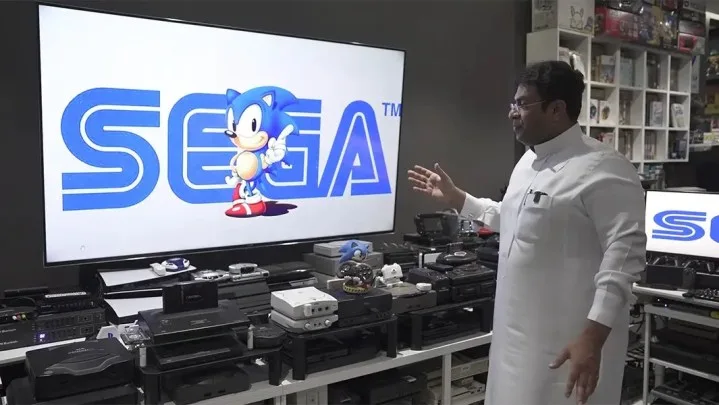
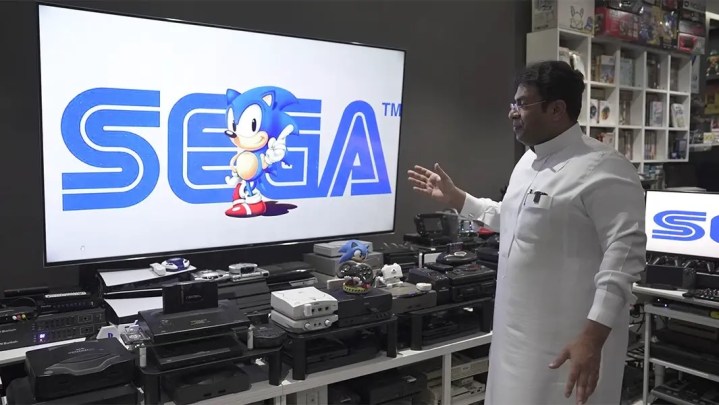
    Ibrahim Al-Nasser in front of his console collection with Sonic and the Sega logo displayed on the TV.
    Guinness World Records

    The answer remains uncertain. However, Utsumi expressed a desire to “make Sega shine again,” alluding to the company’s peak years during the 1990s. Sega has tended to focus more on the domestic market, and he aims to reinvigorate the brand and elevate its international profile by reintroducing a “rock and roll” ethos to gaming.

    Those who experienced the 90s rivalries will recall the fierce competition between Nintendo and Sega, where Sonic the Hedgehog was marketed as the edgy alternative to the beloved plumber. If Sega decides to roll out a subscription service, it has a wealth of titles to draw from. Recent hits like Sonic X Shadow Generations, Shin Megami Tensei V, and the Like a Dragon franchise could attract a lot of users. However, if these titles were to be removed from other platforms, it might lead to a backlash from the gaming community.

    Utsumi refrained from providing many specifics in the interview, frequently stating that details were not ready to be shared. As Sega contemplates launching a subscription service in this already competitive market, it will need a unique approach to stand out.

  • How do I cancel my subscription to Geek Squad?

    How do I cancel my subscription to Geek Squad?

    How to Cancel Your Subscription to Geek Squad

    If you’ve decided that you no longer need your Geek Squad subscription, whether for technical support, device protection, or other services, canceling it is a straightforward process. Here’s a step-by-step guide on how to effectively terminate your subscription.

    Understanding Your Subscription

    Before diving into the cancellation process, it’s vital to understand what type of subscription you have. Geek Squad offers multiple services, including:

    • Geek Squad Protection: Covers accidental damage for various devices.
    • Tech Support Plans: Provides assistance for software issues, installations, and troubleshooting.
    • Membership Plans: Gives you access to discounted services.

    How to Cancel Your Geek Squad Subscription

    There are a few different ways you can cancel your subscription, depending on your preference.

    1. Online Cancellation

    For a quick and convenient way to cancel, you can use the online portal.

    • Step 1: Visit the Best Buy website.
    • Step 2: Log into your account using your email and password.
    • Step 3: Navigate to “Account Settings” or “Subscriptions.”
    • Step 4: Locate the Geek Squad subscription you wish to cancel.
    • Step 5: Follow the prompts to complete the cancellation process.

    2. Phone Cancellation

    If you prefer speaking with a customer service representative or encounter issues online, you can cancel over the phone.

    • Step 1: Call Geek Squad Customer Support at 1-800-GEEK-SQUAD (1-800-433-5778).
    • Step 2: Follow the prompts to connect with a representative.
    • Step 3: Request cancellation of your subscription. Be prepared to provide your account information for verification.

    • Step 4: Confirm the cancellation details with the representative.

    3. In-Store Cancellation

    If you prefer face-to-face interaction, you can also visit a Best Buy store for assistance.

    • Step 1: Find your nearest Best Buy location.
    • Step 2: Bring your account information and any related documentation regarding your subscription.
    • Step 3: Speak with a customer service associate about canceling your Geek Squad subscription.
    • Step 4: Ensure you receive confirmation of the cancellation.

    Important Considerations When Canceling

    While the cancellation process is pretty straightforward, there are a few key points to consider:

    • Timing: Check whether you are in a billing cycle. Canceling before the renewal date may help avoid extra charges.
    • Refund Policy: Understand Geek Squad’s refund policy regarding unused services. Some subscriptions may be eligible for a partial refund, while others may not be.
    • Confirmation: Always ask for confirmation of your cancellation, whether you do it online, over the phone, or in-store. This will protect you from any further charges.

    Final Thoughts

    Canceling your Geek Squad subscription can give you more control over your finances, especially if you find that you are no longer utilizing the services. By following the steps outlined above and taking the necessary precautions, you can ensure a smooth cancellation process. Choose the method that best suits your needs and don’t hesitate to reach out for assistance if needed.

  • Is there a security camera that does not require a subscription?

    Is there a security camera that does not require a subscription?

    Is There a Security Camera That Does Not Require a Subscription?

    When it comes to home security, many homeowners are increasingly seeking ways to ensure safety without the ongoing costs associated with subscription services. While various models come with subscription-based features, there are also several options available that allow users to enjoy peace of mind without extra monthly fees.

    Advantages of No-Subscription Security Cameras

    Choosing a security camera that doesn’t require a subscription offers numerous benefits:

    • Cost Savings: Without a subscription fee, you save money over time.
    • No Long-Term Commitments: You have the flexibility to stop using the camera at any time without worrying about cancellation fees.
    • Easy Access to Footage: Many no-subscription cameras allow users to store data on local devices, making it easier to access footage whenever needed.

    Features of No-Subscription Security Cameras

    Security cameras that don’t require subscriptions vary in features, but some common aspects include:

    Local Storage

    • SD Card Support: These cameras often come with the capability to store footage on a microSD card. This allows users to save recordings without relying on cloud storage.
    • Network Video Recorders (NVR): Some cameras can connect to an NVR for centralized storage, usable even without a subscription.

    User-Friendly Setup

    • Wireless Options: Many no-subscription models are wireless, making installation simple and flexible.
    • Mobile App Access: Users frequently have access to mobile apps for real-time monitoring without additional fees.

    Advanced Monitoring

    • Motion Detection: Look for cameras that offer motion detection alerts without the need for a subscription to view recorded alerts.
    • Two-Way Audio: Some cameras also provide the feature to communicate through the camera, enhancing interactive monitoring.

    Popular No-Subscription Security Cameras

    Several brands and models stand out in the realm of subscription-free security cameras. Here are a few notable options:

    Wyze Cam

    • Features:

      • 1080p HD video
      • Local storage with microSD card
      • Free cloud storage for 14-day clips
    • Ideal For: Budget consumers who want essential monitoring options without recurring fees.

    Blink Outdoor

    • Features:

      • Weather-resistant design
      • Local storage via Sync Module
      • Long battery life (up to two years)
    • Ideal For: Those seeking a reliable outdoor camera without added subscription costs.

    Reolink Argus 2

    • Features:

      • 1080p HD video quality
      • Solar panel option for energy efficiency
      • Local video storage with microSD
    • Ideal For: Users looking for a flexible solution with outdoor capabilities.

    Considerations When Choosing Your Camera

    Before choosing a security camera, be sure to consider the following factors:

    • Video Quality: Higher resolution provides clearer images and helps in identifying details better.
    • Field of View: A wider field of view will cover more area, reducing the number of cameras needed.
    • Compatibility: Ensure the camera can integrate with existing smart home systems if that is desirable.

    Additional Features to Look For

    • Night Vision: Ensure the camera has sufficient night vision capabilities for low-light conditions.
    • Weather Resistance: If using outdoors, check that the camera is rated for outdoor use.
    • Smart Alerts: Choose cameras that offer intelligent notifications that can differentiate between pets, people, and vehicles.

    Finding a security camera that doesn’t come with a subscription doesn’t have to be a daunting task. By understanding the available features and options, you can select a camera that meets your security needs without the burden of monthly fees.

  • Microsoft To Launch Xbox Game Pass Family Plan For Up To Five Players

    Sources claim that Microsoft has been mulling a family plan for Xbox Game Pass for a while now and it is expected to be announced in the “near future”. Moreover, Microsoft plans to integrate the Family Account system, too, which is used for Microsoft 365 Family subscriptions.

    (more…)