الوسم: store

  • How to Get Free Fortnite Cosmetics Through Completing and Solving in Epic Games Store

    How to Get Free Fortnite Cosmetics Through Completing and Solving in Epic Games Store

    Epic Games frequently rewards loyal players by giving away free cosmetics for pre-ordering, buying, or downloading their games. If you’re planning to purchase or play another Epic game, you might unlock exclusive or free cosmetic items for Fortnite.

    These rewards include outfits, back blings, emotes, gliders, and more. Many of them are only available for a limited time, so if you want a chance to claim a free Fortnite cosmetic from the Epic Games Store, it’s best to act quickly.

    All Free Fortnite Cosmetics from Epic Store Games

    Fortnite cosmetics are typically unlocked by completing challenges or purchasing them from the item shop. However, sometimes, you can get a free cosmetic just by pre-ordering or buying another Epic game.

    Note: Some of the listed free items aren’t always available as rewards for purchasing these games. Always check with the Epic Games Store before making a purchase to confirm current offers.

    Here are some games that have had, or currently have, free Fortnite cosmetic offers:

    • Super Meat Boy 3D (available)
    • Resident Evil Requiem (available)
    • Crimson Desert (available)
    • Goat Simulator 3
    • Rocket League
    • Fall Guys
    • Among Us
    • Alan Wake 2
    • Assassin’s Creed Valhalla
    • Elder Scrolls Online
    • Star Wars Jedi: Fallen Order
    • Tiny Tina’s Wonderlands
    • Honkai Star Rail
    Cosmetic Game How to Unlock
    Super Meat Boy Sidekick Super Meat Boy 3D Purchase or pre-order Super Meat Boy 3D via the Epic Games Store.
    Grace Ashcroft Resident Evil Requiem Pre-order Resident Evil Requiem on Epic Games Store.
    Kliff Crimson Desert Purchase Crimson Desert on the Epic Games Store.
    Stellaron Hunter Blade Honkai Star Rail Purchase an eligible item: The Nameless Glory, Honor Badge, Special Pass Exclusive Giftbox, Oneiric Shards, or The Nameless Medal.
    A Goat Goat Simulator 3 Pre-order or purchase Goat Simulator 3 from Epic Games Store.
    Rocket League Cosmetics Rocket League Link your Rocket League and Fortnite accounts, then complete challenges to earn vehicle cosmetics in both games.
    Major Mancake & Others Fall Guys Download Fall Guys from Epic, then play between 10 and 100 rounds.
    Alan Wake Alan Wake 2 Pre-order or buy Alan Wake 2 from Epic Games.
    Ezio Auditore Assassin’s Creed Valhalla Pre-order or buy Assassin’s Creed Valhalla on Epic.
    Sigil of the Alliance War Back Bling Elder Scrolls Online Pre-order or purchase Elder Scrolls Online via Epic.
    Imperial Stormtrooper Star Wars Jedi: Fallen Order Pre-order or buy from Epic Games Store.
    Borderlands 3 Psycho Skin Borderlands 3 Pre-order or purchase Borderlands 3 on Epic.

    Many of these offers require pre-ordering or purchasing the game through the Epic Games Store. Always double-check the current promotion details, as availability can change.

  • How to Best Set Up Your Store in Retro Rewind: Completing and Solving

    How to Best Set Up Your Store in Retro Rewind: Completing and Solving

    When you first start in Retro Rewind, you only have a few shelves and a couple of genres to manage. Over time, you’ll unlock new genres, buy more tapes, and start decorating your store. To keep things running smoothly, it’s important to plan your layout carefully.

    From choosing where to place shelves and signs to adding eye-catching entertainment and snacks, a well-designed store can earn over $500 daily if you plan correctly. Here’s everything you need to know about creating the perfect store layout in Retro Rewind.

    Best Store Layout in Retro Rewind

    Initially, your store space is limited, so focus on arranging shelves for the three genres plus New Releases, with only a small number of VHS tapes. In the early days, set up your shelves in a way that makes the store look organized and inviting.

    As you expand, you’ll add more genres like Sci-Fi and Action, and include snack shelves to encourage customers to spend more money. Maximize wall space by lining shelves along the walls, and use signs and lights to guide customers to different sections.

    Snacks can be placed between movie shelves or stacked back-to-back in the center of the store. It’s best to buy at least two snack shelves so you can display all available snacks. Decorate the store with balloons or movie-themed items in open spaces to attract customers and boost sales.

    When your finances allow, purchase store expansions—starting with Section A for $1,250 or Section B for $1,000. This extra space lets you display more VHS tapes. Section A offers a more dynamic area, while Section B provides a simple backroom extension; the choice depends on your store’s needs. Keep in mind, buying all expansions unlocks an achievement.

    As your store grows, focus on generating more income by adding entertainment items like refrigerators, TVs, and arcade machines. Dedicate a section of your store to these, lining a wall with arcade machines and candy dispensers. These generate passive income and can greatly increase your cash flow, making them worthwhile investments.

    With more room, arrange shelves in aisles or centered displays, leaving clear paths for customers to browse comfortably. Place balloons or movie-themed decorations near popular sections to encourage customers to look at VHS tapes or buy snacks. Avoid overcrowding by leaving enough space around displays so customers can move freely and easily ask questions.

    High-traffic areas are typically near the register and around popular genre shelves. Some genres will see variable popularity depending on the day of the week, so check your in-game calendar to plan accordingly.

    Keep the cash register area as clear as possible, especially to the right where customers queue, and the front-left where customers ask for reserved titles. A cluttered checkout can create chaos and make the store look messy.

    When expanding to the back sections (D, E, and F), consider creating a dedicated arcade zone with gaming machines and candy dispensers. The smallest backroom — Section F — is ideal for storing adult genre VHS out of view from sensitive customers. Decorate this room with adult-themed displays, neon lights, and red balloons for a sensual vibe.

    Don’t hesitate to rearrange your layout as your store develops. Move genre sections to different locations and combine genres like Kids with Christmas, Western with Police, Action with Horror, or Romance with Fantasy as space allows. Flexibility helps keep your store fresh and more appealing to different customer interests.

  • Completing a Successful Store in Retro Rewind: A Step-by-Step Guide

    Completing a Successful Store in Retro Rewind: A Step-by-Step Guide

    To make a profit in Retro Rewind – Video Store Simulator, you need to start your business strong. As you progress, running the store becomes more efficient, and you’ll eventually hire staff to handle most tasks—if they’re capable, of course.

    Being a manager is never easy, and you’ll have to do everything possible to increase profits while meeting customer needs. Here’s what you need to know when starting out.

    Whatever the Weather
    Before opening each day, check the calendar. It shows the date, weather conditions, and upcoming events. Rainy days tend to bring in more customers eager to rent movies for a cozy night, while special events or themed days promote specific genres.
    Weekends and Fridays are the busiest days. If the forecast calls for a rainy Friday, prepare accordingly with plenty of VHS tapes, snack shelves fully stocked, and a good staff member to help out.

    Flying High
    On slow days when fewer customers visit and there are no returns to process, assign a staff member to the cash register while you focus on passing out flyers. Consistent promotion can significantly boost income during quiet times.
    Currently, you must handle flyer distribution yourself, as staff aren’t automated for this. Keep handing out flyers outside the store or near the movie theater across the street, especially to people who are outside looking in, as they are more likely to respond positively.

    By Genre
    Organizing your inventory by genre is the best approach. Instead of randomly stacking tapes, create labeled sections for genres like “Old Action Movies” so you can quickly find what a customer requests. This neat setup improves the store’s appearance and makes reorganization easier when expanding or remodeling.
    Decorate shelves with themed lighting, balloons, or props to attract attention and encourage rentals. You can also replace shelves with larger models when upgrading your store.

    Trashy Titles Matter Too
    Customers love poorly-rated movies that are fun to watch, even if critics dismiss them. These “so-bad-it’s-good” movies are cheap and often in demand.
    While highly-rated films can command higher rental prices, don’t overlook the value of cheap, bad movies—many customers specifically seek them out and they are guaranteed to turn a profit eventually.
    Remember to regularly check in with the Video Guy outside the back door on Tuesdays and Thursdays for interesting new titles.

    Cherry-Pick Charges
    Some customers might try to avoid late fees by sneaking in a late return and posting it through the slot at night. When they come back, you’ll see the late fee on their account—usually $2.
    You can choose to charge the fee or waive it as a gesture of good customer service. Most customers accept paying the fee, but some may threaten to never come back. Decide what’s best for your store—either enforce the fee or waive it to keep a loyal customer base.
    It’s recommended not to waive damage fees, as $20 typically covers replacing a lost VHS tape.

    Movie Munchies
    Snacks are a great way to increase profit. Set up a few snack shelves once you unlock them at level 4. Snacks cost a few cents, but you can sell them for over a dollar, making for a high margin.
    Since customers don’t come to rent movies for snacks, these are impulse buys. Place snack shelves near the checkout or in high-traffic areas to encourage more sales, especially as customers walk past them frequently.

    Logical Layout
    Your store layout impacts profits. Customers dislike spending too long searching for movies or feeling cramped. Design your store to promote easy movement for shoppers, with wide aisles and clear labels for each genre.
    Expanding your store gives more space to arrange larger displays and promotional boards for new releases, helping persuade passersby to rent certain titles.
    Use the Decor button (B) to change the wall and shelf colors freely, customizing your store’s look.

    High Staff Turnover
    At level 6, you can hire your first employee, with a second available at level 20. Each staff member costs a fixed daily fee, so ensure your budget allows before hiring. The staff hire sheet is located in the stockroom.
    Initially, assign employees roles like handling returns and operating the register. Avoid hiring slow workers; look for those with “Average,” “Good,” or “Fast” ratings.
    Check their smaller details, like customer service skills or health, to prevent frequent sick days. During busy times, you can ask staff to speed up, but overdoing it may lead to quitting. If you notice slacking or poor performance, you can fire staff immediately. Keep in mind, firing and hiring staff within the same day will cost double wages.

  • How to Complete All Achievements in Retro Rewind: Video Store Solver

    How to Complete All Achievements in Retro Rewind: Video Store Solver

    Retro Rewind: Video Store Simulator allows players to experience nostalgic memories as they run their own VHS rental shop, aiming to earn profits. You will stock a mix of classic and recent movies, gradually adding different genres to your collection as you progress.

    The game features 18 achievements to unlock, starting with opening your store for the first time and hiring staff, up to unlocking every movie genre. Completing these achievements rewards you with in-game money and experience points, making it worthwhile even if you’re not a completionist.

    You earn rewards each time you unlock an achievement. For example, finishing your first day as a business owner grants you $100 and 50 XP. Helping customers or hiring staff also gives similar rewards. Some achievements involve specific tasks, like selling 20 slushy drinks, owning 250 movies, or checking in 1,000 movies at the return station. Others challenge you to display holographic movies or sell 20 popcorns, rewarding you with cash and XP for success.

    Certain achievements require reaching store levels to unlock new equipment or features, such as the cotton candy machine at level 12 or arcade machines at level 18. You can unlock all store expansions by checking the poster in the office and paying the required costs, boosting your store’s size and capabilities.

    Completing major financial milestones, like generating $10,000 in revenue or owning 1000 movies, also counts towards achievements. To reach these goals, save your earnings, hold off on unnecessary purchases, and manage staff wisely. Unlocking all movie genres and fully staffing your store also unlocks special achievements, adding to your progression.

    New updates may introduce additional achievements, which will be added to this list as they become available.

  • Completing Garrus: New Mass Effect Bundle at BioWare Store

    Completing Garrus: New Mass Effect Bundle at BioWare Store

    If you ask a devoted Mass Effect fan their favorite romanceable companion, many will likely say Tali. If you ask others, Garrus’ name will also come up often. Both are adored in the Mass Effect community, and their fans are very loyal. Therefore, it’s not surprising that Garrus is getting new merchandise in the BioWare store.

    The Mass Effect Garrus Companion Bundle is available for pre-order now, but it comes with a high price tag of €82.72. Fans will receive a small Garrus statue, a necklace, and even a love letter from the turian.

    The Next Mass Effect Companion To Get An Official Bundle Is Garrus

    Orders will be shipped in September this year, but you can place your order now if you think a message from Garrus is worth the price. The message is inside the box containing the bundle, instead of on a scroll like previous Dragon Age bundles.

    By the way, BioWare, could you restock the companion bundle for everyone’s favorite romanceable character, Alistair Theirin?

    Currently, only Tali has her own bundle, which includes similar items but is out of stock, which isn’t surprising.

    In other Mass Effect news, an Amazon TV show is being produced, likely retelling the original trilogy. A new game in the series is also in development, but after significant layoffs at BioWare, it’s unclear how many original developers will work on Mass Effect 5. Regardless, the release is still a few years away.

    Mass Effect

    Released
    November 20, 2007

    ESRB
    M for Mature 17+ due to Blood, Language, Partial Nudity, Sexual Themes, Violence

    Engine
    Unreal Engine 3

    Cross-Platform Play
    Doesn’t have cross-play between PC and consoles

    Cross Save
    Yes

    • Xbox store
    • Steam logo
  • Completing the Quest: Solving Grocery Store Location in Schedule 1

    Completing the Quest: Solving Grocery Store Location in Schedule 1

    To maintain a consistent flow of drug ingredients, ensuring that your debts in Schedule 1 are cleared is crucial. Failing to do so may hinder your ability to expand your business. To pay off these debts, you must deposit cash into various Dead Drop locations throughout the city.

    Most of these sites can be found on the Hyland Point map, with the exception of one: the Grocery Store. It’s vital to familiarize yourself with this store since you’ll frequently need to drop off money for collection. This guide will help you locate the Grocery Store.

    Finding the Grocery Store

    Making your Dead Drop deposits is essential in Schedule 1. Keeping your suppliers happy enables you to access valuable items, such as Green Crack seeds, a highly sought-after drug in the game. Consistently making payments ensures a smoother production process, resulting in faster output.

    The challenge lies in the fact that the building associated with the Dead Drop does not resemble a typical Grocery Store. You might overlook it if you’re not paying attention.

    To find the Grocery Store easily, go to the Taco Tickler and look directly across the street. The Grocery Store will be in that vicinity.

    For this Dead Drop to be available, you may need to unlock the Downtown area first.

    To make things a bit more complicated, you’ll need to navigate to the alleyway behind the Grocery Store, which is not expressly mentioned in the game.

    Locating the Grocery Store’s Dead Drop

    Start your search at the Parking Garage near the Motel. You’ll spot Brad set up in his tent there. Once you reach Brad’s tent, walk in the opposite direction (toward the right) from where you came.

    Look for a blue painting on the wall with a door to its left. If you follow the wall past the painting, you’ll find the Dead Drop associated with the Grocery Store.

    Just a note: the Dead Drop at the Supermarket is different from the one at the Grocery Store, so make sure you’re heading to the correct location before making a deposit.

    If you struggle to pinpoint the exact spot, consult your map. A black dot next to the Parking Garage will indicate the general area of the Dead Drop.

    If you’re in the right place, the Dead Drop will be positioned next to the Supermarket across from the Police Station.

  • Storage Solutions in Kingdom Come: Deliverance 2

    Storage Solutions in Kingdom Come: Deliverance 2

    Your weight can significantly affect your ability to carry important items in Kingdom Come: Deliverance 2. As you gather resources, weapons, and various supplies, your inventory may fill up quickly. This can hinder Henry’s movement, slow him down, and make it difficult to collect more items.

    Although you can enhance your stats and increase your weight limit, there are other effective strategies to handle this challenge. One of the most useful methods is to store items that aren’t immediately necessary in a safe location, freeing up space for more essential gear while keeping your extra items handy for later use.

    How to Store Items

    Before you can store items, you need access to a storage chest. You can find these chests near your personal bed in the game.

    During specific quests, you’ll have access to some free beds for resting, but this can be inconvenient since you’ll want to have beds available in various locations.

    This is where Lodging and Taverns come into play. If you chat with the owner, you’ll have the option to rent a bed for one night or longer. Once you make a deal, you can ask the owner to show you to your room.

    You’ll notice a bed icon on the map marking all the personal beds you can use.

    Once inside your bedroom, look for a chest near the bed that you can access. This will open a menu with the Found section on the left, which shows the items in the chest, and the Player section on the right, which displays everything you currently carry.

    All you need to do is select the items from the Player section and confirm moving them to the Found section. This will store those items, lightening your load and allowing you to pick up additional items.

    Keep in mind that items you place in one storage chest will be accessible from all other storage chests, regardless of their location. This means you don’t have to stress about where to store your items.

  • Amazon’s New ‘Haul’ Store Has Items Under $20

    Amazon’s New ‘Haul’ Store Has Items Under $20

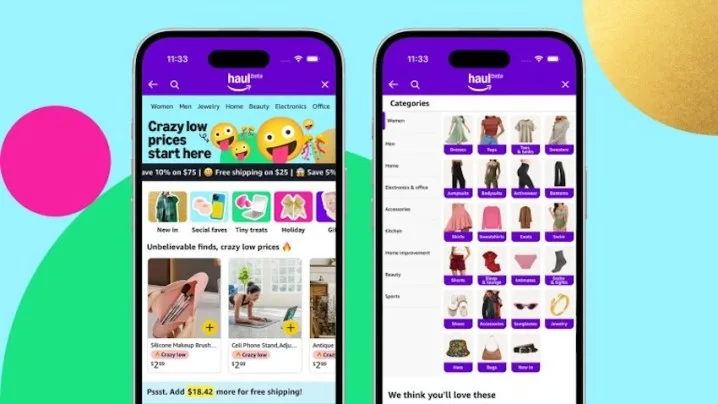
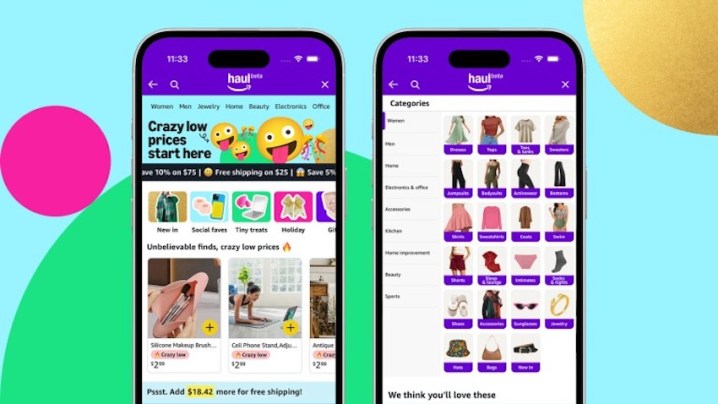
    Amazon's new Haul shopping site.
    Amazon

    Amazon has unveiled a new shopping destination featuring items priced at $20 or less. This initiative aims to compete with popular online retailers like Temu and Shein, who have gained traction among cost-conscious shoppers in the U.S.

    The new platform, named Haul, is currently in beta testing and is exclusively available on mobile. Following your next app update, you’ll find Haul as a new tab within the Amazon shopping app. Alternatively, you can access it through your mobile browser at www.amazon.com/haul.

    During the launch announcement, Amazon highlighted that the platform features a wide range of affordable products across categories including fashion, home goods, lifestyle items, and electronics. However, customers should note that delivery times may take “one to two weeks,” which could be a downside for those seeking immediate purchases.

    “All products are priced at $20 or less, with most items costing $10 or under, and a selection available for as little as $1,” Amazon stated. “Customers can benefit from additional savings by making larger orders, receiving 5% off on purchases over $50 and 10% off orders exceeding $75.”

    Some examples of what’s available include a three-piece trimmer razor set for $2.99, festive table runners priced at $2.99, an iPhone 16 case for $1.79, a women’s elastic stretch belt for $1.99, and touchscreen winter gloves available for $3.21.

    While these prices may attract attention, buyers should expect to sacrifice some quality. Those familiar with Temu and Shein will recognize the trade-off. In an effort to reassure customers, Amazon promises to screen Haul products to ensure they are safe, authentic, and compliant with relevant regulations.

    If you find yourself dissatisfied with your purchase, Amazon offers free returns on items over $3 within 15 days of delivery. Moreover, customers can return items hassle-free at more than 8,000 drop-off locations across the U.S., including Amazon Lockers, Amazon Fresh, Whole Foods Markets, UPS stores, and Staples.

    As consumers seek budget-friendly alternatives amidst rising living expenses, platforms like Temu and Shein have prospered in recent years, prompting Amazon to venture into this competitive market.

    In addition to Haul, Amazon recently introduced a new AI-driven “Shopping Guide” feature aimed at streamlining the shopping experience. This tool helps customers quickly find key product details tailored to their specific needs, minimizing the time spent on product research.