Tag: Speakers

  • How To Improve TV Sound for Free

    How To Improve TV Sound for Free

    Remember the days when you could just turn on your TV, set the volume once, and everything was crystal clear? However, as screens have become slimmer and more minimalist, the audio experience has taken a hit—transforming watching TV into an unpredictable rollercoaster ride of sound.

    Dialogue often comes through so quietly and muffled that subtitles become a necessity just to keep up. Meanwhile, sudden explosions and soundtrack crescendos can practically shake the furniture, making the overall experience more jarring than relaxing. It’s frustrating, and it turns what should be a simple, enjoyable activity into a constant game of adjusting the volume—up, down, then up again—to find a comfortable balance.

    When this becomes a regular issue, many people consider investing in a soundbar or surround sound system to enhance their audio. But before spending extra money, it’s worthwhile to check your TV’s settings and placement. Small adjustments to how your TV is positioned or configured can make a significant difference in your sound quality.

    With insights from Michael Price, a TV and Home AV specialist at Panasonic, here are some practical tips and tricks that may help you achieve better audio performance without additional equipment or hefty expenses.

    ### 1. Correct TV Placement Matters
    Where you position your TV in the room can greatly affect how it sounds, especially depending on its built-in speakers. Many modern TVs feature speakers that fire from the back or downward, rather than forward. If you mount a TV with rear-firing speakers flush against a wall, sound can become muffled, echoey, or distant because the audio reflects back into the wall. The same applies if your TV’s downward-firing speakers are blocked by furniture or placed on a flat surface.

    To optimize sound, position your TV so that rear-firing speakers are a good distance from the wall—leaving space behind it. If your speakers face forward, make sure they’re unobstructed and angled toward your seating area for the best sound projection.

    ### 2. Ensure Your TV Isn’t in Store or Demo Mode
    Some TVs, especially those purchased in retail stores, may default to “Store Mode,” which emphasizes brightness and volume to attract buyers. This setting can produce overly loud, bass-heavy sound that isn’t ideal for everyday viewing. Check your TV’s settings to verify it’s in “Home” or “User” mode, then adjust the sound settings for more natural audio.

    ### 3. Use Your TV’s Spatial Sound Settings
    Higher-end models often come equipped with AI-driven sound calibration features that adapt to your room. For example, Panasonic’s Space Tune function can send test signals to your remote’s microphone, measure the room’s acoustics, and automatically adjust the speaker output and settings accordingly. To benefit from this, sit in your usual viewing spot, ensure the room is quiet, and hold the remote at ear level while the calibration runs.

    ### 4. Check for a Sound Wizard or Auto-Setup
    Many newer TVs come with built-in sound optimization features or “wizards” that guide you through customizing audio profiles. LG’s Personalized Sound Wizard, for instance, offers preset profiles for different listening preferences, like Vocal Enhancement or Spatial Sound. These prompts help you find a sound profile that fits your taste without manually fiddling with individual settings.

    ### 5. Start with Basic Sound Modes
    If advanced features aren’t available, begin with your TV’s standard or “Normal” mode, often labeled as “Standard,” “Auto,” or “Straight Through.” This mode typically disables unnecessary processing, delivering the most natural sound. From there, you can fine-tune using the equalizer to suit your preferences.

    ### 6. Adjust Bass on Wall-Mounted TVs
    If your TV is mounted on the wall, tweaking the bass can make a noticeable difference. Deep bass adds excitement but can also cause distortion, especially if your TV is close to or pressed against a wall. Moderating bass levels helps reduce unwanted rumbles and prevents audio from sounding muddy or distorted.

    ### 7. Brighten Up Dialogue with Treble
    If speech sounds muffled, increase the treble and lower the bass slightly. Turning up the treble emphasizes higher frequencies where voices reside, making dialogue clearer. Turning off surround sound effects or audio enhancements that add rumbling can also help voices stand out more prominently.

    ### 8. Perfect Your Room’s Acoustics
    In open-concept spaces with lots of hard surfaces—like tile floors, glass windows, and sleek countertops—sound reflection can cause echoes and reverberations. To improve clarity, incorporate soft furnishings such as curtains, cushions, or rugs to absorb excess sound. Switching to a “Music” or “Voice” mode on your TV can also help reduce harsh reflections and echo.

    ### 9. Make Use of Dolby Atmos
    Even if your TV lacks multiple built-in speakers, a high-quality decoder and digital tuner enable playback of immersive audio formats like Dolby Atmos, available on services such as Netflix, Disney+, and Apple TV+. Ensure your subscription plan supports Atmos (for example, Netflix’s Premium Plan), and confirm that your TV or sound system can process these signals for a richer, more enveloping sound experience.

    ### 10. Keep Your Firmware Up to Date
    Manufacturers periodically release firmware updates that can improve performance, including audio quality. Check your TV’s settings regularly for updates — a simple download and install might enhance dialogue clarity and overall sound without any extra cost.

    If nothing seems to improve the audio experience, investing in a good soundbar or surround sound system may be the next step. Remember, the quality of your speakers makes a significant difference. Thinner TVs often have smaller speakers that can’t produce the full range of sound, especially bass. Larger speakers with more room to vibrate tend to deliver richer, more dynamic audio.

    In the end, understanding and adjusting your TV’s placement and settings can go a long way toward enjoying better sound—sometimes even more than upgrading your hardware.

  • McIntosh Celebrates Grateful Dead’s 60th With Stealie Speakers

    McIntosh Celebrates Grateful Dead’s 60th With Stealie Speakers

    The legendary jam band Grateful Dead, which debuted in 1965, has significantly influenced both music and culture. To celebrate its 60th anniversary, McIntosh has unveiled a limited edition of two of its wireless speaker systems— the RS150 and RS250— adorned with the Grateful Dead’s iconic “Stealie” skull and lightning bolt emblem.

    This isn’t McIntosh’s first collaboration featuring Grateful Dead artwork. For Dead & Company‘s 2023 Final Tour, McIntosh showcased both the Stealie and the band’s well-known dancing bear design on the front panels of the RS150 and RS250 models.

    McIntosh RS250 Wireless Loudspeaker: Grateful Dead 60th Anniversary Edition
    McIntosh RS250 Wireless Loudspeaker, Grateful Dead 60th Anniversary Edition McIntosh

    These limited edition speakers come at a premium price: the RS250 Wireless Speaker System: Grateful Dead 60th Anniversary Edition is priced at $3,500, which is $500 more than the standard RS250, while the RS150 Wireless Loudspeaker: Grateful Dead 60th Anniversary Edition costs $1,500, a $300 increase over the regular RS150 priced at $1,200. Who knew attending all those concerts would add up?

    McIntosh RS150 Wireless Loudspeaker: Grateful Dead 60th Anniversary Edition
    McIntosh RS150 Wireless Loudspeaker, Grateful Dead 60th Anniversary Edition McIntosh

    While the cost may be high, these speakers deliver impressive power and features. Their Wi-Fi capabilities are compatible with Tidal Connect, Spotify Connect, Google Cast, and AirPlay 2, offering a plethora of streaming options. Additionally, they support Bluetooth with codecs like aptX and aptX HD. Audiophiles will appreciate that these speakers function as Roon endpoints, enhancing their usability.

    The RS150 serves as a straightforward 120-watt mono speaker featuring a woofer and tweeter, while the RS250 is a more sophisticated system that boasts eight drivers and delivers 650 watts of total power. There’s also the option to connect other wired devices using its phono input, HDMI ARC, or digital optical input, along with separate outputs for both a wired subwoofer and headphones.

    The partnership between Grateful Dead and McIntosh dates back to 1973, when McIntosh engineered an extensive Wall of Sound speaker system for the band’s concerts, making it the largest concert audio setup ever constructed at the time.

  • Sonos Introduces Zones For Managing Rooms With Multiple Speakers

    Sonos Introduces Zones For Managing Rooms With Multiple Speakers

    Sonos has announced that the Era 100 Pro, their inaugural speaker specifically designed for the professional installation market, is now available for order and shipping. This innovative speaker utilizes an Ethernet cable for both power and connectivity and is sold exclusively in pairs through select Sonos partners that focus on professional setups. Pricing for the Era 100 Pro is determined by these partners, and Sonos has not disclosed any pricing guidelines. I have contacted a few professional installers to obtain an estimated price range.

    It’s important to note that the Era 100 Pro requires a powered Ethernet connection (PoE), which means it won’t operate on a standard wired home network without additional equipment.

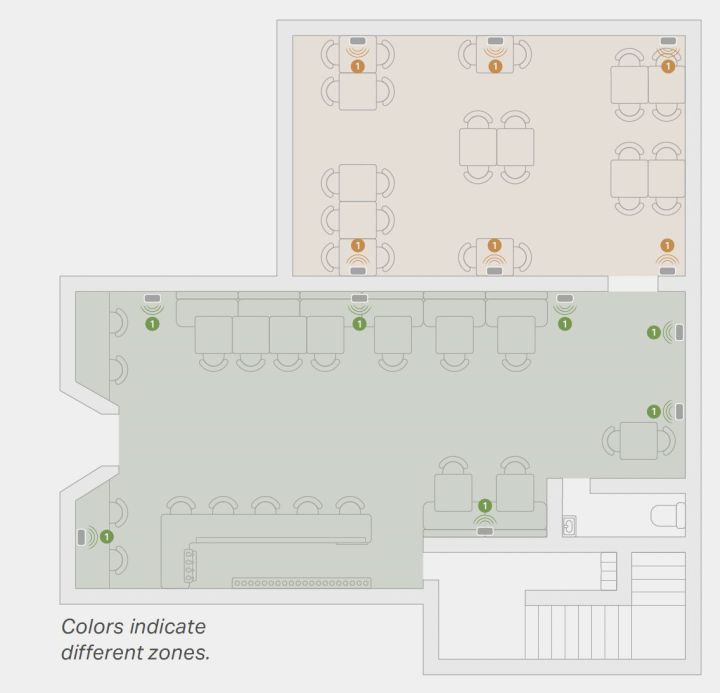
    To coincide with the launch of the Era 100 Pro, designed for commercial environments such as restaurants where numerous speakers may be used in a single area, Sonos has also updated its app, introducing a feature called “zones.”

    A diagram of two zones of Sonos products in a commercial space.
    A diagram of two zones of Sonos products in a commercial space. Sonos

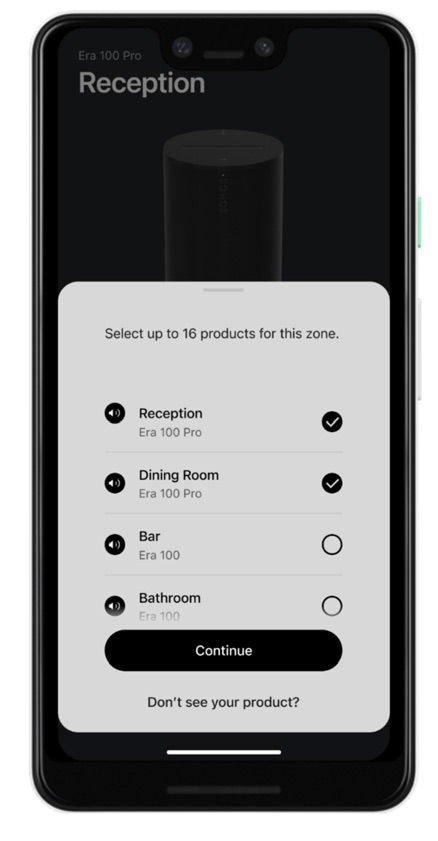
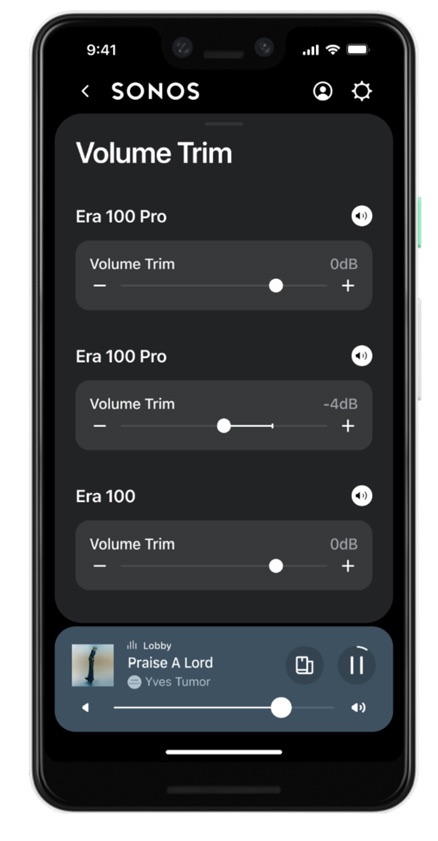
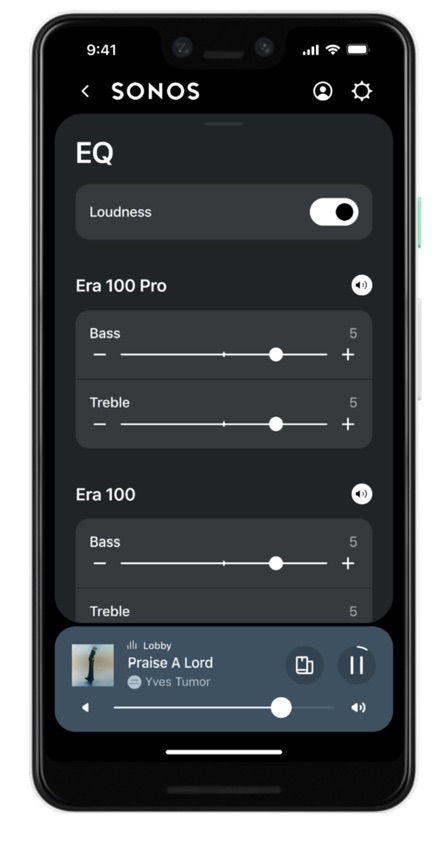
    The new zones feature resembles the existing Groups function, allowing users to add up to 16 compatible Sonos devices to create a “semi-permanent” grouping of speakers. All devices within a zone will play the same audio at the same volume level, unless the “volume trim” settings on individual speakers are adjusted to vary from the zone level. Additionally, users can fine-tune the EQ settings for each speaker individually.

    A key advantage of zones is their ability to combine with other zones or individual Sonos speakers. Since groups can’t be nested inside one another, this feature enables users to manage specific collections of speakers as a cohesive unit, allowing for easy reconfiguration without creating new groups each time.

    Users can add, modify, or remove zones through the Sonos app. There’s also a chime feature to help identify a specific speaker within a zone, which can be useful when the name alone isn’t sufficient to pinpoint its location.

    However, there are certain limitations for the zones feature. Unlike groups, it is only compatible with specific Sonos components, namely the Era 100 Pro, Era 100, Era 300, Sonos One SL, Sonos One (all models), and Sonos Five. Other components such as Sonos soundbars, portable speakers, headphones, and devices like the Port and Amp are not currently compatible with zones.

    Sonos emphasizes the importance of an Ethernet connection for every speaker within a zone. If that’s not feasible, it’s advisable to limit zones to a maximum of six Wi-Fi-connected devices for optimal performance.

    Alongside the Era 100 Pro and the zones update, the Sonos app has received a series of fixes and enhancements as the company works to address issues stemming from the problematic redesign launched in May 2024.

    Notable updates include:

    • New option to snooze alarms directly within the app
    • Changes to System Settings for easier access to key settings
    • Visibility of battery charge percentage in the System view
    • Upgrades to parental controls on iOS
  • Utilizing Education Boards and Speakers in Planet Zoo

    Utilizing Education Boards and Speakers in Planet Zoo

    Planet Zoo gives you many chances to create a wildlife sanctuary just the way you want it while ensuring your favorite animals feel at home. While visitors enjoy watching the animals, they often lack knowledge about them. With your guidance, you can teach your guests about the animals and the zoo’s conservation initiatives.

    We’ll guide you on where to place the appropriate boards and speakers to share information with visitors. The more guests learn, the better your zoo’s ranking will be. Here’s what you need to know to enhance guest education and improve your overall score in Planet Zoo!

    How to Use Education Boards and Speakers

    When you open a new exhibit, it’s essential to set up educational materials around it so visitors can learn more. Otherwise, they might just gaze at the animals without understanding anything about them.

    Click on the facilities tab and then choose the media devices and education section. Here, you’ll find screens, boards, and speakers that can help inform your guests.

    Be sure to install a variety of educational tools for a comprehensive experience.

    Position the selected screens and speakers around the exhibit. After that, pick each one and assign an animal to it. This will kick off the educational process, enabling guests to learn more about the exhibits and the animals in them.

    If you’re feeling creative, you can upload custom images for your educational signs.

    How to Research Animals


    Your education score can also rise by having your veterinarians research various animals. Each vet engaged in detailed research boosts your score.

    You can construct different research labs in your zoo and assign vets to them. This not only increases your score but also helps unlock more enrichment options for your animals.

    When placing these labs, ensure there are paths and resources available for staff to make their research effective. You can monitor the research progress and assign vets to study any animals of your choice within your zoo.

  • Do you need speakers with a receiver?

    Do you need speakers with a receiver?

    When it comes to setting up a home theater or an audio system, one of the first questions that arises is whether you need speakers if you already have a receiver. This question often confuses newcomers to audio systems. Understanding how receivers and speakers work together will clarify this crucial aspect of your audio setup.

    What Is a Receiver?

    A receiver is a central component of an audio or home theater system. Its primary function is to process audio and video signals from various sources (like your TV, Blu-ray player, or gaming console) and send these signals to your speakers and display devices. Here are some key functions of a receiver:

    • Signal Processing: It decodes audio signals from formats such as Dolby Digital or DTS.
    • Switching: It allows you to easily switch between different input devices.
    • Amplification: It boosts the audio signal to a level that can drive speakers.
    • Tuning: In the case of an AV receiver, it can also tune radio frequencies.

    Do You Need Speakers?

    The Short Answer

    Yes, you definitely need speakers if you want to hear audio from your receiver. While the receiver handles the processing and routing of audio signals, it does not produce sound on its own. Here’s a more detailed breakdown:

    Why Speakers Are Essential

    • Sound Production: Speakers are the actual devices that convert electrical signals into sound waves. Without them, the audio signals from your receiver would remain silent.
    • Audio Quality: Different types and setups of speakers can significantly affect the quality and richness of the sound you experience.
    • Surround Sound Experience: For home theater systems, a variety of speakers are necessary to create a surround sound experience where sound appears to come from different parts of the room.

    Choosing the Right Speakers

    If you’ve decided to invest in a receiver, your next step will be selecting the appropriate speakers. Here are some key points to consider:

    Types of Speakers

    • Bookshelf Speakers: Compact and versatile, ideal for smaller spaces.
    • Floor-Standing Speakers: Larger speakers that usually provide more robust sound; great for larger rooms.
    • Satellite Speakers: Small speakers that work well in surround sound setups, often requiring a subwoofer for low-frequency sounds.
    • Subwoofers: Essential for deep bass; they enhance the low-end audio frequencies in your system.

    Matching Speakers with Your Receiver

    • Power Ratings: Ensure the speakers’ power handling matches or exceeds the receiver’s output.
    • Impedance Compatibility: Check that the speakers’ impedance (measured in ohms) matches what the receiver can handle.
    • Sound Quality: Try to listen to different speaker brands and models to find one that suits your taste.

    Setting Up Your System

    After selecting your speakers, configuring them correctly is crucial for optimal performance. Here are some tips for setting up your receiver and speakers:

    Speaker Placement

    • Front Speakers: Should be positioned at ear level, ideally forming a triangle with the seating area.
    • Surround Speakers: Place them slightly above ear level and to the sides or behind the seating area for immersive sound.
    • Subwoofer: Can be placed in various locations; experiment with different spots to find the best spot for bass response.

    Connecting Your Speakers

    • Wiring: Use high-quality speaker wires to connect your speakers to the receiver, ensuring a secure connection.
    • Configuration Settings: Use the receiver’s setup menu to calibrate speaker sizes, distances, and levels for optimal sound.

    Troubleshooting Common Issues

    • No Sound: Check connections, ensure the receiver is on the correct input, and confirm the volume levels.
    • Distorted Sound: Ensure that your speakers are not overloaded, and check the placement to minimize reflections and interference.

    Investing in both a receiver and speakers is essential for creating an engaging audio experience, whether it’s for movies, music, or gaming. Understanding the roles of each component will guide you in choosing the right equipment and getting the most out of your audio setup.

  • What is a receiver with speakers?

    What is a receiver with speakers?

    Understanding the Receiver with Speakers

    When it comes to building a robust audio system, understanding the components is essential. One of the central elements you may encounter is a receiver, particularly when linked with speakers. This article delves into what a receiver with speakers entails, its functions, and how it enhances your audio experience.

    What is a Receiver?

    A receiver is an electrical device designed primarily for audio and video signal processing. It serves as the hub for managing multiple audio and visual components. Here’s a more detailed breakdown:

    • Signal Processing: Receivers can decode various audio formats, allowing for high-quality sound playback.
    • Amplification: They amplify audio signals so that sound can be delivered at adequate volume levels through speakers.
    • Connectivity: Receivers provide multiple input/output options, making it easy to connect various devices like TVs, gaming consoles, and streaming devices.
    • Control Center: They often come with remote controls or app features to manage your audio and video settings efficiently.

    Types of Receivers

    Understanding the different types of receivers can help you choose the right one for your needs. Here are a few common types:

    1. Stereo Receivers: Designed for basic audio systems, these receivers focus primarily on delivering high-quality sound for music.
    2. AV Receivers: Home theater enthusiasts often opt for AV receivers, which support audio and video from many sources and include surround sound capabilities.
    3. Integrated Amplifiers: These devices combine the functions of a preamplifier and power amplifier and are usually found in high-end audio setups.

    The Role of Speakers

    Speakers are essential devices that convert electrical signals from the receiver into audible sound. They come in various forms and sizes, each designed to deliver sound differently. Some common types include:

    • Bookshelf Speakers: Compact and versatile, suited for smaller spaces.
    • Floor-standing Speakers: Larger options that provide a fuller sound and are often used in home theater setups.
    • Subwoofers: Specialized speakers for bass sounds, crucial for a balanced audio experience.
    • In-Wall or In-Ceiling Speakers: Ideal for maximizing space while delivering quality sound discreetly.

    How Receivers and Speakers Work Together

    When receivers connect with speakers, their collaboration creates a complete audio system. Here’s how it functions:

    1. Signal Transmission: The receiver takes input signals from various sources (like a DVD player) and processes them.
    2. Amplification: The processed audio signal is then amplified within the receiver and sent to the speakers.
    3. Sound Delivery: The speakers convert the amplified signals back into sound waves, allowing you to experience music and film audio vividly.

    Key Benefits of a Receiver with Speakers

    Integrating a receiver with speakers in your audio system offers various advantages:

    • Enhanced Sound Quality: Receivers allow for the use of high-quality speakers, improving overall sound fidelity.
    • Simplified Control: With a central hub, you can control multiple devices conveniently without the need for multiple remotes.
    • Versatility: A receiver can accommodate a wide range of devices and adjust settings based on the type of content being played.
    • Customizable Experiences: Many receivers come with features like equalizers, allowing users to tweak sound profiles according to personal preferences.

    Features to Consider

    When selecting a receiver and speakers, consider the following features:

    • Power Output: Measured in watts, it indicates how much power the receiver can provide to the speakers, influencing how loud they can get.
    • Audio Formats Supported: Ensure the receiver can decode modern surround sound formats if you plan to use it for home theater purposes.
    • Connectivity Options: Look for a variety of input sources, such as HDMI, optical, and USB, for connecting your devices.
    • User Interface: A straightforward interface can greatly enhance usability, especially for changing settings or switching inputs quickly.

    Conclusion

    Understanding the intricacies of receivers and speakers will significantly enhance your audio and visual entertainment experience. By choosing the right combination of these components, you can enjoy high-quality sound tailored to your preferences in any setting.

  • How do I choose the right receiver for my speakers?

    Selecting the appropriate receiver for your speakers is essential for achieving optimal sound quality in your audio setup. With numerous options available, it’s important to understand the key factors that influence compatibility and performance. This article will guide you through the process of choosing the right receiver for your speakers to enhance your listening experience.

    Understanding Receiver Basics

    Before diving into compatibility and specifications, it’s crucial to understand what a receiver does. A receiver serves as the hub of your audio system, combining the functions of a preamp, power amplifier, and radio tuner into one device. Here are some of its core functions:

    • Audio Processing: Converts digital audio signals into analog for output through speakers.
    • Routing: Directs audio and video signals from various sources (like a Blu-ray player, gaming console, or streaming device) to the appropriate output.
    • Amplification: Powers the speakers, providing sound at sufficient volume levels.

    Key Factors to Consider

    When selecting a receiver, there are several important parameters to consider:

    1. Power Rating

    The power rating of a receiver is vital for compatibility with your speakers. It’s typically measured in watts per channel and indicates how much power the receiver can deliver to each speaker.

    • Impedance Matching: Ensure that the receiver’s power output matches the impedance (measured in ohms) of your speakers. Most home speakers are rated at 4, 6, or 8 ohms.
    • Volume Needs: Higher wattage can usually drive speakers to higher volumes without distortion, especially important for larger rooms or outdoor use.

    2. Number of Channels

    Receivers come in various channel configurations, which determine how many speakers can be connected:

    • Stereo Receivers: Ideal for two-channel audio setups, suitable for music listening.
    • Surround Sound Receivers (5.1, 7.1, etc.): Support multi-channel audio for home theater setups, allowing for immersive sound from multiple directions.

    3. Features and Connectivity

    Modern receivers come packed with features that can enhance your audio-visual experience. Consider the following:

    • HDMI Inputs/Outputs: Essential for connecting to modern TVs and devices; make sure your receiver has sufficient HDMI ports.
    • Wireless Connectivity: Look for features like Bluetooth, Wi-Fi, or built-in streaming services, which allow for easy connection to your devices.
    • Zone Control: If you want to have different audio setups in various rooms, opt for a receiver that supports multi-zone audio.

    4. Audio Formats Supported

    Different receivers support various audio formats that can affect sound quality:

    • Surround Sound Formats: Ensure the receiver supports formats like Dolby Atmos or DTS:X if you plan on a multi-channel system.
    • High-Resolution Audio: Look for codecs like FLAC or ALAC for lossless audio streaming if you’re an audiophile.

    Compatibility with Speakers

    Once you’ve established your requirements, it’s time to ensure your receiver is compatible with your speakers. Here are some steps to help with that:

    1. Matching Power and Impedance

    • Check Speaker Impedance: Most receivers list what impedance they can drive.
    • Power Compatibility: Look for the recommended power range for your speakers while considering the receiver’s output.

    2. Consider Speaker Placement

    The layout of your room can influence your choice in receiver:

    • Home Theater Setup: If you are designing a surround sound system, choose a receiver that can accommodate additional channels.
    • Compact Spaces: If space is limited, a stereo receiver may suffice for your needs.

    3. Future Upgradability

    It’s also wise to consider future expansions:

    • Growth Potential: Think about whether you might add more speakers or higher-end audio equipment later on.
    • Modular Options: Some receivers allow you to add amplification or additional channels later, which can be a cost-effective strategy.

    Research and Reviews

    Before making your final decision, take time to research:

    • Model Reviews: Read user reviews and expert opinions on the specific models you are considering.
    • Comparisons: Use comparison websites to see how different receivers stack up against each other based on the features that matter to you.

    Summary of considerations:

    • Power Rating: Match wattage and impedance.
    • Channel Count: Choose according to your setup needs.
    • Connectivity and Features: Ensure it has the necessary inputs for your devices.
    • Supported Audio Formats: Check compatibility with your desired sound formats.
    • Room Layout Considerations: Adapt to your specific space for optimal performance.
    • Future-proofing: Look for options that allow for speaker upgrades.

    Choosing the right receiver for your speakers means considering not just what works today, but what will work for you in the long run. With this guide, you’re better equipped to make an informed decision that elevates your audio experience.

  • Do more speakers sound better?

    Do more speakers sound better?

    When it comes to audio systems, one of the most common questions that enthusiasts and casual listeners alike ponder is whether having more speakers results in better sound quality. The answer isn’t straightforward; it depends on various factors. In this article, we will dissect the relationship between the number of speakers and audio quality to better understand how they interact.

    Understanding Audio Quality

    Before diving into the importance of speaker quantity, it’s essential to grasp what defines good audio quality. Several elements contribute to audio performance:

    • Clarity: The ability to hear distinct sounds, including vocals and instruments.
    • Balance: A harmonious blend of bass, midrange, and treble frequencies.
    • Dynamics: The range between the quietest and loudest sounds in a track.
    • Soundstage: The perceived spatial quality of sound – how wide and immersive the listening experience feels.

    These factors are critical when assessing audio systems and can influence whether more speakers will enhance your listening experience.

    Speaker Configuration Matters

    Types of Speaker Setups

    The configuration of speakers can significantly impact their performance. Below are some common arrangements:

    • Two-Channel Stereo: A basic setup with left and right speakers, optimal for music listening. The soundstage is limited compared to multi-speaker systems.

    • Surround Sound: Involves multiple speakers positioned around the listener—standard 5.1 or 7.1 configurations. This setup is favored for home theaters as it creates an immersive audio experience.

    • Multi-Room Systems: These systems allow sound to be distributed throughout different rooms, often involving multiple speakers that can be controlled independently.

    Influence on Sound Quality

    • Stereo vs. Multi-Speaker Systems: While two speakers can provide excellent sound quality, introducing more speakers, particularly in a surround sound setup, generally enhances the immersive experience.

    • Speaker Placement: Adding more speakers can lead to sound quality improvement if they are adequately positioned. Poor placement can result in muddled sound, regardless of how many speakers are present.

    Quality Over Quantity

    Premium Speakers vs. More Speakers

    • Sound Quality: A high-quality two-speaker setup can outperform a lower-quality multi-speaker array. Investing in good speakers can produce richer, more detailed sound.

    • Integration: It’s crucial that all speakers in a system work well together. A cohesive sound requires speakers from the same brand or model range, ideally matched in design and capability.

    Room Acoustics

    • Room Size: Larger rooms may benefit from more speakers, as sound can dissipate, and a higher number of speakers can fill the space more effectively.

    • Acoustic Treatment: Regardless of speaker quantity, if the room isn’t acoustically treated, sound quality can suffer due to echoes or dead spots.

    Practical Considerations

    Cost vs. Benefit

    • Budgeting: More speakers typically mean higher costs. Consider whether adding more will yield enough improvement in sound quality to justify the expense.

    • Complexity: Larger speaker systems can require more complex setups, which may involve additional equipment like amplifiers or receivers.

    Listening Preferences

    • Personal Taste: Individual preferences for music genres can also dictate preferred setups. Some users may enjoy the precision of stereo systems, while others may favor the enveloping sound of surround setups.

    Maintenance and Wiring

    • Cabling and Setup: With additional speakers comes the need for more cabling, which can complicate setup and require more maintenance.

    • Placement Challenges: More speakers mean determining optimal placement becomes more important in order to avoid phase issues or imbalanced sound.

    In summary, the quantity of speakers can influence audio quality, but it’s not the sole determining factor. Quality, speaker placement, room acoustics, and individual preferences play significant roles. Ultimately, whether more speakers sound better depends on the overall context of the listening environment and personal taste.

  • Are waterproof speakers really waterproof?

    Are waterproof speakers really waterproof?

    In an age where portability and convenience dominate audio technology, waterproof speakers have surged in popularity. As we take our music to the beach, pool parties, and outdoor adventures, the demand for devices that can stand up to water exposure has never been higher. But the question looms: are waterproof speakers genuinely waterproof?

    Understanding Waterproof Ratings

    To determine the legitimacy of a waterproof claim, it’s crucial to understand the ratings that speakers receive. The International Electrotechnical Commission (IEC) established a standard for measuring an electronic device’s resistance to water through the IP (Ingress Protection) code.

    What Do the Ratings Mean?

    The IP code comprises two digits. The first digit represents dust protection, while the second digit indicates water resistance. Here are some common water ratings to look for:

    • IPX4: Resistant to splashes from any direction.
    • IPX7: Can withstand immersion in up to 1 meter (3.3 feet) of water for 30 minutes.
    • IPX8: Designed for continuous immersion in water deeper than 1 meter.

    Not All Waterproof is Created Equal

    While manufacturers often promote their products as “waterproof,” many simply mean they’re water-resistant. Here’s how to differentiate:

    • Water-Resistant: Can handle some moisture but may not survive submersion.
    • Waterproof: Specifically tested to endure water exposure in specified conditions.

    Real-World Usage Scenarios

    To fully assess whether these speakers hold up in everyday life, let’s look at a few typical scenarios:

    Beach Days

    • IPX7 or IPX8 rated speakers are ideal for sandy and wet environments, as they can handle occasional splashes and accidental dips in water.
    • For those with lower ratings, keeping them in a bag or on a towel can offer some protection.

    Pool Parties

    • Water-resistant models might survive light splashes but could be compromised if dropped in.
    • Waterproof models will likely float or remain operational if submerged momentarily.

    Outdoor Adventures

    • Hiking or Camping: A rugged, waterproof speaker is a sound investment for unpredictable weather conditions.
    • If a sudden rain shower occurs, an IPX4-rated speaker may not be sufficient for prolonged exposure.

    Maintenance Tips for Waterproof Speakers

    Even the toughest speakers benefit from some TLC to extend their lifespan. Consider these maintenance suggestions:

    • Rinse After Use: If exposed to saltwater or chlorinated water, rinse your speaker with fresh water after use to avoid corrosion.
    • Dry Completely: Before storing, ensure the speaker is thoroughly dried, particularly in the ports or crevices.
    • Use Cases and Covers: These can provide additional protection from the elements, particularly during transport.

    Final Thoughts

    While waterproof speakers offer a higher level of protection against water damage, the degree of waterproofing varies. Understanding the ratings and making informed choices based on your intended use can help you maximize your investment. Whether lounging by the pool or exploring the great outdoors, there’s a speaker out there designed to keep the music playing, rain or shine.

  • What Is a Subwoofer?

    What Is a Subwoofer?

    What Is a Subwoofer?

    A subwoofer is a specialized speaker designed to reproduce low-frequency sounds, typically within the range of 20 Hz to 200 Hz. Unlike regular speakers that handle mid and high frequencies, subwoofers focus on delivering deep bass sounds, which enhance music, movies, and overall audio experiences.

    The Role of Subwoofers in Audio Systems

    Subwoofers play a crucial role in both home audio systems and professional sound setups. They help create a fuller and richer sound, allowing listeners to experience music and film soundtracks as intended by the creators.

    Key Functions of Subwoofers

    • Enhanced Listening Experience: Subwoofers bring depth to soundtracks, making horror movies scarier and action movies more exhilarating.
    • Improved Frequency Response: They fill in the gaps left by standard speakers in the lower frequency range, offering a more balanced audio profile.
    • Vibration and Impact: The tactile impact provided by subwoofers can enhance the emotional response to audio.

    Types of Subwoofers

    When considering a subwoofer, it’s important to understand the different types available. Each type has its unique characteristics and advantages.

    Ported vs. Sealed Subwoofers

    • Ported Subwoofers:

      • Features a vent or port that enhances bass output.
      • Offers louder sound at specific frequencies.
      • Ideal for home theater systems where dramatic bass is desired.

    • Sealed Subwoofers:

      • Enclosed in a box without any ports.
      • Provides tighter, more accurate bass response.
      • Suitable for music genres that require precision and clarity.

    Active vs. Passive Subwoofers

    • Active Subwoofers:

      • Equipped with a built-in amplifier.
      • Easier to set up and integrate into other audio systems.
      • Offers greater control over the bass output.

    • Passive Subwoofers:

      • Requires an external amplifier to operate.
      • Can often offer better sound quality for audiophiles seeking to customize their system.
      • More flexibility in sound tuning but may require additional components.

    Choosing the Right Subwoofer

    Selecting the best subwoofer for your needs involves considering several factors. Here are some key points to keep in mind:

    Size and Power

    • Room Size: Bigger rooms might benefit from larger subwoofers that can produce more volume.
    • Wattage: Higher wattage typically translates to louder sound, but consider the balance with your main speakers.

    Frequency Response

    • Look for a subwoofer that can reproduce the lowest frequencies effectively, which is especially important for genres like hip-hop or electronic music.

    Connectivity Options

    • Wired vs. Wireless: While wired connections may provide more reliable performance, wireless subwoofers offer convenience and less clutter.
    • Compatibility: Ensure the subwoofer is compatible with your existing audio system.

    Placement of Subwoofers

    The location of a subwoofer can significantly impact sound quality. Here are some tips for optimal placement:

    • Corner Placement: Placing a subwoofer in a corner can enhance bass response but may create uneven sound.
    • Mid-Room Positioning: This can provide a more balanced audio experience throughout the room.
    • Avoid Walls: Keeping the subwoofer away from walls or furniture can reduce echo and improve sound clarity.

    Understanding what a subwoofer is and its significance in an audio setup can greatly enhance your listening experience. Whether you’re a casual listener or a serious audiophile, investing in a quality subwoofer might be one of the best decisions you make for your home audio system.

  • 1Mm-Thick Speakers May Change Smart Glasses, Watches, Earbuds

    1Mm-Thick Speakers May Change Smart Glasses, Watches, Earbuds

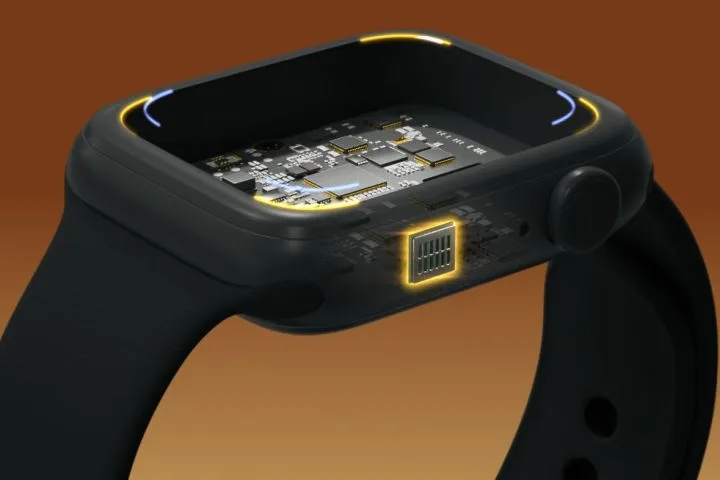
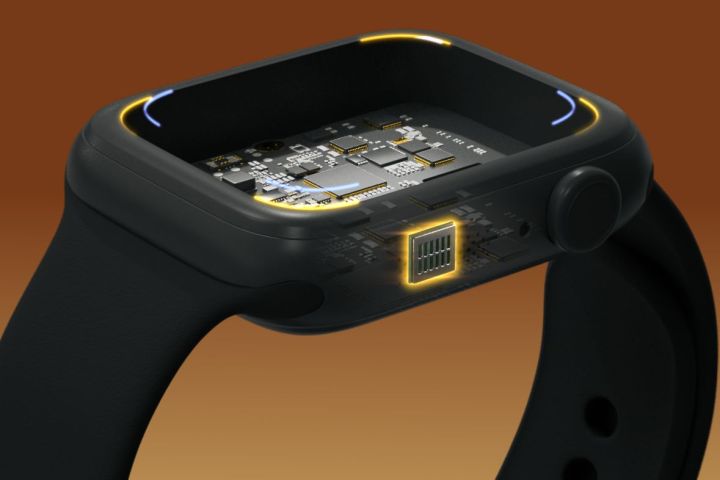
    XMEMS, the trailblazer behind the first speaker developed using microchip manufacturing techniques, is gearing up to unveil its latest innovation in miniature audio devices. The new model, dubbed Sycamore, boasts a thickness of merely 1.13 mm and a weight of just 150 milligrams. Despite its small size, it is designed to deliver full-range sound across short distances, such as between your ears and the arms of your smart glasses, as stated by the company.

    Sycamore represents a significant advancement in the lineage of micro speakers. The initial iteration from XMEMS was ideal for wireless earbuds, excelling at high frequencies but relying on a dynamic driver for low-end sounds. The subsequent model could produce full-range audio but still required an ear canal seal provided by a silicone tip. Now, with Sycamore, XMEMS introduces a micro speaker capable of full-range sound reproduction without the necessity for a completely closed system.

    xMEMS Sycamore microspeaker driver.
    xMEMS

    The audio capabilities of the Sycamore driver outshine those of conventional speaker technologies. According to XMEMS, it features a first-order low-frequency roll-off that matches the mid-bass performance of traditional drivers, while providing up to 11 decibels of headroom for sub-bass extension. Furthermore, Sycamore enhances high-frequency performance by as much as 15 dB above 5KHz compared to its predecessors.

    Essentially, the Sycamore is anticipated to deliver superior low and high-frequency sounds. Its durability is another standout feature, earning an IP58 rating that ensures it is resistant to both water and dust ingress.

    xMEMS Sycamore microspeaker driver.
    xMEMS

    However, the most impressive aspect of Sycamore could be its compact size, which is reportedly one-seventh the size of a conventional dynamic driver and one-third the thickness. This significant reduction could pave the way for sleeker designs in smart glasses, lighter and more resilient smartwatches, and smaller yet higher-quality open-ear earbuds.

    XMEMS anticipates that Sycamore could serve multiple applications beyond traditional uses. Its high-frequency capabilities make it a potential candidate for tweeters in automotive headrests, Bluetooth speakers, and laptops. Moreover, its integration in smartphones as an earpiece speaker could enhance call clarity and provide greater privacy.

    Despite these promising prospects, the release of Sycamore samples for electronics manufacturers is not expected until the first quarter of 2025, with mass production projected to begin in October 2025. As a result, we might see the first products featuring Sycamore technology unveiled during CES 2026.

  • Do receivers make speakers sound better?

    Do receivers make speakers sound better?

    When it comes to building a high-quality audio system, many enthusiasts ponder the role of a receiver in enhancing sound quality. While speakers often take the spotlight, the receiver plays a crucial role in shaping the auditory experience. This article explores how receivers interact with speakers and whether they can indeed elevate sound quality.

    Understanding the Role of Receivers

    What is a Receiver?

    A receiver is a piece of audio equipment that functions as the hub of a home theater or audio system. It performs several key functions, including:

    • Amplifying Audio: Boosts the audio signal to levels suitable for driving speakers.
    • Decoding Formats: Supports various surround sound formats and ensures the correct audio is played.
    • Switching Sources: Allows users to connect multiple audio/video sources and easily switch between them.

    Types of Receivers

    • Stereo Receivers: Primarily designed for two-channel audio systems, ideal for music.
    • AV Receivers: Supports multiple audio and video inputs, usually for home theater systems.
    • Integrated Amplifiers: Combines the functions of a preamp and a power amplifier for enhanced audio playback.

    The Connection Between Receivers and Speakers

    Signal Quality

    One of the first ways a receiver affects sound is through signal processing. A high-quality receiver will:

    • Reduce distortion and noise, maintaining the integrity of the audio signal.
    • Provide better digital-to-analog conversion (DAC), particularly important for digital audio sources.

    Power Management

    The relationship between a receiver’s power output and speakers is vital for sound performance. Key considerations include:

    • Match Power Ratings: A receiver should match or exceed the power handling capabilities of the connected speakers.
    • Headroom: Having extra power allows for dynamic peaks in music without distortion.

    Routing and Processing

    Receivers often come equipped with advanced audio processing features that can enhance sound quality, such as:

    • Room Calibration: Many modern receivers feature auto-calibration that adjusts sound output based on room acoustics.
    • Equalization Settings: These settings allow users to customize sound profiles to suit their preferences or compensate for room characteristics.

    Factors That Influence Sound Quality

    While receivers can certainly enhance sound quality, several factors also come into play:

    Speaker Quality

    No amount of enhancement from a receiver can substitute for low-quality speakers. The speakers must be capable of producing clear sound and handling power effectively.

    Room Acoustics

    The acoustic properties of a room significantly influence how sound is experienced. For instance:

    • Furnishings: Items in a room can absorb or reflect sound, impacting clarity.
    • Room Size & Shape: Larger or irregularly shaped spaces might require more sophisticated receivers to manage sound dispersion.

    Cables and Connectivity

    The type of cables used to connect the receiver and speakers can affect overall sound quality. Considerations include:

    • Speaker Wire Gauge: Thicker wires can reduce resistance, enhancing sound quality, especially over long distances.
    • HDMI / Optical Connections: Digital connections often provide cleaner signals compared to analog.

    Key Takeaways on Receivers and Sound Quality

    • A good receiver enhances sound by improving amplification, signal processing, and source switching.
    • Quality match between speakers and receivers is essential for optimal performance.
    • Room acoustics, speaker quality, and proper wiring play critical roles alongside the receiver’s capabilities.
    • Advanced features like room calibration and equalization can significantly improve listening experiences.

    While receivers are not the sole factor determining sound quality, they certainly bear significant influence on how speakers perform in any audio setup. Understanding this relationship can help consumers make wiser choices when outfitting their home audio systems.

  • Is there a difference between Bluetooth and wireless speakers?

    Is there a difference between Bluetooth and wireless speakers?

    When it comes to audio devices, the terms "Bluetooth speakers" and "wireless speakers" are often used interchangeably. However, they represent distinct categories of technology, each with its own features and functionalities. Understanding these differences can help you choose the right speaker for your needs.

    What Are Bluetooth Speakers?

    Bluetooth speakers utilize Bluetooth technology to transmit audio from a paired device, such as a smartphone or tablet, to the speaker.

    Key Features of Bluetooth Speakers:

    • Portability: Most Bluetooth speakers are compact and lightweight, making them easy to carry around.
    • Easy Pairing: Connecting a device is generally straightforward, requiring only a few taps on your device.
    • Short Range: Bluetooth typically works within a limited range (usually around 30 feet), so staying close to the paired device is necessary.
    • Battery-Powered: Many Bluetooth speakers are designed for portability, operating on rechargeable batteries.

    What Are Wireless Speakers?

    Wireless speakers can refer to a broader category of speakers that connect to audio sources without physical wires. This term often encompasses various technologies, including Wi-Fi, radio frequency (RF), and others, alongside Bluetooth.

    Key Features of Wireless Speakers:

    • Multiple Connectivity Options: Wireless speakers may support multiple methods of connection, including Wi-Fi, which can deliver better sound quality and range than Bluetooth.
    • Extended Range: Wireless speakers using Wi-Fi can transmit audio over longer distances, often throughout a home.
    • Multi-Room Capability: Many wireless speaker systems allow you to connect multiple speakers for a multi-room audio experience.
    • Power Options: Some wireless speakers can be plugged into a power source, while others may also be battery-powered.

    Comparing Bluetooth and Wireless Speakers

    To clarify the distinctions further, here’s a breakdown of the differences between Bluetooth and wireless speakers.

    Bluetooth Speakers vs. Wireless Speakers

    Feature Bluetooth Speakers Wireless Speakers
    Connection Method Bluetooth only May use Wi-Fi, RF, or Bluetooth
    Range Up to 30 feet Can exceed 100 feet or more (depending on the method)
    Portability Highly portable Can vary; some models are portable, while others are designed for stationary use
    Sound Quality Good, but can be compressed Generally better quality, especially with Wi-Fi connections
    Multi-Room Support Limited, typically one-to-one Often supports multi-room setups

    When to Choose Which?

    Choosing between Bluetooth and wireless speakers will depend on your specific needs:

    Choose Bluetooth Speakers If:

    • You need a portable speaker for outings, camping, or travel.
    • You want a simple, quick connection for casual listening.
    • You don’t require multi-room audio or extensive range.

    Choose Wireless Speakers If:

    • Sound quality is a top priority, and you have a larger area to cover.
    • You want to set up a multi-room audio system.
    • You’re willing to invest in a system that may require a Wi-Fi connection or an app for easier control.

    By understanding the differences between Bluetooth and wireless speakers, you can make a more informed decision and select an audio solution that best fits your lifestyle and listening habits. Whether you favor the simplicity and portability of Bluetooth or the advanced functionality of wireless speakers, each has something to offer for audio enthusiasts.

  • Should I buy speakers for my PC?

    Should I buy speakers for my PC?

    When it comes to enhancing your PC experience, audio quality can make a significant difference. While many users rely on built-in computer speakers or headphones, investing in dedicated speakers can elevate your enjoyment of music, movies, and games. If you’re contemplating whether to buy speakers for your PC, consider the following aspects.

    Benefits of Using Speakers

    Enhancing Sound Quality

    • Rich Audio Experience: Dedicated speakers typically offer a fuller sound compared to integrated options, providing a richer listening experience.
    • Better Bass Response: Many speaker systems come with subwoofers, adding depth and clarity to lower frequencies, essential for genres like hip-hop and electronic music.

    Immersive Experience

    • Gaming: Quality speakers can create an immersive gaming environment, allowing you to hear directional audio that can enhance gameplay.
    • Movies and TV Shows: Enjoying films with high-quality sound adds to the cinematic experience, making dialogue clearer and sound effects more impactful.

    Types of Speakers

    When choosing speakers for your PC, you’ll encounter various types, each with its own strengths.

    2.0 Speakers

    • Description: Consist of two speakers (left and right).
    • Ideal For: General usage, casual listening, and basic gaming.

    2.1 Speakers

    • Description: Include two desktop speakers plus a subwoofer.
    • Ideal For: Music lovers and gamers who want enhanced bass.

    Multimedia Speakers

    • Description: Often come with added features like Bluetooth connectivity and auxiliary inputs.
    • Ideal For: Users looking for versatility and convenience.

    Bookshelf Speakers

    • Description: Larger speakers meant to be placed on a shelf, offering audiophile-quality sound.
    • Ideal For: Serious listeners and music enthusiasts.

    Key Features to Consider

    Before making a purchase, it’s essential to consider several factors to ensure you choose the right speakers for your needs.

    Sound Quality

    • Check for frequency response range (20 Hz to 20 kHz is standard for good quality).
    • Look for reviews regarding sound clarity and balance.

    Connectivity Options

    • Wired vs. Wireless: Decide if you prefer the stability of wired connections or the convenience of wireless options.
    • Compatibility: Ensure the speakers can easily connect to your computer and any other devices you plan to use.

    Space and Design

    • Size: Consider the available space on your desk. Some speakers can take up more room than you anticipate.
    • Aesthetics: Choose a design that complements your setup. Speakers come in various styles, from modern to retro.

    Price Range

    • Determine your budget. Speakers can range from affordable to high-end, so it’s crucial to find a balance between quality and price.
    • Look for sales or bundles that may offer better value.

    Potential Drawbacks

    While there are many advantages to using dedicated speakers, there are a few downsides to consider as well.

    Space Consumption

    • Speakers can take up additional desk space, which may be a concern for smaller setups.

    Cost

    • A quality set of speakers can be an extra expense, particularly if you’re already using headphones or built-in speakers.

    Sound Leakage

    • Unlike headphones, speakers can lead to sound leakage, which might be problematic in shared spaces or during quiet hours.

    Making Your Decision

    Choosing whether to invest in speakers for your PC requires careful consideration of your audio needs and preferences. Evaluate how much time you spend listening to music, playing games, or watching videos. If sound quality is a priority for you, purchasing dedicated speakers could be a worthwhile investment.

    By carefully examining your options and aligning them with your priorities, you can make an informed decision that enhances your overall PC experience.

  • What’s better Bose or JBL?

    What’s better Bose or JBL?

    When it comes to choosing the right audio equipment, two of the most popular brands that come to mind are Bose and JBL. Both companies have established a strong reputation for producing high-quality sound products, but they cater to slightly different markets and preferences. This article will delve into the core differences between Bose and JBL across several critical factors to help you make an informed decision.

    Sound Quality

    Bose: Premium Acoustic Performance

    Bose is renowned for its commitment to delivering an exceptional audio experience. Their products often emphasize:

    • Clarity: Bose speakers are adept at reproducing high frequencies with a clean and crisp sound.
    • Balanced Sound: The emphasis is on ensuring an even sound profile across all frequencies, making their products suitable for various genres of music.
    • Noise Cancellation: Many Bose headphones feature advanced noise cancellation technology, enhancing the listening experience by minimizing external distractions.

    JBL: Powerful and Dynamic Sound

    JBL’s sound profile is characterized by a more vibrant and bass-heavy output. Key aspects include:

    • Deep Bass: Many users prefer JBL for its ability to produce pronounced bass, making it ideal for genres like hip-hop and electronic music.
    • Loudness: JBL speakers are known for their ability to deliver powerful sound, perfect for outdoor settings or parties.
    • Customizability: JBL devices often allow users to tweak their EQ settings, catering to personal sound preferences.

    Product Range

    Diverse Offerings from Bose

    Bose primarily focuses on:

    • Headphones: QuietComfort and Noise Cancelling Headphones series are among their flagship products.
    • Smart Speakers: The Bose Home Speaker series offers integrated voice control and smart technology.
    • Soundbars: Bose Soundbars are widely recognized for enhancing home theater experiences.

    JBL’s Versatile Collections

    JBL boasts a variety of products tailored to different environments:

    • Portable Speakers: The JBL Flip and Charge series are popular for their portability and durability.
    • Professional Sound Systems: JBL has a substantial presence in professional audio with products for concerts and events.
    • Wearable Audio: The JBL Reflect series features lightweight, sport-friendly headphones designed for active users.

    Design and Build Quality

    Bose: Sleek and Sophisticated

    Bose designs are often sleek and minimalist, appealing to those who prefer a more refined aesthetic. Features include:

    • Premium Materials: Many Bose products incorporate high-end materials, giving them a luxurious feel.
    • Ergonomic Design: Comfort is a priority in Bose headphones, making them ideal for long listening sessions.

    JBL: Robust and Colorful

    JBL products tend to be more rugged and colorful, catering to a younger, adventurous audience. Notable characteristics are:

    • Durability: Many JBL speakers are water-resistant and designed for outdoor use.
    • Vibrant Colors: The use of bold colors allows for personal expression and appeals to a youthful market.

    Connectivity Options

    Bose: Seamless Integration

    Bose products often come with multiple connectivity options, including:

    • Bluetooth and Wi-Fi: Many Bose speakers offer both Bluetooth and Wi-Fi connections, ensuring versatility.
    • Voice Control: Compatibility with smart assistants like Alexa and Google Assistant is a common feature.

    JBL: Reliable and Simple

    JBL devices also prioritize connectivity:

    • Bluetooth Connectivity: Known for solid Bluetooth performance, JBL speakers connect easily to various devices.
    • PartyBoost Feature: Some JBL speakers come with a PartyBoost option that allows them to connect with other compatible JBL speakers for a synchronized audio experience.

    Price Range

    Bose: Investment in Quality

    Bose products typically fall into a higher price range, reflective of their premium build quality and features. However, this comes with:

    • Longevity: Users often find that Bose products last well over time.
    • Expertise: The brand’s reputation for sound innovation justifies its price points.

    JBL: Budget-Friendly Options

    JBL products often offer more affordable choices without sacrificing quality, making them appealing to a broader audience. Key benefits include:

    • Wide Range of Prices: From high-end speakers to budget-friendly options, JBL has something for everyone.
    • Great Value: Users frequently highlight the cost-to-quality ratio in their favor.

    User Experience and Customer Service

    Bose: High Customer Satisfaction

    Bose generally receives high marks for:

    • User-Friendly Interfaces: Many users find the controls and setups intuitive and straightforward.
    • Customer Support: Bose is known for its responsive customer service, enhancing the overall customer experience.

    JBL: Community Engagement

    JBL has cultivated a strong community presence:

    • Social Media Interaction: JBL actively engages with customers on social platforms, encouraging feedback and suggestions.
    • User Forums: JBL’s online resources help users troubleshoot and maximize their product experience.

    In the battle of Bose vs. JBL, the ultimate choice will depend on your specific needs and preferences. Consider what aspects matter most to you—be it sound quality, product range, design, or budget—before making a decision. Both brands have their unique strengths, ensuring that there’s something for everyone in the world of audio equipment.

  • Amazon Unveils Limited-Edition NFL Echo Pop Collection

    Amazon Unveils Limited-Edition NFL Echo Pop Collection

    Amazon

    The NFL season is well underway, and Amazon Prime is set to showcase Thursday Night Football until the matchup between the Seattle Seahawks and the Chicago Bears on December 26. But Amazon’s partnership with the NFL goes beyond just game broadcasts; you can now find a new collection of Echo Pops adorned with the logos of your favorite teams.

    These limited-edition Echo Pops, priced at $60 compared to the standard model at $40, are truly worth the extra investment. Each team’s Echo Dot features a unique design, complete with a licensed NFL faceplate and sleeve, giving these devices a stylish edge over their regular counterparts.

    However, not all 32 NFL teams are available just yet. Amazon is rolling them out in phases through November 19. Here’s the full schedule of releases:

    • October 15: Denver Broncos and New Orleans Saints
    • October 22: Minnesota Vikings and Los Angeles Rams
    • October 29: Houston Texans and New York Jets
    • November 5: Cincinnati Bengals and Baltimore Ravens
    • November 12: Washington Commanders and Philadelphia Eagles
    • November 19:
      • Pittsburgh Steelers
      • Cleveland Browns
      • Chicago Bears
      • Detroit Lions
      • New York Giants
      • Dallas Cowboys
      • Miami Dolphins
      • Green Bay Packers
      • Las Vegas Raiders
      • Kansas City Chiefs
      • Atlanta Falcons
      • Tampa Bay Buccaneers
      • Los Angeles Chargers
      • New England Patriots
      • Buffalo Bills
      • Arizona Cardinals
      • Indianapolis Colts
      • Tennessee Titans
      • Jacksonville Jaguars
      • Carolina Panthers

    Aside from their distinctive designs, these Echo Pops function just like the regular units. Our review of the Echo Pop highlighted its impressive features and decent audio quality, making it a standout option for budget-conscious consumers. Given the popularity of these limited-edition models, don’t miss your chance to grab one while they last. For more top picks, be sure to explore our guide to the best smart speakers.

  • No More Speaker Cables With New Tech Using Power Lines

    No More Speaker Cables With New Tech Using Power Lines

    Picture this: the convenience of placing your wired speakers in any room with a power outlet, sparing yourself from the headache of trailing speaker cables through walls or carpets. This is the innovative vision of Audio Cu, created by Fasetto, a tech company based in Scottsdale, Arizona.

    Audio Cu leverages the existing electrical wiring in your home to deliver up to ten channels of lossless, high-resolution audio at 24-bit/192 kHz. This signal is sent from a single transmitter to multiple receivers. Recently, Fasetto gained Dolby Atmos certification from Dolby Labs for Audio Cu, marking them as the first manufacturer to achieve this in the audio-over-power-line market.

    As an interesting note, “Cu” is the chemical symbol for copper, a material commonly used in speaker and power cables for its outstanding conductivity.

    While using electrical lines for data transmission is not a novel concept—companies like TP-Link offer power line networking products as alternatives to Ethernet and Wi-Fi—there has yet to be a widespread solution dedicated solely to delivering multichannel, multiroom audio. This gap is likely due to the complexities of creating fast and reliable connections over wiring not originally designed for this purpose.

    Issues like latency or packet loss during data transfer can severely degrade audio quality in home theater systems. However, Fasetto claims that it is the only company successfully navigating these challenges, ensuring data flows smoothly over power lines in any setting. If true, this is quite a significant breakthrough. I’ve tried a power line networking solution to link my home office to my garage, which generally performs well. However, it tends to drop out whenever the ceiling fan in my office is turned on.

    According to Fasetto founder and CEO Coy Christmas, “Users can now experience high-fidelity Dolby-certified audio through speakers or subs connected over power lines, resulting in minimal latency and exceptional sound.” He emphasized that this allows users to set up their home audio systems wherever they want without needing cumbersome speaker wires, sidestepping issues related to structural barriers and RF interference. He argues it’s vastly superior to existing audio solutions that rely on Wi-Fi, Bluetooth, or WiSA.

    Tackling the latency and interference obstacles associated with power line audio is impressive, but what will really attract audiophiles is the ability to continue using their preferred wired speakers. Many competing wireless solutions typically require users to invest in new powered speakers or are designed specifically as add-ons for such products.

    That said, one critical detail that enthusiasts will likely seek is the power output of each Audio Cu receiver. So far, Fasetto hasn’t disclosed this information.

    The Audio Cu setup is straightforward: the transmitter connects to a power outlet and any device with an HDMI output, while the receivers plug into power outlets and feature standard red and black speaker cable terminals for connecting to speakers.

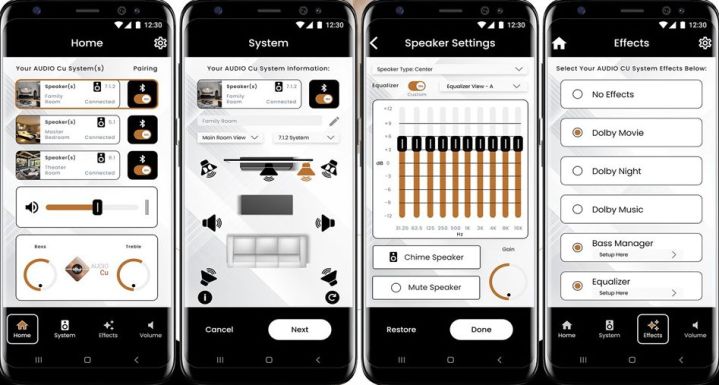
    The Audio Cu app.
    Fasetto

    Fasetto claims users can configure their audio preferences via a mobile app, eliminating the need for an AV receiver. However, with just a single HDMI ARC/eARC input and no support for AirPlay, Google Cast, or Bluetooth, it doesn’t offer the same level of flexibility as a traditional AV receiver.

    Moreover, the company asserts that multiple transmitters can coexist in one household—up to 32 channels can be utilized, each with distinct audio sources and receivers, without causing any interference.

    Interestingly, Fasetto isn’t merely marketing Audio Cu as an easy alternative for typical users. They’ve also developed software that allows professional installers to remotely monitor the performance of Audio Cu components for troubleshooting assistance.

    Currently, Fasetto is working on bringing Audio Cu transmitters and receivers to market. Specific details on availability and pricing are yet to be revealed; however, there’s potential for the company to license this innovative technology to television and speaker manufacturers.

    For powered speakers that need to be plugged into an outlet, the integration of Audio Cu technology is an intriguing concept. WiSA has already adopted a similar approach with brands like LG, Bang & Olufsen, and Klipsch.