الوسم: Solution

  • Seal of Death Puzzle Solution in No Sleep for Kaname: Completing and Solving

    Seal of Death Puzzle Solution in No Sleep for Kaname: Completing and Solving

    Chapter Two of No Sleep for Kaname Date

    In this part of the game, time is running out. Ota is trying to rescue Iris from a large box in the hot spring area. Toward the end of the puzzle section, it’s revealed that the box is a Kotoribako, a dangerous box that only needs the right code to trigger a deadly ritual.

    Ota and Date must work together to solve the Seal of Death puzzle on the outside of the Kotoribako once Iris passes out inside. You will need to interpret the clues and use a note about breaking curses to find the right solution.

    Memento Appraisal System Solution

    After unlocking the lockers using your color-coded light, you can interact with the Memento Appraisal System on the far side of the box where Iris is. First, inflate the air mattress to create a platform, then enter the code shown earlier to access the drawers marked with a circle, square, and triangle.

    You are given a newspaper clipping about missing girls. Your task is to pair two items in each of the three drawers, using clues from the article to figure out what happened to each girl.

    The girls are linked to different stories: one was taken from basketball practice, another disappeared with a baby, and there is a third story marked as XX. Match these stories with the items by following the order in the newspaper. The correct pairs are:

    • Circle drawer: Workout Shorts and Taped Finger Model
    • Triangle drawer: Umbilical Cord and Ring Finger Model
    • Square drawer: Magatama Necklace and Basic Finger Model

    When you open these drawers, you’ll move on to the numbers puzzle, which continues your progress through the second chapter.

    Seal of Death Code Solution

    After discovering that the dangerous box, or Kotoribako, could kill Iris according to local legends, you need to revisit the locker puzzle. Iris’s note before passing out shows a black square on the grid, indicating you should investigate the fifth locker in the second row from the top on the right side by the second down.

    This opens a numerical panel showing a code needed to open the Kotoribako, but since your goal is to save Iris, you must use the Curse Breaking Note to find a different path. You will need to understand the symbol on the scroll hanging above the number pad. This symbol involves a square, pentagon, and diamond, known as the Seal of Death.

    The solution involves finding the numbers enclosed by this symbol. To do this, flip open Ota’s Uncurse Note, which contains the key information. The numbers you need are framed inside shapes that form a triangle around the main numbers, which are the ones used to perform the deadly ritual.

    The numbers to enter, to stop the ritual and save Iris, are one, five, and three. These are found by identifying the shape symbols around the numbers on the map of the hot spring room, which help frame the solution.

    Finding the Numbers

    On the map, the bathhouse is labeled with numbers inside different shapes, such as squares, pentagons, and diamonds. The note instructs Ota to enter the numbers in the sequence closest to the sun, which is indicated in the bottom-left corner of the map on the back of the note.

    The key is to recognize that the numbers inside the shapes of the Seal of Death correspond to the ones listed on the scroll used in the ritual. The puzzle requires creative thinking: find the three numbers framed by the shapes that make up the Seal of Death symbol.

    Once you align the shapes and numbers properly, you’ll see that the code to unlock the Kotoribako and prevent Iris’s death is 1, 5, 3.

  • Completing the Rosethorn Cache Riddle in Oblivion Remastered

    Completing the Rosethorn Cache Riddle in Oblivion Remastered

    During your adventures in The Elder Scrolls IV: Oblivion Remastered, you’ll discover an array of surprises—hidden spots, Easter eggs, and secret quests that enrich the game’s experience. These treasures are dispersed throughout the land, just waiting for explorers like you to find them.

    A particularly interesting example is the Rosethorn Cache, a hidden quest that many players might overlook on their first journey. It’s cleverly concealed, and even if you locate it, deciphering the riddle can be quite challenging. Fortunately, our guide will help you tackle this puzzle.

    How to Begin the Rosethorn Cache Quest

    Once you acquire your home in Skingrad, called Rosethorn Hall, head to the top floor and enter the bedroom.

    In the loft above the stairs, jump up there to find a scroll titled Long Forgotten Note. Picking this up will kick off the Rosethorn Cache quest.

    Getting to the loft may require some effort, but if you have decent Acrobatics skill, you should manage just fine.

    If you’ve upgraded your home sufficiently, you can simply leap onto the desk, then to the deer statue, and finally reach the loft.

    How to Solve the Rosethorn Cache Riddle

    If you’ve carefully read the note, you’ll learn that what you’re searching for is an hourglass hidden within the house. No need for guesswork.

    Simply head to the basement. On one of the two wooden pillars, you’ll notice one adorned with Garlic Clusters. The treasure you seek, the hourglass, is nestled at the top of the frame on that same pillar.

    Once you grab it, the quest concludes, and your rewards include the hourglass, the Ring of the Gray, along with two flawless diamonds, two flawless sapphires, and two flawless emeralds.

  • Completing the Billiard Room Dart Puzzle in Blue Prince: A Guide

    Completing the Billiard Room Dart Puzzle in Blue Prince: A Guide

    If you know the solution, the Blue Prince dart puzzle is a consistent way to gather small items and rewards such as keys, gems, and other useful tools. These can be vital for ensuring a successful journey.

    However, solving the puzzle can be somewhat challenging, and it becomes more complicated as you progress. Understanding the game’s rules might require some trial and error, but we’re here to guide you through it. Here’s how to locate and solve the puzzle.

    How to Find the Dart Puzzle

    You shouldn’t have trouble locating the dart puzzle; it’s found in the Billiard Room, which is a common area. In fact, you’ll likely encounter it during nearly every run.

    The puzzle is located on the wall in one corner of the Billiard Room.

    How to Solve the Dart Puzzle

    The darts puzzle in the Billiard Room of Blue Prince, with symbols in the bullseye.

    Understanding Colors and Symbols

    The dart puzzle involves some math, so having a calculator nearby can be helpful if you’re not great at calculating in your head. Certain sections of the board will be highlighted. Here’s a breakdown of what each color represents:

    • Blue: Add
    • Yellow: Subtract
    • Pink: Multiply
    • Purple: Divide

    You’ll also encounter symbols in the bullseye as the game progresses. Here’s what they mean:

    • Square: Square the number.
    • Diamond: Reverse the digits.
    • Curved Line: Round the number. One curve means round to the nearest whole number, two curves mean round to the nearest ten, and three curves mean round to the nearest hundred.

    Other important notes include:

    • An X next to numbers on the board: Don’t include this number in your calculations.
    • If a colored segment has only its center third highlighted: Divide this number by three before performing calculations.

    Order of Calculations

    PEMDAS isn’t applicable here. Instead, approach it from the center outward. Start calculating the segments closest to the center first, then move to the next nearest segment.

    Be aware that if there’s a symbol in the bullseye, its effect needs to apply to all segments of the same color.

    If you have multiple symbols in the bullseye, use the same outward approach, starting with the innermost symbol.

  • How Can Solve The Problem Asus Play Store?

    How Can Solve The Problem Asus Play Store?

    If you own an Asus device and are experiencing issues with the Play Store, you’re not alone. Problems can range from downloading errors and app crashes to the store not functioning at all. Fortunately, there are several steps you can take to address these issues effectively.

    Common Issues with Asus Play Store

    Understanding the specific problems can help in finding the right solutions. Here are a few common issues users might face:

    • Download Errors: Apps may fail to download or update.
    • App Crashes: The Play Store may crash unexpectedly during use.
    • Inaccessibility: The Play Store might not open at all.
    • Authentication Issues: Problems with signing into your Google account.

    Basic Troubleshooting Steps

    Check Your Internet Connection

    Before diving into more complex solutions, ensure your device is connected to the internet.

    • Wi-Fi vs. Mobile Data: Check if the issue persists on both Wi-Fi and mobile data.
    • Signal Strength: A weak signal can lead to connectivity issues, affecting the Play Store.

    Restart Your Device

    Sometimes, a simple restart can resolve various problems.

    1. Press and hold the power button.
    2. Select "Restart" from the menu.
    3. Once rebooted, try opening the Play Store again.

    Clear Cache and Data

    If the Play Store is still misbehaving, clearing its cache and data might help.

    Steps to Clear Cache:

    1. Go to Settings on your device.
    2. Tap on Apps or Application Manager.
    3. Locate and select Google Play Store.
    4. Choose Storage.
    5. Tap on Clear Cache.

    Steps to Clear Data:

    1. Follow steps 1-3 above.
    2. Select Clear Data after clearing the cache.
    3. Restart your device again and check if the Play Store works.

    Check Google Account Settings

    A lot of problems can arise due to issues with your Google account. Here’s how to troubleshoot:

    1. Go to Settings.
    2. Tap on Accounts.
    3. Select Google.
    4. Ensure your account is active.
    5. If not, consider removing and re-adding it.

    Steps to Remove and Re-add Google Account:

    • To Remove:

      • Press your Google account and select Remove Account.

    • To Re-add:

      • Go back to Accounts and select Add Account.
      • Choose Google and follow the prompts to log in again.

    Update Google Play Services

    Outdated Google Play Services can hinder the Play Store’s functionality. Here’s how to check for updates:

    1. Open the Google Play Store.
    2. Tap the three horizontal lines in the upper left corner (the menu).
    3. Select My apps & games.
    4. Look for Google Play Services in the list and update if an update is available.

    Factory Reset as a Last Resort

    If all else fails, a factory reset might be necessary. Keep in mind, this should only be done after backing up your data.

    How to Perform a Factory Reset:

    1. Go to Settings on your device.
    2. Tap on System and select Reset options.
    3. Choose Erase all data (factory reset).
    4. Follow the prompts to reset your device.

    Seeking Support from Asus

    If troubleshooting does not resolve the issue, consider reaching out to Asus support. They can provide specific guidance tailored to your device model.

    How to Contact Asus Support:

    • Visit the official Asus support website.
    • Use their chat feature or submit a support ticket.
    • Call their customer service for immediate assistance.

    Following these steps should help you tackle any issues related to the Asus Play Store. With a bit of patience and effort, you’ll be back to downloading your favorite apps in no time.

  • Solving the Fallen Fortress Trial Puzzle in Disney Dreamlight Valley

    Solving the Fallen Fortress Trial Puzzle in Disney Dreamlight Valley

    As you journey through Storybook Vale in Disney Dreamlight Valley, you’ll face a range of challenges and obstacles. Each challenge offers a chance to grow and explore the unique areas of the village. Inspired by classic fairy tales and legends, these tasks must be completed so you can ultimately confront the Mistress of All Evil.

    The Fallen Fortress tells stories of brave knights and the fierce monsters they battled. In this guide, we’ll help you navigate the puzzle and cleanse the corruption in the Fairy Tale Trial, bringing you closer to facing Maleficent in Disney Dreamlight Valley.

    How to Enter the Fallen Fortress Fairy Tale Trial

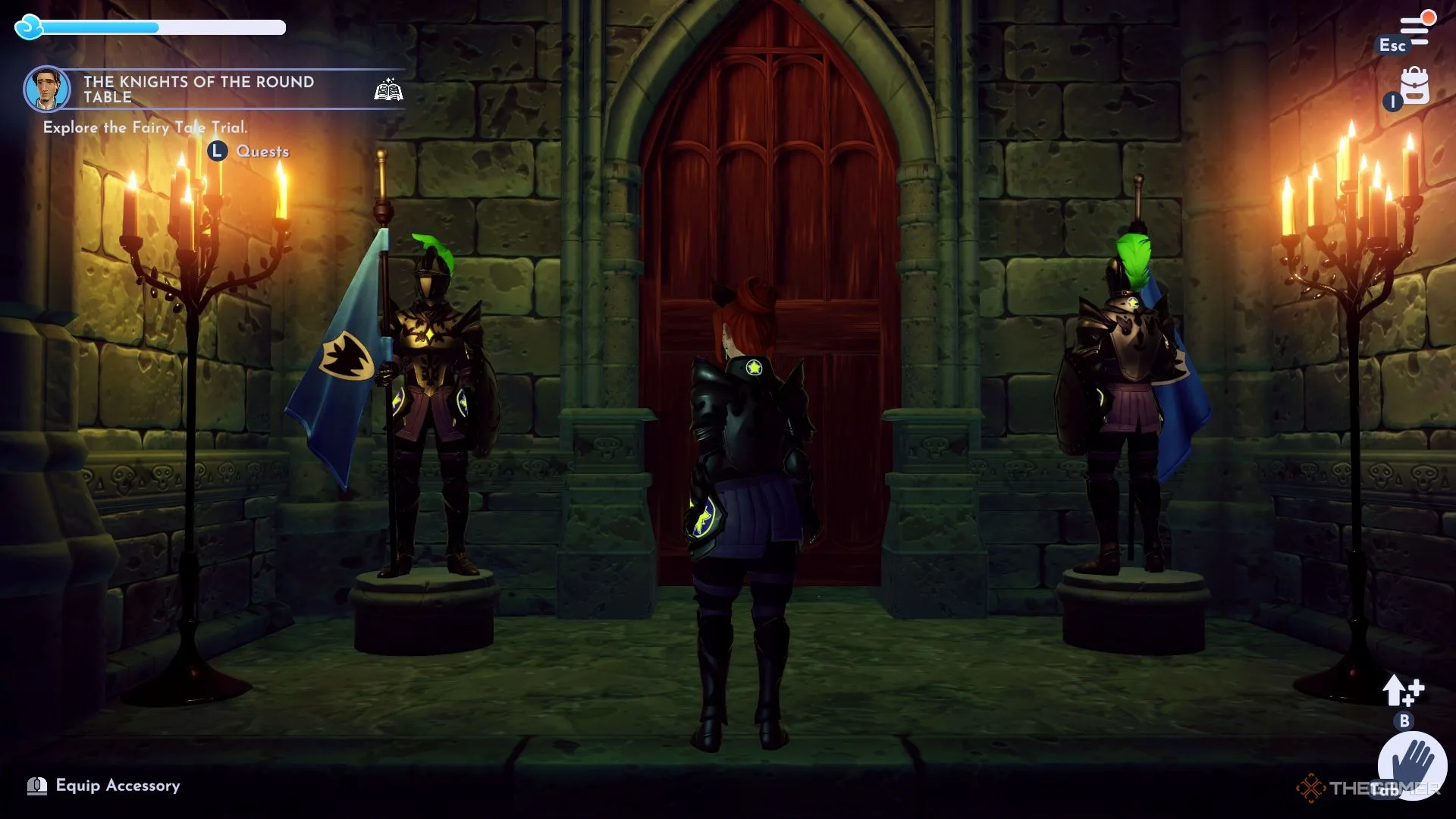
    To access the Fairy Tale Fortress, you must spend 5,000 Storybook Magic to unlock the entrance and then complete the Fallen Fortress quest. Once inside, you’ll encounter a locked door and two suits of armor looking in different directions.

    Interact with the suits of armor so they both face outward, allowing the door to open. Proceed inside and head down the stairs to find three more suits of armor facing each other, each missing a crucial item. You’ll need to locate these items to solve the puzzle.

    A path blocked by vibrant mushrooms is off to the side, but you won’t be able to access it until you’ve made more progress.

    If you need help or get stuck, remember to ask Flynn for a hint!

    How to Find the Knight’s Helmet

    One knight is missing a helmet, and you will need to retrieve it. Make your way to the eastern wing of the castle, where you’ll find a winding hallway and a well at the center. Use your royal tools to navigate around it and go down the staircase.

    The door leading to the well is locked, so enter the nearest open room and use your Royal Net on the spinning wheel to unlock it. Once inside the well room, use your Royal Fishing Rod to catch the Knight’s Helm from the golden orange bubbles.

    How to Find the Knight’s Shield

    From the main chamber, head to the west and utilize your Royal Net to open the door to a room filled with armor. You’ll see five suits of armor along the walls on each side, plus one at the front and back, but not all of them are facing the same direction.

    Interact with the suits to ensure that each one is facing toward the center of the room, unlocking a secret passage at the back of the chamber. Open the chest found here to retrieve the Knight’s Shield for the main room.

    How to Find the Knight’s Flag

    For the last piece of the puzzle, clear away the inkies on the western side of the main chamber. Use your Royal Pickaxe to break the petrified stone and wood blocking a short staircase to reach the Knight’s Flag.

    After collecting all the necessary items, return to the main chamber and equip each knight with their missing gear. Then, interact with each knight to turn them to face their enemies!

    Doing so will unlock the door at the back of the chamber, letting you discover the source of corruption within the trial and cleanse it. With this, you will be closer to facing Maleficent, and Flynn will be there to assist you through every challenge.

  • Dragon Age: Veilguard – Solving the Lighthouse Statue Challenge

    Dragon Age: Veilguard – Solving the Lighthouse Statue Challenge

    After completing the prologue in Dragon Age: The Veilguard, you’ll gain access to the Lighthouse, which serves as your primary base of operations. This is the place where you’ll unwind after missions, interact with your companions, and tackle various puzzles including the statue puzzle, wisp puzzles, and the portal puzzle.

    To solve the statue puzzle, you need to locate and adjust three statues so that each pair is facing one another. Upon entering the Lighthouse, you’ll notice a locked door against the north wall. Examine the note nearby to initiate the puzzle in the courtyard that will grant you access to that door. After exiting to the outside area, your objective will be to maneuver six pairs of statues in the Lighthouse in Dragon Age: The Veilguard so they face each other.

    First Statue Pair Location

    dragon age veilguard lighthouse statue

    When you step into the open courtyard, go west toward the left side of the workshop building. When you reach the corner, take a right, and you’ll discover the first statue. Rotate this statue so it faces north towards its counterpart.


    Return to the main spawn area and head north up the stairs. You’ll find another set of stairs leading down to a dilapidated study; drop down to the right side of those stairs to locate the next statue. Adjust its lever so it faces its pair.

    Second Statue Pair Location

    dragon age veilguard lighthouse statue

    The next statue is located on the stairs of the library building. Turn its lever to face north, directing it toward the stairs.


    For its counterpart, go back down the stairs from where you came, heading straight north toward the Dining Hall area. Proceed up the stairs and veer to the right side of the building to discover the pair. Rotate this statue so it’s facing south directly toward its counterpart.

    Third Statue Pair Location

    dragon age veilguard lighthouse statue

    The third statue and its pair are quite easy to find as they are situated next to each other on the library stairs. To finish the lighthouse puzzle, rotate the first statue to the east and position the other to face it in Dragon Age: Veilguard. A wisp will emerge and fly into the Lighthouse, which you should follow to collect your rewards.

    Lighthouse Statue Puzzle Reward in Dragon Age: The Veilguard

    Upon solving the puzzle, you’ll unlock the music room in the library where you can find:

    • Memorial of a Duet Codex Entry
    • 20 Flawless Crystals
    • 400-600 Gold

    How to Open the Door in the Music Room?

    Once you’ve gathered the items, focus on the door located on the west side of the music room. It requires two wisps to unlock. One of the wisps is situated near the piano, so collect it using the interact button and place it in one of the door’s slots. This is the wisp you released from the statues after completing the puzzle. Then, the Caretaker will appear and provide a hint: Another helper waits between the facing gods.

    A note will be left behind echoing the same message. Make your way back to the statues near the library door to find another wisp. Collect it and return to the music room door, slot it into place, and unlock it to reveal a portal. Enter the portal, and you’ll be transported to a balcony above the library. Look for the device located to your left, approach it, and activate it to repair the Astrolabe in the library, which will also grant you a discount on upgrades for the Caretaker’s Workshop.