Tag: Social Media

  • 7 Features I Wish Facebook Would Bring Back from Its Early Days

    7 Features I Wish Facebook Would Bring Back from Its Early Days

    Facebook, which started as a straightforward platform for staying in touch with friends and family, has transformed into a multifaceted social media powerhouse. Despite its evolution over the years, there are numerous nostalgic features from its early days that I genuinely miss. Here are seven of those cherished aspects.

    1 Facebook Notes

    Facebook Notes was a highlight from those times, providing a space for us to write, share, and publish long-form content directly on our profiles. It created an effective way to express ourselves, allowing users to craft blog-style entries, narrate personal anecdotes, or update their status without the constraints of a typical post.

    There was something incredibly satisfying about typing out my thoughts. It was equally refreshing to see friends interact with my notes, leaving thoughtful comments and sparking meaningful dialogues. The format encouraged creativity; I could add images and personalize the layout, making each note feel special.

    Sadly, Facebook phased out the Notes feature in 2020, and I often find myself wishing it would return. It was a priceless tool that allowed me to share my reflections in a truly distinctive way.

    2 A Chronological News Feed

    Kaspars Grinvalds/Shutterstock

    Another aspect I long for from Facebook’s early days is the chronological news feed. It was exhilarating to witness my friends’ life moments in real-time. Scrolling through my feed meant I could see updates in the order they were shared, offering me a genuine glimpse into their thoughts, activities, and experiences.

    This chronological flow not only felt more authentic but allowed me to engage with posts while the topics were still fresh. Interacting with my friends while conversations remained current made for more immediate and sincere exchanges.

    Currently, algorithm-driven content obscures that authentic experience. It’s frustrating to miss important updates from friends whose lives I genuinely want to follow simply because they don’t fit the algorithm.

    3 An Ad-Free Experience

    The initial absence of ads on Facebook is another treasured memory. When I first joined, my news feed was filled with updates from friends and family, free from excessive distractions. It felt like a more intimate space where sharing life moments outweighed marketing attempts.

    Scrolling back then didn’t require filtering through sponsored posts or enticing ads trying to market products I didn’t want. The platform resembled a sincere community hub, encouraging genuine interactions as opposed to commercial exchanges.

    As Facebook matured, ads began to dominate my feed, overshadowing posts that mattered to me. While I understand the necessity of advertisements for revenue, I can’t help but wish for a more balanced approach—one that minimizes their intrusion.

    4 The Poke Feature

    a woman pointing her finger at a social media app
    Kaspars Grinvalds/Shutterstock

    Do you recall Facebook’s Poke feature? It was an amusing way to connect with friends without the weightiness of starting a full conversation. The ambiguous nature of a poke added intrigue—was it simply a cheerful nudge, or did it hold a deeper meaning? It brought an element of mystery and spontaneity to our online interactions.

    Regrettably, the Poke button has vanished from profiles over the years. Even though it’s still possible to poke someone, the feature is so hidden within the app that most people overlook it. Many of my friends who have joined recently don’t even know it exists, which is unfortunate.

    5 Facebook Gifts

    Woman's hands holding present box with red bow on pastel pink background with multicolored confetti
    Efetova Anna / Shutterstock

    Facebook Gifts is yet another feature I wish would make a comeback. The ability to send a physical gift, like a coffee mug or a teddy bear, directly to a friend’s timeline was incredibly heartfelt and personal. The thrill of selecting the ideal present, wrapping it with a digital bow, and delivering it straight to a friend’s inbox added a unique flair to the platform.

    Using Facebook Gifts wasn’t just about sending a post or saying “Happy Birthday!”—it was a meaningful gesture that showed I genuinely cared. I fondly remember my friends’ delight when they received their gifts; it was a lovely surprise among their busy timelines.

    Unfortunately, Facebook Gifts was discontinued in 2014, leading me to rely on third-party gift-giving sites.

    6 Less of a Focus on Video Content

    a person posting a reaction on facebook
    sitthiphong/Shutterstock

    In the past, my Facebook feed was filled with status updates, insightful blog links, and photos shared by friends and family. Conversations thrived in the comment sections, leading to meaningful exchanges.

    Today, Facebook’s emphasis on video content has changed that atmosphere. While I appreciate the creativity behind videos, they often overshadow written posts, limiting in-depth discussions. The relentless stream of reels and live streams can be overwhelming, which pushes more nuanced content to the background. It feels like the platform has transitioned from fostering connections to being primarily about entertainment.

    I miss the days when Facebook resembled a lively community where friends connected through words and images rather than as a video streaming service.

    7 Minimal Algorithmic Influence and Limited Data Tracking

    facebook privacy settings on a screen with a magnifying glass
    pixinoo/Shutterstock

    Throughout the years, Facebook’s algorithms have indeed made significant advancements, but they primarily focus on maximizing the time I spend on the platform. It’s impressive how they can tailor content to fit individual preferences, yet it often leads to an overwhelming barrage of posts and notifications.

    What I genuinely miss about the early Facebook experience is the minimal influence of algorithms. I wish my feed felt like a true representation of my friends’ lives rather than a curated collection aimed at keeping me scrolling endlessly.

    Additionally, the limited data tracking back then provided a sense of privacy that is increasingly hard to find today. I remember enjoying interactions without the constant worry of being monitored or targeted with ads. The emphasis was on connection rather than consumption, making my online presence about sharing experiences instead of becoming a product. Nowadays, Facebook tracks user behavior across the web and within its connected applications.

    As I consider Facebook’s evolution, it’s clear how much it has changed, but I still yearn for some of the original features that made it feel more intimate and engaging.

    In the end, I find that balance is essential. While I appreciate the innovations that have turned Facebook into a vast platform, integrating elements of its early essence could help restore the genuine connections that once flourished.
  • My Top Hidden TikTok Features You Need to Try!

    My Top Hidden TikTok Features You Need to Try!

    Quick Links

    Honestly, TikTok is one of my all-time favorite social media platforms. While many of its features are well-known, there are several that deserve more attention. Here are some underrated TikTok functionalities that I believe can significantly enhance your experience!

    1. Offline Videos

    I spend over three hours commuting each day. With the busy schedules that work and school bring, I rarely find time to indulge in a Netflix binge or mindlessly scroll through TikTok, which I consider a form of self-care. Therefore, I make the most of my lengthy bus ride by stealthily watching TikToks, streaming Netflix, and enjoying music.

    Manually downloading TikToks can be time-consuming and takes up valuable storage space. Fortunately, TikTok has a feature called Offline Videos that allows you to watch TikTok videos without Wi-Fi or mobile data.

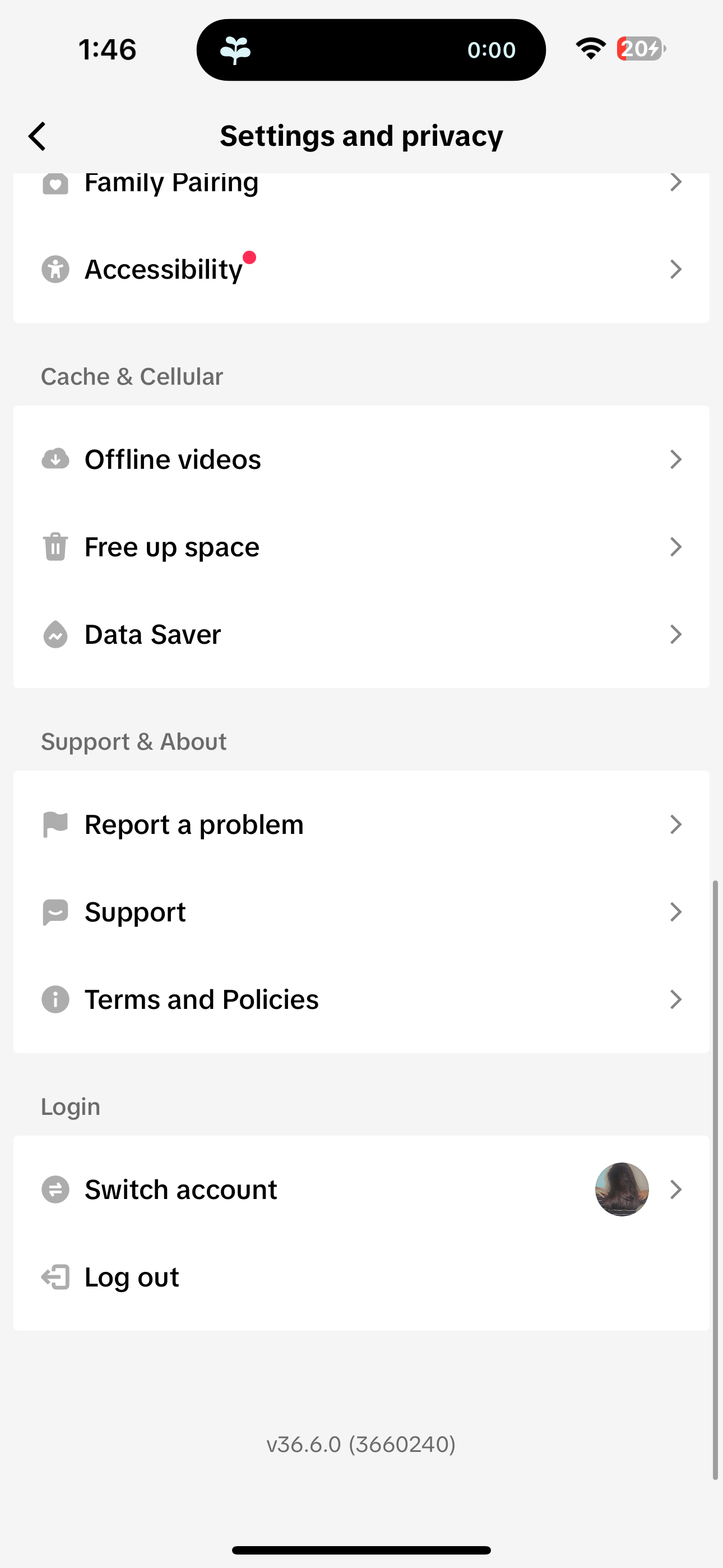
    To activate Offline Videos, tap on the profile icon located at the bottom-right corner of the screen. Next, click on the three horizontal lines in the top-right corner and select Settings and privacy. Scroll down slightly and select Offline videos under Cache & Cellular. There, you can choose to download 50, 100, 150, or 200 videos before tapping Download.

    That’s all there is to it! TikTok will download videos from your For You page and refresh them for you once you’re back online. Whether you’re commuting like me or planning to travel soon, TikTok’s Offline Videos feature is perfect for killing time while staying connected with the social world.

    2. Auto Scroll

    As a member of Gen-Z, one common stereotype about us is our struggle to maintain focus. Like many, I find that having a video playing in the background helps me concentrate.

    I must admit that I tend to focus better when TikToks play in the background. But, let’s be real—how many times can you rerun the same TikTok without getting tempted to scroll down? The moment I try to move to the next video, my phone quickly falls into my hand, leading me down rabbit holes like Instagram Reels my friends send me.

    Enter TikTok’s Auto Scroll feature, which I believe doesn’t get the publicity it deserves! It automatically transitions from one video to the next, allowing for an uninterrupted flow of content.

    To enable Auto Scroll, simply go to your For You page and start watching a video. Then, press and hold the screen and select Auto scroll from the on-screen video controls.

    A notification will pop up to confirm that Auto Scroll is now enabled.

    3. Speeding Up Videos

    Whether I’m tackling a lengthy calculus lecture or a podcast, I’ve never shied away from adjusting the playback speed. I typically lose focus quickly, so increasing a video’s speed not only compresses the viewing time but also keeps my brain engaged.

    I’ve changed my approach to watching online content—speeding everything up, which makes it hard to sit through influencers’ lengthy product reviews at regular speed. Generally, I’d prefer to fast-forward to the juicy bits. For longer TikTok videos, I watch most at double speed.

    You can easily adjust the playback speed of a TikTok by long-pressing the video and selecting Playback speed from the options. Alternatively, you can tap and hold either side of the screen while the video is playing. However, this shortcut only changes the speed to 2x; it won’t apply if you want to set it to other speeds like 1.5x.

    4. Picture-In-Picture Mode

    As you might have gathered, I thrive on multitasking—there’s nothing better than watching hilarious TikToks while drafting an email! TikTok boasts a Picture-in-Picture (PiP) mode that minimizes the app into a small floating window.

    Similar to enabling Auto Scroll, you can activate the Picture-in-Picture mode by navigating to your For You page and long-pressing a video. Select Picture-in-picture from the video controls, and you should see a confirmation that PiP mode is active.

    The cherry on top? Picture-in-Picture works hand-in-hand with Auto Scroll, allowing me to maximize both features and elevate my multitasking game!

    5. Auto-Generated Captions

    I can’t stand watching movies on Netflix or videos on YouTube without closed captions, and while a handful of TikTok creators do add subtitles, many do not.

    Thankfully, TikTok has an auto captioning feature that automatically generates subtitles. This was originally introduced to assist those who are hard of hearing, but I think everyone can benefit from it.

    To use this feature, simply press and hold a video and select Captions from the video controls. Then, just toggle on the switch next to Show captions (auto-generated), and you’re good to go!

    6. Refreshing Your For You Feed

    A standout aspect of TikTok is its algorithm—it excels at suggesting content that keeps me engaged. Although this keeps me scrolling for hours, I love discovering relatable material.

    Like any algorithm, TikTok doesn’t always get it right, and sometimes suggests content that’s off-base. One foolproof way to reset your TikTok For You page is to refresh your feed entirely, allowing you to begin fine-tuning your content preferences from scratch.

    You can refresh your feed by tapping on the profile icon at the bottom right of the screen. Then, click on the three horizontal lines and choose Settings and privacy. Go to Content preferences under Content & Display, and tap on Refresh your For You feed. Hit Continue, followed by Refresh.

    Once you complete these steps, be mindful not to make the same mistakes that ruin your TikTok recommendations!

    7. Hiding Liked Videos

    I have a quirky sense of humor that not everyone agrees with, which leads me to like some pretty embarrassing TikToks. The last thing I want is to share my liked videos with my followers. Fortunately, TikTok allows you to keep your liked videos private.

    To do this, tap the profile icon in the bottom-right corner, click the three horizontal lines in the upper right corner of the screen, and select Settings and privacy. Next, navigate to Privacy and click on Liked videos under Interactions. Finally, choose Only you under the Who can watch your liked videos section.

    Now, you can enjoy all the content that makes you laugh without worrying about embarrassing comments from friends!

    These are just a few features I strongly recommend activating. They have enhanced my TikTok experience immensely, and I’m confident they will improve yours as well!

  • Facebook Prioritizes Content You Might Not Care About

    Facebook Prioritizes Content You Might Not Care About

    It seems like every social media platform is borrowing ideas from one another, leading to a landscape of similar features across the board. Facebook is no exception; it frequently monitors other platforms to integrate popular features into its own service. Recently, the company shared an extensive blog post outlining several new features set to debut on Facebook, some of which might seem quite familiar.

    Facebook Introduces an Explore Tab

    Image Credit: Facebook

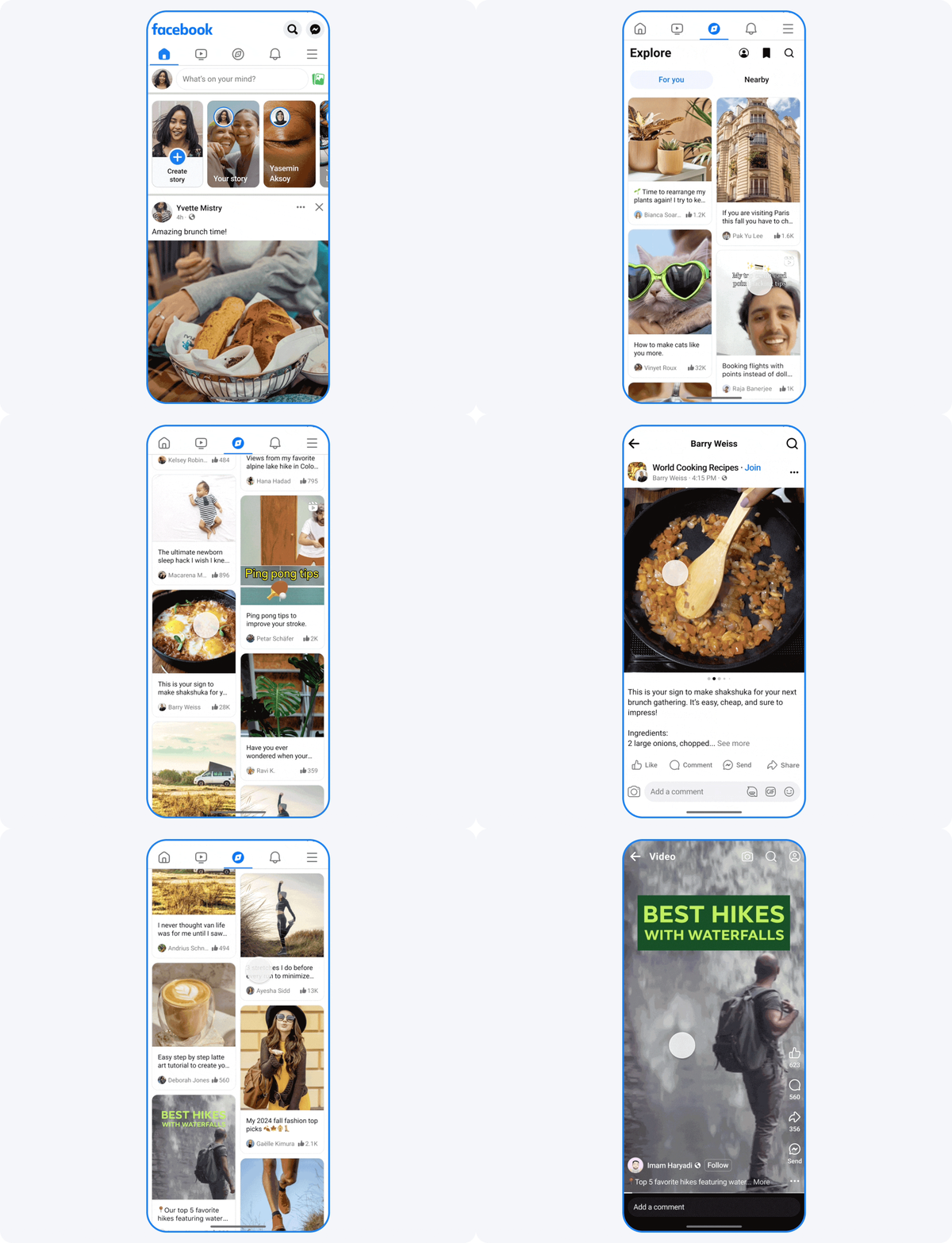
    As shared in the Meta Newsroom, Facebook has announced new features coming our way. One of the standout additions is the “Explore” tab, which may ring a bell:

    The Explore feature aims to present users with content that not only entertains but also encourages deeper exploration of their interests, inspires them through real-life examples, and connects them with expert communities. This feature will be tailored to individual users, utilizing various signals to ensure the content aligns with their preferences.

    It’ll be fascinating to see how Facebook leverages its wealth of user data to develop its version of TikTok’s For You Page. However, considering TikTok allows considerable customization of its FYP, Facebook might need to introduce a few more features to the Explore tab to truly engage users.

    In a similar vein, Facebook is rolling out a new way to view Reels—users will now be able to enjoy a continuous, full-screen stream of videos that employs recommendation technology to identify what they might want to watch next. As noted by Facebook, “Young adults on Facebook spend nearly 60% of their time on the app watching videos,” indicating this change could resonate well with those who love scrolling through Reels.

    Additionally, Facebook is launching a “Local” tab that aggregates nearby events and meetups. Currently, this feature is limited to select cities, including Austin, New York City, Los Angeles, Washington D.C., Chicago, Charlotte, Dallas, Houston, San Francisco, and Phoenix. It holds promise as a way for users to discover local happenings.

    Facebook Enhances People Management Features

    The new Group AI tool in Facebook
    Image Credit: Facebook

    Beyond new feeds, Facebook has introduced several useful tools for managing people on the platform. Users can now invite others to events via SMS or email, allowing them to respond without needing a Facebook account. Additionally, event organizers can send invitations to their Instagram followers for larger events.

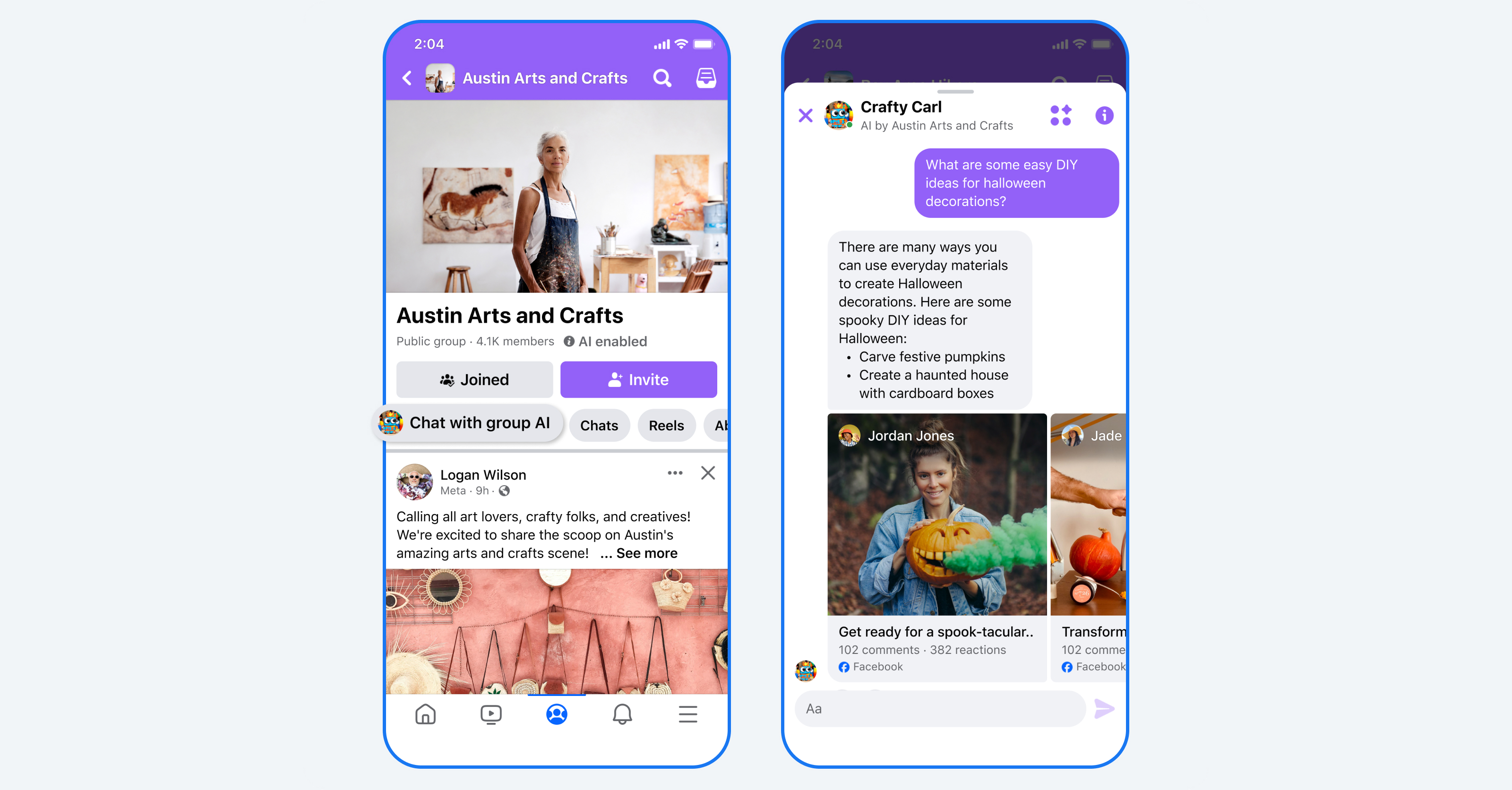
    Furthermore, Facebook is simplifying the process of joining Groups. Group admins can now set up a tool called “Group AI,” designed to handle frequently asked questions and provide essential group information. This way, if you have a question about the group but hesitate to contact the admin, you can simply ask the bot instead. Currently, this feature is only available in the U.S. and Canada, but given the advantages of Facebook Groups, it may roll out globally soon.

  • WhatsApp Status Introduces Two New Features—Love Them or Hate Them!

    WhatsApp Status Introduces Two New Features—Love Them or Hate Them!

    Is WhatsApp still just a messaging platform, or is it evolving into something beyond that? With the app adopting more features similar to those of its Meta siblings, Facebook and Instagram, the distinctions are becoming increasingly unclear. This transformation is especially evident with WhatsApp’s latest features: Status Likes and Mentions.

    New Features for WhatsApp Status: Likes and Mentions

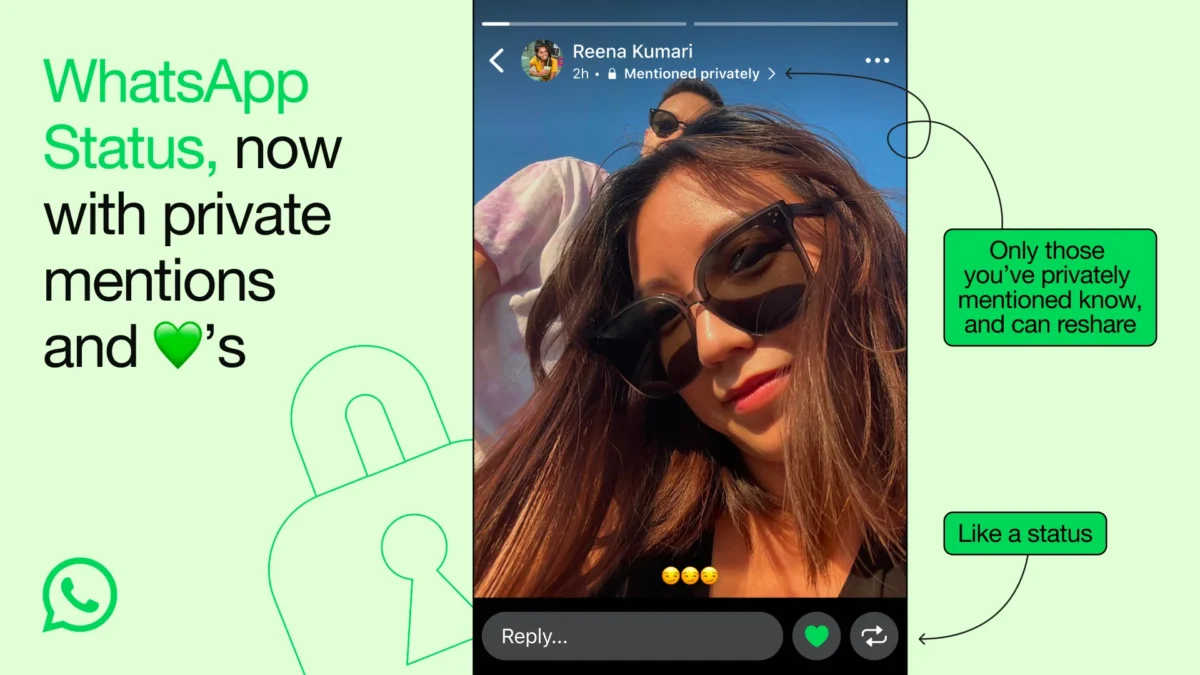
    In a recent announcement on the WhatsApp Blog, it was revealed that WhatsApp is introducing Likes and Mentions to the WhatsApp Status feature. For those who aren’t familiar, WhatsApp Status is akin to a story feature, letting users post updates that vanish after 24 hours—essentially a snapshot of their current status.

    Status Likes are represented by a green heart, allowing users to express their enjoyment of a Status with a single tap. These Likes remain private, with no visible count, meaning the user will only see the heart beside the list of viewers of their Status.

    With Status Mentions, users can now tag individuals directly in their Status Updates. Those mentioned will receive a private notification, although the mention will not be visible publicly on the Status. This functionality enhances the possibility of users resharing your Status, potentially broadening your reach.

    The rollout of WhatsApp Status Likes and Mentions is currently underway, and they should soon be accessible to WhatsApp users worldwide. Remember to keep your app updated to ensure you can access new features right away.

    Are These Features About to Make WhatsApp More Annoying?

    Initially, my reaction to the addition of Likes and Mentions was that they might clutter the experience on WhatsApp. Likes seem manageable since it’s my choice whether to use them. However, I’m less enthusiastic about the idea of being tagged in a Status through a Mention.

    Regardless of how you feel about these features, they are clear indicators that WhatsApp is shifting towards functioning more like a social media platform rather than remaining simply a messaging application. This shift was likely inevitable, given Meta’s overall strategy to create consistency across its platforms, though it might not be universally welcomed.

    I genuinely appreciate WhatsApp and consider it one of the best messaging apps available. It allows me to communicate with everyone effortlessly. Personally, I do not find the need for Status, let alone the additional Likes or Mentions. But I recognize that I might not be the target audience Meta aims to reach with these enhancements.

  • 7 Unique Alternatives to Pinterest You Should Try

    7 Unique Alternatives to Pinterest You Should Try

    Pinterest has often been viewed as a platform primarily for women seeking inspiration for weddings, home decor, and leisure activities. If you’re not quite a fan of Pinterest’s focus or simply looking for something different, you’re in luck—there are several great alternatives to explore.

    According to its homepage, Dribbble is described as “the leading destination to find and showcase creative work.” If you’re a creative individual, Dribbble presents a fantastic platform to answer the question: “What are you currently working on?”

    Whether you’re crafting websites, designing movie posters, creating typography, pixel art, business logos, or even working on architectural designs, Dribbble allows you to display your creations. It’s an excellent way to show off what you can do using design tools like Canva, Photoshop, and more.

    Not a designer? No problem! You can still browse through Dribbble’s posts, known as “shots,” to get a peek into the creativity of various artists.

    This platform makes for a splendid alternative to Pinterest as you can create and label collections, curating a personalized gallery of shots based on specific aesthetics. If you appreciate art across different forms, you’ll discover an astonishing wealth of content here.

    Pearltrees homepage

    Pearltrees serves as a central hub for your interests. You can add photos, URLs, and documents, as well as clip snippets of web pages to your collection using Pearltrees’ browser extension or mobile app.

    This platform allows you to create diverse collections, organizing them with sub-collections, reminiscent of Pinterest’s layout. Once you add an item, Pearltrees suggests similar collections made by other users.

    You get 1GB of free storage on Pearltrees, with options to subscribe for additional storage and enhanced features.

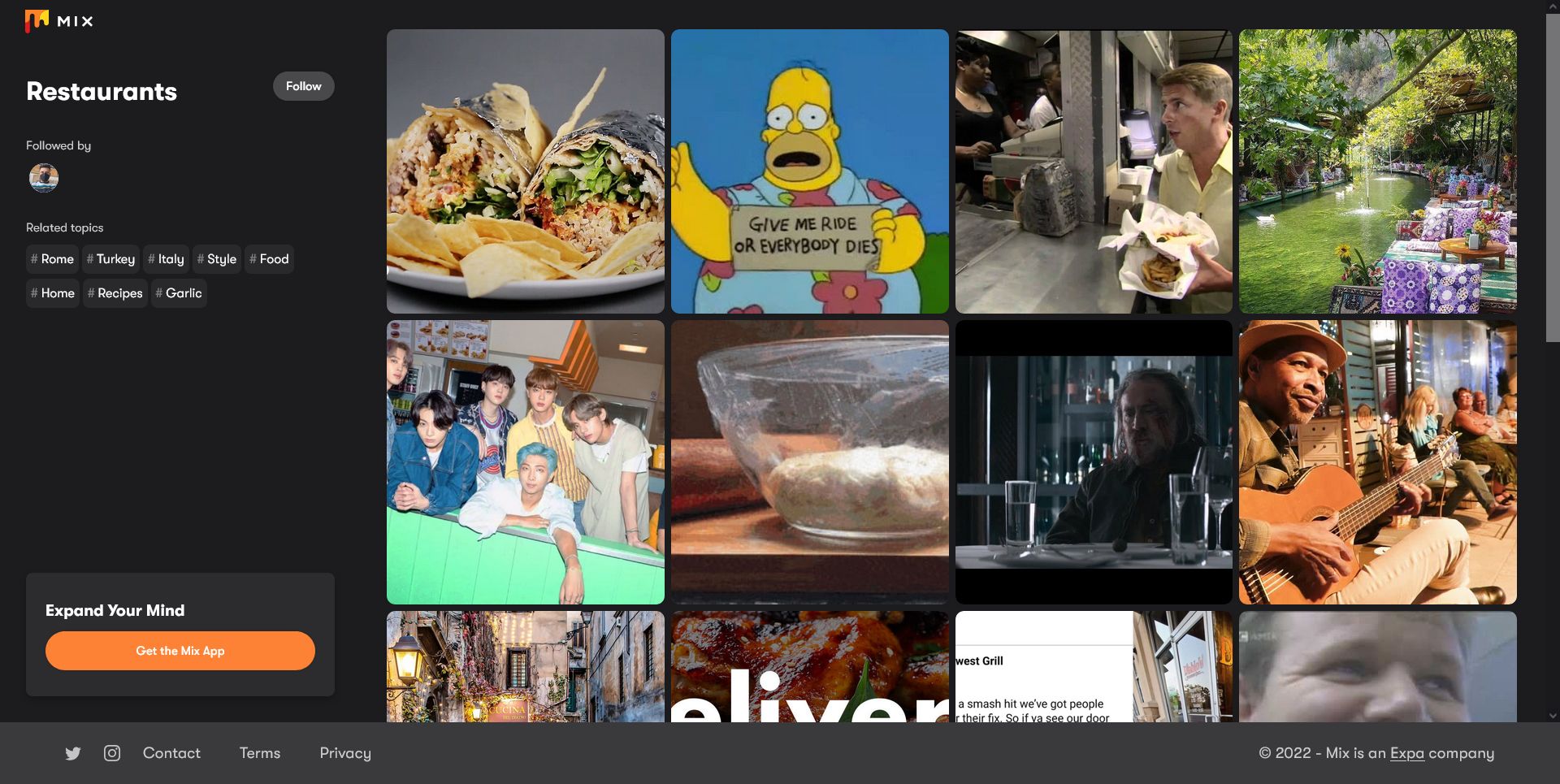
    Exploring restaurants in Mix

    Mix, formerly known as StumbleUpon, is a fantastic alternative to Pinterest. By downloading the Mix app, you can select topics to follow, including fashion, design, music, humor, nature, and much more. These categories are perfect for those who primarily use Pinterest for fashion inspiration, tattoo ideas, or funny memes.

    When you come across a post that interests you, simply hit the Mix button, which adds it to a collection on your profile. You can share these collections with others as well. Mix tailors a personalized feed using the posts you engage with. You can also explore what other users are mixing by checking the Popular tab.

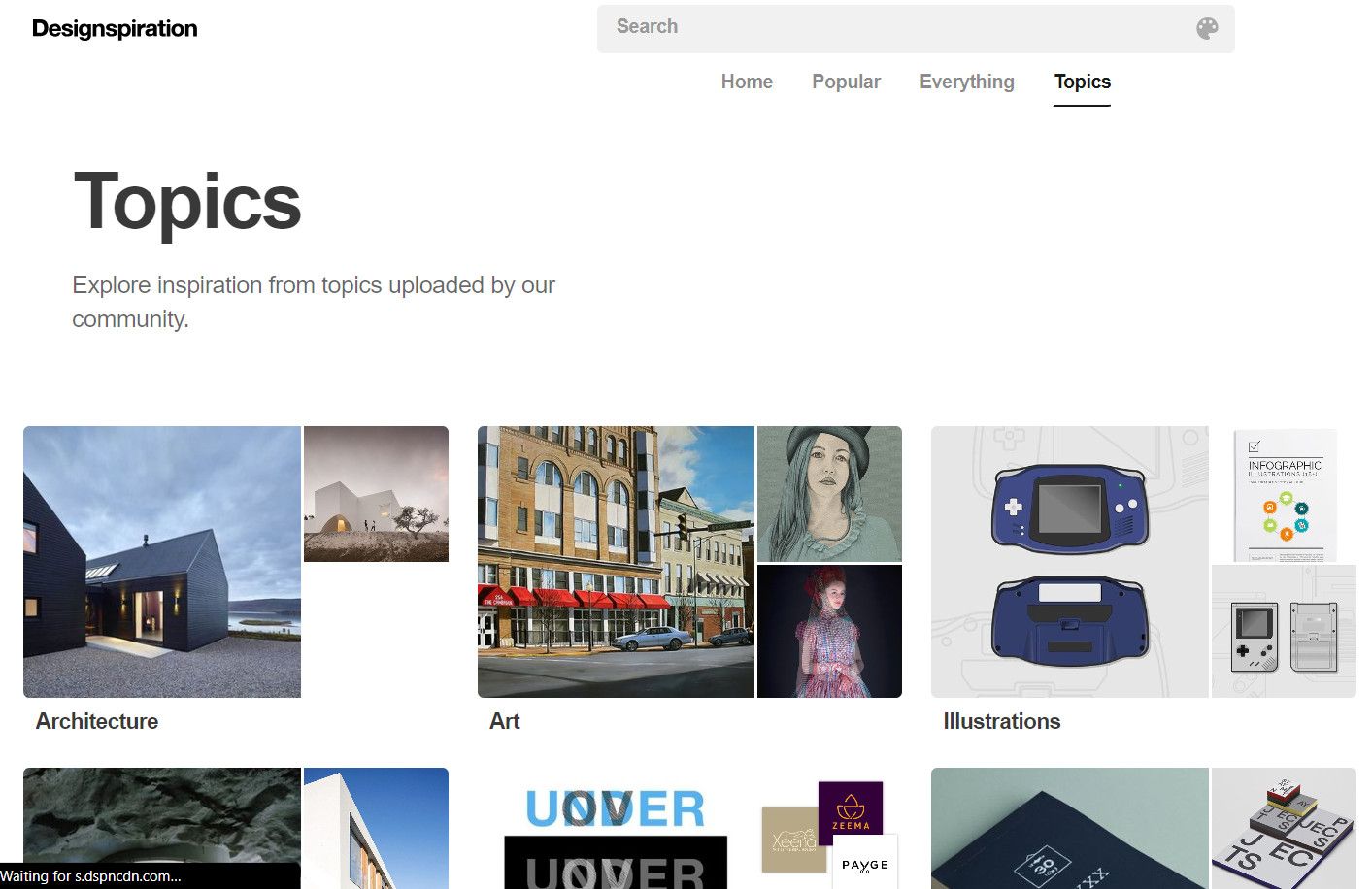
    Explore different topics on Designspiration

    Designspiration is another popular website, explicitly aimed at providing inspiration to designers and creatives. The platform is filled with a broad spectrum of visual content, including images, graphics, typography, and various other design elements.

    You can explore different categories or themes to uncover new ideas, as well as search using specific keywords, colors, and styles. This feature closely resembles saving items on Pinterest by creating collections and adding your favorites to them. If you’re a designer, this site can be an excellent avenue for sharing your work and connecting with others who share similar interests.

    A Pro version of Designspiration is also available, which offers added features like mood boarding, early access to new tools, and exclusive offers for a monthly fee of $5 or an annual cost of $50.

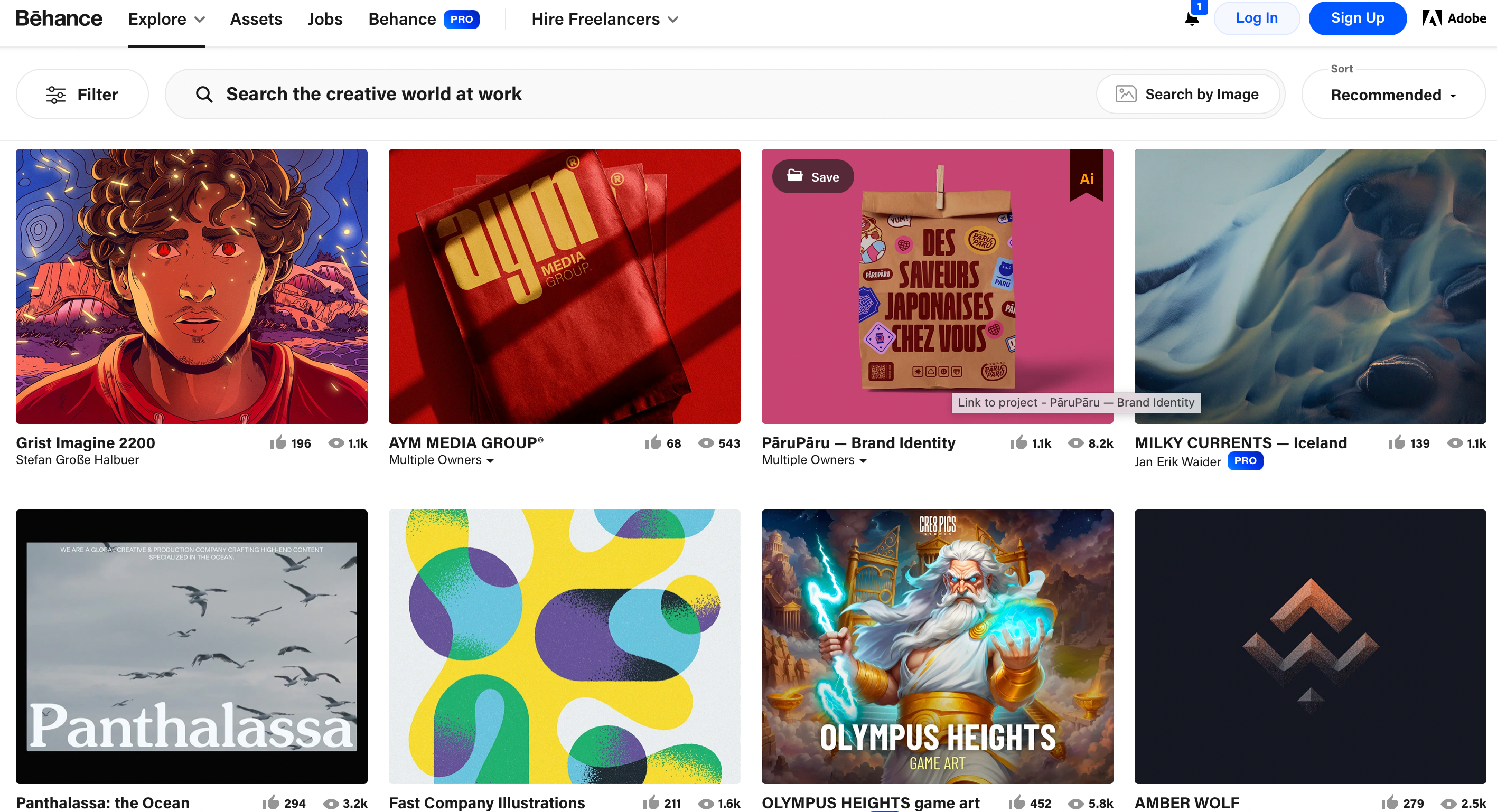
    Homepage of Behance with eight different art pieces showcased

    Behance, a platform owned by Adobe, is dedicated to showcasing artists and their works. Users can search for projects, images, and individuals, along with filtering searches by specific creative fields such as 3D art, fashion, or logo design. By creating an account, you can compile various posts into Moodboards, effectively forming collections similar to Pinterest boards.

    A premium subscription is available for $9.99 each month, granting access to advanced project settings, analytics, and zero platform fees when selling your work.

    Behance also helps connect businesses with artists by matching creatives with commission opportunities. Artists can showcase their portfolios on the site, making it an excellent tool for photographers and other creatives who want to present their work to a broader audience.

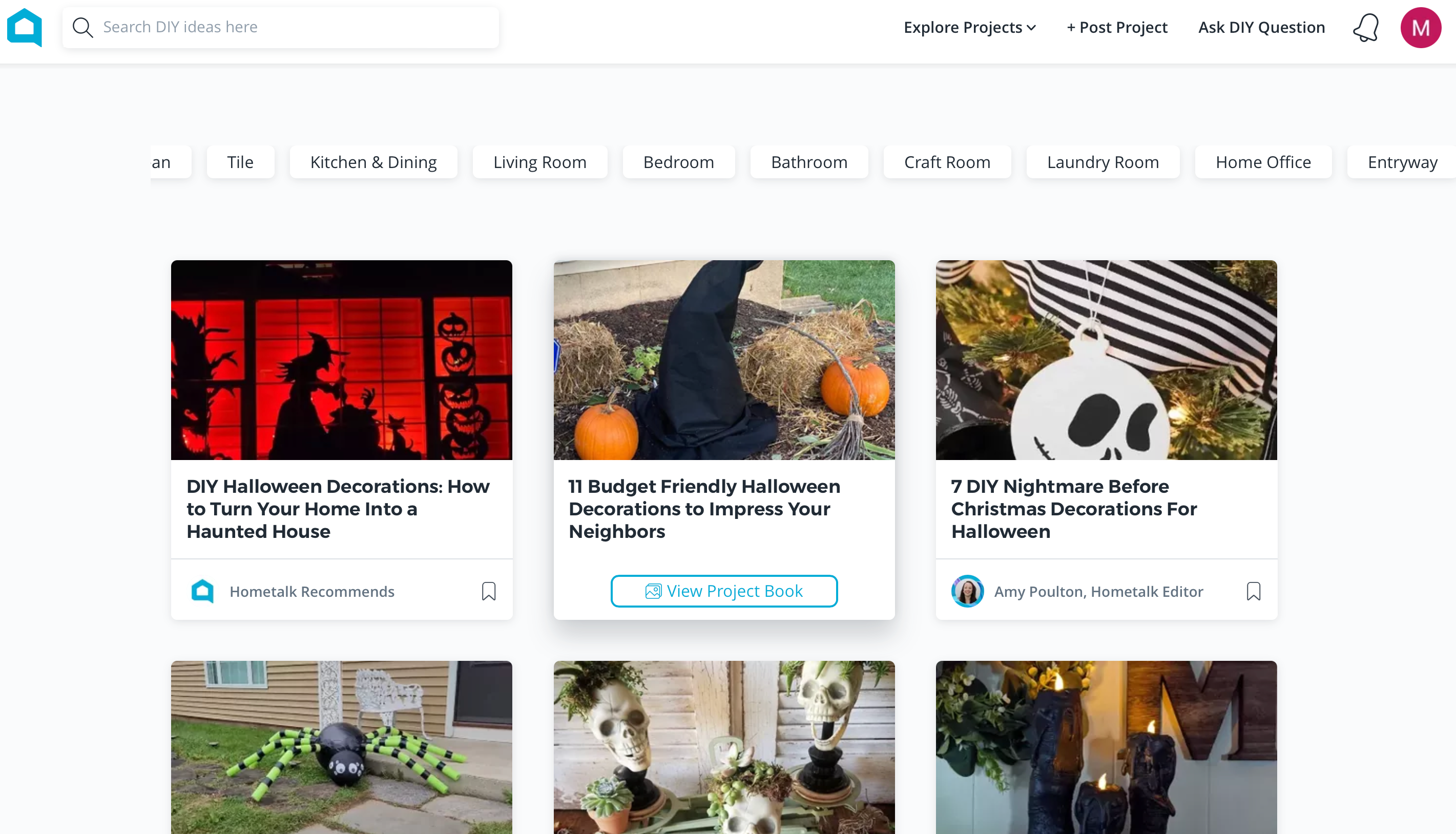
    Hometalk home page with lots of Halloween DIY ideas including 7 DIY Nightmare Before Christmas decorations

    Hometalk is an ideal site for uncovering tips on home maintenance, decor, and DIY projects. The platform features various categories, including detailed guides on seasonal DIY decor, organization tips, and specific area cleaning guides.

    For instance, during October, there are numerous Halloween-inspired DIY projects. Hometalk is a fantastic alternative to Pinterest, offering a wealth of DIY inspiration that you can save for future reference—especially if you frequently seek out such ideas on Pinterest.

    Additionally, you can share your DIY project ideas, ask questions, and save projects you want to try in the My Saved Projects section. Plus, Hometalk is entirely free to use.

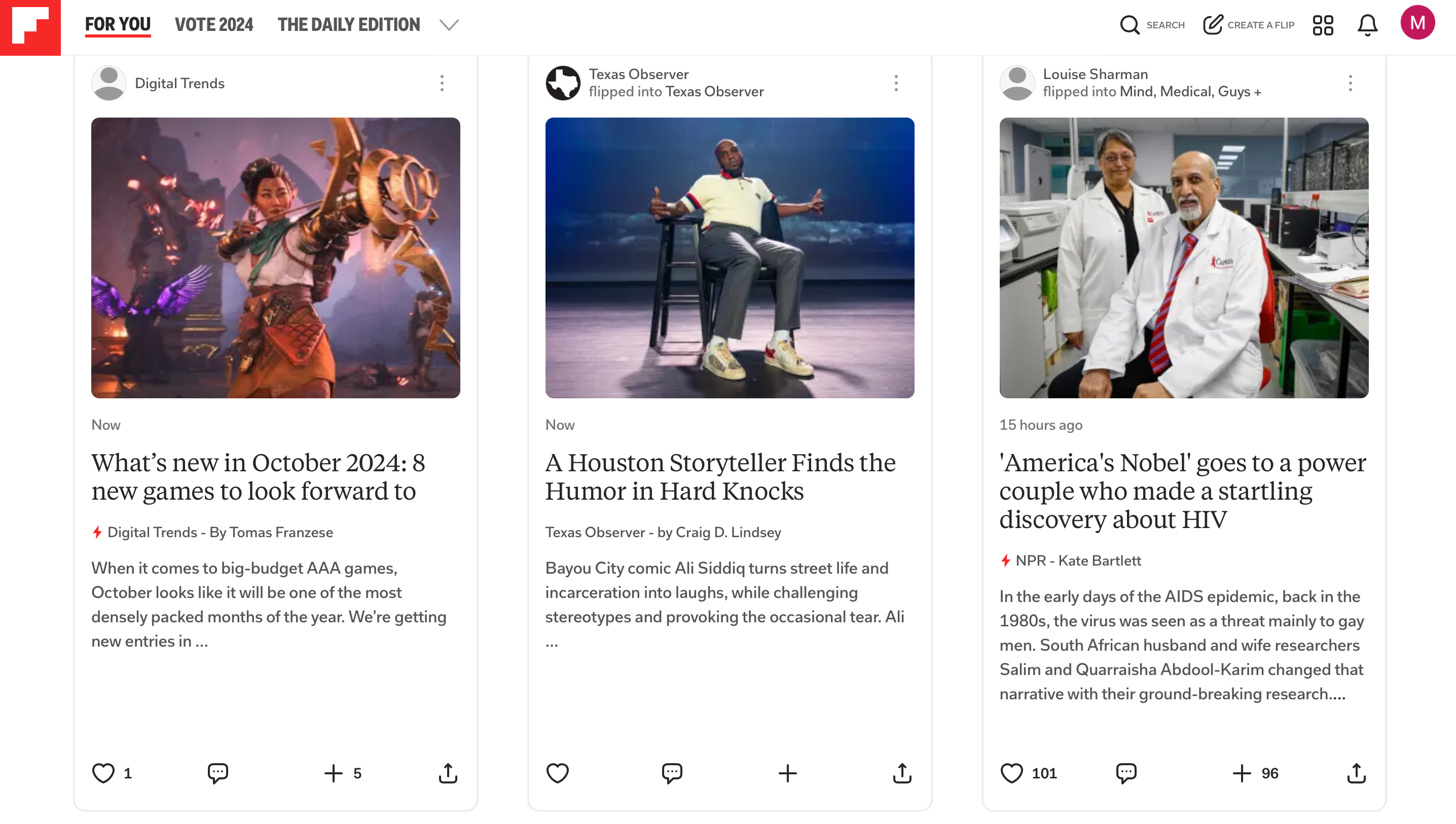
    Flipboard Flips including new games in October and science updates

    Flipboard bills itself as “the first and only social magazine.” This platform allows you to select numerous topics of interest, including books, DIY projects, celebrity news, science, and more. Users can also follow individual profiles, magazines, and videos.

    Flipboard is an excellent alternative to Pinterest since it provides digestible, sharable content in your favorite areas, offering a more meaningful reading experience than standard Pinterest images or graphics.

    Your For You page is tailored to display articles and content that match your interests, allowing you to comment, like, and share individual Flips. You can also click the plus sign to add articles to your boards, also called Magazines. Furthermore, you can import links and images to create your own Flips and invite collaborators to join your magazines.

    If news is what you’re after, Flipboard features The Daily Edition, showcasing significant news stories from the day.

    These Pinterest alternatives are excellent choices when you’re seeking a break from Pinterest itself. They offer a plethora of fresh content for you to explore, curate, and share. Having shared some of the best websites like Pinterest, why not take a moment to check them out for yourself?

  • WhatsApp Introduces Filters and Backgrounds for Colorful Video Calls

    WhatsApp Introduces Filters and Backgrounds for Colorful Video Calls

    Even though the wave of video calling excitement may have peaked during the COVID-19 pandemic, it remains a vital way to stay connected. In a surprising move, WhatsApp has decided to enhance its video calling feature by introducing filters and backgrounds.

    WhatsApp Introduces Filters and Backgrounds for Video Calls

    According to a recent post on the WhatsApp Blog, the app is rolling out a selection of filters and background options for video calls. Users will now be able to alter their appearance on camera and change their backdrop away from their actual surroundings.

    Initially, users will have access to 10 different filters and 10 unique backgrounds. The filters include: Warm, Cool, Black & White, Light Leak, Dreamy, Prism Light, Fisheye, Vintage TV, Frosted Glass, and Duo Tone. As for the backgrounds, options will include: Living Room, Office, Café, Pebbles, Foodie, Smoosh, Beach, Sunset, Celebration, and Forest.

    WhatsApp

    Alongside the filters and backgrounds, WhatsApp is also introducing Touch Up and Low Light features. These options aim to enhance your surroundings, allowing you to adjust what others see during the call. The goal is to help you feel more at ease and confident while on camera.

    These new features will start rolling out to all WhatsApp users in the coming weeks. If you’re eager to try them out, make sure to keep your app updated. Once available, you can find the new effect icons in the upper right corner of your screen during calls.

    Are These Features Really Necessary?

    WhatsApp has touted these filters and backgrounds as a way to make conversations “fun and expressive.” The company claims they provide “a more personal touch” and foster “a playful atmosphere.” However, I’m not entirely convinced this perspective is accurate.

    Maybe it’s just my personal preference, but I find the use of filters and backgrounds in video calls somewhat distracting. We all know you’re not calling from a beach if your real background is a bland office, and that’s okay. Let’s just keep it real.

    Moreover, WhatsApp does seem a bit late to jump on this trend. Many video calling platforms, like Zoom and Google Meet, have allowed users to change their background or apply filters for years now, especially during the peak of the pandemic. In a rather surprising turn of events, WhatsApp has only decided to implement these features in 2024.

  • I Quit Social Media Ten Years Ago, and Life Feels Great!

    I Quit Social Media Ten Years Ago, and Life Feels Great!

    Living Without Social Media: A Personal Journey

    We often feel pressured to maintain a presence on social media due to societal expectations, but it’s entirely possible to live happily without it. I’ve been social media-free for nearly a decade, and this experience has been remarkably positive. Allow me to share my journey with you.

    Why I Said Goodbye to Social Media

    Even ten years ago, we had already begun to understand the detrimental effects of social media on our mental health and society. I learned this lesson firsthand.

    The Pitfalls of Comparison

    There were times when I could be enjoying a perfectly lovely morning, only for a quick scroll through Facebook to ruin it. I’d see someone else’s exciting weekend adventure and suddenly, my peaceful moment of reading felt lackluster in comparison.

    The reality is, I adore reading and define a fulfilling life around it. Yet, seeing others out having fun made me question the joy I derived from my hobbies.

    Even when I was out with friends exploring a new city, I couldn’t shake that feeling of envy when I’d check social media and see someone vacationing in a more exotic locale. It’s a game with no winners.

    The Toll of Internet Negativity

    As a web writer, I had a professional reason to be active on social platforms. I got a job through a Twitter connection, but promoting myself online often felt overwhelming. I would spend far too long crafting the perfect tweet, frightened of potential backlash from anyone in the world who could respond with negativity.

    Additionally, I grew weary of engaging in fruitless arguments with people from my past—high school acquaintances I wouldn’t have kept in touch with otherwise. These debates could derail my entire week, especially when they involved sensitive topics like politics. The sting from criticism is magnified when it comes from a former friend rather than just a random stranger.

    Finding Peace of Mind

    The positive impact of quitting social media became immediately evident. Without the stress of Twitter in my life, I redirected my energy toward my writing instead of self-promotion.

    This shift has vastly improved my productivity. In my role, I’m not responsible for marketing my articles. I focus on creating content worth sharing, which many of my peers have also found beneficial in terms of productivity since ditching social media apps.

    Losing touch with my high school classmates hasn’t bothered me. For many of them, our paths diverged as we matured, and forgetting certain ties allows me space for growth.

    The difficulty of family dynamics often arises from comparing our present selves with the younger versions captured in photo albums. Conversely, friendships are enriching because they affirm our current selves.

    I now experience less envy. When I tend to my garden, I’m not bombarded with images of someone else’s more beautiful one. When I purchase a car, I don’t see posts showcasing peers with the model I would’ve liked. I can appreciate my wardrobe without the distraction of influencers showcasing their wardrobes.

    Staying Informed Without Social Media

    The fear of missing out often keeps people glued to their screens. It’s true that by deleting my accounts, I miss some things. However, I’ve realized that focusing on social media often means overlooking alternatives to stay informed.

    While scrolling through feeds might seem convenient, it detracts from engaging with quality content like reputable magazines, attending local events, or even connecting with neighbors. This habit can blur the lines between collective consciousness and the actual state of the world around us.

    Instead of relying on social media for news, I subscribe to newsletters and immerse myself in the vibrant podcasting world. Through podcasts, I stay updated without the chaos and negativity often found on social media platforms.

    A Fulfilling Social Life

    Interestingly, my social life is now healthier than ever. I maintain regular game nights with friends, go hiking, and even kayak together. I engage in mindfulness with meditation groups, logging untold hours of reflection and connection. I practiced karate for years, finding camaraderie within a supportive community.

    None of these connections arose from social media, but rather from existing friendships or exploring hobbies that speak to my interests.

    As a parent, husband, and son, I cherish the relationships with my immediate family without the distractions of online scrutiny. I take great joy in my day-to-day life and the genuine connections I cultivate without concern for follower counts or likes.

    Career Continuity

    You’re reading my work right now, so it’s evident that I’ve managed to continue my writing career despite giving up my social media presence. While social platforms can enhance job visibility, the value of producing quality work and nurturing real connections far outweighs the benefits of social media.

    Overall, social media platforms serve as tools to share creative endeavors, especially for those in fields like art and influence. However, it’s crucial to assess the impact of these platforms on mental health. If the stress of social media undermines your creativity or overall well-being, it might be worth stepping back and reevaluating how you engage with these platforms.

    Significant changes have their pros and cons. While social media offers bright spots, many of us have recognized the negative impacts on our childhoods, families, and communities and found that the advantages simply don’t outweigh the costs. Social media interactions aren’t essential for fulfilling relationships, and even if you’re not ready to completely disengage, minimizing your presence can still yield significant benefits.

  • My Secrets for Enhancing Reddit Account Privacy

    My Secrets for Enhancing Reddit Account Privacy

    While Reddit is inherently an anonymous platform, I take several extra measures to enhance the privacy of my account. Here are my top suggestions for utilizing features and settings that can bolster your account’s privacy on this social media site.

    1 Control Who Can Message Me

    Reddit is a great place to meet people who share your interests, but I prefer to have control over who can send me messages and chat requests. Similar to my settings on Instagram, I don’t want just anyone reaching out to me.

    I allow certain accounts to message me if they are at least 30 days old. If you’re looking to tighten security even more, you can set messaging permissions to Nobody. While I wish there were options to restrict direct messages to specific groups, I’ve set this feature to Nobody on one of my accounts.

    To adjust your chat and message settings, follow these steps:

    1. Click your profile picture in the upper right corner to open the sidebar menu.
    2. Scroll down and select Settings.
    3. Under Account Settings, tap on your username.
    4. Scroll down and choose Chat and Messaging Permissions.
    5. Adjust your chat and messaging settings until you’re satisfied.

    2 Using a Random Username

    I maintain two Reddit accounts. One uses my real name to apply for freelance jobs, conduct research for my articles, and to browse professional forums. The other one has an anonymous, randomly generated username that I use for personal interests, where I mostly just lurk rather than actively participate.

    The situation with my accounts was accidental. When I first joined Reddit back in 2020, I naively used my real name, not understanding how the platform functioned. I thought it would be useful for work. Eventually, I decided it would be beneficial to have an anonymous account as well. I did not realize that Reddit does not allow you to change your username after the first 30 days.

    If you’re serious about keeping your Reddit usage private, consider adopting a randomly generated username. You automatically receive one upon signing up, but you can always change it. Just be sure not to reuse names from other accounts.

    3 Hiding My Account From Search Engines

    Even with an anonymous username, it’s possible to worry about others being able to find your account through search engines. Thankfully, Reddit has an option to remove your profile from search results if you choose.

    To prevent Reddit from displaying your profile in search results, you can do the following:

    1. Click your profile picture and select Settings from the sidebar.
    2. Scroll down to Privacy.
    3. Toggle Show up in search results to off.

    4 Concealing My Active Communities

    I enjoy following various communities on Reddit, but I prefer that this information remain private. To achieve this, I hide my active communities so they aren’t visible on my profile. Note that you’ll need to do this from the Reddit web app, not the mobile version.

    Here’s how to hide your active communities:

    1. Log into your Reddit account using a desktop browser.
    2. Click on your profile icon in the top right corner and select Settings from the dropdown menu.
    3. Go to the Profile tab.
    4. Set Show active communities to off.

    5 Avoiding Profile Pictures

    One of the simplest ways to maintain privacy on Reddit is to refrain from uploading a picture of yourself. I use an avatar for my private account, and you’ll notice that many Reddit users choose not to display profile pictures. While this may embolden some users in ways that aren’t necessarily good, it’s a smart choice if you want to keep your appearance private.

    You can create an avatar as soon as you sign up for Reddit. If you currently have a photo and wish to switch it out, check out this article for guidance on changing your Reddit avatar or profile picture.

    6 Browsing in Anonymous Mode

    Reddit’s anonymous browsing feature is akin to incognito mode in web browsers. When you browse anonymously, your history and searches are not saved, and personal notifications or suggestions won’t be shown until you exit this mode (which will turn off automatically if inactive for more than 30 minutes).

    I recommend using the anonymous browsing setting when you just want to explore without engaging in interactions. However, be aware that this mode limits your ability to comment or post. This feature is currently available only on mobile devices. To enable it, refer to our guide on browsing Reddit anonymously.

    These privacy features help me use Reddit while preserving my online anonymity. Be sure to check your privacy settings to avoid sharing unnecessary information or making your profile easily discoverable via search engines. While anonymous browsing is a temporary measure, choosing a non-identifiable username and managing who can contact you will significantly enhance your privacy.

  • Why I Only Use Reddit and Discord for Social Media

    Why I Only Use Reddit and Discord for Social Media

    Main Points

    • I’ve discovered that sticking to just Reddit and Discord for my social media needs is sufficient for connecting with people who share my interests, along with accessing a wealth of information and entertainment.
    • Reddit serves as an excellent platform for engaging in niche communities and getting news, while Discord allows for more meaningful, real-time conversations and various entertainment options.
    • While this strategy might limit encounters with trending content and wider networks, it alleviates stress and the fear of missing out (FOMO), fostering more significant interactions centered on my personal passions.

    With so many social media platforms at our fingertips today, it often feels like we’re expected to juggle multiple accounts—posting on Instagram, tweeting on X, connecting with friends on Threads, and keeping up with TikTok trends. It’s dizzying, draining, and largely unnecessary for most people.

    After several breaks from social media, I realized I didn’t need to keep up with multiple platforms. I’ve simplified my online presence to just Reddit and Discord, and here’s how they’ve got me covered.

    How Reddit and Discord Enhance My Social Connections

    When it comes to meeting new individuals, especially those who share my interests, there’s no better place than Reddit. A simple keyword search on the platform quickly leads me to relevant communities.

    Recently, I learned that I have joint hypermobility—something I hadn’t even heard of before. I turned to Reddit, joined a hypermobility community, and found valuable stretches and discussions about the experience of being someone with flexible joints.

    I’m part of several Reddit communities related to my health, hobbies, and beliefs. These targeted groups connect me with people who not only share similar interests but also provide support and insights I might not find elsewhere. Whether it’s discussing chronic pain or joining conversations about hobbies, Reddit creates a space for meaningful connections.

    I’ve also discovered many Discord servers through Reddit. Discord is a more intimate platform, ideal for deeper discussions. While private messages and group chats are available on both platforms (like the Duolingo German Learners chat I’m part of), Discord offers unique options, such as voice chats and game streams.

    So, I can meet new friends on Reddit and move the conversation to Discord when I want, or keep building relationships on Reddit. I can also search for enticing Discord servers to join or create my own and extend the invitation to others. Either way, I feel well-connected thanks to both platforms.

    Ideal for Information Exchange and Discovery

    Staying informed is a big reason many of us are glued to social media apps like X, Snapchat, and Instagram. We want to know who said what and when, plus any additional information that can help us stay in the loop.

    Reddit is fantastic for gathering community-driven content and news on everything from celebrities and gadgets to global events. By enabling notifications, I can effortlessly keep track of what’s trending in technology, updates from around the world, and fresh discussions on current affairs.

    Discord adds another layer with its real-time interactions. It’s like having a messaging app with social media elements, allowing me to communicate directly with people I may not know personally.

    If I’m searching for quick updates or niche advice, I can jump into relevant server discussions or send a direct message to someone. It’s a productive way to gather information, whether from experts or fellow fans.

    Reddit and Discord Provide Endless Entertainment

    Before I learned how to avoid the rabbit hole of endless scrolling, I often found myself spending hours watching reels, saving memes, participating in Instagram debates, and reposting tweets. If I conducted a survey, I’m confident that many would agree this is why we’re drawn to mainstream social media.

    However, Reddit and Discord offer countless ways to unwind. On Reddit, I can browse through an endless stream of memes, enjoy hilarious videos, or engage in lighthearted discussions. Each day, I launch the app unsure of what delight I’ll find, since the entertainment is continually refreshed. Plus, the upvoting system ensures I see the best content from communities.

    Discord ups the fun factor by allowing me to interact with friends, listen to music together, game together, and much more.

    Pros and Cons: Are You Really Missing Anything?

    Limiting my social media to just Reddit and Discord comes with its downsides, but none significant enough to make me want to go back to how things were before. As an influencer, perhaps I’d be missing out. Having a vibrant presence on Instagram, X, TikTok, or similar platforms is essential for sharing an audience and staying relevant. However, for the average person, this doesn’t seem to matter much.

    If you need to use apps like X or Facebook for professional purposes—whether for marketing or using tools like MuckRack—you can still set up accounts for work without getting caught up in personal social media interactions.

    One major benefit of streamlining my social media usage is a noticeable drop in stress and fear of missing out (FOMO). I no longer feel I’m neglecting what everyone else is doing because I tailor my online experience around what truly matters to me. It also helps me avoid the fatigue that comes with endlessly scrolling and attempting to keep up with everyone’s posts, many of which don’t interest me.

    When I used to keep my Instagram account active, I turned off notifications and checked it every few days. That meant I returned to an overwhelming heap of reels—many sent from friends with good intentions—filled with cat videos, average jokes, and mundane content that offered more stress than enjoyment.

    Another perk is that I can engage in more meaningful interactions. With fewer platforms, I can focus on participating in communities that genuinely interest me instead of spreading myself too thin across too many spaces. It’s less about public visibility and more about fostering connections with like-minded individuals.

    Still, there are trade-offs. By focusing on Reddit and Discord, I miss features like reels, live streams, and the opportunity to connect with a broader audience. My reach is more limited, and I often miss out on the latest viral trends. That said, I don’t truly feel deprived. I’ve achieved a simpler, more focused social media experience without sacrificing the connections and information that matter most to me.

    Ultimately, this approach works for me, although it might not suit everyone. However, if you’re seeking to cut down on social media overload, Reddit and Discord could be your ideal alternatives too.

  • Meta AI Will Still Use Your Data Despite Viral Posts: Find Out Why

    Meta AI Will Still Use Your Data Despite Viral Posts: Find Out Why

    Occasionally, a viral post circulates, claiming that Facebook and Meta lack permission to access users’ photos and content, spreading quickly across social media worldwide.

    This idea doesn’t work—and it never will. However, new iterations of this debunked meme keep cropping up; this time, they’re targeting Meta AI and its data usage for training purposes.

    Why Posting “I Don’t Give Facebook Permission” Is Ineffective

    In simple terms, posting this statement on your Facebook timeline achieves nothing because it contradicts the terms of service laid out by Facebook and Meta. By using their platform, users inherently grant Meta permission to utilize their data, including images and interactions, to refine their services and generate advertising revenue.

    The original version of this message was aimed at Meta’s (which was still referred to simply as “Facebook” at the time) general data collection practices. It suggested that by merely posting the message on their timeline, users could magically stop Meta from using their data. Obviously, this is not how it functions, and Meta’s scope of data collection continues to be extensive.

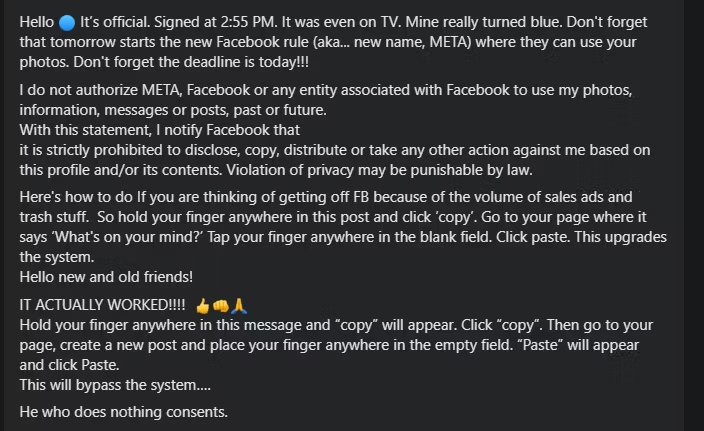
    Here’s a recent example I came across:

    While the fundamental message reflects a misunderstanding of how Facebook operates, it also wrongly assumes that simply copying and pasting such a message can “update the system.”

    What Has Triggered This Viral Message Again?

    This latest trend targets Meta AI, the artificial intelligence chatbot that Meta is rolling out across its various platforms. Many users of Meta products, like Facebook, WhatsApp, and Instagram, are expressing their dissatisfaction with these integrations, particularly regarding both the AI tool and the associated data collection necessary for training it.

    The increase in visibility surrounding Meta AI has led to a new wave of viral posts that users are encouraged to share on their profiles. While there are several variations, the core message remains similar to previous iterations:

    Although the structure is akin to earlier messages, it remains completely ineffective.

    What sets Meta AI apart in terms of data training is that, theoretically, there is a way to opt out of having your data utilized. However, this option may vary depending on your location.

    Sadly, as of now, Facebook users in the United States cannot choose to opt out of the data collection necessary for Meta’s AI training. Data privacy laws in the US are notoriously weak, meaning Meta is not obligated to offer a way for users to safeguard their information.

    meta data collection notice with options to stop collection

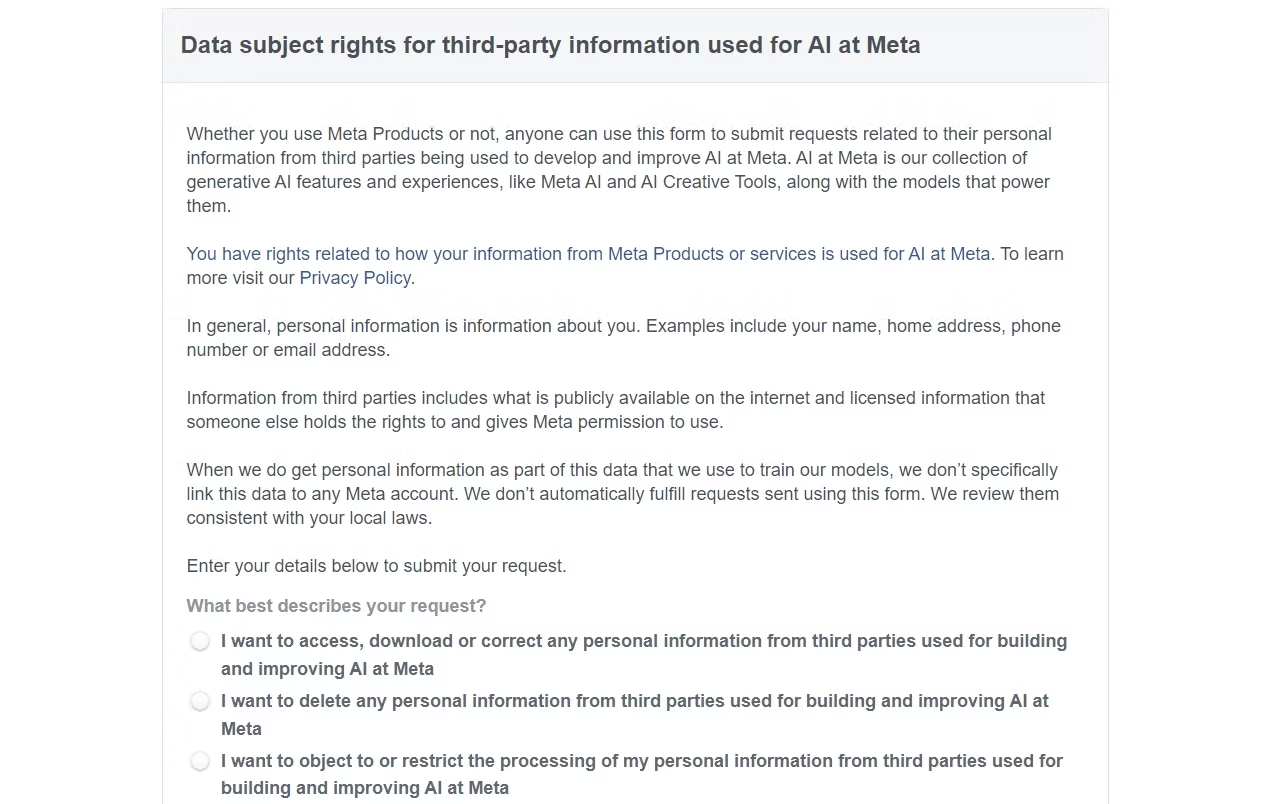
    However, if you reside in the EU or the UK, the Facebook Data Subject Rights Form allows you to inform Meta that you prefer not to have your data used.

    Though I tend to be skeptical about its effectiveness, the EU’s GDPR mandates that Meta offers this option to users. In contrast, for individuals elsewhere, the only way to escape Meta’s data gathering is to completely disengage from their platforms, which is certainly easier said than done.

  • Your Guide to Unsubscribing Effectively

    Your Guide to Unsubscribing Effectively

    Important Points

    • Snapchat’s My Selfie feature is powered by generative AI and automatically enables the company to utilize your selfies in personalized advertising.
    • Fortunately, there are simple steps you can take to opt out of this feature.
    • It’s advisable to routinely check your privacy settings on social media platforms to safeguard your personal information.

    Snapchat offers a variety of AI-driven features in its app, including a customizable AI chatbot and creative tools that enable users to generate and enhance their Snaps. While many of these features are designed for fun and engagement, one — My Selfie — grants Snapchat permission to use your image for personalized ads by default.

    What Is Snapchat’s My Selfie Feature?

    Snapchat / Diego Thomazini / Shutterstock

    My Selfie is one of Snapchat’s AI features, allowing users and their friends to generate AI images based on their selfies. Upon first using this tool, you’ll be prompted to take a selfie. Snapchat will also suggest granting the app access to your camera roll for even more personalized and accurate AI images.

    After completing this setup, a notification will appear stating: “By selecting Agree & Continue, you accept the My Selfie Terms and permit Snap and your Friends to use your likeness and My Selfies on Snapchat. This includes Snap utilizing your My Selfies to serve you personalized ads and enhance its machine learning models using My Selfie.”

    While Snapchat does provide a warning regarding how your AI-generated images may be used, it can be easy to miss the fine details.

    How to Opt Out of Snapchat Using Your AI-Generated Selfies in Ads

    If you have utilized the My Selfie feature on Snapchat, you have automatically allowed Snap to use your generated selfies. Fortunately, opting out is possible. Follow these steps:

    1. Open the Snapchat app.
    2. Tap your profile icon located in the upper-left corner of the screen.
    3. Tap the gear icon in the upper-right corner.
    4. Find and select My Selfie.
    5. Toggle off the See My Selfie in Ads option.

    You don’t need to sacrifice your privacy to enjoy your social life. If you are an active social media user but prefer to limit the information you share or the use of your likeness in advertisements, regularly checking your privacy settings and staying updated on any changes in terms of service will help protect your personal information.

    Additionally, be cautious about common social media pitfalls, such as having a public profile or interacting with unfamiliar accounts, to further safeguard your privacy.

  • LinkedIn Trains AI with Your Data—Here’s How to Opt Out

    LinkedIn Trains AI with Your Data—Here’s How to Opt Out

    LinkedIn has introduced a new data privacy setting that allows the company to utilize your data for training its AI models. The silver lining? You can easily opt out with just a quick toggle. Here’s what you should be aware of.

    How Does LinkedIn Use Your Data?

    Thapana_Studio / Alexander Supertramp / Shutterstock

    LinkedIn, like many companies today, is harnessing the power of AI to enhance its professional networking platform. In 2023, the company launched generative AI tools aimed at simplifying the job search process. However, it also updated its privacy policy to automatically enroll users into a program that collects data for AI training.

    The new privacy policy outlines that the data gathered will serve to “develop, provide, and personalize [the company’s] Services, along with insights sourced from AI and automation, ensuring that our Services remain relevant and beneficial for you and others.”

    This data encompasses information that you submit to LinkedIn, along with details provided by other users. It also includes contact and calendar details, messages, educational and employment background, user interactions with LinkedIn services, and device/location information.

    Starting in November, users across the United States, Canada, and several other countries will be automatically enrolled unless they choose to opt out.

    What If You Don’t Opt Out?

    Staying in the program shouldn’t change your overall experience on LinkedIn. Furthermore, companies like LinkedIn won’t use your data maliciously. Instead, it’s more likely they’ll use this information to refine their AI for delivering more tailored ads, services, and content that align with your needs.

    If you’re comfortable with this, you might not find any reason to opt out. However, if you strongly value online privacy, opting out could be the better route for you.

    How to Opt Out of LinkedIn’s AI Training Program

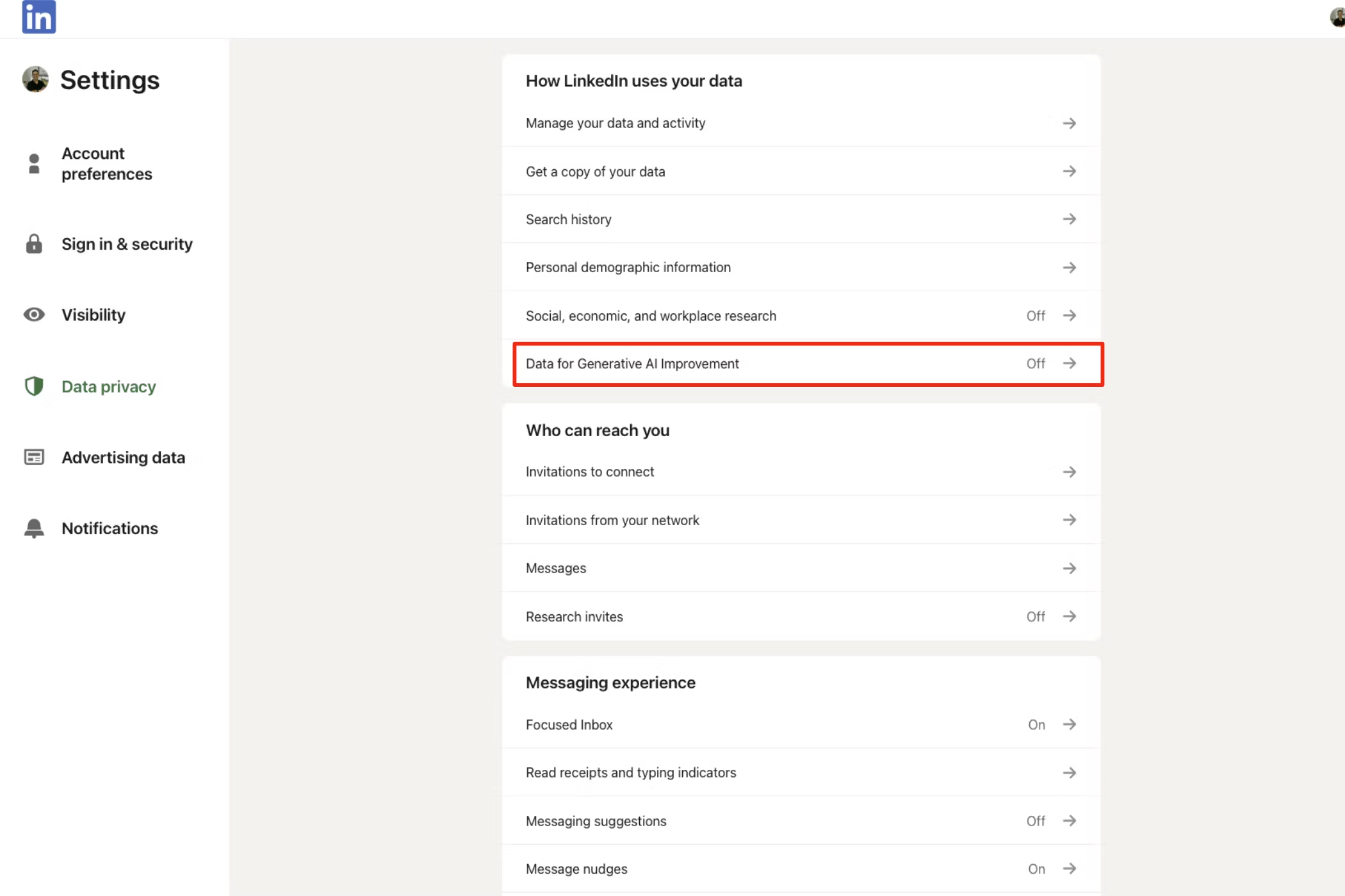
    The generative AI toggle setting on LinkedIn's Website

    To opt out using a web browser, log into your LinkedIn account. Click on the Me icon at the top right corner, which will lead you to the menu for your account settings. From there, go to Settings & Privacy > Data Privacy > Data for Generative AI Improvement > Use my data for training content creation AI models and set it to Off.

    For mobile users, the process is quite similar. Open the LinkedIn app, go to your profile, and tap the gear icon in the upper right corner. This will take you to your Account Settings page. From there, select Data Privacy > Data for Generative AI Improvement > Use my data for training content creation models, and toggle it to Off.

    Luckily, LinkedIn has streamlined the process of opting out of its generative AI training program. Just flip a switch, and you’re done. For those concerned about the extensive data collection practices of large corporations like LinkedIn, this option provides an important sense of control. While there’s currently no evidence to suggest LinkedIn is mishandling your data, being able to choose what to share can enhance your sense of security and peace of mind.

  • What It Would Take to Win Me Back Again

    What It Would Take to Win Me Back Again

    After Elon Musk acquired Twitter and transformed it into X, many changes were bound to occur. As a result, several users, including myself, have exited the platform due to its new trajectory. I often find myself contemplating a return, but here’s what it would take to bring me back.

    1 Enhanced News Curation

    Musk claims that X is the top news platform globally. While I’m not sure if this assertion is accurate, it’s undeniable that some significant stories have emerged on X before mainstream outlets picked them up. However, my biggest concern was the rampant spread of misinformation.

    X’s algorithms seem to favor sensationalist content, particularly if it’s shared widely, regardless of its factual accuracy. If these algorithms could be adjusted to prioritize credibility and subjects that genuinely engage users, the overall quality of news would likely improve for many.

    2 Enhanced Content Moderation

    Labeling X as the “free speech platform” led to fewer restrictions on what users could post. As a result, there has been a noticeable increase in hate speech, not to mention disinformation. Personally, I encountered more harmful content here than on any other mainstream social platform.

    I believe that diverse opinions can coexist alongside robust moderation. Clear and consistent policies against harmful content must be established and enforced. Unfortunately, I found the enforcement on X to be lacking.

    3 Reviving the Old Verification System

    In the past, a blue checkmark indicated that the account belonged to a verified celebrity, journalist, government official, or any notable entity of public interest. Now, anyone can obtain this verification through X Premium (previously Twitter Blue), which offers additional features along with a boost in perceived legitimacy.

    This dilution has made it challenging to identify genuine accounts, as fake profiles can now masquerade as real ones while spreading hate and misinformation. A return to the previous verification system is essential for restoring a sense of credibility to the platform.

    4 Addressing the Bot Crisis

    Bots are rapidly disseminating false information and exploiting the algorithm for harmful purposes on X. Their prevalence has eroded the platform’s integrity for many users. Although Musk announced a cleansing of these accounts, my interest in returning would significantly increase if we could be assured that the bot issue has been adequately addressed.

    5 Free Basic Features

    Features like editing posts or publishing longer content should not be locked behind a paywall with an X Premium subscription. There have been countless times when I made an error, necessitating a deletion, followed by an edit and repost, or when I exceeded character limits and had to create a thread to express my thoughts fully.

    I get that X must generate revenue. Certain features, such as ad-free browsing or customizable app icons, can enhance the value of subscribing. However, basic functionalities should remain accessible to all users.

    6 Reduce the Ads

    During my time on X, I found the volume of ads to be excessive. This would be more tolerable if the ads were relevant, but I often encountered dubious-looking scams being promoted, which became intolerable.

    Ads are so pervasive that even X Premium subscribers still see ads—albeit half as many as those on the standard or Basic plan. To eliminate ads completely, one must opt for X Premium+.

    7 Reviving Third-Party Apps

    I was a huge fan of using Tweetbot for its sleek interface, extensive customization options, enhanced timeline management, and ad-free experience. When X limited access to its API at the start of 2023, it essentially shut down any third-party services that aimed to improve the user experience on X.

    This forced me back to the official X app and website, which came with overwhelming advertisements, minimal customization, and no timeline control. Should they ever reinstate their API for third-party apps, I know many users, myself included, would happily return.

    Despite the setbacks from actions like rebranding Twitter to X, many of us were willing to stick around. However, with these cumulative changes on the platform (both before and after), leaving has become a more appealing option. X has the potential to be an excellent platform for engaging with diverse perspectives, but I just hope that the adjustments I mentioned could be made for me to consider coming back.

  • 8 Key Strategies for Effective WhatsApp Group Management

    8 Key Strategies for Effective WhatsApp Group Management

    Key Points

    • I write a concise group description to clarify the group’s purpose and pin essential updates and messages for easy access to important information.
    • Utilizing invitation links combined with member approval allows me to bring in many participants while minimizing the risk of spam or unwanted members.
    • In larger WhatsApp groups, I assign multiple co-admins to assist with group management and restrict members from changing settings, ensuring the group remains organized.

    WhatsApp groups are a fantastic way to keep in touch with family, friends, coworkers, and communities. However, managing these groups, particularly larger and more active ones, can be quite challenging. Here are some strategies and features I leverage to effectively manage my WhatsApp groups.

    1 Set a Clear Purpose for the Group

    When establishing a WhatsApp group, one of the first steps I take is to articulate a clear purpose in the group description. While this may appear minor, it greatly influences the tone and expectations for new members. I ensure the description succinctly drives home the group’s objective, what discussions are encouraged, and any basic rules for members to follow.

    For instance, in a work-related group, I would outline the suitable types of updates and messages, such as sharing project deadlines, important documents, and task instructions. This straightforward approach helps steer conversations and keeps discussions relevant.

    2 Highlight Essential Messages

    In a busy WhatsApp group where messages can pile up quickly, important details can easily be overlooked. That’s why I consistently pin crucial announcements, event information, and instructions, making these items readily accessible to all members. This simple tactic helps keep everyone informed, especially when conversations become fast-paced and chaotic.

    Pinning a message is easy—all I do is long-press it and select Pin. This has saved me from repeatedly sharing important details, particularly in larger groups where participation varies or new members join frequently.

    In the past, I used to add every new member as a contact to bring them into a group. Not only was this process time-consuming, but it also cluttered my contact list. Now, I opt for a direct invite link to the WhatsApp group. This way, I can share the link with anyone needing to join—through email, another messaging app, or even via a QR code. It simplifies the addition of many members while letting them choose whether to join the group.

    Additionally, I have the option to reset or disable the invite link at my discretion, giving me control over who can access the group. This is especially beneficial for managing a group that may become closed to new members later on.

    4 Approve New Members for the Group

    While I create group invite links for easy access, I don’t allow just anyone to join without my permission. Enabling the “Approve New Members” feature in WhatsApp allows me to review each join request before adding someone to the group.

    Whenever someone clicks the invite link, I receive a notification and can decide whether to approve or deny the request. This helps me maintain control over the group and prevents spam or unwanted individuals from joining. It’s particularly useful for groups focused on specific topics or sensitive discussions where privacy is crucial.

    5 Restrict Members from Altering Group Settings

    By default, WhatsApp allows group members to edit the group name, icon, description, and add new members. This can lead to unintended modifications that may disrupt the group dynamic. To maintain order and ensure the group functions as intended, I always prevent members from changing these settings.

    To implement this, I access the group details, tap Group Permissions, and turn off the options for Edit Group Settings and Add Other Members. This straightforward action helps maintain clarity and avoid misunderstandings.

    6 Appoint Co-Admins for Help

    As the sole admin of my WhatsApp group, I often find myself overwhelmed with various tasks—moderating discussions, responding to member inquiries, and keeping engagement levels up. This can become hectic, especially during peak activity times when I cannot devote enough time to the group.

    To alleviate this burden, I typically designate several co-admins to assist in managing the group. This ensures that even in my absence, the group remains well-maintained and issues are quickly addressed. Appointing a co-admin is easy: I simply find the member in the list, long-press their name, and select Make Group Admin.

    7 Determine Who Can Send Messages

    In large WhatsApp groups, particularly when the main goal is to relay important information, I find it vital to control who has the ability to send messages. By limiting messaging to admins only, I establish a more organized environment where relevant information can be communicated clearly, free from distractions of unrelated discussions.

    To do this, I navigate to the group details page, tap on Group Permissions, and toggle off the Send Messages option under the “Members Can” section. This method not only helps maintain the focus but also minimizes the flood of notifications from multiple participants, allowing everyone to concentrate on critical updates.

    8 Regularly Review Group Composition

    In groups consisting of hundreds of members, I make it a habit to periodically review the membership list, typically every few weeks. During these reviews, I check for members who appear inactive or who might have inadvertently left the group.

    Additionally, this process allows me to introduce new participants who should be included in the discussions. Whether they are friends, colleagues, or acquaintances with similar interests, inviting the right individuals can infuse fresh perspectives and energy into the group.

    This practice not only keeps the atmosphere lively and engaging but also ensures that everyone feels connected and relevant within the group.

    Managing WhatsApp groups doesn’t have to be a tedious chore. The tips and features I’ve shared make it simpler for me to oversee both small and large groups. If you’re in charge of a group as well, I recommend applying these strategies to improve your WhatsApp experience.

  • Australia Targets Social Media Firms with Misinformation Fines

    Australia Targets Social Media Firms with Misinformation Fines

    Australia has announced plans to impose fines on internet companies of up to 5% of their global revenue if they fail to curtail the spread of misinformation online.

    This initiative is part of a global effort to rein in powerful tech giants, but it has raised concerns among advocates for free speech.

    The government stated that tech platforms will be required to establish codes of conduct that outline how they will combat the dissemination of harmful false information. These codes will need to be approved by a regulatory body.

    If a platform does not comply, the regulator will create its own guidelines and impose penalties for any failures to adhere to these standards.

    The proposed legislation, set to be introduced in parliament on Thursday, specifically targets false information that could undermine electoral integrity or public health, incite violence against individuals or groups, or disrupt essential infrastructure and emergency services.

    This bill is part of a broader regulatory initiative by the Australian government, which has expressed concerns that foreign tech companies are undermining national sovereignty. This effort comes ahead of a federal election expected to occur within the next year.

    Meta, the parent company of Facebook, has already indicated that it might block professional news content if required to pay licensing fees, while X, formerly known as Twitter, has significantly reduced its content moderation since being acquired by billionaire Elon Musk in 2022.

    “Misinformation and disinformation are significant threats to the safety and welfare of Australians, as well as to our democracy, society, and economy,” stated Australian Communications Minister Michelle Rowland. “Ignoring this issue is not an option.”

    A draft version of the bill faced backlash in 2023 for granting excessive authority to the Australian Communications and Media Authority regarding the definitions of misinformation and disinformation, which refers to the intentional spreading of falsehoods.

    Rowland clarified that the updated bill would limit the media regulator’s powers, ensuring it cannot force the removal of individual pieces of content or user accounts. The revised legislation would also protect professional news, artistic, and religious content, but not government-approved material.

    Citing the Australian Media Literacy Alliance, Rowland noted that approximately 80% of Australians support measures to tackle the spread of misinformation.

    Meta, which boasts nearly 90% of Australians as Facebook users, declined to comment on the new proposals. The industry group DIGI, of which Meta is a member, stated that the new rules bolster an anti-misinformation code it last updated in 2022, but many questions still remain.

    X was not available for immediate comment.

    James Paterson, the opposition’s home affairs spokesman, acknowledged that he had yet to delve into the revised bill but expressed concern that “Australians’ valid political beliefs should not be silenced by the government or foreign social media platforms.”

    The Australian Communications and Media Authority expressed its support for the legislation, which would formally empower it to address misinformation and disinformation on digital platforms.

  • How To Get Snapchat Plus (Android and iOS)

    With Snapchat Plus, Snap has officially entered the paid subscription game.

    (more…)
  • Use Spotify In Pakistan For Free – Android/PC/iOS

    This is the way you can get Spotify in Pakistan for free without paying a single penny on your Android, iOS, and PC. Follow these steps to use it for free.

    (more…)