Tag: smart

  • Top Smart Home Gym Gear

    Top Smart Home Gym Gear

    The typical workout no longer starts with your first repetition. Instead, it begins with the data you’ve already gathered. Modern smartwatches monitor your sleep and heart rate, smart rings assess recovery, and some fitness buffs even utilize continuous glucose monitors to better understand how their bodies react to training and nutrition. Connected home gym equipment expands on this by combining hardware with AI-driven coaching, adjustable resistance, and progress tracking over time to turn health data into smarter workout routines.

    Smart fitness has evolved far beyond streaming workout classes. The latest equipment can automatically modify resistance as you build strength, analyze your progress over weeks or months, and integrate seamlessly with devices you already use for health tracking. Some systems even leverage AI to suggest workouts tailored to your goals and training history, making each session feel more personalized. If you’re pondering whether investing in connected fitness aligns with your lifestyle, explore our guide on whether a smart home gym is a worthwhile addition.

    From compact strength machines replacing entire weight racks to connected bikes and rowing machines that deliver studio-quality workouts at home, today’s smart gym gear covers nearly every form of training. Whether you’re setting up your first home gym or upgrading an existing one, these standout products excel in hardware, software, and long-term value.

    Top smart home gym equipment overview:

    Tonal 2

    Tonal 2 is the company’s second-generation smart home gym mirror, designed to be mounted on a wall and provide detailed workout insights along with guidance for maintaining proper form and exercise walkthroughs.

    What sets Tonal 2 apart is that it’s not just a mirror with bodyweight exercises; it’s a comprehensive resistance system capable of supporting intense strength training aimed at specific muscle groups.

    The strength training videos are excellent if you’re exploring new exercises, and the system can smartly increase resistance as you improve. You can also log a variety of stats over time to track your progress. Although it isn’t heavily focused on live sessions, if your goal is to get stronger at home, this is a compelling choice.

    Peloton Bike+

    While Peloton played a key role in popularizing connected fitness, the Bike+ has grown beyond offering streaming cycling classes. Today, it serves as the core piece of a broad fitness ecosystem, combining premium hardware with thousands of cycling, strength, yoga, mobility, and outdoor training options. Its 23.8-inch HD touchscreen rotates easily between workouts, and Auto Resistance adjusts resistance automatically during instructor-led classes, allowing you to stay fully engaged.

    Recent software updates have added more intelligence to the Bike+. Peloton’s AI-based training can suggest workouts based on your past sessions and goals, while detailed metrics help you monitor progress. Regular updates and compatibility with wearables like the Apple Watch keep the system advancing over time.

    Note, however, that the All-Access Membership is required for many features. The bike can operate without a subscription, but access to its extensive class library, personalized coaching, and advanced training tools depends on a monthly fee. If you seek an immersive connected fitness experience rather than just a smart bike, the Bike+ remains an excellent choice.

    Hydrow Arc Rower

    Rowing machines are excellent for elevating your heart rate and providing an intense workout. The Hydrow Arc Rower isn’t just visually appealing; it’s the company’s most advanced model, offering a premium rowing experience.

    It features a 24-inch HD touchscreen for workouts, real-time data on speed and calories, and immersive visuals to keep you engaged during sessions.

    The Hydrow’s HydroMetrics system monitors your stroke quality, power, and endurance, giving you valuable insights into your training progress.

    With both guided and solo rowing options, as well as core strength and yoga workouts led by top athletes, it provides a comprehensive fitness experience.

    Speediance Gym Monster 2

    Creating a home gym often involves compromises. You can dedicate an entire room to weights and machines or settle for equipment that limits your options. The Speediance Gym Monster 2 strikes a balance by combining a compact footprint with a multi-functional strength training system that fits comfortably into an average home and accommodates numerous exercises. Unlike wall-mounted units, it’s also ready to use with minimal setup, making it a practical choice for renters or those wishing to move it easily.

    This system isn’t just small; it’s smarter with use. Its digital resistance supports various training modes, while the integrated touchscreen delivers guided workouts, tracks progress, and employs AI to personalize future sessions. Frequent software updates and compatible app support enhance the experience over time, transforming it from just another piece of equipment to a truly versatile fitness tool.

    One major benefit is its flexibility. Unlike some smart gym systems, the Gym Monster 2 doesn’t require a recurring subscription to access essential features. An optional membership unlocks more personalized coaching, detailed insights, and expanded workout options but the core hardware remains highly capable on its own. If you want a multi-purpose smart gym that doesn’t demand a dedicated workout space or ongoing fees, the Speediance Gym Monster 2 is among the best options available today.

    FightCamp

    Home boxing might not be the first activity you associate with high-tech workouts, but FightCamp offers an advanced experience. It combines smart gloves and a smart punching bag to track punches, speed, and overall output with precision.

    You can select from various programs and styles based on your training preferences, all monitored on a nearby screen that displays data from the app (a TV nearby will enhance this experience).

    For those with existing boxing setups at home, the FightCamp Connect package includes trackers and wraps for your hands and ankles, allowing use with your own equipment.

    Professional trainers are available for different styles and experience levels. We recommend the core package, optimized for home gyms, although additional accessories may enhance your training depending on how you plan to use FightCamp.

    NordicTrack Commercial 1750

    Exercising indoors doesn’t have to feel monotonous. The NordicTrack Commercial 1750 maintains its reputation by providing an engaging running experience that blends solid performance with iFIT’s connected training platform. This transforms routine runs, recovery walks, and marathon prep into dynamic activities. Plus, it folds away easily when not in use, making it practical for homes with limited space.

    This treadmill boasts standard high-end features, such as a cushioned deck, a 16-inch rotating HD touchscreen, and incline/decline controls simulating varied terrain. Its standout feature is iFIT, which automatically adjusts speed and incline during trainer-led sessions, while AI-driven tools like SmartAdjust and ActivePulse tailor workouts based on your fitness level and heart rate. Recent updates include AI-powered coaching and continual software enhancements that keep the experience fresh and motivating.

    However, the iFIT subscription is key. While the treadmill can be operated manually, many advanced features—including access to extensive classes, personalized guidance, and adaptive coaching—require a monthly membership. For a treadmill that can adapt to your evolving fitness journey rather than just tracking miles, the NordicTrack Commercial 1750 remains an excellent investment.

    How to pick the right smart gym equipment

    Identify your fitness objectives

    Before diving into display options, subscriptions, or AI capabilities, clarify what you want from your workouts. If your goal is to improve cardiovascular health, a connected treadmill, rowing machine, or exercise bike might be ideal. If building muscle and maintaining strength are priorities, a smart strength trainer with adaptive resistance and guided routines is a better fit. Choosing equipment aligned with your specific goals will be more impactful than selecting the device with the most features.

    Weight management isn’t the only motivation to invest in a home gym. Many users now incorporate medications like GLP-1 analogs—Ozempic, Wegovy, Mounjaro, and Zepbound—into their health plans. While these can drive substantial weight loss, preserving muscle mass is equally critical. Strength training supported by progressive resistance and personalized programs complements these treatments effectively.

    Prioritize features that enhance workout quality

    A screen alone doesn’t make gym equipment truly smart. Top systems utilize technology to maximize workout effectiveness. Seek devices that can automatically change resistance, record reps or strokes, monitor your progress over time, and leverage AI to suggest workouts based on your performance.

    Many high-end systems also connect with your existing devices, pulling data from smartwatches or health apps for a comprehensive view of your fitness. Regular software updates and intuitive companion apps further add features and improvements long after purchase.

    Know what your subscription covers

    Multiple smart gym brands rely on subscriptions, but offerings vary significantly. Some reserve AI coaching, advanced analytics, and extensive class libraries for paying members, while others include core functionality without a recurring fee.

    If your household plans to use the equipment, verify multi-user support. Some platforms allow multiple profiles under a single subscription; others require separate accounts for each person. These ongoing costs can add up and are worth considering for families or couples training together.

    Ensure it fits your space

    The most effective home gym is the one you use consistently. Before purchasing, evaluate your available space, whether the equipment needs wall mounting, if it can fold away, and how noisy it is. Apartment dwellers may prefer compact or quieter models, while larger homes might have room for dedicated strength or cardio setups.

  • Build Smarter Google Home Routines Easily

    Build Smarter Google Home Routines Easily

    Google Home automations are becoming significantly smarter thanks to a major update that broadens the core components of routines, offering users more precise control over their smart devices. If you depend on Google Home for managing lights, appliances, or security systems, this new rollout provides a whole new level of customization.

    The update adds approximately 20 new starting conditions and actions within the Google Home app. Anish Kattukaran, Chief Product Officer for Google Home and Gemini for Home, announced on X that these enhancements will enable more detailed, flexible automation configurations.

    At the core of this update are new triggers, conditions, and actions that allow routines to respond to real-time events in your home. You can now create routines based on media playback states such as playing, paused, or buffering, including specific volume or screen brightness levels.

    This means automations can, for example, automatically dim the lights when a movie begins or behave differently if a TV is paused instead of actively streaming. Smart appliances also gain more intelligence, with routines able to check whether a washer or dryer is running, paused, stopped, or reporting an error, giving routines a newfound awareness.

    The enhancements in actions are equally significant. Google Home can now control individual devices more precisely—turning devices on or off, arming security systems, opening or closing smart blinds, or managing robot vacuums by pausing, resuming, or sending them back to their dock.

    Support for appliances like washers, dryers, and coffee makers has expanded to include start, stop, or pause commands, although support is still limited to certain models. While categories such as smart ovens, robot vacuums, and robot mops aren’t fully supported yet, more device types are expected to be added over time.

    Additionally, smaller improvements have been implemented to boost user experience, like making it easier to provide feedback on AI-created automation descriptions, which are still in early testing phases.

    Google indicates this is just the first wave of updates, with more automation features already in development. With the arrival of Gemini on Google’s smart home products, these enhancements empower users to craft routines with greater precision without adding complexity to the setup process.

  • Pre-Order Anker Solix E10 Hybrid Home Backup System

    Pre-Order Anker Solix E10 Hybrid Home Backup System

    After debuting its newest home backup solutions at CES last week, Anker has officially introduced the Solix E10. Marketed as the “world’s first smart hybrid whole-home backup system,” the Solix E10 integrates a smart fuel generator, battery storage, and solar input with both automatic and manual switching options, providing nearly limitless backup power.

    According to Anker, a single Solix E10 unit can deliver up to 37.2 kW of power—more than enough to power high-demand appliances such as a 5-ton air conditioner. Up to three additional units can be connected in parallel to achieve a total of 90 kWh of storage capacity, designed to supply more backup power during outages or high-demand situations.

    The Power Dock features an instant 20-millisecond automatic switch that seamlessly transfers power to backup sources without harming connected devices. Alternatively, users can connect the Solix E10 to a Smart Inlet Box for a more budget-friendly setup, though this configuration requires manual switching during power interruptions.

    Each Solix E10 supports up to 9 kW of solar input per unit, which increases to 27 kW when three units are combined. Anker states that it is compatible with all types of solar panels, including rigid, portable, and third-party AC systems. Additionally, the system can be charged directly with a smart generator via a DC connection, potentially extending backup runtime up to five times longer than traditional AC generators.

    Pre-orders begin today through Anker’s website, with product availability scheduled for February 4. The basic package, which includes an inverter and a battery, is priced at $4,299. A bundle that adds the Smart Inlet Box costs $4,599. The higher-tier options include the Solix E10 paired with the Power Dock for $5,799, and a premium bundle with the Smart Generator available for $7,399. All configurations come with a standard five-year warranty, with pre-order customers receiving an additional three-year extension. Early purchasers can also take advantage of a $500 discount and a gift pack valued at over $1,500, which includes a 400W solar panel, with just a $10 deposit required to reserve a unit.

  • TCL D2 Pro Smart Lock Review

    The TCL D2 Pro presents a futuristic approach to smart locks, standing out with its replacement of traditional fingerprint scanners with palm vein recognition technology. This innovative system analyzes the unique blood vessel patterns in your hand using near-infrared light combined with AI, making it one of the first devices to incorporate such advanced biometric security. It’s surprising that this technology isn’t more common in consumer electronics, as it shows promise for applications in automobiles, security systems, and beyond.

    Priced at $169.99 MSR, the TCL D2 Pro is TCL’s premium smart lock, promising 99.9% accuracy and an impressively quick 0.3-second unlock time. TCL and others often liken the palm scan to the iconic “Iron Man” gesture—holding up your palm towards the sensor—which adds a fun, sci-fi element to its use. I found myself imagining Iron Man’s suit every time I used the device during a month-long test.

    ### Design and Durability

    The D2 Pro features a sleek, futuristic look reminiscent of hardware from Star Trek’s USS Enterprise. Its dark gray finish resists fingerprints, and the separation between the palm scanner and touchscreen keypad enhances its premium feel compared to earlier models like the TCL D1 series. However, its aesthetic may not blend seamlessly with traditional door finishes like nickel or brass.

    Constructed with durability in mind, the lock boasts an IP55 rating, shielding it from dust, splashes, and extreme temperatures ranging from -13°F to 158°F. The keypad is robust and sealed with silicone gaskets for tamper resistance. While some competitors optimize for smaller footprints, the D2 Pro’s size strikes the right balance between functionality and aesthetics, making it an attractive addition to most doors.

    ### Technology Explained

    The palm vein recognition technology hinges on the fact that every palm has a distinct network of veins—biological fingerprints that are internal, invisible to the naked eye, and highly secure because they cannot be affected by dirt, moisture, or skin aging.

    The scanner projects near-infrared light (around 760-820 nm wavelength) into your palm. This light penetrates about 5mm of skin, absorbing in the deoxygenated hemoglobin present in your veins while reflecting off surrounding tissues. The resulting dark, branching patterns are captured by an internal camera. AI algorithms then analyze these images, and the system improves recognition over time, adapting to minor changes like injuries or aging.

    ### Features and Functionality

    The D2 Pro offers six ways to unlock: palm vein scan (supports up to 20 users), PIN codes (up to 100), remote control via the TCL Home app, NFC fobs (included are two, though some units may come without), physical keys, and voice commands through Alexa or Google Assistant. Its rechargeable 10,000mAh battery is replaceable and can last around 10 months between charges, with low-battery alerts. It supports 2.4GHz Wi-Fi for remote access and even includes a basic doorbell chime.

    While it currently lacks a video feed or support for the Matter protocol, biometrics are stored locally, ensuring data remains offline and secure.

    ### Installation and Daily Use

    Installing the D2 Pro took roughly 15 minutes—significantly smoother compared to an older Kwikset lock I previously used. The TCL app and detailed manual make setup straightforward. An available firmware update during my trial period shows TCL’s commitment to addressing user-reported issues.

    Setting up multiple users (including programing both hands) was quick, taking less than 10 minutes. The app allows for extensive customization, including auto-lock settings, doorbell chimes, human detection, and away mode for added security. The ability to lock or unlock remotely offers convenience, especially when expecting guests.

    Once installed, the palm reader was remarkably fast, usually unlocking in under a second. It worked smoothly even when my hands were wet. The auto-lock feature functions well, although it is timer-based rather than distance-based. Compatibility with Alexa was perfect for status checks, though I couldn’t test Google Assistant due to device limitations.

    ### Battery Life and Connectivity

    Wi-Fi connectivity remained stable throughout my use, with no disconnections. The large, replaceable battery is easy to maintain, but long-term battery life will need further testing beyond the month of use. I will update this review if I discover any issues.

    ### Warranty and Comparison

    TCL offers a 1-year limited warranty covering defects and workmanship, with repairs, replacements, or refunds available at authorized centers (shipping costs apply). Damage caused by misuse isn’t covered. For comparison, Schlage’s warranty extends to three years for electronics and a lifetime for the hardware, making it a strong contender for frequent-use scenarios. Yale provides a two-year warranty on hardware with one to two years on electronics, while TCL and August are generally comparable in warranty coverage.

    ### Final Thoughts

    The TCL D2 Pro is a highly recommended purchase for those looking for a hassle-free, secure, and quick smart lock. Its palm vein recognition technology is a standout feature, offering a level of security and convenience that makes it worth the price. The easy installation, user-friendly app, and innovative technology make it a top choice for modern homes seeking advanced security solutions at an excellent value.

  • Aventon Unveils Abound LR Super-Cargo Smart E-Bike

    Aventon Unveils Abound LR Super-Cargo Smart E-Bike


    Aventon has unveiled the Abound LR e-bike, which serves as an extended version of the Abound SR and the original Aventon Abound line of cargo e-bikes. At a pre-launch announcement in February, the company described the Abound SR as a versatile utility and cargo bike, while the Abound LR is intended as a family-oriented cargo carrier that could potentially replace a second vehicle.

    This long-rack LR model shares several smart features and technical specifications with the shorter SR, with differences mainly in length and weight. The Abound LR is 8 pounds heavier and 7.1 inches longer compared to the SR. This makes it analogous to the Chevy Tahoe and Suburban, two vehicles designed for similar functionalities—just differing in size.

    Features and Capabilities of the Abound LR

    Aventon Abound LR left profile in Long Beach harbor.
    Bruce Brown / Digital Trends

    Weighing in at 88 pounds, the Abound LR is somewhat cumbersome to pedal without power assistance, unless on flat, smooth surfaces and for those who appreciate the workout. During my ride around Long Beach, California, I found the 80 Nm of torque to effectively propel the bike quickly at stoplights. As a Class 2 e-bike, the Abound LR limits pedal assist and throttle to a maximum speed of 20 mph.

    The e-bike features a 36V, 750-watt rear hub drive motor and a rechargeable Lithium-ion 36V 20Ah battery that provides 708 Wh of electric power. Aventon claims the Abound LR has a maximum range of 60 miles; however, to achieve that distance, it’s essential to use the lowest level of pedal assistance and maintain a slower speed. Factors such as cargo weight, speed, road conditions, and incline will significantly affect range.

    Aventon Abound LR at launch event right profile.
    Bruce Brown / Digital Trends

    Aventon has thoughtfully included a torque sensor, ensuring that the level of power assistance corresponds to your pedaling efforts rather than your speed. Additionally, the Ride Tune feature in the Aventon app lets you customize the pedal assistance levels according to your liking. These enhancements contribute to a more seamless and efficient riding experience.

    With a total payload capacity of 440 pounds, the Abound LR can support up to 143 pounds on its rear rack. Given the potential weight load, the inclusion of hydraulic disc brakes with 180mm front and 203mm rear rotors is a welcome feature.

    This model accommodates riders from 4 feet 11 inches to 6 feet 6 inches tall, thanks to adjustable handlebar height and angle, as well as seat height. A suspension seat post and adjustable front fork suspension help absorb any bumps encountered on the road.

    Equipped with a center stand and mesh rear wheel guards, loading cargo or children becomes a safer and more convenient task. Standard accessories for the Abound LR include a rear rack, fenders, footboards, and a compact storage bag that fits neatly within the frame behind the seat tube. While the bag isn't large enough for most helmets, it can hold essentials like rain gear, snacks, and tools.

    What Makes the Abound LR So Intelligent?

    Aventon Abound LR in Long Beach harbor rear view showing rear rack and footboards.
    Bruce Brown / Digital Trends

    The Aventon Abound LR represents the third e-bike from the brand to feature the Aventon Control Unit (ACU), which utilizes GPS and 4G connectivity to enhance both security and convenience. This technology supports over-the-air (OTA) system upgrades and maintenance. Key features of the ACU—which is also present in Aventon’s Abound SR and Level.3 commuter models—include a keyless battery, startup passcode function, GPS tracking, geofencing, an onboard alarm, and an electronic centerstand lock.

    Aventon Abound LR at launch event parked outside hotel waiting to start a press ride.

    I rode the Abound LR in Long Beach without any cargo, but I am eager to conduct a thorough review of the bike soon. The Abound LR is now available for $1,999 at Aventon retailers and on their official website.

  • Top Smart Light Bulbs You Need

    Top Smart Light Bulbs You Need


    Smart light bulbs are a great way to modernize your living space. They’re budget-friendly and straightforward to install, making them accessible even for those new to smart technology. With features like scheduling, color-changing capabilities, vacation modes, and compatibility with other smart devices, these bulbs make a versatile addition to any area of your home.

    However, selecting the ideal smart bulb can be overwhelming due to the vast array of choices available. While many bulbs have overlapping features, reliability can vary. Some bulbs may lag in response to your commands or offer a limited color palette. Fortunately, the majority of these smart bulbs are LED, which ensures they will likely help reduce your energy bills regardless of your choice.

    Unsure of which smart bulb to select? Here’s a breakdown of some of the top models currently on the market, catering to various budgets and showcasing compatibility with both Amazon Alexa and Google Home. Some options also include Matter support for enhanced functionality.

    Kim Wetzel/Digital Trends

    Philips Hue Smart Light Bulb Starter Kit

    Pros

    • Informative features
    • Excellent range and responsiveness
    • Broad compatibility with third-party apps
    • Compatible with Alexa, Siri, and Google Assistant

    Cons

    • Bridge needs to be connected to your router
    • Higher price point

    While the Philips Hue White Ambiance Smart Light Bulb Starter Kit may be pricier, it stands out as one of the best options available. This kit includes four A19 LED smart bulbs that emit a soft white light adjustable from “warm white” to “cool daylight.” The Philips Hue Bridge included can connect up to 50 bulbs. You have control over brightness, scheduling, and dimming via the Hue app for iOS and Android.

    In addition to app control, these bulbs are compatible with various smart hubs, such as Amazon Echo, Google Home, and Apple HomePod, allowing for command via voice control.

    smart home Sengled Element Classic LED Smart Bulbs
    Image used with permission by copyright holder

    The best budget kit

    Sengled Element Classic A19 Kit

    Pros

    • Cost-effective
    • Energy-efficient
    • Supports Alexa and Google Assistant

    Cons

    • Not as high-end as other models

    The Sengled Element Classic A19 Kit is a budget-friendly package that includes two light bulbs and a hub with an Ethernet cable. Each bulb emits 800 lumens while consuming only 9 watts, lasting up to 25,000 hours. These bulbs easily connect with Amazon Echo and Google Home devices for convenient voice control.

    The accompanying Element Home app, available for iOS and Android, allows group control so all lights can be turned on or off simultaneously. You can program the lights’ schedules and even use the Wake-up Time feature for a gentle morning illumination. The app also shows energy consumption compared to the money saved, making the Sengled Element Classic A19 Kit ideal for newcomers to smart lighting.

    Sengled Element Classic Smart LED Light Bulbs A19 2700K 60W Starter Kit (2 A19 bulbs and Hub)

    Sengled Element Classic A19 Kit

    The best budget kit

    Image used with permission by copyright holder

    The best starter bulb

    Sengled Wi-Fi Smart Bulb

    Pros

    • Simple installation
    • User-friendly smartphone application
    • Affordable pricing

    Cons

    • Limited integrations with smart home features

    The Sengled Wi-Fi smart bulb connects directly to your 2.4 GHz network without requiring a hub. Setup is straightforward: just download the Sengled Home app, screw in the bulb, and it will flash to indicate readiness. After logging in and connecting the device to your network, you’ll have dimmable smart lights controllable through your phone or via voice with Amazon Alexa.

    This bulb’s low price and hassle-free setup make it an excellent choice for beginners. It offers a soft white color at 2700K.

    Sengled Smart Wi-Fi LED Soft White A19 Bulb, No Hub Required

    Sengled Wi-Fi Smart Bulb

    The best starter bulb

    wyze bulb color review 3 of 10
    John Velasco / Digital Trends

    The best budget bulb

    Wyze Color Bulb

    Pros

    • Very bright output
    • Vibrant color saturation
    • No bridge required
    • Extremely affordable

    Priced at under $10 (or under $40 for a pack of four), the Wyze bulb is an excellent bargain. You can manage multiple bulbs or just one using the Wyze app or voice commands through Alexa or Google Assistant. The bulb allows for dimming and lets you adjust the color temperature from warm to cool. It ranges from 2,700K to 6,500K and provides 800 lumens (equivalent to 60W).

    If you’re interested in the Wyze Bulb Color but only need varying shades of white light, check out the standard Wyze Bulb.

    Wyze Bulb Color

    Wyze Color Bulb

    The best budget bulb

    Nanoleaf Essentials A19 3-Pack of bulbs in living room.
    Image used with permission by copyright holder

    The best smart bulbs for Matter

    Nanoleaf Matter A19 Smart Bulb

    Pros

    • Vast array of color choices
    • Complete Matter support
    • Control via app or voice commands

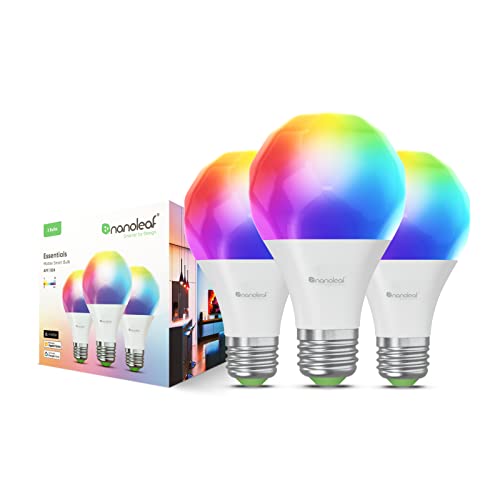
    At $20 per bulb, the Nanoleaf Matter A19 Smart Bulbs offer robust support for the Matter interoperability standard. With over 16 million colors, they provide easy control through the Nanoleaf app or voice commands, along with various customization options. As one of the few smart bulbs that support Matter, they’re a leading choice among competitors.

    Nanoleaf Essentials Smart LED Color-Changing Light Bulb (60W)

    Nanoleaf Matter A19 Smart Bulb

    The best smart bulbs for Matter


  • This Smart Mirror Reveals Who’s The Healthiest Of All

    This Smart Mirror Reveals Who’s The Healthiest Of All

    CES 2025
    Explore our extensive coverage of CES here
    Updated less than 2 hours ago

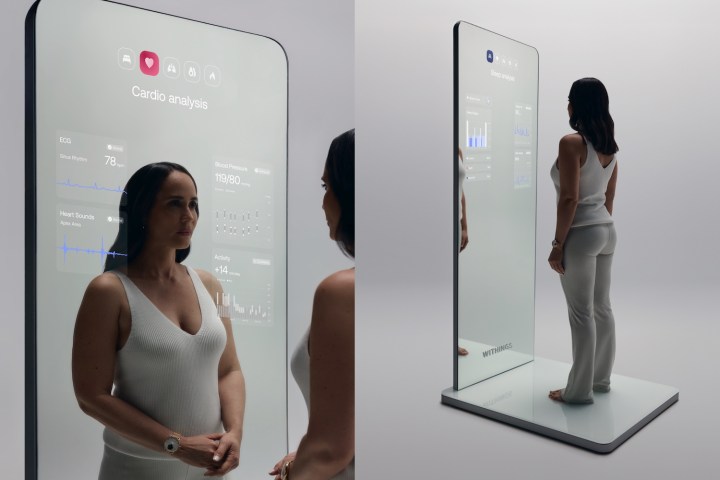
    The innovative Omnia smart mirror from Withings offers an in-depth look at your health and well-being, even sharing details you may not want to confront after the holiday season. This advanced mirror integrates data from Withings’ lineup of health devices, including the Withings ScanWatch 2 smartwatch, to deliver a comprehensive analysis of your vital signs.

    Omnia tracks an impressive range of 60 health and fitness metrics. The mirror gathers this extensive data set from scans conducted by connected devices, other Withings products, and additional external information. It covers everything from body composition and weight to sleep patterns and lung capacity, displaying all of this useful information right in front of you.

    The standout feature of Omnia is its ability to synthesize information from various health gadgets and discern patterns, which can prompt you to notice significant shifts in your health metrics, such as blood pressure, heart rate, sleep quality, and even factors like nutrition and body makeup that necessitate ongoing observation. In addition to simply presenting data, Omnia is equipped with an AI voice assistant that guides you through alterations in your health, responds to your inquiries, and gives valuable feedback.

    The Withings Omnia smart mirror concept.
    Withings

    Withings also aims to facilitate connections between you and your healthcare professionals, enabling comprehensive virtual consultations that incorporate accessible data along with visual examinations.

    Eric Carreel, the founder of Withings, shared his vision for Omnia, noting, “By seamlessly analyzing a wide array of vital health parameters, Omnia delivers an unrivaled understanding of the interactivity of bodily systems. This comprehensive view empowers users to actively manage their well-being while identifying subtle irregularities early on, often before they develop into more serious issues.”

    While the Omnia is not yet available for purchase—it remains a “work in progress” that Withings states is under development—it showcases features expected from Withings in the near future, such as AI-driven health advice and enhanced telemedicine capabilities. Even without the Omnia, users can access a myriad of insightful health data today through Withings’ smart scales, smartwatches, sleep pads, and blood pressure monitors.

    At CES 2025, Withings plans to unveil a prototype of the Omnia, continuing a trend of innovative smart mirrors and fitness-oriented displays showcased at previous events, including the NuraLogix Anura MagicMirror and the Amazfit HomeStudio.

  • Smart Puck Controls Your Entire Smart Home

    Smart Puck Controls Your Entire Smart Home

    Jon Bitner / Linxura

    My home is filled with smart gadgets, and I primarily control them through my smartphone. This reliance on a mobile device works well most of the time, as it’s always within reach—whether I need to turn on my smart lights, adjust my air purifier, or change the thermostat, I can usually handle these tasks with a few taps. However, having a physical button to execute these actions would be much more convenient. Instead of navigating through apps, having a simple remote would make things quicker and easier, similar to how one operates a television.

    This is the idea behind the Linxura Smart Controller. This disc-shaped device allows you to perform numerous actions with just the press of a button. After connecting it to your smart devices, you can essentially ditch the companion apps. A simple tap or double-tap on its outer ring can activate a wide array of products. I’ve been trying it out at home, and while I find it to be an entertaining addition, it does have some shortcomings. However, if you’re looking for a physical remote for your smart home, this gadget is certainly worth considering.

    Straightforward but Time-Consuming Setup

    Three screens of the Linxura mobile app.
    Linxura

    Linking smart devices with the Linxura Smart Controller is simple. Its e-ink display is sharp and clear, while the outer ring rotates and clicks, offering diverse ways to adjust your settings. You can connect it to your other smart devices using a process similar to setting up automations. For instance, after linking it to my Google Home account, I was able to create a program that lets me tap the outer ring to turn the lights on and double-tap to turn them off. The intuitive Linxura mobile app guides you through most of the steps, making it user-friendly for those unfamiliar with automations or routines.

    This controller can map four devices to its four buttons, and the rotating ring allows you to navigate through 13 screens—providing ample space to assign your most frequently used actions.

    While the setup is clear-cut, it can be incredibly time-consuming. Not only do you have to connect Linxura with each app, but you must also program every single action. This process can be quite lengthy and demands a fair bit of patience. Once configured, the e-ink screen displays icons and text that indicate what each button does, making it easy for other household members to understand which button to press.

    Linxura has expanded its functionality since its launch in 2023, now supporting platforms like Google Home, Alexa, Yale, IFTTT, August, Philips Hue, and SmartThings. While there are some limitations in terms of functionality within these apps, all of the essential features are available. The compatibility with Google Home is particularly impressive, though the range of actions for some devices may not be as extensive as those found in their dedicated apps, meaning you might only be able to perform basic tasks like turning devices on or off.

    A Good Fit for Many Smart Homes

    A person holding the Linxura.
    Jon Bitner / Digital Trends

    Despite its few limitations, the Linxura Smart Controller could be a valuable addition to most smart homes. As long as you don’t need complex routines at the touch of a button, you’ll find it helpful. The convenience of having a physical button that allows anyone in the household to easily adjust the lights, stop a robot vacuum, or change the thermostat is undeniably beneficial.

    I have noticed some lag in its performance, with certain actions taking a few seconds to register. For instance, switching on my lights can sometimes take nearly three seconds after pressing the button, and some users have reported even longer delays for other commands. While this isn’t a deal-breaker, it would certainly be preferable if communication between the Linxura and its connected devices were a bit more responsive.

    Overall, I’ve found the Linxura to be a useful addition to my home setup. Its design may feel a bit bulky, but its buttons and spinning dial are enjoyable to use. Priced at $100, it is on the expensive side, but anyone looking for a fresh way to control their smart devices might find it to be an exciting addition to their home.

  • What is the price of 40 inch smart 4K TV?

    What is the price of 40 inch smart 4K TV?

    Smart TVs have become a centerpiece of modern entertainment, blending high-quality visuals with digital connectivity. A 40-inch smart 4K TV is a popular choice for many households due to its size and performance. But how much should you expect to pay for one? This article will explore various factors that influence the price and provide insights into what you can find in the market.

    Factors Influencing the Price of a 40-Inch Smart 4K TV

    When shopping for a 40-inch smart 4K TV, several elements can affect the price:

    Brand Reputation

    • Established Brands: Well-known manufacturers like Samsung, LG, and Sony often command higher prices due to brand reliability and quality.
    • Less Known Brands: Budget-friendly options from lesser-known brands may offer competitive features at lower prices.

    Features and Specifications

    • Picture Quality: Higher-end models may offer advanced technologies like OLED panels or HDR support, leading to increased costs.
    • Smart Capabilities: Some TVs come with built-in voice assistants, smart home integration, and more streaming options, which can elevate the price.

    Availability and Sales

    • Seasonal Discounts: Prices can fluctuate based on holidays like Black Friday or Cyber Monday when discounts are common.
    • Retailer Choice: Prices may vary between online platforms and physical stores; shopping around can yield better deals.

    Current Price Range for 40-Inch Smart 4K TVs

    As of now, the price of a 40-inch smart 4K TV generally falls within the following range:

    • Budget Models: Typically priced between $250 to $400

      • Brands: Some lesser-known manufacturers and older models fit into this category.
      • Features: Basic smart capabilities, decent picture quality without advanced features.

    • Mid-Range Options: Priced around $400 to $600

      • Brands: Recognizable names that offer reliable performance.
      • Features: Better picture quality, enhanced smart features, and more streaming options.

    • High-End Models: Starting at $600 and above

      • Brands: Premium brands with a reputation for high quality and durability.
      • Features: Top-notch picture technologies, excellent build quality, and sophisticated smart functionalities.

    Where to Buy a 40-Inch Smart 4K TV

    Finding the best deal also depends on where you choose to purchase:

    • Online Retailers: Websites like Amazon, Best Buy, and Walmart often have the best selection and prices.
    • In-Store Retailers: Visiting stores can allow you to see the TV in person and take advantage of any in-store promotions.
    • Warehouse Clubs: Membership-based retailers like Costco or Sam’s Club may offer competitive prices, particularly for bulk purchases.

    Tips for Buying a TV

    • Read Reviews: Always check customer reviews and ratings to gauge performance and reliability.
    • Compare Prices: Utilize price comparison websites to find the best deals available.
    • Check Return Policies: Ensure that the store has a fair return policy in case the TV does not meet your expectations.

    With these factors in mind, you can make an informed decision when purchasing a 40-inch smart 4K TV. Understanding the market landscape will help you find the best balance of quality and price to enhance your entertainment experience.

  • Easily Build A Smart Haunted House With Govee Lights

    Easily Build A Smart Haunted House With Govee Lights

    Creating an impressive Halloween or Christmas light display that leaves a lasting impression on your guests is no easy task. To start, you need to gather the right lighting options, including methods to synchronize them with other lights or even music. Next, you’ll need to devise a plan for installation. Finally, there’s the actual setup, which involves a substantial amount of testing. Even then, it can be challenging to bring your vision to life, especially given the variety of lights available and your initial ideas. Fortunately, there’s a simpler and smarter approach using Govee’s extensive range of smart lighting products. From neon rope lights and pathway illuminators to permanent outdoor fixtures and eye-catching designs like curtains and icicles, Govee provides everything you need to transform any space into a smart haunted house in just minutes.

    To demonstrate this, we’ve created an easy guide for setting up a smart haunted house. By blending eerie lighting with classic Halloween decorations and controlling everything through a mobile app or smart assistant, you can easily create a chilling atmosphere.

    Shop Now

    1. Consider Your Roadside Presence

    Govee

    Similar to curb appeal, your goal is to create a spooky and foreboding atmosphere that makes passersby feel nervous as they approach your home, even from the street out front. You’ll be setting the mood long before they reach your driveway or walkway.

    Begin by lighting up the outer walls of your house with in vibrant colors like purple, red, green, or orange. Then, adorn your yard with traditional decorations such as gravestones, skeletons, and cauldrons. Accent these with . The flexibility of rope lights allows you to shape them into spooky forms like pumpkins or spiders with ease.

    Finally, enhance your windows or roof with , or . You could even hang the curtain lights from your garage to give it an extra boost of flair.

    2. Frighten Those Who Dare to Come Close

    Govee smart lighting frightening visitors and trick or treaters
    Govee

    While it’s great to spook guests from afar, adding detail for those who come closer can elevate their experience. Trick-or-treaters and curious visitors will appreciate the added intricacies of your decor.

    Use and to line your yard and pathways. Then, sprinkle in some eerie decor like skulls or spiders to enhance the ghoulish ambiance. Adding a fog machine or humidifier to create an atmospheric mist on the ground can heighten the spooky effect.

    3. Don’t Forget to Sync Everything Up

    Govee smart lighting for halloween all synced up
    Govee

    If you want to coordinate your display with spooky music or cycle through different lighting patterns and colors, you can link all the Govee products using the Govee Home App. With a single tap, the AIGC feature lets you instantly create a Halloween light show. For more personalization, you can also fine-tune the lighting effects on individual pieces to design a truly distinctive spectacle.

    Govee’s integrated music sync feature allows you to easily flicker or dim lights in time with sound effects or musical notes, resulting in lively lighting displays that create a memorable experience when paired with the right tunes.

    4. Add an Interactive Station

    Govee smart lighting with interactive station spider web
    Govee

    Govee’s outdoor lighting is perfect for adding more interactive features. For instance, you could drape a massive spider over a tree or porch awning, then create a glowing web using . Alternatively, you might hang a large skeleton or another frightening figure while adding lights for a dramatic effect. You can even create movement in your decor by using the Govee String Lights to give onlookers a real scare!

    5. Don’t Forget the Other Holidays

    Govee pathway lights for Halloween can stay for other holidays
    Govee

    As Halloween draws to a close at the end of October, it’s natural to feel a sense of loss, but that doesn’t mean you have to take down your lights just yet. With Govee Permanent Outdoor Lights, you can keep them up for the upcoming holidays like Thanksgiving, Christmas, and New Year’s. This also applies to your pathway lights.

    Ensure your home remains a standout and brilliantly illuminated space with Govee’s wide array of outdoor and smart lighting options.

    Shop Now