الوسم: Sims 2

  • Your Ultimate Handbook to Sims 2: University Life

    Your Ultimate Handbook to Sims 2: University Life

    While college life may not be as glamorous as it’s often portrayed, it has become an essential component of the The Sims franchise. It all began with The Sims 2: University, the first expansion to introduce the college experience and young adults to the game, greatly enriching its gameplay.

    With the additional content brought by this expansion, starting your college journey can feel overwhelming. There are specific steps to get your college life underway, and they might not always be straightforward. Furthermore, there are several factors to consider once you arrive on campus.

    Overview of College Campuses


    To utilize most features of The Sims 2: University, you must add a college campus to your neighborhood. This inclusion brings various places for students to live and socialize.

    Available Universities

    By default, there are three ready-made university campuses you can integrate into any neighborhood in The Sims 2:

    • La Fiesta Tech
    • Académie Le Tour
    • Sim State University

    If none of these options appeal to you, feel free to design your own college town from scratch, just like any other map!

    Be sure to manually add one (or more) of these campuses to your chosen neighborhood before diving in. You can place the same campus in multiple neighborhoods, but each will function as a separate entity.

    You cannot send Sims to college or access the Create A Student feature until a campus is added to your selected neighborhood.

    Adding a College Campus to Your Neighborhood

    To get started, open your neighborhood from the main screen or enter through Live Mode. Look at the toolbar at the top of the neighborhood overview page.

    Click the button featuring a graduation cap. This will open a menu that lets you select the campus you wish to add, including a brief description and an image of each campus.

    Choose your preferred campus (or opt to add all of them) and wait as the game builds the college. Once it’s complete, the campus will automatically load, allowing you to kick off your college adventure.

    Getting Into University

    A Sim in The Sims 2: University, looking frustrated while writing a term paper in her dorm room.

    To attend university, any Teen Sim can use a phone or computer. In the phone menu, select Call, then choose College. This will present several options, including applying for scholarships and moving to college.

    Unlike some other games, there is no tedious application process; when a Teen Sim decides to attend college, a taxi is dispatched immediately to pick them up. Once they arrive at the campus, they will be added to the Family Bin in the campus sub-neighborhood.

    You can move your Sim directly into one of the properties from the Family Bin or even merge them with another household. Alternatively, you can use the Create A Student menu to create a new Sim from scratch.

    The process is similar if you decide to use a computer instead of a phone. Just select the College option and then choose Move To College, where you can also apply for scholarships.

    Unfortunately, Adult and Elder Sims cannot attend college. However, you can cheat to revert an Adult Sim back to a Teen to start the process.

    Sending Sims to College via the Family Bin

    If there’s a Teen Sim in the Family Bin within any neighborhood, you can use the Send Teens to College tool to initiate the process. They must have at least a D- grade in High School to qualify.

    campus Family Bin.

    College campuses also come pre-loaded with families. If you prefer to skip the setup process, you can start playing as one of these existing households.

    The Young Adult Life Stage

    Two Sims in The Sims 2 University playing catch outside of a dorm.

    The Sims 2: University introduced the Young Adult life stage. Young Adults have nearly all the freedoms of Adults except for marriage, pregnancy, and full-time employment.

    This life stage is exclusive to Sims attending university, automatically making any enrolled Sim a Young Adult. After graduating, they transition into regular Adults.

    You can also create Young Adults through the Create A Student feature, which functions similarly to Create A Sim, allowing you to construct Young Adult Sims from the ground up.

    You can create Teen Sims in a regular neighborhood like Pleasantville and send them directly to university as soon as the household is loaded.

    Tuition and Scholarships

    In The Sims 2, college attendance is completely free. Additionally, Teen Sims venturing into college receive 500 Simoleons to kickstart this new life phase. While it may not be substantial, it’s a helpful start.

    Teens can also apply for scholarships to ease their college expenses. This can be done using a phone or computer, mirroring the process for attending university. Unfortunately, once a Sim becomes a Young Adult, they can no longer apply for scholarships.

    You can review accepted scholarships under the same menu used to apply for them.

    Fields of Study at University

    Three sorority sisters in The Sims 2: University engaging in different activities in a common area.

    At the beginning, all Freshmen Sims have an Undecided Major. However, diligent Sims will need to select a Major at university, and thankfully, there are numerous options available:

    • Art
    • Biology
    • Drama
    • Economics
    • History
    • Mathematics
    • Philosophy
    • Physics
    • Political Science
    • Psychology
    • Literature

    Your Sim will need to develop their skills as they progress through their courses, which will vary based on their chosen Major. Generally, Sims will emerge from college as well-rounded individuals.

    When it’s time to declare your Sim’s Major, you’ll be presented with a clear overview of what each one entails, including a course summary, a prospective job list, and the skills that will improve during their studies.

    Graduates have enhanced career opportunities compared to Sims who skipped college, opening paths in fields such as Artist, Natural Scientist, Paranormal, and Show Business.

    Majors may also be linked to careers introduced in other DLC, often aligning with intuitive career paths. For instance, Psychology correlates with Education, and Biology connects with Medicine.

    Declaring a Major

    When you’re prepared to select a Major for your Sim, approach a computer and contact the Registrar. Choose College, then click Registrar – Change Major. A window will pop up with all the essential information about each course.

    Select the desired Major by clicking on its icon and hitting the check mark at the bottom of the dialogue box. If you’re uncertain about which icon corresponds to which course, don’t worry; details regarding the course will be displayed when you click on each icon.

    It’s crucial for Sims to declare their Major before they reach their third year. Failing to do so automatically enrolls them as Philosophy Majors—which has its own advantages, to be fair.

    Dropping Out of College

    If your Sim has had enough of the college scene, they can drop out anytime. Just select the phone and use the College interaction again. One of the options available will be to Drop Out Of College.

    A menu in The Sims 2 University showing how to drop out of college on the phone.

    This decision is both immediate and irreversible. Sims who withdraw and leave campus will age up to Adults as they exit. So, think carefully before making this choice.

    Living Arrangements for University Students

    A Sim participating in a Greek society rush in a dorm room in The Sims 2 University.

    All students are required to live on campus. This means Sims can’t reside in places like Strangetown and commute to classes. While living on campus, they have several different housing options:

    Type of Residence

    Description

    On-campus residential houses

    Houses available for rent on campus.

    Greek societies

    Fraternities and sororities.

    Dormitories

    Private rooms in large shared properties.

    You’ll need to apply and be accepted to become part of a Greek society, whereas you can immediately rent a dorm or a house. Renting on-campus houses tends to be more expensive than dormitories, resembling regular off-campus living in this iteration of The Sims.

    If you opt for a dorm, you’ll need to select a room by clicking on its door and choosing Claim Door. Once your Sim successfully claims a room, their face will appear on the door. Act quickly to secure your preferred room before someone else claims it!

    If a Greek life experience appeals to you, you’ll need to complete a few more steps. To apply for a fraternity or sorority, select a phone and go to Greek House then Join. To successfully join, focus on making friends with existing members of that fraternity or sorority.

    If you want to embrace Greek life, keep in mind that Académie Le Tour does not offer any Greek societies.

  • Unlocking the Perks of Boosting Charisma in The Sims 2

    Unlocking the Perks of Boosting Charisma in The Sims 2

    In The Sims 2, relationships play a crucial role in a sim’s life. Sims can create meaningful connections with family and neighbors, but poor treatment can lead to rivalries. As they interact with others and strengthen their bonds, they may form friendships that last forever and even start new families.

    To develop relationships, a sim needs to engage in various social activities with others. Certain actions, like sharing jokes, can enhance a relationship when they go well, while a failed attempt can hurt it. To get better at making connections, sims should work on their Charisma skill.

    Tips for Improving Charisma Skills


    Here are some ways a sim can enhance their Charisma skill:

    • Practice speeches in front of a mirror.
    • Practice romantic gestures using a mirror.
    • Engage with an Execuputter.
    • Use the Enterprise Office Concepts Bushmaster Tele-Prompter.
    • Learn from another sim who has a higher Charisma level.
    • Read Charisma-related books from the Books First For Learning shelf.
    • Interact with birds.
    • Teach birds to talk.
    • Children can play with a Rip Co. Wobbly Wabbit Head.
    • Children can learn or sing nursery rhymes.

    Benefits of the Charisma Skill

    The Charisma skill is vital for successful social interactions, especially for sims whose aspirations involve strengthening their relationships.

    Sims with aspirations focused on building relationships must often perform well in specific interactions to earn aspiration points. If these interactions don’t go well, they risk losing aspiration points if a penalty is in place.

    For sims heading to university, a strong Charisma skill may qualify them for the Bain-Gordon Communication Fellowship scholarship.

    Adult sims will also benefit from the Charisma skill in the following careers:

    • Athletic
    • Business
    • Military
    • Politics
    • Slacker
    • Artist
    • Paranormal
    • Show Business
    • Adventurer
    • Education
    • Journalism
    • Music
    • Law
    • Dance
    • Entertainment
  • Tips to Wow the Headmaster in The Sims 2

    Tips to Wow the Headmaster in The Sims 2

    Every sim believes their child is a real prodigy in The Sims 2, but some kids really shine. These exceptional students not only ace their grades but also have a great home environment, or at least enough charm to catch the attention of the private school headmaster.

    Getting your little sims admitted to a private school can be tricky if you’re not ready, but we’ve got you covered with tips to help you prepare. From the meals you serve to how tidy your home appears, here’s all you need to know for getting your kids into the most prestigious school around.

    How to Contact the Headmaster


    Once you have at least one child or teen sim in your household, you can use a phone to invite the headmaster over. He will show up that evening to conduct a household inspection. If everything goes well, your kid could be granted admission to a private school!

    Several factors will determine your eligibility for private school admission. First, your students need to maintain grades of ‘C’ or higher. Thus, it’s a good idea to wait until your kids return from school before calling the headmaster to avoid any potential grade drops right before the visit.

    How to Pass the Inspection

    A family enjoying dinner with the headmaster.

    When the headmaster arrives, that’s when the real challenge begins. You will have a limited amount of in-game time to impress him and earn at least 90 points for your child to be admitted. The evening includes three key sections that contribute to your score:

    • The House Tour: The headmaster needs to see if your home is conducive to your child’s academic success.
    • The Headmaster’s Dinner: If you invite the headmaster for dinner, it’s essential to serve a great meal.
    • Showing the Headmaster a Good Time: Engaging conversation is crucial to leaving a positive impression.

    The House Tour

    A vital part of impressing the headmaster is giving him a tour of your home. He will assess each room based on its decor and cleanliness. Bright, vibrant decor makes for an appealing environment, which will likely please him.

    To start the tour, talk to the headmaster and choose the option to give him a house tour from the Entertain menu. Then, navigate through the house to the chosen rooms and show them to him. Pay attention to his reactions!

    When it’s time to conclude the tour, let him know by choosing the end option while chatting with him again.

    You can only give one tour, and each room can only be shown once, so make sure they’re well presented!

    The Best Dinner

    Your guest will likely get hungry, and your dining skills will significantly impact your score. If cooking isn’t your strong suit, improve your skills until you have at least three or four points.

    Simple dishes won’t wow the headmaster, so skip the mac and cheese. Consider easy yet impressive choices like spaghetti or hamburgers, or go for fancier options like Baked Alaska or Lobster Thermidor.

    Cooking takes time! If you’re short on it or if you’re a single parent, prepare the meal before the headmaster arrives and keep it ready in your inventory.

    Once you’re set to serve dinner, use the Entertain option while talking to him to invite him to dine. If you don’t do this, points will count towards the Schmooze category instead of Dinner.

    How to Schmooze

    Finally, it’s time to engage the headmaster in conversation. Even if your sims don’t share a lot of interests, friendly dialogue can go a long way. Your overall score will depend on how well you connect.

    Since you’ll be serving dinner, make small talk at the table to keep things lively. Ensure the headmaster feels entertained and engaged! While you don’t need to become best friends, aim for him to leave with a positive impression.

    If all else fails, consider flirting with the headmaster. Sims don’t worry much about social propriety!

    Once you hit the 90-point mark, the headmaster will shake your hand and welcome you and your eligible kids into the private school.

    Any new children born or aged up after the acceptance or those who were not admitted will need to reapply to get a chance at private school.

    Even though you may hear that private school is pricey, you don’t have to pay anything.

  • Tips for Planning a Vacation in The Sims 2

    Tips for Planning a Vacation in The Sims 2

    The Sims 2: Bon Voyage Overview

    The Sims 2 expanded the holiday experience with the Bon Voyage expansion pack, introducing players to three exciting vacation hotspots: the Far East, a Tropical paradise, and a Mountain getaway. Each destination offers unique attractions for your Sims to explore and enjoy.

    The various vacation spots feature an assortment of activities, including guided tours for eager explorers. When your Sims head out on vacation, they can choose from a selection of hotels, bungalows, or villas, with options to fit different budgets, ensuring that vacations are accessible to all players.

    Adding Vacation Destinations to Your Neighborhood

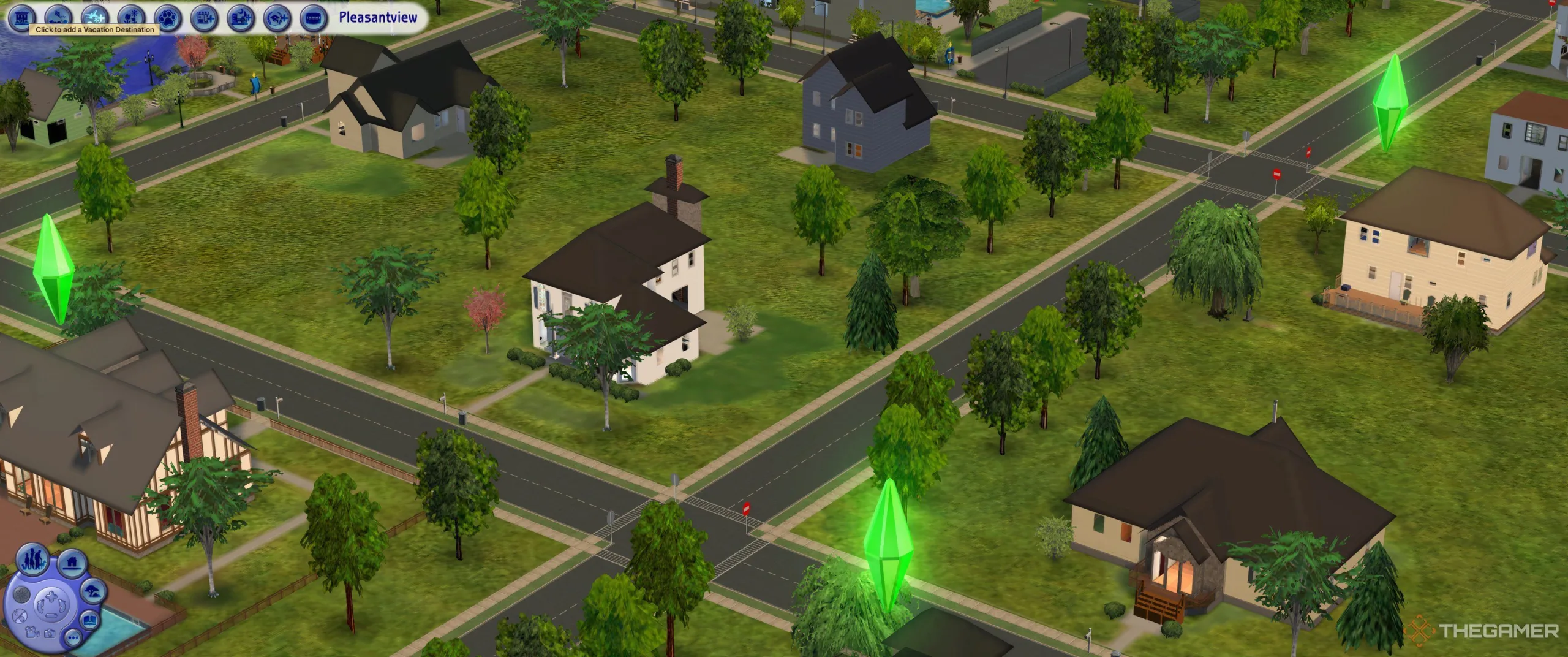
    Before planning a vacation, it’s essential to verify that your neighborhood has vacation destinations available. To check this, navigate to the neighborhood screen and glance at the icons located in the upper left corner. The third icon features a plane; if there’s a plus (+) symbol next to it, you need to add the vacation spots.

    Hovering over this icon will display the prompt "Click to add a Vacation Destination." Follow the on-screen instructions to proceed to the destination selection screen.

    Available Vacation Destinations

    You will have the option to select from:

    • Takemizu Village (Far East)
    • Three Lakes (Mountain)
    • Twikkii Island (Tropical Beach)

    If you choose the "Add All" option, you can create neighborhoods for all three vacation spots, giving you a full range of choices.

    How to Arrange a Vacation

    Once the vacation options are set, your Sims can book a trip using the phone at their home lot. Click the phone, and then select Vacation > Book Vacation to access the Trip Planning screen.

    From here, you can:

    • Select a Departure Time: Choose to leave immediately or pick a specific day to start your vacation.
    • Decide the Length of Stay: Choose anywhere from a minimum of 3 days (2 nights) to a maximum of 7 days (6 nights).
    • Create a Guest List: This includes household members and friends who can accompany your Sim.

    To invite others, simply click their name to highlight it in green, then press the + button to add them to the Vacation List. You can have up to 8 guests, and changes can be made by selecting a name from the list and hitting the – button to remove it.

    The total airfare is displayed at the top right, and each Sim’s fare costs 500 Simoleons. Confirm your choices by clicking the checkmark.

    The following screen will present a choice of locations with a list of four to five accommodation options appearing on the right side. You may either pre-select a place or choose to decide upon arrival.

    The bottom part of the menu provides details about each hotel, such as size, pricing, and amenities, ranging from free to $$$$$. The more dollar signs, the more luxurious (and expensive) the stay.

    After finalizing your accommodation, click the tick again to confirm. An immediate deduction for airfare will occur, while the hotel costs will be billed after check-in.

    Do Vacations Impact Your Career?

    Vacations do not interfere with your Sims’ careers, and there’s no need to take vacation days. When you leave a lot, it saves exactly as it was. Upon your return, you’ll arrive on the same day you departed, and time, along with aging, will pause for the duration of your trip. However, your stay cannot exceed seven days in a vacation world.

    Who Can Join the Vacation?

    Children, teens, and adults can all travel for vacations. For those with babies, toddlers, or pets, arrangements must be made for them to stay behind with an adult or a nanny.

    Overview of Destination Options

    Your Sims can visit the following three vacation locations:

    1. Takemizu Village: A picturesque Far Eastern destination with several accommodation options, including two purchase-able vacation homes and unique community lots like the Takemizu Pagoda and Market.

    2. Twikkii Island: A tropical retreat featuring a variety of oceanside accommodations, including three hotels, rental bungalows, and rich community experiences like ancient ruins and fun beaches.

    3. Three Lakes: A mountainous setting that comes with a campground, upscale resorts, and community lots that invite plenty of outdoor activities.

    Each destination not only provides a unique theme but also offers various amenities and accommodations, ensuring every vacationer finds something that meets their desires. Happy simming!