Digital Phablet – The renowned Turkish drama ‘Yasak Elma’ (Forbidden Apple) is making a comeback with a new season.
Also ReadFOX TV’s Yasak Elma (Forbidden Apple) Episode 127
This series, which spanned six successful seasons and gained widespread popularity, is gearing up to return with brand-new episodes. Reports indicate that plans are already underway to reboot the show as a television series.
Initially, reports hinted that the series might return as a movie. However, recent information confirmed that it will come back as a series, according to Turkish journalist Birsen Altuntaş.
Scenes from “Yasak Elma.” (Instagram/ Yasak Elma page)
“Yasak Elma” Series Returns: Everything You Need to Know
The production company Medyapım, led by Fatih Aksoy, is once again teaming up with Turkish writer Melis Civelek to remake the “Yasak Elma” series.
The show is expected to premiere on NOW TV, its original network, which first broadcast the series in 2018.
The focus will remain on the four main characters: Yıldız, Ender, Caner, and Asuman, portrayed by Eda Ece, Şevval Sam, Barış Aytaç, and Melisa Doğu, respectively.
Plot Overview of “Yasak Elma”:
The story centers around two sisters, Zeynep and Yıldız, living together in Istanbul but with divergent dreams. While Zeynep is dedicated and hardworking, Yıldız aspires to marry into wealth for a comfortable life.
Meta has officially unveiled its new AI-powered smart glasses with built-in display technology, called the Meta Ray-Ban Display. Priced starting at $799, the package includes the glasses and the Meta Neural Band worn on the wrist. These devices will be launched in the United States on September 30 through retailers such as Best Buy, LensCrafters, Sunglass Hut, Ray-Ban Stores, and Verizon outlets, with plans for international availability next year.
The standout feature of these glasses is the integrated display embedded within the lens. This allows users to preview media captured by the camera, manage calls, view translated text, and interact with Meta AI—all without needing to reach for their phone. The entire experience operates independently on a vivid, high-resolution color panel situated on the right lens.
This visual display aims to streamline routine tasks, making them faster and less disruptive to daily flow. Meta emphasizes that the display is optimized for quick, brief interactions rather than prolonged use.
Additionally, the glasses facilitate seamless connectivity with messaging apps like WhatsApp, Messenger, and Instagram, as well as the user’s paired smartphone. They can provide real-time navigation with visual maps, display captions, and assist with language translation on the go.
One of the major improvements is addressing a common inconvenience with smart glasses—voice commands and side taps. The Meta Ray-Ban Display tackles this by integrating the Meta Neural Band, a wearable device worn on the wrist. This band interprets muscle movements and gestures, allowing users to scroll, click, and even compose messages through subtle finger gestures, akin to the controls on devices like the Apple Watch or Galaxy Watch 8. Future updates promise the capability to write messages using delicate finger motions.
The wristband is designed to detect muscle activity signals and translate them into commands. It boasts IPX7 water resistance, can operate for up to 18 hours on a single charge, and works with the glasses, which last about six hours per charge—extending up to 30 hours with the included foldable charging case.
Apple has long avoided the idea of equipping MacBooks with touchscreens, despite popularizing the concept of button-less smartphones. However, recent reports suggest that the company’s stance may be shifting. The upcoming redesign of the MacBook Pro, which is expected to feature an OLED display, is anticipated to include a touchscreen after all.
According to Ming-Chi Kuo, a well-known analyst at TF Securities, Apple plans to add touch controls to a future MacBook Pro model to boost user productivity and enhance the overall experience. While this feature has been a staple on Windows laptops for years, Apple has been cautious about adopting it on MacBooks.
Kuo also mentioned that the new OLED MacBook Pro, expected to enter mass production by late 2026, will incorporate a touch panel with on-cell touch technology. This suggests a significant shift towards blending traditional computing with more interactive touch capabilities.
Interestingly, Apple appears to draw inspiration from how iPad users interact with their devices. The iPad, with its compact 13-inch screen combined with a comprehensive keyboard accessory, seems to influence this new direction.
Historically, Apple has been skeptical about touch interfaces on laptops. Steve Jobs famously dismissed the idea in 2010, arguing that touch surfaces don’t work well in a vertical position. He pointed out that prolonged use can cause fatigue and discomfort, making it an impractical solution for laptops. Despite this, the increasing similarity between iPadOS and macOS—especially in the iPad Pro models—indicates that the concept of touch on laptops might not be as far-fetched as once believed.
While the integration of touchscreens into MacBook Pros is expected to bring a notable design overhaul, that model might not arrive until 2027. In the meantime, models equipped with the M5 chip are likely to fill the gap next year, offering a bridge towards the future of Apple’s portable computing devices.
Since Apple replaced the traditional notch at the top of iPhones with the pill-shaped Dynamic Island cutout, many have speculated that the company is moving toward an entirely full-screen design. However, it appears that this shift will not happen immediately, at least not for the upcoming iPhone 18. There’s a good chance that next year’s model will feature a narrower version of the Dynamic Island, though it will still retain some visible elements.
According to trusted leaks from Digital Chat Station, the Dynamic Island on the iPhone 18 could become thinner in the future. Sharing their insights on the Chinese social platform Weibo, the source also notes that Apple is unlikely to fully hide the camera and Face ID sensors beneath the display, so they will still be visible but less prominent.
So far, several Android manufacturers have managed to achieve a nearly bezel-less look by implementing under-display cameras. Samsung briefly experimented with this approach but abandoned it, and smaller players like China’s Red Magic continue to explore the technology, despite some impact on image quality caused by the under-display sensors.
For Apple, integrating the under-display camera is more complex because the Dynamic Island system includes multiple components: an RGB sensor, infrared camera, dot projector, and flood illuminator. The challenge lies in how a layer of glass might affect the accuracy and reliability of biometric authentication, and it’s not a straightforward transition.
There’s also speculation about whether Apple is waiting for its special iPhone anniversary release. Some reports suggest that the company might introduce under-display Face ID and sensor technology in an upcoming flagship, possibly arriving with the next big anniversary model. Early indications hint at a shift toward a completely uninterrupted screen without the pill-shaped cutout, possibly arriving as early as 2026.
However, the upcoming iPhone 18, scheduled for release next year, is not expected to feature the all-invisible Dynamic Island. Instead, sources suggest that this feature will be reserved for the highly anticipated anniversary edition, which is rumored to include a full-glass screen design. In the meantime, Apple has already adjusted the position of the Dynamic Island on the iPhone Air, and a slimmer module appears to be on the horizon for next year.
TCL has been at the forefront of creating devices with its proprietary NXTPAPER display technology, which provides a paper-like, glare-free visual experience. The newest addition to their lineup is the NXTPAPER 60 Ultra smartphone, featuring the fourth-generation version of the eye-friendly screen along with several AI-enhanced features.
What makes this phone stand out?
The main attraction is its 7.2-inch FHD+ display, which boasts seven different eye-care features, including flicker-free operation, blue light filtering, anti-glare screen reflection, low-light eye protection, circadian rhythm adjustments, and TruePaper Restoration technology. This combination aims to simulate natural light exposure, which may support healthy circadian cycles. The display also supports a refresh rate of 120Hz, driven by Circular Polarized Light (CPL) technology that mimics natural light wave interactions. Additionally, it intelligently adjusts brightness and color temperature based on the time of day, with screen brightness capable of dropping to as low as 2 nits for comfortable nighttime viewing.
Enhanced night and reading modes
The device features a Max Ink mode, activated via a dedicated button, which minimizes distractions by blocking notifications for a serene reading experience. TCL has introduced new AI functions like AI Outline, AI Q&A, AI Audiobook, and AI Podcast, all designed to enhance content comprehension and provide smarter interaction options.
What’s under the hood?
Powering the NXTPAPER 60 Ultra is MediaTek’s Dimensity 7400 chipset, complemented by 12GB of RAM and up to 512GB of internal storage. The device is equipped with a 5,200mAh battery that supports 33W wired fast charging. For note-taking, TCL offers the T-Pen Magic stylus, which promises a paper-like writing experience, further elevating the device’s appeal.
Camera capabilities
The smartphone’s camera array has also seen improvements. It includes a 50-megapixel primary sensor, accompanied by a second 50-megapixel module featuring OIS and foldable lens architecture that provides 3x optical zoom. Additional cameras include an 8-megapixel ultra-wide and a 32-megapixel front-facing shooter, making it versatile for both photography and selfies.
Pricing and availability
The TCL NXTPAPER 60 Ultra is priced at approximately EUR 499 for the base model with 256GB of storage, bundled with accessories. The 512GB version will retail for around EUR 549. Details regarding availability and pricing in the U.S. are still pending.
More than a year ago, product designer Scott Yu-Jan crafted a unique Mac Studio iPad dock that harks back to the vintage Macintosh style. This sleek, 3D-printed device combines an iPad mini and a Mac Studio in a minimalistic design inspired by classic Apple aesthetics. A few months later, he tackled the concept of a portable computer by connecting a Mac mini to a full-sized keyboard and an unusually broad display, giving it a mobile computer vibe.
Currently working as an interaction designer at Google, Yu-Jan doesn’t market his creations commercially. However, for those who dream of giving their compact Apple desktop a nostalgic Macintosh look, a new product might be just the thing. The Wokyis M5 is a Mac mini docking station featuring a 5-inch display and a bounty of ports, including an M.2 SSD slot that supports drives up to 8TB.
The Kickstarter campaign for this device has already surpassed its initial funding goal over sixteen times and is set to begin shipping next month. The hub boasts a total of 13 ports, such as USB-C (10Gbps USB 3.2), four USB-A ports (1Gbps), HDMI, SD and microSD card readers, and a 3.5mm headphone jack.
The standout feature is its vintage Apple Macintosh-inspired design and the integrated 5-inch display. This isn’t just a toy screen; it’s a fully functional monitor capable of extending or mirroring your Mac mini’s display, similar to any external monitor. It’s perfect for managing media playback or keeping an eye on chats. Plus, there’s a power button located beneath the screen, decorated with the iconic Apple logo in colorful hues.
It supports only the current-generation Mac mini with a compact chassis and an M4 series processor, but it also works when connected to a MacBook. You can see more about the Wokyis M5 on their Kickstarter page and official website.
More details show that the price on the Wokyis website is listed at $199, though the Kickstarter offering includes the 10Gbps version at just $169. For the more advanced 80Gbps model, expect to pay around $339. Early supporters can snag the base model for as little as $109, with the higher-end version available for $199.
The design’s most impressive aspect is its retro Apple Macintosh look, complemented by the 5-inch, fully functional display. It supports screen extension or mirroring for your Mac mini, making it a practical addition whether used for media control or for monitoring chats. A power button below the display makes it easy to turn on or off, enhancing the vintage aesthetic with its classic Apple logo color scheme.
Keep in mind, this dock only supports the latest Mac mini models featuring the slim chassis and M4 processors. However, it’s compatible with MacBook computers when connected. For those interested in blending vintage design with modern functionality, this device combines the best of both worlds.
For additional information, visit the Kickstarter page or the official Wokyis website.
When purchasing or using a laptop, screen brightness plays a critical role in the overall user experience. Brightness is often measured in nits, a unit that quantifies luminance. Understanding how to determine your laptop screen brightness in nits can help you assess the display’s performance, especially in varying lighting conditions.
What Are Nits?
Nits represent one candela per square meter (cd/m²) and indicate how much light a screen emits. Higher nit values generally equate to better visibility, particularly in bright environments. Here’s a breakdown of typical brightness levels:
Low Brightness (100-200 nits): Suitable for indoor use in dim environments.
Moderate Brightness (200-350 nits): Good for general use, including moderate indoor lighting.
High Brightness (350-600 nits): Ideal for use in bright environments, like outdoors or sunny rooms.
Ultra High Brightness (600+ nits): Often found in premium laptops, suitable for outdoor use with direct sunlight.
How to Check Laptop Screen Brightness
There are several methods to determine your laptop’s screen brightness in nits.
Using Built-in Display Settings
Windows Users:
Right-click on the desktop.
Select "Display settings."
Scroll down to “Brightness and color.”
Adjust the brightness slider; some laptops show brightness in nits.
Mac Users:
Click on the Apple logo in the top left corner.
Select "System Preferences."
Click on "Displays."
Adjust the brightness slider; while it may not show nits directly, you can note the highest setting.
Using Online Tools
Online brightness measurement tools can provide an estimate of your screen brightness in nits. Here’s how to do it:
Visit a website that offers brightness testing (search for “screen brightness test”).
Follow the on-screen instructions to measure brightness levels.
Keep in mind that these tests may only provide approximate nits.
Using Screen Calibration Software
Screen calibration software can also help you determine brightness in nits. Here’s a recommended approach:
Download and install calibration software like DisplayCAL or CalMAN.
Run the calibration tool, following instructions to measure the screen’s brightness.
These tools will provide detailed reports, including brightness in nits.
Factors Influencing Laptop Screen Brightness
Several elements can impact your laptop’s perceived brightness, including:
Ambient Light: The surrounding lighting conditions can affect how brightness is observed. A display may appear dim in bright light.
Display Type: OLED screens generally have higher contrast ratios, making them appear brighter than LCD screens with similar nit values.
Software Adjustments: Operating system settings, like night mode or blue light filters, may reduce brightness.
Importance of Screen brightness in Nits
Knowing your laptop’s brightness in nits can help you make informed decisions based on your needs:
Outdoor Usage: For frequent outdoor work, higher brightness (above 300 nits) is preferable.
Content Creation: Designers may need displays with high brightness to accurately represent colors.
Gaming Experience: Gamers benefit from brighter screens for more vivid graphics and improved visibility in dark scenes.
By understanding how to measure and interpret laptop screen brightness in nits, you can select models that cater to your specific requirements, ensuring a better user experience in a variety of scenarios.
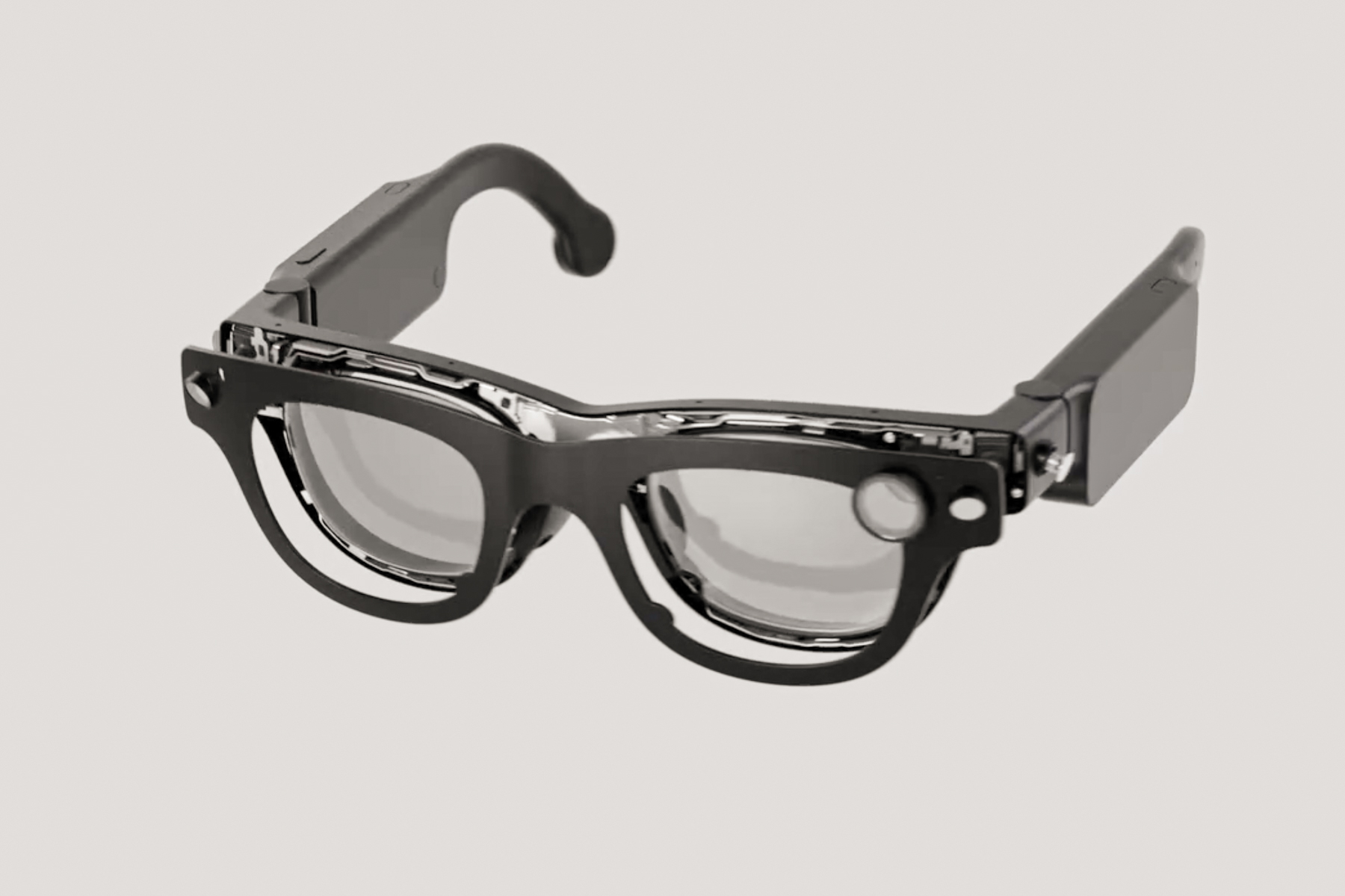
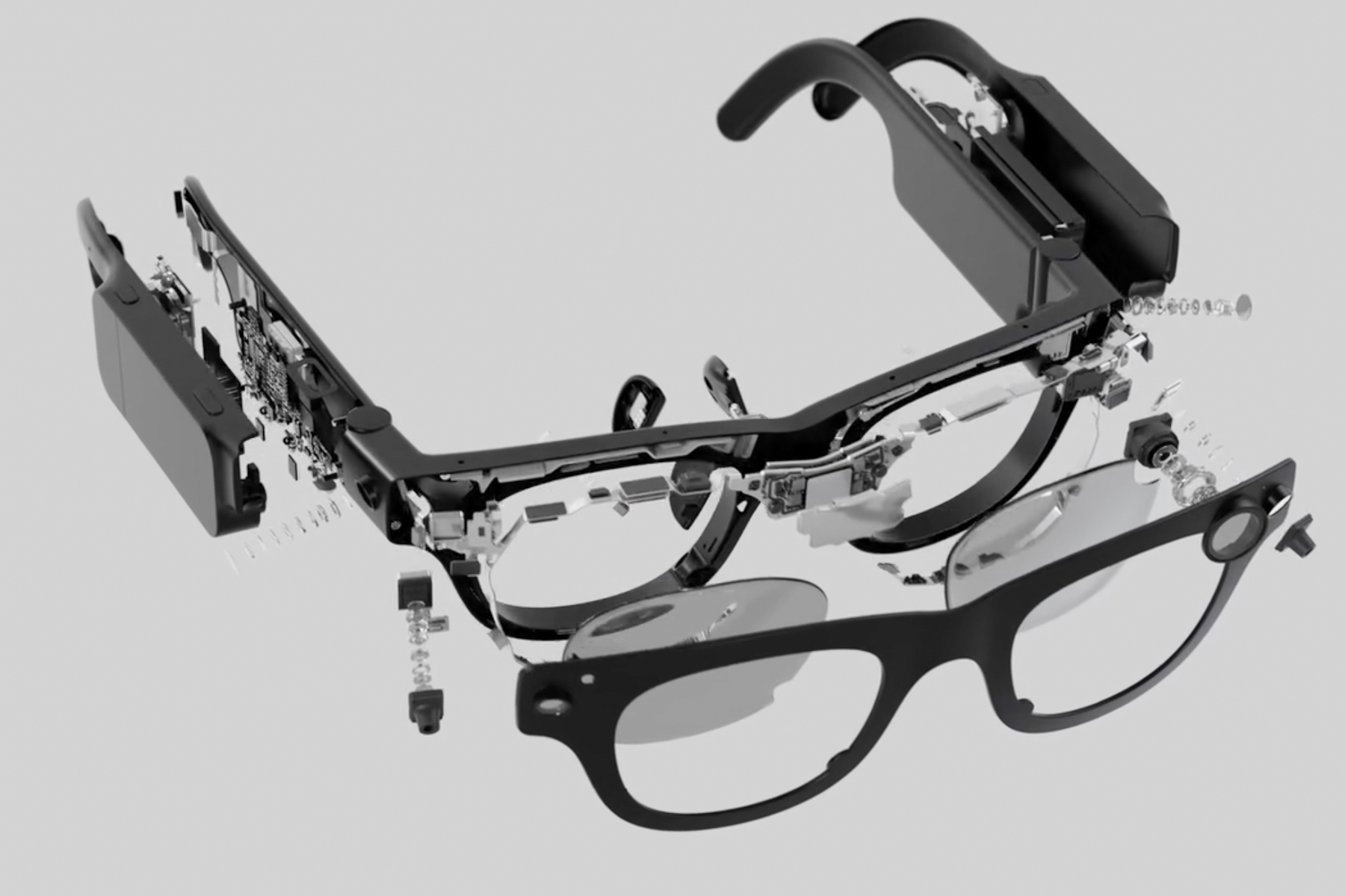
Meta has achieved remarkable success with its Stories smart glasses developed in partnership with Ray-Ban. This innovative wearable, equipped with embedded cameras for capturing social media content and featuring an integrated AI assistant, has gained enough traction for Meta to even offer high-end fashion versions aimed at a luxury market.
However, one thing that has been notably absent is an interactive display. Moving forward, Meta seems set on adding a screen to these stylish smart glasses, enhancing their usability significantly. Unfortunately, this added functionality is expected to come at a high cost. According to Bloomberg, potential buyers should brace themselves for a price tag starting at $1,000, potentially reaching $1,300 to $1,400.
“Employees at Meta estimate that the device, currently code-named Hypernova, will retail for over $1,000,” the report states. The smart glasses are anticipated to launch by the end of 2025.
Meta Aria Gen 2 smart glasses.Meta
For context, most VR-ready smart glasses on the market typically retail around the $500 mark. Popular models include the Viture Pro, Xreal One, and Rokid Max, all of which provide high-resolution displays along with impressive spatial computing capabilities and appealing designs.
A stylish pirate eye-patch?
The current trend among VR smart glasses involves the inclusion of a display for each eye, usually located behind the lenses. Some models even feature adjustable focus for those who wear prescription glasses. However, Meta’s forthcoming smart glasses might adopt a more minimalistic design by only offering a display for the right eye.
According to Bloomberg, this approach will result in a monocular design, meaning the display will be placed in the lower right corner, allowing for clear vision through the left lens.
Meta Aria Gen 2 smart glasses.Meta
“This means that information will only be visible in the right eye, with optimal clarity when the wearer glances downward,” the report explains. This design choice allows users to maintain visibility of their surroundings through the left lens.
The Hypernova smart glasses will enable users to capture photos, watch videos, navigate maps, and receive notifications from apps like WhatsApp. The user interface will respond to gestures along the stems, incorporating swipes and taps for control.
Notably, Meta plans to include a wristband that allows users to interact with the interface using hand gestures, such as pinch-to-zoom and wrist rotations. This accessory is currently being developed under the codename “Ceres” and is expected to be part of the final product.
Powered by Qualcomm technology, these glasses are designed to run a specially adapted version of Android. Interestingly, Samsung is also planning to introduce Android-based smart glasses around the same time in 2025. Meanwhile, Meta continues to innovate, working on its ambitious Orion holographic glasses alongside the research-focused Aria Gen 2 AR glasses.
A broken phone screen can be a frustrating experience, but fortunately, there are multiple options available for repair. Whether you’ve dropped your device or accidentally sat on it, understanding how to fix a shattered screen can save you time and money. Below, we explore the various methods for repairing a broken phone screen, including DIY solutions and professional services.
Assessing the Damage
Before deciding on a repair method, it’s essential to evaluate the extent of the damage. Here are some common issues you might encounter:
Cracks and Scratches: Minor cracks or scratches may not affect functionality but can be unsightly.
Dead Pixels: Areas of the screen that no longer respond to touch or display information correctly.
Display Issues: Problems like black spots, color distortion, or flickering screens may indicate more severe damage.
Touch Sensitivity: If the screen does not respond to touch inputs, it could be a sign of underlying hardware issues.
DIY Repair Options
For those looking to save money and tackle the repair themselves, here are some DIY methods to consider:
1. Screen Protector and Adhesive
If the damage is minor, applying a screen protector might hide cracks and prevent further damage. Adhesive solutions can also hold the glass in place temporarily.
Pros:
Inexpensive and easily accessible.
Simple and quick to apply.
Cons:
Only cosmetic, does not fix underlying issues.
May not be effective for extensive damage.
2. Repair Kits
Several manufacturers offer DIY repair kits specifically designed for various phone models. These kits typically include tools and replacement screens.
Components:
Replacement glass or LCD screen
Tools such as screwdrivers and pry tools
Adhesive strips
Steps:
Power off the device.
Remove the broken screen carefully.
Install the new screen according to the kit’s instructions.
Pros:
Cost-effective compared to professional repairs.
Satisfying independence of fixing your device.
Cons:
Requires patience and precision.
Risk of further damaging the device if not done correctly.
Professional Repair Services
If the damage is extensive or if you’re uncomfortable attempting DIY repairs, a professional service is a reliable option.
1. Manufacturer Repairs
Most phone manufacturers offer repair services and warranties that cover screen damage. Always check if your device is still under warranty to avoid additional costs.
Pros:
Use of original parts leads to better quality.
The repair process usually guarantees the integrity of the device.
Cons:
Higher costs compared to independent repair shops.
Longer repair times, especially if parts need to be ordered.
2. Third-party Repair Shops
Local or chain repair shops often provide quick and cost-effective fixes for broken screens. These establishments have honed their skills in fixing devices efficiently.
Pros:
Typically cheaper than manufacturer repairs.
Fast turnaround, often within a few hours.
Cons:
Variable quality of parts and service.
Warranties and guarantees may differ.
3. Mail-in Repair Services
Some companies offer mail-in repair services, where you send your device and receive it back fixed.
Pros:
Convenient if local options are limited.
Often has standard rates and clear timelines.
Cons:
Potential for longer wait times.
Risk of shipping damages.
Preventative Measures
After addressing the repair, it’s wise to take steps to prevent future screen damage:
Invest in a quality case: A sturdy phone case can absorb some impacts.
Use screen protectors: Regularly replacing screen protectors can provide an extra layer of defense.
Be mindful of where you place your phone: Avoid putting it in precarious spots or carrying it in pockets with other hard objects.
Focusing on efficient repair options and preventive strategies can significantly enhance the longevity of your device while minimizing frustration in the future. Whether you choose a DIY approach or seek professional help, understanding your options can make a significant difference in your smartphone experience.
A cracked or shattered cell phone screen can be a frustrating experience. Many users find themselves wondering whether it’s more sensible to repair the device or to invest in a new one instead. Before making a decision, it’s essential to weigh the pros and cons of fixing your phone screen.
Factors to Consider When Deciding to Fix Your Phone Screen
Cost of Repair vs. Replacement
One of the first things to consider is the cost involved.
Repair Costs: Depending on the model of your phone and the extent of the damage, screen repairs can range from $50 to over $300.
Replacement Costs: A new phone may set you back anywhere from $200 to more than $1,000.
Age and Condition of Your Phone
The age of your device plays a significant role in your decision.
Older Models: If your phone is several years old, it might not be worth it to spend money on repairs, especially if it may not function optimally for much longer.
Recent Models: If you have a newer phone, investing in a repair could be more justified, especially if the rest of the device is in good condition.
Emotional Attachment and Usage Needs
Some people develop a personal attachment to their devices, which can influence their decision.
Familiarity: If you are used to your current phone and enjoy its features, repairing it may be a better choice.
Loyalty to Brand: If you prefer a specific brand or model, it could impact your willingness to switch.
Benefits of Repairing Your Phone Screen
Cost-Effective Solution
Repairing a screen is often the more economical option for users who want to keep their devices functional without spending much on a new phone.
Saves Money: Lower repair costs compared to buying a new device.
Avoids Additional Expenses: You won’t need to purchase new accessories, applications, or transfer data.
Environmental Considerations
Choosing to repair your phone rather than replace it can positively impact the environment.
Reduce E-Waste: By opting for a repair, you help to decrease the growing issue of electronic waste.
Sustainable Choice: Extending the life of your device contributes to a more sustainable approach to consumer electronics.
Quick Turnaround
In many cases, screen repairs can be completed quite quickly, allowing you to get back to your daily activities.
Convenience: Many repair shops offer same-day service.
DIY Options: If you’re handy, there are many guides available for self-repair.
Drawbacks of Repairing Your Cell Phone Screen
Potential for Future Issues
While you may fix the screen, other underlying problems may not be addressed.
Other Damage: If the device has suffered other internal damage (such as to the battery), repairing the screen may not solve all problems.
Limited Lifespan: Older phones may have outdated software and hardware, limiting their overall functionality after a repair.
Warranty Considerations
Repairing a device can potentially void any remaining warranties.
Manufacturer’s Warranty: Check if fixing the screen through a non-certified shop affects your warranty.
Insurance Implications: If your phone is insured, consider whether using insurance for repairs is a better financial choice.
Repair Will Not Guarantee Performance
A repaired phone may not perform as well as a new one.
Quality of Parts: If high-quality parts are not used, you might end up with a subpar screen.
Functional Problems: Other issues can arise post-repair, leading to an unreliable device.
Alternatives to Repairing Your Screen
If you decide against repairing your screen, you may want to explore some alternatives.
Trade-in Programs: Many manufacturers offer trade-in options that give you credit toward a new device.
Upcycling: Consider donating or recycling your old phone instead of simply throwing it away.
Budget Models: If you opt for a new phone, consider entry-level models to minimize expense while still upgrading your technology.
Choosing whether to repair your cell phone screen or invest in a new device can be a challenging decision. By weighing the variables involved and assessing your own personal circumstances, you’ll be better positioned to make an informed choice that fits your needs and budget.
Technological progress is an unstoppable force, constantly morphing our world. While many advancements only bring subtle enhancements, there are innovations that truly astonish us. We’ve already witnessed the emergence of foldable screens, and rollable displays are on the horizon. But what about screens that can stretch?
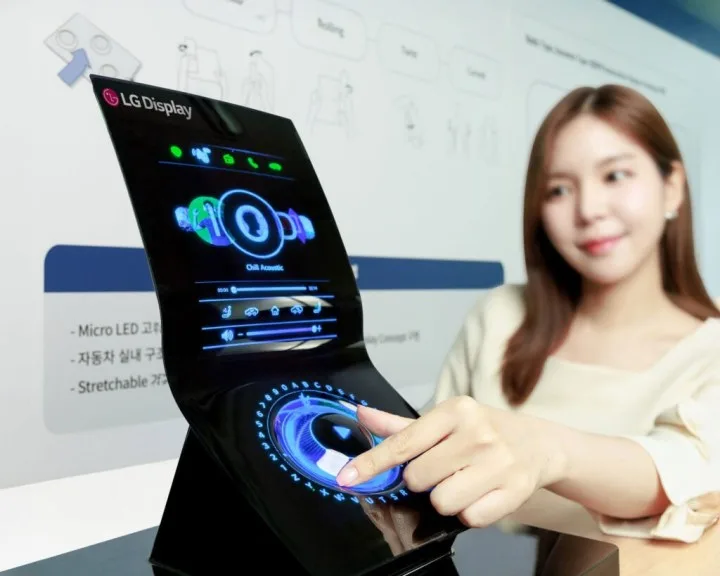
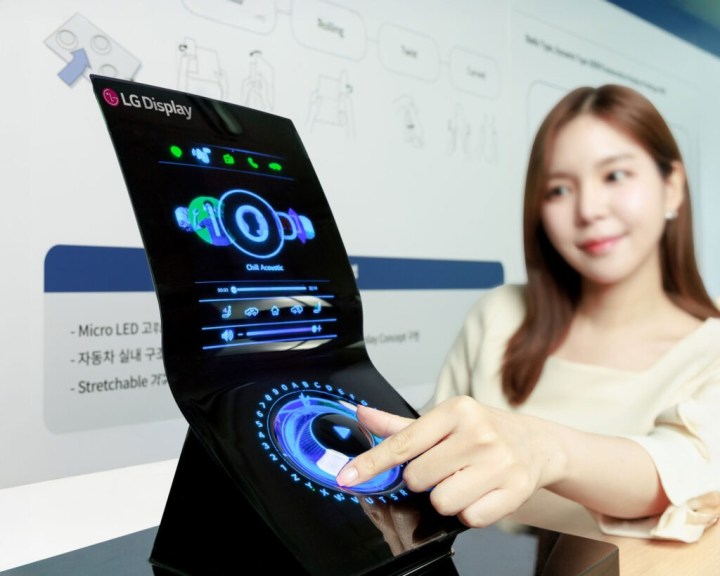
LG Display has unveiled a groundbreaking display that’s typically 12 inches in size but can expand to 18 inches without any damage. Remarkably, as it stretches and bends, it remains completely smooth, eliminating the unsightly creases that have plagued foldable smartphones since their inception. A stretchable screen could potentially redefine user experiences in ways we’ve barely begun to imagine.
While one might immediately think of its application in smartphones, LG has also demonstrated the technology within dashboard displays of vehicles and on garments. The possibilities are vast, and we can easily see this stretchable technology being employed in dynamic wraparound screens for smartwatches and various wearable devices. LG isn’t new to innovative screen technologies; back in 2018, they introduced a 65-inch television that could roll up like a poster, and they had concepts for rollable phones prior to exiting the mobile market. In 2022, they showcased a similar stretchable display capable of expanding to only 120% of its original size, whereas this latest iteration can stretch an impressive 150% without losing image integrity.
This new technology is undeniably thrilling, yet we still have a ways to go before it becomes widely accessible. However, LG is making significant strides with this prototype. It boasts the ability to be stretched and released over 10,000 times and utilizes microLEDs that are just 40 micrometers in width—quite remarkable considering that an average human hair measures around 70 micrometers. The potential for this kind of display technology is vast, and we are eager to see how it evolves and where it might make its debut in the real world.
Cracked phone screens are a common issue that can happen to anyone. Whether it’s a slip from your hand or an unexpected fall, a broken screen can be both frustrating and costly. If you’ve found yourself in this situation, you’re probably wondering how much it will cost to get that screen fixed. Let’s break down the factors affecting repair costs and what you can expect.
Factors Influencing Repair Costs
The price of fixing a phone screen can vary greatly depending on several key factors:
1. Phone Model
Different phone models have different repair costs. High-end smartphones typically have more expensive screens compared to budget models.
Flagship Phones (e.g., iPhone, Samsung Galaxy)
Mid-Range Phones (e.g., Google Pixel, OnePlus)
Budget Phones (e.g., Moto G, Nokia)
2. Type of Damage
The extent of the damage also plays a significant role in determining the price.
Cracked Screen: Minor cracks may only require a screen replacement.
Shattered Glass: A completely smashed display could involve more extensive repair work.
Internal Damage: If there’s damage beyond just the screen, like with the LCD or digitizer, costs will increase.
3. Repair Location
Where you choose to have your phone repaired can significantly impact the overall cost.
Authorized Service Centers: Generally more expensive, as they use original parts and provide warranties.
Local Repair Shops: Often cheaper, but quality may vary.
DIY Repairs: Costs can be lower if you have the skills, but it involves risks.
Average Cost Estimates
Here’s a general breakdown of what you might expect in terms of cost:
Standard Smartphone Repairs
iPhone Screen Repair:
iPhone 11: $199 – $299
iPhone 12: $199 – $279
iPhone 12 Pro: $279 – $329
Samsung Galaxy Screen Repair:
Galaxy S20: $250 – $300
Galaxy S21: $199 – $299
Galaxy Note Series: $250 – $350
Other Brands:
Google Pixel: $150 – $250
OnePlus: $150 – $250
Budget-Friendly Options
Some budget phones might cost significantly less to repair, ranging from:
$50 – $150 for basic models like Moto G or Nokia smartphones.
Additional Costs to Consider
When getting your phone screen fixed, keep the following in mind:
Warranty Activation: Ensure that the repair shop offers a warranty on their work.
Screen Protectors: Consider investing in a screen protector post-repair to prevent future damage.
Backup Services: If you need data recovery or phone backup services while your device is being repaired, factor in those costs.
DIY Repair Options
For those handy with tools and looking to save money, DIY options are available. Here’s what you should know:
Pros of DIY Repairs
Cost savings on labor.
Satisfaction from fixing your own device.
Cons of DIY Repairs
Risk of damaging the phone further.
Potential voiding of warranties from manufacturers.
Final Thoughts
With various factors influencing the cost to fix a phone screen, it’s essential to weigh your options carefully. Whether you choose to go through an authorized service center, a local repair shop, or tackle the repair yourself, being informed will help you make the best decision for your budget and needs. Always remember to consider future protective measures to keep your phone screen intact longer!

 FOX TV’s Yasak Elma (Forbidden Apple) Episode 127