الوسم: review

  • Cosori Iconic Review: Stylish Air Fryer for Your Countertop

    Cosori Iconic Review: Stylish Air Fryer for Your Countertop

    Cosori Iconic

    MSRP $249.00

    “The Iconic cooks as well as anything in its class, but it’s the only air fryer I’d actually want sitting out on the counter.”

    Pros

    • Beautiful stainless steel design
    • Really useful app features
    • 5-year warranty coverage

    Cons

    • Available at a lower price with comparable results
    • No dedicated preheat function
    • Fingerprints are very visible on the stainless steel surface

    Quick insight: The most stylish air fryer you can buy

    While air fryers have been a staple on kitchen counters for years, their looks often leave much to be desired. Typically, they’re bulky plastic boxes that cook well but have the aesthetic of office equipment. The 6.5-quart Cosori Iconic stands out with its polished and brushed stainless steel exterior.

    Priced at $249, the Iconic is the most expensive model in Cosori’s lineup, and the premium build matches the price tag. Beneath its sleek stainless steel exterior, it shares core components with Cosori’s TurboBlaze model—selling for about $120 less—including the same basket, 5-speed DC motor, and cooking modes. The upgrades in the Iconic include a high-end body, PFAS-free ceramic nonstick basket, a tempered glass control panel, Wi-Fi connectivity, and a generous 5-year warranty.

    The primary question isn’t whether it can cook—which it does exceptionally well. It’s whether the enhanced looks are worth the extra investment. After a month of use, I believe it’s ideal for a specific type of buyer. The Iconic delivers the cooking performance of its competitors but is the only air fryer I’d actually want visually prominent on my countertop.

    Cosori Iconic specs

    Capacity 6.5 quarts (serves 3–5 people)
    Basket 9.5 x 9.5 inches, 4.75 inches deep (3.5 inches with crisper plate installed)
    Price (MSRP) $249
    Dimensions 14.8 x 11.8 x 11.6 inches (with handle)
    Weight 14.1 pounds
    Power 1,725W
    Temperature range 90 to 450°F
    Cooking modes Air Fry, Roast, Bake, Dehydrate, Proof, Reheat
    Motor 5-speed DC motor (roughly 700–3,600 RPM)
    Materials 304 stainless steel basket, 430 stainless steel exterior, tempered glass panel
    Nonstick coating PFAS-free ceramic (dishwasher safe baskets and crisper plate)
    Smart features Wi-Fi, VeSync app, voice control compatible
    Warranty 5-year limited on main unit; 1-year on basket and crisper plate

    Design: The standout feature

    Quick review: An all-metal showpiece amid a sea of plastic models
    Cosori Iconic Air Fryer

    Andre Revilla / Digital Trends

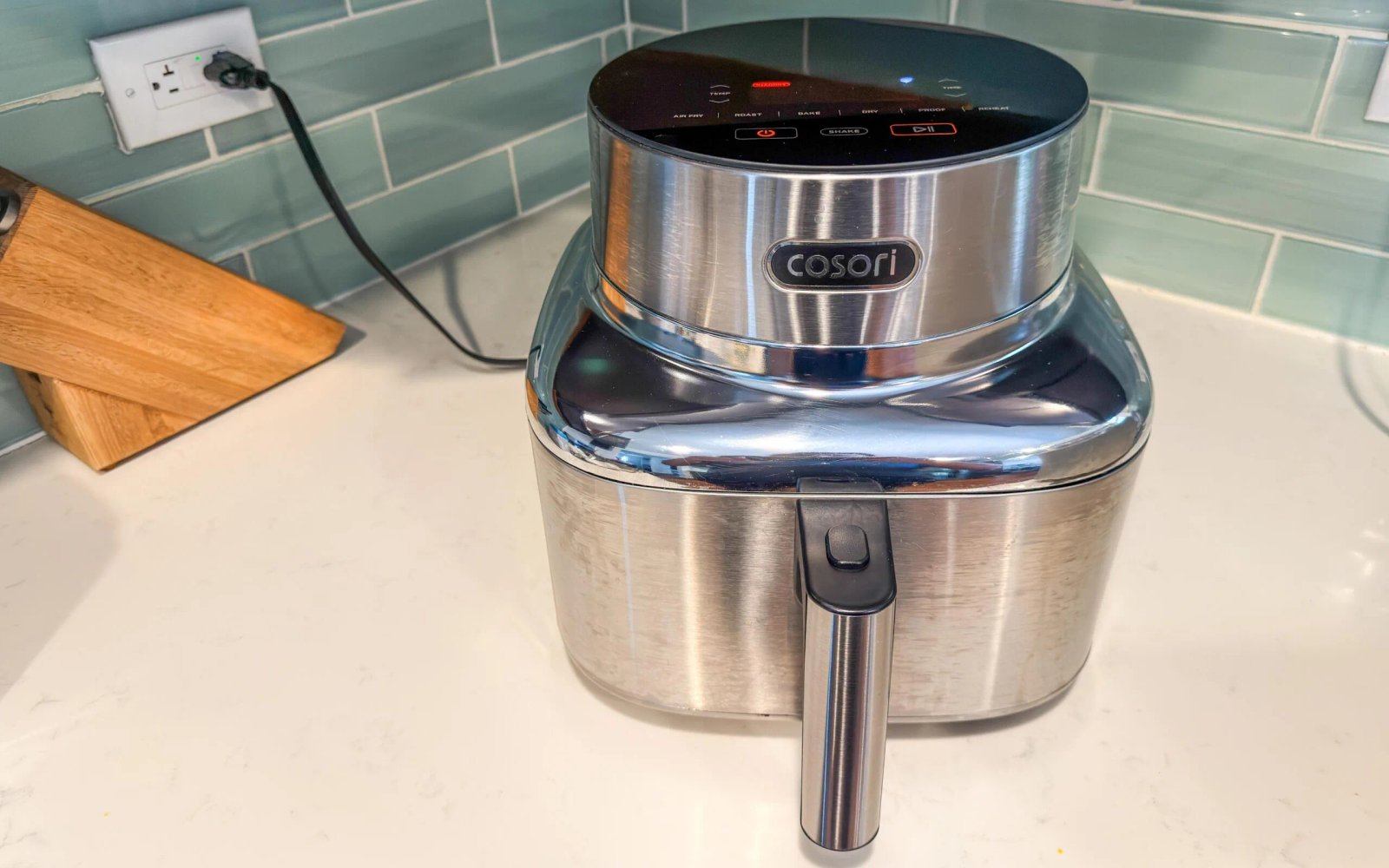
    Cosori claims that 96% of the Iconic’s exposed surfaces are metal, and its design evidence is right there. The base is a square with rounded edges; the main body features polished stainless steel, with vertical brushed faces that minimize reflections. Despite all that steel, the exterior remains cool during operation, with heat confined to the back exhaust and near the heating element on top. The handle is made of heat-resistant plastic, ensuring it stays cool too.

    The control panel is a tempered glass touch screen that lights up during use. It displays time and temperature, along with the current cooking mode and a fan speed indicator—a detail I appreciate given the variable airflow that influences cooking flexibility. There’s a Shake button, which flashes and buzzes to remind you to toss food midway, and the app can also provide alerts if you step away.
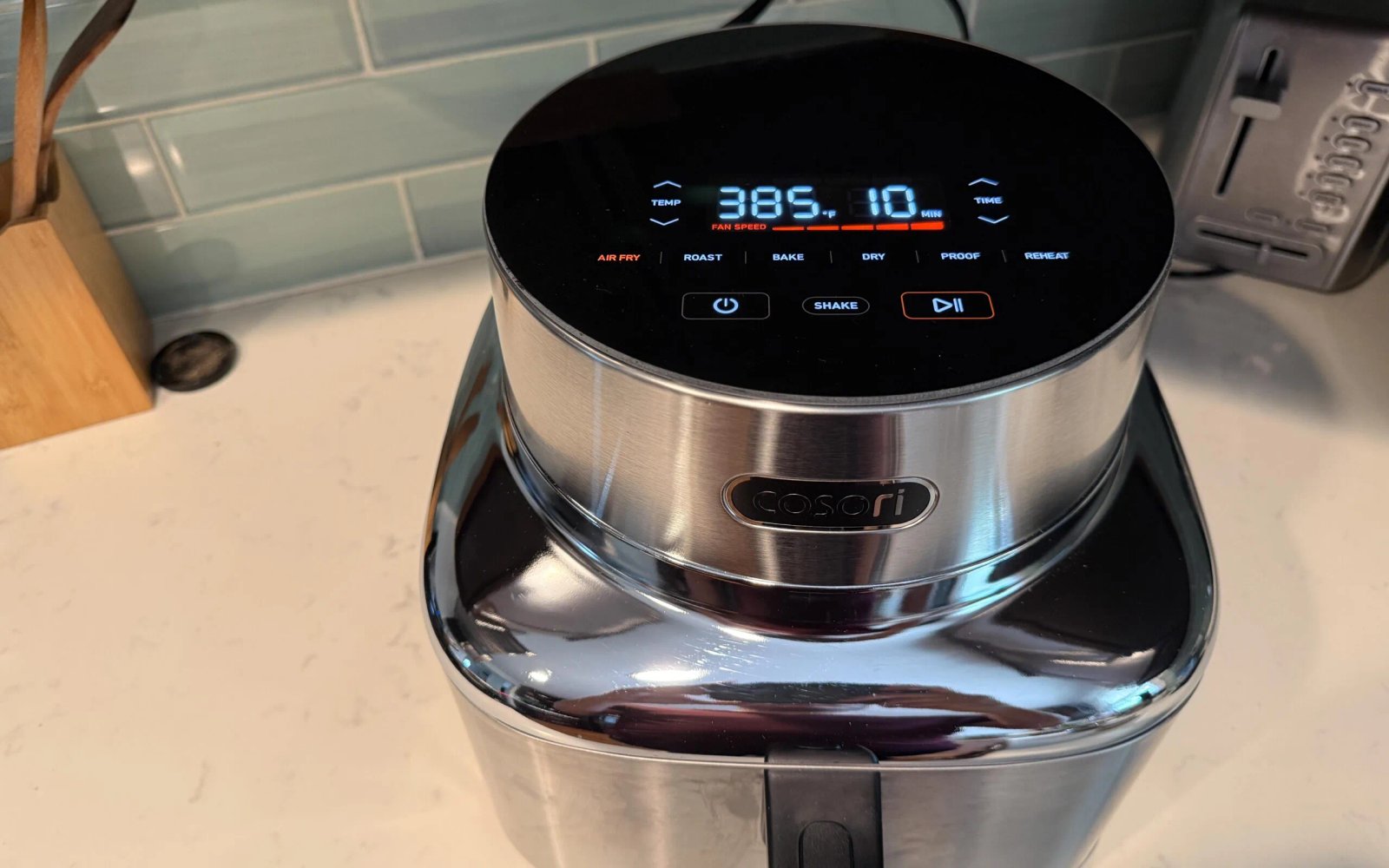
    Cosori Iconic Control Panel

    Image used with permission by copyright holder

    The basket features a traditional drawer design with a removable crisper plate that sits on silicone feet, raising it an inch above the bottom to promote airflow underneath. Both components are coated with PFAS-free ceramic, which prevents food from sticking, and are dishwasher safe. The shape, approximately 9.5 inches square, is wide and shallow—perfect for single-layer air frying, ensuring even cooking for foods like pork tenderloin, which browns evenly, or crispy roasted potatoes that serve a family.

    A couple of practical considerations: the Iconic requires about 14.8 by 11.8 inches of counter space plus 5 inches of clearance on all sides during operation. The stainless exterior attracts fingerprints easily, but these can be wiped away quickly for a pristine look.
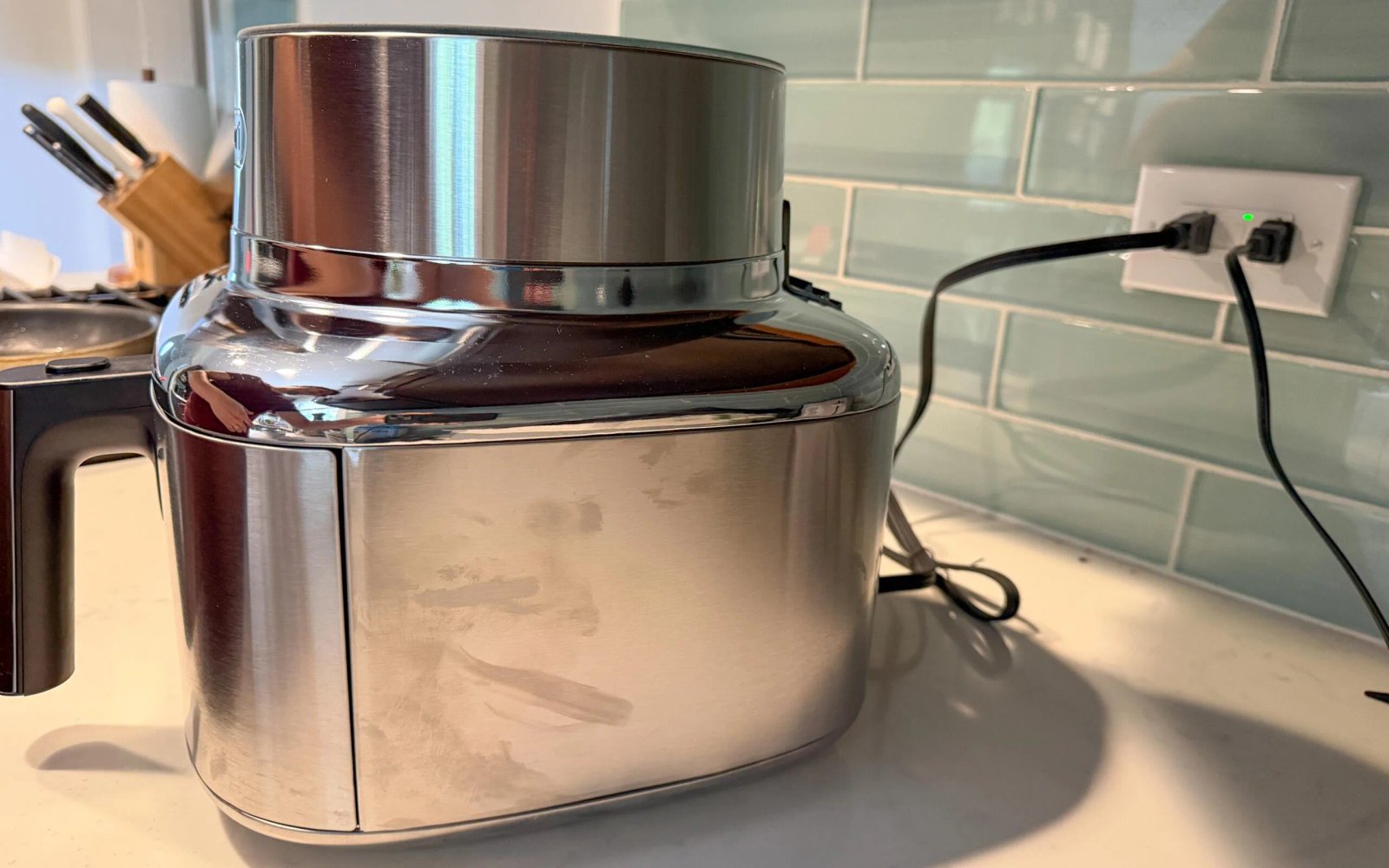
    Fingerprints on Stainless Steel Surface

    Image used with permission by copyright holder

    Performance-wise, the Iconic’s 5-speed DC motor is key. Many air fryers only vary time and temperature, but this model also adjusts airflow. Its fan can spin up to around 3,600 RPM for rapid air frying, or slow to about 700 RPM for dehydrating or proofing dough. Each cooking mode is linked to a fixed fan speed—for example, full blast for air frying or roasting, gentler for baking, and almost off for proofing—making it one of the most versatile single-basket models available, with a temperature range from 90 to 450°F.

    In daily use, I’ve enjoyed making pork tenderloin, which develops a beautiful crust, and roasted red potatoes that are consistently crispy. The generous, shallow basket allows cooking an entire meal in one layer, which is convenient and effective.

    Roasted Potatoes

    Image used with permission by copyright holder

    A few caveats: the Iconic lacks a preheat function, so it requires a brief empty run to reach optimal temperature, though this isn’t necessary for frozen foods. Once heated, it cooks swiftly—sometimes faster than expected. Breaded frozen items like mozzarella sticks may need a couple extra minutes, while fresh meats like burgers or steaks may cook quicker than suggested; checking early is advised.

    Noise levels are typical for the category, with air frying mode around 60–65 decibels, and quiet modes operating even more softly.

    Smart features and app: Surprisingly effective

    Quick review: The VeSync app provides an organized, user-friendly experience that’s worth using.

    VeSync App Screen

    Image used with permission by copyright holder

    Unlike many kitchen apps, VeSync offers extensive cooking charts organized by food type, with suggested times and temperatures that can be sent directly to the fryer. Its Chef Mode simplifies operation: just specify what you’re cooking and its weight, and the app suggests the settings. A barcode scanner for packaged foods can pull up nutrition info and automatically set the correct parameters.

    The app also keeps a history of your recent cooks and supports voice commands through Alexa and Google Assistant. However, remote start isn’t supported; you need to initiate cooking from the control panel itself.

    Ease of cleaning: Denting the ceramic coating’s reputation

    Quick assessment: Simple cleaning inside, occasional exterior wipes

    The ceramic coating makes cleaning easy—wipes away with minimal effort, and both basket and crisper plate are dishwasher safe. The interior of the cooking chamber is polished steel, with most residues wiped away with a paper towel. Regularly cleaning the basket after each use prevents grease buildup, which otherwise may require more scrubbing over time.

    Should you consider the Cosori Iconic?

    If your kitchen aesthetic matters, if you prefer a nonstick surface free of PFAS chemicals, and you plan to use your air fryer often, it’s a solid choice. The Iconic is rare in that its premium features genuinely enhance its presence on your counter while offering top-tier cooking performance.

    On a budget? A TurboBlaze or another reliable plastic-bodied air fryer around $100 can produce similar results. The Iconic won’t cook anything any better, but you’re paying for its all-metal finish, ceramic nonstick coating, glass panel, and extended warranty.

    Our testing process

    Over the past month, I used the Cosori Iconic daily as our main air fryer. I cooked pork tenderloin, crispy roasted potatoes, frozen snacks, and reheats, testing both the onboard controls and the app for time and temperature accuracy.

    I assessed cooking uniformity, preheat performance, cleanup ease, and how well the stainless exterior withstands everyday kitchen wear.

    Common questions (FAQs)

    Is the Cosori Iconic truly nonstick without PFAS?

    Yes. The basket and crisper plate utilize a ceramic-based nonstick coating that’s free of PFAS chemicals, with the supporting structure made from 304 and 430 stainless steel.

    What distinguishes the Cosori Iconic from the TurboBlaze?

    Mostly the exterior and added features. Both share a 6.5-quart basket, a 5-speed DC motor, and similar cooking performance. The Iconic adds a stainless steel shell, glass touch panel, PFAS-free ceramic coating, Wi-Fi connectivity, and a 5-year warranty, costing about $120–$150 more depending on sales.

    Can the Cosori Iconic dehydrate foods?

    Absolutely. It has a dehydrating mode that can operate as low as 90°F with a slow fan, suitable for jerky, dried fruits, and herbs. The Proof mode also maintains low temperatures for dough proofing.

  • Tineco Pure One Station 5 Pro Review: Easy and Convenient Cleaner

    Tineco Pure One Station 5 Pro Review: Easy and Convenient Cleaner

    Tineco Pure ONE Station 5 Pro

    MSRP $599.00

    “An almost perfect combination vacuum”

    Pros

    • Powerful cleaning on various floor types
    • Lightweight and easy to maneuver
    • No trigger to hold during cleaning
    • Excellent edge and corner cleaning
    • Helpful wide-angle LED headlight
    • Bagless self-emptying station
    • Convenient attachment storage
    • Extremely easy to assemble

    Cons

    • App pairing can be tricky with combined Wi-Fi networks
    • Lack of precise remaining battery time estimate

    Living with two young kids and two dogs means my floors face daily stress tests. From crumbs and pet hair to tracked-in dirt, there’s always something to clean. The Tineco Pure ONE Station 5 Pro has eased those frustrations remarkably. It runs for over an hour and a half on a single charge, and its base station’s dustbin capacity surpasses many upright vacuums I’ve tested over the years.

    It’s lightweight, doesn’t need you to hold a trigger, and returns to a base that charges, empties, and stores it automatically. Besides dependable battery life and large bin capacity, it automates much of the cleaning process, using smart floor-type detection that adjusts suction strength in real time. Notable features include a wide-angle LED headlight, built-in HEPA filtration, and dedicated onboard accessory storage. Overall, it’s a well-designed and practical addition to household chores.

    Tineco Pure ONE Station 5 Pro specifications

    Price $599
    Vacuum Type Cordless stick vacuum
    Suction Power 200 air watts
    Estimated Runtime Up to 100 minutes
    Clean Station Capacity 2.5 liters
    Floor Compatibility Hard floors and carpet
    Brush Type ZeroTangle brush
    Sensors DustSense and EdgeSense
    Headlight 120-degree wide-angle LED
    Filtration System 12-stage
    Station Features Automatic dust collection, full-path self-cleaning
    Color Black

    Easy physical setup

    Tineco Pure One Station 5 Pro vacuum cleaner

    The station arrives with the vacuum, floorhead, cleaning station, and attachments—all straightforward to assemble. I didn’t need to consult instructions because everything snapped into place intuitively. I had it ready to go in just a few minutes, making it one of the easiest setups I’ve experienced with a device of this size.

    It handled whatever my family left behind

    Living with kids and pets means my floors constantly need attention. I tested the Station 5 Pro on a mix of hard floors, area rugs, and carpets, and it consistently picked up crumbs, pet hair, dirt, and general debris without multiple passes—even on the first try.

    Tineco Pure One Station 5 Pro vacuum cleaner

    Edge cleaning impressed me, especially the transition between floors and stairs. The vacuum got noticeably closer to the edges than most models I’ve used. The LED headlight helped spot debris that blends into the floor, making cleanup more efficient.

    Its lightweight design makes moving between rooms easy, and not having to hold a trigger is a small but meaningful comfort. It’s one of those features you appreciate only after trying a vacuum without it.

    Self-emptying station that’s worth the space

    Tineco Pure One Station 5 Pro vacuum cleaner

    The self-emptying station is remarkably convenient. When the vacuum docks, debris transfers automatically into the base. Though the process makes some noise, I found it manageable—certain models are so loud they become a hassle, but this one isn’t.

    Since the station is bagless, there are no replacement bags to worry about. When it’s time to empty the dustbin, you can simply dump it into the trash. I also appreciate the built-in attachment storage, which keeps all accessories nearby, preventing misplacement and making them handy when needed.

    Ample battery life, but limited info

    Tineco Pure One Station 5 Pro vacuum cleaner

    Tineco claims up to 100 minutes of runtime, which is sufficient for most homes. I never worried about running out of power mid-clean. However, the display lacks a precise minute-by-minute estimate, making it hard to gauge if another room can be completed before the battery depletes. It’s not a major issue but is a missed opportunity in an otherwise well-designed system.

    Wi-Fi setup depends on your network

    Tineco Pure One Station 5 Pro vacuum cleaner

    Connecting the vacuum to Wi-Fi was the only frustrating part. It requires a 2.4GHz network, but my Xfinity gateway combines 2.4GHz and 5GHz into a single network, causing detection issues. The app recognized the product but couldn’t connect, likely due to my network setup. Fortunately, Wi-Fi isn’t necessary for actual operation; cleaning, charging, and self-emptying work perfectly without it.

    Should you consider the Tineco Pure ONE Station 5 Pro?

    Tineco Pure One Station 5 Pro vacuum cleaner

    This system stands out because it alleviates many common cordless vacuum frustrations. The self-emptying station, LED light, excellent edge cleaning, lightweight design, and onboard accessory storage create a thoughtfully designed, powerful system ideal for busy households.

    While a more detailed battery indicator and a smoother app setup would improve the experience, these issues don’t detract from its impressive cleaning ability and daily convenience. Overall, it’s an easy recommendation for anyone seeking a cordless vacuum that’s truly simple to live with.

    How we tested

    Tineco Pure One Station 5 Pro vacuum cleaner

    I used the vacuum at home for several weeks, testing on different surfaces including hardwood, tile, and rugs. I evaluated cleaning performance against pet hair, dirt, flour, and dry kitchen waste, paying attention to suction power and how well the built-in brush handled tangled debris.

    For runtime testing, I ran the vacuum in Eco, Auto, and Max modes, using edge-to-edge cleaning along with crevice and pet tools. I also assessed the LED’s debris detection, as well as the self-emptying, HEPA filtration, and dustbin capacity over extended use.

    Frequently Asked Questions

    How long does it last on a single charge?

    It can run for over 90 minutes cordless.

    Is it good for hard floors and carpets?

    Yes, it handles both surfaces effectively.

    Does it have an auto-empty station?

    Yes, the smart station empties the debris automatically.

    What about the warranty?

    It comes with a standard two-year warranty for U.S. customers.

  • Beatbot AquaSense X Review: The Pool Cleaner for Pampered Pools

    Beatbot AquaSense X Review: The Pool Cleaner for Pampered Pools

    “The Beatbot AquaSense X is the most comprehensive pool robot ever designed”

    Advantages

    • Exceptional cleaning performance
    • Advanced technology features
    • Performs as claimed
    • High-quality construction of both station and robot

    Disadvantages

    • Relatively costly
    • Station requires considerable space

    Quick Take:

    For many, robotic pool cleaners eliminated the most dreaded chore of pool ownership years ago. But they introduced a new task: hauling a wet device to its charging station and cleaning out its debris basket after each use. The Beatbot AquaSense X is designed to eliminate that mess. Its AstroRinse station is the first in its class to backflush the filter, dispose of debris into a sizable bin, and recharge the robot—all automatically when docked.

    It’s also among the most expensive robotic cleaners on the market. Priced at $3,999 as of July 2, 2026 (down from $4,250 at launch), it costs roughly $1,400 more than Beatbot’s AquaSense 2 Ultra and more than twice what competitors like Aiper or iGarden charge. The primary added expense covers the station itself. Additionally, with optional clarifier cartridges at $49.99/month, the total three-year cost exceeds $6,000—comparable to a monthly pool service.

    Ultimately, the choice hinges on your preference: how much do you dread filter cleaning, and do you want the best system available? If you’re eager to minimize maintenance and want a top-tier system, the AquaSense X offers a hassle-free cleaning experience backed by a three-year replacement warranty. If occasional filter rinsing is acceptable, the AquaSense 2 Ultra or Aiper’s Scuba X1 Pro Max provide nearly comparable cleanliness at a much lower price. But if you desire luxury and a system that’s as stylish as it is effective, the AquaSense X lives up to its promises and also looks impressive.

    AquaSense X Specs: What’s Under the Hood?

    Spec Details
    Type Cordless 5-in-1 robot (floors, walls, waterline, surface, ledges)
    Pool size rating
    Coverage Up to 3,875 sq. ft. per charge (roughly 65 ft. pools)
    Runtime Up to 10 hours (surface); up to 5 hours (floors/walls)
    Battery 24-cell, 13,400 mAh lithium-ion
    Charge time 3.5 to 4.5 hours (wireless station)
    Filtration Dual-layer basket (250/150 microns), auto-cleaned by station
    Debris bin 22L (~5.8 gallons), disposable bag liners, up to 2 months between emptying
    Suction 6,800 GPH (11 motors)
    Navigation HybridSense AI with camera, ultrasonic, infrared sensors (29 total), mapping first run
    Smart features Wi-Fi/Bluetooth app, multiple cleaning modes, scheduling, zone cleaning, night mode, voice control (surface mode only)
    Robot weight 28.9 lbs
    Station weight/size 41.9 lbs; approx. 25 x 21 x 22 inches
    Water resistance IP68 to 3 meters; saltwater compatible up to 5,000 ppm
    Warranty 3-year full replacement
    Price $3,999 (as of July 2, 2026)

    Design and Construction of the AquaSense X

    AquaSense X

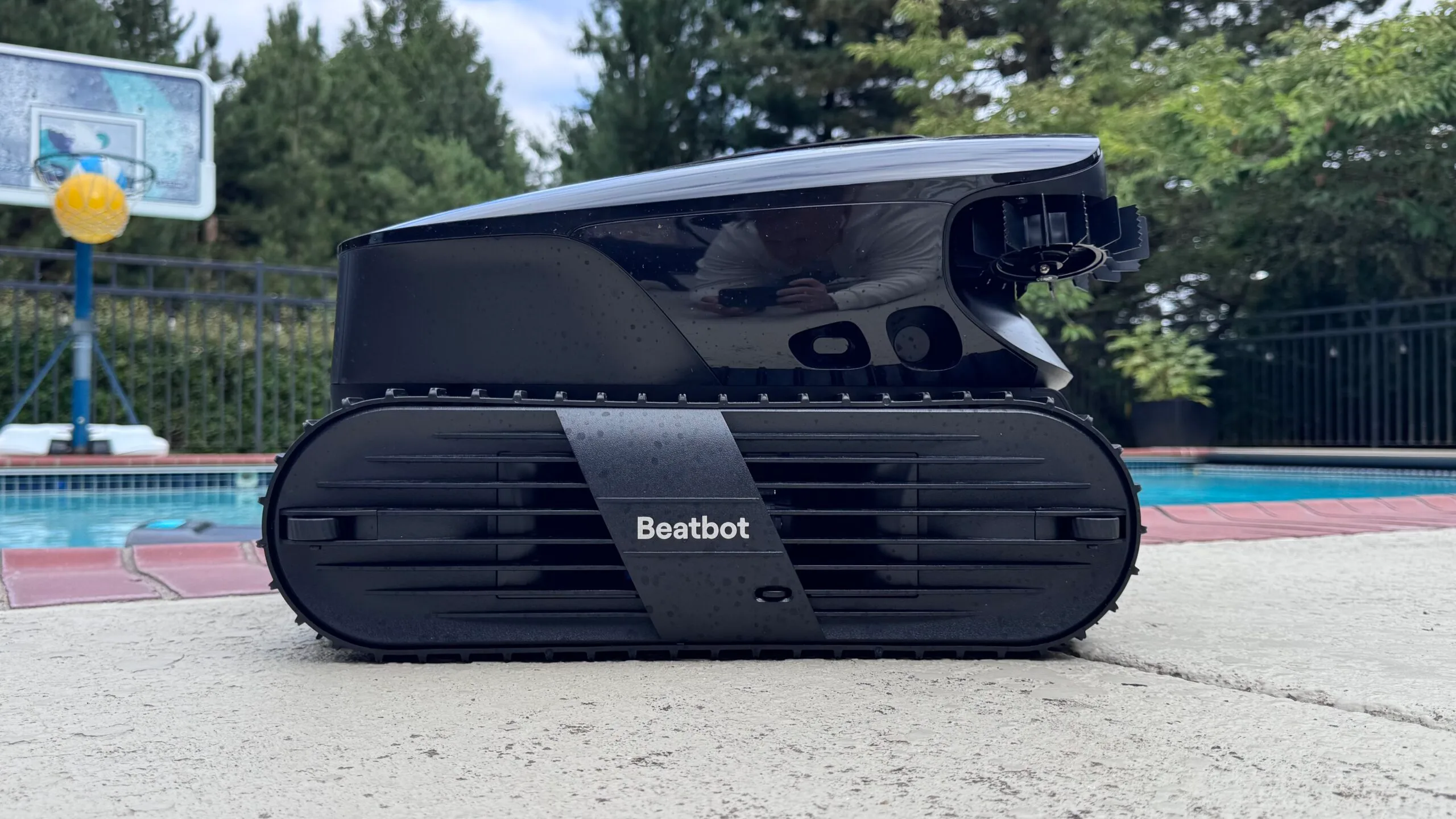
    The AquaSense X resembles a sleek automotive component, with a low-profile, tracked drive system, a top handle for carrying, and a durable IMR coating designed resist UV and heat. Weighing nearly 29 pounds, it’s noticeably heavier than recent models like Beatbot Sora 70, which weighs 23 pounds. One ergonomic challenge is lifting the robot from the pool onto its docking station—Beatbot offers no custom caddy, although Aiper does.

    To ease this task, Beatbot has incorporated the SmartDrain feature. When the cycle ends or battery runs low, the robot surfaces, parks against the pool wall, and releases water from within, reducing weight for removal. You can also summon it to the pool edge via the app. While effective, this feature does not eliminate the need to lift the robot’s weight if you have mobility concerns.

    AquaSense X Side View

    The AstroRinse station is a weather-resistant cabinet weighing approximately 42 pounds, equipped with a bubble level, child lock, and corrosion and freeze resistance. Beatbot advises draining hoses and storing the station indoors during winter, as its internal plumbing isn’t designed to withstand freezing water.

    AquaSense X Rear View

    The station’s rinse nozzle doesn’t quite reach the top basket or lid underside, requiring occasional manual rinsing with a garden hose. Despite this minor flaw, the station automates debris disposal and recharging, adding significant convenience and reducing manual intervention.

    Battery Life and Charging Performance

    The 24-cell, 13,400 mAh battery offers up to 10 hours of surface skimming and about 5 hours of floor or wall cleaning, covering nearly 4,000 square feet per charge. During prolonged tests, a typical session used around 76% of the battery, confirming the claimed runtime. Wireless charging takes roughly 3.5 to 4.5 hours, and the station automatically maintains the battery’s charge status. The three-year replacement warranty covers the drive box and battery, providing peace of mind, especially as battery replacement can be costly.

    Smart Features & Mobile App

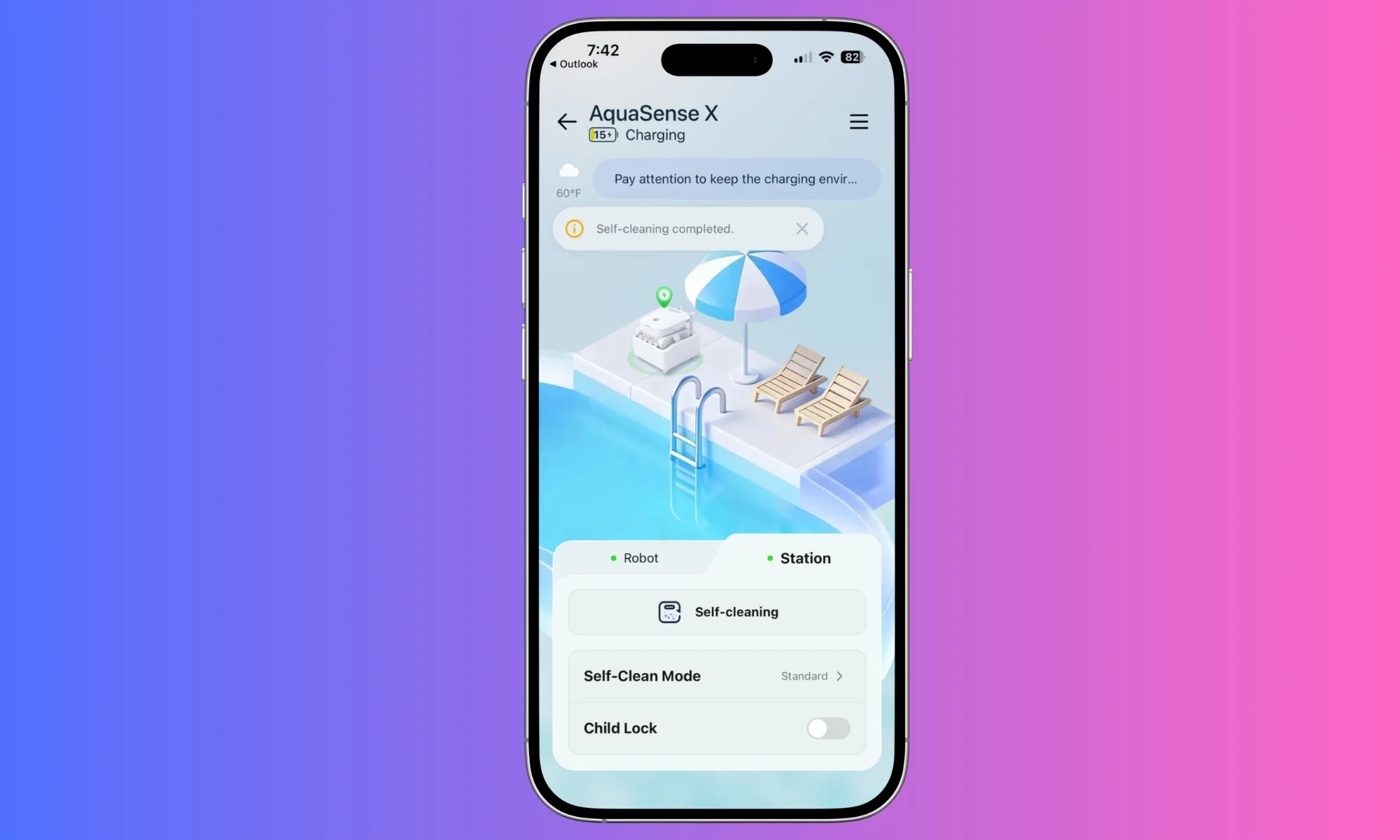
    The companion app simplifies pairing via Bluetooth or Wi-Fi, offers seven distinct cleaning modes, scheduling, custom zones with exclusions, and detailed coverage reports. Post-cleaning data includes exact square footage, duration, and battery usage, appealing to tech enthusiasts and meticulous pool owners.

    AquaSense X App Interface

    The AquaSense X supports voice commands through Alexa, Google Home, or Siri for starting surface cleaning. However, voice control is limited and mainly for initiating specific tasks, making it more of a novelty than a practical feature.

    Impact and Noise Levels

    The robot operates quietly in water, emitting only a soft hum, with most noise coming from the station’s high-pressure backflush process—similar to a small pressure washer. The optional ClearWater clarifier system actively improves water clarity by dispersing a natural, recycled-crab-shell-based clarifier during cleaning cycles, which is effective but optional if you prefer manual dosing or already maintain water chemistry.

    How I Tested the AquaSense X

    Over six weeks, I tested the AquaSense X in a 15,000-gallon concrete pool with features like a hot tub, steps, and a ladder, surrounded by trees. I used various debris, pollen, and organic matter to gauge performance. Battery life was monitored during different cleaning modes, matching the manufacturer’s specifications closely.

    Alternatives & Considerations

    • Beatbot AquaSense 2 Ultra ($2,649): Former flagship, with 27 sensors, 5,500 GPH suction, and AI debris detection for about 20 debris types. Requires manual filter rinsing; provides a two-year warranty. Significantly cheaper, but lacks the AstroRinse station.
    • Aiper Scuba X1 Pro Max ($1,799–$2,299): Outperforms in suction and navigation with 8,500 GPH and 40+ sensors, plus surface skimming. Manual filter cleaning and a shorter warranty make it a good value for performance.
    • Dolphin Liberty 400: Weighs much less and is easier to retrieve, with a quick 90-minute cycle, but lacks surface skimming and automated filter care, at a lower price point.

    Should You Make the Investment?

    The AquaSense X excels as a cleaning robot—powerful suction, exceptional waterline scrubbing, intelligent debris targeting, and comprehensive surface coverage. Its standout feature is the AstroRinse station, which automates filter cleaning and debris disposal—adding a level of luxury and convenience that few others offer.

    However, at $3,999, before optional clarifier upgrades, it’s a significant investment—more than three seasons of a typical pool service. It’s the most capable and refined unit of its kind, perfect for those who want top-tier technology and don’t mind the higher price. Budget-conscious buyers can opt for the AquaSense 2 Ultra or similar models and still enjoy excellent results.

    FAQs

    Does the AquaSense X clean itself?

    It automatically backflushing the filter and disposing of debris via the AstroRinse station, but you still need to manually place the robot onto the station. The station handles filter cleaning, debris removal, and recharging, with no manual mucking required.

    What size pool is supported?

    Rated for pools up to approximately 3,875 square feet, operating in water depths of 1.6 to 9.8 feet. Larger pools may need additional recharges to complete deep or comprehensive cycles.

    Is it safe for vinyl liners and saltwater pools?

    Yes. It’s rated for various surfaces, including vinyl, fiberglass, and concrete, and handles saltwater up to 5,000 ppm.

    What does installation involve?

    Level ground near the pool, an outdoor GFCI outlet, Wi-Fi connectivity, enough space around the station, a water source for the inlet hose, and a drainage point for the slurry. In colder climates, drain hoses and store equipment indoors during winter.

    Are clarifier refills necessary?

    Optional. The robot cleans, scrubs, and skims effectively on its own. Clarifier cartridges can be purchased for about $49.99/month, treating up to 99,000 gallons, or manually dosed with generic products at a lower cost.

  • Google Home Speaker 2026 Review: Smarter and Brighter with a Subscription

    Google Home Speaker 2026 Review: Smarter and Brighter with a Subscription

    Google Home Speaker

    MSRP $99.99

    “A delightful smart speaker that’s easy to love.”

    Advantages

    • Gemini makes voice interactions feel genuinely conversational
    • Robust smart home integration
    • Better sound quality than previous compact Google speakers
    • Modern, compact look
    • Outstanding value at $99

    Disadvantages

    • Advanced features require a subscription
    • Optimal experience depends on using Google’s ecosystem
    • No display for visuals or info

    Quick Overview

    Google has introduced its new Home Speaker with Gemini, signaling one of the biggest shifts in the company’s smart home lineup in years. This isn’t just a hardware upgrade with better sound or a fresh look. Instead, Google presents Gemini as the core of a smarter home assistant, capable of understanding natural conversations rather than relying solely on rigid voice commands. Priced at $99, it enters a highly competitive market segment, typically compared with devices like Apple’s HomePod mini.

    After testing for several weeks, it’s clear that Gemini is the key upgrade. The hardware is an advancement over earlier Google compact speakers, but the most significant change is how naturally it understands and responds during conversations. It adapts seamlessly to your speech, making interactions feel more genuine and less mechanical.

    What’s Inside the Google Home Speaker?

    Colors Berry, Porcelain, Hazel, Jade
    Dimensions Product: 3.4″ x 4.2″ diameter
    Power Cable: 59.1″
    Weight 0.9 lbs (including speaker and cable, excluding power adapter)
    Power & Ports 30W USB-C Adapter, 59.1″ cable, dimensions 2.3″ x 1.1″ x 2.2″, weight 0.1 lbs
    Memory & Storage 1 GB LPDDR4 RAM, 4 GB eMMC storage
    Processor Quad-core A55 2.0 GHz with NPU
    Sound & Microphones Omnidirectional sound, 58mm full-range driver, three microphones with a two-stage hardware mute
    Technology Gemini for Home, Voice match tech
    Sensors Capacitive touch control (3 zones)
    Materials At least 37% recycled materials in its design, plastic-free packaging
    Connectivity Wi-Fi 6, Bluetooth 5.4, Thread 1.3 border router
    Compatibility Google Home, Matter, acts as a Matter hub with Google Home
    Supported Devices iOS and Android
    Included in the Box Google Home Speaker, Power adapter, 59.1″ cable, Quick guide, Safety and warranty info

    Design and Setup: Sleek and Simple

    The speaker stands just 3.44 inches tall, with a 4.2-inch diameter and a light 0.9 pounds, making it incredibly easy to fit into any space while looking more refined than Google’s previous Nest models. Setting up is straightforward. Inside the box, you’ll find the speaker, a 30W USB-C power adapter, and a 1.5-meter cable, all configured through the Google Home app.

    It’s available in four colors: Hazel, Porcelain, Jade, and Berry, with Jade and Berry exclusive to the U.S. Currently, the Porcelain option used for this review has a clean, subtle look that blends easily into most homes. Its minimal, modern aesthetic doesn’t draw attention but complements most decor. The design also emphasizes sustainability, with recycled materials used throughout, including the exterior fabric that resembles Apple’s HomePod style.

    One neat detail is the dynamic light ring around the base, which shifts based on the speaker’s activity, such as listening, processing, or responding. This visual feedback enhances the overall experience, making interactions feel more responsive and alive. The omnidirectional microphones ensure the device picks up requests clearly from across the room without needing repeated commands.

    Interacting with the New Gemini

    The most noticeable change with the new Home Speaker isn’t just hardware—it’s the shift from Google Assistant to Gemini, fundamentally transforming how you communicate with your device.

    Older Google smart speakers required you to speak in commands. For example, turning off the lights or setting a timer meant delivering specific requests one at a time. Gemini moves away from this command-based model. Instead, you can speak naturally, much like talking to another person. Saying “Get the house ready for bedtime,” is enough for it to understand your intent and act accordingly. It can handle multiple instructions in one sentence and even adjust if you change your mind mid-sentence.

    What sets Gemini apart is its reasoning capability. During testing, when asked if it would rain during a baseball game, it didn’t just give today’s forecast. It processed multiple data points to make an inference, providing a more contextual and intelligent response. Google describes this as real reasoning, a substantial improvement over previous AI capabilities from Google Assistant.

    It’s equally adept at routine tasks. It can manage reminders, calendar events, shopping lists, and daily planning, supporting follow-up questions that build on the conversation rather than starting anew each time. You can personalize its voice with ten options, enhancing the natural feel of interactions.

    Google is offering the core Gemini experience at no extra charge. Buyers who get the Home Speaker before the end of September also receive six months of Google Home Premium, unlocking Gemini Live. This feature facilitates full conversations, enabling you to say, “Let’s chat,” and enjoy an extended back-and-forth. Premium adds advanced smart home management features, like camera status updates or the ability to ask if the garage was left open or if the dog jumped on the couch. It also provides summaries of events you missed while away. Google Home Premium comes in two tiers, with the basic included in Google AI Pro and the more advanced version bundled with Google AI Ultra.

    Sound Experience: Solid for Its Purpose

    Along with Gemini, audio performance has been significantly improved. Google claims the new Home Speaker offers enhanced microphone processing for clearer voice pickup, 360-degree sound, and bass that’s 2.5 times stronger than the Nest Mini. The difference in sound quality is immediately apparent compared to older Google compact speakers, making it a worthwhile upgrade if you owned previous models.

    Dual speakers can be paired for stereo sound, and integration with Google TV, Nest devices, and Cast-compatible products allows it to be part of a whole-home audio setup. It fits well within Google’s ecosystem, providing room-filling audio with punch and clarity. It avoids overly processed sound, delivering a balanced audio profile suitable for podcasts and vocals. While it handles small to medium rooms well, it might struggle with complex music at high volumes, where it can sound a bit muddled. For audiophiles, models like the Sonos Era 100 or the larger Google Nest Audio may be preferable.

    HomePod mini vs. Google Home Speaker

    Comparing this Google speaker to Apple’s HomePod mini is almost inevitable, as both are priced at around $99, feature fabric finishes, and come in various colors. The key distinction is purpose: the HomePod mini is primarily a music-focused speaker within the Apple ecosystem, while the Google Home Speaker is designed as a visual-less AI hub powered by Gemini.

    Gemini’s conversational improvements significantly distinguish Google’s offering. Its ability to handle multi-step, context-aware interactions feels more natural. Apple’s Siri AI, however, doesn’t yet support these next-gen features, meaning future versions of the HomePod may need to improve to match this experience.

    Those invested in Apple’s HomeKit ecosystem might prefer the HomePod mini, but Gemini’s support for multi-action commands, contextual dialog, and AI automation makes interactions more fluid and less reactive for Google users. In terms of audio quality, the HomePod mini offers clear, balanced sound suitable for casual listening, whereas Google emphasizes bass and immersive 360-degree audio that fills a room.

    Should You Consider Buying?

    This device offers more than just an upgrade in sound quality; it represents a shift in what a smart home assistant can be. The experience is less about issuing commands and more about natural, intuitive interactions. It performs well with podcasts and music for casual listening and features one of the most advanced on-device AI assistants available. Voice conversations feel natural, cross-device integration is seamless, and it can manage various tasks across apps if your accounts are linked. Some advanced features require a subscription, but for basic smart speaker needs, the latest Google Home Speaker is a top choice.

    Alternative Options to Explore

    Amazon Echo Dot Max — If exceptional audio quality is your priority, the Echo Dot Max features a dedicated woofer and tweeter, delivering impressive bass and clarity. Its Omnisense system offers presence detection, and support for protocols like Matter and Thread makes it versatile for smart homes. It automatically adapts to room layouts and includes a new, upgraded Alexa assistant.

    Apple HomePod mini — The closest competitor in design, the HomePod mini emphasizes Apple ecosystem integration. It provides pleasing sound, though less thunderous than larger speakers. Its AI, Siri, has improved significantly, supporting complex tasks across third-party apps, but it’s less flexible for Android users as many features remain locked behind Apple’s ecosystem.

    Sonos Era 100 SL — For audiophiles willing to invest more, the Sonos Era 100 SL offers refined, deep bass, a wider soundstage, and stereo separation. It supports multi-room playback and detailed EQ tuning. However, its virtual assistant features and app experience still need enhancement.

    How We Conducted Our Testing

    Our evaluation lasted several weeks, during which the device was linked to a personal Google account to access Gemini’s smart features. Sound quality was assessed by playing various genres, with comparisons made against the Apple HomePod mini for context. We focused on three core aspects: audio fidelity, responsiveness and accuracy of the AI, and how well it integrated across connected devices.

    Performance in audio was gauged by how well it reproduced different frequencies. The AI interaction tests involved natural language queries related to smart device control and information retrieval, measuring accuracy and response times. Finally, the setup was tested in different locations with varying network conditions to ensure reliable multi-device functioning.

  • LG SIGNATURE DLEX9900S Review: Big Beautiful Dryer With One AI Mark

    LG SIGNATURE DLEX9900S Review: Big Beautiful Dryer With One AI Mark

    LG SIGNATURE DLEX9900S

    MSRP $2,099.00

    “Smart, stunning, and worth the premium it demands.”

    Pros

    • Impressive capacity
    • Elegant design
    • TurboSteam is quite handy
    • Numerous smart features

    Cons

    • AI sensors need some refinement
    • Remote start isn’t fully automatic

    Quick Summary

    The LG SIGNATURE DLEX9900S is the dryer companion to LG’s flagship laundry duo, making an immediate impact similar to its washer counterpart, the WM9900HSA. It features a massive 9.0-cubic-foot brushed platinum steel drum and a sleek 7-inch touchscreen where traditional knobs would be. It effortlessly handles king-sized comforters and pet beds, quickly de-wrinkles shirts with TurboSteam, and when paired with the matching washer, they communicate seamlessly, simplifying laundry days. After extensive family laundry testing, it’s become the most enjoyable dryer I’ve owned.

    While not the most advanced in intelligence, this is where LG emphasizes its expertise. The AI Sensor Dry detects fabric type and moisture levels to automatically adjust drying times and temperature, generally working well but occasionally requiring manual intervention for stubborn loads. Sometimes, load information isn’t transferred properly to the dryer, likely due to timing issues between paired units.

    If you opt for the matching washer, the DLEX9900S becomes essential; together, they form an exceptional, large-capacity, well-crafted laundry system. On its own, it remains a top-tier, beautifully designed electric dryer, only requiring occasional oversight on the AI features. It has truly become one of my favorites.

    Specifications of the LG SIGNATURE DLEX9900S

    Type Vented Electric Dryer
    Capacity 9.0 cu. ft.
    Voltage 240V, 26 amps
    Sensor Drying Yes (AI Sensor Dry)
    Steam Options Yes (TurboSteam, SteamFresh, SteamSanitary)
    Dry Programs 25 + 15 options
    Efficiency ENERGY STAR certified; CEF 3.94
    Display 7-inch full-touch LCD
    Venting Vented, 4-way options; FlowSense duct indicator
    Dimensions (WxHxD) 29 x 40.88 x 31.5 inches (53.4 inches deep open door)
    Weight 145.3 pounds
    Finish Brushed Platinum Steel
    Warranty 1 year parts/labor, 3 years drum
    Price $2,099 (as of July 3, 2026; MSRP $2,499); Gas model available

    Design and Construction

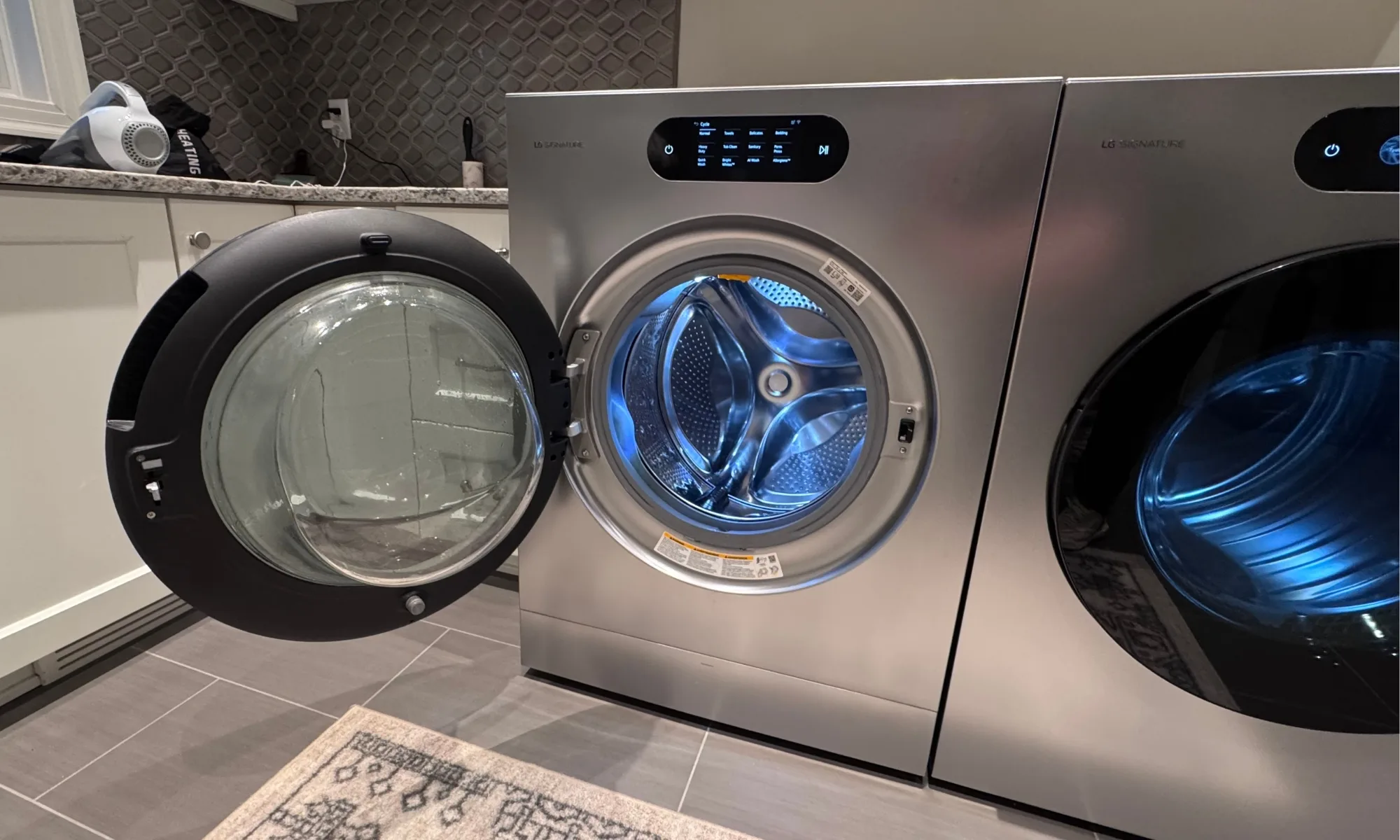
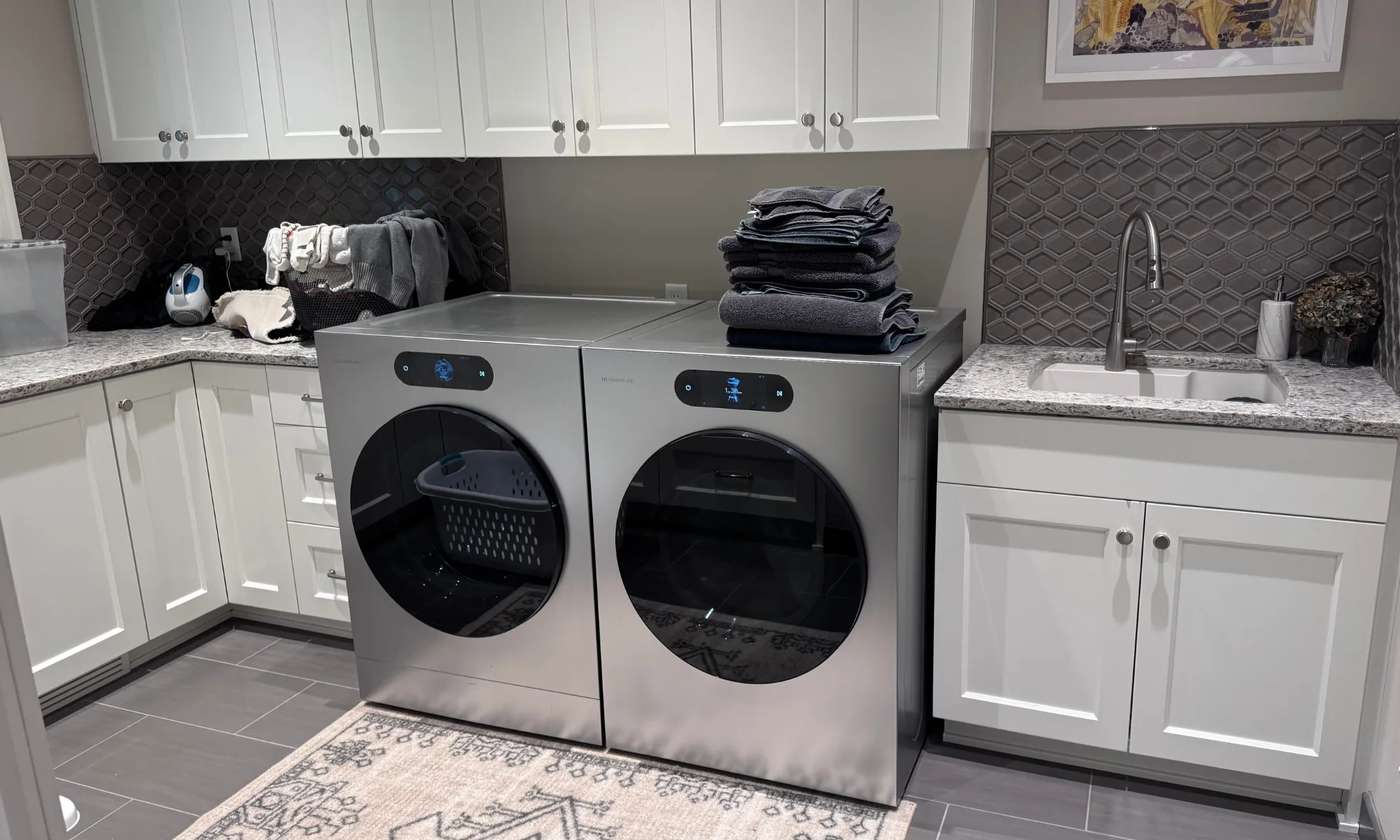
    The dryer resembles a piece of furniture, with my daughter joking that it looks like the “Cybertruck of dryers,” which I take as a compliment. Its Brushed Platinum Steel cabinet, tempered-glass door, and minimal button design set it apart from typical dryers. It holds up well with no dents over time. Inside, a NeveRust stainless steel drum boasts an interior light; the door is reversible, offering flexible placement options, and the lint filter located at the drum’s mouth is easy to access and clean.

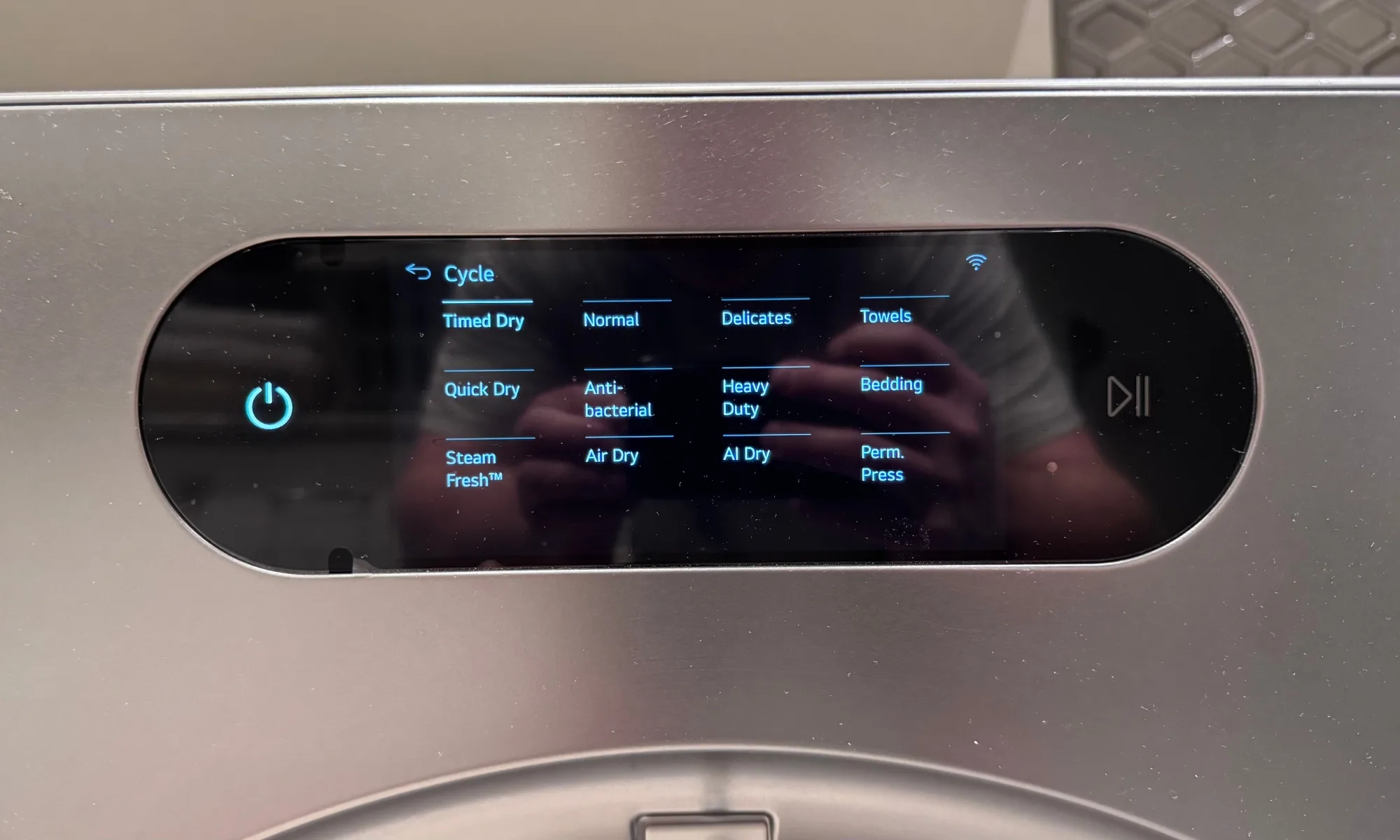
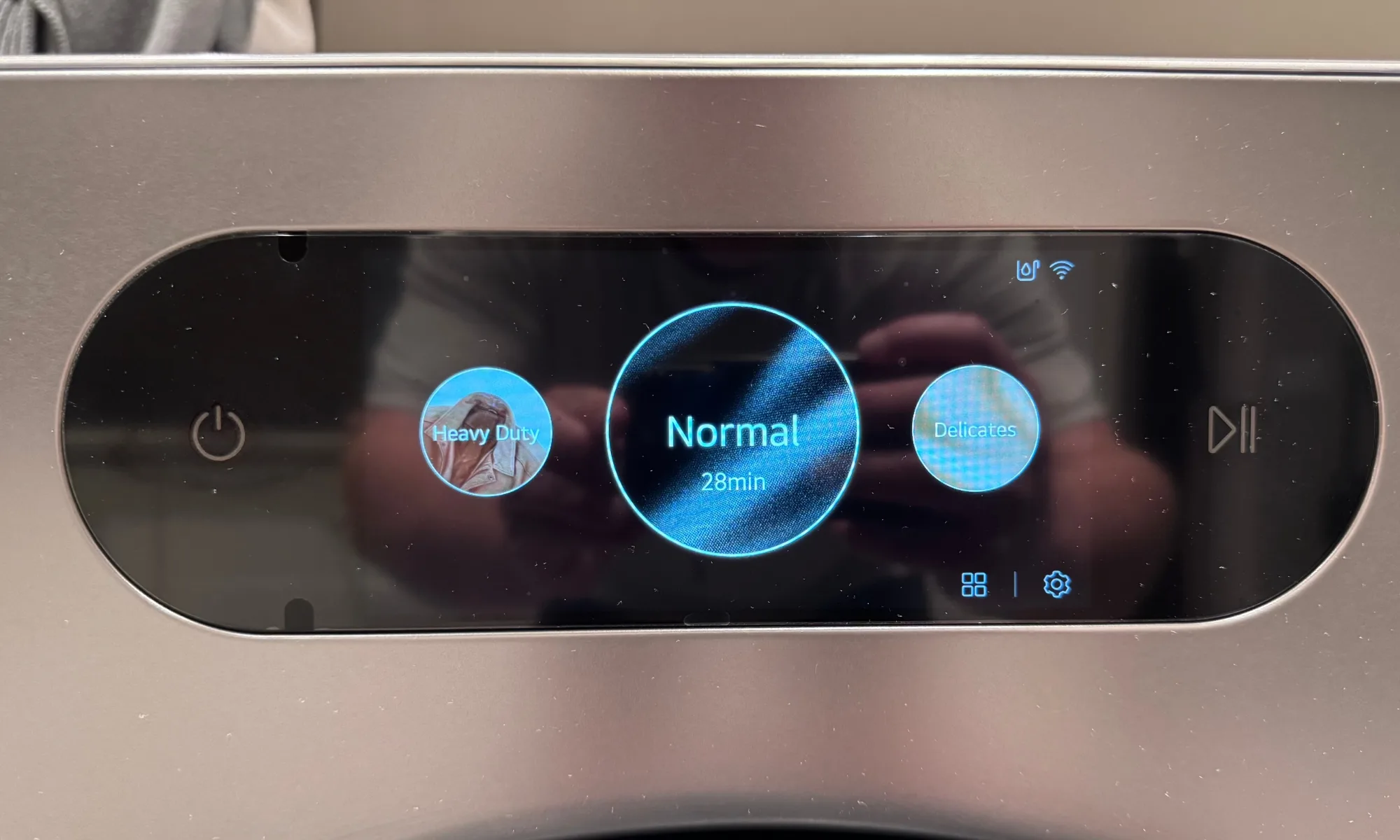
    The 7-inch LCD touchscreen offers responsive, clear navigation, with customizable cycle lists for quick access to favored programs. However, visibility can be hampered under bright sunlight, so you might need to shade the screen occasionally near large windows. An update to increase screen brightness could improve this issue.

    Installation and Venting

    Like the paired washer, the dryer was professionally installed. It’s a standard vented unit, requiring a 240V outlet and an outdoor duct, with flexible, 4-way venting options. A side vent kit is available. For homes without a 240V circuit, hiring a licensed electrician is advised; installing gas models (DLEX9901S) also requires professional hookup to a gas line.

    Drying Performance

    The large drum comfortably handles large loads like comforters and multiple family items, often drying them thoroughly in a single cycle. Paired with an extractor-powered washer, it minimizes the number of loads needed each week. The size and efficiency make it a significant upgrade from older models.

    Test results confirmed consistent performance with manual cycles, but sensor-based drying sometimes left dense or mixed loads slightly damp, requiring additional time or cycles. Using the “More Dry” setting mitigates this but defeats some of the AI’s convenience. Manual timed settings are useful for delicate or stubborn loads.

    Steam Features: TurboSteam and More

    TurboSteam significantly reduces wrinkles in about 12 minutes, a real boon for quick touch-ups. SteamFresh refreshes garments and non-washables like decorative pillows, while SteamSanitary offers high-temperature sanitizing options. Wrinkle Care tumbles clothes intermittently after the cycle if you can’t unload immediately. I found no shrinking during testing. Use these features on less valuable items first to gauge effects before treating your best clothes.

    Noise Levels and Vibration

    The tumbling is quite subdued, producing a low rumble that is barely noticeable from nearby rooms. No excessive noise or rattling occurs, though vibrations might be more noticeable on upper floors, especially in homes with echoing spaces.

    Smart Capabilities and App Integration

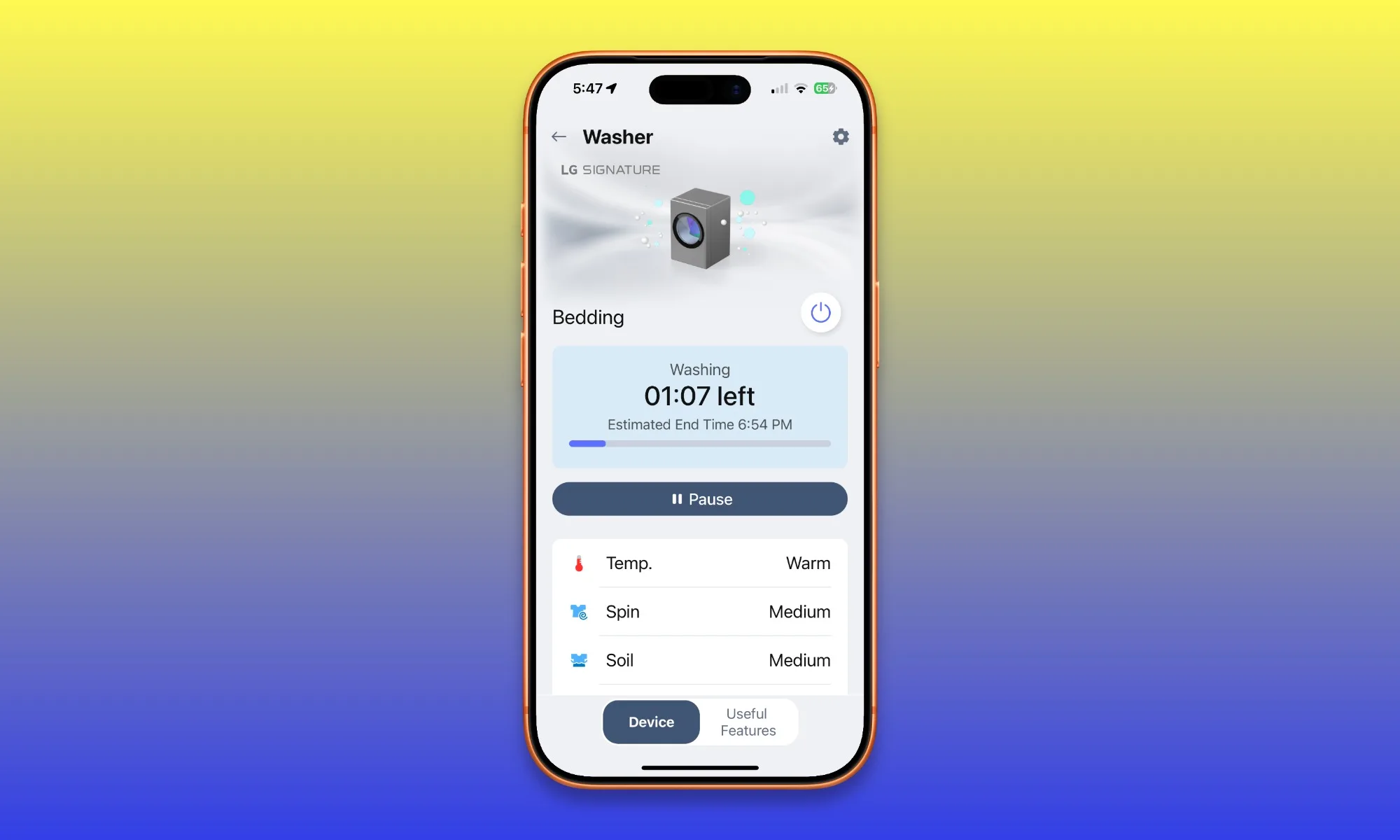
    The ThinQ platform offers reliable cycle monitoring, notifications, downloadable programs, energy tracking, and diagnostic support. Integration with Google Assistant and Alexa is supported, though I couldn’t test these features directly. The best aspect is the pairing: when the washer finishes, it transfers cycle data to the dryer, which automatically pre-selects the right cycle. Occasionally, this transfer failed if the dryer was delayed in starting, but generally, it streamlined laundry routines significantly.

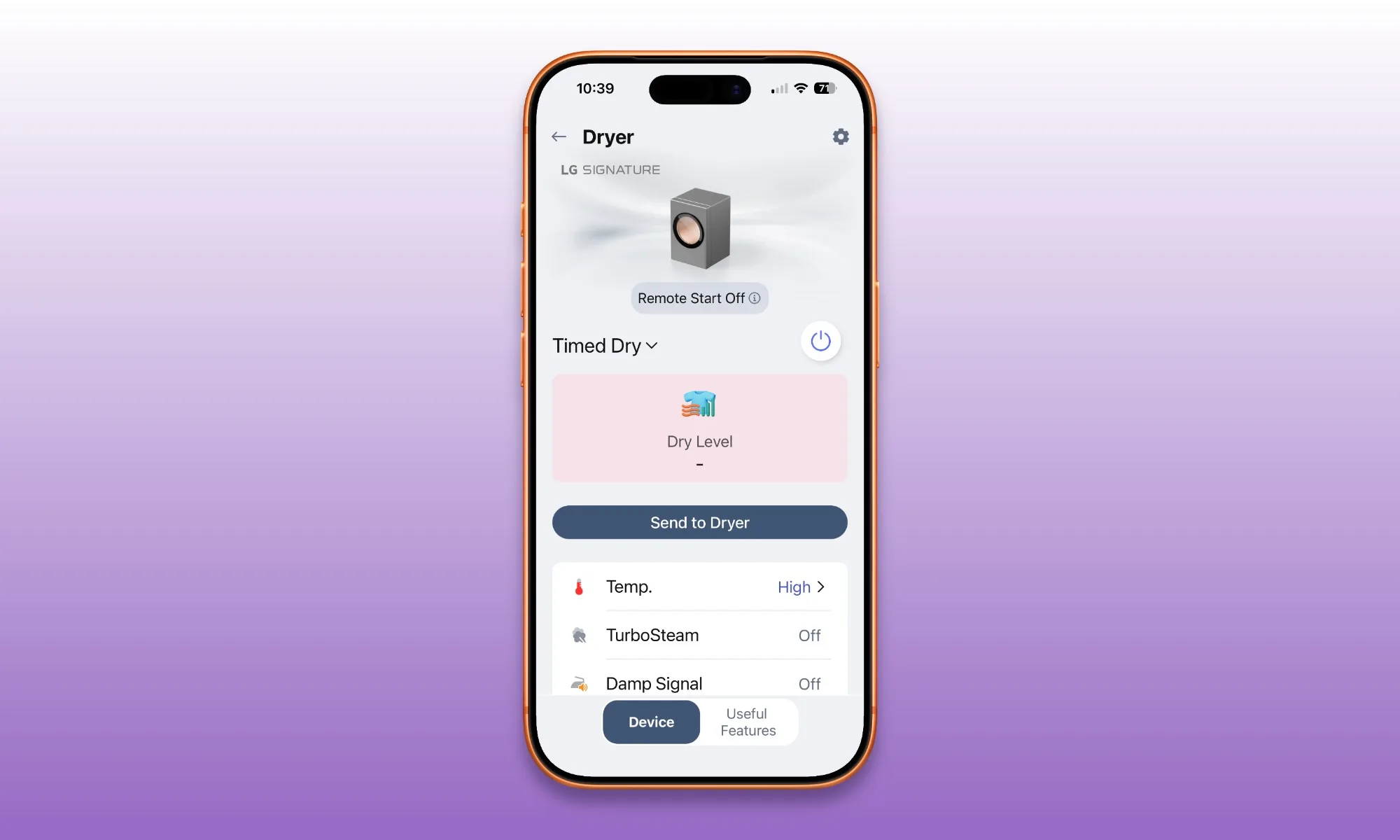
    One notable flaw remains—the remote start feature requires manual activation on the dryer every time before initiating remote control, which diminishes its usefulness. Standing at the machine, you might as well start it directly without the app.

    Maintenance is straightforward—clean the lint filter regularly, heed airflow warnings, and inspect the duct annually. The FlowSense indicator is a valuable safety feature warning of potential blockages, helping prevent fire hazards. Aside from routine cleaning, the dryer requires minimal upkeep. I appreciated the option to choose different tunes for end-of-cycle alerts, including festive options. Phone notifications are handy for reminding me when the cycle ends, and the sleep mode keeps noise and alerts quiet during night runs.

    Testing Procedure

    I used the dryer as my primary household unit for around six months, testing it with everyday loads—cottons, linens, synthetics, delicates, towels, king-size bedding, pet beds, and mixed family loads. Cycles tested included Normal, Heavy Duty, Delicates, Quick Dry, Bedding, TurboSteam, and SteamFresh while tracking sensor-dry performance across multiple normal loads. The dryer worked seamlessly with LG’s matching washer, which spins at up to 1,300 RPM.

    Competitors and Alternatives

    The main rival to the DLEX9900S is LG’s own lineup: the DLEX8900B offers a smaller 7.4 cu. ft. capacity with sensor dry and steam at a lower price but sacrifices the sleek SIGNATURE finish and larger drum. Samsung’s Bespoke DVE53BB8700 (7.6 cu. ft.) offers similar smart features and steam options at a more affordable price point, though its service network is less extensive than LG’s.

    Final Recommendation

    The LG SIGNATURE DLEX9900S is an exceptional dryer boasting a useful AI system that sometimes overestimates, but overall provides a premium experience. Its large capacity, superior craftsmanship, TurboSteam feature, minimal maintenance, and seamless pairing with the matching washer make it well worth the price of $2,099, especially when bundled with the full laundry set. Ideal for those who value aesthetics, capacity, and smart tech, it elevates laundry to a refined experience.

    FAQs

    Is a 9.0-cubic-foot dryer excessive for most homes? Probably for small households. For larger families or those who frequently wash bulky items, the oversized drum reduces loads, prevents uneven drying, and handles comforters and bedding efficiently.

    Electric vs. Gas? If your home already has a 240V outlet, the electric model is straightforward. Gas versions (DLEX9901S) tend to cost less to operate but require professional installation and are less common in newer constructions.

    Does it need venting? Yes. This is a traditional vented dryer requiring an exhaust duct outside.

    Why might sensor drying leave clothes damp? Dense or mixed loads may fool the moisture sensors, causing early cycle termination. Sorting heavier items and using the “More Dry” setting can help, but occasional damp outcomes are possible.

    How to maintain safety? Regularly clean the lint trap after each load, check the exhaust duct annually, and heed FlowSense alerts. Proper maintenance reduces fire risk and maintains optimal airflow.

  • LG SIGNATURE WM9900HSA Review: Stylish and Fun Washer

    LG SIGNATURE WM9900HSA Review: Stylish and Fun Washer

    LG SIGNATURE WM9900HSA

    MSRP $2,499.00

    “A new class of washer that unapologetically exudes premium quality with impressive features.”

    Pros

    • Generous capacity
    • Thoughtful automation features
    • Elegant design and sturdy build
    • Consistent cleaning power
    • Quiet operation without disruptions

    Cons

    • Expensive for a washer
    • Sunlight can make the display hard to read
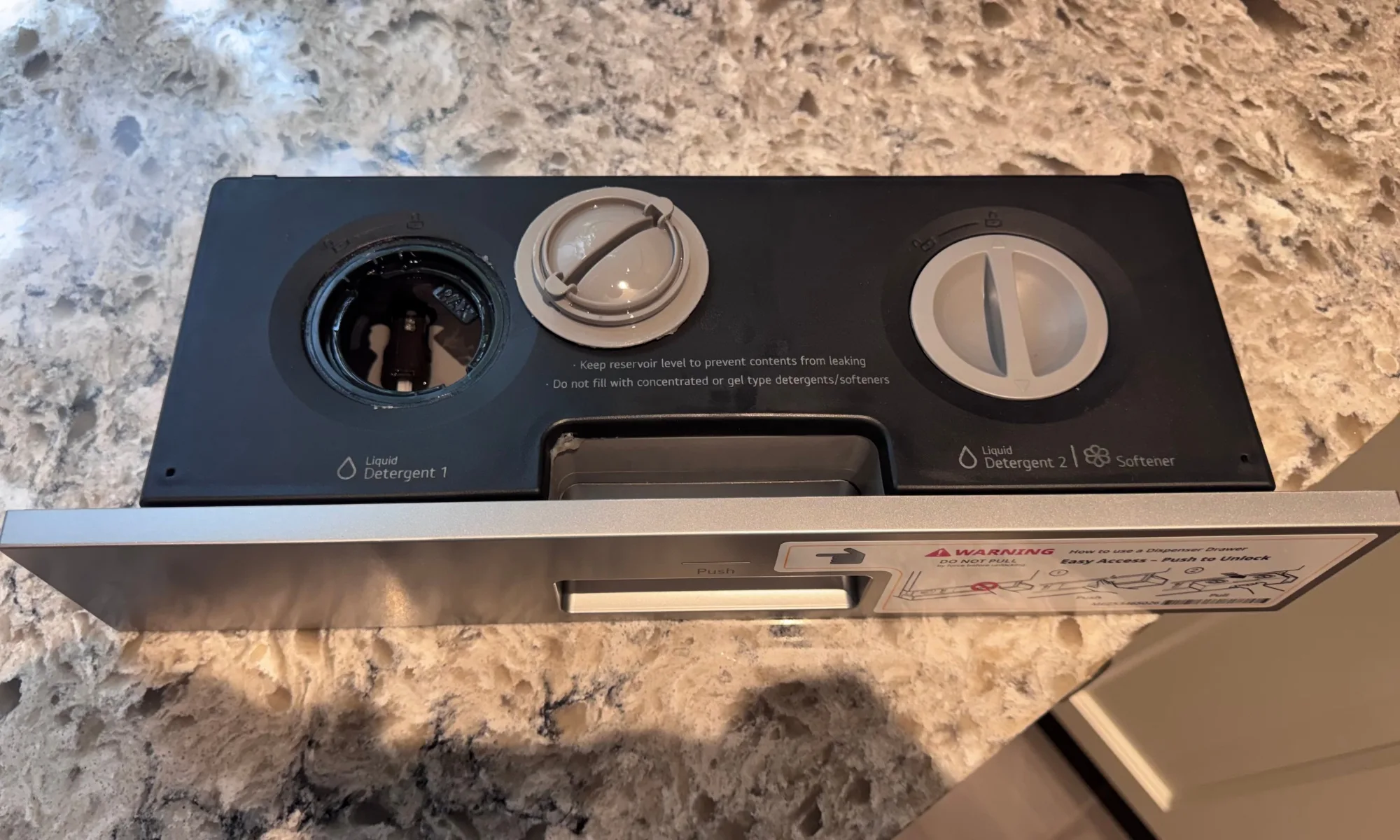
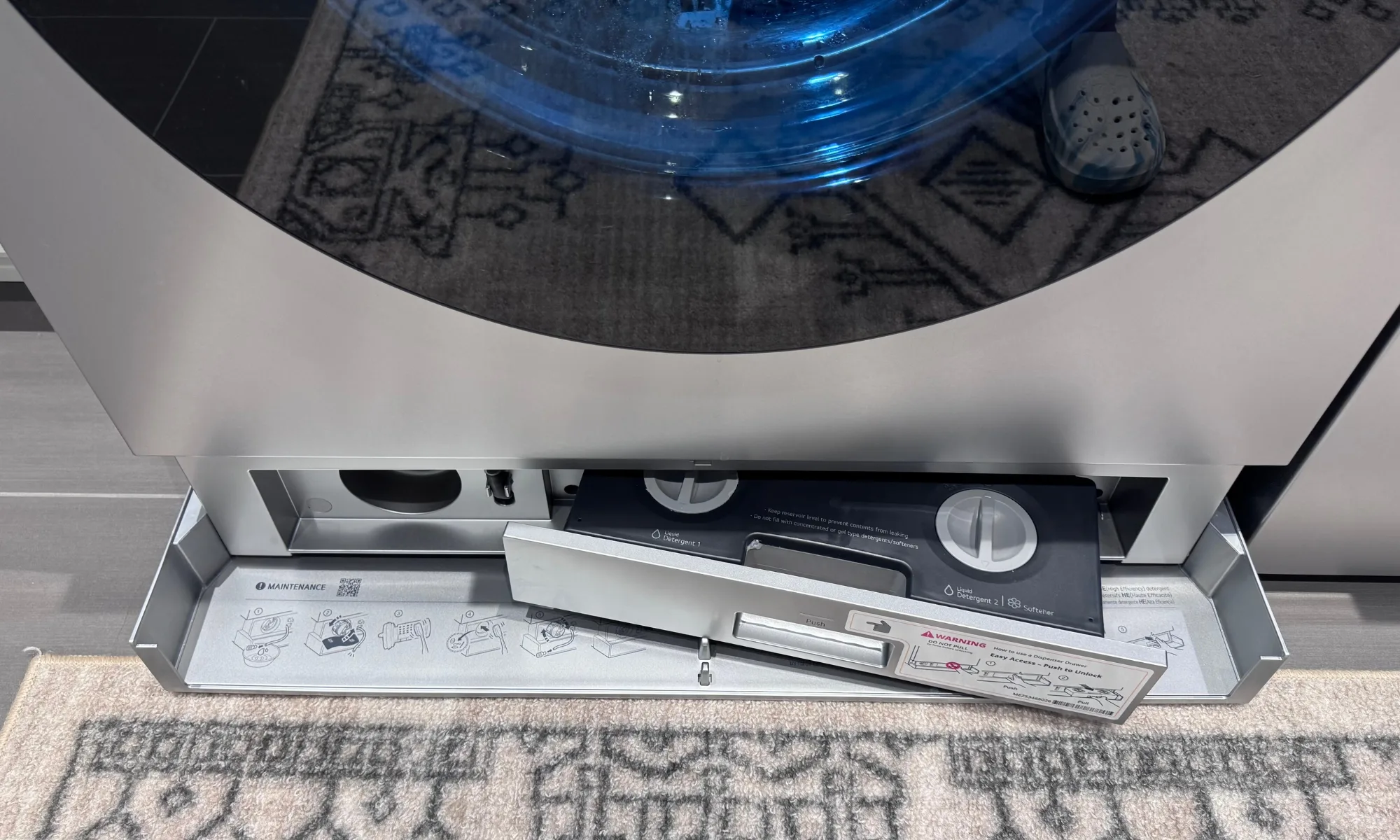
    • Low placement of the dispenser drawer can be inconvenient
    • Remote start feels unnecessary

    Quick Overview

    The LG SIGNATURE WM9900HSA is the result of LG pouring every available technology into a sleek front-load washer, combined with their signature minimalistic yet highly functional design. My kids refer to it as the Cybertruck of washers, and while that may be a bit much, it highlights its bold, futuristic aesthetic. Its 5.8-cubic-foot drum is the largest you’ll find outside of commercial laundromats. The 7-inch LCD touchscreen replaces traditional buttons, and the ezDispense system means you can go weeks without touching a detergent bottle. After testing it with the everyday laundry of my family—including towels, delicate fabrics, and heavily soiled sports clothes—the washer performs as impressively as it looks, surpassing most in the market.

    However, with a current price of $1,899 (as of July 3, 2026), down from $2,499, this is a significant investment. The touchscreen can be difficult to read in direct sunlight, the dispensing drawer’s low placement risks accidental bumps, and LG’s remote start implementation is overly cautious, making it practically useless. These aren’t dealbreakers but are important considerations before making such a purchase.

    If you desire maximum capacity, an advanced display, and a highly automated detergent system and your budget allows, the WM9900HSA is an excellent choice. Otherwise, LG’s WM6700HBA offers much of this performance at about half the price.

    LG SIGNATURE WM9900HSA Specs

    Spec Details
    Type Front-load washer
    Capacity 5.8 cu. ft.
    Max spin speed 1,300 RPM
    Wash programs 26 with 22 options
    Efficiency ENERGY STAR Most Efficient; CEE Tier 3; IMEF 3.2; IWF 2.6
    Dispenser Automatic ezDispense for detergent and softener
    Display 7-inch touchscreen LCD
    Dimensions (WxHxD) 29 x 40.75 x 31.125 inches (54.3 inches deep with door open)
    Weight 217 pounds
    Electrical 120V, 12 amps
    Finish Brushed platinum steel
    Warranty 1 year parts/labor; 10-year direct-drive motor; 10-year drum
    Price $1,899 (as of July 3, 2026)

    Prices may vary depending on region and retailer.

    Design and Construction

    This appliance commands attention with its brushed platinum steel housing, tempered-glass door with chrome rim, and nearly buttonless interface—making it feel more like a piece of modern furniture. It’s the first thing people notice, and even after months of use, I never tire of its striking appearance. The drum is crafted from LG’s NeveRust stainless steel, illuminated by an interior light, and powered by a 10-year-inverter direct-drive motor, backed by LG’s warranty.

    The interface is dominated by a 7-inch LCD touchscreen instead of traditional dials and small displays. It’s responsive, though sometimes a bit slow when swiping. Every cycle parameter, including temperature, spin speed, and soil level, is accessible within a few taps. You can customize your favorite cycles for quick access. A notable drawback is that in bright sunlight, the screen can be hard to see. For dark or windowless laundry rooms, this isn’t an issue; in bright environments, it can be challenging.

    Overall, the design feels robust and luxurious. The build quality is evident in every touchpoint, from the sturdy cabinetry to the smooth finish. Despite the advanced technology, the machine’s aesthetic remains clean and uncluttered, fitting seamlessly into a premium laundry space.

    My only real design critique revolves around the ezDispense drawer. Its low placement can lead to accidental bumps, and its fragile feel contrasts with the otherwise heavy-duty construction. While I never damaged it, caution is advised during loading and unloading.

    Measuring 29 inches wide, it exceeds the standard 27-inch width, so verifying available space beforehand is essential. It’s compatible with LG’s WDP8S pedestal, the SideKick mini washer, and can be stacked with the matching dryer using LG’s stacking kit.

    Installation and Setup

    At 217 pounds and 29 inches in width, this is a sizable unit. Installation is best handled by professionals, especially if you’re unfamiliar with plumbing connections—LG offers a concierge service to assist with setup, which I used. The typical setup involves connecting hot and cold water lines, a drain pipe, and a standard 120V outlet.

    Once installed and leveled, configuring the washer takes roughly 10 minutes. It connects to Wi-Fi via LG’s ThinQ app, guiding you through registration. The touchscreen makes initial setup straightforward, allowing you to customize cycle preferences. Filling the ezDispense reservoirs for detergent and softener is simple; a single fill suffices for roughly 20 to 36 loads, depending on load size and soil level. During my testing, I went weeks without refilling, and I prefer using fabric softener sheets, which I added manually instead of the softener dispenser.

    Cleaning Performance

    Performing at the high end of expectations for its price point, this washer consistently delivers excellent cleaning results. TurboWash 360, LG’s multidirectional spray technology, reduces full-cycle times to under 30 minutes without sacrificing cleaning quality. AI Wash, an intelligent system that automatically adjusts settings based on load size and fabric type, proved reliable in my experience, handling all kinds of loads seamlessly.

    The large 5.8-cubic-foot drum accommodates sizeable items like king-size comforters, multiple towels, and bulky rugs in a single cycle, saving time for large households. The capacity alone can free up weekends typically spent on laundry chores.

    Overall, this washer handles dirty loads with ease, maintaining consistent cleaning performance. Its efficiency features help minimize water and energy consumption, making it environmentally friendly without compromising results.

    Smart Features and the ThinQ App

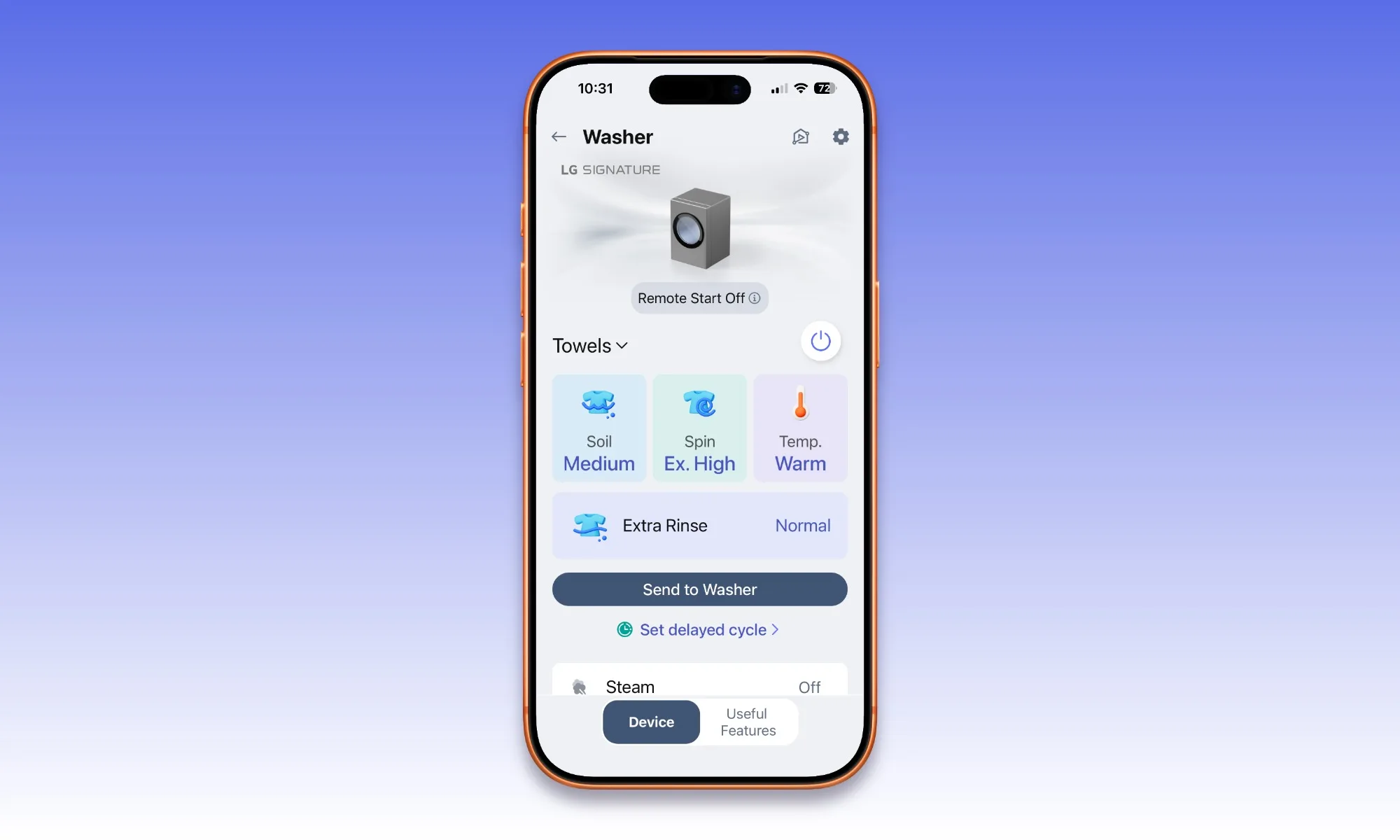
    The ThinQ app allows remote control, cycle monitoring, and setting adjustments, all reliably functioning during my use. Notifications alert you when a cycle completes, which is especially helpful if the laundry area isn’t visible from your main living space. You can create routines, download new cycle options, and the washer can communicate with the matching dryer to pre-select drying settings based on the load information. Compatibility with Google Assistant and Amazon Alexa is supported, though I haven’t had a chance to test these integrations. The app feels actively maintained, with regular updates adding features like new routines and music options.

    The biggest frustration lies in the remote start function. Due to safety concerns, you must manually enable Remote Start on the washer before the app can initiate a cycle. If you’re already standing at the machine, it’s quicker just to press start directly. LG’s approach simplifies liability but diminishes the feature’s convenience, leaving it less useful than advertised.

    Testing Methodology

    I used this washer as my household’s primary laundry machine for several months, testing various loads—including cottons, synthetics, delicates, towels, king-size bedding, and heavily soiled sportswear. I examined cycle options such as Normal, Heavy Duty, Delicates, Quick Wash, Sanitary, and Allergiene, verifying ezDispense accuracy over multiple loads. The machine was paired with the LG DLEX9900S dryer, and LG handled the installation for me—standard plumbing and electrical requirements apply.

    Comparable Alternatives

    LG’s own WM6700HBA, with a 5.0-cubic-foot capacity and TurboWash 360, offers much of the same functionality at roughly half the cost but lacks the SIGNATURE finish and extra drum space. Samsung’s Bespoke WF53BB8900 (5.3 cu. ft.) adds AI OptiWash and auto-dispense but trails LG in network reliability. Electrolux’s ELFW7637AT (4.5 cu. ft.) remains popular for cleaning performance at a significantly lower price—though it sacrifices capacity and smart features.

    Is the LG SIGNATURE WM9900HSA Right for You?

    At $1,899, it’s a premium investment. The design, features, and performance justify the cost for those who want a state-of-the-art laundry setup and have the space to accommodate its size. Its smart capabilities and large capacity make it ideal for big households and tech enthusiasts. However, its sunlight-sensitive display, fragile dispenser drawer, and cautious remote start may be dealbreakers for some. For those seeking a high-end, feature-rich front-loader with an exceptional aesthetic, the WM9900HSA stands out as the top contender.

    Overall Score: 8.5/10

    Frequently Asked Questions

    Is 5.8 cubic feet larger than I need? For singles or couples, probably yes. A 4.5 cu. ft. machine would suffice. For larger families or those washing king-sized bedding regularly, the extra capacity reduces the number of loads.

    Will it fit in my space? With a width of 29 inches, it’s 2 inches wider than a standard 27-inch washer. Ensure your space and doorways can accommodate this size before purchasing.

    How do I prevent mold and odors? Leave the door and dispenser slightly open between loads, dry the door gasket after washing, use only HE detergents with correct dosing (ezDispense manages this automatically), and periodically run the Tub Clean cycle when prompted. Using a magnet on the door to keep it ajar can also help prevent buildup.

    Does ezDispense require special detergent? No, any HE liquid detergent or fabric softener works. One refill can last between 20 to 36 loads, depending on load size and soil level.

    Can it be stacked with the dryer? Yes, it supports LG’s matching DLEX9900S (electric) or DLGX9901S (gas) dryers using the appropriate stacking kit, or you can place it on a compatible pedestal.

  • GEME Terra 2 Review Can It Reduce Kitchen Waste

    GEME Terra 2 Review Can It Reduce Kitchen Waste

    GEME Terra 2

    MSRP $549.00

    “The GEME Terra 2 makes composting feel accessible and meaningful, even if it isn’t quite as odor-free as claimed.”

    Pros

    • Easy setup and straightforward operation
    • Can handle a variety of food waste, including meat and dairy
    • Produces genuine, usable compost
    • Allows continuous feeding
    • Contributes significantly to household food waste reduction

    Cons

    • Notable odor during decomposition stages
    • Food needs to be chopped into small pieces
    • May fill quickly in larger households
    • Occasional error messages if overloaded

    For households aiming to cut down on food waste, indoor composters offer an attractive solution: transforming kitchen scraps into useful compost without the hassle of outdoor bins.

    The GEME Terra 2 positions itself as a next-generation composting device capable of managing common kitchen waste—such as meat, dairy, and oily foods—that often challenge other systems.

    The company’s guiding principle is simple: “If you can eat it, GEME can handle it.” In practice, however, some waste types perform better than others.

    Unlike many food waste systems that merely dry and grind scraps into pulp, the Terra 2 uses true microbial decomposition, speeding up natural composting with controlled heat, moisture, and airflow.

    This isn’t a compact countertop gadget—it’s closer to a full-sized kitchen trash can and needs dedicated floor space.

    Accepted inputs include fruit and vegetable peels, cooked leftovers, coffee grounds, eggshells, and plant matter. Plastics, metals, large bones, and excessive grease should be avoided.

    For a family of five, this feature stood out. We generate a surprising amount of kitchen waste, and knowing those scraps were being turned into useful compost instead of trash felt rewarding.

    After weeks of testing, the system was able to produce real compost, though with some caveats.

    Verdict: The GEME Terra 2 makes composting approachable and truly satisfying, especially for families, but odor issues and limited capacity might make it better suited for smaller households or well-ventilated spaces.

    GEME Terra 2 Specs

    • Dimensions: 11.7″ x 17.2″ x 22.3″
    • Capacity: 14 liters
    • Daily processing: About 1kg (up to 3kg with lighter use)
    • Weight: 28 lbs (13 kg)
    • Power: 110V / Max 0.43 kWh
    • Composting method: Microbial aerobic fermentation
    • Feeding style: Continuous
    • Initial decomposition: 6-8 hours (full composting takes longer)
    • Odor control: Metal oxidation deodorization and UV system
    • Output: Acceptable for gardening or houseplants

    Design

    Quick take: Practical and larger than expected

    The Terra 2 ships in a single box and is simple to set up—just plug it in, add starter compost, and it’s ready to process waste. It’s about the size of a kitchen trash can, so it needs dedicated floor space rather than sitting on a countertop. We placed ours just outside our front door to improve airflow and odor management. The design emphasizes function over aesthetics; once in position, it blends into the background as a utility appliance.

    Score: 8.5/10

    Performance

    Quick take: Produces genuine compost but demands attention

    The Terra 2 fulfills its primary promise by turning food scraps into usable compost. We used the finished product for repotting houseplants, and they responded positively—plants looked healthier after being transplanted into the compost. The key is preparation; scraps need to be cut into pieces approximately one inch or smaller for optimal results. This required some household education. In a family of five, the volume of scraps can be substantial, and while the system is marketed to handle up to 3 kg daily, sticking closer to 1 kg ensures consistent performance. Overloading prompts error messages like E32, requiring manual intervention. Although decomposition begins within hours, converting waste to fully usable compost takes time—greater than typical recyclers, but the result is more natural and enriched soil.

    Score: 7/10

    Ease of Use

    Quick take: Simple operation after initial setup

    Using the Terra 2 daily is straightforward once familiar with the process. Food scraps can be added continuously, and finished compost is scooped out periodically. Larger, undecomposed pieces can be returned for further breakdown, similar to traditional composting. The main adjustment involves consistently chopping scraps to about an inch or smaller. It performs best when inputs are spaced out and kept below the fill line—overloading or adding very moist waste can slow the breakdown or cause errors. Once the system is accustomed to this routine, maintenance becomes quite manageable.

    Score: 8/10

    Noise & Odor

    Quick take: Quiet operation but noticeable smell

    The Terra 2 operates with a gentle hum, quiet enough for most spaces. However, odor was our biggest concern—despite claims of minimal smell, a sour, rotten smell often emerged during initial decomposition, especially when fresh scraps were added. After a few days, the smell generally improved, but for our household, this made indoor placement problematic. The system includes deodorization and UV treatment, but it doesn’t fully eliminate odors during the early stages of composting, which is a natural limitation with real decomposition. Placement outdoors was ultimately necessary in our case.

    Score: 6/10

    Durability & Maintenance

    The GEME Terra 2 functions like a small compost bin, with periodic maintenance needed—mainly, removing finished compost and returning larger chunks for further processing. The build quality is robust, evidently designed for long-term, consistent use. Adhering to input guidelines ensures reliability. The device includes a one-year limited warranty, shorter than some competitors, but ongoing longevity will depend on routine maintenance—including moisture adjustments and microbial starters like GEME Kobold. It’s built for continuous operation, entering power-saving mode when idle, and relies on active microbes, which require periodic care.

    Score: 7.5/10

    Comparison with Other Indoor Composters

    The Terra 2 distinguishes itself by performing true composting rather than just drying and grinding. Many alternatives produce a pulp that still needs further processing, whereas this system yields a natural soil amendment—though with some odor and slower results. For users seeking authentic composting, this is a vital difference.

    Alternatives to Consider

    Mid-Range Option: Lomi Kitchen Composter

    • Typically costs between $500 and $700
    • Faster processing—just a few hours
    • Lower odor risk due to filtration system
    • Produces dried material, not real compost

    Good for those prioritizing speed and convenience over authentic compost production. Less expensive than premium systems but still a notable purchase.

    More Affordable: Vitamix FoodCycler

    • Usually around $300–$400
    • Compact and quiet
    • Minimal maintenance required
    • Does not produce true compost

    Ideal for smaller households seeking an easy, low-cost option for waste reduction without managing active composting.

    High-End: Mill Food Recycler

    • Price around $999
    • Subscription service (~$33/month) for waste pickup
    • Almost odorless operation
    • Produces dried material for external processing, not compost

    The Mill provides a seamlessly hands-off experience but at a significantly higher price and without at-home composting benefits.

    Traditional Outdoor Compost Bin

    • Cost often falls between $50 and $200
    • Handles large waste volumes easily
    • No electricity needed
    • Requires outdoor space and ongoing maintenance

    Still the best choice for households with yards and substantial waste output.

    Testing Overview

    I used the GEME Terra 2 at the start of the year in a family of five, with a straightforward setup—delivered in one box, ready after adding starter compost. I added a variety of kitchen scraps, including vegetable peels, leftovers, coffee grounds, and eggshells. Regular removal of finished compost allowed us to see and use the results directly, primarily for repotting plants. The family’s high waste volume made for an authentic test of the system’s capabilities.

    Should You Invest in the GEME Terra 2?

    • Consider purchasing if:
    • You want to reduce household food waste
    • You enjoy gardening or caring for houseplants
    • You lack outdoor space for composting
    • You’re comfortable managing a composting process
    • Skip if:
    • You need a completely odor-free device
    • You produce large amounts of food waste daily
    • You desire instant results with minimal prep

    The Terra 2 provides a genuine way to turn food waste into useful compost at home, making it a meaningful addition for households motivated to reduce waste and embrace eco-friendly practices.

  • Halsey Criticizes Fantano for Harsh Album Review

    Halsey Criticizes Fantano for Harsh Album Review

    Digital Phablet – Recently, American singer-songwriter Halsey took to social media to criticize YouTuber and music critic Anthony Fantano after he gave a notably harsh review of her 2024 album, The Great Impersonator. The discussion reignited on X (formerly known as Twitter) when Fantano responded to a post referencing his interview about the album.

    A user named “NotRealMusic” shared their thoughts, writing, “I didn’t agree with some of Fantano’s approach to his review of Halsey’s album, but I can’t understand why this is still being discussed all this time later. It’s not like it’s some masterpiece… how are people still stuck on it?”

    Halsey Criticizes Music Critic Fantano Over Critical Album Review

    In the exchange, Fantano replied, “If they’re more into the review than the album 🤭.” This prompted Halsey to reply, “I’m pretty sure my least memorable song will be remembered more fondly and for a longer time than anything you’ll ever accomplish in your life. Everything you say comes off as more ‘whiny’ and ‘edgy’ than anything I expressed on that album. At least I had the excuse of going through chemo.”

    Her response underscores the challenges she faced during the album’s creation. At the time, Halsey was publicly undergoing cancer treatment and managing serious health issues, which significantly influenced the songwriting.

    Fantano, for his part, rated the album a “light to decent 1,” describing its songs as exhibiting “main character syndrome.”

  • Eight Sleep Pod Review: Can Better Sleep Improve Life

    Eight Sleep Pod Review: Can Better Sleep Improve Life

    Eight Sleep Pod

    MSRP $2,395.00

    “The Eight Sleep Pod has genuinely improved my sleep quality, making a noticeable difference in my daily energy.”

    Advantages

    • Immediate improvements in sleep from the very first night
    • Compatible with your current mattress
    • Automatically adjusts temperature throughout the night
    • Provides detailed, actionable sleep insights
    • Dual-zone temperature control for couples

    Disadvantages

    • High initial cost
    • Requires subscription for advanced features and Autopilot
    • Built-in alarm speaker may wake both partners
    • Enhances sleep but doesn’t resolve all issues

    Quick Overview

    If you often wake up overheated or get out of bed feeling groggy despite a full night’s sleep, the Eight Sleep Pod could be a game-changer. It promises measurable, performance-driven sleep enhancements.

    More than just a cooling mattress topper, the Pod is a comprehensive sleep system that dynamically manages body temperature and tracks biometrics to enhance rest gradually, taking the guesswork out of sleep optimization.

    The system integrates with your existing mattress via water-based thermal technology, allowing independent heating or cooling on each side. This feature is especially beneficial for couples with differing sleep temperature preferences.

    The accompanying app offers a daily sleep score along with metrics such as heart rate, HRV, respiratory rate, and sleep stages. It even features a gentle vibration alarm to replace typical wake-up sounds.

    The price, starting just under $2,400 plus a subscription for advanced analytics and temperature adjustments, is a significant investment. However, it stands apart from traditional cooling pads or mattress toppers by offering much more.

    In real-world testing, the effects were immediate. From the first night, I experienced fewer tosses and turns, fewer awakenings, and felt more energized during the day. I even found myself waking up in the same position I fell asleep in—something rare before.

    Once installed, the system seamlessly fades into the background. It simply functions.

    Pod Specifications

    Temperature Range Approximately 55°F – 110°F
    Zones Dual zone (independent control left/right)
    Compatibility Works with most mattresses
    Data Tracking Sleep stages, heart rate, HRV, respiratory rate
    Connectivity Wi-Fi and mobile app
    Subscription Required for advanced features and Autopilot

    Design & Setup: Keeps a Low Profile

    Summary: Minimalist design, nearly invisible when in place

    The Pod Cover fits snugly over your mattress like a fitted sheet, maintaining the overall feel of your bed. It’s not bulky or stiff like some cooling pads, offering a subtle and unobtrusive experience.

    The Hub is positioned beside or underneath the bed and operates quietly — so quiet in fact that it quickly becomes white noise. Once set up, it remains discreet and well-engineered.

    Rating: 9/10

    Performance & Effectiveness: It Delivers Results

    Summary: Noticeable impact from night one, with continual improvements

    Temperature adjustments occur automatically, preventing overheating and reducing wake-ups. The bed proactively maintains ideal conditions rather than reacting to discomfort.

    Automatic temperature regulation helps reduce tossing and turning, leading to deeper, more restful sleep. Many reports indicate clearer, more consistent sleep quality and waking up refreshed.

    Sleep scores from Garmin climbed from inconsistent 50s–70s into the high 80s, with rare instances hitting 100. While perfect sleep nightly isn’t guaranteed, the reliability and consistent improvement are significant.

    Particularly for hot sleepers, Eight Sleep offers a compelling advantage over competitors.

    Score: 10/10

    App & Data Analysis: Insightful & Motivating

    Summary: Clear, detailed, and practical data presentation

    The app delivers nightly sleep scores, trend analyses, and biometric data that are easy to interpret and motivate ongoing improvements. It avoids information overload while providing meaningful insights.

    The app clearly presents sleep scores, trends, and biometric insights that are both informative and encourage healthier sleep patterns. It’s designed to feel approachable, not overwhelming.

    Score: 9/10

    Ease of Use: Set It and Forget It

    Summary: Simple setup, minimal ongoing interaction

    Initial setup takes about 30-45 minutes, involving unpacking, calibration, and water filling, all guided by the app. After setup, daily use is almost invisible, especially with Autopilot engaged. Minor adjustments like alarms and schedules are straightforward.

    Once configured, daily operations are straightforward. Adjustments like alarm timing and temperature schedules are simple, with minimal effort required.

    However, the built-in alarm’s volume can wake your partner if they’re sleeping in or waking earlier.

    Rating: 8.5/10

    Durability & Warranty: Ensuring Longevity

    Eight Sleep offers a two-year limited warranty covering manufacturing defects for the Pod Cover, Hub, and internal parts. While this is typical for smart sleep tech, some may find it conservative given the investment and system complexity.

    Built with quality in mind, the cover features reinforced seams and a premium feel, while the Hub remains sturdy and vibration-free. As a water-based system, careful initial setup and maintenance are vital; leaks and tubing durability have improved significantly over earlier versions, maintaining high reliability. It’s not a “set-it-and-forget-it” product like a traditional mattress topper, but its software updates and algorithm refinements ensure ongoing performance and longevity.

    Final Verdict: Is the Eight Sleep Pod Right for You?

    My experience shows that the Eight Sleep Pod genuinely elevates sleep quality and daily performance. While the cost is high, it’s a worthwhile investment for those who see sleep as a vital part of peak performance.

    If persistent sleep difficulties remain despite standard remedies like dark curtains, adjusting the thermostat, or sleep masks, the Eight Sleep Pod may be a worthwhile investment. While costly, the improvements in sleep quality can be significant for performance-oriented sleepers, though results may not be life-changing for everyone.

    Comparison with Alternatives

    Designated as a performance sleep system, Eight Sleep offers faster, quieter temperature adjustments, more precise tracking sensors, enhanced app interface, and smarter algorithms compared to earlier models.

    Are There Better Options?

    This depends on priorities. For comprehensive biometric tracking and automated optimization, Eight Sleep is top. For simple cooling without data, more affordable options exist.

    Other Options to Consider

    ChiliPad OOLER

    • Similar price point (~$2,499 for queen)
    • Strong cooling performance
    • Limited sleep tracking capabilities

    A solid choice if cooling is your primary goal and detailed tracking isn’t necessary.

    Sleep Number Climate360

    • Complete, integrated smart mattress
    • Much higher cost
    • Less adaptable if you prefer your current mattress

    Ideal for those replacing their entire setup and willing to invest heavily.

    BedJet

    • Air-based cooling system
    • No biometric tracking
    • More noticeable airflow
    • Lower price (~$1,549)

    Budget-friendly cooling option but lacks the seamless integration and data capabilities of Eight Sleep.

    Best For:

    • You sleep hot or struggle with temperature regulation
    • Sleep quality impacts your performance, mood, or workouts
    • You value detailed health data and optimization
    • You and your partner need independent temperature zones

    Best To Skip:

    • On a tight budget
    • You’re not interested in sleep data
    • Temperature isn’t a sleep concern for you

    If traditional remedies like blackout curtains, adjusting the thermostat, or sleep masks haven’t worked, investing in this system could be worthwhile. Although the sleep improvements are meaningful, they aren’t drastically transformative for everyone. Still, for those focused on high performance, it offers genuine value.

    Frequently Asked Questions

    Does Eight Sleep truly improve sleep?
    Most users notice immediate improvements in comfort, consistency, and reductions in wake-ups, leading to better focus, energy, and mood.

    Is it worth the cost?
    If sleep issues hinder your daily performance and other methods have failed, the system’s benefits justify the expense. For minor issues, it may seem costly.

    Is it compatible with any mattress?
    Most mattresses are compatible without affecting the feel significantly.

    Is a subscription necessary?
    Basic functions work without one. Advanced features like Autopilot and detailed analytics require a paid subscription, enabling automatic temperature adjustments based on your sleep cycle.

    Testing Methodology

    I used the Eight Sleep Pod nightly on my king-size bed for over a month. Results were clear from the start: noticeable jumps in sleep quality, with my Garmin sleep score moving from the 50s–70s to the high 80s, and in some cases reaching 100. Alongside subjective improvements—less tossing, fewer awakenings, and more consistent energy—the system’s automatic temperature regulation played a significant role. Adjustments to alarms and schedules were minimal, with the system handling most settings seamlessly.

  • Aiper Scuba V3 Review: Smart Pool Robot

    Aiper Scuba V3 Review: Smart Pool Robot

    Aiper Scuba V3

    MSRP $949.99

    Expected Release February 2026

    “The Scuba V3 surpasses expectations with exceptional performance and value”

    Advantages

    • Lightweight design
    • Effective cleaning
    • User-friendly app interface

    Disadvantages

    • Cannot clean the water surface
    • Average battery life

    Quick Overview

    Owning a pool is a lot like owning a boat—most of your time goes into maintenance and cleaning, especially in places like Oregon. Over the years, robotic pool cleaners have evolved from capricious, tangled devices to reliable tools, with AI technology making leaps and bounds. Priced at $1,199 MSRP (currently around $970 in the market), the Aiper Scuba V3 targets those looking for a premium, AI-assisted cleaner that combines sophisticated navigation with a sleek design, rather than being the cheapest option available.

    For 2026, the Scuba V3 introduces new AI features and better value, though it curtails some tech features to keep costs down. Positioned between the $899.99 Scuba X1 and the $1,699 Scuba X1 Pro Max, it offers advanced AI capabilities for just $70 more than the X1, making it an attractive choice. It’s equipped with AI Vision and dToF sensors, giving it a more methodical approach, reducing random bouncing around the pool.

    My experience with the V3 proved it to be a dependable, durable device with impressive battery longevity. If you already have an older, functioning pool cleaner, it might not be worth upgrading. However, if you’re shopping around, investing in a more advanced system like this, paired with the EcoSurfer S2 skimmer, will keep your pool sparkling with minimal effort.

    Specs and Measurements

    Here’s how the Scuba V3 compares:

    Size (L x W x H) 17.48 x 14.96 x 8.58 in
    Weight (Dry) 18.1 lbs
    Suction Capacity 4,800 GPH
    Filtration 3-micron MicroMesh™ Multi-layer
    Debris Container Capacity 3.5 Liters
    Battery Capacity 149.76 Wh (Lithium-ion)
    Run Time Up to 150 minutes
    Charge Time 5 hours with wireless dock
    Navigation Tech AI Patrol, dToF, VisionPath™
    Drive System Tank treads with dual brushes
    Cleaning Coverage Floor, Walls, Waterline (JetAssist™)

    Design and Portability

    The V3 moves via tank treads, similar to other pool cleaners. Its body features a sleek, high-quality black finish with light blue accents, signaling a focus on value rather than luxury. It’s noticeably smaller and lighter than bigger models like the X1 or X1 Pro Max. At just under 20 pounds when dry, it’s easily portable—most people won’t need a cart to move it around, though Aiper offers a caddy for convenience.

    The tank treads perform well on walls, and the device adheres firmly to vertical surfaces despite a moderate suction level. Beneath, four scrubbing brushes (two front, two back) loosen algae and debris before suction takes over, funneling trash into a redesigned 3.5-liter mesh filter basket.

    The build quality feels premium: durable plastics, solid moving parts, and no flimsy latches. Unlike some models, it employs extra screws and reinforcement in manufacturing, indicating a focus on longevity and durability. The entire structure feels rugged enough to withstand several seasons of outdoor use.

    The Aiper Scuba V3 demonstrates thoughtful engineering and rugged durability.

    Wall Climbing & Waterline Cleaning

    The V3 handles vertical walls with ease and innovatively walks the waterline using JetAssist™ — a directed jet of water that pushes it horizontally along the tile, scrubbing the scum line vigorously. During testing, it cleaned about an inch higher than the waterline, reaching around the brick surround at the pool’s edge.

    It appears to defy gravity while doing so.

    While effective at cleaning, the V3 occasionally struggles with stairs, managing the first step easily but having issues on the second. Manual cleaning remains necessary for thorough results in those areas. In terms of power, it’s moderate—less suction than premium models but sufficient for regular cleaning needs.

    • Aiper Scuba X1 Pro Max: 8,500 GPH
    • Aiper Scuba S1 Pro: 6,000 GPH
    • Beatbot Aquasense Pro: 5,500 GPH
    • Aiper Scuba V3: 4,800 GPH
    • Dolphin Nautilus CC Plus: 4,500 GPH

    Smart App & Connectivity

    The Aiper app is straightforward and intuitive, allowing quick setup and control. Pairing involves Bluetooth activation, followed by Wi-Fi setup—getting onboarded is simple, scoring a 9/10 for ease of use. It offers features like AI-generated weekly cleaning plans, weather and history sync, and integrated navigation using AI vision plus dToF sensors.

    The system supports multiple yard profiles, scheduling devices accordingly. The ecosystem promotes automation but may seem excessive for casual users. Also, note that water immersion cuts Wi-Fi connection unless you invest in a special extender like the Aiper HydroComm, adding a significant cost. Without it, you’ll need to manually retrieve the robot post-cleaning.

    Surface Skimming & Additional Features

    The V3 doesn’t include a dedicated surface skimmer, which might matter for some. For floating debris, I recommend pairing it with a standalone skimmer like the EcoSurfer S2, which uses solar power for continuous operation, preventing surface debris buildup proactively. Aiper offers bundle deals on both units, saving approximately a hundred dollars—a smart investment for comprehensive coverage.

    For smaller or less debris-prone pools, the combination of bottom and wall cleaning may suffice without additional surface skimming. If you want a device that handles all surfaces, ensure you pick a model with long enough battery life for surface cleaning tasks.

    Battery Duration & Charging

    In real-world usage, a full charge delivers between 140 and 150 minutes of continuous operation—a solid runtime for typical residential pools. It completes cleaning the floor, walls, and waterline, leaving about 30 minutes of reserve, enough for errands or manual retrieval. The wireless charging dock simplifies recharging, spending about 5 hours to reach a full charge, which is standard in its class.

    Durability & Support

    The V3 features an impact-resistant, UV-protected outer shell and sturdy tank treads that hold up well after extensive use. Internally, sealed brushless motors prevent water ingress, and the wireless dock removes common failure points. Aiper provides a two-year warranty, with excellent customer support, available 24/7. Firmware updates through the app improve navigation algorithms over time, extending the lifespan and functionality of your device.

    Note that I only tested the V3 for a month; longer-term reliability remains to be seen. Checking customer reviews on major sites may provide additional insights into its durability over time.

    Final Thoughts: Should You Buy the Aiper Scuba V3?

    If you’re shopping for a new robotic pool cleaner, I highly recommend considering the V3 along with the EcoSurfer S2. The combination ensures a clean pool inside and out, with the V3’s advanced navigation and app features providing excellent value. It’s a well-built device from a reputable company, offering good performance at a competitive price point.

    Testing Methodology

    During the two-week evaluation, I used the V3 exclusively to clean my 15,000-gallon, in-ground plaster pool in a windy environment with heavy debris. I subjected it to high-load scenarios by adding soil, sand, and leaves, alongside standard dust and insects. I monitored the AI Patrol’s ability to recognize and target debris, measured battery life from start to the activation of the waterline parking feature, and assessed navigation efficiency. The wireless dock’s ease of use and consistent charging were also evaluated in outdoor conditions.

  • Anker Solix E10 Home Backup Review Power For Your Life

    Anker Solix E10 Home Backup Review Power For Your Life

    Anker Solix E10

    Manufacturer’s Suggested Retail Price $5,799.00

    “A modular approach to backup power that actually adapts to how people live, not just system specifications.”

    Pros

    • Highly expandable system: add batteries, circuits, or parallel setups.
    • Smooth transition during outages.
    • Handles power surges from air conditioning units or well pumps.
    • Operates without internet after initial setup, using Bluetooth for local control.

    Cons

    • A custom natural gas hose is needed for the Smart Generator 5500.
    • App interface has a slight learning curve for setup.
    • 130-pound battery modules require some effort to install.

    Instant Perspective: Reliable Power, No Interruptions

    Whole-house backup power sounds ideal, especially in my rural setting. Our outages are frequent and serious—here, when the power fails, so does water, because we rely on well water. No water for toilets, cleaning, or drinking. That’s what prompted me to try the Anker SOLIX E10 Whole-Home Backup System. This is not a test setup; it’s installed and actively used in my home.

    Traditional generators from well-known brands like Generac are powerful but costly. Latest options like Tesla Powerwall tend to be complex and pricey too. The Anker SOLIX E10 offers a flexible, scalable alternative that challenges conventional home backup methods—all at a more manageable price point.

    The overall cost—including parts and installation—beats competitors while providing up to 37.2 kW of surge power. But specifications alone reveal little about how reliable it truly feels in a real outage when your home must continue operating seamlessly.

    My main concern wasn’t just about protecting the house; it was about solving my water outage issue during power failures. What I found is that Anker didn’t just develop a battery—they built an intelligent, hybrid-style system. It’s not about being the cheapest; it’s about matching your home’s needs and offering future expansion options. The most significant takeaway from my experience is how natural it feels—the house keeps running, even when the power grid is down.

    Specifications for the Anker Solix E10

    Size (Inverter) 26.4 x 11.8 x 10.2 inches
    Weight 60.6 pounds (Inverter), 130 pounds (Battery Modules)
    Battery Storage 6,144Wh each (Two modules total ~12kWh)
    Circuit Management Power Dock supports up to 12 circuits
    Generator Fuel Types Natural gas, propane, gasoline
    Normal Power Output 7,680W (single unit)
    Turbo Power 10,000W (for 90 minutes per unit)
    Switchover Speed Less than 20 milliseconds
    Price E10 setup (power module + batteries): $5,799
    Battery Module (B6000): $3,299
    Smart Generator 5500 (Tri-Fuel): $2,899
    Power Dock: $1,999

    Design & Expansion: Built for Growth

    The system centers around the Power Dock, which hooks into your existing electrical panel and manages up to 12 circuits—more if needed. In my case, I kept some circuits free for future additions like office outlets or gate power. I added a power module linked to two battery units, each storing 6,144Wh, totaling roughly 12kWh.

    The standout feature is its scalability. You aren’t locked into your initial setup. Need more capacity for a pool or electric vehicle? Add extra batteries. Want to expand the circuit capacity? You can include additional subpanels easily.

    Adding capacity or circuits is straightforward with available expansion options—making it flexible as your needs evolve without costly reconfigurations.

    Installation is simple enough for a licensed electrician—no proprietary technicians required. That said, having someone familiar with Anker’s systems can save you time and effort, especially given the technology’s novelty.

    I tested the system by manually activating the “Go Off-Grid” mode, mimicking a total power failure. The entire home remained unaffected—no flickering lights, no Wi-Fi disconnect, no reset of clocks. It simply kept working seamlessly.

    During the first few weeks, I monitored battery levels, load demands, and charging times via the app. I also deliberately pushed the system with heavy loads like well pumps and multiple appliances to see how it managed the demand and battery drain. Additionally, I tested the system’s resilience when Wi-Fi was disabled, relying solely on Bluetooth within the home, and confirmed remote access through the internet remained functional when available.

    One unexpected discovery was that a power outage of just six minutes went unnoticed in the house—testament to how seamlessly the system handles disruptions, with no drama or noticeable interruptions.

    To challenge the hardware, I ran heavy appliances— well pump, water heater, home offices, and filtration systems—simultaneously. Despite this demanding load, the system maintained excellent efficiency, averaging around 46W idle consumption and about 200W from the battery heater in cold weather, which is designed to protect the cells.

    Score: 10/10

    App & Connectivity: Local Control & Remote Access

    The accompanying app offers a clean, intuitive interface. It’s straightforward to see energy flows, configure circuits, set priorities, and control the generator, making system management accessible even for non-technical users.

    Although initial setup involves some learning, especially in configuring battery charging schedules within the Energy Usage Mode, the system’s flexibility is impressive. I mainly used the Time-of-Use mode, which allows scheduling to minimize costs—charging at night during off-peak hours—especially useful without solar panels.

    While setup requires Wi-Fi for firmware updates, after that, the system runs independently. Bluetooth control is available within close range, and remote access is possible if your home maintains internet connectivity.

    My biggest concern was system functionality during internet outages. I verified that control and monitoring still worked via Bluetooth and that the system continued operation without issues—key for emergency preparedness.

    Score: 9/10

    Smart Generator 5500: The Versatile Power Extender

    Long-term outages exhaust battery reserves. The Smart Generator 5500 adds valuable security. Being a tri-fuel generator—gas, propane, natural gas—it provides essential backup flexibility without locking you into a single fuel source.

    The real advantage is its automation: it normally stays off but starts automatically when needed and shuts down when not. It connects directly to the batteries for efficient DC charging, reducing typical energy conversion losses. While it functions as a traditional generator when necessary, its smarter operation makes it feel more like a managed energy device.

    This generator can be configured via the app with different modes, such as Turbo for rapid response during spikes, Eco for fuel efficiency and noise reduction, and Quiet for ultra-low noise operation. Starting remotely from the app is a handy feature—no need to physically go outside to start or stop it, although manual operation remains an option.

    Simulated Outage: Hybrid Power Cycle

    Time Battery Level Power Source Demand Generator Status
    8:00 AM 100% Battery High (Well Pump/Furnace) OFF
    2:00 PM 70% Battery + Solar Medium (Offices/Networking) OFF
    7:00 PM 35% Battery High (Water Heater/Fridge) OFF
    10:00 PM 15% Generator Low (Sleep Mode) ON (Auto Start)
    12:00 AM 85% Battery Low Off (Auto Stop)

    Score: 9.5/10

    Build Quality & Warranty

    The components are housed in weatherproof NEMA 4 (IP66) enclosures, suitable for outdoor installation across extreme climates. The heavy battery modules lock securely and withstand environmental stresses. Anker offers a 5-year warranty, and the EV-grade LFP batteries are rated for over 3,000 cycles, providing a lifespan of more than a decade.

    The robust build ensures durability for outdoor use. The 130-pound batteries lock into place securely, and the system’s lifetime is designed to exceed 10 years. Sprinkled with warranty and extensive cycle life, it provides confidence for long-term reliability.

  • How Long To Complete Octopath Traveler 0 & Solving Its Journey

    How Long To Complete Octopath Traveler 0 & Solving Its Journey

    Octopath Traveler 0 is a lengthy game. It’s definitely one of the longest JRPGs I’ve ever played, ranking alongside titles like Dragon Quest 7 and Xenoblade Chronicles 2. The main story alone is quite substantial, and adding all the side content makes it even more extensive.

    Since time is limited, it’s important to know what you’re getting into before choosing your protagonist and heading into Wishvale. Here’s what you can expect.

    Main Story
    The main storyline in Octopath Traveler 0 is estimated to take about 100 hours to complete, according to the developers. That’s not an exaggeration; I can see where they’re coming from with that estimate. The game’s structure includes a prologue, three arcs each divided into three chapters, an eight-chapter arc, then three more arcs with three chapters each, followed by another eight-chapter arc. It’s a massive undertaking.

    In reality, it probably took me around 80 hours to progress from the beginning to the end of the main story, but 100 hours seems accurate for a dedicated playthrough. Most players will likely spend between 80 and 100 hours on the main story.

    Main Story + Side Content
    Beyond the main story, there’s a good amount of side content as well. While it adds hours of gameplay, it’s not as abundant as the main storyline, which was clearly the focus in this version of the game.

    One significant addition is the eight-chapter Wishvale restoration arc—extra story material that’s optional but highly recommended. Including this, along with completing every Path Action, side story, battling elite enemies, participating in monster arena events, and exploring all content, can bring the total playtime to around 130 to 150 hours.

    Overall, the primary story makes Octopath Traveler 0 quite lengthy, especially compared to many similar JRPGs. Digging deeply into the world of Orsterra, however, can push the total playtime even further without quite reaching the lengths of some of the longest JRPGs like Xenoblade Chronicles 2, Persona 5 Royal, or Star Ocean: The Last Hope.

  • Is the Battle Pass Worth Completing in Where Winds Meet?

    Is the Battle Pass Worth Completing in Where Winds Meet?

    In Where Winds Meet, besides your regular adventures, you can enjoy additional benefits based on the objectives you complete each season. The battle pass offers even more rewards, regardless of which tier you’re on.

    Let’s go over each battle pass level and what rewards they might include, and whether buying into it is worth it. While the battle pass is optional, it provides extra perks for dedicated players. Casual players can still benefit from free rewards just by exploring the jianghu and logging in daily after the server resets.

    The battle pass is available at no cost to all players, but you can purchase a premium version to unlock extra benefits. You can experience the battle pass in three ways:

    • The Free Battle Pass becomes available after completing the first chapter of the main story and continues to be available. It unlocks only the top row of rewards.
    • The Elite Battle Pass costs $9.99 and includes everything in the free version, plus access to the portable merchant, increased inventory and medicine capacity, and the second row of rewards.
    • The Collection Battle Pass, priced at $19.99, offers all benefits of the Elite, plus a ten-level boost to your battle pass progress, more inventory and medicine space, and access to all rewards in the pass.

    It’s wise to wait before buying the battle pass until you’re sure you can claim the rewards you want—since you can retroactively get items you unlock at previous levels when you upgrade to a higher tier.

    To progress in the battle pass, you’ll need to complete different objectives that earn you points toward leveling up. These objectives are split into three categories:

    • Daily quests involve tasks like logging in and spending energy to clear outposts.
    • Weekly quests are more challenging, such as spending large amounts of energy or defeating weekly bosses.
    • Seasonal quests are long-term goals that can only be completed once per season, which lasts about six weeks. These could include exploring new regions, finishing main story quests, or expanding your compendium.

    Some objectives may require completing tasks in specific modes, like solo or multiplayer, so always check what’s needed to earn your rewards. Don’t forget to gather everything possible before logging off, as rewards are reset when the server resets.

    As you gain rewards, you’ll earn special points that can be exchanged in the Battle Pass Shop for unique items like decorations and gear dyes. These tokens are only available from levels beyond 51, making them bonuses you can redeem for new profile poses and decorations.

  • How Long to Complete Hyrule Warriors: Age of Imprisonment?

    How Long to Complete Hyrule Warriors: Age of Imprisonment?

    Hyrule Warriors: Age of Imprisonment isn’t an open-world game like Breath of the Wild or Tears of the Kingdom. However, it still offers a lot of content as a musou spin-off. Besides the main story, which covers the Imprisoning War, there are various optional missions and endgame activities designed to keep players engaged well after finishing the story. Koei Tecmo has created a substantial experience, and here’s how long it typically takes to complete.

    ### How Long to Complete the Campaign

    Age of Imprisonment doesn’t require the same lengthy commitment as traditional Zelda titles. The game consists of shorter, more linear stages rather than full access to Hyrule’s entire map. Despite this, there are many levels to go through. During a review playthrough, it took about 22 hours to finish the main campaign, including most side missions and side quests encountered along the way, as well as dedicating time to upgrade weapons and characters.

    Your playtime may vary depending on how quickly you prefer to move through the main story. Each stage has a recommended level to aim for, but you can still beat them with lower levels if you have enough skill. It’s helpful to bring plenty of healing items and make use of camp spots when possible.

    ### How Long to Achieve 100% Completion

    After finishing the main story and reaching the credits, the world map unlocks additional missions and activities. You can explore conflicts to reclaim territories across Hyrule and defend areas while new challenges, called “Vicious Battles,” become available. These battles feature tougher enemies and are designed for players seeking a real challenge.

    There is also a special questline called Lenalia’s Journal, involving helping a character complete murals beneath Hyrule Castle. To unlock this, players must achieve full 100% completion of all territories, which requires finishing every mission, unlocking all upgrades, and leveling every character fully. This is quite an undertaking and will add roughly 10 more hours to the total gameplay time when all is done.

  • Tested Tineco Pure ONE Station 5 And Dyson V11 Clear Winner

    Tested Tineco Pure ONE Station 5 And Dyson V11 Clear Winner

    Cordless vacuums are a must-have in my household, where my kids and pets are always making a mess. I need something that’s convenient, powerful, and simple to operate.

    I don’t want to hassle with lugging around a heavy vacuum up and down stairs, plugging it into different outlets, or tripping over cords.

    Two top options are the Tineco Pure ONE Station 5 and the Dyson V11. Both promise strong suction, extended battery life, and features designed to simplify cleaning and boost efficiency.

    I tested them in my home to see which one truly lives up to the hype.

    What I liked about the Tineco

    The first feature that caught my attention was the push-button power. No need to hold down a trigger the entire time you vacuum. That might sound trivial until you’ve used a model that requires continuous pressure. With two toddlers, I don’t want my hand cramping halfway through, and the Tineco’s on/off switch makes it much more comfortable.

    It’s also very easy to maneuver and slim enough to slide under couches and tight spaces around furniture. With kids, crumbs are often tucked away in those spots, so being able to reach them easily is a big advantage.

    My husband was genuinely impressed with the built-in headlight, and I have to admit I found it pretty handy too. It illuminates dust and dirt you might otherwise miss. Watching it all get sucked up as you clean is oddly satisfying.

    A standout feature is the self-emptying base. When you finish vacuuming, simply dock the device, and it automatically empties into a larger bin inside the base. I can do several cleanings before needing to empty it, which is far more convenient than having to empty a handheld canister after each session.

    The Pure ONE Station 5 model is designed with pet owners in mind, and it certainly delivers. I have two pugs who shed constantly, and the ZeroTangle brush handled everything without issue. I’ve never had to stop and untangle or clean the brush, even when cleaning rugs, hardwood floors, and tight corners.

    The Dyson V11 also picked up pet hair well, but I did need to untangle the roller once during my testing. It’s not a dealbreaker, but the Tineco definitely makes pet hair cleanup easier and more hands-off.

    What I liked about the Dyson V11

    Right out of the box, the Dyson V11 feels premium. I love the deep blue color and the digital display on the back. It isn’t a touchscreen, but it looks sleek and offers quick info on battery life and cleaning mode—really helpful features.

    It performs exceptionally on hardwood floors, gliding effortlessly without needing any setting adjustments, which I’ve always appreciated about Dyson. It also works well on carpets, although like the Tineco, it struggles a bit with thin rugs that tend to bunch up.

    My only real complaint is the trigger. Having to keep it pressed down during cleaning gets tiring—my hand starts to fatigue after a while, and honestly, I’d prefer just pressing a button and walking away.

    Ease of Use and Value

    The Tineco weighs approximately 10.5 pounds with the base, while the Dyson V11 is about 6.7 pounds, making it slightly lighter. Both are easy to maneuver, but the Dyson feels more top-heavy, whereas the Tineco glides smoothly under furniture without resistance.

    Storage is another big difference. The Tineco’s freestanding dock charges the vacuum and manages the self-emptying process, so you don’t need to install anything on the wall. Just place it in the dock when finished, and it’s ready for next time.

    The Dyson comes with a wall-mounting bracket that you need to install yourself. Our unit just rests on a shelf in the laundry room, which works fine—but the Tineco’s setup is more convenient and stable.

    Both units promise up to 60 minutes of runtime in normal or auto mode, but in practice, that drops to about 10 to 30 minutes on higher suction—where I do most of my cleaning. The Tineco fully recharges in around 3–4 hours, compared to Dyson’s 4.5 hours.

    While Dyson offers a removable battery for swapping, the Tineco’s all-in-one dock system means you don’t have to worry about plugging anything in each time you recharge.

    Pricing-wise, the Tineco Pure ONE Station 5 is currently listed at $459 on Amazon, versus the Dyson V11 at $549.95. Given that the Tineco includes its self-emptying base and features I actually use daily, I believe it offers better overall value.

    Dyson still impresses with its appearance and performance on hardwood, but for everyday convenience and value, the Tineco is the smarter choice.

    And my winner is…

    Both vacuums do an excellent job, and your floors will look clean with either. But for my home, the Tineco Pure ONE Station 5 emerges as the top pick.

    Its push-button operation, self-emptying station, pet-hair handling, easy docking, and effective carpet suction make it a perfect fit for a busy home with kids and pets.

    While Dyson stands out with its sleek design and hardwood floor prowess, the Tineco outshines in terms of convenience and practicality for daily use.

  • Should You Play the Classic or Enhanced Version of FFT: The Ivalice Solving?

    Should You Play the Classic or Enhanced Version of FFT: The Ivalice Solving?

    Final Fantasy Tactics: The Ivalice Chronicles tells a story set in a politically intense medieval fantasy world, featuring rich and strategic combat. This game is a remake of a classic that’s a fundamental part of the tactical role-playing genre and a major reason many players fell in love with Ivalice. Even years after its original release, new players must choose: do you start with the time-honored Classic Version or go for the more recent Enhanced Version?

    Both versions tell the same compelling story of Ramza Beoulve and a war-torn kingdom. However, they differ in how they are presented and the wording of their scripts. Picking which version to play first can be tricky, so let’s look at what makes them different and help decide the best starting point.

    ### The Differences Between Classic and Enhanced

    The biggest difference between the two comes down to the script and translation. The Classic version uses the script from the War of the Lions re-release, which is known for its elaborate and sometimes confusing English translation. While it has nostalgia value for longtime fans, it sometimes makes it hard to understand the story’s political details and depth. The original PlayStation version’s awkward localization version is not included.

    The Enhanced version features a new, polished script that’s viewed as the definitive version of the story. It’s similar to the Classic script but includes tweaks and new parts that clarify events, characters’ motivations, and key moments. This makes the story easier to follow and, many believe, improves the overall flow of the game.

    It’s also worth noting that only the Enhanced version includes voice acting, which is a matter of personal preference.

    ### Visual Presentation Differences

    The visual style is the second key difference. The Classic version maintains the original pixel art and interface from its PlayStation days. Many players love this retro look for its nostalgic charm.

    The Enhanced version updates graphics but keeps the original isometric style. It features higher-resolution sprites, better portraits, and a wider screen format. These updates make everything look clearer and sharper, although some long-time fans feel the newer visuals lose some of the original’s gritty feel. Still, modern gamers tend to find the updated look more accessible.

    Despite the visual changes, the core gameplay remains exactly the same in both versions. The tactical battles, difficulty, and game mechanics are identical.

    ### Which Version Should You Play?

    If you’re new to Ivalice and Ramza’s story, we strongly suggest starting with the Enhanced Version. Its improved, cohesive script makes the story easier to enjoy and understand. The updated visuals also help make the game more visually appealing without sacrificing the core style. Overall, this version offers the best experience for getting into the story.

    That said, the Classic version is worth playing later on. Its original script is a fascinating part of localization history, and its pixel art has a nostalgic pull. Playing it after the Enhanced Version can give you a deeper appreciation for the game’s roots, but your first playthrough should be with the upgraded version to enjoy the story as it’s best told today.

  • Our Experience With EA’s Skate (Early Access Review)

    Our Experience With EA’s Skate (Early Access Review)

    Digital Phablet – The latest Skate game has finally arrived. However, after eight hours of early access gameplay, Digital Phablet finds it challenging to recommend this title to longtime fans of the beloved skateboarding franchise.

    Also Read:
    In defense of Mafia: The Old Country (Review)
    In Defense of Mafia: The Old Country (Review)

    Although the gameplay provides brief entertainment, Skate falls short in many areas that made its predecessors stand out, including its art style, environments, character design, dialogue, and game modes.

    It’s evident that EA has shifted the game’s target demographic by adopting a free-to-play, live-service approach, filled with loot boxes, skins, and purchasable extras—moving away from earlier titles that focused on a story mode and celebrated skateboarding culture and single-player experiences.

    We Tried EA’s Skate (Early Access Review)

    Watch our gameplay review

    The visual style has also taken a notable turn, shifting from realistic and gritty to more stylized, reminiscent of titles like Fortnite. Fans of the franchise have consistently criticized EA for this change after glimpsing early gameplay footage shared on social media.

    While Skate 3 introduced a more vibrant color palette, it still retained the core look and feel of a Skate game, despite its more arcade-like mechanics.

    The game lacks modes like the Hall of Meat challenges, where players score points by landing awkward tricks and breaking bones. Although a similar mode exists in this release, it’s less impactful due to EA’s decision to remove the X-ray feature in favor of a more family-friendly tone.

    During gameplay, an NPC mentions that characters no longer get injured by hay bales thanks to new AI technology that safeguards their bodies.

    Nothing screams “skateboarding culture” like a corporate AI sidekick

    Skate

    EA’s Skate.

    Additionally, well-known skateboarders and iconic characters like Coach Frank are absent from the game. Instead, Coach Frank has been replaced by an AI bot and NPCs that incessantly pressure players into completing repetitive quests, endlessly showcasing all the game has to offer.

    Dialogue also feels unnatural and forced at times, with NPCs using cringeworthy phrases such as “Skater eyes.”

    While darkside tricks are not yet available, EA has announced they will be included in future updates, as the game remains in early access.

    That said, not everything is negative. The gameplay itself is tight and reacts well, with challenges dispersed around the city becoming more difficult as players progress. The leveling system can be quite addictive, though repetitive gameplay may threaten to cause fatigue.

    After a while, the challenges start to feel similar, and without a proper story mode, it’s tough for Digital Phablet to invest more time into the game.

    Overall, mechanics such as grinding and transitions from crashes have improved over previous entries. However, the signature “floaty” feeling from Skate 3 persists, enabling players to pull off wild aerial tricks.

    The soundtrack features some excellent tracks, but while nostalgia might be influencing perceptions, none compare to the soundtracks of Skate 1 and 3.

    On PC (via Steam), the game requires just under 8 GB of storage, an impressive feat for a 2025 open-world title.

    Skate is currently available for free in early access on PlayStation 4 and 5, Xbox One, Xbox Series X/S, and PC through Steam, Epic Games Store, and the EA App.

    While EA’s Skate offers some enjoyable moments, its transition to a free-to-play, live-service format, coupled with visual and stylistic changes that diverge from the skateboarding culture of earlier editions, makes it difficult to recommend to fans who grew up with Skate 2 and 3.

    Skate
    EA’s Skate. (Poster by Digital Phablet)