الوسم: respec

  • How to Respec and Reassign Skill Points in Borderlands 4 Completing and Solving

    How to Respec and Reassign Skill Points in Borderlands 4 Completing and Solving

    Borderlands 4 may move customization options to the character menu, but respeccing works similarly to previous games. So, if you accidentally select the wrong skill or don’t like your current setup, don’t worry.

    Right after escaping prison and completing the third mission, “Down and Outbound,” you’ll gain access to the first Respec Machine. These machines let you shift your Skill Points around, allowing you to change your build and try new abilities without starting over completely.

    Where to Find Respec Stations

    The first Respec Machine appears at The Launchpad after finishing the third mission. Later in the game, you’ll find more stations around the world in different hubs:

    • Belton’s Bore
    • Carcadia
    • The Lockaway
    • The Food Court
    • Sumpview Falls

    Each of these towns and safehouses has icons that pop up on your map when you hover over them. A small recycle symbol indicates a Respec Machine.

    Once you arrive at a Respec Station, you’ll see its icon on your compass. Head toward it, and you’ll find a small pod that prompts you to pay a fee to respec your skills. The cost depends on the amount of money you have, and you’ll need to pay each time you respec. When ready, interact with the machine to access the skill menu.

    There are two main options inside: “Respec Tree,” which resets the skill tree you currently have open, and “Respec All,” which clears all Skill Points. You can then redistribute points to customize your build.

    After making your choices, close the menu. You’ll be asked to confirm. You can select “Continue” to go back to Kairos with your new setup, “Return” to keep adjusting, or “Don’t Ask Again” to prevent the confirmation pop-up from appearing in future respecs.
  • Completing Your Class Respec in Last Epoch: A Guide to Solving

    Completing Your Class Respec in Last Epoch: A Guide to Solving

    Last Epoch provides extensive build customization options through various class and Mastery selections, gear, passive points, and skill trees. The ability to experiment with builds in Last Epoch stands out in the ARPG genre, letting you naturally develop your character as you find your preferred skills and test different synergies.

    Previously, before the Season 2 update, once you selected your Class Mastery, you couldn’t change it without starting a new character. Fortunately, that has changed with Season 2; now you can switch your Class Mastery at any time for a small fee. Here’s how to do it.

    How to Change Your Class Mastery


    To change your Class Mastery, visit the respec NPC at the End of Time, Chronomancer Lerinne. This NPC is located just south of the waypoint and is the same one you use to respec your Class Mastery passive points.

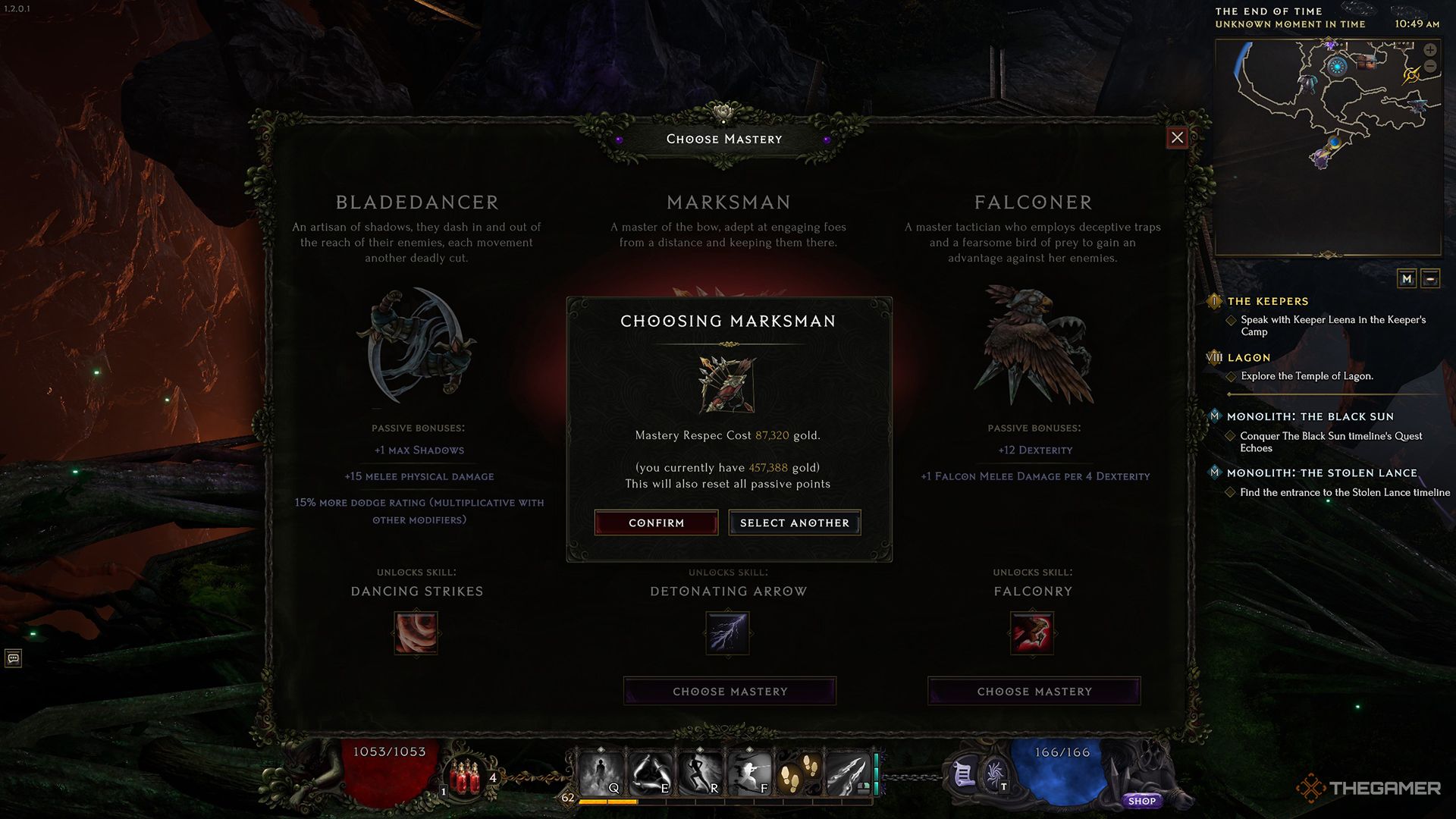
    Engage with this NPC and select Respecialize Mastery. A menu will pop up showing the other two Masteries available for your class. To switch to a different one, you’ll need to spend some gold, with the cost depending on your level and the number of passive points allocated to your current Mastery.

    Changing your Mastery will also reset all of your passive points, including those assigned to your base Class.

    After paying the fee, you’ll switch to the new Class Mastery, and all your passive points will be reset. You can then freely reallocate your points according to the new Mastery you’ve selected. Your current gear will remain equipped, but you might want to swap in new items if your Mastery change requires different gear, such as moving from a Bladedancer to a Marksman.

  • Completing Your Talent Tree Respec in Mandragora

    One of the most daunting features of Mandragora is its extensive passive tree. Much like in games such as Path of Exile, the primary talent tree consists of numerous nodes spread across six distinct classes. Crafting a build might seem overwhelming, especially if you decide to alter your approach partway through your journey.

    Fortunately, you can respec your character without too much trouble, but first, you need to unlock this option. In this guide, we’ll explain how to respec your character in Mandragora, which quest will grant you access to this feature, and address some frequently asked questions about what aspects you can and cannot reset.

    How to Reset Your Talent Tree

    You can reset your talent tree after completing the “Witch Hunt” quest, a principal story mission that is mandatory. This quest will take several hours to finish, so you won’t be able to respec immediately. If you make an error, you’ll have to live with it until you defeat The Necromancer.

    After completing the quest, head back to the Witch Tree and engage with the Altar of Power. It’s located just a short distance to the left of the fast travel point. Interact with the altar and navigate to the “Retalent” section to reset your tree. The first reset is complimentary, but any subsequent resets will require an increasing amount of Essence.

    Initiating a reset will refund all your spent talent points, allowing you to reallocate them as you wish. Any three-point nodes you’ve invested in will also be fully refunded. If you earned talent points through hidden shrines, those will be refunded as well.

    Can You Change Your Class in Mandragora?

    No, you cannot change your starting class in Mandragora. Resetting your talent tree will maintain your initial position. However, you can access the talent trees of other classes by navigating to the left or right edges of your current tree. This is the closest you can get to multiclassing in Mandragora.

    Can You Respec Skill Upgrades?

    As far as we know, you cannot respec skill upgrades. Later in the game, you’ll be able to enhance your skills using a special currency called Entropic Essence. There’s no way to revert your skills to reclaim any allocated Entropic Essence, so choose your upgrades wisely.

  • How to Respec Passive Abilities in Path of Exile 2: A Comprehensive Guide

    How to Respec Passive Abilities in Path of Exile 2: A Comprehensive Guide


    Grinding Gear Games

    Similar to its predecessor, Path of Exile 2 features an intricate skill tree that resembles an intricate web. With an overwhelming number of options, it’s easy to feel lost about how to allocate your valuable points. Fortunately, the game provides a way for you to refund your passive ability points and completely redesign your build if you wish. This process does require some time and consideration, so let’s explore how to go about it.

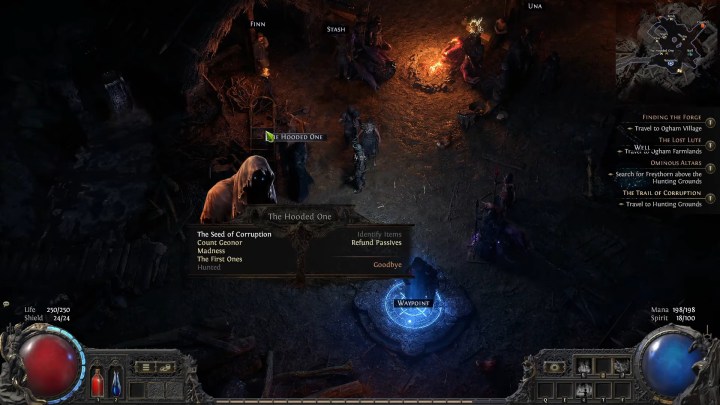
    A character talking to the hooded one in Path of Exile 2.

    Grinding Gear Games

    How to Reset Your Skills in Path of Exile 2

    Initially, you won’t be able to reset your skills for the first few hours of playing Path of Exile 2, depending on your engagement with side quests and grinding. To unlock this feature as quickly as possible, focus on progressing through the main story arc of Act 1.

    Step 1: Complete the quest titled The Mysterious Shade.

    Step 2: During this quest, you and Una will be tasked with reviving an NPC known as The Hooded One at the Clearfell Encampment.

    Step 3: Once you finish the quest, return to Finn’s tent to talk to The Hooded One and select the Refund Passives option.

    Step 4: Respecing your skills will cost you gold, with the fee increasing based on how many points you wish to refund. Fortunately, gold is relatively easy to acquire, so you should not have to worry about running out. As long as you have enough currency, feel free to respec as often as you like.


  • How to Respec Your Character in Dragon Age: The Veilguard

    How to Respec Your Character in Dragon Age: The Veilguard

    Creating your character in Dragon Age: The Veilguard can be quite the endeavor. With numerous options for race, appearance, background, and class, you have plenty of opportunities to tailor the experience to your preferences. Once you’ve made your selections and participated in your first skirmishes, you’ll gain your initial skill point and be encouraged to invest it in the skill tree. While this is a staple of RPGs, even seasoned players might find the vastness of the skill system overwhelming. Think of it less as a tree and more like a sprawling bush—you start at the core and can navigate outward towards the various specializations. However, you won’t have enough skill points to access them all, which means you’ll be limited to only one specialization at a time. Instead of spending hours plotting out the ideal upgrade path, why not enjoy the process and experiment with different skills? If need be, you can always reset your points down the line. Here’s how to reset your skill points in Dragon Age: The Veilguard.

    How to Reset Skill Points in Dragon Age: The Veilguard

    EA

    Resetting your skill points in Dragon Age: The Veilguard is straightforward, cost-free, and can be done as often as you like. After unlocking the skill tree and using your first skill points, you have two options when you decide to respec. The first method involves selecting skills individually to refund, provided they aren’t linking two nodes, allowing for a careful, measured approach. Alternatively, for a complete overhaul, you can hit Y or Triangle on your controller to refund all points at once.

    This feature is essential due to the limited number of skill points available. You’ll find that you won’t come close to unlocking all skills while being constrained to a single specialization, even though each class offers three. By resetting your skills, you can try out different character builds and explore various specializations without needing to restart the game entirely.