الوسم: R.E.P.O.

  • All Weapons and Tools You Can Get in R.E.P.O.: Completing and Solving

    All Weapons and Tools You Can Get in R.E.P.O.: Completing and Solving

    In Repo, you can buy various items from the Service Shop to help you during your gameplay, especially as you progress to higher levels. The shop offers weapons for fighting monsters, as well as devices and tools that assist in locating extraction points, valuables, or making objects indestructible.

    Below, you’ll find information about the different weapons and tools available, including their average prices and how to use them. Keep in mind that all weapons and tools have a limited charge that decreases with use.

    All Weapons in Repo

    There are three main categories of weapons at the Service Station Shop:

    • Melee weapons
    • Grenades and mines
    • Guns

    The least expensive options are grenades and mines, which can be especially helpful early on when you don’t have much money. Some melee weapons and guns become more useful starting at level five and beyond.


    Melee Weapons

    Melee weapons are simple to use—just hold the weapon like any item and swing using your mouse, no need to activate or turn them on.

    Name Cost Range Description
    Inflatable Hammer $9,000–$12,000 Not very powerful, but fun and useful against small creatures like gnomes or animals.
    Baseball Bat Starting at $25,000 Easy to use; best when enemies are stunned first.
    Sword Starting at $29,000 An advanced version of the bat but can knock you down if you’re not careful.
    Frying Pan $23,000–$30,000 More damage than the inflatable hammer, but less than a sledgehammer. Ideal mid-tier weapon.
    Sledge Hammer $42,000–$48,000 Very powerful, dealing high damage to enemies.
    Prodzap $22,000–$30,000 A baton combined with a taser; stuns enemies for 3 seconds, good for quick hits.

    Mines and Grenades

    Use mines by holding one, pressing E to activate, and placing it on the ground where you expect monsters to walk. To deactivate, just pick it up and press E again, or store it in your pocket.

    Grenades are thrown or dropped by pressing E. You can deactivate an unused grenade by putting it back in your pocket.

    Warning: Grenades and mines are effective against monsters, but can also harm you and your teammates if you’re not careful.

    Name Cost Range Description
    Human Grenade $2,000 Explodes and damages enemies; only available in the secret shop room.
    Duct Tape Grenade $2,000 Multiple human grenades taped together for multiple explosions.
    Trapzap Mine $3,000+ Sends a shockwave when triggered—place where monsters cross.
    Stun Grenade $3,000+ Throws to stun enemies briefly.
    Stun Mine $3,000+ Deals small damage over about 10 seconds, stunning enemies temporarily.
    Explosive Mine $3,000+ Causes a big explosion when stepped on, good for slow-moving monsters.
    Shockwave Grenade $3,000+ Produces a shockwave that knocks enemies back.
    Grenade $3,000+ Standard explosive; use with caution.
    Rubber Duck $17,000–$18,000 Bounces unpredictably and can damage or stun enemies. Fun but random.

    Guns

    Guns pack the most punch against monsters, especially at higher levels. To fire, hold the gun and press E.

    Name Cost Range Description
    Tranquilizer Gun $15,000–$18,000 Briefly stuns enemies, giving you a chance to escape or finish them off.
    Handgun Starting around $46,000 Basic firearm for shooting and killing monsters.
    Shotgun Starting around $85,000 The most expensive firearm; offers strong firepower.
    Pulse Pistol $14,000–$18,000 Deals 25 damage; knocks enemies back, great for pushing them into pits.
    Photon Blaster $38,000–$48,000 Heavy damage over multiple ticks, effective against large monsters.
    Boltzap $14,000–$18,000 Stuns for 1.5 seconds, dealing minor damage from a distance.
    C.A.R.T Cannon $38,000–$48,000 Mounted on a cart, fires powerful cannonballs.
    C.A.R.T Laser $38,000–$48,000 Attached to a cart, delivers high damage with laser fire.

    Drones

    Drones can be activated by holding and pressing E, and can hover over targets. Use them to modify behaviors or find specific items.

    Name Cost Range Description
    Roll Drone $9,000–$12,000 Makes you roll continuously, ideal for outrunning monsters.
    Recharge Drone $4,000–$5,000 Recharges your weapons or tools without going to the ship.
    Zero Gravity Drone $24,000–$29,000 Creates a moon-like low-gravity environment.
    Feather Drone $15,000–$16,000 Lightens you or objects, making jumping higher or easier to carry heavy items.
    Indestructible Drone $26,000–$27,000 Makes you or items indestructible, preventing damage or loss of value.

    Staffs

    Staffs work by charging and pointing at targets to activate effects.

    Name Price Description
    Roll Staff $22,000–$30,000 Shoots at enemies, causing them to roll away similar to the Roll Drone.
    Zero Gravity Staff $14,000–$18,000 Renders nearby objects floating in the air.
    Void Staff $22,000–$30,000 Creates a force that pulls in enemies and objects, including robots and Semibots.

    Vehicles

    Vehicles, added in the May 2026 update, are driven by a single player. They’re useful for quick map traversal.

    Name Price Description
    Scouter $18,000–$20,000 Compact speedster for rapid movement across the map.
    Hauler $38,000–$48,000 Can carry one Semibot and up to $20,000 worth of valuables.

    Miscellaneous Items

    Other unique tools and items are listed below, activated similarly by holding and pressing E.

    Name Cost Range Description
    Zero Gravity Orb $41,000–$48,000 Creates a field of zero gravity, affecting anything that passes through.
    Phase Bridge $18,000–$20,000 Extends a bridge for crossing pits or reaching high places.
    Duck Bucket $5,000–$8,000 Used in the secret shop, can be placed on big creatures or teammates to annoy them.
    Crystals $5,000–$24,000 Used to recharge other items.
    Leaf Blower $8,000–$12,000 Blows enemies away into pits.
    Defibro $38,000–$48,000 Revives players after death.
    Semibot Walkies $22,000–$30,000 Lets you communicate or spy on areas remotely.

    Trackers

    Trackers help locate specific points or loot by turning them on with E.

    Name Cost Range Description
    Extraction Tracker $6,000–$9,000 Guides you to extraction points; display shows distance.
    Valuable Tracker $16,000–$17,000 Finds loot and valuable items; similar operation as the extraction tracker.

    Loot Carts

    Loot carts don’t require activation but are limited; once broken, they’re gone.

    Name Price Description
    Pocket C.A.R.T. $17,000–$18,000 Small cart carried in your pocket for extra storage. Useful when big carts are full or far away.
    C.A.R.T. $40,000–$46,000 Larger cart for holding more items, ideal for bigger maps and teams.
  • Installing and Using Mods in R.E.P.O.: A Quick Guide

    Installing and Using Mods in R.E.P.O.: A Quick Guide

    Amidst the frenzy of dodging monsters and trying to hit your target in every round, vanilla R.E.P.O. offers its own unique thrill. But what if you want to play with more than six players or outfit your character with cool cosmetics? For that, you’ll need to add some mods.

    If you’re eager to dive into the world of modded R.E.P.O., this guide will show you how to get and utilize mods, including the program necessary for finding and installing them. We’ll walk you through each step, so you can unlock the exciting possibilities that mods can bring to your gameplay.

    Keep in mind that some mods may conflict with each other or lead to crashes and performance issues. Usually, simply removing the troublesome mod will resolve the problem, but be sure to do your research on any modifications you plan to use before installation.

    Locating Mods


    If you’re new to modding, the thought of installing mods might feel overwhelming, but it’s easier than you think.

    Instead of scouring multiple websites to download mod files and figuring out where to place them, you can use an app designed for mod installations straight into the game.


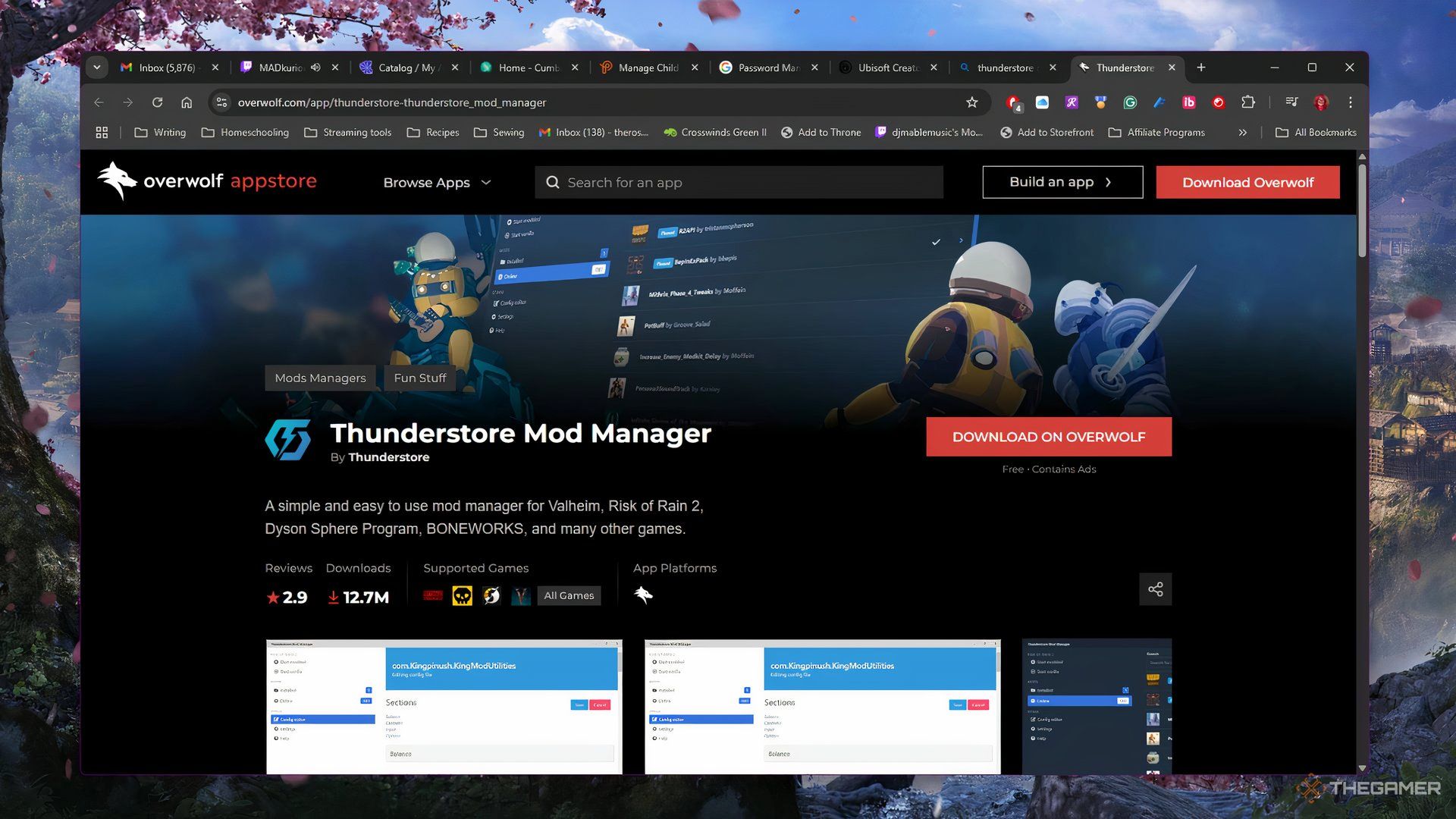
    Thunderstore Mod Manager Download Page In Overwolf Launcher

    The Thunderstore Mod Manager, created by Overwolf, is the tool you’ll use to install and manage your mods for R.E.P.O. To get it, first download the Overwolf client, then install Thunderstore. The entire setup is straightforward and shouldn’t take long.

    Installing Mods


    Searching For R.E.P.O. In Thunderstore

    Once you have Thunderstore ready, search for R.E.P.O. (you can include or skip the periods) and click on it. This will lead you to its dedicated mod profile.


    Mods Page In R.E.P.O. Section Of Thunderstore

    Here, you can explore and install any available mods for R.E.P.O., check which ones you have already added, and launch the game with those mods.

    search, install, and utilize mods:

    1. Click on the Get mods tab. You can browse through the mods and apply filters to find specific kinds. If you’re after a particular mod, you can type the name in the search bar.
    2. Select the mod you’d like and hit Download.
    3. A window will appear asking you to pick a version. It’s best to go with the latest version of any mod. When ready, click on Download with dependencies.
    4. After the installation completes, it will appear under the My mods section.
    5. To start the game with your installed mods, click the blue button in the top right corner labeled Modded.

    Make sure you know that every mod for R.E.P.O. requires a base mod called BepInExPack, found in the Get mods section. Installing this is crucial for any other mods to function, and you’ll see an error message if you attempt to launch the game without it.

    Playing Multiplayer with Mods


    Profile Export For Modded R.E.P.O.

    One of the best features of Thunderstore is how effortless it makes modded multiplayer. Just click on Share at the top of the window, and you’ll receive an alphanumeric profile code to share with your friends.


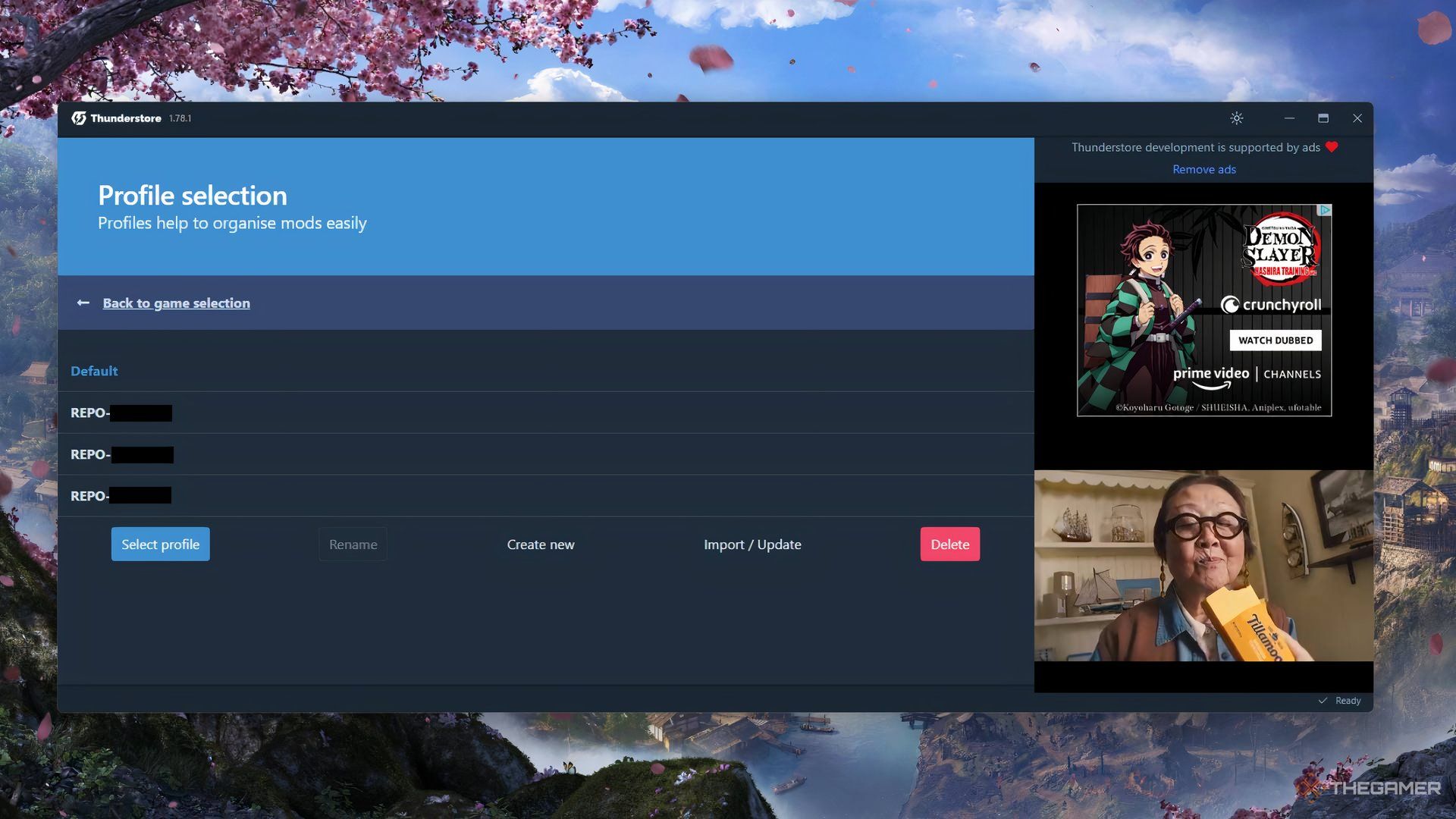
    Profile List For R.E.P.O. In Thunderstore

    Guide your friends to install Thunderstore and then help them through the process to install your profile:

    1. Instruct them to click on Change profile.
    2. Next, they should click Import/Update.
    3. Then select From code.
    4. Have them paste in your profile code.
    5. Then, either create a new profile with these mods, or update an existing one.
    6. Lastly, the mods will be installed for them, and they only need to launch the game through Thunderstore.

    This method can be particularly helpful if you have several mods, as your friends won’t have to go through the hassle of installing each one individually.

  • Essential Tips for Your R.E.P.O. Journey

    Essential Tips for Your R.E.P.O. Journey

    R.E.P.O. is an entertaining co-op horror game that blends humor and scares, reminiscent of Lethal Company. In this game, you and your friends take on the role of tiny robots tasked with scavenging valuable items to sell to the Taxman, all while navigating buildings teeming with terrifying monsters.

    While the introductory guide covers the fundamentals of gameplay, it’s nothing compared to the thrill of securing your loot while avoiding a gruesome fate. To help you survive your first playthrough, we’ve compiled some valuable tips for newcomers.

    How to Adjust Your Graphics Settings

    The minimum system requirements for R.E.P.O. are quite low, allowing even less powerful computers to run the game smoothly. However, adjusting some graphics settings can enhance your experience.

    Graphics Setting

    Recommended Change

    Max FPS

    It defaults to unlimited; consider setting it to a maximum of 60 FPS for improved performance.

    Grain

    This is turned on by default. If you prefer a clearer image, you can turn it off.

    Pixelation

    The default setting is high. Lower it to medium or small for smoother graphics based on your preference.

    Avoid Standing in the Extraction Point When Activated

    Once you fill the extraction point with loot to sell, the collection process will commence. You’ll need to move quickly to get out of the way before the wall crashes down and the loot is extracted.

    If you linger in the extraction point when the wall slams down, you’ll be eliminated.

    In multiplayer mode, you can be revived if you fall, but if you’re playing solo or are the last survivor, it’s game over.

    In addition to the previous advice, ensure that all the loot is securely placed inside the extraction point. Smaller items won’t pose much trouble, but you need to pay close attention to larger items like big paintings or televisions.

    If anything sticks out beyond the extraction point’s boundaries, the collection process could damage those items, which may result in the total value of your loot dropping below the required quota, leading to a failed extraction.

    This means you’ll have to retrieve more items, forcing you to face the monsters for longer.

    Become a Crouching Expert

    In R.E.P.O., you can crouch to stealthily navigate through rooms and hide under furniture. Monsters can hear you, so crouching effectively turns off your flashlight and minimizes noise.

    When in crouch mode, you have the ability to hide under almost anything or in various corners.

    Crouching and hiding is crucial for your survival, especially against larger monsters. In the earlier levels, mastering the crouch is the only way to avoid hits since you won’t have weapons to fight back.

    Bear in mind that smaller monsters could still spot you beneath furniture, and some monsters have long reach, so choose your hiding spots wisely!

    Understand Physics and Gravity

    When carrying loot, keep in mind that everything is fragile. The more damage a piece of loot suffers, the less it is worth. If it gets damaged enough, you could lose the item altogether.

    Move slowly, avoid abrupt movements, and be cautious of obstacles like tables, chairs, and door frames while transporting items.

    How you lift an item is important. Some items may trigger actions when picked up from certain places, and larger items may be easier to lift if grabbed from the base, even with multiple players involved.

    The loot cart and the floor of the extraction point are the only safe places to drop items without risking damage.

    From the second level onward, you’ll need to clear more than one extraction point to finish the level. After you clear the first extraction point near your truck, seek out the second one to complete the next quota.

    Using your map to identify unexplored rooms will help you easily locate the extraction point. While searching, listen for the low hum emitted by extraction points, as it will guide you directly to them.

    In the shop, you might come across an item called an Extraction Finder. This long tool will show you the direction of the next extraction point and can be particularly handy on maps with multiple extraction points.

    Don’t Hesitate to Purchase Weapons

    The monsters in R.E.P.O. are indeed frightening and can inflict significant damage. However, they can be defeated, despite how invincible they might seem initially.

    You can hurt the monsters; for example, smaller ones like Gnomes or Bangers can be picked up and thrown for elimination. Other monsters will require a strategy and some effort to defeat.

    At the Service Shop, you can purchase grenades, mines, and various weapons to use against the creatures. If you successfully defeat a monster, some may drop cores that could contribute a few thousand dollars toward your quota.

    For items like grenades, make sure to use them in a safe location where you can escape. You don’t want to accidentally blow yourself up… like I did!

    Upgrade Your Skills as Soon as You Can

    In the first level or two, you may not require many upgrades, but as you progress, enhancing your skills and abilities becomes crucial.

    At the service shop, look for boxes resembling cereal boxes. These contain upgrades for strength, stamina, health, and more. Don’t overlook them; they could be the key to your success.

  • Healing Strategies in R.E.P.O: A Guide to Recovery

    Healing Strategies in R.E.P.O: A Guide to Recovery

    In the eerie atmosphere of R.E.P.O, plenty of frightening elements hide in the shadowy rooms and hallways. It’s not just the monsters you need to worry about; sometimes your fellow players can be just as dangerous as the bizarre enemies, like armed lunatics and evil ducks. Each player starts with a total of 100 HP, and this can drop quickly during gameplay. To make it to the next round, you’ll need to regain health, and fortunately, there are several effective methods for doing so.

    Your teammates can help you recover, you’ll also receive some healing between rounds at the Service Station, and there’s the option to buy healing items for emergencies.

    How to Heal Your Teammates


    One of the easiest methods for maintaining your team’s health is to heal one another. If a teammate has more health than you, they can restore your health by positioning themselves behind you and interacting with the health bar located at the back of your head.

    You can do the same for your teammates, and each time you heal someone, it restores 10 HP.

    To heal a teammate, simply approach their health bar and press ‘E’.

    How to Heal Yourself


    REPO Small Health Pack At Service Station

    You don’t have to solely depend on teammates—especially useful in a game as unpredictable as R.E.P.O. You can also heal yourself during the intervals at the Service Station.

    Every player receives a 25 HP boost upon entering the Service Station, and you have the option to buy Health Packs for additional healing.

    These Health Packs can be purchased at the Service Station. Just carry the item to the designated buying area, and it’ll become available in the truck before the next round starts. You can choose from Small, Medium, and Large Health Packs.

    To use the Health Packs, wait until the round begins, grab the Med Kit from inside the truck, and press ‘E’ to activate the item.