الوسم: PS1

  • Microsoft Completes Removal of PS1 Title from Xbox Storefronts

    By now, we all know there are many low-quality games on major gaming stores. For example, the Nintendo eShop has a questionable game called Pirate Anime Quest: One Boys’ Journey, A Piece of Island Love. The PlayStation Store is also filled with subpar games. They tried to remove many of these games back in February, but it’s a tough fight.

    Things got interesting when it was found out that the Xbox store had an edited version of a PlayStation game being sold as a real game through emulation. Microsoft has since removed this game.

    It Took Three Months For Action To Be Taken On This 1:1 WipEout Copy

    TrueAchievements reported and Digital Foundry covered that a game called Anti-Gravity Racing WipEout was released in April for $14.99. The issue? It’s not an original game.

    Using some careful comparisons, John Linemann showed that this game was mainly an emulated version of the original WipEout series, particularly WipEout and WipEout 3: Special Edition.

    While the main menu of the game seemed somewhat original, the actual gameplay was the classic WipEout, altered with texture changes to disguise it as a new title.

    The game has now been taken down, and trying to access its product page leads to an error on Microsoft’s site.

    Interestingly, this isn’t the first time a PlayStation game was copied and brought to Xbox. In 2022, a game resembling God of War, featuring a nearly identical character to Kratos, was available. It was quickly removed, and while it wasn’t as blatant as an emulated version, it highlights the issues within the digital storefronts.

  • How To Use the PS1 Startup Sound on PS5

    How To Use the PS1 Startup Sound on PS5

    PlayStation

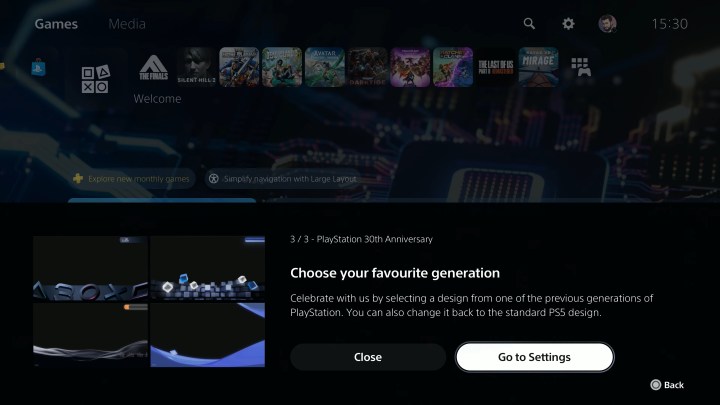
    PlayStation is marking its 30th anniversary with some exciting surprises. Earlier, we were treated to a limited-edition PS5 and PS5 Pro inspired by the legendary PS1, alongside a retro-style DualShock controller. But one nostalgic feature took many by surprise: a secret update that allows players to enjoy new themes reminiscent of the classic consoles, including the beloved PS1. There’s a bit more to it, so let’s explore how to make the most of these themes while they’re available.

    How to Use the 30th Anniversary PlayStation Themes

    The best part about these themes is that they’re entirely free! As long as your PS5 is connected online and has the latest update, you can select whichever theme brings the fondest memories.

    Step 1: Upon booting your PS5, it will automatically start up with the classic PS1 sound and logo.

    Step 2: If you want to switch to themes from the PS2, PS3, or PS4 eras, navigate to Settings.

    Changing PlayStation themes.
    PlayStation

    Step 3: From here, select Appearance and Sound.

    Step 4: You will now have the option to choose from 30th Anniversary, PlayStation, PlayStation 2, PlayStation 3, and PlayStation 4 themes.

    PlayStation anniversary theme options.
    PlayStation

    Step 5: Each theme will alter your console’s startup animation and sound, along with the layout of your home screen and sound effects.

    While these themes are exciting, it’s worth noting that they are only available for a limited time. Sony hasn’t specified when they will be removed or the reasoning behind it, so make sure to seize the opportunity while you can. Here’s hoping that PlayStation recognizes our affection for these themes and decides to keep them around permanently!

  • Apple iPhone Users Can Play PS1 Games

    Apple iPhone Users Can Play PS1 Games

    Apple iPhone users can now conveniently enjoy their beloved PlayStation 1 games with the assistance of the Gamma emulator.

    Apple gadgets are witnessing emulation as they steadily gain momentum. After the successful launch of the Delta emulator, users are noticing an increasing number of emulators surfacing on both iPhones and iPads.

    The most recent one is the Gamma emulator, which enables iPhone users to enjoy various PlayStation games and is currently accessible for download from the App Store.

    The Gamma emulator operates similarly to other game emulators on the App Store in terms of overall functionality. Customization is available so that users can ensure that the controls are tailored to their liking. Hence, users receive a comprehensive interface along with options like support for Bluetooth controllers and wired keyboards.

    This emulator is excellent if users are aiming to play classic PS1 games on their iPhone or iPad.

    Furthermore, if users wish to play multiple games on the emulator, it also supports both Google Drive and Dropbox, which will enable users to back up their disk images and preserve progress.

    To back up games and saved stages, Gamma will also provide users the choice to select their preferred method or service.

    Devotees of the PS1 era are undoubtedly going to relish this emulator immensely as it will offer them the experience they have been seeking.