الوسم: playlist

  • Baby Monkey ‘Punch’ Gets His Own Spotify Playlist

    Baby Monkey ‘Punch’ Gets His Own Spotify Playlist

    Digital Phablet – ‘Punch’ is once again making headlines on social media after online reports revealed that the baby macaque has its own Spotify playlist titled “Yearning.”

    The adorable baby monkey became viral after being featured pulling his favorite orange plush toy on the playlist’s cover photo, with the caption “We are all your mom Punch” written beneath. A screenshot shared by Pop Crave on X (formerly Twitter) shows that the playlist has accumulated over 660,000 saves.

    Now thriving at Ichikawa Zoo in Japan, Punch has been through a lot. The seven-month-old was abandoned by his mother shortly after birth, faced challenges in making friends, and was bullied by older monkeys in his troop, leading him to find solace in a bright orange monkey plushie.

    ## Baby Monkey ‘Punch’ Gets His Own Spotify Playlist

    Punch stunned everyone by appearing on the cover of Spotify’s ‘Yearning’ playlist.

    The plushie also gained widespread attention, inspiring the Swedish multinational furniture retailer IKEA to release a plush toy modeled after the viral stuffed animal. Reports indicate that the $20 comfort plush, named “DJUNGELSKOG,” is already selling out at IKEA stores.

    His story struck a chord worldwide, turning him into an international celebrity. Over the past week, videos of Punch have flooded social media, with countless users eagerly following updates on their favorite baby monkey.

    Recently, a video showed two older monkeys in his troop stepping in to shield Punch from possible bullying. Other clips reveal that he has already connected with a favorite human— a zookeeper at Ichikawa Zoo. Still, another video captured Punch confidently standing up to a bully.

    The zoo frequently posts updates on Punch’s journey, captivating millions as they watch his character grow and develop.

  • Where To Get All Instruments for Completing and Solving Your Heartopia Music

    Where To Get All Instruments for Completing and Solving Your Heartopia Music

    Starting a new life in Heartopia involves enjoying your hobbies, hanging out with friends, and completing quests around town. As you build your relationships, you can chase your dreams! One popular goal is Music Production, which allows you to share your talent with the community.

    You won’t be able to start this right away. Here’s how to begin your musical journey and earn rewards by sharing CDs and the love of music with others. Here’s what you need to know to record and release your own music in Heartopia.

    How to Produce Music

    When you reach level 17, you can start producing music. Before that, at level 16, you won’t have access to this feature. To produce music, buy a phonograph from Ka Ching’s General Store and place it in your home. Then, interact with the record menu to start a session. When the timer runs out, you can begin playing music and record it onto a CD.

    Note: You need to play the music all at once, so it’s smart to practice beforehand, especially if you’re playing with friends.

    Once your recording is finished, burn a CD using a Music CD Publishing Permit. Other players can buy your CD and leave positive feedback, helping you build your reputation as a local musician.

    All Instruments and How to Get Them

    To make music, you’ll need various instruments, which you can purchase by talking to Annie in the center of town. She runs the Music Store and sells a variety of instruments along with music CDs from other players.

    Here’s a list of instruments Annie offers and their prices:

    Name Price
    Recorder 38,000g
    Bamboo Xiao 38,000g
    Lute 38,000g
    Conga 72,000g
    Cajon 72,000g
    Wooden Bass 38,000g
    Piano (Red) 195,000g
    Concertina 57,000g
    8-Note Xylophone with Stand 72,000g
    Mbira 57,000g
    Lyre 57,000g
    Bagpipe 38,000g
    Violin 57,000g
    Cello 94,500g

    Music Production Goals and Rewards

    Beyond just having fun playing music, you can work toward becoming a music producer. This involves playing different instruments and sharing your recordings with friends and neighbors. Achieving certain goals grants rewards and increases your Dream Progression.

    Here are some of the main goals and the rewards you earn:

    Dream Goal Rewards Dream Progression
    Own 1 instrument 30 points 30
    Play 1 Music CD 30 points 30
    Play the piano once 10 points 10
    Play the drum set once 10 points 10
    Play the recorder once 10 points 10
    Own 1 phonograph 30 points 30
    Play an instrument once 30 points 30
    Participate in another player’s recording session 50 points 50
    Record 1 piece of music 30 points 30
    Burn 1 Music CD 30 points 30
    Duplicate 1 Music CD 30 points 30
    Have 1 other member listen to your Music CD 30 points 30
    Have 10 members listen to your Music CD 50 points 50
    Have 30 members listen to your Music CD 80 points 80
    Have 60 members listen to your Music CD 110 points 110
    Have 90 members listen to your Music CD 150 points 150
    One member likes your Music CD 30 points 30
    Ten members like your Music CD 50 points 50
    Thirty members like your Music CD 80 points 80
    Sixty members like your Music CD 110 points 110
    Ninety members like your Music CD 150 points 150
    Release your Music CD publicly 30 points 30
    One member purchases your Music CD 30 points 30
    Ten members purchase your Music CD 50 points 50
    Thirty members purchase your Music CD 80 points 80
    Sixty members purchase your Music CD 110 points 110
    Ninety members purchase your Music CD 150 points 150

    More Instruments and How to Get Them

    To expand your collection, visit Annie at the town center. She will open the Music Store where you can buy additional instruments and music CDs from other players.

    Prices for some of the instruments include:

    • Recorder: 38,000g
    • Bamboo Xiao: 38,000g
    • Lute: 38,000g
    • Conga: 72,000g
    • Cajon: 72,000g
    • Wooden Bass: 38,000g
    • Piano (Red): 195,000g
    • Concertina: 57,000g
    • Xylophone with Stand: 72,000g
    • Mbira: 57,000g
    • Lyre: 57,000g
    • Bagpipe: 38,000g
    • Violin: 57,000g
    • Cello: 94,500g

    Goals and Rewards in Music Production

    Advancing through the levels of the Music Production Dream involves various milestones. For example, owning instruments, recording music, sharing with friends, and reaching certain milestones in likes and purchases. Earning these goals grants progression points and unlocks rewards such as different record covers, the ability to release albums, or earn special permits and instruments.

    Key milestones include producing a mini album at 500 progression points, a full album at 1,500, and becoming an Ace Producer at 3,500. Achieving the Golden Music CD at 6,500 points signifies an important step, with further levels unlocking even more exclusive rewards.

  • Discover Local Concerts On Spotify With New Playlist

    Discover Local Concerts On Spotify With New Playlist

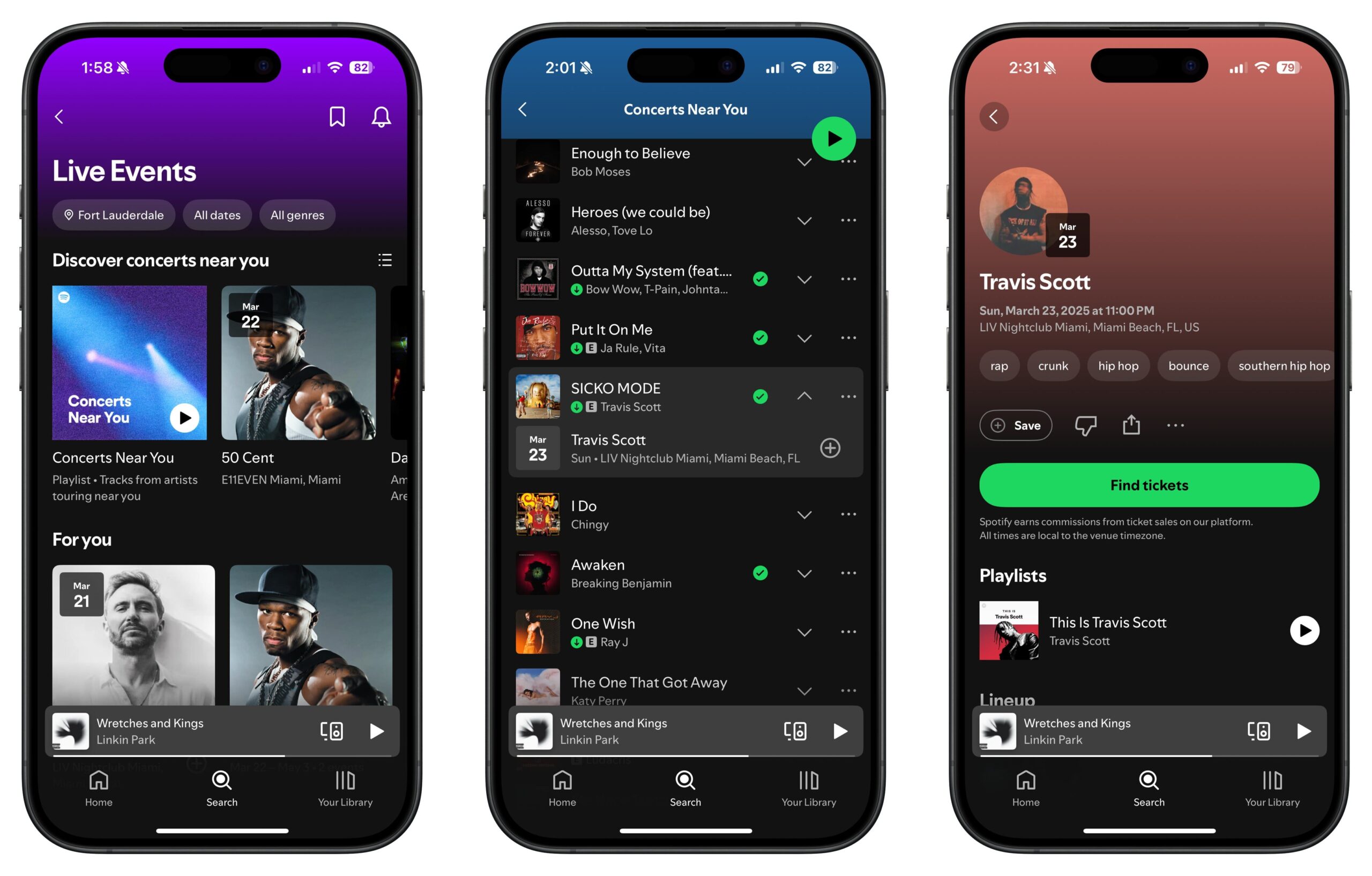
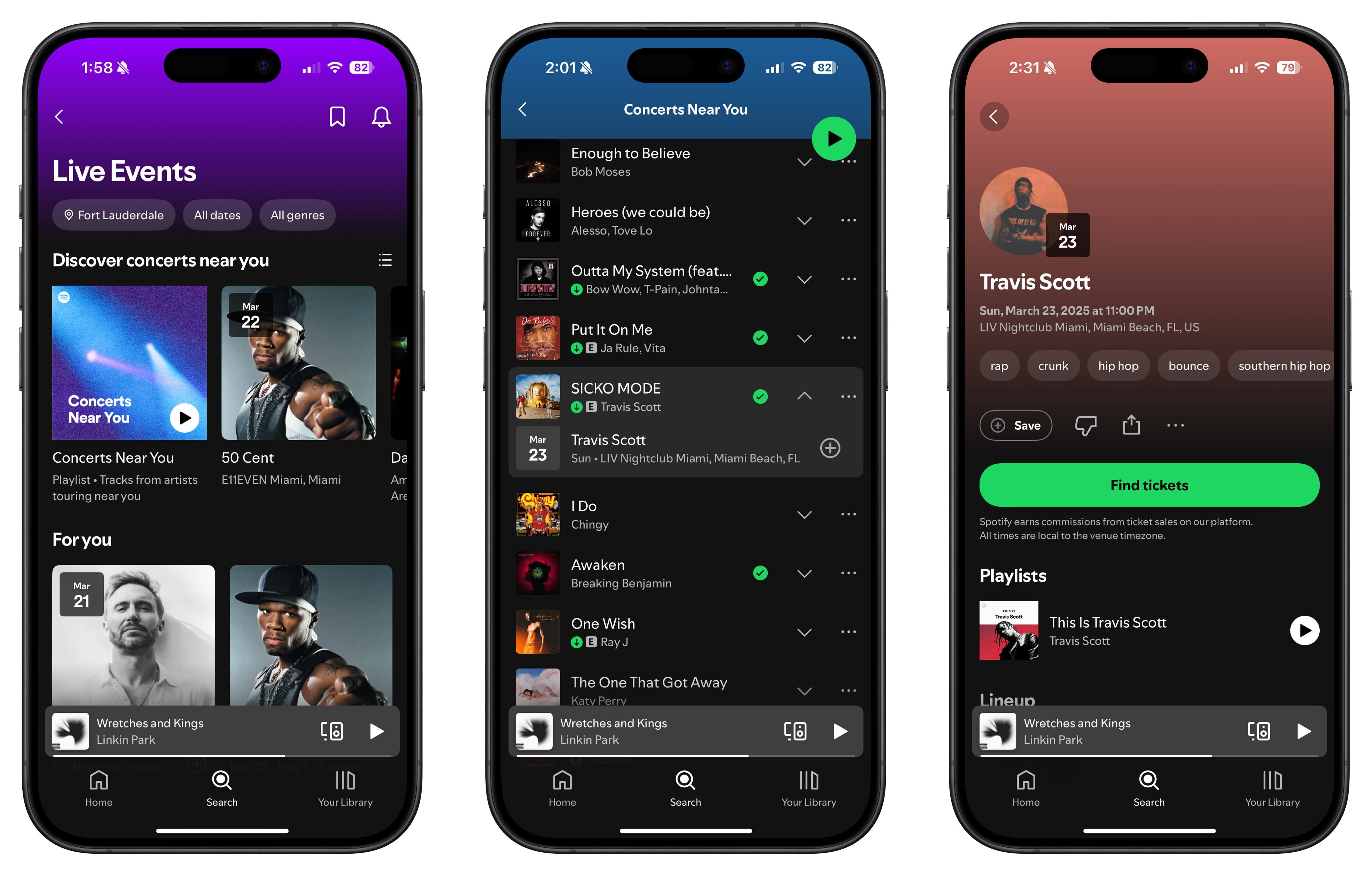
    The next Sabrina Carpenter concert could be just around the corner! Spotify has introduced a new feature called Concerts Near You to help fans discover performances by their favorite artists in their local areas.

    In a recent announced press release, Spotify revealed that this feature aims to assist listeners in finding upcoming concerts based on their musical preferences. The Concerts Near You playlist will refresh every Wednesday, featuring 30 tracks from frequently listened-to artists as well as those from your favorite genres that you may not have heard yet. Each track includes an option to view details regarding the artist’s forthcoming concert dates and venues. This way, you can easily access the event page for further information and purchase tickets when planning to attend.

    “Nothing is worse than finding out your favorite artist was in town just last week,” stated Charlie Hellman, Spotify’s VP and Global Head of Music Product. “Concerts Near You takes care of that inconvenience. This new playlist helps fans discover nearby shows, while also providing artists with an effective way to boost ticket sales and fill their venues with those who truly enjoy their music.”

    Demonstration of Concerts Near You playlist on Spotify.
    Cristina Alexander / Digital Trends

    If you love going to concerts, here’s how you can take advantage of the Concerts Near You feature. Simply navigate to the search page and click on the Live Events tab. From there, adjust your location settings to explore concerts happening near you and head to the Concerts Near You playlist. Browse through the playlist to find an artist whose song you enjoy, then click the dropdown button to discover their upcoming concert details. By clicking the info banner, you will access the event page where you can purchase tickets, share the event with friends, and mark the date.

    You can also save the Concerts Near You playlist to your Spotify library as a reminder to keep an eye on upcoming local concerts. Additionally, by tapping on any of the three genres presented at the beginning of the playlist, you can view concert dates from more artists that may not be featured at that specific time.

  • Design Custom Spotify Playlist Cover Art In The App

    Design Custom Spotify Playlist Cover Art In The App

    Bringing a personal touch to your Spotify playlists just got easier with the introduction of an in-app cover art creation tool. Starting today, this beta feature is available in English across 65 markets, enabling users to choose backgrounds, add unique text styles, and incorporate stickers to craft their own cover art. This tool is accessible to both free and Premium Spotify users.

    To utilize this new functionality, simply navigate to a playlist you’ve created, tap on the context menu (the three dots…), and select “Create Cover Art.” From there, you can opt to upload a new image or begin creating from scratch.

    Upon selecting the option to create cover art, you’ll access an editor where your playlist’s name will overlay a randomly selected default background. This background could be a solid color, a gradient, or even a rainbow effect.

    There’s no obligation to retain the original playlist name. You have the freedom to modify text, experiment with sizes and colors, and apply various effects. Although the selection of stickers isn’t extensive, you can add as many as desired, resizing them to add flair. Once you’re pleased with your creation and save it, the new cover art will automatically update on your playlist, making it ready for sharing across various platforms.

    Your artistic expression is primarily limited by Spotify’s existing Platform Rules. As the company notes:

    “Spotify actively monitors cover art for content violations, and users have the option to report playlists that possibly breach Spotify’s Platform Rules. You can also upload your own images for your playlist cover art, but ensure you have the rights to any images utilized and adhere to Spotify’s guidelines.”

    If Spotify removes your cover art due to rule violations, there’s limited recourse to restore it, except for residents in the EU, who are allowed to appeal content moderation decisions.

    Will users eagerly customize their playlists? Given their immense popularity, it seems likely. More than 8 billion playlists have been created on the platform to date.

    If you’re looking to set up a playlist but need assistance in curating it, Spotify has recently introduced an AI playlist creation tool and has partnered with Instagram to simplify the process of saving songs that users discover on the popular social platform.