الوسم: PCs

  • Microsoft Adds Copilot+ AI Tools for Intel and AMD PCs

    Microsoft Adds Copilot+ AI Tools for Intel and AMD PCs

    If you invested in a new AI-powered Copilot+ PC equipped with the latest Intel or AMD processor, and noticed the absence of certain features, your wait is finally over. Several of those Copilot+ enhancements are now becoming available for devices that utilize Intel and AMD processors.

    It’s been nearly a year since Microsoft unveiled the Copilot+ PC classification, designed to prioritize AI capabilities. Up until now, Qualcomm was the exclusive chip supplier for these devices.

    In late 2024, competing chip manufacturers entered the Copilot scene with the release of AMD’s Ryzen AI 300 series and Intel’s Core Ultra 200V series processors. However, many features remained inaccessible to those using Intel and AMD machines.

    That situation is finally changing today. Microsoft announces that Copilot tools such as Live Captions, Cocreator, Restyle Image, and Image Creator will now be available on Copilot+ hardware powered by Intel and AMD.

    What is changing?

    Starting with Live Caption, this functionality provides captions for videos, audio, and real-time interactions like meetings conducted in English. It can also translate text from over 40 different languages into English, as well as 27 languages into Chinese.

    In the future, a new feature called Voice Access will enable users to manage their PC using natural language commands. This feature is already rolling out to Copilot+ devices with Qualcomm chips, with support for AMD and Intel hardware anticipated soon.

    For creative tasks, the AI-powered Cocreator feature is now available in Paint across all device types. Microsoft claims it helps make artistic creation and image enhancement more intuitive and accessible. Users can blend text-based editing with freehand drawing, providing added flexibility.

    Through the Photos app, users of Intel and AMD machines will also gain access to the Restyle Image and Image Creator tools. The Image Creator function allows for generating images based on text descriptions, similar to how you would interact with ChatGPT to create Ghibli-inspired art. The Restyle tool, meanwhile, applies artistic effects to images in a preset manner.

    All of these AI features will be available on AMD and Intel-powered Copilot+ PCs with the March 2025 Windows update. It’s intriguing to consider why these capabilities were initially absent from Intel and AMD devices, even though they satisfied the minimum AI performance criteria.

    Unfortunately, this trend of missing features is not expected to end soon. Recently, Microsoft announced enhancements to the Windows Search experience, which will significantly simplify locating files, photos, and settings. Regrettably, this improvement will only be available for Snapdragon-based Copilot+ devices.

  • AI PCs Inspire Swift Business Upgrades For Tailored Employee Experiences

    AI PCs Inspire Swift Business Upgrades For Tailored Employee Experiences

    By 2025, artificial intelligence is becoming a common term among the public, yet for businesses, it’s an integral part of everyday operations and a crucial element for growth. An IDC white paper, commissioned by AMD, highlights that AI-enabled PCs are sparking a significant upgrade cycle in the PC market, as businesses shift toward machines equipped with neural processing units (NPUs) for local AI task execution.

    This paper draws from a survey conducted in November 2024, targeting IT decision-makers. It involved 670 participants from sizable companies with at least 500 employees globally, including a notable number from large enterprises — 195 respondents held managerial positions in organizations with over 5,000 employees. The survey encompassed a diverse range of industries, such as manufacturing, finance, and telecommunications.

    A significant 73% of businesses surveyed report that the introduction of AI PCs in recent years has substantially influenced their strategies, accelerating the urgency for hardware upgrades. Notably, 58% of these organizations still utilize Windows 10, which further emphasizes their need for timely upgrades given that Windows 10 is nearing the end of its lifecycle, increasing security vulnerabilities. Nevertheless, 60% of those relying on Windows 10 intend to transition to AI PCs running Windows 11 with Copilot+ support.

    Data on the various uses of AI in an enterprise setting.
    IDC / AMD

    The surveyed businesses are already leveraging AI in various facets of their operations; an impressive 95% currently use or are testing AI technologies in the cloud. AI applications span numerous sectors, including manufacturing (predictive maintenance), retail (AI-driven suggestions), finance (fraud detection), and healthcare (AI-assisted diagnostics). Employees employ AI for various tasks, such as summarizing documents, creating content, and automating processes.

    Get your weekly breakdown of tech in PC gaming


    Check your inbox!

    The advantages of AI for businesses are substantial, and decision-makers are fully conscious of this fact. Personalization of user experiences (77%), improved data privacy (75%), and enhanced security (74%) rank as the leading benefits in a corporate context.

    Organizations also look forward to AI enhancing employee experiences, with 82% of respondents expecting a positive influence on their workforce. They believe AI will reduce repetitive tasks (as indicated by 83% of participants), enable employees to concentrate on more significant priorities (79%), and boost productivity (76%).

    However, executives are also aware of the challenges that come with adopting AI. Issues such as data privacy concerns (36%), security vulnerabilities (26%), high expenses (31%), and regulatory compliance (25%) are among the primary hurdles organizations face. Using AI PCs can help mitigate these risks by processing data locally rather than relying on cloud solutions.

    AMD is a pivotal player in the advancement of AI PCs. The company collaborates with OEMs like Dell, HP, and Lenovo to directly integrate AI into their systems, while also focusing on software optimization to ensure popular AI applications perform well on AMD platforms.

    This survey underscores that AI PCs are here to remain, with businesses ready to adopt this new technology. As Windows 10 approaches its end-of-life phase in October, the uptake of AI PCs is likely to increase significantly in the coming year.

  • 28% of Women Play PC Games Globally, 64% on Mobile

    28% of Women Play PC Games Globally, 64% on Mobile

    The Evolving Landscape of Female Gamers: Trends and Insights

    In recent years, the gaming industry has witnessed a seismic shift in demographics, marking the ascent of female gamers around the globe. No longer a minority by the margins, women are asserting their presence across various gaming platforms, catalyzing a transformation in how games are developed and marketed. This blog dives into the statistics, trends, and cultural implications surrounding female gamers based on recent data from a Statista Consumer Insights survey.

    The Growth of the Female Gamer Community

    Historically, female gamers have often been overshadowed in a predominantly male-oriented gaming scene that dates back to the 1990s. However, recent trends indicate a significant rise in female participation in gaming, encompassing a wide array of platforms and genres.

    Regional Variations in Gaming Preferences

    The survey highlighted some intriguing regional differences regarding female gamers’ platform preferences. While the traditional view still holds in certain regions, the growth of women gamers is particularly pronounced in countries like India, China, and Brazil, where PC and desktop gaming reign supreme among female audiences.

    • PC Gaming Popularity in Emerging Markets: In countries such as Brazil and India, the allure of PC gaming appears to attract a higher percentage of women, marking these regions as pivotal growth markets for female gamers.

    • Console Gaming in Western Nations: Conversely, in more established markets like the United States and the United Kingdom, console gaming remains the preferred choice among females, suggesting cultural and market-specific influences on gaming habits.

    Overall Gaming Trends Among Women

    The survey compiled responses from 21 countries, revealing some compelling statistics about female gaming habits:

    • PC vs. Console Gaming: On average, 28% of female respondents indicated they regularly engage in PC gaming, while 22% reported playing on consoles. This distinction underscores the varying experiences and preferences of women across different regions.

    • Mobile Gaming Surge: Notably, the gender trend takes an interesting twist when it comes to mobile gaming in the United States. A staggering 64% of women reported regularly playing games on smartphones, outpacing their male counterparts, of whom 58% engaged in mobile gaming.

    Genre Preferences Among Female Gamers

    The types of games that female gamers gravitate towards reveal substantial differences in gaming tastes compared to their male counterparts.

    Top Genres for Female Gamers in 2024

    According to survey findings, the following genres are the most popular among U.S. female gamers:

    1. Casual Games (39%): These games, often characterized by straightforward gameplay and accessibility, take the lead as the most favored genre.

    2. Strategy Games (34%): Games that require tactical thinking and planning are also highly appealing to women, reflecting a growing interest in multi-layered gameplay.

    3. Action Games (31%): While traditionally considered a male-dominated genre, action games have found a significant female audience, indicating a broadening of interests within this category.

    A Comparative Analysis: Male Preferences

    In contrast, the gaming preferences among U.S. male respondents reveal a stark departure from those of women:

    1. Action (48%): A dominant genre, showcasing the appeal of high-paced, competitive gameplay.

    2. Action-Adventure (45%): This genre combines narrative with engaging gameplay mechanics, attracting a significant male audience.

    3. Shooters (38%): A classic genre rooted in competitive multiplayer scenes, particularly among young male gamers.

    National Leaders in Gaming: Brazil and Mexico

    The survey results illuminate Brazil’s standout position in the realm of PC gaming, with 46% of respondents indicating regular engagement with PC titles—making it the leading nation in this category.

    • Brazil: Its vibrant gaming community and increasing accessibility to technology are contributing to an expanding base of female gamers, crucial for developers aiming to reach diverse audiences.

    On the console front, Mexico takes the lead, with 40% of respondents identifying as active console gamers. This showcases a robust interest in console gaming platforms within the region and signifies ample opportunities for developers to cater to this enthusiastic audience.

    Conclusion

    The growth of female gamers and the evolving landscape of gaming preferences reveal the dynamic nature of the gaming world. With more women engaging across various platforms and genres, the industry is poised for continued transformation, making it an exciting time for creators and players alike.

  • FBI To Remove Nasty Malware Affecting 2.5 Million PCs

    FBI To Remove Nasty Malware Affecting 2.5 Million PCs

    A person surrounded by multiple computers working on a laptop.
    Digital Trends

    A malware strain traced back to China has been successfully neutralized following an FBI court order that facilitated the removal of its harmful code from thousands of Windows-based computers.

    This operation has effectively brought an end to the PlugX malware in the United States, which had impacted over 2.5 million devices worldwide by compromising infected USB drives, according to PCMag.

    Working alongside the FBI, the Justice Department announced that it received judicial approval to expunge the malware from around 4,260 computers and networks across the country as of Tuesday. Consequently, the FBI plans to alert the owners of affected devices through their respective internet service providers.

    This case highlights the efforts by federal agencies to tackle significant cybersecurity threats. The Justice Department clarified that the assailants behind this incident are a group of state-sponsored hackers from China known as “Mustang Panda,” who created a tailored version of the PlugX malware for this ongoing campaign.

    Initially identified in 2008, PlugX served as a backdoor vulnerability, allowing cybercriminals to remotely control compromised Windows machines. By 2020, updates to the malware enabled it to infiltrate USB drives and connected computers, making it “wormable,” meaning it could spread between PCs through infected peripherals.

    Cybersecurity firm Sekoia noted that Mustang Panda eventually lacked the necessary resources to manage the large number of systems infected with PlugX and ultimately abandoned the undertaking.

    Additionally, cybersecurity company Sophos detected numerous PlugX infections originating from a single IP address. In September 2023, in conjunction with Sekoia, Sophos spent just $7 to gain insights into the IP address and the affected devices. This investigation revealed a self-deletion command embedded within the PlugX code.

    In July 2024, French law enforcement authorized the use of this self-deleting feature to rectify the infected computers, and since then, 22 additional countries have adopted similar measures.

    While specific methods for removing the malware from U.S. systems are not yet clear, the FBI confirmed in an affidavit that it has verified the self-delete command’s effectiveness, ensuring that it exclusively removes the malware without impacting any other functions on the device or transmitting any unauthorized code.

  • Windows 11 Fuels PC Growth More Than AI

    Windows 11 Fuels PC Growth More Than AI

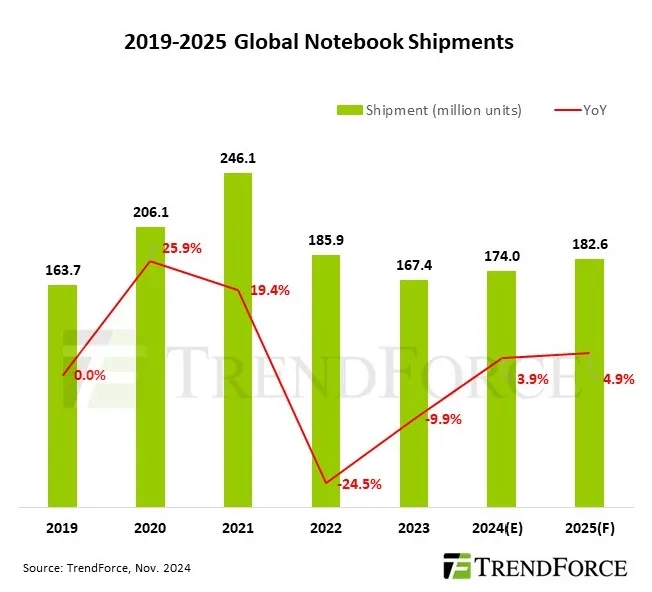
    This year, there’s been considerable buzz surrounding AI-equipped PCs, but are they truly living up to expectations? According to a recent study by TrendForce, the notable increase in laptop sales for 2024 is attributed more to updates in Windows 11 rather than cutting-edge AI functionalities.

    “The effects of notebooks with AI integration on the broader market are still minimal at this stage,” the report notes. “Nonetheless, as brands gradually incorporate these capabilities, AI functionalities are anticipated to become standard in notebook specs, which should lead to a steady increase in the adoption of AI notebooks.”

    While the report does not clarify what constitutes “AI-integrated notebooks,” it likely refers to devices featuring Copilot+ technology, which incorporates a more advanced neural processing unit (NPU) capable of handling local AI tasks.

    A bar chart showing PC sales.
    TrendForce

    Several factors contribute to this situation. The TrendForce report indicates that aggressive marketing strategies and entry-level models have dominated the North American consumer market. In contrast, Copilot+ devices start at $999, targeting a more upscale demographic. Consequently, these higher-priced models are not the current driving force in the consumer Windows PC landscape.

    To convince consumers to invest in these AI PCs, manufacturers must effectively communicate the advantages of AI features — something that appears to be lacking as of now.

    Most users tend to rely on cloud-based AI resources like ChatGPT or find their current hardware sufficient for tasks such as video conferencing and document editing. For professionals, AI PCs could enhance efficiency in complex tasks like video editing, but the average user perceives limited immediate benefit, resulting in a decreased urgency to upgrade at this time.

    The privacy issues surrounding the delays of the Recall feature have further complicated matters. Originally touted as the flagship AI function of Copilot+ PCs, it is only now beginning to roll out, nearly six months later.

    Despite AI not being the marketing triumph Microsoft envisioned, the increase in PC sales is a positive development nonetheless. Global notebook shipments are projected to rise by an additional 4.9%, reaching 183 million units by 2025. As support for Windows 10 approaches its end, the need for both businesses and consumers to upgrade will only intensify.

    The transition away from Windows 10 has become the primary driving force behind new laptop purchases. Many older systems lack the hardware necessary for Windows 11, such as TPM 2.0 support, compelling users to replace otherwise functional devices. This has triggered a surge in demand for non-AI laptops that are compatible with the updated operating system. Businesses and consumers who are upgrading, whether for compliance or enhanced functionality, are prioritizing budget-friendly options over newer, AI-driven models.

    As AI PCs continue to advance and the technology progresses, their attractiveness could increase, especially if more applications are developed to take advantage of NPUs and prices decline. However, the drive for upgrading remains secondary to the pressing need to move to Windows 11, underscoring a disconnect between industry advancements and consumer priorities, which focus more on cost-effectiveness and essential functionalities rather than speculative innovations.

  • What Is the Best Cheapest Gaming PCs?

    With the rising popularity of computer gaming, many enthusiasts are on the lookout for budget-friendly gaming PCs that don’t compromise on performance. The market offers a range of options that provide decent gaming experiences without breaking the bank. This guide will explore some of the best inexpensive gaming PCs available, including their specifications, features, and why they might be the right choice for gamers on a budget.

    Understanding Budget Gaming PCs

    What Makes a Gaming PC Affordable?

    Affordable gaming PCs don’t mean sacrificing quality. Several factors contribute to a reasonable price tag:

    • Older Generation Components: Many budget systems utilize slightly older CPUs and GPUs, which still deliver good performance for most games.
    • Reduced Aesthetic Focus: Budget models often forgo flashy designs or RGB lighting to keep costs down.
    • Minimal Storage Solutions: They may come with smaller SSDs or traditional HDDs, making storage expansions more necessary.

    Key Considerations When Choosing a Budget Gaming PC

    • Performance: Look for a balance between price and processing power.
    • Upgrade Potential: Choose systems that allow for future upgrades.
    • Warranty and Support: Warranty options can save money in the long run if components fail.

    Top Affordable Gaming PCs

    Here’s a rundown of some of the best inexpensive gaming PCs available on the market that offer great performance without hefty prices.

    1. CyberPowerPC Gamer Xtreme VR Gaming PC

    Specifications:

    • Processor: Intel Core i5-11400F
    • Graphics Card: NVIDIA GeForce GTX 1660
    • RAM: 8GB DDR4
    • Storage: 500GB SSD

    Why Choose It?

    • VR Ready: This PC is equipped for virtual reality gaming.
    • Excellent Cooling: Comes with a good cooling system, keeping performance stable during intense sessions.

    2. SkyTech Archangel Gaming Computer

    Specifications:

    • Processor: AMD Ryzen 5 3600
    • Graphics Card: NVIDIA GeForce GTX 1660 Super
    • RAM: 16GB DDR4
    • Storage: 1TB SSD

    Why Choose It?

    • High RAM Capacity: The 16GB of RAM is great for multitasking and gaming.
    • Stylish Design: Offers RGB lighting and an attractive chassis for those who value aesthetics.

    3. iBUYPOWER Element Mini 9300

    Specifications:

    • Processor: AMD Ryzen 3 3100
    • Graphics Card: NVIDIA GeForce GTX 1650
    • RAM: 8GB DDR4
    • Storage: 480GB SSD

    Why Choose It?

    • Compact Design: Its small footprint is ideal for tight gaming spaces.
    • Affordable Upgrades: It allows for easy upgrades if you wish to boost performance in the future.

    4. HP Pavilion Gaming Desktop

    Specifications:

    • Processor: AMD Ryzen 5 5600G
    • Graphics Card: Integrated Vega Graphics
    • RAM: 8GB DDR4
    • Storage: 512GB SSD

    Why Choose It?

    • Dual Functionality: Excellent for both gaming and productivity with integrated graphics.
    • Solid Build Quality: HP desktops are known for their reliability.

    Advantages of Buying a Budget Gaming PC

    Investing in a budget gaming PC comes with several benefits that attract gamers:

    • Affordability: Access to gaming without a significant financial burden.
    • Performance for Price: Many budget options deliver a good balance of performance for the cost.
    • Flexibility: Systems can be upgraded over time as performance needs increase.

    Tips for Maintaining Your Gaming PC

    Regardless of how budget-friendly your gaming PC is, proper maintenance can extend its lifespan and ensure optimal performance. Here are some maintenance tips:

    • Regular Cleaning: Dust can accumulate quickly and impact cooling—clean external and internal components regularly.
    • Software Updates: Keep the operating system and drivers updated to ensure all components run smoothly.
    • Monitor Temperatures: Use software to keep track of internal temperatures and ensure efficient cooling.

    Final Thoughts

    A budget gaming PC doesn’t mean you have to sacrifice quality or experience. With various options available that cater to different needs and preferences, gamers can find an affordable system that brings their favorite titles to life. By considering the options listed, along with the tips shared, you can enjoy a satisfying gaming experience without overspending.

  • 000 dollar gaming PCs good?

    000 dollar gaming PCs good?

    The gaming community has a wide array of options when it comes to building or purchasing a gaming PC. For many, the $1,000 price point represents a sweet spot that balances performance and budget. But is a $1,000 gaming PC actually good enough for your gaming needs? Let’s explore what you can expect in terms of performance, components, and overall value.

    Performance Expectations

    When evaluating the prowess of a $1,000 gaming rig, it’s essential to consider what you can realistically achieve in terms of performance:

    Frame Rates and Resolution

    • 1080p Gaming: A $1,000 gaming PC can generally handle 1080p gaming at high settings for most modern titles effortlessly.
    • 1440p Gaming: Many setups can manage decent performance at 1440p, but graphical settings may need to be adjusted to medium in more demanding games.

    Popular Games

    • Competitive Titles: Games like Fortnite, Valorant, and Call of Duty: Warzone usually run smoothly with frame rates well above 60 FPS.
    • Graphically Intensive Titles: Games like Cyberpunk 2077 or Red Dead Redemption 2 may require compromises, such as reducing graphical fidelity or tuning settings.

    Key Components

    For a $1,000 budget, it’s crucial to invest wisely in key components. The following list outlines the primary parts that will influence your gaming experience:

    Central Processing Unit (CPU)

    • Aim for mid-range processors like the AMD Ryzen 5 or Intel Core i5.
    • These CPUs provide a solid balance between gaming performance and general multitasking capabilities.

    Graphics Processing Unit (GPU)

    • A dedicated graphics card is vital for gaming performance.
    • Look for options such as the NVIDIA GeForce GTX 1660 Super or AMD Radeon RX 6500 XT.

    Memory (RAM)

    • Ideally, opt for 16GB of RAM.
    • This amount will ensure you have sufficient resources for gaming and multitasking without noticeable lag.

    Storage

    • A combination of a solid-state drive (SSD) for your operating system and a traditional hard disk drive (HDD) for storage can provide speed and capacity.
    • A 500GB SSD paired with a 1TB HDD is a practical approach.

    Building vs. Buying

    When considering your $1,000 gaming PC, you may face the dilemma of building one from scratch or purchasing a pre-built model. Here’s a quick breakdown:

    Advantages of Building

    • Customization: You have the freedom to choose each component based on your specific needs.
    • Potential Savings: Buying parts individually can sometimes yield better deals than purchasing a pre-built system.

    Advantages of Buying Pre-Built

    • Convenience: A pre-built system saves time and technical challenges associated with assembling parts.
    • Warranty and Support: Most pre-builts come with manufacturer support and warranties, providing peace of mind.

    Cooling and Aesthetics

    While performance is vital, don’t ignore cooling and aesthetics, especially if you plan on using the PC for extended gaming sessions:

    Cooling Solutions

    • Consider mid-range air coolers or all-in-one liquid cooling solutions to maintain optimal temperatures.
    • Ensure your case has adequate airflow, with space for additional fans if necessary.

    Aesthetic Choices

    • RGB lighting and customizable cases are popular trends, making a gaming rig visually appealing.
    • Keep in mind that aesthetic upgrades can also boost cooling efficiency.

    Final Thoughts on $1,000 Gaming PCs

    A $1,000 gaming PC can be an excellent investment, especially for those looking to enjoy gaming at a great level without breaking the bank. With thoughtful component selection and consideration for building versus buying, you can create or obtain a system that meets your gaming requirements. By balancing performance, cooling, and aesthetics, you’ll be well on your way to becoming an integral part of the gaming world.

  • Best Backlit Keyboard To Buy In [year]

    The backlit keyboard integrates a lighting system that illuminates the letters and symbols underneath the keys for better visibility in dim environments.

    (المزيد…)