الوسم: Passwords

  • Microsoft Accounts Promote Passkeys Over Passwords

    Microsoft Accounts Promote Passkeys Over Passwords


    Last May, Microsoft entered the passkey landscape and has now taken further steps to enhance the security of users on Windows PCs and other services. From now on, all new Microsoft accounts will automatically be set up to operate without passwords, prioritizing user convenience and improved safety.

    Envision a scenario where remembering elaborate passwords is unnecessary, and where hackers cannot easily breach your Microsoft account. Passkeys provide the solution, serving as digital keys that transform your trusted devices into authentication tools.

    These keys are secured with biometric locks. When logging in, you'll receive a prompt on your phone or PC, and all you have to do is confirm your identity through face recognition, fingerprint scanning, or by entering your device password.

    What is changing?

    According to Microsoft, “New users will be presented with multiple password-free methods to access their accounts without needing to set a password.” Current users can delete their saved passwords via the account dashboard and fully transition to using passkeys.

    For those utilizing two-factor authentication (2FA), there will be no password prompts; instead, users will simply enter the 2FA code sent via SMS or email. In future logins, they will switch entirely to passkeys.

    Major companies like Google, Apple, and Microsoft are driving the shift toward passkeys, which utilize cryptographic techniques aligned with FIDO security standards. The key facilitating login is stored privately on the user's device.

    How to use a passkey?

    These unique keys can only be accessed after verifying identity through biometrics or entering a device PIN. Users in the Windows environment can enable passkeys for their Microsoft accounts through the Authenticator app.

    The app is available on both Android and iOS devices. After setting up the passkey, users just need to activate it in their settings. Android users can toggle the Authenticator option in the Passwords & Accounts section of their settings, while Apple users can do the same within the Autofill & Passwords section.

    Passkeys are compatible with Windows 10 and 11, macOS Ventura and later, iOS 16, Android 9, Chrome OS 109, Microsoft Edge (version 109), Safari (version 16), and Chrome for mobile devices.

    If Microsoft’s authenticator doesn’t suit you, third-party applications like 1Password can also store your passkeys. Regardless of the choice, all passkey data is encrypted end-to-end and protected by the PC’s Trusted Platform Module (TPM).
  • Beware: These Passwords Are Hacker Favorites

    Beware: These Passwords Are Hacker Favorites

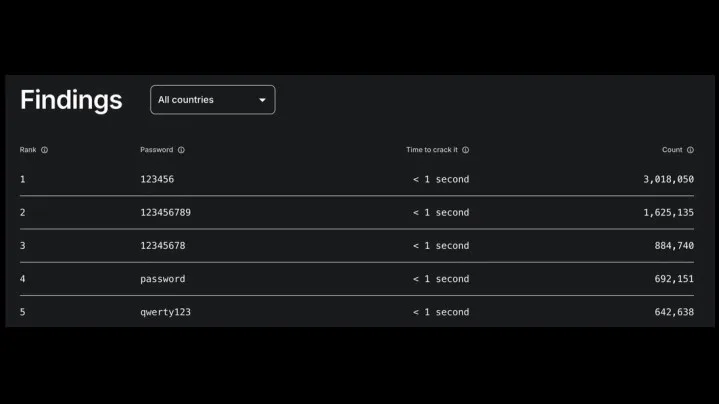
    Top five popular passwords according to NordPass.
    NordPass

    One might assume that by now, stronger passwords would be the norm. However, the annual report from NordPass reveals that popular password choices remain rather uninspired.

    The clear winner and reigning champion for the easiest password is still 123456. On a positive note, “password” has dropped from its top position; however, many equally weak alternatives continue to dominate, including:

    • 123456789
    • 12345678
    • password
    • qwerty123

    If you find yourself using any of these weak passwords, it is crucial to take the time to create a more secure option. While crafting a strong password may seem cumbersome, it is far preferable to dealing with the aftermath of a hacker accessing your accounts and files.

    The extended list of passwords is even more revealing, showcasing some surprising entries. Other commonly used weak passwords include:

    • iloveyou
    • monkey
    • dragon
    • 11111111
    • secret
    • abc123
    • 00000000
    • tinkle
    • 88888888
    • pokemon
    • superman
    • baseball

    These examples highlight just how easy it is for hackers to break in, often in just seconds. Many passwords reflect personal interests, while others appear to be chosen as a means of expressing frustration. For a deeper dive into the most popular passwords in your area, you can consult the filter tool available on NordPass’s site.

    Creating a strong password can be daunting, especially when you might resort to commonly used options like “secret” or “123456,” which are prevalent in the U.S. Fortunately, password managers like 1Password can assist you in generating secure passwords. Additionally, consider utilizing a new email address as part of a layered security strategy. This method can significantly enhance the safety of your online accounts. Remember to steer clear of using personal information, such as your address, when setting up your next password.

  • A Complete Guide for Protecting Your Passwords ([year])

    Despite the increasing number of password breaches and data leakage incidents demonstrate that passwords aren’t always, they’re still the most widely used authentication method. Infact, we’re seeing an alarming number of users still using poor password practises when setting up their accounts. Interestingly, this trend isn’t geographically-constricted, rather a global issue.

    (المزيد…)
  • These Are The 10 Most Easily Hacked Passwords – Beware!

    If you use these common passwords for your internet accounts, then you’re more likely to compromise it to the hackers.

    (المزيد…)