الوسم: MSI

  • MSI Eases OLED Monitor Protection Challenges

    MSI Eases OLED Monitor Protection Challenges

    If you have invested in one of the top OLED monitors, you're likely aware of their exceptional color vibrancy and contrast. However, these monitors come with a notable downside: burn-in problems. Manufacturers recognize this issue, and many are working to find solutions. MSI has already implemented some protective measures, and with their latest firmware update, they aim to make the process of safeguarding your monitor even easier.


    What is OLED burn-in?

    Burn-in is a problem that results in permanent discoloration or ghosting on certain OLED displays when static images remain on-screen for prolonged periods. This often includes elements like logos, gaming HUDs, or news tickers—essentially anything that is displayed consistently over time. Running your monitor at its maximum brightness can worsen burn-in, as it leads to uneven wear on the organic compounds responsible for generating light in OLED screens.

    Fortunately, contemporary OLED technology has made significant strides in reducing the risk of burn-in, though it can still occur and is quite annoying to deal with. You may notice a faint lingering shadow of a previously displayed static image, which remains visible regardless of the content currently being shown.

    When burn-in occurs, it is typically irreversible. This is why companies like MSI are proactive in employing strategies to prevent it from arising in the first place—no one wants their gaming monitor marred by lasting ghosting imagery.


    How does MSI’s new update help prevent burn-in?

    MSI has implemented a strategy called MSI OLED Care, a suite of features designed to extend the life of OLED displays and prevent burn-in. While MSI monitors generally come with a three-year warranty, utilizing these protective technologies is crucial to maintaining that warranty.

    One key feature within OLED Care 2.0 is Panel Protect, which refreshes each pixel to ensure consistent display quality and mitigate the risk of ghosting. This process, however, can disrupt gameplay if it occurs during an intense gaming session. Previously, the refresh happened every 16 hours—while not too common, it could still be poorly timed.

    MSI has acknowledged user feedback and is extending the refresh interval to once every 24 hours. If your monitor is used for over four hours, the system will prompt you to perform a Pixel Refresh. You can postpone this notification a few times, but overdoing it could result in the refresh happening regardless of your preference. Fortunately, it will now be scheduled for 24 hours instead of 16, which should be a relief for avid gamers who tend to leave their systems running for extended periods.

    The only way to access this update is to download the new firmware. If you're satisfied with the current 16-hour refresh cycle and it's working for you, feel free to skip it. However, for those who appreciate extended operational intervals, waiting an extra eight hours may be beneficial. MSI has also released an update for their Claw handheld device, reflecting similar user-driven enhancements.
  • MSI Claw’s New Update Delivers What Users Wanted

    MSI Claw’s New Update Delivers What Users Wanted

    The MSI Claw had a tumultuous beginning, but the newest MSI Claw AI 8+ is now considered one of the top contenders in the gaming handheld market. Regardless of the specific console model, MSI demonstrates a strong dedication to incorporating user feedback. The latest update introduces several features that gamers have long requested. Let’s explore these enhancements.

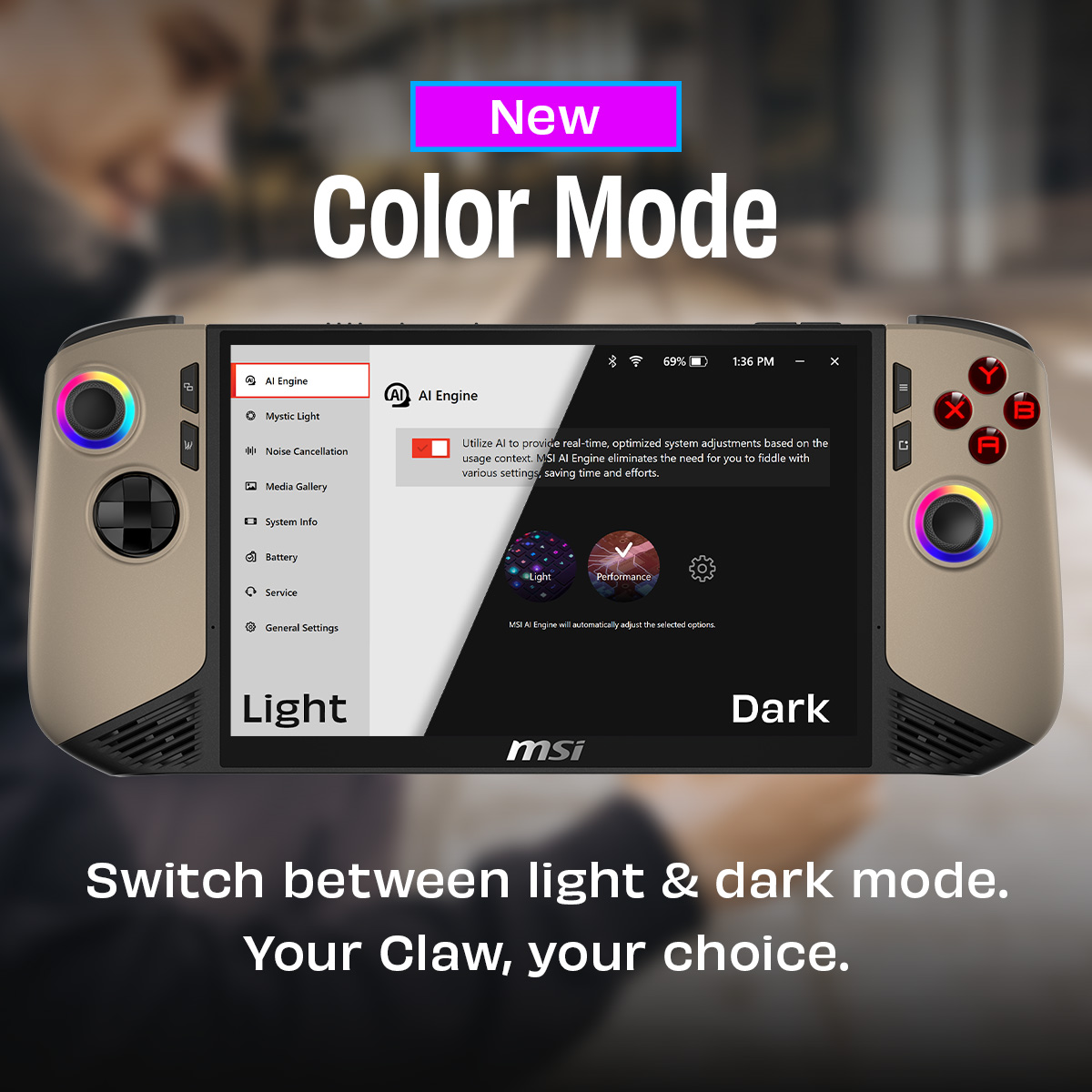
    MSI revealed the update in a post on X (formerly Twitter), stating: “We’re enhancing MSI Center M features based on community feedback.” Upon reviewing the new additions, it’s clear that they align with user requests—one notable feature is the option to toggle between light and dark themes, a functionality that I believe should be an essential part of any software.

    The color mode feature allows users to select a design that works best for them. Personally, I prefer dark mode on all my devices, but I must admit that the light mode looks quite appealing as well. It’s not overly glaring, which is beneficial for nighttime gaming sessions; however, you should try it out yourself and share your thoughts.

    Additionally, there are updates focused on battery performance. MSI has introduced Battery Master, which enables users to set a charging limit to help preserve battery longevity. Similar to the advice often given for smartphone charging—avoiding a full 100% charge—MSI now offers this same feature for the Claw.

    Lastly, there’s Battery Calibration, a separate tool that MSI suggests using every three months to optimize battery life further. Bear in mind this should only be performed while the handheld is plugged in, as it will close all applications, meaning you should avoid using it mid-game to prevent losing progress.

    MSI also mentioned that several bug fixes were included in this update, although specifics on what was addressed were not provided.

    The update is being rolled out now, so if you’re a Claw owner, you can download the patch and experience these enhancements firsthand.

  • MSI Goes All-In on AMD

    MSI Goes All-In on AMD

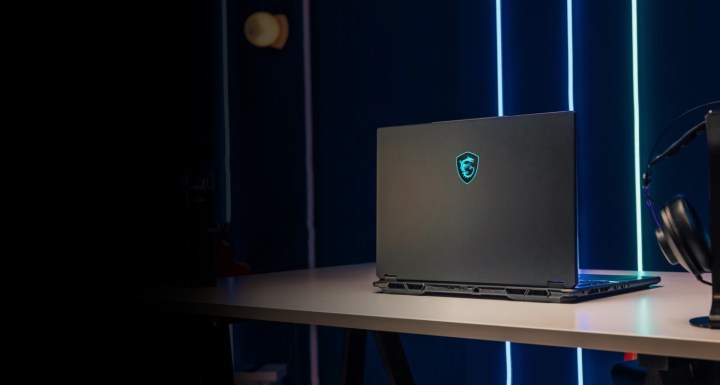
    MSI Stealth laptop on a desk
    MSI
    CES 2025 coverage
    CES 2025
    Explore our comprehensive coverage of CES.
    Updated just moments ago


    At CES 2025, MSI is unveiling a robust lineup of gaming laptops, featuring a surprising shift toward AMD processors in many new models—a notable deviation from their historical preference for Intel chips. Additionally, MSI is emphasizing larger laptops, showcasing five models with 18-inch displays alongside 17-inch and 16-inch options.

    The premium models, including the Titan, Raider, and Vector, will benefit from PCIe 5.0 support, and they’ll incorporate enhanced thermal solutions with dedicated heatsinks for improved cooling of both the CPU and GPU. Improvements in speaker driver materials are also set to minimize resonance and enhance audio quality. Let’s dive into the various laptops MSI has just introduced.

    MSI Titan

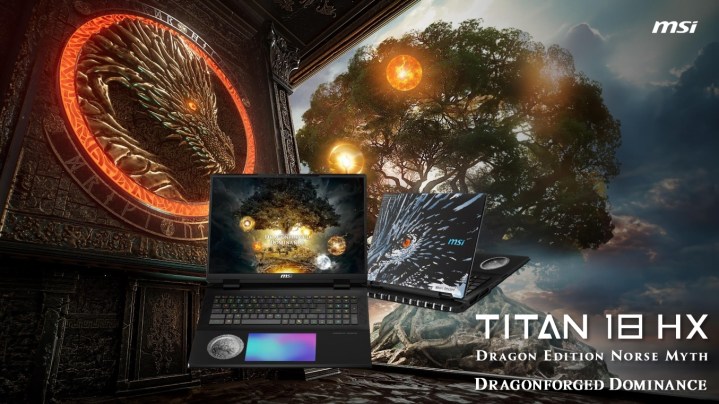
    MSI Titan 18 HX presentation slide
    MSI

    The Titan series continues its tradition of excellence with the new Titan 18 HX. This year's model showcases a Dragon Edition influenced by Norse mythology, featuring intricate designs including a dragon motif and rune-etched lid. The unique aesthetics are complemented by a textured metal finish and a Norse-themed coin set beneath glass in the palm rest, with designs illustrating Yggdrasil, the tree of life in Norse lore.

    Also notable is the inclusion of a large RGB haptic touchpad and RGB-lit Cherry mechanical switches. Under the hood, the Titan 18 HX boasts Intel’s Core Ultra 9 275HX CPU and Nvidia's latest RTX 50-series GPUs. To manage its impressive 270W power usage (comprising 95W for CPU and 175W for GPU), MSI employs advanced vapor chamber cooling, alongside support for up to 96GB DDR5-6400 RAM and up to four SSDs.

    The display features an 18-inch UHD+ (3,840 x 2,400) mini LED panel supporting a 120Hz refresh rate, 100% DCI-P3 color gamut, and VESA Display HDR 1000 certification. Connectivity includes two Thunderbolt 5 ports, three USB 3.2 Gen2 Type-A ports, a 2.5GbE LAN, Wi-Fi 7, Bluetooth 5.4, and HDMI 2.1.

    This powerhouse weighs approximately 7.9 pounds and is powered by a substantial 99.9 watt-hour battery, rechargeable via a hefty 400W power supply. While official pricing hasn't been disclosed, last year's model was priced above $5,000, suggesting the latest Titan 18 HX may surpass that benchmark.

    MSI Raider and Vector

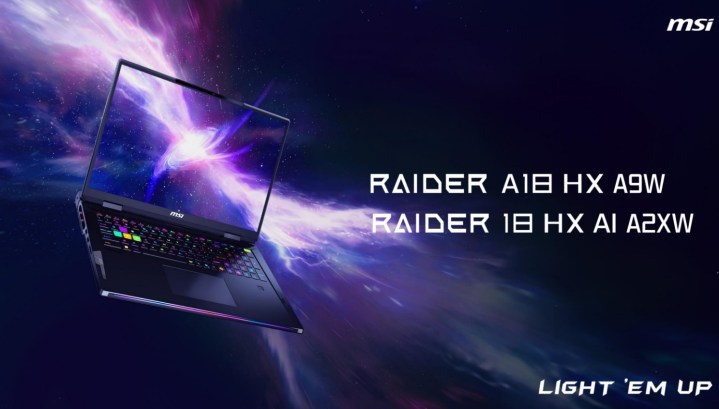
    MSI Raider laptop on a galaxy-themed background.
    MSI

    The Raider lineup also sees the introduction of an 18-inch model, which closely mirrors the Titan 18 HX in features and dimensions. Customers can choose between Intel’s Core Ultra 9 275HX (Raider 18 HX A2XW) and AMD’s Ryzen 9 9955HX3D (Raider A18 HX A9W) processors, complemented by Nvidia's RTX 50-series graphics cards.

    Similar to its premium counterpart, it features the same 18-inch mini-LED display, options for up to 96GB DDR5 RAM, and dual M.2 SSD slots. Connectivity remains robust, offering dual Thunderbolt ports (version 4 on the AMD version), a 2.5GbE LAN port, Wi-Fi 7, a per-key RGB keyboard from SteelSeries, and a potent 400W power supply.

    Meanwhile, the new Vector series, while a tad less premium than the Raider, still packs a punch. The 18-inch Vector 18 HX AI A2XW is available with an Intel Core Ultra 9 275HX, while the Vector A18 HX A9W can be configured with an AMD Ryzen 9 9955HX processor. While the GPU will still be Nvidia, it might not be as powerful as the Raider’s offerings. The display on the Vector series boasts a QHD+ (2,560 x 1,600) resolution, a 240Hz refresh rate, and 100% DCI-P3 coverage.

    Interestingly, MSI specifies that the AMD model will sport a 99.9Whr battery paired with a 400W power supply, whereas the Intel model will have a 90Whr battery and a 330W adapter.

    MSI Stealth

    MSI Stealth 18 HX presentation slide
    MSI

    The Stealth series, known for its sleek design, is now offering an 18-inch variant equipped with either the Intel Core Ultra 9 275HX (Stealth 18 HX AI A2XW) or the AMD Ryzen AI 9 HX 370 (Stealth A18 AI+ A3HW). Users can choose a high-end Nvidia RTX 50-series GPU, paired with 96GB of DDR5 memory. Other features include a single NVMe M.2 PCIe Gen 4 SSD slot, a per-key RGB keyboard from SteelSeries, and a Dynaudio six-speaker audio system.

    For its display options, MSI provides a choice between an 18-inch UHD+ (3840×2400) panel with a 120Hz refresh rate or a QHD+ (2560×1600) IPS panel with a higher 240Hz refresh rate. Both configurations come with a 99.9Whr battery and a 280W power supply.

    In addition, there’s a compact 16-inch variant (Stealth A16 AI+ A3HW), which is solely powered by AMD’s Ryzen AI 9 HX 370 processor. This model supports up to an RTX 5090 GPU, 64GB of LPDDR5x memory, an NVMe M.2 PCIe Gen 4 SSD slot, and shares similar keyboard and speaker technologies with its larger counterpart. Display options include a 16-inch QHD+ (2560×1600) OLED panel that provides a 240Hz refresh rate, 100% DCI-P3 color gamut, and VESA DisplayHDR True Black 600 certification.

    MSI Crosshair, Cyborg, and Venture

    MSI is also launching mid-range gaming options with the Crosshair 18 HX AI A2XW and the Cyborg A17 AI B2HW. The Crosshair 18 model features an 18-inch screen and offers configurations up to an Intel Core Ultra 9 275HX, a QHD+ 240Hz IPS display, dual NVMe M.2 SSD slots, up to 96GB of DDR5 RAM, and a 240W power adapter.

    Aiming at a more budget-conscious audience, the Cyborg A17 AI B2HW is available with up to an AMD Ryzen 7 260 processor, RTX 50-series graphics, and DDR5 memory up to 96GB. The display measures 17.3 inches, utilizes an FHD (1,920 x 1,080) IPS panel with a refresh rate of 144Hz. Other specifications include a modest 55.2Whr battery and a 150W power adapter.

    MSI Crosshair 18 HX presentation slide
    MSI

    Lastly, the Venture series fills the gap for everyday computing needs, offering a variety of models in 14-inch, 16-inch, and 17-inch sizes with options for both Intel Core Ultra and AMD Ryzen 300 processors.

  • I Played Black Myth: Wukong On The New MSI Handheld

    I Played Black Myth: Wukong On The New MSI Handheld

    When MSI handed me the Claw 8 AI+ with Black Myth: Wukong open, I couldn’t help but chuckle. Having logged 80 hours on a full desktop equipped with an RTX 4090, I was well aware of the game’s demanding nature. Playing such a high-intensity title on a handheld seemed far-fetched.

    Clicking on Continue, I started at the Pool of Shattered Jade rest point—the best spot for farming; if you’re familiar with the game, you know what I mean. I rushed toward the cocoons scattered around the area, activated my spirit ability, and dashed back. Amid the low light of a New York City bar, my farming routine was on repeat. I had plenty of experience harvesting in the game.

    That’s when it struck me—I was completely immersed in Black Myth: Wukong, completely forgetting that I was playing on a handheld device. Sure, the graphics weren’t flawless, and the frame rate wasn’t a steady 60 fps, but here I was, tackling one of the year’s most demanding games on something portable enough to have stowed in my carry-on.

    Get your weekly teardown of the tech behind PC gaming


    Check your inbox!

    However, let’s keep things in perspective. The original MSI Claw, which I rated a dismal 5/10, had its fair share of issues. In my earlier review, I stated that it “isn’t worth your time and certainly isn’t worth your money.” It was pricier than its competitors and delivered inconsistent performance—a total disaster.

    But the MSI Claw 8 AI+ aims to reclaim its place in the handheld gaming world, thanks to Intel’s latest Lunar Lake chip. Just on the basis of the new chip, it’s understandable if you’re feeling a glimmer of hope.

    Specs for the MSI Claw 8 AI+ compared to the ROG Ally X.
    MSI

    With this new model, MSI is clearly competing against the Asus ROG Ally X. It features the Core Ultra 258V chip, 32GB of LPDDR5x RAM (as the Lunar Lake is a system-on-a-chip, 24GB isn’t an option), an 8-inch 1200p display, Hall Effect joysticks, an 80Wh battery, dual Thunderbolt 4 ports, and Wi-Fi 7. On paper, it seems like the Claw 8 AI+ outperforms the ROG Ally X in nearly every respect.

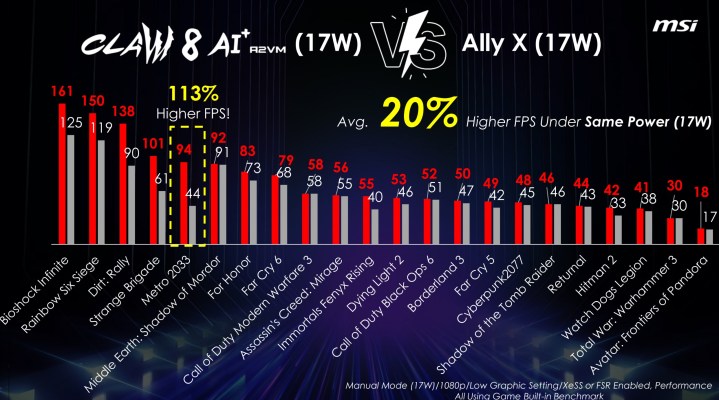
    MSI also claims it surpasses the ROG Ally X in performance. In its 17W mode, it allegedly offers 20% greater average performance, and with MSI’s dynamic AI Engine settings, it boasts a 28% increase. Impressively, MSI asserts that it delivers 7% more performance at 17W compared to the ROG Ally X at 30W, along with 44% longer battery life.

    Performance comparison between the MSI Claw 8 AI+ and Asus ROG Ally X.
    MSI

    While these claims are bold, we’ve seen MSI make grand statements before. I’m reserving judgment until the handheld actually arrives, and I recommend you do the same. The original MSI Claw often consumed more power while providing less performance compared to the initial ROG Ally, meaning MSI has significant work ahead of it.

    Nevertheless, being able to play a portion of Black Myth: Wukong is impressive. It may not be enough to earn a full-fledged endorsement, but it certainly piqued my interest. I truly hope MSI’s performance claims hold true once the device is officially available.

    MSI is releasing two versions of the handheld: the Claw 8 AI+ and the Claw 7 AI+. The latter retains the original Claw’s design but features the internals of the Claw 8 AI+. Priced at $899 and $799 respectively, MSI needs to not only match Asus’s offerings with the ROG Ally X but also exceed them given the higher price tags.

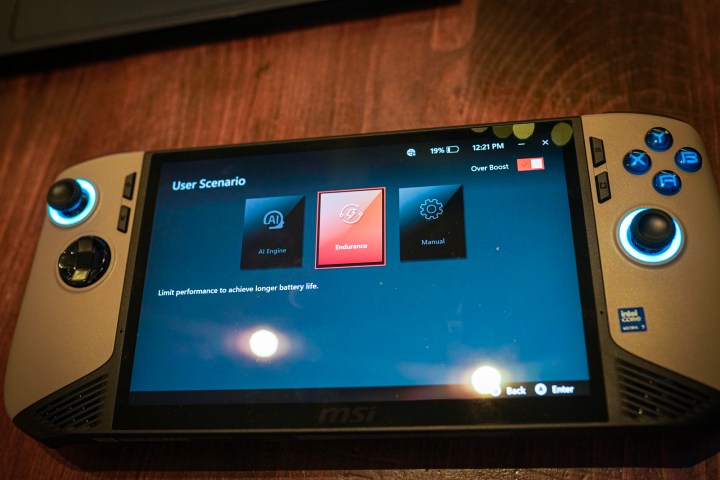
    Power settings on the MSI Claw 8 AI+.
    Jacob Roach / Digital Trends

    What concerns me is the release strategy. Both handhelds are currently available for preorder, with an official sale date set for December 26. MSI has informed me that no reviews will be released on launch day. Like the original Claw, this handheld will hit the shelves without a review program for media outlets.

    This means that initial feedback will come solely from consumers taking a chance with their own funds—a potential red flag in tech product launches. If you’re considering the Claw 8 AI+, I suggest waiting for a while after its release to see insights from independent reviewers before making a decision.

  • Top 10 Laptops That Can Run Windows 11 – Best Windows 11 Laptops

    With the announcement of the launch of the Windows 11 operating system on 24th June 2021, users all over the world are buzzing with anticipation. This Windows 11 update comes six years after the launch of Windows 10. And it’s filled with better features for a smooth experience.

    (المزيد…)
  • Charles Chiang, CEO of MSI Dead After Jumping From The Building

    Charles Chiang CEO of the famous motherboard manufacturing company MSI has died after jumping from a 7th-floor window of MSI HQ in Taiwan.

    (المزيد…)