Tag: Messaging

  • How to Use WhatsApp Web: A Complete Guide

    How to Use WhatsApp Web: A Complete Guide

    WhatsApp, owned by Meta, is widely recognized as a phone-centric messaging platform, but its web version has become increasingly practical. If you spend most of your workday at a desk, typing on a full keyboard is far easier than tapping away on your phone. This is where WhatsApp Web comes into play.

    With WhatsApp Web, you can access your chats directly from a laptop or desktop browser, providing a wider view of conversations and a more comfortable environment for typing, sharing files, and managing group chats. It’s especially useful when your phone is charging across the room, tucked away in a bag, or when you prefer not to switch devices repeatedly.

    The browser version of WhatsApp has also seen feature enhancements. It now supports video messages, time-limited voice messages, message editing, and more. While earlier versions required your phone to stay connected to the internet for the web version to work, multi-device support allows WhatsApp Web to function even if your phone goes offline temporarily. However, initial setup still requires your phone.

    One important thing to note is that WhatsApp accounts are linked to phone numbers rather than usernames or passwords. Therefore, you can’t simply sign in to WhatsApp Web like a typical website. Instead, you’ll need to link your browser to your account through the WhatsApp app on your iPhone or Android device, usually by scanning a QR code or entering your phone number.

    The setup process is quick, and once you’re connected, the web interface resembles the mobile app closely. You can send messages, share media, browse past chats, and adjust privacy settings without having to learn a new layout. Here’s how to get started.

    How to Log in to WhatsApp Web from an iPhone

    Getting started with WhatsApp Web on an iPhone is straightforward. Visit the WhatsApp Web page in any browser like Safari or Chrome and scan the QR code displayed on your computer screen using the WhatsApp app on your iPhone. Once linked, WhatsApp Web will stay active until you log out from either device.

    1. On your PC, open your preferred browser and go to https://web.whatsapp.com.
    2. Launch WhatsApp on your iPhone.
    3. Tap Settings in the bottom right, then select Linked Devices.
    4. Tap Link a Device and authenticate if prompted via Face ID or Touch ID. The camera will activate.
    5. Hold your iPhone up to scan the QR code on your computer screen. The web page should refresh and log you into WhatsApp Web.

    How to Log in to WhatsApp Web from an Android Phone

    The process with Android devices is similarly simple:

    1. Open WhatsApp on your Android phone.
    2. Tap the three dots in the upper right corner of the chat list and select Linked Devices.
    3. Tap Link a Device, authenticating if needed. The camera will turn on.
    4. Scan the QR code on your computer screen.
    5. Once scanned, the webpage refreshes and logs you into your WhatsApp account.

    Logging in without a QR Code Using Your Phone Number

    Aside from scanning QR codes, you can also log into WhatsApp Web by manually entering your phone number. Here’s how:

    1. On the WhatsApp Web login page, choose Log in with phone number.
    2. Enter your phone number and press Next.
    3. You’ll receive an eight-digit code on WhatsApp that you’ll need to input on the web page.
    4. Alternatively, on your phone, go to Settings > Linked Devices, select Link a Device, and choose Link with Phone Number.
    5. Enter the eight-digit code when prompted, and the web session will be activated.

    Protecting Your WhatsApp Web Session

    After logging in, WhatsApp Web remains connected until you explicitly log out. To maintain privacy, you can enable an app lock feature:

    • Open WhatsApp Web and go to Settings (gear icon).
    • Select Privacy, then App Lock.
    • Enable the feature and set a password.
    • You can choose how long before the session automatically locks, or manually lock it anytime from the menu.

    Remember, this password only applies to your current browser session; it doesn’t sync across devices and must be re-established if you sign out and log back in later.

    Features of WhatsApp Web

    Once connected, WhatsApp Web provides an experience similar to the mobile app:

    • View and select chats from the list on the left.
    • Access your message history and send new messages by typing in the chat window.
    • Attach media files, documents, or voice recordings using the attachment icon.
    • Use menu options to start new chats, create groups, update your profile, or adjust notification settings.
    • View contact statuses and updates posted by your contacts.

    Using WhatsApp Web allows for seamless communication, making it easier to stay connected while working on your computer. It combines the convenience of the mobile app with the comfort and efficiency of a desktop environment.

  • Time-bending Crystals, Group Streaks & Unstoppable Alarms

    Time-bending Crystals, Group Streaks & Unstoppable Alarms

    Time Crystals: From Science Fiction to Everyday Security


    Artwork by Affan Qasim, created with Gemini Pro

    Picture pulling out a 1000 Rupee bill and seeing its security stripe pulse like a heartbeat—shifting, shimmering, and repeating in ways counterfeiting can’t replicate. That’s the intriguing potential of time crystals, a form of matter physicists once believed was impossible.

    Researchers at the University of Colorado Boulder have now created the first visible time crystals. Made from twisted liquid crystals illuminated by light, these crystals ripple with vibrant tiger-stripe patterns that are sturdy, stable, and sometimes even visible with the naked eye.

    This isn’t sci-fi fuel for a time machine, but it could redefine how we safeguard currency, store data, or develop futuristic displays. Imagine screens that animate themselves, changing colors or patterns rhythmically, powered by the principles of time symmetry breaking.

    By layering different types of time crystals, it might be possible to produce holographic images that are extremely secure and constantly shifting or create bright, shimmering surfaces for wearable tech or architecture. From seemingly impossible physics to holograms on banknotes, time crystals show that even the wildest science can find practical applications right in your pocket.

    Snapchat Enhances Features: Unlimited Storage and Group Streaks

    Artwork by Syed Alihasan Agha, created using Gemini Pro
    Artwork by Syed Alihasan Agha, created with Gemini Pro

    Snapchat is changing the game again: the app renowned for disappearing messages now aims to keep your chats forever and encourage ongoing friendships.


    With “Infinite Retention,” you can pin conversations so they stay put instead of fading away, a bold move away from Snapchat’s original “disappear after viewing” approach.

    Meanwhile, “Group Streaks” turn your group chats into a friendly competition, where everyone contributes to maintaining a streak. Let one lazy friend slip up, and the whole record is lost. This feature gamifies chatting, making your group conversations more of a daily routine than a casual drop-in.

    “Good morning! It’s a sunny day. Solve for X.”

    Artwork created by Daniyal Khuhro using Gemini
    Artwork by Daniyal Khuhro, generated with Gemini

    Today, it seems like fresh innovation is scarce, replaced by rebrands of familiar concepts.

    Awake, the latest alarm app for iOS, demands that users complete a task or challenge before turning off the alarm, setting itself apart. It now includes features like weather updates, morning news, calendar reminders, and even social media block functions—all bundled into one package. Though useful, these features are nothing new.

    Most of these added features come with a hefty price tag—$19.99 annually or $6.49 monthly—highlighting that they’re selling convenience, not novelty, as usual.

  • Can Bitchat App Replace My Regular Messaging?

    Can Bitchat App Replace My Regular Messaging?

    In today’s fast-paced digital world, staying connected is more important than ever. With a plethora of messaging applications available, Bitchat is emerging as a popular choice. But can it truly replace traditional messaging apps? Let’s dive deeper into what Bitchat has to offer and weigh its strengths and weaknesses.

    What is Bitchat?

    Bitchat is an innovative messaging application designed to facilitate easy and engaging communication between users. It combines features from social media, video calls, and traditional texting, creating a unique platform for modern communication.

    Key Features of Bitchat

    • Multimedia Messaging: Send photos, videos, and voice notes seamlessly.
    • Group Chats: Create and manage group conversations for family, friends, or work.
    • Video Conferencing: Integrated video calling allows for face-to-face interactions.
    • Customization Options: Personalize chats with themes, emojis, and stickers.
    • Privacy Controls: Enhanced security features, including end-to-end encryption, ensure user privacy.

    Advantages of Using Bitchat

    Switching to Bitchat can come with several benefits that may appeal to various users.

    User-Friendly Interface

    • Intuitive Design: The app’s layout is clean and easy to navigate, making it accessible for users of all ages.
    • Quick Access: Instant notifications and a straightforward messaging design allow for immediate communication.

    Enhanced Engagement Features

    • Interactive Tools: The app includes polls, quizzes, and games to inspire user engagement.
    • Expressive Communication: Vibrant stickers and GIF options enhance emotional expression compared to standard text messaging.

    Versatile Communication

    • Cross-Platform Functionality: Works seamlessly on various devices, including smartphones, tablets, and PCs.
    • Integration with Social Apps: Easily share content with other social media platforms.

    Potential Drawbacks of Bitchat

    While Bitchat offers numerous advantages, it’s essential to consider the challenges it may present.

    Privacy Concerns

    • Data Collection: Some users may have concerns around how their data is used or shared.
    • Dependence on Connectivity: Requires a stable internet connection, making it less reliable in areas with poor service.

    Limited Popularity

    • User Base: Depending on your circle, not all friends or family may be using Bitchat, which could limit its effectiveness as a messaging app.
    • Familiarity with Traditional Apps: Many users are comfortable with long-standing messaging platforms like WhatsApp or SMS, which may hinder the switch.

    Cost Implications

    • In-App Purchases: While the app might be free, some features could require payment.
    • Potential Advertisement: Users might find some advertisements intrusive unless they opt for a premium version.

    Is Bitchat Right for You?

    To determine if Bitchat is a suitable replacement for your regular messaging, consider the following factors:

    • Social Interaction Needs: If you enjoy interactive features and multimedia messages, Bitchat may enhance your communication experience.
    • Privacy Priorities: If data privacy is a significant concern for you, delve deeper into Bitchat’s policies.
    • Peer Preference: Assess whether your friends and family are open to using a new platform.

    Conclusion

    The decision to shift from regular messaging to Bitchat hinges on individual needs, preferences, and social dynamics. While it offers unique functionalities and interactive communication options, weighing its potential drawbacks against your requirements is essential for making an informed choice.

  • What is Bitchat App and How Does It Work?

    What is Bitchat App and How Does It Work?

    What is Bitchat App?

    Bitchat is a messaging application that has gained popularity for its user-friendly interface and robust features. Targeting individuals who prioritize privacy and flexible communication, Bitchat allows users to connect with friends, family, and colleagues in various effective ways. Features like encrypted chats, group messaging, and multimedia sharing make it stand out in the crowded messaging app landscape.

    Key Features of Bitchat

    Bitchat offers a variety of features that cater to the needs of modern users. Here are some notable aspects:

    • End-to-End Encryption: Ensures that only the sender and receiver can read messages.
    • Multimedia Sharing: Users can send photos, videos, and voice notes easily.
    • Group Chats: Communicate with multiple people simultaneously by creating group conversations.
    • User-Friendly Interface: The design is intuitive, making it accessible for users of all ages.
    • Customizable Notifications: Personalize alert settings for different chats.

    How Does Bitchat Work?

    Understanding how Bitchat functions can help users maximize their experience. Here’s a breakdown of its functionalities.

    Getting Started with Bitchat

    1. Download and Install:

      • Available on major platforms like iOS and Android.
      • Download from the App Store or Google Play Store.

    2. Set Up Your Account:

      • Create an account using your phone number or email.
      • Verify your account through a confirmation code.

    3. Create a Profile:

      • Set a username and profile picture.
      • Customize your status for friends to see.

    Navigating the Interface

    • Chat Screen: A list of conversations is displayed, allowing you to pick where you left off.
    • Search Bar: Quickly find contacts or messages.
    • Menu Options: Access settings, account management, and help easily.

    Messaging Features

    • Sending Text Messages:

      • Compose messages to individuals or groups.
      • Use emojis, stickers, or GIFs to enhance conversations.

    • Voice and Video Calls:

      • Make high-quality voice and video calls directly within the app.
      • Group calling available for multiple participants.

    • Broadcast Messages:

      • Send messages to multiple contacts without creating a group.
      • Efficient for announcements or updates.

    Security Measures

    Bitchat takes user security seriously. Implementing various protective measures ensures user data remains private.

    Privacy Features

    • Data Encryption: Ensures messages are scrambled and unreadable by third parties.
    • Self-Destructing Messages: Set messages to disappear after being read.
    • Account Recovery: Options to recover your account securely if you forget your credentials.

    Reporting and Blocking

    Users can block or report any suspicious accounts, maintaining a safe environment for all.

    Community Engagement

    Bitchat fosters community interaction through:

    • Public Groups: Join discussions on various topics.
    • Event Scheduling: Organize and plan events with friends using integrated features.

    Feedback and Updates

    Users can easily provide feedback which the developers use to enhance functionality and adapt to changing user needs.

    By focusing on privacy, user experience, and comprehensive features, Bitchat continues to carve a niche in the competitive messaging app market, making it a go-to choice for many users looking for an efficient and secure way to communicate.

  • Telegram Teams Up with Musk’s xAI to Launch Grok for Users

    Telegram Teams Up with Musk’s xAI to Launch Grok for Users

    Illustration of xAI and Grok logos, captured on February 16, 2025.
    Illustration showing the logos of xAI and Grok, taken on February 16, 2025. — Reuters

    Elon Musk’s AI venture, xAI, is set to pay Telegram $300 million to launch its Grok chatbot on the messaging platform, which boasts over a billion users. This move aims to strengthen its position within the rapidly growing AI industry, as reported by Reuters.

    According to Telegram’s founder, Pavel Durov, the agreement spans one year and includes a provision where xAI will share half of the subscription revenue generated through the app. The $300 million will be settled with a combination of cash and stock.

    Durov emphasized that xAI’s access to user data will be limited to information that Telegram users voluntarily provide to Grok during their interactions.

    This collaboration could grant xAI, which acquired X earlier this year, access to valuable data for refining and enhancing its AI models.

    As many open-source data sources have been depleted, AI firms face growing challenges in acquiring quality data. This has led companies like Meta Platforms to leverage public interactions with AI for training their models.

    X’s privacy policy indicates that it utilizes public user posts to inform its AI models, although it’s unclear if xAI plans to follow a similar approach with data from Telegram.

    This year, xAI has established multiple partnerships aimed at reinforcing its presence in both AI infrastructure and financial services. The company has not yet responded to a request for comment from Reuters.

  • WhatsApp Is Finally Here on iPad Just What I’ve Been Waiting For

    WhatsApp Is Finally Here on iPad Just What I’ve Been Waiting For

    iPad users who enjoy WhatsApp can now celebrate, as the messaging app, which boasts over two billion users globally, is finally available on Apple’s beloved tablet. You can download the WhatsApp app directly from the App Store for your iPad right now.

    For a long time, iPad owners—regardless of whether they had the latest models—had to rely on the WhatsApp Web version, which often proved inconvenient for chatting with friends. However, Meta, the parent company of WhatsApp, has now launched a dedicated app.

    This exciting announcement was made via the official WhatsApp social media channels, less than a day after they hinted at something coming soon.

    The new app allows you to read and respond to messages, interact with communities and channels, update your status, and even make video calls—features that weren’t accessible through the web version. Essentially, it provides the complete experience you would expect from the standalone application.

    Finally Here

    WhatsApp on iPad app in Slide Over mode
    John McCann / Digital Trends

    Given how frequently iPads are used for travel—I’ve seen countless individuals using them on my trips for both work and leisure—it’s surprising that it took Meta this long to release an official version of WhatsApp.

    That said, the good news is that the iPad version of WhatsApp lives up to my expectations. Installation was a breeze, and connecting it to my existing WhatsApp account was easy. You can link it with both iPhones and Android devices, so you have flexibility. Plus, its compatibility with iPad’s multitasking features, including Split View and Slide Over, enhances the user experience, allowing me to switch between apps effortlessly while keeping WhatsApp within reach.

    After using the app for just a few hours, it’s clear that the dedicated WhatsApp version significantly upgrades my experience while using my iPad Air (5th Gen) as my primary work device away from the office.

    Now, what’s the status on a dedicated Instagram app for iPad, Meta? Fingers crossed that it’s in the works!

    How to Install the WhatsApp App on Your iPad

    Getting started with WhatsApp on your iPad is easy. Just follow these steps:

    1. Download WhatsApp on your iPad from the App Store.
    2. Open the WhatsApp app.
    3. On your phone, navigate to ‘Linked Devices’ in the settings menu and scan the QR code displayed on your iPad.
    4. Start using WhatsApp on your iPad!

    Make sure your iPad is running iOS 15.1 or newer for the app to function. With the upcoming launch of iOS 19 and iPadOS 19 on the horizon at WWDC 2025, many iPads will be compatible with this app.

  • WhatsApp Will Soon Help You Avoid Missing Important Texts

    WhatsApp Will Soon Help You Avoid Missing Important Texts

    Recently, WhatsApp rolled out an updated feature that encourages users to check for status story updates from their contacts. In a new enhancement, the platform has now integrated reminders for messages as well.

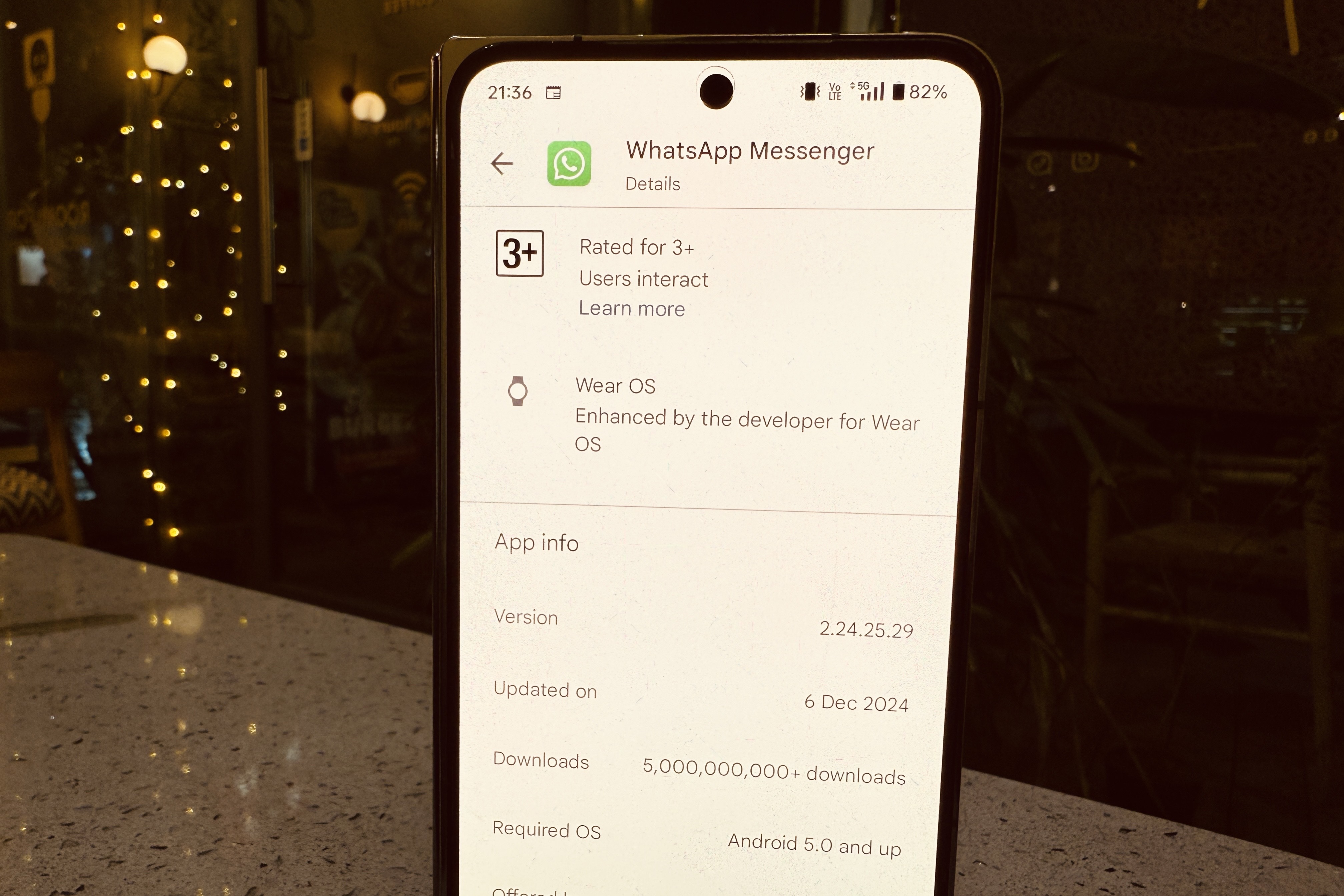
    Currently undergoing testing with the v2.24.25.29 build on Android, this feature was initially identified by the update tracker WABetaInfo. Our team at DigitalTrends has verified that it is available in the latest beta version through the Google Play Store.

    Users can toggle this feature on in the Notifications settings, allowing the app to send occasional nudges regarding “messages or status updates” that haven’t been viewed for some time. The specific frequency of these alerts—whether they are displayed as in-app reminders or stand-alone notifications—remains unclear.

    Furthermore, the app doesn’t clarify how these notifications are prioritized, especially whether they focus on contacts with whom users frequently interact. However, according to WABetaInfo, this functionality appears to rely on an algorithm based on user engagement patterns.

    “If a user reinstalls the application, WhatsApp will need to reassess these interactions since none of this data is retained in backups or stored on their servers,” the report states. The primary aim is to ensure that users don’t overlook important messages from friends and family.

    Latest beta build of WhatsApp on the Play Store.
    The Reminders feature is now available with the latest beta update on the Play Store. Nadeem Sarwar / Digital Trends

    While this new feature may not seem revolutionary, it holds significant potential, especially in regions where businesses—from banks to telecom services and grocery delivery giants—rely heavily on WhatsApp for critical communications and alerts.

    Numerous small businesses and marketplaces also utilize WhatsApp for customer outreach, including digital payment integrations. As a result, the influx of messages from various services can quickly overshadow personal messages, making this Reminders feature a beneficial addition.

    The concept is reminiscent of the “nudge” system found in Gmail, which first appeared in 2018 and was later adopted in Google’s Messages app. In that framework, users receive alerts about texts that need follow-up or reminders about birthdays.

    As of now, there’s no indication of when this Reminders feature will be made available to WhatsApp users through the stable release. With nearly three billion users globally, according to estimates from Statista, WhatsApp serves as a vital communication tool in both personal and business contexts, particularly in areas like Asia and Latin America. Providing users with the chance to catch up on potentially missed messages is certainly a positive advancement.

  • How to Change Your iPhone Call and Messaging Apps in iOS 18.2

    How to Change Your iPhone Call and Messaging Apps in iOS 18.2

    Bryan M. Wolfe / Digital Trends

    The forthcoming iOS 18.2 update will grant users the ability to select their preferred calling and messaging applications on their iPhones. This means you won’t be required to stick with Apple’s built-in options. Below are the simple steps to make the change.

    Difficulty

    Easy


    Duration

    10 minutes

    What You Need

    • An iPhone running iOS 18.2 or later

    Note: iOS 18.2 is currently in beta, so these steps may change by the time the official version is released.

    How to Change Your Default Calling and Messaging Apps

    Changing your default calling and messaging apps is a straightforward process, thanks to Apple’s combined settings hub for managing defaults.

    Step 1: Launch the Settings app on your iPhone with iOS 18.2 or later.

    Step 2: Scroll down and select the Apps option.

    Step 3: In the Apps section, look for the new Default apps option at the top and tap on it.

    How to set default apps on iOS 18.2
    Bryan M. Wolfe / Digital Trends

    Step 4: You’ll see options for both Calling and Messaging. Choose one to modify.

    Step 5: You will be presented with a list of compatible apps installed on your iPhone. Select the app you want to set as your default for calling or messaging.

    How to adjust default apps on iOS 18.2
    Bryan M. Wolfe / Digital Trends

    Why Switch from Native Apps?

    You might wonder why you would want to switch your calling or messaging app. While Apple’s iMessage boasts impressive features like SharePlay and Memoji, and the Phone app is a standard for making calls, many users find value in alternatives. For example, applications like WhatsApp, Signal, and Telegram are preferred for their focus on international communication and enhanced security options.

    Some users appreciate alternative apps for their compatibility across various platforms, which can simplify communication with a broader audience. At the end of the day, you might favor a different app simply because it offers unique features that Apple’s apps do not. Once iOS 18.2 is publicly released, users will have the flexibility to select third-party applications as their default options, promoting increased choice and competition.

    The iOS 18.2 update is anticipated to be available to everyone by the end of the year.

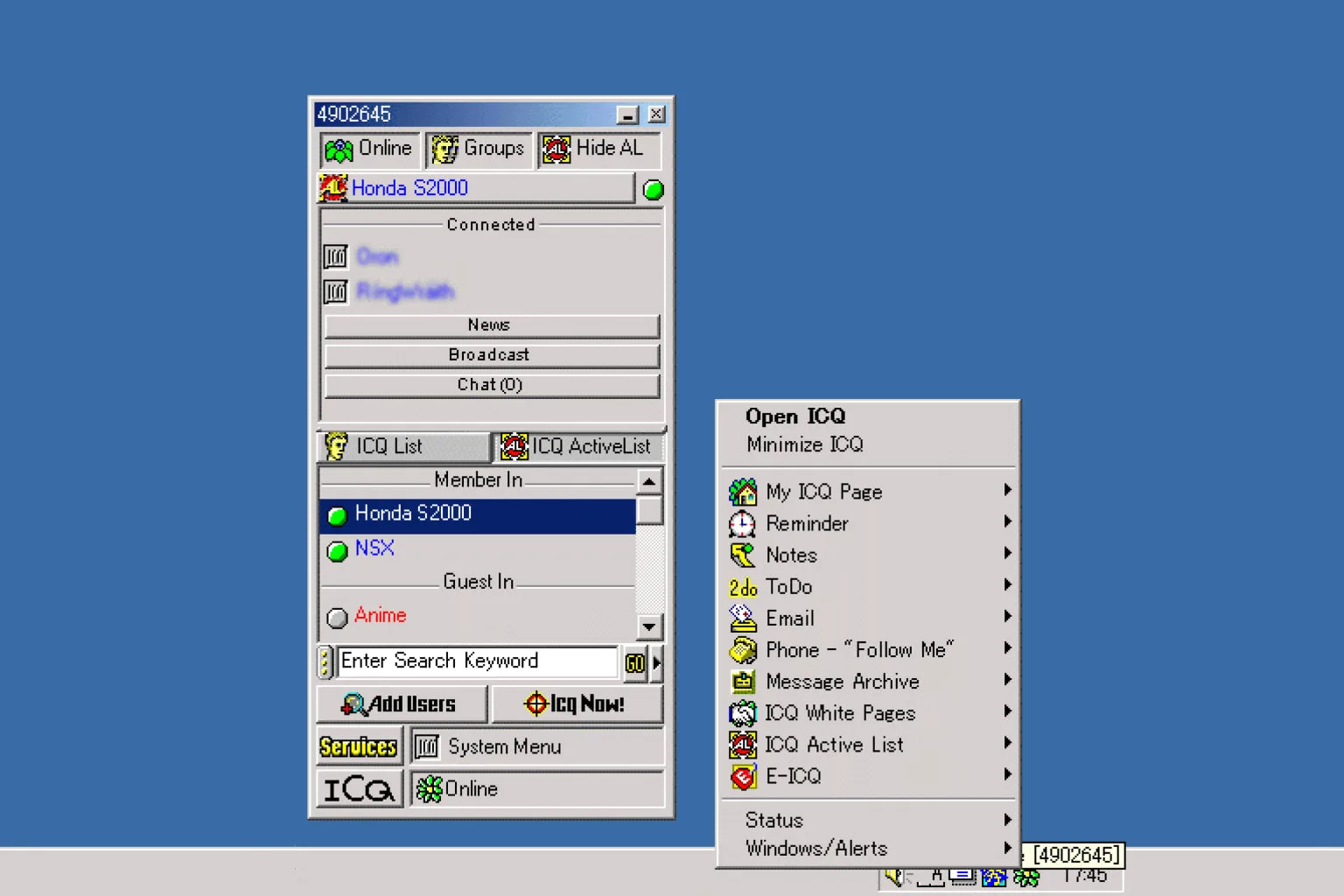
  • ICQ Shuts Down After 28 Years

    ICQ Shuts Down After 28 Years

    After going through three different owners, the old-school VOIP platform ICQ is finally saying goodbye.

    Originally launched in 1996, ICQ—short for “I Seek You”—will cease operations on June 26, marking almost 28 years since it first came online.

    ICQ had its heyday with nine million users and 2.5 million daily active users. That was pretty impressive back when most folks were still using dial-up connections and DSL was starting to roll out in a few countries.

    ICQ’s journey began when AOL bought it from Mirabilis in 1998 for $407 million. Fast forward to 2010, and the Russian company Mail.Ru, later called VK, snapped it up. ICQ had a big following in Russia, and VK aimed to bring the app into the modern era, making it available on Android and iOS.

    Now, ICQ is advising its remaining users to switch over to VK, which has been its parent company since AOL sold it. VK tried to keep ICQ relevant by updating it for modern smartphones but eventually decided to wind things down.

    Interestingly, ICQ’s X account hinted that it might come back one day, but in a world full of messaging apps, could it find its place again? When MSN Messenger shut down, users were moved to Skype, so many see a similar transition happening here.

    ICQ’s quiet exit reflects how internet communication has evolved. Today, people use WhatsApp, social media like Facebook and X (formerly Twitter), and more sophisticated platforms that integrate messaging, voice, and video calls. Russia has its own social media ecosystem with VK, much like how China has its platforms. While the market is crowded, ICQ managed to last longer than many of its contemporaries, such as MSN, AOL, Yahoo, MySpace, Orkut, and Google Plus.

    Despite ICQ hinting at a possible return, its impact since the ’90s is undeniable. It holds a special place in the hearts of those who formed long-lasting friendships and relationships on the platform. Even if the app fades away, the memories it created will live on.