الوسم: lost luggage

  • How To Share the Location of Your Lost Luggage with Airlines Using Android’s Find Hub

    How To Share the Location of Your Lost Luggage with Airlines Using Android’s Find Hub

    Android’s Find Hub now allows you to share the exact location of your lost luggage directly with airlines. This new feature arrives at a perfect time, just as holiday travel peaks and baggage loss is more common. You can generate a secure link from a compatible tracker tag and submit it into the airline’s baggage claim form. Over ten major global carriers, including Lufthansa, Air India, and Scandinavian Airlines, accept these links. This system puts control of your luggage’s location into your hands, eliminating the need to wait for airport staff to manually search for your bag.

    ### How the Find Hub Location Sharing Works

    This feature creates a secure connection between your tracker and the airline’s baggage system. When you report a bag as lost within the Find Hub app, it produces an encrypted URL that directs to the real-time location of your item.

    This link acts as a temporary key. Once you paste it into the airline’s lost luggage form, their staff can view your bag’s position on a map using their existing tracking tools. Importantly, the airline never gains permanent access to your tracker or its history. The link expires after seven days and will deactivate immediately once your phone detects the bag is nearby again. Google ensures all location data remains encrypted end-to-end for privacy.

    ### Step-by-Step Guide to Sharing Your Bag’s Location

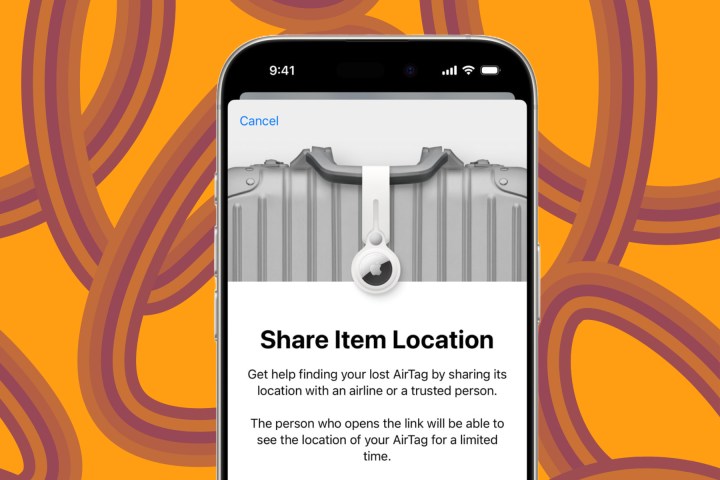
    Begin in the Find Hub app on your phone. Locate your lost item in the list and select it. You’ll see a button labeled “Share Item Location.” Tapping this will generate a unique, secure URL that you can copy.

    Next, head to your airline’s website or app. Find the baggage help section and paste the link into the appropriate form. The airline will then have access to a map showing your bag’s current location with live updates.

    Sharing automatically ends when your device detects the bag is back in your possession. Google adds an extra layer of privacy by automatically expiring the link after seven days and encrypting all data involved.

    ### Future Developments

    Google is collaborating with Samsonite to integrate Find Hub technology directly into new suitcases. That means upcoming luggage will connect to the network straight out of the box, without needing a separate tracker tag. The company also states that more airlines, including Qantas, will be joining this program soon.

    For now, this feature gives Android users the same luggage tracking capabilities that iPhone owners have enjoyed since last year. Before your next trip, pick up a compatible tracker tag, check if your airline is on the list, and set up this system in just a few minutes. It’s a quick and easy way to save hours of stress at the baggage counter.

  • Locating the Owner of Lost Luggage in Hello Kitty Island Adventure

    Locating the Owner of Lost Luggage in Hello Kitty Island Adventure

    After making a quick escape from their plane, everyone from Hello Kitty Island Adventure landed safely on the island, thanks to their balloons. Now, as they settle in, they realize something crucial is missing: their luggage. It’s scattered all over the island, and no one knows where it is or who it belongs to.

    Cinnamaroll has been appointed as the island’s mail carrier, but he’s overwhelmed with deliveries and doesn’t have the time to search for the lost bags. That’s where you come in! With your tools, it’s your job to help Cinnamaroll locate all the misplaced luggage and return them to their rightful owners.

    How to Start Your Search for Lost Luggage

    Finding any piece of lost luggage will kick off your quest. The first one you can locate is Chococat’s, which is fairly easy to find since it doesn’t require too much progress in the story and only needs one of your primary tools.

    Once you discover the luggage, you’ll need to identify its owner and return it to one of seven characters who have lost something: Badtz-maru, Chococat, Hangyodon, Hello Kitty, Keroppi, My Melody, and Kuromi.

    Helpful Tip: If you check the menu and read the info tab for each piece of luggage, it will provide a hint about who it belongs to based on the description and the symbol for their liked items.

    You can find the Packaged Luggage at various locations throughout the four main regions of the game. They look like a blue and pink box with wings, matching Cinnamaroll’s color scheme.

    While there isn’t a big reward for collecting all the luggage like some quests, every time you drop off a piece of luggage, it boosts the character’s Friendship level significantly. So, it’s definitely worth the effort to collect and return them!

    Badtz-maru’s Lost Luggage

    To track down Badtz-maru’s Packaged Luggage, you’ll need to unlock the gate to the Spooky Swamp. Once through, head to the northern edge of the region, go past the minecart track, and use the rocks to climb up the cliff.

    Tip: You can reveal the foggy areas on the map by lighting up the Minecart Tour’s three lanterns, but it’s not necessary to find Badtz-maru’s luggage.

    Run along the cliff until you get to a flat area in the center, where you’ll find his Packaged Luggage overlooking a sandy spot with shallow water. Once you’ve got it, take it back to Badtz-maru at his Comic Stand to complete that part of your quest.

    Chococat’s Lost Luggage

    For Chococat’s luggage, you’ll need to open the large gates and make your way into the Spooky Swamp, where you’ll find the other piece of the Flippers that allow you to swim without being sent back to shore.

    Once you have the Flippers, go to the Resort area of the island and swim into the lake south of Chococat’s house. The Packaged Luggage is near the shore closest to him. After collecting it, head to Chococat’s home to return it.

    Hangyodon’s Lost Luggage

    The next piece of luggage belongs to Hangyodon, and you’ll need to reach Gemstone Mountain for it. This region is located northwest of the Spooky Swamp, and the only requirement is to have previously unlocked the Spooky Swamp.

    Note: You don’t need the Flippers for this quest, but they can help save time by allowing you to swim through the surrounding waters.

    You can find Hangyodon’s luggage at the southwestern edge of Gemstone Mountain, on a cliff beside a broken staircase where a Nul is wandering. To deliver the luggage to Hangyodon, you need to reach Friendship level six with Kuromi and complete her Deep Diving quest to obtain a Snorkel. Once you have it, head to the Comedy Club in the underwater region’s southwestern corner to return the luggage.

    Hello Kitty’s Lost Luggage

    To find Hello Kitty’s luggage, make sure you’ve unlocked the Spooky Swamp, acquired the Flippers, reached Friendship level six with Kuromi, and obtained the Snorkel.

    From there, swim or walk to the waters south of Gemstone Mountain, and find the large pier in the middle of the southern region. Dive in, and you’ll spot the Packaged Luggage near a set of three rocks to the left of a ledge with a Radiant Chest. Return it to Hello Kitty to complete another quest.

    Keroppi’s Lost Luggage

    Keroppi’s luggage can be found on Mount Hothead, the volcanic area in the northwestern part of the map.

    Be sure to have a good amount of stamina before attempting to reach this location, as climbing there requires navigating high cliffs. To access Mount Hothead, unlock the Spooky Swamp and get the Flippers from Chococat’s quest.

    Travel from the western side of the resort, cross Moonstone Island, and swim to reach the area. Begin at the fast-travel mailbox at the bottom, and carefully climb the rocks and cliffs on the volcano’s western side.

    If you want to save stamina, jump to your maximum height and cling to the wall as you climb. Once you reach the secondary level with buildings, go to the edge and hop between the rocks along the cliff to reach the top. Run along the volcano’s rim, and then jump down to where the debris is situated. Finally, hop over to the rocks to find Keroppi’s Packaged Luggage, and bring it back to him at the Resort or Nature Preserve.

    Kuromi’s Lost Luggage

    Kuromi’s luggage is back near the Comedy Club. Again, ensure you’ve unlocked the Spooky Swamp, reached Friendship level six with Kuromi, and obtained the Snorkel.

    Fast-travel to the Comedy Club in the Rainbow Reef, then swim over the fence south of that area to find Kuromi’s luggage in the sand near some coral. After retrieving it, head back to her in Spooky Swamp to hand it over.

    My Melody’s Luggage

    Finally, My Melody’s luggage is the second one you’ll find at Mount Hothead, but it’s much easier to reach than Keroppi’s.

    You can either swim from Moon Island, using the rocks and ledges to climb, or use the Mount Hothead fast-travel mailbox. From the first mailbox near the ruins, head east along the path until you locate the second ledge adorned with palm trees and plants.

    The luggage is positioned on the edge of this ledge between three yellow flowers and some Toasted Almonds. Return it to My Melody to finish the entire luggage quest.

  • United Adds Apple’s Lost Luggage Recovery Tool For Travelers

    United Adds Apple’s Lost Luggage Recovery Tool For Travelers

    Recently, Apple unveiled an exciting new feature known as “Share Item Location,” designed to enable users to securely share the location of their lost Find My-compatible devices or luggage equipped with AirTags with their airline. This initiative aims to facilitate the recovery of misplaced items. The feature is now operational, with United Airlines being the first to implement it. According to a press release from United, the functionality to relay lost item details from the Find My network has been integrated into their mobile app. This rollout coincided with the launch of iOS 18.2, which also includes significant advancements in Apple Intelligence. Air Canada has also announced they will be employing this feature.

    The objective of this collaboration is to allow users to “effortlessly share the accessory’s location with the airline’s customer service team” to expedite the recovery process of mishandled items. David Kinzelman, United’s chief customer officer, stated that this new capability will assist customers in locating their lost baggage “much more efficiently.”

    Apple's Share Item Location feature in United app.
    United

    Here’s how the recovery procedure works: If your baggage does not arrive at your destination, simply open the United mobile app and file a delayed baggage report. At this point, you can securely share the location data sourced from the Find My network.

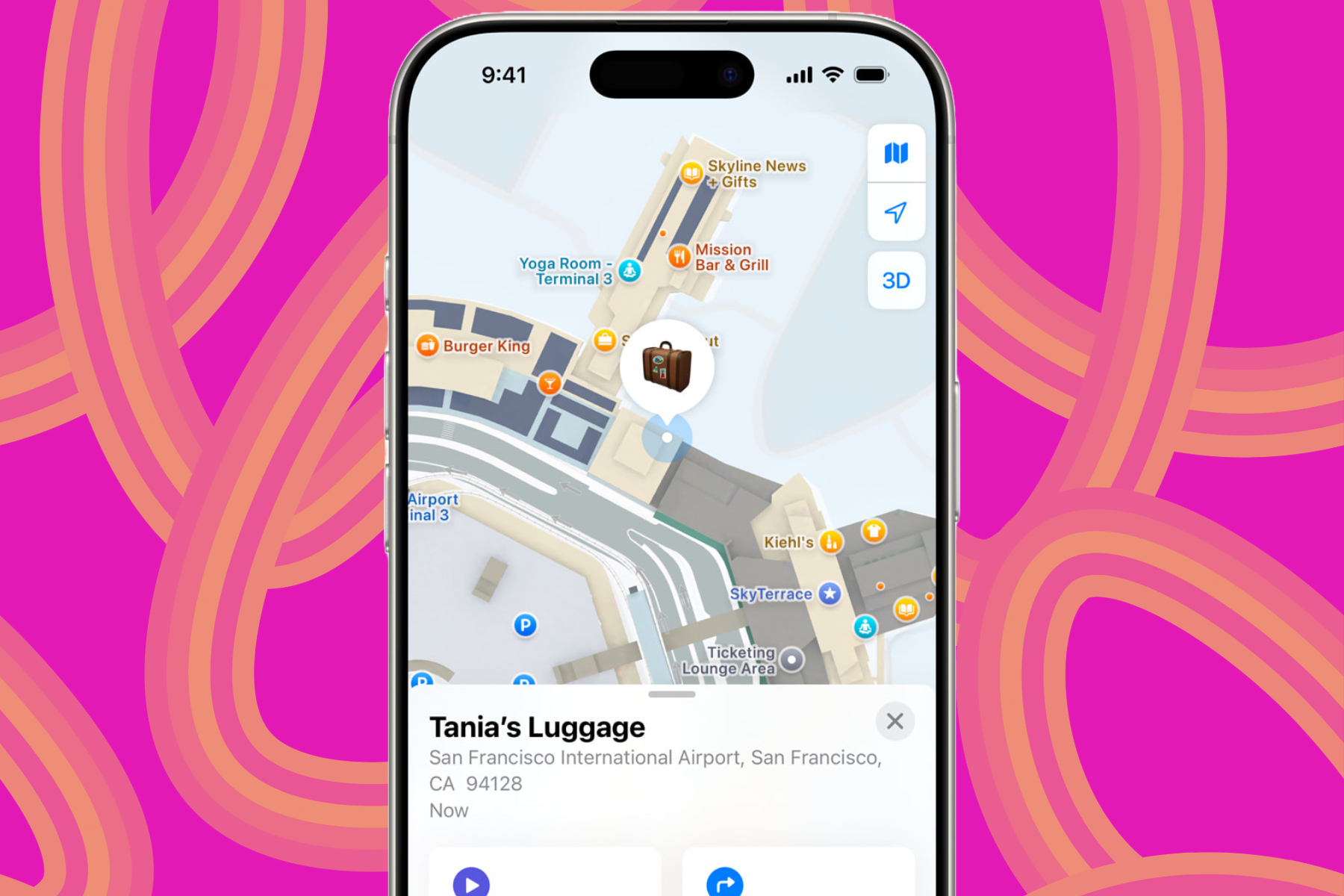
    To generate a tracking link, users can access the Find My app on their iPhone, iPad, or Mac. This link will direct them to an interactive map on a webpage that displays the real-time location of the missing item and updates as it changes, complete with a timestamp for tracking.

    Share Item Location feature in Apple Find My System to find misplaced luggage/
    Apple

    Once the item is located and returned to the customer, the shared location information stops updating, and the link expires after one week. For enhanced security, the entire process is end-to-end encrypted, ensuring that the shared location data remains confidential between the customer and the airline.

    In the upcoming months, major airlines such as Lufthansa, Qantas, Singapore Airlines, Swiss International Air Lines, Turkish Airlines, and Virgin Atlantic are slated to join the two dozen other airlines that will support Apple’s Share Item Location feature.

    Share Item Location feature in Apple Find My System.
    Apple

    To enhance its implementation, Apple has partnered with global aviation technology leader SITA (Société Internationale de Télécommunications Aéronautique) to incorporate this feature into their WorldTracer baggage tracking system. This collaboration aims to provide this new convenience to approximately 2,800 airports worldwide, serving over 500 commercial airlines.

  • Apple’s New Find My Tool Helps Locate Lost Luggage

    Apple’s New Find My Tool Helps Locate Lost Luggage

    Apple’s Find My platform plays a significant role in its ecosystem, allowing users to track the location of their accessories. Recently, the tech giant unveiled a new feature named Share Item Location, enhancing the ability for users to securely share the whereabouts of any accessory or item attached to an AirTag with friends or airline service providers.

    In pursuit of this goal, Apple has partnered with more than 15 major airlines across North America, Australia, Asia, and Europe to facilitate the tracking of lost belongings for passengers. These airline partners are set to launch their tracking support services in the coming months.

    Share Item Location feature in Apple Find My System.
    Apple

    Current airline partners include well-known carriers such as Air Canada, Air New Zealand, Austrian Airlines, British Airways, Delta Air Lines, Lufthansa, Qantas, Turkish Airlines, United, and Virgin Atlantic.

    SITA (Société Internationale de Télécommunications Aéronautiques), a global technology provider for aviation, will incorporate Apple’s Share Item Location into its WorldTracer baggage tracking system. This collaboration aims to broaden the scope of Apple’s tracking features to cover over 500 airlines and 2,800 airports, enhancing the travel experience for users globally.

    The Share Item Location capability is integrated within the Find My system and is currently accessible as part of the iOS 18.2 beta update. At the time of writing, Digital Trends has confirmed its availability to users in several regions across North America and Asia.

    Finding lost items using Share Item Location feature in Apple Find My System.
    Apple

    This innovative tool works with all Apple devices compatible with the Find My system, as well as any item or luggage connected to AirTags. Apple assures that the sharing of item tracking links will be fully encrypted, providing essential security for users.

    Share Item Location feature in Apple Find My System to find misplaced luggage.
    Apple

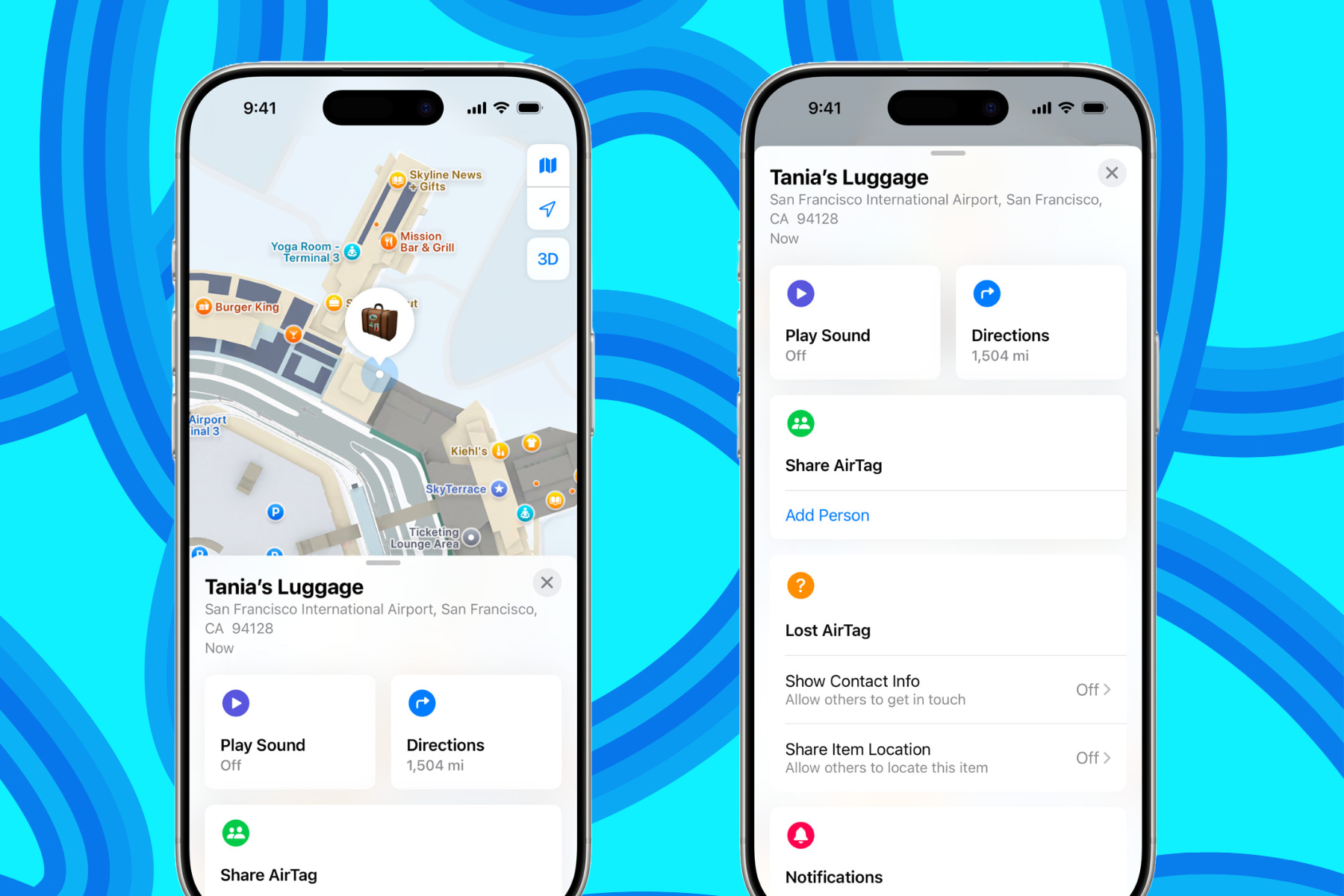
    If you’ve misplaced an Apple device or a bag with an AirTag, you can initiate the retrieval process by launching the Find My app on any Apple device and creating a Share Item Location link.

    After generating the link, the recipient will be able to see a map indicating the location of the item in question. According to Apple, “the website will automatically refresh when new location data becomes available and will display the most recent update’s timestamp.”

    Share Item Location feature in Apple Find My System to recover lost items.
    Apple

    To maintain security, anyone attempting to access the tracking dashboard will need to verify their identity. This measure safeguards against unauthorized access to the item’s live location, thus protecting user privacy.

    Verification will occur either through an Apple Account (for those in the Family Sharing group or part of the Apple ecosystem) or via a registered email provided by the airline service partner.

    The aforementioned email address will be recognized as an Apple Partner, accessible only to airlines that have partnered with Apple to assist users in Find My tracking.