الوسم: LLM

  • Understanding the Model Context Protocol (MCP) Simplified

    Understanding the Model Context Protocol (MCP) Simplified

    In November of last year, Anthropic launched an open-source initiative known as the Model Context Protocol (MCP). Although the announcement didn’t make a big splash in the news at that time, MCP has quickly gained traction. Now, major AI players like OpenAI and Google have committed to supporting this MCP standard. But what exactly is MCP, and how can it be utilized in AI? We’ve outlined the details of the Model Context Protocol below to help clarify its functionality and applications.

    What is the Model Context Protocol in AI?

    The Model Context Protocol (MCP) is an open-source standard crafted by Anthropic, the organization behind the Claude AI chatbot. MCP enables AI models to access external data, interpret it, and perform actions through a universal connection point. While AI models are incredibly capable, they typically operate in isolation and aren’t able to access your files or read communications in platforms like Slack.

    To allow AI models to connect with external data or systems, companies usually need to create specific connectors for each application. MCP simplifies this by offering a universal connector (a standardized protocol) that facilitates interaction with external data sources. For example, through MCP, an AI model such as Claude could be linked with services like Google Drive or GitHub.

    Thanks to the universal MCP protocol, AI models can interact with data sources in a secure and context-sensitive manner. It establishes a bidirectional link: one from the MCP server and another from the MCP client. For instance, the Claude Desktop app acts as an MCP client requesting data, while the MCP server serves as the connector delivering that data.

    MCP is tailored for developers, allowing them to create MCP servers and clients. So what does that mean for regular users like us? Well, consumers can install MCP servers for popular platforms including Google Maps, WhatsApp, Slack, Google Drive, GitHub, Bluesky, Windows, macOS, Linux, and more. This means you can retrieve information from these services using an AI chatbot such as ChatGPT.

    You can also link MCP servers to your computer’s local file system, enabling you to read and modify files seamlessly. Being an open-source project, anyone has the ability to develop an MCP server/client tailored to their specific workflow, making it possible to connect a powerful AI model to various external data sources.

    Essentially, MCP paves the way for large language models (LLMs) to leverage their intelligent capabilities to engage with external applications, tools, and services. While the Claude desktop app already supports MCP, numerous top-tier companies like Google, Microsoft, and OpenAI have declared their intention to adopt the MCP protocol in the future.

    Is the Model Context Protocol (MCP) an AI Agent?

    Some may mistakenly conclude that MCP is an AI agent, but it is, in fact, a standard communication protocol that enables interactions between AI models and external data sources. An AI agent typically engages in planning, decision-making, and executing tasks delegated to it. In contrast, MCP allows for data accessibility between different systems.

    However, MCP has significant potential to enhance the reliability of AI agents. It can unlock the full capabilities of these agents. At the recent Google Next 2025 event, Google introduced the Agent2Agent Protocol (A2A), which enables AI agents to communicate amongst themselves. Google states in their blog post: “A2A is an open protocol that complements Anthropic’s Model Context Protocol (MCP), providing valuable tools and context to agents.”

    As we move into an era where AI agents are increasingly prevalent, MCP is poised to significantly enhance their functionality and adaptability.

    While numerous community-driven MCP servers exist, created by independent developers, Anthropic has developed several excellent MCP servers for users to experiment with. For instance, the Google Drive MCP server allows users to search for and access files from Google Drive using the Claude Desktop app.

    The Filesystem MCP server enables you to read, write, create, delete, move, and search for files on your local system. Meanwhile, the Slack MCP server allows for channel management, sending messages, responding to threads, retrieving messages, and much more. Additionally, the GitHub MCP server facilitates repository management, file operations, branch creation, etc.

    Beyond that, other popular community-generated MCP servers include Google Calendar MCP, which helps you view schedules, and add or remove events. You can also set up MCP servers for many platforms, such as Airtable, Airbnb, Apple Calendar, Discord, Excel, Figma, Gmail, Notion, Spotify, Telegram, X (formerly Twitter), YouTube, and more. You can discover the most widely used MCP servers right here.

    In summary, MCP is set to transform our interactions with AI chatbots. With this technology, AI applications can evolve beyond simple conversations and become genuinely helpful in executing tasks across various workflows.

  • Prompt Tuning: What Is It and How to Do It? [With Soft Prompts + OpenAI Fine Tuning]

    Prompt Tuning: What Is It and How to Do It? [With Soft Prompts + OpenAI Fine Tuning]

    Prompt tuning is a fascinating aspect of working with AI language models, enhancing their performance on specific tasks by adjusting the input prompts. We will guide you through what prompt tuning is, its importance, and how to implement it using soft prompts and OpenAI fine-tuning.

    Understanding Prompt Tuning

    Understanding Prompt Tuning
    (Photo: Jeff Dean)

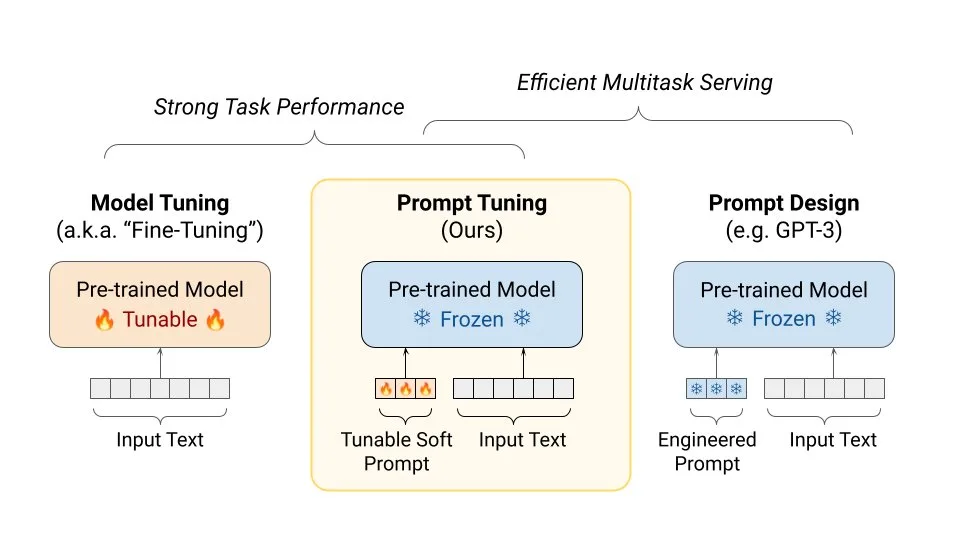
    Prompt tuning involves modifying the input prompts given to AI language models to achieve better performance on particular tasks. Instead of changing the model’s parameters, you tweak the way questions or statements are presented to the model. This process helps in aligning the AI’s responses more closely with desired outcomes.

    The Importance of Prompt Tuning

    Fine tuning vs Prompt Engineering
    (Photo: Gradient Flow)

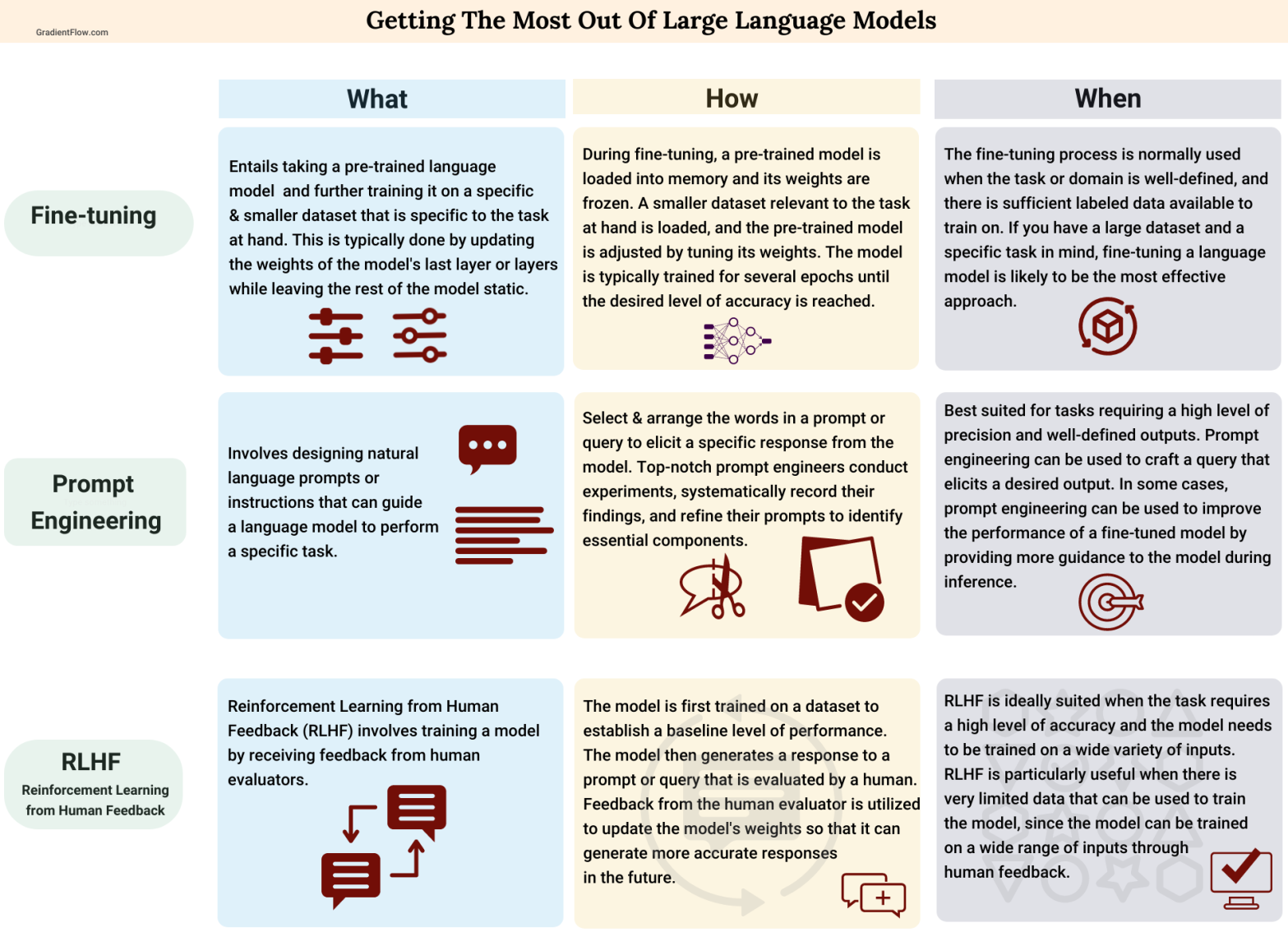
    Prompt tuning is crucial for several reasons. It enhances the accuracy and relevance of the AI’s responses without requiring extensive computational resources. By refining prompts, you can:

    • Improve the model’s performance on specific tasks.
    • Ensure more accurate and contextually relevant outputs.
    • Customize the AI for various applications without modifying the underlying architecture.

    What Are Soft Prompts?

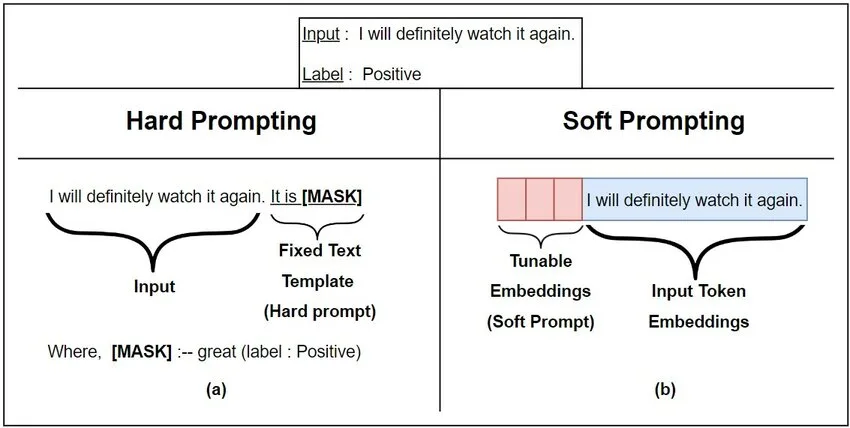
    Soft prompts are continuous embeddings that are optimized to guide the model towards producing desired outputs. Unlike traditional hard prompts, which are static text-based instructions, soft prompts are learned representations that can be more effective in steering the model.

    hard vs soft prompt
    (Photo: ResearchGate)

    How to Use Soft Prompts

    Using soft prompts involves a few key steps:

    1. Identify the Task

    First, clearly define the task you want to improve. This could be anything from generating creative content to answering specific types of questions accurately.

    2. Generate Initial Prompts

    Create a set of initial prompts that are likely to guide the model towards the desired outputs. These can be simple text prompts related to your task.

    3. Embed the Prompts

    Convert these text prompts into embeddings using the AI model. These embeddings will serve as the initial soft prompts.

    4. Optimize the Prompts

    Use a training process to optimize these embeddings. The goal is to adjust the soft prompts so that they better align with the desired task outcomes. This involves:

    • Feeding the model a combination of inputs and observing the outputs.
    • Adjusting the embeddings to minimize errors and improve performance.

    5. Evaluate and Iterate

    After optimizing, evaluate the performance of the model with the new soft prompts. If the results are not satisfactory, iterate the process to further refine the prompts.

    OpenAI Fine Tuning

    OpenAI fine-tuning takes this process a step further by allowing adjustments to the model’s parameters. Here’s how you can fine-tune an OpenAI model:

    1. Prepare Your Dataset

    Gather and preprocess a dataset that reflects the tasks you want the AI to perform better. Ensure that your data is clean, well-organized, and representative of the desired outputs.

    2. Use the OpenAI API

    Leverage the OpenAI API for fine-tuning. This involves uploading your dataset and specifying the desired configurations for the tuning process.

    3. Train the Model

    Initiate the training process through the API. The model will adjust its parameters based on your dataset to improve its performance on the specified tasks.

    4. Test and Refine

    After training, test the fine-tuned model with real-world inputs to assess its performance. Make any necessary adjustments and repeat the fine-tuning process if needed.

    Combining Soft Prompts with OpenAI Fine Tuning

    For optimal results, you can combine soft prompts with OpenAI fine-tuning. This hybrid approach ensures that you leverage both the immediate contextual benefits of soft prompts and the deeper, parameter-based improvements from fine-tuning.

    Steps to Combine Both Methods:

    Initial Soft Prompt Tuning:

      • Start with creating and optimizing soft prompts as described earlier.

      Fine-Tune the Model:

        • Use the optimized soft prompts and your dataset to fine-tune the model via the OpenAI API.

        Evaluate Combined Results:

          • Test the model’s performance using the optimized soft prompts post-fine-tuning to ensure the best possible outcomes.

          Iterate as Needed:

            • Continuously evaluate and refine both the soft prompts and fine-tuned model based on real-world performance.

            Practical Applications

            Customer Support

            By tuning prompts, AI models can provide more accurate and helpful responses in customer support scenarios, leading to higher customer satisfaction.

            Content Creation

            Prompt tuning helps in generating more relevant and creative content, making AI a useful tool for writers and marketers.

            Data Analysis

            In data analysis, prompt tuning ensures that the AI provides precise and contextually appropriate insights, aiding better decision-making.

            Prompt tuning, especially when combined with soft prompts and OpenAI fine-tuning, is a powerful method to enhance the performance of AI language models. By following the steps outlined above, you can tailor the outputs of these models to better suit your specific needs, improving accuracy and relevance across various applications.

          1. Apple Releases On-Device AI Model OpenELM

            Apple Releases On-Device AI Model OpenELM

            Apple has recently announced a new open-source LLM (Large Language Models) known as OpenELM (Open-source Efficient Language Models).

            In Short

            • Apple has released a new open-source LLM known as OpenELM.
            • OpenELM will run locally on devices, improving processing speed with enhanced privacy.
            • OpenELM is anticipated to underpin a variety of on-device AI features, including more powerful versions of Siri and other AI-powered applications.

            Apple’s LLM will run locally on devices, making a great shift from costly cloud-based processing to on-device processing. Apple’s main focus for this LLM is to improve processing speed with enhanced privacy.

            OpenELM models use a layer-wise scaling technique, that effectively allocates parameters with every layer of the transformer model to increase accuracy. For example, with a budget of around one billion parameters, OpenELM achieved a 2.36% gain in accuracy over its predecessor model, OLMo but using half the amount of pre-training tokens.

            This method not only increases speed but also decreases the computational burden on devices, which is critical for running AI applications directly on consumer hardware.

            Features and Capabilities

            The OpenELM project has several major elements that set it apart from past AI models:

            • Open-source availability: Apple has made OpenELM available on the Hugging Face Hub, allowing developers and researchers to access and participate in its development.

            • Comprehensive Training Framework: Unlike traditional models, which simply supply model weights and inference code, the OpenELM release contains the entire infrastructure for training and evaluating publicly available datasets. This features training records, many milestones, and pre-training setups.

            • Enhanced privacy and speed: Because OpenELM runs on-device, there is no need to send data to cloud servers, which improves user privacy. Furthermore, local processing minimizes latency, resulting in quicker reaction times for AI-powered features on device
            • .

            Integration with iOS

            Apple intends to include OpenELM in the future iOS 18 version, which is likely to include several new AI features. The integration of OpenELM is anticipated to underpin a variety of on-device AI features, including more powerful versions of Siri and other AI-powered applications.

          2. Apple Breaks New Ground with $50 Million AI Training Deals with Major Publishers

            Apple Breaks New Ground with $50 Million AI Training Deals with Major Publishers

            Apple is charting new territories in the AI landscape by pioneering a novel methodology to train its large language models (LLMs). The tech magnate has reportedly reached out to elite publishers and news organizations, offering coveted multi-year deals worth at least $50 million. Names on this distinguished list include Condé Nast, NBC News, and IAC, proprietor of highly circulated platforms like People, The Daily Beast, and Better Homes and Gardens.

            Forgoing the conventional path of scraping data from the internet and books for AI training, Apple aims to cultivate a controlled, reliable, and legally sound environment by directly licensing content from publishers. This strategy marks a significant shift from traditional methodologies in the AI sector.

            Despite the promising potential, Apple’s novel method has given rise to certain apprehensions among publishers and legal authorities. Concerns primarily revolve around the licensing terms, legal liabilities, as well as how generative AI will be utilized in a news dissemination context.

            However, undeterred by the present concerns, Apple’s investment in AI training is notably robust, with daily expenditures reportedly running into millions of dollars. The brainchild behind this innovative venture is the “Foundational Models” team, led by renowned AI engineer John Giannandrea. Under his leadership, the team has been developing conversational AI, akin to ChatGPT, along with other advanced models. One of their premier inventions includes an LLM chatbot designed to interact with customers availing AppleCare services.

            Among its many accomplishments, Apple’s team has invested in training its most advanced LLM known internally as Ajax GPT. With a robust training regimen with over 200 billion parameters, Ajax GPT is poised to rival OpenAI’s GPT-3.5 in terms of power and functionality.

            Despite its several advantages, Apple’s approach is not free from scrutiny. Given that the company’s strategy involves licensing content from a select group of publishers, the scope of knowledge for its AI models might be relatively constricted. This methodology essentially trades the almost infinite pool of internet data for a more legally sound but substantially smaller base for its AI to learn from.

            With Apple steadfast in its decision to license content for its AI training, only the future will tell how this initiative impacts the broader AI and news generation landscape, offering an intriguing development to watch for industry insiders.