الوسم: live

  • Tiffany Haddish Mocks Trump Over FIFA Role on Jimmy Kimmel

    Tiffany Haddish Mocks Trump Over FIFA Role on Jimmy Kimmel

    Digital Phablet – Tiffany Haddish targeted Trump during her guest-host debut on Jimmy Kimmel Live.

    Donald Trump’s phone call regarding the World Cup has sparked a late-night roasting. During her first appearance as guest host, Haddish delivered sharp humor about the president’s controversial involvement with FIFA, among other topics.

    Haddish criticized President Donald Trump for meddling in the World Cup during her appearance on Jimmy Kimmel Live! on Monday. According to the Independent, she kicked off her week-long hosting stint by condemning Trump’s controversial call to FIFA. She is filling in for Kimmel during his usual two-month summer break from the show.

    Haddish stated on the show that Trump reinstated a U.S. FIFA player, claiming it was “the first time he ever defended a Black person.” She added, “Of course, no one in the left-wing media will call her out for this wild claim.” (source: @theMRC)

    Trump had reached out to FIFA President Gianni Infantino to express his dissatisfaction with U.S. star Folarin Balogun’s red card during the Bosnia-Herzegovina match. Subsequently, FIFA announced that the red card had been suspended, allowing him to participate in the knockout stage against Belgium. On Monday, Trump told reporters in the Oval Office that he “asked for a review by FIFA” but denied any involvement in the decision.

    Haddish addressed the situation directly on the show. “One of our star players was supposed to be suspended from tonight’s game, but President Trump personally called FIFA to get him reinstated,” she claimed. She then remarked, “Which is surprising because Trump doesn’t know anything about soccer, and it’s the first time he’s ever defended a Black person!”

    Despite his efforts, the U.S. men’s soccer team lost 4-1 to Belgium on Monday. Trump responded on Truth Social, saying, “Thank you to FIFA for doing what was right and reversing a great injustice.” The incident continues to be the subject of ridicule worldwide.

    Haddish also took aim at Trump’s Great American State Fair, which saw low attendance due to extreme heat and canceled performances. “Trump claimed the event would be, and I quote, ‘packed to the brim,’” she said. “Honestly, there were more people at my bar mitzvah.” Starting July 13, actor Anthony Anderson will take over the guest hosting duties.

  • Epstein’s Lawyer Threatens to Sue Bassem Youssef Live On Air

    Epstein’s Lawyer Threatens to Sue Bassem Youssef Live On Air

    Digital Phablet – Bassem Youssef confronts Alan Dershowitz in explosive TV debate.

    An intense TV confrontation unfolded between Egyptian media personality Bassem Youssef and American legal expert Alan Dershowitz, known for representing billionaire Jeffrey Epstein, who faced serious allegations of sex crimes and trafficking minors. The exchange garnered widespread attention and sparked reactions across social media platforms.

    The debate was hosted on a program moderated by British journalist Piers Morgan, focusing on Epstein’s abuse allegations. Youssef accused Dershowitz of financial compensation to possible victims to silence their claims.

    Bassem Youssef

    At one point, Youssef stated, “Two women accused you, and you agreed to pay a million dollars.” The phrase “Innocent men don’t pay” was linked to an alleged financial settlement related to accusations that Dershowitz exploited two women sexually during their childhood.

    Dershowitz vehemently denied the allegations, asserting, “I didn’t pay a single dollar.” He threatened to sue for defamation after being accused on air.

    Millions streamed the debate on digital platforms, igniting discussions about the ethics surrounding legal defenses and the media’s role in exposing misconduct.

    Many on Twitter remarked that Youssef has become one of the most prominent figures in the U.S. for exposing alleged Zionist child killers. Supporters praised his eloquence and intelligence, emphasizing that he presented substantial evidence rather than empty rhetoric.

    Others characterized the on-air exchange as assertive and evidence-based, with Youssef pushing Dershowitz under pressure with documents and proof.


    Reactions on social media were mixed. Some lauded Youssef’s courage and his skill in presenting facts on live TV, while others warned that confronting such high-profile legal figures could invite costly legal repercussions. This episode sparked renewed debate about the ethics of legal defense and the media’s role in uncovering misconduct.

    Many noted that the “Epstein documents” and Youssef’s fiery comments transformed the incident into a significant legal and public discourse. The conflict over a settlement versus reputational damage highlighted the potential cost of lawsuits reaching into millions of dollars.

    Dershowitz was mocked by Youssef, who quipped, “Jeffrey Epstein must have been a Russian spy.”

    Bloggers viewed this as a rare instance of live media critique, especially given the influence and contacts Dershowitz holds. Youssef’s daring confrontation represented a groundbreaking act of journalistic bravery, bringing truth directly into the public eye.

    Numerous blogs concurred that this incident was more than a simple dispute; it was a pivotal moment testing the media’s capacity to shed light on abuses and the legal challenges faced when covering powerful individuals in complex cases.

    Some commentators viewed Youssef’s approach as a blend of legal analysis and fearless journalism while safeguarding the rights of the opposition. This incident sparked widespread debate about managing sensitive legal and media issues in the public arena.

  • WWDC 2025 Developer Q&A: Live Forum Sessions and Schedule

    The Apple Worldwide Developers Conference (WWDC) continues to be a pivotal event for developers eager to dive into the latest technologies, tools, and resources Apple has to offer. In 2025, WWDC promises to elevate this experience with live Q&A forum sessions designed to facilitate direct interaction with Apple engineers and developers.

    Overview of WWDC 2025

    Scheduled for June 3-7, 2025, WWDC 2025 will be a blend of in-person and online events, ensuring accessibility for developers worldwide. This year’s sessions will include a comprehensive lineup of topics from iOS development to advancements in machine learning and ARKit.

    Key Features of WWDC 2025

    • In-Person Sessions: Dedicated conference days where developers can engage directly with Apple’s engineering teams.
    • Virtual Accessibility: Live streams and webinars for those unable to attend in person.
    • Hands-On Labs: Opportunities for attendees to experiment with the latest SDKs and tools.

    Live Forum Sessions: An Interactive Experience

    One of the standout features of WWDC 2025 will be the live Q&A forum sessions. These sessions allow developers to ask specific questions regarding newly introduced features, best practices, and innovative use cases.

    Session Format

    The live forums will feature:

    • Structured Panels: Experts will deliver key insights on specific topics, followed by an open Q&A.
    • Real-Time Interaction: Developers can submit questions through a dedicated platform, ensuring that even online participants can engage actively.
    • Focus on Inclusion: Sessions will cater to all levels of developers, from beginners to advanced.

    Scheduled Topics

    Each day of the conference will cover a variety of themes:

    Day 1: iOS 18 Innovations

    • New iOS features
    • Best practices for app development
    • Enhancements in UIKit and SwiftUI

    Day 2: macOS and Software Development

    • Effective use of Swift for macOS apps
    • Updates on Xcode and developer tools
    • Performance optimization strategies

    Day 3: Machine Learning and AI

    • Utilizing Core ML for innovative applications
    • Ethical considerations in AI
    • Real-world implementation case studies

    Day 4: AR and VR Technologies

    • Building immersive experiences with ARKit
    • Integration of VR in standard apps
    • Practical workshops on creating AR content

    Day 5: Security and Privacy

    • Advanced security protocols for developers
    • User privacy best practices
    • Tools for compliance and data protection

    How to Prepare for the Sessions

    Developers interested in attending the live Q&A forums can maximize their experience by:

    • Registering Early: Secure your spot to avoid missing out on popular sessions.
    • Researching Topics: Familiarize yourself with key themes and prepare questions in advance.
    • Engaging with Peers: Join online forums and social media groups to discuss insights and gather questions from others.

    Accessing the Forums

    To participate in the live Q&A forum sessions:

    • Registration: Sign up through the official WWDC website.
    • Schedule Overview: Check the daily schedule posted on the website.
    • Q&A Platform: Utilize the designated platform for submitting questions and following session updates.

    WWDC 2025 is set to enhance the developer experience significantly. With live forums and a carefully curated schedule, Apple aims to foster a community where developers can gain insights and collaborate on the future of technology.

  • Watch WWDC 2025 Live: All Streaming Options and Platforms

    The Worldwide Developers Conference (WWDC) is a pivotal event in the tech calendar, and WWDC 2025 promises to be no exception. Developers, tech enthusiasts, and Apple fans from around the globe are eagerly awaiting announcements about new software updates, hardware releases, and innovative features. For those who want to catch the action live, there are numerous options available to ensure you don’t miss a moment.

    Events and Schedule

    Before diving into streaming options, it’s important to know when the events will take place. WWDC 2025 typically features a series of keynotes, sessions, and workshops.

    Key Dates

    • Opening Keynote: June 2, 2025
    • Sessions and Labs: June 3 – June 7, 2025

    Streaming Options

    There are various ways to stream WWDC 2025 depending on your preferences and devices. Here are the most recommended options:

    Official Apple Platforms

    1. Apple’s Website

    2. Apple Developer App

      • Available on iOS, iPadOS, and macOS.
      • Provides a user-friendly interface and access to session videos after they air.

    3. YouTube

      • WWDC keynotes and sessions are streamed live on Apple’s official YouTube channel.
      • Ideal for those who prefer watching on a larger screen.

    Alternative Streaming Platforms

    • Twitch

      • Certain tech influencers and channels may provide live commentary and analysis on Twitch.
      • Perfect for those who enjoy interactive discussions during the presentation.

    • Social Media Platforms

      • Twitter and Facebook may host live updates and discussions as the event unfolds.
      • Follow specific hashtags such as #WWDC2025 for real-time information.

    Devices to Stream On

    You can enjoy WWDC 2025 on a variety of devices:

    • Smartphones and Tablets

      • Use the Apple Developer app or YouTube to watch on your iPhone or iPad.

    • Computers

      • Stream on your laptop or desktop via Apple’s website or their YouTube channel.

    • Smart TVs

      • If you have a smart TV with YouTube app access, stream directly to your TV for a cinema-like experience.

    Tips for an Optimal Viewing Experience

    To make the most out of your WWDC 2025 live stream, consider the following tips:

    • Stable Internet Connection

      • Ensure you have a high-speed internet connection to avoid interruptions.

    • Join Early

      • Join the stream a few minutes ahead of time to ensure you don’t miss the start.

    • Engage With the Community

      • Participate in live chats or social media discussions to enhance your experience.

    Additional Resources

    To prepare for WWDC 2025, it might be helpful to follow a few key resources:

    • Apple Developer Documentation

      • Access the latest development guidelines and resources as they are released.

    • Tech Blogs and Websites

      • Websites like TechCrunch, The Verge, and 9to5Mac provide insights, previews, and analyses before and after the event.

    This year’s WWDC is set to bring a range of exciting announcements, and by utilizing these streaming options, you can stay up-to-date with all the latest developments in the Apple ecosystem.

  • Steam Replay 2024 Is Live Here’s How To View Yours

    Steam Replay 2024 Is Live Here’s How To View Yours

    It's that time of year again—time for Steam Replay! Much like Xbox's Year in Review and PlayStation's Wrap-Up, Steam Replay 2024 allows you to reflect on your gaming stats over the past year. This feature reveals what games you've played, how much time you've dedicated to each, and the milestones you've reached along the way.

    As always, Steam Replay will be available until the end of the year, so you'll want to log in soon to view your stats and earn the exclusive Steam Replay 2024 badge. Fortunately, you can save your replay to your profile as a highlighted showcase, allowing you to share it with friends throughout the year.

    How to Access Steam Replay 2024

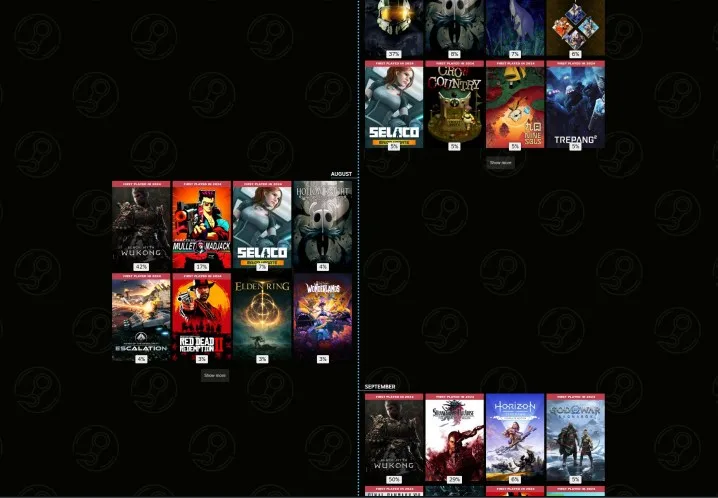
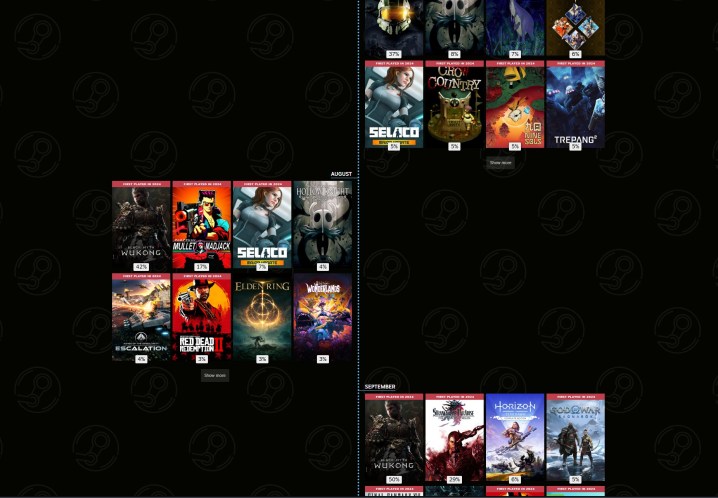
    Timeline of games played in Steam Replay 2024.
    Jacob Roach / Digital Trends

    To view your Steam Replay for 2024, you have a couple of options. If you are reading this around the time of publication, you’ll notice a banner advertisement in the Steam store that links directly to your replay. If that's not the case, simply visit store.steampowered.com/replay. If you're signed in, it will take you directly to your replay; if not, you'll be prompted to log in.

    Similar to previous years, you can explore a wealth of statistics. You'll find out which games you played, the playtime distribution among those games, the achievements you've unlocked, as well as the total hours spent on your PC and Steam Deck. Steam even tracks these details by month, allowing you to see how your gaming habits changed throughout the year.

    Earning the Steam Replay 2024 Badge

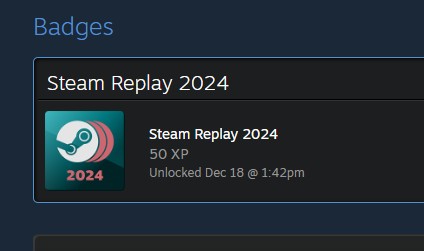
    Steam Replay 2024 badge displayed in Steam.
    Jacob Roach / Digital Trends

    You can earn the Steam Replay 2024 badge by simply viewing your replay. This will grant you 50 XP towards your Steam level. While you won’t receive any alerts about the badge, it will automatically appear among your other badges after you check out your replay. Although the badge itself may not carry much significance, it does contribute a bit of XP, which aids in leveling up your Steam profile, especially if you choose to showcase it.

    Sharing Your Steam Replay 2024

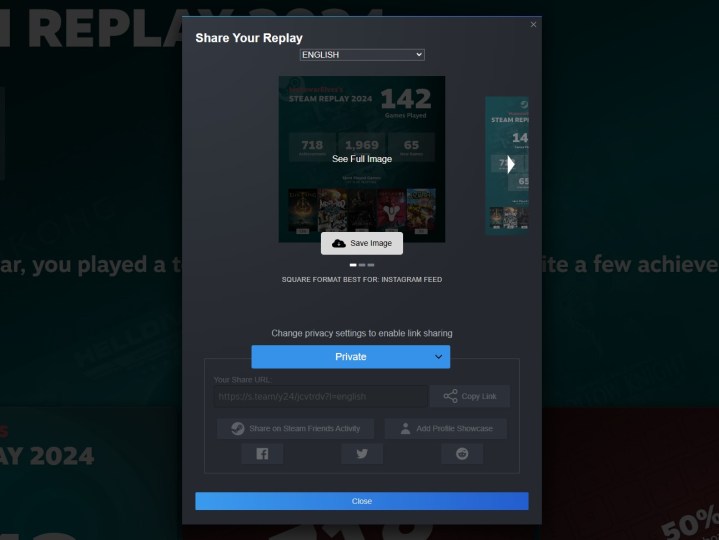
    Sharing settings for Steam Replay 2024.
    Jacob Roach / Digital Trends

    The Steam Replay is quite comprehensive, but there’s also a shorter version you can share with your friends. At the top of the page, you’ll find a Share button along with your privacy settings. If your settings are set to Friends only or Public, you’ll be able to share a link that leads others to your complete replay.

    If you prefer a more concise sharing method, just click the Share button. This will present you with three images that you can download and share wherever you like. Valve also offers these visuals in multiple languages.

    Moreover, you can feature your Steam Replay on your profile as a highlighted showcase. To do this, you need to have an empty showcase slot at your disposal—additional slots can be purchased through the Points Shop on Steam. Once you have a slot available, you will see an Add profile showcase option at the bottom of your Steam Replay page. Click it, and it will direct you to your showcase settings page, where your replay will already be included. Simply drag it to your desired position and hit Save.

    At the bottom, you can also see friends who have shared their Steam Replays. If their privacy settings allow it, you can click on their names to view their full replays.

  • How To View Your Stats in Xbox Year in Review 2024

    How To View Your Stats in Xbox Year in Review 2024

    The Xbox Year in Review 2024 is here, offering gamers a detailed look into their gaming habits and achievements from the past year across all the top Xbox Series X titles. If you’re eager to discover your total achievements, the hours spent on cross-platform games, or which free-to-play game took up the most of your time, this is an opportunity you won’t want to pass up. In this quick guide, we’ll walk you through how to access your Xbox Year in Review and share your gaming achievements with friends.

    Be sure to explore the upcoming Xbox Series X titles and see if you can predict which games will headline your 2025 year in review.

    Microsoft / .

    How to view and share your Xbox Year in Review 2024 stats

    When you’re ready to check out your Xbox Year in Review 2024 stats, follow these simple steps.

    Step 1: Visit the Xbox Year in Review website.

    Step 2: Sign in to your Xbox account.

    Step 3: Browse through your stats, which will display your total playtime, most-played titles, and much more.

    Step 4: Share your accomplishments with friends by clicking the Share button located just above your stats.

    Please note that some users have reported issues with the share button occasionally disappearing. If you encounter this, refreshing the page or logging back in might help to restore it.