Lenovo’s ThinkPad lineup has long been known for its dependability, sturdy build, and consistently solid performance. Despite the brand’s reputation and diverse range of models, the core design of its laptops has remained largely unchanged over the years. However, Lenovo has recently introduced a bold new look that grabs attention.
What’s New?
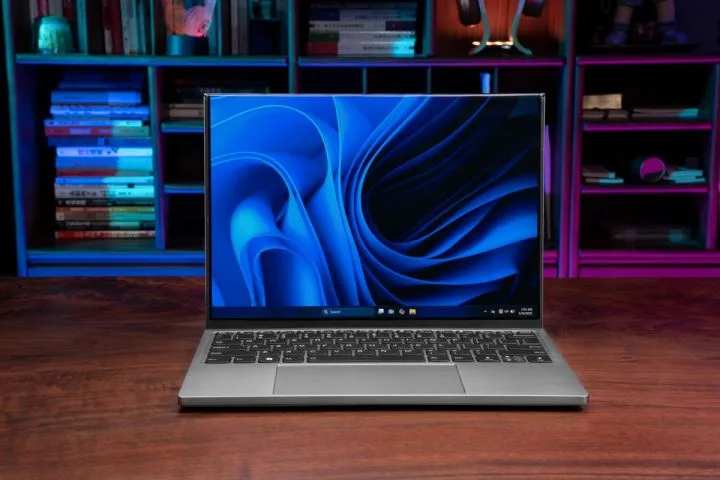
At the recent IFA event, Lenovo unveiled the ThinkPad X9 Aura Edition in a striking Glacier White color. Previously, this model was only available in a sleek dark gray shade, featuring a slim aluminum chassis and a distinctive engine hub design that encases key components and cooling systems.
The new Glacier White finish boasts a pearlescent sheen that provides an elegant contrast with the polished metal engine hub, which also serves as the housing for I/O ports. The design elevates the base slightly off surfaces, promoting better airflow underneath.
This edition’s metallic construction meets MIL-STD-810 military-grade durability standards, making it capable of withstanding extreme temperatures, pressure, and vibration. It also features a spacious trackpad with haptic feedback, although it no longer includes the traditional TrackPoint pointing device.
What’s Under the Hood?
The ThinkPad X9 Aura Edition will be available in both 14-inch and 15-inch variants, both equipped with OLED screens for vibrant visuals. It comes with a 65W USB-C GaN Nano charging brick and features a user-replaceable battery, offering flexibility and convenience.
Inside, the laptop can be configured with a powerful Intel Core Ultra 7 (Series 2) processor, up to 32GB of LPDDR5x RAM, and 1TB of SSD storage. Authentication options include a fingerprint sensor and an infrared camera for facial recognition.
Connectivity and Availability
The device offers a broad range of ports, including two Thunderbolt 4 ports, a USB Type-A port, and an HDMI 2.1 port, catering to various user needs. The Glacier White ThinkPad X9 Aura Edition is set to hit shelves in October, with pricing starting around EUR 1,619 (approximately $1,900). It also bears the Copilot+ AI-ready badge, highlighting its support for intelligent features.
Design and Build
The sleek, metal exterior combines durability with style, featuring an MIL-STD-810 certification that assures resilience against environmental and physical stressors. Despite its high-end build quality, the laptop offers a large, responsive haptic trackpad—though it no longer includes the traditional TrackPoint.
In summary, Lenovo’s latest ThinkPad X9 Aura Edition blends a fresh, eye-catching design with high-performance components and robust durability, making it a compelling choice for power users seeking both form and function.
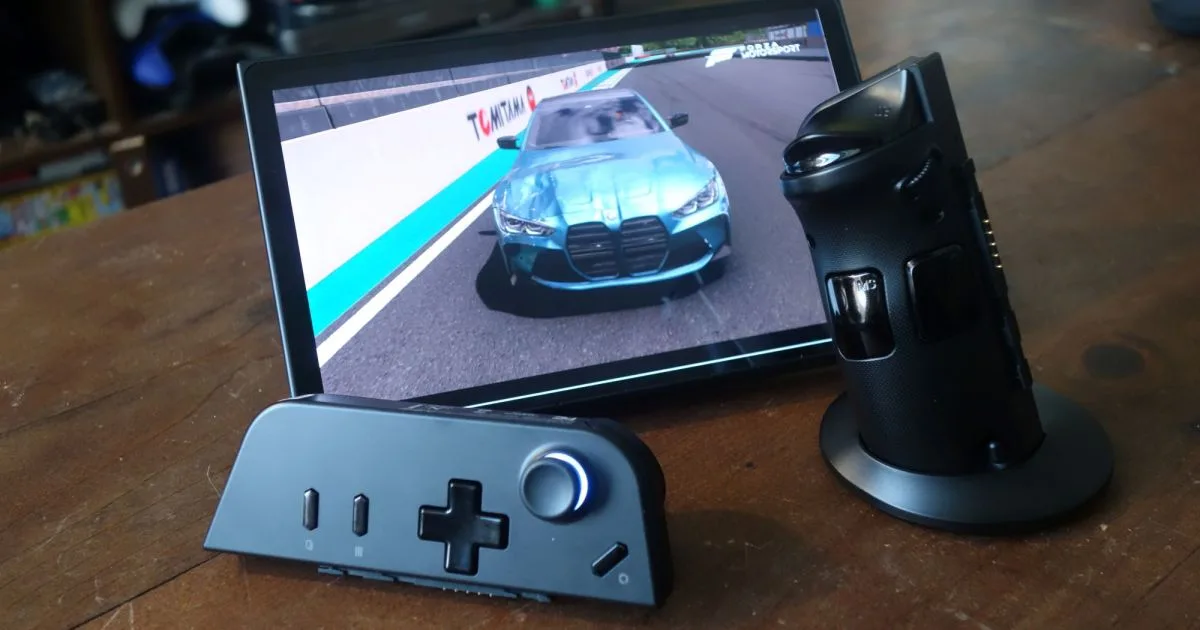
The highly anticipated gaming tablet from Lenovo is set to launch soon, with the company unveiling some of its essential specifications. The Lenovo Legion Tab Gen 4 serves as an update to its predecessor, boasting numerous enhancements that are likely to make it competitive among the top gaming tablets on the market.
According to Notebookcheck, this new gaming tablet is beginning to take form. Lenovo just introduced the previous model, the Legion Tab Gen 3, in late 2024, yet gamers will be able to experience the updated version in May 2025, less than a year later.
Earlier leaks highlighted that the tablet will feature the Snapdragon 8 Elite chipset. This upgrade is expected to result in a significant boost in performance, although it’s still unclear whether Lenovo will opt for the seven-core or the eight-core variant of the system-on-chip (SoC), which adds an element of uncertainty regarding its full potential.
Joe Maring / Digital Trends
Another significant upgrade appears to be the battery life. Lenovo disclosed that the battery capacity has increased from 6,550 mAh to 7,600 mAh. When paired with the new Snapdragon 8 Elite, this enhancement suggests an improvement in battery performance, which is essential for gaming devices.
Additionally, Lenovo has revealed that the tablet will feature a new large vapor chamber cooling system, complete with a 12,000mm² copper cooler. Given that gaming tablets can generate considerable heat during demanding sessions, this upgrade is particularly beneficial.
Finally, the tablet will support up to 16GB of RAM and offer 512GB of storage, while maintaining a lightweight design at approximately 340 grams (0.7 lbs).
Although the exact launch date and pricing remain unclear, with an anticipated release in May, the wait for the Lenovo Legion Tab Gen 4 is nearly over.
If you’re in the market for a gaming tablet, Lenovo may have something in the works that piques your interest. Recent leaks suggest that the tech giant is gearing up to launch an updated version of the Legion Y700 gaming tablet, featuring some subtle yet significant enhancements. Here’s a breakdown of what we know so far.
The information comes from a leak shared by Digital Chat Station. As is typical with such leaks, the message is concise, yet packed with insights. Although not explicitly named, it seems to refer to the upcoming iteration of the Lenovo Legion Y700. The original Y700 was released in September 2024, but Lenovo might have an upgraded model on the horizon. It’s important to remember that leaks are not confirmed until verified by Lenovo.
The new tablet is targeted toward esports enthusiasts and is expected to swap out the Snapdragon 8 Gen 3 chip for the more powerful Snapdragon 8 Elite. This upgrade is expected to significantly enhance performance, with some sources indicating a performance increase of up to 45% compared to the Gen 3 processor.
Joe Maring / Digital Trends
Additionally, battery life is set to improve. The previous Y700 model featured a 6550 mAh battery, and while the capacity for the new variant hasn’t been disclosed, it’s expected to house a larger battery while maintaining a sleeker profile.
Similar to its predecessor, the new Legion tablet is anticipated to come equipped with dual speakers and dual X-axis monitors. The display size is reportedly remaining at 8.8 inches.
As for the release date, it’s still uncertain. The leaker did not provide specifics, but sources from Notebookcheck speculate it could arrive in the second quarter of 2025, which would be less than a year after the original Y700 launch.
Lenovo Unveils Innovative ThinkBook Flip AI PC Concept at MWC 2025
Lenovo is once again pushing the boundaries of computing with its latest concept showcased at the Mobile World Congress (MWC) 2025 in Barcelona. Introducing the ThinkBook Flip AI PC, a versatile 5-in-1 laptop that features five distinct display configurations tailored to a variety of use cases.
While many are accustomed to 2-in-1 devices that transition between traditional clamshell and easel modes, the ThinkBook Flip AI PC leverages recent advancements in Lenovo’s foldable and rollable technology. It incorporates a dual hinge that supports various modes, enhancing display functionality for optimization, productivity, multitasking, and seamless collaboration.
The device boasts a standard clamshell setup, featuring a 13.1-inch OLED display with a 16:10 aspect ratio. It can then transform into a vertical mode, offering an 18.1-inch OLED display with a stunning resolution of 2000 x 2664 in a 3:4 format.
One unique capability of the ThinkBook Flip AI PC is the outward folding share mode, which presents dual 16:10 aspect ratio panels of 13.1 inches and 12.9 inches, making it easy for multiple users to interact with the screen simultaneously. In read mode, the outer display panel flattens against the device’s cover, showcasing a 12.8-inch 2000 x 1258 display. When folded closed, it takes on a tablet form that reveals only the 12.9-inch display.
Lenovo envisions the ThinkBook Flip AI PC as a tool for enhancing workflows with AI capabilities while negating the need for additional external monitors.
In terms of hardware, this device is powered by Intel Core Ultra 7 processors, equipped with 32GB LPDDR5x RAM and PCIe SSD storage. It also includes Thunderbolt 4 ports and a fingerprint reader for secure access. The compact laptop measures 11.3 x 8.2 x 0.7 inches and weighs just 3.1 pounds, making it highly portable and user-friendly.
The ThinkBook Flip AI PC draws inspiration from earlier Lenovo creations, such as the ThinkPad X1 Fold and the upcoming rollable ThinkBook Plus Gen 6 set for release in June. While it remains uncertain whether this concept will eventually go into production, Lenovo is known for showcasing cutting-edge technologies. Last year, for instance, they presented a transparent display laptop at MWC 2024, along with a voice-controlled Auto Twist AI PC during IFA 2024.
Explore our full coverage of Mobile World Congress
Updated moments ago
During the Mobile World Congress (MWC) held in Barcelona, Lenovo introduced an innovative concept: a laptop harnessing solar energy. The device features an entire lid adorned with a high-quality solar panel boasting an impressive 24% conversion efficiency, comparable to some of the top rooftop units available today.
Lenovo claims that a brief exposure of just 20 minutes to direct sunlight can generate enough power for up to an hour of video playback. Additionally, even in low-light settings, the laptop can maintain its battery charge while idling. This remarkable efficiency is facilitated by a cutting-edge “Back Contact Cell” technology paired with an advanced tracking system designed to optimize energy conservation and electric stability.
What’s particularly striking about this device is that aside from its unique solar panel design, it resembles an ordinary laptop. This machine is ultra-slim, measuring just 15mm thick and weighing 1.22kg, setting it apart as the world’s first ultra-sleek solar-powered PC. Lenovo envisions this 12-inch model featuring Intel Core Ultra processors, up to 32GB of RAM, 1TB of storage, and an OLED display.
Lenovo
Additional specifications include a 50.2 Wh battery, a 2MP infrared camera, four speakers, microphones, and three USB-C ports. For those eager to maximize their solar energy use, Lenovo also showcased a prototype portable solar panel kit and power bank. This compact accessory would allow users to charge a power bank by connecting the USB-C solar panel to a backpack, tent, tree, or any sunny spot they encounter.
Lenovo
This innovative charging solution could be useful when using the Yoga Solar PC, allowing users to collect solar energy even while they’re indoors. This accessory presents an opportunity for anyone wanting to embrace solar power without the need to invest in a completely new laptop.
While it’s challenging to predict how much solar energy an average user might harness, any contribution from solar power is a step in the right direction. This initiative from Lenovo demonstrates that it’s possible to create a solar-powered laptop without compromising on design, dimensions, or specifications, raising the question of why solar panels are not more common in our computers.
At this point, the pricing for such a solar-powered laptop remains unknown, but an elevated price could limit accessibility. However, introducing designs like this to the market could encourage competitive pricing in the future. Here’s hoping Lenovo advances this concept into a tangible product, as solar-powered laptops represent an exciting possibility for the future of technology.
At CES 2025, Lenovo unveiled a laptop featuring a rollable extending screen, showcasing their continued commitment to innovative designs. Now, Evan Blass has leaked what appears to be renders of a dual-display folding laptop.
Picture a foldable device similar to a book-style smartphone, but with a keyboard attached. Alternatively, envision a laptop akin to offerings from Asus or HP that boast a flexible folding screen, paired with a traditional keyboard at the base.
This concept aligns well with the upcoming Lenovo ThinkBook Flip AI PC, which will debut at MWC soon. This model is expected to be sturdier than a rollable version, given that it’s built on more conventional flexible screen technology.
Details regarding the device’s internals, pricing, and target audience remain undisclosed. However, one cannot help but wonder about the practicality of utilizing the rear screen when it’s visible to onlookers around you.
Possible use cases for this format could include presenting to clients, engaging students in a classroom, or facilitating real-time translation during meetings. The tent-like configuration could indeed foster a shared experience in computing that benefits multiple users.
Imagine the screen extending vertically to eye level, making for an unabashedly “public” computing experience unless you’re in a more private setting.
Having previously garnered attention for projects such as the dual-screen YogaBook 9i—which received accolades for its impressive build quality, stunning display, and versatile functionality—Lenovo is once again poised to innovate. The forthcoming ThinkBook Flip AI PC promises a dual-screen experience that embodies various engineering concepts, whether rolling, folding, or book-styled.
I’m certainly curious about the anticipated price point and whether the accompanying user manual will advise keeping the device’s footprint minimal on shared desks or in cozy cafés, ensuring it doesn’t become a distraction to nearby laptop users.
The Consumer Electronics Show (CES) 2025 has officially begun in Las Vegas, Nevada. While much of the groundbreaking news broke yesterday, it was primarily a preview for press members. Significant reveals include Samsung’s impressive 37-inch 4K gaming monitor, Withings’ Omnia smart mirror, AMD’s Ryzen 9 9950X 3D processor, and Hisense’s gigantic 116-inch TriChroma LED television.
There’s a wealth of innovative technology set to be unveiled today and into tomorrow, so stay connected for ongoing updates.
Congratulations on your new laptop! The excitement of unboxing and experimenting with a fresh machine is exhilarating—an experience I still cherish even after unboxing more than 200 different devices. Each device brings its own unique features, which certainly appeals to our desire for novelty.
However, there’s nothing worse than discovering a defect after the return period has lapsed. Why hang on to a machine with a significant issue when returning it is an easy option? Here are some essential checks to perform to help ensure you don’t end up with a problematic laptop or waste hours on warranty calls.
Difficulty
Moderate
Duration
1 hour
What You Need
Operating system
Cinebench
Unigine Heaven
Apple MacBook Air 14 Screen Post/Unsplash
Inspect It Physically
First, ensure all external components are functioning correctly. This includes visible parts that don’t require opening the laptop, which we will avoid to prevent any issues with return policies.
Step 1: Examine the laptop casing thoroughly. Look for misaligned elements, any gaps, or physical damage like scratches or dents. A brand-new laptop mustn’t exhibit any damage, as these issues can allow dust to enter and cause further problems. Confirm that all necessary components, such as rubber feet and screws, are intact and properly secured.
Next, assess the hinge. Open and close it to check if it moves smoothly without any sticking. While larger differences in hinge design may be noticeable between budget and premium models, a poorly functioning hinge should be apparent. Ensure that the hinge remains aligned, and that the display closes correctly against the casing.
Mark Coppock/Digital Trends
Step 2: Now, check the screen. Utilize solid colors like white, black, and other hues to identify dead or stuck pixels. Dead pixels are a valid reason for a quick return, especially if the warranty doesn’t cover it. Look out for image quality problems such as banding or inconsistent color temperatures across the display. For non-OLED screens, inspect for light bleeding at the edges during boot-up.
Your display should function flawlessly; after all, it’s an element you’ll engage with every time you use your laptop.
Mark Coppock / Digital Trends
Step 3: Then, assess the keyboard. Ensure each key functions without any sticking or looseness. Test keys in both standard and shifted states, including any function key variations. For backlit keyboards, check for even illumination across all keys, ensuring RGB lighting reacts appropriately.
Keyboard feel can vary widely across devices, so confirm that it meets your preferences, as this will be a frequently used component.
Mark Coppock / Digital Trends
Step 4: Don’t ignore the touchpad. Verify it’s installed correctly and doesn’t wobble, and test the button clicks to ensure they work as intended. The entire touchpad should respond accurately to swipes and taps. As you press the touchpad, ensure no significant gaps appear between it and the chassis.
Mark Coppock/Digital Trends
Step 5: Finally, check the audio quality. Play various audio tracks using your preferred service or app, and listen for distortion or static. While different laptops will have varying sound quality, you should not hear any noticeable playback issues.
Mark Coppock/Digital Trends Image used with permission by copyright holder
Update Your Laptop
Start by updating your operating system right after setup. Whether you’re on Windows 11, MacOS, or Chrome OS, navigate to system settings and run the update utility until everything is up to date. If the laptop has a separate update application for drivers and firmware, run that as well. Finally, if applicable, check any Nvidia or AMD utilities to ensure your drivers are current.
You’ll be surprised how many initial issues can be fixed by simply making sure everything is updated.
Image used with permission by copyright holder
Run Some Benchmarks
To identify potential inherent CPU issues, conduct stress tests using a program like Cinebench. Test both multicore and single-core performance; if the laptop crashes during these tests, it might indicate a deeper problem.
During the benchmarks, you should hear the fans ramping up. If they don’t, that could be a red flag. When the fans do run, pay attention to any unusual sounds. Consistent noise is acceptable, but if you hear buzzing or whirring that’s out of the ordinary, it could signal a malfunction.
For GPU testing, employ Unigene Heaven. This tool will stress both the CPU and GPU, potentially revealing any significant issues.
Alternative applications are available for stress testing, but those are beyond the scope of this guide.
Image used with permission by copyright holder
Use Your Laptop Frequently
During the return period, make an effort to use your laptop extensively. Open your favorite applications, browse the internet, and perform speed tests to verify your Wi-Fi performance. Engage in some gaming, if that’s part of your usage. Generally, ensure that the laptop operates according to your expectations. Take note of any sluggishness or crashes you experience.
Many problems may not present themselves immediately, some only cropping up well after the return period concludes. Others might surface once the warranty expires. It’s crucial to use your laptop extensively during the return period to confirm whether it meets your needs.
Conduct Research
Before returning a laptop with issues, research to determine whether those problems are widespread. Solutions may already exist, or the manufacturer could be addressing known flaws. Understanding if your situation is common or unique allows for better-informed decisions.
Your research might reveal prevalent issues that typically manifest after the initial testing, which could sway your choice toward a different laptop without the same concerns.
Prior to returning the laptop, be sure to erase your data by restoring it to factory settings. This procedure will vary slightly depending on the operating system, be it Windows, Chrome OS, or macOS. Following this will ensure your data is secure and ready for the next user.
These steps should be completed before the return window closes. Whether or not to return the laptop ultimately depends on your personal criteria—after all, a minor aesthetic issue may be inconsequential if the laptop performs well. Each return and repurchase carries the risk of receiving a problematic unit again.
However, investing in a laptop is significant, and taking these precautions allows you to ensure it operates and looks as expected. Once the return period is over, you may find yourself relying on the warranty, which is certainly acceptable, but it’s always preferable to catch any issues early on.
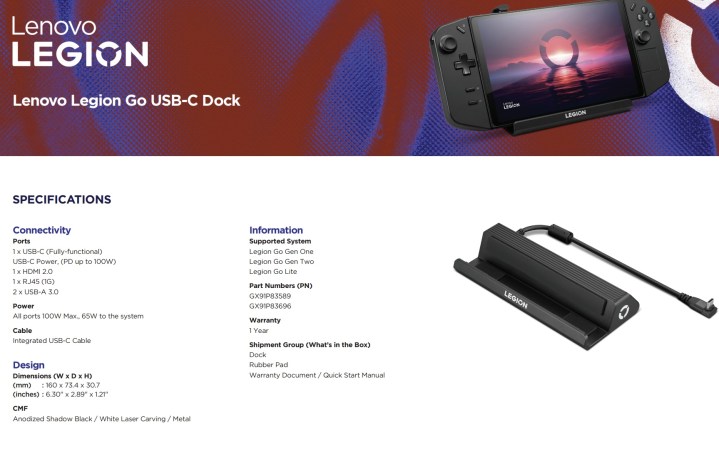
Lenovo has inadvertently revealed plans for two new handheld gaming consoles. The company recently issued documentation for its new Legion Go USB-C Dock, which mentions support for two upcoming devices: the Legion Go Gen 2 and Legion Go Lite.
This isn’t the first mention of the Legion Go Lite; back in May, Windows Central reported that Lenovo is developing a more affordable version of the original Legion Go. This smaller device, anticipated to have a 7-inch display, is expected to use the same AMD Z1-series chipset, offering improvements while coming at a reduced price.
Just recently, YouTuber NITRXX shared images that appear to show the exterior design of the Legion Go Lite. It seems this model may come with fixed controllers, distinguishing it from the original Legion Go, which featured detachable controls, thereby removing the necessity for a dedicated mouse. Additionally, it might feature a smaller trackpad located beneath the right analog stick, reduced rear button functionality, and relocated auxiliary buttons.
NITTRX
Currently, details about the Legion Go Gen 2 remain scarce, with this being its first mention. It could potentially serve as the direct successor to the original Legion Go.
Lenovo’s current Legion Go model boasts the AMD Ryzen Z1 Extreme processor, 16GB of LPDDR5X-7500 RAM, and up to 1TB of PCIe Gen4 SSD storage, making it competitive with other handhelds like the Steam Deck and ASUS ROG Ally. What sets the Legion Go apart is its larger 8-inch display and detachable controllers, similar to the design seen in the Nintendo Switch.
While there is no solid information yet, many anticipate that the Legion Go Gen 2 will come with an upgraded processor. AMD has introduced new processors in the Ryzen 8000 lineup, including the Ryzen AI 300, which are found in various laptops and mini PCs. Transitioning to a new AMD Z2 or Z2 Extreme would seem logical, although Intel’s upcoming Lunar Lake chips also show promise and could make a good match for future handheld gaming devices.
There’s no denying that one of the key reasons MacBooks often rank among the top laptops is their impressive battery life, a hallmark of Apple’s devices. However, Intel may potentially take the lead with its new Lunar Lake mobile processors. A recent battery test conducted by Lenovo showed that its Yoga Slim 7i Aura Edition, equipped with the Core Ultra 7 258V processor, achieved an astounding 23 hours and 54 minutes during a local video playback test, outlasting both the M2 and M3 MacBooks by more than five hours.
This assertion is both ambitious and surprisingly ahead of schedule. Laptops with Intel’s latest processors are expected to hit the market on September 24, meaning reviews should emerge around that date. It appears Lenovo may have revealed some eager findings early, as they did not specify whether their test was conducted on a MacBook Air or MacBook Pro. Nevertheless, the results indicate a considerable advantage for the forthcoming Lunar Lake devices. The M2 MacBook recorded 18 hours and 19 minutes, while the M3 model fared slightly better with 18 hours and 32 minutes. However, both models fall short compared to Lenovo’s near-24-hour performance.
Notably, this level of battery efficiency also surpasses what we have seen with Copilot+ laptops featuring the Snapdragon X Elite chip, such as the Asus ProArt PZ13. In our video playback tests, this laptop managed 18 hours and 39 minutes, while the M3 MacBook Air achieved 19 hours and 39 minutes. The Dell XPS 13 9345 is the current leader with 22 hours and 9 minutes in similar tests, but Lenovo is asserting that its upcoming Lunar Lake models will exceed even that.
Battery longevity is crucial for the success of Intel’s next generation. The rollout of Copilot+ led to a notable surge in laptop sales, not necessarily due to new AI functionalities but largely because of enhanced battery life. While the initial Lunar Lake laptops won’t feature Copilot+, Microsoft has confirmed that support will arrive in November through free updates to Windows.
While it’s wise to await third-party evaluations, it’s reassuring that this is an official test from Lenovo, with all three laptops tested under equal conditions. Given how closely Lenovo’s findings align with our assessments, the prospect of 24-hour battery life in the upcoming Lunar Lake laptops seems plausible.
Intel’s advancement in battery performance is somewhat expected. The Lunar Lake architecture represents a significant departure from Intel’s traditional CPU designs, including outsourcing manufacturing to TSMC for the first time. These new chips forgo Intel’s long-standing Hyper-Threading feature to optimize battery usage, focusing on efficient cores as the primary performance drivers. These fundamental shifts could have significant ramifications for battery life.
The pressing question remains: can Intel maintain robust performance levels while achieving this remarkable battery efficiency? The Lunar Lake processors max out at eight cores, which could pose challenges for heavily threaded applications. We will need to wait until the September 24 launch to find out for ourselves.
Lenovo has revealed a groundbreaking concept at the Mobile World Congress in Barcelona – the ThinkBook Transparent Display Laptop. Boasting a 17.3-inch MicroLED display with up to 55% transparency, this innovative device offers a unique user experience.
The transparent display’s transparency varies based on pixel settings; when set to black and turned off, it achieves 55% transparency. As pixels light up, transparency decreases until the display appears completely opaque, reaching a peak brightness of 1000 nits.
Beyond its visual appeal, Lenovo sees practical applications for this transparent technology. Digital artists, for instance, could benefit from seeing the world behind the laptop while sketching on the lower half, akin to an augmented reality experience. The laptop utilizes AI object recognition to identify items behind it, potentially overlaying digital information or imagery.
The concept also includes a flat touch keyboard that doubles as a drawing tablet. The keyboard projection seamlessly disappears when a stylus is near the drawing surface, facilitating a smooth transition between typing and drawing.
While the ThinkBook Transparent Display Laptop is currently a concept and not commercially available, Lenovo expresses confidence that the showcased technologies will be integrated into a real laptop within the next five years. The company envisions transparent displays and AI integration enhancing collaboration and adding a new dimension to user experiences.
It’s worth noting that the prototype has limitations, including a 720p resolution and the absence of tactile feedback from the touch keyboard. Lenovo is exploring solutions, such as AI learning user typing habits, to address these challenges and improve accuracy. Despite these limitations, the concept has garnered attention for its innovative approach to laptop design and potential future applications.
The Lenovo Thinkpad E585 is a very affordable business laptop that offers much value for your money. The build quality, keyboard, and touchpad are all excellent, and the performance is more than enough for everyday tasks.
Price
The ThinkPad E585 starts at $679, a little under $100 more than the base model of the ThinkPad T480s we reviewed last year. The E585 comes with an 8th Generation Intel Core i5 processor and 8GB of RAM, while a 256GB SSD powers its Windows 10 Pro operating system. It also has two USB-A ports and one USB Type-C port, along with HDMI and VGA outputs for connecting to external displays or projectors.
Suppose you want to get more power out of your laptop without spending more money on upgrades like RAM or storage space (two areas where most consumer laptops are lacking). In that case, it may be worth considering upgrading from the base model to one with better specs than what we reviewed today.
Design
The E585 is a 15.6-inch laptop with a matte finish on the screen. The screen has a diagonal measurement of 3840 x 2160 (4K) pixels and a 16:9 aspect ratio. It features an Intel UHD Graphics 620 integrated graphics card and an Intel Core i7 processor. The laptop also comes with 8GB of RAM, which can be upgraded to up to 32GB, depending on your needs.
Regarding connectivity options, the Thinkpad E585 includes two USB 3 ports, an HDMI port, an RJ45 Ethernet jack, and headphone/microphone jacks. You’ll also find two speakers near the front edge of the keyboard deck so you can enjoy audio without headphones or external speakers plugged into your computer device’s jack for sound output (which is nice if you don’t have much desk space).
The webcam features 720p resolution, so you’ll be able to record videos in high definition quality when needed — although I would recommend using another camera when possible since camera quality isn’t as good as other devices (especially smartphones).
And finally, there’s an integrated fingerprint scanner located below its touchpad area – press down on it before entering your password so that your computer will automatically recognize who exactly was typing away at their keyboard before logging into their account(s).
Display
The Lenovo Thinkpad E585 comes with a 15.6-inch display having an FHD (1920 x 1080) IPS panel with an aspect ratio of 16:9 and a maximum brightness of 400 nits. The display offers wide viewing angles and is protected by Corning Gorilla Glass on top, which makes it scratch resistant.
The laptop has the Intel UHD Graphics 620 chip built into it for handling graphical needs such as gaming, multimedia playback, etc. Still, its lack of dedicated memory means you won’t be able to play games on it if you’re looking for high frame rates or quality graphics.
On the performance front, this machine offers 10-point multi-touch support, which allows users to interact with windows smoothly while they are working on them in any application – be it casual apps like Facebook or Microsoft Word or professional ones like Adobe Photoshop Professional Edition where precision is required while making edits in images or documents respectively.
Keyboard and touchpad
The keyboard is comfortable and has an excellent feel to it. There’s no lag when typing, so it should be great for long typing sessions.
Performance
As expected, the ThinkPad E585 laptop is a workhorse. It’s powered by an 8th generation Intel Core i5-8250U processor (1.6GHz) and comes with 8GB DDR4 RAM, 128GB SSD, and Intel UHD Graphics 620 for graphics support.
The laptop also supports WLAN 802.11ac, Bluetooth 4.2 connectivity options, and an optional SIM card slot that allows you to connect to mobile data networks instead of relying solely on Wi-Fi networks (via Lenovo’s MiMo technology).
Battery life
Lenovo Thinkpad E585 is a laptop with a 7-hour battery life. This makes it ideal for people who go on long trips and won’t be near an outlet for most of their time away from home or the office.
Some laptops claim to have longer battery lives than this, but we’ve found them to be misleading at best and outright lies at worst—the quoted figures assume you’re using the device while plugged into power; if you use it unplugged, the actual life will be shorter by an hour or two (or more).
Specs
Processor: Intel Core i5-8250U processor (1.6 GHz with Turbo Boost up to 3.4GHz)
Memory: 8GB DDR4 2400MHz RAM
Storage: 256GB SSD + 1TB HDD (5400rpm)
Ports/Connectivity: 2x USB 3.1 Gen 1 Type-A, 1x Thunderbolt 3 port, 2x USB 3.1 Gen 1 Type-C (one supports Power Delivery), VGA, HDMI, Ethernet RJ45 jack, microSD card reader
WiFi: 802.11ac 2×2 MIMO; Bluetooth 4.1
The Lenovo Thinkpad E585 is an excellent choice for small-to-medium size businesses.
The Lenovo Thinkpad E585 is an excellent choice for small-to-medium size businesses. It has a sleek design, a good display, and a keyboard and performs well. It also offers impressive battery life and has enough ports to keep you connected on the go.
This is one to consider if you’re looking for a laptop that can do it all without breaking the bank!
Conclusion
It’s an affordable laptop for businesses looking for a reliable notebook that won’t break the bank. It has fast performance and long battery life, making it ideal for work use. There are also plenty of ports and connectivity options, including Ethernet and USB-C.
However, while the Thinkpad E585 is slim at just 0.8 inches thick, its weight of 2 pounds makes this model less portable than other ultraportables on our list, like the HP Spectre x360 15 or Dell Inspiron 13 7000 2-in-1s which weigh only 1 pound each (and 0.9 pounds if we’re counting).
With an Intel Core i7 8th generation processor inside alongside 16GB of RAM (which can be upgraded up to 32GB), it also doesn’t offer much room for upgrades later down the road as compared to other laptops within this price range like ASUS ZenBook UX330UA or Lenovo Yoga 720 – both have better performance than many others on their respective categories but don’t offer expandable storage capacity either due to limited space within their chassis design.”
If you’re an accountant, you know that the best laptop for your needs is not necessarily the same as the best laptop for someone else. Accountants need a combination of features, including power and portability, so we’ve rounded up all our favorite laptops for accountants in [year].
The Best Laptops For Accountants in [year]
Dell Inspiron 15 7000
ASUS VivoBook S15
HP Notebook 15-da0040nr
Lenovo Yoga C740
Microsoft Surface Pro 4 (Intel Core i5, 8 GB RAM, 128 GB SSD)
ASUS ZenBook 13 (Intel Core i7, 16GB RAM and 512 GB SSD)
Dell G15 15 6th Generation Laptop (Intel Core i7-6700HQ/2.60 GHz Processor/16GB DDR4/1TB HDD/Windows 10 Professional) with Nvidia GeForce GTX 950M 2GB GDDR5 Video Card for Gaming and Video Editing with Full HD Display.
Best Budget Laptop for Accountants
Dell Inspiron 15 7000 Series
Acer Aspire E5-575G-55KK
Asus ZenBook UX330UA
These three laptops are solid choices if you’re looking for a laptop that won’t break the bank but can still handle your accounting needs. They all feature 8th-generation Intel processors and come with either 256GB or 512GB SSDs. This means they’ll be able to keep up with your daily tasks without lag time between actions.
Best 2-in-1 Convertible Laptop for Accountants
The best 2-in-1 convertible laptop for accountants is the HP Spectre x360. The HP Spectre x360 has a lightweight design, long-lasting battery life, and is small and portable enough to fit in your bag.
The large touch display makes it easy to navigate through programs like Microsoft Excel or other accounting software apps that can use data entry from your fingers rather than keys on the keyboard.
Accountants also need laptops to run heavy programs like spreadsheets without lag or glitches during operation. The best laptops for accountants will have a powerful processor to handle complex calculations quickly without compromising accuracy or causing errors when entering data into spreadsheets or tax forms.
Most Powerful Laptop for Accountants
If you’re an accountant, it can be helpful to get work done on the go. A laptop is an excellent option since you can use it at home and take it with you when necessary. The best laptop for accountants needs to have enough power and speed to do their jobs without any problems or delays.
Best Long-lasting Laptop for Accountants
If you’re looking for a laptop built to last and keep up with your busy schedule, then the Dell XPS 13 2-in-1 is an excellent choice.
The laptop has a long battery life, which means it can run for a long time on a single charge – perfect if you want to use your laptop in more than one place. The battery also comes with fast charging technology, so even if you forget to charge it overnight, there’s no need to worry about running out of power during the day.
Best Lightweight and Portable Laptop for Accountants
The best lightweight laptops for accountants in [year] are the Macbook Air, Dell XPS 13, and HP Spectre x360. Each of these laptops is great in its own right, but I’d recommend going with one of two options: the Macbook Air or one of two Windows 10 models.
Our top pick for this category is the Apple Macbook Air, an excellent lightweight option that offers incredible performance at a reasonable price point. It features a powerful Intel Core i5 processor and 8 GB memory, while its 1 TB SSD allows you to store all your files without worrying about space limitations or performance issues.
The Macbook Air weighs just 2 lbs., so it’s easy to carry around wherever you go—even in your pocket! However, if you’re looking for something more portable than an ultra-light laptop like this one, perhaps consider getting yourself a Dell XPS 13 or HP Spectre x360 instead.
Both have slightly larger screens than their Apple competitor (13″ vs. 12″) but weigh less due to using aluminum casing instead steel frames; additionally, they come equipped with better graphics cards which could be helpful depending on what kind of applications most often while working as an accountant.”
The Verdict: Which is the Best Laptop for Accountants?
The Dell Inspiron 15 7000 is the best laptop for accountants because it has a fast processor, a long battery life, and is affordable.
The Acer Aspire E15 has an 8th generation i5 processor that’s faster than the 7th generation i7 processor in the other two laptops. It also has 32GB of RAM compared to 16GB on both options.
The most significant difference is its price: if you can afford it and want something with more power behind it—especially if you’re running multiple programs at once—this could be your best bet.
Best Overall Laptops for Accountants
Dell Inspiron 15 7000 (Editor’s Pick)
Dell XPS 15 9570 (Best Overall)
Apple MacBook Pro 15-inch, Touch Bar (Best Overall)
In conclusion, the best laptop for accountants in [year] is the Dell Inspiron 7000. It’s powerful enough to run any accounting software and is available with a wide range of hardware configurations.
You can get it with an i7 processor, 16GB of RAM, and up to 1TB of SSD storage space. The laptop also has a fantastic display of 3200 x 1800 pixels or even 4K resolution if you like that much better! And lait’s but not least important feature… it’s lightweight and portable, so you can take it anywhere without worrying about weight or size.
With the announcement of the launch of the Windows 11 operating system on 24th June 2021, users all over the world are buzzing with anticipation. This Windows 11 update comes six years after the launch of Windows 10. And it’s filled with better features for a smooth experience.
You will see Lenovo vs HP laptops and PC battles everywhere if you are interested in buying a new laptop. Its been ages since HP has been around, and it is still the most popular brand today.
Lenovo is introducing its Lenovo Flex 5G in the race of 5G laptops, which is to be released by the 18th of June at $1,399.99 as the world’s first 5G laptop as the Verizon exclusive.